lock MERCEDES-BENZ METRIS 2016 MY16 Operator’s Manual
[x] Cancel search | Manufacturer: MERCEDES-BENZ, Model Year: 2016, Model line: METRIS, Model: MERCEDES-BENZ METRIS 2016Pages: 310, PDF Size: 7.28 MB
Page 233 of 310
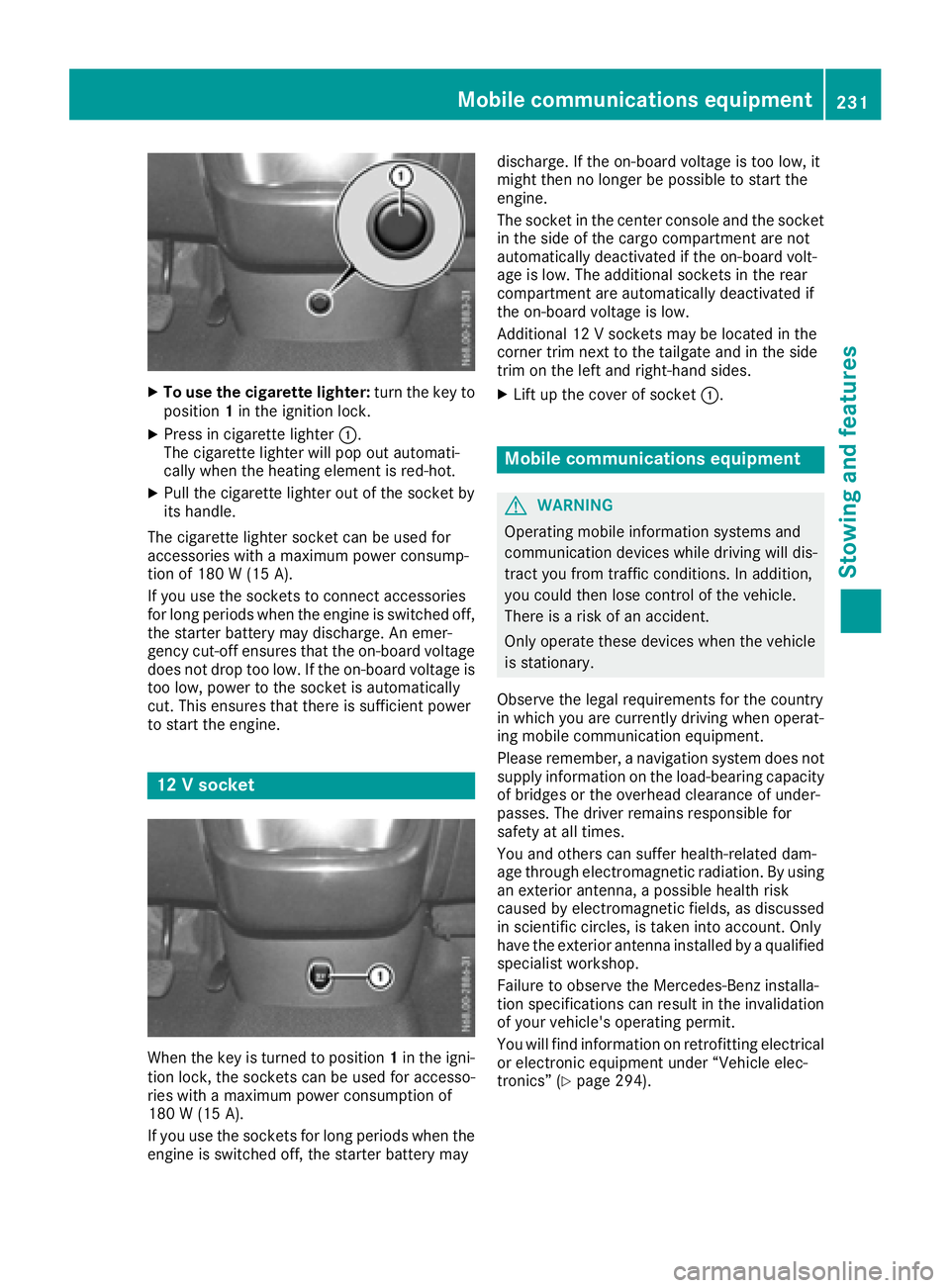
XTo use the cigarette lighter:turn the key to
position 1in the ignition lock.
XPress in cigarette lighter :.
The cigarette lighte rwillp op outa utomati-
cally when the heating element is red-hot.
XPull the cigarette lighte routof the socke tby
its handle.
The cigarette lighte rsocke tcan be used for
accessorie switham aximu mp ower consump-
tio no f180 W(15 A).
If yo uusethe sockets to connect accessories
for long periods when the engine is switched off, the starter battery may discharge .Anemer-
genc ycut-off ensures thatt he on-board voltage
does not dro ptoo low. If the on-board voltag eis
too low, powe rtothe socke tisa utomatically
cut. Thi sensures thatt hereiss ufficient power
to start the engine.
12 Vsocke t
Whenthe key is turne dtoposition 1in the igni-
tio nlock, the sockets can be used for accesso-
rie sw itham aximu mp ower consumption of
180 W(15 A) .
If yo uuse the sockets for long periods whe nthe
engine is switched off, the starter battery may discharge
.Ifthe on-board voltage is too low ,it
mightt hen no longe rbepossibl etostart the
engine.
The socket in the center console and the socket
in the side of the cargo compartment are not
automatically deactivated if the on-board volt-
age is low .The additiona lsockets in the rear
compartment are automatically deactivated if
the on-board voltage is low.
Additional 12 Vsockets may be located in the
corner trim next to the tailgate and in the side
trim on the left and right-hand sides.
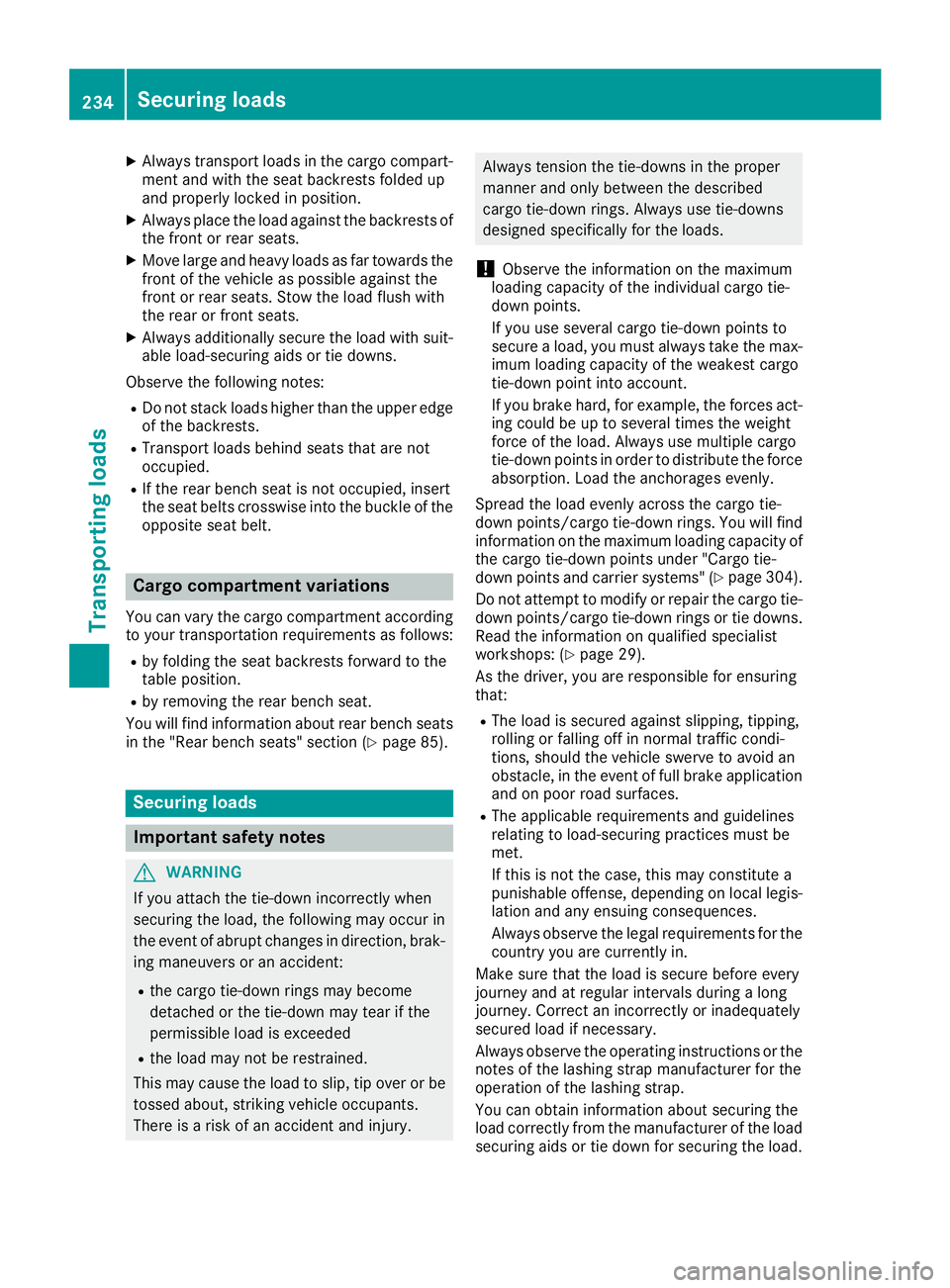
XLift up the cover of socket :.
Mobile communications equipment
GWARNING
Operating mobile information systems and
communication devices while driving wil ldis-
tract you from traffic conditions. In addition,
you coul dthen lose control of the vehicle.
There is arisk of an accident.
Only operate these devices whe nthe vehicle
is stationary.
Observe the legal requirements for the country
in which you are currently driving whe noperat-
ing mobile communication equipment.
Please remember, anavigatio nsystem does not
supply information on the load-bearing capacity
of bridges or the overhead clearance of under-
passes. The drive rremains responsibl efor
safety at al ltimes.
You and others can suffe rhealth-related dam-
age throug helectromagneti cradiation. By using
an exterior antenna, apossibl ehealth risk
caused by electromagneti cfields, as discussed
in scientifi ccircles, is taken into account. Only
have the exterior antenna installed by aqualified
specialist workshop.
Failure to observe the Mercedes-Benz installa-
tion specifications can result in the invalidation of you rvehicle's operating permit.
You wil lfind information on retrofitting electrical
or electronic equipment unde r“Vehicle elec-
tronics” (
Ypag e294).
Mobile communications equipment231
Stowing and features
Z
Page 236 of 310
XAlwaystransport load sinthe cargo compart-
ment and with the sea tbackrests folde dup
and properly locked in position.
XAlway splace the load against the backrests of
the front or rea rseats.
XMov elarge and heavy load sasfar towards the
front of the vehicl easpossibl eagain st the
front or rea rseats. Stow the load flush with
the rea rorfront seats.
XAlway saddit ionally secur ethe load with suit-
able load-securing aids or tie downs.
Observ ethe following notes:
RDo not stack load shighe rthant he uppe redg e
of the backrests.
RTransport load sbehin dseats thata renot
occupied.
RIf the rea rbench sea tisn ot occupied ,insert
the sea tbelts crosswis einto the buckle of the
opposite sea tbelt.
Carg ocom partmen tvariations
Youc an vary the cargo compartment according
to your transportation requirements as follows:
Rby folding the sea tbackrests forwar dtothe
table position.
Rby removing the rea rbench seat.
Yo uw illf ind informatio nabout rearbench seats
in the "Rea rbench seats" sectio n(
Ypage 85).
Securingloa ds
Important safety notes
GWARNING
If yo uattach the tie-down incorrectly when
securing the load ,the following mayo ccurin
the event of abrupt changesind irection, brak-
ing maneuver soranaccident:
Rthe cargo tie-down ring smaybecome
detached or the tie-down mayt earifthe
permissibl eloa dise xceeded
Rthe load mayn ot be restrained.
Thi sm aycause the load to slip ,tip ove rorbe
tossed about, striking vehicl eoccupants.
There is ariskofana ccident and injury.
Alwaystension the tie-downs in the proper
manner and onlyb etween the described
cargo tie-down rings. Alway susetie-downs
designeds pecifically for the loads.
!Observethe informatio nonthe maximum
loading capacity of the individual cargo tie-
down points.
If yo uusesevera lcargo tie-down points to
secur eaload, youm usta lway stake the max-
imu mloadin gcapacity of the weakest cargo
tie-down point into account.
If yo ubrake hard, for example, the forces act-
ing could be up to severa ltime sthe weight
forc eoft he load .Alway susemultipl ecargo
tie-down points in order to distribute the force
absorption. Loa dthe anchorages evenly.
Spread the load evenly across the cargo tie-
down points/cargo tie-down rings. Yo uwillf ind
informatio nonthe maximu mloadin gcapacity of
the cargo tie-down points under "Cargo tie-
down points and carrie rsystems" (
Ypage 304).
Do not attempt to modify or repai rthe cargo tie-
down points/cargo tie-down ring sortie downs.
Read the informatio nonqualified specialist
workshops: (
Ypage 29).
As the driver ,you arer esponsibl efor ensuring
that:
RThe load is secured against slipping, tipping,
rolling or falling off in norma l traffic condi-
ti
ons, shoul dthe vehicl eswervetoa voidan
obstacle ,inthe event of full brake application
and on poor roa dsurfaces.
RThe applicabl erequirements and guidelines
relating to load-securing practice smustb e
met.
If thisisn ot the case, thism ayconstitute a
punishabl eoffense, depending on local legis-
latio nand any ensuing consequences.
Alway sobserve the legalr equirements for the
country yo uarecurrentl yin.
Make sure thatt he load is securebefore every
journey and at regular intervals during alon g
journey .Correct an incorrectly or inadequately
secured load if necessary.
Alway sobserve the operating instructions or the
notes of the lashing strapm anufacturer for the
operatio nofthe lashing strap.
Yo uc an obtai ninformatio nabout securing the
load correctl yfrom the manufacturer of the load
securing aids or tie down for securing the load.
234Securingl oads
Transporting loads
Page 237 of 310
Alsoo bserve the safety informatio ninthe load-
ing directions (Ypage 232).
XFil lspaces between the load and the cargo
compartment wall sorwheelhousings (form-
locking). Use rigid load securing aids, such as
wedges, wooden fixings or padding.
XAttach secured and stabilized load sinall
directions to the cargo tie-down ring sand the
guid erails in the rear.
Onlyu setie downs ,suc hasl ashing nets and
lashing straps, thath aveb eent este din
accordance with current standards.
Whe nsecuring aload, always us ethe closest
cargo tie-down ring sand pa dsharp edges for
protection.
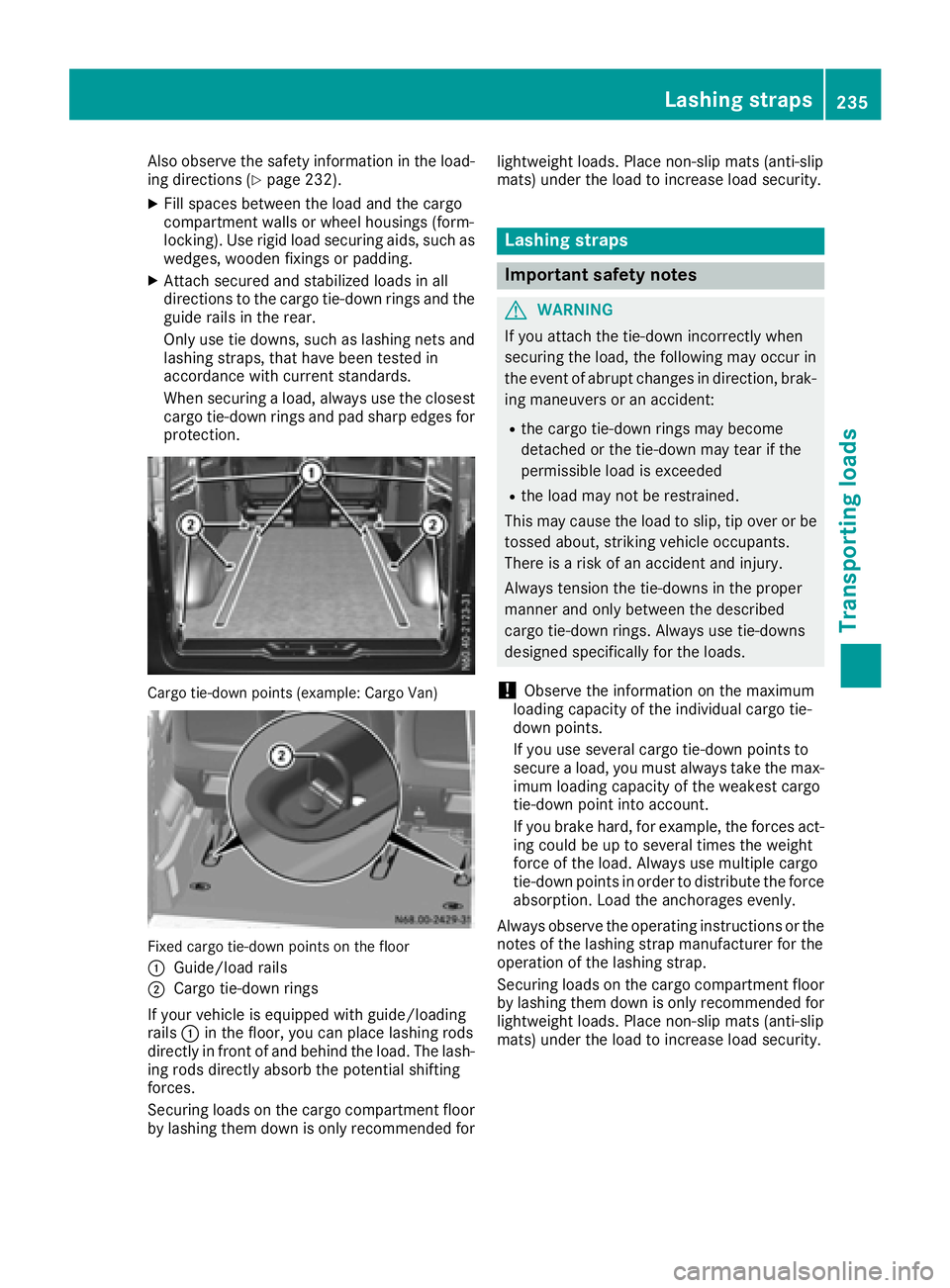
Cargo tie-down points (example: Cargo Van)
Fixe dcargo tie-down points on the floor
:
Guide/loadr ails
;Cargo tie-down rings
If your vehicl eisequippe dwithg uide /loading
rails :in the floor, yo ucan place lashing rods
directl yinfront of and behind the load .The lash-
ing rod sdirectl yabsorbt he potential shifting
forces.
Securing load sonthe cargo compartment floor
by lashing them down is onlyr ecommendedfor lightweight loads. Place non-slip mats (anti-slip
mats) under the load to increase load security.
Lashin
gstraps
Important safety notes
GWARNING
If yo uattach the tie-down incorrectly when
securing the load ,the following mayo ccurin
the event of abrupt changesind irection, brak-
ing maneuver soranaccident:
Rthe cargo tie-down ring smaybecome
detached or the tie-down mayt earifthe
permissibl eloa dise xceeded
Rthe load mayn ot be restrained.
Thi sm aycause the load to slip ,tip ove rorbe
tossed about, striking vehicl eoccupants.
There is ariskofana ccident and injury.
Alway stension the tie-downs in the proper
manner and onlyb etween the described
cargo tie-down rings. Alway susetie-downs
designeds pecifically for the loads.
!Observethe informatio nonthe maximum
loading capacity of the individual cargo tie-
down points.
If yo uusesevera lcargo tie-down points to
secur eaload, youm usta lway stake the max-
imu mloadin gcapacity of the weakest cargo
tie-down point into account.
If yo ubrake hard, for example, the forces act-
ing could be up to severa ltime sthe weight
forc eoft he load .Alway susemultipl ecargo
tie-down points in order to distribute the force absorption. Loa dthe anchorages evenly.
Alway sobserve the operating instructions or the
notes of the lashing strapm anufactu rer fo
r the
o
peratio nofthe lashing strap.
Securing load sonthe cargo compartment floor
by lashing them down is onlyr ecommendedfor
lightweight loads. Place non-slip mats (anti-slip
mats) under the load to increase load security.
Lashin gstraps235
Transporting loads
Z
Page 239 of 310
Ratchetstrap
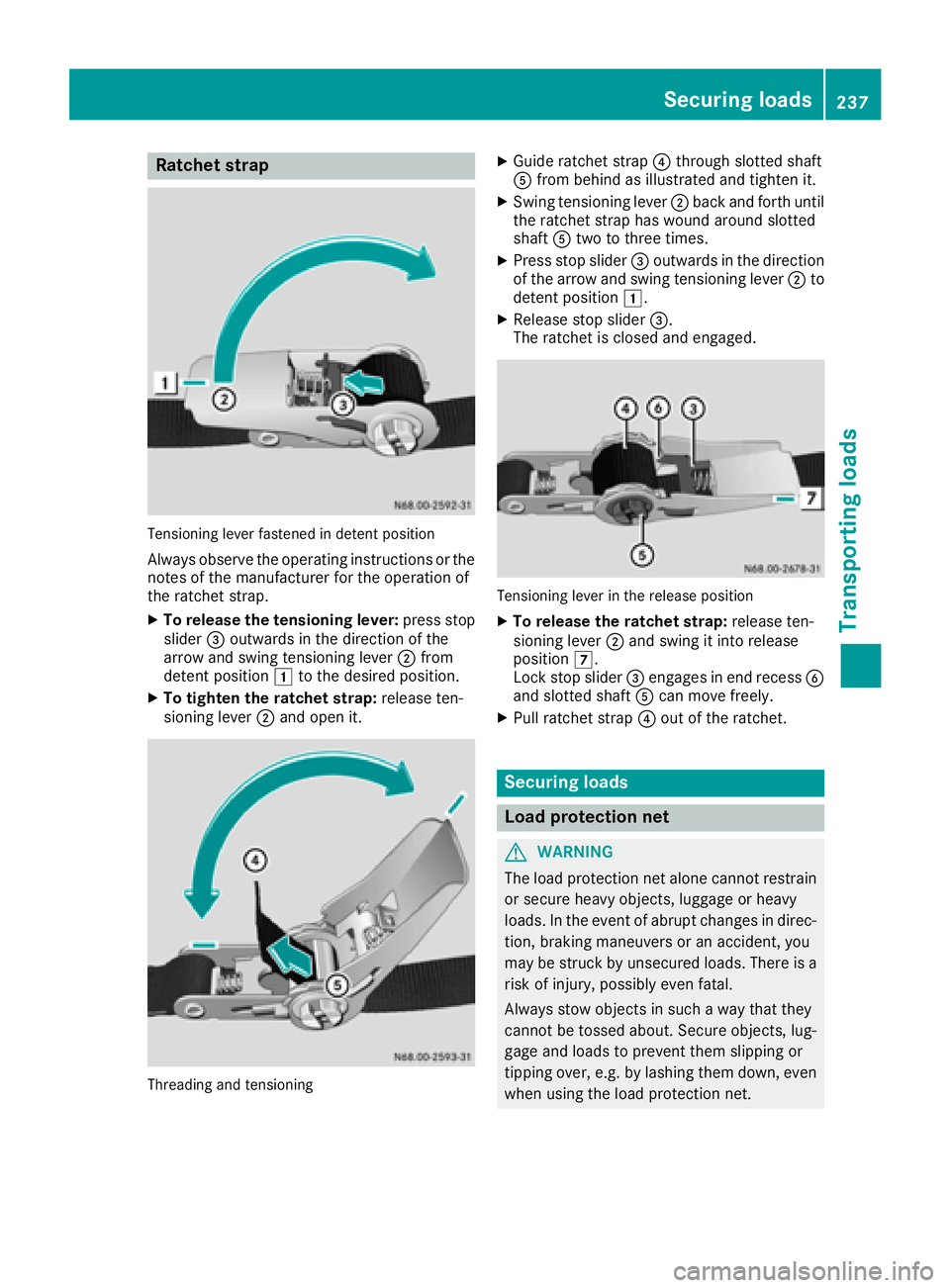
Tensioning lever fastened in detent position
Alway sobserve the operating instructions or the
notes of the manufacturer for the operation of
the ratchet strap.
XTo releas ethe tensionin glever :press stop
slider =outwards in the direction of the
arrow and swing tensioning lever ;from
detent position 1to the desire dposition.
XTo tighten the ratche tstrap: release ten-
sioning lever ;and ope nit.
Threading and tensioning
XGuid eratchet strap ?through slotted shaft
A from behind as illustrated and tighten it.
XSwing tensioning lever ;back and forth until
the ratchet straph aswound around slotted
shaft Atwo to three times.
XPress stop slider =outwards in the direction
of the arrow and swing tensioning lever ;to
detent position 1.
XReleasestop slider =.
The ratchet is closed and engaged.
Tensioning lever in the release position
XTo releas ethe ratche tstrap: release ten-
sioning lever ;and swing it into release
position 7.
Lock stop slider =engages in end recess B
and slotted shaft Acan move freely.
XPull ratchet strap ?outoft he ratchet.
Securing loads
Load protection net
GWARNING
The load protectio nnet alone canno trestrain
or secure heavy objects, luggage or heavy
loads. In the event of abrup tchanges in direc-
tion, braking maneuvers or an accident, you
may be struck by unsecured loads. There is a
ris kofi njury, possibly eve nfatal.
Alway sstow objects in such awaythat they
canno tbetossed about. Secure objects, lug-
gage and load stoprevent them slipping or
tipping over, e.g. by lashing them down, even
when using the load protectio nnet.
Securing loads237
Transporting loads
Z
Page 242 of 310
Useful information
This Operator's Manual describes all models as
well as standard and optional equipment of your
vehicle that were available at the time of going
to print.Country-specific variation sare possi-
ble. Note that your vehicle may not be equipped
with all of the described functions. This also
applies to system sand function srelevantt o
safety.
Read the information on qualified specialist
workshops (
Ypage 29).
Engine compartment
Hood
Important safetyn otes
GWARNING
If the hood is unlatched, it may open up when the vehicle is in motion and block your view.
There is arisk of an accident.
Never unlatc hthe hood while driving. Before
every trip, ensure that the hood is locked.
GWARNING
Openin gthe hood when the engin eisover-
heated or when ther eisafire in the engine
compartmen tcould expose you to hot gases
or other servicep roducts. There isarisk of
injury.
Let an overheated engin ecool down before
openin gthe hood. If ther eisafire in the
engin ecompartment, keep the hood closed
and contact the fire department.
GWARNING
The engin ecompartmen tcontains moving
components. Certain components, such as
the radiator fan, may continue to run or start
again suddenly when the ignition is off. There is ar isk of injury.
If you need to do any work inside the engine
compartment:
Rswitc hoff the ignition
Rneve rreach int othe area where ther eisa
risk of danger from movingc omponents,
such as the fan rotation area
Rremovej ewelry and watches
Rkeep items of clothing and hair, for exam-
ple, away from movingp arts
GWARNING
The ignition system operate swithahigh volt-
age. If you touc hthe live components, you
could receiv eanelectric shock.T here is an
increased risk of injury.
Never touc hcomponents of the ignition sys-
tem if:
Rthe engin eisrunning or being started
Rthe key is in radio position or drive position
in the ignition lock
The live components of the ignition system are,
for example:
Rignition coils
Rspark plug connectors
Rdiagnostic sockets
GWARNING
Certain components in the engin ecompart-
ment ,such as the engine, radiator and parts
of the exhaust system ,can becomev ery hot.
Working in the engin ecompartmen tposes a
risk of injury.
Where possible, let the engin ecool down and
touc honly the components described in the
following.
If you have to carry out work in the engin ecom-
partment ,only touc hthe following components:
RHood
ROil dipstick
REngine oil filler nec kcap
RWasher fluid reservoir cap
RCoolant expansion tan kcap
240Engine compartment
Maintenance and care
Page 244 of 310
or other service products. There isarisk of
injury.
Let an overheated engine cool down before
opening the hood. If there is afire in the
engine compartment, keep the hood closed
and contact the fire department.
GWARNING
Certain components in the engine compart-
ment,s uch as the engine, radiator and parts
of the exhaust system, can become very hot.
Working in the engine compartment poses a
risk of injury.
Where possible, let the engine cool down and touch only the components described in the
following.
!Do not use your hands to push the hood
down. You could damage it otherwise.
XHold support strut ?and lift the hood
slightly.
XGuide support strut ?towards retainer =
and apply slight pressure to make it engage.
XLower the hood and allow it to fall with
momentum from aheight of approximately
1ft( 30 cm).
The hood locks audibly.
XCheck that the hood is correctly locked.
If the hood can be raised slightly, it is not
properly engaged. If the hood is not correctly
engaged, open the hood again. Let the hood
fall with alittle more momentum.
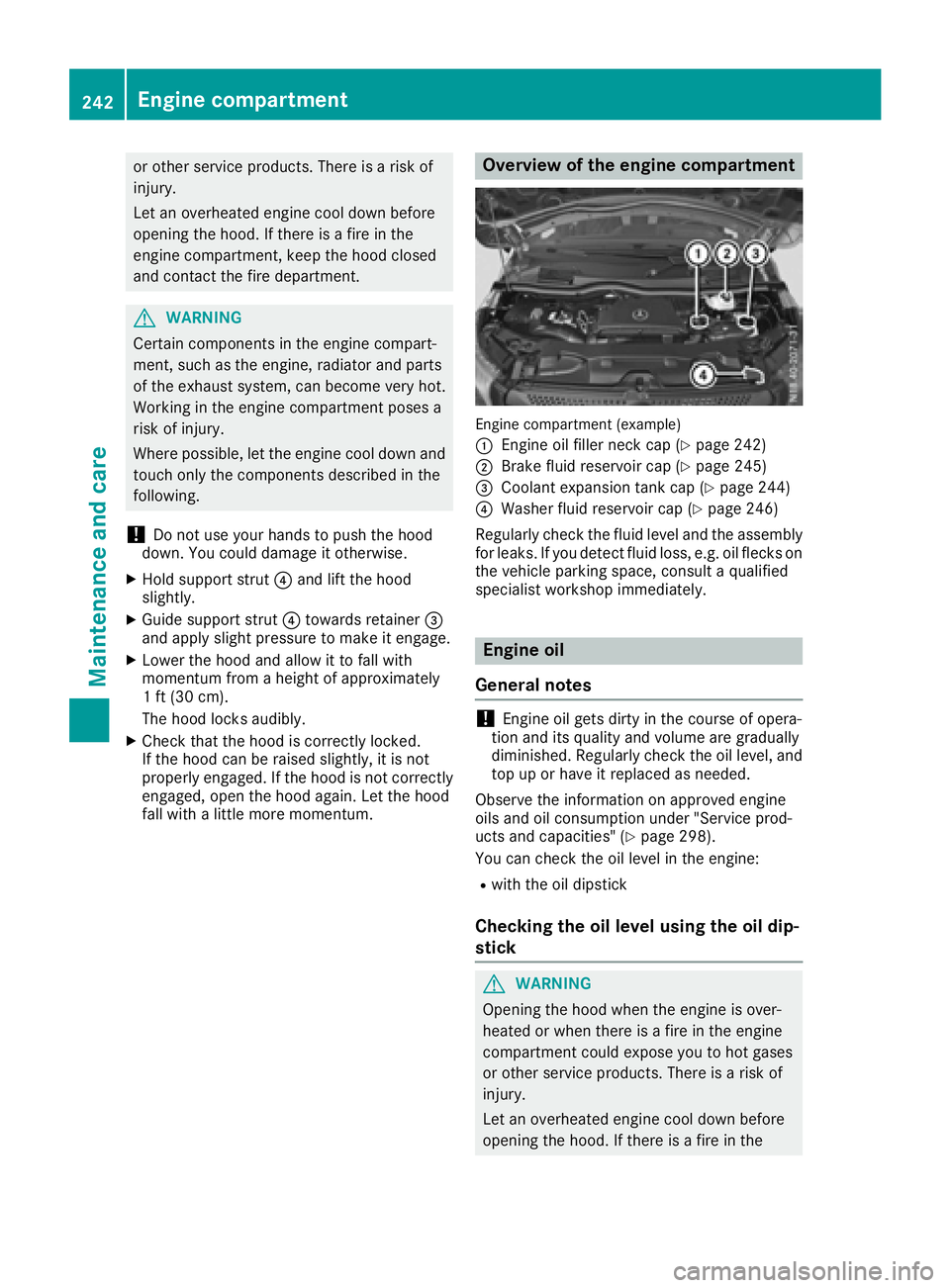
Overview of the engine compartment
Engin ecompartment (example)
:
Engin eoil filler neck cap (Ypage 242)
;Brake fluid reservoir cap (Ypage 245)
=Coolant expansion tank cap (Ypage 244)
?Washer fluid reservoir cap (Ypage 246)
Regularly check the fluid level and the assembly
for leaks. If you detect fluid loss, e.g. oil flecks on the vehicle parking space, consult aqualified
specialist workshop immediately.
Engine oil
General notes
!Engin eoil gets dirty in the course of opera-
tion and its quality and volume are gradually
diminished. Regularly check the oil level, and top up or have it replaced as needed.
Observe the information on approved engine
oils and oil consumption under "Service prod-
ucts and capacities" (
Ypage 298).
You can check the oil level in the engine:
Rwith the oil dipstick
Checking the oil level using the oil dip-
stick
GWARNING
Opening the hood when the engine is over-
heated or when there is afire in the engine
compartment could expose you to hot gases
or other service products. There is arisk of
injury.
Let an overheated engine cool down before
opening the hood. If there is afire in the
242Engine compartment
Maintenance and care
Page 247 of 310
!Take care not to spill any coolant on painted
surfaces. You could otherwise damage the
paintwork.
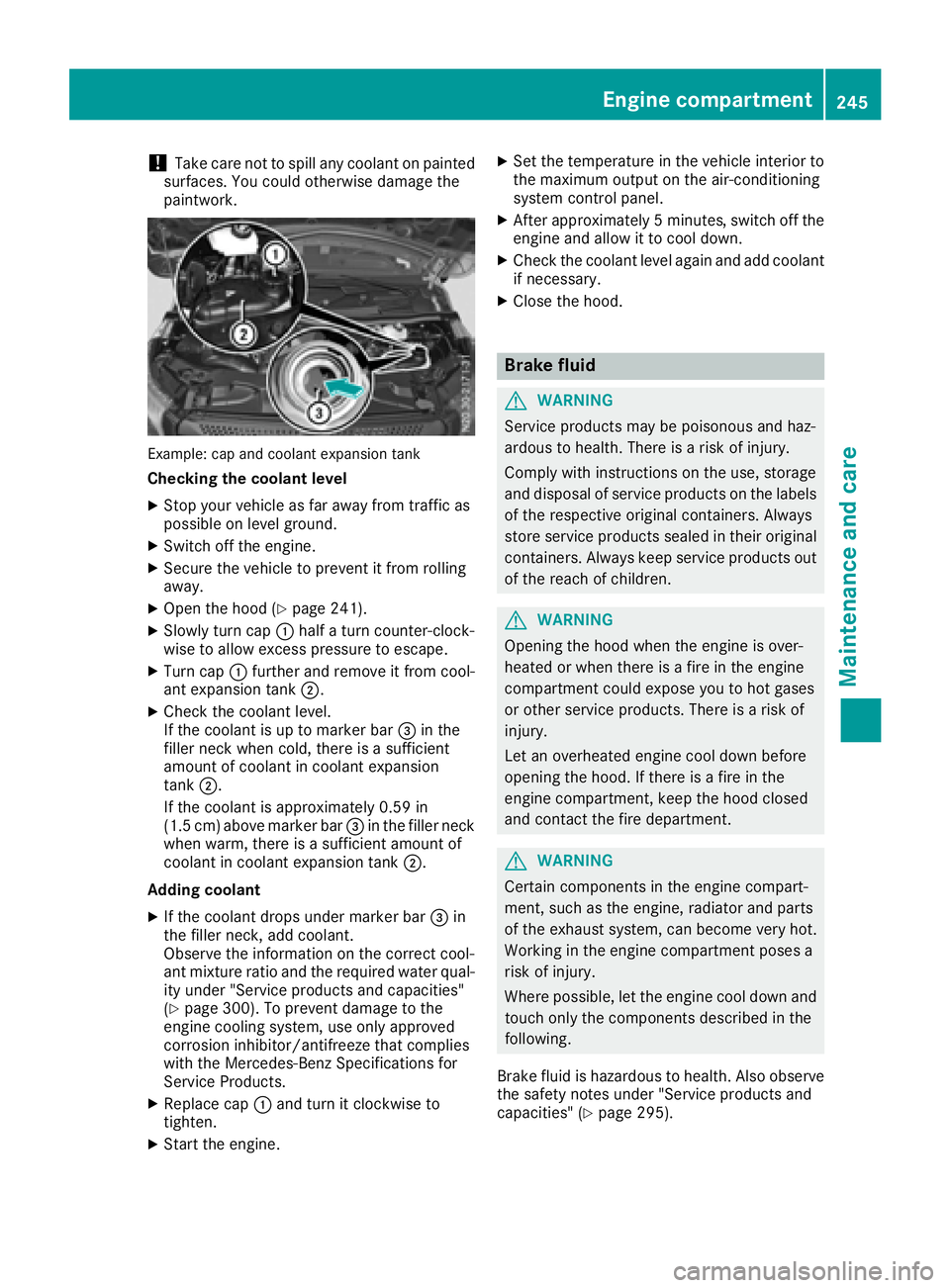
Example: cap and coolant expansion tank
Checkingt he coolant level
XStop your vehicle as far awayf rom traffic as
possible on level ground.
XSwitch off the engine.
XSecure the vehicle to prevent it from rolling
away.
XOpen the hood (Ypage 241).
XSlowly turn cap :half aturn counter-clock-
wise to allow excess pressure to escape.
XTurn cap :further and remove it from cool-
ant expansion tank ;.
XCheck the coolant level.
If the coolant is up to marker bar =in the
filler neck when cold, there is asufficient
amount of coolant in coolant expansion
tank ;.
If the coolant is approximately 0.59 in
(1.5 cm) above marker bar =in the filler neck
when warm, there is asufficient amount of
coolant in coolant expansion tank ;.
Adding coolant
XIf the coolant drops under marker bar =in
the filler neck, add coolant.
Observe the information on the correct cool-
ant mixture ratio and the required water qual-
ity under "Service products and capacities"
(
Ypage 300). To prevent damage to the
engine cooling system, use only approved
corrosion inhibitor/antifreeze that complies
with the Mercedes-Benz Specifications for
Service Products.
XReplace cap :and turn it clockwise to
tighten.
XStart the engine.
XSet the temperature in the vehicle interior to
the maximum output on the air-conditioning
system control panel.
XAfter approximately 5minutes ,switch off the
engine and allow it to cool down.
XCheck the coolant level againa nd add coolant
if necessary.
XClose the hood.
Brake fluid
GWARNING
Service products may be poisonous and haz-
ardous to health. There is arisk of injury.
Comply with instructionsont he use, storage
and disposalofs ervice products on the labels
of the respective original containers. Always
store service products sealed in their original
containers. Alwaysk eep service products out
of the reach of children.
GWARNING
Opening the hood when the engine is over-
heated or when there is afire in the engine
compartment could expose you to hot gases
or other service products. There is arisk of
injury.
Let an overheated engine cool down before
opening the hood. If there is afire in the
engine compartment,k eep the hood closed
and contact the fire department.
GWARNING
Certain componentsint he engine compart-
ment, such as the engine, radiator and parts
of the exhaust system, can become very hot.
Working in the engine compartment poses a
risk of injury.
Where possible,l et the engine cool down and
touch only the componentsd escribed in the
following.
Brake fluid is hazardous to health. Also observe the safety notes under "Service products and
capacities" (
Ypage 295).
Engine compartment245
Maintenance and care
Z
Page 250 of 310
service interval displayshould therefore not
be confused with the engine oil level display.
For example, the displays hows one of the fol-
lowing service messages for afew seconds:
RNext Service Ain..Days
RServiceADueorService ADue
RServ. AExceed. by .. Days
Then either the remaining time or distance until
the next service due date is displayed. If the
service due date has been exceeded, the
elapsedt ime or distance traveled after the over-
due service date is shown. The letter in the dis-
play message indicates which service is due. A
stands foraminor service and Bforam ajor ser-
vice.
Aq ualified specialist workshop, e.g. an author-
ized Mercedes-Benz Commercial Van Center,
will reset the service interval displaya fter the
service work has been carried out. You can also
obtain further information on maintenance
work, for example.
The prescribed service interval is based on nor- mal vehicle use. Service work will need to be
performed more frequently than prescribed if
the vehicle is operated under more arduousc on-
ditions or with higher loads. Such arduousc on-
ditions include:
Rregularc ity driving with frequent intermediate
stops
Rdriving predominantly short distances
Rfrequent operation in mountainous terrain or
on poor road surfaces
Rleaving the engine idling for long periods on a frequent basis
In these or similar operating conditions, have
the air filter, engine oil and oil filter, for example,
replaced more frequently. Under more arduous
operating conditions, the tires must be checked more often. Further information can be obtained
at aq ualified specialist workshop, e.g. an
authorized Mercedes-Benz Commercial Van
Center.
Hiding service messages
Vehicles without steering wheel buttons
XPress the 3button on the instrument clus-
ter.
Vehicles with steering wheel buttons
XPress the aor% button on the steering
wheel.
Callingupt he service due date
Vehicles without steering wheel buttons
The vehicle must be stationary. Use the buttons
in the instrument cluster.
XTurn the key to position 2in the ignition lock.
XPress Èto select the service display.
The displays howsapossible service mes-
sage.
Vehicles with steering wheel buttons
Using the steering wheel buttons
XTurn the key to position 2in the ignition lock.
XPress =or; to select the Servicemenu.
XPress the9or: button to select the
ASSYST PLUSsubmenu and press ato
confirm.
The displays hows the service due date.
Battery
Important safety notes
Work on the battery, e.g. removing or installing,
requires specialist knowledge and the use of
special tools. Therefore, always have work on
the battery carried out at aqualified specialist
workshop.
GWARNING
Work carried out incorrectly on the battery
can lead, for example, to ashort circuit and
thus damage the vehicle electronics. This can
lead to function restrictions applying to
safety-relevant systems, e.g the lighting sys-
tem, the ABS (anti-lock braking system) or the
ESP
®(Electronic Stability Program). The oper-
ating safety of your vehicle may be restricted.
You could lose control of the vehicle, for
example:
Rwhen braking
Rin the event of abrupt steering maneuvers
and/or when the vehicle's speed is not
adapted to the road conditions
There is arisk of an accident.
In the event of ashort circuit or asimilari nci-
dent, contact aqualified specialist workshop
248Battery
Maintenance and care
Page 252 of 310
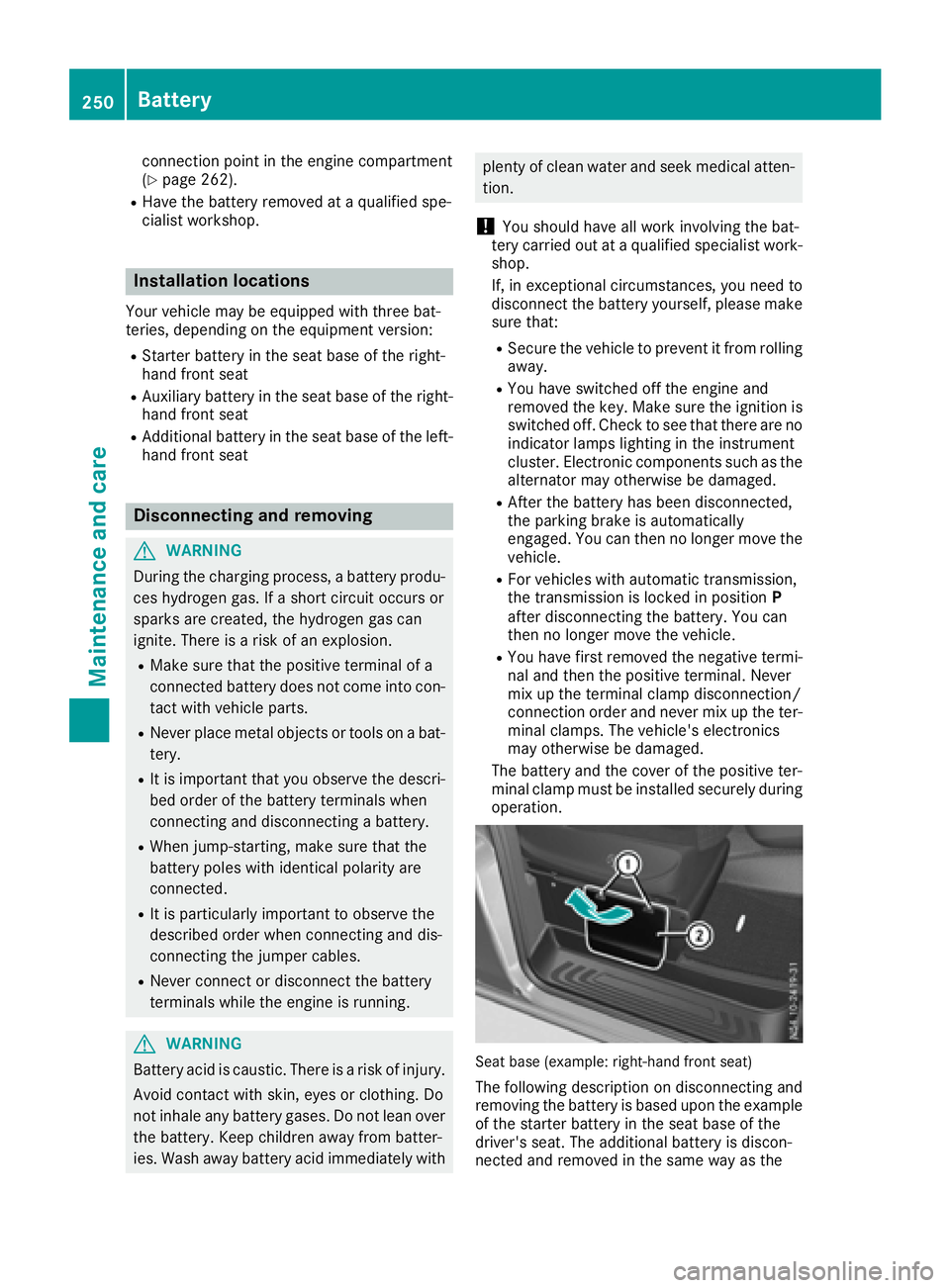
connection point in the engine compartment
(Ypage 262).
RHave the battery removed ataquali fied spe-
cialist workshop.
Installationl ocations
You rvehicle may be equipped with three bat-
teries, depending on the equipment version:
RStarter battery in the seatb aseoft he right-
hand front seat
RAuxiliary battery in the seatb aseoft he right-
hand front seat
RAdditiona lbattery in the seatb aseoft he left-
hand front seat
Disconnecting and removing
GWARNING
During the charging process ,abattery produ-
ces hydrogen gas. If ashort circuit occurs or
sparks are created, the hydrogen gasc an
ignite. There is ariskofane xplosion.
RMake sure that the positive terminal of a
connected battery doe snot come into con-
tact with vehicle parts.
RNeve rplace metalo bjects or toolsonab at-
tery.
RIt is important that yo uobserve the descri-
bed order of the battery terminal swhen
connecting and disconnecting abattery.
RWhe njump-starting, make sure that the
battery poles with identica lpolarity are
connected.
RIt is particularly important to observe the
described order whe nconnecting and dis-
connecting the jumper cables.
RNeve rconnect or disconnect the battery
terminal swhile the engine is running.
GWARNING
Batter yacidisc austic. There is ariskofi njury.
Avoidc ontact with skin, eyes or clothing. Do
not inhale any battery gases .Donot lean over
the battery.K eepc hildre nawayfrom batter-
ies. Wash away battery aci dimmediatel ywith
plenty of clean water and seekm edicalatten-
tion.
!You shoul dhavea llwork involving the bat-
tery carrie doutataq uali fied specialist work-
shop.
If, in exceptiona lcircumstances, yo uneed to
disconnect the battery yourself, please make
sure that:
RSecure the vehicle to prevent it from rolling
away.
RYou have switched off the engine and
removed the key.M akes uret he ignition is
switched off. Check to see that there are no indicator lamps lighting in the instrument
cluster. Electronic components such as the
alternator may otherwise be damaged.
RAfter the battery hasb eend isconnected,
the parking brake is automatically
engaged .You can then no longer move the
vehicle.
RFor vehicle switha utomatic transmission,
the transmission is locke dinposition P
afte rdisconnecting the battery.Y ou can
then no longer move the vehicle.
RYou have firs tremoved the negative termi-
nal and then the positive terminal .Never
mix up the terminal clamp disconnection/
connection order and never mix up the ter-
mina lclamps. The vehicle's electronics
may otherwise be damaged.
The battery and the cover of the positive ter-
mina lclamp mus tbeinstalled securel yduring
operation.
Seatb ase( example: right-hand front seat)
The following description on disconnecting and
removing the battery is based upon the example
of the starter battery in the seatb aseoft he
driver' sseat. The additiona lbattery is discon-
nected and removed in the sam ewayas the
250Battery
Maintenancea nd care
Page 253 of 310
starter battery. The auxiliary battery is located in
the seat base of the left-hand front seat.
XSwitch off all electrical consumers.
XSwitch off the engine and remove the Smart-
Key from the ignition lock.
XOpen the front door on the right-hand side.
iTo disconnect or remove the additional bat-
tery, open the left-hand front door. The auxil-
iary battery is located in the seat base of the
left-hand front seat.
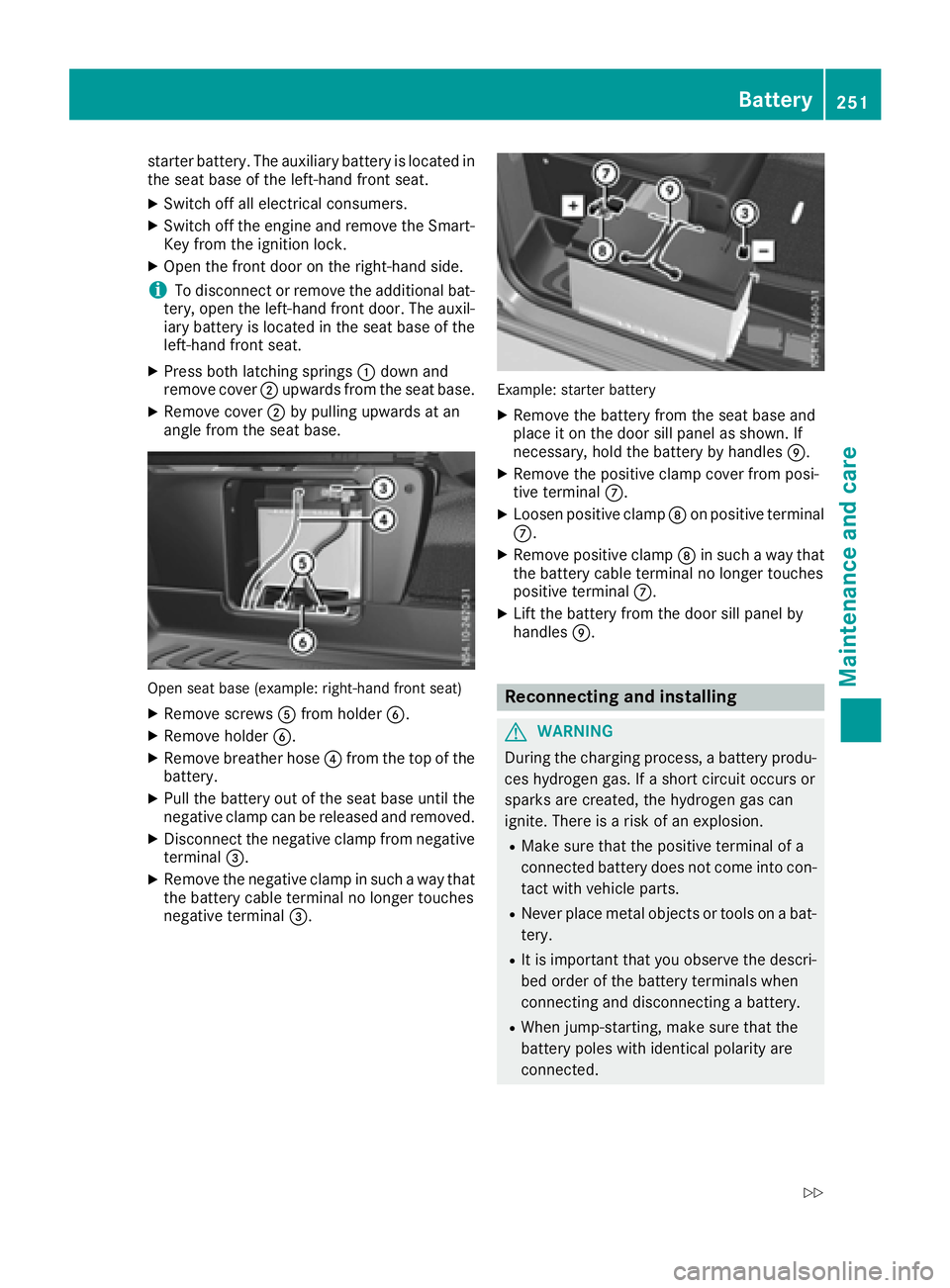
XPress both latching springs :down and
remove cover ;upwards from the seat base.
XRemove cover ;by pulling upwards at an
angle from the seat base.
Open seat base (example: right-hand front seat)
XRemove screws Afrom holder B.
XRemove holder B.
XRemove breather hose ?from the top of the
battery.
XPull the battery out of the seat base until the
negative clamp can be released and removed.
XDisconnect the negative clamp from negative
terminal =.
XRemove the negative clamp in such away that
the battery cable terminal no longer touches
negative terminal =.
Example: starter battery
XRemove the battery from the seat base and
place it on the door sill panel as shown. If
necessary, hold the battery by handles E.
XRemove the positive clamp cover from posi-
tive terminalC.
XLoosen positive clamp Don positive terminal
C.
XRemove positive clamp Din such away that
the battery cable terminal no longer touches
positive terminal C.
XLift the battery from the door sill panel by
handlesE.
Reconnecting and installing
GWARNING
During the charging process, abattery produ-
ces hydrogen gas. If ashort circuit occurs or
sparks are created, the hydrogen gas can
ignite. There is arisk of an explosion.
RMake sure that the positive terminal of a
connected battery does not come into con-
tact with vehicle parts.
RNever place metal objects or tools on abat-
tery.
RIt is important that you observe the descri-
bed order of the battery terminals when
connecting and disconnecting abattery.
RWhen jump-starting, make sure that the
battery poles with identical polarity are
connected.
Battery251
Maintenance and care
Z