change time MERCEDES-BENZ METRIS 2016 MY16 Operator’s Manual
[x] Cancel search | Manufacturer: MERCEDES-BENZ, Model Year: 2016, Model line: METRIS, Model: MERCEDES-BENZ METRIS 2016Pages: 310, PDF Size: 7.28 MB
Page 3 of 310
Welcome to the world of Mercedes-Benz
Before you first drive off, read the Operator's
Manual carefully and familiarize yourself with
yourvehicle. Please adhere to the information
and warning notes in this Operator's Manual for
you rown safety and to ensure alonger operat-
ing duration of the vehicle. Failure to observe
the instructions may lea dtodamage to the vehi-
cle or personal injury.
Vehicle damage caused by afailure to observe
the instructions is not covered by the New Vehi-
cle Limited Warranty.
The equipment or model designation of your
vehiclem ay differaccording to:
Rmodel
Rorder
Rcountry specification
Ravailability
The illustrations in this Operator's Manual show
al eft-hand-drive vehicle. The location of vehicle
parts and controls for right-hand drive vehicles
differa ccordingly.
Mercedes-Benz is constantly updating its vehi-
cles to the state of the art.
Mercedes-Benz reservest he right to introduce
changes in:
Rdesign
Requipment
Rtechnology
Therefore, the descriptions provided may occa- sionally diffe rfrom you rown vehicle.
The following are integralp arts of the vehicle:
ROperator's Manual
RMaintenance or Service Booklet
REquipment-dependent operating instructions
Keep these printed documents in the vehiclea t
all times. Shoul dyou sell the vehicle, always
pas sthe documents on to the new owner.
4475842302
Page 27 of 310
Operator'sManual
Beforet he first journey
These instructions, the Maintenance or Service
Booklet and the additional equipment-specific
instructions are integral parts of the vehicle.
Keep these documents in the vehicle at all
times. If you sell the vehicle, alwaysp ass on all
documents to the new owner.
Beforey ou first drive off, read these documents
carefully and familiarize yourself with your vehi- cle.
For your own safety and alonger vehicle life,
follow the instructions and warning notices in
these Operatin gInstructions. Failure to observe
the instructions may lead to damage to the vehi-
cle or personal injury.
Vehicle damage caused by afailure to observe
the instructions is not covered by the New Vehi-
cle Limited Warranty.
Limited warranty
!
Follow the instructions in this manual about
the proper operation of your vehicle as well as
about possible vehicle damage. Damage to
your vehicle that arises from culpable contra-
ventions against these instructions is not cov-
ered either by the Mercedes-Benz Limited
Warrant yorbythe New or Used-Vehicle War-
ranty.
Vehicle equipment
The Operatin gInstructions describe all models
and standard and optional equipment of your
vehicle that were available at the time of going
to print .Country-specific variation sare possi-
ble. Note that your vehicle may not be equipped with all of the described functions. This also
applies to systems and function srelevant to
safety. The equipment in your vehicle may there-
fore differ from that shown in the descriptions
and illustrations.
The original purchase contrac tdocumentation
for your vehicle contains alist of all of the sys-
tems in your vehicle.
Question sconcerning equipment or operation
can be directed to any Mercedes-Benz Com-
mercial Van Center.
Service and vehicle operation
Warranty
The Limited Warrant yfor your vehicle is in
accordance with the warrantyt ermsint he Ser-
vice and Warrant yInformation booklet.
Your Mercedes-Benz Commercial Van Center
will replace and repair all factory-installed parts
in accordance with the term softhe following
warranties:
RNew Vehicle Limited Warranty
RExhaust System Warranty
REmission System sWarranty
RCalifornia, Connecticut ,Maine, Massachu-
setts, New York, Pennsylvania, Rhode Island
and VermontE mission Control System War-
ranty
RState Warrant yEnforcement Laws ("Lemon
Laws")
Replacement parts and accessories are covered
by the Mercedes-Benz Parts and Accessories
Warranties. You can obtain these from any
Mercedes-Benz Commercial Van Center.
iShould you lose your Service and Warranty
Information booklet ,contact aMercedes-
Benz Commercial Van Center for areplace-
ment .The new Service and Warrant yInfor-
mation booklet will be posted to you.
Customer information for California
In California you are entitled to demand that
your vehicle be exchanged or that the purchase
or leasing price be refunded if Mercedes-Benz
USA,L LC and/or authorized workshops or ser-
vice centers are not able, after several justifiable
repairs, to rectify major damage to or malfunc-
tion soft he vehicle as covered by the contrac-
tual warrantyp rovisions. Customers who pur-
chase or lease avehicle can have the vehicle
repaired within aperiod of 18 months after
delivery or after amileage of up to 29,000k m
(equals approx. 18,000m iles), whichever
comes first,i f:
(1) the same serious defect or damage which could lead to fatal or serious injuries to the
occupant softhe vehicle during driving has
been repaired at least twice and Mercedes-
Introduction25
Page 28 of 310
Benz, LLC has beeninformed in writing of
the necessity of such arepair.
(2) the sam edefect or damage, although less
serioust han described in (1) ,has been
repaired at least fou rtimes and Mercedes-
Benz has bee ninformed of the necessity of
such arepai rinw riting.
(3) the vehicle cannot be operate dfor more
than 30 calenda rdaysd ue to repairs result-
ing from the sam eorother majo rdefects or
damage.
Please send written notification to:
Mercedes-Benz USA, LLC
CustomerA ssistance Center
One Mercedes Drive
Montreal ,N07645-0350
Maintenance
The Service and Warranty Information booklet
describes al lthe necessar ymaintenance work
which should be performe datregula rintervals.
Alway sbring the Service and Warranty Informa-
tion booklet with yo uwhent aking the vehicle to
aM ercedes-Benz Commercial Van Center. Your
customer service adviso renters each service
into the Service and Warranty Information book-
let for you.
Breakdown assistance
The Mercedes-Benz Roadsid eAssistance Pro-
gramp rovides yo uwitht echnical assistance in
the case of abreakdown. You rtoll-free calls to
the Roadsid eAssistance Hotline are answered
by ours taff around the clock. 365 days ayear.
1-800-FOR-MERCedes (1-800-367-6372)
(USA)
1-800-387-0100 (Canada)
Further information can be found in the
Mercedes-Benz Roadsid eAssistance-Program
brochure (USA) or the "Roadside Assistance"
section of the Service and Warranty Information booklet (Canada). Both are located in your vehi-
cle document wallet.
Change of address or owner
Please use the "Notice of Change of Address"
form in the Service and Warranty Information booklet to infor
musofachangeofa ddress, or
simplyp hone the Mercedes-Benz Customer
Assistance Center (USA) on hotline number
1-800-FOR-MERCede s(1-800-367-6372) or
Customer Servic e(Ca nada )on
1-800-387-0100 .Thise nables us ,ifnecessary,
to contact yo uatany time.
If yo uselly ou rM ercedes, please leave al lthe
literature in the vehicl esothatiti savailable for
the next owner.
If your vehicl ewaspurchased as ausedv ehicle,
please send us the "Notice of Purchase of Used
Car" from the Service and Warranty Information
bookle torphone the Mercedes-Benz Customer
Assistance Center (USA) on hotline number
1-800-FOR-MERCedes (1-800-367-6372) or
Customer Service (Canada )on
1-800-387-0100.
Operatin gthe vehicle outside of the
USA and Canada
Whe ntraveling abroa dwithy ourv ehicle,
observe the following points:
RService facilities or replacement parts may
not be available immediately.
RUnleade dfuelfor vehicles with acatalytic
converter may not be available .Leade dfuel
can cause damag etothe catalytic converter.
RThe fue lmay have aconsiderably lower
octane rating. Unsuitabl efuelcan cause
engine damage.
Certai nMercedes-Benz model sare available in
Europe throug hourEuropean Delivery Program.
Please consult aMercedes-Benz Commercial
VanC enter for further information, or write to
one of the following addresses:
In the USA
Mercedes-Benz USA, LLC
European Delivery Department
One Mercedes Drive
Montreal, N07645-0350
In Canada
Mercedes-Benz Canada, Inc.
European Delivery Department
98 Vanderhoof Avenue
Toronto, Ontario M4G 4C9
26Introduction
Page 30 of 310
Operating conditions:
Ravoid short trips as these increase fuel con-
sumption.
Ralways make sure that the tire pressures
are correct.
Rdo not carry any unnecessary weight.
Rremove roof racks once you no longer need
them.
Raregularly serviced vehicle will contribute
to environmental protection. You should
therefore adhere to the service intervals.
Ralways have service work carried out at a
qualified specialist workshop.
Personal driving style:
Rdo not depress the accelerator pedal when
starting the engine.
Rdo not warm up the engine when the vehicle
is stationary.
Rdrive carefully and maintain asafe distance
from the vehicle in front.
Ravoid frequent, sudden acceleration and
braking.
Rchange gear in good time and use each gear
only up to Ôof its maximum engine speed.
Rswitch off the engine in stationary traffic.
Rkeep an eye on the vehicle's fuel consump-
tion.
Environmental issues and recommen-
dations
When prompted by this Operator's Manual to
dispose of materials, please try to regenerate
and recycle these materials. Observe all rele-
vant environmental guidelines and regulations
when disposing of materials. This helps to pro-
tect the environment.
Operating safety and vehiclea pproval
Important safety notes
GWARNING
If you do not have the prescribed service/
maintenance work or any required repairs
carried out, this can result in malfunctions or system failures. There is arisk of an accident.
Alwaysh ave the prescribed service/mainte-
nance work as well as any required repairs
carried out at aqualified specialist workshop.
Air bags and pyrotechnic EmergencyT ensioning
Devices (ETDs) contain perchlorate material,
which may require special handling and regard
for the environment.T he guidelines must be
observed during disposal.
In California, you can find more information on
the Internet at www.dtsc.ca.gov.
Notes on operating the vehicle
There isarisk of damage to the vehicle if:
Rthe vehicle makes contact with the ground,
e.g. on ahigh curb or aloose road surface
Ryou drive too quickly over an obstacle, e.g. a
curb or apothole
Raheavy object hits the underbody or chassis
component
In these or similars ituations, the vehicle body/
frame, the underbody,c hassis components,
wheels or tires could be damaged even if this is
not visible from the outside. Components that
have been damaged in this way can unexpect-
edly fail or no longer be able to assimilate the
loads occurring in the event of an accident. If the underbody paneling is damaged,f lammable
material, such as leaves, grass or twigs, could
collect between the underbody and underbody
paneling. These materials could ignite if they
remain in contact with hot componentsoft he
exhaust system for an extended period.
GWARNING
Flammable material such as leaves, grass or
twigs may ignite if they come into contact with
hot parts of the exhaust system. There is arisk
of fire.
28Introduction
Page 69 of 310
Useful information
This Operator's Manual describes all models as
well as standard and optional equipment of your
vehicle that were available at the time of going
to print.Country-specific variation sare possi-
ble. Note that your vehicle may not be equipped
with all of the described functions. This also
applies to system sand function srelevantt o
safety.
Read the information on qualified specialist
workshops (
Ypage 29).
Key
Important safetyn otes
GWARNING
If children are left unsupervised in the vehicle,
they could:
Ropen the doors, thus endangering other
people or road users.
Rget out and disrupt traffic.
Roperate the vehicle' sequipment.
Additionally, children could set the vehicle in
motion if, for example, they:
Rrelease the parkin gbrake.
Rshifting the automatic transmission out of
park position P
RStart the engine.
There is arisk of an acciden tand injury.
When leaving the vehicle, always tak ethe
SmartKey with you and lock the vehicle. Never
leave children or animals unattended in the
vehicle. Always keep the SmartKey out of
reach of children.
GWARNING
If you attach heavy or large objects to the
SmartKey, the SmartKey could be uninten-
tionally turned in the ignition lock .This could
cause the engin etobeswitched off. There is a
risk of an accident.
Do not attach any heavy or large objects to the
SmartKey. Remove any bulky key rings before
insertin gthe SmartKey int othe ignition lock.
!Keep the SmartKey away from strong mag-
netic fields. Otherwise, the remotec ontrol
function could be affected.
Strongm agnetic fields can occur in the vicin-
ity of powerful electrical installations.
Do not keep the key:
Rwith electronic devices,e .g.am obile phone
or another key
Rwith metallic objects, e.g. coinsorm etal foil
Rin metallic objects, e.g. metal cases
This can affectt he key's functionality.
Key functions
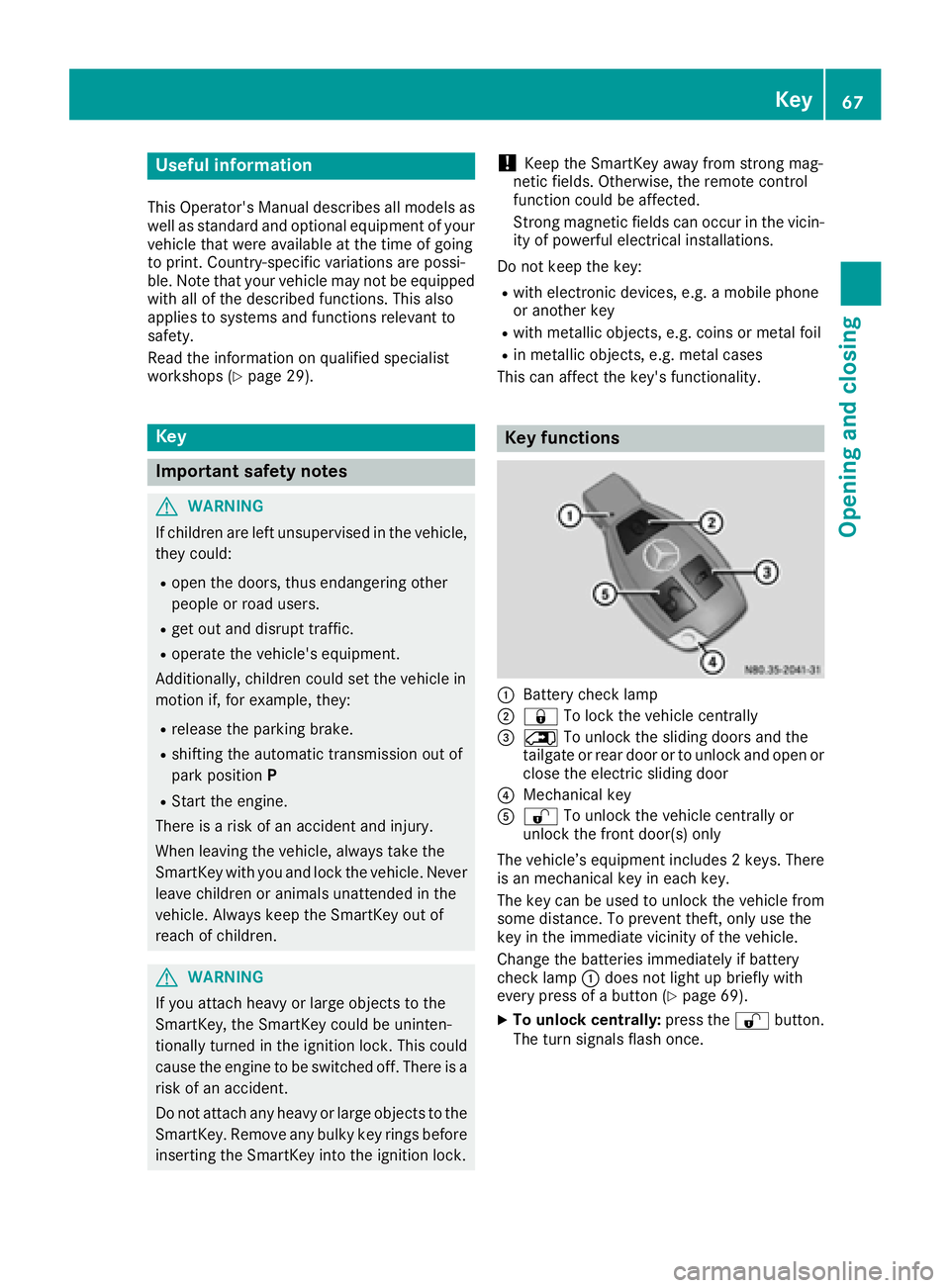
:Battery checklamp
;&To lock the vehicle centrally
=5To unlock the sliding doors and the
tailgate or rear door or to unlock and open or
close the electric sliding door
?Mechanical key
A% To unlock the vehicle centrally or
unlock the frontd oor(s) only
The vehicle’s equipment includes 2keys. There
is an mechanical key in each key.
The key can be used to unlock the vehicle from
some distance. To preventt heft, only use the
key in the immediatev icinity of the vehicle.
Change the batteries immediately if battery
checkl amp:does not light up briefly with
every press of abutton (
Ypage 69).
XTo unlock centrally: press the%button.
The turn signals flash once.
Key67
Opening and closing
Z
Page 70 of 310
XTo unlockthe sliding doors and the tail-
gate or rear doo ronly:p ress the 5but-
ton.
The turn signals flash once.
iIf yo udon ot open the vehicl ewithina pprox-
imately40s econds of unlocking:
Rthe vehicleislocked again.
Rthe anti-thef tprotection is armed again.
XTo lock centrally: press the&button.
The indicator lamps flash thre etime sif:
Rthe anti-thef tprotection is armed.
Rallt he doors and the tailgate or rea rdoor
are closed.
XCheck the locking knobs on al lthe doors.
The locking knobs must al lbeinthe lowered
position.
The key's factory setting enables yo utocen-
trally lock and unlock the following:
Rthe driver's and the front-passenger door
Rthe sliding doors
Rthe tailgate or rea rdoor
In an emergency, the driver's door can also be
unlocke dmanuall yusing the mechanical key
(
Ypage 68).
Yo uc an also set an audibl esignaltoc onfirm
thatt he vehicl ehasbeen locked .The audible
locking-verification signalc an be switched on/
off:
Rusing the on-board compute ronvehicles with
steering whee lbuttons (Ypage 187)
Rat as pecialist qualified workshop for vehicles
withou tsteering whee lbuttons
After unlocking using the remote control, the
surround lighting also goe sonint
he dark. For
ve
hicles with steering whee lbuttons, the sur-
round lighting can be activate dand deactivated
in the on-board compute r(
Ypage 186).
Changingthe settings of the locking
system
If yo utravel alone alot,y ou mayw ishtoc hange
the settings of the locking system .Press
the % button to unlock:
Rthe driver's and front-passenger door (Cargo
Van)
or
Rthe driver's door (Passenger Van)
XTo chang ethe setting: press and hol ddown
the % and& buttons simultaneously
unti lthe battery check lamp flashe stwice.
(
Ypage 67).
If the setting of the locking system is changed
withint he signalr angeoft he vehicle, press the
& or% button to:
Rlock or
Runlock the vehicle
The key now functions as follows:
XTo unloc kthe driver' sdoororf rontdoors:
press the %button once.
XTo unloc kcentrally: brieflypress the %
button twice.
XTo lock centrally: press the&button.
XTo restore factory settings: press and hold
down the %and& buttons simultane-
ouslyu ntilthe battery check lamp flashes
twice (
Ypage 67).
The key unlocks the vehicl ecentrall yagain .
Mechanical key
General notes
If the vehicl ecan no longer be locked or
unlocke dwitht he key,u sethe mechanical key.
The anti-thef talarm system (ATA) is triggered
when yo uunlock and open the vehicl eusing the
mechanical key (
Ypage 66).
The alarm can be disabled in the following two
ways:
XPress the %or& button on the key.
or
XInsert the key into the ignition lock.
Removing the mechanical key
68Key
Opening and closing
Page 71 of 310
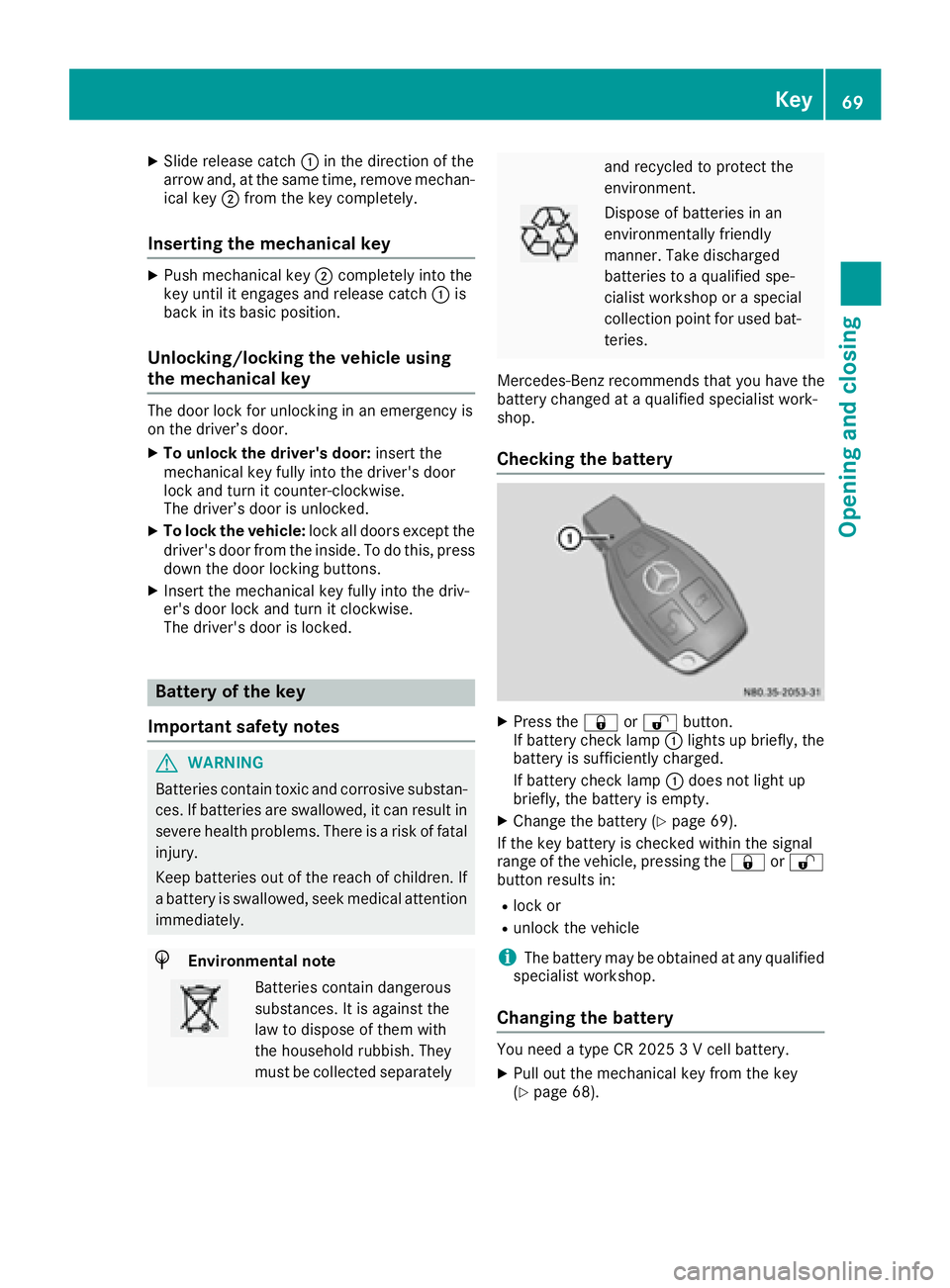
XSlide release catch:in the direction of the
arrow and ,atthe same time ,remove mechan-
ica lkey ; from the key completely.
Inserting the mechanical key
XPush mechanical key ;completely into the
key unti litengages and release catch :is
back in its basic position.
Unlocking/locking the vehicle using
the mechanical key
The doo rloc kf or unlocking in an emergency is
on the driver’ sdoor.
XTo unloc kthe driver's door: insert the
mechanical key fully into the driver' sdoor
lock and turn it counter-clockwise.
The driver’ sdoorisu nlocked.
XTo lock the vehicle: lock alldoors excep tthe
driver' sdoorfrom the inside. To do this ,press
dow nthe doo rloc king buttons.
XInsert the mechanical key fully into the driv-
er's doo rloc ka nd turn it clockwise.
The driver' sdoorisl ocked.
Battery of the key
Important safety notes
GWARNING
Batterie scontai ntoxic and corrosiv esubstan-
ces. If batteries are swallowed, it can result in
severe health problems .There is ariskoff atal
injury.
Kee pbatteries outoft he reach of children. If
ab attery is swallowed, see kmedica lattention
immediately.
HEnvironmental note
Batterie scontai ndangerous
substances. It is against the
la wtod ispose of them with
the householdr ubbish. They
mus tbec ollected separately
and recycle dtoprotect the
environment.
Dispose of batteries in an
environmentally friendly
manner. Take discharged
batteries to aquali fied spe-
cialist workshoporas pecial
collection point for used bat-
teries.
Mercedes-Benz recommend sthat yo uhavet he
battery changed at aquali fied specialist work-
shop.
Checking the battery
XPress the &or% button.
If battery check lamp :lights up briefly, the
battery is sufficiently charged.
If battery check lamp :doe snot light up
briefly, the battery is empty.
XChang ethe battery (Ypage 69).
If the key battery is checke dwithin the signal
rang eoft he vehicle, pressing the &or%
button results in:
Rlock or
Runlock the vehicle
iThe battery may be obtaine datany qualified
specialist workshop.
Changing the battery
You need atypeC R2 025 3Vc ellbattery.
XPull outt he mechanical key from the key
(Ypage 68).
Key69
Opening and closing
Z
Page 100 of 310
Signal and ambient light in the tail-
gate
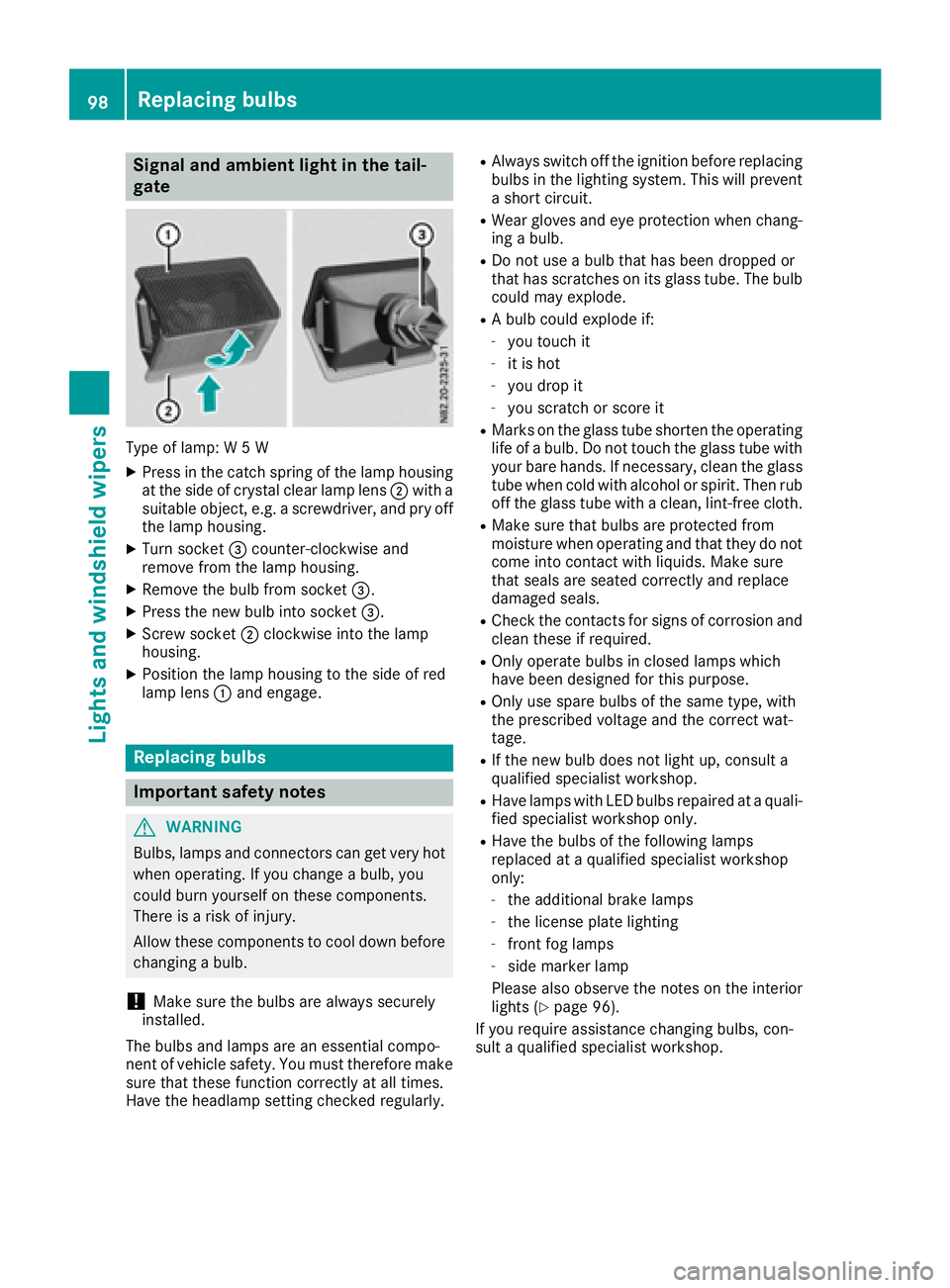
Type of lamp:W5W
XPress in the catch spring of the lamp housing
at the side of crystal clear lamp lens ;with a
suitable object ,e.g. ascrewdriver, and pry off
the lamp housing.
XTurn socket =counter-clockwise and
remove from the lamp housing.
XRemove the bulb from socket =.
XPress the new bulb into socket =.
XScrew socket;clockwise into the lamp
housing.
XPosition the lamp housing to the side of red
lamp lens :and engage.
Replacing bulbs
Important safety notes
GWARNING
Bulbs, lamps and connectors can get very hot
when operating. If you change abulb, you
could burn yourself on these components.
There is arisk of injury.
Allow these components to cool down before
changing abulb.
!Make sure the bulbs are always securely
installed.
The bulbs and lamps are an essential compo-
nent of vehicle safety. You must therefore make
sure that these function correctly at all times.
Have the headlamp settingc hecked regularly.
RAlways switch off the ignition before replacing
bulbs in the lighting system. This will prevent
as hort circuit.
RWear gloves and eye protection when chang-
ing abulb.
RDo not use abulb that has been dropped or
that has scratches on its glass tube. The bulb
could may explode.
RAb ulb could explode if:
-you touch it
-it is hot
-you drop it
-you scratchors core it
RMarks on the glass tube shorten the operating
life ofabulb. Do not touch the glass tube with
your bare hands. If necessary, clean the glass
tube when cold with alcohol or spirit. Then rub
off the glass tube with aclean, lint-free cloth.
RMake sure that bulbs are protected from
moisture when operating and that they do not
come into contact with liquids. Make sure
that seals are seated correctly and replace
damaged seals.
RCheck the contacts for signs of corrosion and
clean these if required.
ROnly operate bulbs in closed lamps which
have been designed for this purpose.
ROnly use spare bulbs of the same type, with
the prescribed voltage and the correct wat-
tage.
RIf the new bulb does not light up, consult a
qualified specialist workshop.
RHave lamps with LED bulbs repaired at aquali-
fied specialist workshop only.
RHave the bulbs of the following lamps
replaced at aqualified specialist workshop
only:
-the additional brake lamps
-the license plate lighting
-front fog lamps
-side marker lamp
Please also observe the notes on the interior
lights (
Ypage 96).
If you require assistance changing bulbs, con-
sult aqualified specialist workshop.
98Replacing bulbs
Lights and windshieldw ipers
Page 109 of 310
Useful information
This Operator's Manual describes all models as
well as standard and optional equipment of your
vehicle that were available at the time of going
to print.Country-specific variation sare possi-
ble. Note that your vehicle may not be equipped
with all of the described functions. This also
applies to system sand function srelevantt o
safety.
Read the information on qualified specialist
workshops (
Ypage 29).
Overview of climat econtrol systems
Important safetyn otes
Observethe recommende dsettings on the fol-
lowing pages. Otherwise, the windows could fog
up.
To preventt he windows from foggingu p:
Ronly switchoff climatec ontrolbriefly
Ronly switc honair-recirculation mode briefly
Rfor vehicles with TEMPMATIC air-conditioning
or automatic climatec ontrol, switchonthe
"Cooling with air dehumidification "function.
Rfor vehicles with automatic climatec ontrol,
switc hont he windshield defrostin gfunction
briefly, if required
Climate contro lregulates the temperature and
the humidity in the vehicle interior and filters
undesirable substances from the air.
Climate contro lisonly operational when the
engin eisrunning. The system only functions
optimally when the side windows are closed.
Ventilate the vehicle for abrief period during
warm weather. In order to cool the vehicle more
rapidly, switc hclimat econtro ltoair-recircula-
tion mode briefly. This will speed up the cooling
process and the desired interior temperature
will be reached more quickly.
The integrated filter can filter out most particles
of dust and completely filter sout pollen. In vehi-
cles with automatic climatec ontrol, gaseous
pollutant sand odors will also be reduced. A
clogged filter reduces the airflow int othe vehi-
cle interior. For this reason,y ou should always
observet he interval for replacin gthe filter,
which is specified in the Maintenance Booklet.
As the interval between changes depends on
environmental conditions, e.g. heavy air pollu- tion
,the interval may be shorter than stated in
the Maintenance Booklet.
Overview of climat econtrol systems107
Climat econtrol
Page 121 of 310
Useful information
This Operator's Manual describes all models as
well as standard and optional equipment of your
vehicle that were available at the time of going
to print.Country-specific variation sare possi-
ble. Note that your vehicle may not be equipped
with all of the described functions. This also
applies to system sand function srelevantt o
safety.
Read the information on qualified specialist
workshops (
Ypage 29).
Breaking-in notes
Important safetyn otes
In certain drivingand drivingsafetysystems, the
sensors adjust automatically while acertain dis-
tance is being driven after the vehicle has been
delivered or after repairs. Full system effective- ness is not reached until the end of this teach-in
procedure.
New or replaced brake pads and brake discs
only reach their optimal brakin geffecta fter a
few hundred kilometers of driving. Until then,
compensat efor this by applying greater forcet o
the brake pedal.
The first 1000 miles (1500 km)
For the servicel ife and economy of your vehicle
it is crucial that you break in the engin ewith due
care.
RTherefore, protect the engin efor the first
1000m iles (1500k m) by drivingatv arying
vehicle and engin espeeds.
RAvoid overstraining the vehicle and high
engin espeeds during this period, e.g. driving
at full throttle. Do not exceed Øof the max-
imum speed for each gear.
RDo not change down agear manually in order
to brake.
RTry to avoid depressingt he accelerator pedal
beyond the point of resistance (kickdown).
After 1000m iles (1500km), you can increase
the engin espeed gradually and accelerate the
vehicle to full speed.
iYou should also observet hesenotes on
breaking-in if the engin eorparts of the drive
train on your vehicle have been replaced.
Driving
Important safetyn otes
GWARNING
Flammable materials introduced through
environmental influence or by animals can
ignit eifinc ontact with the exhaust system or
parts of the engin ethat heat up. There is arisk
of fire.
Carry out regular checks to make sure that
ther eare no flammable foreign materials in
the engin ecompartmen torinthe exhaust
system.
GWARNING
If you switc hoff the ignition while driving,
safety-relevant function sare only available
with limitations, or not at all. This could affect, for example, the power steering and the brake
boosting effect. You will require considerably
more efforttos teer and brake. There is arisk
of an accident.
Do not switc hoff the ignition while driving.
GWARNING
If the parkin gbrake has not been fully
released when driving, the parkin gbrake can:
Roverheat and cause afire
Rlose its hold function.
There is arisk of fire and an accident. Release
the parkin gbrake fully before drivingo ff.
!Warm up the enginequickly. Do not use the
engine's full performanc euntil it has reached
operatin gtemperature.
Only shift the automatic transmission to the
desired drive position when the vehicle is sta-
tionary.
Where possible, avoid spinning the drive
wheels when pulling away on slippery roads.
You could otherwise damage the drive train.
Driving119
Driving and parking
Z