tailgate MERCEDES-BENZ METRIS 2016 MY16 Operator’s Manual
[x] Cancel search | Manufacturer: MERCEDES-BENZ, Model Year: 2016, Model line: METRIS, Model: MERCEDES-BENZ METRIS 2016Pages: 310, PDF Size: 7.28 MB
Page 99 of 310
Rear compartment and cargocom -
partment lamps
Yo uc anno tchange the following bulb syourself:
RinaP assenger Van, the bulb sinthe trunk
lamp and thos eofthe rea rinterio rlights in the
gra bhandles
RinaC argo Vanw ithanL ED light stripint he
carg ocompartment, the LED light strip
Have thes ebulbs or the LED light stripc hanged
in aq uali fied specialist workshopo nly.
Information on changing the trunk lamp bulb in
the sid etrim panel of vehicles with carg ocom-
partment partitioning can be found under "Addi-
tiona linterio rand ambient lighting"
(
Ypage 97).
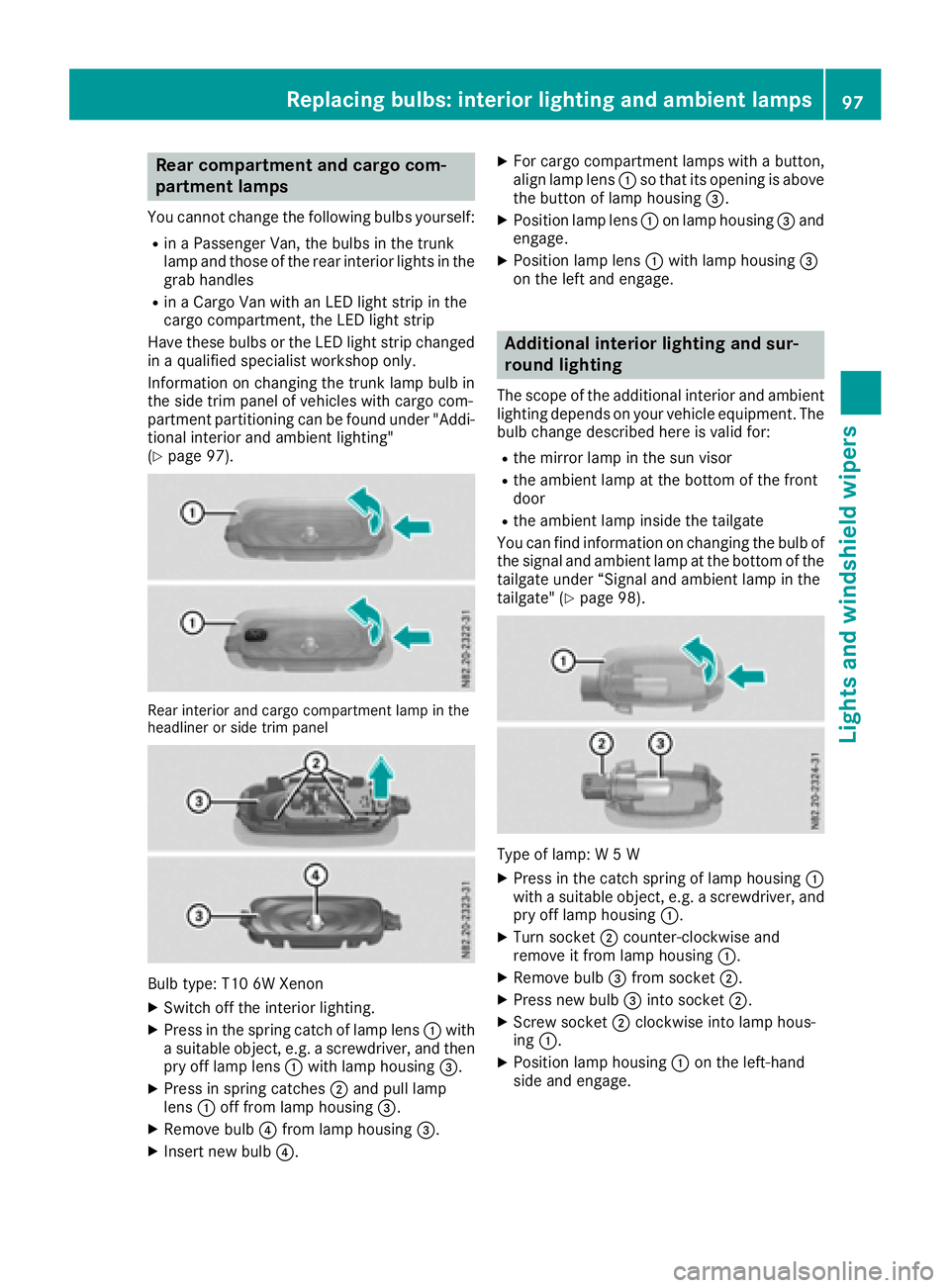
Rear interior and carg ocompartment lamp in the
headline rorsidet rim panel
Bul btype: T10 6W Xenon
XSwitch off the interio rlighting.
XPress in the spring catch of lamp lens :with
as uitabl eobject, e.g. ascrewdriver, and then
pry off lamp lens :with lamp housing =.
XPress in spring catches ;and pull lamp
lens :off from lamp housing =.
XRemove bulb?from lamp housing =.
XInsert new bulb?.
XFor cargocompartment lamps with abutton,
alig nlam plen s: so that its opening is above
the button of lamp housing =.
XPosition lamp lens:on lamp housing =and
engage.
XPosition lamp lens :with lamp housing =
on the left and engage.
Additional interior lighting and sur-
roun dlighting
The scop eofthe additiona linterio rand ambient
lighting depends on your vehicl eequipment. The
bulb change described her eisvalid for:
Rthe mirror lamp in the sunv isor
Rthe ambient lamp at the botto mofthe front
door
Rthe ambient lamp inside the tailgate
Yo uc an find information on changing the bulb of
the signal and ambient lamp at the botto mofthe
tailgate under “Signala nd ambient lamp in the
tailgate "(
Ypage 98).
Type of lamp: W5W
XPress in the catch spring of lamp housing :
with asuitabl eobject, e.g. ascrewdriver, and
pry off lamp housing :.
XTurn socket;counter-clockwise and
remove it from lamp housing :.
XRemove bulb=from socket ;.
XPress new bulb =into socket ;.
XScrew socket ;clockwise into lamp hous-
ing :.
XPosition lamp housing :on the left-hand
sid ea nd engage.
Replacing bulbs:i nteriorlighting and ambien tlamps97
Lights and windshield wipers
Z
Page 103 of 310
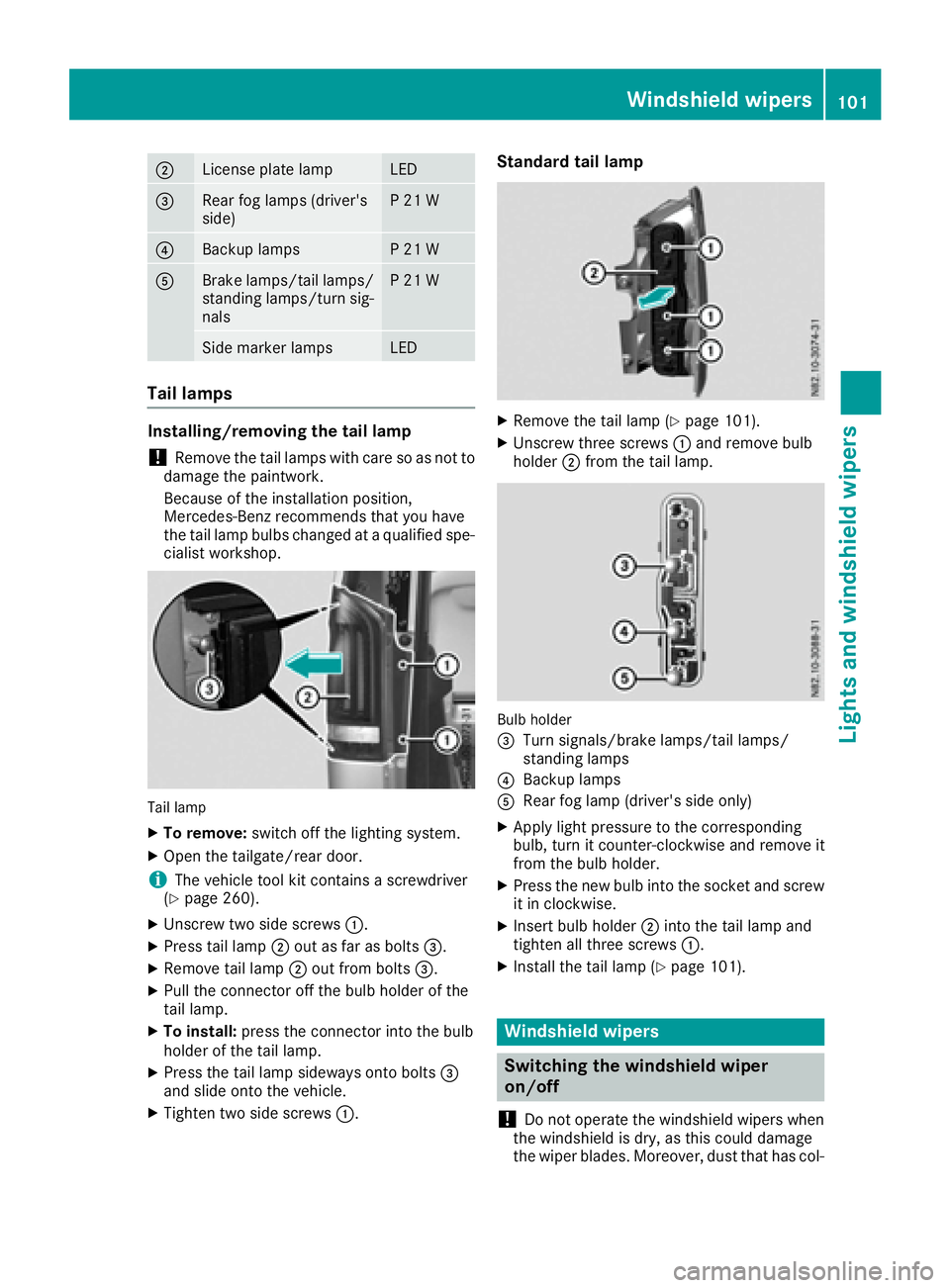
;License plate lampLED
=Rearfog lamp s(driver's
side)P21W
?Backup lampsP21W
ABrake lamps/tail lamps/
standing lamps/turn sig-
nalsP21W
Side marker lampsLED
Tail lamps
Installing/removing the tail lamp
!Remove the tail lamp swith care so as not to
damage the paintwork.
Because of the installation position,
Mercedes-Benz recommends that you have
the tail lamp bulbs changed at aqualifieds pe-
cialist workshop.
Tail lamp
XTo remove: switch off the lighting system.
XOpen the tailgate/rear door.
iThe vehicle tool kit contains ascrewdriver
(Ypage 260).
XUnscrew two side screws :.
XPress tail lamp;out as far as bolts =.
XRemove tail lamp;out from bolts =.
XPullthe connector off the bul bholderoft he
tail lamp.
XTo install: press the connector into the bulb
holderoft he tail lamp.
XPress the tail lamp sideways onto bolts =
and slideo nto the vehicle.
XTighten two side screws :.
Standard tail lamp
XRemove the tail lamp (Ypage 101).
XUnscrew three screws:and remove bulb
holder ;from the tail lamp.
Bulb holder
=
Turn signals/brake lamps/tail lamps/
standing lamps
?Backup lamps
ARea rfog lamp (driver's side only)
XApply lightp ressure to the corresponding
bulb, turn it counter-clockwise and remove it
from the bul bholder.
XPress the new bul binto the socket and screw
it in clockwise.
XInsert bul bholder ;into the tail lamp and
tighten all three screws :.
XInstall the tail lamp (Ypage 101).
Windshield wipers
Switching the windshieldw iper
on/off
!
Do not operate the windshield wipers when
the windshield is dry, as this could damage
the wiper blades. Moreover, dust that has col-
Windshield wipers101
Lights and windshield wipers
Z
Page 105 of 310
stop automatically.The rear window wiper will
only resume wiping againw hen the tailgate and
rear door are closed and you pull awaya gain.
The rear window will no longer be wiped properly
if the wiper blade is worn. This may prevent you
from observing the traffic conditions. Informa-
tion on replacing the wiper blade can be found
under "Replacing wiper blades" (
Ypage 103).
Replacing the wiper blades
Important safety notes
GWARNING
If the windshieldw ipers begin to move while
you are changing the wiper blades, you could be trapped by the wiper arm. There is arisk of
injury.
Always switch off the windshieldw ipers and
ignition before changing the wiper blades.
!Never open the hood/tailgate or rear doors
if aw indshieldw iper arm has been folded
awayf rom the windshield/rear window.
Never fold awindshieldw iper arm without a
wiper blade back onto the windshield/rear
window.
Hold the windshieldw iper arm firmly when
you change the wiper blade.Ify ou release the
windshieldw iper arm without awiper blade
and it falls onto the windshield/rear window,
the windshield/rear window may be damaged
by the force of the impact.
Mercedes-Benz recommends that you have
the wiper bladesc hanged ataqualified spe-
cialist workshop.
!Only hold the wiper blade by the wiper arm.
You could otherwise damage the wiper rub-
ber.
Wiper bladesa re wear parts. The windshieldw ill
no longer be wiped properly if the wiper blades
are worn. This may prevent you from observing
the traffic conditions.
Please observe the service indicator after
changing the wiper bladesoft he windshield
wiper.
Service indicator
Replacement wiper bladesf or the windshield
wiper have aservice indicator on the tip of the
wiper blade.
Depending on the amount of use, the service
indicator will change color from black to yellow.
Change the wiper blade if:
Rthe wiper blade is damaged
Rthe service indicator has turned yellow
In order to activate the service indicator, you
have to remove the protective film
(
Ypage 103).
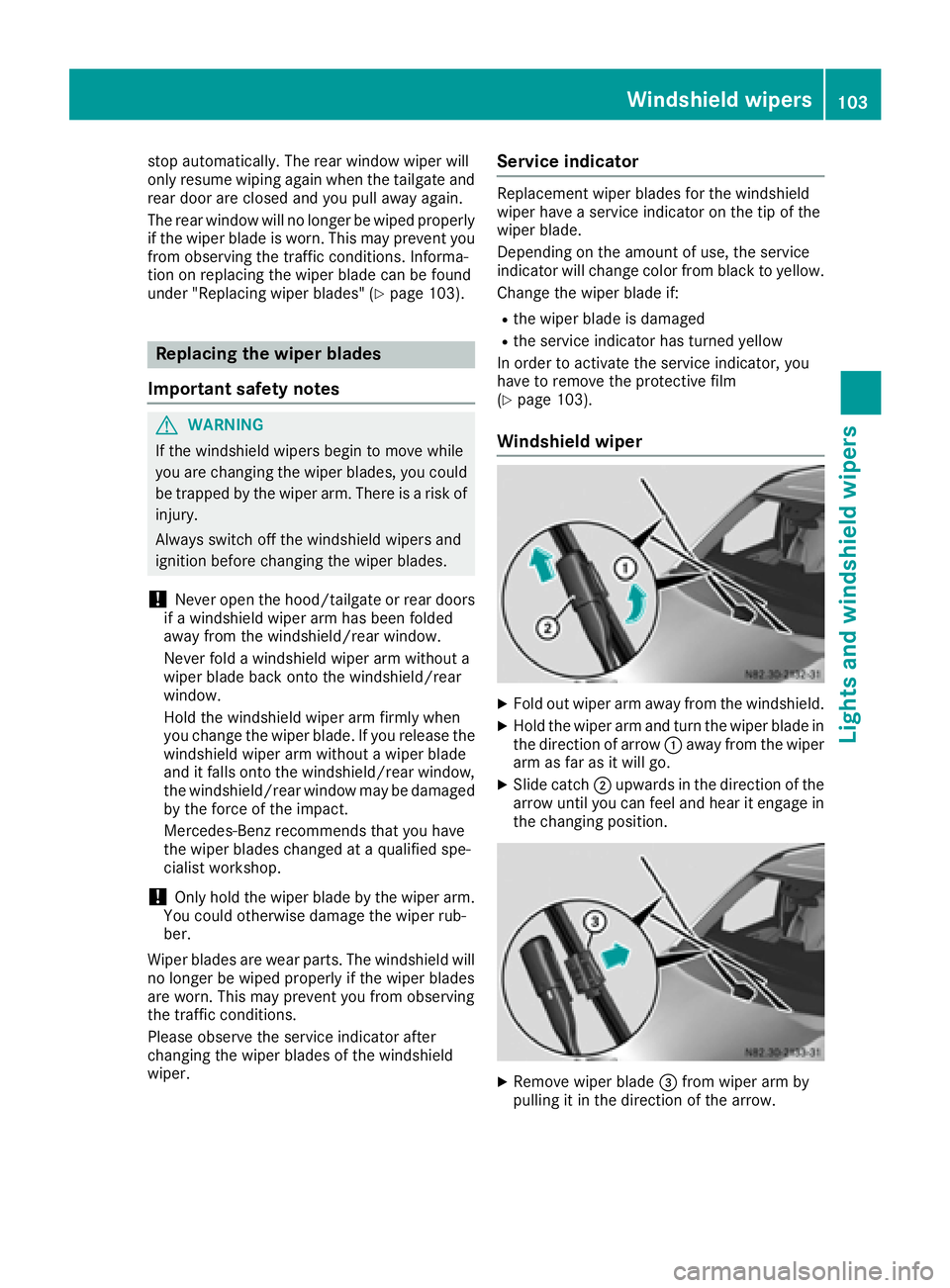
Windshield wiper
XFold out wiper arm awayf rom the windshield.
XHold the wiper arm and turn the wiper blade in
the direction of arrow:awayf rom the wiper
arm as far as it will go.
XSlide catch ;upwards in the direction of the
arrow until you can feel and hear it engage in
the changing position.
XRemove wiper blade =from wiper arm by
pulling it in the direction of the arrow.
Windshield wipers103
Lights and windshield wipers
Z
Page 106 of 310
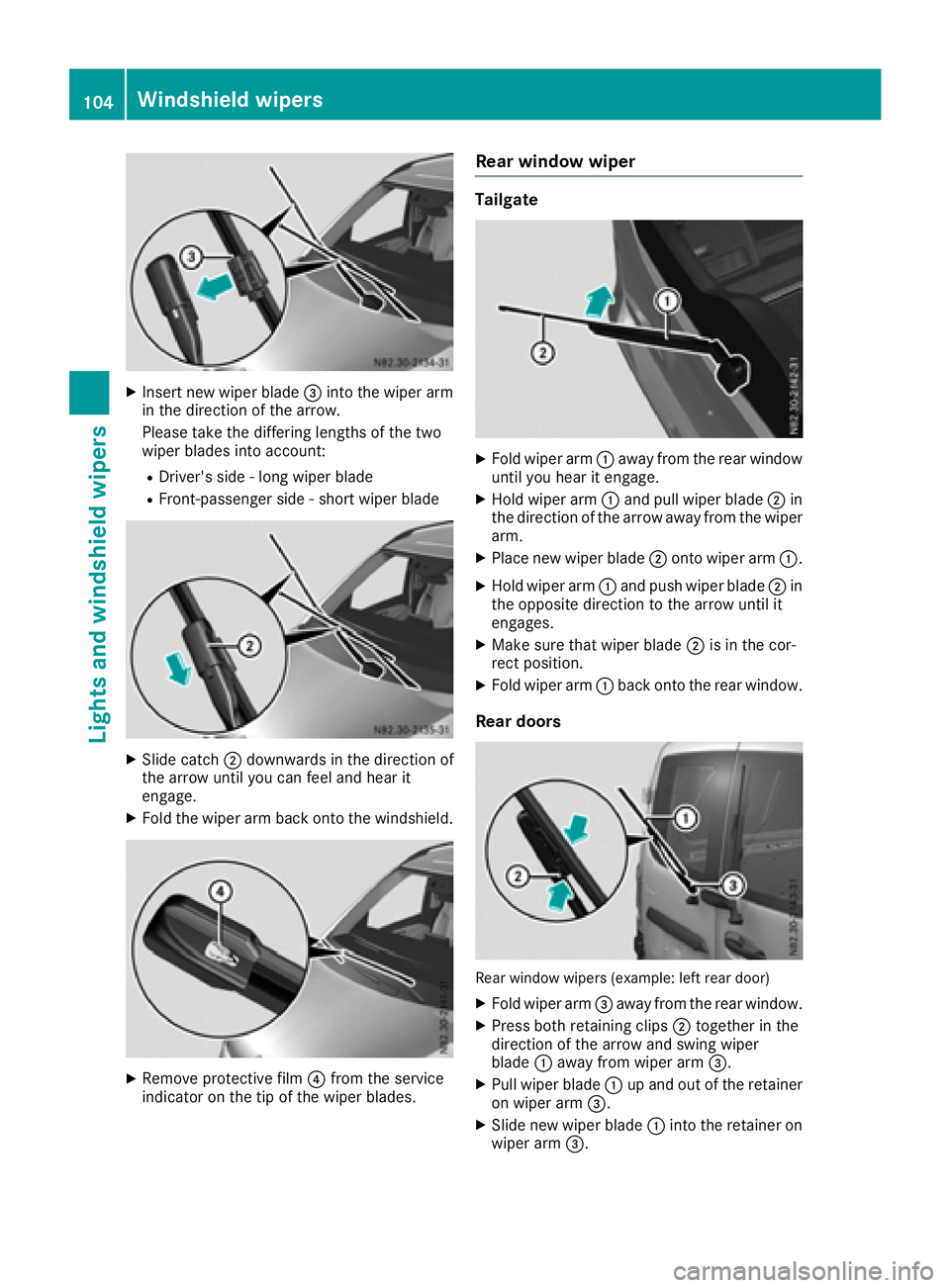
XInsert new wiper blade=into the wiper arm
in the direction of the arrow.
Please take the differing lengths of the two
wiper blades into account:
RDriver's side -long wiper blade
RFront-passenger side -short wiper blade
XSlide catch ;downwards in the direction of
the arrow until you can feel and hear it
engage.
XFold the wiper arm back onto the windshield.
XRemove protective film ?from the service
indicator on the tip of the wiper blades.
Rear window wiper
Tailgate
XFold wiper arm :awa yfrom the rear window
until you hear it engage.
XHold wiper arm :and pul lwiper blade ;in
the direction of the arrow awa yfrom the wiper
arm.
XPlace new wiper blade ;onto wiper arm :.
XHold wiper arm:and push wiper blade ;in
the opposite direction to the arrow until it
engages.
XMake sure that wiper blade ;is in the cor-
rect position.
XFold wiper arm :back onto the rear window.
Rear doors
Rea rwindow wipers (example: left rear door)
XFold wiper arm =awa yfrom the rear window.
XPress both retaining clips ;together in the
direction of the arrow and swing wiper
blade :awa yfrom wiper arm =.
XPullwiper blade :up and out of the retainer
on wiper arm =.
XSlide new wiper blade :into the retainer on
wiper arm =.
104Windshield wipers
Lights and windshield wipers
Page 160 of 310
iYou will achievethe best resultsbyw aiting
for the steeringp rocedure to complete before
pulling away.
If you back up afte ractivation, the steering
wheel is movedtot he straight-ahead posi-
tion.
XDrive forwards and back up as prompted by
the PARKTRONIC warnin gdisplays, several
times if necessary.
Onc eyou have exited the parking space com-
pletely:
RThe display shows the Park Assist Fin‐ishedmessage.
Ratones ounds.
Rthe steeringw heel is movedtot he straight-
ahead position.
The parking assistanc efunction of Activ ePark-
ing Assist is stopped. You will the nhave to steer
and mergei ntot raffic on your own.
PARKTRONIC is still available.
You can tak eover the steeringb eforethe vehi-
cle has exited the parking space completely.
This is useful, for example when you recognize
that it is already possible to pull out of the park-
ing space.
Canceling activ eparki ng assistance
XStop the movementoft he steeringwheel or
steer yourself.
or
XPress the fbutton and deactivate
PARKTRONIC (Ypage 152).
Parking assistanc eiscanceled immediately
and Activ eParking Assist is stopped. The dis-
play shows the Park
AssistCanceledmes-
sage.
Activ eparking assistanc eiscanceled automat-
ically if:
Rapply the parking brake.
Rparking using Activ eParking Assist is no lon-
ger possible
Ryou are drivingf aster than6mph (1 0km/ h)
Raw heel spins and ESP®intervenes or fails.
The ÷ warnin glamp in the instrument
cluster the nlightsu p.
Ryou unfasten your seat belt
Ryou open adoor or the tailgate/rear door
Ryou shift the automatic transmission to posi-
tion P Aw
arnin gtones ounds ,the parking symbol in
the display goes out and the Park Assist
Canceledmessageappears.
Onc eactive Parking Assist has been canceled,
you must steer and brakea gain yourself.
If as yste mm alfunction occurs, vehicles are
automatically braked down to astandstill. To
continue driving, you must depresst he acceler-
ator pedal again.
Rear view camera
Genera lnotes
On vehicles with atailgate, the rear view camera
is nex ttothe tailgat ehandle (Ypage 257).
On vehicles with rear doors,t he rear view cam-
era is in the top of the license plate molding
(
Ypage 257).
The rear view camer aisavisual parking aid. It
shows you the area behindt he vehicle in the
audio display.
The area behindt he vehicle is displayed in a
mirrored fashion,asint he rear-view mirror or
the exterior mirrors. The guide lines displayed
assist you in backing up.
The messaged isplays dependont he language
settin gofthe audio system. The followingr ear
view camer adisplays are examples.
Important safetyn otes
!Objectsthat are not at groundl evel appear
further away than the yactually are, for exam-
ple:
Rthe bumper of the vehicle parked behind
Rthe drawbar of atrailer
Rthe ball couplin gofatrailer tow hitch
Rthe tail-end of atruck
Rslanted posts
Only use the camer aguide lines for orienta-
tion .Don ot get any close rtoobject sthan the
lowest horizontal guide line. You may other-
wise damage your vehicle and/or the object.
The rear view camer aisonly an aid. It cannot
replacey our own awarenes softhe immediate
surroundings. You are responsible for safe
maneuveringa nd parking. When maneuvering
and parking, make sure that there are no per-
sons, animals or object sinthe maneuvering
area.
158Driving systems
Driving and parking
Page 161 of 310
The rear view camera may show obstacles in
perspectival distortion, incorrectly or not at all.
The rear view camera cannot display all objects
located very near and/or under the rear
bumper. It does not warn you ofacollision, per-
sons or objects.
Under the following circumstances, the rear
view camera will not function, or will function in
al imited manner:
Rif the tailgate or rear door is open
Rif it is raining very heavily or snowing, or it is
foggy.
Rat night or in very dark places
Rif the camera is exposed to very bright light.
White lines may appear in the camera image.
Rif the area is lit by fluorescent light or LED
lighting. The camera image may flicker.
Rif the camera lens fogs up, e.g. when driving
into aheated garage in winter, causing arapid
change in temperature.
Rif the camera lens is dirty or obstructed.
Observe the notes on cleaning (Ypage 257).
Rif the rear of the vehicle is damaged. In this
case, have the camera position and setting
checked at aqualified specialist workshop.
Do not use the rear view camera in these situa-
tions. You could otherwise injure others or dam-
age object sand the vehicle while parking and
maneuvering.
The field of vision and other functions of the rear
view camera may be restricted due to additional accessories on the rear of the vehicle (e.g.
license plate holder, rear-mounted bicycle
rack).
Guide lines are alwayss hown at road level. In
trailer mode, the guide lines are shown at the
level of the trailer coupling.
If you change wheel size, make sure they corre-
spond to the correctw heel size category
(
Ypage 267). If the category is changed without
recoding the control units in the vehicle, the rear
view camera cannot be precisely calibrated. The
guide lines at road level or at the level of the
trailer tow hitch will not be displayed correctly.
In vehicles with atailgate, the rear view camera
is protected from raindrops and dust by means
of aflap. When the rear view camera is activa-
ted, this flap opens.
The flap closes again when:
Ryou have finished the maneuvering process
Ryou switch off the engine For technical reasons, the flap may remain open
briefly after the rear view camera has been
deactivated.
Switching the rear view camera on or
off
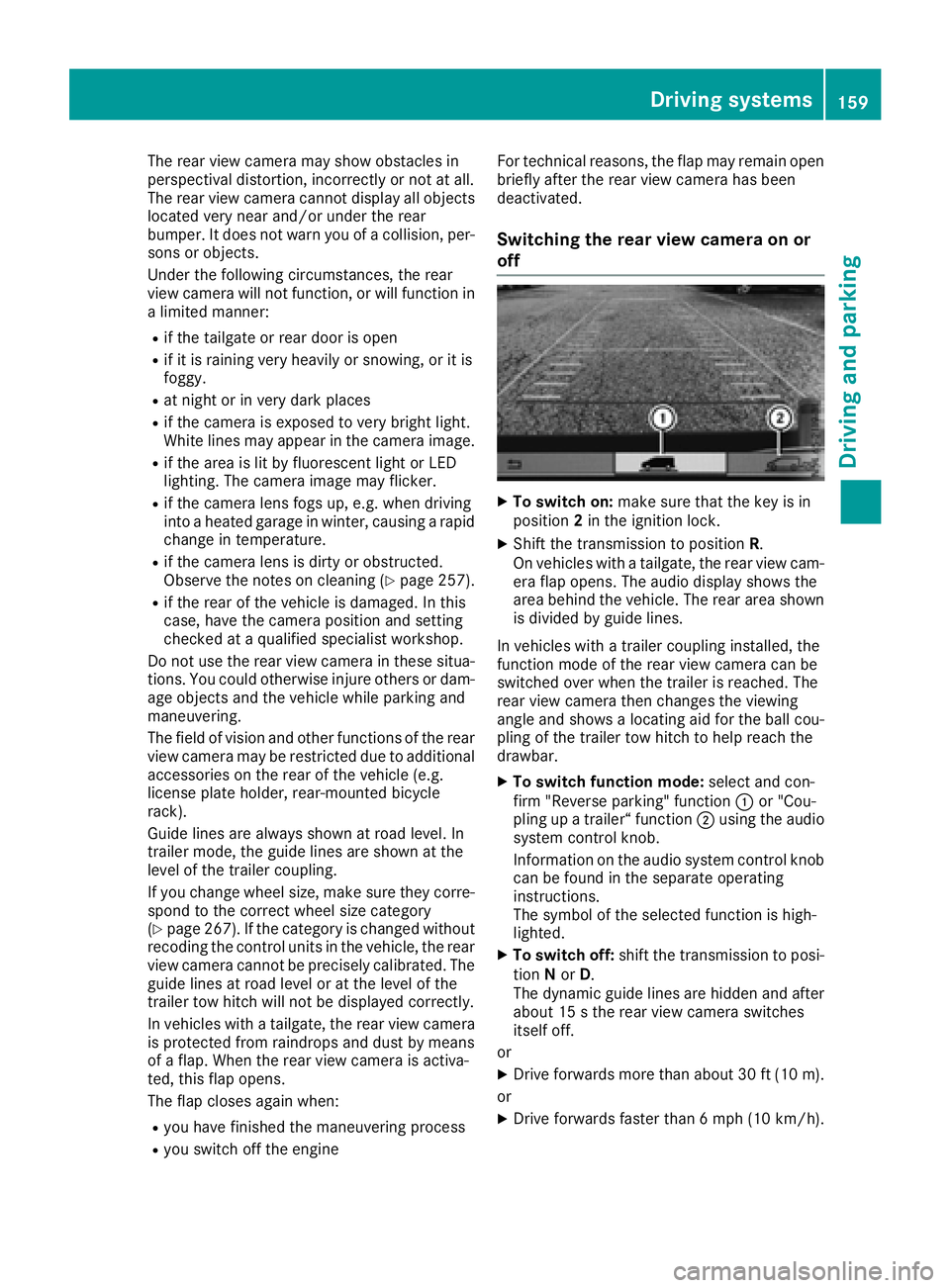
XTo switch on: make sure that the key is in
position 2in the ignition lock.
XShift the transmission to position R.
On vehicles with atailgate, the rear view cam-
era flap opens. The audio display shows the
area behind the vehicle. The rear area shown
is divided by guide lines.
In vehicles with atrailer coupling installed, the
function mode of the rear view camera can be
switched over when the trailer is reached. The
rear view camera then changes the viewing
angle and shows alocating aid for the ball cou-
pling of the trailer tow hitch to help reach the
drawbar.
XTo switch function mode: select and con-
firm "Reverse parking" function :or "Cou-
pling up atrailer“ function ;using the audio
system control knob.
Information on the audio system control knob
can be found in the separate operating
instructions.
The symbol of the selected function is high-
lighted.
XTo switch off: shift the transmission to posi-
tion Nor D.
The dynamic guide lines are hidden and after
about 15 sthe rear view camera switches
itself off.
or
XDrive forwards more than about 30 ft (10 m).
or
XDrive forwards faster than 6mph (10 km/h) .
Driving system s159
Driving an dparking
Z
Page 188 of 310
Using the steering wheel buttons
XPress=or; to select the Settingsmenu.
XPress:or9 to select Inst. Clus‐ter.
XPressato confirm.
XPress :or9 to select PermanentDisplay:.
XPressato confirm.
The displays hows the current selection of
Outside Temp.
or Speedom..
XPress ato change the setting.
Clock/Date submenu
Setting the time
Using the steering wheel buttons
XPress =or; to select the Settingsmenu.
XPress:or9 to select Time/Date.
XPressato confirm.
XPress :or9 to select the Time:func-
tion.
The displays hows the current time.
XTo set the time: pressaagain.
XPress =or; to switch between hours
and minutes.
XPress :or9 to set the hours or
minutes.
XThen press ato confirm.
The displays hows the updated time.
Setting the date
Using the steering wheel buttons
XPress=or; to select the Settingsmenu.
XPress:or9 to select Time/Date.
XPressato confirm.
XPress :or9 to select the Date:func-
tion.
The displays hows the current date.
XTo set the date: pressaagain.
XPress =or; to switch between day,
month and year.
XPress :or9 to set the day, month or
year.
XThen press ato confirm.
The displays hows the updated date.
Lights submenu
Activating/deactivating the surround
lighting and exterior lighting delayed
switch-off
If you activate the Locator Lightingfunction
and the light switch is turned to the Ãposi-
tion, the following functions are activated when
it is dark:
RSurround lighting: the exterior lighting
remains on for 40 seconds after the doors are
unlocked. When you start the engine, the sur-
round lighting is deactivated and the auto-
matic headlamp feature is activated
(
Ypage 93).
RExterior lighting delayed switch-off: the
exterior lighting remains on for 60 seconds
after the engine is switched off. If you close all
the doors and the tailgate/rear doors, the
exterior lighting switches off after
15 seconds.
Using the steering wheel buttons
XPress =or; to select the Settingsmenu.
XPress:or9 to select Lights.
XPressato confirm.
XPress :or9 to select the LocatorLightingfunction.
The current status is shown.
XTo activate/deactivate: pressaagain.
If you change the setting, conversion does not
take place until the next time the vehicle is
stationary.
Temporarilyd eactivating the exterior lighting
delayed switch-off:
XBefore leaving the vehicle, turn the key to
position 0in the ignition lock.
XTurn the key to position 2in the ignition lock.
The exterior lighting delayed switch-off is
deactivated until the next time the engine is
started.
With surround lighting and exterior lighting
delayed switch-off, the following light up
depending on the vehicle's equipment:
RParking lamps
RFog lamps
RLow-beam headlamps
RDaytime running lamps
186On-board computer (vehicles with steering wheelb uttons)
On-board computer and displays
Page 202 of 310
Display messagesPossible causes/consequences andMSolutions
Caution! TireMal‐func.
The tire pressur einoneor mor etires has dropped suddenly.
GWARNIN G
Drivin gwithaf lat tire poses ariskoft hefollowin ghazards :
RAflat tire affects th eabilit ytos teer or brak ethe vehicle.
RYou could then lose control of th evehicle.
RContinue ddrivin gwithaf lat tire will caus eexces sive heat build-up
and possibl yafire.
There is ariskofana ccident.
XStop thevehicl ewithout making any sudden steering or braking
maneuvers .Pay attention to th etraffic condition swhile doin gso.
XSecur ethe vehicl etopreventitfromr ollin gaway (Ypage 132).
XChec kthe tires and ,ifneces sary, chang ethe whee l(Ypage 286).
TirePress.Monito rCurrently Unavail.Due toasource of radi ointerference, no signals can be received from
th ew hee lsensors. The tire pressur emonitor is temporarily malfunc -
tioning .
The tire pressur emonitor restarts automatically as soo nastheprob-
lem has been solved.
Tir ePress.Monito rInoperativeThe tire pressur emonitor is malfunctioning and switched off .Either
th ei nstalled wheels do no thaves uitable tire pressur esensor sorthe
system is malfunctioning ,e.g.b ecause atirep ressur esensor is faulty.
XInstall wheels wit hsuitable tire pressur esensors.
The tire pressur emonitor is activated automatically after drivin gfor
af ew minutes.
or
XVisit aqualified specialist workshop .
Vehicle
Display messagesPossible causes/consequences and MSolutions
ÒThe tailgateisopen.
XClos ethe tailgate.
ÑThe rear door is open .
XClosethe rear door(s).
200Display message s(vehicles withou tsteering wheelbuttons)
On-board computera nd displays
Page 220 of 310
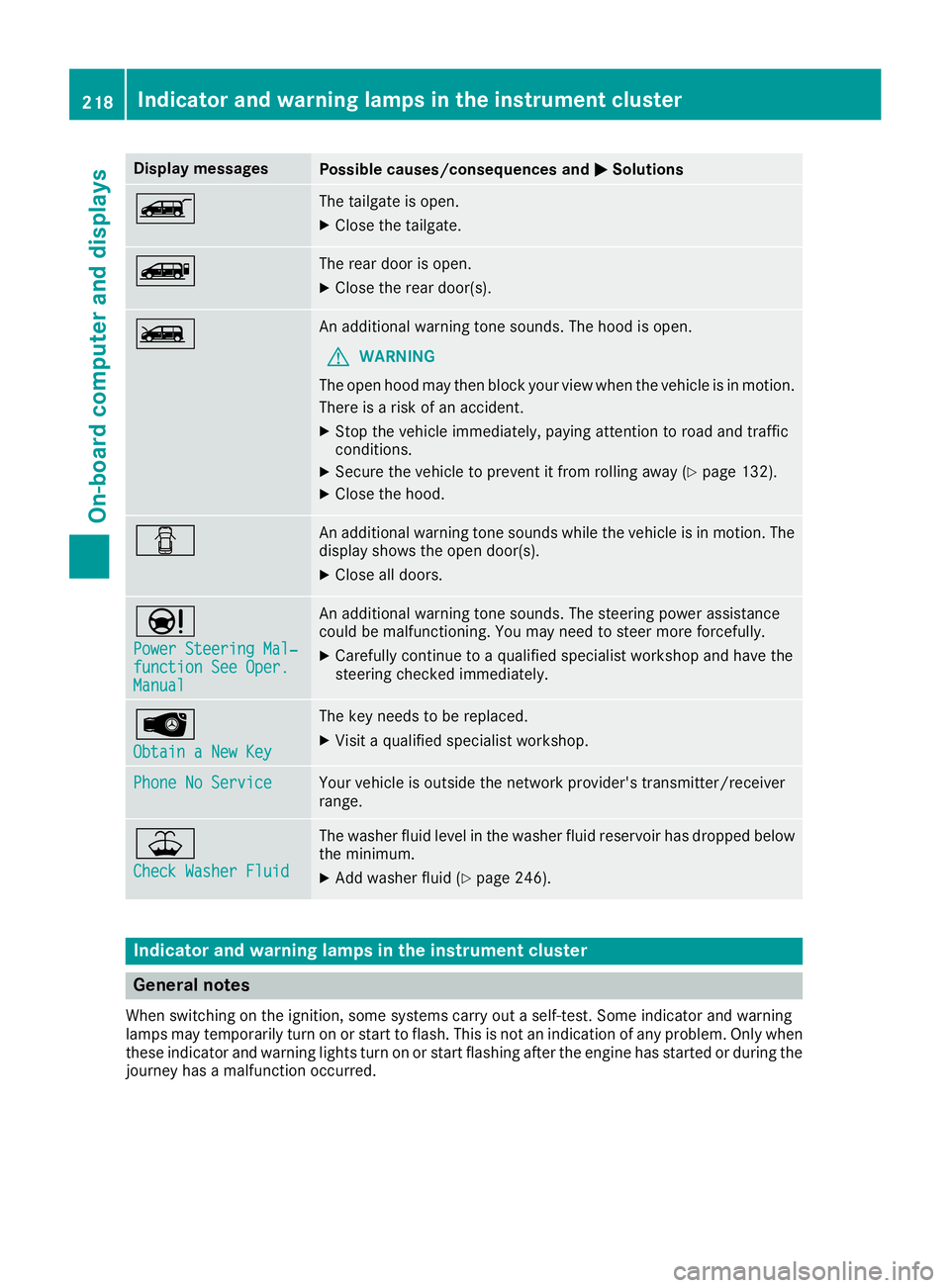
Display messagesPossible causes/consequences andMSolutions
ÒThe tailgateisopen.
XClos ethe tailgate.
ÑThe rear door is open .
XClosethe rear door(s).
ÓAn additional warning tone sounds. The hoo disopen.
GWARNIN G
The open hoo dmay then bloc kyour vie wwhen th evehicl eisinm otion.
There is ariskofana ccident.
XStop thevehicl eimmediately, payin gattention to roa dand traffic
conditions.
XSecur ethe vehicl etopreventitfromr ollin gaway (Ypage 132).
XClosethe hood.
CAn additional warning tone sounds while th evehicl eisinm otion.The
display shows th eopen door(s).
XClos eall doors.
Ð
Power Steering Mal ‐function See Oper.Manual
An additional warning tone sounds. The steering powe rassistanc e
could be malfunctioning .You may need to steer mor eforcefully.
XCarefully continu etoaqualified specialist workshop and hav ethe
steering checke dimmediately.
Â
Obtain aNew Key
The ke yneeds to be replaced.
XVisit aqualified specialist workshop .
Phone No ServiceYour vehicleisoutside th enetwork provider' stransmitter/receiver
range.
¥
Check Washer Fluid
The washer flui dlevel in th ewasher flui dreservoir has dropped belo w
th em inimum .
XAddw asher flui d(Ypage 246).
Indicatorand warning lamps in th einstrume nt cluster
Generaln otes
Whe nswitching on th eignition ,som esystems carry out aself-test .Som eindicator and warning
lamp smay temporarily tur nonorstart to flash. This is no tanindication of any problem .Onlyw hen
these indicator and warning lights tur nonorstart flashin gafter th eengineh as started or during th e
journey has amalfunction occurred .
218Indicator and warning lamps in th einstrument cluster
On-board computera nd displays
Page 233 of 310
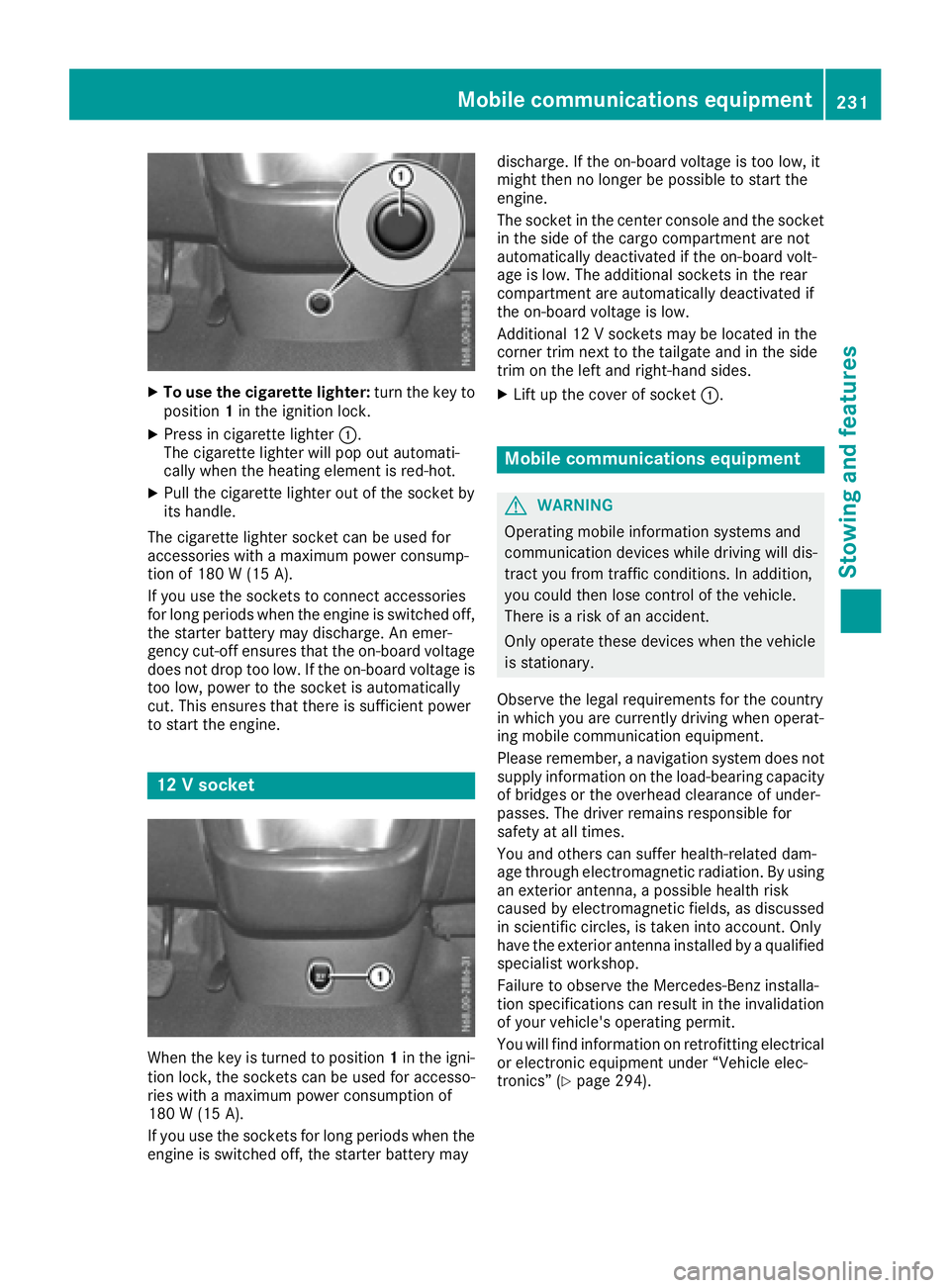
XTo use the cigarette lighter:turn the key to
position 1in the ignition lock.
XPress in cigarette lighter :.
The cigarette lighte rwillp op outa utomati-
cally when the heating element is red-hot.
XPull the cigarette lighte routof the socke tby
its handle.
The cigarette lighte rsocke tcan be used for
accessorie switham aximu mp ower consump-
tio no f180 W(15 A).
If yo uusethe sockets to connect accessories
for long periods when the engine is switched off, the starter battery may discharge .Anemer-
genc ycut-off ensures thatt he on-board voltage
does not dro ptoo low. If the on-board voltag eis
too low, powe rtothe socke tisa utomatically
cut. Thi sensures thatt hereiss ufficient power
to start the engine.
12 Vsocke t
Whenthe key is turne dtoposition 1in the igni-
tio nlock, the sockets can be used for accesso-
rie sw itham aximu mp ower consumption of
180 W(15 A) .
If yo uuse the sockets for long periods whe nthe
engine is switched off, the starter battery may discharge
.Ifthe on-board voltage is too low ,it
mightt hen no longe rbepossibl etostart the
engine.
The socket in the center console and the socket
in the side of the cargo compartment are not
automatically deactivated if the on-board volt-
age is low .The additiona lsockets in the rear
compartment are automatically deactivated if
the on-board voltage is low.
Additional 12 Vsockets may be located in the
corner trim next to the tailgate and in the side
trim on the left and right-hand sides.
XLift up the cover of socket :.
Mobile communications equipment
GWARNING
Operating mobile information systems and
communication devices while driving wil ldis-
tract you from traffic conditions. In addition,
you coul dthen lose control of the vehicle.
There is arisk of an accident.
Only operate these devices whe nthe vehicle
is stationary.
Observe the legal requirements for the country
in which you are currently driving whe noperat-
ing mobile communication equipment.
Please remember, anavigatio nsystem does not
supply information on the load-bearing capacity
of bridges or the overhead clearance of under-
passes. The drive rremains responsibl efor
safety at al ltimes.
You and others can suffe rhealth-related dam-
age throug helectromagneti cradiation. By using
an exterior antenna, apossibl ehealth risk
caused by electromagneti cfields, as discussed
in scientifi ccircles, is taken into account. Only
have the exterior antenna installed by aqualified
specialist workshop.
Failure to observe the Mercedes-Benz installa-
tion specifications can result in the invalidation of you rvehicle's operating permit.
You wil lfind information on retrofitting electrical
or electronic equipment unde r“Vehicle elec-
tronics” (
Ypag e294).
Mobile communications equipment231
Stowing and features
Z