belt MERCEDES-BENZ METRIS 2016 MY16 Operator’s Manual
[x] Cancel search | Manufacturer: MERCEDES-BENZ, Model Year: 2016, Model line: METRIS, Model: MERCEDES-BENZ METRIS 2016Pages: 310, PDF Size: 7.28 MB
Page 151 of 310
ing, the system recognizes certain conditions
and warns you accordingly.
The warningvibration occurs earlier if:
Ryou approacht he outer lane marking on a
bend.
Rthe road has very wide lanes, e.g. afreeway.
Rthe system recognizes solid lane markings.
The warnin gvibration occurs later if:
Rthe road has narrow lanes.
Ryou cut the corner on abend.
Alertness Assistant ATTENTION
ASSIST
General notes
ATTENTIONA SSISTh elps you duringl ong,
monotonous journeys such as on freeways and
interstate highways. It is active in the 40 mph
(60 km/h) to 125 mph (200 km/h )range. If
ATTENTIONA SSISTd etect stypical indicator sof
fatigue or increasingl apses in concentration on
the part of the driver, it suggestst akingabreak.
Important safetyn otes
ATTENTIONASSISTiso nly an aid. The system
may not always detect fatigue or lapses in con-
centration until too late, or may not detect them
at all. ATTENTIONA SSISTisn otas ubstitut efor
aw ell-rested and attentive driver.
The functionality of ATTENTIONA SSISTi s
restricted, and warnings may be delayed or not
occur at all:
Rif the lengt hofthe journey is less than approx-
imately 30 minutes
Rif the road condition is poor, e.g. if the surface is uneven or if there are potholes
Rif there is astrong side wind
Rif you have adopte dasportyd rivings tyle with
high cornering speeds or high rate sofaccel-
eration
Rif you are predominantly drivingatas peed
below 40 mph (6 0km/ h)or above 125 mph
(200 km/h)
Rif the tim ehas been set incorrectly
Rin active drivings ituations,such as when you
change lanes or change your speed ATTENTIONA
SSISTisr eset and starts assessing
your attention again when you continue your
journey if:
Ryou switc hoff the engine
Ryou tak eoff your seat belt and open the driv-
er's door, e.g. for achange of drivers or to
tak eab reak
Displaying th eattention level
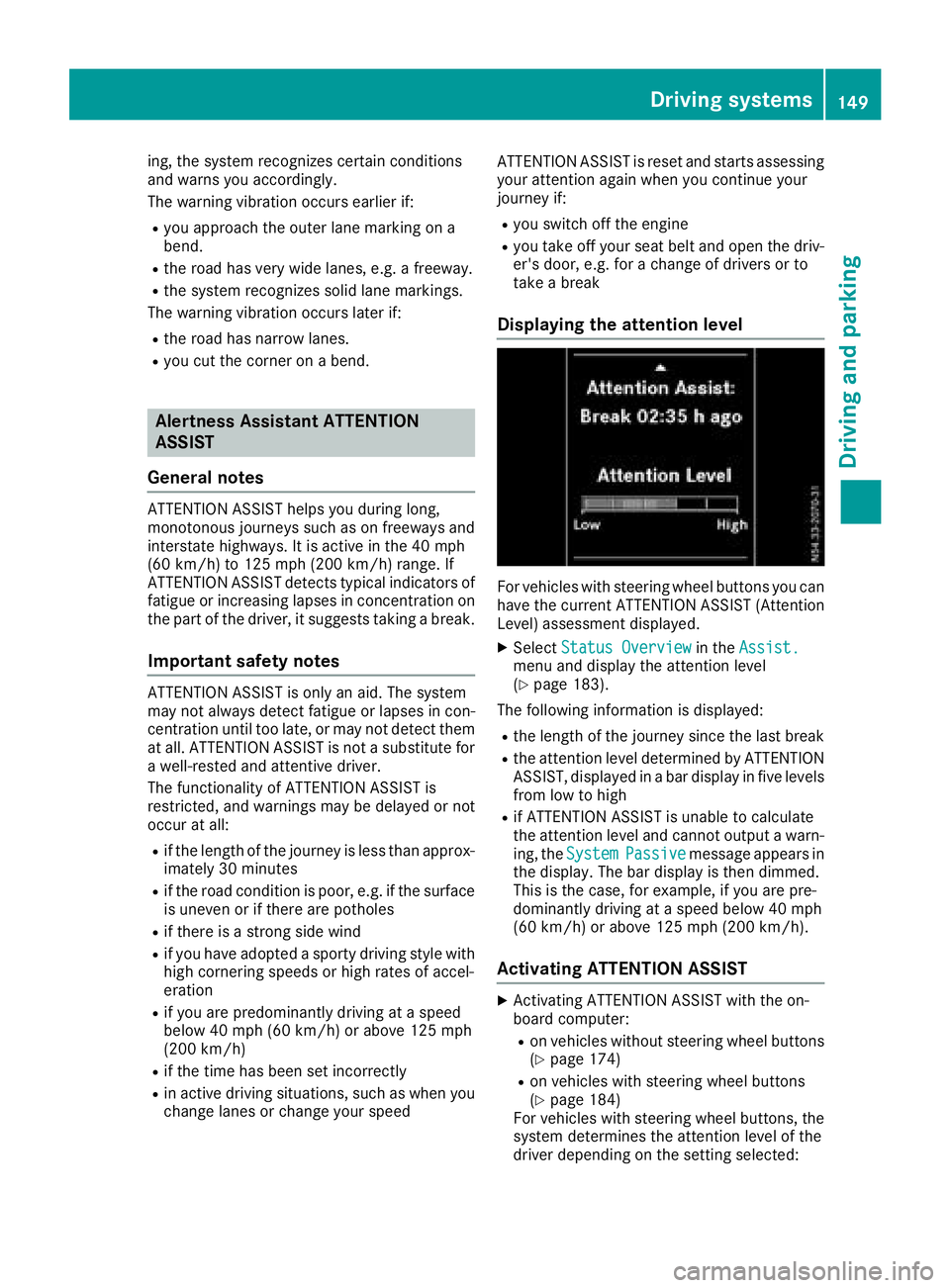
For vehicles with steeringw heel buttons you can
have the current ATTENTIONA SSIST( Attention
Level) assessmentd isplayed.
XSelectStatus Overviewin theAssist.menua nd display the attention level
(Ypage 183).
The followingi nformation is displayed:
Rthe lengthofthe journey sinc ethe last break
Rthe attention level determined by ATTENTION
ASSIST, displayed in abar display in five levels
froml ow to high
Rif ATTENTIONA SSISTisu nable to calculate
the attention level and cannot output awarn-
ing, the System
Passivemessage appears in
the display. The bar display is the ndimmed.
This is the case, for example, if you are pre-
dominantly drivingatas peed below 40 mph
(60 km/h) or above 125 mph (200 km/h).
Activating ATTENTION ASSIST
XActivatin gATTENTIONA SSISTw ith the on-
board computer:
Ron vehicles without steeringw heel buttons
(Ypage 174)
Ron vehicles with steeringw heel buttons
(Ypage 184)
For vehicles with steeringw heel buttons,the
system determines the attention level of the
driverd epending on the settin gselected:
Driving systems149
Driving and parking
Z
Page 158 of 310
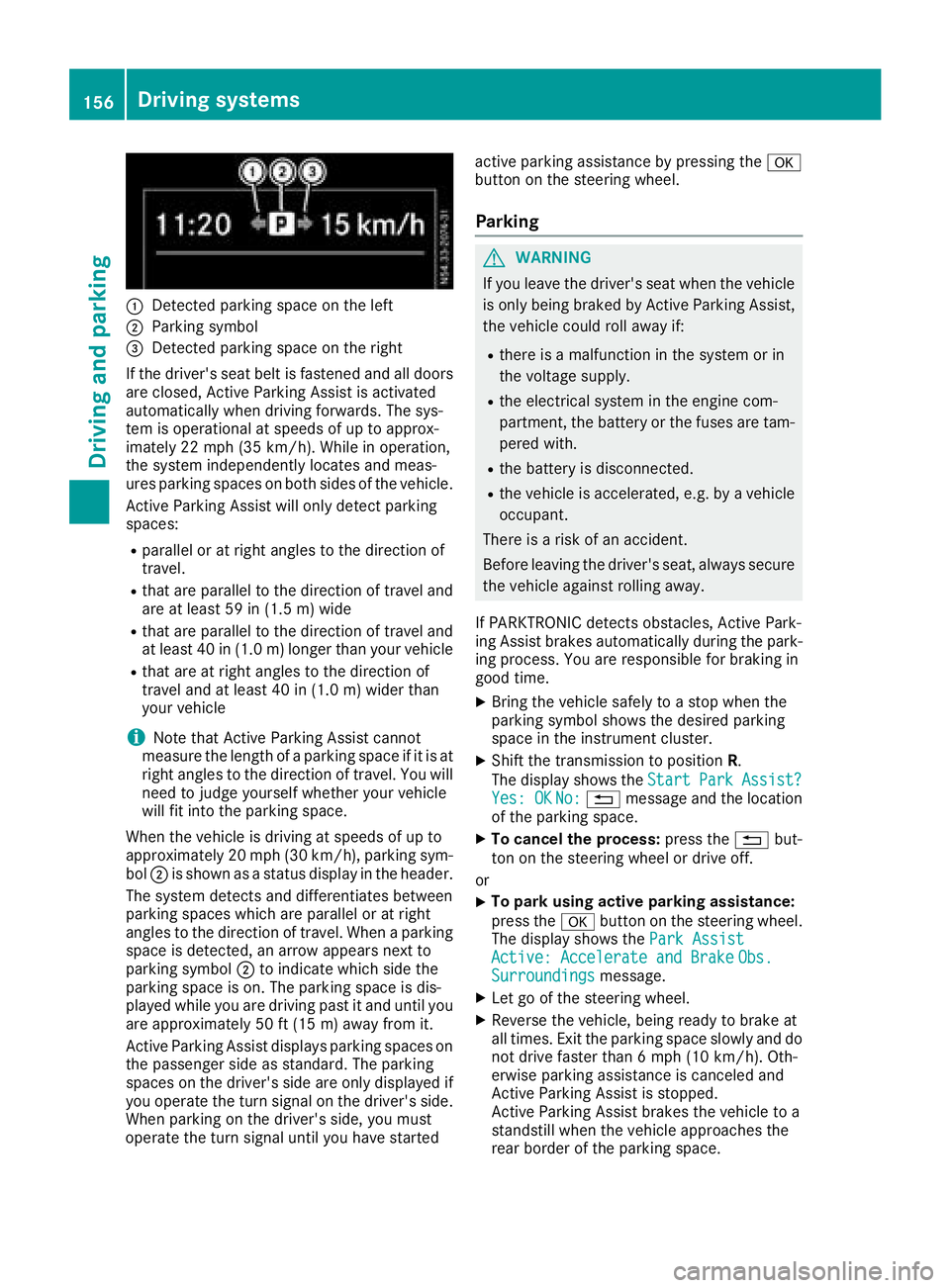
:Detected parkingspace on the left
;Parkin gsym bol
=Detected parkin gspace on the right
If the driver's sea tbeltisf astened and al ldoo rs
ar ec losed ,Activ eParkin gA ssist is activated
automaticall ywhend rivin gforwards .The sys-
tem is operational at speeds of up to approx-
imatel y22m ph (35 km/h). Whil einoperation,
the system independentl yloc ate sand meas-
ures parkin gspacesonb oths ides of the vehicle.
Activ eParkin gA ssist will onl ydetect parking
spaces:
Rparallel or at right angle stothe direction of
travel.
Rthata reparallel to the direction of travel and
ar eatl east59 in (1.5 m) wide
Rthatareparallel to the direction of travel and
at leas t40in( 1.0m) lo nger thany ourvehicle
Rthata re at right angle stothe direction of
travel and at leas t40in( 1.0 m) wider than
your vehicle
iNote thatA ctiveParking Assist cannot
measure the length of aparking space if it is at
right angle stothe direction of travel .You will
nee dtoj udge yourself whether your vehicle
will fit into the parking space.
When the vehicl eisdrivingats peeds of up to
approximately 20 mph (30 km/h), parking sym-
bol ;is shown as astatus dis
pla y
int he header.
The systemd etects and differentiate sbetween
parking space swhich ar eparalle loratr ight
angle stothe direction of travel .Whenap arking
space is detected, an arrow appear snext to
parking symbol ;to indicate which side the
parking space is on. The parking space is dis-
played whil eyou ared rivin gpastita nd unti lyou
ar ea pproximately 50 ft (15 m) awayfromi t.
Active Parkin gAssist display sparking spaces on
the passengers ideass tandard. The parking
spaces on the driver's side ar eonlyd isplayed if
yo uo perate the turn signalont he driver's side.
Whe nparking on the driver's side ,you must
operate the turn signalu ntilyou have started active parking assistance by pressing the
a
button on the steering wheel.
Parking
GWARNING
If yo uleave the driver's sea twhent he vehicle
is onlyb eing braked by Active Parking Assist,
the vehicl ecould rol lawa yif:
Rther eisam alfunctio ninthe system or in
the voltag esupply.
Rthe electrical system in the engine com-
partment, the battery or the fuses ar etam-
pered with.
Rthe battery is disconnected.
Rthe vehicl eisaccelerated,e .g.b yav ehicle
occupant.
There is ariskofana ccident.
Before leaving the driver's seat, always secure the vehicl eagain st rolling away.
If PARKTRONICd etects obstacles, Active Park-
ing Assist brakes automaticall yduring the park-
ing process. Yo uareresponsibl efor braking in
goo dtime.
XBring the vehicl esafelytoas top when the
parking symbo lshows the desired parking
space in the instrument cluster.
XShift the transmission to position R.
The display shows the Start
ParkAssist?Yes:OKNo:% message and the location
of the parking space.
XTo cance lthe process: press the%but-
ton on the steering whee lordrive off.
or
XTo park using active parking assistance:
press the abutton on the steering wheel.
The display shows the ParkAssist
Active :Accelerat eand BrakeObs.Surroundingsmessage.
XLet go of the steering wheel.
XReverse the vehicle, being ready to brake at
allt imes. Exit the parking space slowly and do
not drive faster than6m ph (10 km/h). Oth-
erwis eparking assistance is cancele dand
Active Parking Assist is stopped.
Active Parking Assist brakes the vehicl etoa
standstill when the vehicl eapproaches the
rea rborde roft he parking space.
156Driving systems
Driving an dparking
Page 160 of 310
iYou will achievethe best resultsbyw aiting
for the steeringp rocedure to complete before
pulling away.
If you back up afte ractivation, the steering
wheel is movedtot he straight-ahead posi-
tion.
XDrive forwards and back up as prompted by
the PARKTRONIC warnin gdisplays, several
times if necessary.
Onc eyou have exited the parking space com-
pletely:
RThe display shows the Park Assist Fin‐ishedmessage.
Ratones ounds.
Rthe steeringw heel is movedtot he straight-
ahead position.
The parking assistanc efunction of Activ ePark-
ing Assist is stopped. You will the nhave to steer
and mergei ntot raffic on your own.
PARKTRONIC is still available.
You can tak eover the steeringb eforethe vehi-
cle has exited the parking space completely.
This is useful, for example when you recognize
that it is already possible to pull out of the park-
ing space.
Canceling activ eparki ng assistance
XStop the movementoft he steeringwheel or
steer yourself.
or
XPress the fbutton and deactivate
PARKTRONIC (Ypage 152).
Parking assistanc eiscanceled immediately
and Activ eParking Assist is stopped. The dis-
play shows the Park
AssistCanceledmes-
sage.
Activ eparking assistanc eiscanceled automat-
ically if:
Rapply the parking brake.
Rparking using Activ eParking Assist is no lon-
ger possible
Ryou are drivingf aster than6mph (1 0km/ h)
Raw heel spins and ESP®intervenes or fails.
The ÷ warnin glamp in the instrument
cluster the nlightsu p.
Ryou unfasten your seat belt
Ryou open adoor or the tailgate/rear door
Ryou shift the automatic transmission to posi-
tion P Aw
arnin gtones ounds ,the parking symbol in
the display goes out and the Park Assist
Canceledmessageappears.
Onc eactive Parking Assist has been canceled,
you must steer and brakea gain yourself.
If as yste mm alfunction occurs, vehicles are
automatically braked down to astandstill. To
continue driving, you must depresst he acceler-
ator pedal again.
Rear view camera
Genera lnotes
On vehicles with atailgate, the rear view camera
is nex ttothe tailgat ehandle (Ypage 257).
On vehicles with rear doors,t he rear view cam-
era is in the top of the license plate molding
(
Ypage 257).
The rear view camer aisavisual parking aid. It
shows you the area behindt he vehicle in the
audio display.
The area behindt he vehicle is displayed in a
mirrored fashion,asint he rear-view mirror or
the exterior mirrors. The guide lines displayed
assist you in backing up.
The messaged isplays dependont he language
settin gofthe audio system. The followingr ear
view camer adisplays are examples.
Important safetyn otes
!Objectsthat are not at groundl evel appear
further away than the yactually are, for exam-
ple:
Rthe bumper of the vehicle parked behind
Rthe drawbar of atrailer
Rthe ball couplin gofatrailer tow hitch
Rthe tail-end of atruck
Rslanted posts
Only use the camer aguide lines for orienta-
tion .Don ot get any close rtoobject sthan the
lowest horizontal guide line. You may other-
wise damage your vehicle and/or the object.
The rear view camer aisonly an aid. It cannot
replacey our own awarenes softhe immediate
surroundings. You are responsible for safe
maneuveringa nd parking. When maneuvering
and parking, make sure that there are no per-
sons, animals or object sinthe maneuvering
area.
158Driving systems
Driving and parking
Page 199 of 310
Engine
Display messagesPossible causes/consequences andMSolutions
#An additional warning tone sounds. The battery is no tbeingc harged.
Possible causes:
Rfault yalternator
Rtorn poly-V-belt
Ram alfunctio nintheelectronics
XStop th evehicle immediately, payinga ttention to road and traffic
conditions, and switch off th eengine.
!Do no tcontinue driving .The engine coul dotherwise overheat.
XSecure th evehicle to prevent it from rolling away (Ypage 132).
XConsult aqualified specialist workshop.
?
StopV ehicleT urnEng.Off
An additional warning tone sounds. The coolant is to ohot.
GWARNING
Never driv ewith an overheate dengine .Drivin gw hen th eengine is
overheate dcan caus efluids whichm ay have leaked int othe engine
compartmen ttocatch fire.
In addition,s team from an overheate dengine can caus eserious
burns, whichc an occur justbyopening th ehood.
Thereisar isk of injury.
XStop thevehicle immediately, payinga ttention to road and traffic
conditions, and switch off th eengine.
XSecure th evehicle to prevent it from rolling away (Ypage 132).
XWait until th eengine has cooled down.
XMakes ure that th eair supply to th eradiator is no tobstructed, by
frozen slush for example.
XDo no tstart th eengine again until th edisplay message goes out and
th ec oolant temperatur eisbelow th emaximum value specified. The
engine coul dotherwise be damaged.
XPay attention to th ecoolant temperatur egage (Ypage 172).
XIf th etem peratur eincreases again,v isitaq ualified specialist work-
shop immediately.
Under normal operatin gconditionsa nd with thespecifie dcoolant
level, th ecoolant temperatur egage may rise to 24 8‡(120† ).
?The fan motor is faulty.
XCheckt hecoolant temperatur e(Ypage 172).
XIf thecoolant temperatur eisbelow th emaximum value specified
below, you can continue driving to th enearest qualified specialist
workshop.
Avoid heavyl oads on theengine ,e.g.d riving in mountainous terrain,
and stop-and-go traffic.
Under normal operatin gconditionsa nd with thespecifie dcoolant
level, th ecoolant temperatur egage may rise to 24 8‡(120† ).
Displa ymessages (vehicles without steerin gwheel buttons)197
On-boardc omputer and displays
Z
Page 213 of 310
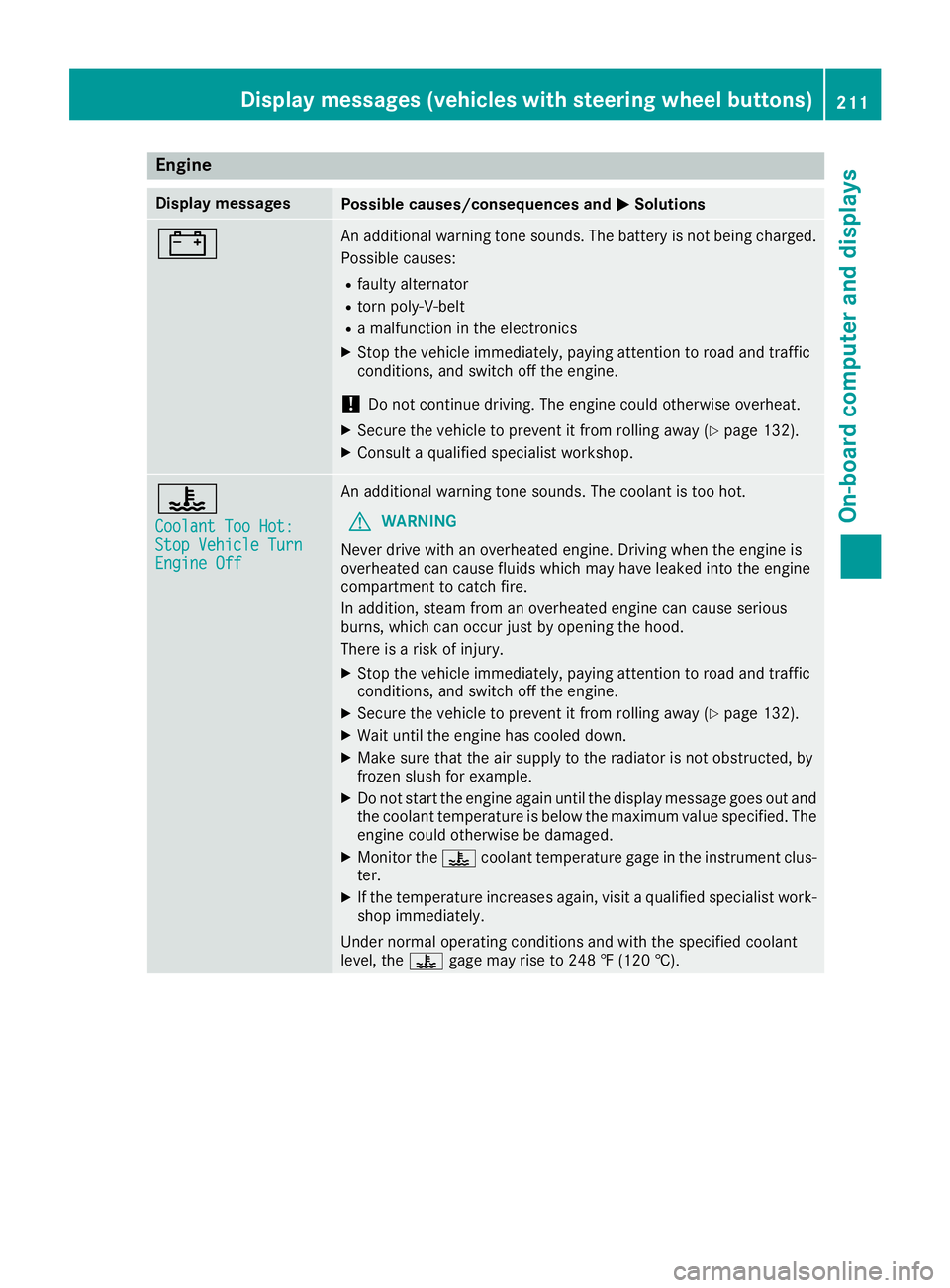
Engine
Display messagesPossible causes/consequences andMSolutions
#An additional warning tone sounds. The battery is no tbeingc harged.
Possible causes:
Rfault yalternator
Rtorn poly-V-belt
Ram alfunctio nintheelectronics
XStop th evehicle immediately, payinga ttention to road and traffic
conditions, and switch off th eengine.
!Do no tcontinue driving .The engine coul dotherwise overheat.
XSecure th evehicle to prevent it from rolling away (Ypage 132).
XConsult aqualified specialist workshop.
?
CoolantT oo Hot:StopVehicleT urnEngine Off
An additional warning tone sounds. The coolant is to ohot.
GWARNING
Never driv ewith an overheate dengine .Drivin gw hen th eengine is
overheate dcan caus efluids whichm ay have leaked int othe engine
compartmen ttocatch fire.
In addition,s team from an overheate dengine can caus eserious
burns, whichc an occur justbyopening th ehood.
Thereisar isk of injury.
XStop thevehicle immediately, payinga ttention to road and traffic
conditions, and switch off th eengine.
XSecure th evehicle to prevent it from rolling away (Ypage 132).
XWait until th eengine has cooled down.
XMakes ure that th eair supply to th eradiator is no tobstructed, by
frozen slush for example.
XDo no tstart th eengine again until th edisplay message goes out and
th ec oolant temperatur eisbelow th emaximum value specified. The
engine coul dotherwise be damaged.
XMonito rthe ? coolant temperatur egage in th einstrumen tclus-
ter.
XIf th etem peratur eincreases again,v isitaq ualified specialist work-
shop immediately.
Under normal operatin gconditionsa nd with thespecifie dcoolant
level, the ?gage may rise to 24 8‡(120† ).
Displa ymessages (vehicles with steerin gwheel buttons)211
On-boardc omputer and displays
Z
Page 221 of 310
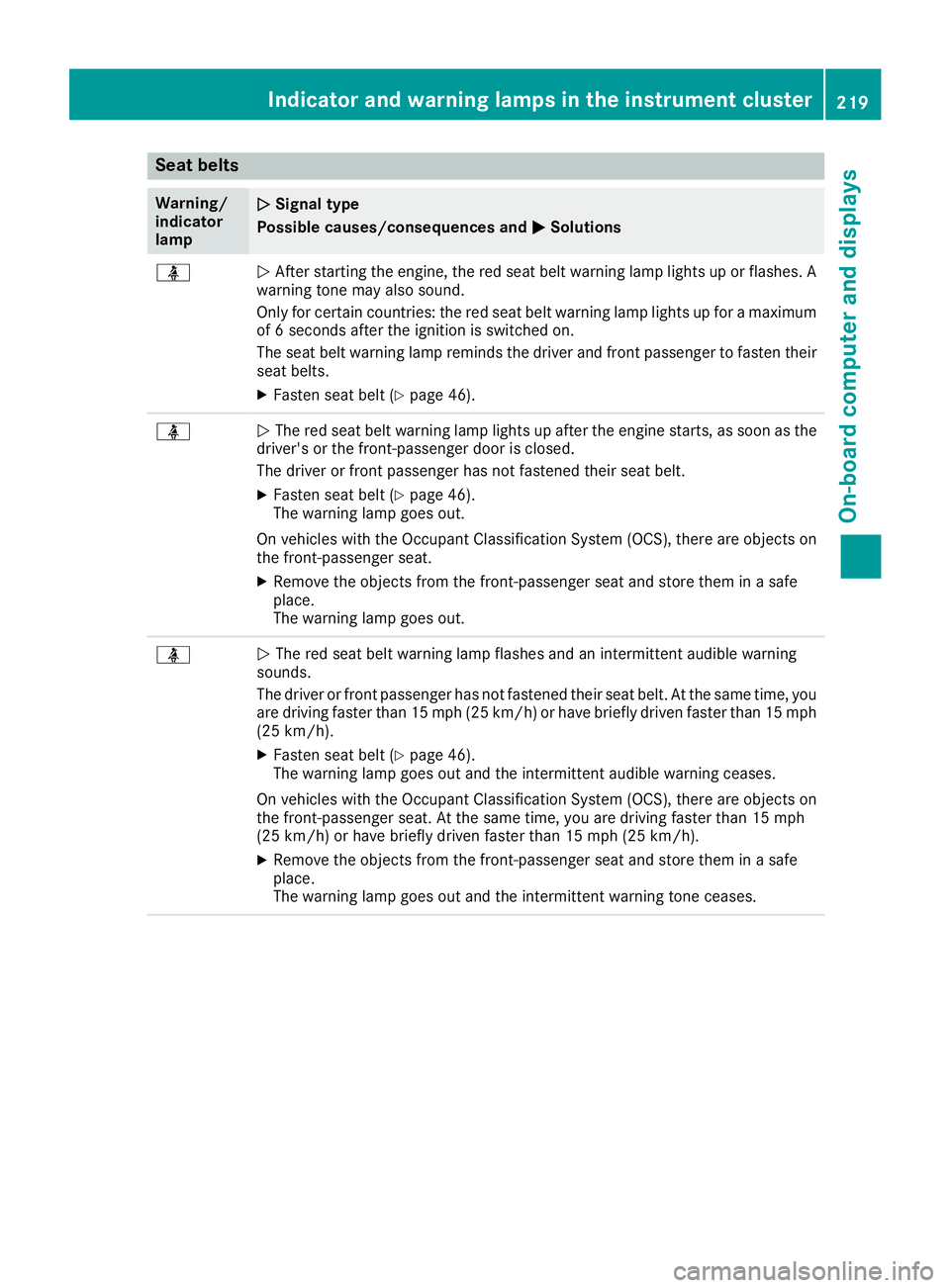
Seat belts
Warning/
indicator
lampNSignal type
Possible causes/consequences and M
Solutions
üNAfter startin gthe engine, the red seat belt warning lamp lights up or flashes. A
warning tone may also sound.
Only for certain countries: the red seat belt warning lamp lights up for amaximum
of 6s econds after the ignition is switched on.
The seat belt warning lamp reminds the driver and front passenger to fasten their
seat belts.
XFasten seat belt (Ypage 46).
üN The red seat belt warning lamp lights up after the engine starts, as soon as the
driver's or the front-passenger door is closed.
The driver or front passenger has not fastened their seat belt.
XFasten seat belt (Ypage 46).
The warning lamp goes out.
On vehicles with the Occupant Classification System (OCS), there are object son
the front-passenger seat.
XRemove the object sfrom the front-passenger seat and store them in asafe
place.
The warning lamp goes out.
üN The red seat belt warning lamp flashes and an intermittenta udible warning
sounds.
The driver or front passenger has not fastened their seat belt. At the same time, you
are driving faster than 15 mph (25 km/h) or have briefly driven faster than 15 mph
(25 km/h).
XFasten seat belt (Ypage 46).
The warning lamp goes out and the intermittenta udible warning ceases.
On vehicles with the Occupant Classification System (OCS), there are object son
the front-passenger seat. At the same time, you are driving faster than 15 mph
(25 km/h) or have briefly driven faster than 15 mph (25 km/h).
XRemove the object sfrom the front-passenger seat and store them in asafe
place.
The warning lamp goes out and the intermittentw arning tone ceases.
Indicator and warning lampsinthe instrument cluster219
On-board computer and displays
Z
Page 236 of 310
XAlwaystransport load sinthe cargo compart-
ment and with the sea tbackrests folde dup
and properly locked in position.
XAlway splace the load against the backrests of
the front or rea rseats.
XMov elarge and heavy load sasfar towards the
front of the vehicl easpossibl eagain st the
front or rea rseats. Stow the load flush with
the rea rorfront seats.
XAlway saddit ionally secur ethe load with suit-
able load-securing aids or tie downs.
Observ ethe following notes:
RDo not stack load shighe rthant he uppe redg e
of the backrests.
RTransport load sbehin dseats thata renot
occupied.
RIf the rea rbench sea tisn ot occupied ,insert
the sea tbelts crosswis einto the buckle of the
opposite sea tbelt.
Carg ocom partmen tvariations
Youc an vary the cargo compartment according
to your transportation requirements as follows:
Rby folding the sea tbackrests forwar dtothe
table position.
Rby removing the rea rbench seat.
Yo uw illf ind informatio nabout rearbench seats
in the "Rea rbench seats" sectio n(
Ypage 85).
Securingloa ds
Important safety notes
GWARNING
If yo uattach the tie-down incorrectly when
securing the load ,the following mayo ccurin
the event of abrupt changesind irection, brak-
ing maneuver soranaccident:
Rthe cargo tie-down ring smaybecome
detached or the tie-down mayt earifthe
permissibl eloa dise xceeded
Rthe load mayn ot be restrained.
Thi sm aycause the load to slip ,tip ove rorbe
tossed about, striking vehicl eoccupants.
There is ariskofana ccident and injury.
Alwaystension the tie-downs in the proper
manner and onlyb etween the described
cargo tie-down rings. Alway susetie-downs
designeds pecifically for the loads.
!Observethe informatio nonthe maximum
loading capacity of the individual cargo tie-
down points.
If yo uusesevera lcargo tie-down points to
secur eaload, youm usta lway stake the max-
imu mloadin gcapacity of the weakest cargo
tie-down point into account.
If yo ubrake hard, for example, the forces act-
ing could be up to severa ltime sthe weight
forc eoft he load .Alway susemultipl ecargo
tie-down points in order to distribute the force
absorption. Loa dthe anchorages evenly.
Spread the load evenly across the cargo tie-
down points/cargo tie-down rings. Yo uwillf ind
informatio nonthe maximu mloadin gcapacity of
the cargo tie-down points under "Cargo tie-
down points and carrie rsystems" (
Ypage 304).
Do not attempt to modify or repai rthe cargo tie-
down points/cargo tie-down ring sortie downs.
Read the informatio nonqualified specialist
workshops: (
Ypage 29).
As the driver ,you arer esponsibl efor ensuring
that:
RThe load is secured against slipping, tipping,
rolling or falling off in norma l traffic condi-
ti
ons, shoul dthe vehicl eswervetoa voidan
obstacle ,inthe event of full brake application
and on poor roa dsurfaces.
RThe applicabl erequirements and guidelines
relating to load-securing practice smustb e
met.
If thisisn ot the case, thism ayconstitute a
punishabl eoffense, depending on local legis-
latio nand any ensuing consequences.
Alway sobserve the legalr equirements for the
country yo uarecurrentl yin.
Make sure thatt he load is securebefore every
journey and at regular intervals during alon g
journey .Correct an incorrectly or inadequately
secured load if necessary.
Alway sobserve the operating instructions or the
notes of the lashing strapm anufacturer for the
operatio nofthe lashing strap.
Yo uc an obtai ninformatio nabout securing the
load correctl yfrom the manufacturer of the load
securing aids or tie down for securing the load.
234Securingl oads
Transporting loads
Page 257 of 310
This will prevent smears and reduce wiping
noises caused by residue on the windshield.
Ron vehicles with rear doors, from the rear view
camera lens in the top of the license plate
molding (
Ypage 257)
Washing by hand
In some countries, washing by hand is only
allowed at specially equipped washing bays.
Observe the legal requirementsofthe country
you are currently in when washing by hand.
XDo not use hot water and do not wash the
vehicle in direct sunlight.
XUse asoft car sponge.
XUse amild cleaning agent, e.g. aMercedes-
Benz approved car shampoo.
XThoroughly hose down the vehicle with agen-
tle jet of water.
XDo not point the water jet directly towards the
air inlets.
XUse plenty of water and rinse out the sponge
frequently.
XRinse the vehicle with clean water and dry
thoroughly with achamois.
XDo not let the cleaning agents dry on the
paintwork.
When using the vehicle in winter, remove all
traces of road salt deposits carefully and as
soon as possible.
Power washers
GWARNING
The water jet from acircular jet nozzle (dirt
blasters) can cause invisible exterior damage
to the tires or chassis components .Compo-
nentsd amaged in this way may fail unexpect-
edly. There is arisk of an accident.
Do not use power washers with circular jet
nozzles to clean the vehicle. Have damaged
tires or chassis components replaced imme-
diately.
!Under no circumstances use power washers
in the vehicle interior. The pressurized water
and associated spray produced by the power
washer could cause extensive damage to the
vehicle.
!When using high-pressure cleaning equip-
ment,m aintainaminimum distance of
approx. 1ft(30 cm) between the spray nozzle
and the vehicle parts. Do not use apower
washer with around-jet nozzle. You could
damage the vehicle or engine parts.
!Keep the water jet moving constantly while
cleaning. This will avoid causing damage to
the vehicle.
Do not point the water jet at:
Rdoor joints
Rrear view camera
Rair bellows
Rbrake hoses
Rwheel balance weights
Relectrical components
Relectrical connections
Rseals
Rdrive train, especially not at the intermedi-
ate bearing of the propeller shaft
Cleaning the engine
!Water must not enter intak eorventilation
openings. When cleaning with high pressure
water or steam cleaners, the spray must not
be aimed directly at electrical components or the terminals of electrical lines.
Preserve the engine after the engine has been
cleaned. Protectt he belt drive system from
exposure to the preservative agent.
Also observe the information under "Power
washers" (
Ypage 255).
Cleaning the paintwork
!Do not affix:
Rstickers
Rfilms
Rmagnetic plates or similar items
to painted surfaces. You could otherwise
damage the paintwork.
Scratches, corrosived eposits, areas affected by
corrosion and damage caused by inadequate
care cannot alwaysbec ompletely repaired. In
such cases, visit aqualified specialist workshop.
Care255
Maintenance and care
Z
Page 261 of 310
Cleaning thesteering wheel and selec-
tor lever
XThoroughlyw ipe withadamp cloth.
XVehicles with leather upholstery: after
cleaning, use leather car eagents that have
been recommended and approved by
Mercedes-Benz.
Cleaning th etrime lements
!Do no tuse solvent-based cleanin gagents
suchast ar remover, wheel cleaners, polishes
or waxes. Thereiso therwise ariskofd amag-
ing th esurface.
XWipe th etrime lements withad amp, lint-free
cloth ,e.g.am icrofiber cloth.
XHeavy soiling: use careproduct sand clean-
ing agents recommended and approved by
Mercedes-Benz.
Cleaning th eseat covers
!Do no tuse microfiber cloth stoclean genu-
ine leather or artificial leather covers.Ifu sed
often,am icrofiber cloth can damag ethe
cover.
!Clean:
Rartificial leather covers withac loth mois-
tene dwithas olution containing 1% deter-
gent, e.g .dish washingl iquid.
Rcloth covers witham icrofiber cloth mois-
tene dwithas olution containing 1% deter-
gent, e.g .dish washingl iquid. Wipe entire
seat sections carefull ytoa void leaving visi-
ble lines. Leavet heseat to dry afterwards.
Cleaning results dependont hetype of dirt
and how longith as been there.
Rgenuine leather covers carefull ywitha
damp cloth ,the nw ipe th ecovers down
withad ry cloth.Makes ure that th eleather
does no tbecome soaked. Otherwise, the
leather coul dbecome roug horcracked.
Only use leather car eagents that have
been tested and approved by Mercedes-
Benz. You can obtain these from aqualified
specialist workshop.
iPleasek eepinm indt hat:
Rleather covers are anatural product and ,as
such, are subject to anatural agingp roc-
ess.L eather may reac tdifferently (e.g. increased wrinkling
)tocertain environ-
mental influences (suchash igh humidity or
intense heat).
Rregular car eisessential to mak esure that
th ea ppearanc eand comfor tofthecovers
are retaine dovertime.
Cleaning th eseat belts
GWARNING
Seat beltsc an become severely weakened if
bleached or dyed. This coul dcaus ethe seat
beltstot earorf ail, for instance, in th eevent of
an accident. This posesani ncreased riskof
injury or fatal injury.
Never bleachord ye theseat belts.
!Do no tclean th eseat beltsu singchemical
cleanin gagents .Don otdry th eseat beltsb y
heating at temperatures above1 76‡(80 †)
or in direct sunlight.
Remove any stains or dirt immediately .This will
avoi dresidue or damage.
XUse clean, lukewarm water and soaps olution.
Cleaning the headliner and carpets
XHeadliner:if it is very dirty ,use asoft brus hor
dry shampoo.
XCarpets: use the carpe tand textile cleaning
agents recommended and approved by
Mercedes-Benz.
Care259
Maintenancea nd care
Z
Page 265 of 310
!Vehicles withagasolinee ngine:avoid
repeated and lengthy starting attempts. Oth-
erwise, the catalytic converter could be dam-
aged by non-combusted fuel.
If the indicator and warning lamps in the instru-
ment cluster do not light up at low tempera-
tures, the discharged battery may have frozen.
In this case you may neither charge the battery
nor jump-start the vehicle. The service life of a
thawed battery may be shorter. Start-up behav-
ior may deteriorate, in particular at low temper-
atures. Have the thawed battery checked at a
qualified specialist workshop.
Do not use arapid charging device to start the
vehicle. If your vehicle's battery is discharged,
the engine can be jump-started from another
vehicle or from adonor battery using jumper
cables. For this purpose, the vehicle has ajump-
starting connection point in the engine com-
partment.
When jump-starting, observe the following
points:
RThe battery is not accessible in all vehicles. If
the other vehicle's battery is not accessible,
jump-start the vehicle using adonor battery
or ajump-startingd evice.
RYou may only jump-start the vehicle when the
engine and exhaust system are cold.
RDo not start the engine if the battery is frozen.
Let the battery thaw first.
RJump-starting may only be performed from
batteries with anominal voltage of 12 V.
ROnly use jumper cables that have asufficient
cross-section and insulated terminal clamps.
RIf the battery is fully discharged, attach the
battery of another vehicle for afew minutes
before attempting to start. This charges the
empty battery alittle.
RMake sure that the two vehicles do not touch.
Make sure that:
Rthe jumper cables are not damaged.
Rbare parts of the terminal clamps do not come
into contact with other metal parts while the
jumper cables are connected to the battery.
Rthe jumper cables cannot come into contact
with parts such as the V-belt pulley or the fan.
These parts move when the engine is started
and while it is running.
Jumper cables and further information regarding
jump starting can be obtained at any qualified
specialist workshop.
Before connecting the jumper cables
XApply the parking brake.
XShift the transmission to position P.
XSwitch off all electrical consumers, e.g. audio
equipment, blower.
XTurn key to position 0in the ignition lock and
remove it.
XOpen the hood (Ypage 241).
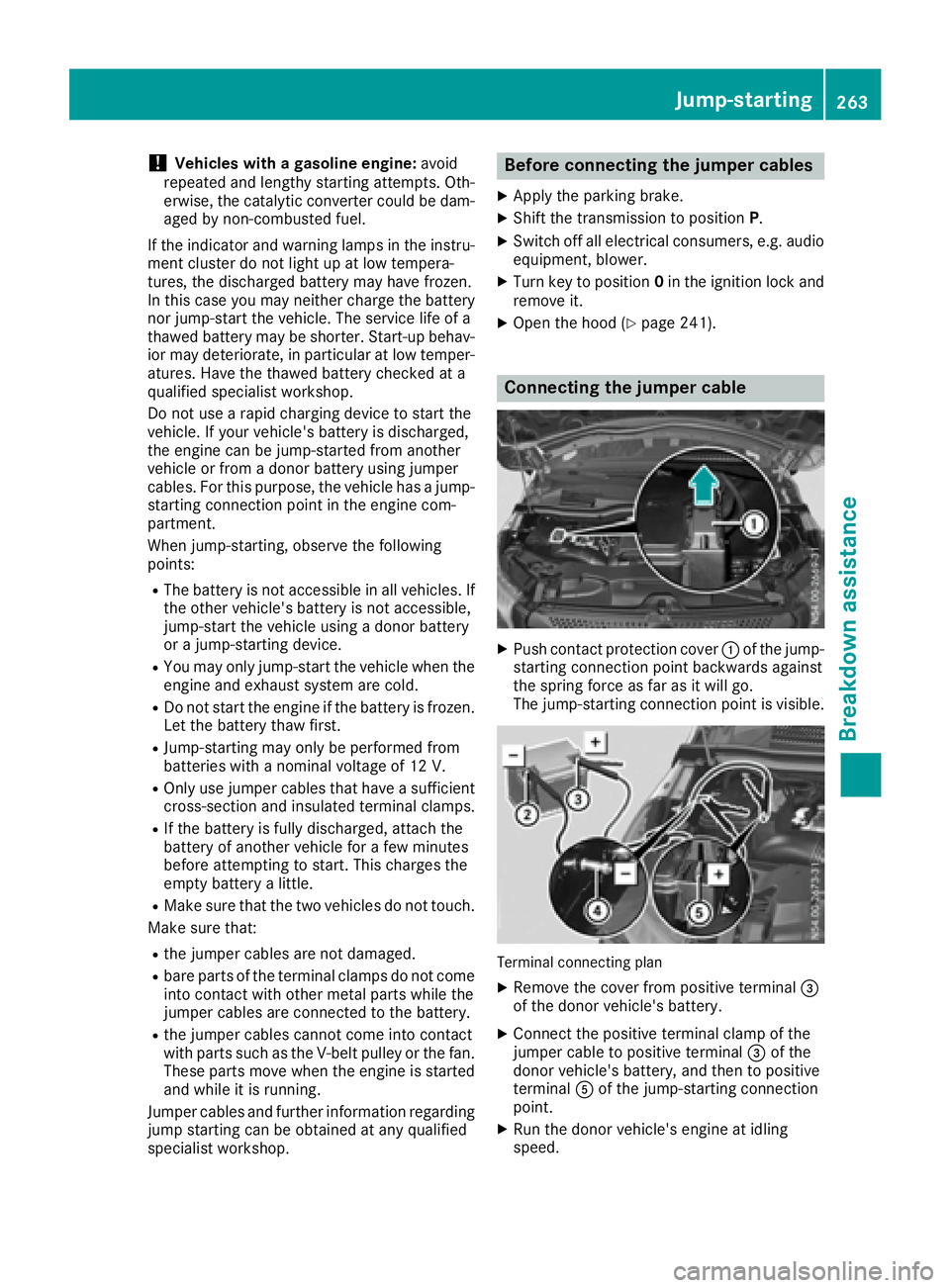
Connecting the jumper cable
XPush contact protection cover :of the jump-
starting connection point backwards against
the spring force as far as it will go.
The jump-startingc onnection point is visible.
Terminal connecting plan
XRemove the cover from positive terminal =
of the donor vehicle's battery.
XConnect the positive terminal clamp of the
jumper cable to positive terminal =of the
donor vehicle's battery, and then to positive
terminal Aof the jump-startingc onnection
point.
XRun the donor vehicle's engine at idling
speed.
Jump-starting263
Breakdown assistance
Z