steering MERCEDES-BENZ METRIS 2016 MY16 Operator’s Manual
[x] Cancel search | Manufacturer: MERCEDES-BENZ, Model Year: 2016, Model line: METRIS, Model: MERCEDES-BENZ METRIS 2016Pages: 310, PDF Size: 7.28 MB
Page 128 of 310
Beforeswitching off the engine, always switch
to parking position P.Prevent the parked vehi-
cle from rolling away by applying the parking
brake.
!If the engine is switched off, rolling in neutral
N can damag ethe power transmission and
result in transmission damage.
Alway sobserve the instructions and safety
notes under "Tow starting and towing away"
(
Ypage 264).
Bearinm ind that power transmission between
the engine and the transmission is interrupted
whe nthe engine is switched off. For this reason,
shift the automatic transmission to Pbefore the
engine is switched off and with the vehicle is
stationary. Appl ythe parking brake to prevent
the vehicle from rolling away.
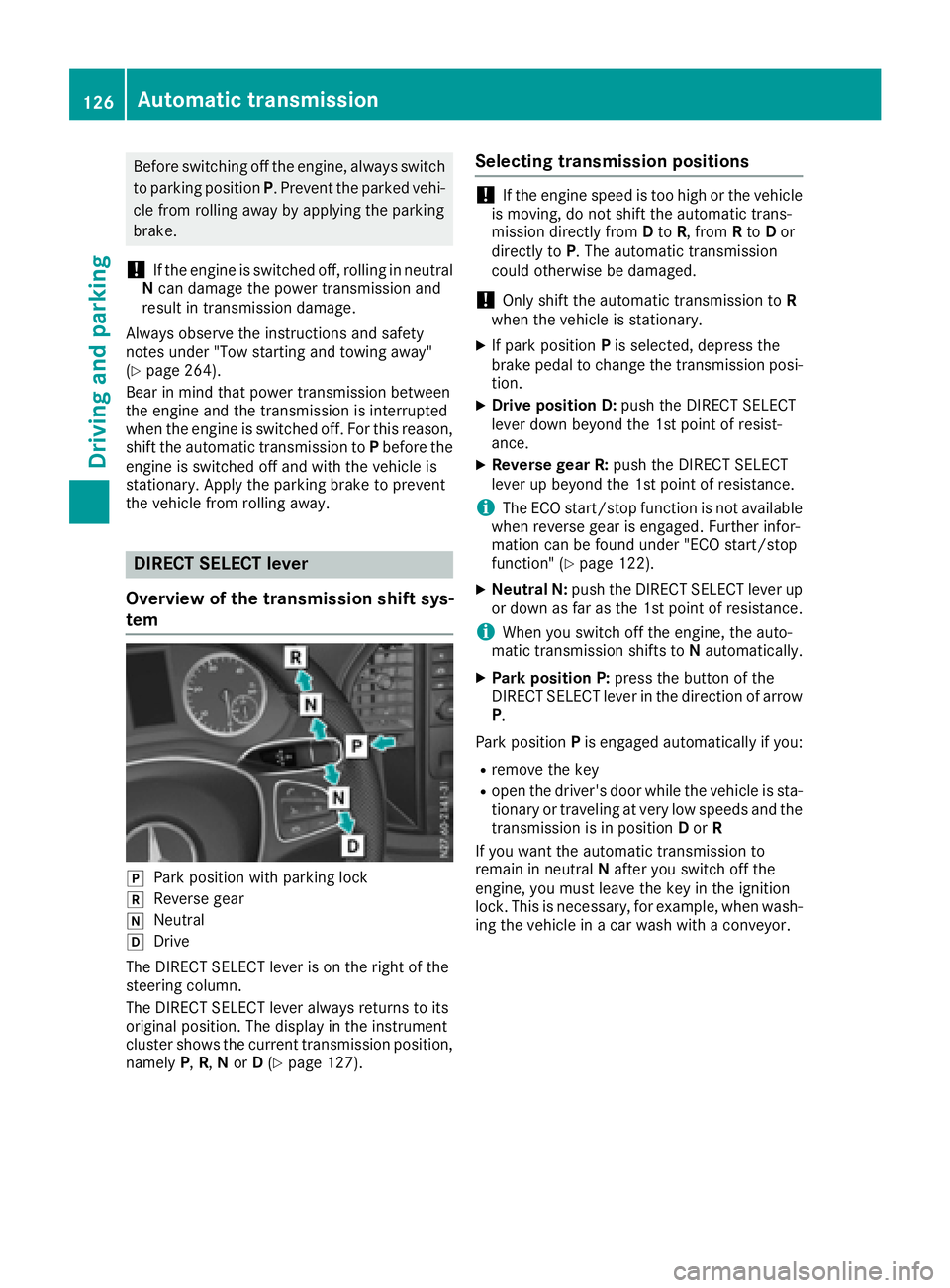
DIREC TSELECT lever
Overvie wofthe transmissio nshift sys-
tem
jPark positio nwithp arking lock
kReverseg ear
iNeutral
hDrive
The DIREC TSELECT lever is on the right of the
steering column.
The DIREC TSELECT lever always returns to its
origina lposition. The display in the instrument
cluster showst he current transmission position,
namely P,R, Nor D(
Ypage 127).
Selecting transmissio npositions
!If the engine speed is too hig horthe vehicle
is moving, do not shift the automatic trans-
missio ndirectly from Dto R,f rom Rto Dor
directly to P.The automatic transmission
could otherwise be damaged.
!Only shift the automatic transmission to R
whe nthe vehicle is stationary.
XIf park position Pis selected ,depress the
brake pedal to chang ethe transmission posi-
tion.
XDrive positionD :push the DIREC TSELECT
lever dow nbeyond the 1st point of resist-
ance.
XReverse gear R: push the DIRECTSELECT
lever up beyond the 1st point of resistance.
iThe ECO start/stop function is not available
whe nreverse gea risengaged .Further infor-
mation can be found under "EC Ostart/stop
function" (
Ypage 122).
XNeutral N: push the DIREC TSELECT lever up
or dow nasfar as the 1st point of resistance.
iWhe nyou switch off the engine, the auto-
mati ctransmission shifts to Nautomatically.
XPark positionP :press the button of the
DIREC TSELECT lever in the directio nofarrow
P.
Park position Pis engaged automaticall yifyou:
Rremove the key
Rope nthe driver'sd oorwhile the vehicle is sta-
tionary or traveling at very low speeds and the
transmission is in position Dor R
If yo uwantthe automatic transmission to
remain in neutral Nafte ryou switch off the
engine, yo umustleave the key in the ignition
lock. Thisisn ecessa
ry, for example, whe nwash-
i
ng the vehicle in acar wash with aconveyor.
126Automatic transmission
Drivin gand parking
Page 130 of 310
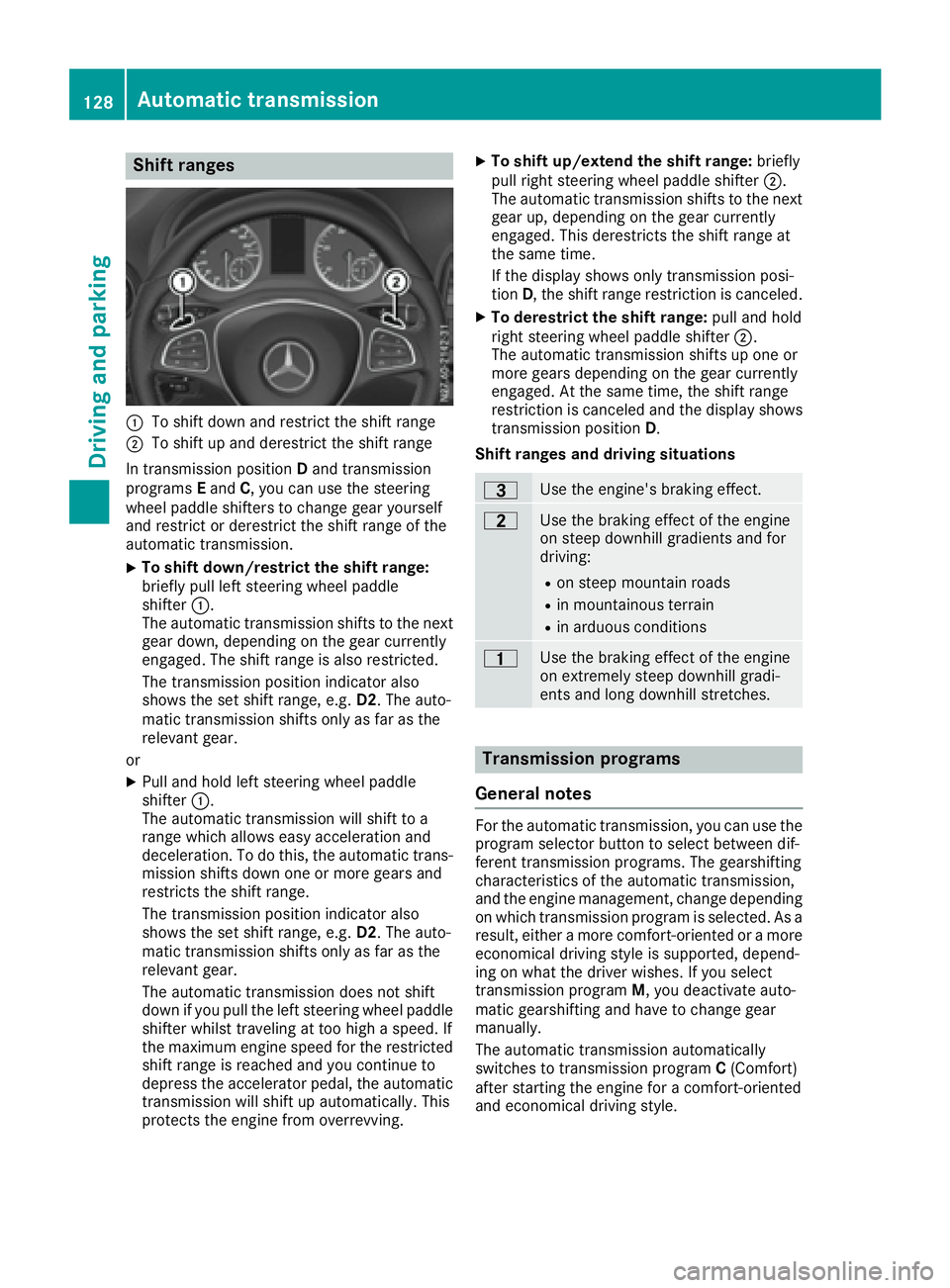
Shift ranges
:To shift down and restrict the shift range
;To shift up and derestrict the shift range
In transmission position Dand transmission
programs Eand C,you can use the steering
wheel paddle shifters to change gear yourself
and restrict or derestrict the shift range of the
automatic transmission.
XTo shift down/restrict the shift range:
briefly pull left steering wheel paddle
shifter :.
The automatic transmission shifts to the next gear down, depending on the gear currently
engaged. The shift range is also restricted.
The transmission position indicator also
shows the set shift range, e.g. D2.The auto-
matic transmission shifts only as far as the
relevant gear.
or
XPull and hold left steering wheel paddle
shifter :.
The automatic transmission will shift to a
range which allowse asy acceleration and
deceleration. To do this, the automatic trans-
mission shifts down one or more gears and
restrictst he shift range.
The transmission position indicator also
shows the set shift range, e.g. D2.The auto-
matic transmission shifts only as far as the
relevant gear.
The automatic transmission does not shift
down if you pull the left steering wheel paddle
shifter whilst traveling at too high aspeed. If
the maximum engine speed for the restricted
shift range is reached and you continue to
depress the accelerator pedal, the automatic
transmission will shift up automatically. This
protectst he engine from overrevving.
XTo shift up/extend the shift range: briefly
pull right steering wheel paddle shifter ;.
The automatic transmission shifts to the next
gear up, depending on the gear currently
engaged. This derestrict sthe shift range at
the same time.
If the display shows only transmission posi-
tion D,the shift range restriction is canceled.
XTo derestrict the shift range: pull and hold
right steering wheel paddle shifter ;.
The automatic transmission shifts up one or
more gears depending on the gear currently
engaged. At the same time, the shift range
restriction is canceled and the display shows
transmission position D.
Shift ranges and driving situations
=Use the engine's braking effect.
5Use the braking effect of the engine
on steep downhill gradients and for
driving:
Ron steep mountain roads
Rin mountainous terrain
Rin arduous conditions
4Use the braking effect of the engine
on extremely steep downhill gradi-
ents and long downhill stretches.
Transmission programs
General notes
For the automatic transmission, you can use the
program selector button to select between dif-
ferent transmission programs. The gearshifting
characteristics of the automatic transmission,
and the engine management, change depending
on which transmission program is selected. As a
result, either amore comfort-oriented or amore
economical driving style is supported, depend-
ing on what the driver wishes. If you select
transmission program M,you deactivate auto-
matic gearshifting and have to change gear
manually.
The automatic transmission automatically
switches to transmission program C(Comfort)
after startin gthe engine for acomfort-oriented
and economical driving style.
128Automatic transmission
Driving and parking
Page 132 of 310
Rockingthe vehicle free
At speeds up to 5mph (9 km/h )you can switch
back and forth between drive position Dand
reverse gear Rwithou tapplyin gthe brakes. This
helps when rocking the vehicl eoutof snow or
slush.
XPush the DIREC TSELECT lever alternately up
and dow nbeyond the firs tpoint of resistance.
Towin gatrailer
XDepending on the downhil lgradient, limit the
shift rang e(Ypage 128 )orshift manually into
al ower gear (Ypag e130) in which the engine
wil loperate in the middle of the engine speed
range. This als oapplie sifcruise control is
activated.
Manual gearshifting
General notes
If you select transmission program M,automatic
gearshifting is deactivated and manua lgear-
shifting is automatically activated .You must
then permanently change geary ourself for as
long as the transmission programiss elected.
Permanent manua lgearshifting is deactivated
automatically when you switch from transmis-
sion program Mto another transmission pro-
gram. The automatic transmission then shifts
gears automatically. The display shows the
selected transmission programa nd transmis-
sion position Dagain.
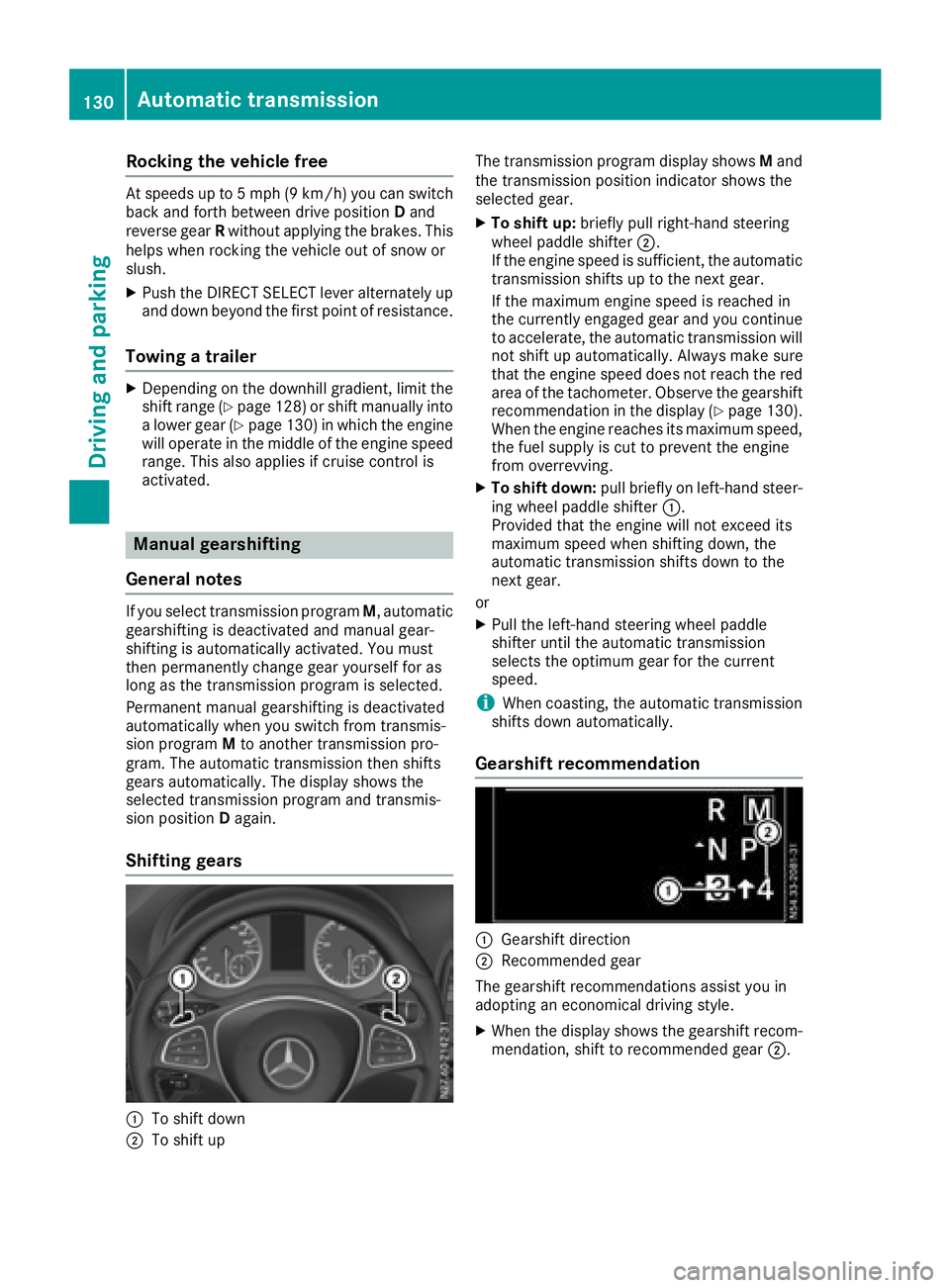
Shifting gears
:To shift down
;To shift up The transmission programd
isplay showsMand
the transmission position indicator shows the
selected gear.
XTo shift up: brieflypullr ight-hand steering
whee lpaddle shifter ;.
If the engine speediss ufficient, the automatic
transmission shifts up to the next gear.
If the maximu mengine speedisr eachedin
the currently engage dgear and you continue
to accelerate, the automatic transmission will
not shift up automatically. Always make sure
that the engine speedd oes not reach the red
area of the tachometer. Observe the gearshift
recommendation in the display (
Ypag e130).
When the engine reache sits maximu mspeed,
the fuel supply is cut to prevent the engine
from overrevving.
XTo shift down: pullbriefl yonl eft-hand steer-
ing whee lpaddle shifter :.
Provided that the engine wil lnot exceed its
maximu mspeedw hen shifting down, the
automatic transmission shifts down to the
next gear.
or
XPul lthe left-hand steering whee lpaddle
shifter until the automatic transmission
selects the optimumg ear for the current
speed.
iWhen coasting, the automatic transmission
shifts down automatically.
Gearshift recommendation
:Gearshift direction
;Recommended gear
The gearshift recommendations assist you in
adopting an economicald riving style.
XWhen the display shows the gearshift recom-
mendation, shift to recommended gear ;.
130Automatic transmission
Driving and parking
Page 136 of 310
Switching off the engine
Important safety notes
GWARNING
The automatic transmission switches to neu-
tral position Nwhen you switch off the engine.
The vehicle may roll away.T here isarisk of an
accident.
After switching off the engine, always switch
to parking position P.Prevent the parked vehi-
cle from rolling away by applying the parking
brake.
!If the coolant temperature is very high, e.g.
after driving on hilly roads, leave the engine
running at idle speed for about two minutes
before turning it off.
This allowst he coolant temperature to return
to normal.
Vehicles with automatic transmission
XStop the vehicle.
XShift the transmission to position P.
XApply the parking brake.
XTurn key to position0in the ignition lock and
remove it.
The immobilizer is activated.
If you switch the engine off with the trans-
mission in position Ror D,t he automatic
transmission shifts to Nautomatically.
If you then open one of the front doors or
remove the key from the ignition, the auto-
matic transmission automatically shifts to P.
If you shift the automatic transmission to N
before switching off the engine, the automatic
transmission remains in Neven if afront door
is opened.
XSecure the vehicle to prevent it from rolling
away (Ypage 132).
Parking the vehicle for along period
If you leave the vehicle parked for longer than
4w eeks, the battery may be damaged by
exhaustive discharging.
XDisconnect the battery (Ypage 250).
or
XConnect the battery to atrickle charger.
Be sure to observe the notes on charging the batteries (
Ypage 253).
You can obtain information about trickle
chargers from aqualified specialist work-
shop.
If you leave the vehicle parked for longer than
6w eeks, the vehicle may suffer damage as a
result of lack of use.
XVisit aqualified specialist workshop and seek
advice.
Driving tips
General notes
Important safety notes
GWARNING
If you switch off the ignition while driving,
safety-relevant functions are only available
with limitations, or not at all. This could affect, for example, the power steering and the brake
boosting effect.Y ou will require considerably
more effort to steer and brake. There is arisk
of an accident.
Do not switch off the ignition while driving.
GWARNING
If you operate mobile communication equip-
ment while driving, you will be distracted from traffic conditions. You could also lose control
of the vehicle. There is arisk of an accident.
Only operate this equipment when the vehicle
is stationary.
Observe the legal requirements of the countryi n
which you are driving. Some jurisdictions pro-
hibit the driver from using amobile phone while
driving avehicle.
134Driving tips
Driving and parking
Page 140 of 310
have sufficient tread depth, depending on the
depth of water on the road. There isarisk of
an accident.
For this reason, avoid tire ruts and brake care-
fully.
Therefore, in heavy rain or other conditions in
which hydroplaning can occur, drive as follows:
Rreduce your speed
Ravoid tire ruts
Rapply the brakes with care
Driving on flooded roads
!Do not drive through flooded areas. Check
the depth of any water before driving through
it. Drive slowly through standing water. Oth-
erwise, water may enter the vehicle interior or
the engine compartment. This can damage
the electronic components in the engine or
the automatic transmission. Water can also
be drawn in by the engine's air suction nozzles
and this can cause engine damage.
If you have to drive on stretches of road on which
water has collected, please bear in mind that:
Rthe water level of standing water should not
be above the lower edge of the front bumper
Rdo not drive faster than walking speed
Driving in winter
GWARNING
If you shift down on aslippery road surface in
an attempt to increase the engine's braking
effect,t he drive wheels could lose their grip.
There is an increased danger of skidding and
accidents.
Do not shift down for additional engine brak-
ing on aslippery road surface.
!Vehicles with automatic transmission may
roll only briefly in the neutral position N.Pro-
longed rolling of the wheels, e.g. when being
towed, will result in transmission damage.
Have your vehicle winterproofed at aqualified
specialist workshop at the onset of winter. Drive particularly carefully on slippery roads.
Avoid sudden acceleration, steering and braking
maneuvers. Do not use cruise control.
If the vehicle threaten stoskid or cannot be
stopped when moving at low speed:
XShift the transmission to position N.
XTry to maintain control of the vehicle using
corrective steering.
The outside temperature indicator is not
designed to serve as an ice-warning device and
is therefore unsuitable for that purpose.
Changes in the outside temperature are dis-
played after ashort delay.
Indicated temperatures just above the freezing
point do not guarantee that the road surface is
free of ice. The road may still be icy, especially in
wooded areas or on bridges. If you do not adjust
your driving style, the vehicle may start to skid.
Always adapt your driving style and drive at a
speed to suit the prevailing weather conditions.
You should pay special attention to road condi-
tions when temperatures are around freezing
point.
You can find further information under:
R"M+S tires" (Ypage 269)
R"Snow chains" (Ypage 270)
R"Driving with summer tires" (Ypage 269)
Also observe the notes under "Winter operation" (
Ypage 269).
Driving off-road
Important safety notes
GWARNING
If you drive on asteep incline at an angle or
turn when driving on an incline, the vehicle
could slip sideways, tip and rollover. There is a risk of an accident.
Always drive on asteep incline in the line of
fall (straight up or down) and do not turn the
vehicle.
GWARNING
When driving off-road, your body is subject to
forces from all directions, due to the uneven
surface. You could be thrown from your seat,
for instance. There is arisk of injury.
138Driving tips
Driving and parking
Page 141 of 310
Alwayswearas eatb elt, eve nwhend riving off-
road.
GWARNING
If yo udrive ove robstacle sorinr uts, the steer-
ing whee lmayjerk outofy ourg rip, causing
injury to your hands.
Alway sholdt he steering whee lfirmly with
both hands. Whe ndriving ove robstacles, you
must expect steering forces to increase
briefl yand suddenly.
GWARNING
Flammabl ematerial such as leaves, grass or
twigs mayi gnite if they come into contact with
hot parts of the exhaus tsystem .There is arisk
of fire.
Whe ndriving off roa doronunpaved roads,
check the vehicle's undersid eregularly .In
particular, remove parts of plants or other
flammabl ematerial swhich have become
trapped. In the cas eofdamage, contact a
qualified specialist workshop.
!Whe ndriving off-roadoronu npaved surfa-
ces ,check the undersid eofthe vehicl eand
the wheels and tire satregular intervals .In
particular, remove any trappe dforeign
objects, e.g .stone sand branches.
Such foreig nobjects may:
Rdamage the chassis, the fuel tank or the
brake system
Rcause imbalance sand thusv ibrations
Rbe flung outw heny ou continue driving
If ther eisany damage, inform aquali fied spe-
cialist workshop.
Whe ndriving off-roada nd on construction sites,
sand, muda nd water mixe dwitho il,f or exam-
ple, mayg et into the brakes. Thi smaylead to a
reduction in braking performance or totalb rake
failure, also as aresul tofi ncreased wear .The
braking characteristics will vary depending on
the material thath asgot into the system .Clean
the brakes afte rdriving o
ff-road. If yo uth
en
notice reduce dbraking performance or hear
scraping noises ,hav et he brake system checked
at aq uali fied specialist workshop.A djust your
driving style to the changedb raking character-
istics. Driving off-roadoronc
onstruction sites increa-
ses the possibility of vehicl edamag ewhich may
in turn lead to the failure of certain assemblies
and systems. Adapt your driving style to the off- roa ddriving conditions. Driv ecarefully. Have
any vehicl edamag erectifie dataq ualified spe-
cialist workshop as soo naspossible.
Whe nloadin gyourvehicl efor driving off-roado r
on aconstruction site, kee pthe vehicle's center
of gravity as lo waspossible.
Rule sfor drivin goff-road
!Alway sbearthe vehicle's ground clearance
in mind and avoido bstacles, e.g .deepr uts.
Obstacles mayd amagethe following parts of
the vehicle:
Rthe chassis
Rthe drive train
Rthe fuel and supply tanks
For thisr eason, yo ushoul dalway sdrive
slowly when driving off-road. If yo uhavet o
drive ove robstacles, have the front
passengerd irect you.
iWe recommend thaty ouadditionally carry a
shovel and arecover yrop ew iths hackle in the
vehicle.
REnsure thatl oadsand items of luggage are
securel ystowed or lashe ddown
(
Ypage 232).
RBefore driving off-road, stop the vehicl eand
shift to alow gear.
RIf the surface requires ,temporaril ydeactivate
ESP®when pulling away (Ypage 64).
ROnlyd rive off-roadw itht he engine running
and ageare ngaged.
RDriv eslowly and smoothly. Walking pace is
necessary in many situations.
RAvoi dspinning the drive wheels.
RMake sure thatt he wheels always remai nin
contact with the ground.
RDriv ewithe xtreme car eoveru nknown terrain
where yo ucan onlys ee forashort distance.
As aprecaution, get outoft he vehicletotake
al oo katt he route to be take ninadvance.
RCheck the water depth before fording.
RWatch outf or obstacles(e.g. rocks ,holes,
tree stumps and ruts).
RAvoi dedges where the surface could crumble
or break away.
Driving tips139
Driving an dparking
Z
Page 142 of 310
Checklist after driving off-road
!If you detect damagetothevehicle after
driving off-road, have th evehicle checked
immediately at aqualified specialist work-
shop.
Off-road driving places ahigher demand on your
vehicle than normal road operation. Checky our
vehicle after driving on roug hterra in. By doing
so you will notic eany damageing ood timeand
reduc ethe riskofana ccidentf or yourself and
other road users. Clean your vehicle thoroughly
before driving on public roads.
Observ ethe followingp oints after driving off-
road ,onc onstructio nsites and before driving on
public roads:
XActivate ESP®(Ypage 64).
XClean th eheadlamps and tail lamps and
check them for damage.
XClean th efront and rear licens eplates.
XClean th ewindshield, windows and exterior
mirrors.
XClean th esteps, door sills and grab handles.
This increases safety of footing.
XClean th ewheels/tires, wheel housing sand
th eu nderbody of th evehicle withaw aterjet .
This increases road grip ,especiall yonw et
road surfaces.
XCheckt hewheels/tires and wheel housings
for trapped foreign object sand remove them.
Trapped foreign object scan damaget he
wheels/tires and may be flun gout from the
vehicle when you continue driving.
XCheckt heunderbody for trapped branches or
other part sofplants and remove them.
Trapped branches or other part sofplants
increas ethe riskoff irea nd can caus ed
am-
age
to fuel lines, brak ehoses and th erubber
bellows of axle joint sand driv eshafts.
XClean th ebrak edisks, brak epads and axle
joints, particularly after operatio ninsand,
mud, grit/gravel, wate rorsimilarly dirt ycon-
ditions.
XCheckt heentir efloo rassembly, th etires,
wheels, bodywork structure, brakes, steering,
chassis and exhaust system for any damage.
XCheckt heservic ebrak efor operatin gsafety,
e.g .carry out abrak etest.
XIf you notic estron gv ibrations after driving off-
road ,che ck th ewheelsa nd drivetrain for for-
eign object sagain.R emove any foreign object
swhichc an lead to imbalances and
thus caus evibrations.
Driving in mountainous areas
When driving in mountainous areas ,notet hat
th ep ower output of th eengine, and withiti ts
gradientc limbingcapability, decreas ewith
increasing altitude. Pleaset aken oteoft hisp ar-
ticularly when driving withat railer in mountain-
ous areas.
The maximum permissible trailer loads are valid
for journeys at altitudes up to 1100 yds
(1000 m) aboves ea levelwithg radients up to
12%.
Information on maximum permissible trailer
loads can be foun dinyour vehicle registration
papersa nd on thevehicle identification plate
(
Ypage 294) or unde r"Trailer loads"
(Ypage 305).
When driving at altitudes of 2700 yds (2500 m)
aboves ea level, th eECO start/sto pfunction is
no longer available.
Notes on braking on downhill gradients can be
foun dint he"Braking" sectio n(
Ypage 136).
Driving systems
Cruise control
General notes
Cruise control maintain sthe speedoft hevehi-
cle for you. It brakes automatically in orde rto
avoid exceedingt heset speed.
Use cruise control if road and traffic conditions
makeita ppropriat etomaintain asteady speed
for aprolonged period. You can set any speed
from 30 km/h upwards in increment sof1km/h
and 10 km/h.
If you have set Miles
as theunit for th edigital
speedometer, you can set any speeda bove
20 mph in increment sof1mph and5mph.
Changingt hedisplay unit for th edigital speed-
omete rand th edistance:
Ron vehicle swithout steering wheel buttons
(Ypage 174)
Ron vehicle swith steering wheel buttons
(Ypage 185)
Cruise control shouldn otbe activated when
driving off-road or on constructio nsites.
140Driving systems
Driving and parking
Page 143 of 310
Cruisecontro lmaybe unab leto maintain the
storeds peedonu phillgradients .The stored
speedisr esumedifth eu phill gradiente vens out
and th evehicle 's speedd oes notfall below
20 mph (30 km/ h).C ruise control maintains the
storeds peed on downhil lgradients by automat-
icall yapplyin gthe brakes. Observe the addi-
tiona ldriving tip s(
Ypage 136).
Important safety notes
Observe the notes on braking (Ypage 136).
If yo ufailtoa dapt your driving style or if yo uare
inattentive ,cruise control can neither reduce
the ris kofana ccident nor override the laws of
physics .Cruise control canno ttake road,
weathe rand traffic conditions into account.
Cruise control is only an aid. Yo uare responsible
for the distance to the vehicl einfront, for vehi-
cle speed, for braking in goo dtime and for stay-
ing in lane.
If yo uchange wheel size ,make sure they corre-
spond to the correct wheel size category
(
Ypage 267). If the categor yischanged without
recoding the control units in the vehicle, the
functioning of cruise control may be impaired.
Do not us ecruise control:
Rin traffic conditions that are unsuitable for
driving at aconstant speed, e.g. in heavy traf-
fic, on winding roads or off-road.
Ron slippery roads. Braking or accelerating
may cause the drive wheel stoloset raction
and the vehicl ecould then skid.
Rwhen there is poo rvisibility ,e.g. du etofog,
heavy rai norsnow.
If there is achange of drivers ,make sure that
yo ui nform the new driver aboutt he set cruise
speed.
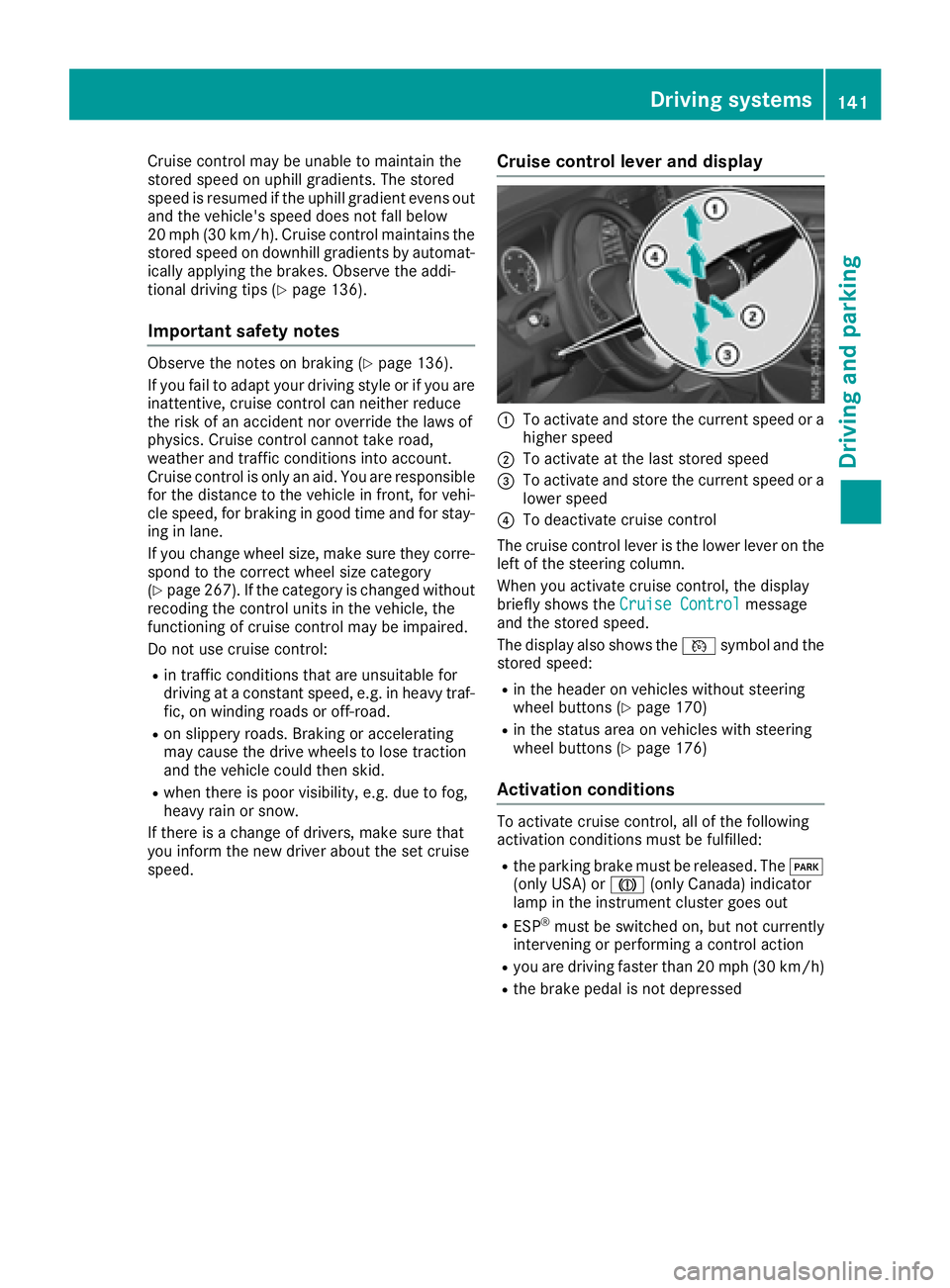
Cruise control levera nd display
:To activate and store the current speed or a
higher speed
;To activate at the last storeds peed
=To activate and store the current speed or a
lowerspeed
?To deactivate cruise control
The cruise control lever is the lowe rlev er on the
left of the steering column.
Whe nyou activate cruise control ,the display
briefl yshows the Cruise Control
message
and the storeds peed.
The display also shows the Vsymbo land the
storeds peed:
Rin the header on vehicles withou tsteering
wheel buttons (Ypage 170)
Rin the statu sareaonv ehicles with steering
wheel buttons (Ypage 176)
Activation conditions
To activate cruise control ,allof the following
activation conditions mus tbefulfilled:
Rthe parking brake mus tbereleased .The F
(onl yUSA) or J(onlyCanada) indicator
lamp in the instrument cluster goe sout
RESP®mus tbes witched on, bu tnot currently
intervening or performing acontrol action
Ryoua re driving faster than 20 mph (30 km/h)
Rthe brake pedal is not depressed
Driving systems141
Driving and parking
Z
Page 144 of 310
Storing and maintaining the current
speed
XAccelerate the vehicle to the desired speed
above 20 mph (30 km/h).
XBriefly push the cruise control lever up:or
down =.
XRelease the accelerator pedal.
Cruise control is activated. The current speed
is stored and shown briefly in the display's
text field.
The display also shows the Vsymbol and
the stored speed:
Rin the header on vehicles without steering
wheel buttons (Ypage 170)
Rin the status area on vehicles with steering
wheel buttons (Ypage 176)
Resuming the stored speed
GWARNING
If you call up the stored speed and it differs
from the current speed, the vehicle acceler-
ates or decelerates. If you do not know the
stored speed, the vehicle could accelerate or brake unexpectedly. There is arisk of an acci-
dent.
Pay attention to the road and traffic condi-
tions before calling up the stored speed. If you
do not know the stored speed, store the
desired speed again.
XBriefly pull the cruise control lever towards
you ;.
XRelease the accelerator pedal.
Cruise control is activated and resumes the
vehicle's speed to the last speed stored.
The stored speed is shown briefly in the dis-
play.
The display also shows the Vsymbol and
the stored speed:
Rin the header on vehicles without steering
wheel buttons (Ypage 170)
Rin the status area on vehicles with steering
wheel buttons (Ypage 176)
iWhen you pull the cruise control lever
towards you for the first time after startin gthe
engine, cruise control adopts the current
speed.
Setting the speed
It may be amoment before the vehicle starts to
accelerate or brake to the set speed. Take this
delay into account when settingt he speed.
XPress the cruise control lever up:to
increase the speed or down =to reduce the
speed.
The vehicle will accelerate or decelerate. The
speed is shown in the display.
XRelease the cruise control lever once the
desired speed is reached.
The displayed speed is stored.
or
XBriefly press the cruise control lever as far as
the 1st pressure point up :or down =.
The last speed stored is increased/reduced in increments of 1mph (1 km/h).
or
XBriefly press the cruise control lever beyond
the pressure point up :or down =.
The last speed stored is increased/reduced in increments of 5mph (10 km/h).
iCruise control is not deactivated if you
depress the accelerator pedal. If you acceler-
ate briefly to overtake, for example, cruise
control resumes the vehicle’s speed to the
last speed stored after you have finished over-
taking.
To deactivatec ruise control
There are various ways to deactivate cruise con-
trol:
XBriefly press the cruise control lever for-
wards?.
or
XApply the brakes.
The last speed set remains stored. The last
speed stored is deleted when you switch off the
engine.
Cruise control is deactivated automatically
when:
Ryou apply the brakes
Ryou apply the parking brake and the F
(only USA) or J(only Canada) indicator
lamp in the instrumentc luster lights up
Ryou are driving slower than 20 mph (30 km/h)
Ryou shift the automatic transmission to neu-
tral positionNwhile the vehicle is in motion
142Driving systems
Driving and parking
Page 149 of 310
The intensity of warning lamps:depends on
the brightness of the ambient light and is con-
trolled automatically.
Collision warning
If av ehicle is detected in the monitoring range of
Blind Spot Assist and you switch on the corre-
sponding turn signal, adouble warning tone
sounds once. The warning lamp in the corre-
sponding exterior mirror flashes. If the turn sig-
nal remains on, detected vehicles are indicated
by the flashing of the warning lamp in the exte-
rior mirror. There are no further warning tones.
Activating Blind Spot Assist
XMake sure that Blind Spot Assist is activated
in the on-board computer (Ypage 184).
XTurn the key to position 2in the ignition lock.
The warning lamps in the exterior mirrors light
up for approximately 1.5 seconds.
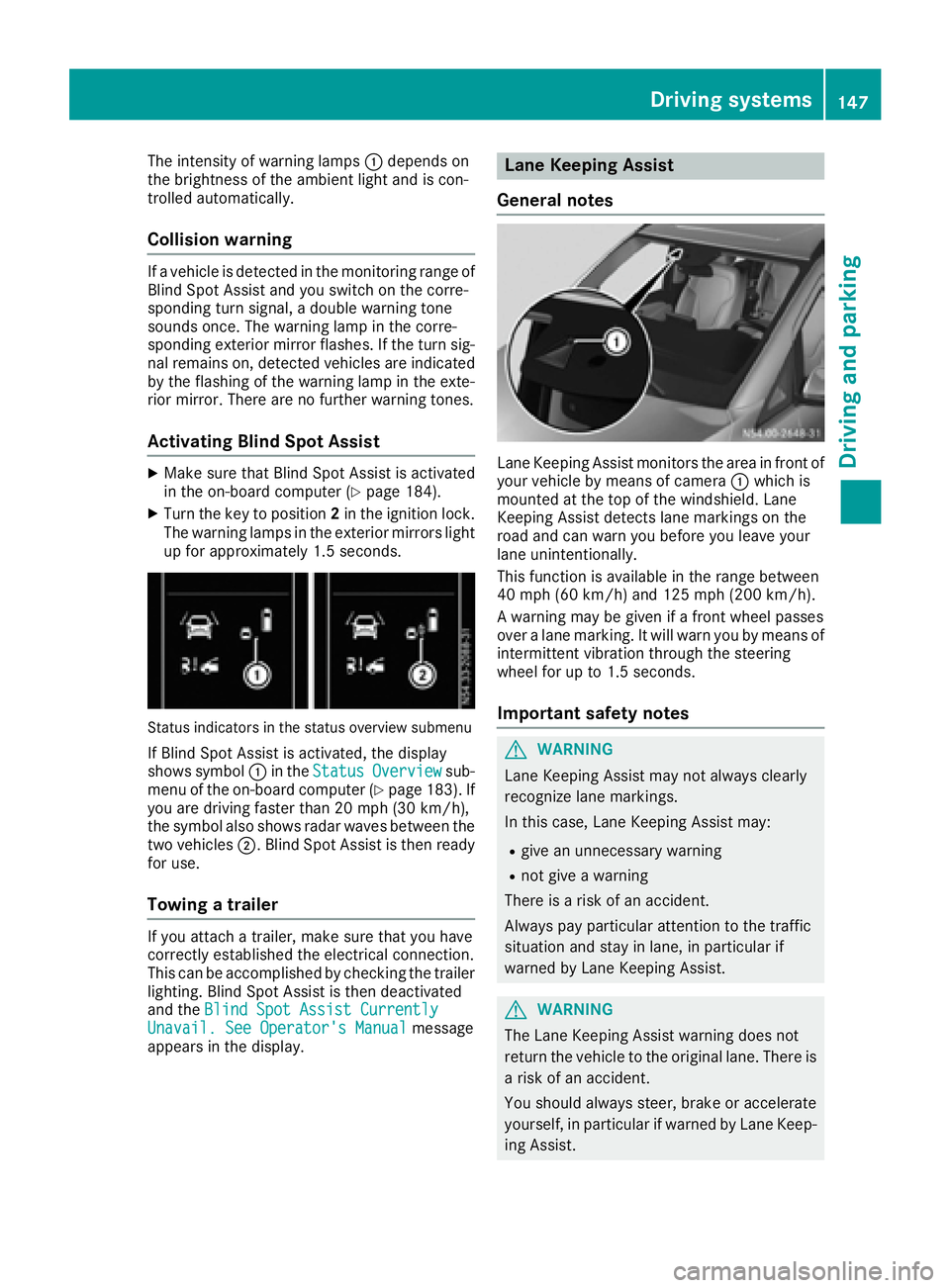
Status indicators in the status overview submenu
If Blind Spot Assist is activated, the display
shows symbol :in the StatusOverviewsub-
menu of the on-board computer (Ypage 183). If
you are driving faster than 20 mph (30 km/h) ,
the symbo lalsos hows rada rwaves between the
two vehicles ;.Blind Spo tAssist is thenr eady
for use.
Towin gatrailer
If youattach atrailer, make sure thaty ouhave
correctl yestablishe dthe electrical connection.
Thi scan be accomplishe dbychecking the trailer
lighting. Blind Spo tAssist is thend eactivated
and the Blind Spo tAssist Currently
Unavail. See Operator' sManualmessage
appear sinthe display.
Lane Keeping Assist
General notes
Lane Keeping Assist monitors the area in front of
your vehicl ebymeans of camera :which is
mounted at the top of the windshield. Lane
Keeping Assist detects lane markings on the
roa dand can warn yo ubefor ey ou leav eyour
lane unintentionally.
This functio nisa vailable in the range between
40 mph (60 km/h )and 125 mph (20 0km/h).
Aw arning maybeg iven if afront whee lpasses
ove ralanem arking. It will warn yo ubymeans of
intermittent vibratio nthroug hthe steering
whee lfor up to 1.5 second s.
Importan tsafety notes
GWARNING
Lane Keeping Assist may not always clearly
recognize lane markings.
In this case, Lane Keeping Assist may:
Rgive an unnecessary warning
Rnot give awarning
There is ariskofana ccident.
Alway spayparticula rattention to the traffic
situation and stay in lane, in particula rif
warned by Lane Keeping Assist.
GWARNING
The Lane Keeping Assist warning doe snot
return the vehicl etothe original lane. There is
ar iskofana ccident.
Yo us houl dalway ssteer, brake or accelerate
yourself, in particula rifwarned by Lane Keep-
ing Assist.
Driving systems147
Driving and parking
Z