display MERCEDES-BENZ METRIS 2016 MY16 Operator’s Manual
[x] Cancel search | Manufacturer: MERCEDES-BENZ, Model Year: 2016, Model line: METRIS, Model: MERCEDES-BENZ METRIS 2016Pages: 310, PDF Size: 7.28 MB
Page 156 of 310
Problems with PARKTRONIC
ProblemPossible causes/consequences andMSolutions
Only the red segments in
the PARKTRONIC warn-
ing displaysare lit.
Aw arning tone also
sounds for approx-
imately 2seconds.
PARKTRONIC is then
deactivated.
The indicator lamp of the
f button lights up
and the red segments in
the PARKTRONIC warn-
ing display go out.PARKTRONIC has malfunctioned and has switched itself off.
XIf problems persist, have PARKTRONIC checked at aqualified spe-
cialist workshop.
The PARKTRONIC warn-
ing displaysi mplausible
distances.
For example, all the seg-
mentsm ay be lit even
though there is no obsta-
cle present.The PARKTRONIC sensors are dirty or iced up.
XClean the PARKTRONIC sensors (Ypage 257).
XTurn the key to position 2again in the ignition lock.
The license plate or other parts attached near the sensors may not be
secured correctly.
XCheck the license plate and attachmentp arts near the sensors for
correct seating.
An external radio or ultrasonic source may be causing interference.
XCheck PARKTRONIC functions in adifferent location.
Active Parking Assist
General notes
Active Parking Assist is an electronic parking
aid. The system uses ultrasound sensors to
measure the road on both sides of the vehicle
and indicates suitable parking spaces. It can
then actively steer and brake the vehicle to help
you to park and exit the parking space.
Active Parking Assist includes the PARKTRONIC
parking aid which indicates visuallya nd audibly
the distance between your vehicle and an
object .Todot his, PARKTRONIC uses the ultra-
sonic sensors of the Active Parking Assist
(
Ypage 150).
Important safety notes
Active Parking Assist is only an aid. It is not a
substitute for your attention to the immediate
surroundings. You are responsible for safe maneuvering, parking and pulling away.M
ake
sure that no persons, animals or object sare in
the maneuvering range.
When you deactivate PARKTRONIC, Active Park-
ing Assist will also be deactivated.
For vehicles with atrailer coupling installed, the
minimum length for parking spaces will be
slightly increased.
If you have attached atrailer to your vehicle, you
should not use Active Parking Assist. Once the
electrical connection is established between
your vehicle and the trailer, Active Parking
Assist is no longer available. PARKTRONIC is
then deactivated for the rear area.
GWARNING
While parking or pulling out of aparking
space, the vehicle swings out and can drive
onto areas of the oncomingl ane. This could
result in acollision with another road user.
There is arisk of an accident.
154Driving systems
Driving and parking
Page 157 of 310
Pay attention to other road users. Stop the
vehicle if necessary or cancel the Active Park-ing Assist parking procedure.
!If unavoidable, you should drive over obsta-
cles such as curbs slowly and not at asharp
angle. Otherwise, you may damage the
wheels or tires.
Active Parking Assist may also display spaces
not suitable for parking, e.g.:
Rin az onew here parking or stopping is pro-
hibited
Rin frontofd riveways or entrances and exits
Ron unsuitable surfaces
Parking tips:
Ron narrow roads, drive as closely as possible
past the parking space.
Rparking spaces that are littered or overgrown
might be identified or measured incorrectly.
Rparking spaces that are partially occupied by
trailer drawbars might not be identified as
such or be measured incorrectly.
Rsnowfall or heavy rain may lead to aparking
space being measured inaccurately.
Rpay attention to the PARKTRONIC warning
messages (Ypage 152) during the parking
procedure.
Ryou can intervene in the steerin gprocedure to
correctitata ny time. Parking assistanc ewill
then be canceled and Active Parking Assist
stopped.
Rwhen transportin gaload which protrudes
from your vehicle, you should not use Active
Parking Assist.
Rnever use Active Parking Assist when snow
chains are installed.
Ralwayse nsure that the tire pressure is cor-
rect.T his has adirect influenc eonthe parking
characteristics of the vehicle.
Use Active Parking Assist for parking spaces
that are:
Rparallel or at right angles to the direction of
travel.
Ron straight roads, not bends
Ron the same level as the road, e.g. not on the
pavement
Detecting parking spaces
GWARNING
If there are object sabove the detection range:
RActive Park Assist may steer too early
Rthe vehicle may not stop in frontoft hese
objects
You may cause acollision as aresult. There is
ar isk of an accident.
If object sare located above the detection
range, stop and deactivate Active Parking
Assist.
Objectsl ocated above the height range of Active
Parking Assist will not be detected when the
parking space is measured. These are not taken
into account when the parking procedure is cal-
culated, e.g. overhangin gloads, tail sections or
loading ramps of goods vehicles.
For further information on the detection range
(
Ypage 151).
Active Parking Assist does not assist you park-
ing in spaces at right angles to the direction of
travel if:
Rtwo parking spaces are located directly next
to one another
Rthe parking space is directly next to alow
obstacle such as alow curb
Ryou forward park
Active Parking Assist does not assist you park-
ing in spaces that are parallel or at right angles
to the direction of travel if:
Rthe parking space is on acurb
Rthe system reads the parking space as being
blocked, for example by foliage or grass pav-
ing blocks
Rthe area is too small for the vehicle to maneu-
ver into
Rthe parking space is bordered by an obstacle,
e.g. atree, apost or atrailer
Driving systems155
Driving and parking
Z
Page 158 of 310
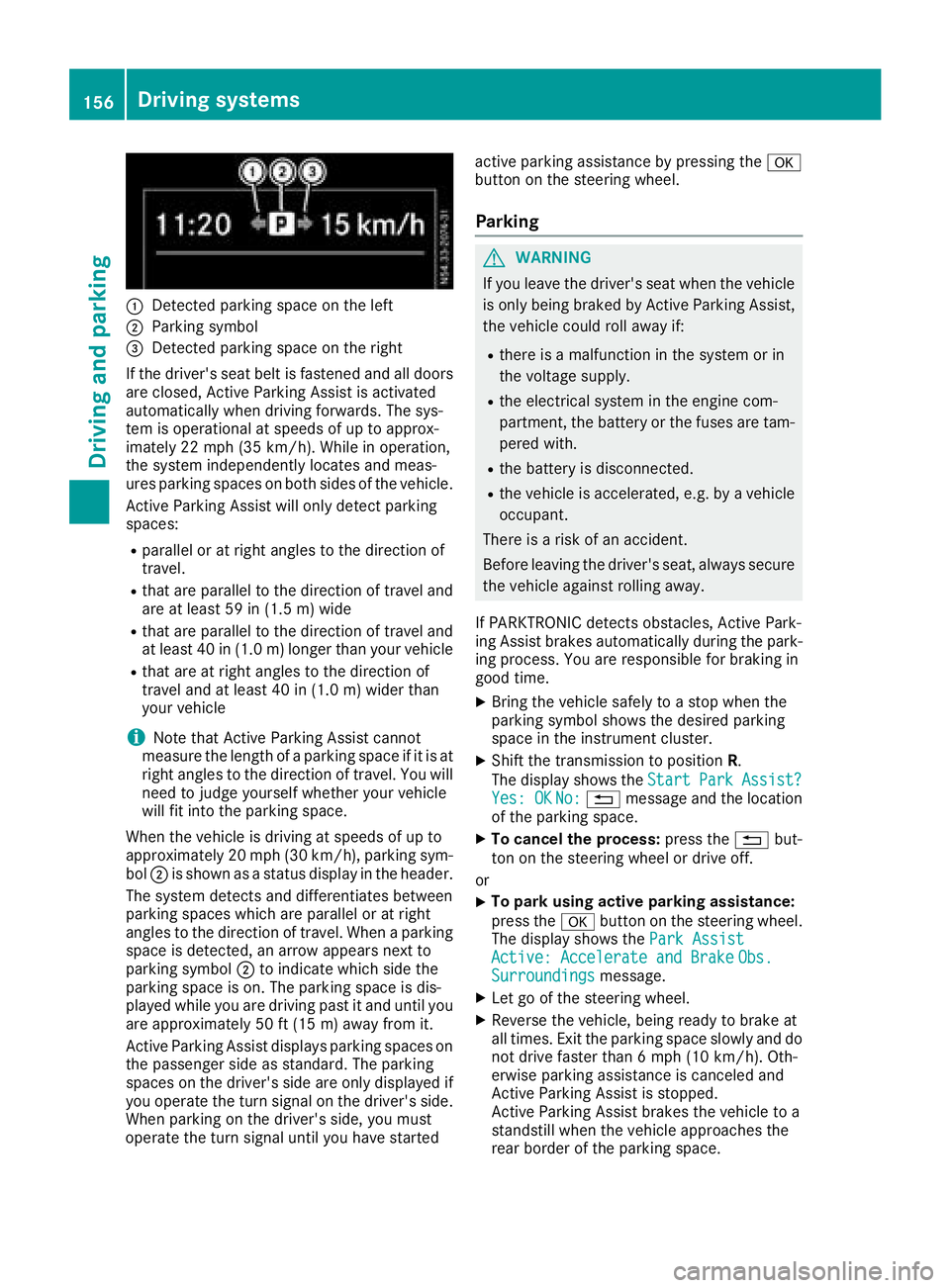
:Detected parkingspace on the left
;Parkin gsym bol
=Detected parkin gspace on the right
If the driver's sea tbeltisf astened and al ldoo rs
ar ec losed ,Activ eParkin gA ssist is activated
automaticall ywhend rivin gforwards .The sys-
tem is operational at speeds of up to approx-
imatel y22m ph (35 km/h). Whil einoperation,
the system independentl yloc ate sand meas-
ures parkin gspacesonb oths ides of the vehicle.
Activ eParkin gA ssist will onl ydetect parking
spaces:
Rparallel or at right angle stothe direction of
travel.
Rthata reparallel to the direction of travel and
ar eatl east59 in (1.5 m) wide
Rthatareparallel to the direction of travel and
at leas t40in( 1.0m) lo nger thany ourvehicle
Rthata re at right angle stothe direction of
travel and at leas t40in( 1.0 m) wider than
your vehicle
iNote thatA ctiveParking Assist cannot
measure the length of aparking space if it is at
right angle stothe direction of travel .You will
nee dtoj udge yourself whether your vehicle
will fit into the parking space.
When the vehicl eisdrivingats peeds of up to
approximately 20 mph (30 km/h), parking sym-
bol ;is shown as astatus dis
pla y
int he header.
The systemd etects and differentiate sbetween
parking space swhich ar eparalle loratr ight
angle stothe direction of travel .Whenap arking
space is detected, an arrow appear snext to
parking symbol ;to indicate which side the
parking space is on. The parking space is dis-
played whil eyou ared rivin gpastita nd unti lyou
ar ea pproximately 50 ft (15 m) awayfromi t.
Active Parkin gAssist display sparking spaces on
the passengers ideass tandard. The parking
spaces on the driver's side ar eonlyd isplayed if
yo uo perate the turn signalont he driver's side.
Whe nparking on the driver's side ,you must
operate the turn signalu ntilyou have started active parking assistance by pressing the
a
button on the steering wheel.
Parking
GWARNING
If yo uleave the driver's sea twhent he vehicle
is onlyb eing braked by Active Parking Assist,
the vehicl ecould rol lawa yif:
Rther eisam alfunctio ninthe system or in
the voltag esupply.
Rthe electrical system in the engine com-
partment, the battery or the fuses ar etam-
pered with.
Rthe battery is disconnected.
Rthe vehicl eisaccelerated,e .g.b yav ehicle
occupant.
There is ariskofana ccident.
Before leaving the driver's seat, always secure the vehicl eagain st rolling away.
If PARKTRONICd etects obstacles, Active Park-
ing Assist brakes automaticall yduring the park-
ing process. Yo uareresponsibl efor braking in
goo dtime.
XBring the vehicl esafelytoas top when the
parking symbo lshows the desired parking
space in the instrument cluster.
XShift the transmission to position R.
The display shows the Start
ParkAssist?Yes:OKNo:% message and the location
of the parking space.
XTo cance lthe process: press the%but-
ton on the steering whee lordrive off.
or
XTo park using active parking assistance:
press the abutton on the steering wheel.
The display shows the ParkAssist
Active :Accelerat eand BrakeObs.Surroundingsmessage.
XLet go of the steering wheel.
XReverse the vehicle, being ready to brake at
allt imes. Exit the parking space slowly and do
not drive faster than6m ph (10 km/h). Oth-
erwis eparking assistance is cancele dand
Active Parking Assist is stopped.
Active Parking Assist brakes the vehicl etoa
standstill when the vehicl eapproaches the
rea rborde roft he parking space.
156Driving systems
Driving an dparking
Page 159 of 310
Maneuvering may be required in tight parking
spaces. The display shows thePark Assist
Active: Select DObs. Surroundingsmes-
sage.
XWhile the vehicle is stationary, shift the trans-
mission to position D.
Active Parking Assist immediately steers in
the other direction. The display shows the
Park Assist Active: Accelerate and
BrakeObs. Surroundingsmessage.
iYou will achieve the best results by waiting
for the steering procedure to complete before
pulling away.
XDrive forwards and be ready to brake at all
times.
Active Parking Assist brakes the vehicle to a
standstill.
The display shows the Park
AssistActive:Select RObs. Surroundingsmessage.
As soon as the parking procedure is complete,
the Park Assist Finished
message appears
in the display and atone sounds. The parking
assistance function of Active Parking Assist is
stopped. The vehicle is parked and kept station-
ary without the driver having to depress the
brake pedal. The braking effect is canceled
when you depress the accelerator pedal.
Active Parking Assist no longer supports you
with steering interventions and brake applica-
tions. Once active parking assistance has been
stopped, you must steer and brake again your-
self. PARKTRONIC is still available.
Parking tips:
RThe way your vehicle is positioned in the park- ing space after parking is dependent on vari-
ous factors. These include the position and
shape of the vehicles parked in front and
behind it and the conditionsoft he location. It
may be the case that Active Parking Assist
guides you too far into aparking space, or not
far enough into it. In some cases, it may also
lead you across or onto the curb. In this case,
cancel the active parking assistance.
RYou can also preselect transmission position
D.T he vehicle redirects and does not drive as
far into the parking space. If you change direc-
tion too early, parking assistance is canceled
and Active Parking Assist is stopped. It is then
not possible to achieve asensible parking
position from the current position.
Exiting aparking space
In order that Active Parking Assist can support
you when you exit the parking space:
Rthe border of the parking space must be high
enough at the front and the rear. Acurb is too
small, for example.
Rthe border of the parking space must not be
too wide. Your vehicle can be maneuvered
into aposition at amaximum of 45° to the
startin gposition in the parking space.
Ram aneuvering distance of at least 3.3 ft
(1.0 m) must be available.
Active Parking Assist can only assist you with
exiting aparking space if you have parked the
vehicle parallel to the direction of travel using
Active Parking Assist.
If PARKTRONIC detects obstacles, Active Park-
ing Assist brakes automatically when exiting
from the parking space. You are responsible for
braking in good time.
XStart the engine.
XSwitch on the turn signal in the direction in
which you are pulling away.
XShift the transmission to position Dor R.
The display shows the Start
ParkAssist?Yes: OKNo:%message.
XTo cancel the process: press the%but-
ton on the steering wheel or drive off.
or
XTo exit the parking space using active
parking assistance: press theabutton
on the steering wheel.
The display shows the Park Assist
Active: Accelerate and BrakeObs.Surroundingsmessage.
XLet go of the steering wheel.
XPull away,being ready to brake at all times.
Exit the parking space slowly and do not drive
faster than 6mph (10 km/h). Otherwise park-
ing assistance is canceled and Active Parking
Assist is stopped.
Active Parking Assist brakes the vehicle to a
standstill when the vehicle approaches abor-
der of the parking space.
XWhile the vehicle is stationary, shift the trans-
mission to position Dor Ras required or
according to the message.
Active Parking Assist immediately steers in
the other direction. The display shows the
Park Assist Active: Accelerate and
BrakeObs. Surroundingsmessage.
Driving systems157
Driving and parking
Z
Page 160 of 310
iYou will achievethe best resultsbyw aiting
for the steeringp rocedure to complete before
pulling away.
If you back up afte ractivation, the steering
wheel is movedtot he straight-ahead posi-
tion.
XDrive forwards and back up as prompted by
the PARKTRONIC warnin gdisplays, several
times if necessary.
Onc eyou have exited the parking space com-
pletely:
RThe display shows the Park Assist Fin‐ishedmessage.
Ratones ounds.
Rthe steeringw heel is movedtot he straight-
ahead position.
The parking assistanc efunction of Activ ePark-
ing Assist is stopped. You will the nhave to steer
and mergei ntot raffic on your own.
PARKTRONIC is still available.
You can tak eover the steeringb eforethe vehi-
cle has exited the parking space completely.
This is useful, for example when you recognize
that it is already possible to pull out of the park-
ing space.
Canceling activ eparki ng assistance
XStop the movementoft he steeringwheel or
steer yourself.
or
XPress the fbutton and deactivate
PARKTRONIC (Ypage 152).
Parking assistanc eiscanceled immediately
and Activ eParking Assist is stopped. The dis-
play shows the Park
AssistCanceledmes-
sage.
Activ eparking assistanc eiscanceled automat-
ically if:
Rapply the parking brake.
Rparking using Activ eParking Assist is no lon-
ger possible
Ryou are drivingf aster than6mph (1 0km/ h)
Raw heel spins and ESP®intervenes or fails.
The ÷ warnin glamp in the instrument
cluster the nlightsu p.
Ryou unfasten your seat belt
Ryou open adoor or the tailgate/rear door
Ryou shift the automatic transmission to posi-
tion P Aw
arnin gtones ounds ,the parking symbol in
the display goes out and the Park Assist
Canceledmessageappears.
Onc eactive Parking Assist has been canceled,
you must steer and brakea gain yourself.
If as yste mm alfunction occurs, vehicles are
automatically braked down to astandstill. To
continue driving, you must depresst he acceler-
ator pedal again.
Rear view camera
Genera lnotes
On vehicles with atailgate, the rear view camera
is nex ttothe tailgat ehandle (Ypage 257).
On vehicles with rear doors,t he rear view cam-
era is in the top of the license plate molding
(
Ypage 257).
The rear view camer aisavisual parking aid. It
shows you the area behindt he vehicle in the
audio display.
The area behindt he vehicle is displayed in a
mirrored fashion,asint he rear-view mirror or
the exterior mirrors. The guide lines displayed
assist you in backing up.
The messaged isplays dependont he language
settin gofthe audio system. The followingr ear
view camer adisplays are examples.
Important safetyn otes
!Objectsthat are not at groundl evel appear
further away than the yactually are, for exam-
ple:
Rthe bumper of the vehicle parked behind
Rthe drawbar of atrailer
Rthe ball couplin gofatrailer tow hitch
Rthe tail-end of atruck
Rslanted posts
Only use the camer aguide lines for orienta-
tion .Don ot get any close rtoobject sthan the
lowest horizontal guide line. You may other-
wise damage your vehicle and/or the object.
The rear view camer aisonly an aid. It cannot
replacey our own awarenes softhe immediate
surroundings. You are responsible for safe
maneuveringa nd parking. When maneuvering
and parking, make sure that there are no per-
sons, animals or object sinthe maneuvering
area.
158Driving systems
Driving and parking
Page 161 of 310
The rear view camera may show obstacles in
perspectival distortion, incorrectly or not at all.
The rear view camera cannot display all objects
located very near and/or under the rear
bumper. It does not warn you ofacollision, per-
sons or objects.
Under the following circumstances, the rear
view camera will not function, or will function in
al imited manner:
Rif the tailgate or rear door is open
Rif it is raining very heavily or snowing, or it is
foggy.
Rat night or in very dark places
Rif the camera is exposed to very bright light.
White lines may appear in the camera image.
Rif the area is lit by fluorescent light or LED
lighting. The camera image may flicker.
Rif the camera lens fogs up, e.g. when driving
into aheated garage in winter, causing arapid
change in temperature.
Rif the camera lens is dirty or obstructed.
Observe the notes on cleaning (Ypage 257).
Rif the rear of the vehicle is damaged. In this
case, have the camera position and setting
checked at aqualified specialist workshop.
Do not use the rear view camera in these situa-
tions. You could otherwise injure others or dam-
age object sand the vehicle while parking and
maneuvering.
The field of vision and other functions of the rear
view camera may be restricted due to additional accessories on the rear of the vehicle (e.g.
license plate holder, rear-mounted bicycle
rack).
Guide lines are alwayss hown at road level. In
trailer mode, the guide lines are shown at the
level of the trailer coupling.
If you change wheel size, make sure they corre-
spond to the correctw heel size category
(
Ypage 267). If the category is changed without
recoding the control units in the vehicle, the rear
view camera cannot be precisely calibrated. The
guide lines at road level or at the level of the
trailer tow hitch will not be displayed correctly.
In vehicles with atailgate, the rear view camera
is protected from raindrops and dust by means
of aflap. When the rear view camera is activa-
ted, this flap opens.
The flap closes again when:
Ryou have finished the maneuvering process
Ryou switch off the engine For technical reasons, the flap may remain open
briefly after the rear view camera has been
deactivated.
Switching the rear view camera on or
off
XTo switch on: make sure that the key is in
position 2in the ignition lock.
XShift the transmission to position R.
On vehicles with atailgate, the rear view cam-
era flap opens. The audio display shows the
area behind the vehicle. The rear area shown
is divided by guide lines.
In vehicles with atrailer coupling installed, the
function mode of the rear view camera can be
switched over when the trailer is reached. The
rear view camera then changes the viewing
angle and shows alocating aid for the ball cou-
pling of the trailer tow hitch to help reach the
drawbar.
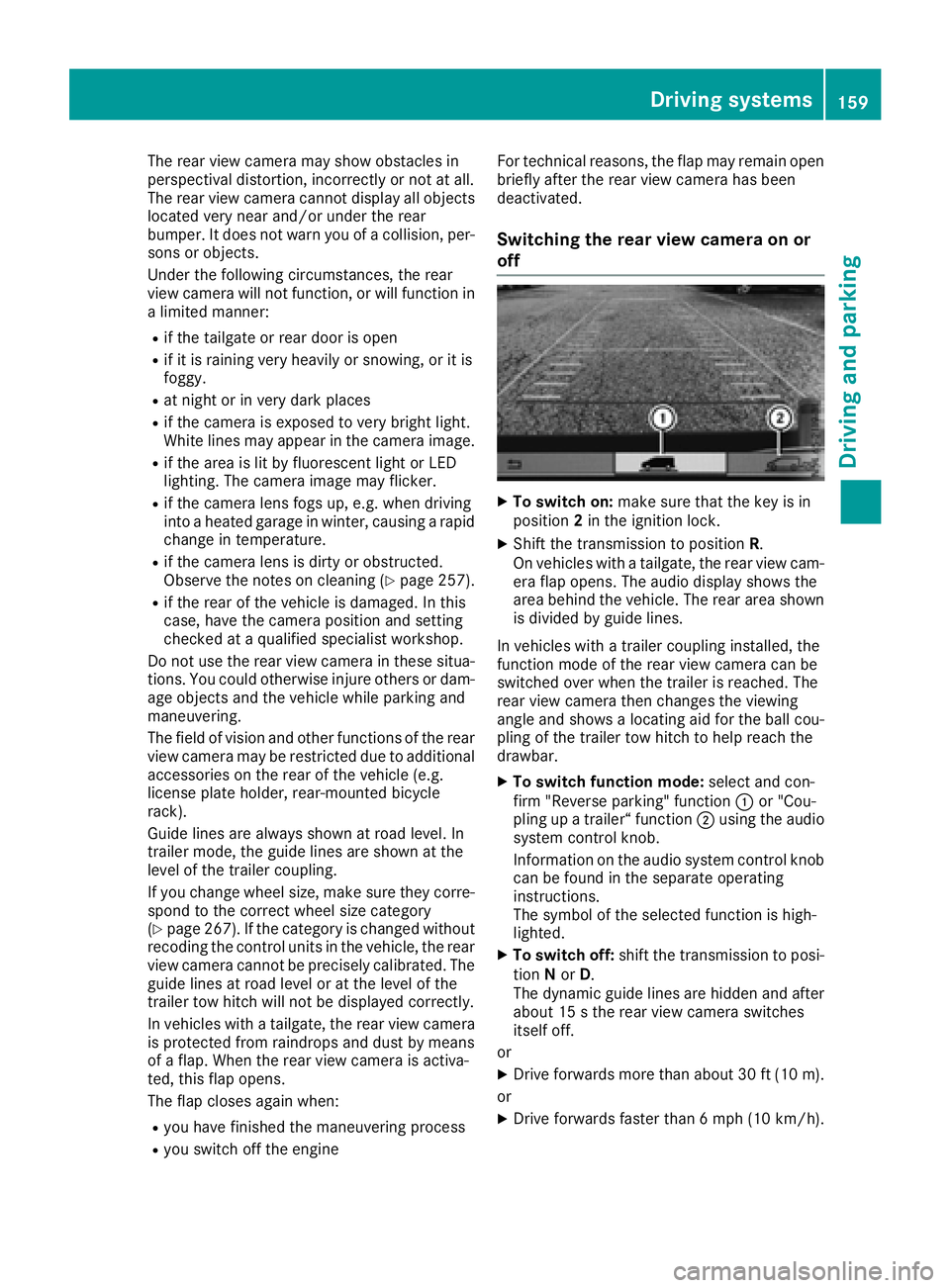
XTo switch function mode: select and con-
firm "Reverse parking" function :or "Cou-
pling up atrailer“ function ;using the audio
system control knob.
Information on the audio system control knob
can be found in the separate operating
instructions.
The symbol of the selected function is high-
lighted.
XTo switch off: shift the transmission to posi-
tion Nor D.
The dynamic guide lines are hidden and after
about 15 sthe rear view camera switches
itself off.
or
XDrive forwards more than about 30 ft (10 m).
or
XDrive forwards faster than 6mph (10 km/h) .
Driving system s159
Driving an dparking
Z
Page 162 of 310
or
XShift the automatic transmission toP.
In vehicles with Active Parking Assist,t he rear
view camera remains switched on after the ini-
tial shift to reverse gear for the whole duration of
active parking assistance. You can find informa-
tion on active parking assistance under "Active
Parking Assist“(
Ypage 154).
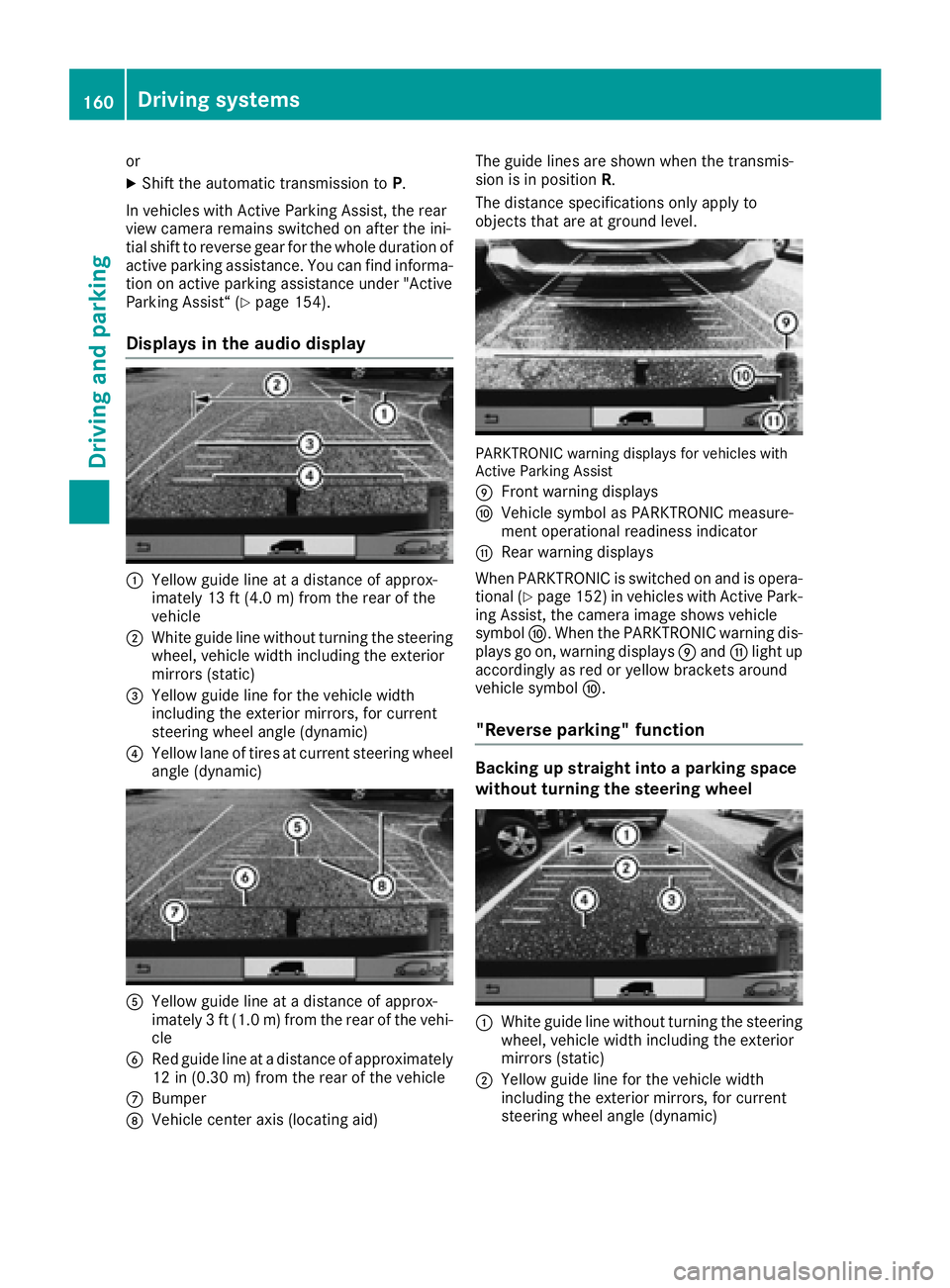
Displays in the audio display
:Yellow guide line at adistance of approx-
imately 13 ft (4.0 m) from the rear of the
vehicle
;White guide line without turnin gthe steering
wheel, vehicle width including the exterior
mirrors (static)
=Yellow guide line for the vehicle width
including the exterior mirrors, for current
steering wheel angle (dynamic)
?Yellow lane of tires at current steering wheel
angle (dynamic)
AYellow guide line at adistance of approx-
imately 3ft(1.0 m) from the rear of the vehi-
cle
BRed guide line at adistance of approximately
12 in (0.30 m) from the rear of the vehicle
CBumper
DVehicle center axis (locating aid) The guide lines are shown when the transmis-
sion is in position
R.
The distance specification sonly apply to
object sthat are at ground level.
PARKTRONIC warning displaysf or vehicles with
Active Parking Assist
E
Frontw arning displays
FVehicle symbol as PARKTRONIC measure-
ment operational readiness indicator
GRear warning displays
When PARKTRONIC is switched on and is opera- tional (
Ypage 152) in vehicles with Active Park-
ing Assist,t he camera image shows vehicle
symbol F.When the PARKTRONIC warning dis-
plays go on, warning displays Eand Glight up
accordingly as red or yellow bracket saround
vehicle symbol F.
"Reverse parking" function
Backing up straight into aparking space
without turning the steering wheel
:White guide line without turnin gthe steering
wheel, vehicle width including the exterior
mirrors (static)
;Yellow guide line for the vehicle width
including the exterior mirrors, for current
steering wheel angle (dynamic)
160Driving systems
Driving and parking
Page 170 of 310
Useful information
This Operator's Manual describes all models as
well as standard and optional equipment of your
vehicle that were available at the time of going
to print.Country-specific variation sare possi-
ble. Note that your vehicle may not be equipped
with all of the described functions. This also
applies to system sand function srelevantt o
safety.
Read the information on qualified specialist
workshops (
Ypage 29).
Important safetyn otes
GWARNING
If you operate information system sand com-
munication equipment integrated in the vehi-
cle while driving, you will be distracted from
traffic conditions. You could also lose control
of the vehicle. There is arisk of an accident.
Only operate the equipment when the traffic
situatio npermits. If you are not sure that this
is possible, park the vehicle paying attention
to traffic condition sand operate the equip-
ment when the vehicle is stationary.
GWARNING
If you are drivinga nd reach through the steer-
ing wheel to operate the adjustment knob,
you could lose contro lofthe vehicle. There is
ar isk of an acciden tand injury.
Only operate the adjustment knobs when the vehicle is stationary. Do not reach through the
steering wheel when driving.
You must observet he legal requirements for the
country in which you are currently drivingw hen
operatin gthe on-board computer.
GWARNING
If the instrumentc luster has failed or mal-
functioned, you may not recogniz efunction
restrictions in system srelevanttos afety. The
operatin gsafetyofy our vehicle may be
impaired. There is arisk of an accident.
Driv eonc arefully. Have the vehicle checked
at aq ualified specialist workshop immedi-
ately.
The on-board computer display only shows mes-
sages and warnings from certain systems. You
should therefore make sure your vehicle is oper-
ating safely at all times .Ifthe operatin gsafetyo f
your vehicle is impaired, stop the vehicle as
soon as possible, paying attention to road and
traffic conditions. Then consult aqualified spe-
cialist workshop.
The accurac yofthe speedometer and odometer
displays is legally prescribed. Determining the
speed is dependen tonthe wheel size or the
rolling circumference of the wheels. If you
change the wheel size on your vehicle, make
sure it is assigned to the correct wheel size cat-
egory (
Ypage 267). If you change wheel size
category without recoding the contro lunit, the
speedometer indication will be inaccurate. Driv-
ing safetya nd drivings ystemsmay be impaired
or detec tamalfunction and shut down.
An overview of the instrumentc luster can be
found under "Instrumentc luster":
Rfor vehicles without steering wheel buttons
(Ypage 35)
Rfor vehicles with steering wheel buttons
(Ypage 37)
Display and operation
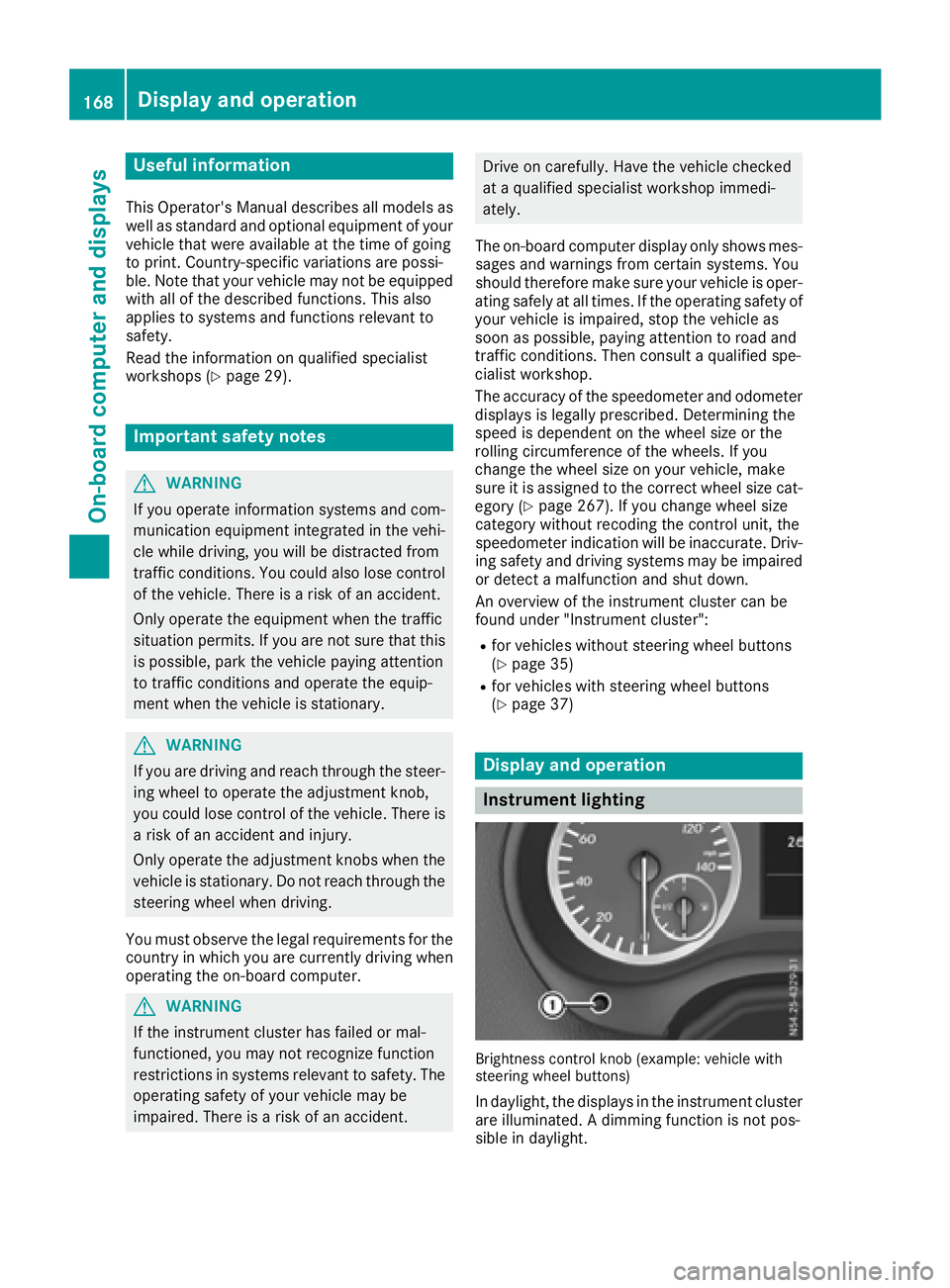
Instrument lighting
Brightness controlkno b( example: vehicle with
steering wheel buttons)
In daylight, the displays in the instrumentc luster
are illuminated. Adimmingf unction is not pos-
sible in daylight.
168Display and operation
On-boardc omputer and displays
Page 171 of 310
On vehicles with steering wheel buttons, the
light sensor in the instrument cluster automati-
cally controls the brightness of the displaylight-
ing.
While the lights are on, the brightness is depend-
ent upon the brightness of the ambient light.
You can also adjust the brightness of the instru-
ment lighting and the displayl ighting
Rby pressing thefand gbuttons on the
instrument cluster on vehicles without steer-
ing wheel buttons (not in the Settings
menu)
Rby turning control:on vehicles with steer-
ing wheel buttons.
Speedometer
If you change the wheel size on your vehicle,
make sure it is assigned to the correct wheel
size category (
Ypage 267). If you change wheel
size category without recoding the control unit,
the speedometer indication will be inaccurate.
The current vehicle speed may then be higher
than the speed displayed in the speedometer.
The speed can also be shown in the displayi n
the form of adigital speedometer:
Ron vehicles without steering wheel buttons
(Ypage 172)
Ron vehicles with steering wheel buttons
(Ypage 178)
iIn some countries, awarning sounds and/or
the displays howsamessage when the vehi-
cle reaches the maximum legally permissible
speed limit, e.g. at 75 mph (120 km/h).
Tachometer
!
Do not drive in the overrevving range, as this
could damage the engine.
HEnvironmental note
Avoid driving at high engine speeds. This
unnecessarily increases the fuel consumption
of your vehicle and harms the environment as
ar esult of increased emissions.
The red band in the tachometer indicates the
engine's overrevving range.
To protect the engine, the fuel supply is inter-
rupted when the red band is reached.
Outside temperatured isplay
You should pay special attention to road condi-
tions when temperatures are around freezing
point.
Please bear in mind that the outside tempera-
ture displayshows the air temperature meas-
ured and not the road temperature.
The displays hows the outside temperature in
the header:
Ron vehicles without steering-wheel buttons
(Ypage 170)
Ron vehicles with steering wheel buttons
(Ypage 176).
Changes in the outside temperature are dis-
played after ashort delay.
Coolant temperatureg auge
GWARNING
Opening the hood when the engine is over-
heated or when there is afire in the engine
compartment could expose you to hot gases
or other service products. There is arisk of
injury.
Let an overheated engine cool down before
opening the hood. If there is afire in the
engine compartment,k eep the hood closed
and contact the fire department.
On vehicles without steering wheel buttons, you
can have the coolant temperature shown in the
display(
Ypage 172).
On vehicles with steering wheel buttons, an ana-
log coolant temperature gage is located in the
tachometer in the instrument cluster
(
Ypage 37).
Under normal operating conditions and with the
specified coolant level, the gage may rise to
248 ‡(120† ).
Display and operation169
On-board computer and displays
Z
Page 172 of 310
On-boardcomputer (vehicles without
steering wheel buttons)
Operating the on-board computer
Overview
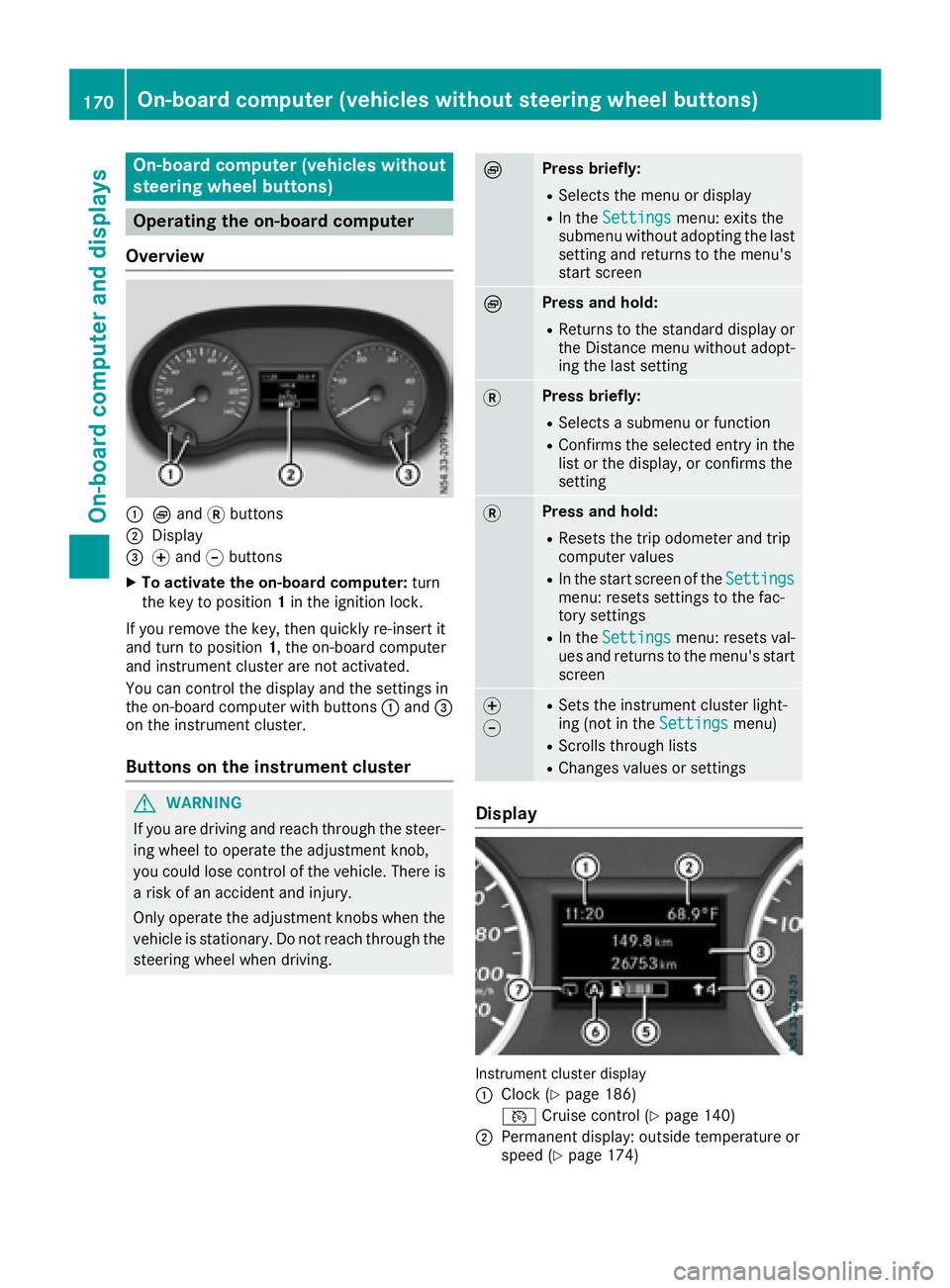
:È and 3buttons
;Display
=f and gbuttons
XTo activate the on-board computer: turn
the key to position 1in the ignition lock.
If you remove the key, then quickly re-insert it
and turn to position 1,the on-board computer
and instrument cluster are not activated.
You can control the display and the settings in
the on-board computer with buttons :and =
on the instrument cluster.
Buttons on the instrument cluster
GWARNING
If you are driving and reach through the steer- ing wheel to operate the adjustment knob,
you could lose control of the vehicle. There is
ar isk of an accidenta nd injury.
Only operate the adjustment knobs when the vehicle is stationary. Do not reach through the
steering wheel when driving.
ÈPress briefly:
RSelectst he menu or display
RIn theSettingsmenu: exits the
submenu without adopting the last
setting and return stothe menu's
start screen
ÈPress and hold:
RReturns to the standard display or the Distance menu without adopt-
ing the last setting
3Press briefly:
RSelectsas ubmenu or function
RConfirmsthe selected entry in the
list or the display, or confirms the
setting
3Press and hold:
RResets the trip odometer and trip
computer values
RIn the start screen of the Settingsmenu: resetssettings to the fac-
tory settings
RIn the Settingsmenu: resetsv al-
ues and return stothe menu's start
screen
f
gRSetst he instrument cluster light-
ing (not in the Settingsmenu)
RScrolls through lists
RChanges values or settings
Display
Instrument cluster display
:
Clock (Ypage 186)
V Cruise control (
Ypage 140)
;Permanen tdisplay: outside temperature or
speed (Ypage 174)
170On-boardc omputer (vehicles without steering wheel buttons)
On-boardcomputer and displays