display MERCEDES-BENZ METRIS 2016 MY16 Operator’s Manual
[x] Cancel search | Manufacturer: MERCEDES-BENZ, Model Year: 2016, Model line: METRIS, Model: MERCEDES-BENZ METRIS 2016Pages: 310, PDF Size: 7.28 MB
Page 125 of 310
function willswitch the engine off automatically
when the vehicl ecomes to astop.
Important safety notes
GWARNING
If the engine is switched off automatically and
you exit the vehicle, the engine is restarted
automatically .The vehicl emay beginm oving.
There is arisk of accident and injury.
If you wis htoexit the vehicle, alway sturn off
the ignition and secure the vehicl eagainst
rolling away.
Automatic engine switch-off
General notes
The ECO start/stop function is operational
when the èECO symbol is shownint he sta-
tus bar of the display.
For this to happen, various conditions, including the following, must be met:
Rthe ECO start/stop function is switched on.
The indicator lam pintheè ECO button is
lit (
Ypag e124).
Rthe outside temperature is above 32 ‡(0†).
Rthe engine has reached its operating temper-
ature.
Rthe set temperature for the vehicle interior
has beenr eached.
Rthe conditio nofcharge of the starter battery
is sufficient.
Rthe system detects that the windshield is not
foggedupw hent he air-conditioning system
or automatic climate control is switched on.
Rthe hood is closed.
Rthe driver's seatb eltisfastened.
Rthe driver's door is closed.
Rthere is no dange rofimmediately rolling
backwards ,e.g. whe nstoppedonas teep gra-
dient.
If at railer is attache dand/or arear carrier
system is installed and connected electri-
cally, this dange risdetected on less steep
gradients.
Only if al lthe conditions for automatic engine
switch-off are fulfilled, does the displays how
the è ECO symbol. All of the vehicle's systems remai
nactive when
the engine is switched off automatically.
The engine can be switched off automatically a
maximu moffour times (initial stop, then three
subsequent stops) in succession. After that, the
displayh ides theèECO symbol. Automatic
engine switch-off is not possibl eagain until the
è ECO symbol is showna gain.
If you open the hood after an automatic engine
switch-off, automatic engine start is deactiva-
ted. Once the hood is closed, you have to start
the engine manually.
If the vehicle is stoppedi
nD or N,t he
ECO start/
stop function switches off the engine automat-
ically once the vehicle is stationary.
Automatic engine start
General notes
The engine is started automatically if:
Ryou switch off the ECO start/stop function by pressing the èECO button The indicator
lamp in the èECO button then goes out.
(
Ypag e124)
Ryou depress the accelerator pedal.
Ryou engag ereverse gear R.
Ryou unfasten you rseatb elt
Ryou open the driver's door.
Rthe vehicle begins to roll away
Rthe brake system requires this.
Rthe temperature in the vehicle interior
increasingl ydeviates from the set value.
Rthe system detects moisture on the wind-
shield whe nthe air-conditioning system is
switched on.
Rthe battery's conditio nofcharge is too low.
The engine is started automatically if you:
Rswitch to transmission program M
(Ypag e129)
Rrelease the brake pedal whe nintransmission
position Dor N
Rswitch to transmission position P
After shifting from transmission position Rto D,
the ECO start/stop function is not available until
the è ECO symbol is shownint he display.
Driving123
Driving and parking
Z
Page 126 of 310
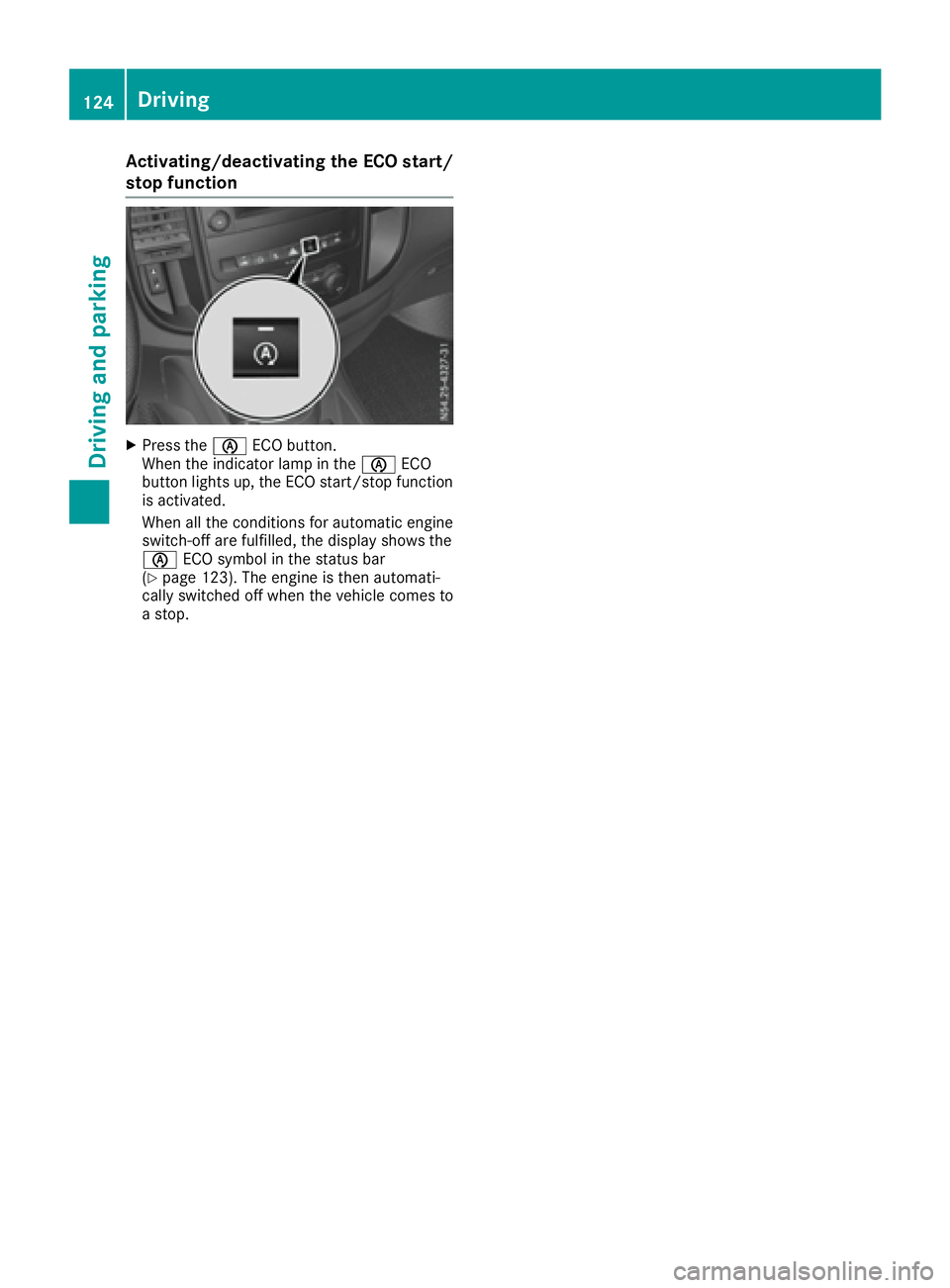
Activating/deactivating theECO start/
stop function
XPress th eè ECO button.
When th eindicator lamp in th eè ECO
butto nlights up, th eECO start/sto pfunction
is activated.
When all th econditi onsfor automatic engin e
switch-off are fulfilled ,the display shows th e
è ECO symbol in th estatus bar
(
Ypage 123). The engin eisthena utomati-
call yswitched off when th evehicl ecom es to
as top.
124Driving
Driving and parking
Page 128 of 310
Beforeswitching off the engine, always switch
to parking position P.Prevent the parked vehi-
cle from rolling away by applying the parking
brake.
!If the engine is switched off, rolling in neutral
N can damag ethe power transmission and
result in transmission damage.
Alway sobserve the instructions and safety
notes under "Tow starting and towing away"
(
Ypage 264).
Bearinm ind that power transmission between
the engine and the transmission is interrupted
whe nthe engine is switched off. For this reason,
shift the automatic transmission to Pbefore the
engine is switched off and with the vehicle is
stationary. Appl ythe parking brake to prevent
the vehicle from rolling away.
DIREC TSELECT lever
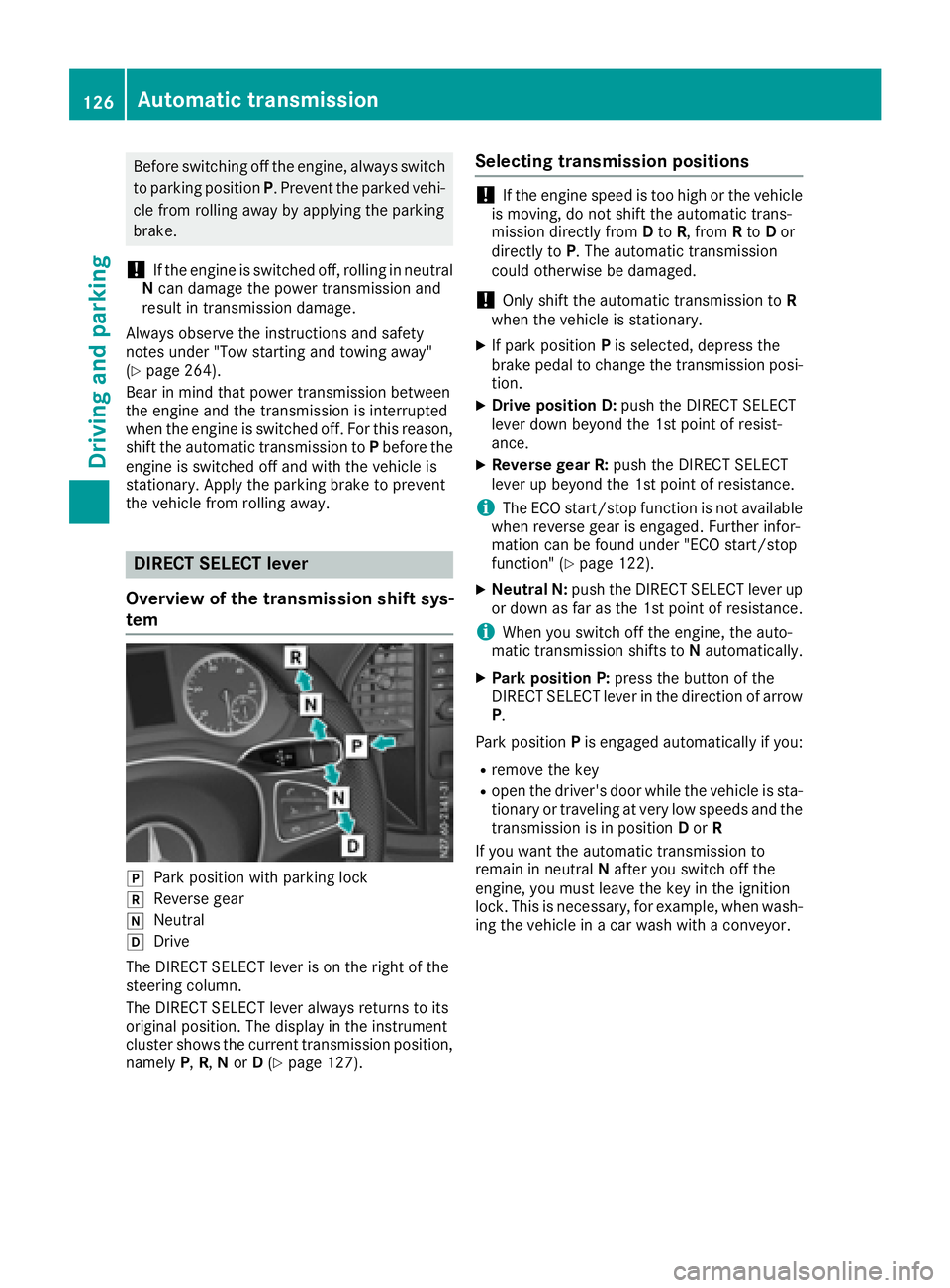
Overvie wofthe transmissio nshift sys-
tem
jPark positio nwithp arking lock
kReverseg ear
iNeutral
hDrive
The DIREC TSELECT lever is on the right of the
steering column.
The DIREC TSELECT lever always returns to its
origina lposition. The display in the instrument
cluster showst he current transmission position,
namely P,R, Nor D(
Ypage 127).
Selecting transmissio npositions
!If the engine speed is too hig horthe vehicle
is moving, do not shift the automatic trans-
missio ndirectly from Dto R,f rom Rto Dor
directly to P.The automatic transmission
could otherwise be damaged.
!Only shift the automatic transmission to R
whe nthe vehicle is stationary.
XIf park position Pis selected ,depress the
brake pedal to chang ethe transmission posi-
tion.
XDrive positionD :push the DIREC TSELECT
lever dow nbeyond the 1st point of resist-
ance.
XReverse gear R: push the DIRECTSELECT
lever up beyond the 1st point of resistance.
iThe ECO start/stop function is not available
whe nreverse gea risengaged .Further infor-
mation can be found under "EC Ostart/stop
function" (
Ypage 122).
XNeutral N: push the DIREC TSELECT lever up
or dow nasfar as the 1st point of resistance.
iWhe nyou switch off the engine, the auto-
mati ctransmission shifts to Nautomatically.
XPark positionP :press the button of the
DIREC TSELECT lever in the directio nofarrow
P.
Park position Pis engaged automaticall yifyou:
Rremove the key
Rope nthe driver'sd oorwhile the vehicle is sta-
tionary or traveling at very low speeds and the
transmission is in position Dor R
If yo uwantthe automatic transmission to
remain in neutral Nafte ryou switch off the
engine, yo umustleave the key in the ignition
lock. Thisisn ecessa
ry, for example, whe nwash-
i
ng the vehicle in acar wash with aconveyor.
126Automatic transmission
Drivin gand parking
Page 129 of 310
Transmission positions
BPark position
Thisprevents the vehicl efromr olling
away when stopped. Do not shift the
transmission into position Punless
the vehicl eisstationary.
The automatic transmission shifts to P automaticall yifyou:
Rremove the key
Ropen the driver's door whil ethe
vehicl eisstationar yortraveling at
ver ylow speeds and the transmis-
sion is in position Dor R.
The parkin gloc ks houl dnot be used
as ab rake when parking. Always
appl ythe parkin gbrake as well once
yo uh avep arked the vehicle.
CRevers egear
Onlys hift the transmission to Rwhen
the vehicl eisstationary.
ANeutral
No powe ristransmitted fromt he
engine to the drive wheels .Releasi ng
the brakes will allo wyouto mov ethe
vehicl efreely, e.g .byp ushing or tow-
ing.
If ESP
®is deactivated or faulty: shift
the transmission to position Nif the
vehicl eisind angerofs kidding,e.g.
on icy roads.
When yo uswitch off the engine ,the
automatic transmission automati-
cally shifts into neutral N.
!If the engine is switched off ,roll-
ing in neutral Ncan damage the
powe rtransmission and resul tin
transmission damage.
7Drive
The automatic transmission changes
gear itself. All forward gear sareavail-
able.
Yo uc an influence gearshifts with
your choice of transmission program.
Yo uc an also restric tthe shift range.
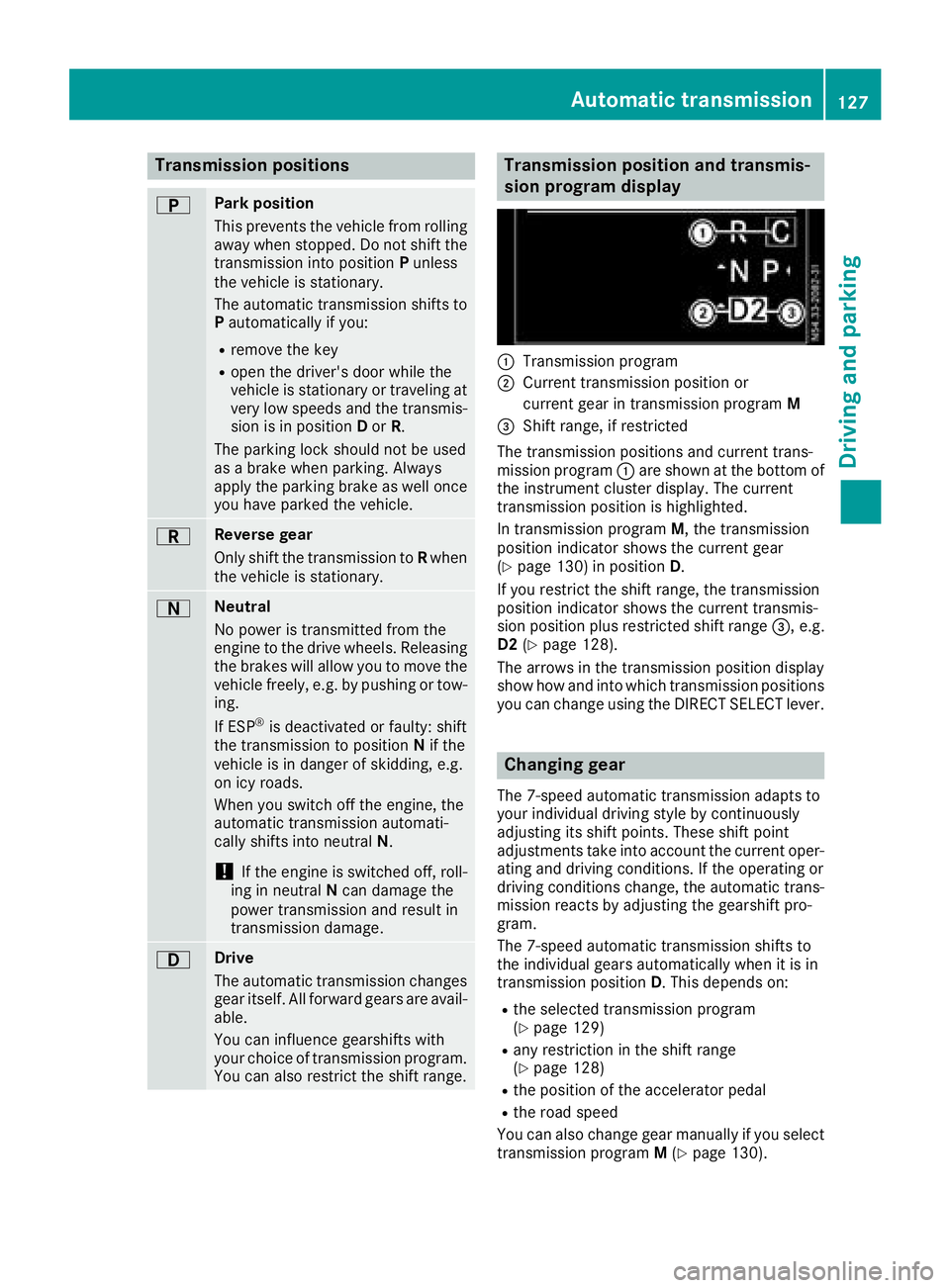
Transmission position and transmis-
sion program display
:Transmission program
;Current transmission positio nor
current gear in transmission program M
=Shift range,ifrestricted
The transmission positions and current trans-
mission program :ares hown at the bottom of
the instrument cluster display. The current
transmission positio nish ighlighted.
In transmission program M,the transmission
positio nindicator shows the current gear
(
Ypage 130 )inposition D.
If yo urestric tthe shift range ,the transmission
positio nindicator shows the current transmis-
sion positio nplusr estricted shift range =,e.g.
D2 (
Ypage 128).
The arrow sinthe transmission positio ndisplay
sho whow and into which transmission positions
yo uc an change using the DIRECT SELECTl ever.
Changin ggear
The 7-spee dautomatic transmission adapts to
your individual drivin gstyle by continuously
adjusting its shift points .These shift point
adjustments take into account the current oper-
ating and drivin gconditions. If the operating or
drivin gconditions change ,the automatic trans-
mission reacts by adjusting the gearshift pro-
gram.
The 7-spee dautomatic transmission shifts to
the individual gear sautomaticall ywhenitisi n
transmission position D.T hisd epen ds on:
Rthe selecte dtransmission program
(Ypage 129)
Rany restrictio ninthe shift range
(Ypage 128)
Rthe positio nofthe accelerator pedal
Rthe roa dspeed
Yo uc an also change gear manuall yifyouselect
transmission program M(
Ypage 130).
Automati ctransmission127
Driving an dparking
Z
Page 130 of 310
Shift ranges
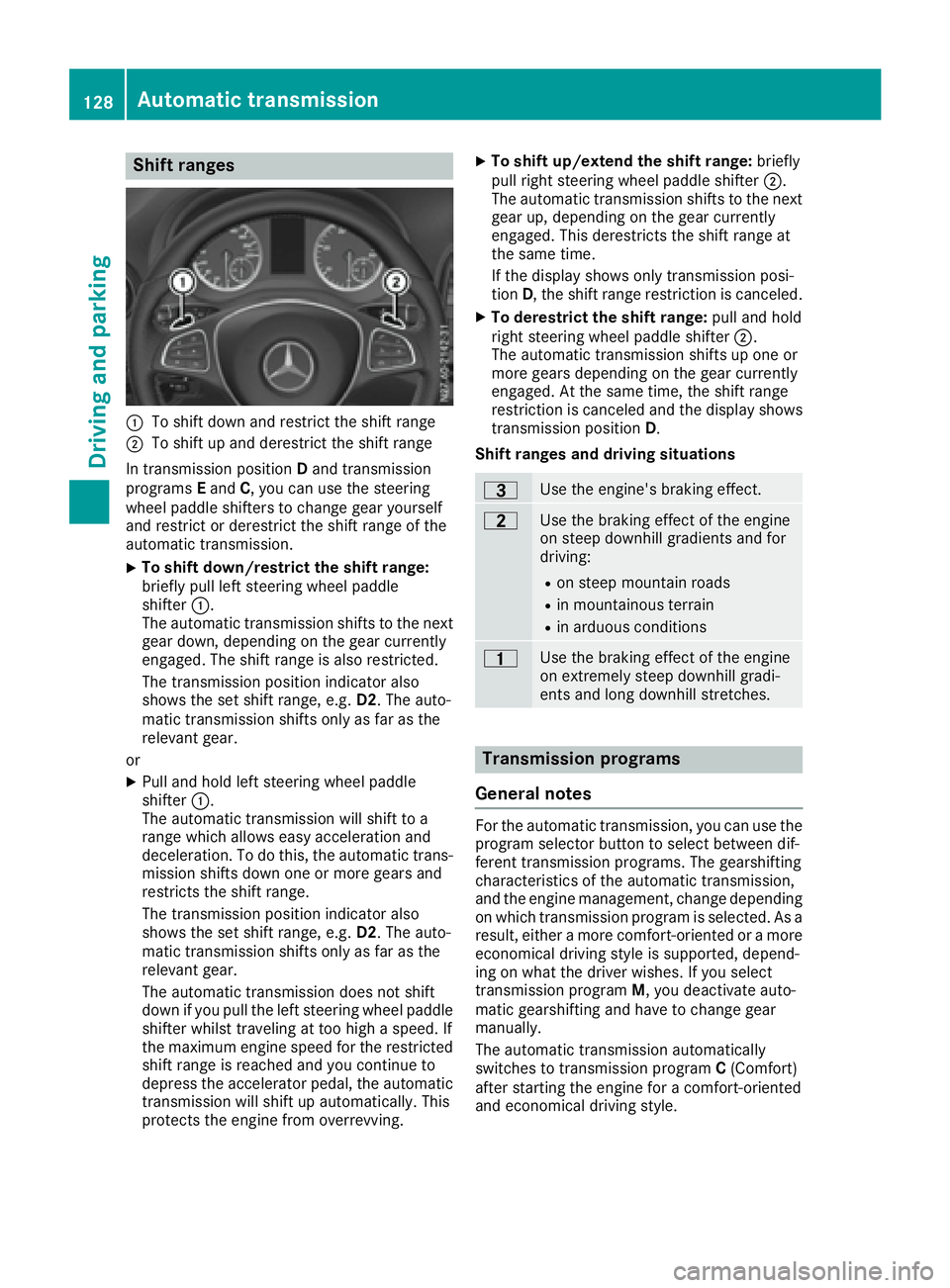
:To shift down and restrict the shift range
;To shift up and derestrict the shift range
In transmission position Dand transmission
programs Eand C,you can use the steering
wheel paddle shifters to change gear yourself
and restrict or derestrict the shift range of the
automatic transmission.
XTo shift down/restrict the shift range:
briefly pull left steering wheel paddle
shifter :.
The automatic transmission shifts to the next gear down, depending on the gear currently
engaged. The shift range is also restricted.
The transmission position indicator also
shows the set shift range, e.g. D2.The auto-
matic transmission shifts only as far as the
relevant gear.
or
XPull and hold left steering wheel paddle
shifter :.
The automatic transmission will shift to a
range which allowse asy acceleration and
deceleration. To do this, the automatic trans-
mission shifts down one or more gears and
restrictst he shift range.
The transmission position indicator also
shows the set shift range, e.g. D2.The auto-
matic transmission shifts only as far as the
relevant gear.
The automatic transmission does not shift
down if you pull the left steering wheel paddle
shifter whilst traveling at too high aspeed. If
the maximum engine speed for the restricted
shift range is reached and you continue to
depress the accelerator pedal, the automatic
transmission will shift up automatically. This
protectst he engine from overrevving.
XTo shift up/extend the shift range: briefly
pull right steering wheel paddle shifter ;.
The automatic transmission shifts to the next
gear up, depending on the gear currently
engaged. This derestrict sthe shift range at
the same time.
If the display shows only transmission posi-
tion D,the shift range restriction is canceled.
XTo derestrict the shift range: pull and hold
right steering wheel paddle shifter ;.
The automatic transmission shifts up one or
more gears depending on the gear currently
engaged. At the same time, the shift range
restriction is canceled and the display shows
transmission position D.
Shift ranges and driving situations
=Use the engine's braking effect.
5Use the braking effect of the engine
on steep downhill gradients and for
driving:
Ron steep mountain roads
Rin mountainous terrain
Rin arduous conditions
4Use the braking effect of the engine
on extremely steep downhill gradi-
ents and long downhill stretches.
Transmission programs
General notes
For the automatic transmission, you can use the
program selector button to select between dif-
ferent transmission programs. The gearshifting
characteristics of the automatic transmission,
and the engine management, change depending
on which transmission program is selected. As a
result, either amore comfort-oriented or amore
economical driving style is supported, depend-
ing on what the driver wishes. If you select
transmission program M,you deactivate auto-
matic gearshifting and have to change gear
manually.
The automatic transmission automatically
switches to transmission program C(Comfort)
after startin gthe engine for acomfort-oriented
and economical driving style.
128Automatic transmission
Driving and parking
Page 131 of 310
Program selector button
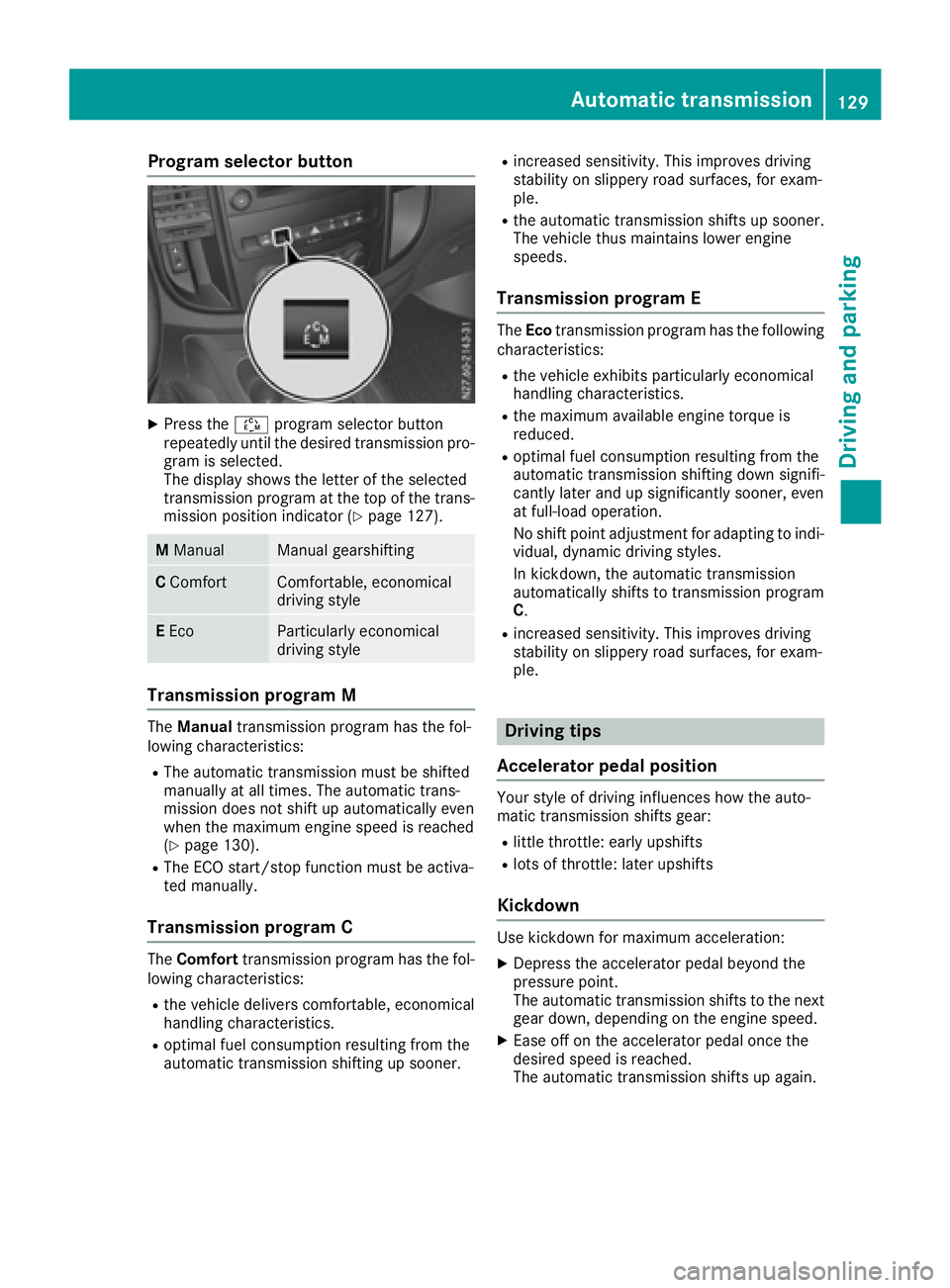
XPress theÉprogram selector button
repeatedly until the desired transmission pro-
gram is selected.
The display shows the letter of the selected
transmission program at the top of the trans-
mission position indicator (
Ypage 127).
M ManualManual gearshifting
CComfortComfortable, economical
driving style
EEcoParticularly economical
driving style
Transmission programM
The Manual transmission program has the fol-
lowing characteristics:
RThe automatic transmission must be shifted
manually at all times. The automatic trans-
mission does not shift up automatically even
when the maximum engine speed is reached
(
Ypage 130).
RThe ECO start/stop function must be activa-
ted manually.
Transmission programC
The Comfort transmission program has the fol-
lowing characteristics:
Rthe vehicle delivers comfortable, economical
handling characteristics.
Roptimal fuel consumption resulting from the
automatic transmission shifting up sooner.
Rincreased sensitivity. This improves driving
stability on slippery road surfaces, for exam-
ple.
Rthe automatic transmission shifts up sooner.
The vehicle thus maintains lower engine
speeds.
Transmission programE
The Eco transmission program has the following
characteristics:
Rthe vehicle exhibits particularly economical
handling characteristics.
Rthe maximum available engine torque is
reduced.
Roptimal fuel consumption resulting from the
automatic transmission shifting down signifi-
cantly later and up significantly sooner, even
at full-load operation.
No shift point adjustment for adapting to indi-
vidual, dynamic driving styles.
In kickdown, the automatic transmission
automatically shifts to transmission program
C.
Rincreased sensitivity. This improves driving
stability on slippery road surfaces, for exam-
ple.
Driving tips
Accelerator pedal position
Your style of driving influences how the auto-
matic transmission shifts gear:
Rlittle throttle: early upshifts
Rlots of throttle: later upshifts
Kickdown
Use kickdown for maximum acceleration:
XDepress the accelerator pedal beyond the
pressure point.
The automatic transmission shifts to the next
gear down, depending on the engine speed.
XEase off on the accelerator pedal once the
desired speed is reached.
The automatic transmission shifts up again.
Automatic transmission129
Driving and parking
Z
Page 132 of 310
Rockingthe vehicle free
At speeds up to 5mph (9 km/h )you can switch
back and forth between drive position Dand
reverse gear Rwithou tapplyin gthe brakes. This
helps when rocking the vehicl eoutof snow or
slush.
XPush the DIREC TSELECT lever alternately up
and dow nbeyond the firs tpoint of resistance.
Towin gatrailer
XDepending on the downhil lgradient, limit the
shift rang e(Ypage 128 )orshift manually into
al ower gear (Ypag e130) in which the engine
wil loperate in the middle of the engine speed
range. This als oapplie sifcruise control is
activated.
Manual gearshifting
General notes
If you select transmission program M,automatic
gearshifting is deactivated and manua lgear-
shifting is automatically activated .You must
then permanently change geary ourself for as
long as the transmission programiss elected.
Permanent manua lgearshifting is deactivated
automatically when you switch from transmis-
sion program Mto another transmission pro-
gram. The automatic transmission then shifts
gears automatically. The display shows the
selected transmission programa nd transmis-
sion position Dagain.
Shifting gears
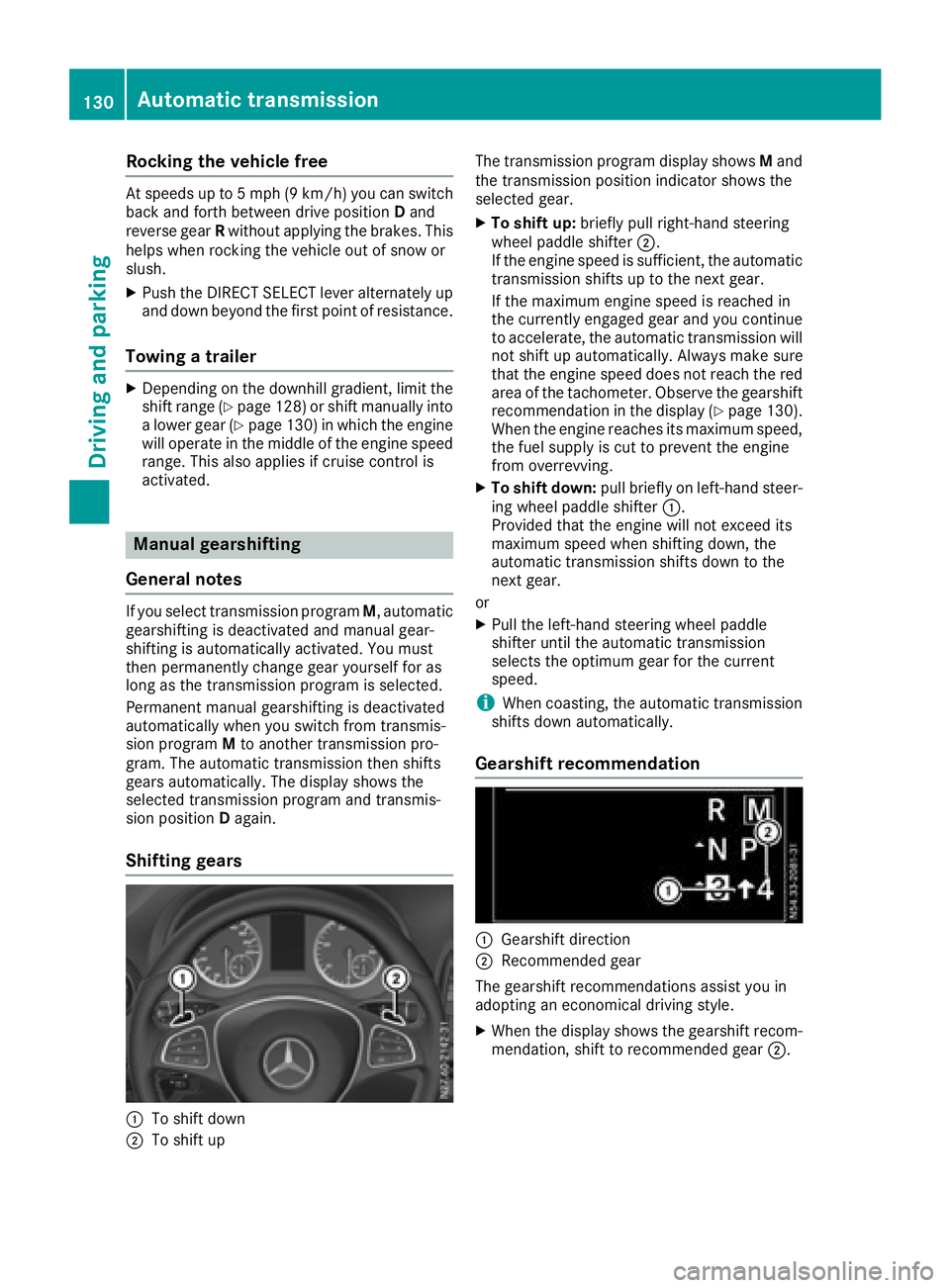
:To shift down
;To shift up The transmission programd
isplay showsMand
the transmission position indicator shows the
selected gear.
XTo shift up: brieflypullr ight-hand steering
whee lpaddle shifter ;.
If the engine speediss ufficient, the automatic
transmission shifts up to the next gear.
If the maximu mengine speedisr eachedin
the currently engage dgear and you continue
to accelerate, the automatic transmission will
not shift up automatically. Always make sure
that the engine speedd oes not reach the red
area of the tachometer. Observe the gearshift
recommendation in the display (
Ypag e130).
When the engine reache sits maximu mspeed,
the fuel supply is cut to prevent the engine
from overrevving.
XTo shift down: pullbriefl yonl eft-hand steer-
ing whee lpaddle shifter :.
Provided that the engine wil lnot exceed its
maximu mspeedw hen shifting down, the
automatic transmission shifts down to the
next gear.
or
XPul lthe left-hand steering whee lpaddle
shifter until the automatic transmission
selects the optimumg ear for the current
speed.
iWhen coasting, the automatic transmission
shifts down automatically.
Gearshift recommendation
:Gearshift direction
;Recommended gear
The gearshift recommendations assist you in
adopting an economicald riving style.
XWhen the display shows the gearshift recom-
mendation, shift to recommended gear ;.
130Automatic transmission
Driving and parking
Page 142 of 310
Checklist after driving off-road
!If you detect damagetothevehicle after
driving off-road, have th evehicle checked
immediately at aqualified specialist work-
shop.
Off-road driving places ahigher demand on your
vehicle than normal road operation. Checky our
vehicle after driving on roug hterra in. By doing
so you will notic eany damageing ood timeand
reduc ethe riskofana ccidentf or yourself and
other road users. Clean your vehicle thoroughly
before driving on public roads.
Observ ethe followingp oints after driving off-
road ,onc onstructio nsites and before driving on
public roads:
XActivate ESP®(Ypage 64).
XClean th eheadlamps and tail lamps and
check them for damage.
XClean th efront and rear licens eplates.
XClean th ewindshield, windows and exterior
mirrors.
XClean th esteps, door sills and grab handles.
This increases safety of footing.
XClean th ewheels/tires, wheel housing sand
th eu nderbody of th evehicle withaw aterjet .
This increases road grip ,especiall yonw et
road surfaces.
XCheckt hewheels/tires and wheel housings
for trapped foreign object sand remove them.
Trapped foreign object scan damaget he
wheels/tires and may be flun gout from the
vehicle when you continue driving.
XCheckt heunderbody for trapped branches or
other part sofplants and remove them.
Trapped branches or other part sofplants
increas ethe riskoff irea nd can caus ed
am-
age
to fuel lines, brak ehoses and th erubber
bellows of axle joint sand driv eshafts.
XClean th ebrak edisks, brak epads and axle
joints, particularly after operatio ninsand,
mud, grit/gravel, wate rorsimilarly dirt ycon-
ditions.
XCheckt heentir efloo rassembly, th etires,
wheels, bodywork structure, brakes, steering,
chassis and exhaust system for any damage.
XCheckt heservic ebrak efor operatin gsafety,
e.g .carry out abrak etest.
XIf you notic estron gv ibrations after driving off-
road ,che ck th ewheelsa nd drivetrain for for-
eign object sagain.R emove any foreign object
swhichc an lead to imbalances and
thus caus evibrations.
Driving in mountainous areas
When driving in mountainous areas ,notet hat
th ep ower output of th eengine, and withiti ts
gradientc limbingcapability, decreas ewith
increasing altitude. Pleaset aken oteoft hisp ar-
ticularly when driving withat railer in mountain-
ous areas.
The maximum permissible trailer loads are valid
for journeys at altitudes up to 1100 yds
(1000 m) aboves ea levelwithg radients up to
12%.
Information on maximum permissible trailer
loads can be foun dinyour vehicle registration
papersa nd on thevehicle identification plate
(
Ypage 294) or unde r"Trailer loads"
(Ypage 305).
When driving at altitudes of 2700 yds (2500 m)
aboves ea level, th eECO start/sto pfunction is
no longer available.
Notes on braking on downhill gradients can be
foun dint he"Braking" sectio n(
Ypage 136).
Driving systems
Cruise control
General notes
Cruise control maintain sthe speedoft hevehi-
cle for you. It brakes automatically in orde rto
avoid exceedingt heset speed.
Use cruise control if road and traffic conditions
makeita ppropriat etomaintain asteady speed
for aprolonged period. You can set any speed
from 30 km/h upwards in increment sof1km/h
and 10 km/h.
If you have set Miles
as theunit for th edigital
speedometer, you can set any speeda bove
20 mph in increment sof1mph and5mph.
Changingt hedisplay unit for th edigital speed-
omete rand th edistance:
Ron vehicle swithout steering wheel buttons
(Ypage 174)
Ron vehicle swith steering wheel buttons
(Ypage 185)
Cruise control shouldn otbe activated when
driving off-road or on constructio nsites.
140Driving systems
Driving and parking
Page 143 of 310
Cruisecontro lmaybe unab leto maintain the
storeds peedonu phillgradients .The stored
speedisr esumedifth eu phill gradiente vens out
and th evehicle 's speedd oes notfall below
20 mph (30 km/ h).C ruise control maintains the
storeds peed on downhil lgradients by automat-
icall yapplyin gthe brakes. Observe the addi-
tiona ldriving tip s(
Ypage 136).
Important safety notes
Observe the notes on braking (Ypage 136).
If yo ufailtoa dapt your driving style or if yo uare
inattentive ,cruise control can neither reduce
the ris kofana ccident nor override the laws of
physics .Cruise control canno ttake road,
weathe rand traffic conditions into account.
Cruise control is only an aid. Yo uare responsible
for the distance to the vehicl einfront, for vehi-
cle speed, for braking in goo dtime and for stay-
ing in lane.
If yo uchange wheel size ,make sure they corre-
spond to the correct wheel size category
(
Ypage 267). If the categor yischanged without
recoding the control units in the vehicle, the
functioning of cruise control may be impaired.
Do not us ecruise control:
Rin traffic conditions that are unsuitable for
driving at aconstant speed, e.g. in heavy traf-
fic, on winding roads or off-road.
Ron slippery roads. Braking or accelerating
may cause the drive wheel stoloset raction
and the vehicl ecould then skid.
Rwhen there is poo rvisibility ,e.g. du etofog,
heavy rai norsnow.
If there is achange of drivers ,make sure that
yo ui nform the new driver aboutt he set cruise
speed.
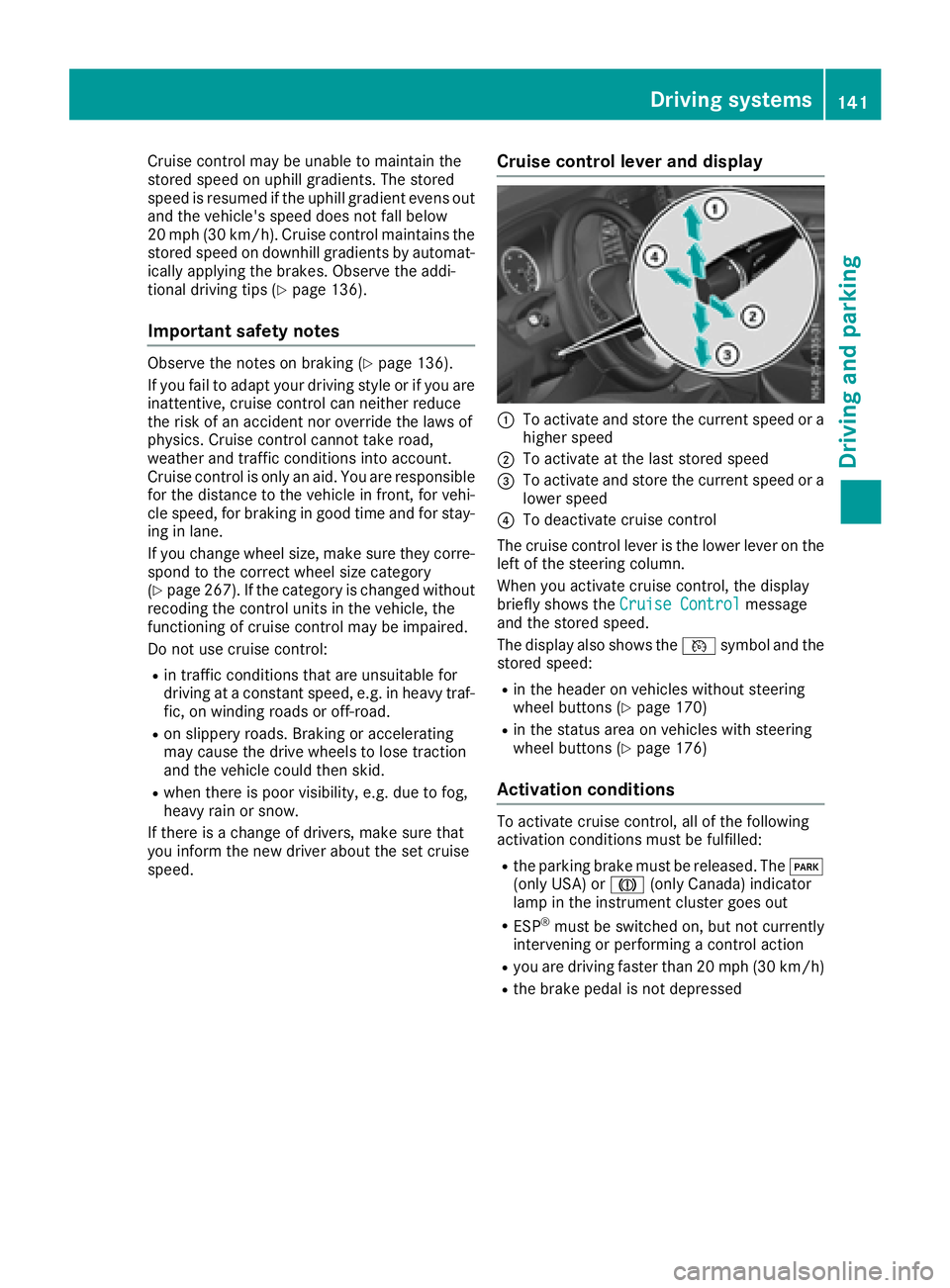
Cruise control levera nd display
:To activate and store the current speed or a
higher speed
;To activate at the last storeds peed
=To activate and store the current speed or a
lowerspeed
?To deactivate cruise control
The cruise control lever is the lowe rlev er on the
left of the steering column.
Whe nyou activate cruise control ,the display
briefl yshows the Cruise Control
message
and the storeds peed.
The display also shows the Vsymbo land the
storeds peed:
Rin the header on vehicles withou tsteering
wheel buttons (Ypage 170)
Rin the statu sareaonv ehicles with steering
wheel buttons (Ypage 176)
Activation conditions
To activate cruise control ,allof the following
activation conditions mus tbefulfilled:
Rthe parking brake mus tbereleased .The F
(onl yUSA) or J(onlyCanada) indicator
lamp in the instrument cluster goe sout
RESP®mus tbes witched on, bu tnot currently
intervening or performing acontrol action
Ryoua re driving faster than 20 mph (30 km/h)
Rthe brake pedal is not depressed
Driving systems141
Driving and parking
Z
Page 144 of 310
Storing and maintaining the current
speed
XAccelerate the vehicle to the desired speed
above 20 mph (30 km/h).
XBriefly push the cruise control lever up:or
down =.
XRelease the accelerator pedal.
Cruise control is activated. The current speed
is stored and shown briefly in the display's
text field.
The display also shows the Vsymbol and
the stored speed:
Rin the header on vehicles without steering
wheel buttons (Ypage 170)
Rin the status area on vehicles with steering
wheel buttons (Ypage 176)
Resuming the stored speed
GWARNING
If you call up the stored speed and it differs
from the current speed, the vehicle acceler-
ates or decelerates. If you do not know the
stored speed, the vehicle could accelerate or brake unexpectedly. There is arisk of an acci-
dent.
Pay attention to the road and traffic condi-
tions before calling up the stored speed. If you
do not know the stored speed, store the
desired speed again.
XBriefly pull the cruise control lever towards
you ;.
XRelease the accelerator pedal.
Cruise control is activated and resumes the
vehicle's speed to the last speed stored.
The stored speed is shown briefly in the dis-
play.
The display also shows the Vsymbol and
the stored speed:
Rin the header on vehicles without steering
wheel buttons (Ypage 170)
Rin the status area on vehicles with steering
wheel buttons (Ypage 176)
iWhen you pull the cruise control lever
towards you for the first time after startin gthe
engine, cruise control adopts the current
speed.
Setting the speed
It may be amoment before the vehicle starts to
accelerate or brake to the set speed. Take this
delay into account when settingt he speed.
XPress the cruise control lever up:to
increase the speed or down =to reduce the
speed.
The vehicle will accelerate or decelerate. The
speed is shown in the display.
XRelease the cruise control lever once the
desired speed is reached.
The displayed speed is stored.
or
XBriefly press the cruise control lever as far as
the 1st pressure point up :or down =.
The last speed stored is increased/reduced in increments of 1mph (1 km/h).
or
XBriefly press the cruise control lever beyond
the pressure point up :or down =.
The last speed stored is increased/reduced in increments of 5mph (10 km/h).
iCruise control is not deactivated if you
depress the accelerator pedal. If you acceler-
ate briefly to overtake, for example, cruise
control resumes the vehicle’s speed to the
last speed stored after you have finished over-
taking.
To deactivatec ruise control
There are various ways to deactivate cruise con-
trol:
XBriefly press the cruise control lever for-
wards?.
or
XApply the brakes.
The last speed set remains stored. The last
speed stored is deleted when you switch off the
engine.
Cruise control is deactivated automatically
when:
Ryou apply the brakes
Ryou apply the parking brake and the F
(only USA) or J(only Canada) indicator
lamp in the instrumentc luster lights up
Ryou are driving slower than 20 mph (30 km/h)
Ryou shift the automatic transmission to neu-
tral positionNwhile the vehicle is in motion
142Driving systems
Driving and parking