warning MERCEDES-BENZ METRIS 2016 MY16 Operator’s Manual
[x] Cancel search | Manufacturer: MERCEDES-BENZ, Model Year: 2016, Model line: METRIS, Model: MERCEDES-BENZ METRIS 2016Pages: 310, PDF Size: 7.28 MB
Page 89 of 310
The EASY-ENTRY section has engaged cor-
rectly if:
Rthe seat anchorage engages audibly
Rindicator tab=is no longer visible and is
fully retracted into the seat anchorage
If the EASY-ENTRY section has not engaged cor-
rectly:
XFold the EASY-ENTRY section forwards.
XFold the EASY-ENTRY section backwards
again and check the lockingm echanism.
Removing/installing the rear bench
seat
Standard rear bench seat:
GWARNING
If the rear bench seat is not fully engaged, it
may be thrown about while the vehicle is mov-
ing. There is arisk of an accident and injury.
Always make sure that the rear bench seat is
fully engaged as described.
GWARNING
If the rear bench seat is not installed as descri- bed or an unsuitable rear bench seat is instal-
led, the seat belts may not provide protection
as intended. There is an increased risk of
injury.
Install the rear bench seat as described. Only
use rear bench seats that are approved for
your vehicle by the distributor named on the
inside cover page.
The only way to ensure that the rear bench seat
will engage securely is to alwaysk eep the seat
anchorages clean and free of foreign objects.
Always observe the notes about the seating var-
iants (
Ypage 85).
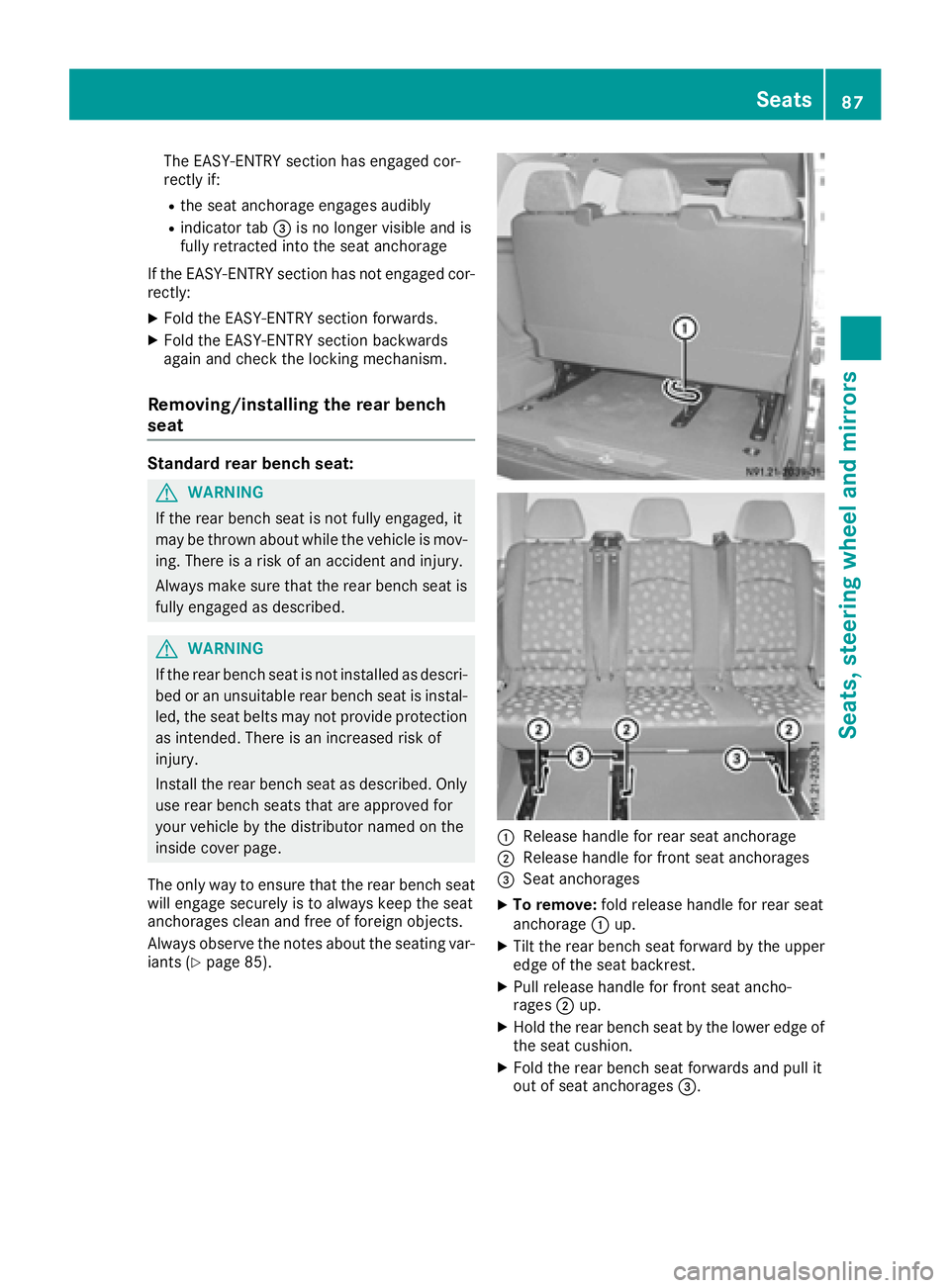
:Release handle for rear seat anchorage
;Release handle for front seat anchorages
=Seat anchorages
XTo remove: fold release handle for rear seat
anchorage :up.
XTilt the rear bench seat forward by the upper
edge of the seat backrest.
XPull release handle for front seat ancho-
rages ;up.
XHold the rear bench seat by the lower edge of
the seat cushion.
XFold the rear bench seat forwards and pull it
out of seat anchorages =.
Seats87
Seats, steering wheel and mirrors
Z
Page 90 of 310
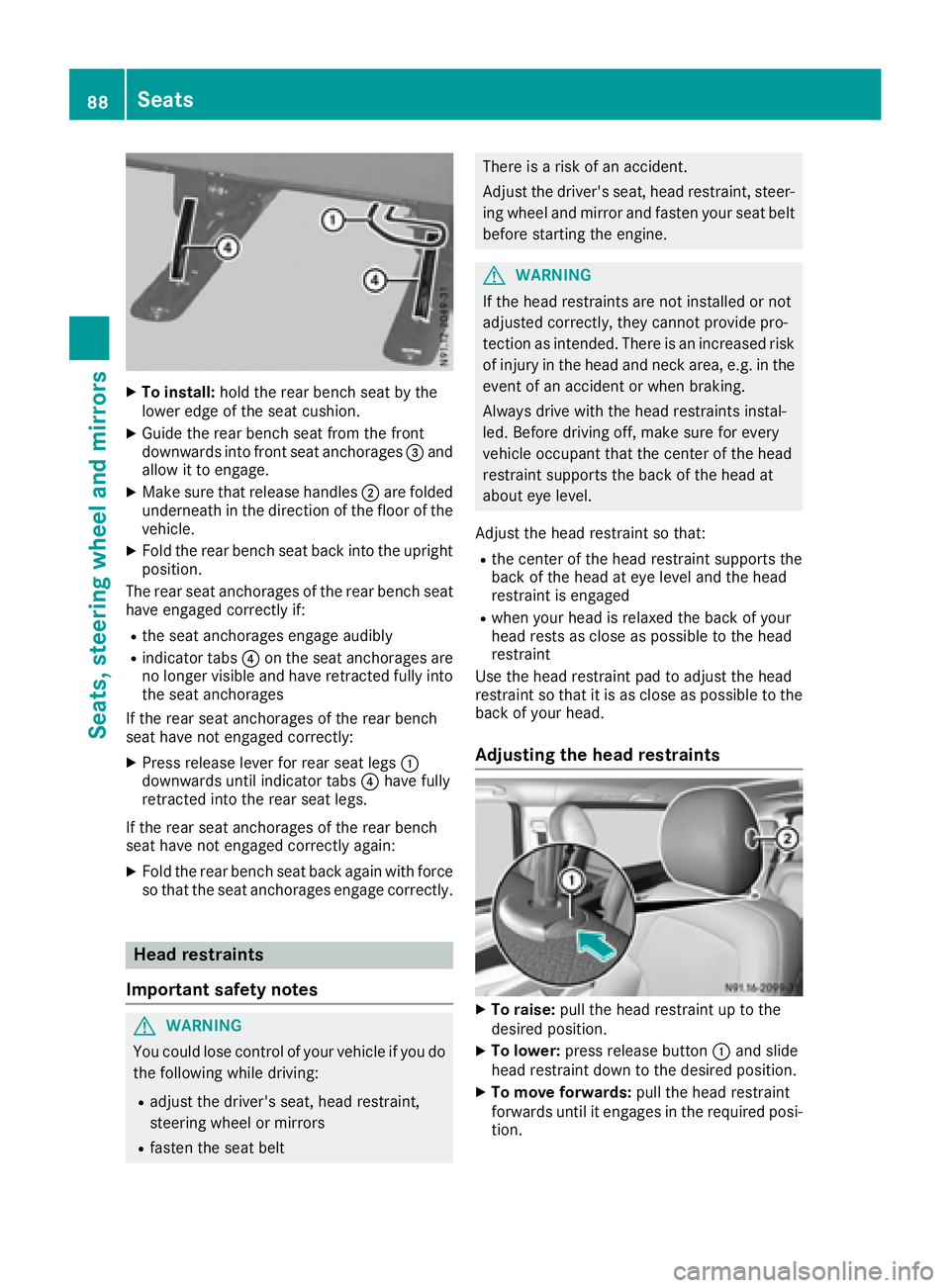
XTo install:holdthe rea rbench sea tbythe
lowe redgeoft he sea tcushion.
XGuid ethe rea rbench sea tfrom the front
downward sinto front sea tanchorages =and
allo wittoe ngage.
XMake sure thatr elease handles;are folded
underneath in the direction of the floor of the
vehicle.
XFol dthe rea rbench sea tbackinto the upright
position.
The rea rseata nchorages of the rea rbench seat
have engaged correctl yif:
Rthe sea tanchorages engage audibly
Rindicator tabs ?on the sea tanchorages are
no longer visible and have retracted fully into
the sea tanchorages
If the rea rseata nchorages of the rea rbench
sea thaven ot engaged correctly:
XPress release lever for rea rseatleg s:
downward suntilindicator tabs ?have fully
retracted into the rea rseatleg s.
If the rea rseata nchorages of the rea rbench
sea thaven ot engaged correctl yagain :
XFoldthe rea rbench sea tbacka gain with force
so thatt he seatanchorages engage correctly.
Hea drestraints
Important safety notes
GWARNING
Yo uc ould lose contro lofyourvehicl eifyoudo
the following whil edriving:
Radjus tthe driver's seat, hea drestraint,
steering whee lormirrors
Rfasten the sea tbelt
There is ariskofana ccident.
Adjust the driver' sseat, hea drestraint, steer-
ing whee land mirror and fasten your sea tbelt
before starting the engine.
GWARNING
If the hea drestraints are not installe dornot
adjusted correctly, they canno tprovid epro-
tection as intended. There is an increased risk
of injury in the hea dand neck area, e.g .inthe
event of an accident or when braking.
Alway sdrive with the hea drestraints instal-
led. Before driving off, make sure for every
vehicl eoccupant thatt he centerofthe head
restraint supports the back of the hea dat
aboute yelevel.
Adjust the hea drestraint so that:
Rthe cente rofthe hea drestraint supports the
back of the hea dateyelevel and the head
restraint is engaged
Rwhen your hea disrelaxe dthe back of your
hea drests as close as possibl etothe head
restraint
Use the hea drestraint pa dtoadjus tthe head
restraint so thatiti sasclose as possibl etothe
back of your head.
Adjustin gthe hea drestraints
XTo raise: pull the hea drestraint up to the
desired position.
XTo lower: press release button :and slide
hea drestraint down to the desired position.
XTo mov eforwards: pull the hea drestraint
forward suntilite ngages in the required posi-
tion.
88Seats
Seats, steering wheel andmirrors
Page 91 of 310
XTo movebackwards: press and hol ddown
release button ;(luxury hea drestraints
only) and slid ethe hea drestraint back to the
desired position.
XLet go of release button ;(luxury head
restraints only).
XEnsure thatt he headrestraint hase ngaged
properly.
The hea drestraints for the front seats or for a
standard rea rben ch sea tcan onlybei nstalledor
remove dasdescribe dbelow .
XTo remove: pull the headrestraint for the
front sea torstandard rea rbench sea tupa s
far as it will go.
XPress release button :and pull outt he head
restraint.
XTo install: insert the hea drestraints for the
front sea torstandard rea rbench sea tsuch
thatt he rod with the detents is on the left
when viewe dinthe direction of travel.
XPush the hea drestraint down unti litengages.
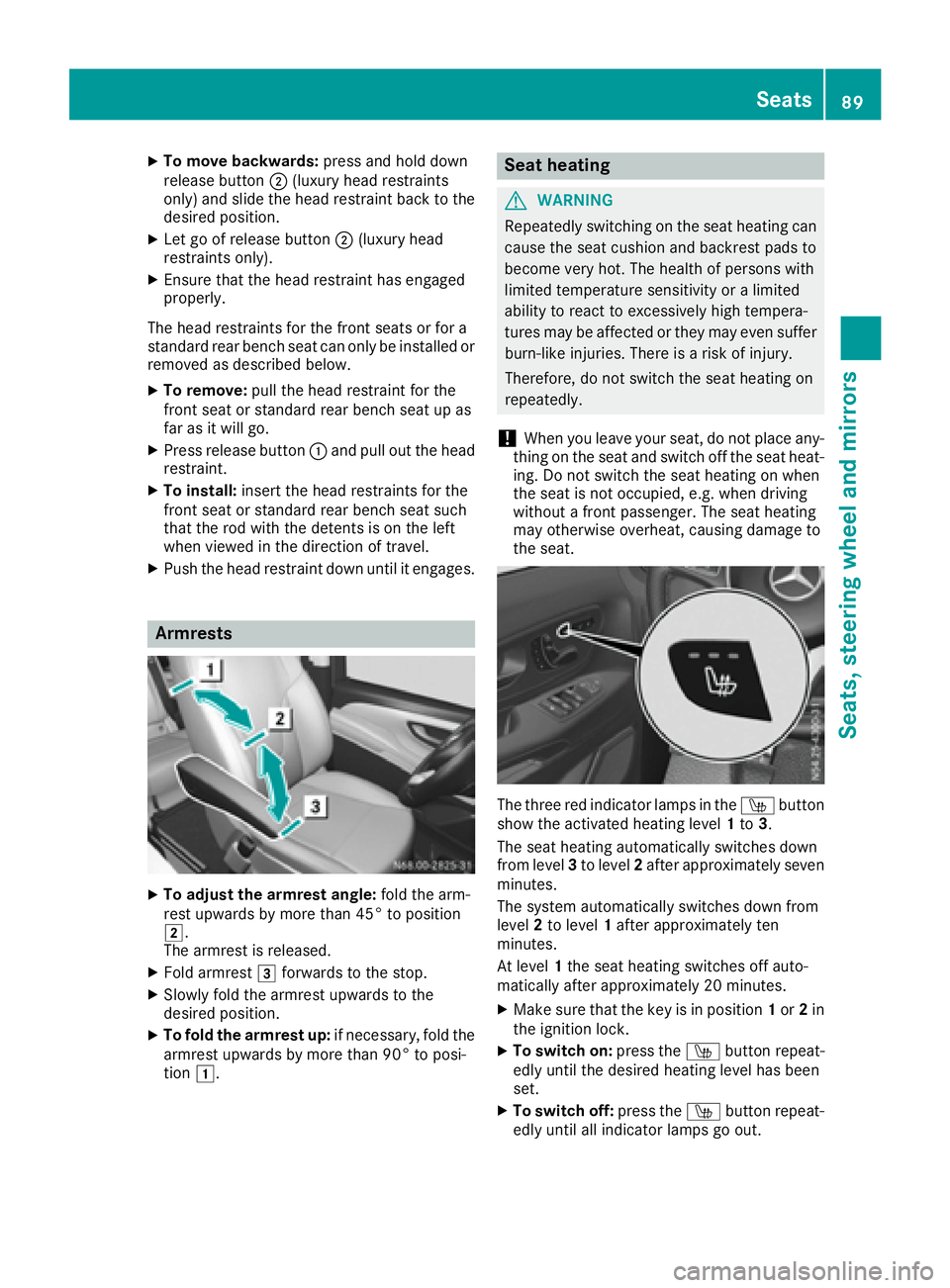
Armrests
XTo adjust the armres tangle: foldt he arm-
res tupwar ds by more than4 5° to position
2.
The armres tisr eleased.
XFol da rmrest 3forward stothe stop.
XSlowl yfoldt he armres tupwar ds to the
desired position.
XTo fol dthe armres tup:if necessary,f oldt he
armres tupwar ds by more than9 0° to posi-
tion 1.
Seat heating
GWARNING
Repeatedl yswitching on the sea theating can
cause the sea tcushion and backres tpadst o
become very hot. The health of persons with
limite dtemperature sensitivity or alim ited
ability to react to excessivel yhight empera-
ture smaybe affecte dorthey maye vens uffer
burn-like injuries. There is ariskofi njury.
Therefore, do not switch the sea theating on
repeatedly.
!Whe nyou leave your seat, do not place any-
thing on the sea tand switch off the sea theat-
ing .Don ot switch the sea theating on when
the sea tisn ot occupied ,e.g.w hend riving
withou tafront passenger .The sea theating
mayo therwise overheat, causing damag eto
the seat.
The thre ered indicator lamps in the Íbutton
sho wthe activate dheating level 1to 3.
The sea theating automaticall yswitches down
from level 3to level 2afte rapp roximatelys even
minutes.
The system automaticall yswitches down from
level 2to level 1afte rapproximatelyt en
minutes.
At level 1the sea theating switches off auto-
maticall yafterapproximately2 0minutes.
XMake sure thatt he key is in position 1or 2in
the ignition lock.
XTo switc hon:press the Íbutton repeat-
edly unti lthe desired heating level hasb een
set.
XTo switc hoff:press the Íbutton repeat-
edly unti lallindicator lamps go out.
Seats89
Seats, steering wheel andmirrors
Z
Page 92 of 310
If the on-board voltage is too low, the seat heat-
ing willeither switch itself off prematurely or not
come on at all .Inthis case, too many electrical
consumers are switched on or the battery
charge is not sufficient. The seat heating will
automatically switch back to the current heating
level when enough on-board voltage is available
again.
Steering wheel
GWARNING
You could lose control of you rvehicle if you do
the following whil edriving:
Radjust the driver's seat, head restraint,
steering wheel or mirrors
Rfasten the seat belt
There is arisk of an accident.
Adjust the driver's seat, head restraint, steer-
ing wheel and mirror and fasten you rseat belt
before starting the engine.
GWARNING
If the steering wheel is unlocked whil ethe
vehicle is in motion, it could change position
unexpectedly .This could cause you to lose
control of the vehicle.T here isarisk of an
accident.
Before starting off, make sure the steering
wheel is locked. Never unlock the steering
wheel whil ethe vehicle is in motion.
GWARNING
Children could injure themselves if they
adjust the steering wheel .There is arisk of
injury.
When leaving the vehicle,a lways take the
SmartKey with you and lock the vehicle.N ever
leave childrenu nsupervised in the vehicle.
The steering wheel can still be adjusted if the
key has been removed.
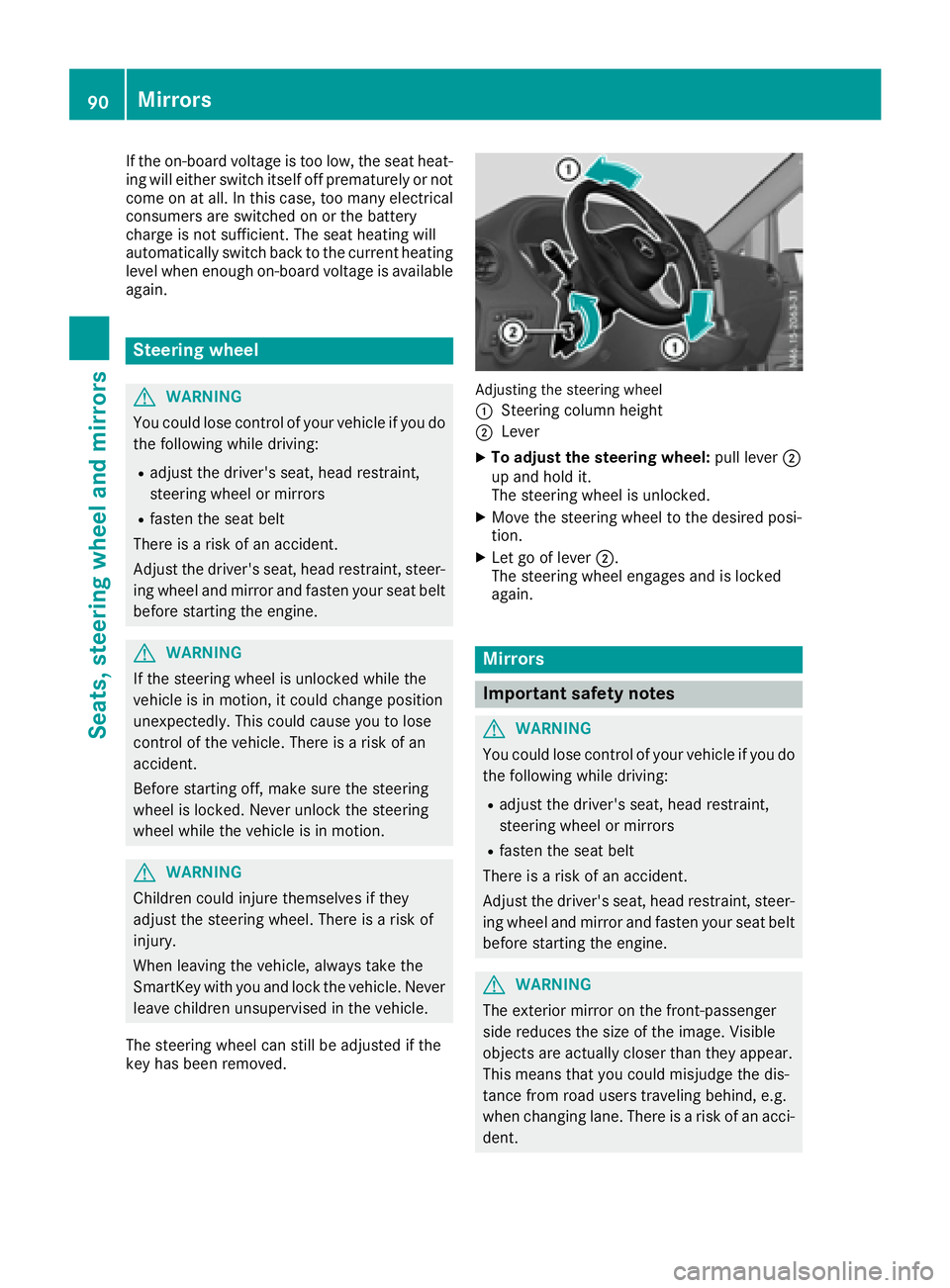
Adjusting the steering wheel
:
Steering column height
;Lever
XTo adjust the steering wheel: pulllever ;
up and hold it.
The steering wheel is unlocked.
XMove the steering wheel to the desiredp osi-
tion.
XLet go of lever ;.
The steering wheel engages and is locked
again.
Mirrors
Important safety notes
GWARNING
You could lose control of you rvehicle if you do
the following whil edriving:
Radjust the driver's seat, head restraint,
steering wheel or mirrors
Rfasten the seat belt
There is arisk of an accident.
Adjust the driver's seat, head restraint, steer-
ing wheel and mirror and fasten you rseat belt
before starting the engine.
GWARNING
The exterior mirror on the front-passenger
side reduces the size of the image .Visible
objects are actually closer than they appear.
This means that you could misjudge the dis-
tance from road users traveling behind, e.g.
when changing lane. There is arisk of an acci-
dent.
90Mirrors
Seats, steerin gwheel and mirrors
Page 95 of 310
Low-beamheadlamps
When theignitio nisswitche donand thelight
switch is in the Lposition,t heparking lamps
and low-beam headlamps are switche doneven
if th elight sensor does not sense dark ambient
light.T his is particularly useful when there is fog
or rain.
XTo switch on: turnthe key to position 2in the
ignitio nlockors tart th eengine.
XTurn th elight switch to position L.
The L indicator lamp in th einstrument
cluster lightsu p.
Daytime running lamps
XTo switch on: turnthe light switch to the
$ orà position.
Automatic headlamp mode
GWARNING
When th elight switch is set to Ã,thelow-
beam headlamps may not be switche don
automatically if there is fog ,sno woro ther
cause sofpoor visibilityd ue to theweather
conditionss uch as spray. Thereisar isk of an
accident.
In such situations ,tur nt he light switch to
L.
Automatic headlampm ode is onlyadriving aid.
You are responsible for th evehicle lighting at all
times.
When th eparking lamps and low-beam head-
lamps are switche don, th egreen T (parking
lamps)a ndL (low-beam headlamps) indica-
to rlamps in th einstrumentc luster light up.
à is thepreferred light switch setting. The
light settin gisautomatically selected according
to th ebrightnes softheambientl ight (excep-
tion: poor visibilityd ue to weather conditions,
such as fog ,sno wors pray):
RKey in position 1in th eignitio nlock: th epark-
ing lamps are switche don/off automatically
depending on th ebrightnes softheambient
light.
RWhen th eengine is on: depending on the
ambientl ight,thedaytim erunnin glamps or
th ep arking lamps and low-beam headlamps
are switche don/off automatically.
XTo switch on automatic headlamp mode:
turnthe light switch to Ã.
Fog lamps/rear fog lamp
You can onlyswitch th efog lamps on or off
manually in vehicle swhichh ave fog lamps
installed.
Front fog lamps help you to see and be seen in
conditionsofp oor visibilitydue to fog or pre-
cipitation. They can onl ybeoperated together
with th eparking lamps or with th elow-beam
headlamps.
The rear fog lamp improves visibilityofy our
vehicle for th etraffic behindint heeven tof
heavy fog .Observe th elegal requirements of the
countr yyou are currently in when usingt herear
fog lamp.
XTurn th elight switch to LorÃ.
XTurn th ekey to position 2in th eignitio nlock
or start th eengine.
XTo switch th efront fog lamps on/off: press
the N button.
When th egreen N indicator lamp in the
instrumentc luster goes on, th efog lamps are
switche don.
XTo switch th erearfog lamps on/off: press
the R button.
When th eyellow Rindicator lamp in the
instrumentc luster goes on, th erear fog lamp
is switche don.
Standing lamp
!If th ebattery charge is veryl ow, thestand-
ing lamps will switch off automatically to ena-
ble th enexte ngine start.A lways park your
vehicle in accordance with legal regulations,
in as ecure and adequately lit location.A void
leavin gthe T parking lamps on for several
hours. If possible, switch on th eright X or
left W standin glamp.
Switching on th estandin glamps ensures that
th ec orresponding side of th evehicle is illumi-
nated.
Exterior lighting93
Lightsa nd windshield wipers
Z
Page 96 of 310
Switching on the standing lamps:
XTurn the key to position0(Ypage 120) in the
ignition lock or remove the key.
XRight-hand standing lamp: turn the light
switch to position X.
XLeft-hand standing lamp: turn the light
switch to position W.
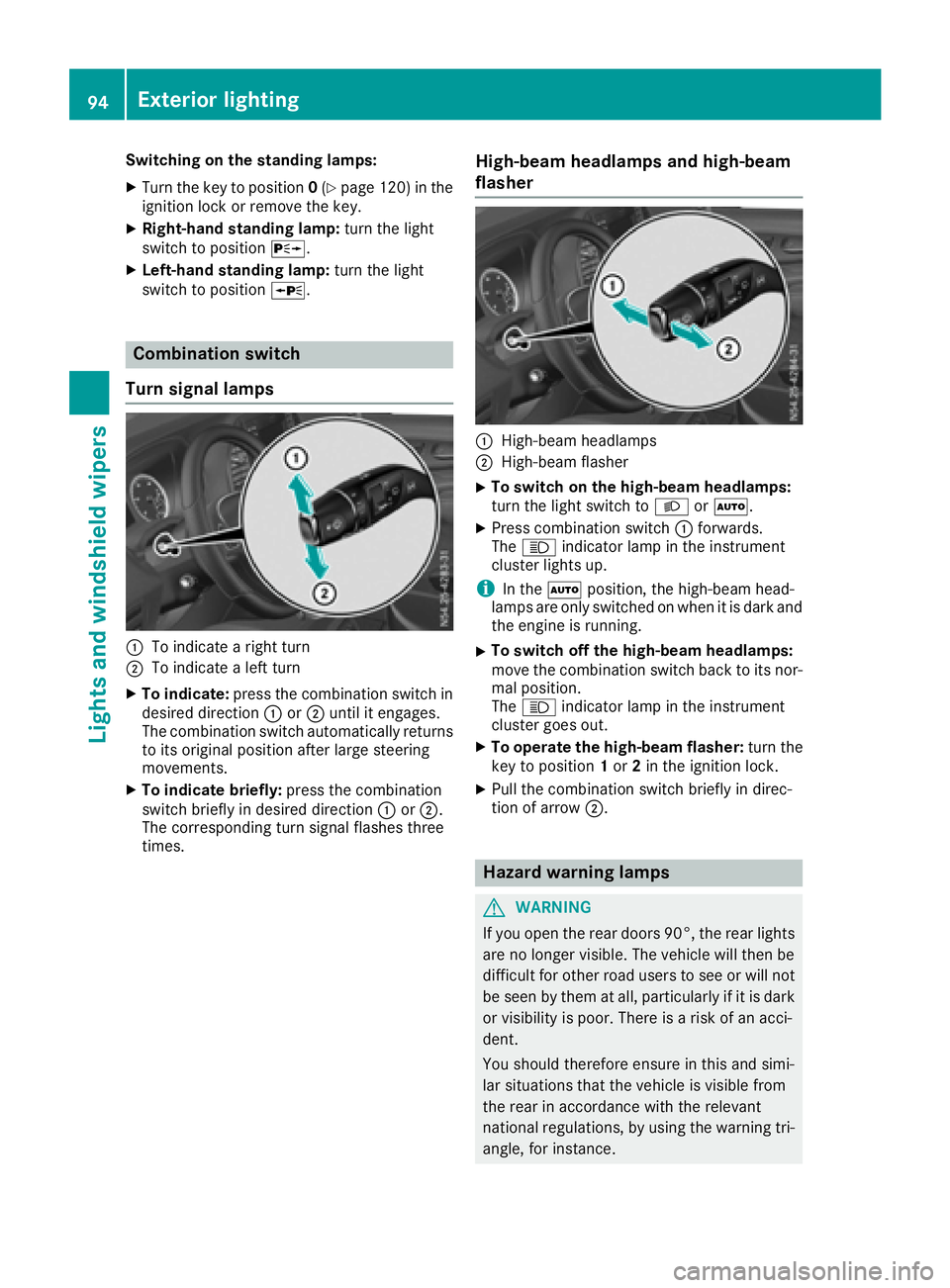
Combination switch
Turns ignal lamps
:To indicate aright turn
;To indicate aleft turn
XTo indicate: press the combination switch in
desired direction :or; until it engages.
The combination switch automatically returns
to its original position after large steering
movements.
XTo indicate briefly: press the combination
switch briefly in desired direction :or;.
The correspondingt urn signal flashes three
times.
High-beam headlamps and high-beam
flasher
:High-beam headlamps
;High-beam flasher
XTo switch on the high-beam headlamps:
turn the light switch to LorÃ.
XPress combination switch :forwards.
The K indicator lamp in the instrument
cluster lights up.
iIn the Ãposition, the high-beam head-
lamps are only switched on when it is dark and
the engine is running.
XTo switch off the high-beam headlamps:
move the combination switch back to its nor-
mal position.
The K indicator lamp in the instrument
cluster goes out.
XTo operate the high-beam flasher: turn the
key to position 1or 2in the ignition lock.
XPull the combination switch briefly in direc-
tion of arrow ;.
Hazard warning lamps
GWARNING
If you open the rear doors 90°, the rear lights are no longer visible. The vehicle will then be
difficult for other road users to see or will not
be seen by them at all, particularly if it is dark
or visibility is poor. There is arisk of an acci-
dent.
You should therefore ensure in this and simi-
lar situations that the vehicle is visible from
the rear in accordance with the relevant
national regulations, by using the warning tri-
angle, for instance.
94Exterior lighting
Lights and windshield wipers
Page 97 of 310
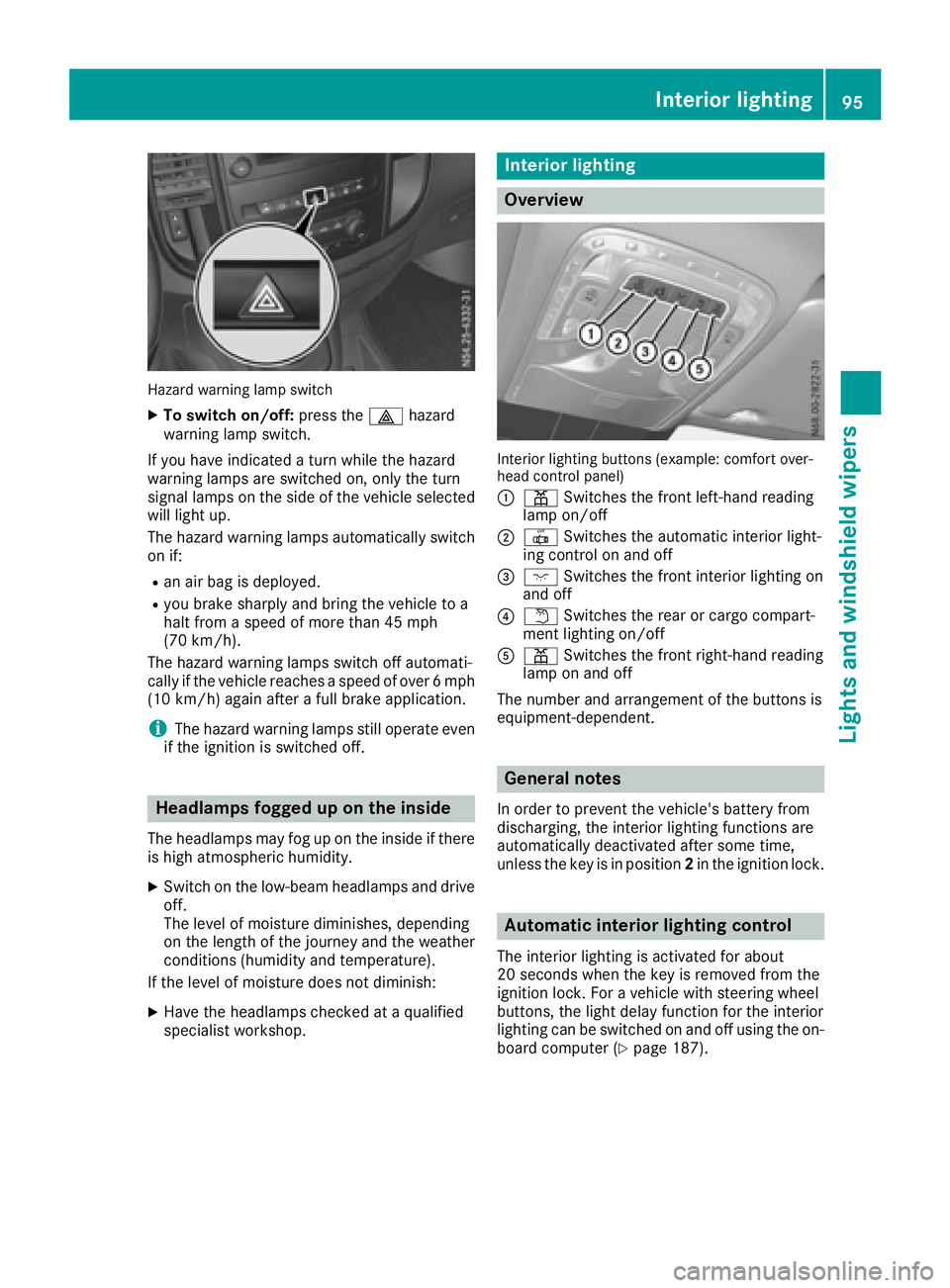
Hazard warning lamp switch
XTo switch on/off:pressthe £ hazard
warning lamp switch.
If yo uhave indicated aturn while the hazard
warning lamps are switched on, only the turn
signal lamps on the sid eofthe vehicle selected
will light up.
The hazard warning lamps automatically switch
on if:
Ran ai rbag is deployed.
Ryoub rake sharpl yand bring the vehicle to a
hal tfrom aspeed of more than 45 mph
(70 km/h).
The hazard warning lamps switch off automati-
cally if the vehicle reaches aspeed of over 6mph
(10 km/h )again after afullb rake application.
iThe hazard warning lamps stil loperate even
if the ignition is switched off.
Headlamps foggedupo nthe inside
The headlamps may fog up on the inside if there
is hig hatmospheric humidity.
XSwitch on the low-beamh eadlamps and drive
off.
The leve lofmoisture diminishes, depending
on the length of the journe yand the weather
conditions (humidity and temperature).
If the leve lofmoisture doesn ot diminish:
XHave the headlamps checked at aqualified
specialist workshop.
Interio rlighting
Overview
Interio rlighting buttons (example: comfort over-
hea dcontrol panel)
:
p Switche sthe front left-hand reading
lamp on/off
;| Switche sthe automati cinterior light-
ing control on and off
=c Switche sthe front interior lighting on
and off
?w Switche sthe rearorc argo compart-
ment lighting on/off
Ap Switche sthe front right-hand reading
lamp on and off
The number and arrangement of the buttons is
equipment-dependent.
General notes
In ordertop revent the vehicle' sbattery from
discharging, the interior lighting functions are
automatically deactivate dafter some time,
unless the key is in position 2in the ignition lock.
Automatic interior lighting control
The interior lighting is activated for about
20 secondsw hent he key is remove dfromt he
ignition lock. For avehicl ewiths teering wheel
buttons, the light dela yfun ctio nfor the interior
lighting can be switched on and off using the on-
boar dcompute r(
Ypage 187).
Interior lighting95
Lights and windshield wiper s
Z
Page 100 of 310
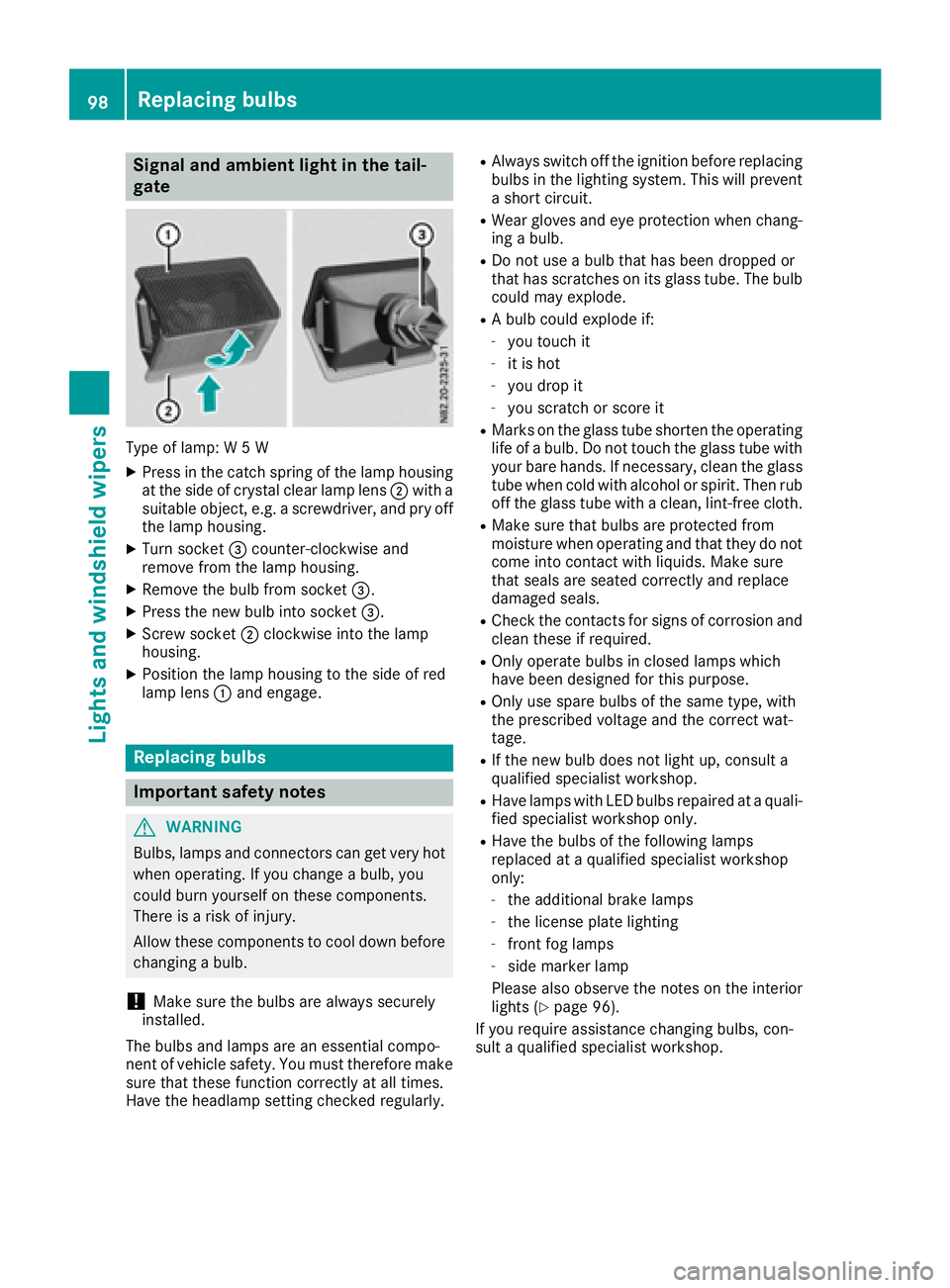
Signal and ambient light in the tail-
gate
Type of lamp:W5W
XPress in the catch spring of the lamp housing
at the side of crystal clear lamp lens ;with a
suitable object ,e.g. ascrewdriver, and pry off
the lamp housing.
XTurn socket =counter-clockwise and
remove from the lamp housing.
XRemove the bulb from socket =.
XPress the new bulb into socket =.
XScrew socket;clockwise into the lamp
housing.
XPosition the lamp housing to the side of red
lamp lens :and engage.
Replacing bulbs
Important safety notes
GWARNING
Bulbs, lamps and connectors can get very hot
when operating. If you change abulb, you
could burn yourself on these components.
There is arisk of injury.
Allow these components to cool down before
changing abulb.
!Make sure the bulbs are always securely
installed.
The bulbs and lamps are an essential compo-
nent of vehicle safety. You must therefore make
sure that these function correctly at all times.
Have the headlamp settingc hecked regularly.
RAlways switch off the ignition before replacing
bulbs in the lighting system. This will prevent
as hort circuit.
RWear gloves and eye protection when chang-
ing abulb.
RDo not use abulb that has been dropped or
that has scratches on its glass tube. The bulb
could may explode.
RAb ulb could explode if:
-you touch it
-it is hot
-you drop it
-you scratchors core it
RMarks on the glass tube shorten the operating
life ofabulb. Do not touch the glass tube with
your bare hands. If necessary, clean the glass
tube when cold with alcohol or spirit. Then rub
off the glass tube with aclean, lint-free cloth.
RMake sure that bulbs are protected from
moisture when operating and that they do not
come into contact with liquids. Make sure
that seals are seated correctly and replace
damaged seals.
RCheck the contacts for signs of corrosion and
clean these if required.
ROnly operate bulbs in closed lamps which
have been designed for this purpose.
ROnly use spare bulbs of the same type, with
the prescribed voltage and the correct wat-
tage.
RIf the new bulb does not light up, consult a
qualified specialist workshop.
RHave lamps with LED bulbs repaired at aquali-
fied specialist workshop only.
RHave the bulbs of the following lamps
replaced at aqualified specialist workshop
only:
-the additional brake lamps
-the license plate lighting
-front fog lamps
-side marker lamp
Please also observe the notes on the interior
lights (
Ypage 96).
If you require assistance changing bulbs, con-
sult aqualified specialist workshop.
98Replacing bulbs
Lights and windshieldw ipers
Page 105 of 310
stop automatically.The rear window wiper will
only resume wiping againw hen the tailgate and
rear door are closed and you pull awaya gain.
The rear window will no longer be wiped properly
if the wiper blade is worn. This may prevent you
from observing the traffic conditions. Informa-
tion on replacing the wiper blade can be found
under "Replacing wiper blades" (
Ypage 103).
Replacing the wiper blades
Important safety notes
GWARNING
If the windshieldw ipers begin to move while
you are changing the wiper blades, you could be trapped by the wiper arm. There is arisk of
injury.
Always switch off the windshieldw ipers and
ignition before changing the wiper blades.
!Never open the hood/tailgate or rear doors
if aw indshieldw iper arm has been folded
awayf rom the windshield/rear window.
Never fold awindshieldw iper arm without a
wiper blade back onto the windshield/rear
window.
Hold the windshieldw iper arm firmly when
you change the wiper blade.Ify ou release the
windshieldw iper arm without awiper blade
and it falls onto the windshield/rear window,
the windshield/rear window may be damaged
by the force of the impact.
Mercedes-Benz recommends that you have
the wiper bladesc hanged ataqualified spe-
cialist workshop.
!Only hold the wiper blade by the wiper arm.
You could otherwise damage the wiper rub-
ber.
Wiper bladesa re wear parts. The windshieldw ill
no longer be wiped properly if the wiper blades
are worn. This may prevent you from observing
the traffic conditions.
Please observe the service indicator after
changing the wiper bladesoft he windshield
wiper.
Service indicator
Replacement wiper bladesf or the windshield
wiper have aservice indicator on the tip of the
wiper blade.
Depending on the amount of use, the service
indicator will change color from black to yellow.
Change the wiper blade if:
Rthe wiper blade is damaged
Rthe service indicator has turned yellow
In order to activate the service indicator, you
have to remove the protective film
(
Ypage 103).
Windshield wiper
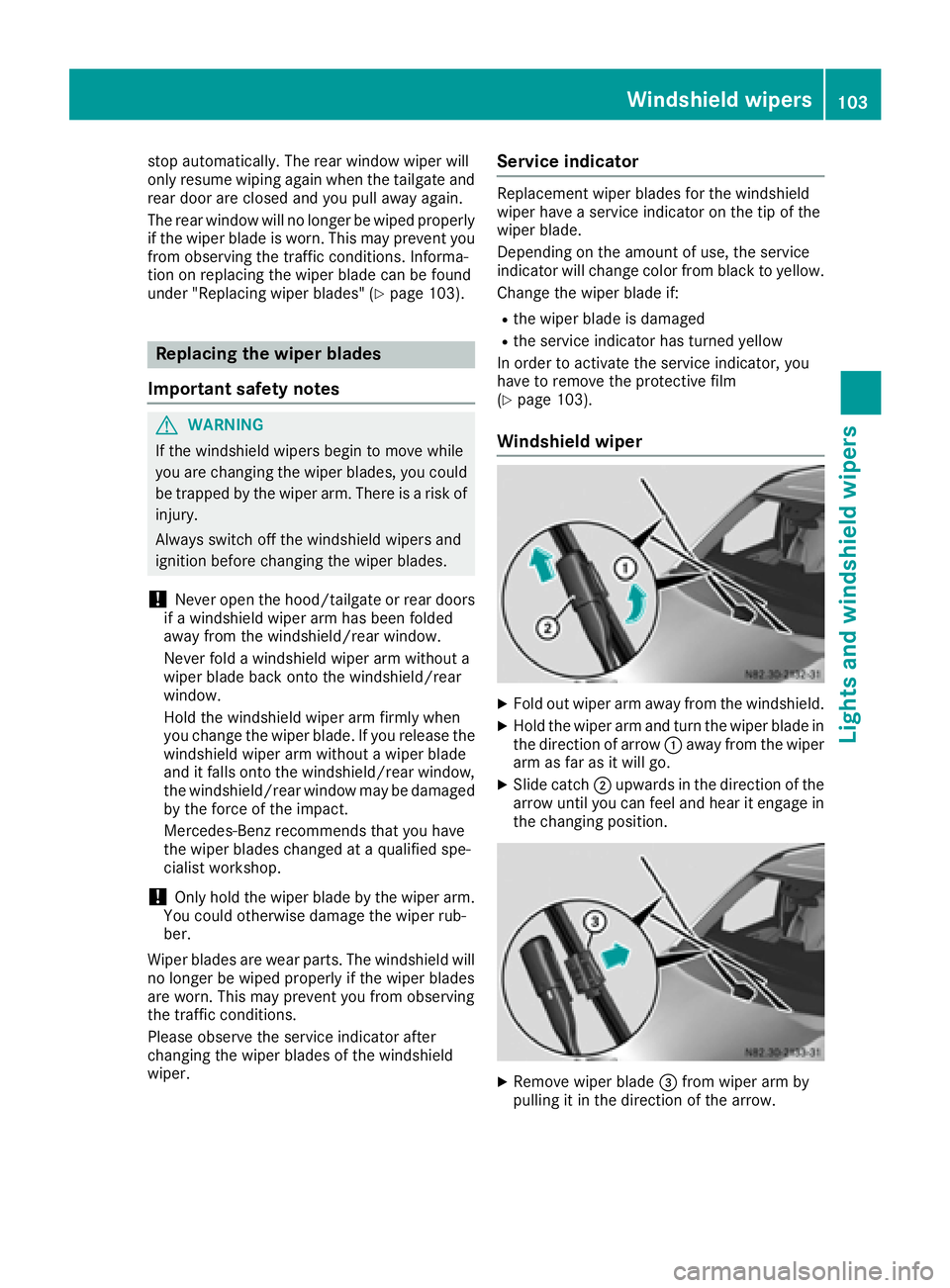
XFold out wiper arm awayf rom the windshield.
XHold the wiper arm and turn the wiper blade in
the direction of arrow:awayf rom the wiper
arm as far as it will go.
XSlide catch ;upwards in the direction of the
arrow until you can feel and hear it engage in
the changing position.
XRemove wiper blade =from wiper arm by
pulling it in the direction of the arrow.
Windshield wipers103
Lights and windshield wipers
Z
Page 118 of 310
TEMPMATIC air-conditioning system or
dual-zone automatic climate control
XSwitch on climate control(Ypage 110).
XPress thehbutton.
If the indicator lamp in the hbutton lights
up ,air-recirculation mod eisactivated.
Air-recirculation mod eswitches on automati-
cally:
Rat high outside temperatures
Rwhil edrivin ginat unnel(on ly vehicles with a
navigation system).
The indicator lamp in the hbutton is thenn ot
li tu p.Outside ai risadded automaticall yafter
abou t30m inutes.
Air-recirculation mod eisdeactivated automati-
cally:
Rafter approximately 5minute satoutside tem-
peratures belo wabout 45‡(7† )
Rafter approximately 5minute sw hen the cool-
ing with air dehumidification function is deac-
tivated
Rafter approximately 30 minutes at outside
temperatures above about 45 ‡(7†)and
when the cooling with air dehumidification
function is active.
Convenienceo pening/pre-entryc li-
matec ontrol
GWARNING
During convenience opening, body parts
could be drawn in or become trapped
between the side window and the door frame.
There is arisk of injury.
Monitor the entire opening procedure when
using convenience opening. When opening,
make sure that nobody touches the side win- dow. Release the %switch immediately if
somebody becomes trapped, to interrupt the
opening procedure.
XPre-entry climate control and conveni-
ence opening with the key: press and hold
the % button on the key.
The side windows open automatically and the
blower of the climate control system is acti-
vated.
XRelease the %button.
iAt high interior temperatures, the blower is
also switched on when adoor is opened. This
means that slightly cooled air enters the vehi-
cle interior after the engine is started, to cool
the vehicle more rapidly.
Switching the residual heat function
on/off
General notes
Only vehicles with automatic climate control
have the residual heat function.
Once the engine is switched off, it is possible to
make use of the residual heat of the engine to
continue heating or ventilating the front com-
partment of the vehicle for approximately
30 minutes. The heating or ventilation time
depends on the set interior temperature.
Switching the function on/off
XTurn the key to position 0in the ignition lock
or remove it.
XPress the Ìbutton.
If the residual heat function is activated, the
indicator lamp in the Ìbutton comes on.
The blower will run at alow speed regardless
of the airflow setting.
If you activate the residual heat function at
high temperatures, only the auxiliary ventila-
tion will be activated. The blower then runs at
medium speed.
The residual heat function switches off auto-
matically
Rafter approximately 30 minutes
Rif the starter battery's condition of charge is
too low
Rwhen you switch on the ignition
Adjusting the air vents
Important safety notes
GWARNING
Very hot or very cold air can flow from the air
vents .This could result in burns or frostbite in
the immediate vicinity of the air vents.T here
is ar isk of injury.
116Adjusting the air vents
Climatec ontrol