warning MERCEDES-BENZ METRIS 2016 MY16 Operator’s Manual
[x] Cancel search | Manufacturer: MERCEDES-BENZ, Model Year: 2016, Model line: METRIS, Model: MERCEDES-BENZ METRIS 2016Pages: 310, PDF Size: 7.28 MB
Page 137 of 310
Alwaysusethe hands-free system for telephon-
ing whil edriving .Onlyu sethe telephone if road
traffic conditions permit. If thisisn ot the case,
pull ove rtoasafel oc ation before using the tele-
phone.
Bea rinm ind thatata speed of just30mph
(approximately5 0km/h), your vehicl eiscov-
ering adistance of 44 fee t(approximately 14 m)
every second.
Drive sensibly –save fuel
In order to save fuel, observe the following tips:
XThe tires should alwaysbei nflated to the rec-
ommended tire pressure.
XRemove unnecessary loads.
XRemove roof carriers when they are not nee-
ded.
XWarm up the engine at low engine speeds.
XAvoid frequent acceleration or braking.
XHave all maintenanc ework carried out as
indicated by the servicei ntervals in the Main-
tenance Booklet or by the servicei nterval dis-
play.
Fuel consumption also increases when driving in cold weather, in stop-start traffic and in moun-
tainous terrain.
Overrun cutoff
If you are in overrun mode and take your foot off
the accelerator pedal, the fuel supply is cut off
when the engine speed is out of the idle speed
control range.
Drinking and driving
GWARNING
Drinking and driving and/or takin gdrugs and
driving are very dangerous combinations.
Even asmall amount of alcohol or drugs can
affect your reflexes ,perceptions and judg-
ment.
The possibility of aserious or even fatal acci-
dent is greatly increased when you drink or
take drugs and drive.
Do not drink or take drugs and drive or allow
anyone to drive who has been drinking or tak-
ing drugs.
Emission control
GWARNING
Combustion engines emit poisonous exhaust
gases such as carbon monoxide. Inhaling
these exhaust gases leads to poisoning. There
is ar isk of fatal injury. Thereforen ever leave
the engine running in enclosed spaces with-
out sufficien tventilation.
Certain engine systems are designed to keep
the level of poisonous substances in exhaust
fumes within legal limits.
These systems only work optimally if they are
maintained exactly in accordance with the man-
ufacturer's specifications. An ywork on the
engine should therefore be carried out by quali-
fied and authorized Mercedes-Benz technicians.
The engine settings must not be changed under
any circumstances. In addition, all specific
maintenanc ework must be carried out at regu-
lar intervals and in accordance with the service
requirement softhe dealer listed here on the
inside title page. Details can be found in the
Maintenance Booklet.
Speed limiter
GWARNING
Exceeding the stated tire load-bearing capa-
city and the approved maximum speed could
lead to tire damage or the tire bursting. There is ar isk of accident.
Therefore, only use tire types and sizes
approved for your vehicle model. Observe the
tire load ratin gand speed ratin grequired for
your vehicle.
As the driver, you must be aware of the maxi-
mum design speed of the vehicle and the maxi- mum permissible speed based on the tires (tire
and tire pressure). In particular, also observe the tire approval regulations for each country.
You must, under no circumstances, exceed the
speed limit for the tires specified by the speed
index. The speed ratin gisstated in the tire
tables (
Ypage 291).
You can permanently limit the maximum speed
of your vehicle, e.g. for driving on winter tires.
Driving tips135
Driving and parking
Z
Page 138 of 310
Mercedes-Benzrecommends that you have the
maximum permissible speed programed at a
Mercedes-BenzC ommercial Van Center.
Before overtaking, take into consideration that
the engine speed limiter prevents the speed
increasing beyond the programed maximum
speed.
Driving abroad
Service
An extensive network of authorized Mercedes-
Benz Centers is also at your disposal when you
are traveling abroad. Nevertheless, please bear
in mind that service facilities or replacement
parts may not always be immediately available.
The relevant workshop directories are available
from any Mercedes-BenzC ommercial Van Cen-
ter.
Fuel
In some countries, only fuels with ahigher sulfur
content are available.
Unsuitable fuel can cause engine damage. You
will find information about fuel under "Service
products and capacities" (
Ypage 296).
Low-beam headlamps
General notes
When driving in countries in which traffic drives
on the opposite side of the road to the country
where the vehicle is registered, you must switch
the headlamps to symmetrical low beam. This
prevents oncomingt raffic from being blinded.
Symmetrical low beam does not illuminate as
large an area of the edge of the road.
Vehicles with halogen headlamps
The headlamps do not need to be switched to
symmetrical low beam. The legal requirements
of countries in which traffic drives on the oppo- site side of the road to the countryw here the
vehicle is registered are met without the need to
convert the headlamps.
Transport by rail
Transporting your vehicle by rail may be subject to certain restrictions or require special meas- ures to be taken in some countries due to vary-
ing tunnel heights and loading standards.
You can obtain information on this from any
Mercedes-BenzC
ommercial Van Center.
Brakes
Important safety notes
GWARNING
If you shift down on aslippery road surface in
an attempt to increase the engine's braking
effect,t he drive wheels could lose their grip.
There is an increased danger of skidding and
accidents.
Do not shift down for additional engine brak-
ing on aslippery road surface.
Downhill gradients
!Depressing the brake pedal constantly
results in excessive and premature wear to
the brake pads.
This also applies to automatic braking if you
have activated cruise control.
On long and steep downhill gradients, you
should change down to shift range 2or1 in
good time (
Ypage 128).
This should be observed in particular when driv-
ing with aladen vehicle and when towing a
trailer.
You thereby make use of the braking effect of
the engine and do not have to brake as often to
maintain the speed. This relieves the load on the
service brake and prevents the brakes from
overheating and wearing too quickly.
Heavy and light loads
GWARNING
If you rest your foot on the brake pedal while
driving, the braking system can overheat. This increases the stopping distance and can even
cause the braking system to fail. There is a
risk of an accident.
Never use the brake pedal as afootrest.N ever
depress the brake pedal and the accelerator
pedal at the same time.
136Driving tips
Driving and parking
Page 139 of 310
!Depressing the brake pedal constantly
results in excessive and premature wear to
the brake pads.
If the brakes have been subjected to aheavy
load, do not stop the vehicle immediately.D rive
on for ashort while.T he brakes are cooled down
more quickly in the airflow.
Wet road surfaces
If you have been driving for along time in heavy
rain without braking, there may be adelayed
response when you first apply the brakes. This
may also occur after driving through acar wash
or deep water.
You must depress the brake pedal more firmly.
Maintain alonger distance to the vehicle in
front.
While paying attention to the traffic conditions,
you should brake the vehicle firmly after driving
on aw et road surface or through acar wash. This
heats the brake discs, so that they dry more
quickly, which protects them against corrosion.
Limited braking performance on salt-
treated roads
When driving on salted roads, salt may start to
buildupont he brake disks and brake pads. This
can increase braking distances considerably.
Maintain agreater distance to the vehicle in
front.
To remove any build-up of salt that may have
formed:
XApply the brakes at the start of the journey,
occasionally during journey and at the end of
the journey. Make sure that you do not endan-
ger other road users when doing so.
New brake discs and brake pads/
linings
New brake pads and brake discs only reach their
optimal braking effect after about60m iles
(100 kilometers). Until then, compensate for
this by applying greater force to the brake pedal. For safety reasons, Mercedes-Benz recom-
mends only installing the following brake discs
and brake pads/linings:
Rbrake discs that have been approved by
Mercedes-Benz
Rbrake pads/linings that have been approved
by Mercedes-Benz or are of an equivalent
standard of quality
Other brake discs or brake pads/linings can
compromise the safety of your vehicle.
Alwaysr eplace all brake discs or brake pads/
linings on an axle at the same time and only have
them replaced at aqualified specialist work-
shop. When replacing the brake discs, always
have the brake pads/linings replaced at the
same time.
Parking brake
GWARNING
If you must brake the vehicle with the parking brake, the braking distance is considerably
longer and the wheels could lock. There is an
increased danger of skidding and accidents.
Only use the parking brake to brake the vehi-
cle when the service brake is faulty. Do not
apply the parking brake too firmly. If the
wheels lock, release the parking brake until
the wheels begin turning again.
When driving on wet roads or dirt-covered sur-
faces, road salt and/or dirt may get into the
parking brake. This causes corrosion and a
reduction of braking force.
In order to prevent this, drive with the parking
brake lightly applied from time to time. When
doing so, drive for adistance of approximately
110 yds (100 m) at amaximum speed of 12 mph
(20 km/h).
The brake lamps are not illuminated when you
brake the vehicle using the parking brake.
Driving in wet conditions
Hydroplaning
GWARNING
There is adanger of hydroplaning occurring,
even if you are driving slowly and your tires
Driving tips137
Driving and parking
Z
Page 140 of 310
have sufficient tread depth, depending on the
depth of water on the road. There isarisk of
an accident.
For this reason, avoid tire ruts and brake care-
fully.
Therefore, in heavy rain or other conditions in
which hydroplaning can occur, drive as follows:
Rreduce your speed
Ravoid tire ruts
Rapply the brakes with care
Driving on flooded roads
!Do not drive through flooded areas. Check
the depth of any water before driving through
it. Drive slowly through standing water. Oth-
erwise, water may enter the vehicle interior or
the engine compartment. This can damage
the electronic components in the engine or
the automatic transmission. Water can also
be drawn in by the engine's air suction nozzles
and this can cause engine damage.
If you have to drive on stretches of road on which
water has collected, please bear in mind that:
Rthe water level of standing water should not
be above the lower edge of the front bumper
Rdo not drive faster than walking speed
Driving in winter
GWARNING
If you shift down on aslippery road surface in
an attempt to increase the engine's braking
effect,t he drive wheels could lose their grip.
There is an increased danger of skidding and
accidents.
Do not shift down for additional engine brak-
ing on aslippery road surface.
!Vehicles with automatic transmission may
roll only briefly in the neutral position N.Pro-
longed rolling of the wheels, e.g. when being
towed, will result in transmission damage.
Have your vehicle winterproofed at aqualified
specialist workshop at the onset of winter. Drive particularly carefully on slippery roads.
Avoid sudden acceleration, steering and braking
maneuvers. Do not use cruise control.
If the vehicle threaten stoskid or cannot be
stopped when moving at low speed:
XShift the transmission to position N.
XTry to maintain control of the vehicle using
corrective steering.
The outside temperature indicator is not
designed to serve as an ice-warning device and
is therefore unsuitable for that purpose.
Changes in the outside temperature are dis-
played after ashort delay.
Indicated temperatures just above the freezing
point do not guarantee that the road surface is
free of ice. The road may still be icy, especially in
wooded areas or on bridges. If you do not adjust
your driving style, the vehicle may start to skid.
Always adapt your driving style and drive at a
speed to suit the prevailing weather conditions.
You should pay special attention to road condi-
tions when temperatures are around freezing
point.
You can find further information under:
R"M+S tires" (Ypage 269)
R"Snow chains" (Ypage 270)
R"Driving with summer tires" (Ypage 269)
Also observe the notes under "Winter operation" (
Ypage 269).
Driving off-road
Important safety notes
GWARNING
If you drive on asteep incline at an angle or
turn when driving on an incline, the vehicle
could slip sideways, tip and rollover. There is a risk of an accident.
Always drive on asteep incline in the line of
fall (straight up or down) and do not turn the
vehicle.
GWARNING
When driving off-road, your body is subject to
forces from all directions, due to the uneven
surface. You could be thrown from your seat,
for instance. There is arisk of injury.
138Driving tips
Driving and parking
Page 141 of 310
Alwayswearas eatb elt, eve nwhend riving off-
road.
GWARNING
If yo udrive ove robstacle sorinr uts, the steer-
ing whee lmayjerk outofy ourg rip, causing
injury to your hands.
Alway sholdt he steering whee lfirmly with
both hands. Whe ndriving ove robstacles, you
must expect steering forces to increase
briefl yand suddenly.
GWARNING
Flammabl ematerial such as leaves, grass or
twigs mayi gnite if they come into contact with
hot parts of the exhaus tsystem .There is arisk
of fire.
Whe ndriving off roa doronunpaved roads,
check the vehicle's undersid eregularly .In
particular, remove parts of plants or other
flammabl ematerial swhich have become
trapped. In the cas eofdamage, contact a
qualified specialist workshop.
!Whe ndriving off-roadoronu npaved surfa-
ces ,check the undersid eofthe vehicl eand
the wheels and tire satregular intervals .In
particular, remove any trappe dforeign
objects, e.g .stone sand branches.
Such foreig nobjects may:
Rdamage the chassis, the fuel tank or the
brake system
Rcause imbalance sand thusv ibrations
Rbe flung outw heny ou continue driving
If ther eisany damage, inform aquali fied spe-
cialist workshop.
Whe ndriving off-roada nd on construction sites,
sand, muda nd water mixe dwitho il,f or exam-
ple, mayg et into the brakes. Thi smaylead to a
reduction in braking performance or totalb rake
failure, also as aresul tofi ncreased wear .The
braking characteristics will vary depending on
the material thath asgot into the system .Clean
the brakes afte rdriving o
ff-road. If yo uth
en
notice reduce dbraking performance or hear
scraping noises ,hav et he brake system checked
at aq uali fied specialist workshop.A djust your
driving style to the changedb raking character-
istics. Driving off-roadoronc
onstruction sites increa-
ses the possibility of vehicl edamag ewhich may
in turn lead to the failure of certain assemblies
and systems. Adapt your driving style to the off- roa ddriving conditions. Driv ecarefully. Have
any vehicl edamag erectifie dataq ualified spe-
cialist workshop as soo naspossible.
Whe nloadin gyourvehicl efor driving off-roado r
on aconstruction site, kee pthe vehicle's center
of gravity as lo waspossible.
Rule sfor drivin goff-road
!Alway sbearthe vehicle's ground clearance
in mind and avoido bstacles, e.g .deepr uts.
Obstacles mayd amagethe following parts of
the vehicle:
Rthe chassis
Rthe drive train
Rthe fuel and supply tanks
For thisr eason, yo ushoul dalway sdrive
slowly when driving off-road. If yo uhavet o
drive ove robstacles, have the front
passengerd irect you.
iWe recommend thaty ouadditionally carry a
shovel and arecover yrop ew iths hackle in the
vehicle.
REnsure thatl oadsand items of luggage are
securel ystowed or lashe ddown
(
Ypage 232).
RBefore driving off-road, stop the vehicl eand
shift to alow gear.
RIf the surface requires ,temporaril ydeactivate
ESP®when pulling away (Ypage 64).
ROnlyd rive off-roadw itht he engine running
and ageare ngaged.
RDriv eslowly and smoothly. Walking pace is
necessary in many situations.
RAvoi dspinning the drive wheels.
RMake sure thatt he wheels always remai nin
contact with the ground.
RDriv ewithe xtreme car eoveru nknown terrain
where yo ucan onlys ee forashort distance.
As aprecaution, get outoft he vehicletotake
al oo katt he route to be take ninadvance.
RCheck the water depth before fording.
RWatch outf or obstacles(e.g. rocks ,holes,
tree stumps and ruts).
RAvoi dedges where the surface could crumble
or break away.
Driving tips139
Driving an dparking
Z
Page 144 of 310
Storing and maintaining the current
speed
XAccelerate the vehicle to the desired speed
above 20 mph (30 km/h).
XBriefly push the cruise control lever up:or
down =.
XRelease the accelerator pedal.
Cruise control is activated. The current speed
is stored and shown briefly in the display's
text field.
The display also shows the Vsymbol and
the stored speed:
Rin the header on vehicles without steering
wheel buttons (Ypage 170)
Rin the status area on vehicles with steering
wheel buttons (Ypage 176)
Resuming the stored speed
GWARNING
If you call up the stored speed and it differs
from the current speed, the vehicle acceler-
ates or decelerates. If you do not know the
stored speed, the vehicle could accelerate or brake unexpectedly. There is arisk of an acci-
dent.
Pay attention to the road and traffic condi-
tions before calling up the stored speed. If you
do not know the stored speed, store the
desired speed again.
XBriefly pull the cruise control lever towards
you ;.
XRelease the accelerator pedal.
Cruise control is activated and resumes the
vehicle's speed to the last speed stored.
The stored speed is shown briefly in the dis-
play.
The display also shows the Vsymbol and
the stored speed:
Rin the header on vehicles without steering
wheel buttons (Ypage 170)
Rin the status area on vehicles with steering
wheel buttons (Ypage 176)
iWhen you pull the cruise control lever
towards you for the first time after startin gthe
engine, cruise control adopts the current
speed.
Setting the speed
It may be amoment before the vehicle starts to
accelerate or brake to the set speed. Take this
delay into account when settingt he speed.
XPress the cruise control lever up:to
increase the speed or down =to reduce the
speed.
The vehicle will accelerate or decelerate. The
speed is shown in the display.
XRelease the cruise control lever once the
desired speed is reached.
The displayed speed is stored.
or
XBriefly press the cruise control lever as far as
the 1st pressure point up :or down =.
The last speed stored is increased/reduced in increments of 1mph (1 km/h).
or
XBriefly press the cruise control lever beyond
the pressure point up :or down =.
The last speed stored is increased/reduced in increments of 5mph (10 km/h).
iCruise control is not deactivated if you
depress the accelerator pedal. If you acceler-
ate briefly to overtake, for example, cruise
control resumes the vehicle’s speed to the
last speed stored after you have finished over-
taking.
To deactivatec ruise control
There are various ways to deactivate cruise con-
trol:
XBriefly press the cruise control lever for-
wards?.
or
XApply the brakes.
The last speed set remains stored. The last
speed stored is deleted when you switch off the
engine.
Cruise control is deactivated automatically
when:
Ryou apply the brakes
Ryou apply the parking brake and the F
(only USA) or J(only Canada) indicator
lamp in the instrumentc luster lights up
Ryou are driving slower than 20 mph (30 km/h)
Ryou shift the automatic transmission to neu-
tral positionNwhile the vehicle is in motion
142Driving systems
Driving and parking
Page 145 of 310
RESP®intervenes or youdeactivate ESP®
Rthere is amalfunctio ninthe ESP®or ABS sys-
tem
If cruis econtro lautomaticall ydeactivates, a
warning tone sounds and the Cruise
ControlOffmessage appearsbriefl yint he display.
The V symbo land the displa yofthe stored
spee dint he header or in the status area of the
displa yarethenn ot shown.
Problems with cruis econtrol
The spee dcanno tbes et when cruis econtro lis
activated.
The displa yisshowing amessage of high priority
and canno ttherefore sho wachange in speed.
XProcee dasinstructed by the message in the
display.
COLLISIO NPREVENTION ASSIST
General notes
COLLISION PREVENTION ASSIST help syou:
Rto minimize the ris kofafront-end collision
with adetecte dobstacle in the path of your
vehicle
Rto reduce the consequences of afront-end
collision
The system uses rada rsensor stod etect vehi-
cle sinf ront.
COLLISION PREVENTION ASSIST consists of the
distance warning functio nand Adaptive Brake
Assist.
If COLLISION PREVENTION ASSIST is malfunc-
tioning ,the displa yshows acorresponding mes-
sage (
Ypage 213).
Distance warning function
Important safety notes
GWARNING
The distance warning functio ndoesn ot react:
Rto people or animals
Rto oncomin gvehicles
Rto crossing traffic
Rwhen cornering
Thus, the distance warning functio ncannot
provid eawarning in al lcritica lsituations.
There is ariskofana ccident.
Alway spaycarefu lattentio ntothe traffics it-
uatio nand be ready to brake.
GWARNING
The distance warning functio ncanno talway s
clearly identify objects and comple xtraffic
situations.
In such cases, the distance warning function
may:
Rgive an unnecessary warning
Rnot give awarning
There is ariskofana ccident.
Alway spaycarefu lattentio ntothe traffics it-
uatio nand do not rel ysolel yont he distance
warning function.
In particular ,the detection of obstacle scan be
impaired in the cas eof:
Rdirt on the sensor soranything else covering
the sensors
Rit is snowing or raining heavily
Rthere is interferenc efromo therradar sources
Rthe possibility of strong rada rreflections, for
example, in parkin ggarages .
Ranarrow vehicl etraveling in front, e.g .a
motorbike
Rav ehicl etraveling in front on adifferent line
Due to the nature of the system ,particularly
complicate dbutnon-critical drivin gconditions
maya lsoc ause the system to displa yawarning.
If yo ufailtoa dapt your drivin gstyle ,the dis-
tance warning functio ncan neitherr educe the
ris kofana ccident nor override the laws of phys-
ics .The distance warning functio ncanno ttake
into account road, weather or trafficc onditions.
The distance warning functio ni
so nlyana id.
You
ar er esponsibl efor the distance to the vehicl ein
front, for vehicl espeed, braking in good time
and for staying in your lane.
Following damage to the front end of the vehicle,
have the configuratio nand operatio nofthe
rada rsensor checked at aquali fied specialist
workshop .Thisa lsoa pplies to collisions at slow
speeds where there is no visible damage to the
front of the vehicle.
Driving system s143
Driving an dparking
Z
Page 146 of 310
If you change wheel size, make sure they corre-
spond to the correct wheel size category
(
Ypage 267). If the category is changed without
recoding the control units in the vehicle,t he
functioning of the distance warning feature may
be impaired. COLLISION PREVENTION ASSIST
may then detect amalfunction and switch itself
off.
Operation
XTo activate/deactivate: activate or deacti-
vate the distance warning function in the on-
board computer (
Ypage 184).
If the distance warning function of the COL-
LISION PREVENTION ASSISTisa ctivated, the
display shows the Äsymbol:
Rin the header
Rin the Status Overviewof the Assist.menu (Ypage 183)
At speedsuptoa pprox20m ph (30 km/h) the
display in vehiclesw ith Active Parking Assist
first shows the ístatus indicator. Only from
as peed of abou t20m ph (30 km/h )does the
display show the Äsymbolinstead of the
í status indicator.
The distance warning function can help you to
minimize the risk of afront-end collision with a
vehicle ahea dorreduce the effects of such a
collision. With the help of the rada rsensor sys-
tem, the distance warning function can detect
obstacles that are in the path of you rvehicle for
an extended period of time. If the distance warn-
ing function detects that there is arisk of acol-
lision, you wil lbewarned visually and, where
necessary ,acoustically.W ithout yourinterven-
tion, the distance warning function cannot pre-
vent acollision.
The distance warning function issues awarning
at speeds:
Rfrom abou t4mph (7 km/h) if you approach a
vehicle traveling in front or astationary vehi-
cle very quickly. The ·warning lamp in the
instrument cluster flashe sand an intermittent
warning tone also sounds.
At speedsuptoa bout45mph (70 km/h), the
system also detects stationary obstacles ,for
example stationary or parked vehicles.
XBrake immediately until the distance to the
obstacle increases and the risk of acollision
has passed.
or
XTake evasive action, provideditiss afe to do
so.
Adaptive Brake Assist
General notes
Adaptive Brake Assist evaluates the traffic sit-
uatio nwith the help of the rada rsensor system
and can detect obstacle swhich have been in
you rvehicle's path for an extended period of
time. From speedsa bove4mph (7 km/h), Adap-
tive Brake Assist aid syou in braking during haz-
ardou ssituations.
Up to aspeed of approximately 125 mph
(200 km/h), Adaptive Brake Assist is capable of
reacting to moving obstacle sthat have already
been detected as such at least once over the
period of observation.
Important safety notes
GWARNING
Adaptive Brake Assist does not react:
Rto peopleora nimals
Rto oncoming vehicles
Rto crossing traffic
Rto stationary obstacles
Rwhen cornering
As aresult, the Adaptive Brake Assist may not
intervene in all critical conditions. There is a
risk of an accident.
Alway spay careful attention to the traffic sit-
uatio nand be ready to brake.
GWARNING
Adaptive Brake Assist cannot always clearly
identify objects and complex traffic situa-
tions.
In such cases, Adaptive Brake Assist can:
Rintervene unnecessarily
Rnot intervene
There is arisk of an accident.
144Driving systems
Driving and parking
Page 147 of 310
Alwayspaycarefu lattentio ntothe traffic sit-
uatio nand be ready to brake. Terminate the
interventio ninanon-critica ldriving situation.
In particular, the detection of obstacle scan be
impaired in the cas eof:
Rdirt on the sensors or anything else covering
the sensors
Rsnow or heavy rain
Rinterference from othe rradar sources
Rstrong rada rreflections, for example, in park-
ing garages
Ran arrow vehicl etraveling in front, e.g .a
motorbike
Rav ehicl etraveling in front on adifferent line
Due to the nature of the system ,particularly
complicate dbutnon-critica ldriving conditions
maya lsoc ause Adaptive Brake Assist to inter-
vene.
If yo ufailtoa dapt your driving style ,Adaptive
Brake Assist can neither reduce the ris kofacci-
dent nor override the laws of physics. Adaptive
Brake Assist canno ttake into account road,
weather or traffic conditions. Adaptive Brake
Assist is onlyana id.Y ou arer esponsibl efor the
distance to the vehicl einfront, for vehicle
speed ,braking in goo dtime and for staying in
your lane.
Following damage to the front end of the vehicle,
have the configuratio nand operatio nofthe
rada rsensor checked at aquali fied specialist
workshop.T hisa lsoa pplies to collisions at slow
speed swhe
re the rei
snov isible damage to the
front of the vehicle.
If yo uchange whee lsize, make sure they corre-
spond to the correct whee lsizec ategory
(
Ypage 267). If the categor yischangedw ithout
recoding the contro lunits in the vehicle, the
functioning of Adaptive Brake Assist mayb e
impaired .COL LISION PREVENTION ASSIST may
then detect amalfunctio nand switch itsel foff.
If Adaptive Brake Assist is not availabl edueto a
malfunctio ninthe rada rsensor system ,the
brake system remains availabl ewithf ullb rake
boosting effect and BAS.
Operation
With the hel pofthe rada rsensor system ,Adap-
tive Brake Assist can detect obstacle sthath ave
been in the path of your vehicl efor an extended
perio doft ime.Adaptive Brake Assist does not
react to stationar yobstacles. If Adaptive Brake Assist detects
ariskofc ollision with avehicle
traveling in front or with astationar yobstacle,
the system calculate sthe braking forc eneces-
sary to avoidt hiscollision. If yo uapply the
brakes forcefully, Adaptive Brake Assist will
automaticall yincrease the braking forc etoa
level suitabl efor the traffic conditions.
XBrake unti lthe distance to the obstacle
increases and the ris kofacollision passes.
ABS
prevents the wheels from locking.
The brakes functio nasusual againif:
Ryour elease the brake pedal
Rther eisnol ongera ny dangerofac ollision
Rno obstacle is detecte dinfront of your vehicle
Braking assistance is then ended.
Blind SpotA ssist
General notes
Blind Spo tAssist monitors the area soneither
side of the vehicl ethata renot visible to the
driver with two lateral, rear-facing rada rsensors
in the bumper. It supports yo ufrom speed sof
approximately20m ph (30 km/h).Awarning
display in the exterio rmirrors draws your atten-
tio ntov ehicles detecte dinthe monitore darea.
If yo uthen switch on the corresponding turn
signaltoc hange lane, yo uwilla lsor eceive an
optica land audibl ecollision warning.
Important safety notes
GWARNING
Blind Spo tAssist does not react to:
Rvehicles overtake ntoo closel yonthe side,
placing them in the blind spo tarea
Rvehicles which approach with alarge speed
differential and overtake your vehicle
As aresult, Blind Spo tAssist mayn ot give
warning sinsuchs ituations. There is arisko f
an accident.
Alway sobserve the traffic conditions care-
fully, and maintain asafel atera ldistance.
Blind Spo tAssist is onlyana id.Itm ayfailto
detect som evehicles and is no substitute for
attentive driving .Alway sensure thatt hereis
Driving systems145
Driving an dparking
Z
Page 148 of 310
sufficient distance to the side for other road
users and obstacles.
In particular, the detection of obstacles can be
impaired in the case of:
Rdirt on the sensors or anything else covering
the sensors
Rfog, heavy rain or snow
Rnarrow vehicles, e.g. motorcycles or bicycles
Rvery wide lanes
Rnarrow lanes
Rvehicles not driving in the middle of their lane
Rbarriers or other road boundaries
Vehicles in the monitoring range are then not
indicated.
iUSA only:
This device has been approved by the FCC as
a" Vehicular Rada rSystem". The radar sensor
is intended for use in an automotive radar
system only. Removal, tampering, or altering
of the device will void any warranties, and is
not permitted by the FCC. Do not tamper with,
alter, or use in any non-approved way.
Any unauthorized modification to this device
could void the user’s authority to operate the
equipment.
Monitoring range of the sensors
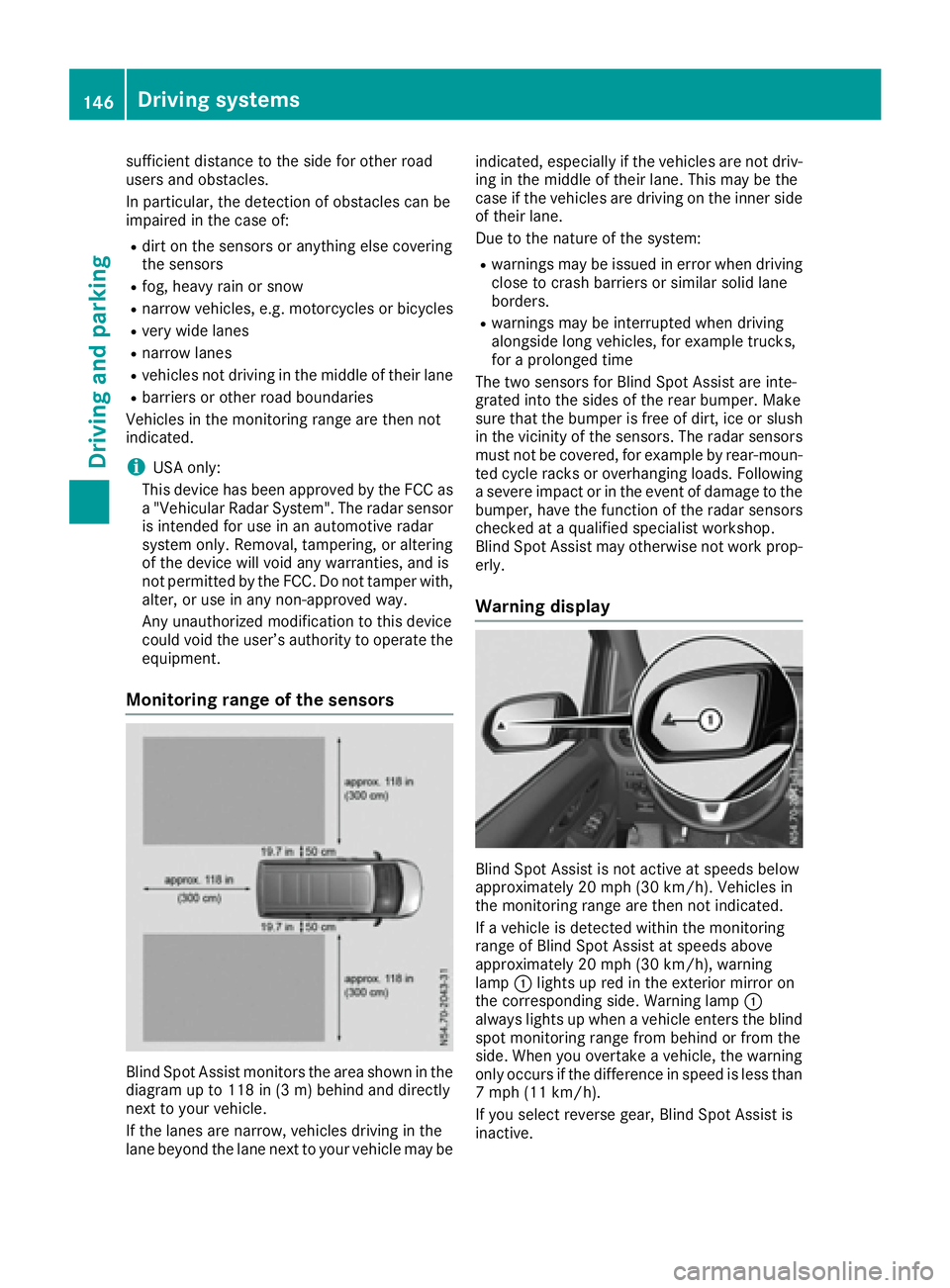
Blind Spot Assist monitors the area shown in the
diagramupt o118 in (3 m) behind and directly
next to your vehicle.
If the lanes are narrow, vehicles driving in the
lane beyond the lane next to your vehicle may be indicated, especially if the vehicles are not driv-
ing in the middle of their lane. This may be the
case if the vehicles are driving on the inner side
of their lane.
Due to the nature of the system:
Rwarnings may be issued in error when driving
close to crash barriers or similars olid lane
borders.
Rwarnings may be interrupted when driving
alongside long vehicles, for example trucks,
for aprolonged time
The two sensors for Blind Spot Assist are inte-
grated into the sides of the rear bumper. Make
sure that the bumper is free of dirt, ice or slush
in the vicinity of the sensors. The radar sensors
must not be covered, for example by rear-moun-
ted cycle racks or overhanging loads. Following
as evere impact or in the event of damage to the
bumper, have the function of the radar sensors
checked at aqualified specialist workshop.
Blind Spot Assist may otherwise not work prop-
erly.
Warning display
Blind Spot Assist is not active at speeds below
approximately 20 mph (30 km/h). Vehicles in
the monitoring range are then not indicated.
If av ehicle is detected within the monitoring
range of Blind Spot Assist at speeds above
approximately 20 mph (30 km/h), warning
lamp :lights up red in the exterior mirror on
the corresponding side. Warning lamp :
always lights up when avehicle enters the blind
spot monitoring range from behind or from the
side. When you overtake avehicle, the warning
only occurs if the difference in speed is less than
7m ph (11 km/h).
If you select reverse gear, Blind Spot Assist is
inactive.
146Driving systems
Driving and parking