lock MERCEDES-BENZ METRIS 2020 MY20 Operator’s Manual
[x] Cancel search | Manufacturer: MERCEDES-BENZ, Model Year: 2020, Model line: METRIS, Model: MERCEDES-BENZ METRIS 2020Pages: 320, PDF Size: 26.38 MB
Page 183 of 320
The vehicle must be stationary. Use the but-
tons in the instrument cluster.
X Press È to select the Settings menu.
X Press 3 to select the Distance Unit:
submenu.
The display indicates the selected setting of
km or Miles.
X Change the setting by pressing f or g.
X Press 3 to confirm.
The display shows the next submenu or the
Settings menu again.
The selected distance units are used for the
displays:
R Digital speedometer
R Odometer and trip odometer
R Trip computer
R Range
R Current consumption
R Cruise control
R Service intervals
Setting the time and date The vehicle must be stationary. Use the but-
tons in the instrument cluster.
X Press È to select the Settings menu.
X Press 3 to select the time and date display.
X Press f or g to set the hours and press
3 to confirm.
X Press f or g to set the minutes and press
3 to confirm.
X Press f or g to set the day and press 3
to confirm.
X Press f or g to set the month and press
3 to confirm.
X Press f or g to set the year and press 3
to confirm.
The display shows the Settings menu
again. On-board computer (vehicles with
steering wheel buttons)
Operating the on-board computer
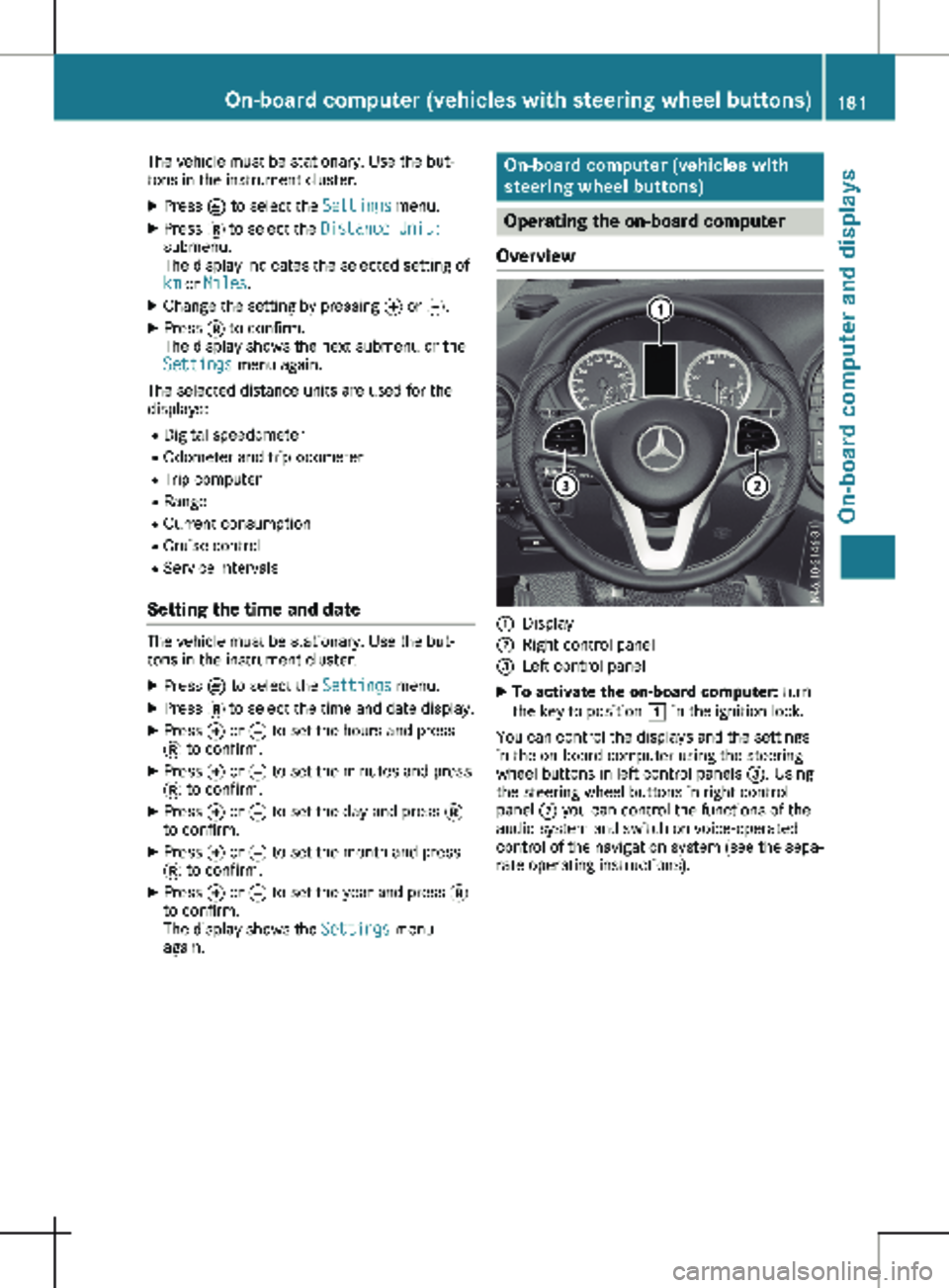
Overview :
Display
; Right control panel
= Left control panel
X To activate the on-board computer: turn
the key to position 1 in the ignition lock.
You can control the displays and the settings
in the on-board computer using the steering
wheel buttons in left control panels =. Using
the steering wheel buttons in right control
panel ; you can control the functions of the
audio system and switch on voice-operated
control of the navigation system (see the sepa-
rate operating instructions). On-board computer (vehicles with steering wheel buttons)
181On-board computer and displays Z
Page 185 of 320
Display
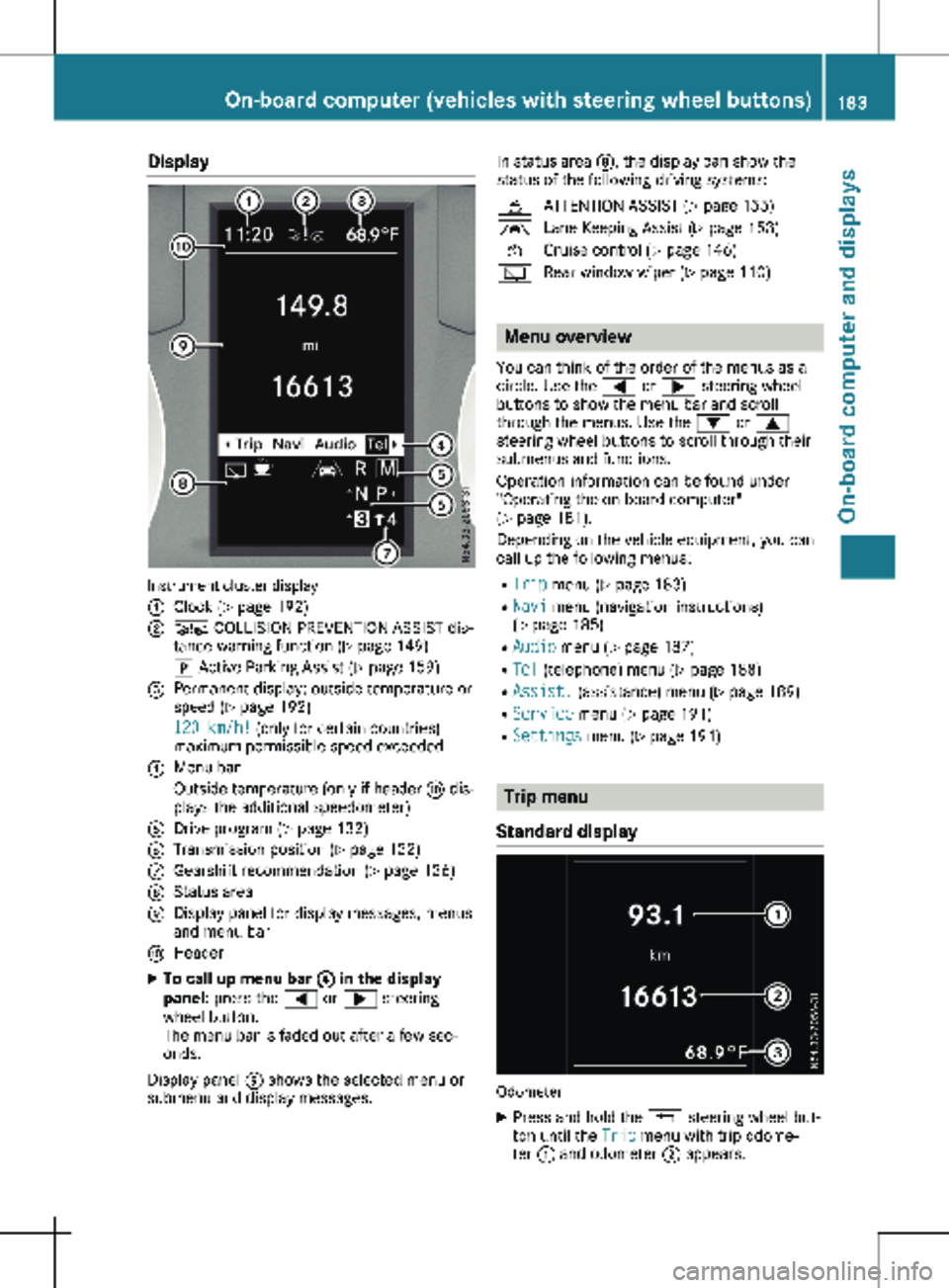
Instrument cluster display
:
Clock (Y page 192)
; Ä COLLISION PREVENTION ASSIST dis-
tance warning function
(Y page 149)
j Active Parking Assist
(Y page 159)
= Permanent display: outside temperature or
speed ( Y page
192)
120 km/h! (only for certain countries)
maximum permissible speed exceeded
? Menu bar
Outside temperature (only if header F dis-
plays the additional speedometer)
A Drive program ( Y page 132)
B Transmission position ( Y page
132)
C Gearshift recommendation ( Y page
136)
D Status area
E Display panel for display messages, menus
and menu bar
F Header
X To call up menu bar ? in the display
panel: press the = or ; steering
wheel button.
The menu bar is faded out after a few sec-
onds.
Display panel E shows the selected menu or
submenu and display messages. In status area D, the display can show the
status of the following driving systems:
À ATTENTION ASSIST ( Y page
155)
à Lane Keeping Assist ( Y page
153)
V Cruise control (Y page
146)
è Rear window wiper (Y page
110) Menu overview
You can think of the order of the menus as a
circle. Use the = or ; steering wheel
buttons to show the menu bar and scroll
through the menus. Use the : or 9
steering wheel buttons to scroll through their
submenus and functions.
Operation information can be found under
"Operating the on-board computer"
(Y page
181).
Depending on the vehicle equipment, you can
call up the following menus:
R Trip menu (Y page 183)
R Navi menu (navigation instructions)
(Y page 185)
R Audio menu ( Y page 187)
R Tel (telephone) menu (Y page 188)
R Assist. (assistance) menu ( Y page 189)
R Service menu (Y page 191)
R Settings menu (Y page 191) Trip menu
Standard display Odometer
X Press and hold the % steering wheel but-
ton until the Trip menu with trip odome-
ter : and odometer ; appears. On-board computer (vehicles with steering wheel buttons)
183
On-board computer and displays Z
Page 194 of 320
R
activating/deactivating or adjusting vehicle
functions in the Vehicle submenu
(Y page
193)
R resetting the settings to Factory Setting
( Y page 194)
Instrument cluster submenu Selecting the unit for the distance
With the Display Unit Speed-/Odometer:
function, you can select whether the display
shows certain information in kilometers or
miles.
Using the steering wheel buttons
X Press = or ; to select the Settings
menu.
X Press : or 9 to select Inst. Clus‐
ter.
X Press a to confirm.
X Press : or 9 to select the Display
Unit Speed-/Odometer: function.
The display indicates the selected km or
Miles setting.
X Press a to change the setting.
The unit for the distance will be selected for:
R Digital speedometer in the Trip menu
R Odometer and trip odometer
R Trip computer
R Current consumption and range
R Navigation instructions in the Navi menu
R Cruise control
R Service interval display
Setting the display language Using the steering wheel buttons
X Press = or ; to select the Settings
menu.
X Press : or 9 to select Inst. Clus‐
ter.
X Press a to confirm.
X Press : or 9 to select Language:.
The display shows the current language
selection for all display messages.
X Press a to change the setting.
X Press : or 9 to select the desired
language.
X Press the a button to save the selection. Selecting the permanent display func-
tion
Using the Permanent Display: function, you
can switch the display in the header between
outside temperature and speed.
If the display shows the speed in the header,
the display shows the outside temperature
with the odometers (Y page
183). The addi-
tional speedometer unit in the header is
always inverse to the speedometer unit.
Using the steering wheel buttons
X Press = or ; to select the Settings
menu.
X Press : or 9 to select Inst. Clus‐
ter.
X Press a to confirm.
X Press : or 9 to select Permanent
Display:.
X Press a to confirm.
The display shows the current selection of
Outside Temp. or Speedom..
X Press a to change the setting.
Clock/Date submenu Setting the time
Using the steering wheel buttons
X Press = or ; to select the Settings
menu.
X Press : or 9 to select Time/Date.
X Press a to confirm.
X Press : or 9 to select the Time:
function.
The display shows the current time.
X To set the time: press a again.
X Press = or ; to switch between
hours and minutes.
X Press : or 9 to set the hours or
minutes.
X Then press a to confirm.
The display shows the updated time.
Setting the date Using the steering wheel buttons
X Press = or ; to select the Settings
menu.
X Press : or 9 to select Time/Date.
X Press a to confirm.192
On-board computer (vehicles with steering wheel buttons)
On-board computer and displays
Page 195 of 320

X
Press : or 9 to select the Date:
function.
The display shows the current date.
X To set the date: press a again.
X Press = or ; to switch between day,
month and year.
X Press : or 9 to set the day, month or
year.
X Then press a to confirm.
The display shows the updated date.
Lights submenu Activating/deactivating the surround
lighting and exterior lighting delayed
switch-off
If you activate the Locator Lighting func-
tion and the light switch is turned to the Ã
position, the following functions are activated
when it is dark:
R surround lighting: the exterior lighting
remains on for
40 seconds after the doors
are unlocked. When you start the engine,
the surround lighting is deactivated and the
automatic headlamp feature is activated
(Y page 100).
R exterior lighting delayed switch-off: the
exterior lighting remains lit for 60 seconds
after the engine is switched off. When you
close all the doors and the tailgate/rear
doors, the exterior lighting switches off after
15 seconds.
Using the steering wheel buttons
X Use the = or ; button to select the
Settings. menu.
X Use : or 9 to select Lights.
X Press a to confirm.
X Use : or 9 to select the Locator
Lighting function.
The current status appears.
X To switch on/off: press a again.
If you change the setting, conversion does
not take place until the next time the vehicle
is stationary. Deactivating exterior lighting delayed switch-
off temporarily:
X Before leaving the vehicle, turn the key to
position g in the ignition lock.
X Turn the key to position 2 in the ignition
lock.
The exterior lighting delayed switch-off is
deactivated until the next time the engine is
started.
With surround lighting and exterior lighting
delayed switch-off, the following light up
depending on the vehicle's equipment:
R Parking lamps
R Fog lamps
R Low-beam headlamps
R Daytime running lamps
Activating/deactivating interior lighting
delayed switch-off If you activate the Interior Lighting
Delay: function, the interior lighting remains
lit for a further 20 seconds.
Using the steering wheel buttons
X Use the = or ; button to select the
Settings. menu.
X Use : or 9 to select Lights.
X Press a to confirm.
X Use : or 9 to select the Interior
Lighting Delay function.
The current status appears.
X To switch on/off: press a again.
Vehicle submenu Setting the sensitivity of the rain sensor
Using the steering wheel buttons
X Press = or ; to select the Settings
menu.
X Press : or 9 to select Vehicle.
X Press a to confirm.
X Press : or 9 to select the Rain
Sensor Sensitivity function.
The display shows the current setting.
X Press a to change the setting.
X Press : or 9 to select the High,
Standard or Low setting. This setting con-
trols the rain sensor's sensitivity to precipi-
tation. The windshield wiper then wipes On-board computer (vehicles with steering wheel buttons)
193
On-board computer and displays Z
Page 196 of 320
more or less frequently at the same precipi-
tation intensity.
X Press the a button to store the entry.
You can find further information under "Wind-
shield wiper" (Y page 109).
Switching the automatic locking feature
on/off
Using the steering wheel buttons
X Press = or ; to select the Settings
menu.
X Press : or 9 to select Vehicle.
X Press a to confirm.
X Press : or 9 to select the Auto‐
matic Door Lock function.
The current status is shown.
X To activate/deactivate: press a again.
If you activate the Automatic Door Lock
function, your vehicle will lock automatically
from a speed of approximately
15 km/h.
You can find further information under "Auto-
matic door lock" (Y page 76).
Activating/deactivating the acoustic
locking confirmation i The selected setting of the acoustic lock-
ing verification signal must comply with the
relevant national road traffic rules. In some
countries, including Germany, the use of the
acoustic locking verification signal is not
permitted under national road traffic regula-
tions (in Germany according to § 16 para. 1
and § 30 para. 1 StVO). Compliance must be ensured by the driver of the vehicle. In
countries where the use of this function is
not permitted, this function is not and must
not be activated in your vehicle.
Using the steering wheel buttons
X Press = or ; to select the Settings
menu.
X Press : or 9 to select Vehicle.
X Press a to confirm.
X Press : or 9 to select Acoustic
lock feedback.
The current status is shown.
X To activate/deactivate: press a again.
If you activate the Acoustic lock feedback function, an acoustic tone sounds when the
vehicle is locked.
Restoring the factory settings Using the steering wheel buttons
X Press = or ; to select the Settings
menu.
X Press : or 9 to select Factory
Setting.
X Press a to confirm.
The Reset All Settings? function is dis-
played.
X Press : or 9 to select No or Yes.
X Press a to confirm the choice.
If you select Yes, the display shows a confir-
mation message. Display messages (vehicles without steering wheel buttons)
Introduction
Important safety notes G
WARNING
If the instrument cluster has failed or malfunctioned, you may not recognize function restric-
tions in systems relevant to safety. The operating safety of your vehicle may be impaired.
There is a risk of an accident.
Drive on carefully. Have the vehicle checked at a qualified specialist workshop immediately.
The on-board computer only shows messages or warnings from certain systems in the instru-
ment cluster display. You should therefore make sure your vehicle is operating safely at all
times. If the operating safety of your vehicle is impaired, stop the vehicle as soon as possible,
paying attention to road and traffic conditions. Then consult a qualified specialist workshop. 194
Display messages (vehicles without steering wheel buttons)On-board computer and displays
Page 198 of 320
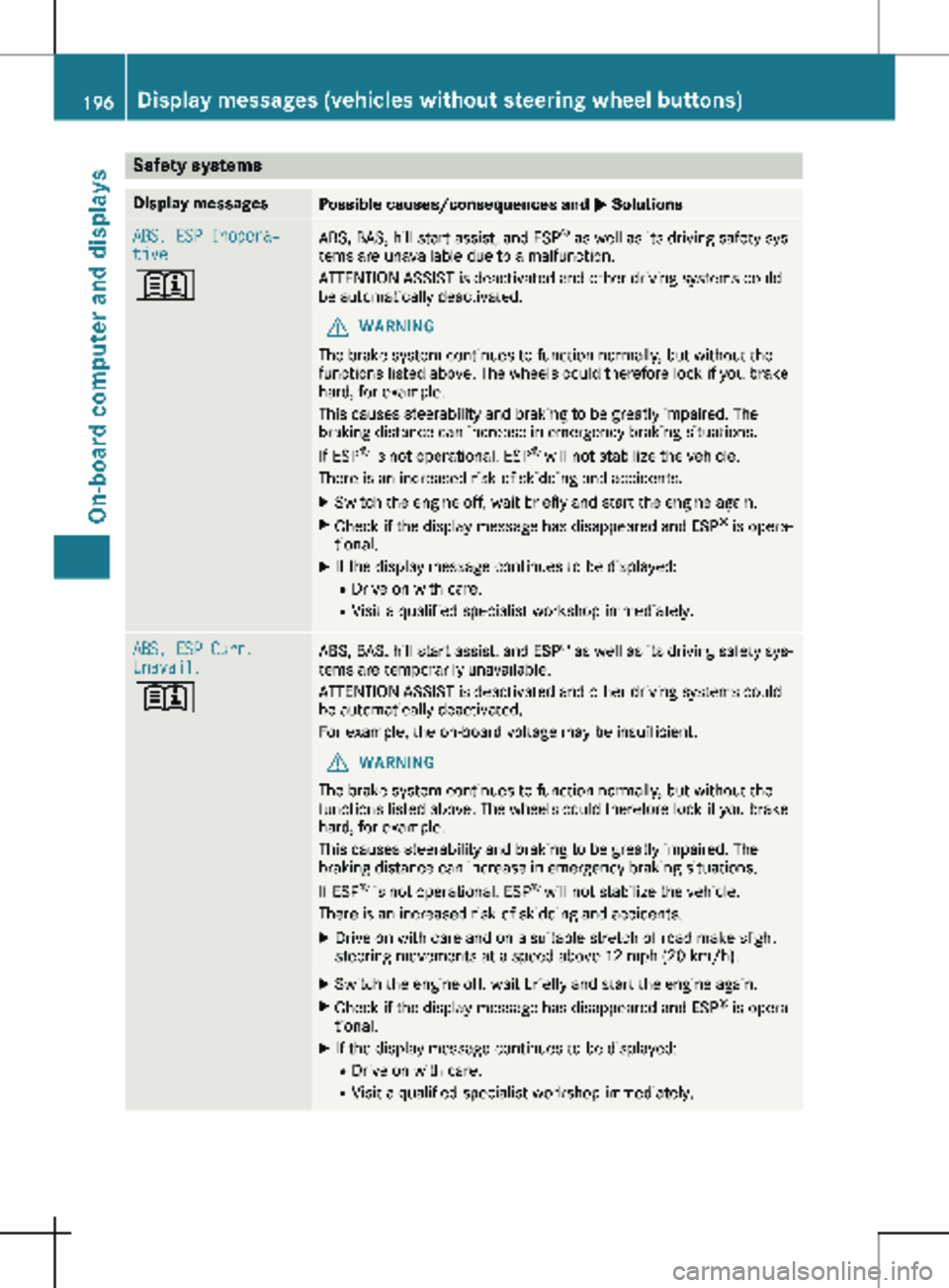
Safety systems
Display messages
Possible causes/consequences and
M SolutionsABS, ESP Inopera‐
tive
+
ABS, BAS, hill start assist, and ESP
®
as well as its driving safety sys-
tems are unavailable due to a malfunction.
ATTENTION ASSIST is deactivated and other driving systems could
be automatically deactivated.
G WARNING
The brake system continues to function normally, but without the
functions listed above. The wheels could therefore lock if you brake
hard, for example.
This causes steerability and braking to be greatly impaired. The
braking distance can increase in emergency braking situations.
If ESP ®
is not operational, ESP ®
will not stabilize the vehicle.
There is an increased risk of skidding and accidents.
X Switch the engine off, wait briefly and start the engine again.
X Check if the display message has disappeared and ESP ®
is opera-
tional.
X If the display message continues to be displayed:
R Drive on with care.
R Visit a qualified specialist workshop immediately. ABS, ESP Curr.
Unavail.
+
ABS, BAS, hill start assist, and ESP
®
as well as its driving safety sys-
tems are temporarily unavailable.
ATTENTION ASSIST is deactivated and other driving systems could
be automatically deactivated.
For example, the on-board voltage may be insufficient.
G WARNING
The brake system continues to function normally, but without the
functions listed above. The wheels could therefore lock if you brake
hard, for example.
This causes steerability and braking to be greatly impaired. The
braking distance can increase in emergency braking situations.
If ESP ®
is not operational, ESP ®
will not stabilize the vehicle.
There is an increased risk of skidding and accidents.
X Drive on with care and on a suitable stretch of road make slight
steering movements at a speed above 12 mph (20 km/h ).
X Switch the engine off, wait briefly and start the engine again.
X Check if the display message has disappeared and ESP ®
is opera-
tional.
X If the display message continues to be displayed:
R Drive on with care.
R Visit a qualified specialist workshop immediately.196
Display messages (vehicles without steering wheel buttons)
On-board computer and displays
Page 201 of 320

Display messages
Possible causes/consequences and
M SolutionsX
Visit a qualified specialist workshop immediately.
Further information on the Occupant Classification System (OCS)
can be found under "Occupant Classification System (OCS)"
(Y page
54). #
Check Brake Pad
Wear The brake pads/linings have reached their wear limit.
X Visit a qualified specialist workshop. $ (USA only)
J (Canada only)
Check Brake Fluid
Level There is insufficient brake fluid in the brake fluid reservoir.
G WARNING
Braking performance can be impaired.
There is a risk of an accident.
X Stop the vehicle immediately, paying attention to road and traffic
conditions. Do not continue driving under any circumstances.
X Secure the vehicle to prevent it from rolling away (Y page
138).
X Do not add brake fluid. Adding more will not remedy the malfunc-
tion.
X Consult a qualified specialist workshop. EBD, ABS, ESP Inop‐
erative
+ EBD is unavailable due to a malfunction. ABS, BAS, hill start assist
and ESP
®
as well as its driving safety systems, for example, are
therefore also unavailable.
ATTENTION ASSIST is deactivated and other driving systems could
be automatically deactivated.
G WARNING
The brake system continues to function normally, but without the
functions listed above. The wheels could therefore lock prematurely
if you brake hard, for example.
This causes steerability and braking to be greatly impaired. The
braking distance can increase in emergency braking situations.
If ESP ®
is not operational, ESP ®
will not stabilize the vehicle.
There is an increased risk of skidding and accidents.
X Switch the engine off, wait briefly and start the engine again.
X Check if the display message has disappeared and ESP ®
is opera-
tional.
X If the display message continues to be displayed:
R Drive on with care.
R Visit a qualified specialist workshop immediately. Display messages (vehicles without steering wheel buttons)
199On-board computer and displays Z
Page 202 of 320
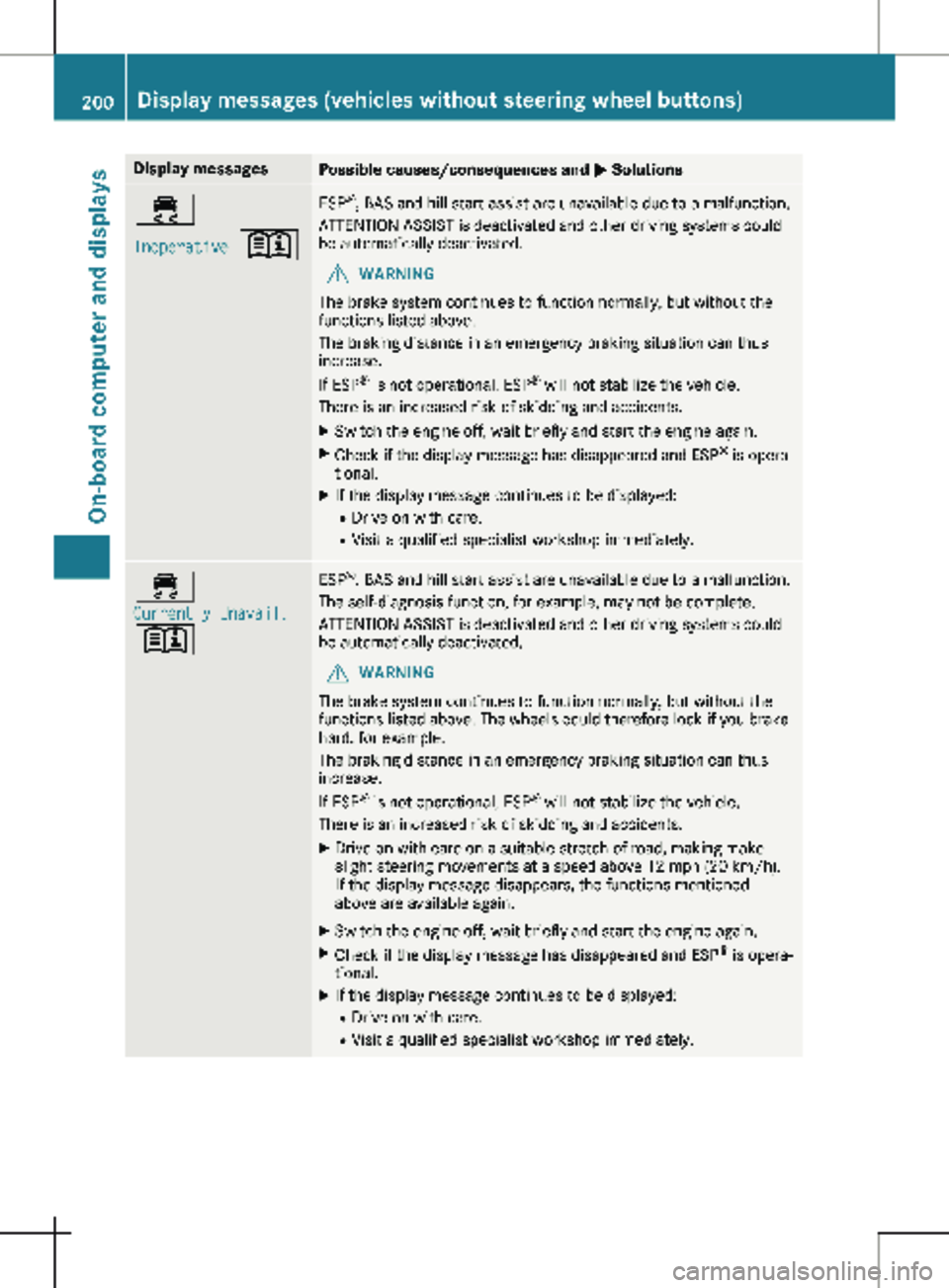
Display messages
Possible causes/consequences and
M Solutions÷
Inoperative
+ ESP
®
, BAS and hill start assist are unavailable due to a malfunction.
ATTENTION ASSIST is deactivated and other driving systems could
be automatically deactivated.
G WARNING
The brake system continues to function normally, but without the
functions listed above.
The braking distance in an emergency braking situation can thus
increase.
If ESP ®
is not operational, ESP ®
will not stabilize the vehicle.
There is an increased risk of skidding and accidents.
X Switch the engine off, wait briefly and start the engine again.
X Check if the display message has disappeared and ESP ®
is opera-
tional.
X If the display message continues to be displayed:
R Drive on with care.
R Visit a qualified specialist workshop immediately. ÷
Currently Unavail.
+ ESP
®
, BAS and hill start assist are unavailable due to a malfunction.
The self-diagnosis function, for example, may not be complete.
ATTENTION ASSIST is deactivated and other driving systems could
be automatically deactivated.
G WARNING
The brake system continues to function normally, but without the
functions listed above. The wheels could therefore lock if you brake
hard, for example.
The braking distance in an emergency braking situation can thus
increase.
If ESP ®
is not operational, ESP ®
will not stabilize the vehicle.
There is an increased risk of skidding and accidents.
X Drive on with care on a suitable stretch of road, making make
slight steering movements at a speed above
12 mph (20 km/h).
If the display message disappears, the functions mentioned
above are available again.
X Switch the engine off, wait briefly and start the engine again.
X Check if the display message has disappeared and ESP ®
is opera-
tional.
X If the display message continues to be displayed:
R Drive on with care.
R Visit a qualified specialist workshop immediately.200
Display messages (vehicles without steering wheel buttons)
On-board computer and displays
Page 210 of 320

Display messages
Possible causes/consequences and
M SolutionsTire Press. Moni‐
tor Currently
Unavail. Due to a source of radio interference, no signals can be received
from the wheel sensors. The tire pressure monitor is temporarily
malfunctioning.
The tire pressure monitor restarts automatically as soon as the
problem has been solved. Tire Press. Moni‐
tor Inoperative The tire pressure monitor is malfunctioning and switched off. Either
the installed wheels do not have suitable tire pressure sensors or
the system is malfunctioning, e.g. because a tire pressure sensor is
faulty.
X Install wheels with suitable tire pressure sensors.
The tire pressure monitor is activated automatically after driving
for a few minutes.
or X Visit a qualified specialist workshop. Vehicle
Display messages
Possible causes/consequences and
M SolutionsÒ The tailgate is open.
X Close the tailgate. Ñ The rear door is open.
X Close the rear door(s). Ó An additional warning tone sounds. The hood is open.
G WARNING
The open hood may then block your view when the vehicle is in
motion.
There is a risk of an accident.
X Stop the vehicle immediately, paying attention to road and traffic
conditions.
X Secure the vehicle to prevent it from rolling away (Y page 138).
X Close the hood. 0 An additional warning tone sounds while the vehicle is in motion.
The display shows the open door(s).
X Close all doors. Ð
Pwr. Steering Mal‐
funct.
+ An additional warning tone sounds. The steering power assistance
could be malfunctioning. You may need to steer more forcefully.
X Carefully continue to a qualified specialist workshop and have the
steering checked immediately. 208
Display messages (vehicles without steering wheel buttons)
On-board computer and displays
Page 212 of 320
X
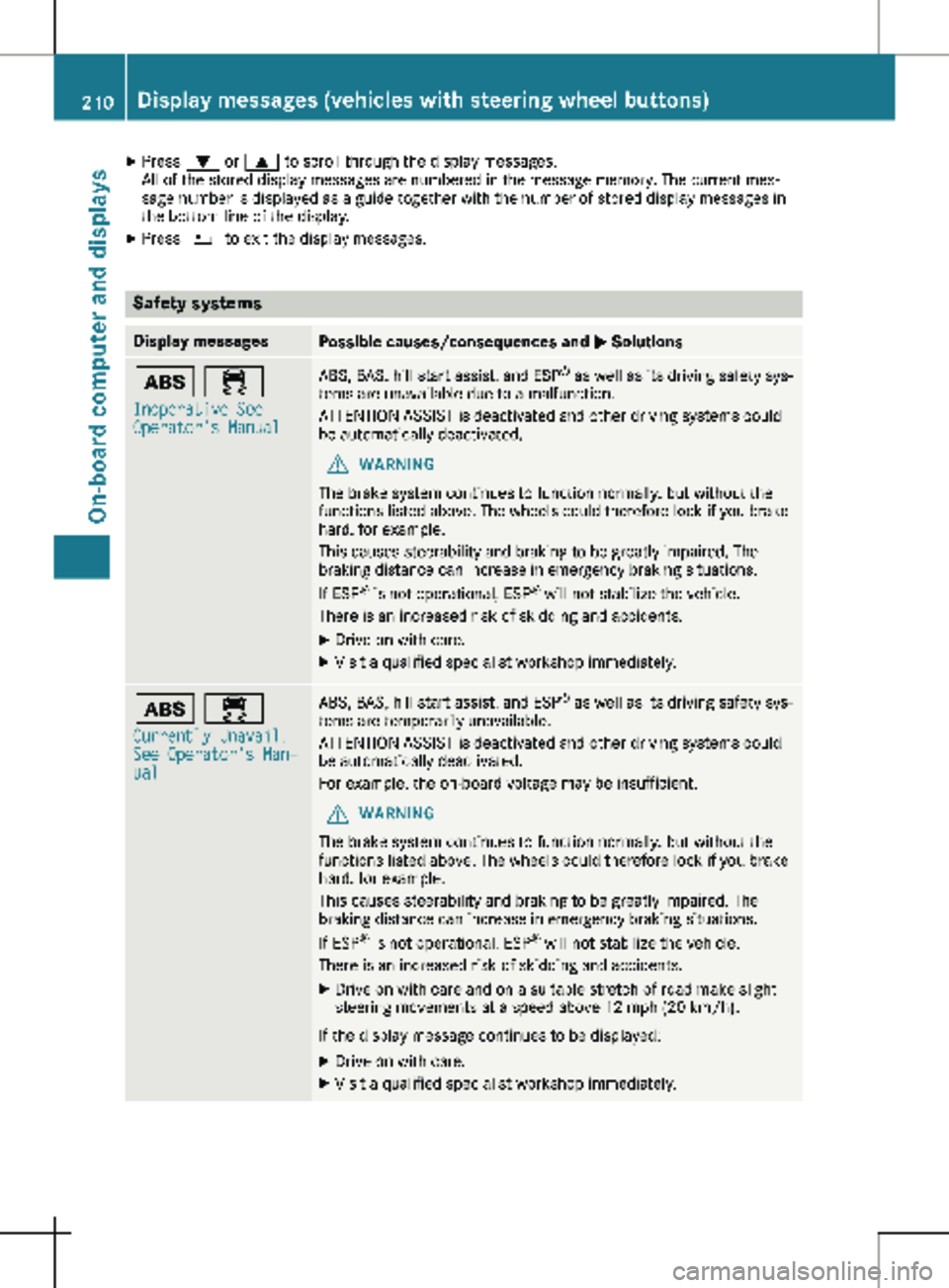
Press : or 9 to scroll through the display messages.
All of the stored display messages are numbered in the message memory. The current mes-
sage number is displayed as a guide together with the number of stored display messages in
the bottom line of the display.
X Press % to exit the display messages. Safety systems
Display messages
Possible causes/consequences and
M Solutionsò ÷
Inoperative See
Operator's Manual ABS, BAS, hill start assist, and ESP
®
as well as its driving safety sys-
tems are unavailable due to a malfunction.
ATTENTION ASSIST is deactivated and other driving systems could
be automatically deactivated.
G WARNING
The brake system continues to function normally, but without the
functions listed above. The wheels could therefore lock if you brake
hard, for example.
This causes steerability and braking to be greatly impaired. The
braking distance can increase in emergency braking situations.
If ESP ®
is not operational, ESP ®
will not stabilize the vehicle.
There is an increased risk of skidding and accidents.
X Drive on with care.
X Visit a qualified specialist workshop immediately. ò ÷
Currently Unavail.
See Operator's Man‐
ual ABS, BAS, hill start assist, and ESP
®
as well as its driving safety sys-
tems are temporarily unavailable.
ATTENTION ASSIST is deactivated and other driving systems could
be automatically deactivated.
For example, the on-board voltage may be insufficient.
G WARNING
The brake system continues to function normally, but without the
functions listed above. The wheels could therefore lock if you brake
hard, for example.
This causes steerability and braking to be greatly impaired. The
braking distance can increase in emergency braking situations.
If ESP ®
is not operational, ESP ®
will not stabilize the vehicle.
There is an increased risk of skidding and accidents.
X Drive on with care and on a suitable stretch of road make slight
steering movements at a speed above 12 mph (20 km/h ).
If the display message continues to be displayed: X Drive on with care.
X Visit a qualified specialist workshop immediately.210
Display messages (vehicles with steering wheel buttons)
On-board computer and displays