cruise control MERCEDES-BENZ METRIS 2020 MY20 Operator’s Manual
[x] Cancel search | Manufacturer: MERCEDES-BENZ, Model Year: 2020, Model line: METRIS, Model: MERCEDES-BENZ METRIS 2020Pages: 320, PDF Size: 26.38 MB
Page 151 of 320
R
you shift to neutral i while the vehicle is in
motion
R ESP ®
intervenes or you deactivate ESP ®
R there is a malfunction in the ESP ®
or ABS
system
If cruise control automatically deactivates, a
warning tone sounds and the Cruise Con‐
trol Off message appears briefly in the dis-
play.
The V symbol and the display of the stored
speed in the header or in the status area of
the display are then not shown.
Problems with cruise control The speed cannot be set when cruise control
is activated.
The display is showing a message of high pri-
ority and cannot therefore show a change in
speed.
X Proceed as instructed by the message in the
display. COLLISION PREVENTION ASSIST
General notes COLLISION PREVENTION ASSIST helps you:
R to minimize the risk of a front-end collision
with a detected obstacle in the path of your
vehicle
R to reduce the consequences of a collision
with the vehicle in front
The system uses radar sensors to detect vehi-
cles in front.
COLLISION PREVENTION ASSIST consists of
the distance warning function and Adaptive
Brake Assist.
If COLLISION PREVENTION ASSIST is malfunc-
tioning, the display shows a corresponding
message
(Y page 222). Distance warning function Important safety notes
G
WARNING
The distance warning function does not
react:
R to people or animals
R to oncoming vehicles
R to crossing traffic
R when cornering
The distance warning function may not give
warnings in all critical situations. There is a
risk of an accident.
Always pay careful attention to the traffic
situation and be ready to brake.
Always adapt your speed to suit the prevail-
ing road and traffic conditions. G
WARNING
The distance warning function cannot
always clearly identify objects and complex
traffic situations.
In such cases, the distance warning function
may:
R give an unnecessary warning
R not give a warning
There is a risk of an accident.
Always pay careful attention to the traffic
situation and do not rely solely on the dis-
tance warning function.
In particular, the detection of obstacles can be
impaired in the case of: R dirt on the sensors or anything else covering
the sensors
R snow or heavy rain
R interference from other radar sources
R strong radar reflections, for example, in
parking garages
R a narrow vehicle traveling in front, e.g. a
motorbike
R a vehicle traveling in front on a different line
Due to the nature of the system, particularly
complicated but non-critical driving conditions Driving systems
149
Driving and parking Z
Page 171 of 320
Ensure that the following weights are not
exceeded:
R the permissible noseweight
R the permissible trailer load
R the permissible rear axle load of the towing
vehicle
R the maximum permissible gross vehicle
weight of both the towing vehicle and the
trailer
R the maximum permissible gross weight of
vehicle/trailer combination
The applicable permissible values that may not
be exceeded can be found:
R in your vehicle documents
R on the type plates for the trailer tow hitch
R on the type plates for the trailer
R on the vehicle identification plate
(Y page
304)
Where the values differ, the lowest is valid.
You will find the values approved by the manu-
facturer on the vehicle identification plates
and those for the towing vehicle in the "Tech-
nical data" section (Y page 315).
Your vehicle behaves differently with a trailer
than without one.
The vehicle/trailer combination:
R is heavier
R is restricted in its acceleration and gradient-
climbing capability
R has an increased braking distance
R is more susceptible to strong crosswinds
R requires more sensitive steering
R has a larger turning radius
This may impair the handling characteristics.
When towing a trailer, always adjust your
speed to suit the road and weather conditions.
Drive carefully. Maintain a safe distance.
If you require any further explanation regard-
ing the information contained in the Operating
Instructions, please contact a Mercedes-Benz
Commercial Van Center.
General notes R
Observe the legally permitted maximum
speed for vehicle/trailer combinations in
the relevant country, state or Canadian
province. Before beginning the journey,
check the trailer's documents for the maxi-
mum permitted speed of your trailer. This reduces the risk of accidents.
R Install only an approved trailer coupling on
your vehicle. Only use a ball coupling for
your Metris trailer tow hitch if it has been
approved for your vehicle. More information
on the availability, mounting and installation
of the trailer electrics is available at any
qualified specialist workshop.
R The trailer coupling is one of the most
important vehicle parts with regard to road
safety. Observe the notes on operation, care
and maintenance of the trailer tow hitch
(see the manufacturer's operating instruc-
tions).
R The bumpers of your vehicle are not suitable
for installing detachable trailer couplings.
R Do not attach rented trailer tow hitches or
other detachable trailer tow hitches to the
bumper.
R Minimize the risk of damage to the ball cou-
pling. If you do not require the ball coupling,
remove it from the ball coupling recess.
You will find weight information under "Techni-
cal data"
(Y page 315).
The height of the ball neck changes according
to the load on the vehicle. If this is case, use a
trailer with a height-adjustable trailer drawbar.
Driving tips The maximum permissible speed for vehicle/
trailer combination depends on the type of
trailer. Before beginning the journey, check
the trailer's documents for the maximum per-
mitted speed of your trailer. Observe the
legally permitted maximum speed in the rele-
vant country, state or Canadian province.
When towing a trailer, your vehicle's handling
characteristics will be different in comparison
to when driving without a trailer and it will con-
sume more fuel.
On long and steep downhill gradients, select a
lower gear.
i This also applies if cruise control is activa-
ted.
This enables you to utilize the engine's braking
effect and you do not need to brake so heavily
to keep the correct speed. This relieves the
load on the brake system and prevents the
brakes from overheating and wearing too
quickly. If you need to brake additionally, to Towing a trailer
169
Driving and parking Z
Page 178 of 320
On-board computer (vehicles with-
out steering wheel buttons)
Operating the on-board computer
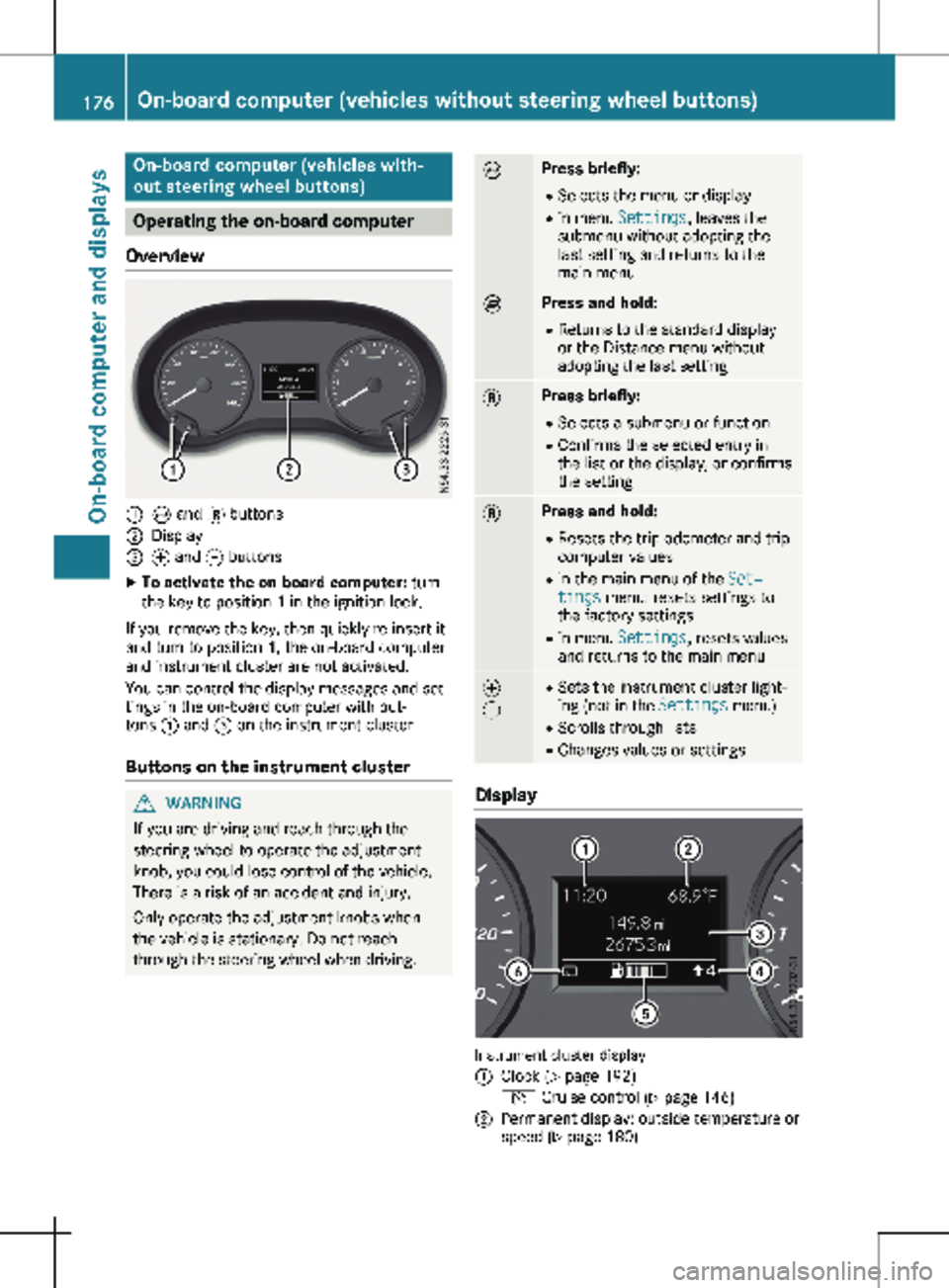
Overview :
È and 3 buttons
; Display
= f and g buttons
X To activate the on-board computer: turn
the key to position 1 in the ignition lock.
If you remove the key, then quickly re-insert it
and turn to position 1, the on-board computer
and instrument cluster are not activated.
You can control the display messages and set-
tings in the on-board computer with but-
tons : and = on the instrument cluster.
Buttons on the instrument cluster G
WARNING
If you are driving and reach through the
steering wheel to operate the adjustment
knob, you could lose control of the vehicle.
There is a risk of an accident and injury.
Only operate the adjustment knobs when
the vehicle is stationary. Do not reach
through the steering wheel when driving. È Press briefly:
R Selects the menu or display
R in menu Settings, leaves the
submenu without adopting the
last setting and returns to the
main menu È Press and hold:
R
Returns to the standard display
or the Distance menu without
adopting the last setting 3 Press briefly:
R Selects a submenu or function
R Confirms the selected entry in
the list or the display, or confirms
the setting 3 Press and hold:
R
Resets the trip odometer and trip
computer values
R in the main menu of the Set‐
tings menu: resets settings to
the factory settings
R in menu Settings, resets values
and returns to the main menu f
g R
Sets the instrument cluster light-
ing (not in the Settings menu)
R Scrolls through lists
R Changes values or settings Display
Instrument cluster display
:
Clock (Y page 192)
V Cruise control (Y page
146)
; Permanent display: outside temperature or
speed
(Y page 180)176
On-board computer (vehicles without steering wheel buttons)
On-board computer and displays
Page 183 of 320
The vehicle must be stationary. Use the but-
tons in the instrument cluster.
X Press È to select the Settings menu.
X Press 3 to select the Distance Unit:
submenu.
The display indicates the selected setting of
km or Miles.
X Change the setting by pressing f or g.
X Press 3 to confirm.
The display shows the next submenu or the
Settings menu again.
The selected distance units are used for the
displays:
R Digital speedometer
R Odometer and trip odometer
R Trip computer
R Range
R Current consumption
R Cruise control
R Service intervals
Setting the time and date The vehicle must be stationary. Use the but-
tons in the instrument cluster.
X Press È to select the Settings menu.
X Press 3 to select the time and date display.
X Press f or g to set the hours and press
3 to confirm.
X Press f or g to set the minutes and press
3 to confirm.
X Press f or g to set the day and press 3
to confirm.
X Press f or g to set the month and press
3 to confirm.
X Press f or g to set the year and press 3
to confirm.
The display shows the Settings menu
again. On-board computer (vehicles with
steering wheel buttons)
Operating the on-board computer
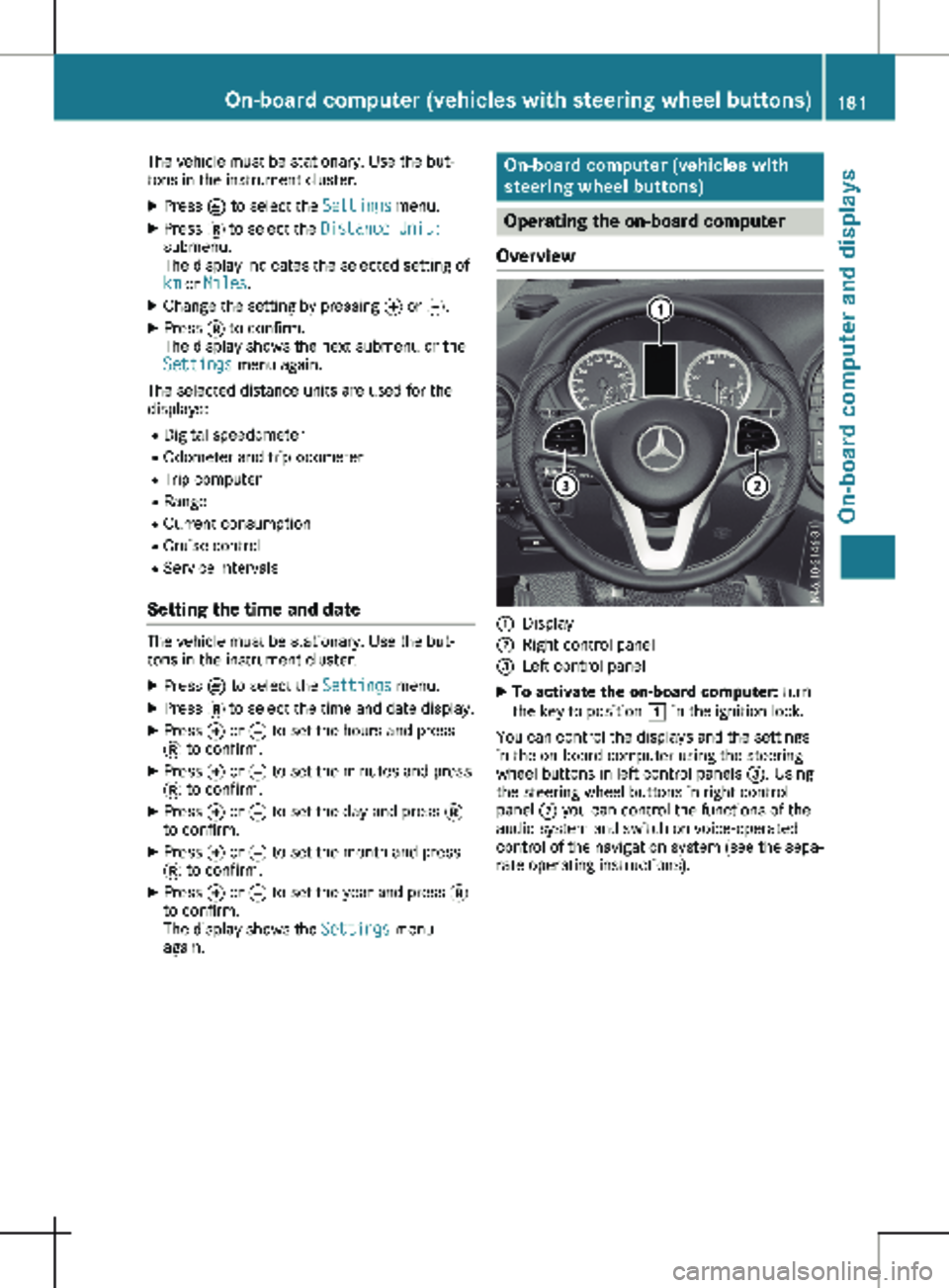
Overview :
Display
; Right control panel
= Left control panel
X To activate the on-board computer: turn
the key to position 1 in the ignition lock.
You can control the displays and the settings
in the on-board computer using the steering
wheel buttons in left control panels =. Using
the steering wheel buttons in right control
panel ; you can control the functions of the
audio system and switch on voice-operated
control of the navigation system (see the sepa-
rate operating instructions). On-board computer (vehicles with steering wheel buttons)
181On-board computer and displays Z
Page 185 of 320
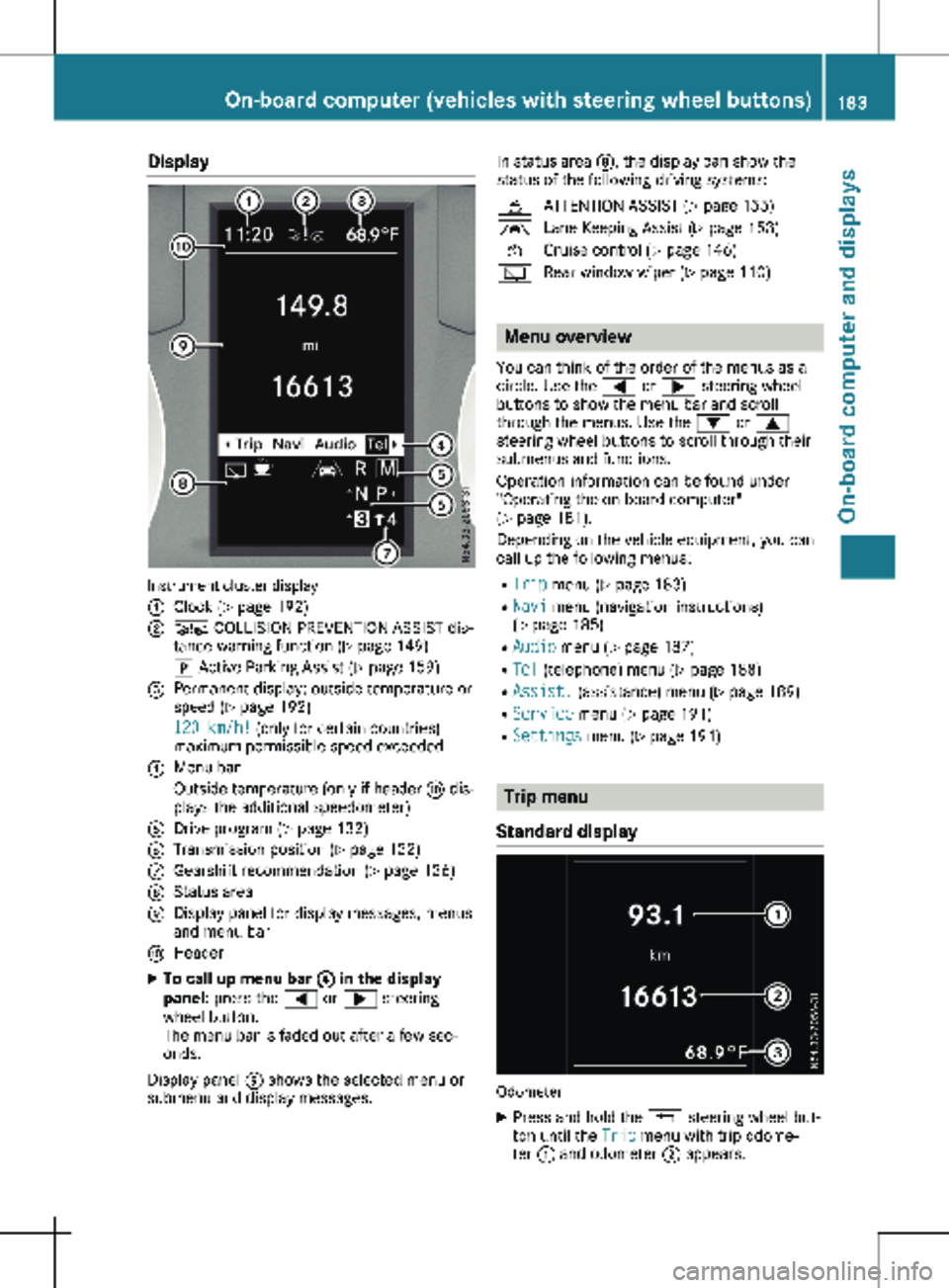
Display
Instrument cluster display
:
Clock (Y page 192)
; Ä COLLISION PREVENTION ASSIST dis-
tance warning function
(Y page 149)
j Active Parking Assist
(Y page 159)
= Permanent display: outside temperature or
speed ( Y page
192)
120 km/h! (only for certain countries)
maximum permissible speed exceeded
? Menu bar
Outside temperature (only if header F dis-
plays the additional speedometer)
A Drive program ( Y page 132)
B Transmission position ( Y page
132)
C Gearshift recommendation ( Y page
136)
D Status area
E Display panel for display messages, menus
and menu bar
F Header
X To call up menu bar ? in the display
panel: press the = or ; steering
wheel button.
The menu bar is faded out after a few sec-
onds.
Display panel E shows the selected menu or
submenu and display messages. In status area D, the display can show the
status of the following driving systems:
À ATTENTION ASSIST ( Y page
155)
à Lane Keeping Assist ( Y page
153)
V Cruise control (Y page
146)
è Rear window wiper (Y page
110) Menu overview
You can think of the order of the menus as a
circle. Use the = or ; steering wheel
buttons to show the menu bar and scroll
through the menus. Use the : or 9
steering wheel buttons to scroll through their
submenus and functions.
Operation information can be found under
"Operating the on-board computer"
(Y page
181).
Depending on the vehicle equipment, you can
call up the following menus:
R Trip menu (Y page 183)
R Navi menu (navigation instructions)
(Y page 185)
R Audio menu ( Y page 187)
R Tel (telephone) menu (Y page 188)
R Assist. (assistance) menu ( Y page 189)
R Service menu (Y page 191)
R Settings menu (Y page 191) Trip menu
Standard display Odometer
X Press and hold the % steering wheel but-
ton until the Trip menu with trip odome-
ter : and odometer ; appears. On-board computer (vehicles with steering wheel buttons)
183
On-board computer and displays Z
Page 194 of 320
R
activating/deactivating or adjusting vehicle
functions in the Vehicle submenu
(Y page
193)
R resetting the settings to Factory Setting
( Y page 194)
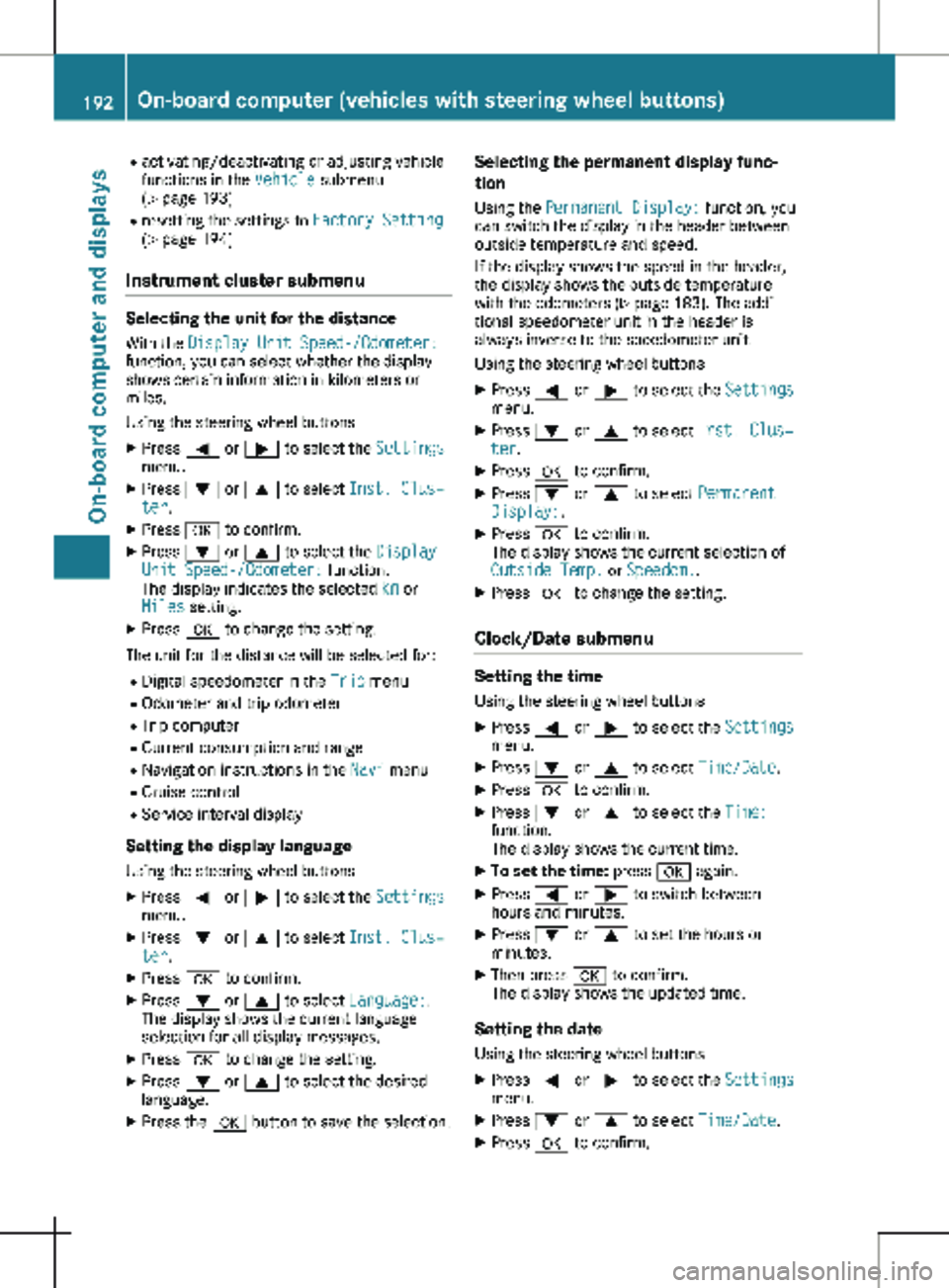
Instrument cluster submenu Selecting the unit for the distance
With the Display Unit Speed-/Odometer:
function, you can select whether the display
shows certain information in kilometers or
miles.
Using the steering wheel buttons
X Press = or ; to select the Settings
menu.
X Press : or 9 to select Inst. Clus‐
ter.
X Press a to confirm.
X Press : or 9 to select the Display
Unit Speed-/Odometer: function.
The display indicates the selected km or
Miles setting.
X Press a to change the setting.
The unit for the distance will be selected for:
R Digital speedometer in the Trip menu
R Odometer and trip odometer
R Trip computer
R Current consumption and range
R Navigation instructions in the Navi menu
R Cruise control
R Service interval display
Setting the display language Using the steering wheel buttons
X Press = or ; to select the Settings
menu.
X Press : or 9 to select Inst. Clus‐
ter.
X Press a to confirm.
X Press : or 9 to select Language:.
The display shows the current language
selection for all display messages.
X Press a to change the setting.
X Press : or 9 to select the desired
language.
X Press the a button to save the selection. Selecting the permanent display func-
tion
Using the Permanent Display: function, you
can switch the display in the header between
outside temperature and speed.
If the display shows the speed in the header,
the display shows the outside temperature
with the odometers (Y page
183). The addi-
tional speedometer unit in the header is
always inverse to the speedometer unit.
Using the steering wheel buttons
X Press = or ; to select the Settings
menu.
X Press : or 9 to select Inst. Clus‐
ter.
X Press a to confirm.
X Press : or 9 to select Permanent
Display:.
X Press a to confirm.
The display shows the current selection of
Outside Temp. or Speedom..
X Press a to change the setting.
Clock/Date submenu Setting the time
Using the steering wheel buttons
X Press = or ; to select the Settings
menu.
X Press : or 9 to select Time/Date.
X Press a to confirm.
X Press : or 9 to select the Time:
function.
The display shows the current time.
X To set the time: press a again.
X Press = or ; to switch between
hours and minutes.
X Press : or 9 to set the hours or
minutes.
X Then press a to confirm.
The display shows the updated time.
Setting the date Using the steering wheel buttons
X Press = or ; to select the Settings
menu.
X Press : or 9 to select Time/Date.
X Press a to confirm.192
On-board computer (vehicles with steering wheel buttons)
On-board computer and displays
Page 208 of 320
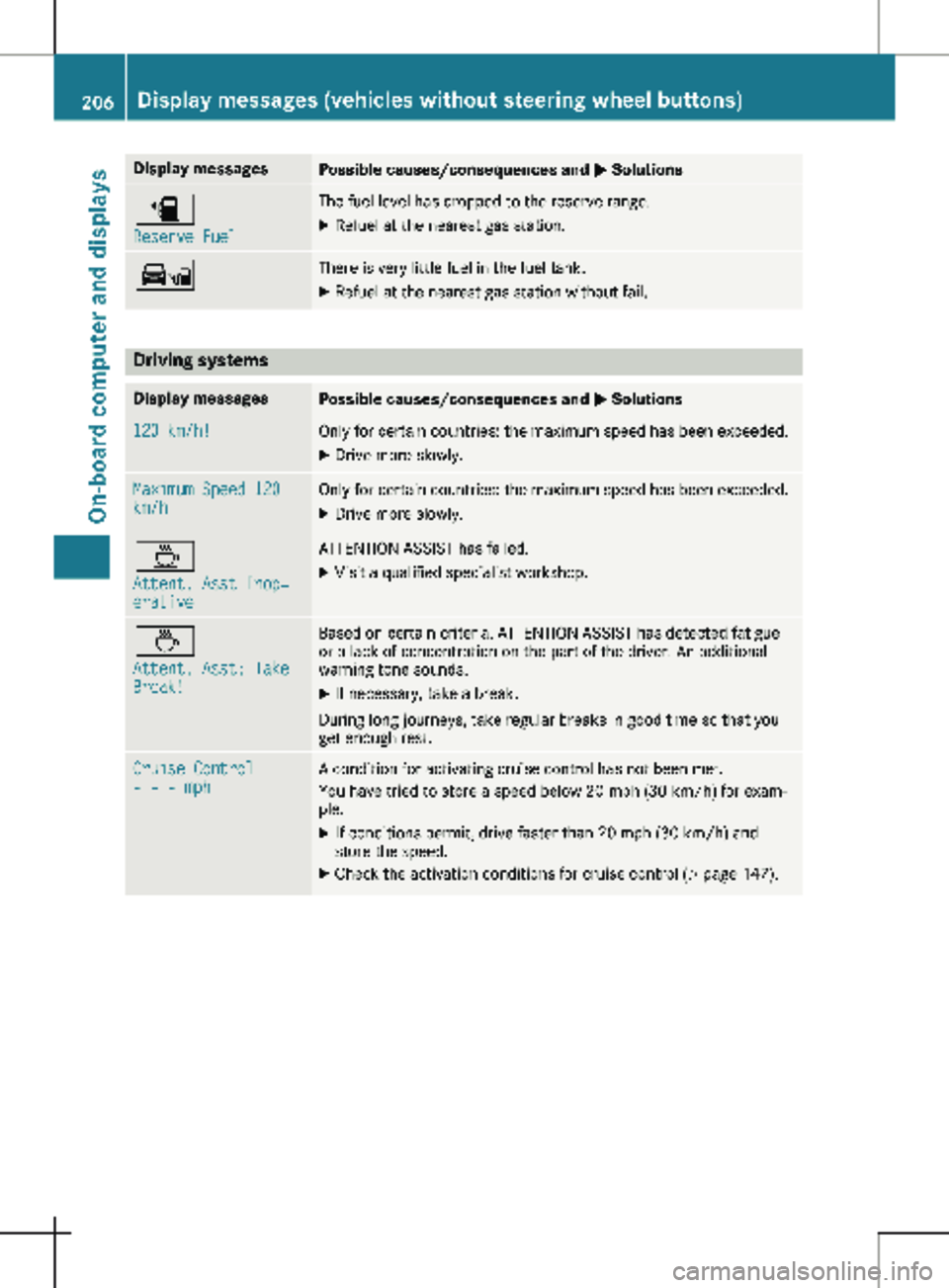
Display messages
Possible causes/consequences and
M Solutionsæ
Reserve Fuel The fuel level has dropped to the reserve range.
X Refuel at the nearest gas station. Ï There is very little fuel in the fuel tank.
X Refuel at the nearest gas station without fail. Driving systems
Display messages
Possible causes/consequences and
M Solutions120 km/h! Only for certain countries: the maximum speed has been exceeded.
X Drive more slowly. Maximum Speed 120
km/h Only for certain countries: the maximum speed has been exceeded.
X Drive more slowly. À
Attent. Asst Inop‐
erative ATTENTION ASSIST has failed.
X Visit a qualified specialist workshop. À
Attent. Asst: Take
Break! Based on certain criteria, ATTENTION ASSIST has detected fatigue
or a lack of concentration on the part of the driver. An additional
warning tone sounds.
X If necessary, take a break.
During long journeys, take regular breaks in good time so that you
get enough rest. Cruise Control
- - - mph A condition for activating cruise control has not been met.
You have tried to store a speed below
20 mph (30 km/h) for exam-
ple.
X If conditions permit, drive faster than 20 mph (30 km/h) and
store the speed.
X Check the activation conditions for cruise control (Y page
147).206
Display messages (vehicles without steering wheel buttons)
On-board computer and displays
Page 225 of 320

Display messages
Possible causes/consequences and
M SolutionsCruise Control
- - - mph A condition for activating cruise control has not been met.
You have tried to store a speed below
20 mph (30 km/h) for exam-
ple.
X If conditions permit, drive faster than 20 mph (30 km/h) and
store the speed.
X Check the activation conditions for cruise control (Y page
147).Blind Spot Assist
Inoperative Blind Spot Assist is faulty.
X Visit a qualified specialist workshop. Blind Spot Assist
Currently Unavail.
See Operator's Man‐
ual Blind Spot Assist is temporarily inoperative. Possible causes:
R You have attached a trailer.
R The sensors in the rear bumper are dirty.
R The function is impaired due to heavy rain or snow.
R The radar sensor system is temporarily inoperative, e.g. due to
electromagnetic radiation emitted by nearby TV or radio stations
or other sources of electromagnetic radiation.
R The system is outside the operating temperature range.
Once the causes listed above no longer apply, the display message
goes out and Blind Spot Assist is operational again.
If the display message does not disappear:
X Pull over and stop the vehicle, paying attention to road and traffic
conditions.
X Secure the vehicle to prevent it from rolling away ( Y page
138).
X Switch off the engine.
X Clean the sensors in the rear bumper (Y page
267).
X Restart the engine. Display messages (vehicles with steering wheel buttons)
223
On-board computer and displays Z
Page 232 of 320
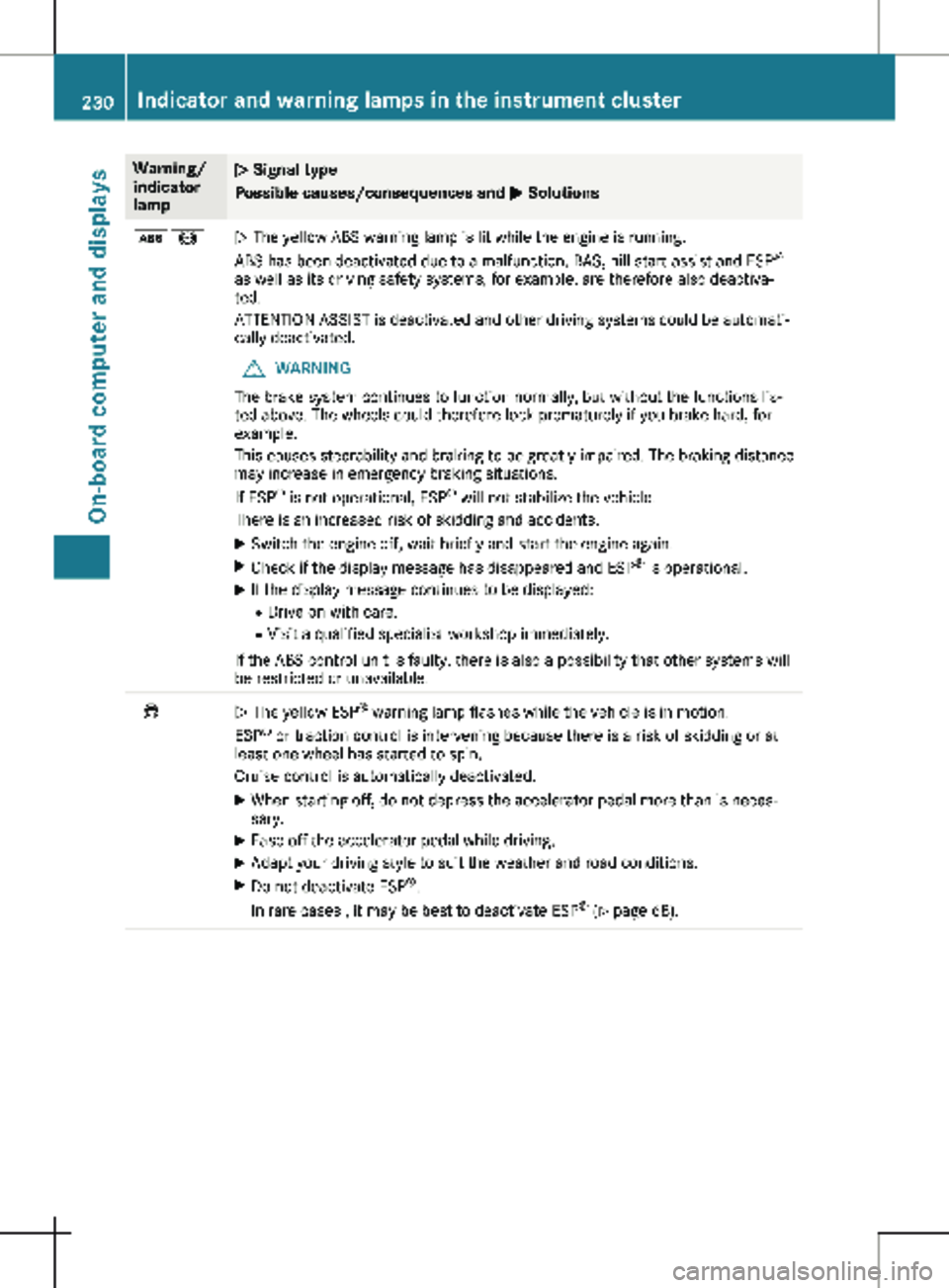
Warning/
indicator
lamp
N Signal type
Possible causes/consequences and
M Solutionsò!
N The yellow ABS warning lamp is lit while the engine is running.
ABS has been deactivated due to a malfunction. BAS, hill start assist and ESP
®
as well as its driving safety systems, for example, are therefore also deactiva-
ted.
ATTENTION ASSIST is deactivated and other driving systems could be automati-
cally deactivated.
G WARNING
The brake system continues to function normally, but without the functions lis-
ted above. The wheels could therefore lock prematurely if you brake hard, for
example.
This causes steerability and braking to be greatly impaired. The braking distance
may increase in emergency braking situations.
If ESP ®
is not operational, ESP ®
will not stabilize the vehicle.
There is an increased risk of skidding and accidents.
X Switch the engine off, wait briefly and start the engine again.
X Check if the display message has disappeared and ESP ®
is operational.
X If the display message continues to be displayed:
R Drive on with care.
R Visit a qualified specialist workshop immediately.
If the ABS control unit is faulty, there is also a possibility that other systems will
be restricted or unavailable. ÷
N The yellow ESP
®
warning lamp flashes while the vehicle is in motion.
ESP ®
or traction control is intervening because there is a risk of skidding or at
least one wheel has started to spin.
Cruise control is automatically deactivated.
X When starting off, do not depress the accelerator pedal more than is neces-
sary.
X Ease off the accelerator pedal while driving.
X Adapt your driving style to suit the weather and road conditions.
X Do not deactivate ESP ®
.
In rare cases , it may be best to deactivate ESP ®
(Y page
68).230
Indicator and warning lamps in the instrument cluster
On-board computer and displays