high beam MERCEDES-BENZ METRIS 2020 MY20 Operator’s Manual
[x] Cancel search | Manufacturer: MERCEDES-BENZ, Model Year: 2020, Model line: METRIS, Model: MERCEDES-BENZ METRIS 2020Pages: 320, PDF Size: 26.38 MB
Page 143 of 320
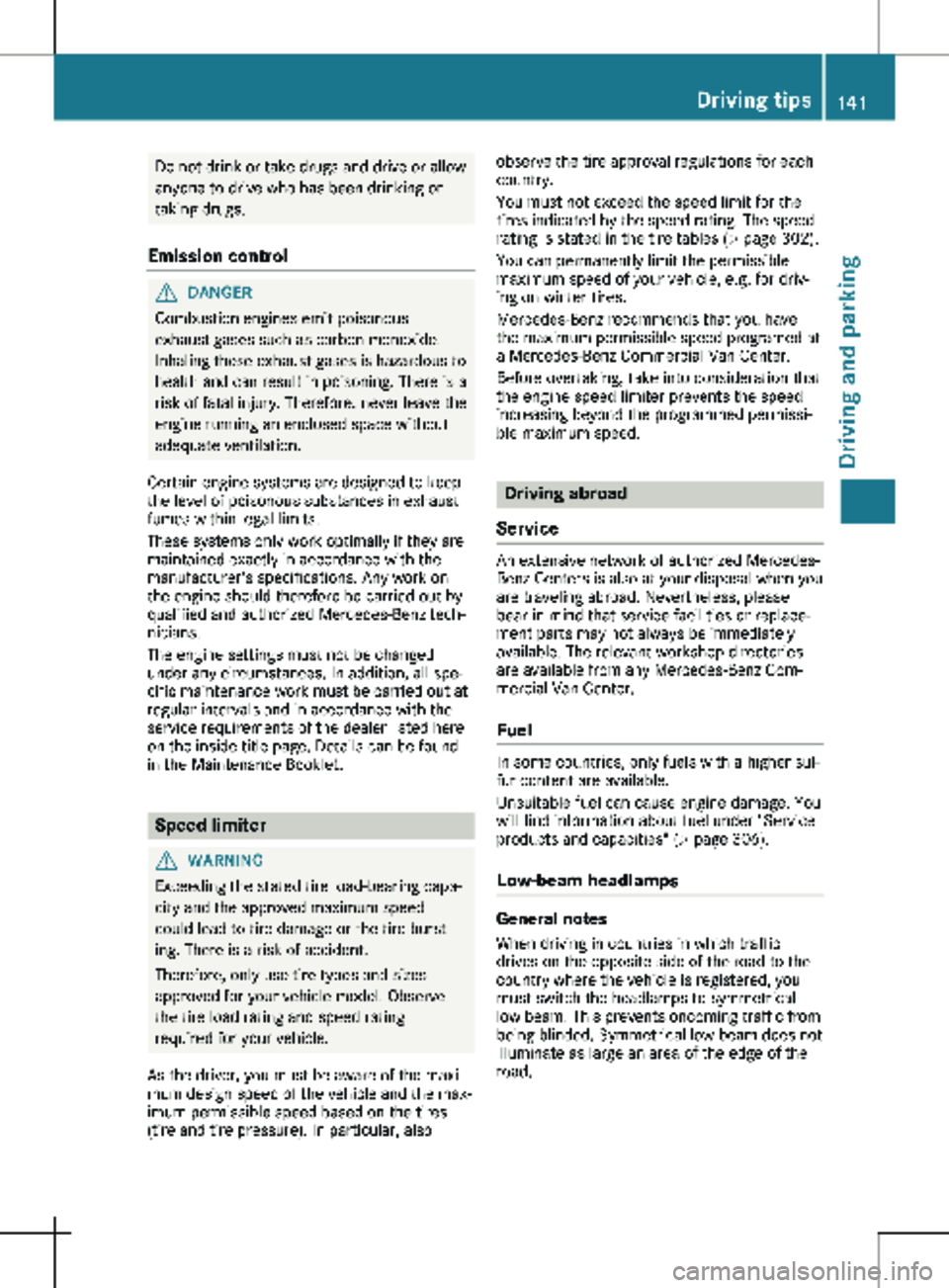
Do not drink or take drugs and drive or allow
anyone to drive who has been drinking or
taking drugs.
Emission control G
DANGER
Combustion engines emit poisonous
exhaust gases such as carbon monoxide.
Inhaling these exhaust gases is hazardous to
health and can result in poisoning. There is a
risk of fatal injury. Therefore, never leave the
engine running an enclosed space without
adequate ventilation.
Certain engine systems are designed to keep
the level of poisonous substances in exhaust
fumes within legal limits.
These systems only work optimally if they are
maintained exactly in accordance with the
manufacturer's specifications. Any work on
the engine should therefore be carried out by
qualified and authorized Mercedes-Benz tech-
nicians.
The engine settings must not be changed
under any circumstances. In addition, all spe-
cific maintenance work must be carried out at
regular intervals and in accordance with the
service requirements of the dealer listed here
on the inside title page. Details can be found
in the Maintenance Booklet. Speed limiter
G
WARNING
Exceeding the stated tire load-bearing capa-
city and the approved maximum speed
could lead to tire damage or the tire burst-
ing. There is a risk of accident.
Therefore, only use tire types and sizes
approved for your vehicle model. Observe
the tire load rating and speed rating
required for your vehicle.
As the driver, you must be aware of the maxi-
mum design speed of the vehicle and the max-
imum permissible speed based on the tires
(tire and tire pressure). In particular, also observe the tire approval regulations for each
country.
You must not exceed the speed limit for the
tires indicated by the speed rating. The speed
rating is stated in the tire tables (Y page
302).
You can permanently limit the permissible
maximum speed of your vehicle, e.g. for driv-
ing on winter tires.
Mercedes-Benz recommends that you have
the maximum permissible speed programed at
a Mercedes-Benz Commercial Van Center.
Before overtaking, take into consideration that
the engine speed limiter prevents the speed
increasing beyond the programmed permissi-
ble maximum speed. Driving abroad
Service An extensive network of authorized Mercedes-
Benz Centers is also at your disposal when you
are traveling abroad. Nevertheless, please
bear in mind that service facilities or replace-
ment parts may not always be immediately
available. The relevant workshop directories
are available from any Mercedes-Benz Com-
mercial Van Center.
Fuel In some countries, only fuels with a higher sul-
fur content are available.
Unsuitable fuel can cause engine damage. You
will find information about fuel under "Service
products and capacities"
(Y page 306).
Low-beam headlamps General notes
When driving in countries in which traffic
drives on the opposite side of the road to the
country where the vehicle is registered, you
must switch the headlamps to symmetrical
low beam. This prevents oncoming traffic from
being blinded. Symmetrical low beam does not
illuminate as large an area of the edge of the
road. Driving tips
141
Driving and parking Z
Page 195 of 320

X
Press : or 9 to select the Date:
function.
The display shows the current date.
X To set the date: press a again.
X Press = or ; to switch between day,
month and year.
X Press : or 9 to set the day, month or
year.
X Then press a to confirm.
The display shows the updated date.
Lights submenu Activating/deactivating the surround
lighting and exterior lighting delayed
switch-off
If you activate the Locator Lighting func-
tion and the light switch is turned to the Ã
position, the following functions are activated
when it is dark:
R surround lighting: the exterior lighting
remains on for
40 seconds after the doors
are unlocked. When you start the engine,
the surround lighting is deactivated and the
automatic headlamp feature is activated
(Y page 100).
R exterior lighting delayed switch-off: the
exterior lighting remains lit for 60 seconds
after the engine is switched off. When you
close all the doors and the tailgate/rear
doors, the exterior lighting switches off after
15 seconds.
Using the steering wheel buttons
X Use the = or ; button to select the
Settings. menu.
X Use : or 9 to select Lights.
X Press a to confirm.
X Use : or 9 to select the Locator
Lighting function.
The current status appears.
X To switch on/off: press a again.
If you change the setting, conversion does
not take place until the next time the vehicle
is stationary. Deactivating exterior lighting delayed switch-
off temporarily:
X Before leaving the vehicle, turn the key to
position g in the ignition lock.
X Turn the key to position 2 in the ignition
lock.
The exterior lighting delayed switch-off is
deactivated until the next time the engine is
started.
With surround lighting and exterior lighting
delayed switch-off, the following light up
depending on the vehicle's equipment:
R Parking lamps
R Fog lamps
R Low-beam headlamps
R Daytime running lamps
Activating/deactivating interior lighting
delayed switch-off If you activate the Interior Lighting
Delay: function, the interior lighting remains
lit for a further 20 seconds.
Using the steering wheel buttons
X Use the = or ; button to select the
Settings. menu.
X Use : or 9 to select Lights.
X Press a to confirm.
X Use : or 9 to select the Interior
Lighting Delay function.
The current status appears.
X To switch on/off: press a again.
Vehicle submenu Setting the sensitivity of the rain sensor
Using the steering wheel buttons
X Press = or ; to select the Settings
menu.
X Press : or 9 to select Vehicle.
X Press a to confirm.
X Press : or 9 to select the Rain
Sensor Sensitivity function.
The display shows the current setting.
X Press a to change the setting.
X Press : or 9 to select the High,
Standard or Low setting. This setting con-
trols the rain sensor's sensitivity to precipi-
tation. The windshield wiper then wipes On-board computer (vehicles with steering wheel buttons)
193
On-board computer and displays Z
Page 204 of 320
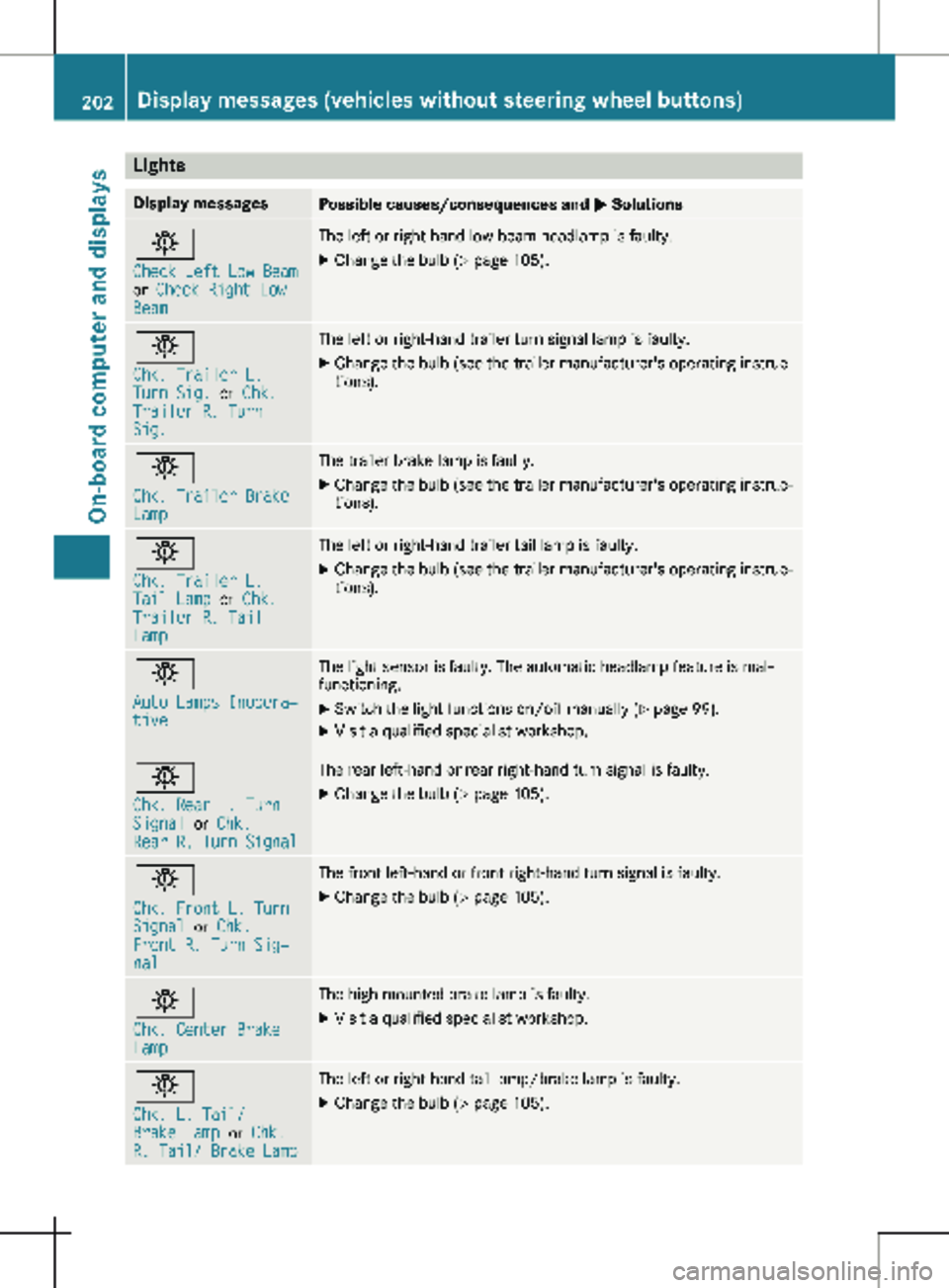
Lights
Display messages
Possible causes/consequences and
M Solutionsb
Check Left Low Beam
or
Check Right Low
Beam The left or right-hand low-beam headlamp is faulty.
X
Change the bulb ( Y page 105).b
Chk. Trailer L.
Turn Sig.
or Chk.
Trailer R. Turn
Sig. The left or right-hand trailer turn signal lamp is faulty.
X
Change the bulb (see the trailer manufacturer's operating instruc-
tions). b
Chk. Trailer Brake
Lamp The trailer brake lamp is faulty.
X Change the bulb (see the trailer manufacturer's operating instruc-
tions). b
Chk. Trailer L.
Tail Lamp
or Chk.
Trailer R. Tail
Lamp The left or right-hand trailer tail lamp is faulty.
X Change the bulb (see the trailer manufacturer's operating instruc-
tions). b
Auto Lamps Inopera‐
tive The light sensor is faulty. The automatic headlamp feature is mal-
functioning.
X
Switch the light functions on/off manually (Y page
99).
X Visit a qualified specialist workshop. b
Chk. Rear L. Turn
Signal
or Chk.
Rear R. Turn Signal The rear left-hand or rear right-hand turn signal is faulty.
X Change the bulb (Y page 105).b
Chk. Front L. Turn
Signal
or Chk.
Front R. Turn Sig‐
nal The front left-hand or front right-hand turn signal is faulty.
X Change the bulb (Y page 105).b
Chk. Center Brake
Lamp The high-mounted brake lamp is faulty.
X
Visit a qualified specialist workshop. b
Chk. L. Tail/
Brake Lamp
or Chk.
R. Tail/ Brake Lamp The left or right-hand tail lamp/brake lamp is faulty.
X Change the bulb (Y page 105).202
Display messages (vehicles without steering wheel buttons)
On-board computer and displays
Page 205 of 320
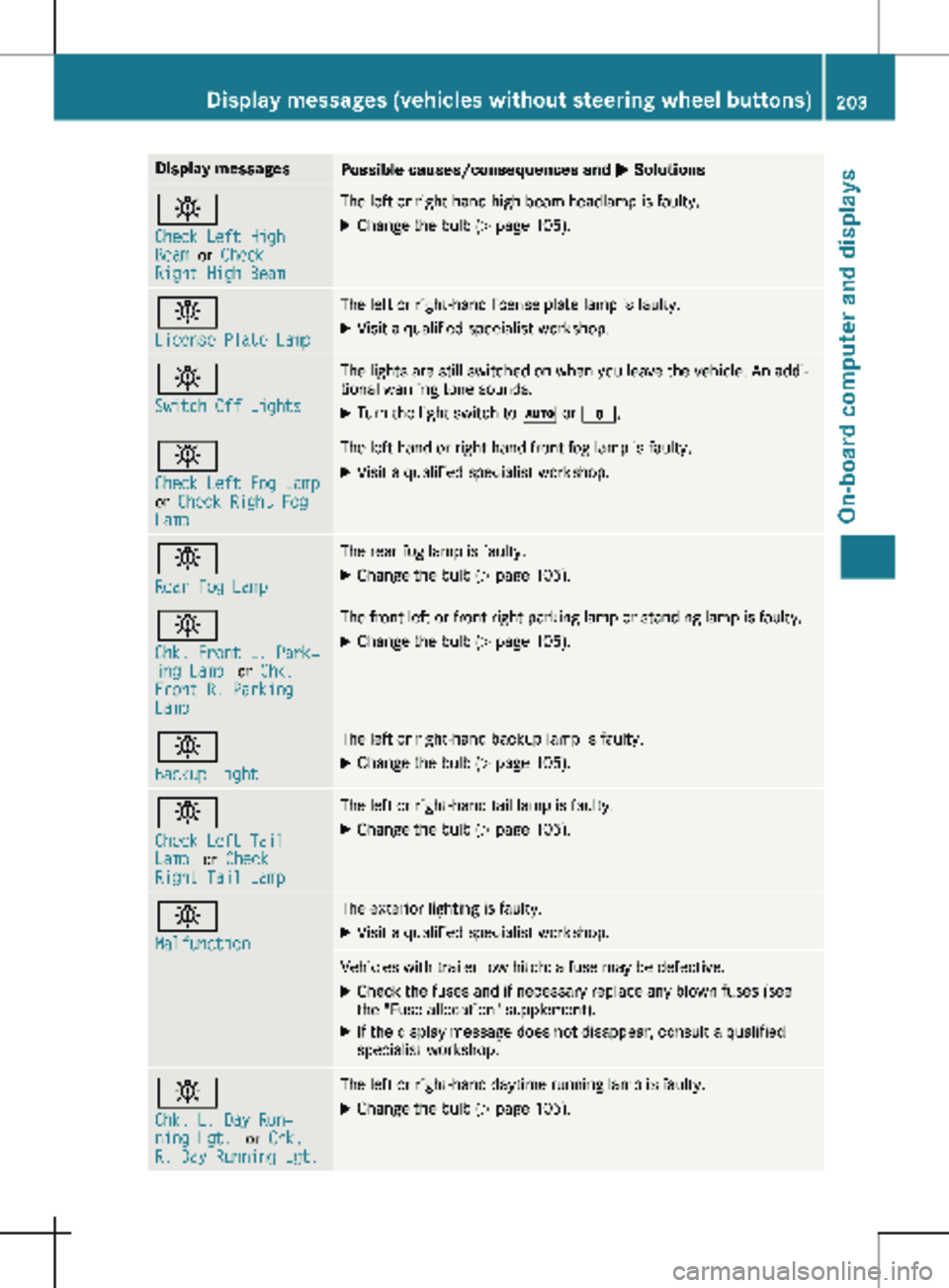
Display messages
Possible causes/consequences and
M Solutionsb
Check Left High
Beam
or Check
Right High Beam The left or right-hand high-beam headlamp is faulty.
X
Change the bulb ( Y page 105).b
License Plate Lamp The left or right-hand license plate lamp is faulty.
X Visit a qualified specialist workshop. b
Switch Off Lights The lights are still switched on when you leave the vehicle. An addi-
tional warning tone sounds.
X Turn the light switch to à or $.b
Check Left Fog Lamp
or
Check Right Fog
Lamp The left-hand or right-hand front fog lamp is faulty.
X Visit a qualified specialist workshop. b
Rear Fog Lamp The rear fog lamp is faulty.
X Change the bulb (Y page
105).b
Chk. Front L. Park‐
ing Lamp
or Chk.
Front R. Parking
Lamp The front left or front right parking lamp or standing lamp is faulty.
X Change the bulb ( Y page 105).b
Backup Light The left or right-hand backup lamp is faulty.
X Change the bulb (Y page
105).b
Check Left Tail
Lamp
or Check
Right Tail Lamp The left or right-hand tail lamp is faulty.
X Change the bulb (Y page 105).b
Malfunction The exterior lighting is faulty.
X Visit a qualified specialist workshop. Vehicles with trailer tow hitch: a fuse may be defective.
X Check the fuses and if necessary replace any blown fuses (see
the "Fuse allocation" supplement).
X If the display message does not disappear, consult a qualified
specialist workshop. b
Chk. L. Day Run‐
ning Lgt.
or Chk.
R. Day Running Lgt. The left or right-hand daytime running lamp is faulty.
X Change the bulb (Y page 105).Display messages (vehicles without steering wheel buttons)
203
On-board computer and displays Z
Page 218 of 320

Lights
Display messages
Possible causes/consequences and
M Solutionsb
Check Left Low Beam
or
Check Right Low
Beam The left or right-hand low-beam headlamp is faulty.
X
Change the bulb ( Y page 105).b
Check Trailer Left
Turn Signal
or
Check Trailer
Right Turn Signal The left or right-hand trailer turn signal lamp is faulty.
X
Change the bulb (see the trailer manufacturer's operating instruc-
tions). b
Check Trailer
Brake Lamp The trailer brake lamp is faulty.
X Change the bulb (see the trailer manufacturer's operating instruc-
tions). b
Check Trailer Left
Tail Lamp
or Check
Trailer Right Tail
Lamp The left or right-hand trailer tail lamp is faulty.
X Change the bulb (see the trailer manufacturer's operating instruc-
tions). b
Auto Lamp Function
Inoperative The light sensor is faulty. The automatic headlamp feature is mal-
functioning.
X
Switch the light functions on/off manually (Y page
99).
X Visit a qualified specialist workshop. b
Check Rear Left
Turn Signal
or
Check Rear Right
Turn Signal The rear left-hand or rear right-hand turn signal is faulty.
X Change the bulb (Y page 105).b
Check Front Left
Turn Signal
or
Check Front Right
Turn Signal The front left-hand or front right-hand turn signal is faulty.
X Change the bulb (Y page 105).b
Check Center Brake
Lamp The high-mounted brake lamp is faulty.
X
Visit a qualified specialist workshop.216
Display messages (vehicles with steering wheel buttons)
On-board computer and displays
Page 219 of 320
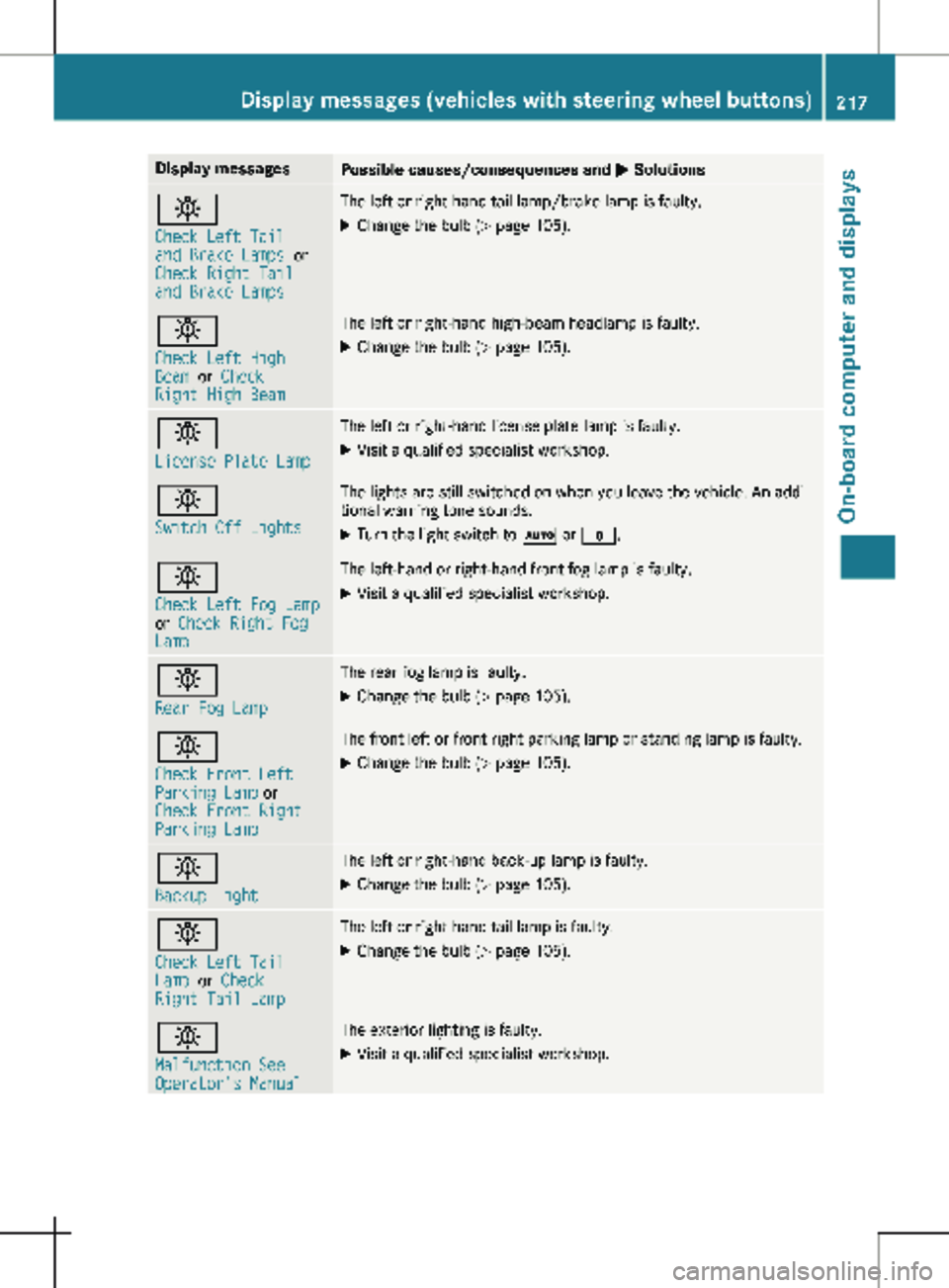
Display messages
Possible causes/consequences and
M Solutionsb
Check Left Tail
and Brake Lamps
or
Check Right Tail
and Brake Lamps The left or right-hand tail lamp/brake lamp is faulty.
X Change the bulb (Y page 105).b
Check Left High
Beam
or Check
Right High Beam The left or right-hand high-beam headlamp is faulty.
X
Change the bulb ( Y page 105).b
License Plate Lamp The left or right-hand license plate lamp is faulty.
X Visit a qualified specialist workshop. b
Switch Off Lights The lights are still switched on when you leave the vehicle. An addi-
tional warning tone sounds.
X Turn the light switch to à or $.b
Check Left Fog Lamp
or
Check Right Fog
Lamp The left-hand or right-hand front fog lamp is faulty.
X Visit a qualified specialist workshop. b
Rear Fog Lamp The rear fog lamp is faulty.
X Change the bulb (Y page
105).b
Check Front Left
Parking Lamp or
Check Front Right
Parking Lamp The front left or front right parking lamp or standing lamp is faulty.
X Change the bulb ( Y page
105).b
Backup Light The left or right-hand back-up lamp is faulty.
X Change the bulb (Y page
105).b
Check Left Tail
Lamp
or Check
Right Tail Lamp The left or right-hand tail lamp is faulty.
X Change the bulb (Y page 105).b
Malfunction See
Operator's Manual The exterior lighting is faulty.
X Visit a qualified specialist workshop. Display messages (vehicles with steering wheel buttons)
217
On-board computer and displays Z