brake light MERCEDES-BENZ METRIS 2020 MY20 Operator’s Manual
[x] Cancel search | Manufacturer: MERCEDES-BENZ, Model Year: 2020, Model line: METRIS, Model: MERCEDES-BENZ METRIS 2020Pages: 320, PDF Size: 26.38 MB
Page 141 of 320
is an increased danger of skidding and acci-
dents.
Only use the parking brake to brake the
vehicle when the service brake is faulty. Do
not apply the parking brake too firmly. If the
wheels lock, release the parking brake until
the wheels begin turning again. The brake lamps are not illuminated when you
brake the vehicle using the parking brake.
As a rule, you may only apply the parking
brake when the vehicle is stationary.
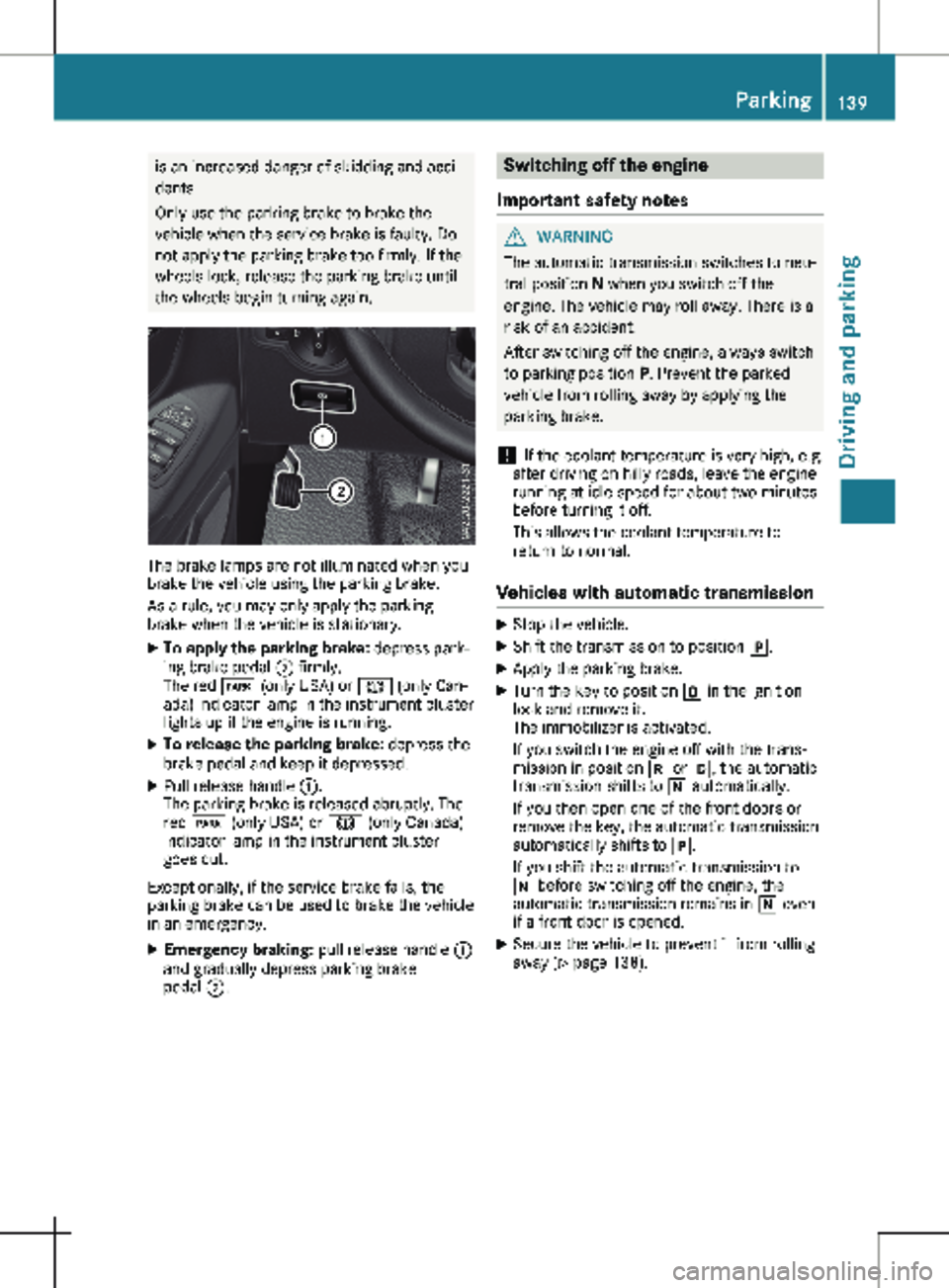
X To apply the parking brake: depress park-
ing brake pedal ; firmly.
The red F (only USA) or J (only Can-
ada) indicator lamp in the instrument cluster
lights up if the engine is running.
X To release the parking brake: depress the
brake pedal and keep it depressed.
X Pull release handle :.
The parking brake is released abruptly. The
red F (only USA) or J (only Canada)
indicator lamp in the instrument cluster
goes out.
Exceptionally, if the service brake fails, the
parking brake can be used to brake the vehicle
in an emergency.
X Emergency braking: pull release handle :
and gradually depress parking brake
pedal ;. Switching off the engine
Important safety notes G
WARNING
The automatic transmission switches to neu-
tral position N when you switch off the
engine. The vehicle may roll away. There is a
risk of an accident.
After switching off the engine, always switch
to parking position P. Prevent the parked
vehicle from rolling away by applying the
parking brake.
! If the coolant temperature is very high, e.g.
after driving on hilly roads, leave the engine
running at idle speed for about
two minutes
before turning it off.
This allows the coolant temperature to
return to normal.
Vehicles with automatic transmission X
Stop the vehicle.
X Shift the transmission to position j.
X Apply the parking brake.
X Turn the key to position u in the ignition
lock and remove it.
The immobilizer is activated.
If you switch the engine off with the trans-
mission in position k or h, the automatic
transmission shifts to i automatically.
If you then open one of the front doors or
remove the key, the automatic transmission
automatically shifts to j.
If you shift the automatic transmission to
i before switching off the engine, the
automatic transmission remains in i even
if a front door is opened.
X Secure the vehicle to prevent it from rolling
away
(Y page 138). Parking
139
Driving and parking Z
Page 144 of 320
Vehicles with halogen headlamps
The headlamps do not need to be switched to
symmetrical low beam. The legal requirements
of countries in which traffic drives on the
opposite side of the road to the country where
the vehicle is registered are met without the
need to convert the headlamps. Transport by rail
Transporting your vehicle by rail may be sub-
ject to certain restrictions or require special
measures to be taken in some countries due
to varying tunnel heights and loading stand-
ards.
You can obtain information on this from any
Mercedes-Benz Commercial Van Center. Braking
Important safety notes G
WARNING
If you shift down on a slippery road surface
in an attempt to increase the engine's brak-
ing effect, the drive wheels could lose their
grip. There is an increased danger of skid-
ding and accidents.
Do not shift down for additional engine brak-
ing on a slippery road surface.
Downhill gradients !
Depressing the brake pedal constantly
results in excessive and premature wear to
the brake pads.
This also applies to automatic braking if you
have activated cruise control.
On long and steep downhill gradients, you
should change down to shift range 2 or 1 in
good time
(Y page 133).
This should be observed in particular when
driving with a laden vehicle and when towing a
trailer.
You thereby make use of the braking effect of
the engine and do not have to brake as often
to maintain the speed. This relieves the load
on the service brake and prevents the brakes
from overheating and wearing too quickly. Heavy and light loads G
WARNING
If you rest your foot on the brake pedal
while driving, the braking system can over-
heat. This increases the stopping distance
and can even cause the braking system to
fail. There is a risk of an accident.
Never use the brake pedal as a footrest.
Never depress the brake pedal and the
accelerator pedal at the same time.
! Depressing the brake pedal constantly
results in excessive and premature wear to
the brake pads.
If the brakes have been subjected to a heavy
load, do not stop the vehicle immediately.
Drive on for a short while. The brakes are
cooled down more quickly in the airflow.
Wet road surfaces If you have been driving for a long time in
heavy rain without braking, there may be a
delayed response when you first apply the
brakes. This may also occur after driving
through a car wash or deep water.
You must depress the brake pedal more firmly.
Maintain a longer distance to the vehicle in
front.
While paying attention to the traffic conditions,
you should brake the vehicle firmly after driv-
ing on a wet road surface or through a car
wash. This heats the brake discs, so that they
dry more quickly, which protects them against
corrosion.
Limited braking performance on salt-
treated roads When driving on salted roads, salt may start to
build up on the brake disks and brake pads.
This can increase braking distances considera-
bly.
Maintain a greater distance to the vehicle in
front.
To remove any build-up of salt that may have
formed:
X Apply the brakes at the start of the journey,
occasionally during journey and at the end 142
Driving tips
Driving and parking
Page 145 of 320
of the journey. Make sure that you do not
endanger other road users when doing so.
Checking the brake pad thickness In addition to monitoring using the brake pad
wear sensor, regularly monitor and check all of
the brake pads by performing a visual inspec-
tion to look for pad material wear.
If you are unable to check the brake wear on
the inside of the wheels, remove the wheels
with the tools provided.
Make sure that the brake pad material thick-
ness never falls below
0.12 in (3 mm). Have
the brake pads checked and replaced at a
qualified specialist workshop, if necessary.
Do not solely rely on the brake pad wear sen-
sor.
It is strongly recommended that you have the
brake pads checked at a qualified specialist
workshop at every service displayed in the
maintenance interval indicator, prior to long
journeys and whenever the wheels are
removed.
New brake discs and brake pads/
linings New brake pads and brake discs only reach
their optimal braking effect after about
60 miles
(100 kilometers). Until then, compen-
sate for this by applying greater force to the
brake pedal.
For safety reasons, Mercedes-Benz recom-
mends only installing the following brake discs
and brake pads/linings:
R brake discs that have been approved by
Mercedes-Benz
R brake pads/linings that have been approved
by Mercedes-Benz or are of an equivalent
standard of quality
Other brake discs or brake pads/linings can
compromise the safety of your vehicle.
Always replace all brake discs or brake pads/
linings on an axle at the same time and only
have them replaced at a qualified specialist
workshop. When replacing the brake discs,
always have the brake pads/linings replaced
at the same time. Parking brake G
WARNING
If you must brake the vehicle with the park-
ing brake, the braking distance is considera-
bly longer and the wheels could lock. There
is an increased danger of skidding and acci-
dents.
Only use the parking brake to brake the
vehicle when the service brake is faulty. Do
not apply the parking brake too firmly. If the
wheels lock, release the parking brake until
the wheels begin turning again.
When driving on wet roads or dirt-covered sur-
faces, road salt and/or dirt may get into the
parking brake. This causes corrosion and a
reduction of braking force.
In order to prevent this, drive with the parking
brake lightly applied from time to time. When
doing so, drive for a distance of approximately
110 yds (100 m) at a maximum speed of
12 mph (20 km/h
).
The brake lamps are not illuminated when you
brake the vehicle using the parking brake. Driving in wet conditions
Hydroplaning G
WARNING
There is a danger of hydroplaning occurring,
even if you are driving slowly and your tires
have sufficient tread depth, depending on
the depth of water on the road. There is a
risk of an accident.
For this reason, avoid tire ruts and brake
carefully.
Therefore, in heavy rain or other conditions in
which hydroplaning can occur, drive as fol-
lows:
R reduce your speed
R avoid tire ruts
R apply the brakes with care Driving tips
143
Driving and parking Z
Page 150 of 320
Storing and maintaining the current
speed
X
Accelerate the vehicle to the desired speed
above 20 mph (30 km/h
).
X Briefly push the cruise control lever up : or
down =.
X Release the accelerator pedal.
Cruise control is activated. The current
speed is stored and shown briefly in the dis-
play's text field.
The display also shows the V symbol and
the stored speed:
R in the header on vehicles without steering
wheel buttons (Y page
176)
R in the status area on vehicles with steer-
ing wheel buttons (Y page 183)
Resuming the stored speed G
WARNING
If you call up the stored speed and it differs
from the current speed, the vehicle acceler-
ates or decelerates. If you do not know the
stored speed, the vehicle could accelerate
or brake unexpectedly. There is a risk of an
accident.
Pay attention to the road and traffic condi-
tions before calling up the stored speed. If
you do not know the stored speed, store the
desired speed again.
X Briefly pull the cruise control lever towards
you ;.
X Release the accelerator pedal.
Cruise control is activated and resumes the
vehicle's speed to the last speed stored.
The stored speed is shown briefly in the dis-
play.
The display also shows the V symbol and
the stored speed:
R in the header on vehicles without steering
wheel buttons (Y page
176)
R in the status area on vehicles with steer-
ing wheel buttons (Y page 183)
i When you pull the cruise control lever
towards you for the first time after starting
the engine, cruise control adopts the cur-
rent speed. Setting the speed It may be a moment before the vehicle starts
to accelerate or brake to the set speed. Take
this delay into account when setting the
speed.
X
Press the cruise control lever up : to
increase the speed or down = to reduce
the speed.
The vehicle will accelerate or decelerate.
The speed is shown in the display.
X Release the cruise control lever once the
desired speed is reached.
The displayed speed is stored.
or
X Briefly press the cruise control lever as far
as the 1st pressure point up : or down =.
The last speed stored is increased/reduced
in increments of
1 mph (1 km/h).
or X Briefly press the cruise control lever beyond
the pressure point up : or down =.
The last speed stored is increased/reduced
in increments of
5 mph (10 km/h).
i Cruise control is not deactivated if you
depress the accelerator pedal. If you accel-
erate briefly to overtake, for example, cruise
control resumes the vehicle’s speed to the
last speed stored after you have finished
overtaking.
Deactivating cruise control There are various ways to deactivate cruise
control:
X Briefly press the cruise control lever for-
wards ?.
or X Apply the brakes.
The last speed set remains stored. The last
speed stored is deleted when you switch off
the engine.
Cruise control is deactivated automatically
when:
R you apply the brakes
R you apply the parking brake and the F
(only USA) or J (only Canada) indicator
lamp in the instrument cluster lights up
R you are driving slower than
20 mph
(30 km/h) 148
Driving systems
Driving and parking
Page 152 of 320

may also cause the system to display a warn-
ing.
If you fail to adapt your driving style, the dis-
tance warning function can neither reduce the
risk of an accident nor override the laws of
physics. The distance warning function cannot
take into account road, weather or traffic con-
ditions. The distance warning function is only
an aid. You are responsible for the distance to
the vehicle in front, for vehicle speed, braking
in good time and for staying in your lane.
Following damage to the front end of the vehi-
cle, have the configuration and operation of
the radar sensor checked at a qualified spe-
cialist workshop. This also applies to collisions
at slow speeds where there is no visible dam-
age to the front of the vehicle.
If you change wheel size, make sure they cor-
respond to the correct wheel size category
(Y page
278). If the category is changed with-
out recoding the control units in the vehicle,
the functioning of the distance warning feature
may be impaired. COLLISION PREVENTION
ASSIST may then detect a malfunction and
switch itself off.
Operation
X To activate/deactivate: activate or deacti-
vate the distance warning function in the on-
board computer
(Y page 190).
If the distance warning function of COLLI-
SION PREVENTION ASSIST is activated, the
display shows the Ä symbol:
R in the header
R in the Status Overview of the Assist.
menu (Y page 189)
At speeds up to approx 20 mph (30 km/h)
the display in vehicles with Active Parking
Assist first shows the í status indicator.
Only from a speed of about 20 mph
(30 km/h) does the display show the
Äsymbol instead of the í status indica-
tor.
The distance warning function can help you to
minimize the risk of a front-end collision with a
vehicle ahead or reduce the effects of such a
collision. With the help of the radar sensor sys-
tem, the distance warning function can detect
obstacles that are in the path of your vehicle
for an extended period of time. If the distance
warning function detects that there is a risk of
a collision, you will be warned visually and,
where necessary, acoustically. Without your intervention, the distance warning function
cannot prevent a collision.
The distance warning function issues a warn-
ing at speeds:
R from about
4 mph (7 km/h) if you approach
a vehicle traveling in front or a stationary
vehicle too quickly. The · warning lamp
in the instrument cluster then lights up and
an intermittent warning tone also sounds.
At speeds up to about 45 mph (70 km/h),
the system also detects stationary obsta-
cles, for example stopped or parked vehi-
cles.
X Brake immediately until the distance from
the obstacle increases and the risk of a
front-end collision passes.
or X Take evasive action, provided it is safe to do
so.
Adaptive Brake Assist General notes
Adaptive Brake Assist evaluates the traffic sit-
uation with the help of the radar sensor sys-
tem and can detect obstacles which have been
in your vehicle's path for an extended period
of time. From speeds above 4 mph (7 km/h
),
Adaptive Brake Assist aids you in braking dur-
ing hazardous situations.
Up to a speed of approximately 125 mph
(200 km/h), Adaptive Brake Assist is capable
of reacting to moving obstacles that have
already been detected as such at least once
over the period of observation.
Important safety notes G
WARNING
Adaptive Brake Assist does not react:
R to people or animals
R to oncoming vehicles
R to crossing traffic
R to stationary obstacles
R when cornering
As a result, the Adaptive Brake Assist may
not intervene in all critical conditions. There
is a risk of an accident. 150
Driving systems
Driving and parking
Page 156 of 320
means of intermittent vibration through the
steering wheel for up to
1.5 seconds.
Important safety notes G
WARNING
Lane Keeping Assist cannot always clearly
detect lane markings.
In such cases, Lane Keeping Assist can:
R give an unnecessary warning
R not give a warning
There is a risk of an accident.
Always pay particular attention to the traffic
situation and keep within the lane, espe-
cially if Lane Keeping Assist alerts you. G
WARNING
The Lane Keeping Assist warning does not
return the vehicle to the original lane. There
is a risk of an accident.
You should always steer, brake or accelerate
yourself, in particular if warned by Lane
Keeping Assist.
If you fail to adapt your driving style, Lane
Keeping Assist can neither reduce the risk of
accident nor override the laws of physics.
Lane Keeping Assist cannot take into account
road, weather or traffic conditions. Lane Keep-
ing Assist is only an aid. You are responsible
for the distance to the vehicle in front, for
vehicle speed, braking in good time and for
staying in your lane.
Lane Keeping Assist does not keep your vehi-
cle in its lane.
The system may be impaired or may not func-
tion if:
R there is poor visibility, e.g. due to insuffi-
cient illumination of the road, or due to
snow, rain, fog or spray
R there is glare, e.g. from oncoming traffic,
the sun or reflection from other vehicles
(e.g. if the road surface is wet)
R the windshield is dirty, fogged up, damaged
or covered, for instance by a sticker, in the
vicinity of the camera
R there are no lane markings, or several
unclear lane markings for one lane, e.g.
around construction sites R
the lane markings are worn away, dark or
covered up, e.g. by dirt or snow
R the distance to the vehicle in front is too
short and thus the lane markings cannot be
detected
R the lane markings change quickly, e.g. lanes
branch off, cross one another or merge
R the road is narrow and winding
R there are highly variable shade conditions
on the road
Deactivating and activating Lane Keep-
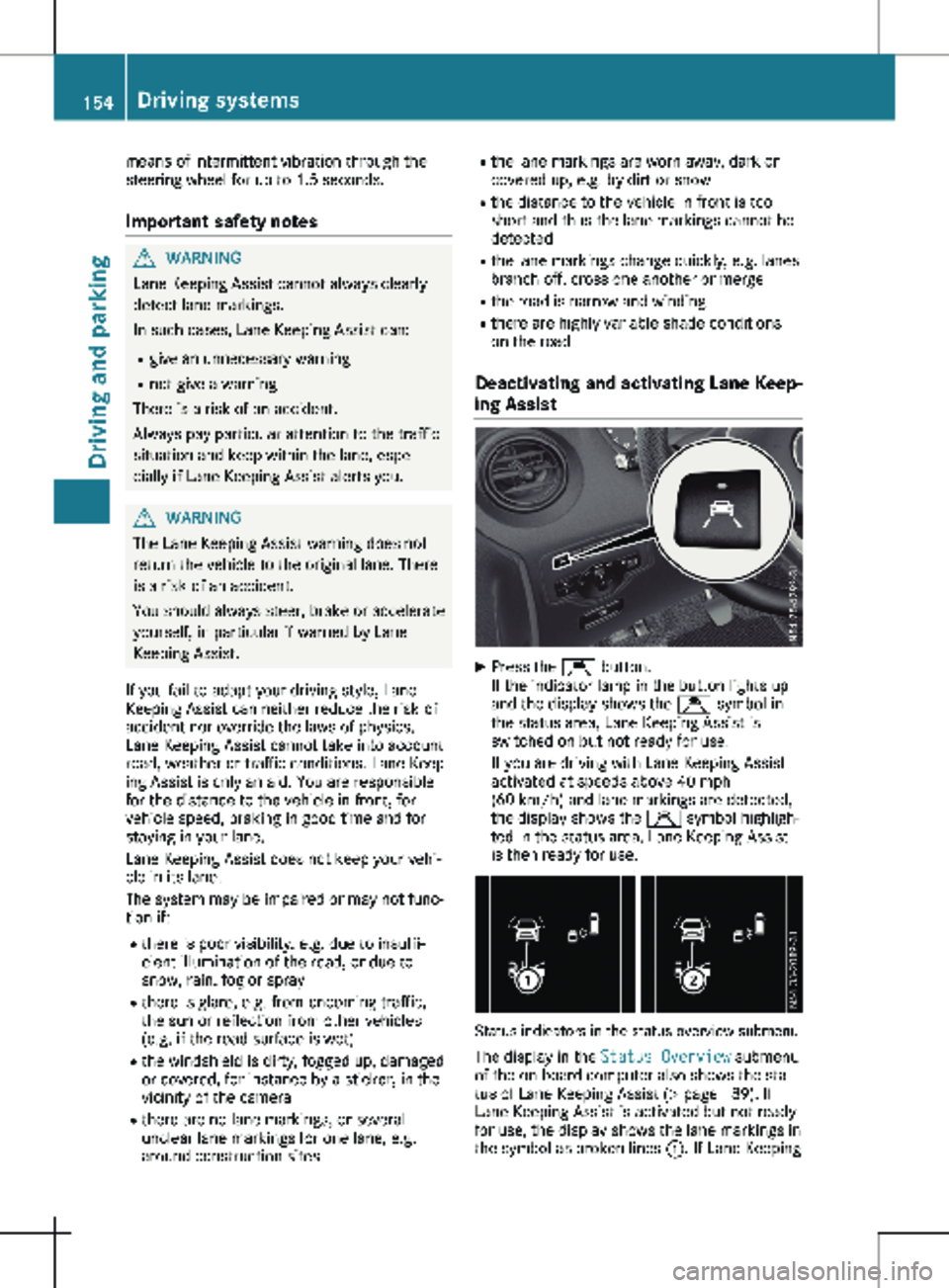
ing Assist X
Press the Ç button.
If the indicator lamp in the button lights up
and the display shows the Ç symbol in
the status area, Lane Keeping Assist is
switched on but not ready for use.
If you are driving with Lane Keeping Assist
activated at speeds above
40 mph
(60 km/h) and lane markings are detected,
the display shows the Ç symbol highligh-
ted in the status area. Lane Keeping Assist
is then ready for use. Status indicators in the status overview submenu
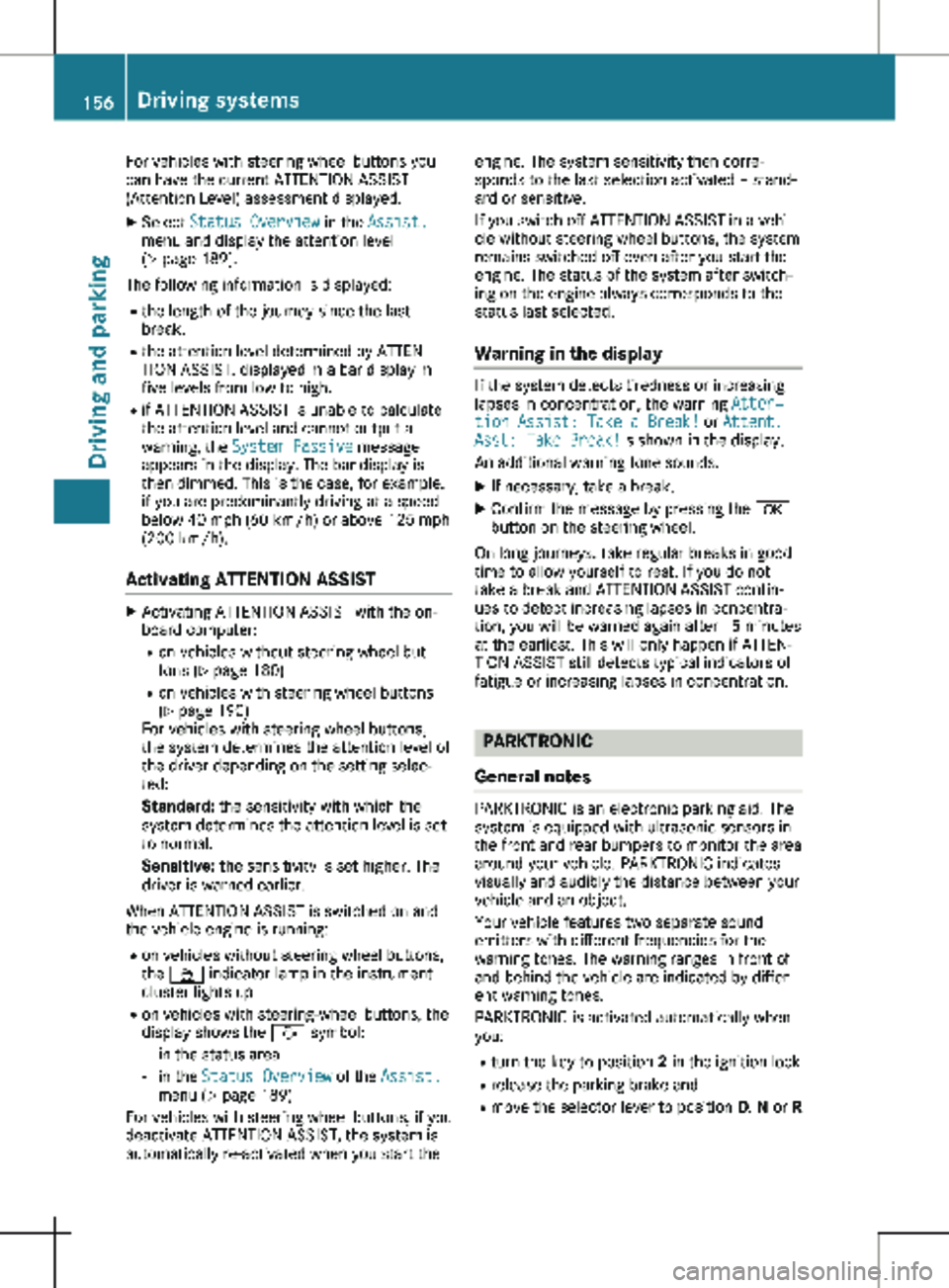
The display in the Status Overview submenu
of the on-board computer also shows the sta-
tus of Lane Keeping Assist
(Y page 189). If
Lane Keeping Assist is activated but not ready
for use, the display shows the lane markings in
the symbol as broken lines :. If Lane Keeping154
Driving systems
Driving and parking
Page 158 of 320
For vehicles with steering wheel buttons you
can have the current ATTENTION ASSIST
(Attention Level) assessment displayed.
X Select Status Overview in the Assist.
menu and display the attention level
(Y page
189).
The following information is displayed: R the length of the journey since the last
break.
R the attention level determined by ATTEN-
TION ASSIST, displayed in a bar display in
five levels from low to high.
R if ATTENTION ASSIST is unable to calculate
the attention level and cannot output a
warning, the System Passive message
appears in the display. The bar display is
then dimmed. This is the case, for example,
if you are predominantly driving at a speed
below
40 mph (60 km/h) or above 125 mph
(200 km/h).
Activating ATTENTION ASSIST X
Activating ATTENTION ASSIST with the on-
board computer:
R on vehicles without steering wheel but-
tons
(Y page 180)
R on vehicles with steering wheel buttons
(Y page 190)
For vehicles with steering wheel buttons,
the system determines the attention level of
the driver depending on the setting selec-
ted:
Standard: the sensitivity with which the
system determines the attention level is set
to normal.
Sensitive: the sensitivity is set higher. The
driver is warned earlier.
When ATTENTION ASSIST is switched on and
the vehicle engine is running: R on vehicles without steering wheel buttons,
the À indicator lamp in the instrument
cluster lights up
R on vehicles with steering-wheel buttons, the
display shows the À symbol:
- in the status area
- in the Status Overview of the Assist.
menu (Y page
189)
For vehicles with steering wheel buttons, if you
deactivate ATTENTION ASSIST, the system is
automatically re-activated when you start the engine. The system sensitivity then corre-
sponds to the last selection activated – stand-
ard or sensitive.
If you switch off ATTENTION ASSIST in a vehi-
cle without steering wheel buttons, the system
remains switched off even after you start the
engine. The status of the system after switch-
ing on the engine always corresponds to the
status last selected.
Warning in the display If the system detects tiredness or increasing
lapses in concentration, the warning
Atten‐
tion Assist: Take a Break! or Attent.
Asst: Take Break!is shown in the display.
An additional warning tone sounds.
X If necessary, take a break.
X Confirm the message by pressing the a
button on the steering wheel.
On long journeys, take regular breaks in good
time to allow yourself to rest. If you do not
take a break and ATTENTION ASSIST contin-
ues to detect increasing lapses in concentra-
tion, you will be warned again after
15 minutes
at the earliest. This will only happen if ATTEN-
TION ASSIST still detects typical indicators of
fatigue or increasing lapses in concentration. PARKTRONIC
General notes PARKTRONIC is an electronic parking aid. The
system is equipped with ultrasonic sensors in
the front and rear bumpers to monitor the area
around your vehicle. PARKTRONIC indicates
visually and audibly the distance between your
vehicle and an object.
Your vehicle features two separate sound
emitters with different frequencies for the
warning tones. The warning ranges in front of
and behind the vehicle are indicated by differ-
ent warning tones.
PARKTRONIC is activated automatically when
you:
R turn the key to position 2 in the ignition lock
R release the parking brake and
R move the selector lever to position D, N or R156
Driving systems
Driving and parking
Page 159 of 320
PARKTRONIC is deactivated at speeds above
11 mph (18 km/h
). PARKTRONIC is reactiva-
ted at speeds below 10 mph (16 km/h).
Important safety notes PARKTRONIC is only an aid. It cannot replace
your own awareness of the immediate sur-
roundings. You are responsible for safe
maneuvering, parking and pulling away. Make
sure that there are no persons, animals or
objects in the maneuvering area while maneu-
vering and parking in/leaving parking spaces.
! Pay particular attention to obstacles above
or below the sensors when parking, such as
flower pots or trailer towbars. PARKTRONIC
does not recognize such objects when they
are in the immediate vicinity of the vehicle.
You could damage the vehicle or objects.
PARKTRONIC can suffer interference from:
R ultrasonic sources such as a truck's
compressed-air brakes, an automatic car
wash or a pneumatic drill
R attachments to the vehicle, e.g. rear
mounted racks
R number plates (vehicle license plates)
that are not affixed flat against the
bumper
R dirty or icy sensors
Remove a detachable trailer coupling if it is no
longer required. PARKTRONIC measures the
minimum detection range to an obstacle from
the bumper, not the ball coupling.
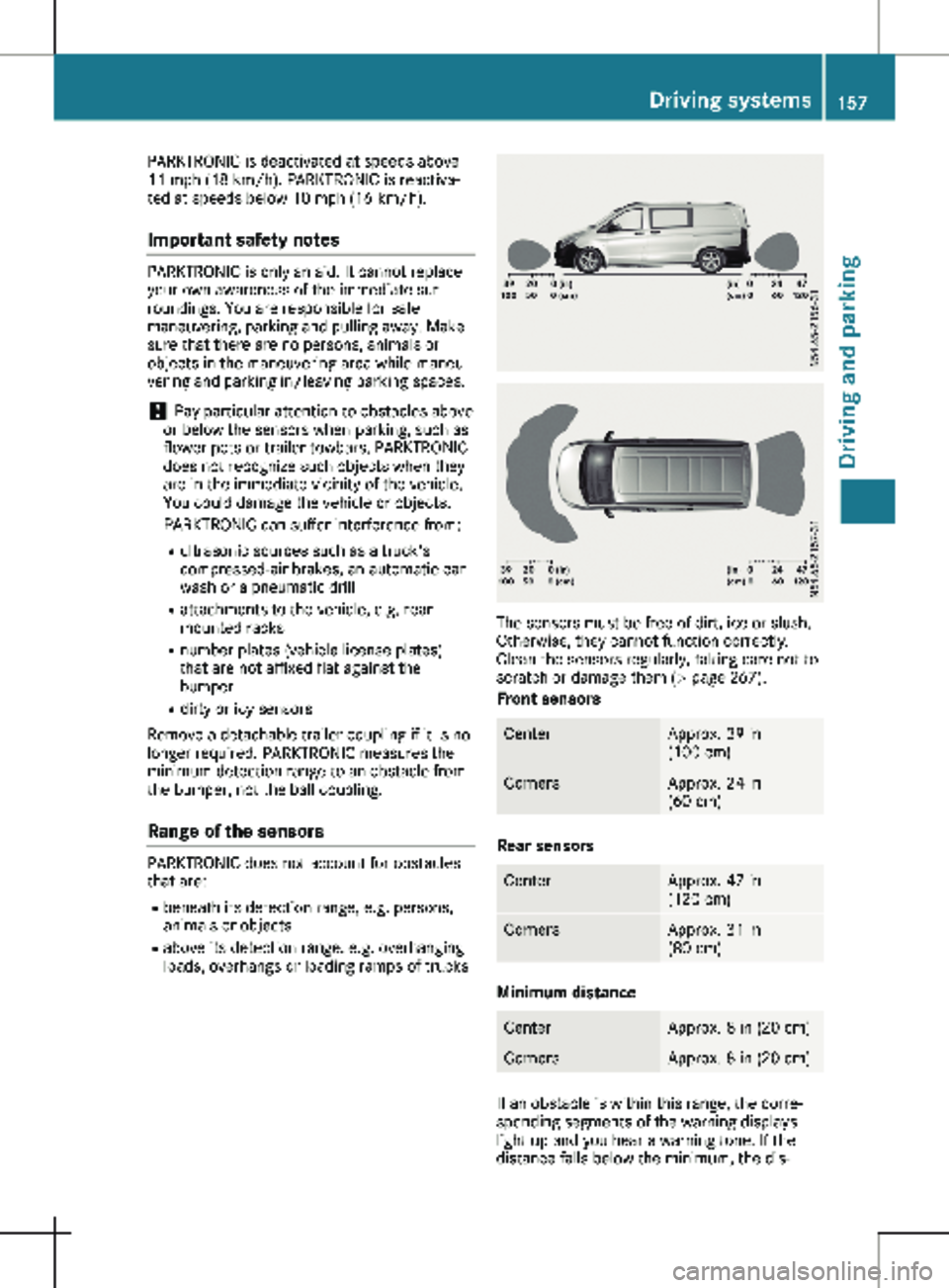
Range of the sensors PARKTRONIC does not account for obstacles
that are:
R beneath its detection range, e.g. persons,
animals or objects
R above its detection range, e.g. overhanging
loads, overhangs or loading ramps of trucks The sensors must be free of dirt, ice or slush.
Otherwise, they cannot function correctly.
Clean the sensors regularly, taking care not to
scratch or damage them (Y page
267).
Front sensors Center Approx. 39 in
(100 cm
) Corners Approx. 24 in
(60 cm
) Rear sensors
Center Approx. 47 in
(120 cm
) Corners Approx. 31 in
(80 cm
) Minimum distance
Center Approx. 8 in (20 cm)
Corners Approx. 8 in (20 cm)
If an obstacle is within this range, the corre-
sponding segments of the warning displays
light up and you hear a warning tone. If the
distance falls below the minimum, the dis- Driving systems
157
Driving and parking Z
Page 161 of 320
Towing a trailer
PARKTRONIC detects a coupled trailer if your
vehicle is equipped with the corresponding
electrical installations for trailer towing.
PARKTRONIC is deactivated for the rear area
when you establish an electrical connection
between your vehicle and a trailer. If you use
an adapter for the socket, remove it from the
socket after detaching the trailer. Otherwise,
PARKTRONIC remains deactivated for the rear
area.
Problems with PARKTRONIC Problem
Possible causes/consequences and
M SolutionsOnly the red segments
in the PARKTRONIC
warning displays are lit.
In addition, a warning
tone sounds for approx.
two seconds
PARKTRONIC is then
deactivated.
The indicator lamp of
the f button lights
up and the red seg-
ments in the
PARKTRONIC warning
display go out. PARKTRONIC has malfunctioned and has switched itself off.
X
If problems persist, have PARKTRONIC checked at a qualified
specialist workshop. The PARKTRONIC warn-
ing displays implausible
distances.
For example, all the
segments may be lit
even though there is no
obstacle present. The PARKTRONIC sensors are dirty or iced up.
X Clean the PARKTRONIC sensors ( Y page 267).
X Turn the key to position 2 in the ignition lock. The license plate or other parts attached near the sensors may not
be secured correctly.
X Check the license plate and attachment parts near the sensors
for correct seating. An external radio or ultrasonic source may be causing interference.
X Check PARKTRONIC functions in a different location. Active Parking Assist
General notes Active Parking Assist is an electronic parking
aid. The system uses ultrasound sensors to
measure the road on both sides of the vehicle
and indicates suitable parking spaces. It can
then actively steer and brake the vehicle to
help you to park and exit the parking space.
Active Parking Assist includes the
PARKTRONIC parking aid which indicates visu-
ally and audibly the distance between your vehicle and an obstruction. To do this,
PARKTRONIC uses the ultrasonic sensors of
the Active Parking Assist
(Y page 156).
Important safety notes Active Parking Assist is only an aid. It is not a
substitute for your attention to the immediate
surroundings. You are responsible for safe
maneuvering, parking and pulling away. Make
sure that no persons, animals or objects are in
the maneuvering range. Driving systems
159
Driving and parking Z
Page 165 of 320

X
Start the engine.
X Switch on the turn signal in the direction in
which you are pulling away.
X Shift the transmission to position h or k.
The display shows the message Start
Park Assist? Yes: OK No: %.
X To cancel the process: press the % but-
ton on the steering wheel or drive off.
or
X To exit the parking space using active
parking assistance: press the a button
on the steering wheel.
The display shows the message Park
Assist Active: Accelerate and Brake
Obs. Surroundings.
X Let go of the steering wheel.
X Pull away, being ready to brake at all times.
Exit the parking space slowly and do not
drive faster than
6 mph (10 km/h). Other-
wise parking assistance is canceled and
Active Parking Assist is stopped.
Active Parking Assist brakes the vehicle to a
standstill when the vehicle approaches a
border of the parking space.
X While the vehicle is stationary, shift the
transmission to position h or k as
required or according to the message.
Active Parking Assist immediately steers in
the other direction. The display shows the
message Park Assist Active: Acceler‐
ate and Brake Obs. Surroundings.
i You will achieve the best results by waiting
for the steering procedure to complete
before pulling away.
If you back up after activation, the steering
wheel is moved to the straight-ahead posi-
tion.
X Drive forwards and reverse as prompted by
the PARKTRONIC warning displays, several
times if necessary.
Once you have exited the parking space com-
pletely:
R The display shows the Park Assist Fin‐
ished message.
R A tone sounds.
R The steering wheel is moved to the straight-
ahead position
The parking assistance function of Active Park-
ing Assist is stopped. You will then have to
steer and merge into traffic on your own.
PARKTRONIC is still available. You can take over the steering before the vehi-
cle has exited the parking space completely.
This is useful, for example when you recognize
that it is already possible to pull out of the
parking space.
Canceling active parking assistance X
Stop the movement of the steering wheel or
steer yourself.
or X Press the f button and deactivate
PARKTRONIC
(Y page 158).
Parking assistance is canceled immediately
and Active Parking Assist is stopped. The
display shows the Park Assist Canceled
message.
Active parking assistance is canceled automat-
ically in the following cases:
R you apply the parking brake.
R parking using Active Parking Assist is no
longer possible.
R you are driving faster than
6 mph
(10 km/h).
R a wheel spins and ESP ®
intervenes or fails.
The ÷ warning lamp in the instrument
cluster then lights up.
R you unfasten your seat belt.
R you open a door or the tailgate/rear-end
door.
R you shift the transmission to position j.
A warning tone sounds, the parking symbol in
the display goes out and the Park Assist
Canceled message appears.
Once active Parking Assist has been canceled,
you must steer and brake again yourself.
If a system malfunction occurs, vehicles are
automatically braked down to a standstill. To
continue driving, you must depress the accel-
erator pedal again. Rear view camera
General notes On vehicles with a tailgate, the rear view cam-
era is next to the tailgate handle
(
Y page
267).
On vehicles with rear-end doors, the rear view
camera is in the top of the license plate mold-
ing ( Y page 267). Driving systems
163
Driving and parking Z