lights MERCEDES-BENZ METRIS 2020 MY20 Operator’s Manual
[x] Cancel search | Manufacturer: MERCEDES-BENZ, Model Year: 2020, Model line: METRIS, Model: MERCEDES-BENZ METRIS 2020Pages: 320, PDF Size: 26.38 MB
Page 75 of 320
X
Slide release catch : in the direction of the
arrow and, at the same time, remove
mechanical key ; from the key completely.
Inserting the mechanical key X
Push mechanical key ; completely into the
key until it engages and release catch : is
back in its basic position.
Unlocking/locking the vehicle using
the mechanical key The door lock for unlocking in an emergency is
on the driver’s door.
X To unlock the driver's door: insert the
mechanical key fully into the driver's door
lock and turn it counter-clockwise.
The driver’s door is unlocked.
X To lock the vehicle: lock all doors except
the driver's door from the inside. To do this,
push down the door-locking knobs.
X Insert the mechanical key fully into the driv-
er's door lock and turn it clockwise.
The driver's door is locked. Battery of the key
Important safety notes G
WARNING
Batteries contain toxic and corrosive sub-
stances. If batteries are swallowed, it can
result in severe health problems. There is a
risk of fatal injury.
Keep batteries out of the reach of children.
If a battery is swallowed, seek medical
attention immediately. H
Environmental note Batteries contain pollutants.
It is illegal to dispose of
them with the household
rubbish. They must be col-
lected separately and dis-
posed of in an environmen- tally responsible recycling
system. Dispose of batteries in an
environmentally responsible
manner. Take discharged
batteries to a qualified spe-
cialist workshop or to a col-
lection point for used bat-
teries.
Mercedes-Benz recommends that you have
the battery changed at a qualified specialist
workshop.
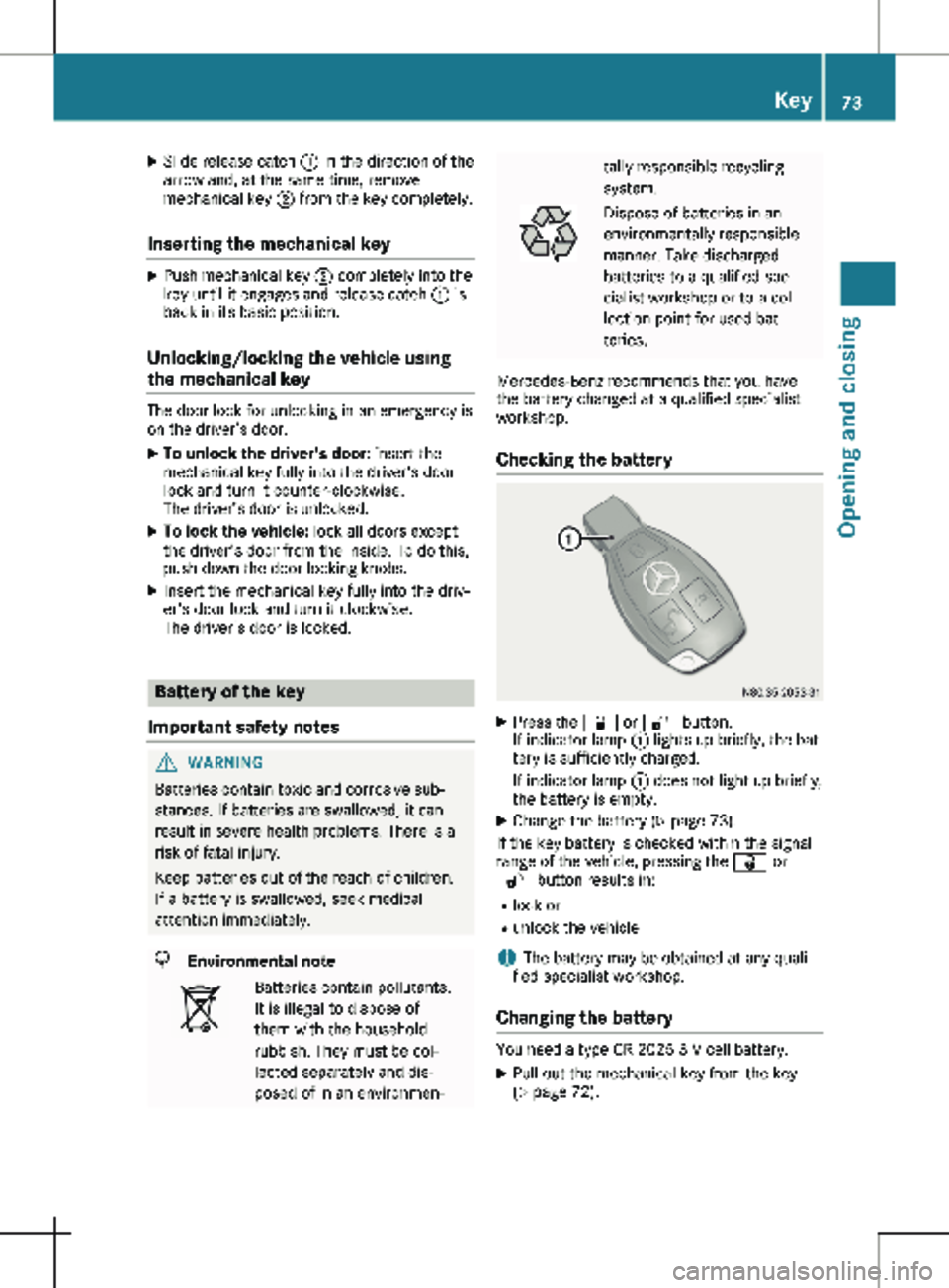
Checking the battery X
Press the & or % button.
If indicator lamp : lights up briefly, the bat-
tery is sufficiently charged.
If indicator lamp : does not light up briefly,
the battery is empty.
X Change the battery ( Y page 73).
If the key battery is checked within the signal
range of the vehicle, pressing the & or
% button results in:
R lock or
R unlock the vehicle
i The battery may be obtained at any quali-
fied specialist workshop.
Changing the battery You need a type CR 2025 3 V cell battery.
X Pull out the mechanical key from the key
(Y page
72). Key
73
Opening and closing Z
Page 99 of 320
Exterior mirrors
Adjusting manually X
Before starting off, manually adjust the exte-
rior mirrors in such a way that you can get a
good overview of road and traffic conditions.
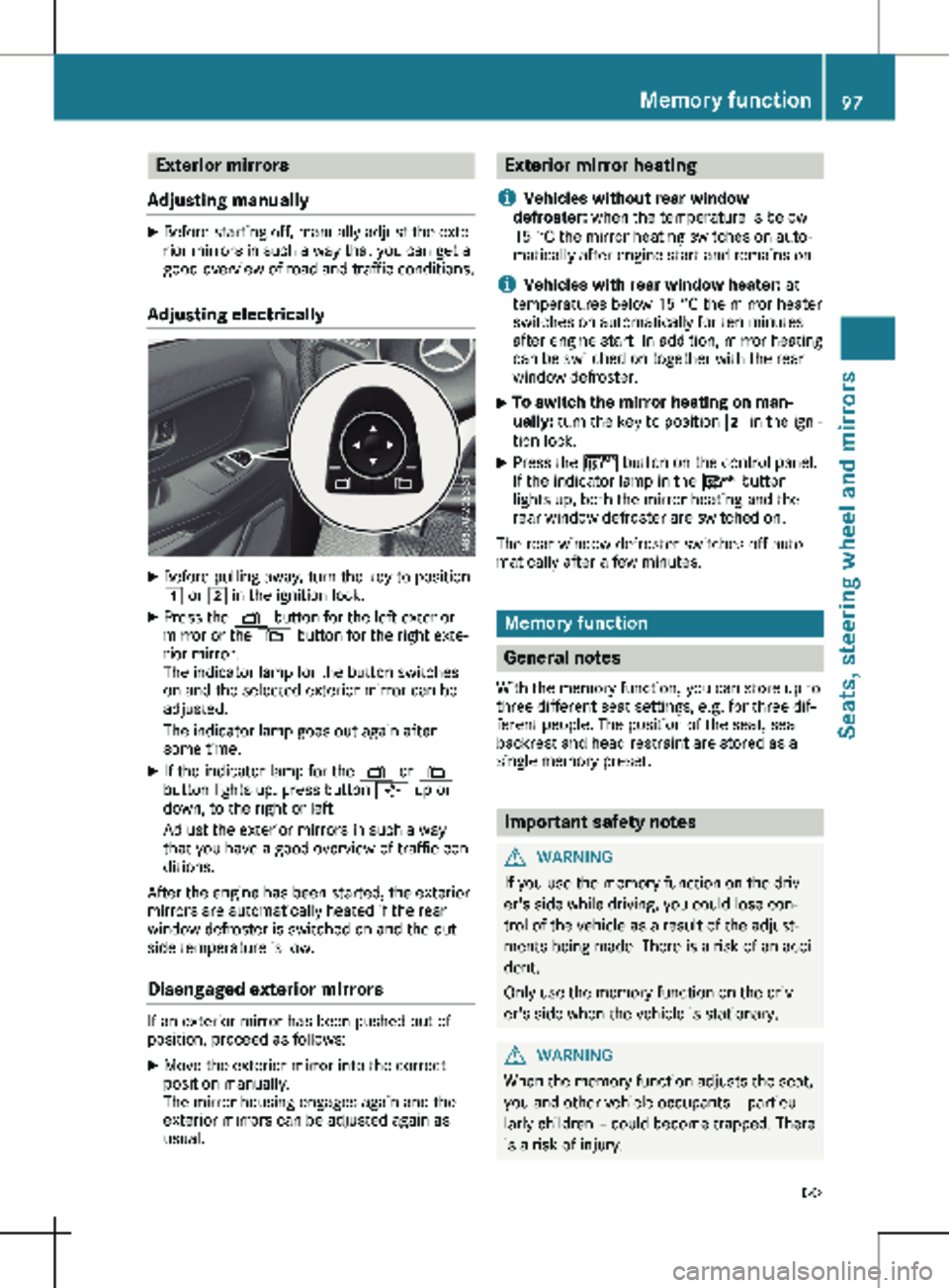
Adjusting electrically X
Before pulling away, turn the key to position
1 or 2 in the ignition lock.
X Press the Z button for the left exterior
mirror or the \ button for the right exte-
rior mirror.
The indicator lamp for the button switches
on and the selected exterior mirror can be
adjusted.
The indicator lamp goes out again after
some time.
X If the indicator lamp for the Z or \
button lights up, press button 7 up or
down, to the right or left.
Adjust the exterior mirrors in such a way
that you have a good overview of traffic con-
ditions.
After the engine has been started, the exterior
mirrors are automatically heated if the rear
window defroster is switched on and the out-
side temperature is low.
Disengaged exterior mirrors If an exterior mirror has been pushed out of
position, proceed as follows:
X
Move the exterior mirror into the correct
position manually.
The mirror housing engages again and the
exterior mirrors can be adjusted again as
usual. Exterior mirror heating
i Vehicles without rear window
defroster: when the temperature is below
15 °C the mirror heating switches on auto-
matically after engine start and remains on.
i Vehicles with rear window heater: at
temperatures below
15 °C the mirror heater
switches on automatically for ten minutes
after engine start. In addition, mirror heating
can be switched on together with the rear
window defroster.
X To switch the mirror heating on man-
ually:
turn the key to position 2 in the igni-
tion lock.
X Press the ¤ button on the control panel.
If the indicator lamp in the ¤ button
lights up, both the mirror heating and the
rear window defroster are switched on.
The rear window defroster switches off auto-
matically after a few minutes. Memory function
General notes
With the memory function, you can store up to
three different seat settings, e.g. for three dif-
ferent people. The position of the seat, seat
backrest and head restraint are stored as a
single memory preset. Important safety notes
G
WARNING
If you use the memory function on the driv-
er's side while driving, you could lose con-
trol of the vehicle as a result of the adjust-
ments being made. There is a risk of an acci-
dent.
Only use the memory function on the driv-
er's side when the vehicle is stationary. G
WARNING
When the memory function adjusts the seat,
you and other vehicle occupants – particu-
larly children – could become trapped. There
is a risk of injury. Memory function
97
Seats, steering wheel and mirrors
Z
Page 101 of 320

Useful information
This Operator's Manual describes all models
as well as standard and optional equipment of
your vehicle that were available at the time of
going to print. Country-specific variations are
possible. Note that your vehicle may not be
equipped with all of the described functions.
This also applies to systems and functions rel-
evant to safety.
Read the information on qualified specialist
workshops (Y page
32).Exterior lighting
Important safety notes
For reasons of safety, Mercedes-Benz recom-
mends that you drive with the lights switched
on even during the daytime. There may be dif-
ferences in operation due to legal require-
ments and voluntary recommendations in
some countries. Light switch
Operation 1W
Left-hand standing lamp
2X Right-hand standing lamp
3T Parking lamps, license plate and
instrument cluster lighting
4$ Lights off and daytime running lamps
à With light sensor: automatic driving
lights, controlled by the light sensor
5L Low-beam or high-beam headlamps
BN Fog lamps
CR Rear fog lamp
If you hear a warning tone when you leave the
vehicle, the lights may still be switched on.
X Turn the light switch to the $ or Ã
position.
The exterior lighting (except the parking/
standing lamps) switches off automatically in
the following situations:
R if you remove the key from the ignition lock.
R if you open the driver's door with the key in
position g in the ignition lock. Exterior lighting
99
Lights and windshield wipers
Page 102 of 320

Low-beam headlamps
When the ignition is switched on and the light
switch is in the
L position, the parking
lamps and low-beam headlamps are switched
on even if the light sensor does not sense dark
ambient light. This is particularly useful when
there is fog or rain.
X To switch on: turn the key to position 2 in
the ignition lock or start the engine.
X Turn the light switch to the L position.
The L indicator lamp in the instrument
cluster lights up.
Daytime running lamps X
To switch on: turn the light switch to the
$ or à position.
Automatic headlamp mode G
WARNING
When the light switch is set to Ã, the
low-beam headlamps may not be switched
on automatically if there is fog, snow or
other causes of poor visibility due to the
weather conditions such as spray. There is a
risk of an accident.
In such situations, turn the light switch to
L.
Automatic headlamp mode is only a driving
aid. You are responsible for the vehicle lighting
at all times.
When the parking lamps and low-beam head-
lamps are switched on, the green T (park-
ing lamps) and L (low-beam headlamps)
indicator lamps in the instrument cluster light
up.
à is the preferred light switch setting. The
light setting is automatically selected accord-
ing to the brightness of the ambient light
(exception: poor visibility due to weather con-
ditions, such as fog, snow or spray):
R Key in position 1 in the ignition lock: the
parking lamps are switched on or off auto-
matically depending on the brightness of the
ambient light.
R When the engine is on: depending on the
ambient light, the daytime running lamps or the parking lamps and low-beam headlamps
are switched on/off automatically.
X To switch on automatic headlamp mode:
turn the light switch to
Ã.
Fog lamps/rear fog lamp You can only switch the fog lamps on or off
manually in vehicles which have fog lamps
installed.
Front fog lamps help you to see and be seen in
conditions of poor visibility due to fog or pre-
cipitation. They can only be operated together
with the parking lamps or with the low-beam
headlamps.
The rear fog lamp improves visibility of your
vehicle for the traffic behind in the event of
heavy fog. Observe the legal requirements of
the country you are currently in when using
the rear fog lamp.
X Turn the light switch to L or Ã.
X Turn the key to position 2 in the ignition
lock or start the engine.
X To switch the front fog lamps on/off:
press the N button.
When the green
N indicator lamp in the
instrument cluster goes on, the fog lamps
are switched on.
X To switch the rear fog lamp on/off: press
the R button.
When the yellow R indicator lamp in the
instrument cluster goes on, the rear fog
lamp is switched on.
Standing lamps !
If the battery charge is very low, the stand-
ing lamps will switch off automatically to
enable the next engine start. Always park
your vehicle in accordance with legal regula-
tions, in a secure and adequately lit loca-
tion. Avoid leaving the T parking lamps
on for several hours. If possible, switch on
the right X or left W standing lamp.
Switching on the standing lamps ensures that
the corresponding side of the vehicle is illumi-
nated. 100
Exterior lightingLights and windshield wipers
Page 103 of 320
Switching on the standing lamps:
X Turn the key to position 0 (Y page 127) in
the ignition lock or remove the key.
X Right-hand standing lamp: turn the light
switch to position X.
X Left-hand standing lamp: turn the light
switch to position W.Combination switch
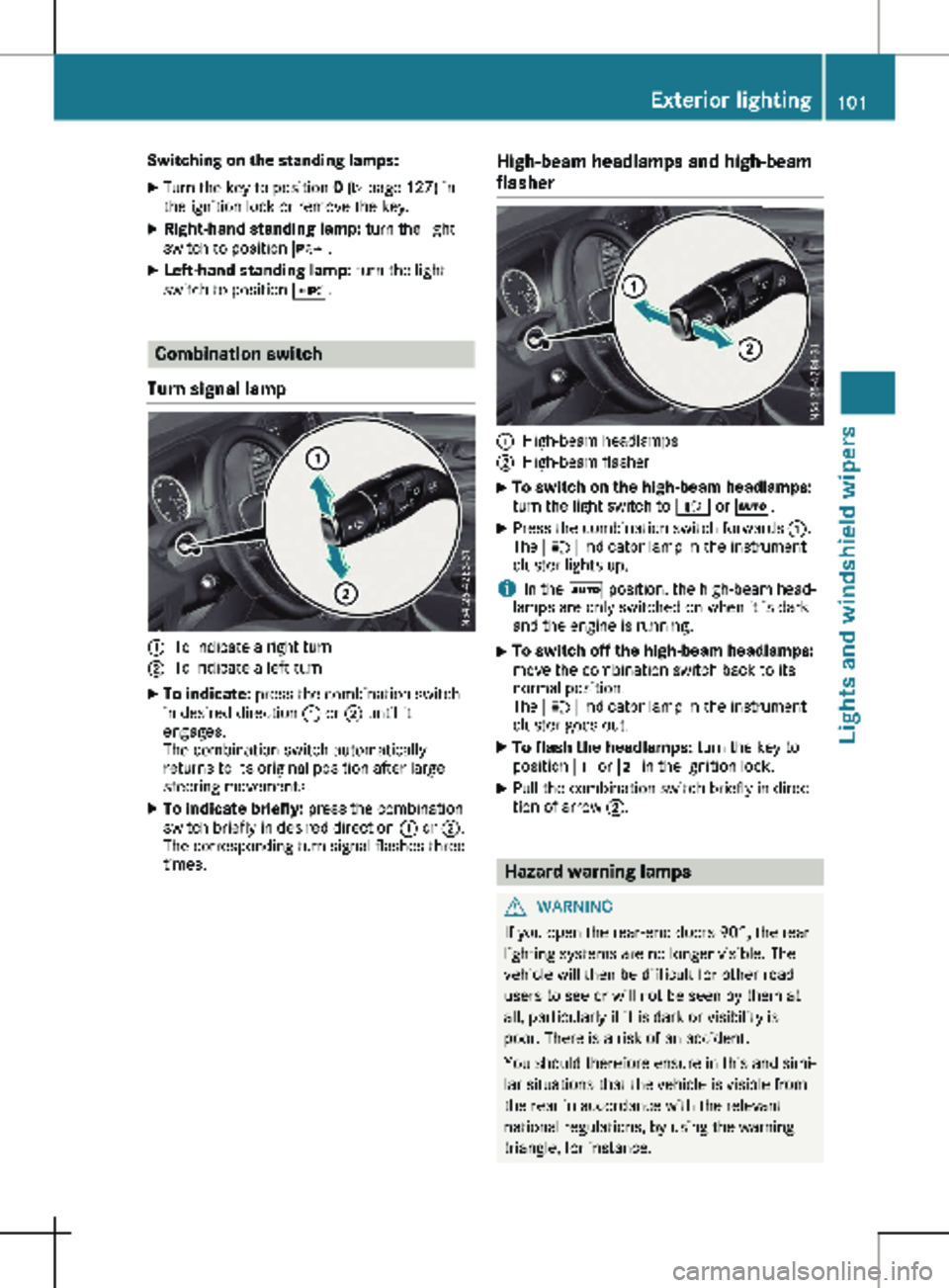
Turn signal lamp :
To indicate a right turn
; To indicate a left turn
X To indicate: press the combination switch
in desired direction : or ; until it
engages.
The combination switch automatically
returns to its original position after large
steering movements.
X To indicate briefly: press the combination
switch briefly in desired direction : or ;.
The corresponding turn signal flashes three
times. High-beam headlamps and high-beam
flasher :
High-beam headlamps
; High-beam flasher
X To switch on the high-beam headlamps:
turn the light switch to
L or Ã.
X Press the combination switch forwards :.
The K indicator lamp in the instrument
cluster lights up.
i In the à position, the high-beam head-
lamps are only switched on when it is dark
and the engine is running.
X To switch off the high-beam headlamps:
move the combination switch back to its
normal position.
The K indicator lamp in the instrument
cluster goes out.
X To flash the headlamps: turn the key to
position 1 or 2 in the ignition lock.
X Pull the combination switch briefly in direc-
tion of arrow ;. Hazard warning lamps
G
WARNING
If you open the rear-end doors 90°, the rear
lighting systems are no longer visible. The
vehicle will then be difficult for other road
users to see or will not be seen by them at
all, particularly if it is dark or visibility is
poor. There is a risk of an accident.
You should therefore ensure in this and simi-
lar situations that the vehicle is visible from
the rear in accordance with the relevant
national regulations, by using the warning
triangle, for instance. Exterior lighting
101
Lights and windshield wipers Z
Page 104 of 320
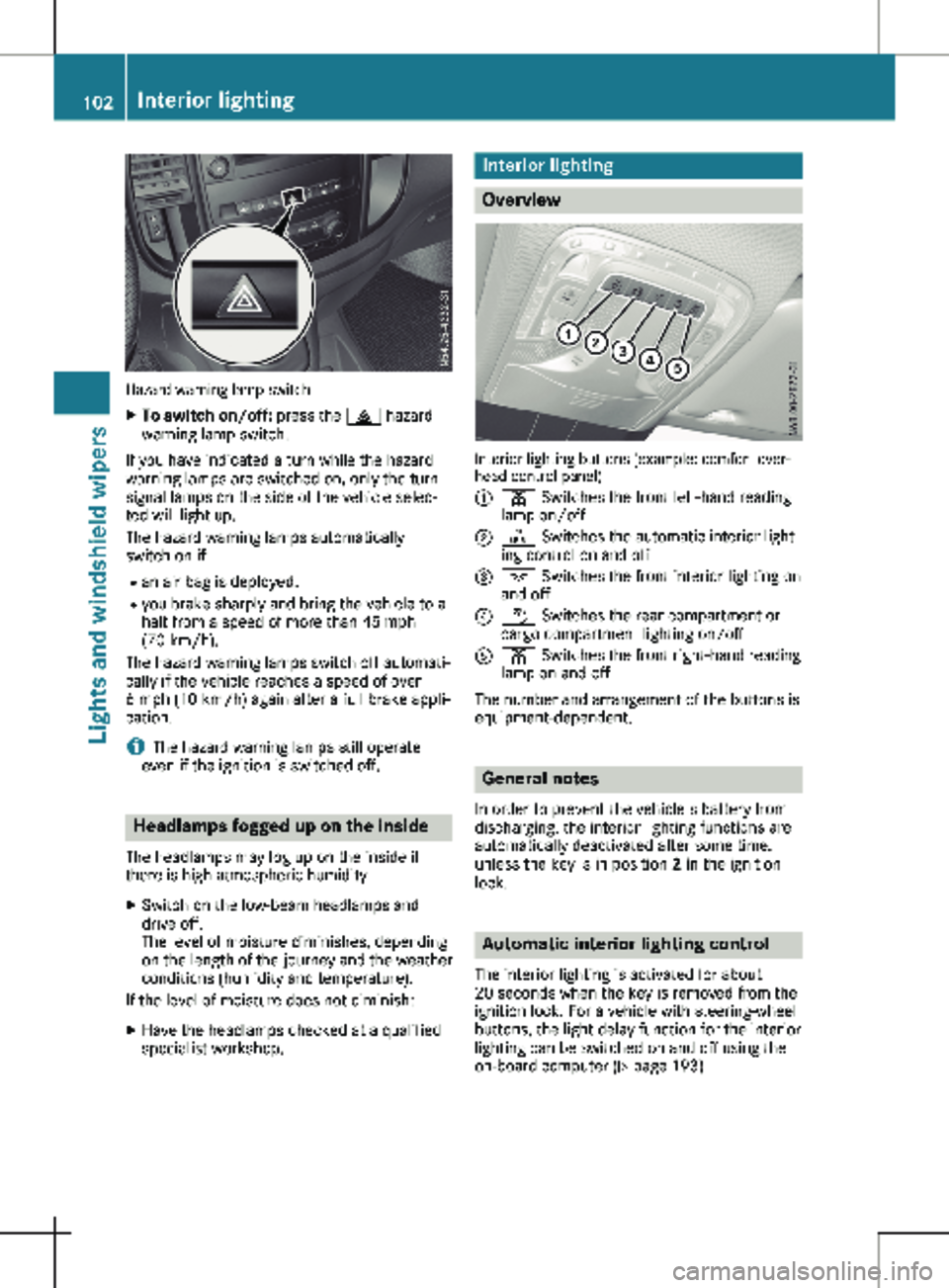
Hazard warning lamp switch
X
To switch on/off: press the £ hazard
warning lamp switch.
If you have indicated a turn while the hazard
warning lamps are switched on, only the turn
signal lamps on the side of the vehicle selec-
ted will light up.
The hazard warning lamps automatically
switch on if: R an air bag is deployed.
R you brake sharply and bring the vehicle to a
halt from a speed of more than 45 mph
(70 km/h
).
The hazard warning lamps switch off automati-
cally if the vehicle reaches a speed of over
6 mph (10 km/h) again after a full brake appli-
cation.
i The hazard warning lamps still operate
even if the ignition is switched off. Headlamps fogged up on the inside
The headlamps may fog up on the inside if
there is high atmospheric humidity.
X Switch on the low-beam headlamps and
drive off.
The level of moisture diminishes, depending
on the length of the journey and the weather
conditions (humidity and temperature).
If the level of moisture does not diminish:
X Have the headlamps checked at a qualified
specialist workshop. Interior lighting
Overview
Interior lighting buttons (example: comfort over-
head control panel)
:
p Switches the front left-hand reading
lamp on/off
; | Switches the automatic interior light-
ing control on and off
= c Switches the front interior lighting on
and off
? w Switches the rear compartment or
cargo compartment lighting on/off
A p Switches the front right-hand reading
lamp on and off
The number and arrangement of the buttons is
equipment-dependent. General notes
In order to prevent the vehicle's battery from
discharging, the interior lighting functions are
automatically deactivated after some time,
unless the key is in position 2 in the ignition
lock. Automatic interior lighting control
The interior lighting is activated for about
20 seconds
when the key is removed from the
ignition lock. For a vehicle with steering-wheel
buttons, the light delay function for the interior
lighting can be switched on and off using the
on-board computer ( Y page 193)102
Interior lighting
Lights and windshield wipers
Page 105 of 320
X
To switch on or off: press the | button.
When the automatic interior lighting control
is activated, the button is flush with the
overhead control panel.
The interior lighting switches on automatically
if you:
R unlock the vehicle
R open a door
R remove the key from the ignition lock
The cargo compartment lamp switches on
automatically if you:
R unlock the vehicle
R open the tailgate or rear-end door
R open a sliding door
The trunk lamp always switches on automati-
cally when the tailgate is opened. Manual interior lighting control
X To switch the front interior lighting on/
off:
press the c button.
X To switch the rear compartment or
cargo compartment lighting on/off: press
the
w button.
X To switch the front reading lamps on/
off: press the
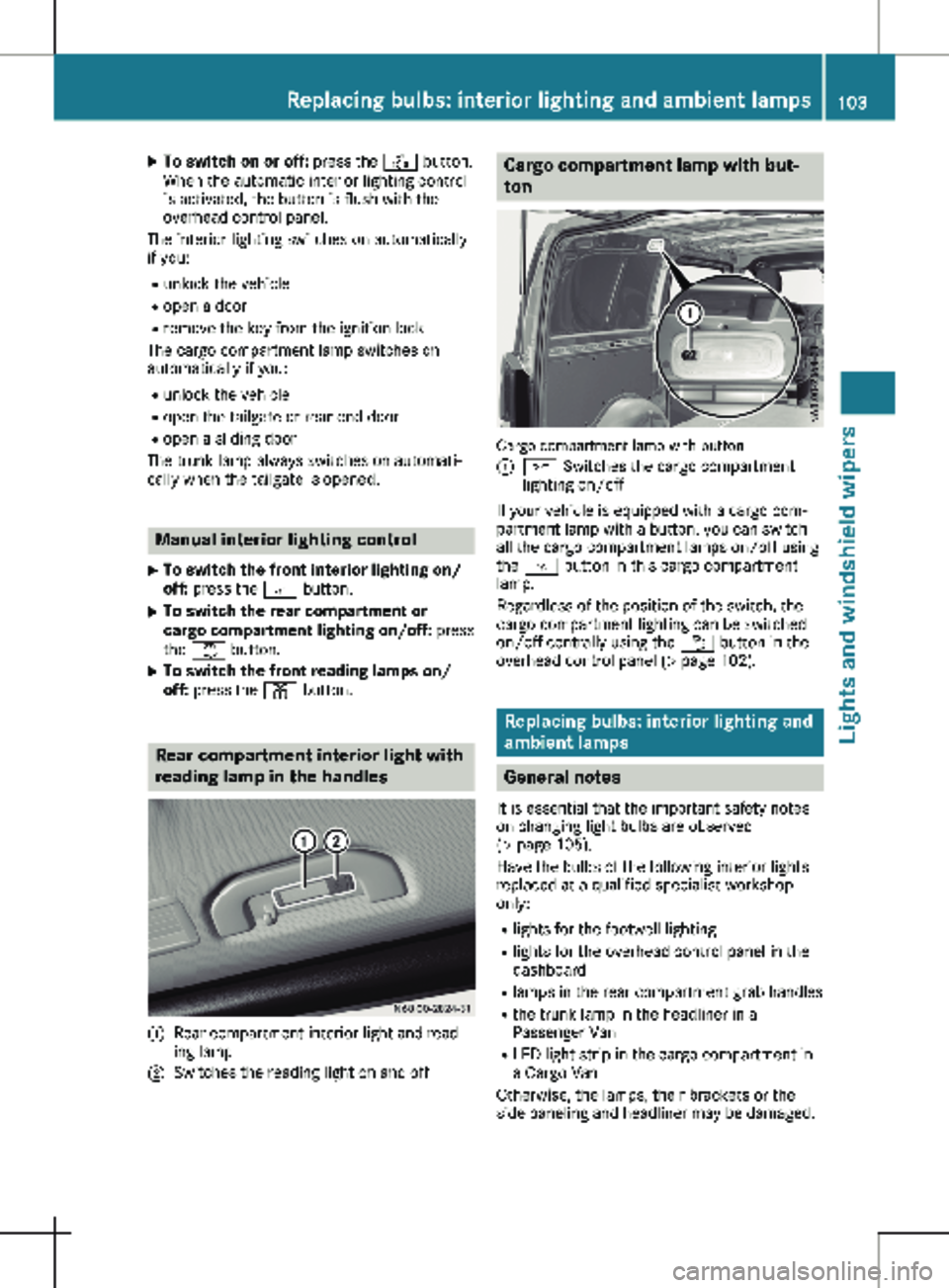
p button.Rear compartment interior light with
reading lamp in the handles
:
Rear compartment interior light and read-
ing lamp
; Switches the reading light on and off Cargo compartment lamp with but-
ton
Cargo compartment lamp with button
:
c Switches the cargo compartment
lighting on/off
If your vehicle is equipped with a cargo com-
partment lamp with a button, you can switch
all the cargo compartment lamps on/off using
the c button in this cargo compartment
lamp.
Regardless of the position of the switch, the
cargo compartment lighting can be switched
on/off centrally using the w button in the
overhead control panel ( Y page
102). Replacing bulbs: interior lighting and
ambient lamps General notes
It is essential that the important safety notes
on changing light bulbs are observed
(Y page
105).
Have the bulbs of the following interior lights
replaced at a qualified specialist workshop
only:
R lights for the footwell lighting
R lights for the overhead control panel in the
dashboard
R lamps in the rear compartment grab handles
R the trunk lamp in the headliner in a
Passenger Van
R LED light strip in the cargo compartment in
a Cargo Van
Otherwise, the lamps, their brackets or the
side paneling and headliner may be damaged. Replacing bulbs: interior lighting and ambient lamps
103
Lights and windshield wipers Z
Page 106 of 320
If you require help when changing bulbs of
other interior lights, please visit a qualified
specialist workshop.
Rear compartment and cargo com-
partment lamps
You cannot change the following bulbs your-
self:
R in a Passenger Van, the bulbs in the trunk
lamp and those of the rear compartment
interior lights in the grab handles
R in a Cargo Van with an LED light strip in the
cargo compartment, the LED light strip
Have these bulbs or the LED light strip
changed in a qualified specialist workshop
only.
Information on changing the trunk lamp light
source in the side trim panel of vehicles with a
cargo compartment shelf can be found under
"Additional interior and surround lighting"
(Y page
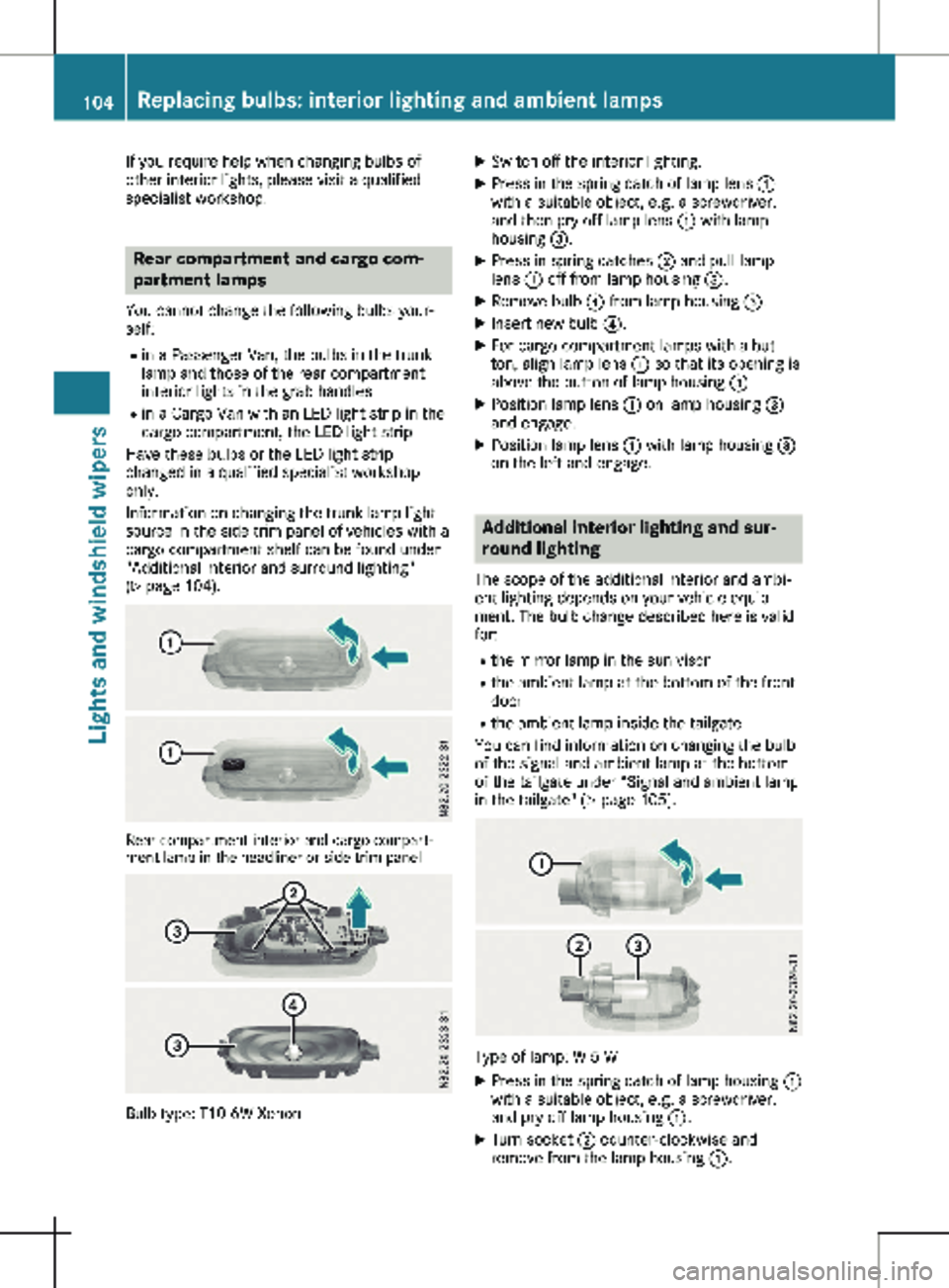
104). Rear compartment interior and cargo compart-
ment lamp in the headliner or side trim panel Bulb type: T10 6W Xenon X
Switch off the interior lighting.
X Press in the spring catch of lamp lens :
with a suitable object, e.g. a screwdriver,
and then pry off lamp lens : with lamp
housing =.
X Press in spring catches ; and pull lamp
lens : off from lamp housing =.
X Remove bulb ? from lamp housing =.
X Insert new bulb ?.
X For cargo compartment lamps with a but-
ton, align lamp lens : so that its opening is
above the button of lamp housing =.
X Position lamp lens : on lamp housing =
and engage.
X Position lamp lens : with lamp housing =
on the left and engage. Additional interior lighting and sur-
round lighting
The scope of the additional interior and ambi-
ent lighting depends on your vehicle equip-
ment. The bulb change described here is valid
for:
R the mirror lamp in the sun visor
R the ambient lamp at the bottom of the front
door
R the ambient lamp inside the tailgate
You can find information on changing the bulb
of the signal and ambient lamp at the bottom
of the tailgate under “Signal and ambient lamp
in the tailgate"
(Y page 105). Type of lamp: W 5 W
X Press in the spring catch of lamp housing :
with a suitable object, e.g. a screwdriver,
and pry off lamp housing :.
X Turn socket ; counter-clockwise and
remove from the lamp housing :. 104
Replacing bulbs: interior lighting and ambient lamps
Lights and windshield wipers
Page 107 of 320
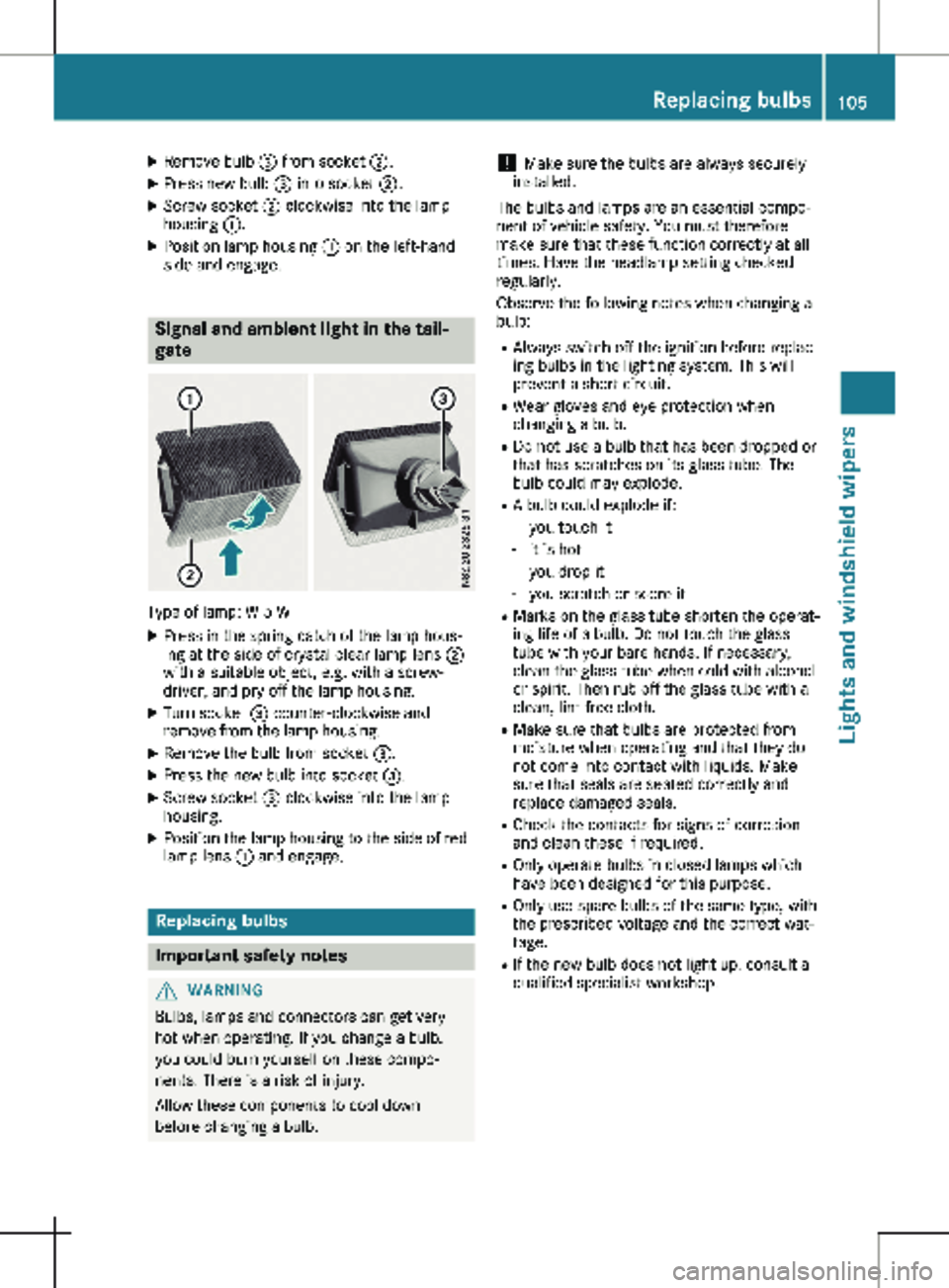
X
Remove bulb = from socket ;.
X Press new bulb = into socket ;.
X Screw socket ; clockwise into the lamp
housing :.
X Position lamp housing : on the left-hand
side and engage. Signal and ambient light in the tail-
gate
Type of lamp: W 5 W
X Press in the spring catch of the lamp hous-
ing at the side of crystal clear lamp lens ;
with a suitable object, e.g. with a screw-
driver, and pry off the lamp housing.
X Turn socket = counter-clockwise and
remove from the lamp housing.
X Remove the bulb from socket =.
X Press the new bulb into socket =.
X Screw socket = clockwise into the lamp
housing.
X Position the lamp housing to the side of red
lamp lens : and engage. Replacing bulbs
Important safety notes
G
WARNING
Bulbs, lamps and connectors can get very
hot when operating. If you change a bulb,
you could burn yourself on these compo-
nents. There is a risk of injury.
Allow these components to cool down
before changing a bulb. !
Make sure the bulbs are always securely
installed.
The bulbs and lamps are an essential compo-
nent of vehicle safety. You must therefore
make sure that these function correctly at all
times. Have the headlamp setting checked
regularly.
Observe the following notes when changing a
bulb:
R Always switch off the ignition before replac-
ing bulbs in the lighting system. This will
prevent a short circuit.
R Wear gloves and eye protection when
changing a bulb.
R Do not use a bulb that has been dropped or
that has scratches on its glass tube. The
bulb could may explode.
R A bulb could explode if:
- you touch it
- it is hot
- you drop it
- you scratch or score it
R Marks on the glass tube shorten the operat-
ing life of a bulb. Do not touch the glass
tube with your bare hands. If necessary,
clean the glass tube when cold with alcohol
or spirit. Then rub off the glass tube with a
clean, lint-free cloth.
R Make sure that bulbs are protected from
moisture when operating and that they do
not come into contact with liquids. Make
sure that seals are seated correctly and
replace damaged seals.
R Check the contacts for signs of corrosion
and clean these if required.
R Only operate bulbs in closed lamps which
have been designed for this purpose.
R Only use spare bulbs of the same type, with
the prescribed voltage and the correct wat-
tage.
R If the new bulb does not light up, consult a
qualified specialist workshop. Replacing bulbs
105Lights and windshield wipers Z
Page 108 of 320
R
Have lamps with LED bulbs repaired at a
qualified specialist workshop only.
R Have the bulbs of the following lamps
replaced at a qualified specialist workshop
only:
- Additional brake lamps
- The license plate lighting
- Front fog lamp
- Side marker lamp
Please also observe the notes on the inte-
rior lights
(Y page 103).
If you require assistance changing bulbs, con-
sult a qualified specialist workshop. Front lamp clusters
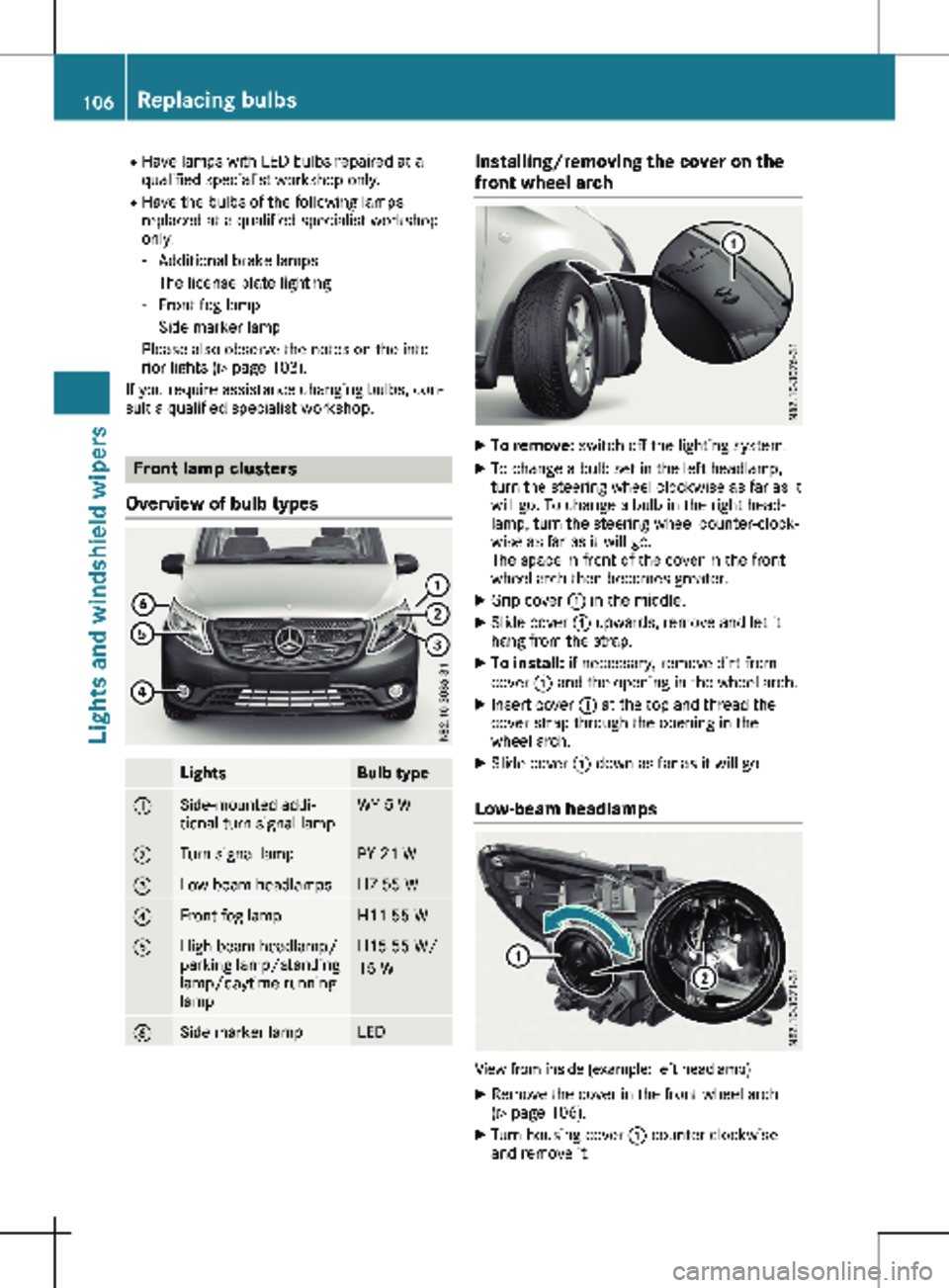
Overview of bulb types Lights Bulb type
:
Side-mounted addi-
tional turn signal lamp WY 5 W
;
Turn signal lamp PY 21 W
=
Low-beam headlamps H7 55 W
?
Front fog lamp H11 55 W
A
High-beam headlamp/
parking lamp/standing
lamp/daytime running
lamp H15 55 W/
15 W
B
Side marker lamp LED Installing/removing the cover on the
front wheel arch
X
To remove: switch off the lighting system.
X To change a bulb set in the left headlamp,
turn the steering wheel clockwise as far as it
will go. To change a bulb in the right head-
lamp, turn the steering wheel counter-clock-
wise as far as it will go.
The space in front of the cover in the front
wheel arch then becomes greater.
X Grip cover : in the middle.
X Slide cover : upwards, remove and let it
hang from the strap.
X To install: if necessary, remove dirt from
cover : and the opening in the wheel arch.
X Insert cover : at the top and thread the
cover strap through the opening in the
wheel arch.
X Slide cover : down as far as it will go.
Low-beam headlamps View from inside (example: left headlamp)
X Remove the cover in the front wheel arch
(Y page
106).
X Turn housing cover : counter-clockwise
and remove it. 106
Replacing bulbs
Lights and windshield wipers