belt MERCEDES-BENZ METRIS 2020 MY20 Operator’s Manual
[x] Cancel search | Manufacturer: MERCEDES-BENZ, Model Year: 2020, Model line: METRIS, Model: MERCEDES-BENZ METRIS 2020Pages: 320, PDF Size: 26.38 MB
Page 90 of 320
!
To prevent damage to the seats and the
seat heating, observe the following notes:
R Do not spill liquids onto the seats. Dry the
seats as soon as possible if liquid does
get spilled on the seats.
R If the seat covers are damp or wet, do not
switch on the seat heating. Also, do not
use the seat heating to dry the seats.
R Clean the seat covers as recommended;
see the "Interior care" section.
R Do not transport heavy loads on the
seats. Do not place pointed objects on
the seat cushions such as knives, nails or
tools. Where possible, use the seats only
for carrying passengers.
R When operating the seat heating, do not
cover the seats with insulating materials,
e.g. blankets, coats, bags, protective cov-
ers, child seats or booster seats.
R When the seat heating is switched on, the
seat surface can be damaged as a result
of objects being placed on the seats, for
example, seat cushions, child seats and
protective covers not approved by
Mercedes-Benz.
Your seat must be adjusted in such a way that
you can wear the seat belt correctly.
Observe the following points:
R Position the backrest in an almost vertical
position so that you are sitting virtually
upright. Do not drive with the backrest
reclined too far back.
R Your arms should be slightly bent when you
are holding the steering wheel.
R Avoid seat positions that prevent the seat
belt from being correctly routed. The shoul-
der section of the belt must be routed over
the middle of your shoulder and be pulled
tight against your upper body. The lap belt
must always pass across your lap as low
down as possible, i.e. over your hip joints.
R Adjust the head restraint so that it supports
the back of the head at eye level.
R The distance from the pedals should be
such that you can depress them fully.
Please also observe the important safety notes
on "Air bags"
(Y page 51), "Seat belts"
(Y page 48) and "Child restraint systems" ( Y page 62). Adjusting the seat manually
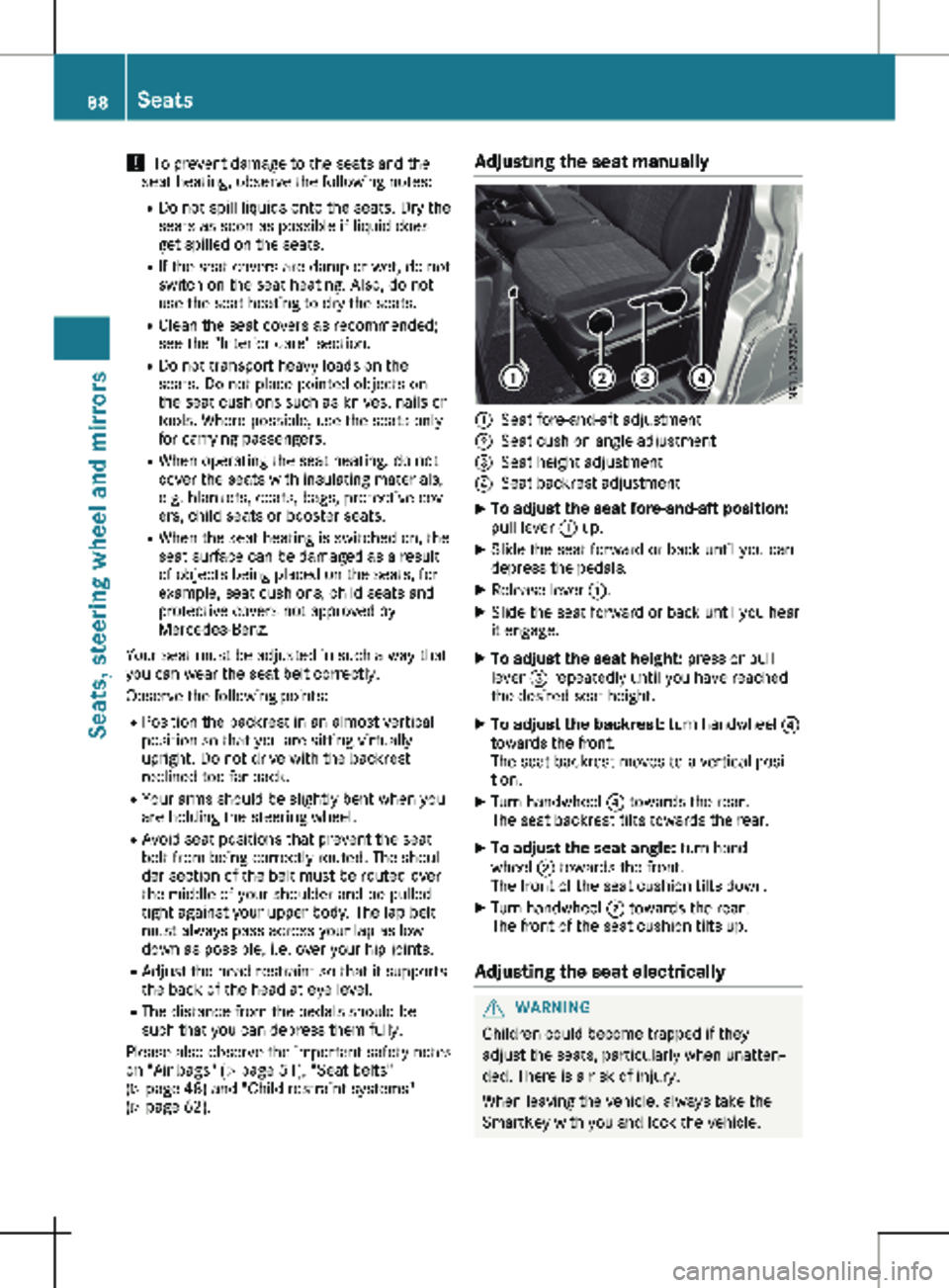
:
Seat fore-and-aft adjustment
; Seat cushion angle adjustment
= Seat height adjustment
? Seat backrest adjustment
X To adjust the seat fore-and-aft position:
pull lever
: up.
X Slide the seat forward or back until you can
depress the pedals.
X Release lever :.
X Slide the seat forward or back until you hear
it engage.
X To adjust the seat height: press or pull
lever = repeatedly until you have reached
the desired seat height.
X To adjust the backrest: turn handwheel ?
towards the front.
The seat backrest moves to a vertical posi-
tion.
X Turn handwheel ? towards the rear.
The seat backrest tilts towards the rear.
X To adjust the seat angle: turn hand-
wheel ; towards the front.
The front of the seat cushion tilts down.
X Turn handwheel ; towards the rear.
The front of the seat cushion tilts up.
Adjusting the seat electrically G
WARNING
Children could become trapped if they
adjust the seats, particularly when unatten-
ded. There is a risk of injury.
When leaving the vehicle, always take the
SmartKey with you and lock the vehicle. 88
Seats
Seats, steering wheel and mirrors
Page 94 of 320
G
WARNING
If the rear bench seat is not installed as
described or an unsuitable rear bench seat
is installed, the seat belts may not provide
protection as intended. There is an
increased risk of injury.
Install the rear bench seat as described.
Only use rear bench seats that are approved
for your vehicle by the distributor named on
the inside cover page.
The only way to ensure that the rear bench
seat will engage securely is to always keep the
seat anchorages clean and free of foreign
objects.
Always observe the notes about the seating
variants (Y page
90). :
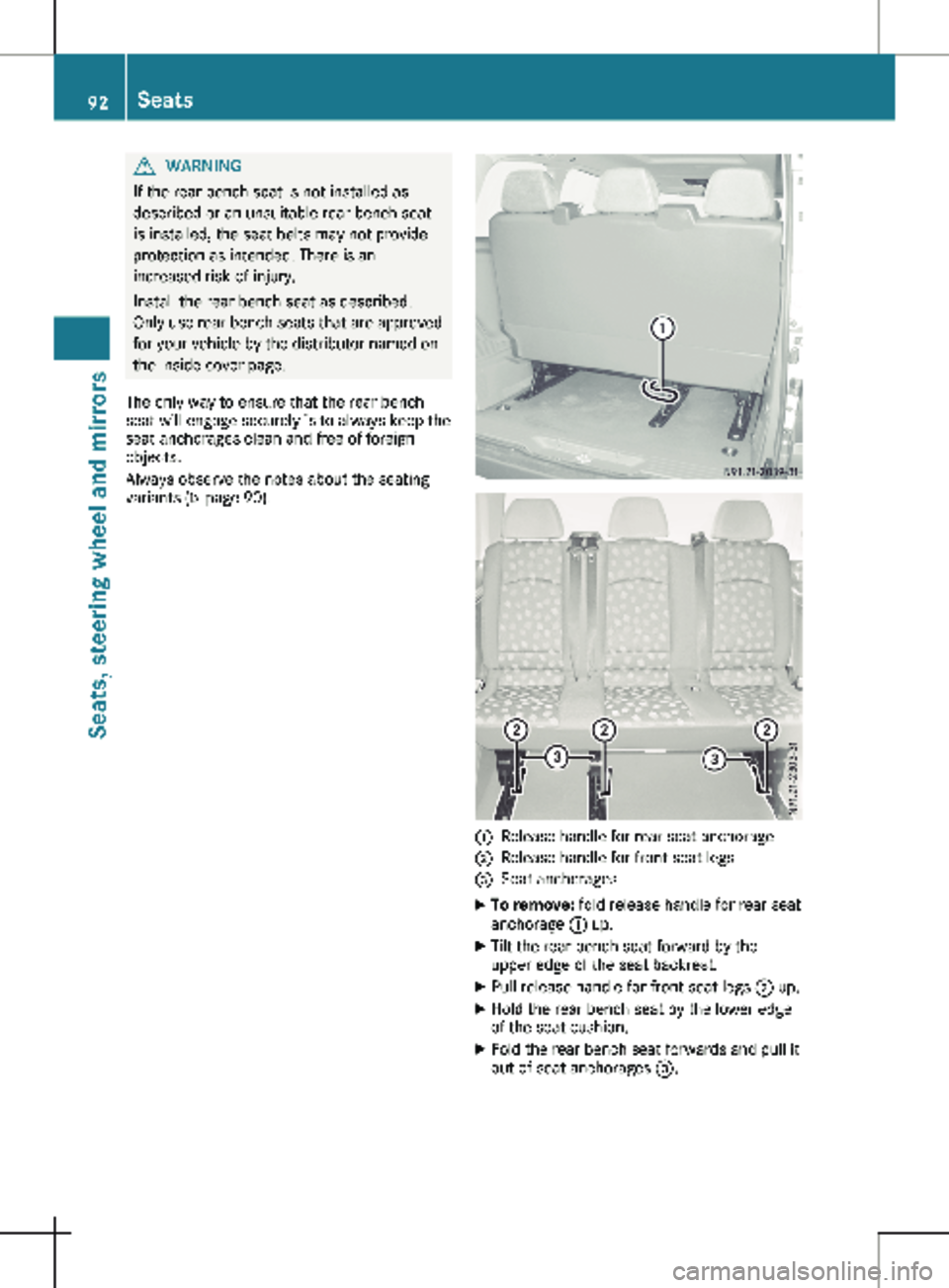
Release handle for rear seat anchorage
; Release handle for front seat legs
= Seat anchorages
X To remove: fold release handle for rear seat
anchorage : up.
X Tilt the rear bench seat forward by the
upper edge of the seat backrest.
X Pull release handle for front seat legs ; up.
X Hold the rear bench seat by the lower edge
of the seat cushion.
X Fold the rear bench seat forwards and pull it
out of seat anchorages =.92
Seats
Seats, steering wheel and mirrors
Page 95 of 320
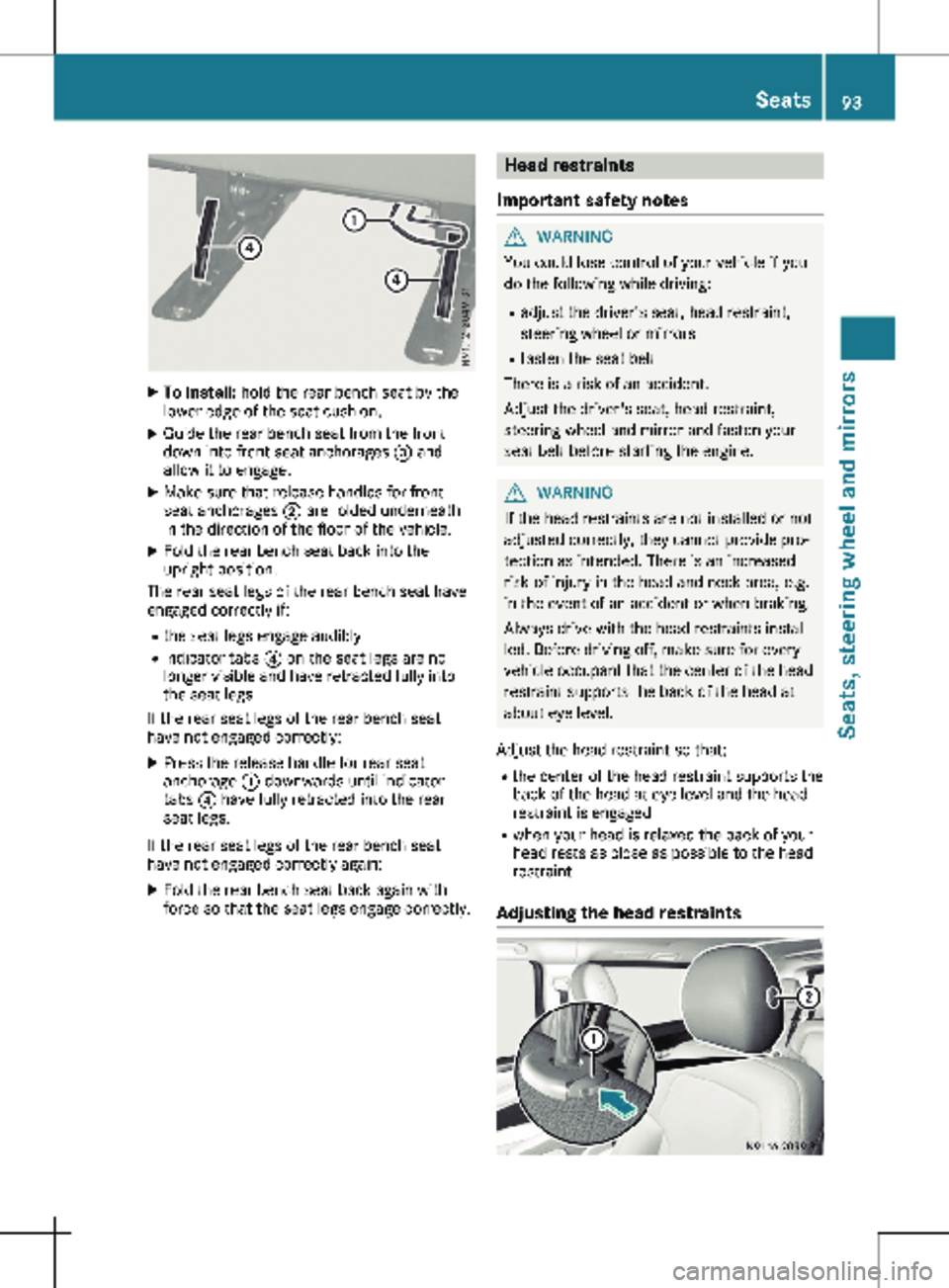
X
To install: hold the rear bench seat by the
lower edge of the seat cushion.
X Guide the rear bench seat from the front
down into front seat anchorages = and
allow it to engage.
X Make sure that release handles for front
seat anchorages ; are folded underneath
in the direction of the floor of the vehicle.
X Fold the rear bench seat back into the
upright position.
The rear seat legs of the rear bench seat have
engaged correctly if:
R the seat legs engage audibly
R indicator tabs ? on the seat legs are no
longer visible and have retracted fully into
the seat legs
If the rear seat legs of the rear bench seat
have not engaged correctly:
X Press the release handle for rear seat
anchorage : downwards until indicator
tabs ? have fully retracted into the rear
seat legs.
If the rear seat legs of the rear bench seat
have not engaged correctly again: X Fold the rear bench seat back again with
force so that the seat legs engage correctly. Head restraints
Important safety notes G
WARNING
You could lose control of your vehicle if you
do the following while driving:
R adjust the driver's seat, head restraint,
steering wheel or mirrors
R fasten the seat belt
There is a risk of an accident.
Adjust the driver's seat, head restraint,
steering wheel and mirror and fasten your
seat belt before starting the engine. G
WARNING
If the head restraints are not installed or not
adjusted correctly, they cannot provide pro-
tection as intended. There is an increased
risk of injury in the head and neck area, e.g.
in the event of an accident or when braking.
Always drive with the head restraints instal-
led. Before driving off, make sure for every
vehicle occupant that the center of the head
restraint supports the back of the head at
about eye level.
Adjust the head restraint so that: R the center of the head restraint supports the
back of the head at eye level and the head
restraint is engaged
R when your head is relaxed the back of your
head rests as close as possible to the head
restraint
Adjusting the head restraints Seats
93Seats, steering wheel and mirrors Z
Page 97 of 320
Armrests
X
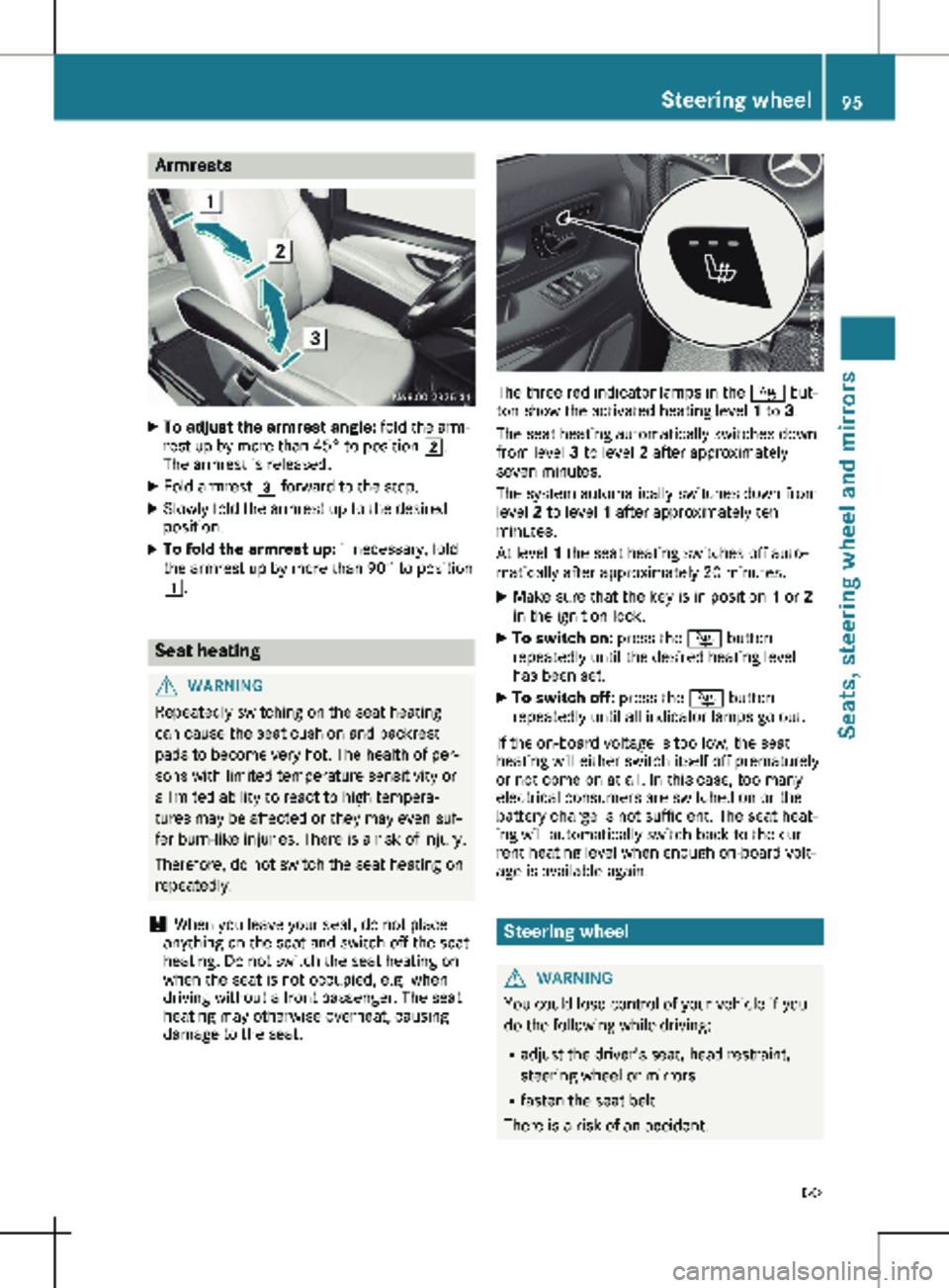
To adjust the armrest angle: fold the arm-
rest up by more than 45° to position 2.
The armrest is released.
X Fold armrest 3 forward to the stop.
X Slowly fold the armrest up to the desired
position.
X To fold the armrest up: if necessary, fold
the armrest up by more than 90° to position
1. Seat heating
G
WARNING
Repeatedly switching on the seat heating
can cause the seat cushion and backrest
pads to become very hot. The health of per-
sons with limited temperature sensitivity or
a limited ability to react to high tempera-
tures may be affected or they may even suf-
fer burn-like injuries. There is a risk of injury.
Therefore, do not switch the seat heating on
repeatedly.
! When you leave your seat, do not place
anything on the seat and switch off the seat
heating. Do not switch the seat heating on
when the seat is not occupied, e.g. when
driving without a front passenger. The seat
heating may otherwise overheat, causing
damage to the seat. The three red indicator lamps in the
Í but-
ton show the activated heating level 1 to 3.
The seat heating automatically switches down
from level 3 to level 2 after approximately
seven minutes.
The system automatically switches down from
level 2 to level 1 after approximately ten
minutes.
At level 1 the seat heating switches off auto-
matically after approximately
20 minutes.
X Make sure that the key is in position 1 or 2
in the ignition lock.
X To switch on: press the Í button
repeatedly until the desired heating level
has been set.
X To switch off: press the Í button
repeatedly until all indicator lamps go out.
If the on-board voltage is too low, the seat
heating will either switch itself off prematurely
or not come on at all. In this case, too many
electrical consumers are switched on or the
battery charge is not sufficient. The seat heat-
ing will automatically switch back to the cur-
rent heating level when enough on-board volt-
age is available again. Steering wheel
G
WARNING
You could lose control of your vehicle if you
do the following while driving:
R adjust the driver's seat, head restraint,
steering wheel or mirrors
R fasten the seat belt
There is a risk of an accident. Steering wheel
95
Seats, steering wheel and mirrors
Z
Page 98 of 320
Adjust the driver's seat, head restraint,
steering wheel and mirror and fasten your
seat belt before starting the engine.
G
WARNING
If the steering wheel is unlocked while the
vehicle is in motion, it could change position
unexpectedly. This could cause you to lose
control of the vehicle. There is a risk of an
accident.
Before starting off, make sure the steering
wheel is locked. Never unlock the steering
wheel while the vehicle is in motion. G
WARNING
Children could injure themselves if they
adjust the steering wheel. There is a risk of
injury.
When leaving the vehicle, always take the
SmartKey with you and lock the vehicle.
Never leave children unsupervised in the
vehicle.
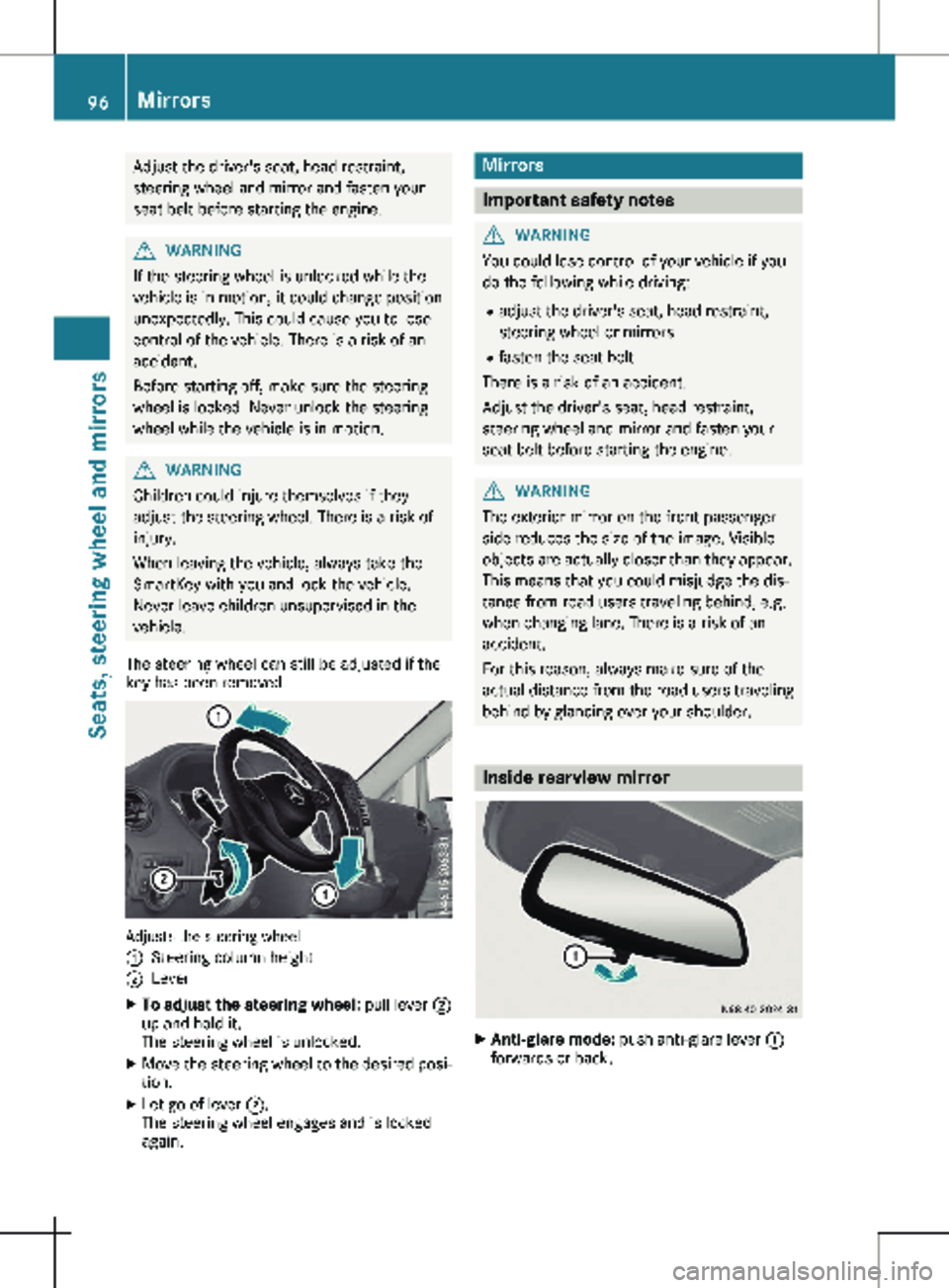
The steering wheel can still be adjusted if the
key has been removed. Adjusts the steering wheel
:
Steering column height
; Lever
X To adjust the steering wheel: pull lever ;
up and hold it.
The steering wheel is unlocked.
X Move the steering wheel to the desired posi-
tion.
X Let go of lever ;.
The steering wheel engages and is locked
again. Mirrors
Important safety notes
G
WARNING
You could lose control of your vehicle if you
do the following while driving:
R adjust the driver's seat, head restraint,
steering wheel or mirrors
R fasten the seat belt
There is a risk of an accident.
Adjust the driver's seat, head restraint,
steering wheel and mirror and fasten your
seat belt before starting the engine. G
WARNING
The exterior mirror on the front-passenger
side reduces the size of the image. Visible
objects are actually closer than they appear.
This means that you could misjudge the dis-
tance from road users traveling behind, e.g.
when changing lane. There is a risk of an
accident.
For this reason, always make sure of the
actual distance from the road users traveling
behind by glancing over your shoulder. Inside rearview mirror
X
Anti-glare mode: push anti-glare lever :
forwards or back. 96
MirrorsSeats, steering wheel and mirrors
Page 130 of 320
X
Stow luggage items securely. Secure the
load as per the loading guidelines
(Y page
242).
X Make sure that the floormats and carpets
are properly secured so that they cannot
slip and obstruct the pedals.
X Close all doors. Starting the engine
Important safety notes G
DANGER
Combustion engines emit poisonous
exhaust gases such as carbon monoxide.
Inhaling these exhaust gases is hazardous to
health and can result in poisoning. There is a
risk of fatal injury. Therefore, never leave the
engine running an enclosed space without
adequate ventilation.
! Do not depress the accelerator when start-
ing the engine.
X Before starting the engine, ensure the fol-
lowing:
R all the doors are closed.
R all the vehicle occupants are wearing their
seat belts correctly.
R the parking brake is applied.
i If you depress the brake pedal before
starting the engine, the pedal travel may be
shorter and pedal resistance higher.
If you depress the brake pedal again after
starting the engine, pedal travel and resist-
ance will be back to normal again.
Automatic transmission X
Shift the transmission to position j
(Y page
131).
The transmission position indicator in the
display shows j.
You can also start the engine in neutral posi-
tion i. Starting the engine X
Turn the key to position 3 in the ignition
lock
(Y page 127) and release it as soon as
the engine is running. Driving off
Automatic transmission G
WARNING
The vehicle can suddenly accelerate if the
engine speed is above the engine idling
speed and you then select transmission
position h or k. There is a risk of an acci-
dent.
When engaging transmission position h or
k at a standstill, always keep the brake
pedal depressed firmly and do not depress
the accelerator pedal at the same time.
! Only shift into reverse gear when the vehi-
cle is stationary k. Otherwise, you could
damage the transmission.
X Depress the brake pedal and keep it
depressed.
X Shift the transmission to position h or k.
On vehicles with a reverse warning feature,
when reverse gear k is engaged a warning
tone sounds to alert other road users
(Y page
129).
X Release the parking brake (Y page
138).
The F (only USA) or J (only Canada)
indicator lamp in the instrument cluster
goes out.
X Release the brake pedal.
Hill start assist automatically maintains the
brake pressure for about another two sec-
onds after the brake pedal is released. This
makes it possible to pull away without the
vehicle immediately rolling back
(Y page
129).
X Carefully depress the accelerator pedal.
i It is only possible to shift the transmission
from position j to the desired transmis-
sion position if you depress the brake pedal.
If the brake pedal is not depressed, the
DIRECT SELECT lever can still be moved but
the j position remains engaged. 128
Driving
Driving and parking
Page 147 of 320
G
WARNING
When driving off-road, your body is subject
to forces from all directions, due to the
uneven surface. You could be thrown from
your seat, for instance. There is a risk of
injury.
Always wear a seat belt, even when driving
off-road. G
WARNING
If you drive over obstacles or in ruts, the
steering wheel may jerk out of your grip,
causing injury to your hands.
Always hold the steering wheel firmly with
both hands. When driving over obstacles,
you must expect steering forces to increase
briefly and suddenly. G
WARNING
Flammable material such as leaves, grass or
twigs may ignite if they come into contact
with hot parts of the exhaust system. There
is a risk of fire.
When driving on an unpaved road or off-
road, check the vehicle underside regularly.
In particular, remove trapped plant parts or
other flammable material. Contact a quali-
fied specialist workshop immediately if dam-
age is detected.
! When driving off-road or on unpaved surfa-
ces, check the underside of the vehicle as
well as the wheels and tires at regular inter-
vals. In particular, remove trapped foreign
objects, such as stones and branches.
Such foreign objects could:
R damage the chassis, the fuel tank or the
brake system
R cause imbalance and thereby vibrations
R be thrown out as you continue your jour-
ney
If there is any damage, inform a qualified
specialist workshop.
When driving off-road and on construction
sites, sand, mud and water mixed with oil, for
example, may get into the brakes. This may
lead to a reduction in braking performance or
total brake failure, also as a result of increased wear. The braking characteristics will vary
depending on the material that has got into
the system. Clean the brakes after driving off-
road. If you then notice reduced braking per-
formance or hear scraping noises, have the
brake system checked at a qualified specialist
workshop. Adjust your driving style to the
changed braking characteristics.
Driving off-road or on construction sites
increases the possibility of vehicle damage
which may in turn lead to the failure of certain
assemblies and systems. Adapt your driving
style to the off-road driving conditions. Drive
carefully. Have any vehicle damage rectified at
a qualified specialist workshop as soon as pos-
sible.
When loading your vehicle for driving off-road
or on a construction site, keep the vehicle's
center of gravity as low as possible.
Rules for driving off-road !
Always bear the vehicle's ground clear-
ance in mind and avoid obstacles, e.g. deep
ruts.
Obstacles may damage the following parts
of the vehicle:
R the chassis
R the drive train
R the fuel and supply tanks
For this reason, you should always drive
slowly when driving off-road. If you have to
drive over obstacles, have the front
passenger direct you.
i We recommend that you additionally carry
a shovel and a recovery rope with shackle in
the vehicle.
R Ensure that loads and items of luggage are
securely stowed or lashed down
(Y page
242).
R Before driving off-road, stop the vehicle and
shift to a low gear.
R If the surface requires, temporarily deacti-
vate ESP ®
when pulling away (Y page 69).
R Only drive off-road with the engine running
and a gear engaged.
R Drive slowly and smoothly. Walking pace is
necessary in many situations.
R Avoid spinning the drive wheels.
R Make sure that the wheels always remain in
contact with the ground. Driving tips
145
Driving and parking Z
Page 157 of 320
Assist is ready for use, the lane markings in
the symbol are shown as solid lines
;.
Setting the sensitivity of Lane Keeping
Assist X
In the Assist. menu on the on-board com-
puter, select the Lane Keeping Assist:
function
(Y page 191).
X Select Standard or Adaptive.
In the Standard setting, no warning vibration
occurs if:
R you operate the turn signal in the corre-
sponding direction. In this event, the warn-
ings are suppressed for a certain period of
time.
R a driving safety system, such as ABS, BAS or
ESP ®
, intervenes or performs a control
action.
When Adaptive is selected, there is also no
warning vibration when: R you accelerate hard, e.g. kickdown.
R brake sharply.
R you steer actively, e.g. swerve to avoid an
obstacle or change lanes quickly.
R you cut the corner on a sharp bend.
In order that you are warned only when neces-
sary and in good time if you cross the lane
marking, the system differentiates between
various conditions and warns you accordingly.
The warning vibration occurs earlier if:
R you approach the outer lane marking on a
bend.
R the road has very wide lanes, such as a
highway.
R the system detects solid lane markings.
The warning vibration occurs later if:
R the road has narrow lanes.
R you cut the corner on a bend. Alertness Assistant ATTENTION
ASSIST
General notes ATTENTION ASSIST helps you during long,
monotonous journeys such as on freeways and
interstate highways. It is active in the 40 mph
(
60 km/h) to 125 mph (200 km/h) range. If
ATTENTION ASSIST detects typical indicators of fatigue or increasing lapses in concentration
on the part of the driver, it suggests taking a
break.
Important safety notes ATTENTION ASSIST is only an aid. The system
may not always detect fatigue or lapses in
concentration until too late, or may not detect
them at all. ATTENTION ASSIST is not a substi-
tute for a well-rested and attentive driver.
The functionality of ATTENTION ASSIST is
restricted, and warnings may be delayed or
not occur at all:
R if the length of the journey is less than
approximately
30 minutes
R if the road condition is poor, e.g. if the sur-
face is uneven or if there are potholes
R if there is a strong side wind
R if you have adopted a sporty driving style
with high cornering speeds or high rates of
acceleration
R if you are predominantly driving at a speed
below 40 mph (60 km/h) or above 125 mph
(200 km/h)
R if the time has been set incorrectly
R in active driving situations, such as when
you change lanes or change your speed
ATTENTION ASSIST is reset and starts assess-
ing your attention again when you continue
your journey if:
R you switch off the engine
R you take off your seat belt and open the
driver's door, e.g. for a change of drivers or
to take a break
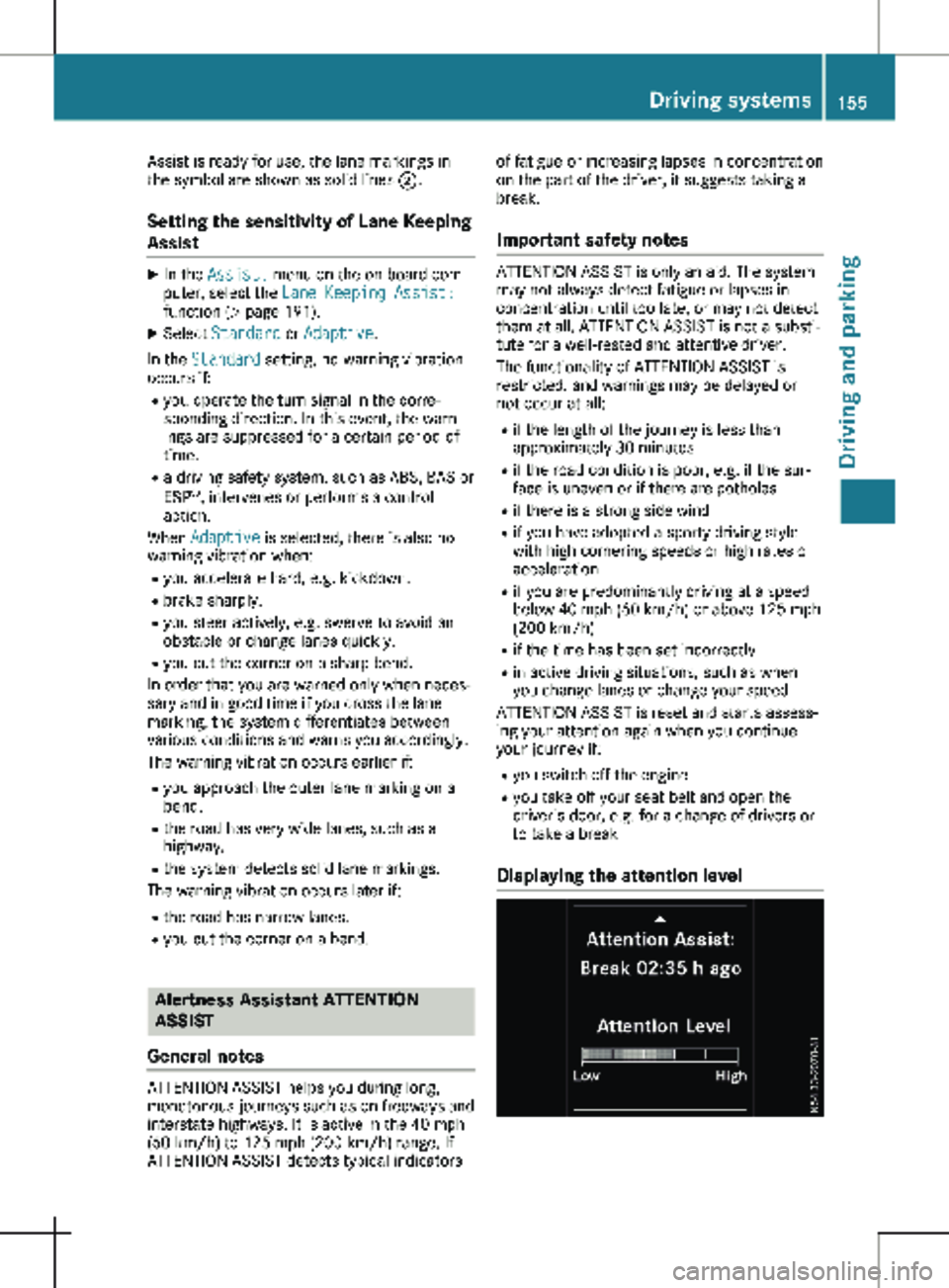
Displaying the attention level Driving systems
155
Driving and parking Z
Page 163 of 320
Active Parking Assist does not assist you park-
ing in spaces at right angles to the direction of
travel if:
R two parking spaces are located directly next
to one another
R the parking space is directly next to a low
obstacle such as a low curb
R you forward park
Active Parking Assist does not assist you park-
ing in spaces that are parallel or at right angles
to the direction of travel if:
R the parking space is on a curb
R the system reads the parking space as being
blocked, for example by foliage or grass
paving blocks
R the area is too small for the vehicle to
maneuver into
R the parking space is bordered by an obsta-
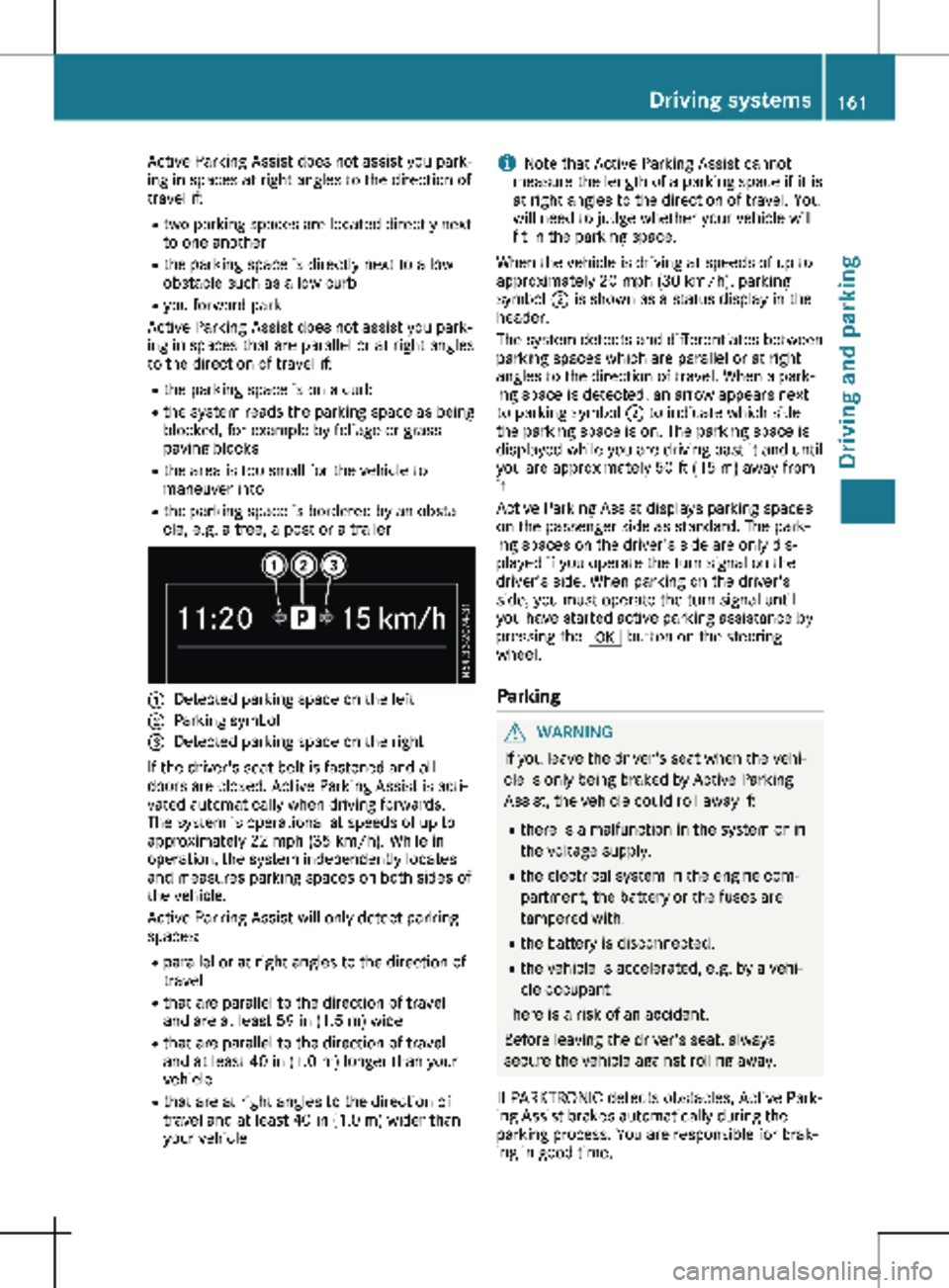
cle, e.g. a tree, a post or a trailer :
Detected parking space on the left
; Parking symbol
= Detected parking space on the right
If the driver's seat belt is fastened and all
doors are closed, Active Parking Assist is acti-
vated automatically when driving forwards.
The system is operational at speeds of up to
approximately
22 mph (35 km/h). While in
operation, the system independently locates
and measures parking spaces on both sides of
the vehicle.
Active Parking Assist will only detect parking
spaces:
R parallel or at right angles to the direction of
travel
R that are parallel to the direction of travel
and are at least 59 in (1.5 m) wide
R that are parallel to the direction of travel
and at least 40 in (1.0 m) longer than your
vehicle
R that are at right angles to the direction of
travel and at least 40 in (1.0 m) wider than
your vehicle i
Note that Active Parking Assist cannot
measure the length of a parking space if it is
at right angles to the direction of travel. You
will need to judge whether your vehicle will
fit in the parking space.
When the vehicle is driving at speeds of up to
approximately
20 mph (30 km/h), parking
symbol ; is shown as a status display in the
header.
The system detects and differentiates between
parking spaces which are parallel or at right
angles to the direction of travel. When a park-
ing space is detected, an arrow appears next
to parking symbol ; to indicate which side
the parking space is on. The parking space is
displayed while you are driving past it and until
you are approximately 50 ft (15 m) away from
it.
Active Parking Assist displays parking spaces
on the passenger side as standard. The park-
ing spaces on the driver's side are only dis-
played if you operate the turn signal on the
driver's side. When parking on the driver's
side, you must operate the turn signal until
you have started active parking assistance by
pressing the a button on the steering
wheel.
Parking G
WARNING
If you leave the driver's seat when the vehi-
cle is only being braked by Active Parking
Assist, the vehicle could roll away if:
R there is a malfunction in the system or in
the voltage supply.
R the electrical system in the engine com-
partment, the battery or the fuses are
tampered with.
R the battery is disconnected.
R the vehicle is accelerated, e.g. by a vehi-
cle occupant.
There is a risk of an accident.
Before leaving the driver's seat, always
secure the vehicle against rolling away.
If PARKTRONIC detects obstacles, Active Park-
ing Assist brakes automatically during the
parking process. You are responsible for brak-
ing in good time. Driving systems
161
Driving and parking Z
Page 165 of 320

X
Start the engine.
X Switch on the turn signal in the direction in
which you are pulling away.
X Shift the transmission to position h or k.
The display shows the message Start
Park Assist? Yes: OK No: %.
X To cancel the process: press the % but-
ton on the steering wheel or drive off.
or
X To exit the parking space using active
parking assistance: press the a button
on the steering wheel.
The display shows the message Park
Assist Active: Accelerate and Brake
Obs. Surroundings.
X Let go of the steering wheel.
X Pull away, being ready to brake at all times.
Exit the parking space slowly and do not
drive faster than
6 mph (10 km/h). Other-
wise parking assistance is canceled and
Active Parking Assist is stopped.
Active Parking Assist brakes the vehicle to a
standstill when the vehicle approaches a
border of the parking space.
X While the vehicle is stationary, shift the
transmission to position h or k as
required or according to the message.
Active Parking Assist immediately steers in
the other direction. The display shows the
message Park Assist Active: Acceler‐
ate and Brake Obs. Surroundings.
i You will achieve the best results by waiting
for the steering procedure to complete
before pulling away.
If you back up after activation, the steering
wheel is moved to the straight-ahead posi-
tion.
X Drive forwards and reverse as prompted by
the PARKTRONIC warning displays, several
times if necessary.
Once you have exited the parking space com-
pletely:
R The display shows the Park Assist Fin‐
ished message.
R A tone sounds.
R The steering wheel is moved to the straight-
ahead position
The parking assistance function of Active Park-
ing Assist is stopped. You will then have to
steer and merge into traffic on your own.
PARKTRONIC is still available. You can take over the steering before the vehi-
cle has exited the parking space completely.
This is useful, for example when you recognize
that it is already possible to pull out of the
parking space.
Canceling active parking assistance X
Stop the movement of the steering wheel or
steer yourself.
or X Press the f button and deactivate
PARKTRONIC
(Y page 158).
Parking assistance is canceled immediately
and Active Parking Assist is stopped. The
display shows the Park Assist Canceled
message.
Active parking assistance is canceled automat-
ically in the following cases:
R you apply the parking brake.
R parking using Active Parking Assist is no
longer possible.
R you are driving faster than
6 mph
(10 km/h).
R a wheel spins and ESP ®
intervenes or fails.
The ÷ warning lamp in the instrument
cluster then lights up.
R you unfasten your seat belt.
R you open a door or the tailgate/rear-end
door.
R you shift the transmission to position j.
A warning tone sounds, the parking symbol in
the display goes out and the Park Assist
Canceled message appears.
Once active Parking Assist has been canceled,
you must steer and brake again yourself.
If a system malfunction occurs, vehicles are
automatically braked down to a standstill. To
continue driving, you must depress the accel-
erator pedal again. Rear view camera
General notes On vehicles with a tailgate, the rear view cam-
era is next to the tailgate handle
(
Y page
267).
On vehicles with rear-end doors, the rear view
camera is in the top of the license plate mold-
ing ( Y page 267). Driving systems
163
Driving and parking Z