lane assist MERCEDES-BENZ METRIS 2020 MY20 Operator’s Manual
[x] Cancel search | Manufacturer: MERCEDES-BENZ, Model Year: 2020, Model line: METRIS, Model: MERCEDES-BENZ METRIS 2020Pages: 320, PDF Size: 26.38 MB
Page 12 of 320
Important safety notes .................. 194
Introduction
................................... 194
Key ................................................ 209
Lamps ............................................ 202
Setting the language ...................... 179
Tires ............................................... 207
Vehicle ........................................... 208
Distance recorder
Displaying (vehicle with steering
wheel buttons) ............................... 183
Displaying (vehicle without steer-
ing wheel buttons) ......................... 177
Setting the display unit (vehicle
without steering wheel buttons) .... 180
Distance recorder
see Trip odometer
Distance warning (warning lamp) .... 235
Distance warning function ............... 149
Door
Changing bulbs (ambient lamp) ..... 104
Display messages (vehicle with
steering wheel buttons) ................. 226
Display messages (vehicle with-
out steering wheel buttons) ........... 208
Indicator lamp ................................ 237
Doors
Central locking/unlocking
(SmartKey) ....................................... 71
Control panel ................................... 44
Emergency locking ........................... 73
Emergency unlocking ....................... 73
Downhill gradients ............................ 142
Drinking and driving ......................... 140
Drinks holder
see Bottle holder
Drinks holder
see Cup holder
Drive program
Automatic transmission ................. 133
Display (DIRECT SELECT lever) ...... 132
Driver's door and front-passenger
door ...................................................... 76
Driver's seat
see Seats
Driving abroad
Fuel ................................................ 141
Low-beam headlamps .................... 141 Mercedes-Benz Service ................. 141
Driving off-road
see Off-road driving
Driving on flooded roads ..................
144
Driving safety systems
ABS (Anti-lock Braking System) ....... 67
BAS (Brake Assist System) .............. 67
EBD (electronic brake force dis-
tribution) .......................................... 68
ESP ®
(Electronic Stability Pro-
gram) ............................................... 68
Important safety information ........... 66
Overview .......................................... 66
Driving system
COLLISION PREVENTION ASSIST .. 149
Display messages (vehicle with-
out steering wheel buttons) ........... 206
Driving systems
Active Parking Assist ..................... 159
ATTENTION ASSIST ........................ 155
Blind Spot Assist ............................ 151
Cruise control ................................ 146
Display messages (vehicle with
steering wheel buttons) ................. 221
Lane Keeping Assist ...................... 153
PARKTRONIC ................................. 156
Rear view camera .......................... 163
Driving tips
Automatic transmission ................. 134
Brakes ........................................... 142
Break-in period .............................. 126
Checking brake lining thickness .... 143
Downhill gradient ........................... 142
Drinking and driving ....................... 140
Driving abroad ............................... 141
Driving in mountainous areas ........ 146
Driving in winter ............................. 144
Driving on flooded roads ................ 144
Driving on wet roads ...................... 143
Exhaust check ............................... 141
Fuel ................................................ 140
General notes ................................ 140
Hydroplaning ................................. 143
Icy road surfaces ........................... 144
Important safety notes .................. 126
Limited braking efficiency on sal-
ted roads ....................................... 142
New brake disks ............................ 143 10
Index
Page 16 of 320
Jacking points ................................ 298
Scope of tire-changing tools
.......... 270
Storage location ............................ 270
Stowage compartment in the
rear ................................................ 271
Stowage space in the cargo com-
partment ........................................ 272
Using ............................................. 298
Jump starting (engine) ...................... 272
Jump-start (engine)
see Jump starting (engine) K
Key Display messages (vehicle with
steering wheel buttons)
................. 227
Display messages (vehicle with-
out steering wheel buttons) ........... 209
Position in the ignition lock ............ 127
Kickdown ........................................... 135L
Lamps Display messages (vehicle with-
out steering wheel buttons) ...........
202
see Warning and indicator lamps
Lane detection (automatic)
see Lane Keeping Assist
Lane Keeping Assist
Activating/deactivating ................. 154
Display message ............................ 222
Function/information .................... 153
Important safety notes .................. 154
Setting sensitivity (on-board
computer) ...................................... 191
Setting the sensitivity .................... 155
Language
Display (vehicle with steering
wheel buttons) ............................... 192
Display (vehicle without steering
wheel buttons) ............................... 179
Lashing points and tie downs
Permissible tensile load ................. 313
Lashing strap
Important safety notes .................. 246
Tensioning strap ............................ 247 LATCH-type (ISOFIX) child seat
anchors
................................................
63
License plate lamp
Changing bulbs .............................. 105
License plate lamps
Display messages (vehicle with
steering wheel buttons) ................. 217
Display messages (vehicle with-
out steering wheel buttons) ........... 203
Light sensor
Display messages (vehicle with
steering wheel buttons) ................. 216
Display messages (vehicle with-
out steering wheel buttons) ........... 202
Lighting
see Lights
Lights
Activating/deactivating the inte-
rior lighting delayed switch-off ....... 193
Automatic headlamp mode ............ 100
Changing bulbs (halogen head-
lamps) ............................................ 105
Changing bulbs (interior lights) ...... 103
Display messages (vehicle with
steering wheel buttons) ................. 216
Driving abroad ............................... 141
Fog lamps ...................................... 100
Hazard warning lamps ................... 101
High beam flasher .......................... 101
High-beam headlamps ................... 101
Important safety notes .................... 99
Light switch ..................................... 99
Low-beam headlamps .................... 100
Parking lamps .................................. 99
Rear fog lamp ................................ 100
Replacing bulbs (halogen head-
lamps) ............................................ 105
Standing lamps ................................ 99
Switching the daytime running
lamps on/off (switch) .................... 100
Switching the exterior lighting
delayed switch-off on/off (on-
board computer) ............................ 193
Switching the surround lighting
on/off (on-board computer) .......... 193
Turn signals ................................... 101
Limited Warranty ................................ 27
Load distribution ............................... 243 14
Index
Page 39 of 320
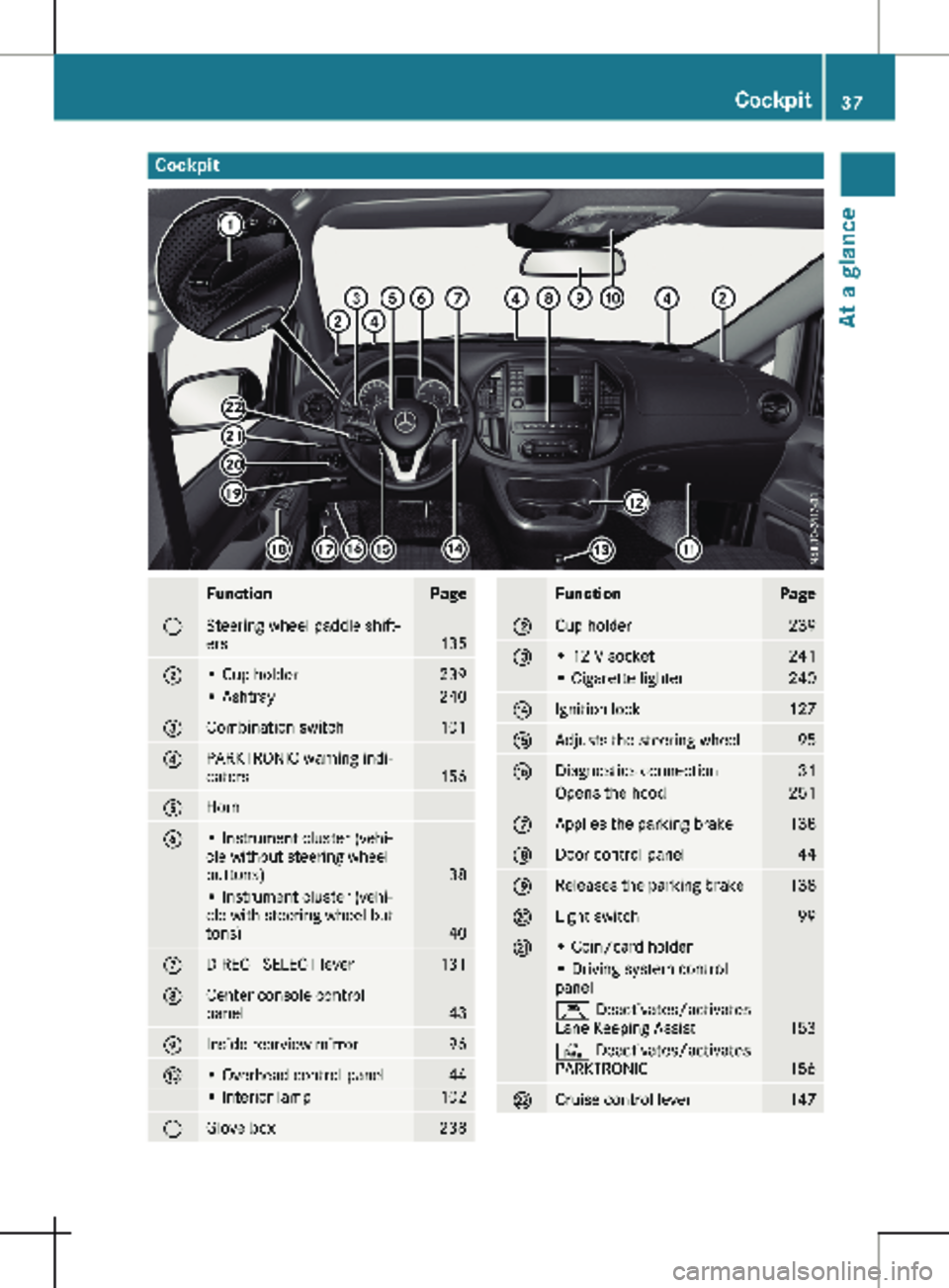
Cockpit
Function Page
:
Steering wheel paddle shift-
ers
135
;
• Cup holder 239
• Ashtray 240
=
Combination switch 101
?
PARKTRONIC warning indi-
cators
156
A
Horn
B
• Instrument cluster (vehi-
cle without steering wheel
buttons)
38
• Instrument cluster (vehi-
cle with steering wheel but-
tons)
40
C
DIRECT SELECT lever 131
D
Center console control
panel
43
E
Inside rearview mirror 96
F
• Overhead control panel 44
• Interior lamp 102
G
Glove box 238 Function Page
H
Cup holder 239
I
• 12 V socket 241
• Cigarette lighter 240
J
Ignition lock 127
K
Adjusts the steering wheel 95
L
Diagnostics connection 31
Opens the hood 251
M
Applies the parking brake 138
N
Door control panel 44
O
Releases the parking brake 138
P
Light switch 99
Q
• Coin/card holder
• Driving system control
panel
Ç Deactivates/activates
Lane Keeping Assist
153
c Deactivates/activates
PARKTRONIC
156
R
Cruise control lever 147Cockpit
37At a glance
Page 68 of 320
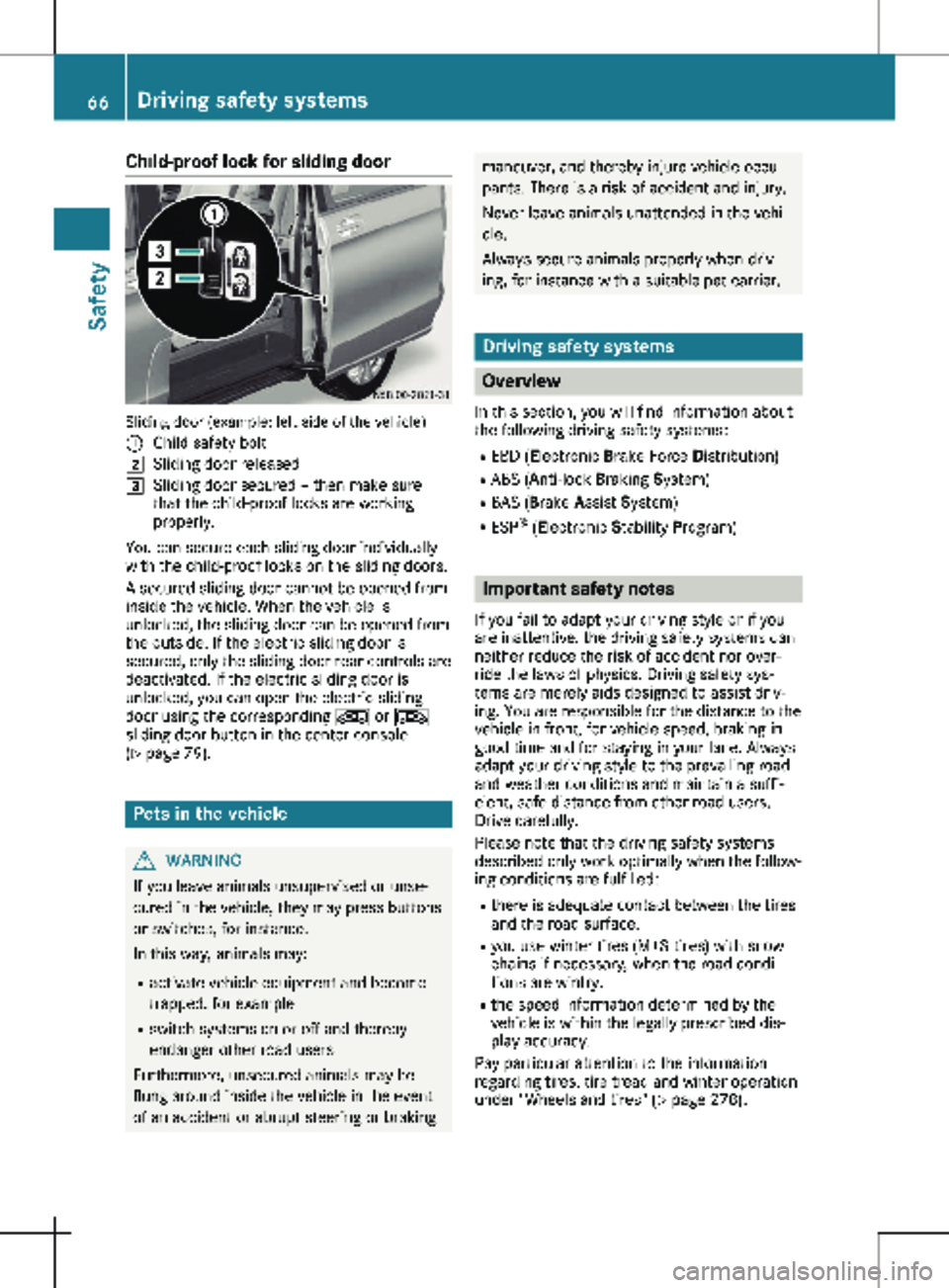
Child-proof lock for sliding door
Sliding door (example: left side of the vehicle)
: Child safety bolt
2 Sliding door released
3 Sliding door secured – then make sure
that the child-proof locks are working
properly.
You can secure each sliding door individually
with the child-proof locks on the sliding doors.
A secured sliding door cannot be opened from
inside the vehicle. When the vehicle is
unlocked, the sliding door can be opened from
the outside. If the electric sliding door is
secured, only the sliding door rear controls are
deactivated. If the electric sliding door is
unlocked, you can open the electric sliding
door using the corresponding Å or Æ
sliding door button in the center console
(Y page
79). Pets in the vehicle
G
WARNING
If you leave animals unsupervised or unse-
cured in the vehicle, they may press buttons
or switches, for instance.
In this way, animals may:
R activate vehicle equipment and become
trapped, for example
R switch systems on or off and thereby
endanger other road users
Furthermore, unsecured animals may be
flung around inside the vehicle in the event
of an accident or abrupt steering or braking maneuver, and thereby injure vehicle occu-
pants. There is a risk of accident and injury.
Never leave animals unattended in the vehi-
cle.
Always secure animals properly when driv-
ing, for instance with a suitable pet carrier. Driving safety systems
Overview
In this section, you will find information about
the following driving safety systems:
R EBD ( Electronic Brake Force Distribution)
R ABS ( Anti-lock Braking System)
R BAS ( Brake A ssist System)
R ESP ®
(Electronic Stability Program) Important safety notes
If you fail to adapt your driving style or if you
are inattentive, the driving safety systems can
neither reduce the risk of accident nor over-
ride the laws of physics. Driving safety sys-
tems are merely aids designed to assist driv-
ing. You are responsible for the distance to the
vehicle in front, for vehicle speed, braking in
good time and for staying in your lane. Always
adapt your driving style to the prevailing road
and weather conditions and maintain a suffi-
cient, safe distance from other road users.
Drive carefully.
Please note that the driving safety systems
described only work optimally when the follow-
ing conditions are fulfilled:
R there is adequate contact between the tires
and the road surface.
R you use winter tires
(M+S tires) with snow
chains if necessary, when the road condi-
tions are wintry.
R the speed information determined by the
vehicle is within the legally prescribed dis-
play accuracy.
Pay particular attention to the information
regarding tires, tire tread and winter operation
under "Wheels and tires" (Y page 278). 66
Driving safety systems
Safety
Page 72 of 320
to stabilize the vehicle/trailer combination in
this situation.
ESP
®
trailer stabilization is activated above
speeds of about
40 mph (65 km/h).
If ESP ®
is switched off or deactivated because
of a malfunction, the trailer stabilization sys-
tem will not function.
Crosswind Assist Observe the important safety guidelines for
the driving safety system (Y page
66).
Strong crosswind gusts can impair the road-
holding of your vehicle when driving straight
ahead. The Crosswind Assist function integra-
ted in ESP ®
reduces these impairments.
Depending on the direction and intensity of
the side wind, Crosswind Assist intervenes
automatically. ESP ®
intervenes with stabilizing
braking to assist you in keeping the vehicle in
the lane. When Crosswind Assist intervenes,
the display shows the traffic sign for strong
side winds and the Crosswind Assist mes-
sage.
Crosswind Assist is activated automatically
above a vehicle speed of approx. 50 mph
(80 km/h) when the vehicle is driving straight
ahead or cornering gently.
Crosswind Assist does not react in the follow-
ing situations:
R in the event of severe jolts and vibrations,
e.g. when driving over uneven surfaces or
potholes
R when road adhesion is reduced, e.g. on
snow or ice or when hydroplaning
Crosswind Assist does not work if ESP ®
is
deactivated or disabled because of a malfunc-
tion. Theft deterrent locking system
Immobilizer
X To activate: remove the key from the igni-
tion lock.
X To deactivate: turn the key to position 2 in
the ignition lock.
The immobilizer prevents your vehicle from
being started without the correct key.
Always take the key with you and lock the
vehicle when leaving the vehicle. If you leave the key in the vehicle, anyone can start the
engine.
i The immobilizer is always deactivated
when you start the engine. ATA (Anti-Theft Alarm system)
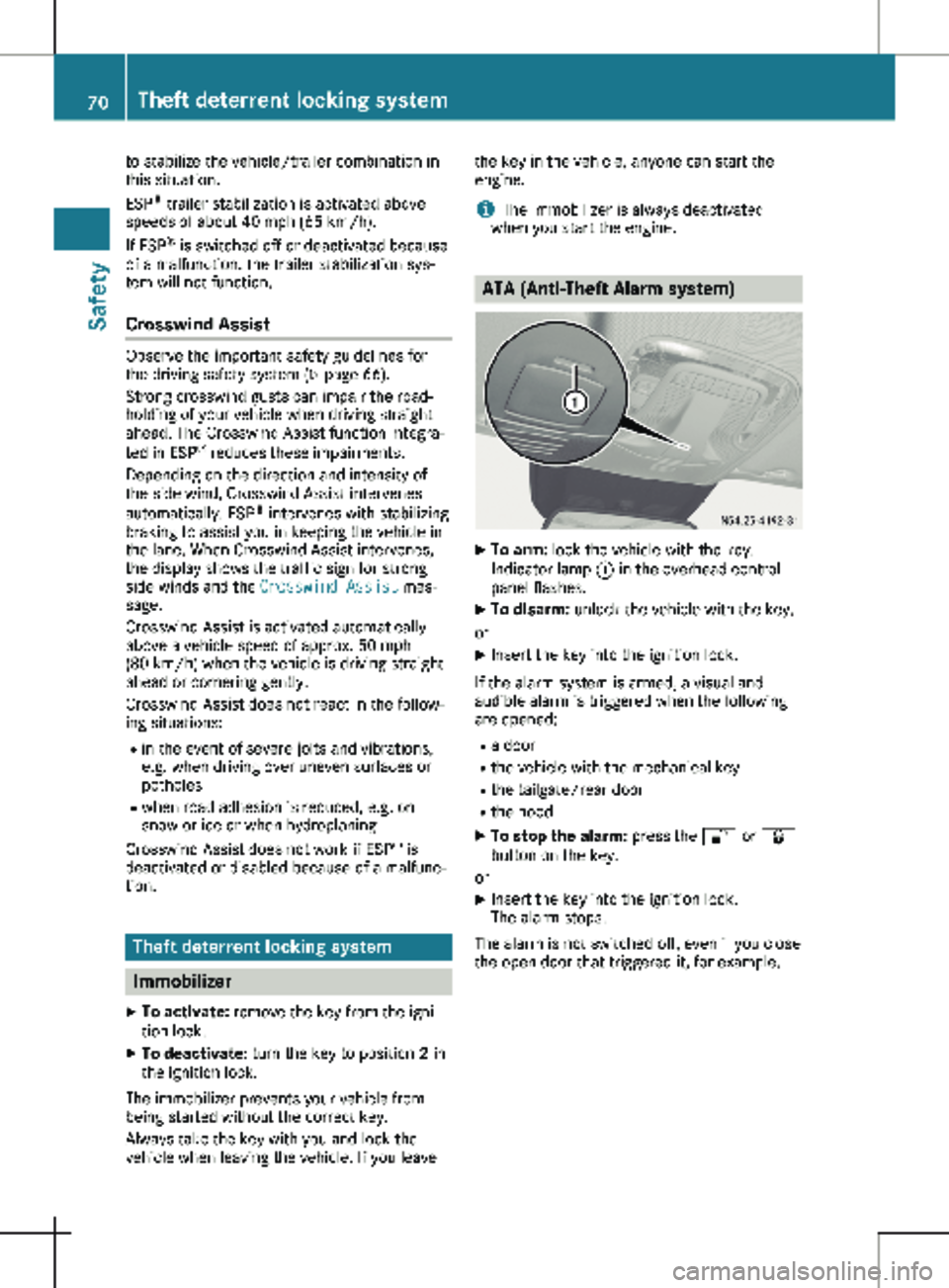
X
To arm: lock the vehicle with the key.
Indicator lamp : in the overhead control
panel flashes.
X To disarm: unlock the vehicle with the key.
or
X Insert the key into the ignition lock.
If the alarm system is armed, a visual and
audible alarm is triggered when the following
are opened:
R a door
R the vehicle with the mechanical key
R the tailgate/rear door
R the hood
X To stop the alarm: press the % or &
button on the key.
or X Insert the key into the ignition lock.
The alarm stops.
The alarm is not switched off, even if you close
the open door that triggered it, for example. 70
Theft deterrent locking system
Safety
Page 152 of 320

may also cause the system to display a warn-
ing.
If you fail to adapt your driving style, the dis-
tance warning function can neither reduce the
risk of an accident nor override the laws of
physics. The distance warning function cannot
take into account road, weather or traffic con-
ditions. The distance warning function is only
an aid. You are responsible for the distance to
the vehicle in front, for vehicle speed, braking
in good time and for staying in your lane.
Following damage to the front end of the vehi-
cle, have the configuration and operation of
the radar sensor checked at a qualified spe-
cialist workshop. This also applies to collisions
at slow speeds where there is no visible dam-
age to the front of the vehicle.
If you change wheel size, make sure they cor-
respond to the correct wheel size category
(Y page
278). If the category is changed with-
out recoding the control units in the vehicle,
the functioning of the distance warning feature
may be impaired. COLLISION PREVENTION
ASSIST may then detect a malfunction and
switch itself off.
Operation
X To activate/deactivate: activate or deacti-
vate the distance warning function in the on-
board computer
(Y page 190).
If the distance warning function of COLLI-
SION PREVENTION ASSIST is activated, the
display shows the Ä symbol:
R in the header
R in the Status Overview of the Assist.
menu (Y page 189)
At speeds up to approx 20 mph (30 km/h)
the display in vehicles with Active Parking
Assist first shows the í status indicator.
Only from a speed of about 20 mph
(30 km/h) does the display show the
Äsymbol instead of the í status indica-
tor.
The distance warning function can help you to
minimize the risk of a front-end collision with a
vehicle ahead or reduce the effects of such a
collision. With the help of the radar sensor sys-
tem, the distance warning function can detect
obstacles that are in the path of your vehicle
for an extended period of time. If the distance
warning function detects that there is a risk of
a collision, you will be warned visually and,
where necessary, acoustically. Without your intervention, the distance warning function
cannot prevent a collision.
The distance warning function issues a warn-
ing at speeds:
R from about
4 mph (7 km/h) if you approach
a vehicle traveling in front or a stationary
vehicle too quickly. The · warning lamp
in the instrument cluster then lights up and
an intermittent warning tone also sounds.
At speeds up to about 45 mph (70 km/h),
the system also detects stationary obsta-
cles, for example stopped or parked vehi-
cles.
X Brake immediately until the distance from
the obstacle increases and the risk of a
front-end collision passes.
or X Take evasive action, provided it is safe to do
so.
Adaptive Brake Assist General notes
Adaptive Brake Assist evaluates the traffic sit-
uation with the help of the radar sensor sys-
tem and can detect obstacles which have been
in your vehicle's path for an extended period
of time. From speeds above 4 mph (7 km/h
),
Adaptive Brake Assist aids you in braking dur-
ing hazardous situations.
Up to a speed of approximately 125 mph
(200 km/h), Adaptive Brake Assist is capable
of reacting to moving obstacles that have
already been detected as such at least once
over the period of observation.
Important safety notes G
WARNING
Adaptive Brake Assist does not react:
R to people or animals
R to oncoming vehicles
R to crossing traffic
R to stationary obstacles
R when cornering
As a result, the Adaptive Brake Assist may
not intervene in all critical conditions. There
is a risk of an accident. 150
Driving systems
Driving and parking
Page 153 of 320

Always pay careful attention to the traffic
situation and be ready to brake. G
WARNING
Adaptive Brake Assist cannot always clearly
identify objects and complex traffic situa-
tions.
In such cases, Adaptive Brake Assist can:
R intervene unnecessarily
R not intervene
There is a risk of an accident.
Always pay careful attention to the traffic
situation and be ready to brake. Terminate
the intervention in a non-critical driving sit-
uation.
In particular, the detection of obstacles can be
impaired in the case of:
R dirt on the sensors or anything else covering
the sensors
R snow or heavy rain
R interference from other radar sources
R strong radar reflections, for example, in
parking garages
R a narrow vehicle traveling in front, e.g. a
motorbike
R a vehicle traveling in front on a different line
Due to the nature of the system, particularly
complicated but non-critical driving conditions
may also cause Adaptive Brake Assist to inter-
vene.
If you fail to adapt your driving style, Adaptive
Brake Assist can neither reduce the risk of
accident nor override the laws of physics.
Adaptive Brake Assist cannot take into
account road, weather or traffic conditions.
Adaptive Brake Assist is only an aid. You are
responsible for the distance to the vehicle in
front, for vehicle speed, braking in good time
and for staying in your lane.
Following damage to the front end of the vehi-
cle, have the configuration and operation of
the radar sensor checked at a qualified spe-
cialist workshop. This also applies to collisions
at slow speeds where there is no visible dam-
age to the front of the vehicle.
If you change wheel size, make sure they cor-
respond to the correct wheel size category
(Y page
278). If the category is changed with- out recoding the control units in the vehicle,
the functioning of Adaptive Brake Assist may
be impaired. COLLISION PREVENTION ASSIST
may then detect a malfunction and switch
itself off.
If Adaptive Brake Assist is not available due to
a malfunction in the radar sensor system, the
brake system remains available with full brake
boosting effect and BAS.
Operation With the help of the radar sensor system,
Adaptive Brake Assist can detect obstacles
that have been in the path of your vehicle for
an extended period of time. Adaptive Brake
Assist does not react to stationary obstacles.
If Adaptive Brake Assist detects a risk of colli-
sion with a vehicle traveling in front or with a
stationary obstacle, the system calculates the
braking force necessary to avoid this collision.
If you apply the brakes forcefully, Adaptive
Brake Assist will automatically increase the
braking force to a level suitable for the traffic
conditions.
X Brake until the distance to the obstacle
increases and the risk of a collision passes.
ABS prevents the wheels from locking.
The brakes function as usual again if:
R you release the brake pedal
R there is no longer any danger of a collision
R no obstacle is detected in front of your vehi-
cle
Braking assistance is then ended. Blind Spot Assist
General notes Blind Spot Assist monitors the areas on either
side of the vehicle that are not visible to the
driver with two lateral, rear-facing radar sen-
sors in the bumper. It supports you from
speeds of approximately
20 mph (30 km/h). A
warning display in the exterior mirrors draws
your attention to vehicles detected in the
monitored area. If you then switch on the cor-
responding turn signal to change lane, you will
also receive an optical and audible collision
warning. Driving systems
151
Driving and parking Z
Page 154 of 320
Important safety notes
G
WARNING
Blind Spot Assist does not react to:
R vehicles overtaken too closely on the side,
placing them in the blind spot area
R vehicles which approach with a large
speed differential and overtake your vehi-
cle
As a result, Blind Spot Assist may not give
warnings in such situations. There is a risk
of an accident.
Always observe the traffic conditions care-
fully, and maintain a safe lateral distance.
Blind Spot Assist is only an aid. It may fail to
detect some vehicles and is no substitute for
attentive driving. Always ensure that there is
sufficient distance to the side for other road
users and obstacles.
In particular, the detection of obstacles can be
impaired in the case of:
R dirt on the sensors or anything else covering
the sensors
R fog, heavy rain or snow
R narrow vehicles, e.g. motorcycles or bicy-
cles
R very wide lanes
R narrow lanes
R vehicles not driving in the middle of their
lane
R barriers or other road boundaries
Vehicles in the monitoring range are then not
indicated.
i USA only:
This device has been approved by the FCC
as a "Vehicular Radar System". The radar
sensor is intended for use in an automotive
radar system only. Removal, tampering, or
altering of the device will void any warran-
ties, and is not permitted by the FCC. Do
not tamper with, alter, or use in any non-
approved way.
Any unauthorized modification to this device
could void the user’s authority to operate
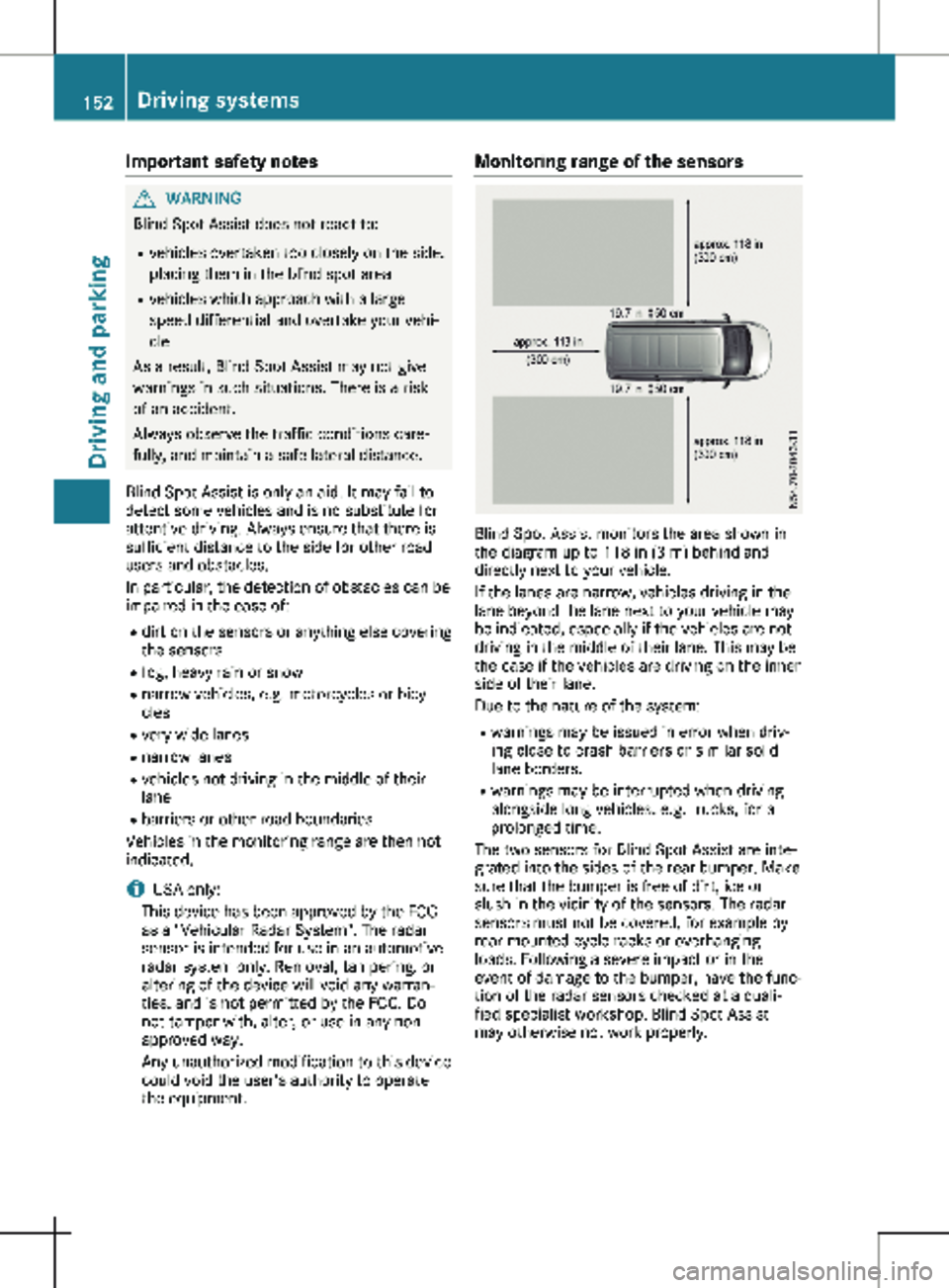
the equipment. Monitoring range of the sensors
Blind Spot Assist monitors the area shown in
the diagram up to
118 in (3 m) behind and
directly next to your vehicle.
If the lanes are narrow, vehicles driving in the
lane beyond the lane next to your vehicle may
be indicated, especially if the vehicles are not
driving in the middle of their lane. This may be
the case if the vehicles are driving on the inner
side of their lane.
Due to the nature of the system:
R warnings may be issued in error when driv-
ing close to crash barriers or similar solid
lane borders.
R warnings may be interrupted when driving
alongside long vehicles, e.g. trucks, for a
prolonged time.
The two sensors for Blind Spot Assist are inte-
grated into the sides of the rear bumper. Make
sure that the bumper is free of dirt, ice or
slush in the vicinity of the sensors. The radar
sensors must not be covered, for example by
rear-mounted cycle racks or overhanging
loads. Following a severe impact or in the
event of damage to the bumper, have the func-
tion of the radar sensors checked at a quali-
fied specialist workshop. Blind Spot Assist
may otherwise not work properly. 152
Driving systems
Driving and parking
Page 155 of 320
Warning display
Blind Spot Assist is not active at speeds below
approximately
20 mph (30 km/h). Vehicles in
the monitoring range are then not indicated.
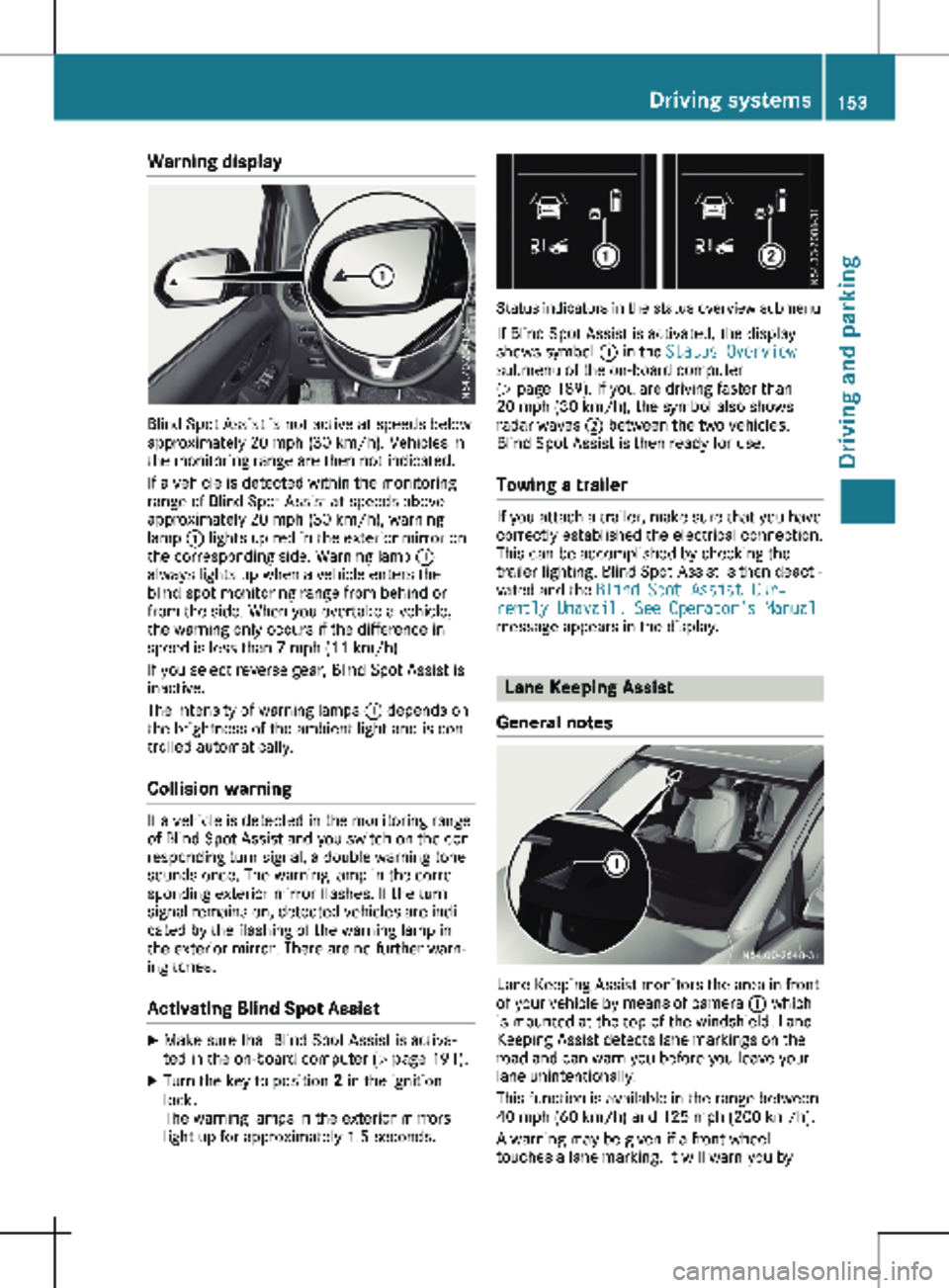
If a vehicle is detected within the monitoring
range of Blind Spot Assist at speeds above
approximately 20 mph (30 km/h), warning
lamp : lights up red in the exterior mirror on
the corresponding side. Warning lamp :
always lights up when a vehicle enters the
blind spot monitoring range from behind or
from the side. When you overtake a vehicle,
the warning only occurs if the difference in
speed is less than 7 mph (11 km/h).
If you select reverse gear, Blind Spot Assist is
inactive.
The intensity of warning lamps : depends on
the brightness of the ambient light and is con-
trolled automatically.
Collision warning If a vehicle is detected in the monitoring range
of Blind Spot Assist and you switch on the cor-
responding turn signal, a double warning tone
sounds once. The warning lamp in the corre-
sponding exterior mirror flashes. If the turn
signal remains on, detected vehicles are indi-
cated by the flashing of the warning lamp in
the exterior mirror. There are no further warn-
ing tones.
Activating Blind Spot Assist X
Make sure that Blind Spot Assist is activa-
ted in the on-board computer (Y page
191).
X Turn the key to position 2 in the ignition
lock.
The warning lamps in the exterior mirrors
light up for approximately
1.5 seconds. Status indicators in the status overview submenu
If Blind Spot Assist is activated, the display
shows symbol : in the Status Overview
submenu of the on-board computer
(Y page
189). If you are driving faster than
20 mph (30 km/h), the symbol also shows
radar waves ; between the two vehicles.
Blind Spot Assist is then ready for use.
Towing a trailer If you attach a trailer, make sure that you have
correctly established the electrical connection.
This can be accomplished by checking the
trailer lighting. Blind Spot Assist is then deacti-
vated and the Blind Spot Assist Cur‐
rently Unavail. See Operator's Manual
message appears in the display. Lane Keeping Assist
General notes Lane Keeping Assist monitors the area in front
of your vehicle by means of camera : which
is mounted at the top of the windshield. Lane
Keeping Assist detects lane markings on the
road and can warn you before you leave your
lane unintentionally.
This function is available in the range between
40 mph (60 km/h
) and 125 mph (200 km/h).
A warning may be given if a front wheel
touches a lane marking. It will warn you by Driving systems
153
Driving and parking Z
Page 156 of 320
means of intermittent vibration through the
steering wheel for up to
1.5 seconds.
Important safety notes G
WARNING
Lane Keeping Assist cannot always clearly
detect lane markings.
In such cases, Lane Keeping Assist can:
R give an unnecessary warning
R not give a warning
There is a risk of an accident.
Always pay particular attention to the traffic
situation and keep within the lane, espe-
cially if Lane Keeping Assist alerts you. G
WARNING
The Lane Keeping Assist warning does not
return the vehicle to the original lane. There
is a risk of an accident.
You should always steer, brake or accelerate
yourself, in particular if warned by Lane
Keeping Assist.
If you fail to adapt your driving style, Lane
Keeping Assist can neither reduce the risk of
accident nor override the laws of physics.
Lane Keeping Assist cannot take into account
road, weather or traffic conditions. Lane Keep-
ing Assist is only an aid. You are responsible
for the distance to the vehicle in front, for
vehicle speed, braking in good time and for
staying in your lane.
Lane Keeping Assist does not keep your vehi-
cle in its lane.
The system may be impaired or may not func-
tion if:
R there is poor visibility, e.g. due to insuffi-
cient illumination of the road, or due to
snow, rain, fog or spray
R there is glare, e.g. from oncoming traffic,
the sun or reflection from other vehicles
(e.g. if the road surface is wet)
R the windshield is dirty, fogged up, damaged
or covered, for instance by a sticker, in the
vicinity of the camera
R there are no lane markings, or several
unclear lane markings for one lane, e.g.
around construction sites R
the lane markings are worn away, dark or
covered up, e.g. by dirt or snow
R the distance to the vehicle in front is too
short and thus the lane markings cannot be
detected
R the lane markings change quickly, e.g. lanes
branch off, cross one another or merge
R the road is narrow and winding
R there are highly variable shade conditions
on the road
Deactivating and activating Lane Keep-
ing Assist X
Press the Ç button.
If the indicator lamp in the button lights up
and the display shows the Ç symbol in
the status area, Lane Keeping Assist is
switched on but not ready for use.
If you are driving with Lane Keeping Assist
activated at speeds above
40 mph
(60 km/h) and lane markings are detected,
the display shows the Ç symbol highligh-
ted in the status area. Lane Keeping Assist
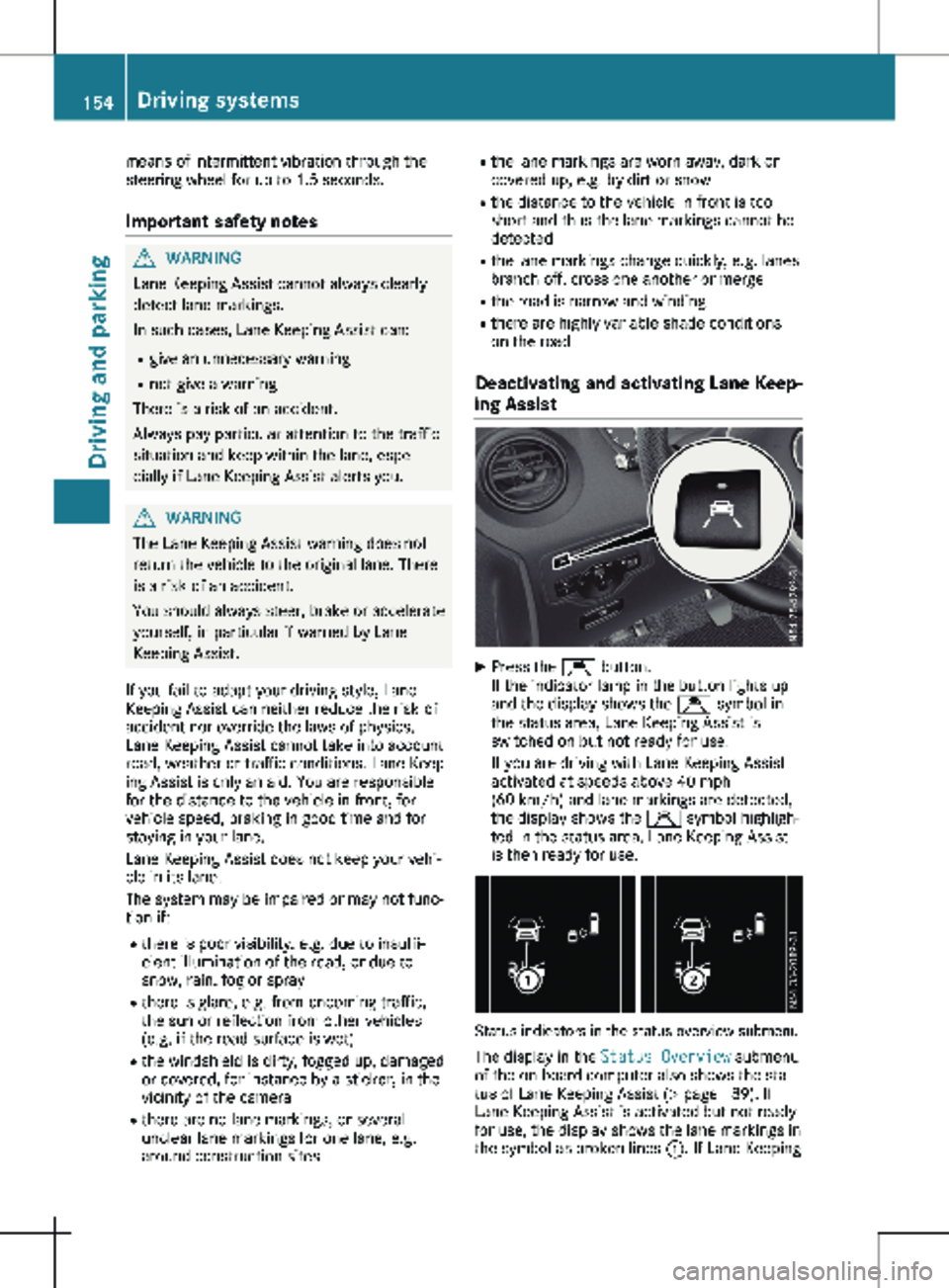
is then ready for use. Status indicators in the status overview submenu
The display in the Status Overview submenu
of the on-board computer also shows the sta-
tus of Lane Keeping Assist
(Y page 189). If
Lane Keeping Assist is activated but not ready
for use, the display shows the lane markings in
the symbol as broken lines :. If Lane Keeping154
Driving systems
Driving and parking