navigation system MERCEDES-BENZ S CLASS 2010 User Guide
[x] Cancel search | Manufacturer: MERCEDES-BENZ, Model Year: 2010, Model line: S CLASS, Model: MERCEDES-BENZ S CLASS 2010Pages: 548, PDF Size: 11.45 MB
Page 100 of 548
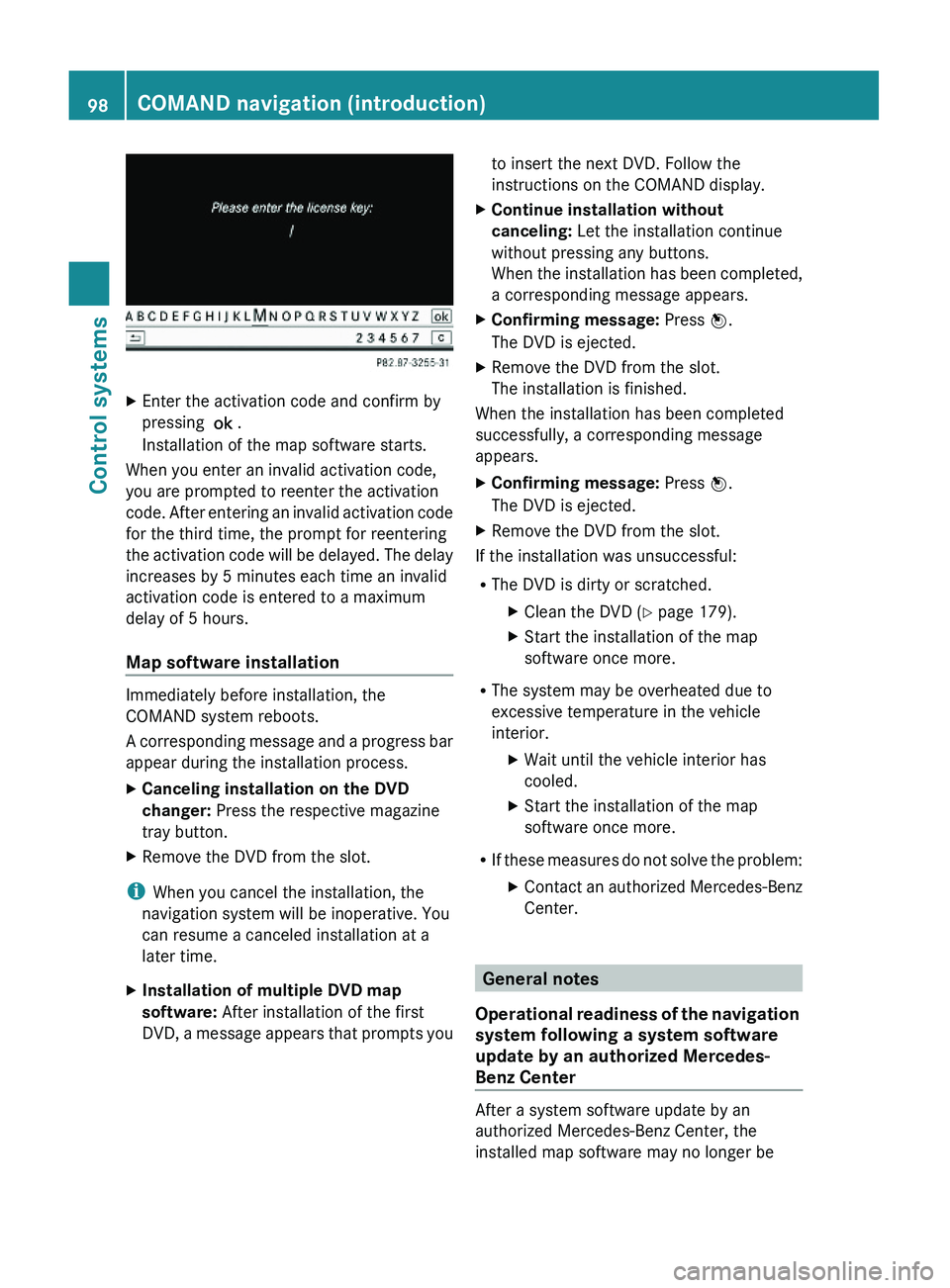
XEnter the activation code and confirm by
pressing \000>.
Installation of the map software starts.
When you enter an invalid activation code,
you are prompted to reenter the activation
code. After entering an invalid activation code
for the third time, the prompt for reentering
the activation code will be delayed. The delay
increases by 5 minutes each time an invalid
activation code is entered to a maximum
delay of 5 hours.
Map software installation
Immediately before installation, the
COMAND system reboots.
A corresponding message and a progress bar
appear during the installation process.
XCanceling installation on the DVD
changer: Press the respective magazine
tray button.
XRemove the DVD from the slot.
iWhen you cancel the installation, the
navigation system will be inoperative. You
can resume a canceled installation at a
later time.
XInstallation of multiple DVD map
software: After installation of the first
DVD, a message appears that prompts you
to insert the next DVD. Follow the
instructions on the COMAND display.
XContinue installation without
canceling: Let the installation continue
without pressing any buttons.
When the installation has been completed,
a corresponding message appears.
XConfirming message: Press \000
Page 101 of 548
compatible. If this is the case, the navigation
system will not be operational.
You will know if this is the case, when the
following message will appear when you
switch to navigation mode: The system
software has been updated. The map
software must be updated now. Please
insert the DVD with the map software.XUpdating map software: Proceed as
described in the “Updating the map
software” section ( Y page 96). Use map
software which is compatible with the
system software.
i Please note that the update must be
allowed to run to the end in this case. If you
interrupt it, the navigation system will
continue to be non-operational.
Initial use or use following a system
software update
In both these cases, the navigation system
must determine the position of the vehicle.
You may have to drive for a while before
precise route guidance is possible.
GPS reception
The Navigation system relies on a number of
factors to function correctly. GPS reception
is very important.
In certain situations GPS may be impaired, for
example:
R in tunnels
R in parking garages
R due to snow on the GPS antenna
If there is snow on the GPS antenna, you
should remove it. The GPS antenna is at the
back of the vehicle roof.
A roof cargo container may also impair GPS
coverage.
Route guidance after transporting the
vehicle or exiting a parking garage
COMAND has to redetermine the position of
the vehicle if the vehicle has been transported
(e.g. by ferry, by train or after towing).
COMAND may also have to redetermine the
vehicle position when leaving a parking
garage.
The proper position of the vehicle will even be
found if you are driving with COMAND
switched off. The duration of the positioning
recalculation will vary case by case.
During positioning, route guidance may be
inaccurate and may show the following:
R Navigation announcements, route
guidance displays and displayed street
names are not consistent with the actual
location of the vehicle.
R COMAND does not generate navigation
announcements.
R Instead of the route guidance displays, you
see the Off Road display and a direction
arrow. The direction arrow shows the
compass heading to the destination.
After the vehicle position has been
redetermined, route guidance with navigation
announcements and route guidance display
is available again.
Interrupting the journey during route
guidance
The following applies if you interrupt the
journey during route guidance and continue
the journey later:
R COMAND resumes route guidance
automatically if you continue the journey
within 2 hours.
R Route guidance is canceled if you continue
the journey after more than 2 hours. It will
be necessary to resume the canceled route
guidance manually ( Y page 135).
i The journey is interrupted if you park the
vehicle and switch off COMAND. The
COMAND navigation (introduction)99Control systems221_AKB; 6; 20, en-USd2ugruen,Version: 2.11.8.12009-09-24T13:28:17+02:00 - Seite 99Z
Page 102 of 548
journey is continued when you switch
COMAND back on and start driving.
Hard disk errors
COMAND has an integrated hard disk on
which the map software is stored.
If the message Navigation Unavailable.
Please refer to the operating
instructions. appears:
XSwitch the COMAND off.XSwitch the COMAND back on.
i
If the message appears again, contact an
authorized Mercedes-Benz Center.
Units of measurement
The units of measurement in navigation mode
are identical to those set in the instrument
cluster ( Y page 235). The units of
measurement can only be changed via the
instrument cluster control system.
Input restrictions
There is an input restriction for vehicles in
certain countries.
The restriction is active for vehicle speeds
above approximately 3 mph (5 km/h). The
restriction is deactivated as soon as the
speed falls below approximately 2 mph
(3 km/h).
Certain entries cannot be made when the
restriction is active.
This is indicated by the fact that certain menu
items cannot be selected, e.g. entering a
destination via map.
Navigation submenu overview
i The components and operating principles of COMAND can be found on ( Y page 76).
100COMAND navigation (introduction)Control systems
221_AKB; 6; 20, en-USd2ugruen,Version: 2.11.8.12009-09-24T13:28:17+02:00 - Seite 100
Page 103 of 548
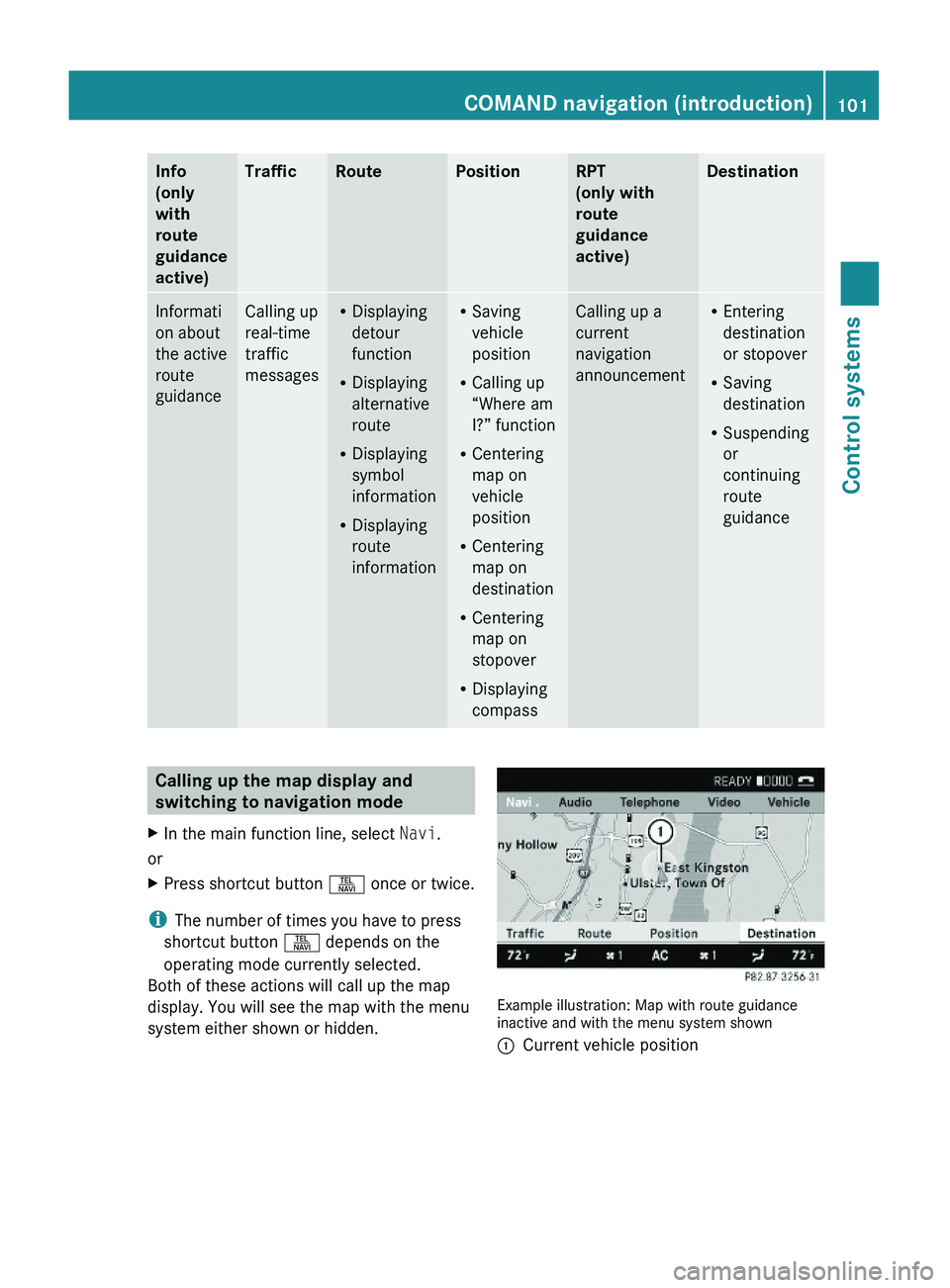
Info
(only
with
route
guidance
active)
TrafficRoutePositionRPT
(only with
route
guidance
active)
DestinationInformati
on about
the active
route
guidance
Calling up
real-time
traffic
messages
RDisplaying
detour
function
RDisplaying
alternative
route
RDisplaying
symbol
information
RDisplaying
route
information
RSaving
vehicle
position
RCalling up
“Where am
I?” function
RCentering
map on
vehicle
position
RCentering
map on
destination
RCentering
map on
stopover
RDisplaying
compass
Calling up a
current
navigation
announcement
REntering
destination
or stopover
RSaving
destination
RSuspending
or
continuing
route
guidance
Calling up the map display and
switching to navigation mode
XIn the main function line, select Navi.
or
XPress shortcut button \000X once or twice.
iThe number of times you have to press
shortcut button \000X depends on the
operating mode currently selected.
Both of these actions will call up the map
display. You will see the map with the menu
system either shown or hidden.
Example illustration: Map with route guidanceinactive and with the menu system shown
\000FCurrent vehicle positionCOMAND navigation (introduction)101Control systems221_AKB; 6; 20, en-USd2ugruen,Version: 2.11.8.12009-09-24T13:28:17+02:00 - Seite 101Z
Page 106 of 548
RBird’s-eye View: Map display 0046 is oriented
in the direction into which you are heading;
the orange tip of the symbol points to the
North.
R 3-D Map: Certain buildings in selected
cities are displayed in detail as a 3-D (three-
dimensional) model. The map displays
mountains and valleys three-
dimensionally. The 3-D map is country-
specific and is connected with the function
City (3D) ( Y page 105).XSelecting map orientation: Select Navi
0054 Map Orientation .
The list of available map orientations
appears. The dot 003F indicates the currently
selected map orientation.XSelect North Up , Heading Up , Bird's-
eye View , or 3-D Map and press 00A1.XExiting menu: Slide 009E005B 009F.
Setting POI symbols
You can set which points of interest (POIs)
should be displayed as symbols in the map.
POIs are parking facilities, hotels, restaurants
or movie theaters, for example.
i Depending on the map scale, POI symbols
may not be visible although their display is
activated. In addition, POI symbols may be
covered by other POIs or names displayed
on the map.
The following settings are possible:
R Standard symbols (factory setting)
R Personal symbols (you can select the
desired POIs)
R No symbols
XAdjusting: Select Navi 0054 POI Symbols
on Map .
The map display list appears. A dot 003F
indicates the current setting.XSelect Standard symbols , Personal
symbols or No symbols .
If you select Personal symbols , the list of
POIs appears.XSwitching POI symbol display on or
off: Select the desired POI.
The corresponding symbol displays are
switched on or off, depending on the
previous status. A checkmark indicates
which status is active. You can switch on
the symbol displays for more than one POI.
i The list shows all symbols that are
contained in the digital map across all
states (USA) and provinces (Canada). Not
all POIs in all states (USA) or in all provinces
(Canada) are available, however. Certain
POI symbols may not be displayed on the
map, even if the symbol display is switched
on. You can use this list as a map legend.
The map legend also contains, in addition
to the POI symbols, the names of the POI
categories.
XExiting menu: Slide 009E005B 009F or press back
button 0041 in the center console
( Y page 87).
Selecting traffic symbols on the map
You can select what kind of traffic information
is displayed on the map ( Y page 139).
Selecting text information on the map
COMAND can display various text
information below the map:
R Time of arrival and distance to destination
R Current street
R Geo coordinates
R None
104COMAND navigation (introduction)Control systems
221_AKB; 6; 20, en-USd2ugruen,Version: 2.11.8.12009-09-24T13:28:17+02:00 - Seite 104
Page 108 of 548
XSelect Navi.XCheck the check box for menu item City
(3D) .
Setting route type
You can set the following route types:
R Fast Route : COMAND calculates a route
with minimized driving time.
R Dynamic Route : COMAND calculates a
route with minimized driving time and takes
into account traffic messages received
along the route. Thus, the navigation
system can dynamically recalculate the
route. Roads that are blocked will be
avoided whenever possible. For
information on traffic messages see
( Y page 138).
R Short Route : COMAND calculates a route
with minimized route length.
XSelect Navi 0054 Mode .
The list of available rote types appears. The
dot 003F indicates the currently selected
setting.XSelect route type: Fast Route , Dynamic
Route or Short Route .XExit menu: Slide 009E005B 009F.
i
If you change the route type setting during
active route guidance, COMAND calculates
a new route. If you change the setting when
route guidance is inactive, COMAND uses
the new setting for the next route guidance.
Setting route mode
With this function you can select the following
options for route calculation:
R Minimize Highways
R Minimize Toll Roads
R Minimize Tunnels
R Minimize Ferries
R Minimize Motorail Trains
XSelect Navi 0054 Mode .
The mode list appears.XSwitching mode on or off: Select desired
modes.
Depending on the previous status, the
mode is switched on or off. A checkmark
indicates that the mode is switched on. It
is possible to switch on more than one
mode.XExiting menu: Slide 009E005B 009F or press back
button 0041 in the center console
( Y page 87).
COMAND will verify whether it can
incorporate the modes if you select them
with route guidance active.
If possible, COMAND calculates a new
route considering the selected options.
If the route cannot be recalculated with the
selected options, a message appears and
an announcement is made. COMAND
calculates a new route. Only options that
are possible will be considered.
Displaying highway information
When this function is enabled, highway
information ahead will display automatically
( Y page 137).
Audio fadeout
XSelect Navi 0054 Audio Fadeout .
When the check box is checked 0069 the
volume of the current audio source fades
during a navigation announcement.
COMAND navigation system
(entering a destination)
Introduction
GWarning!
For safety reasons, only enter a new
destination when the vehicle is stationary.
106COMAND navigation system (entering a destination)Control systems
221_AKB; 6; 20, en-USd2ugruen,Version: 2.11.8.12009-09-24T13:28:17+02:00 - Seite 106
Page 109 of 548
iIt is possible to enter a destination
regardless of whether route guidance is
active or not.
The following destination entry options are
available:
RBy address
RFrom the destination memory
RFrom a list of last destinations
RFrom a point on the map
RA stopover
RA POI
Entering a destination by address
Introduction
iIt is not possible to enter an address when
the vehicle has exceeded a certain speed.
As soon as the vehicle speed drops below
a certain value, the function is available
again.
iIf Russian or Chinese is set as the system
language, the address must be entered
using Latin characters. Setting the system
language (Y page 94).
To enter an address you may proceed as
follows:
REnter state (USA) or province (Canada),
street and city
REnter state (USA) or province (Canada), city
and street
REnter state (USA) or province (Canada), city
and city center
REnter state (USA) or province (Canada), zip
code/postal code and city center
REnter state (USA) or province (Canada), zip
code/postal code and street
iAs additional information to the street
entry, you can enter either a house number
or an intersection.
A zip code/postal code entry replaces the
city entry.
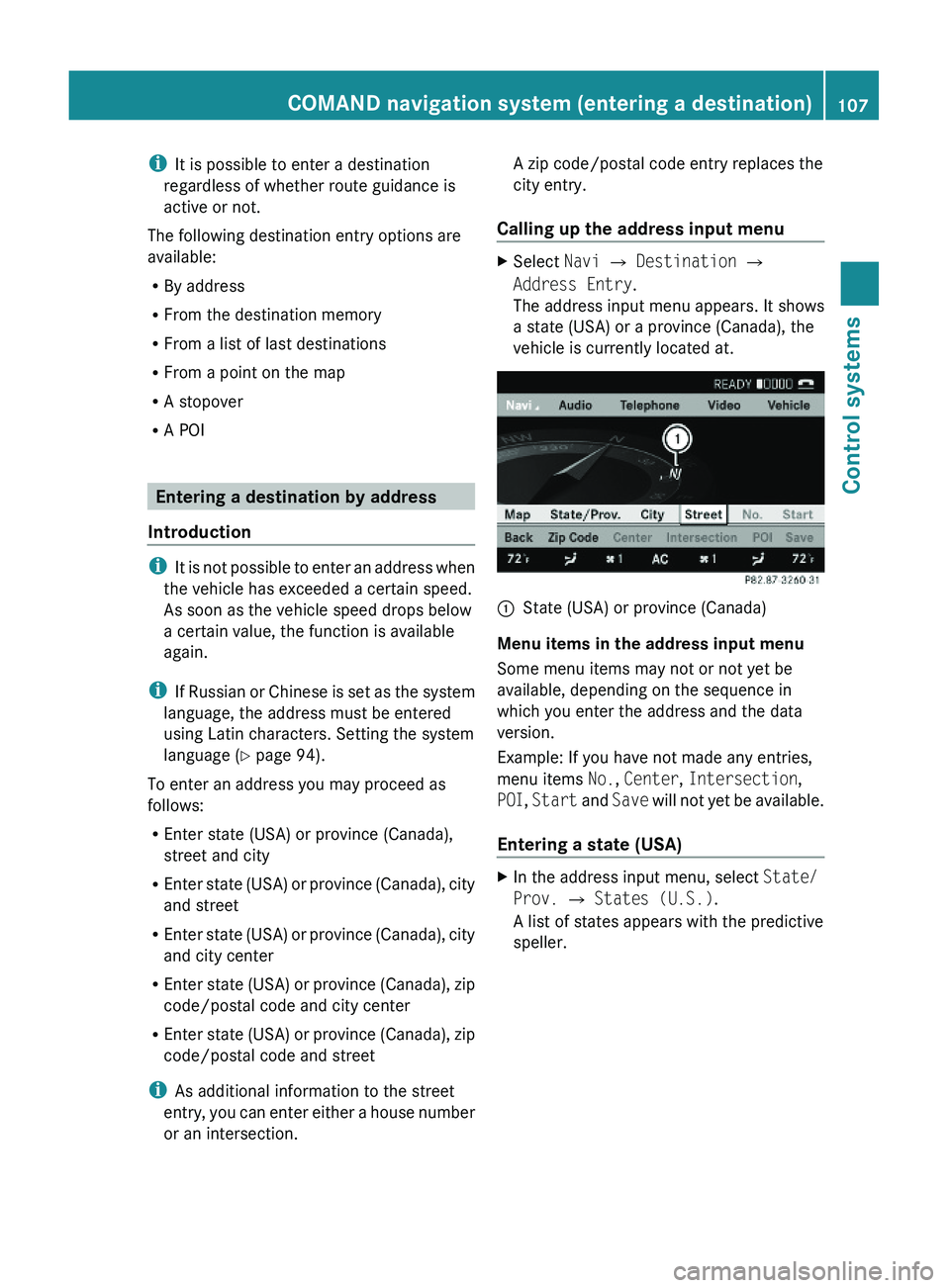
Calling up the address input menu
XSelect Navi \000T Destination \000T
Address Entry.
The address input menu appears. It shows
a state (USA) or a province (Canada), the
vehicle is currently located at.
\000FState (USA) or province (Canada)
Menu items in the address input menu
Some menu items may not or not yet be
available, depending on the sequence in
which you enter the address and the data
version.
Example: If you have not made any entries,
menu items No., Center, Intersection,
POI, Start and Save will not yet be available.
Entering a state (USA)
XIn the address input menu, select State/
Prov. \000T States (U.S.).
A list of states appears with the predictive
speller.
COMAND navigation system (entering a destination)107Control systems221_AKB; 6; 20, en-USd2ugruen,Version: 2.11.8.12009-09-24T13:28:17+02:00 - Seite 107Z
Page 111 of 548
XSelecting a state: Slide 00A0005B 0050 or rotate
0082 005B 0083.XCanceling selection: Select Back by
sliding 009E005B and press 00A1.
or
XPress back button 0041 in the center
console ( Y page 87).XConfirming selection: Press 00A1.
The address input menu appears again. It
shows the abbreviation for the selected
state.
The following menu items are now available:
R Map : Entering a destination from the map
( Y page 122)
R State/Prov. : Change state (USA) or
province (Canada)
R City : Entering a city ( Y page 111) within
the selected state
R Street : Entering a street ( Y page 114)
within the selected state
R Zip Code : Entering the zip code
( Y page 109) within the selected state
XContinuing destination entry: Select one
of the menu items mentioned above.
Entering a province (Canada)
XIn the address input menu, select State/
Prov. 0054 Provinces (Canada) .
A list of provinces appears.XSelect desired province.
The address input menu appears again. It
shows the abbreviation for the selected
province.
The following menu items are now available:
R Map : Entering a destination from the map
( Y page 122)
R State/Prov. : Change state (USA) or
province (Canada)
R City : Entering a city ( Y page 111) within
the selected province
R Street : Entering a street ( Y page 114)
within the selected province
R Zip Code : Entering the postal code
( Y page 109) within the selected provinceXContinuing destination entry: Select one
of the menu items mentioned above.
Quick access to most recently entered
states (USA) or provinces (CDN)
XIn the address input menu, select State/
Prov. 0054 Last States/Provinces .
The list of most recently entered states
(USA) or provinces (Canada) appears. The
last entry is at the top of the list.XSelect desired state (USA) or desired
province (Canada).
The address input menu appears again. It
shows the abbreviation for the selected
state (USA) or province (Canada).
The following menu items are now available:
R Map : Entering a destination from the map
( Y page 122)
R State/Prov. : Change state (USA) or
province (Canada)
R City : Entering a city within the selected
state (USA)/province (Canada)
( Y page 111)
R Street : Entering a street within the
selected state (USA)/province (Canada)
( Y page 114)
R Zip Code : Entering the zip code/postal
code within the selected state (USA)/
province (Canada) ( Y page 109)
XContinuing destination entry: Select one
of the menu items mentioned above.
Entering the zip code/postal code
i It is not possible to enter a zip code/
postal code if you have already entered
other address data aside from the state
(USA) or province (Canada).
COMAND navigation system (entering a destination)109Control systems221_AKB; 6; 20, en-USd2ugruen,Version: 2.11.8.12009-09-24T13:28:17+02:00 - Seite 109Z
Page 122 of 548
RMap: Using the map to enter a destination
(Y page 122)
iIn this case, using the map for destination
entry is based on the city seen in the
address input menu.
RPOI: Entering a point of interest
(Y page 124)
iIn this case, entering a POI is based on the
city seen in the address input menu.
RSave: Saving a destination in the
destination memory (Y page 145)
RStart: Starting the route calculation
(Y page 120)
XContinuing or completing destination
entry: Select one of the menu items
mentioned above.
Starting the route calculation
iYou cannot start the route calculation
until all the necessary address data has
been entered.
XAfter entering the destination, select
Start.
The route calculation will start if route
guidance has not already been activated.
If route guidance has already been
activated, a prompt will appear asking
whether you want to end the current route
guidance.
XSelect Yes or No.
If you select Yes, COMAND will stop the
route guidance and start the route
calculation for the new destination.
If you select No, COMAND will continue
with the active route guidance.
The new destination is discarded.
During the route calculation, an arrow will
indicate the direction to the destination.
Below this, you will see the message The
route is being calculated....
Once the route has been calculated, route
guidance begins (Y page 129).
iRoute calculation requires time. The time
depends on factors such as the distance
from the destination.
COMAND calculates the route using the
digital map data. The calculated route may
differ from the actual road situation, e.g.
due to road construction or incomplete
map data. Please make sure that you
observe the notes about the digital map
(Y page 96).
iRoutes to destinations that do not have
road or ferry access to the current position.
This applies, for example, to routes from
the mainland to Hawaii.
Entering a destination from the
destination memory
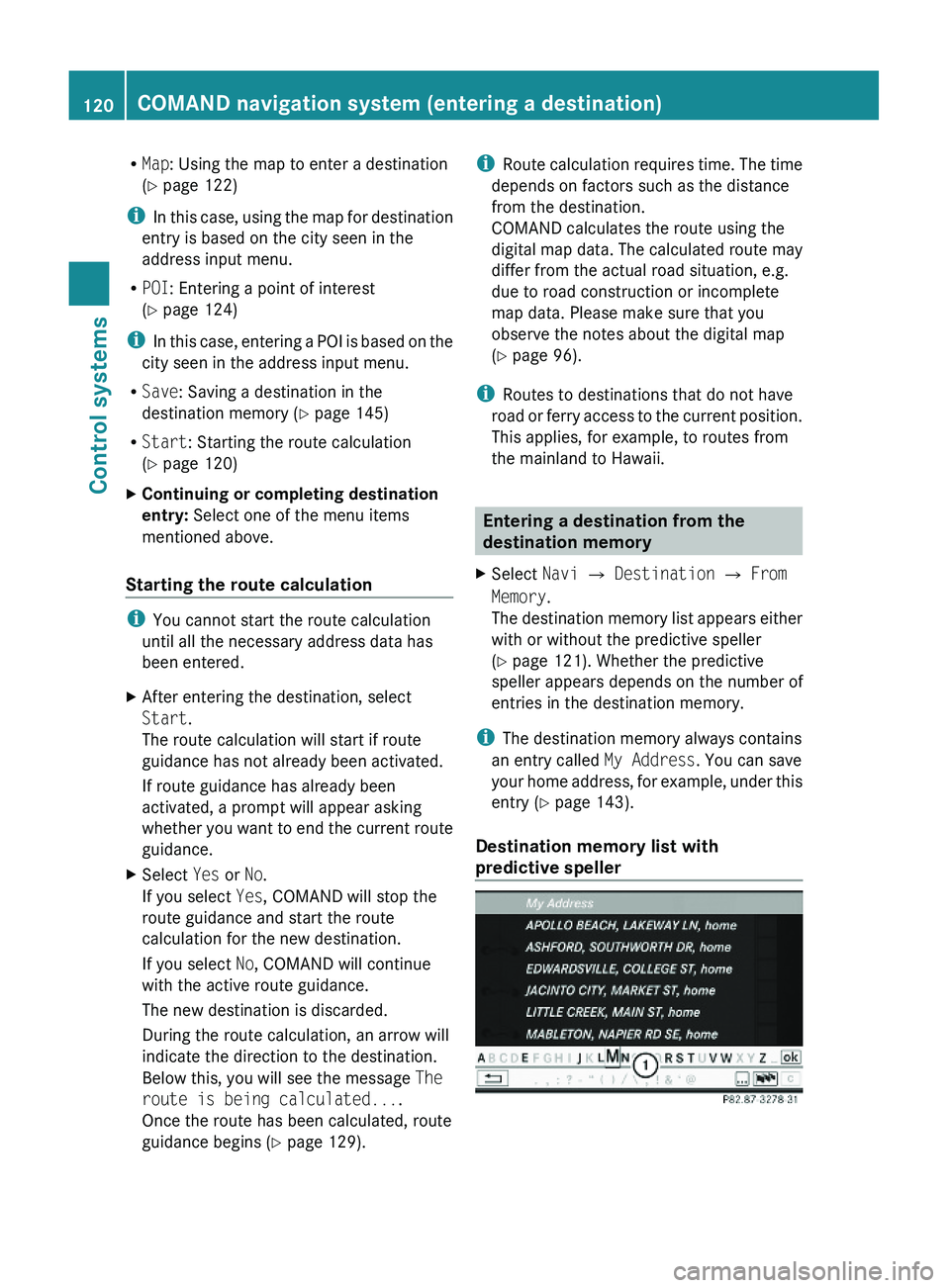
XSelect Navi \000T Destination \000T From
Memory.
The destination memory list appears either
with or without the predictive speller
(Y page 121). Whether the predictive
speller appears depends on the number of
entries in the destination memory.
iThe destination memory always contains
an entry called My Address. You can save
your home address, for example, under this
entry (Y page 143).
Destination memory list with
predictive speller
120COMAND navigation system (entering a destination)Control systems
221_AKB; 6; 20, en-USd2ugruen,Version: 2.11.8.12009-09-24T13:28:17+02:00 - Seite 120
Page 125 of 548
RRestaurant
R Other
With the option Other you can enter stopover
destinations from the destination memory,
last selected destinations, POIs, or via the
address ( Y page 123).
You can enter stopover destinations on the
route or in the vicinity of the route.
You can use the stopover function to
influence the route guidance calculation to
the main destination. When you have reached
your stopover, COMAND automatically
calculates the route to the main destination.
Entering predefined destinationsXSelect Navi 0054 Destination 0054
Stopover .
If a stopover has already been entered, you
can change it.
Changing: Select Change Stopover .
You can now select a category.XSelecting a category: Select category,
e.g. Gas station .
COMAND first looks for destinations along
the vehicle’s route and within the immediate
vicinity of the vehicle. If there are no
destinations available there, COMAND
searches for destinations in an area around
the vehicle position.
If COMAND does not find any destinations,
you will see a message to this effect.
XSelect OK.
You can now select a different category.
If COMAND finds destinations, you will see a
list of the destinations and details of how far
away they are in the right-hand side of the
display. The information about how far away
the destinations are can take a few seconds
to be displayed.
The left-hand part of the display shows the
destinations on the map. The destination
marked in the list is highlighted in the map.
XSelecting a destination: Select the
desired destination from list.
The address of the destination appears.XStarting route calculation: Select Start,
see also ( Y page 120).
Entering another destination as a
stopover
XSelect Navi 0054 Destination 0054
Stopover .XEntering: Select Other.
You can select between the following menu
items:
R Address Entry
R From Memory
R From Last Destinations
R From POIsXSelect a menu item.
Subsequent destination entries may differ,
depending on your selection:
R Address Entry selection:
XEnter a destination by address
( Y page 107).
R
From Memory selection:
XEnter a destination from the
destination memory ( Y page 120).
R
From Last Destinations selection:
XEnter a destination from the list of last
destinations ( Y page 122).
R
From POIs selection:
XEnter a point of interest (POI)
( Y page 124).XStarting route calculation: After entering
a destination, select Start (Y page 120).
Changing a stopover
If a stopover has already been entered, you
can change it.
COMAND navigation system (entering a destination)123Control systems221_AKB; 6; 20, en-USd2ugruen,Version: 2.11.8.12009-09-24T13:28:17+02:00 - Seite 123Z