display MERCEDES-BENZ S CLASS 2010 Manual PDF
[x] Cancel search | Manufacturer: MERCEDES-BENZ, Model Year: 2010, Model line: S CLASS, Model: MERCEDES-BENZ S CLASS 2010Pages: 548, PDF Size: 11.45 MB
Page 194 of 548
Notes about handling DVDs
For notes about handling DVDs, see
( Y page 179).
Functional limitations
Depending on the DVD, it is possible that
certain functions or actions may be
temporarily or permanently unavailable. If
you try to utilize such functions or carry out
such actions, you will see the 0050 symbol in
the display.
Inserting or ejecting DVDs
GObserve Safety notes, see page 176.XInserting or ejecting a DVD ( Y page 179).
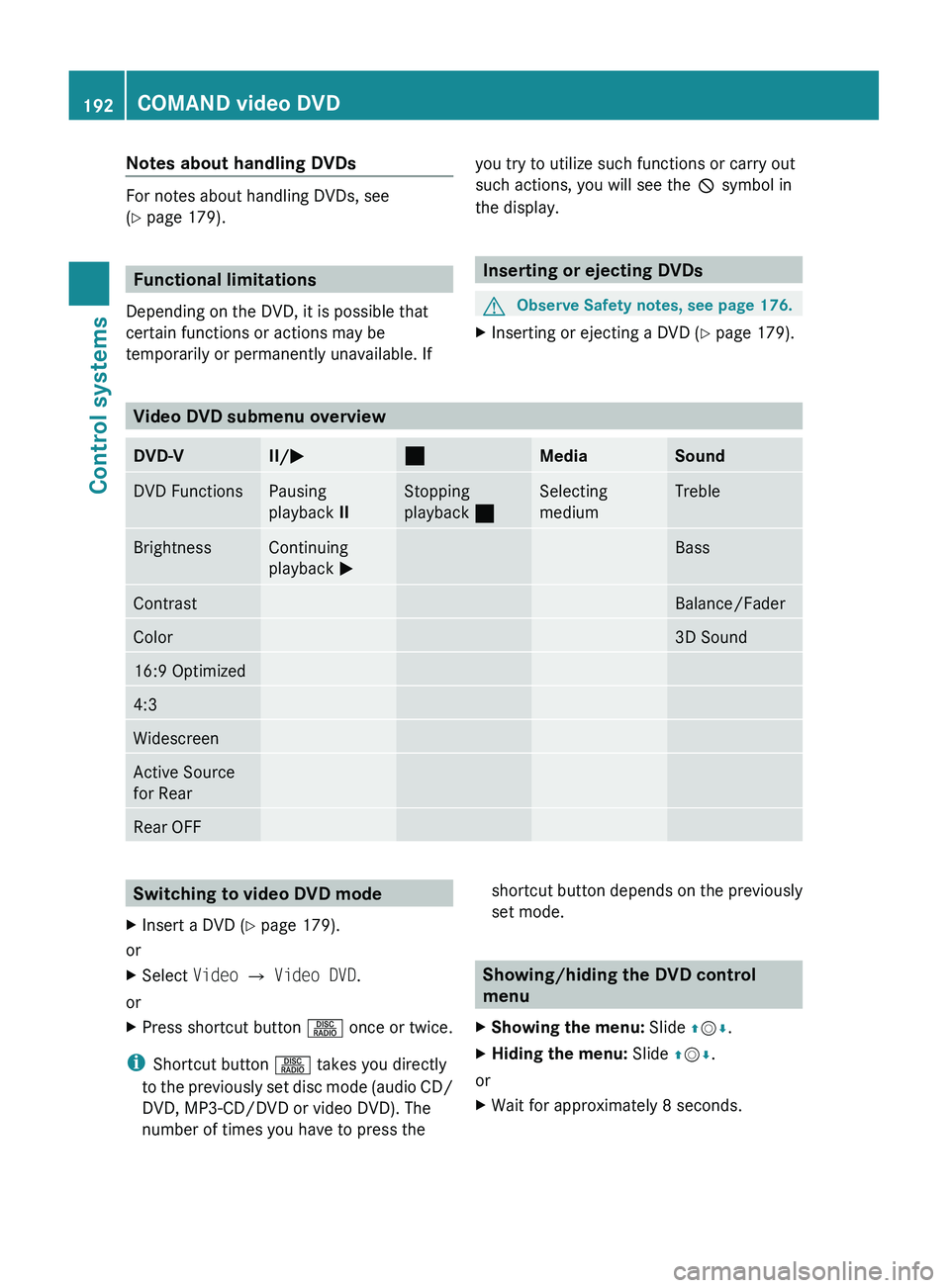
Video DVD submenu overview
DVD-VII/ 005000AAMediaSoundDVD FunctionsPausing
playback IIStopping
playback 00AASelecting
mediumTrebleBrightnessContinuing
playback 0050BassContrastBalance/FaderColor3D Sound16:9 Optimized4:3WidescreenActive Source
for RearRear OFFSwitching to video DVD modeXInsert a DVD ( Y page 179).
or
XSelect Video 0054 Video DVD .
or
XPress shortcut button 0057 once or twice.
i
Shortcut button 0057 takes you directly
to the previously set disc mode (audio CD/
DVD, MP3-CD/DVD or video DVD). The
number of times you have to press the
shortcut button depends on the previously
set mode.
Showing/hiding the DVD control
menu
XShowing the menu: Slide 00A0005B 0050.XHiding the menu: Slide 00A0005B 0050.
or
XWait for approximately 8 seconds.192COMAND video DVDControl systems
221_AKB; 6; 20, en-USd2ugruen,Version: 2.11.8.12009-09-24T13:28:17+02:00 - Seite 192
Page 196 of 548
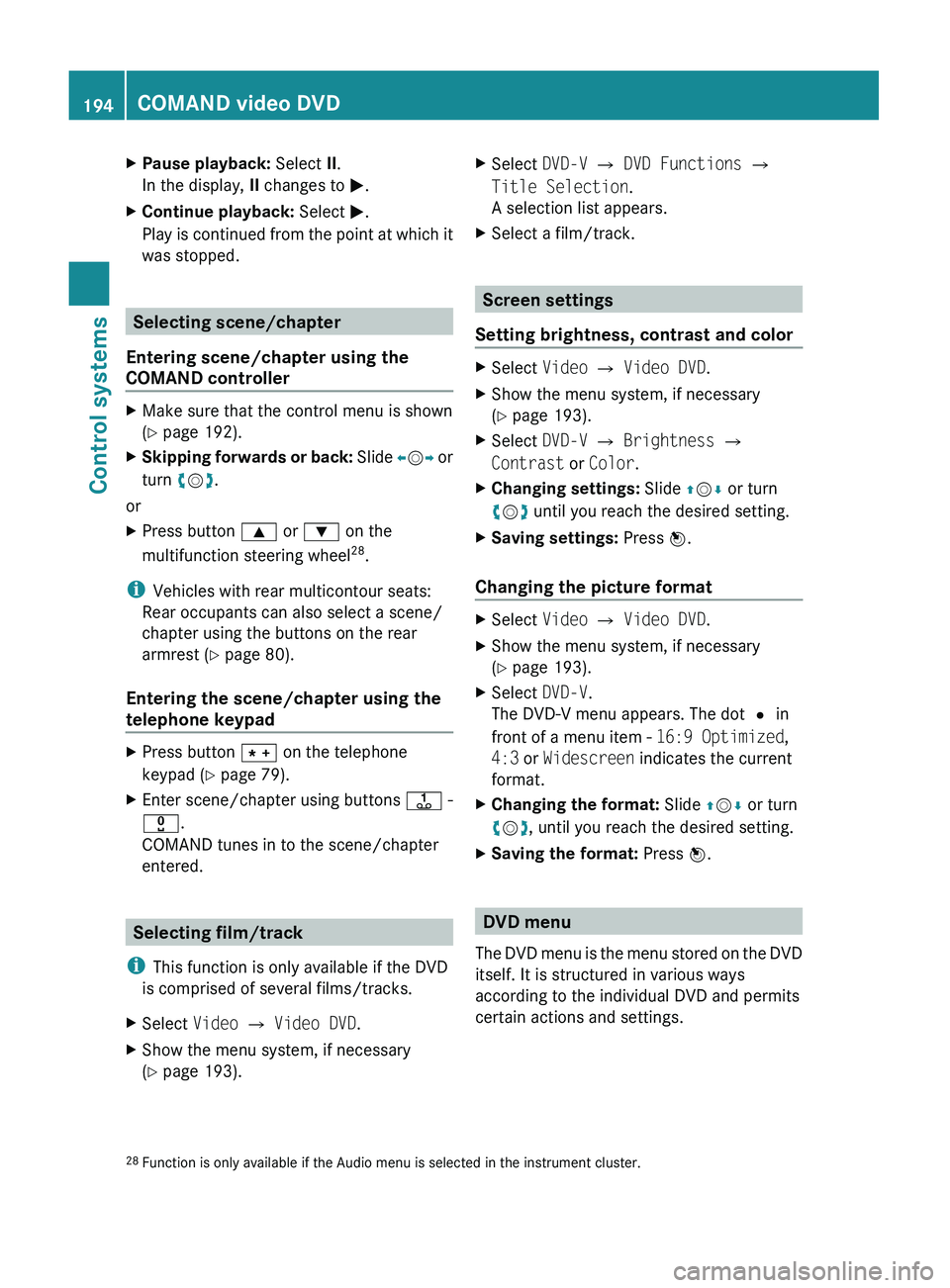
XPause playback: Select II.
In the display, II changes to 0050.XContinue playback: Select 0050.
Play is continued from the point at which it
was stopped.
Selecting scene/chapter
Entering scene/chapter using the
COMAND controller
XMake sure that the control menu is shown
( Y page 192).XSkipping forwards or back: Slide 009E005B 009F or
turn 0082005B 0083.
or
XPress button 003C or 003D on the
multifunction steering wheel 28
.
i Vehicles with rear multicontour seats:
Rear occupants can also select a scene/
chapter using the buttons on the rear
armrest ( Y page 80).
Entering the scene/chapter using the
telephone keypad
XPress button 004D on the telephone
keypad ( Y page 79).XEnter scene/chapter using buttons 0089 -
0037 .
COMAND tunes in to the scene/chapter
entered.
Selecting film/track
i This function is only available if the DVD
is comprised of several films/tracks.
XSelect Video 0054 Video DVD .XShow the menu system, if necessary
( Y page 193).XSelect DVD-V 0054 DVD Functions 0054
Title Selection .
A selection list appears.XSelect a film/track.
Screen settings
Setting brightness, contrast and color
XSelect Video 0054 Video DVD .XShow the menu system, if necessary
( Y page 193).XSelect DVD-V 0054 Brightness 0054
Contrast or Color .XChanging settings: Slide 00A0005B 0050 or turn
0082 005B 0083 until you reach the desired setting.XSaving settings: Press 00A1.
Changing the picture format
XSelect Video 0054 Video DVD .XShow the menu system, if necessary
( Y page 193).XSelect DVD-V.
The DVD-V menu appears. The dot 003F in
front of a menu item - 16:9 Optimized,
4:3 or Widescreen indicates the current
format.XChanging the format: Slide 00A0005B 0050 or turn
0082 005B 0083, until you reach the desired setting.XSaving the format: Press 00A1.
DVD menu
The DVD menu is the menu stored on the DVD
itself. It is structured in various ways
according to the individual DVD and permits
certain actions and settings.
28 Function is only available if the Audio menu is selected in the instrument cluster.194COMAND video DVDControl systems
221_AKB; 6; 20, en-USd2ugruen,Version: 2.11.8.12009-09-24T13:28:17+02:00 - Seite 194
Page 199 of 548
to be lost. Mercedes-Benz USA, LLC is not
liable for any loss of data.
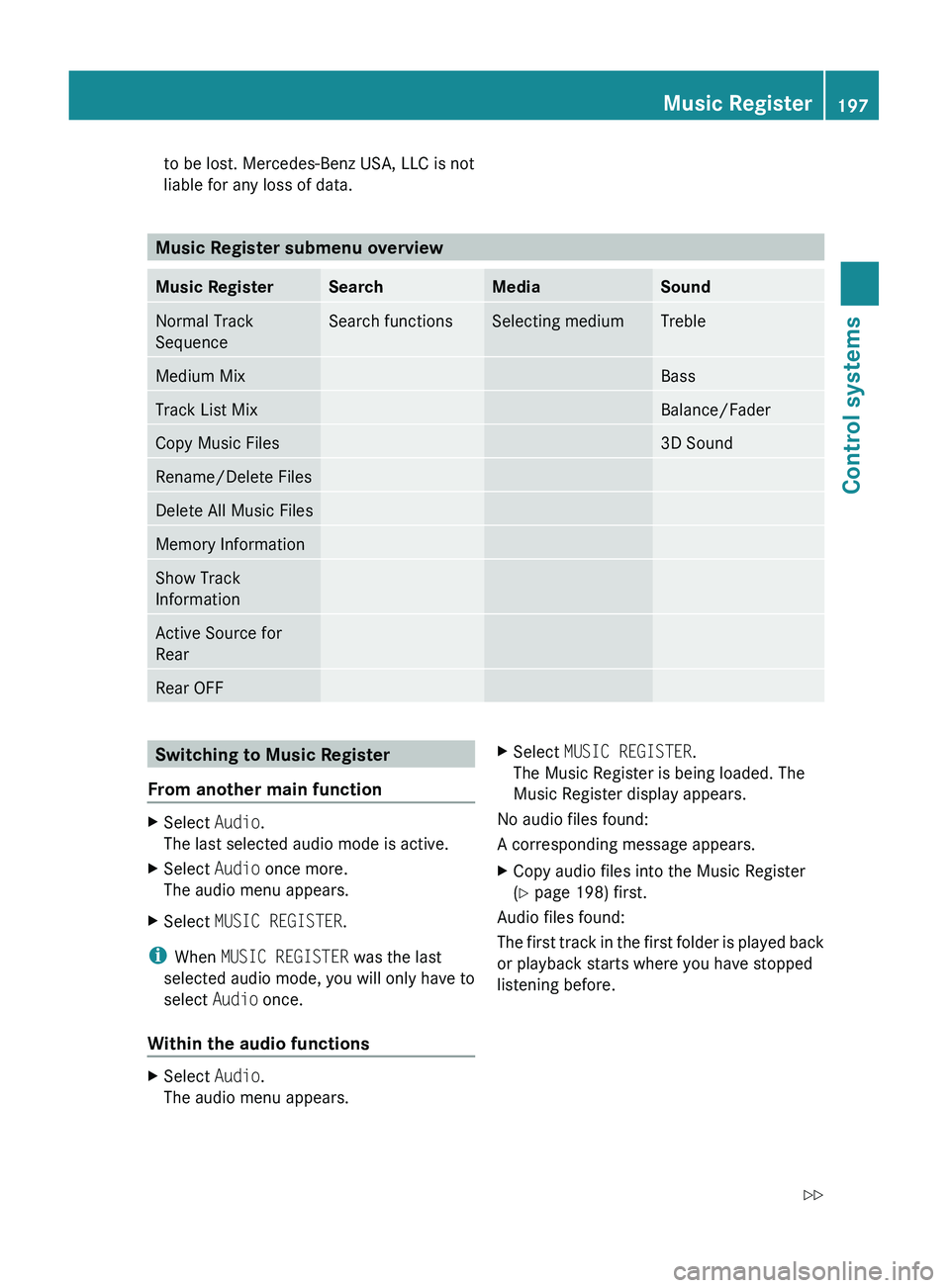
Music Register submenu overview
Music RegisterSearchMediaSoundNormal Track
SequenceSearch functionsSelecting mediumTrebleMedium MixBassTrack List MixBalance/FaderCopy Music Files3D SoundRename/Delete FilesDelete All Music FilesMemory InformationShow Track
InformationActive Source for
RearRear OFFSwitching to Music Register
From another main functionXSelect Audio.
The last selected audio mode is active.XSelect Audio once more.
The audio menu appears.XSelect MUSIC REGISTER .
i
When MUSIC REGISTER was the last
selected audio mode, you will only have to
select Audio once.
Within the audio functions
XSelect Audio.
The audio menu appears.XSelect MUSIC REGISTER .
The Music Register is being loaded. The
Music Register display appears.
No audio files found:
A corresponding message appears.
XCopy audio files into the Music Register
( Y page 198) first.
Audio files found:
The first track in the first folder is played back
or playback starts where you have stopped
listening before.
Music Register197Control systems221_AKB; 6; 20, en-USd2ugruen,Version: 2.11.8.12009-09-24T13:28:17+02:00 - Seite 197Z
Page 206 of 548
track, provided it has been played for
longer that 8 seconds. When the track has
been played for less than 8 seconds, you
will skip to the track before the current one.
When you select an option other than
Normal Track Sequence , the track is
chosen at random.
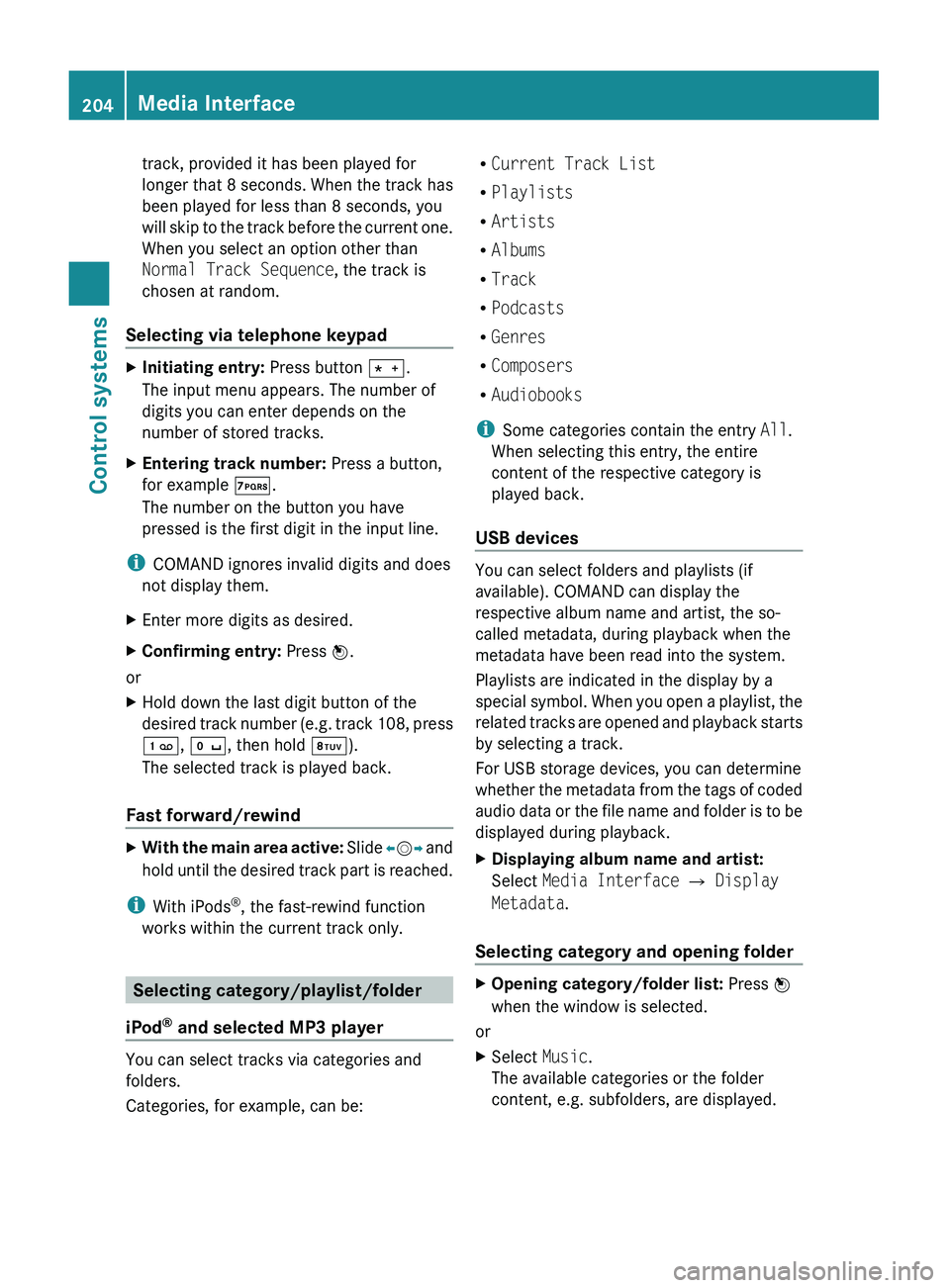
Selecting via telephone keypadXInitiating entry: Press button 010A.
The input menu appears. The number of
digits you can enter depends on the
number of stored tracks.XEntering track number: Press a button,
for example 0107.
The number on the button you have
pressed is the first digit in the input line.
i COMAND ignores invalid digits and does
not display them.
XEnter more digits as desired.XConfirming entry: Press 00A1.
or
XHold down the last digit button of the
desired track number (e.g. track 108, press
0101 , 010B , then hold 0108).
The selected track is played back.
Fast forward/rewind
XWith the main area active: Slide 009E005B 009F and
hold until the desired track part is reached.
i With iPods ®
, the fast-rewind function
works within the current track only.
Selecting category/playlist/folder
iPod ®
and selected MP3 player
You can select tracks via categories and
folders.
Categories, for example, can be:
R Current Track List
R Playlists
R Artists
R Albums
R Track
R Podcasts
R Genres
R Composers
R Audiobooks
i Some categories contain the entry All.
When selecting this entry, the entire
content of the respective category is
played back.
USB devices
You can select folders and playlists (if
available). COMAND can display the
respective album name and artist, the so-
called metadata, during playback when the
metadata have been read into the system.
Playlists are indicated in the display by a
special symbol. When you open a playlist, the
related tracks are opened and playback starts
by selecting a track.
For USB storage devices, you can determine
whether the metadata from the tags of coded
audio data or the file name and folder is to be
displayed during playback.
XDisplaying album name and artist:
Select Media Interface 0054 Display
Metadata .
Selecting category and opening folder
XOpening category/folder list: Press 00A1
when the window is selected.
or
XSelect Music.
The available categories or the folder
content, e.g. subfolders, are displayed.204Media InterfaceControl systems
221_AKB; 6; 20, en-USd2ugruen,Version: 2.11.8.12009-09-24T13:28:17+02:00 - Seite 204
Page 208 of 548
USB storage device
iThis function is available for
alphabetically ordered directories. The
function is not available within playlists for
example.
XWithin a folder, press the respective button
on the telephone keypad once or more to
enter the first character of the desired
artist name. For example, press button
008B three times for an artist whose name
starts with a “C”.
The available characters are displayed on
the bottom of the display.
When the directory contains folders only,
COMAND will search for folders.
Selecting active partition (USB
storage devices only)
You can select this function with USB storage
devices when the storage space is
partitioned. The system supports up to 4
partitions (primary or logical, FAT formatted).
i The Windows formatting program
supports FAT partitions of up to 32 gigabyte
by default.
XSelect Media Interface 0054 Select
Active Partition .
Playback options
The following options are available:
R Normal Track Sequence
Tracks are played back in regular order (e.g.
in numerical or in alphabetical order).
R Random Tracks
All available tracks on the current medium
are played back in random order.
R Category Mix or Random Folder (with
USB devices when Folder was selected)
Tracks of the currently active category or
folder and its subfolders are played back in
random order.XSelecting playback options: Select
Media Interface in the basic display.
The list of options appears. The dot 003F
indicates the currently selected option.XSelect an option.
COMAND vehicle menu
Introduction
GWarning!
HYBRID vehicles: It is imperative that you read
the HYBRID Supplemental Operating
Instructions included in your vehicle literature
portfolio. You may otherwise not receive all
necessary safety information and warning for
the operation of your vehicle.
In this menu, you can program the following
vehicle functions:
FunctionMulti-function Contour Seat
Settings (Y page 216)Rear Window Sunshade (Y page 207)Easy Entry/Exit Feature
( Y page 208)Exterior Lighting Delayed Shut-off
( Y page 208)Interior Lighting Delayed Shut-off
( Y page 208)Ambient Lighting (Y page 209)Automatic Mirror Folding
( Y page 209)Locator Lighting (Y page 210)206COMAND vehicle menuControl systems
221_AKB; 6; 20, en-USd2ugruen,Version: 2.11.8.12009-09-24T13:28:17+02:00 - Seite 206
Page 209 of 548
FunctionAutomatic Locking (Y page 210)Trunk Opening-height Restriction
(Y page 210)
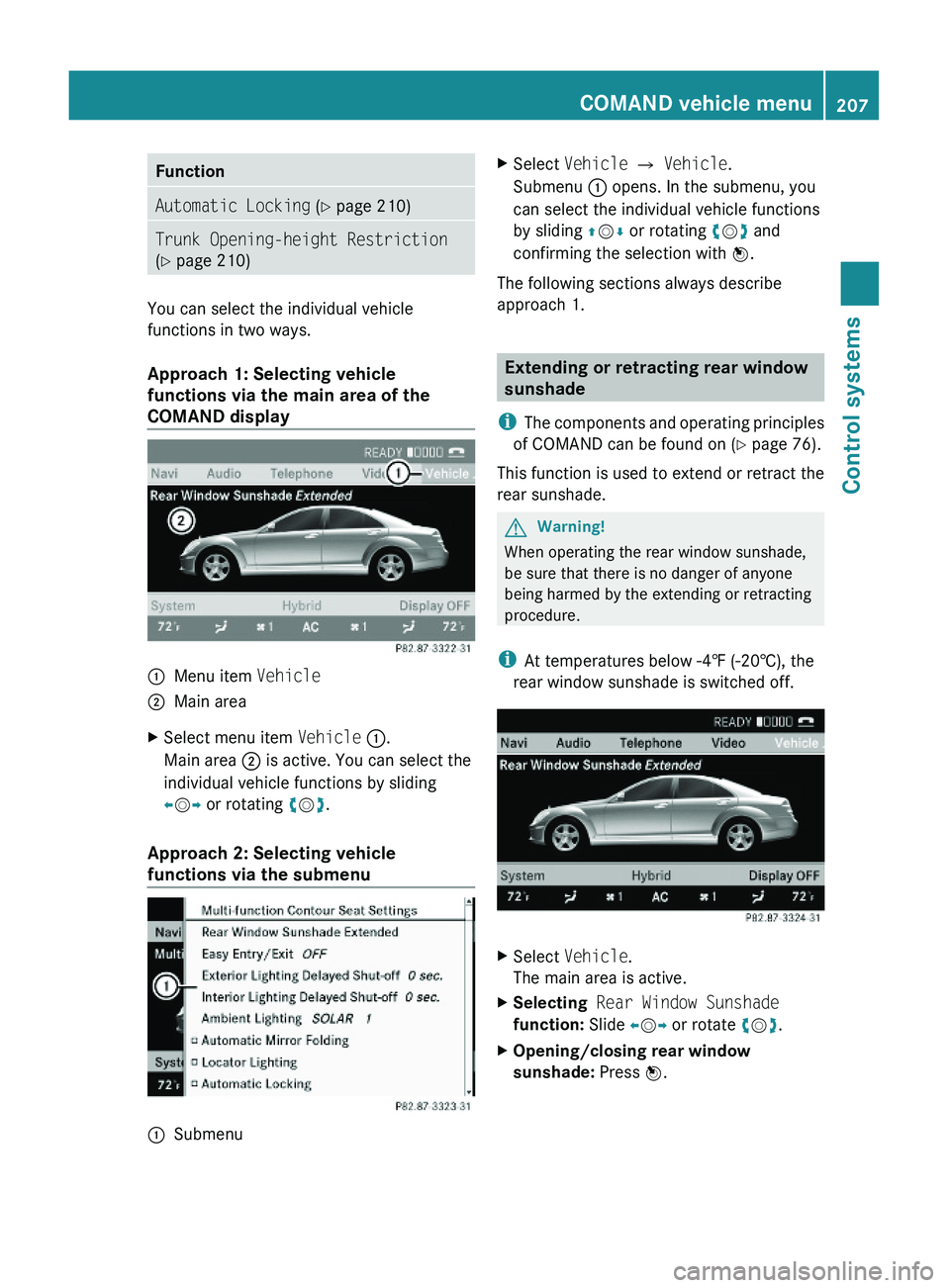
You can select the individual vehicle
functions in two ways.
Approach 1: Selecting vehicle
functions via the main area of the
COMAND display
\000FMenu item Vehicle\000GMain areaXSelect menu item Vehicle \000F.
Main area \000G is active. You can select the
individual vehicle functions by sliding
\000
Page 220 of 548
Multicontour seats, front
iIf PRE-SAFE® has been activated, the air
pressure in the air chambers (on the sides
of the seat cushion and seat backrest) of
the front multicontour seats is increased.
iWhen you adjust the multicontour seat,
noises may result from pumping air into or
releasing air out of the air chambers.
To support the spine, you can individually
adjust the seat backrest contour of the front
seats by regulating the air pressure in the air
chambers of the multicontour seat.
You can adjust the following air chambers:
RSides of seat cushion
RSides of seat backrest
RSeat backrest curvature in lumbar area
RSeat backrest curvature in shoulder area
The settings are made on the COMAND
display.
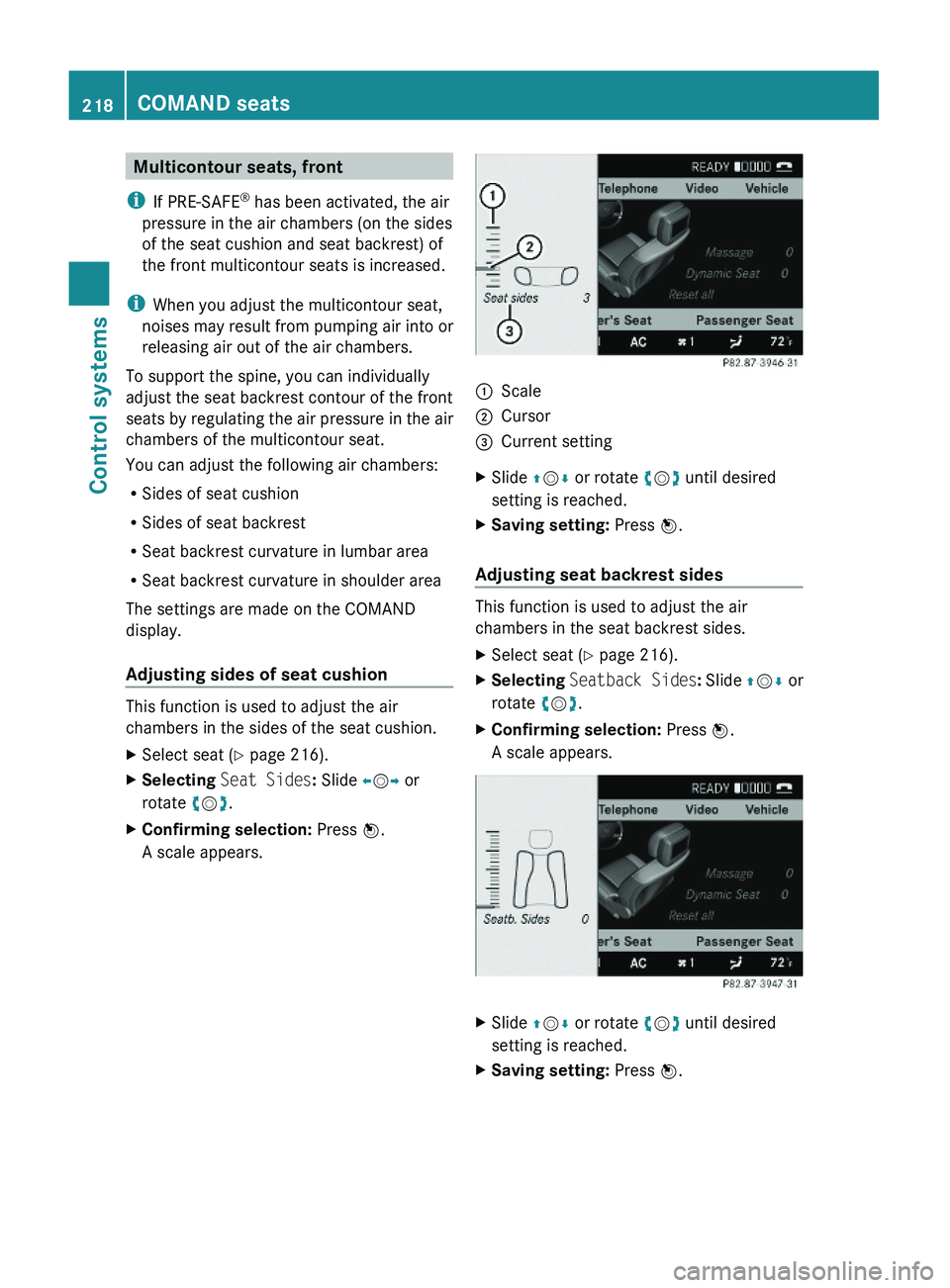
Adjusting sides of seat cushion
This function is used to adjust the air
chambers in the sides of the seat cushion.
XSelect seat (Y page 216).XSelecting Seat Sides: Slide \000
Page 223 of 548
Multifunction steering wheel
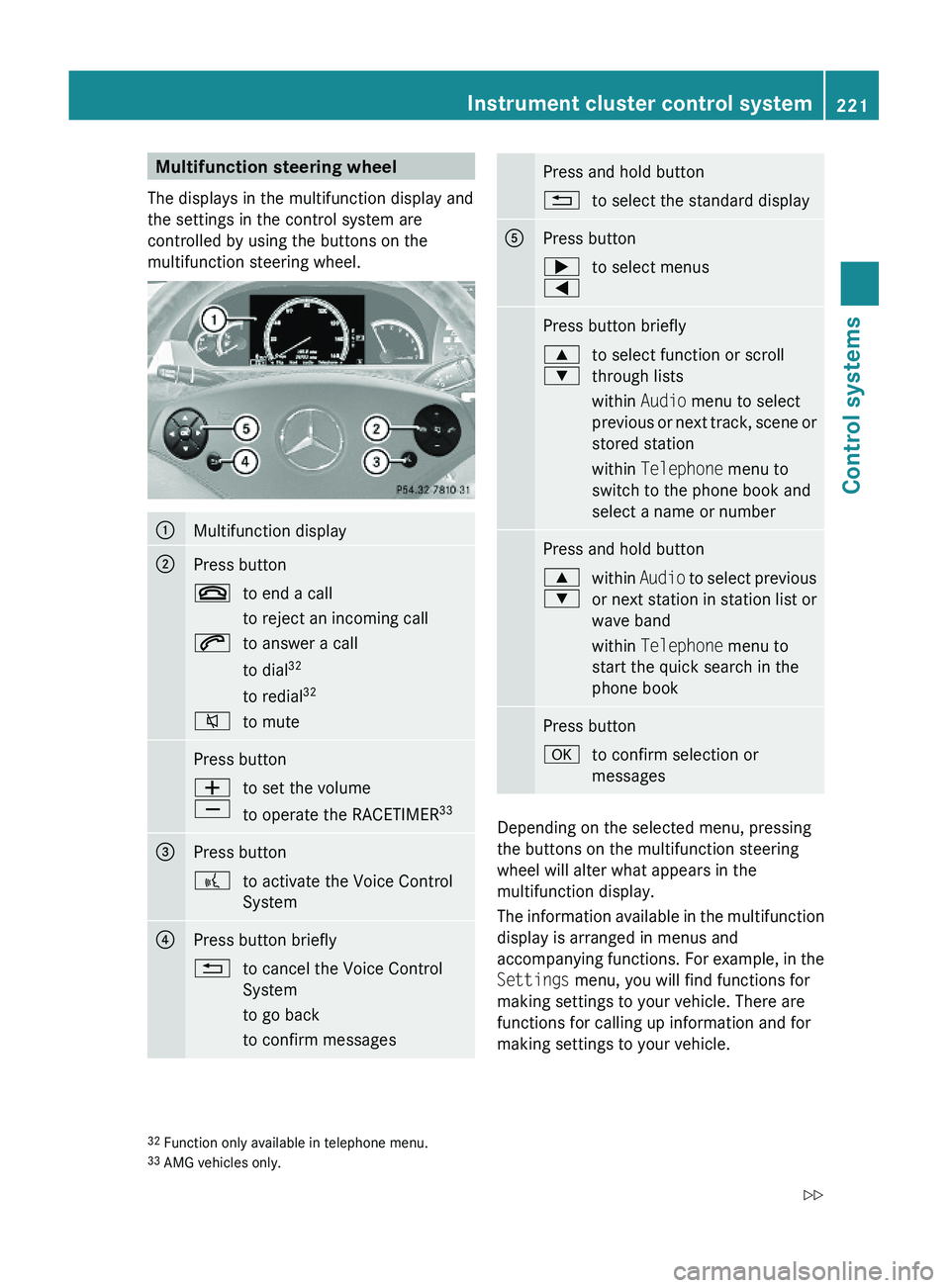
The displays in the multifunction display and
the settings in the control system are
controlled by using the buttons on the
multifunction steering wheel.
\000FMultifunction display\000GPress button\000to end a call
to reject an incoming call
\000jto answer a call
to dial32
to redial32
\000lto mutePress button\000Z
\000[
to set the volume
to operate the RACETIMER33
\000
Page 224 of 548
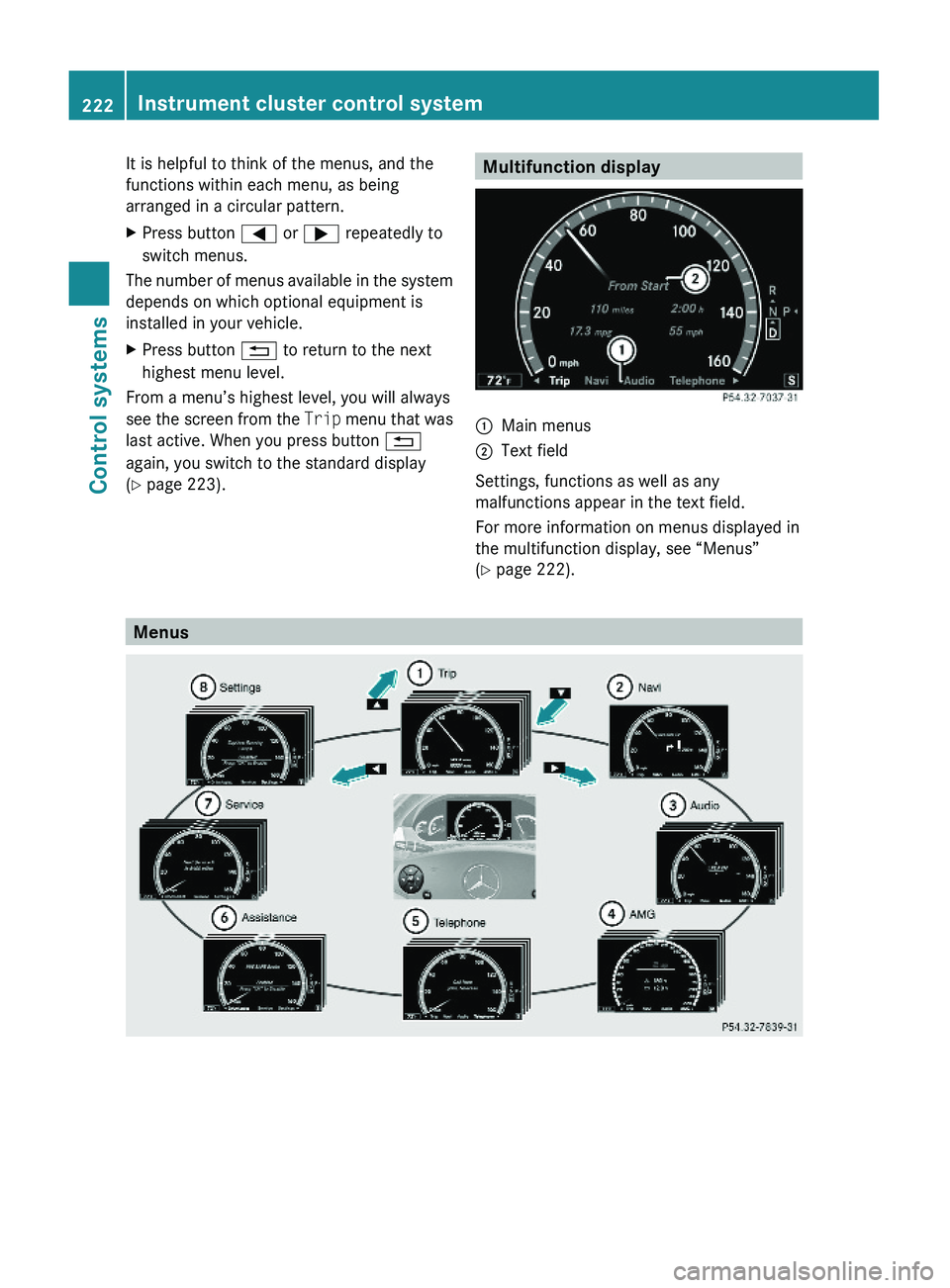
It is helpful to think of the menus, and the
functions within each menu, as being
arranged in a circular pattern.
XPress button \000@ or \000> repeatedly to
switch menus.
The number of menus available in the system
depends on which optional equipment is
installed in your vehicle.
XPress button \000A to return to the next
highest menu level.
From a menu’s highest level, you will always
see the screen from the Trip menu that was
last active. When you press button \000A
again, you switch to the standard display
(Y page 223).
Multifunction display\000FMain menus\000GText field
Settings, functions as well as any
malfunctions appear in the text field.
For more information on menus displayed in
the multifunction display, see “Menus”
(Y page 222).
Menus
222Instrument cluster control systemControl systems
221_AKB; 6; 20, en-USd2ugruen,Version: 2.11.8.12009-09-24T13:28:17+02:00 - Seite 222
Page 227 of 548
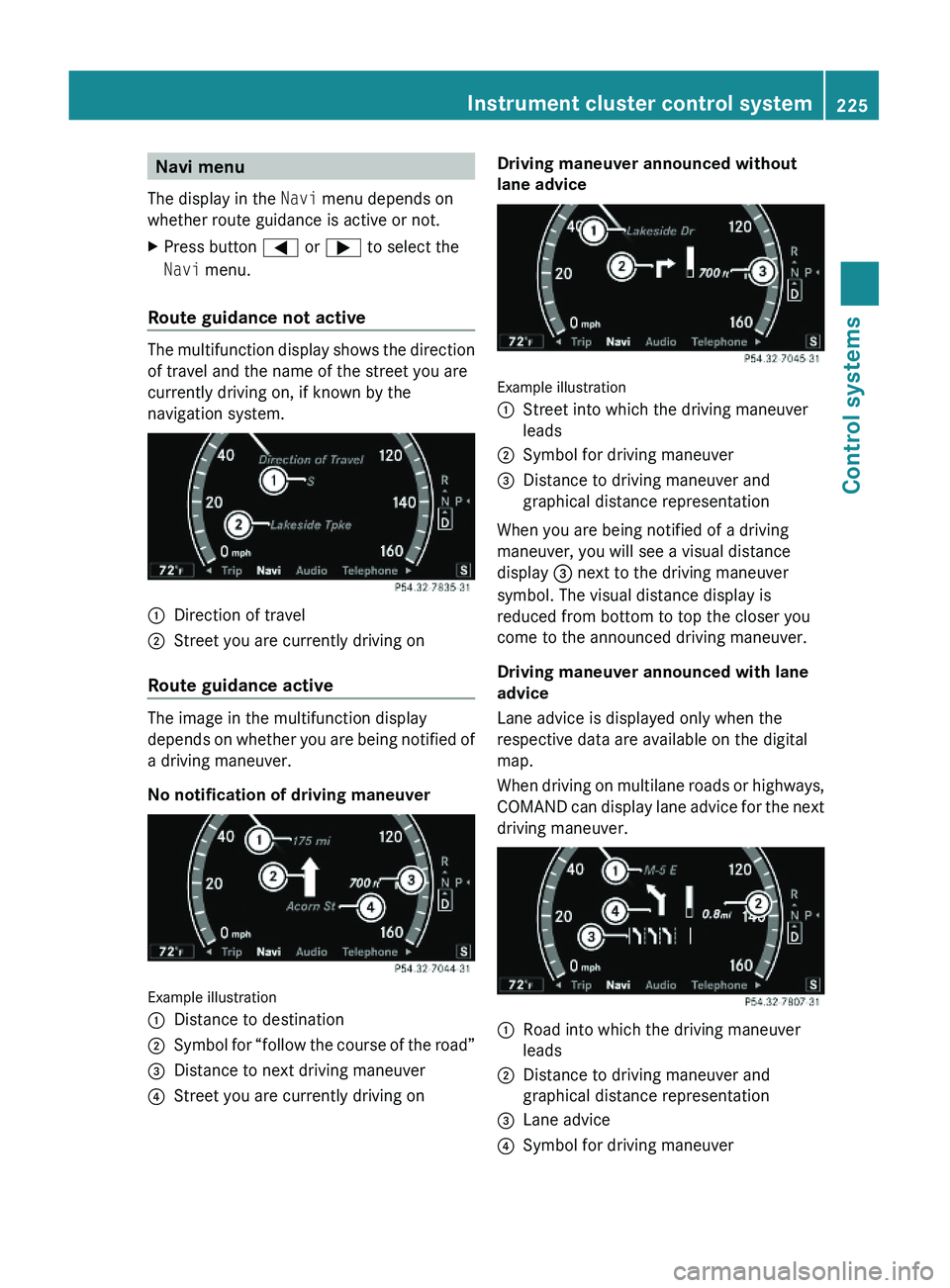
Navi menu
The display in the Navi menu depends on
whether route guidance is active or not.
XPress button \000@ or \000> to select the
Navi menu.
Route guidance not active
The multifunction display shows the direction
of travel and the name of the street you are
currently driving on, if known by the
navigation system.
\000FDirection of travel\000GStreet you are currently driving on
Route guidance active
The image in the multifunction display
depends on whether you are being notified of
a driving maneuver.
No notification of driving maneuver
Example illustration
\000FDistance to destination\000GSymbol for “follow the course of the road”\000