display MERCEDES-BENZ S CLASS 2010 Service Manual
[x] Cancel search | Manufacturer: MERCEDES-BENZ, Model Year: 2010, Model line: S CLASS, Model: MERCEDES-BENZ S CLASS 2010Pages: 548, PDF Size: 11.45 MB
Page 133 of 548
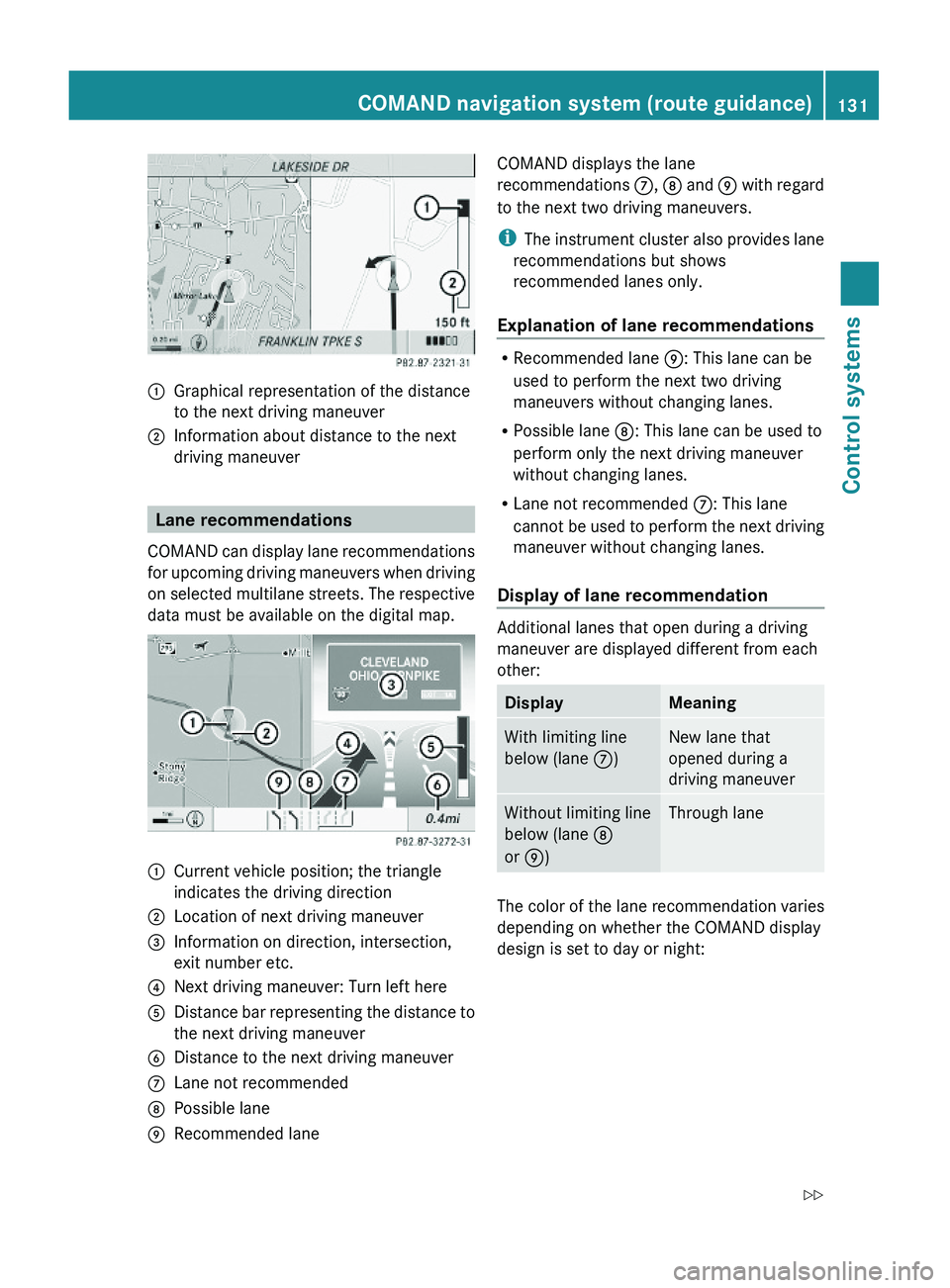
\000FGraphical representation of the distance
to the next driving maneuver
\000GInformation about distance to the next
driving maneuver
Lane recommendations
COMAND can display lane recommendations
for upcoming driving maneuvers when driving
on selected multilane streets. The respective
data must be available on the digital map.
\000FCurrent vehicle position; the triangle
indicates the driving direction
\000GLocation of next driving maneuver\000
Page 134 of 548
Day modeNight modeRecommended
lane \000p = deep blue
Recommended
lane \000p = light blue
Possible lane \000o =
light blue
Possible lane \000o =
deep blue
Lane not
recommended \000n: =
grey
Lane not
recommended \000n: =
grey
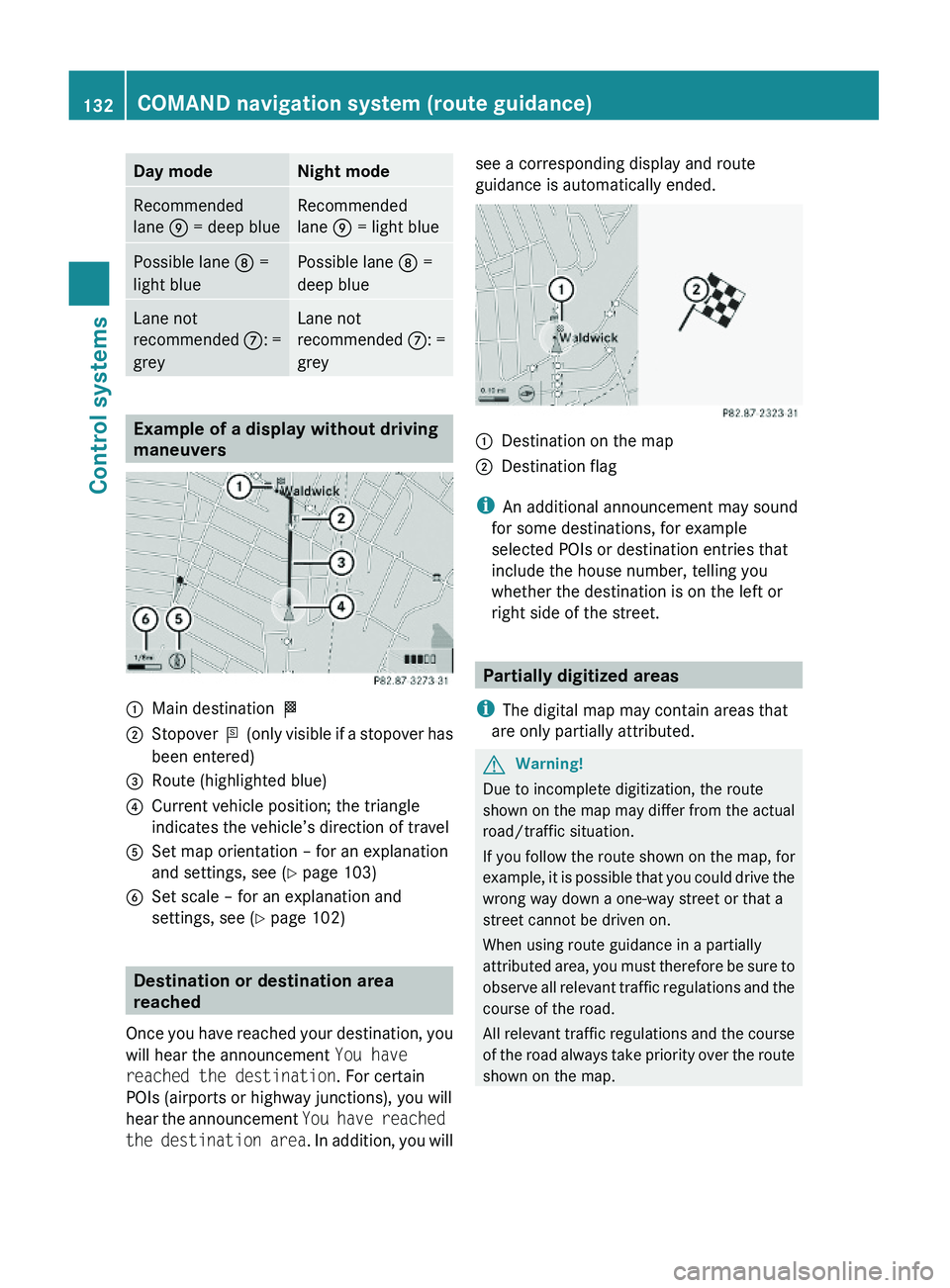
Example of a display without driving
maneuvers
\000FMain destination \000T\000GStopover \000U (only visible if a stopover has
been entered)
\000
Page 135 of 548
If the destination is within a partially
digitized area
COMAND guides you through fully digitized
areas for as long as possible. Route guidance
is conducted in the usual manner, e.g. with
navigation announcements and route
guidance displays.
Before the vehicle reaches a partially digitized
area, COMAND notifies you of this with the
following announcements:
RBe prepared to enter an area where
turn by turn guidance cannot be
provided.
RIn 700 feet you will enter an area
where turn by turn guidance cannot
be provided.
iThe indicated distance can be seen here
by way of example. In reality, it may be
different.
RYou are about to enter an area
where turn by turn guidance cannot
be provided.
iWhen you call up the route info to this
type of destination, (Y page 136) the
following data shown there may differ from
the actual situation:
RDistance to the destination
REstimated driving time to the destination
REstimated arrival time
Route guidance within a partially
digitized area
If you start route guidance in this type of area,
you will hear the following announcement:
You are currently in an area where
turn by turn guidance cannot be
provided.
Route guidance is provided by means of a
direction arrow showing the compass
heading to the destination. COMAND will not
generate automatic navigation
announcements.
If you try to call up an announcement
manually, (Y page 135) you will hear the
announcement You are currently in an
area where turn by turn guidance
cannot be provided.
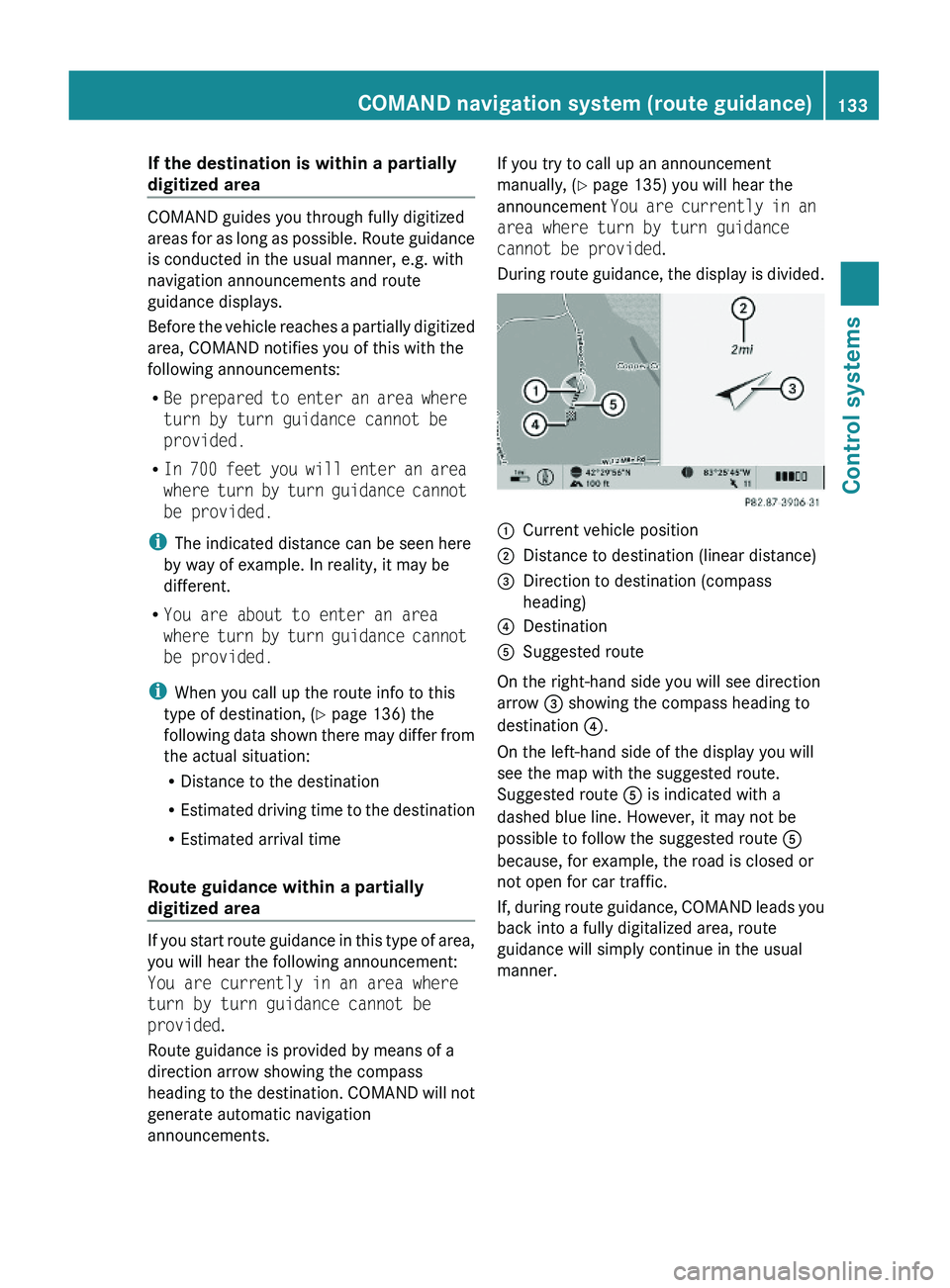
During route guidance, the display is divided.
\000FCurrent vehicle position\000GDistance to destination (linear distance)\000
Page 136 of 548
Off-road and off-map
Route guidance to an off-road
destination
GWarning!
The COMAND navigation system may direct
you to off-road routes that your vehicle may
not be capable of traversing through without
damaging your tires, wheels or vehicle. It is
the driver’s sole responsibility to determine
the suitability of the route. Off-road routes
may be of varying conditions and their
appropriateness for use may be affected by
various factors such as time of day, time of
year and immediate weather conditions that
cannot be judged or taken into consideration
by the COMAND system.
COMAND can guide you to destinations
within the area covered by the digital map,
even if a destination is not located at a road
known to the system.
These destinations are shown as off-road
destinations, which you can enter using the
map, for example. In these cases, COMAND
guides you for as long as possible with
navigation announcements and displays on
roads known to the system.
Shortly before you reach the last known the
point to leave the digitized road network, you
will hear the announcement The
destination is nearby. Follow the
arrow on the display.
You will then see an arrow that indicates the
direction to the off-road destination. When
the off-road destination is close to the road,
Area of dest. reached appears in addition
below the arrow.
The section of the route from the last known
point on the map to the off-road destination
is indicated with a dashed line after a certain
length. It simply shows the direction to the
off-road destination without taking account of
any type of obstacles in the way.
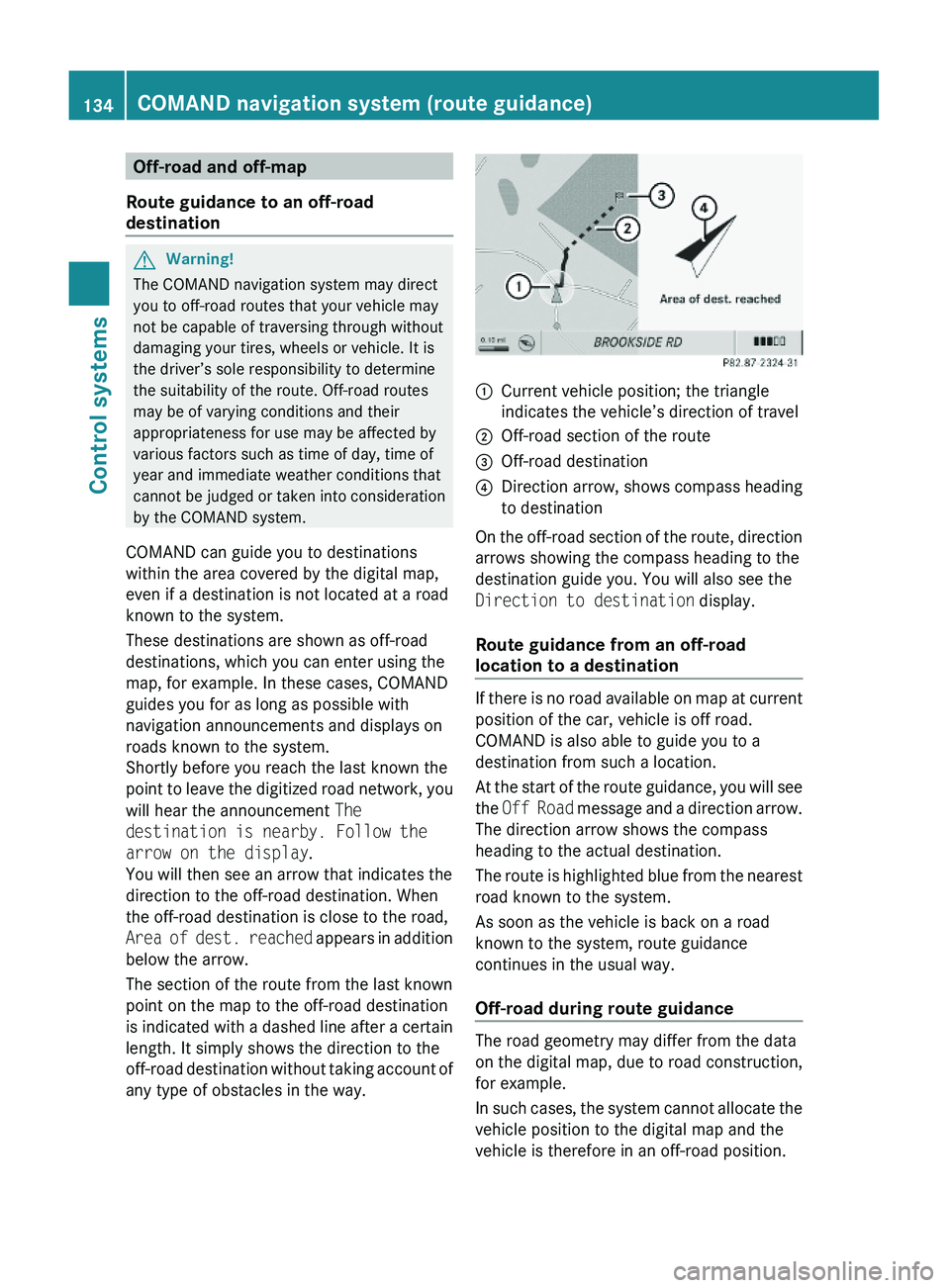
\000FCurrent vehicle position; the triangle
indicates the vehicle’s direction of travel
\000GOff-road section of the route\000
Page 137 of 548
The Off Road message and an arrow showing
the compass heading to the destination
appear on the display.
As soon as the system can allocate the
vehicle position to the map again, route
guidance continues in the usual way.
Navigation announcements
GWarning!
Navigation announcements are intended to
direct you while driving without diverting your
attention from the road and driving.
Please always use navigation announcements
instead of consulting the map display for
directions. Consulting the symbols or map
display for directions may cause you to divert
your attention from driving and increase your
risk of an accident.
i If Chinese is set as the system language,
the navigation announcements are in
English. For information on how to set the
system language see ( Y page 94).
Navigation announcements are muted
during telephone calls. You can, however,
call up a current announcement at any
time. You can also call up a current
announcement at any time if you have
missed an announcement.
Route guidance is active already.
XCalling up a current announcement:
Select Navi 0054 RPT .
or
XPress favorite button 0087 if the button has
been programmed with this function
( Y page 94).XSwitching off navigation messages:
Press button 006C during an
announcement.
You will see the message The driving
instructions have been muted. for a
short while.
i The announcements remain switched off
even if you start a new route guidance or if
COMAND is switched off/on with button
0094 .
If you switch COMAND off by removing the
SmartKey from the starter switch and then
switch the ignition back on after more than
3 minutes, the announcements are
automatically switched back on.
XSwitching navigation announcements
back on manually: Select Navi 0054 RPT .XAdjusting volume of the messages:
Adjust the volume during an automatic
announcement ( Y page 87).
or
XCall up an announcement manually using
Navi 0054 RPT and adjust the volume
( Y page 87).
i
You can use the function Audio
Fadeout (Y page 106) to reduce the
volume of audio sources during navigation
announcements.
COMAND navigation system (during
route guidance)
Cancel route guidance
XSelect Destination 0054 Cancel Route
Guidance in map view with the menu
system displayed ( Y page 102).
Continuing canceled route guidance
XSelect Destination 0054 Continue
Route Guidance in map view with the
menu system displayed ( Y page 102).
COMAND calculates the route.COMAND navigation system (during route guidance)135Control systems221_AKB; 6; 20, en-USd2ugruen,Version: 2.11.8.12009-09-24T13:28:17+02:00 - Seite 135Z
Page 138 of 548
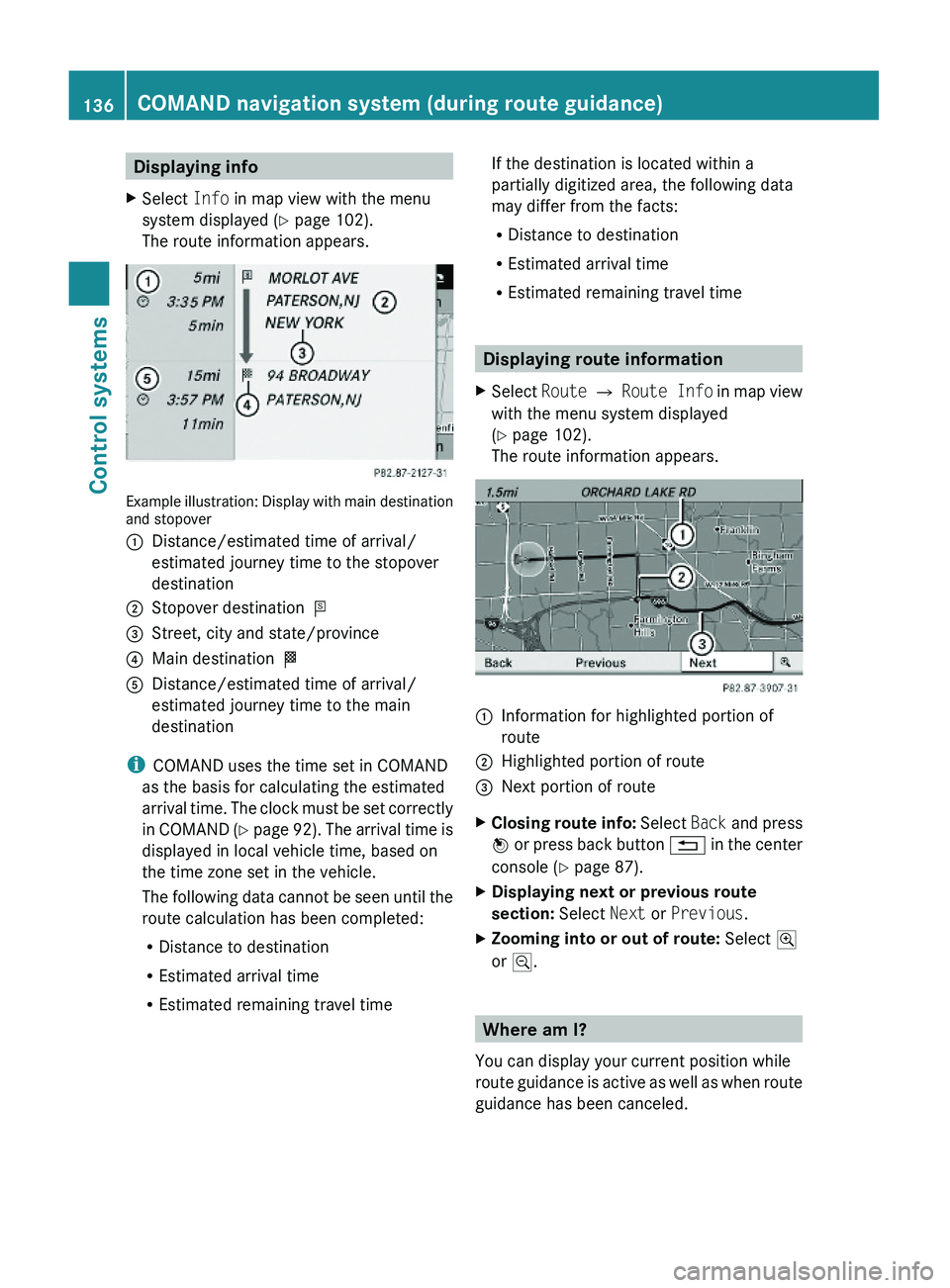
Displaying infoXSelect Info in map view with the menu
system displayed (Y page 102).
The route information appears.
Example illustration: Display with main destinationand stopover
\000FDistance/estimated time of arrival/
estimated journey time to the stopover
destination
\000GStopover destination \000U\000
Page 141 of 548
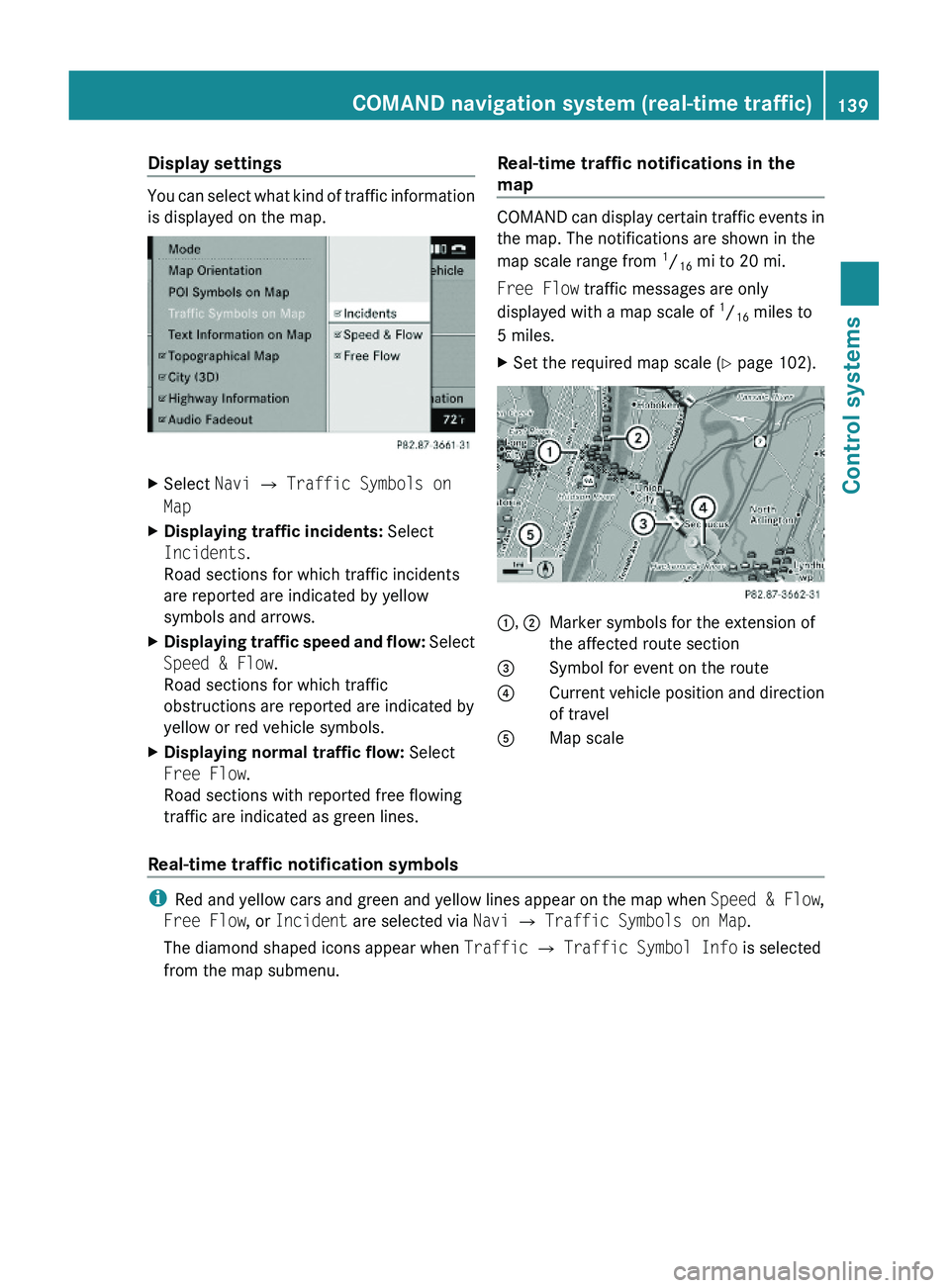
Display settings
You can select what kind of traffic information
is displayed on the map.
XSelect Navi \000T Traffic Symbols on
Map
XDisplaying traffic incidents: Select
Incidents.
Road sections for which traffic incidents
are reported are indicated by yellow
symbols and arrows.
XDisplaying traffic speed and flow: Select
Speed & Flow.
Road sections for which traffic
obstructions are reported are indicated by
yellow or red vehicle symbols.
XDisplaying normal traffic flow: Select
Free Flow.
Road sections with reported free flowing
traffic are indicated as green lines.
Real-time traffic notifications in the
map
COMAND can display certain traffic events in
the map. The notifications are shown in the
map scale range from 1/16 mi to 20 mi.
Free Flow traffic messages are only
displayed with a map scale of 1/16 miles to
5 miles.
XSet the required map scale (Y page 102).1, 2Marker symbols for the extension of
the affected route section
3Symbol for event on the route4Current vehicle position and direction
of travel
\000
Page 142 of 548
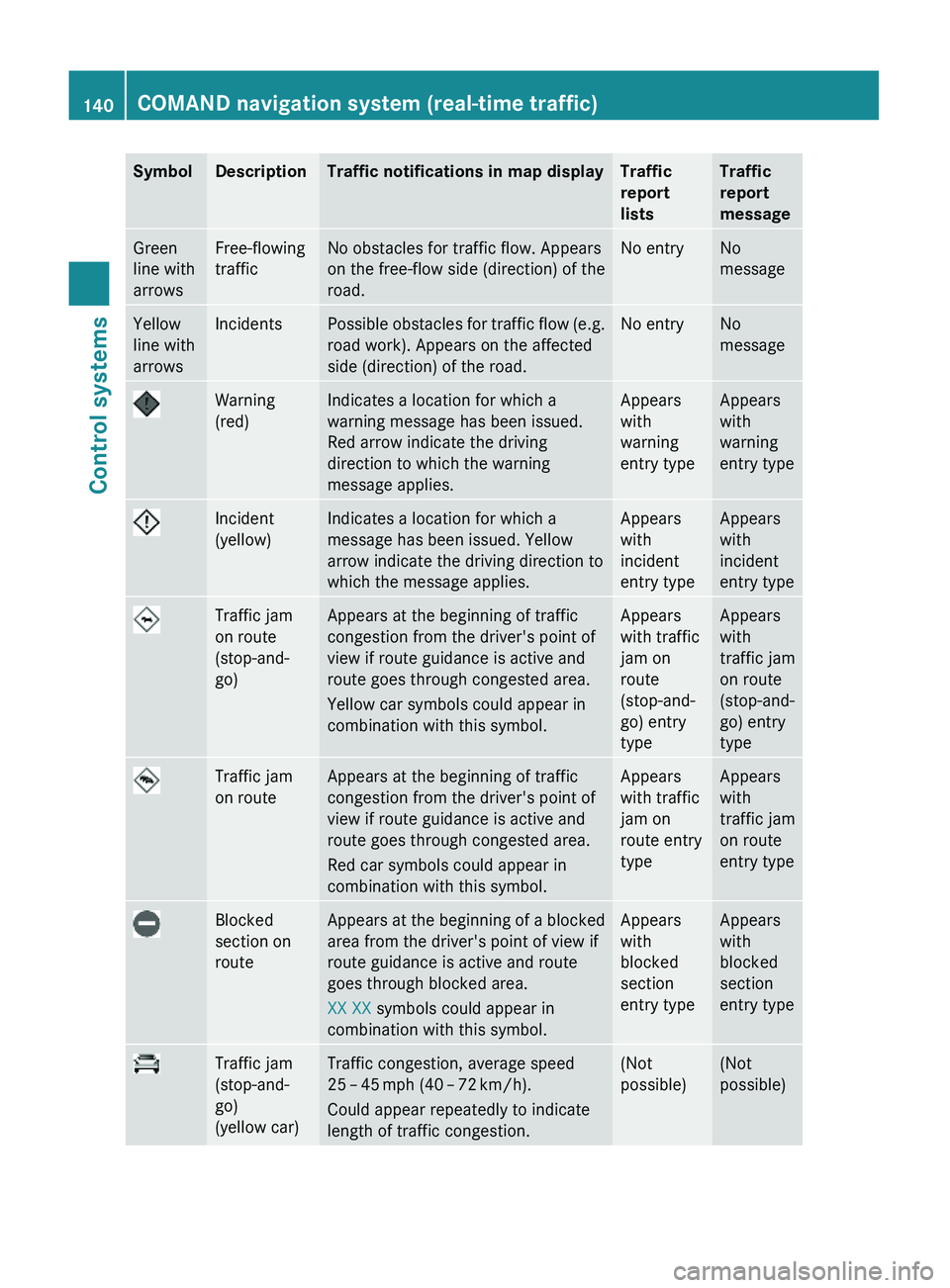
SymbolDescriptionTraffic notifications in map displayTraffic
report
lists
Traffic
report
message
Green
line with
arrows
Free-flowing
traffic
No obstacles for traffic flow. Appears
on the free-flow side (direction) of the
road.
No entryNo
message
Yellow
line with
arrows
IncidentsPossible obstacles for traffic flow (e.g.
road work). Appears on the affected
side (direction) of the road.
No entryNo
message
Warning
(red)
Indicates a location for which a
warning message has been issued.
Red arrow indicate the driving
direction to which the warning
message applies.
Appears
with
warning
entry type
Appears
with
warning
entry type
Incident
(yellow)
Indicates a location for which a
message has been issued. Yellow
arrow indicate the driving direction to
which the message applies.
Appears
with
incident
entry type
Appears
with
incident
entry type
Traffic jam
on route
(stop-and-
go)
Appears at the beginning of traffic
congestion from the driver's point of
view if route guidance is active and
route goes through congested area.
Yellow car symbols could appear in
combination with this symbol.
Appears
with traffic
jam on
route
(stop-and-
go) entry
type
Appears
with
traffic jam
on route
(stop-and-
go) entry
type
Traffic jam
on route
Appears at the beginning of traffic
congestion from the driver's point of
view if route guidance is active and
route goes through congested area.
Red car symbols could appear in
combination with this symbol.
Appears
with traffic
jam on
route entry
type
Appears
with
traffic jam
on route
entry type
Blocked
section on
route
Appears at the beginning of a blocked
area from the driver's point of view if
route guidance is active and route
goes through blocked area.
XX XX symbols could appear in
combination with this symbol.
Appears
with
blocked
section
entry type
Appears
with
blocked
section
entry type
Traffic jam
(stop-and-
go)
(yellow car)
Traffic congestion, average speed
25 – 45 mph (40 – 72 km/h).
Could appear repeatedly to indicate
length of traffic congestion.
(Not
possible)
(Not
possible)
140COMAND navigation system (real-time traffic)Control systems
221_AKB; 6; 20, en-USd2ugruen,Version: 2.11.8.12009-09-24T13:28:17+02:00 - Seite 140
Page 143 of 548
SymbolDescriptionTraffic notifications in map displayTraffic
report
lists
Traffic
report
message
Traffic jam
(red car)
Traffic congestion, average speed
5 – 20 mph (8 – 32 km/h).
Could appear repeatedly to indicate
length of traffic congestion.
(Not
possible)
(Not
possible)
XXXXBlocked
section
Road impassable.
Could appear repeatedly to indicate
length of blocked area
(Not
possible)
(Not
possible)
Displaying real-time traffic reportsXIf necessary, switch to navigation mode
and show the menu system (Y page 102).
XSelect Traffic.
COMAND searches for satellite radio
channels sending traffic messages.
The message No traffic reports are
currently available for this area.
may appear for the following reasons:RMessages were not yet received.
RThere are no messages available.
XCancelling the search: Select Cancel.XClosing the message: Select OK
If there are traffic reports, you will see a list
or a submenu, depending on whether route
guidance is active or not.
iA traffic message may also concern an
area or region rather than a road, e.g.
impaired visibility due to fog.
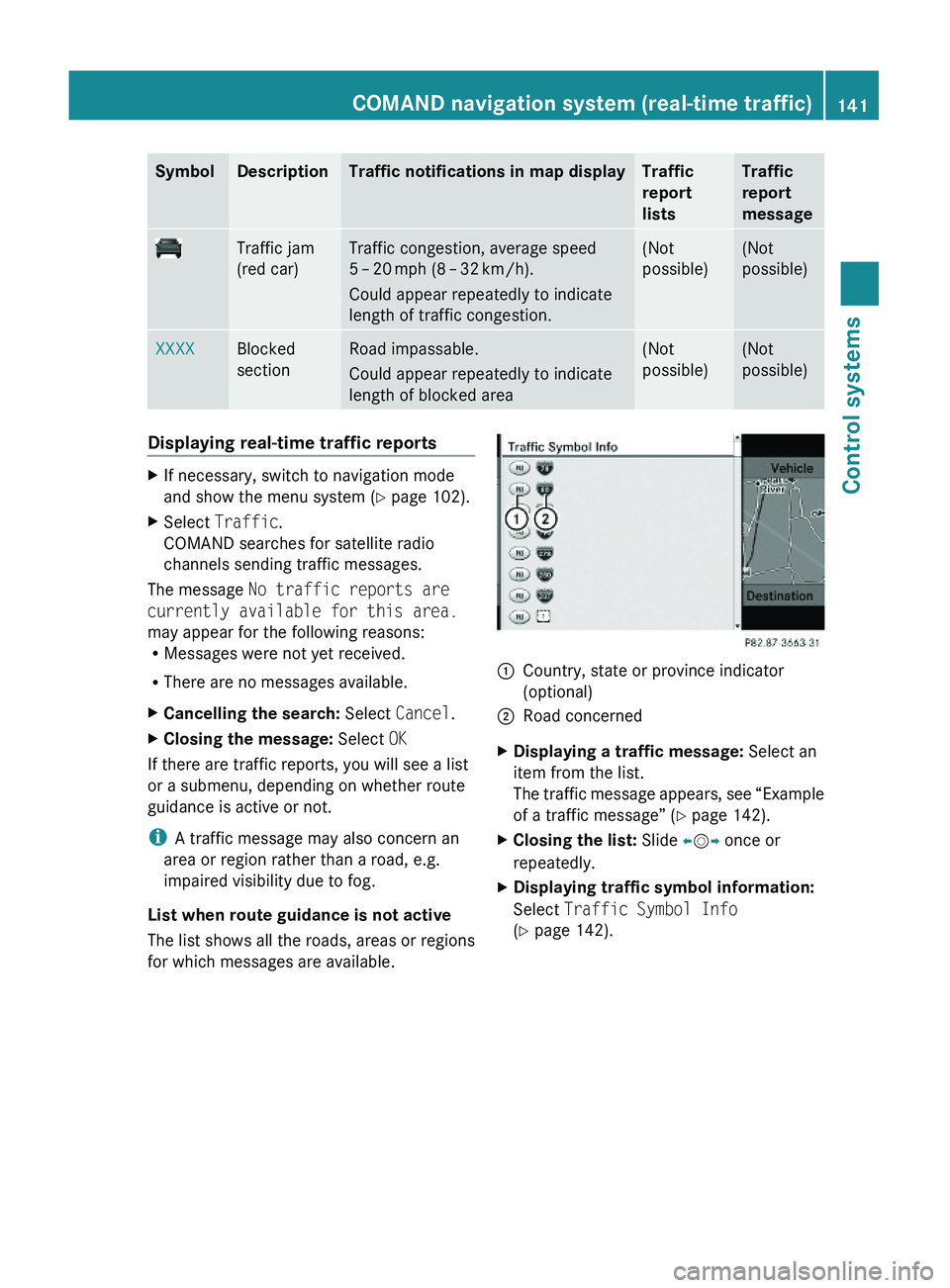
List when route guidance is not active
The list shows all the roads, areas or regions
for which messages are available.
1Country, state or province indicator
(optional)
2Road concernedXDisplaying a traffic message: Select an
item from the list.
The traffic message appears, see “Example
of a traffic message” (Y page 142).
XClosing the list: Slide \000
Page 144 of 548
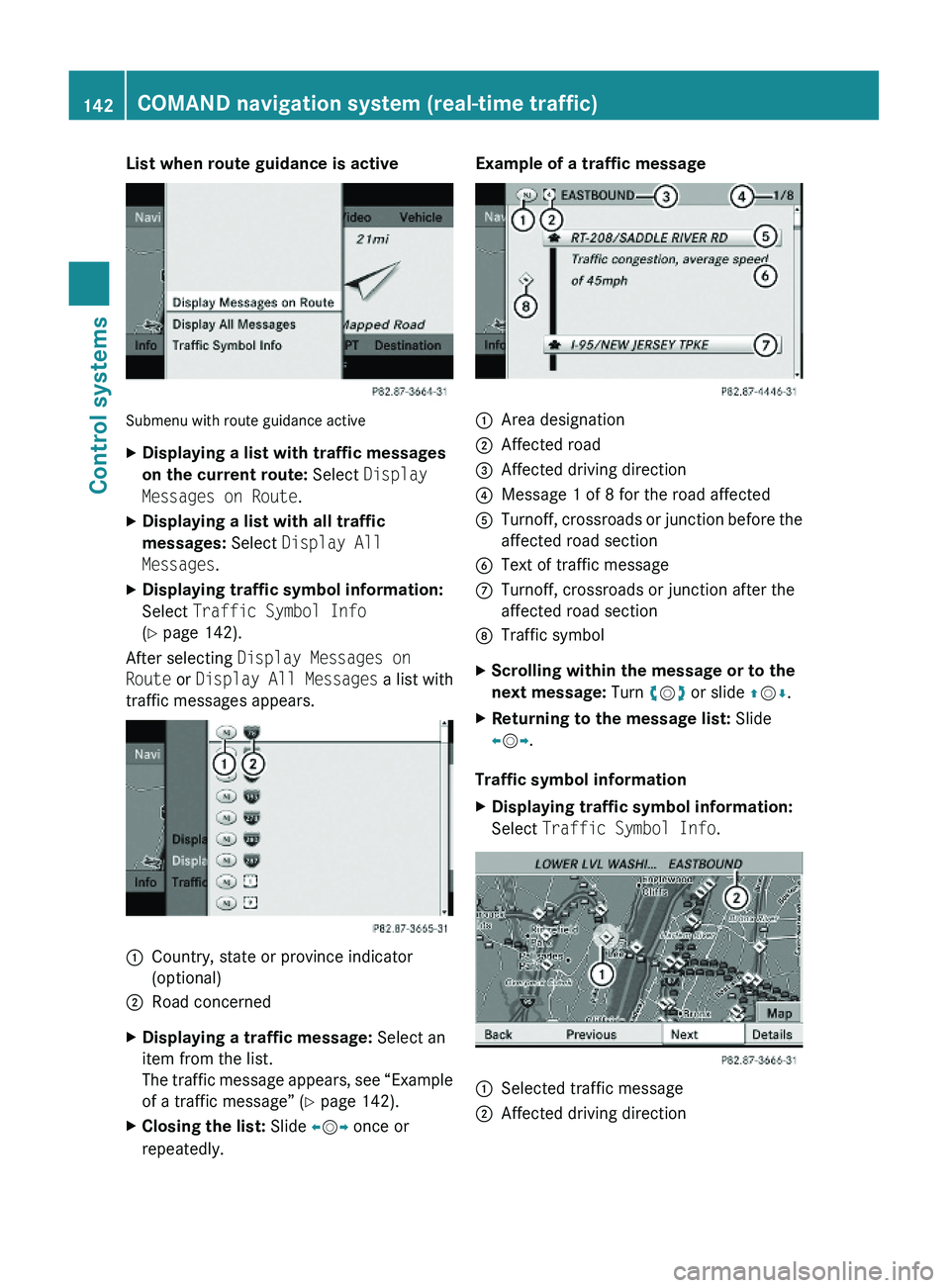
List when route guidance is active
Submenu with route guidance active
XDisplaying a list with traffic messages
on the current route: Select Display
Messages on Route.
XDisplaying a list with all traffic
messages: Select Display All
Messages.
XDisplaying traffic symbol information:
Select Traffic Symbol Info
(Y page 142).
After selecting Display Messages on
Route or Display All Messages a list with
traffic messages appears.
1Country, state or province indicator
(optional)
2Road concernedXDisplaying a traffic message: Select an
item from the list.
The traffic message appears, see “Example
of a traffic message” (Y page 142).
XClosing the list: Slide \000