Time MERCEDES-BENZ S-Class 2011 W221 Owner's Guide
[x] Cancel search | Manufacturer: MERCEDES-BENZ, Model Year: 2011, Model line: S-Class, Model: MERCEDES-BENZ S-Class 2011 W221Pages: 524, PDF Size: 22.53 MB
Page 70 of 524
The brakes will function as usual once you
release the brake pedal. BAS is deactivated.GWarning
If the BAS malfunctions, the brake system still
functions, but without the additional brake
boost available that the BAS would normally
provide in an emergency braking maneuver.
Therefore, the braking distance may increase.
BAS PLUS (Brake Assist PLUS)
GWarning
Observe "Important safety notes"
( Y page 66).
At speeds above approximately
20 mph (30 km/h), BAS PLUS assists you
when braking in hazardous situations and
uses the radar sensor system to evaluate the
traffic conditions.
GWarning!
BAS PLUS is a convenience system designed
to assist the driver during vehicle operation.
The responsibility for the vehicle speed and
the distance to the vehicle ahead, including
most importantly brake operation to assure
safe stopping distance, always remains with
the driver.
Always pay attention to traffic conditions
even while BAS PLUS is switched on.
Otherwise, you may not be able to recognize
dangerous situations until it is too late and
could cause an accident. Personal or fatal
injury to you or others may be the result.
i This equipment has been approved by the
FCC as a "Vehicular Radar System". The
radar sensor system is intended for use in
an automotive radar system only. Removal,
tampering, or altering of the device will void
any warranties, and is not permitted by the
FCC. Do not tamper with the device in any
way.
Any unauthorized modification to this
device could void the user's authority to
operate the equipment.
BAS PLUS can detect obstacles that are in the
path of your vehicle for an extended period of
time. Should you approach a detected
obstacle quickly, BAS PLUS calculates the
braking force necessary to avoid a rear-end
collision. Should you additionally apply the
brakes, BAS PLUS will automatically increase
the braking force to a level suitable for the
traffic conditions.
If BAS PLUS demands particularly high
braking force, PRE-SAFE ®
is activated
simultaneously.XKeep the brake pedal depressed until the
emergency braking situation is over.
ABS prevents the wheels from locking.
The brakes will work normally again when:
R you release the brake pedal
R no obstacle is detected in front of your
vehicle
R there is no longer any danger of a rear-end
collision
BAS PLUS is then deactivated.
At speeds up to approximately
40 mph (70 km/h), BAS PLUS can also detect
stationary obstacles, for example, stopped or
parked vehicles.
For BAS PLUS to assist you when driving, the
radar sensor system must be switched on and
operational. You can check this by activating
DISTRONIC PLUS ( Y page 325) or via the
"radar sensor" function in the on-board
computer( Y page 378).
GWarning!
BAS PLUS will only respond with brake
assistance if it has clearly detected an object.
Detection can be impeded by
R dirty or covered sensors
R snowfall or heavy rain
68Driving safety systemsSafety
Page 74 of 524
Immediately brake your vehicle to increase
the distance between your vehicle and the
vehicle driving in front of you. The warning
sound is intended as a final caution that you
have not interceded with your own braking
inputs to avoid a potentially dangerous
situation. Do not wait for the operation of the
warning signal to intercede with your own
braking, as that will result in potentially
dangerous emergency braking which will not
always result in an impact being avoided.
Tailgating increases the risk of an accident.GWarning!
The PRE-SAFE ®
Brake is a convenience
system designed to assist the driver during
vehicle operation. The responsibility for the
vehicle speed and the distance to the vehicle
ahead, including most importantly brake
operation to assure safe stopping distance,
always remains with the driver.
Always pay attention to traffic conditions
even while the PRE-SAFE ®
Brake is switched
on. Otherwise, you may not be able to
recognize dangerous situations until it is too
late and could cause an accident resulting in
personal or fatal injury to you or others.
i USA only: this device was approved as a
"Vehicular Radar System" by the FCC. The
radar sensor system is only intended for
use with radar systems in passenger
vehicles. Removing, tampering with, or
altering the device will void any warranties
and is not permitted by the FCC. Do not
tamper with the device in any way.
Any unauthorized modification to this
device could void the user's authority to
operate the equipment.
i Canada only: this device complies with
RSS-210 regulations of Industry Canada.
Operation is subject to the following two
conditions:
1. This device may not cause interference,
and
2. This device must withstand any
interference received, including
interference that may cause undesired
operation.
Removing, tampering with, or altering the
device will void any warranties and is not
permitted. Do not tamper with the device
in any way.
Any unauthorized modification to this
device could void the user's authority to
operate the equipment.
With the help of the radar sensor system,
PRE-SAFE ®
Brake can detect obstacles that
are in front of your vehicle for an extended
period of time. If you approach an obstacle
and PRE-SAFE ®
Brake detects a risk of a
collision, the system will initially alert you
both visually and acoustically. If you do not
brake or steer, the vehicle will at first
automatically brake slightly. In the event of
an increased risk of a collision, PRE-SAFE ®
is
activated ( Y page 53). If the risk of collision
remains and you do not brake, take evasive
action or accelerate significantly, the vehicle
may perform automatic emergency braking.GWarning!
The PRE-SAFE ®
Brake will only respond with
brake assistance if it has clearly detected an
object. Detection can be impeded by:
R dirty or covered sensors
R snowfall or heavy rain
R disturbance from other radar sources
R strong radar reflection such as in parking
garages
The PRE-SAFE ®
Brake uses radar signals that
are not reflected well by narrow objects and
absorptive materials. For this reason the PRE-
SAFE ®
Brake will not react to persons,
animals, and approaching traffic or cross-
traffic.
The PRE-SAFE ®
Brake may not detect narrow
vehicles driving in front of you, such as
motorcycles and vehicles driving offset from
your vehicle center.
72Driving safety systemsSafety
Page 75 of 524
In order to maintain an appropriate distance
from the vehicle in front and thus prevent a
collision, you must apply the brakes yourself.
At speeds up to approximately
40 mph (70 km/h), PRE-SAFE ®
Brake may
also detect stationary obstacles, for example
stopped or parked vehicles.GWarning!
If you do not receive visual or acoustic
warning signals, the PRE-SAFE ®
Brake may
R not have recognized the collision risk
R have been deactivated
R be malfunctioning
Apply the brakes yourself to avoid a collision.
XTo activate/deactivate: activate or
deactivate PRE-SAFE ®
Brake in the on-
board computer ( Y page 376).
After activation, the Ä symbol is
displayed on the left in the instrument
cluster.
For PRE-SAFE ®
Brake to assist you when
driving, the radar sensor system must be
switched on and operational.
PRE-SAFE ®
Brake does not always detect
complex traffic situations properly. You can
terminate the braking action of PRE-SAFE ®
Brake in a non-critical driving situation at any
time if:
R an acoustic and visual warning occurs.
R the vehicle brakes.
To stop the braking action, you can either
depress the accelerator pedal further,
activate kickdown or release the brake pedal.
The braking action of PRE-SAFE ®
Brake is
ended automatically if:
R you maneuver to avoid the obstacle.
R your speed drops below approximately
9 mph (15 km/h).
R there is no longer an obstacle detected in
front of your vehicle.
R there is no longer any danger of a collision.
Following a collision or collision-related
damage to the front end of the vehicle, have
the configuration and operation of the radar
sensors checked. Choose a qualified
specialist workshop which has the necessary
specialist knowledge and tools for the work
required. Mercedes-Benz recommends that
you use an authorized Mercedes-Benz Center
for this purpose.
Anti-theft systems
Immobilizer
The immobilizer prevents your vehicle from
being started without the correct key.
When leaving the vehicle, always take the
SmartKey with you and lock the vehicle. The
engine can be started by anyone with a valid
key that is left inside the vehicle.
XTo activate with the SmartKey: remove
the SmartKey from the ignition lock.XTo activate with KEYLESS-GO: switch the
ignition off and open the driver's door.XTo deactivate: switch on the ignition.
i
The immobilizer is always deactivated
when you start the engine.
ATA (Anti-Theft Alarm system)
A visual and audible alarm is triggered if the
alarm system is armed and you open:
R a door
R the vehicle with the mechanical key
R the trunk lid
R the hood
The alarm is not switched off, even if you
close the open door that has triggered it, for
example.
Anti-theft systems73SafetyZ
Page 78 of 524
Vehicle equipment
i This manual describes all the standard
and optional equipment of your vehicle
which was available at the time of
purchase. Country-specific differences are
possible. Bear in mind that your vehicle
may not feature all functions described
here. This also refers to safety-related
systems and functions.
SmartKey
Important safety notes
GWarning!
When leaving the vehicle, always remove the
SmartKey from the starter switch. Always
take the SmartKey with you and lock the
vehicle. Do not leave children unattended in
the vehicle, even if they are secured in a child
restraint system, or with access to an
unlocked vehicle. A child's unsupervised
access to a vehicle could result in an accident
and/or serious personal injury. The children
could
R injure themselves on parts of the vehicle
R be seriously or fatally injured through
excessive exposure to extreme heat or cold
R injure themselves or cause an accident with
vehicle equipment that can be operated
even if the SmartKey is removed from the
starter switch or removed from the vehicle,
such as seat adjustment, steering wheel
adjustment, or the memory function
If children open a door, they could injure other
persons or get out of the vehicle and injure
themselves or be injured by following traffic.
Do not expose the child restraint system to
direct sunlight. The child restraint system's
metal parts, for example, could become very
hot, and the child could be burned by these
parts.
GWarning
Do not carry heavy or hard objects in the
passenger compartment unless they are
firmly secured in place.
Unsecured or improperly positioned cargo
increases a child's risk of injury in the event
of:
R strong braking maneuvers
R sudden changes of direction
R an accident
General information
If you cannot open or lock the vehicle with the
SmartKey, either the battery in the SmartKey
is empty, the SmartKey is faulty, or the starter
battery is discharged.
XCheck the battery in the SmartKey and
replace it if necessary ( Y page 80).XUnlock the driver's door with the
mechanical key ( Y page 84).XLock the vehicle ( Y page 84).XHave the starter battery and battery
contacts checked by an authorized
Mercedes-Benz Center.
If the SmartKey is faulty, contact Roadside
Assistance or an authorized Mercedes-Benz
Center.
SmartKey functions
General notes
i USA only:
This device complies with Part 15 of the
FCC regulations. Operation is subject to
the following conditions:
1. This device must not cause any harmful
interference, and
2. This device must be able to
accommodate interference that is
received, including interference which
could cause unwanted functions.
76SmartKeyOpening and closing
Page 79 of 524
Unapproved modifications to this device
may lead to withdrawal of permission to
operate it.
i Canada only:
This device complies with Industry
Canada's RSS–210 regulations. Operation
is subject to the following conditions:
1. This device must not cause any harmful
interference, and
2. This device must be able to
accommodate interference that is
received, including interference which
could cause unwanted functions.
Unapproved modifications to this device
may lead to withdrawal of permission to
operate it.
Locking and unlocking centrally
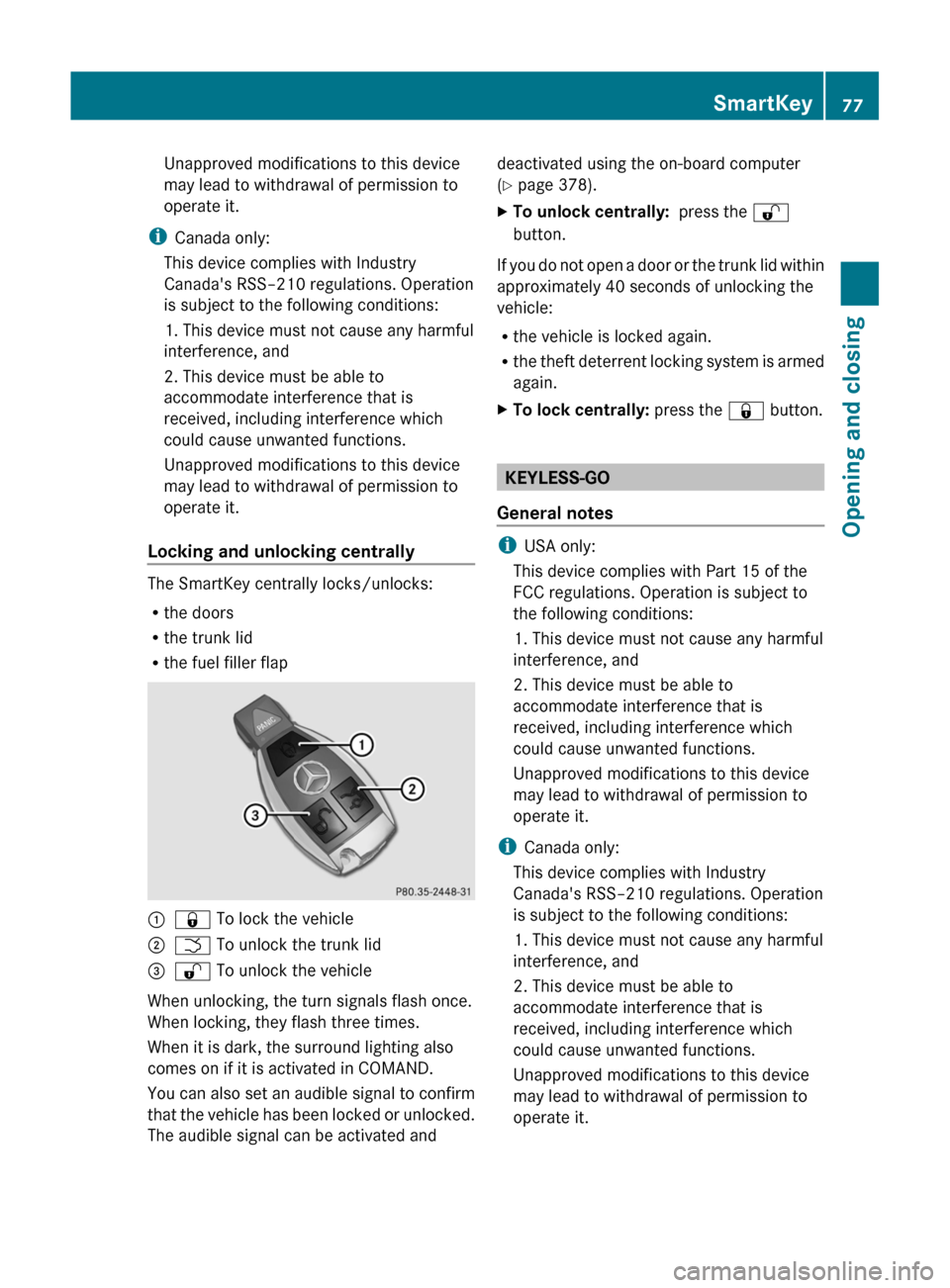
The SmartKey centrally locks/unlocks:
R the doors
R the trunk lid
R the fuel filler flap
:& To lock the vehicle;F To unlock the trunk lid=% To unlock the vehicle
When unlocking, the turn signals flash once.
When locking, they flash three times.
When it is dark, the surround lighting also
comes on if it is activated in COMAND.
You can also set an audible signal to confirm
that the vehicle has been locked or unlocked.
The audible signal can be activated and
deactivated using the on-board computer
( Y page 378).XTo unlock centrally: press the %
button.
If you do not open a door or the trunk lid within
approximately 40 seconds of unlocking the
vehicle:
R the vehicle is locked again.
R the theft deterrent locking system is armed
again.
XTo lock centrally: press the & button.
KEYLESS-GO
General notes
i USA only:
This device complies with Part 15 of the
FCC regulations. Operation is subject to
the following conditions:
1. This device must not cause any harmful
interference, and
2. This device must be able to
accommodate interference that is
received, including interference which
could cause unwanted functions.
Unapproved modifications to this device
may lead to withdrawal of permission to
operate it.
i Canada only:
This device complies with Industry
Canada's RSS–210 regulations. Operation
is subject to the following conditions:
1. This device must not cause any harmful
interference, and
2. This device must be able to
accommodate interference that is
received, including interference which
could cause unwanted functions.
Unapproved modifications to this device
may lead to withdrawal of permission to
operate it.
SmartKey77Opening and closingZ
Page 81 of 524
X To unlock the vehicle: pull the door
handle.XTo lock the vehicle: touch sensor
surface :.
If you pull on the handle of the trunk lid, only
the trunk of the vehicle is unlocked.
Changing the settings of the locking
system
You can change the setting of the locking
system in such a way that only the driver's
door and the fuel filler flap are unlocked. This
is useful if you frequently travel on your own.
XTo change the setting: press and hold
down the % and & buttons
simultaneously for approximately six
seconds until the battery check lamp
( Y page 80) flashes twice.
The SmartKey now functions as follows:
XTo unlock the driver's door: press the
% button once.XTo unlock centrally: press the %
button twice.XTo lock centrally: press the & button.
The KEYLESS-GO function is changed as
follows:
XTo unlock the driver's door : pull the door
handle on the driver's door.XTo unlock centrally: pull the door handle
on the front-passenger door or on the rear
doors.XTo lock centrally: touch sensor
surface : on one of the door handles.
Restoring the factory settings
XPress the % and & buttons
simultaneously for approximately six
seconds until the battery check lamp
flashes twice.Mechanical key
General notes
If you use the mechanical key to unlock and
open the driver's door or the trunk lid, the
anti-theft alarm system will be triggered
( Y page 73).
There are several ways to turn off the alarm:
XPress the % or & button on the
SmartKey.
or
XInsert the SmartKey into the ignition lock.
or
XPress the Start/Stop button in the ignition
lock. The SmartKey must be in the vehicle.
or
XLock or unlock the vehicle using KEYLESS-
GO. The SmartKey must be outside the
vehicle.
Removing the mechanical key
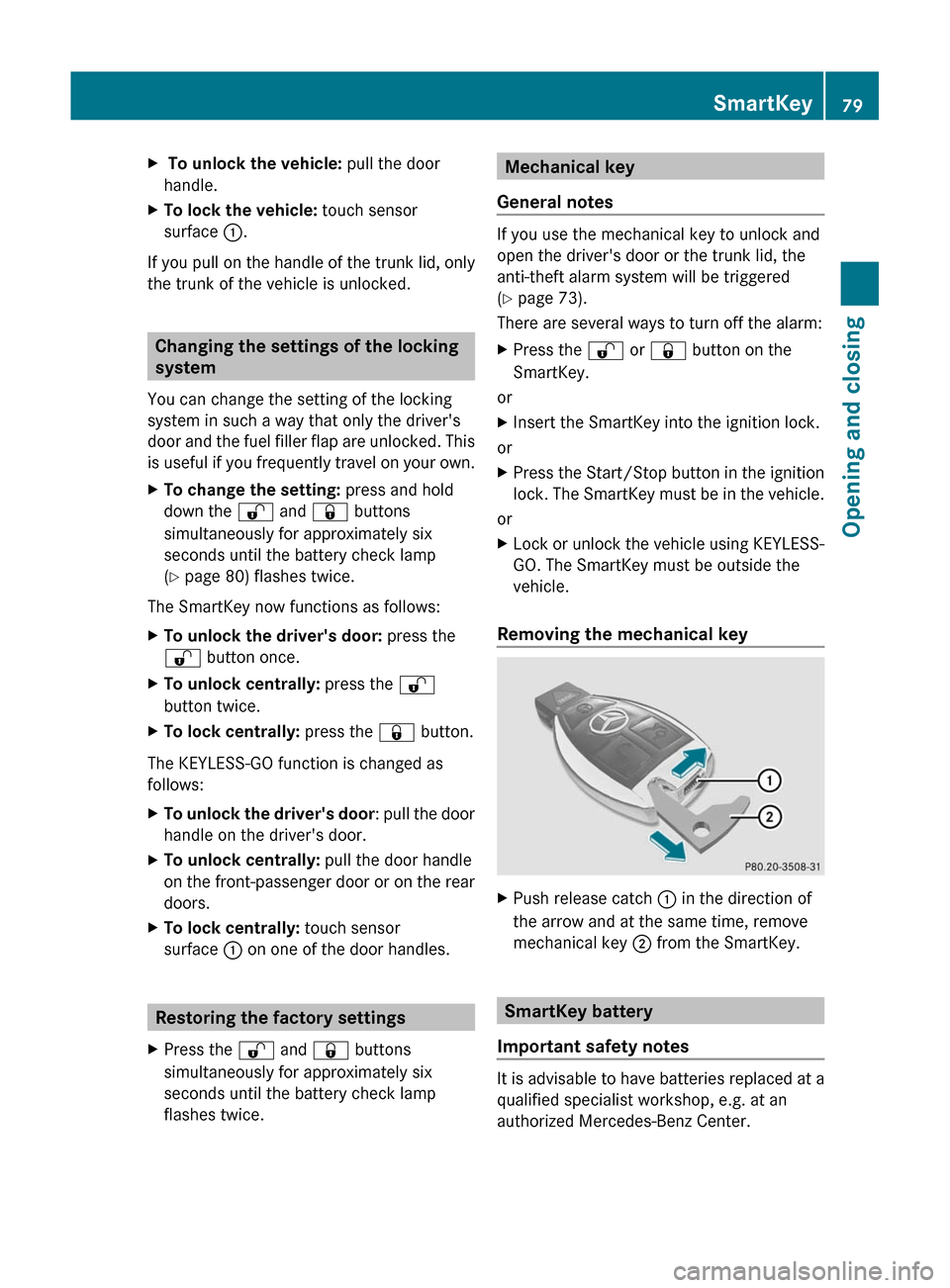
XPush release catch : in the direction of
the arrow and at the same time, remove
mechanical key ; from the SmartKey.
SmartKey battery
Important safety notes
It is advisable to have batteries replaced at a
qualified specialist workshop, e.g. at an
authorized Mercedes-Benz Center.
SmartKey79Opening and closingZ
Page 92 of 524
Opening and closing the side
windows
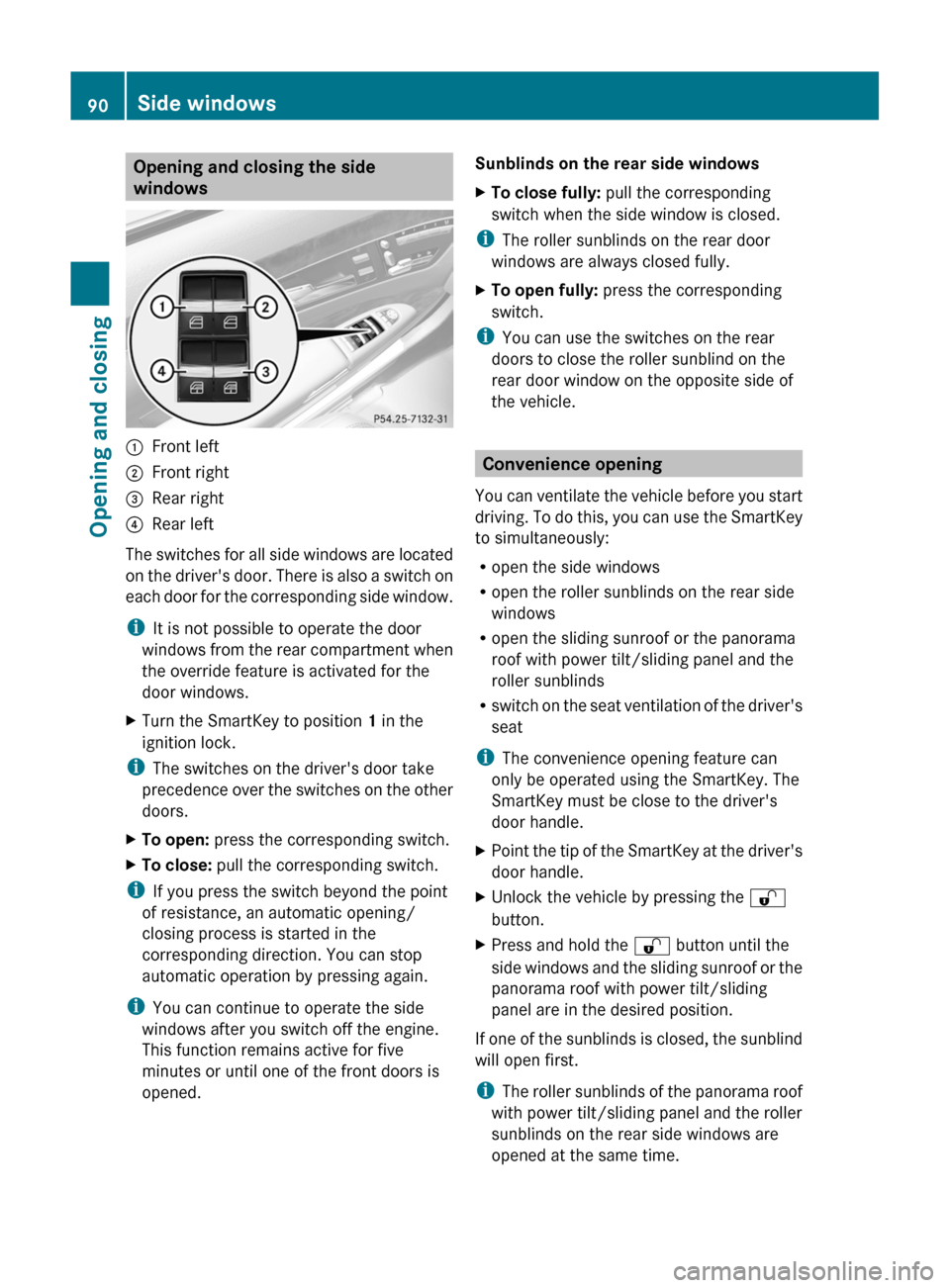
:Front left;Front right=Rear right?Rear left
The switches for all side windows are located
on the driver's door. There is also a switch on
each door for the corresponding side window.
iIt is not possible to operate the door
windows from the rear compartment when
the override feature is activated for the
door windows.
XTurn the SmartKey to position 1 in the
ignition lock.
iThe switches on the driver's door take
precedence over the switches on the other
doors.
XTo open: press the corresponding switch.XTo close: pull the corresponding switch.
iIf you press the switch beyond the point
of resistance, an automatic opening/
closing process is started in the
corresponding direction. You can stop
automatic operation by pressing again.
iYou can continue to operate the side
windows after you switch off the engine.
This function remains active for five
minutes or until one of the front doors is
opened.
Sunblinds on the rear side windowsXTo close fully: pull the corresponding
switch when the side window is closed.
iThe roller sunblinds on the rear door
windows are always closed fully.
XTo open fully: press the corresponding
switch.
iYou can use the switches on the rear
doors to close the roller sunblind on the
rear door window on the opposite side of
the vehicle.
Convenience opening
You can ventilate the vehicle before you start
driving. To do this, you can use the SmartKey
to simultaneously:
Ropen the side windows
Ropen the roller sunblinds on the rear side
windows
Ropen the sliding sunroof or the panorama
roof with power tilt/sliding panel and the
roller sunblinds
Rswitch on the seat ventilation of the driver's
seat
iThe convenience opening feature can
only be operated using the SmartKey. The
SmartKey must be close to the driver's
door handle.
XPoint the tip of the SmartKey at the driver's
door handle.
XUnlock the vehicle by pressing the %
button.
XPress and hold the % button until the
side windows and the sliding sunroof or the
panorama roof with power tilt/sliding
panel are in the desired position.
If one of the sunblinds is closed, the sunblind
will open first.
iThe roller sunblinds of the panorama roof
with power tilt/sliding panel and the roller
sunblinds on the rear side windows are
opened at the same time.
90Side windowsOpening and closing
Page 93 of 524
XPress and hold the % button again until
the side windows and the sliding sunroof or
the panorama roof with power tilt/sliding
panel are in the desired position.
XTo interrupt the convenience opening:
release the % button.
Convenience closing
General information
When you lock the vehicle, you can
simultaneously:
Rclose the side windows
Rclose the sliding sunroof or the panorama
roof with power tilt/sliding panel
On vehicles with roller sunblinds, you can
then close the roller sunblinds.
iThe roller sunblinds of the panorama roof
with power tilt/sliding panel and the roller
sunblinds on the rear side windows are
closed at the same time.
GWarning
When closing the door windows and the
sliding sunroof or panorama roof with power
tilt/sliding panel, make sure that there is no
danger of anyone being harmed by the closing
procedure.
If potential danger exists, proceed as follows:
RRelease the & button to stop the closing
procedure. To open, press and hold the
% button. To continue the closing
procedure after making sure that there is
no danger of anyone being harmed by the
closing procedure, press and hold the
& button.
Vehicles with KEYLESS-GO:
RRelease the sensor surface on the outside
door handle to stop the closing procedure.
RImmediately pull on the same outside door
handle and hold firmly. The door windows
and the sliding sunroof or panorama roof
with power tilt/sliding panel will open for
as long as the door handle is held but the
door is not opened.
Using the SmartKey
iThe SmartKey must be close to the
driver's door handle.
XPoint the tip of the SmartKey at the driver's
door handle.
XLock the vehicle by pressing the &
button.
XPress and hold the & button until the
side windows and the sliding sunroof or the
panorama roof with power tilt/sliding
panel are fully closed.
XMake sure that all the side windows and the
sliding sunroof or panorama roof with
power tilt/sliding panel are closed.
XTo interrupt the convenience closing:
release the & button.
On vehicles with roller sunblinds:
XPress the & button again until the roller
sunblinds close.
XTo interrupt the roller sunblind closing
procedure: press the % button.
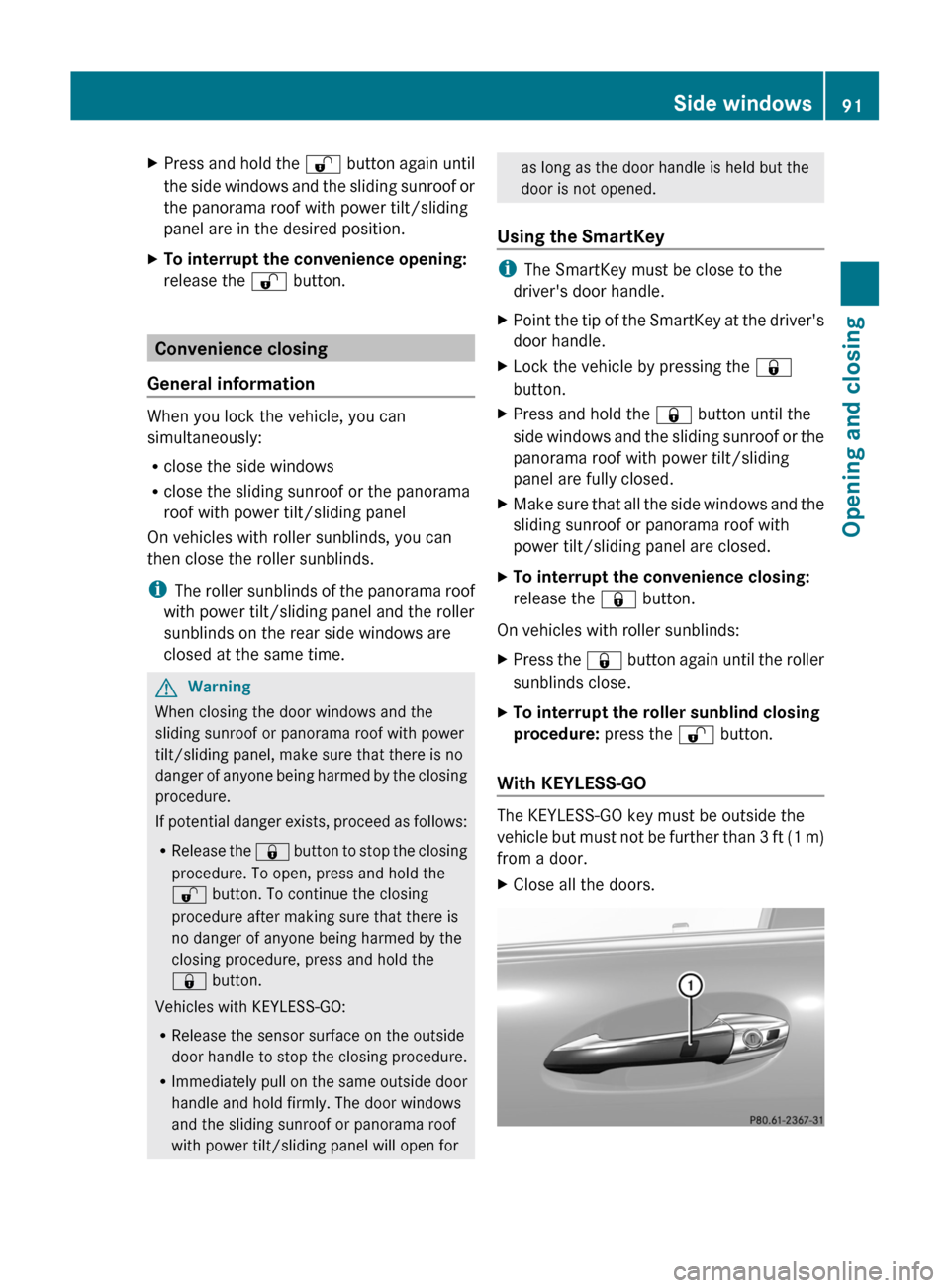
With KEYLESS-GO
The KEYLESS-GO key must be outside the
vehicle but must not be further than 3 ft (1 m)
from a door.
XClose all the doors.Side windows91Opening and closingZ
Page 94 of 524
XTouch sensor surface : on the door
handle until the side windows and the
sliding sunroof or the panorama roof with
power tilt/sliding panel are fully closed.
i Make sure you only touch sensor
surface :.
XMake sure that all the side windows and the
sliding sunroof or panorama roof with
power tilt/sliding panel are closed.XTo interrupt convenience closing:
release sensor surface : on the door
handle.
On vehicles with roller sunblinds:
XTouch the sensor surface on the door
handle again until the roller sunblinds
close.XTo interrupt the roller sunblind closing
procedure: pull the outside door handle
and hold firmly.
Resetting the side windows
You must reset each side window if:
R a side window cannot be closed
automatically.
R a side window opens again slightly after
being closed manually.
XClose all the doors.XTurn the SmartKey to position 1 in the
ignition lock.XPull the corresponding switch on the door
control panel until the side window is
completely closed. ( Y page 90)XHold the switch for an additional second.
If the side window opens again slightly:
XImmediately pull the corresponding switch
on the door control panel until the side
window is completely closed ( Y page 90).XHold the switch for an additional second.XIf the corresponding side window remains
closed after the button has been released,
the side window has been reset correctly.If this is not the case, repeat the steps
above again.
Problems with the side windows
Problem: a side window cannot be closed
because objects are trapped between the
side window and the door frame.
XRemove the objects.XClose the side window.
Problem: a side window cannot be closed
because objects in the guide rail are
preventing the window from being raised.
XRemove the objects.XClose the side window.
Problem: a side window cannot be closed,
and you cannot see the cause.
GWarning
Closing the side windows with increased force
or without the anti-entrapment feature could
lead to serious or even fatal injury. Make sure
that nobody can become trapped when
closing the side windows.
If a side window is obstructed during closing
and reopens again slightly:
XImmediately after the window blocks, pull
the corresponding switch again until the
side window has closed.
The side window is closed with increased
force.
If a side window is obstructed again during
closing and reopens again slightly:
XImmediately after the window blocks, pull
the corresponding switch again until the
side window has closed.
The side window is closed without the anti-
entrapment feature.GWarning!
Pulling and holding the switch to close the
door window immediately after it had been
blocked two times will cause the door window
92Side windowsOpening and closing
Page 100 of 524
If the sliding sunroof is obstructed during
closing and reopens again slightly:XImmediately after the sliding sunroof
blocks, pull the 3 switch in the
overhead control panel down to the point
of resistance and hold it until the sliding
sunroof is closed.
The sliding sunroof is closed with increased
force.
If the sliding sunroof is obstructed again
during closing and reopens again slightly:
XImmediately after the sliding sunroof
blocks, pull the 3 switch in the
overhead control panel down to the point
of resistance and hold it until the sliding
sunroof is closed.
The sliding sunroof is closed without the
anti-entrapment feature.GWarning!
Pressing and holding the sliding sunroof
switch to close the sliding sunroof
immediately after it had been blocked two
times will cause the sliding sunroof to close
without the anti-entrapment feature for as
long as you hold the switch.
98Sliding sunroofOpening and closing