W mode MERCEDES-BENZ S-Class 2011 W221 Manual Online
[x] Cancel search | Manufacturer: MERCEDES-BENZ, Model Year: 2011, Model line: S-Class, Model: MERCEDES-BENZ S-Class 2011 W221Pages: 524, PDF Size: 22.53 MB
Page 238 of 524
Basic settings
Picture settings
Adjusting the brightness, contrast or
color
XPress W the COMAND controller to show
the menu.XSelect Video by sliding VÆ and turning
cVd the COMAND controller and press
W to confirm.XSelect DVD-V and press W to confirm.XSelect Brightness , Contrast or color by
turning cVd the COMAND controller and
press W to confirm.
Changing the picture format
XPress W the COMAND controller to show
the menu.XSelect Video by sliding VÆ and turning
cVd the COMAND controller and press
W to confirm.XSelect Video DVD and press W to confirm.XSelect DVD-V and press W to confirm.
The DVD-V menu appears. The ä dot in
front of a menu item indicates the current
setting.XSelect 16:9 optimized , 4:3 or
Widescreen and press W to confirm.XSelect a setting by turning cVd the
COMAND controller and press W to
confirm.
DVD video mode
Safety notes
GWarning!
COMAND is classified as a Class 1 laser
product. You must not open the casing. If you
open the casing, or if the casing is faulty or
damaged, there is a risk of exposure to
invisible laser radiation. This may damage
your eyes, or those of others.
COMAND does not contain any parts that can
be serviced by the user. For safety reasons,
all maintenance work must be carried out by
qualified aftersales technicians.GWarning!
Only when the vehicle is stationary should
you:
R load a disc
R eject a disc
There is a risk of being distracted from the
road and traffic conditions if this is done while
the vehicle is in motion.
Notes about discs
There may be playback problems when
playing copied discs. There are a large variety
of discs, DVD authoring software, writing
software and writers available. This variety
means that there is no guarantee that the
system will be able to play discs that you have
copied yourself.
! Do not affix stickers or labels to the discs,
as they could peel off and damage
COMAND. Stickers can cause the disc to
bend, which can result in read errors and
disc recognition problems.
! COMAND is designed to accommodate
discs which comply with the EN 60908
standard. You can therefore only use discs
with a maximum thickness of 1.3 mm.
If you insert thicker discs, e.g. those that
contain data on both sides (DVD on one
side and audio data on the other), they
cannot be ejected and can damage
COMAND.
Use round discs with a diameter of 12 cm.
Do not use discs with a diameter of 8 cm,
even with an adapter.
236VideoCOMAND
Page 239 of 524
DVD playback conditions
If video DVDs do not correspond to the NTSC
or PAL TV playback standards, there may be
picture/sound interference or other playback
problems.
COMAND can play back video DVDs
produced according to the following
standards:
Rregion code 1 or region code 0 (no region
code)
iIf you insert a video DVD with a different
region code, you will see a message to this
effect.
RPAL or NTSC standard
You will generally find the relevant details
either on the DVD itself or on the DVD case.
iCOMAND is set to region code 1 at the
factory. This setting can be changed at an
authorized Mercedes-Benz Center. This will
allow you to play video DVDs with a
different region code, provided that they
are produced in accordance with the PAL
or NTSC standard. The region code can be
changed a maximum of five times.
Function restrictions
Depending on the DVD, it is possible that
certain functions or actions will be
temporarily blocked or may not function at all.
As soon as you try to activate these functions
or actions, you will see the K symbol in the
display.
Inserting and removing DVDs
XProceed as described in the "Inserting and
ejecting CDs and DVDs" section
(Y page 217).
Activating video DVD mode
Option 1
XInsert a video DVD.
COMAND loads the medium inserted and
starts to play it.
Option 2
XSelect Video in the main function bar by
sliding ZV and turning cVd the COMAND
controller and press W to confirm.
Video DVD mode is switched on.
Hiding/showing the control menu
XTo show: turn cVd or slide ZVÆ the
COMAND controller.
iThis function is not available while the
DVD's own menu (Y page 240) is being
displayed.
XTo hide: slide ZVÆ the COMAND
controller.
or
XWait for approximately eight seconds.
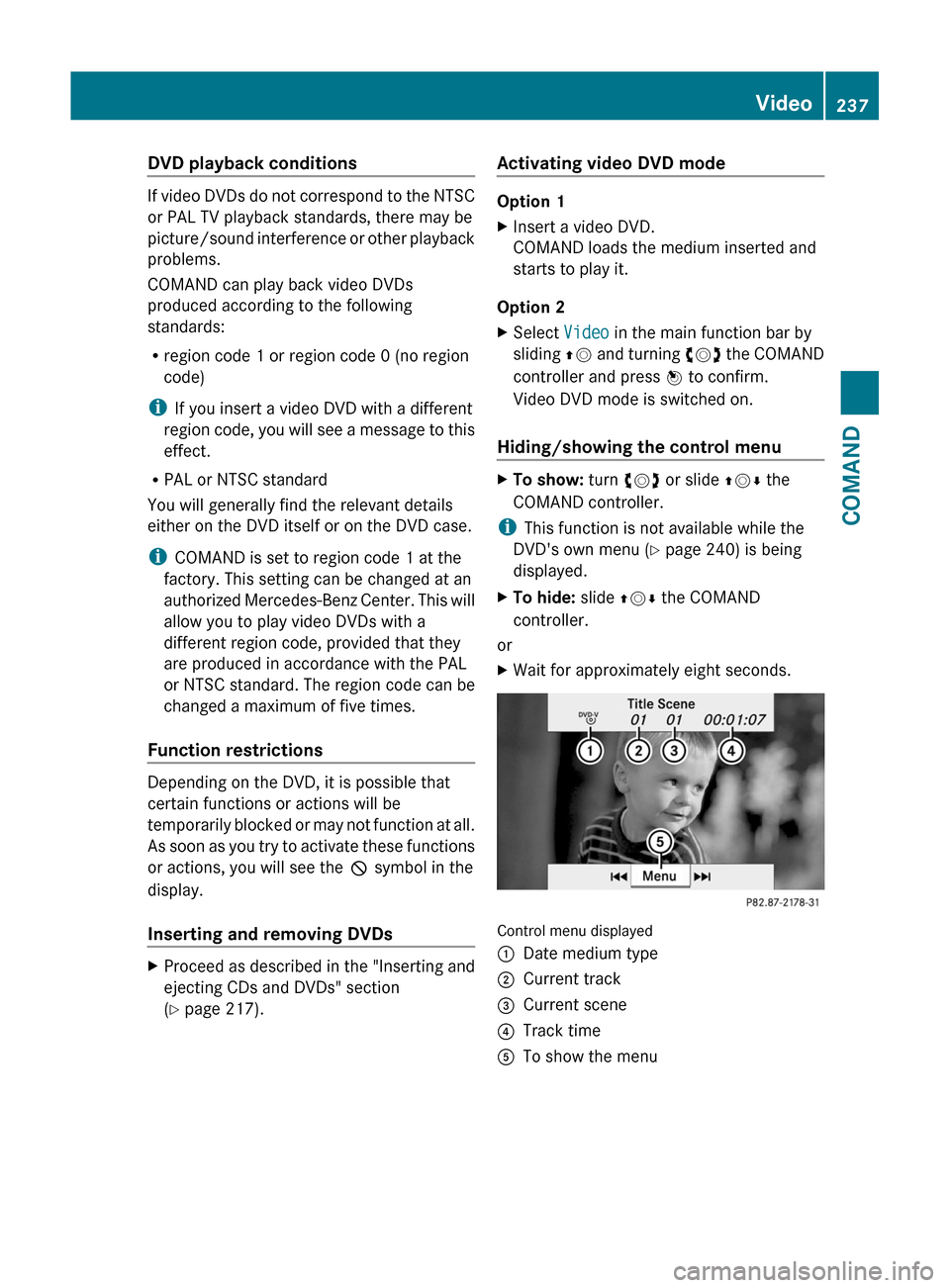
Control menu displayed
:Date medium type;Current track=Current scene?Track timeATo show the menuVideo237COMANDZ
Page 240 of 524
Showing/hiding the menu
This function is not available while the DVD's
own menu (Y page 240) is being displayed.
XTo show: press W the COMAND
controller.
or
XSelect Menu while the navigation menu is
shown and press W to confirm.
XTo hide: slide ZV the COMAND controller
and confirm Full screen by pressing W.
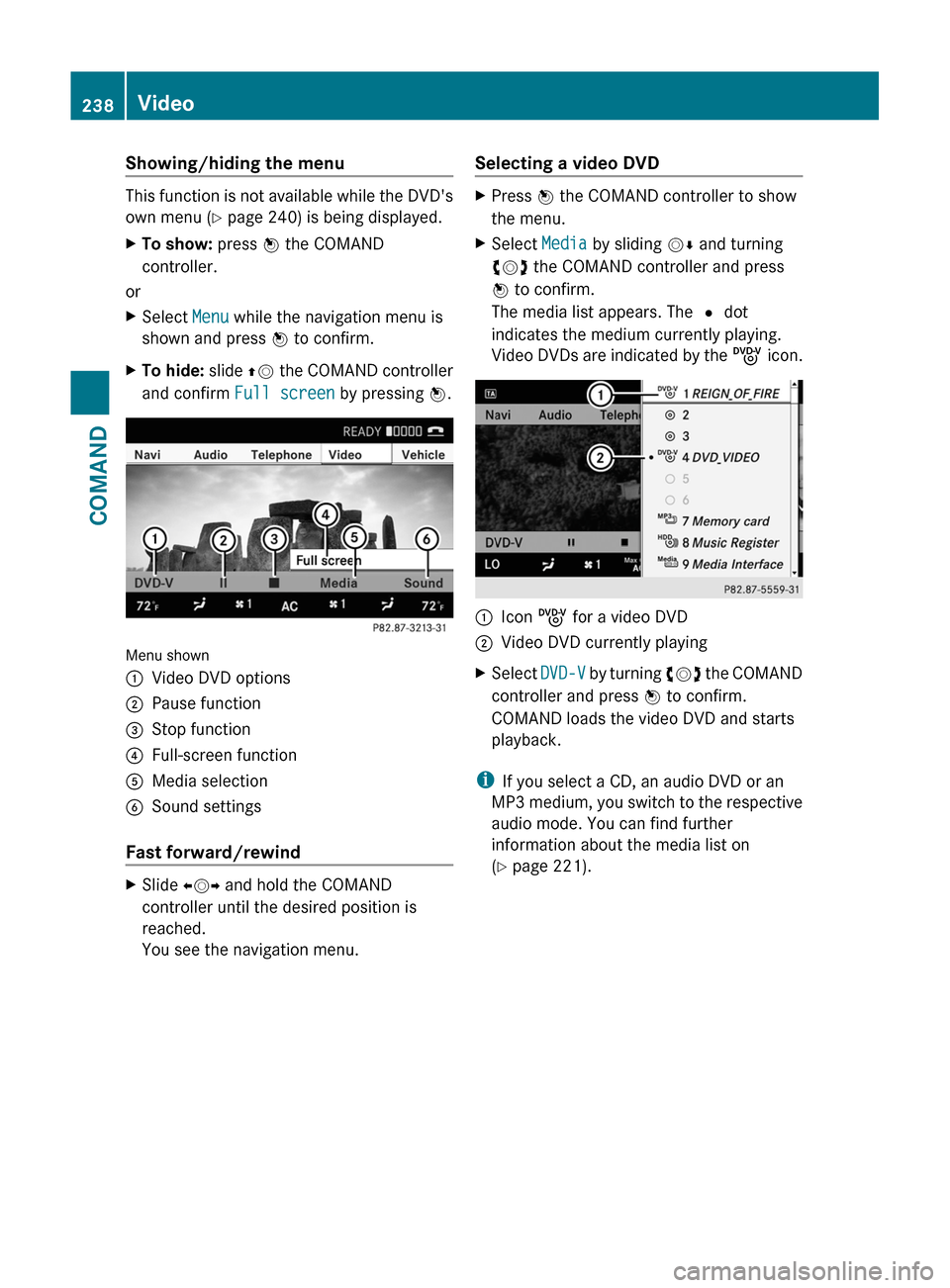
Menu shown
:Video DVD options;Pause function=Stop function?Full-screen functionAMedia selectionBSound settings
Fast forward/rewind
XSlide XVY and hold the COMAND
controller until the desired position is
reached.
You see the navigation menu.
Selecting a video DVDXPress W the COMAND controller to show
the menu.
XSelect Media by sliding VÆ and turning
cVd the COMAND controller and press
W to confirm.
The media list appears. The # dot
indicates the medium currently playing.
Video DVDs are indicated by the ý icon.
:Icon ý for a video DVD;Video DVD currently playingXSelect DVD-V by turning cVd the COMAND
controller and press W to confirm.
COMAND loads the video DVD and starts
playback.
iIf you select a CD, an audio DVD or an
MP3 medium, you switch to the respective
audio mode. You can find further
information about the media list on
(Y page 221).
238VideoCOMAND
Page 241 of 524
Stop functionXPress W the COMAND controller to show
the menu.
XTo interrupt playback: select ± by
turning cVd the COMAND controller and
press W to confirm.
The « display changes to M. The video
image is hidden.
XTo continue playback: select M and press
W to confirm.
Playback continues from the point where it
was interrupted.
XTo stop playback: while playback is
interrupted, select ± again and press W
to confirm.
or
XDuring playback, confirm ± by pressing
W twice in quick succession.
M is selected.
XTo restart playback: confirm M by
pressing W.
Playback restarts from the beginning.
Pause function
XPress W the COMAND controller to show
the menu.
XTo pause: select « by turning cVd the
COMAND controller and press W to
confirm.
The « display changes to M.
XTo continue playback: select M and press
W to confirm.
The menu is hidden.
Selecting a scene/chapter
If the film is divided into scenes or chapters,
you can select them directly while the film is
running, or skip forwards step-by-step. Some
DVDs do not permit this at certain points (e.g.
during the opening credits).
It may also be possible to select the scene/
chapter from within the menu stored on the
DVD.
XTo skip forwards or back: turn cVd or
slide XVY the COMAND controller.
The navigation menu (Y page 237) appears
for approximately eight seconds.
XOn the multifunction steering wheel:
switch on video DVD mode in COMAND
(Y page 237).
XUse the = or ; button to select the
Audio menu.
XPress 9 or : to select a scene/
chapter.
If you press and hold 9 or : for an
extended period, rapid scroll begins.
Selecting a film/title
This function is only available if the DVD is
divided into several films/tracks. If the DVD
contains several films, these can be selected
directly. A film can be selected either when
the DVD is being played back or when it is
stopped.
The film can also be selected from the menu
on the DVD itself.
XPress W the COMAND controller to show
the menu.
XSelect DVD-V by turning cVd the COMAND
controller and press W to confirm.
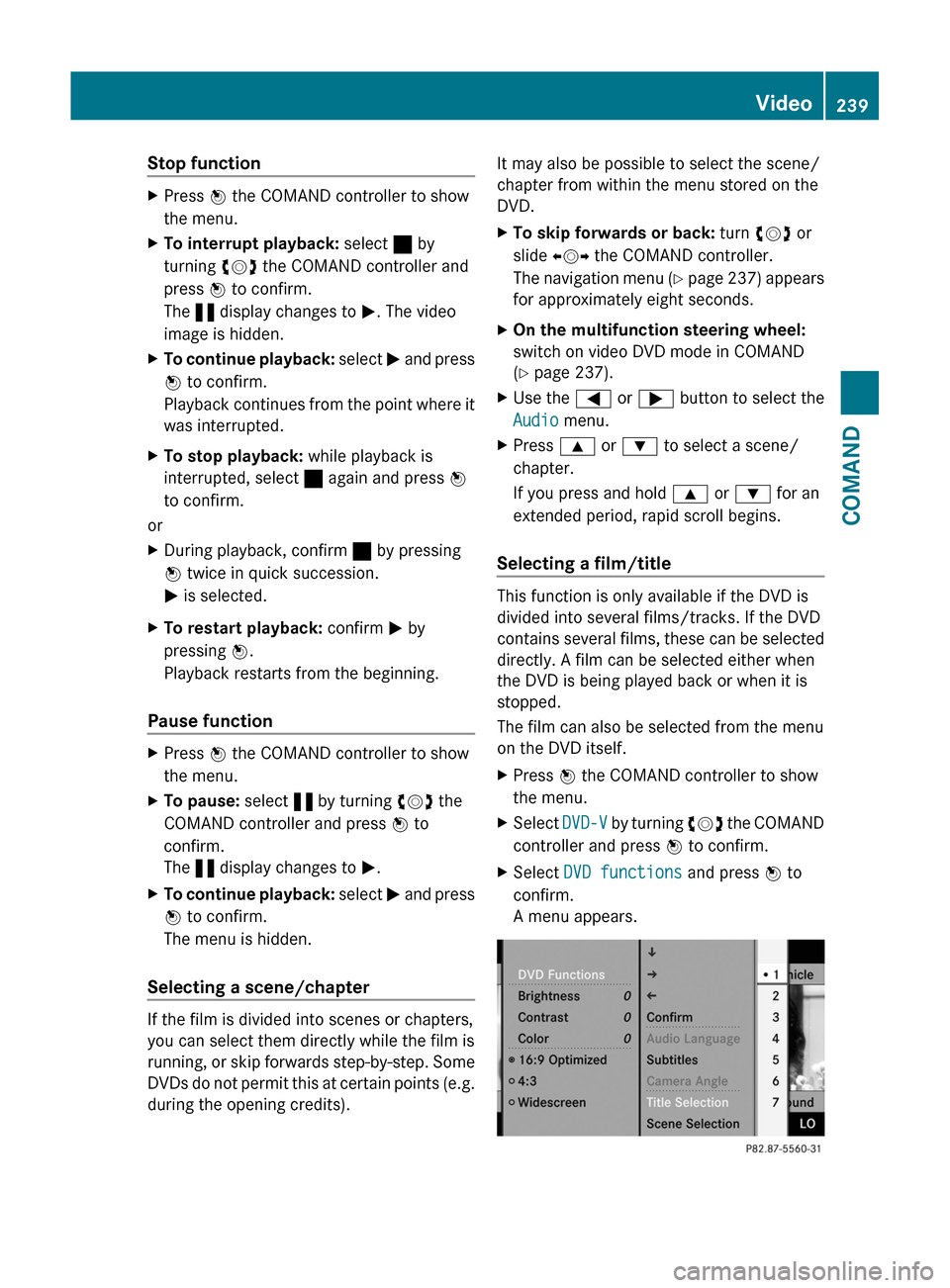
XSelect DVD functions and press W to
confirm.
A menu appears.
Video239COMANDZ
Page 244 of 524
Switching on video AUX modeXSelect Video in the main function bar by
sliding ZV and turning cVd the COMAND
controller and press W to confirm.
If video AUX mode was the last mode
selected, it will now be active.
If another video source is switched on, you
can now switch to video AUX mode in the
video menu.XSelect Video and press W to confirm.XSelect Aux and press W to confirm.
The video AUX menu appears. You will hear
and see the content of the external video
source if it is connected and switched to
playback.
For details on how to operate the external
video source, see the respective device's
operating instructions.
Showing/hiding the menu
XTo show: press W the COMAND
controller.XTo hide: slide ZV the COMAND controller
and confirm Full screen by pressing W.
Volume and sound settings
You will find details on volume ( Y page 132)
and sound ( Y page 133) settings in the "At a
glance" section.
GWarning!
External video sources may have different
volumes, which can mean that system
messages such as traffic announcements and
navigation system announcements are much
louder. If necessary, please deactivate the
system messages or adjust their volume
manually.
i It may be the case that a device which is
connected as an external video source
seems quieter or louder in the vehicle, or
that the usual maximum volume cannot be
reached. On some devices, it is possible to
adjust the volume separately. In this case,
start at a medium volume and increase it
gradually. This enables you to determine
whether the system is able to play the
music at high volume without distorting it.
Rear Seat Entertainment System
Vehicle equipment
i These Operating Instructions describe all
standard and optional equipment available
for your vehicle at the time of purchase.
Please note that your vehicle may not be
equipped with all features described.
General information
Important safety notes
GWarning
The RSE CD/DVD player is a Class 1 laser
product. There is a danger of invisible laser
radiation when you open or damage the cover.
Do not remove the cover. The RSE CD/DVD
player does not contain any parts which can
be serviced by the user. For safety reasons,
have any necessary service work performed
by qualified personnel.
GWarning
The driver should not wear a Rear Seat
Entertainment headset while operating the
vehicle under any circumstances. The use of
a headset while driving the vehicle could
drastically impair the ability to react to audible
traffic conditions (e.g. emergency sirens from
police/fire/ambulance, another car’s horn,
etc.).
GWarning
When not in use, headsets or external video
sources should be stored in a safe location
(e.g. one of the vehicle’s storage
compartments) so that they are not loose
within the passenger compartment during
braking, vehicle maneuvers or a traffic
242Rear Seat Entertainment SystemCOMAND
Page 246 of 524
XInsert new batteries. Observe the polarity
marking on the batteries and in the battery
compartment when doing so.
Left-hand battery: the positive pole (+)
must face upwards.
Right-hand battery: the positive pole (+)
must face downwards.
XTo close the battery compartment: first
place battery compartment cover = into
the battery compartment with retaining
lugs ? and allow lug ; to clip into place.
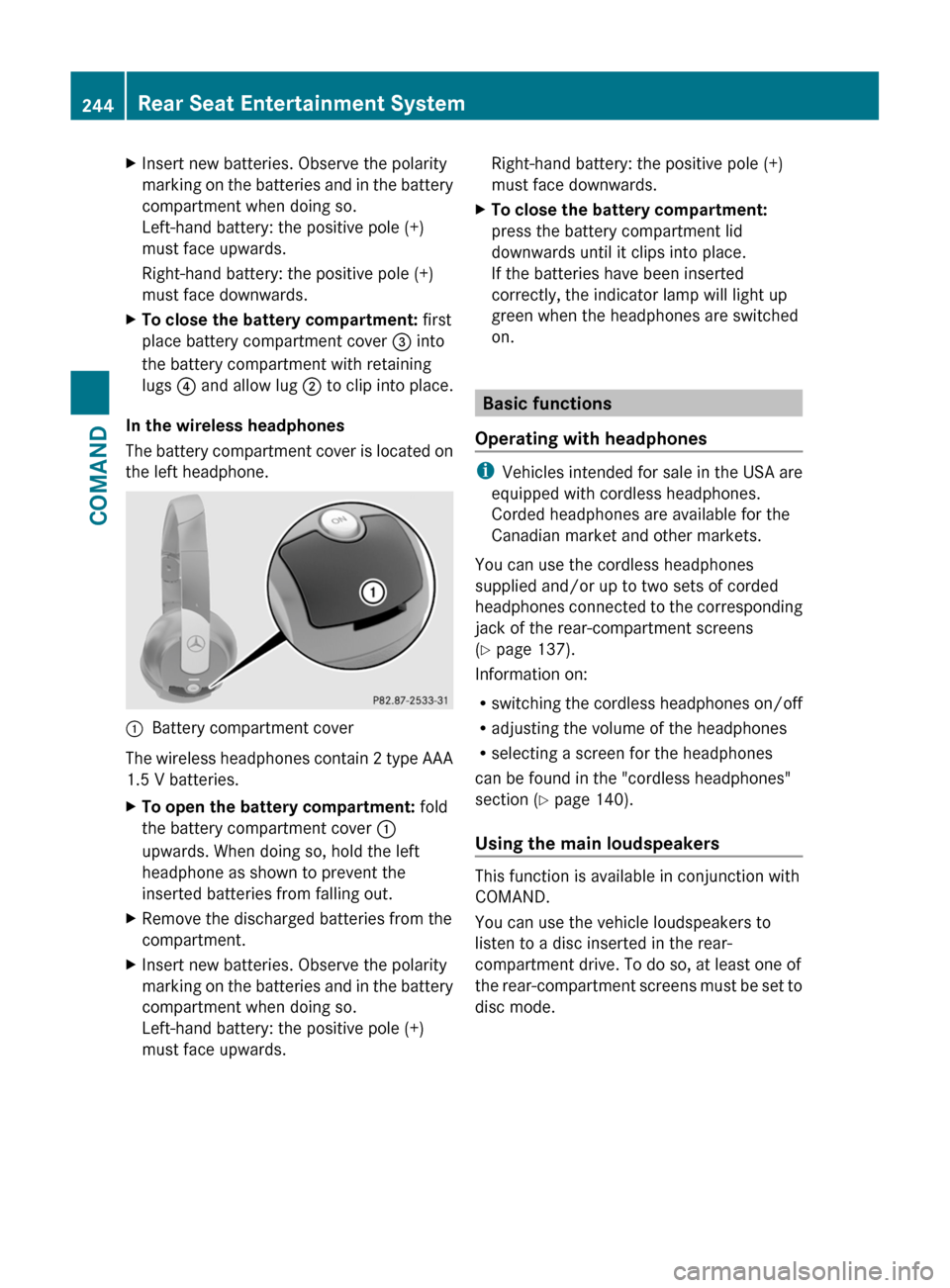
In the wireless headphones
The battery compartment cover is located on
the left headphone.
:Battery compartment cover
The wireless headphones contain 2 type AAA
1.5 V batteries.
XTo open the battery compartment: fold
the battery compartment cover :
upwards. When doing so, hold the left
headphone as shown to prevent the
inserted batteries from falling out.
XRemove the discharged batteries from the
compartment.
XInsert new batteries. Observe the polarity
marking on the batteries and in the battery
compartment when doing so.
Left-hand battery: the positive pole (+)
must face upwards.
Right-hand battery: the positive pole (+)
must face downwards.
XTo close the battery compartment:
press the battery compartment lid
downwards until it clips into place.
If the batteries have been inserted
correctly, the indicator lamp will light up
green when the headphones are switched
on.
Basic functions
Operating with headphones
iVehicles intended for sale in the USA are
equipped with cordless headphones.
Corded headphones are available for the
Canadian market and other markets.
You can use the cordless headphones
supplied and/or up to two sets of corded
headphones connected to the corresponding
jack of the rear-compartment screens
(Y page 137).
Information on:
Rswitching the cordless headphones on/off
Radjusting the volume of the headphones
Rselecting a screen for the headphones
can be found in the "cordless headphones"
section (Y page 140).
Using the main loudspeakers
This function is available in conjunction with
COMAND.
You can use the vehicle loudspeakers to
listen to a disc inserted in the rear-
compartment drive. To do so, at least one of
the rear-compartment screens must be set to
disc mode.
244Rear Seat Entertainment SystemCOMAND
Page 247 of 524
XTo set on COMAND: press the R
function button once or twice to switch on
an audio mode.XSelect Audio by sliding ZV the COMAND
controller and press W to confirm.
The Audio menu appears.XSelect Rear by turning cVd the COMAND
controller and press W to confirm.
i
The headphones' volume setting does not
affect the main loudspeakers.
Adjusting the sound settings
You can select the sound settings in the audio
CD/DVD/MP3, video DVD and AUX modes.
XSwitch on an operating mode (e.g. audio
CD mode) ( Y page 248).XSelect Treble or Bass using
the :=; buttons on the remote
control and press the 9 button to confirm.
An adjustment scale appears.XSelect a setting using the 9:
buttons and press the 9 button to confirm.
Multiple users
Simultaneous use of the rear-
compartment disc drive
The two rear screens can be operated more
or less independently of one another.
However, there can be a conflict in some
menus if the two screens are used
simultaneously.
If the rear-compartment disc drive is being
used for both screens simultaneously,
selecting certain menus or settings on one of
the screens also affects the other screen.
The following functions affect both screens:
R changing playback options
R selecting a track (from a track list or folder)
R using the play, pause and stop functions
R fast forwarding/rewinding or scrolling
R calling up the DVD menu and navigating
within it
R setting the language, subtitles and camera
angle
R calling up interactive DVD content
The following functions affect only one
screen:
R audio and video functions as well as picture
settings
R switching between full screen and the
menu
Switching between operating modes
When you exit an operating mode (e.g. audio
CD mode), the current setting is saved. If you
call up this operating mode again later, there
are two possibilities:
R the operating mode has been changed on
the other screen.
R the operating mode has not been changed.
In the first case, the operating mode appears
as it is on the other screen.
In the second case, the setting appears on the
screen as it was when you last exited the
operating mode.
Picture settings
Overview
You can select these settings in video DVD
and AUX mode. Instructions for AUX mode
are detailed later ( Y page 139).
Adjusting the brightness, contrast and
color
XSwitch on video DVD mode ( Y page 250).XTo show the menu: press the 9 button
on the remote control.
or
XSelect Menu while the navigation menu
( Y page 237) is shown and press the 9
button to confirm.XIn both cases, select DVD-V using
the :=; buttons and press the
9 button to confirm.Rear Seat Entertainment System245COMANDZ
Page 249 of 524
Setting the picture brightnessXSelect Settings using the : button
and press the 9 button to confirm.
XSelect Brightness using the 9:
buttons and press the 9 button to confirm.
A scale appears.
XAdjust the brightness using the 9:
buttons and press the 9 button to confirm.
The brightness bar moves up or down. The
picture becomes lighter or darker in
accordance with the scale.
Showing/hiding the picture
XTo hide the picture: select Display off
in the system menu using the :;
buttons on the remote control and press
the 9 button to confirm.
The picture is hidden.
XTo display the picture: press the 9
button.
Audio CD/DVD and MP3 mode
Safety note
GWarning
The RSE CD/DVD player is a Class 1 laser
product. There is a danger of invisible laser
radiation when you open or damage the cover.
Do not remove the cover. The RSE CD/DVD
player does not contain any parts which can
be serviced by the user. For safety reasons,
have any necessary service work performed
by qualified personnel.
General notes
You will find information on the following
topics in the Audio section:
Rnotes on CDs/DVDs (Y page 225)
Rnotes on MP3 mode (Y page 224)
Rnotes on copyright (Y page 225)
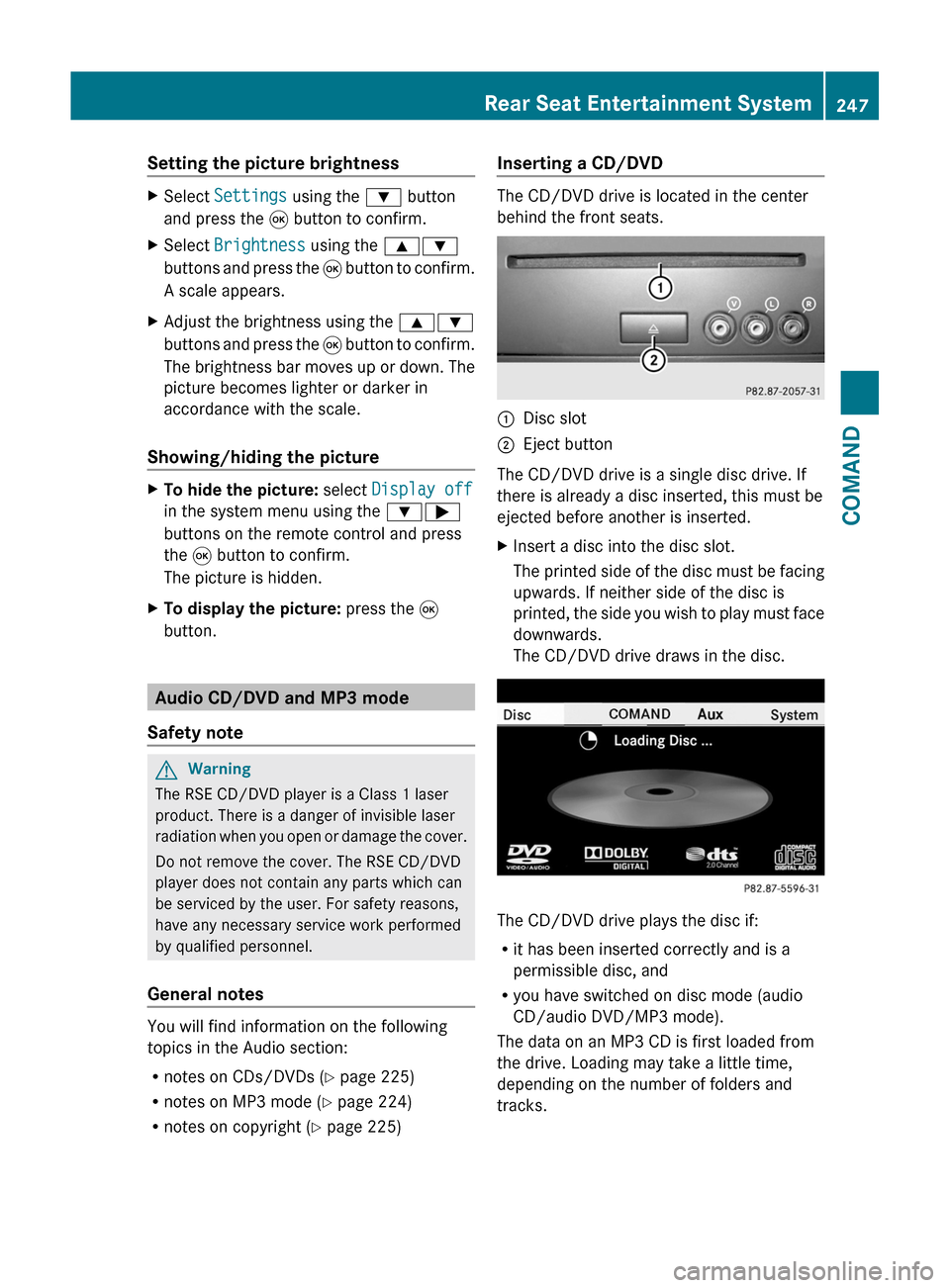
Inserting a CD/DVD
The CD/DVD drive is located in the center
behind the front seats.
:Disc slot;Eject button
The CD/DVD drive is a single disc drive. If
there is already a disc inserted, this must be
ejected before another is inserted.
XInsert a disc into the disc slot.
The printed side of the disc must be facing
upwards. If neither side of the disc is
printed, the side you wish to play must face
downwards.
The CD/DVD drive draws in the disc.
The CD/DVD drive plays the disc if:
Rit has been inserted correctly and is a
permissible disc, and
Ryou have switched on disc mode (audio
CD/audio DVD/MP3 mode).
The data on an MP3 CD is first loaded from
the drive. Loading may take a little time,
depending on the number of folders and
tracks.
Rear Seat Entertainment System247COMANDZ
Page 250 of 524
Removing the CD/DVDXPress the þ eject button.
The drive ejects the disc.XTake the disc out of the slot.
If you do not take the disc out of the slot,
the drive will draw it in again automatically
after a short while.
Switching on audio CD, audio DVD or
MP3 mode
XInsert a CD/DVD ( Y page 247).
The Rear Seat Entertainment System loads
the inserted disc.XSelect Disc in the menu using the
9=; buttons on the remote
control and press the 9 button to confirm.
The corresponding mode is switched on.
The Rear Seat Entertainment System plays
the disc.
i Variable bit rates in MP3 tracks can result
in the elapsed time shown being different
to the actual elapsed time.
Selecting a track
Selecting by skipping to a track
XTo skip forwards or backwards to a
track: press the = or ; button on
the remote control.
or
XPress the E or F button.
The skip forward function skips to the next
track.
Skipping backwards restarts the current
track (if it has been playing for more than
eight seconds) or starts the previous track
(if the current track has only been playing
for a shorter time).
If you have selected the playback options
Random tracks or Random folder , the
track order is random.Selecting by track list
In audio CD mode, the track list contains all
tracks on the disc currently playing.
In audio DVD mode, the track list contains all
tracks in the currently active group; see
"Setting the audio format" ( Y page 223).
In MP3 mode, the track list shows all tracks
in the currently active folder as well as the
folder structure, allowing you to select any
track on the MP3 CD.XSelect Track list (audio CD/DVD mode)
or Folder (MP3 mode) using
the :=; buttons on the remote
control and press the 9 button to confirm.
or
XPress the 9 button when the display/
selection window is active.
The track list appears. The # dot indicates
the current track.XSelect a track using the 9: buttons
and press the 9 button to confirm.
Making a selection by entering the track
number directly
XPress h on the remote control.
The track entry display appears.
Example: track 2
XPress the · number button.
Example: track 12
XPress the corresponding number keys in
rapid succession.
i You cannot enter numbers which are
higher than the number of tracks on the CD
or in the currently active folder.
XWait for approximately three seconds after
making the entry.
You will hear the track entered. The
respective basic menu is shown again.
Fast forward/rewind
XWith the display/selection window active,
press the = or ; button on the248Rear Seat Entertainment SystemCOMAND
Page 251 of 524
remote control repeatedly until you reach
the desired position.
or
XPress and hold the E or F button
until the desired position has been
reached.
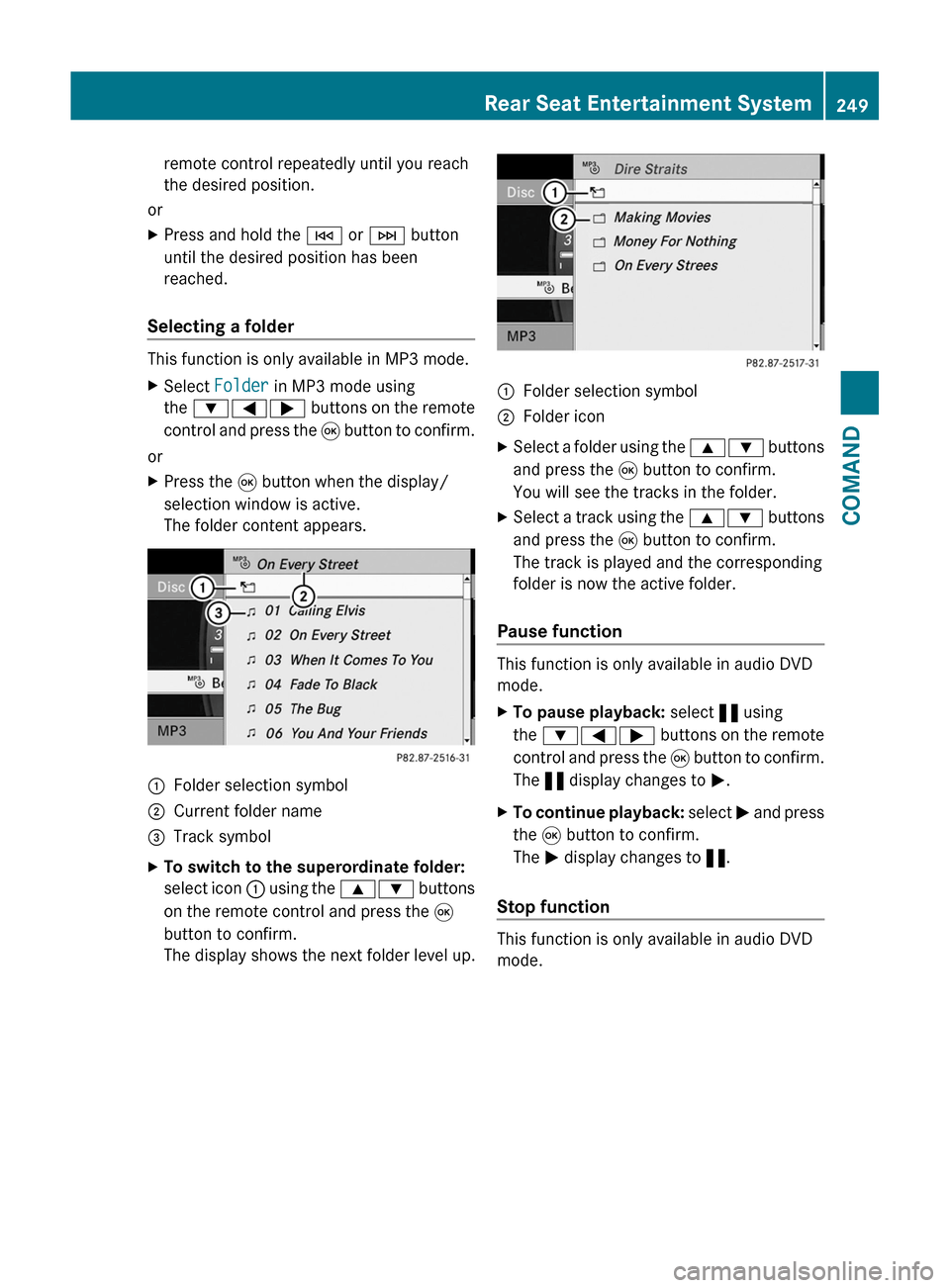
Selecting a folder
This function is only available in MP3 mode.
XSelect Folder in MP3 mode using
the :=; buttons on the remote
control and press the 9 button to confirm.
or
XPress the 9 button when the display/
selection window is active.
The folder content appears.
:Folder selection symbol;Current folder name=Track symbolXTo switch to the superordinate folder:
select icon : using the 9: buttons
on the remote control and press the 9
button to confirm.
The display shows the next folder level up.
:Folder selection symbol;Folder iconXSelect a folder using the 9: buttons
and press the 9 button to confirm.
You will see the tracks in the folder.
XSelect a track using the 9: buttons
and press the 9 button to confirm.
The track is played and the corresponding
folder is now the active folder.
Pause function
This function is only available in audio DVD
mode.
XTo pause playback: select « using
the :=; buttons on the remote
control and press the 9 button to confirm.
The « display changes to M.
XTo continue playback: select M and press
the 9 button to confirm.
The M display changes to «.
Stop function
This function is only available in audio DVD
mode.
Rear Seat Entertainment System249COMANDZ