change time MERCEDES-BENZ S-Class 2014 W222 Comand Manual
[x] Cancel search | Manufacturer: MERCEDES-BENZ, Model Year: 2014, Model line: S-Class, Model: MERCEDES-BENZ S-Class 2014 W222Pages: 278, PDF Size: 6.65 MB
Page 157 of 278
R
Imported via Bluetooth devices
Imported via Bluetooth devices
R Downloaded From Phone
Downloaded From Phone
Turn and press the controller.
A prompt corresponding to your selection
appears.
X To select Yes YesorNo
No: turn the controller and
press to confirm.
If you select Yes
Yes, the contacts are deleted
according to your selection.
If you select No
No, the process will be
canceled.
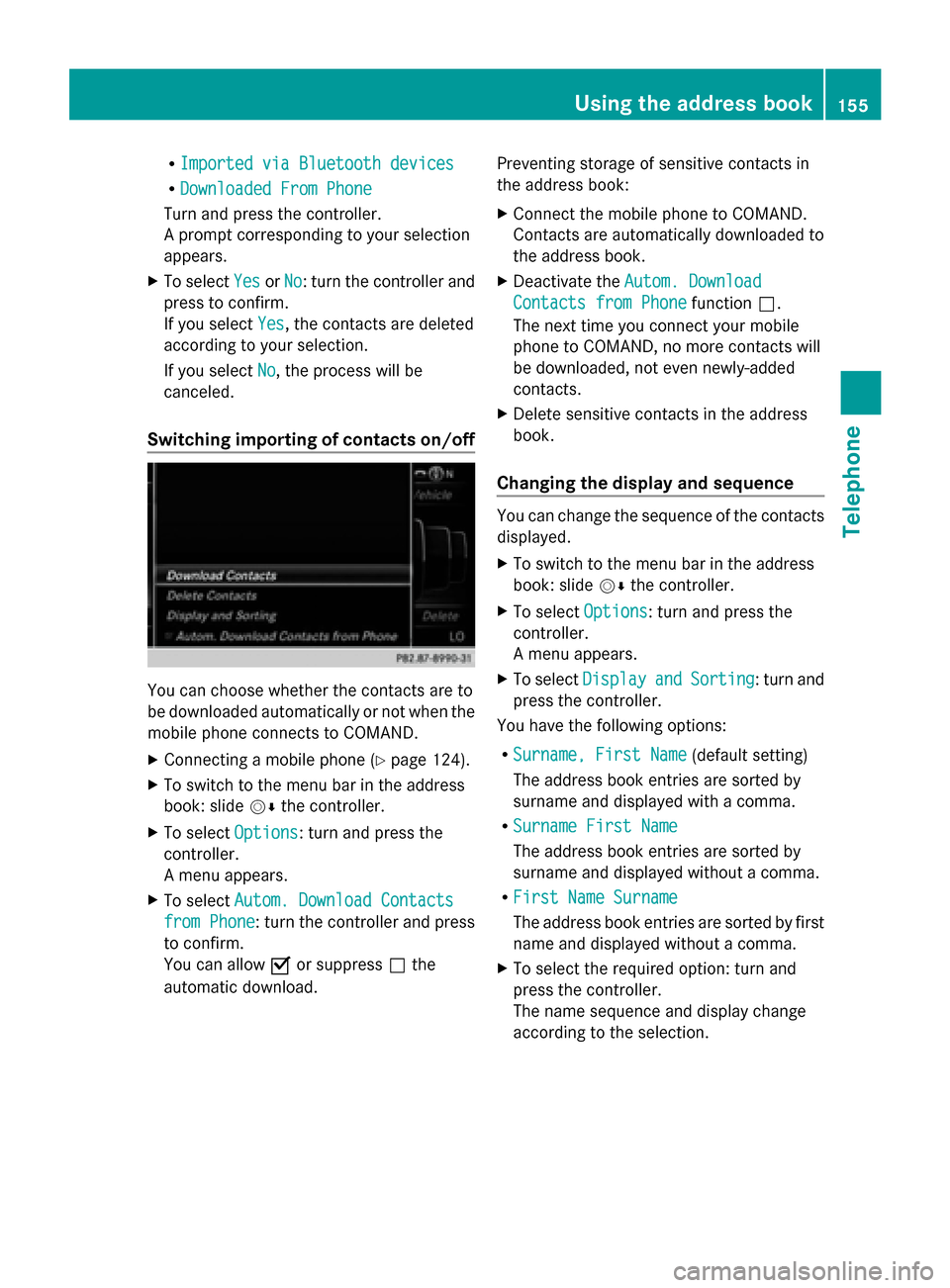
Switching importing of contacts on/off You can choose whether the contacts are to
be downloaded automatically or not when the
mobile phone connects to COMAND.
X
Connecting a mobile phone (Y page 124).
X To switch to the menu bar in the address
book: slide 00520064the controller.
X To select Options Options: turn and press the
controller.
A menu appears.
X To select Autom. Download Contacts Autom. Download Contacts
from Phone
from Phone: turn the controller and press
to confirm.
You can allow 0073or suppress 0053the
automatic download. Preventing storage of sensitive contacts in
the address book:
X
Connect the mobile phone to COMAND.
Contacts are automatically downloaded to
the address book.
X Deactivate the Autom. Download Autom. Download
Contacts from Phone
Contacts from Phone function0053.
The next time you connect your mobile
phone to COMAND, no more contacts will
be downloaded, not even newly-added
contacts.
X Delete sensitive contacts in the address
book.
Changing the display and sequence You can change the sequence of the contacts
displayed.
X
To switch to the menu bar in the address
book: slide 00520064the controller.
X To select Options Options: turn and press the
controller.
A menu appears.
X To select Display Display and
andSorting
Sorting : turn and
press the controller.
You have the following options:
R Surname, First Name Surname, First Name (default setting)
The address book entries are sorted by
surname and displayed with a comma.
R Surname First Name
Surname First Name
The address book entries are sorted by
surname and displayed without a comma.
R First Name Surname First Name Surname
The address book entries are sorted by first
name and displayed without a comma.
X To select the required option: turn and
press the controller.
The name sequence and display change
according to the selection. Using the address book
155Telephone Z
Page 172 of 278
Sound settings
X To make a selection in the Sound
Sound menu:
turn and press the controller.
The menu appears showing the last
accessed sound setting. Internet
Calling up a website
Display restriction Internet pages cannot be shown while the
vehicle is in motion.
Calling up the menu X
Press the 002Bbutton.
The last function called up appears.
X To select the TEL/
TEL/00A7 menu: slide 00970052, turn
and press the controller.
X To select Internet Internet: turn and press the
controller.
The menu for the Internet functions
appears.
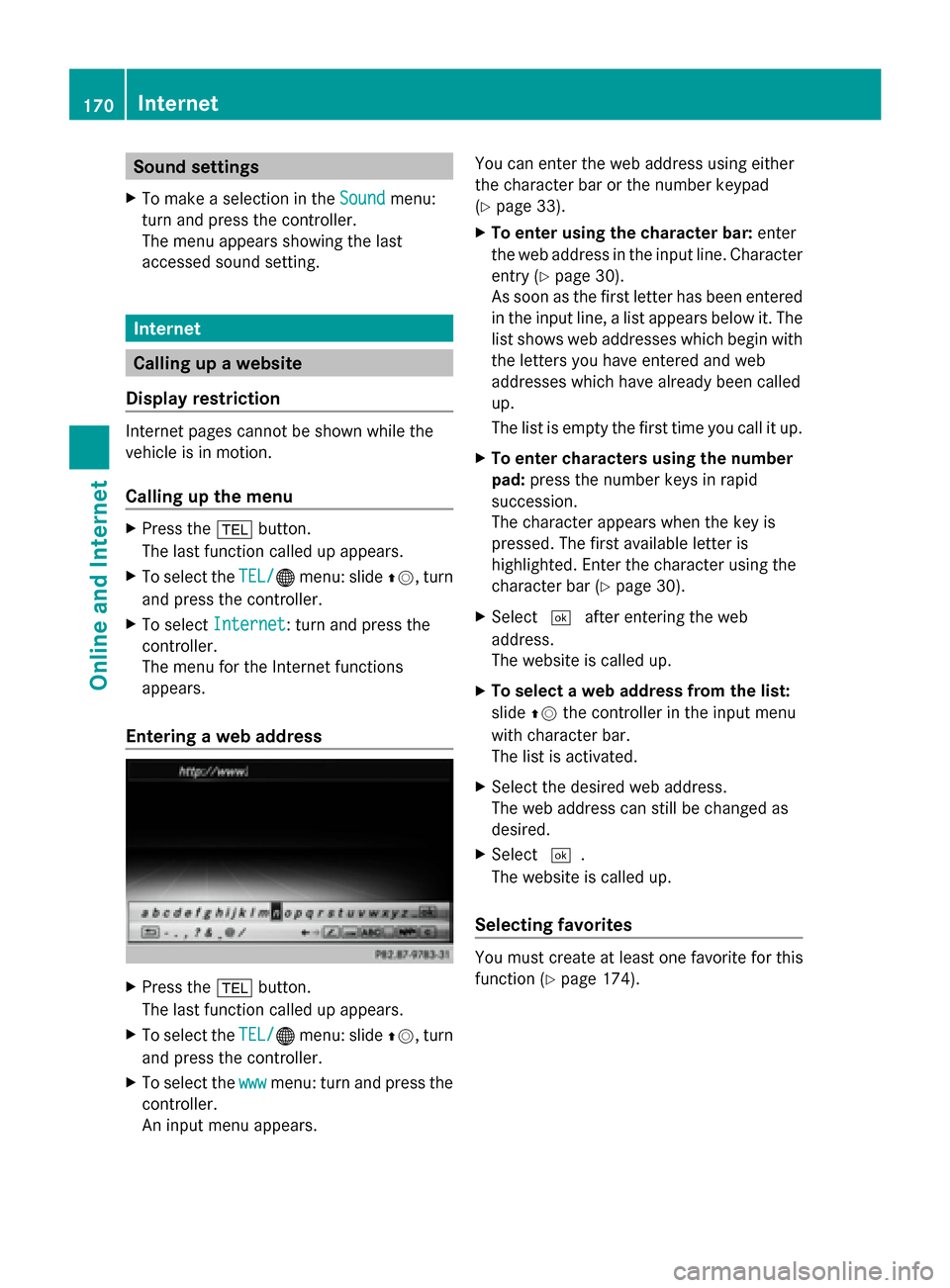
Entering a web address X
Press the 002Bbutton.
The last function called up appears.
X To select the TEL/
TEL/00A7 menu: slide 00970052, turn
and press the controller.
X To select the www wwwmenu: turn and press the
controller.
An input menu appears. You can enter the web address using either
the character bar or the number keypad
(Y
page 33).
X To enter using the character bar: enter
the web address in the input line. Character
entry (Y page 30).
As soon as the first letter has been entered
in the input line, a list appears below it. The
list shows web addresses which begin with
the letters you have entered and web
addresses which have already been called
up.
The list is empty the first time you call it up.
X To enter characters using the number
pad: press the number keys in rapid
succession.
The character appears when the key is
pressed. The first available letter is
highlighted. Enter the character using the
character bar (Y page 30).
X Select 0054after entering the web
address.
The website is called up.
X To select a web address from the list:
slide 00970052the controller in the input menu
with character bar.
The list is activated.
X Select the desired web address.
The web address can still be changed as
desired.
X Select 0054.
The website is called up.
Selecting favorites You must create at least one favorite for this
function (Y
page 174).170
InternetOnline and Internet
Page 177 of 278
Deleting favorites
X
Press the 002Bbutton.
The last function called up appears.
X To select the TEL/
TEL/00A7 menu: slide 00970052, turn
and press the controller.
X To select Internet
Internet: turn and press the
controller.
X To select the Internet
Internet Favorites
Favorites menu:
turn and press the controller.
X Select the desired favorites.
X To select Delete
Delete : slide005200C5and press the
controller.
A prompt appears.
X Select Yes YesorNo
No.
If you select Yes
Yes, the favorite is deleted.
If you select No
No, the process will be
canceled. Settings
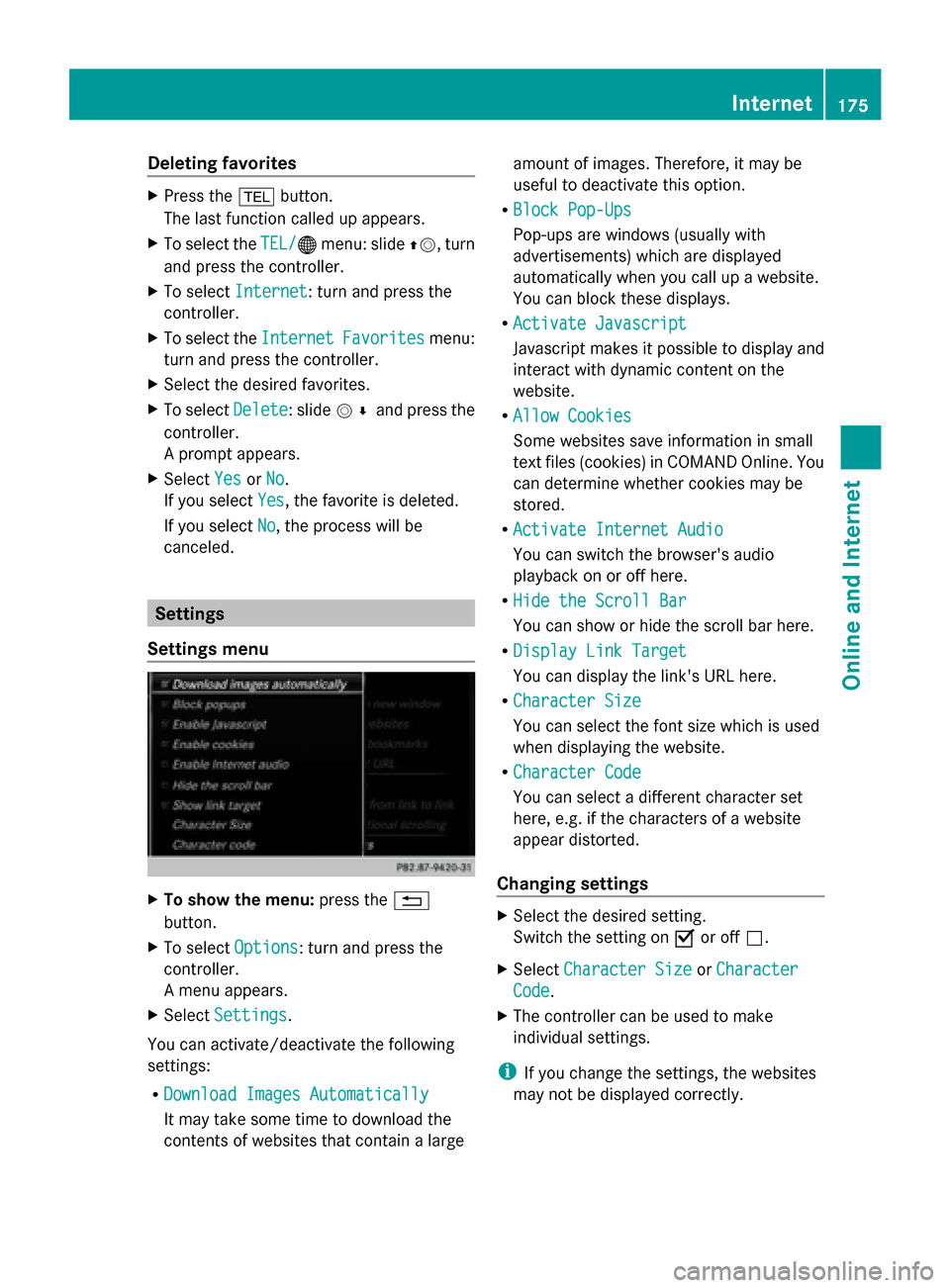
Settings menu X
To show the menu: press the0038
button.
X To select Options
Options: turn and press the
controller.
A menu appears.
X Select Settings
Settings.
You can activate/deactivate the following
settings:
R Download Images Automatically
Download Images Automatically
It may take some time to download the
contents of websites that contain a large amount of images. Therefore, it may be
useful to deactivate this option.
R Block Pop-Ups Block Pop-Ups
Pop-ups are windows (usually with
advertisements) which are displayed
automatically when you call up a website.
You can block these displays.
R Activate Javascript
Activate Javascript
Javascript makes it possible to display and
interact with dynamic content on the
website.
R Allow Cookies Allow Cookies
Some websites save information in small
text files (cookies) in COMAND Online. You
can determine whether cookies may be
stored.
R Activate Internet Audio
Activate Internet Audio
You can switch the browser's audio
playback on or off here.
R Hide the Scroll Bar Hide the Scroll Bar
You can show or hide the scroll bar here.
R Display Link Target Display Link Target
You can display the link's URL here.
R Character Size Character Size
You can select the font size which is used
when displaying the website.
R Character Code Character Code
You can select a different character set
here, e.g. if the characters of a website
appear distorted.
Changing settings X
Select the desired setting.
Switch the setting on 0073or off 0053.
X Select Character Size Character Size orCharacter
Character
Code
Code.
X The controller can be used to make
individual settings.
i If you change the settings, the websites
may not be displayed correctly. Internet
175Online and Internet Z
Page 192 of 278
Your COMAND equipment
These operating instructions describe all
standard and optional equipment available
for your COMAND system at the time of
purchase. Country-specific differences are
possible. Please note that your
COMAND system may not be equipped with
all the features described. This also applies to
safety-relevant systems and functions.
Therefore, the equipment on your COMAND
system may differ from that in the
descriptions and illustrations. Should you
have any questions concerning equipment
and operation, please consult an authorized
Mercedes-Benz Center. Activating media mode
General notes
There are several ways to activate media
sources using COMAND.
The relevant sections of the Operator's
Manual describe the simplest way to activate
a media source.
This section describes all options for
activating media sources. Using the MEDIA button
X Press the 00FDbutton.
The menu for the last accessed media
source appears.
X To select the media source: keep pressing
the 00FD button until the required media
source has been set.
The media sources appear in the following
order:
R CD/DVD
R Memory card
R Media Register
R USB 1
R Media Interface 1
R USB 2 R
Media Interface 2
R BT audio
R TV (if your vehicle is equipped with a TV)
R AUX
If playable music files are found, they will
be played by COMAND.
X To display the function bars: slide 005200C5the
controller. Switching on automatically
X When an external media source is
connected, this media mode is
automatically switched on by COMAND.
External media sources:
R
Apple devices (e.g. iPhone ®
)
R USB devices (e.g. USB stick, MP3 player)
R SD cards
R via AUX cable (automatic activation
depends on the device connected)
R via devices connected by Bluetooth ®
If playable music files are found, they will
be played by COMAND.
i If a media function is already switched on
in COMAND, this will be interrupted and the
basic display of the newly connected
device will appear.
If another function, such as navigation, is
operating, the basic display will not change.
Only the music from the newly connected
media source will play Using the main function bar190
Activa
ting media modeMedia
Page 195 of 278
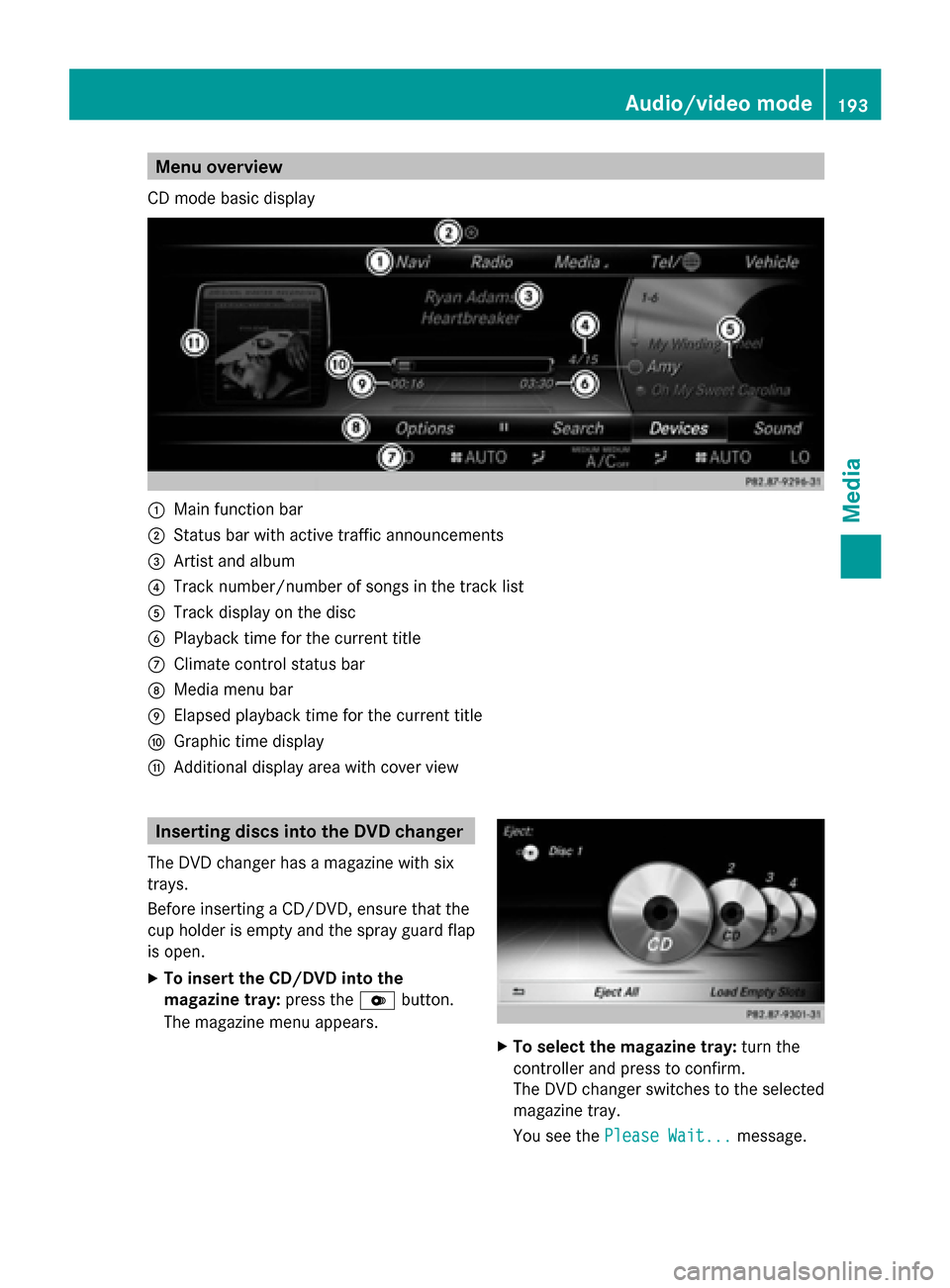
Menu overview
CD mode basic display 0043
Main function bar
0044 Status bar with active traffic announcements
0087 Artist and album
0085 Track number/number of songs in the track list
0083 Track display on the disc
0084 Playback time for the current title
006B Climate control status bar
006C Media menu bar
006D Elapsed playback time for the current title
006E Graphic time display
006F Additional display area with cover view Inserting discs into the DVD changer
The DVD changer has a magazine with six
trays.
Before inserting a CD/DVD, ensure that the
cup holder is empty and the spray guard flap
is open.
X To insert the CD/DVD into the
magazine tray: press the0065button.
The magazine menu appears. X
To select the magazine tray: turn the
controller and press to confirm.
The DVD changer switches to the selected
magazine tray.
You see the Please Wait... Please Wait... message. Audio/video mode
193Media Z
Page 206 of 278
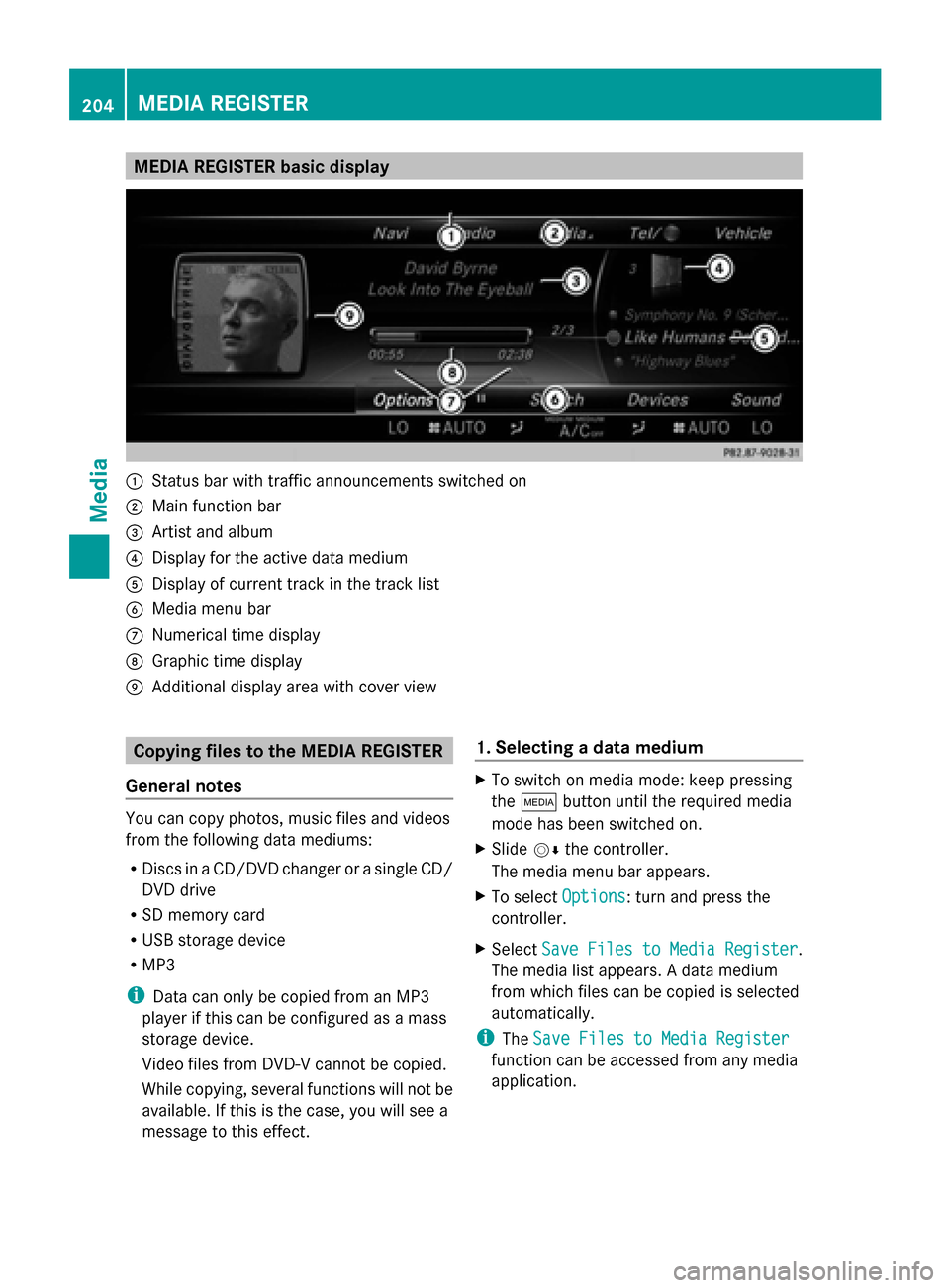
MEDIA REGISTER basic display
0043
Status bar with traffic announcements switched on
0044 Main function bar
0087 Artist and album
0085 Display for the active data medium
0083 Display of current track in the track list
0084 Media menu bar
006B Numerical time display
006C Graphic time display
006D Additional display area with cover view Copying files to the MEDIA REGISTER
General notes You can copy photos, music files and videos
from the following data mediums:
R Discs in a CD/DVD changer or a single CD/
DVD drive
R SD memory card
R USB storage device
R MP3
i Data can only be copied from an MP3
player if this can be configured as a mass
storage device.
Video files from DVD-V cannot be copied.
While copying, several functions will not be
available. If this is the case, you will see a
message to this effect. 1. Selecting a data medium X
To switch on media mode: keep pressing
the 00FD button until the required media
mode has been switched on.
X Slide 00520064the controller.
The media menu bar appears.
X To select Options Options: turn and press the
controller.
X Select Save Files to Media Register
Save Files to Media Register .
The media list appears. A data medium
from which files can be copied is selected
automatically.
i The Save Files to Media Register Save Files to Media Register
function can be accessed from any media
application. 204
MEDIA REGISTERMedia
Page 207 of 278
X
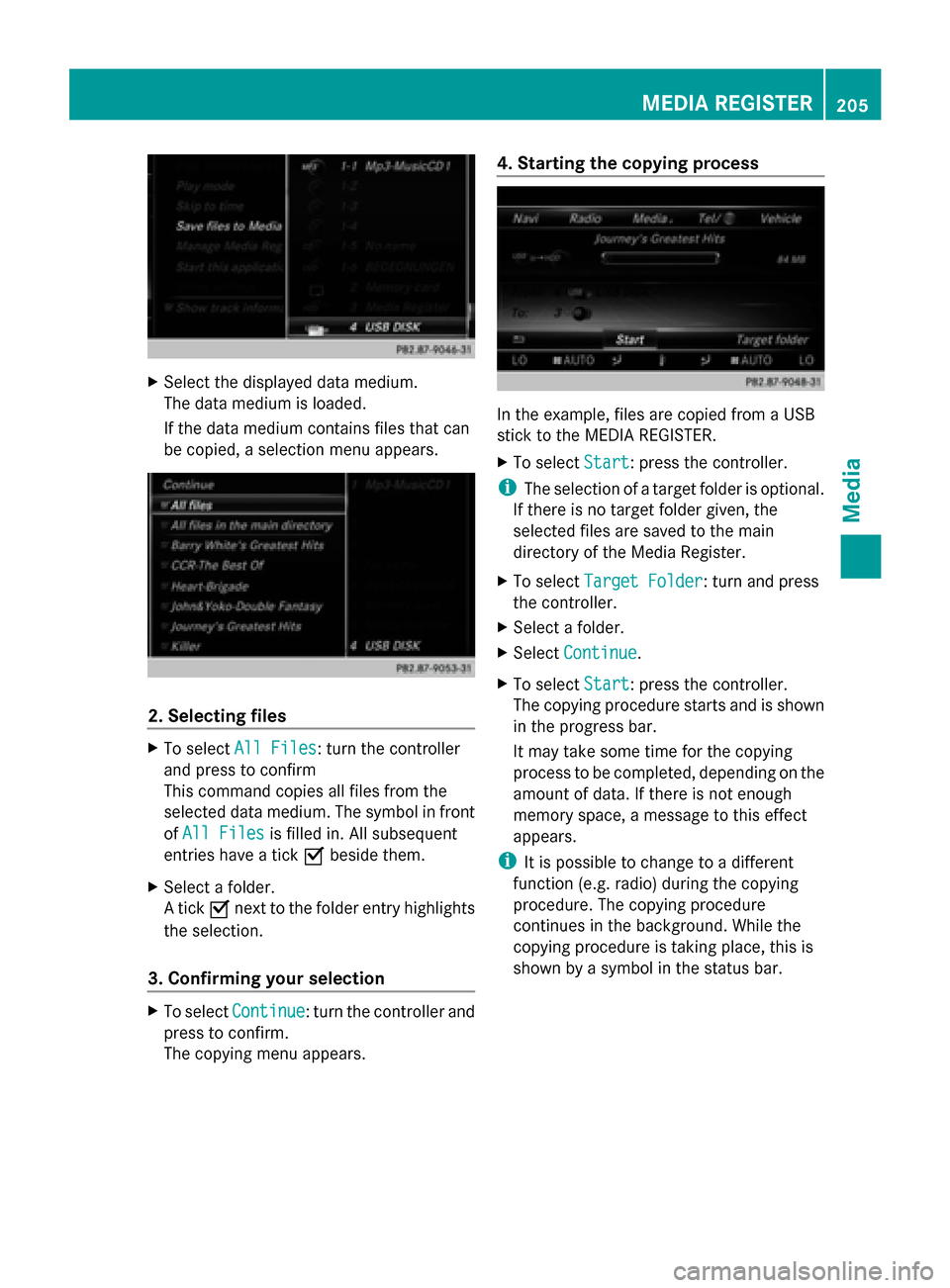
Select the displayed data medium.
The data medium is loaded.
If the data medium contains files that can
be copied, a selection menu appears. 2. Selecting files
X
To select All Files All Files: turn the controller
and press to confirm
This command copies all files from the
selected data medium. The symbol in front
of All Files
All Files is filled in. All subsequent
entries have a tick 0073beside them.
X Select a folder.
A tick 0073next to the folder entry highlights
the selection.
3. Confirming your selection X
To select Continue Continue: turn the controller and
press to confirm.
The copying menu appears. 4. Starting the copying process
In the example, files are copied from a USB
stick to the MEDIA REGISTER.
X
To select Start Start: press the controller.
i The selection of a target folder is optional.
If there is no target folder given, the
selected files are saved to the main
directory of the Media Register.
X To select Target Folder Target Folder : turn and press
the controller.
X Select a folder.
X Select Continue
Continue.
X To select Start
Start: press the controller.
The copying procedure starts and is shown
in the progress bar.
It may take some time for the copying
process to be completed, depending on the
amount of data. If there is not enough
memory space, a message to this effect
appears.
i It is possible to change to a different
function (e.g. radio) during the copying
procedure. The copying procedure
continues in the background. While the
copying procedure is taking place, this is
shown by a symbol in the status bar. MEDIA REGISTER
205Media Z
Page 208 of 278
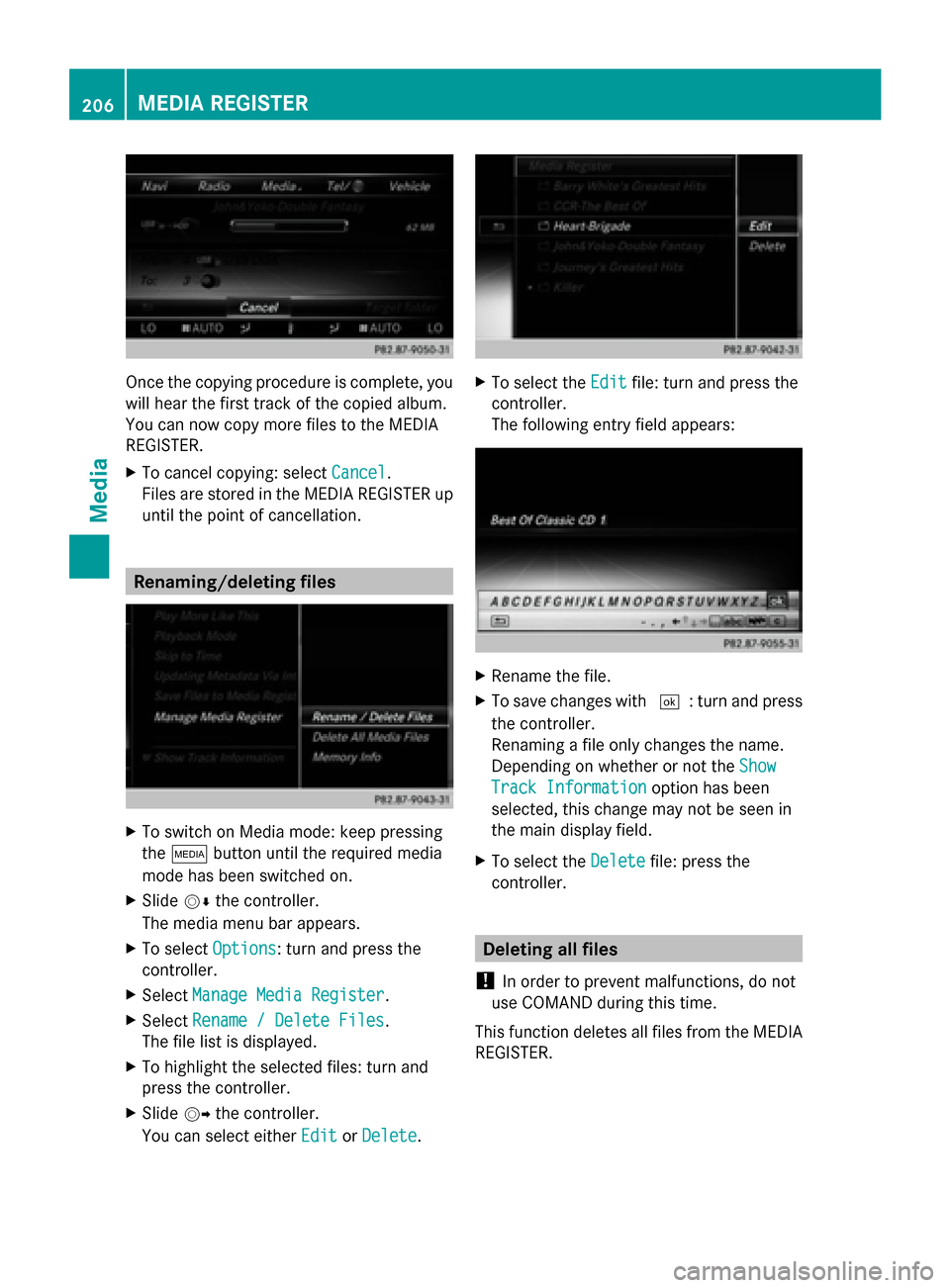
Once the copying procedure is complete, you
will hear the first track of the copied album.
You can now copy more files to the MEDIA
REGISTER.
X To cancel copying: select Cancel
Cancel.
Files are stored in the MEDIA REGISTER up
until the point of cancellation. Renaming/deleting files
X
To switch on Media mode: keep pressing
the 00FD button until the required media
mode has been switched on.
X Slide 00520064the controller.
The media menu bar appears.
X To select Options Options: turn and press the
controller.
X Select Manage Media Register
Manage Media Register.
X Select Rename / Delete Files
Rename / Delete Files.
The file list is displayed.
X To highlight the selected files: turn and
press the controller.
X Slide 00520096the controller.
You can select either Edit
Edit orDelete
Delete. X
To select the Edit
Editfile: turn and press the
controller.
The following entry field appears: X
Rename the file.
X To save changes with 0054: turn and press
the controller.
Renaming a file only changes the name.
Depending on whether or not the Show Show
Track Information
Track Information option has been
selected, this change may not be seen in
the main display field.
X To select the Delete Deletefile: press the
controller. Deleting all files
! In order to prevent malfunctions, do not
use COMAND during this time.
This function deletes all files from the MEDIA
REGISTER. 206
MEDIA REGISTERMedia
Page 210 of 278
The following options are available:
R
Normal Track Sequence Normal Track Sequence
The tracks are played in the normal order
(e.g. track 1, 2, 3, etc.).
R Random Medium
Random Medium
All the tracks on the medium are played in
random order.
R Random Track Mix
Random Track Mix
The tracks in the currently active track list
are played in random order. Bluetooth
®
audio mode Connecting Bluetooth
®
audio devices
Prerequisites Bluetooth
®
audio mode requires a
Bluetooth ®
-capable audio device.
Before using Bluetooth ®
audio mode, you
must check your Bluetooth ®
audio device for
the following (see the Bluetooth ®
audio
device's operating instructions):
R Bluetooth ®
audio profile
The Bluetooth ®
audio device must support
the A2DP and AVRCP Bluetooth ®
audio
profiles.
R Bluetooth ®
visibility
Certain Bluetooth ®
audio devices require
more than simply activating the
Bluetooth ®
function. In addition, your
device must be made "visible" to other
devices.
R Bluetooth ®
device name
This device name is predetermined but can
usually be changed. To make a clear
selection of the Bluetooth ®
device
possible, Mercedes-Benz recommends
that you customize the device name (see
the Bluetooth ®
audio device's operating
instructions). i
A2DP (Advanced AudioDistribution
Profile): Bluetooth ®
audio profile for audio
data transmission
AVRCP (Audio VideoRemote Control
Profile): Bluetooth ®
audio profile for audio
data playback.
i The Bluetooth ®
device must be visible for
authorization. After authorization,
COMAND even finds the Bluetooth ®
device
when it is not visible.
COMAND
X Activate the Bluetooth ®
function in
COMAND (Y page 45).
General notes Before using your Bluetooth
®
audio device
with COMAND for the first time, you will need
to authorize it.
When you authorize a new Bluetooth ®
audio
device, it is connected automatically.
Connection involves first searching for a
Bluetooth ®
audio device and then authorizing
it.
You can authorize up to fifteen Bluetooth ®
devices.
i If you authorize a mobile phone that
supports Bluetooth ®
audio, the A2DP and
AVRCP Bluetooth ®
audio profiles are
connected automatically.
The mobile phone is then entered:
R in the Bluetooth ®
telephone list
(Y page 124)
R in the Bluetooth ®
device list
(Y page 209)
Mercedes-Benz recommends authorizing a
mobile phone in Bluetooth ®
telephony
(Y page 125). 208
Bluetooth ®
audio modeMedia
Page 217 of 278
Operation with the Media Interface
Prerequisite
An iPod ®
, iPhone ®
, USB device or MP3 player must be connected to the Media Interface. You
will find two USB connection sockets in the center console stowage compartment.
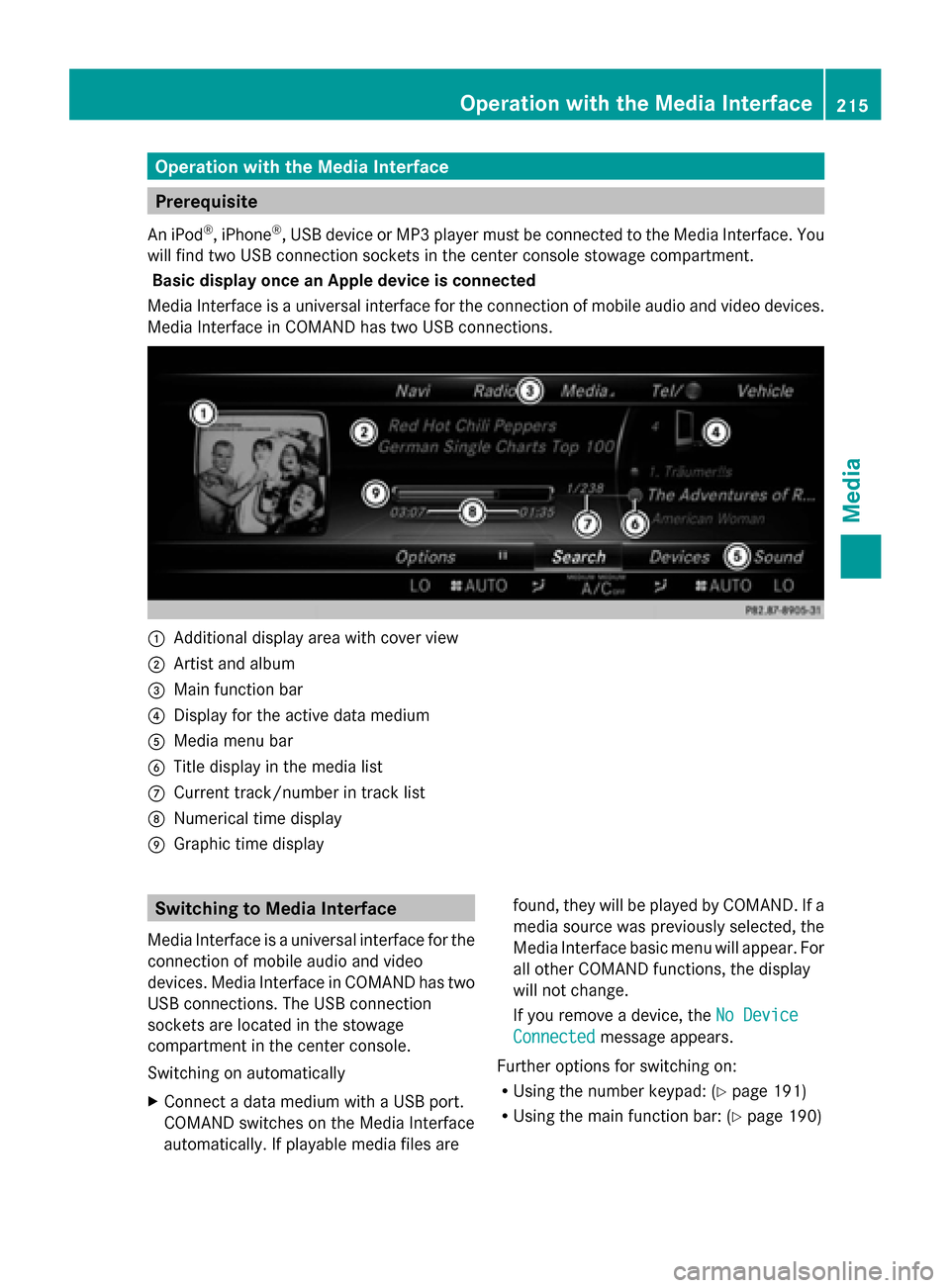
Basic display once an Apple device is connected
Media Interface is a universal interface for the connection of mobile audio and video devices.
Media Interface in COMAND has two USB connections. 0043
Additional display area with cover view
0044 Artist and album
0087 Main function bar
0085 Display for the active data medium
0083 Media menu bar
0084 Title display in the media list
006B Current track/number in track list
006C Numerical time display
006D Graphic time display Switching to Media Interface
Media Interface is a universal interface for the
connection of mobile audio and video
devices. Media Interface in COMAND has two
USB connections. The USB connection
sockets are located in the stowage
compartment in the center console.
Switching on automatically
X Connect a data medium with a USB port.
COMAND switches on the Media Interface
automatically. If playable media files are found, they will be played by COMAND. If a
media source was previously selected, the
Media Interface basic menu will appear. For
all other COMAND functions, the display
will not change.
If you remove a device, the
No Device
No Device
Connected Connected message appears.
Further options for switching on:
R Using the number keypad: (Y page 191)
R Using the main function bar: (Y page 190) Operation with the Media Interface
215Media Z