change time MERCEDES-BENZ S-Class 2014 W222 Comand Manual
[x] Cancel search | Manufacturer: MERCEDES-BENZ, Model Year: 2014, Model line: S-Class, Model: MERCEDES-BENZ S-Class 2014 W222Pages: 278, PDF Size: 6.65 MB
Page 223 of 278
a distance of 44 feet (approximately 14 m)
every second. Notes on discs
! Do not affix stickers or labels to the discs.
They could peel off and damage COMAND.
Stickers can cause the disc to bend, which
can result in read errors and disc
recognition problems.
! COMAND is designed to play discs that
comply with the EN 60908 standard.
Therefore, you can only use discs with a
maximum thickness of 1.3 mm.
If you insert thicker discs, e.g. those that
contain data on both sides (DVD on one
side and audio data on the other), they
cannot be ejected and can damage the
device.
Only use round discs with a diameter of
12 cm. Do not use discs with a diameter of
8 cm, even with an adapter.
The variety of data media, burners and burn
software means there is no guarantee that
the system will be able to play discs that you
have copied yourself. DVD playback conditions
If video DVDs do not conform to the NTSC or
PAL TV standards, they may create picture,
sound or other problems during playback.
COMAND is capable of playing back video
DVDs produced according to the following
standards:
R Region code 1 or region code 0 (no region
code)
R PAL or NTSC standard
You will generally find the relevant details
either on the DVD itself or on the DVD case.
i If you insert a video DVD with a different
region code, a message to this effect
appears. i
COMAND is set to region code 1 at the
factory. This setting can be changed at an
authorized Mercedes-Benz Center. It is also
possible to play video DVDs with a different
region code, provided that they are
produced in accordance with the PAL or
NTSC TV standard. The region code can be
changed up to five times. Control options
There are four control menus available in
video DVD mode.
Most DVDs have their own control menu.
The DVD's control menu is operated directly
using the controller or DVD functions. Control menu and
function Operation
R
DVD's control
menu
Selection of title,
scene, language,
subtitles ... Operation with the
controller
R
Options Options menu
Selection of
brightness,
contrast, color,
format Operation using the
menu bar/options/
video settings
R
Video menu
Selection of
scene, fast
forward/rewind In full-screen mode,
slide
005200C5 the
controller R
DVD functions
Selection of title,
scene, language,
subtitles ... In full-screen mode,
press the controller
Function restrictions
Depending on the DVD, certain functions or
actions may not function at all. The symbol
0047 appears in the display. Video DVD mode
221Media Z
Page 242 of 278
Your COMAND equipment
These operating instructions describe all
standard and optional equipment available
for your COMAND system at the time of
purchase. Country-specific differences are
possible. Please note that your
COMAND system may not be equipped with
all the features described. This also applies to
safety-relevant systems and functions.
Therefore, the equipment on your COMAND
system may differ from that in the
descriptions and illustrations. Should you
have any questions concerning equipment
and operation, please consult an authorized
Mercedes-Benz Center. Rear Seat Entertainment System
overview Important safety notes
G
WARNING
The CD/DVD drive is a class 1 laser product.
If you open the CD/DVD drive housing, you
could be exposed to invisible laser radiation.
This laser radiation could damage your retina.
There is a risk of injury.
Never open the housing. Always have
maintenance and repair work carried out at a
qualified specialist workshop. G
WARNING
If objects such as headphones/headsets or
external audio/video sources are not secured
in the passenger compartment, they can be
flung around and hit vehicle occupants. There
is a risk of injury, for example in the event of
sudden braking or a sudden change in
direction.
Always stow these items or similar objects
carefully so that they cannot be flung around,
for example in a lockable vehicle stowage
compartment. Components
The Rear Seat Entertainment System
includes:
R two screens for the rear behind the front-
seat head restraints
R two remote controls for the rear
compartment
R a CD/DVD drive in the rear compartment
R AUX jacks
R two USB ports
R two sets of cordless headphones General notes
R You can only adjust the volume for the
headphones supplied, directly on the
headphones.
R If media from different sources are used,
they can be used separately from each of
the operating positions. Example: a film
from the DVD drive is played on the rear
right-hand operating position. This means
that another film from the same DVD
cannot be played separately on the rear
left-hand operating position. However, on
the rear left-hand operating position, it is
possible to use the radio, TV, memory card,
MUSIC REGISTER, media interface, USB,
online and Internet functions or AUX.
R If you use the same medium on both sides,
you can both carry out the respective
settings. The "last one wins" principle
applies here, i.e. the last setting activated
is favored.
R The Internet can be used separately at all
operating positions.
R The Internet can only be used if it is set up
and connected via a telephone
(Y page 158). 240
Rea
r Seat Entertainment System overviewRear Seat Entertainment System
Page 244 of 278
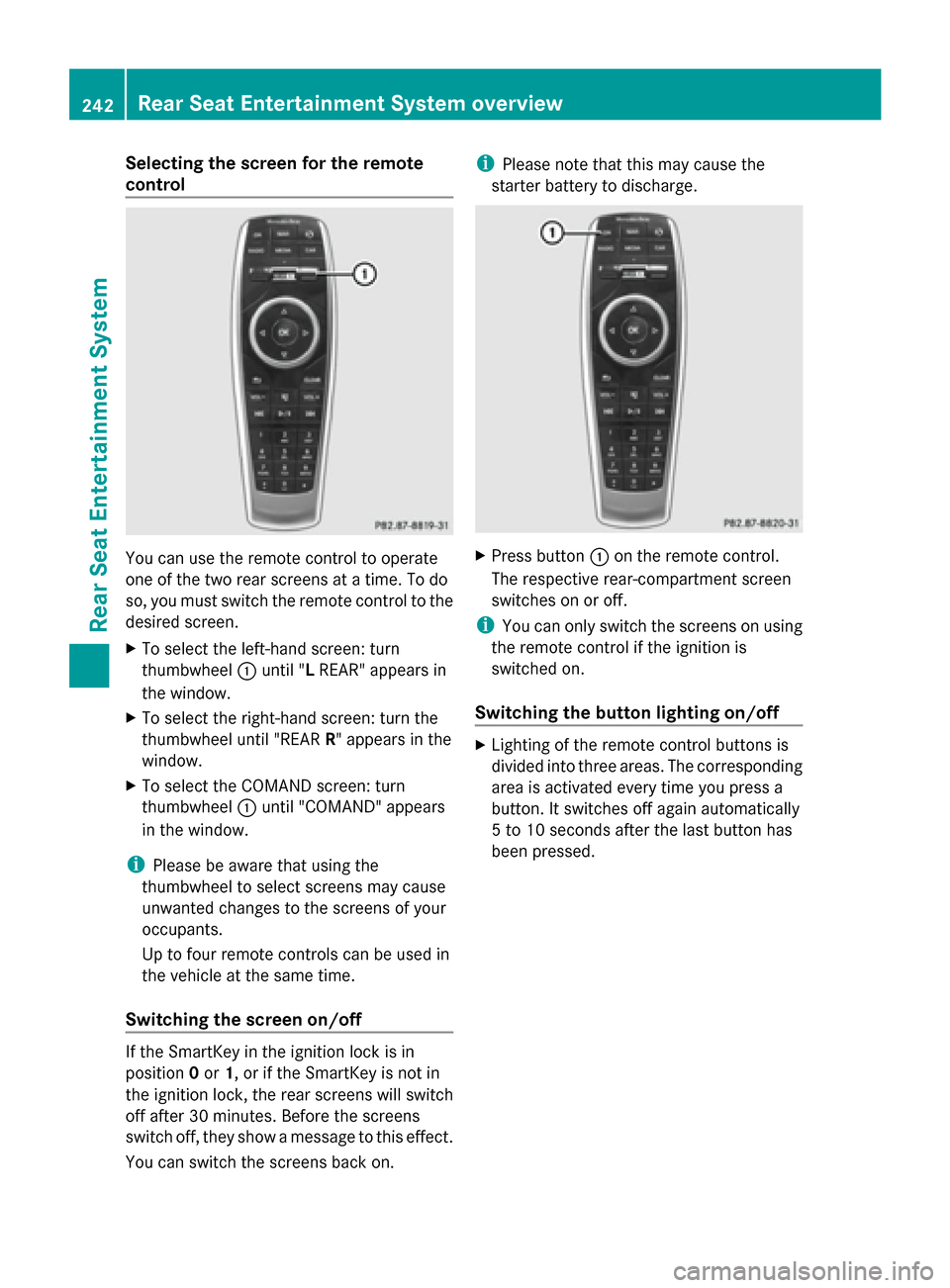
Selecting the screen for the remote
control
You can use the remote control to operate
one of the two rear screens at a time. To do
so, you must switch the remote control to the
desired screen.
X To select the left-hand screen: turn
thumbwheel 0043until "L REAR" appears in
the window.
X To select the right-hand screen: turn the
thumbwheel until "REAR R" appears in the
window.
X To select the COMAND screen: turn
thumbwheel 0043until "COMAND" appears
in the window.
i Please be aware that using the
thumbwheel to select screens may cause
unwanted changes to the screens of your
occupants.
Up to four remote controls can be used in
the vehicle at the same time.
Switching the screen on/off If the SmartKey in the ignition lock is in
position 0or 1, or if the SmartKey is not in
the ignition lock, the rear screens will switch
off after 30 minutes. Before the screens
switch off, they show a message to this effect.
You can switch the screens back on. i
Please note that this may cause the
starter battery to discharge. X
Press button 0043on the remote control.
The respective rear-compartment screen
switches on or off.
i You can only switch the screens on using
the remote control if the ignition is
switched on.
Switching the button lighting on/off X
Lighting of the remote control buttons is
divided into three areas. The corresponding
area is activated every time you press a
button. It switches off again automatically
5 to 10 seconds after the last button has
been pressed. 242
Rear Seat Entertainment System overviewRear Seat Entertainment System
Page 259 of 278
0087
Shows the menu bars for the DVD basic
display
0085 Current scene
0083 Track time
X To show: press the0063or0064 button
on the remote control.
X To hide: press the 0063or0064 button.
or
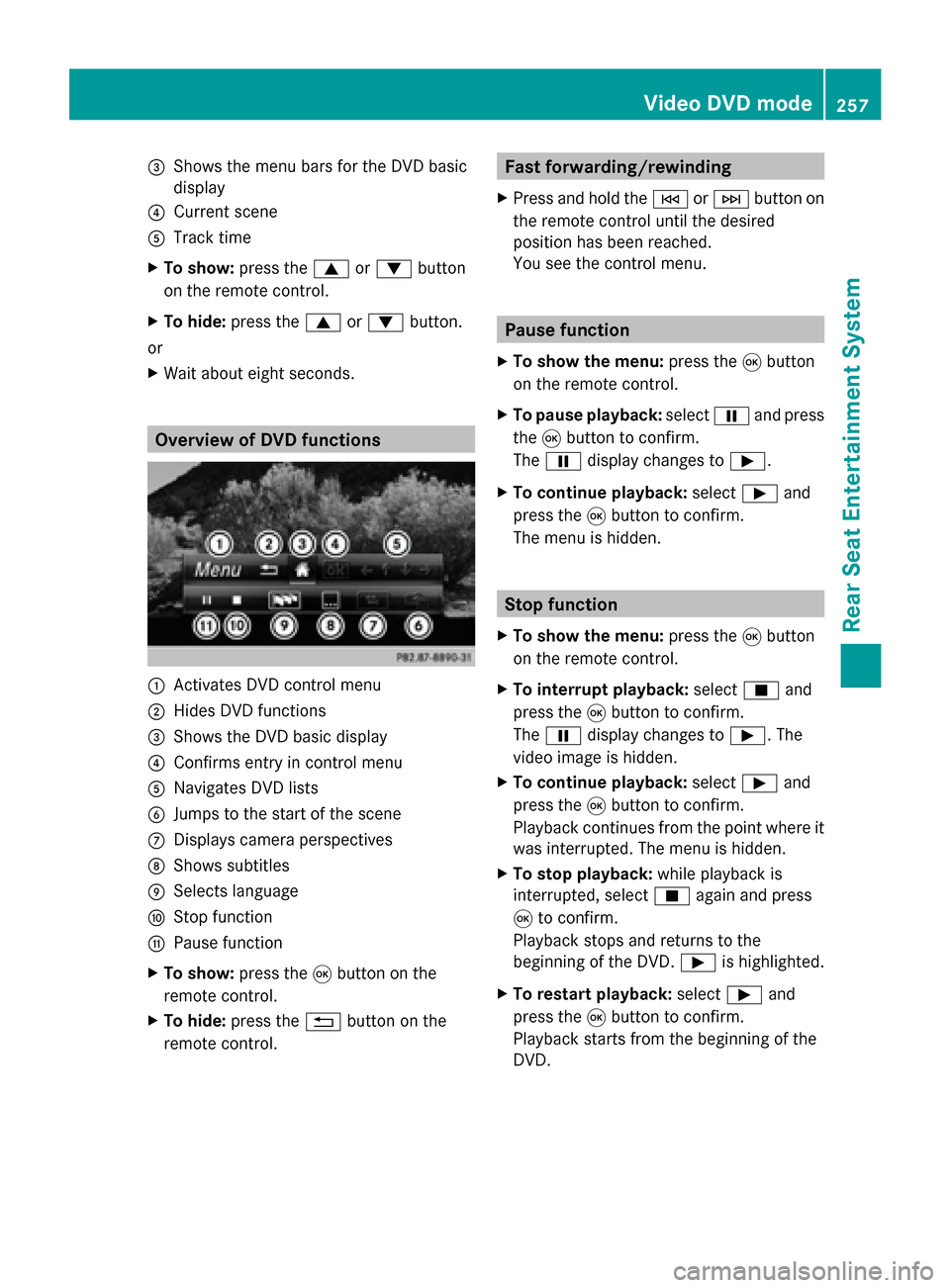
X Wait about eight seconds. Overview of DVD functions
0043
Activates DVD control menu
0044 Hides DVD functions
0087 Shows the DVD basic display
0085 Confirms entry in control menu
0083 Navigates DVD lists
0084 Jumps to the start of the scene
006B Displays camera perspectives
006C Shows subtitles
006D Selects language
006E Stop function
006F Pause function
X To show: press the008Bbutton on the
remote control.
X To hide: press the 0038button on the
remote control. Fast forwarding/rewinding
X Press and hold the 0048or0049 button on
the remote control until the desired
position has been reached.
You see the control menu. Pause function
X To show the menu: press the008Bbutton
on the remote control.
X To pause playback: select00CFand press
the 008Bbutton to confirm.
The 00CF display changes to 00D0.
X To continue playback: select00D0and
press the 008Bbutton to confirm.
The menu is hidden. Stop function
X To show the menu: press the008Bbutton
on the remote control.
X To interrupt playback: select00DBand
press the 008Bbutton to confirm.
The 00CF display changes to 00D0. The
video image is hidden.
X To continue playback: select00D0and
press the 008Bbutton to confirm.
Playback continues from the point where it
was interrupted. The menu is hidden.
X To stop playback: while playback is
interrupted, select 00DBagain and press
008B to confirm.
Playback stops and returns to the
beginning of the DVD. 00D0is highlighted.
X To restart playback: select00D0and
press the 008Bbutton to confirm.
Playback starts from the beginning of the
DVD. Video DVD mode
257Rear Seat Entertainment System Z
Page 270 of 278
i
You can call up the legend for the precipitation radar (Y page 271).
The transparency of the radar map display level can be adjusted in 5 stages.
To display storm characteristics:
X Activate the Storm Characteristics
Storm Characteristics display level (Ypage 266).
If weather data is available, the weather map will then display the storm characteristics.
i You can call up the legend for storms (Y page 271).
The following information on a storm cell is displayed (if available):
R characteristics of the storm cell
R date and time of observation (time stamp)
R directional movement speed and path
The directional movement speed is the speed at which the storm cell moves. To display weather fronts:
X
Activate the Atmospheric Pressure Atmospheric Pressure display level (Ypage 266).
If weather data is available, the weather map will then display the weather fronts.
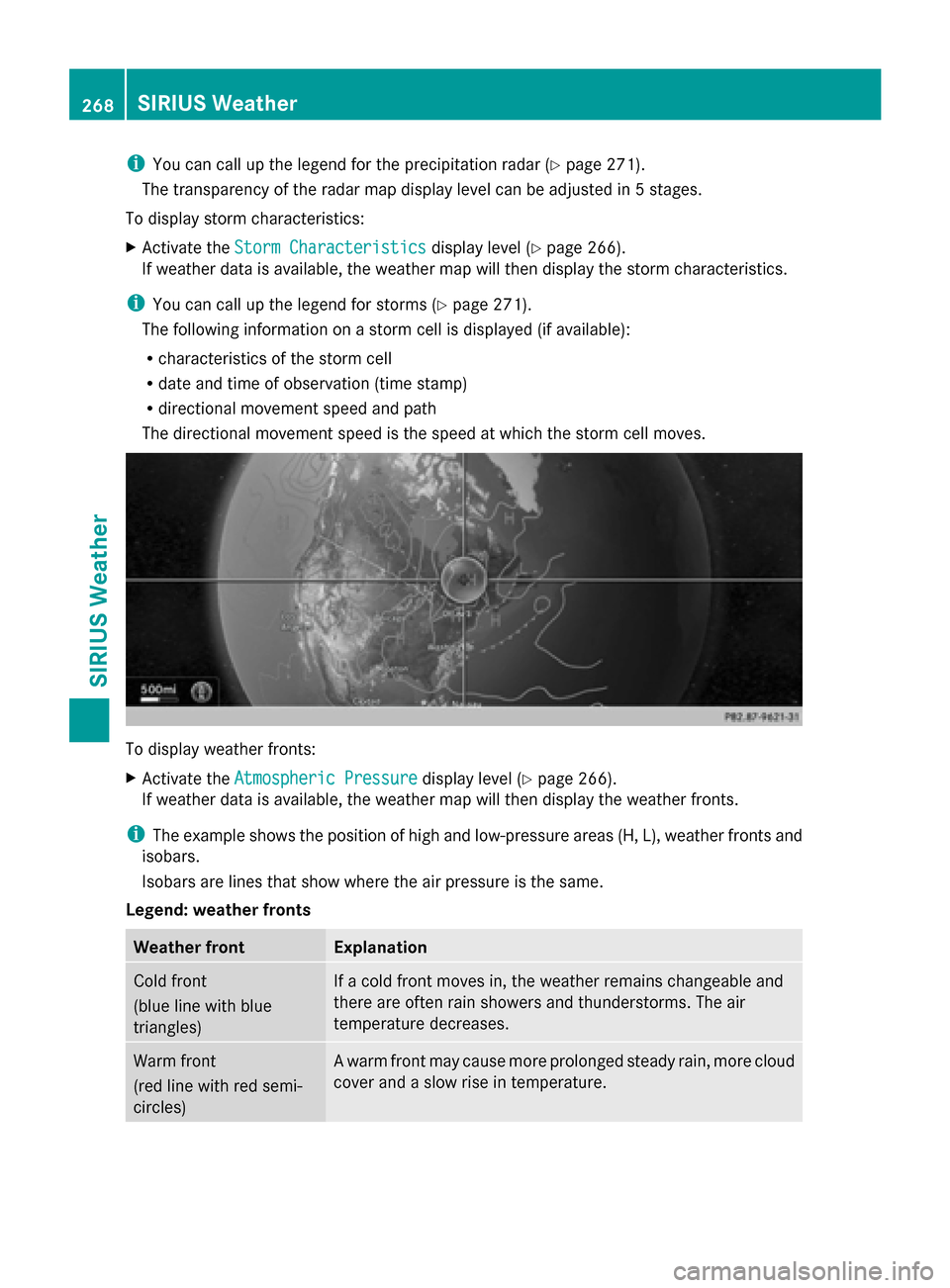
i The example shows the position of high and low-pressure areas (H, L), weather fronts and
isobars.
Isobars are lines that show where the air pressure is the same.
Legend: weather fronts Weather front Explanation
Cold front
(blue line with blue
triangles) If a cold front moves in, the weather remains changeable and
there are often rain showers and thunderstorms. The air
temperature decreases. Warm front
(red line with red semi-
circles) A warm front may cause more prolonged steady rain, more cloud
cover and a slow rise in temperature.268
SIRIUS WeatherSIRIUS Weather
Page 273 of 278
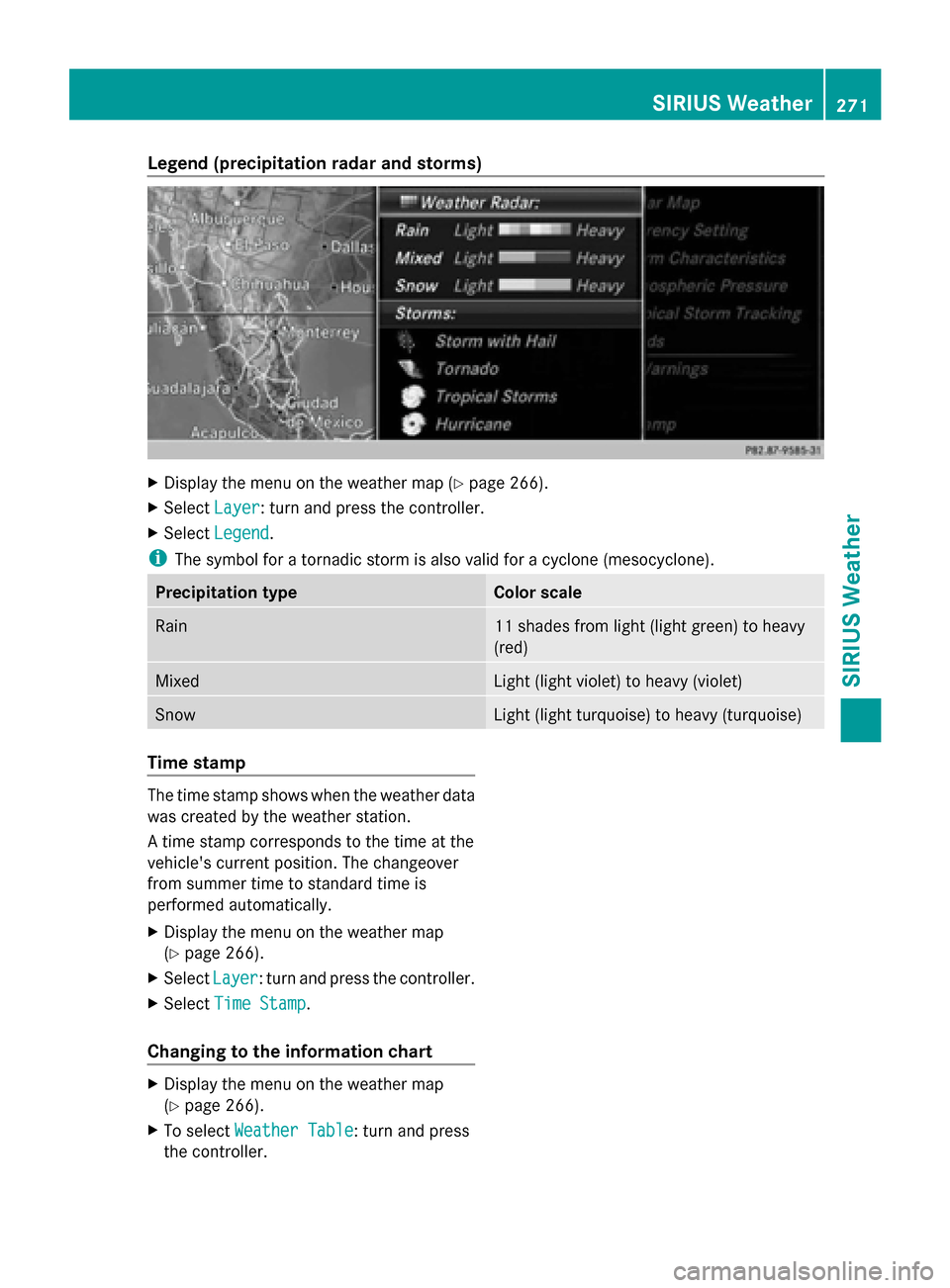
Legend (precipitation radar and storms)
X
Display the menu on the weather map (Y page 266).
X Select Layer Layer: turn and press the controller.
X Select Legend Legend .
i The symbol for a tornadic storm is also valid for a cyclone (mesocyclone). Precipitation type Color scale
Rain 11 shades from light (light green) to heavy
(red)
Mixed Light (light violet) to heavy (violet)
Snow Light (light turquoise) to heavy (turquoise)
Time stamp
The time stamp shows when the weather data
was created by the weather station.
A time stamp corresponds to the time at the
vehicle's current position. The changeover
from summer time to standard time is
performed automatically.
X Display the menu on the weather map
(Y page 266).
X Select Layer Layer: turn and press the controller.
X Select Time Stamp
Time Stamp.
Changing to the information chart X
Display the menu on the weather map
(Y page 266).
X To select Weather Table Weather Table: turn and press
the controller. SIRIUS Weather
271SIRIUS Weather