wheel MERCEDES-BENZ S-Class 2015 W222 User Guide
[x] Cancel search | Manufacturer: MERCEDES-BENZ, Model Year: 2015, Model line: S-Class, Model: MERCEDES-BENZ S-Class 2015 W222Pages: 502, PDF Size: 9.59 MB
Page 23 of 502
Structure and characteristics
(definition) ..................................... 463
Summer tires in winter .................. 444
Temperature .................................. 459
TIN (Tire Identification Number)
(definition) ..................................... 465
Tire bead (definition) ...................... 465
Tire pressure (definition) ................ 464
Tire pressures (recommended) ...... 463
Tire size (data )............................... 471
Tire size designation, load-bearing capacity, speed rating .................... 459
Tire tread ....................................... 443
Tire tread (definition) ..................... 465
Total load limit (definition) ............. 465
Traction ......................................... 458
Traction (definition) ....................... 465
Tread wear ..................................... 458
Uniform Tire Quality Grading
Standards ...................................... 458
Uniform Tire Quality Grading
Standards (definition) .................... 463
Wear indicator (definition) ............. 465
Wheel and tire combination ........... 473
Wheel rim (definition) .................... 463
see Flat tire
Top Tether ............................................ 73
Tow-starting
Emergency engine starting ............ 438
Important safety notes .................. 435
Towing away
Important safety guidelines ........... 435
Installing the towing eye ................ 436
Notes for 4MATIC vehicles ............ 438
Removing the towing eye ............... 436
With both axles on the ground ....... 436
With the rear axle raised ................ 437
Towing eye ......................................... 422
Transfer case ..................................... 205
Transmission
see Automatic transmission
Transporting the vehicle .................. 437
Trim pieces (cleaning instruc-
tions) .................................................. 418
Trip computer (on-board com-
puter) .................................................. 300 Trip odometer
Calling up ....................................... 299
Resetting (on-board computer) ...... 301
Trunk
Emergency release ........................ 105
Important safety notes .................. 100
Locking separately ......................... 104
Opening/closing (automatically
from inside) ................................... 104
Opening/closing (automatically
from outside) ................................. 101
Opening/closing (from outside,
HANDS-FREE ACCESS) .................. 102
Opening/closing (manually from
outside) ......................................... 101
Power closing .................................. 98
Trunk lid
Display message ............................ 352
Obstacle recognition ...................... 100
Opening dimensions ...................... 495
Opening/closing ............................ 100
Trunk load (maximum) ...................... 495
Turn signals
Display message ............................ 333
Switching on/of f........................... 152
Two-way radio
Windshield (infrared reflective) ...... 401
Type identification plate
see Vehicle identification plate U
Unlocking Emergency unlocking ....................... 98
From inside the vehicle (central
unlocking button) ............................. 97 V
Vanity mirror (in the sun visor) ........ 381
Vehicle
Correct use ...................................... 29
Data acquisition ............................... 30
Display message ............................ 351
Equipment ....................................... 25
Individual settings .......................... 308
Limited Warranty ............................. 30
Loading .......................................... 453
Locking (in an emergency) ............... 99 Index
21
Page 24 of 502
Locking (SmartKey) .......................... 91
Lowering ........................................ 470
Maintenance .................................... 26
Operating safety .............................. 27
Parking for a long period ................ 223
Pulling away ................................... 192
Raising ........................................... 467
Reporting problems ......................... 29
Securing from rolling away ............ 466
Towing away .................................. 435
Transporting .................................. 437
Unlocking (in an emergency) ........... 98
Unlocking (SmartKey) ...................... 91
Vehicle data ................................... 495
Vehicle dimensions ........................... 495
Vehicle emergency locking ................ 99
Vehicle Homepage
Data protection .............................. 219
Functions ....................................... 220
General information ....................... 219
Internet connection ....................... 220
Vehicle identification number
see VIN
Vehicle identification plate .............. 488
Vehicle level
Active Body Control ABC ............... 244
Display message ............................ 341
Vehicle maintenance
see ASSYST PLUS
Vehicle tool kit .................................. 422
Video
Operating the DVD ......................... 305
VIN ...................................................... 488 W
Warning Stickers ........................................... 46
Warning and indicator lamps
ABS ................................................ 358
Brakes ........................................... 357
Check Engine ................................. 363
Coolant .......................................... 364
Distance warning ........................... 367
ESP ®
.............................................. 360
ESP ®
OFF ....................................... 361
Fuel tank ........................................ 363
Hybrid system ................................ 366 Overview .......................................... 36
Parking brake ................................ 362
PASSENGER AIR BAG ...................... 50
RBS (Recuperative Brake Sys-
tem) ............................................... 366
Reserve fue
l................................... 363
Restraint system ............................ 362
Seat belt ........................................ 355
Steering ......................................... 369
Tire pressure monitor .................... 368
Warranty .............................................. 25
Washer fluid
Display message ............................ 353
Wheel and tire combination
see Tires
Wheel bolt tightening torque ........... 470
Wheel chock ...................................... 466
Wheels
Changing a whee l.......................... 465
Checking ........................................ 443
Cleaning ......................................... 414
Important safety notes .................. 442
Interchanging/changing ................ 465
Mounting a new whee l................... 470
Mounting a whee l.......................... 466
Removing a whee l.......................... 469
Storing ........................................... 466
Tightening torque ........................... 470
Wheel size/tire size ....................... 471
Window curtain air bag
Operation ......................................... 59
Windows
see Side windows
Windshield
Defrosting ...................................... 175
Infrared reflective .......................... 401
Windshield washer fluid
see Windshield washer system
Windshield washer system
Adding washer fluid ....................... 409
Notes ............................................. 494
Windshield wipers
Problem (malfunction) ................... 161
Replacing the wiper blades ............ 158
Switching on/of f........................... 157
Winter driving
Important safety notes .................. 444
Slippery road surfaces ................... 228 22
Index
Page 27 of 502
R
instrument cluster
R center console
Do not install accessories such as audio
systems in these areas. Do not carry out
repairs or welding. You could impair the
operating efficiency of the restraint sys-
tems.
Have aftermarket accessories installed at a qualified specialist workshop.
You could jeopardize the operating safety of
your vehicle if you use parts, tires and wheels as well as accessories relevant to safety
which have not been approved by Mercedes.
This could lead to malfunctions in safety-rel-
evant systems, e.g. the brake system. Use
only genuine Mercedes-Benz parts or parts of equal quality. Only use tires, wheels and
accessories that have been specifically
approved for your vehicle.
Genuine Mercedes-Benz parts are subject to
strict quality control. Every part has been spe-
cifically developed, manufactured or selected for and adapted to Mercedes-Benz vehicles.
Only genuine Mercedes-Benz parts should
therefore be used.
More than 300,000 different genuine
Mercedes-Benz parts are available for
Mercedes-Benz models.
All authorized Mercedes-Benz Centers main-
tain a supply of genuine Mercedes-Benz parts
for necessary service and repair work. In addi-
tion, strategically located parts delivery cen-
ters provide quick and reliable parts service.
Always specify the vehicle identification num- ber (VIN) when ordering genuine Mercedes-
Benz parts (Y page 488). Operator's Manual
Vehicle equipment
This Operator's Manual describes all models
and all standard and optional equipment of
your vehicle available at the time of going to
print. Country-specific differences are possi-
ble. Bear in mind that your vehicle may not feature all functions described here. This also
applies to safety-relevant systems and func-
tions. The equipment in your vehicle may
therefore differ from that shown in the
descriptions and illustrations.
The original purchase agreement lists all sys-
tems installed in your vehicle.
Should you have any questions concerning
equipment and operation, please consult an
authorized Mercedes-Benz Center.
The Operator's Manual and Maintenance
Booklet are important documents and should
be kept in the vehicle. Service and vehicle operation
Warranty
The implied warranty for your vehicle applies
in accordance with the warranty terms and
conditions in the Service and Warranty Infor-
mation booklet.
Your authorized Mercedes-Benz Center will
replace and repair all factory-installed parts in
accordance with the following warranty terms and conditions:
R New Vehicle Limited Warranty
R Emission System Warranty
R Emission Performance Warranty
R California, Connecticut, Maine, Massachu-
setts, New York, Pennsylvania, Rhode
Island and Vermont Emission Control Sys-
tem Warranty
R State warranty enforcement laws (lemon
laws)
Replacement parts and accessories are cov-
ered by the Mercedes-Benz Parts and Acces- sories warranties. These are available at any
authorized Mercedes-Benz Center.
i Should you lose your Service and War-
ranty Information booklet, have an author-
ized Mercedes-Benz Center arrange for a
replacement. The new Service and War-
ranty Information booklet will be posted to you. Introduction
25 Z
Page 30 of 502
In situations like this, the body, the under-
carriage, chassis parts, wheels or tires
could be damaged without the damage
being visible. Components damaged in this way can unexpectedly fail or, in the case of
an accident, no longer withstand the strain
they are designed to.
If the underbody paneling is damaged,
combustible materials such as leaves,
grass or twigs can gather between the
underbody and the underbody paneling. If
these materials come in contact with hot
parts of the exhaust system, they can catch fire.
In such situations, have the vehicle
checked and repaired immediately at a
qualified specialist workshop. If on con-
tinuing your journey you notice that driving
safety is impaired, pull over and stop the
vehicle immediately, paying attention to
road and traffic conditions. In such cases,
consult a qualified specialist workshop.
Hybrid vehicles have a combustion engine
and an electric motor. The voltage supply for
operating the vehicle electrically is provided
by the vehicle's high-voltage electrical sys-
tem. G
DANGER
The vehicle's high voltage electrical system is under high voltage. If you modify components
in the vehicle's high-voltage electrical system or touch damaged components, you may be
electrocuted. The components in the vehi-
cle's high-voltage electrical system may be
damaged in an accident, although the damage
is not visible. There is a risk of fatal injury.
Following an accident, do not touch any high- voltage components and never modify the
vehicle's high-voltage electrical system. Have
the vehicle towed away after an accident and the vehicle's high-voltage electrical system
checked by a qualified specialist workshop.
The components of the vehicle's high-voltage electrical system are marked with yellow
warning stickers. The cables of the vehicle's high-voltage electrical system are orange in
color.
Vehicles with an electric motor generate
much less driving noise than vehicles with
internal combustion engines. As a result, your
vehicle may not be heard by other road users
in certain situations. This can happen, for
example, when you are parking and your vehi- cle is not seen by other road users. This
requires you to adopt a particularly anticipa-
tory driving style, as it is necessary to allow
for the possibility that other road users may
behave erratically. Declarations of conformity
Vehicle components which receive
and/or transmit radio waves USA:
"The wireless devices of this vehicle
comply with Part 15 of the FCC Rules. Oper-
ation is subject to the following two condi-
tions: 1) These devices may not cause harm-
ful interference, and 2) These devices must
accept any interference received, including
interference that may cause undesired oper-
ation. Changes or modifications not expressly
approved by the party responsible for com-
pliance could void the user’s authority to
operate the equipment."
Canada: "The wireless devices of this vehicle
comply with Industry Canada license-exempt
RSS standard(s). Operation is subject to the
following two conditions: (1) These devices
may not cause interference, and (2) These
devices must accept any interference, includ- ing interference that may cause undesired
operation of the device." Diagnostics connection
The diagnostics connection is only intended
for the connection of diagnostic equipment at a qualified specialist workshop. 28
Introduction
Page 35 of 502
Cockpit
................................................. 34
Instrument cluster ..............................35
Multifunction steering wheel .............37
Center console .................................... 39
Overhead control panel ......................41
Door control panel .............................. 42
Rear seats ............................................ 43 33At a glance
Page 36 of 502
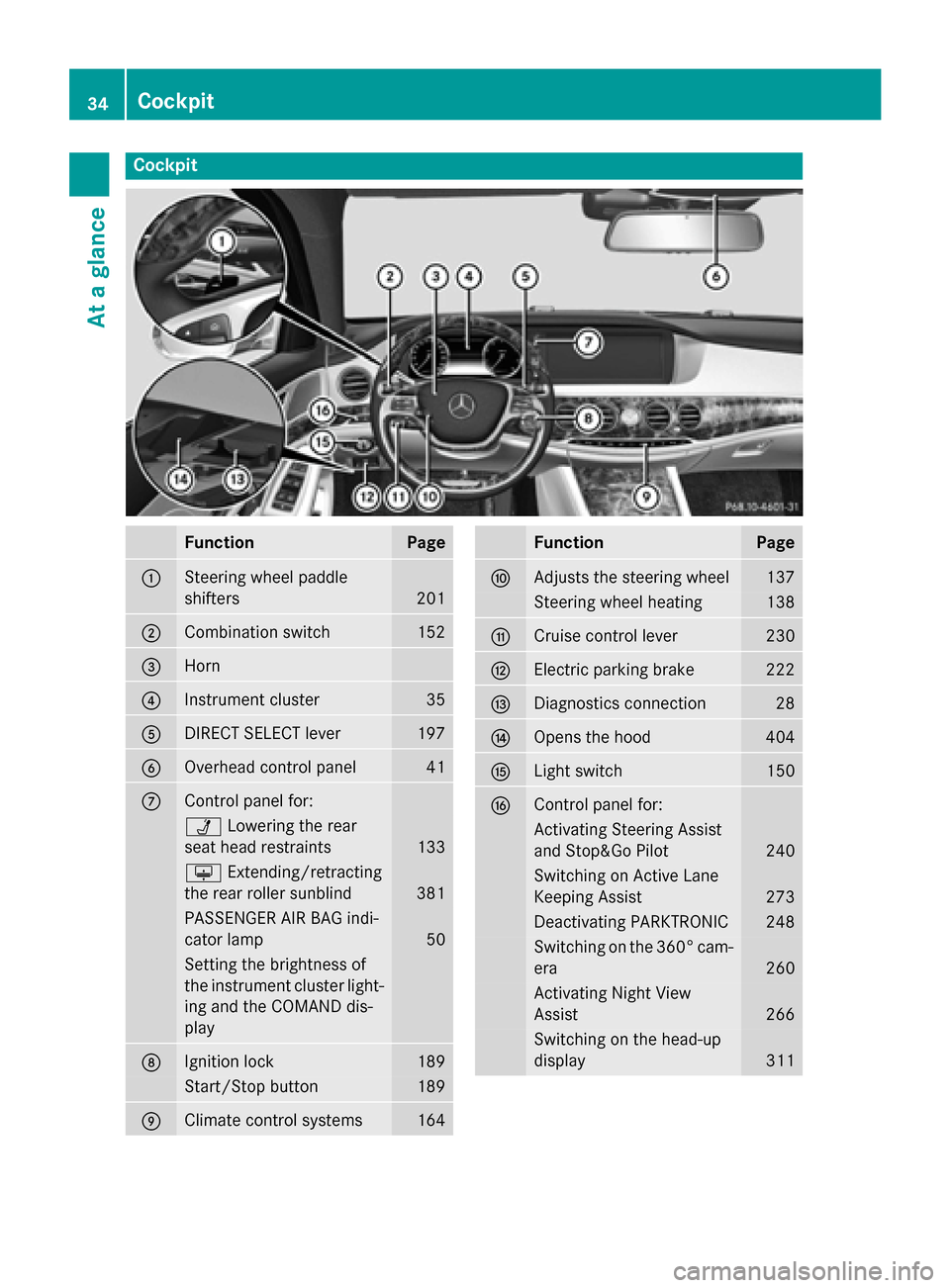
Cockpit
Function Page
:
Steering wheel paddle
shifters
201
;
Combination switch 152
=
Horn
?
Instrument cluster 35
A
DIRECT SELECT lever 197
B
Overhead control panel 41
C
Control panel for:
Ü
Lowering the rear
seat head restraints 133
u
Extending/retracting
the rear roller sunblind 381
PASSENGER AIR BAG indi-
cator lamp
50
Setting the brightness of
the instrument cluster light-
ing and the COMAND dis-
play D
Ignition lock 189
Start/Stop button 189
E
Climate control systems 164 Function Page
F
Adjusts the steering wheel 137
Steering wheel heating 138
G
Cruise control lever 230
H
Electric parking brake 222
I
Diagnostics connection 28
J
Opens the hood 404
K
Light switch 150
L
Control panel for:
Activating Steering Assist
and Stop&Go Pilot
240
Switching on Active Lane
Keeping Assist 273
Deactivating PARKTRONIC 248
Switching on the 360° cam-
era 260
Activating Night View
Assist 266
Switching on the head-up
display
31134
CockpitAt a glance
Page 39 of 502
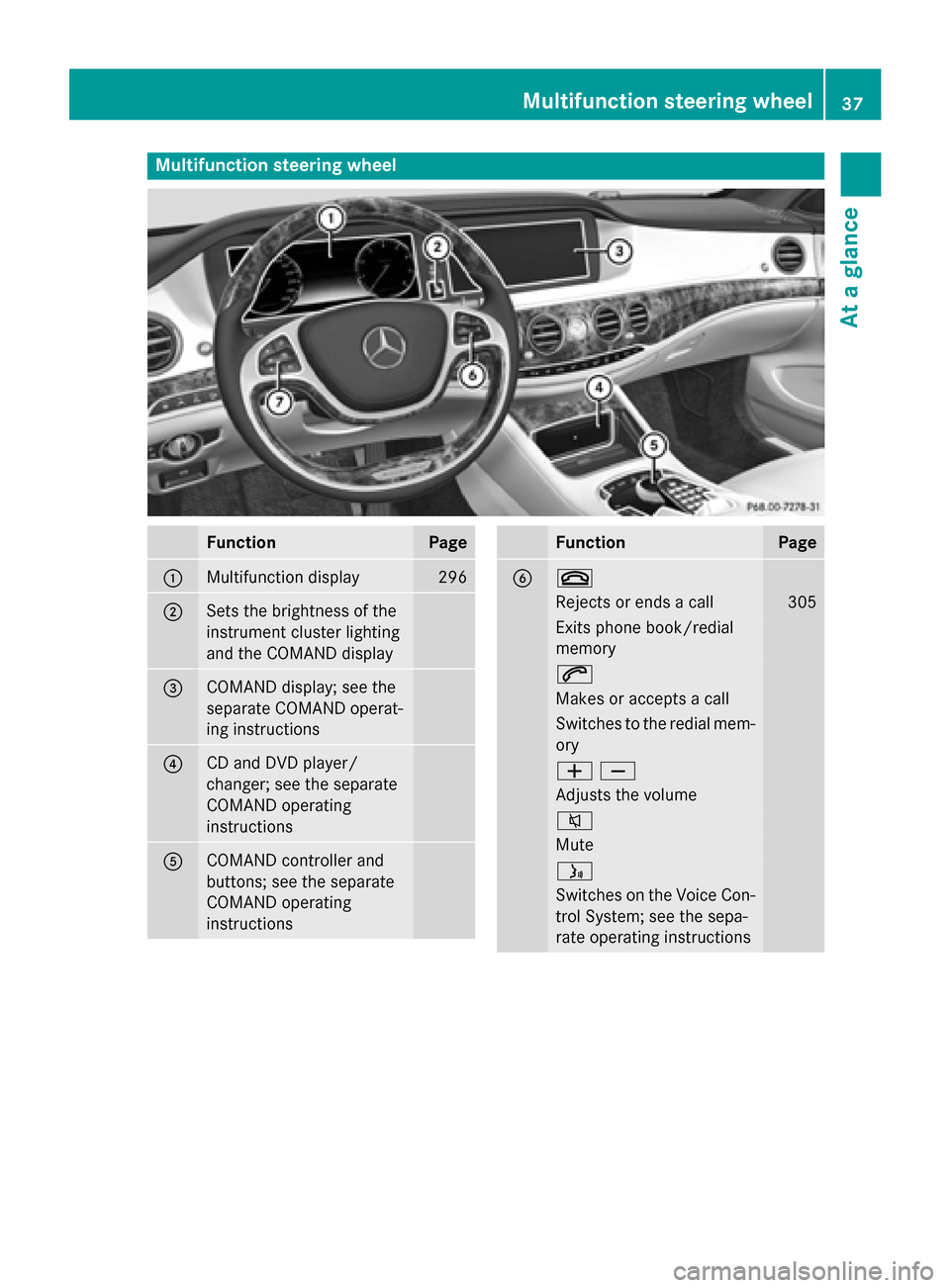
Multifunction steering wheel
Function Page
:
Multifunction display 296
;
Sets the brightness of the
instrument cluster lighting
and the COMAND display
=
COMAND display; see the
separate COMAND operat-
ing instructions
?
CD and DVD player/
changer; see the separate
COMAND operating
instructions
A
COMAND controller and
buttons; see the separate
COMAND operating
instructions Function Page
B ~
Rejects or ends a call 305
Exits phone book/redial
memory
6
Makes or accepts a call
Switches to the redial mem-
ory WX
Adjusts the volume
8
Mute
ó
Switches on the Voice Con-
trol System; see the sepa-
rate operating instructions Multifunction steering wheel
37At a glance
Page 40 of 502
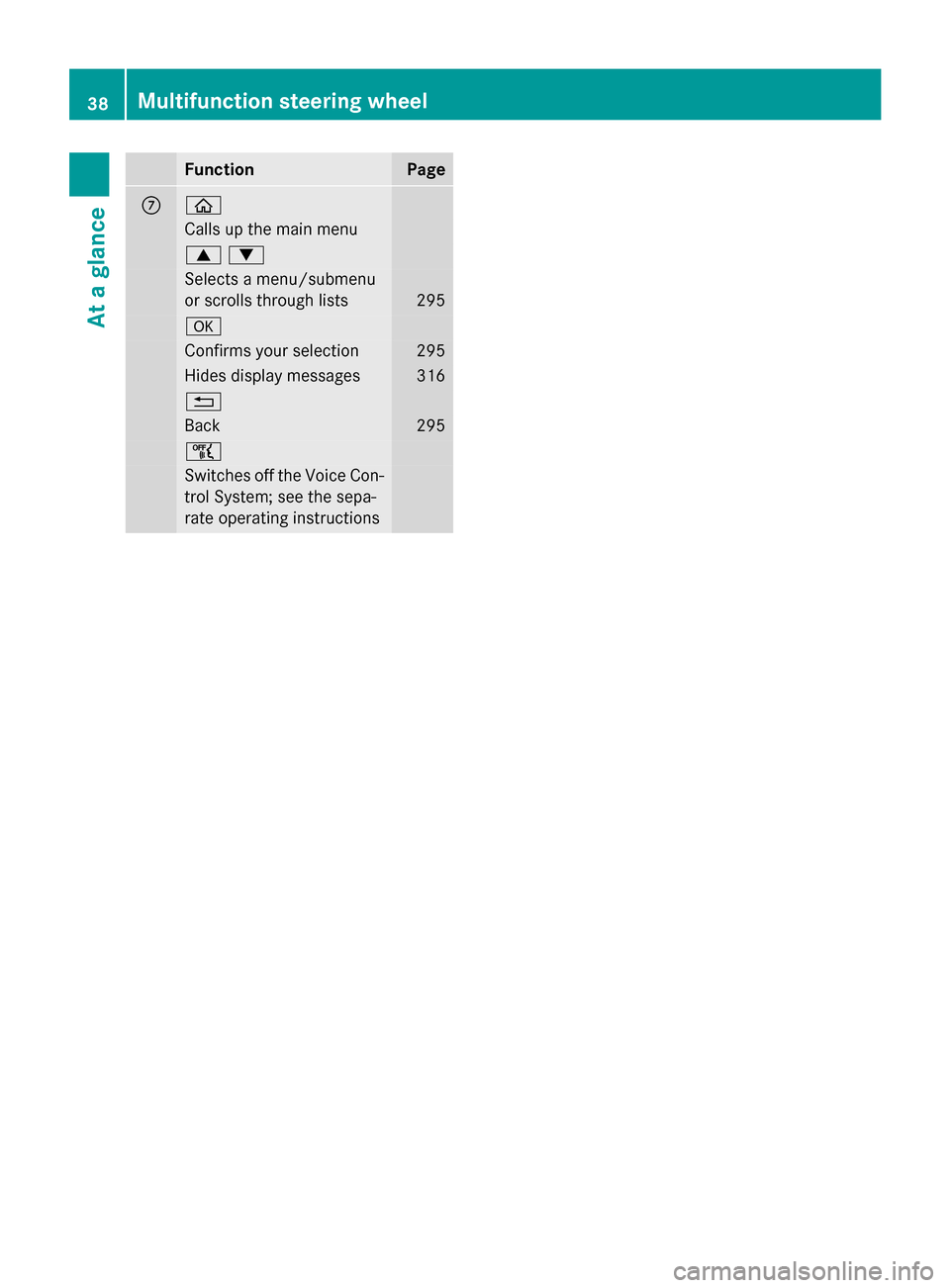
Function Page
C ò
Calls up the main menu
9:
Selects a menu/submenu
or scrolls through lists
295
a
Confirms your selection 295
Hides display messages 316
%
Back 295
ñ
Switches off the Voice Con-
trol System; see the sepa-
rate operating instructions 38
Multifunction steering wheelAt a glance
Page 44 of 502
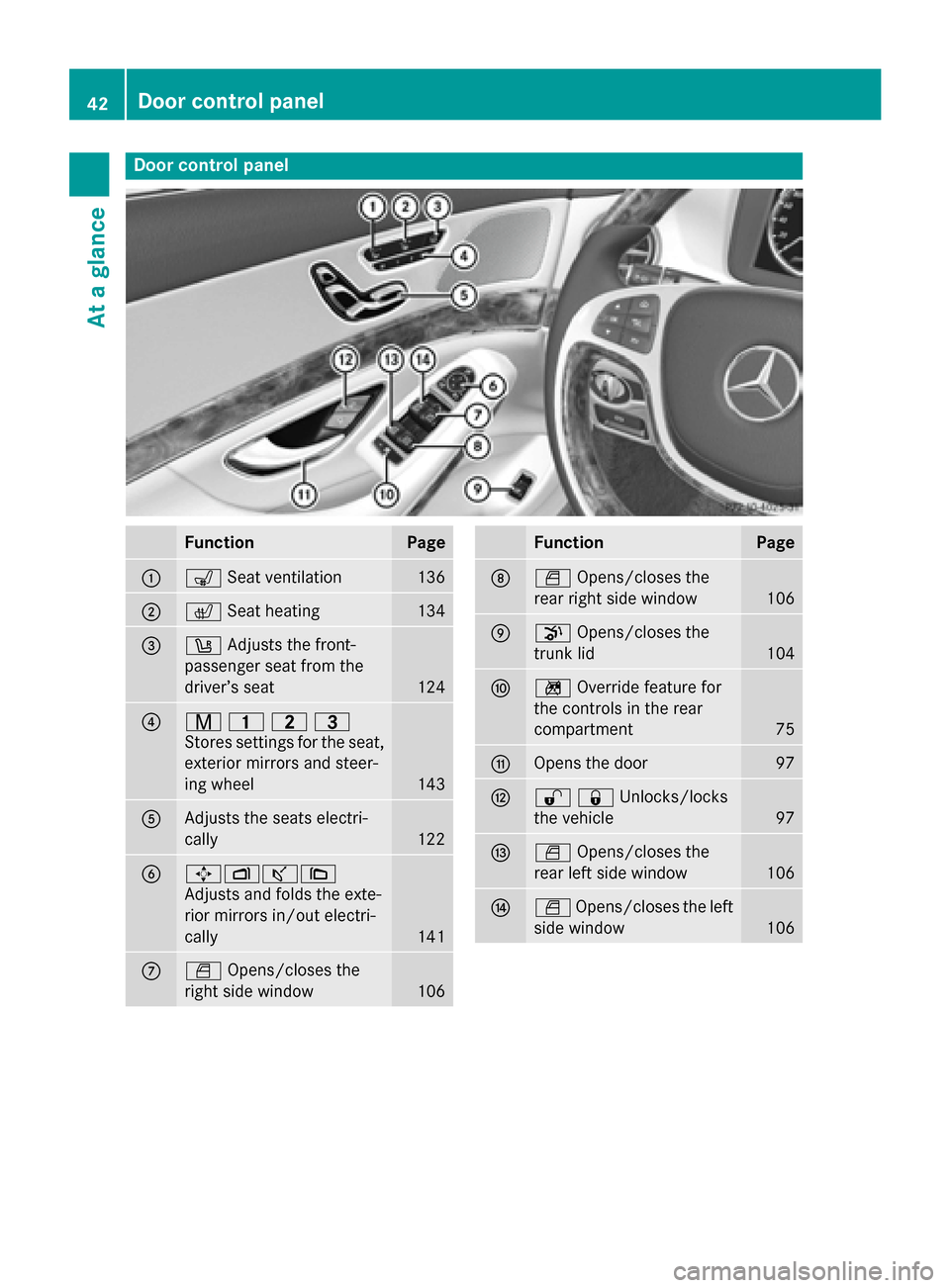
Door control panel
Function Page
:
s
Seat ventilation 136
;
c
Seat heating 134
=
w
Adjusts the front-
passenger seat from the
driver’s seat 124
?
r
45=
Stores settings for the seat, exterior mirrors and steer-
ing wheel 143
A
Adjusts the seats electri-
cally
122
B
7Zª\
Adjusts and folds the exte-
rior mirrors in/out electri-
cally
141
C
W
Opens/closes the
right side window 106 Function Page
D
W
Opens/closes the
rear right side window 106
E
p
Opens/closes the
trunk lid 104
F
n
Override feature for
the controls in the rear
compartment 75
G
Opens the door 97
H
%&Unlocks/locks
the vehicle
97
I
W
Opens/closes the
rear left side window 106
J
W
Opens/closes the left
side window 10642
Door control panelAt a glance
Page 49 of 502
voltage electrical system. This poses an
increased risk of injury or even fatal injury.
Have the restraint system checked and
repaired immediately at a qualified specialist
workshop. Immediately switch off the ignition and remove the SmartKey from the ignition
lock after an accident.
If components of the restraint system are
activated during an accident, the hybrid sys-
tem is automatically deactivated.
The hybrid system is not activated when the
vehicle is started if:
R a short circuit is detected in the hybrid sys-
tem.
R one of the hybrid system’s electrical con-
nections is disconnected.
This ensures that you do not come into con-
tact with high voltage.
Manual deactivation of the hybrid sys-
tem The hybrid system can be deactivated man-
ually using the high voltage switch-off device.
! To prevent damage to the hybrid system
please observe the following instructions:
R only deactivate the hybrid system man-
ually in the following situations.
R work on the hybrid system may only be
carried out at a qualified specialist work-
shop, even when it has been deactivated
manually.
R if the 6 restraint system warning lamp
in the instrument cluster lights up after an
accident.
R if the vehicle is badly damaged, e.g. after an
accident, and the restraint system compo-
nents were not activated.
R if the vehicle is badly damaged and has to
be towed or transported. X
If possible, move the vehicle out of the
danger zone: shift the automatic transmis-
sion into position N.
X Release the electric parking brake.
X Roll the vehicle to a safe place and park it
safely.
Get assistance from others if necessary.
i The vehicle is locked automatically when
the ignition is switched on and the wheels
are turning. There is therefore a risk of
being locked out if the vehicle is being
pushed or tested on a dynamometer.
X Switch the ignition off.
X Shift the automatic transmission to park
position P(Y page 197).
Depress the electric parking brake
(Y page 222).
Secure the vehicle against rolling away
(Y page 466).
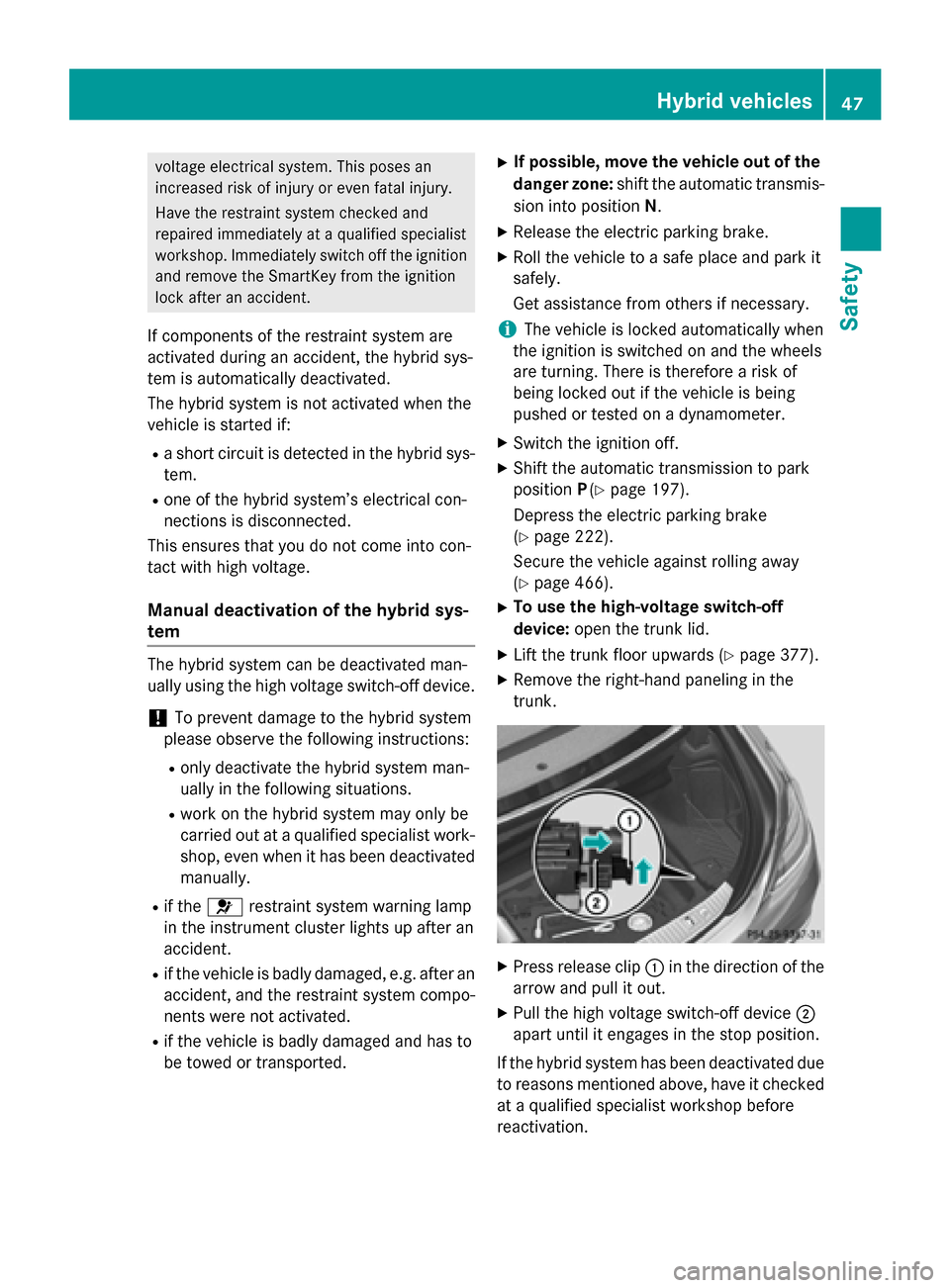
X To use the high-voltage switch-off
device: open the trunk lid.
X Lift the trunk floor upwards (Y page 377).
X Remove the right-hand paneling in the
trunk. X
Press release clip :in the direction of the
arrow and pull it out.
X Pull the high voltage switch-off device ;
apart until it engages in the stop position.
If the hybrid system has been deactivated due to reasons mentioned above, have it checked
at a qualified specialist workshop before
reactivation. Hybrid vehicles
47Safety Z