warning MERCEDES-BENZ S CLASS 2019 Owners Manual
[x] Cancel search | Manufacturer: MERCEDES-BENZ, Model Year: 2019, Model line: S CLASS, Model: MERCEDES-BENZ S CLASS 2019Pages: 578, PDF Size: 23.31 MB
Page 228 of 578
Activating/deactivating audiofadeoutYou can specify whetherthevolume of a mediasource inthe multimedia system istobereduced whenParking AssistPARKTRONIC givesan audiblewarning.
#SelectAudio Fadeout During Warning Tones.
#Activatesor deactivateSthe function.
Reversing camera
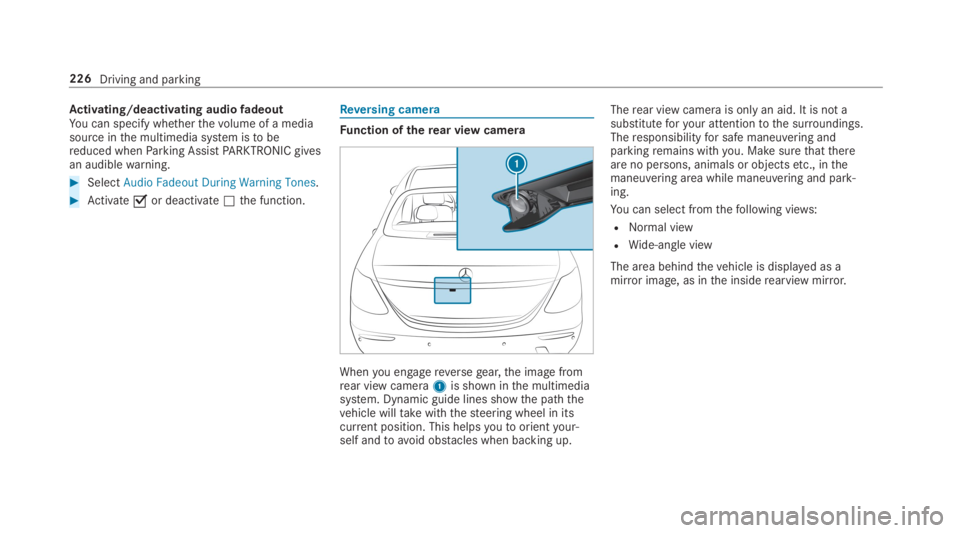
Function oftherear view camera
Whenyou engagereversegear,the image fromrear view camera1is shown inthe multimediasystem. Dynamic guide lines showthe paththevehicle willtakewiththesteering wheel in itscurrent position. This helpsyoutoorientyour‐self andtoavoid obstacles when backing up.
Therear view camera is onlyan aid. It is not asubstituteforyour attentiontothe surroundings.Theresponsibilityfor safe maneuvering andparkingremains withyou. Make surethatthereare no persons, animals or objectsetc., inthemaneuvering area while maneuvering and park‐ing.
You can select fromthefollowing views:
RNormal view
RWide-angle view
The area behindthevehicle is displayed as amirror image, as inthe insiderearview mirror.
226Driving and parking
Page 229 of 578
Camera viewsinthe multimedia system
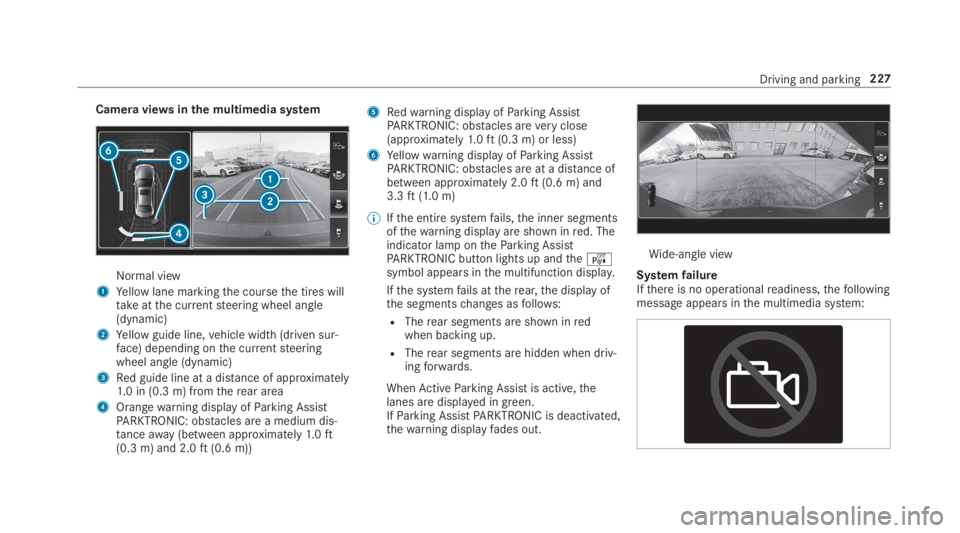
Normal view
1Yellow lane markingthe coursethe tires willtakeatthe currentsteering wheel angle(dynamic)
2Yellow guide line,vehicle width (driven sur‐face) depending onthe currentsteeringwheel angle (dynamic)
3Red guide line at a distance of approximately1.0 in (0.3 m) fromtherear area
4Orangewarning display ofParking AssistPARKTRONIC: obstacles are a medium dis‐tanceaway(between approximately1.0ft(0.3 m) and 2.0ft(0.6 m))
5Redwarning display ofParking AssistPARKTRONIC: obstacles areveryclose(approximately1.0ft(0.3 m) or less)
6Yellowwarning display ofParking AssistPARKTRONIC: obstacles are at a distance ofbetween approximately 2.0ft(0.6 m) and3.3ft(1.0 m)
%Ifthe entire systemfails,the inner segmentsofthewarning display are shown inred. Theindicator lamp ontheParking AssistPARKTRONIC button lights up andtheésymbol appears inthe multifunction display.
Ifthe systemfails attherear,the display ofthe segmentschanges asfollows:
RTherear segments are shown inredwhen backing up.
RTherear segments are hidden when driv‐ingforwards.
WhenActiveParking Assist is active,thelanes are displayed in green.IfParking AssistPARKTRONIC is deactivated,thewarning displayfades out.
Wide-angle view
SystemfailureIfthere is no operationalreadiness,thefollowingmessage appears inthe multimedia system:
Driving and parking227
Page 231 of 578
Top view
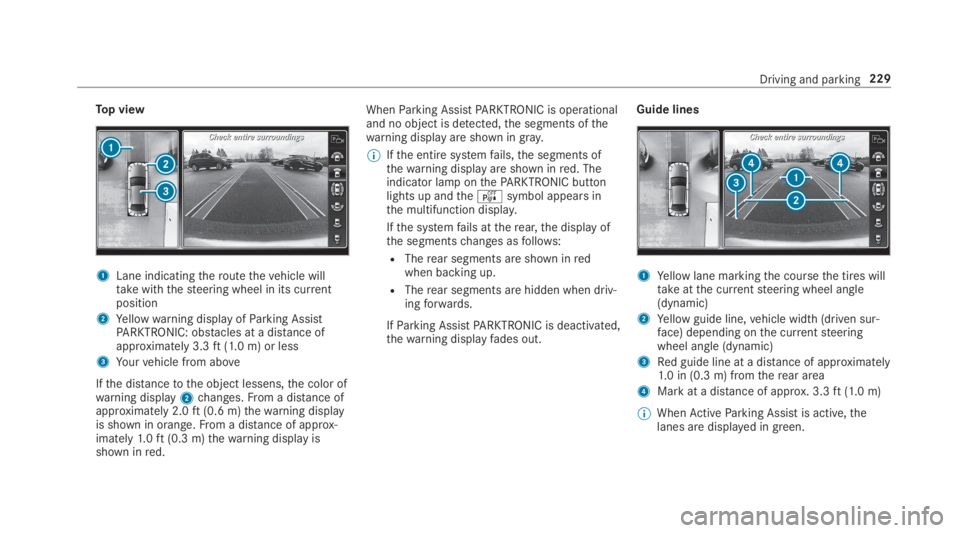
1Lane indicatingtheroutethevehicle willtakewiththesteering wheel in its currentposition
2Yellowwarning display ofParking AssistPARKTRONIC: obstacles at a distance ofapproximately 3.3ft(1.0 m) or less
3Yourvehicle from above
Ifthe distancetothe object lessens,the color ofwarning display2changes.From a distance ofapproximately 2.0ft(0.6 m)thewarning displayis shown in orange.From a distance of approx‐imately1.0ft(0.3 m)thewarning display isshown inred.
WhenParking AssistPARKTRONIC is operationaland no object is detected,the segments ofthewarning display are shown ingray.
%Ifthe entire systemfails,the segments ofthewarning display are shown inred. Theindicator lamp onthePARKTRONIC buttonlights up andtheésymbol appears inthe multifunction display.
Ifthe systemfails attherear,the display ofthe segmentschanges asfollows:
RTherear segments are shown inredwhen backing up.
RTherear segments are hidden when driv‐ingforwards.
IfParking AssistPARKTRONIC is deactivated,thewarning displayfades out.
Guide lines
1Yellow lane markingthe coursethe tires willtakeatthe currentsteering wheel angle(dynamic)
2Yellow guide line,vehicle width (driven sur‐face) depending onthe currentsteeringwheel angle (dynamic)
3Red guide line at a distance of approximately1.0 in (0.3 m) fromtherear area
4Mark at a distance of approx. 3.3ft(1.0 m)
%WhenActiveParking Assist is active,thelanes are displayed in green.
Driving and parking229
Page 234 of 578
whenthe parking space is being measured.These are also nottaken into account whentheparking maneuver is calculated, e.g.overhangingloads,overhangs or loadingramps of trucksorthe boundaries of parking spaces. In some cir‐cumstances,ActiveParking Assist maythereforeguideyou intothe parking space prematurely.
&WARNINGRisk of accident duetoobjects located aboveor belowthedetectionrange ofActiveParking Assist
Ifthere are objects aboveor belowthedetectionrange,thefollowing situations mayarise:
RActiveParking Assist maysteertoo early.
RVehicles with automatic transmis‐sion:Thevehicle may notstop in front ofthese objects.
This could cause a collision.
#Inthese situations, do not useActiveParking Assist.
Snowfall or heavyrain may leadtoa parkingspace being measured inaccurately.Parking
spacesthat are partiallyoccupiedbytrailerdrawbars might not be identified as such or bemeasured incorrectly. Only useActiveParkingAssist on level, high-gripground.
Do notuseActiveParking Assist inthefollowingsituations:
RInextremeweather conditions such as ice,packed snow or in heavyrain.
RWhen transporting a loadthat protrudesbeyondthevehicle.
RIfthe parking space is on asteep downhill oruphill gradient.
RWhen snowchains are installed.
ActiveParking Assist may also display parkingspacesthat are not suitablefor parking, e.g.:
RParking spaces where parking is prohibited.
RParking spaces on unsuitable surfaces.
ActiveParking Assist will not assistyou withparking spaces atright anglestothe direction oftravel inthefollowing situations:
RIf two parking spaces are located immedi‐ately nexttoeachother.
RIfthe parking space is immediately nextto alow obstacle suchas a curb.
ActiveParking Assist will not assistyou withparking spaces parallel or atright anglestothedirection of travel inthefollowing situations:
RIfthe parking space is on a curb.
RIfthe parking space is borderedbyan obsta‐cle, e.g. a tree, a post or a trailer.
232Driving and parking
Page 235 of 578
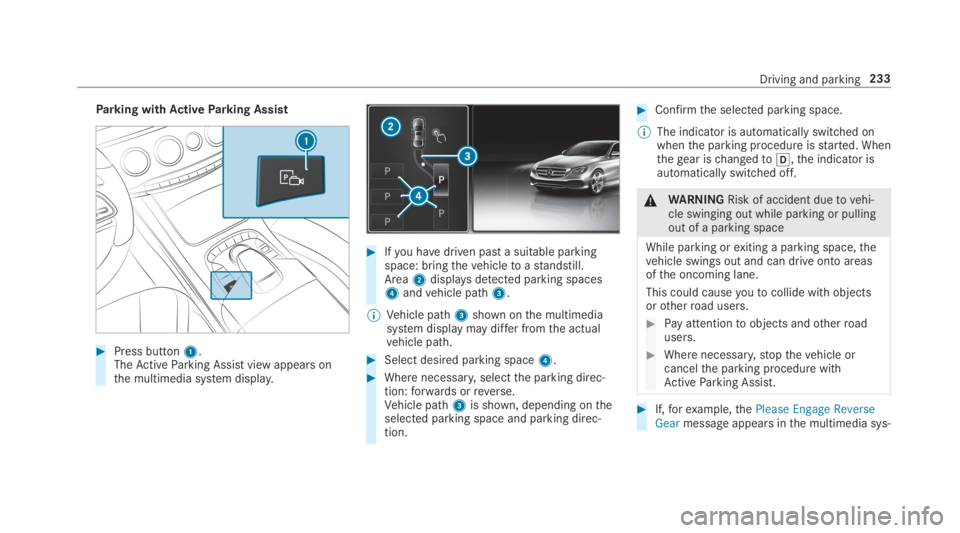
Parking withActiveParking Assist
#Press button1.TheActiveParking Assist view appears onthe multimedia system display.
#Ifyou havedriven past a suitable parkingspace: bringthevehicletoastandstill.Area2displaysdetected parking spaces4andvehicle path3.
%Vehicle path3shown onthe multimediasystem display may differ fromthe actualvehicle path.
#Select desired parking space4.
#Where necessary,selectthe parking direc‐tion:forwards orreverse.Vehicle path3is shown, depending ontheselected parking space and parking direc‐tion.
#Confirmthe selected parking space.
%The indicator is automatically switched onwhenthe parking procedure isstarted. Whenthegear ischangedto[,the indicator isautomatically switched off.
&WARNINGRisk of accident duetovehi‐cle swinging out while parking or pullingout of a parking space
While parking orexiting a parking space,thevehicle swings out and can drive onto areasofthe oncoming lane.
This could causeyoutocollide withobjectsorotherroad users.
#Pay attentiontoobjects andotherroadusers.
#Where necessary,stopthevehicle orcancelthe parking procedure withActiveParking Assist.
#If,forexample,thePlease Engage ReverseGearmessage appears inthe multimedia sys‐
Driving and parking233
Page 237 of 578
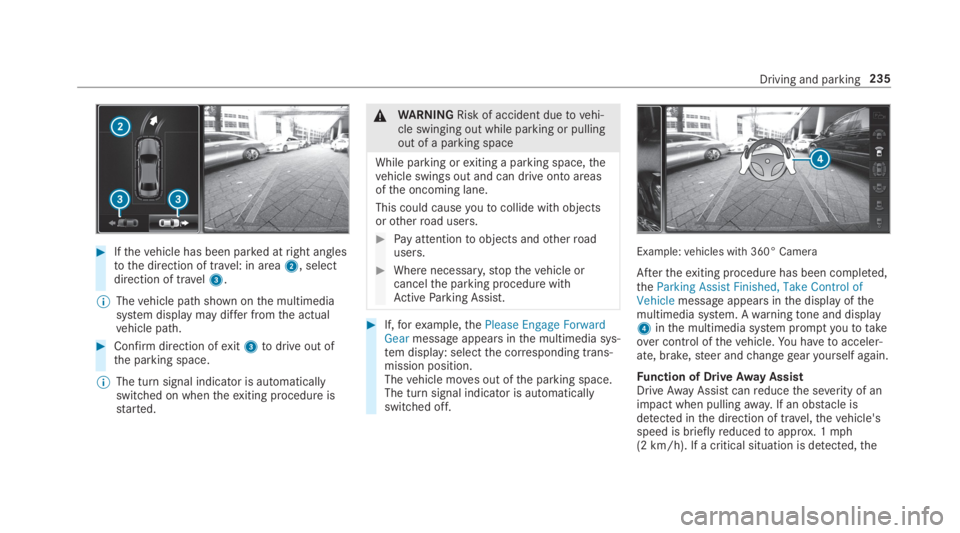
#Ifthevehicle has been parked atright anglestothe direction of travel: in area2, selectdirection of travel3.
%Thevehicle path shown onthe multimediasystem display may differ fromthe actualvehicle path.
#Confirm direction ofexit3todrive out ofthe parking space.
%The turn signal indicator is automaticallyswitched on whentheexiting procedure isstarted.
&WARNINGRisk of accident duetovehi‐cle swinging out while parking or pullingout of a parking space
While parking orexiting a parking space,thevehicle swings out and can drive onto areasofthe oncoming lane.
This could causeyoutocollide withobjectsorotherroad users.
#Pay attentiontoobjects andotherroadusers.
#Where necessary,stopthevehicle orcancelthe parking procedure withActiveParking Assist.
#If,forexample,thePlease Engage ForwardGearmessage appears inthe multimedia sys‐tem display: selectthe corresponding trans‐mission position.Thevehicle moves out ofthe parking space.The turn signal indicator is automaticallyswitched off.
Example:vehicles with 360° Camera
Aftertheexiting procedure has been completed,theParking Assist Finished, Take Control ofVehiclemessage appears inthe display ofthemultimedia system. Awarningtone and display4inthe multimedia system promptyoutotakeover control ofthevehicle.You havetoacceler‐ate, brake,steer andchangegearyourself again.
Function of DriveAway AssistDriveAwayAssistcanreducethe severity of animpact when pullingaway. If an obstacle isdetected inthe direction of travel,thevehicle'sspeed is brieflyreducedtoapprox. 1mph(2 km/h). If a critical situation is detected,the
Driving and parking235
Page 239 of 578
be applied automatically.Todothis,the functionusestheradar sensors inthe bumper. The areaadjacenttothevehicle is continually monitored.
Iftheradar sensors are obstructedbyvehiclesorother objects, detection is not possible.
The CrossTraffic Alert function is activeunderthefollowing conditions:
RIf Blind Spot Assist is activated.
RIfthevehicle is backing up atwalking pace.
RIfthe maneuvering assistance function isactivated inthe multimedia system.
System limitationsThe CrossTraffic Alert function is notavailableon inclines.
Deactivating/activating maneuvering assis‐tanceMultimedia system:
,Vehicle.kAssistance.Camera
& Parking.Maneuvering Assist.
#Activatesor deactivateSthe function.
%Maneuvering assistance mustbe activeforthe function of DriveAwayAssist
(→page 235) and CrossTraffic Alert(→page236).
ATTENTION ASSIST
Function ofATTENTION ASSISTATTENTION ASSIST assistsyou on long, monoto‐nous journeys, e.g. on highways and trunkroads.IfATTENTION ASSIST detects indicators offati‐gue or increasing lapses in concentration onthepart ofthe driver, it suggeststaking a break.
ATTENTION ASSIST is only an aid. It cannotalways detectfatigue or lapses in concentrationin time. The system is not a substitutefor awell-rested and attentive driver. On long journeys,takeregular breaks in good timethat allowforadequaterecuperation.
You canchoose between two settings.
RStandard:normal system sensitivity.
RSensitive:higher system sensitivity. Thedriver iswarned earlier andthe attentionlevel detectedbyATTENTION ASSIST is adap‐ted accordingly.
If drowsiness or increasing lapses in concentra‐tion are detected,theATTENTION ASSIST: Takea Break!warning appears inthe Instrument Dis‐play.You can acknowledgethe message andtake a break where necessary.Ifyou do nottakea break andATTENTION ASSIST continuestodetect increasing lapses in concentration,youwill bewarned again after a minimum of15minutes.
You can havethefollowingstatus informationforATTENTION ASSIST displayed inthe assistancemenu ofthe on-board computer:
RThe length ofthe journey sincethe lastbreak.
Driving and parking237
Page 240 of 578
RThe attention level determinedbyATTENTIONASSIST.
IfATTENTION ASSIST is unabletocalculatetheattention level and cannot issue awarning,theSystem Suspendedmessageappears.
If awarning is given inthe Instrument Display,the multimedia system offerstosearchfor arestarea.You can select arestarea andstart naviga‐tiontothisrestarea. This function can be activa‐ted and deactivated inthe multimedia system.
IfATTENTION ASSIST is deactivated,the
Page 241 of 578
Traffic Sign Assist
Function ofTraffic Sign Assist
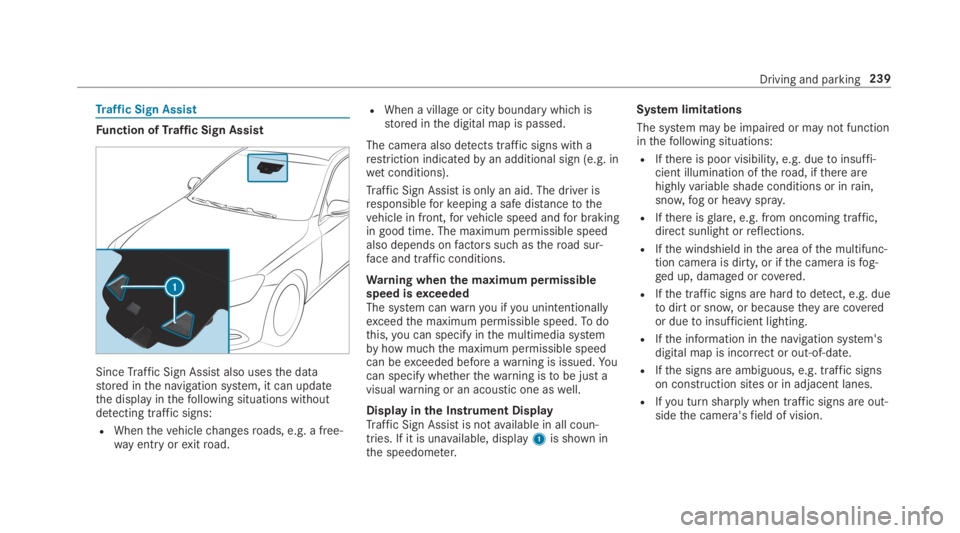
SinceTraffic Sign Assistalso usesthe datastored inthe navigation system, it can updatethe display inthefollowing situations withoutdetecting traffic signs:
RWhenthevehiclechangesroads, e.g. a free‐way entry orexitroad.
RWhen a village or city boundary which isstored inthe digital map is passed.
The camera also detects traffic signs with arestriction indicatedbyan additional sign (e.g. inwet conditions).
Traffic Sign Assistis only an aid. The driver isresponsibleforkeeping a safe distancetothevehicle in front,forvehicle speed andfor brakingin good time. The maximum permissible speedalso depends onfactors suchastheroad sur‐face and traffic conditions.
Warning whenthe maximum permissiblespeed isexceededThe system canwarnyou ifyou unintentionallyexceedthe maximum permissible speed.Todothis,you can specify inthe multimedia systembyhow muchthe maximum permissible speedcan beexceeded before awarning is issued.Yo ucan specify whetherthewarning istobe just avisualwarning or an acoustic one aswell.
Display inthe Instrument DisplayTraffic Sign Assistis notavailable in all coun‐tries. If it is unavailable, display1is shown inthe speedometer.
System limitations
The system may be impaired or may not functioninthefollowing situations:
RIfthere is poor visibility, e.g. duetoinsuffi‐cient illumination oftheroad, ifthere arehighlyvariable shade conditions or inrain,snow,fog or heavy spray.
RIfthere isglare, e.g. from oncoming traffic,direct sunlight orreflections.
RIfthe windshield inthe area ofthe multifunc‐tion camera is dirty, or ifthe camera isfog‐ged up, damaged or covered.
RIfthe traffic signs are hardtodetect, e.g. duetodirt or snow,or becausetheyare coveredor duetoinsufficient lighting.
RIfthe information inthe navigation system'sdigital map is incorrect or out-of-date.
RIfthe signs are ambiguous, e.g. traffic signson construction sites or in adjacent lanes.
RIfyou turn sharply when traffic signs are out‐sidethe camera'sfield of vision.
Driving and parking239
Page 242 of 578
SettingTraffic Sign AssistMultimedia system:
,Vehicle.kAssistance.Traffic
Sign Assist
Activating/deactivating automatic adoptionof speed limits
Requirements:
RActive Distance AssistDISTRONIC is activa‐ted.
#SelectLimit Adoption.
#Activatesor deactivateSthe function.The speed limits detectedbyTraffic SignAssistare automatically adoptedbyActiveDistance AssistDISTRONIC.
Displaying detected traffic signs in themedia display
#SelectDisplay in COMAND.
#Activatesor deactivateSthe function.
%When DISTRONIC or cruise control are acti‐vated,the speed detected can be manuallyadopted asthe speed limit (→page 204).
Adjusting the type ofwarning
#SelectVisual & Audible,VisualorNone.
Adjusting thewarningthresholdThisvalue determinesthe speed at which awarning is issued whenexceeded.
#SelectWarning Threshold.
#Setthe desired speed.
NightViewAssist
Function of NightViewAssist
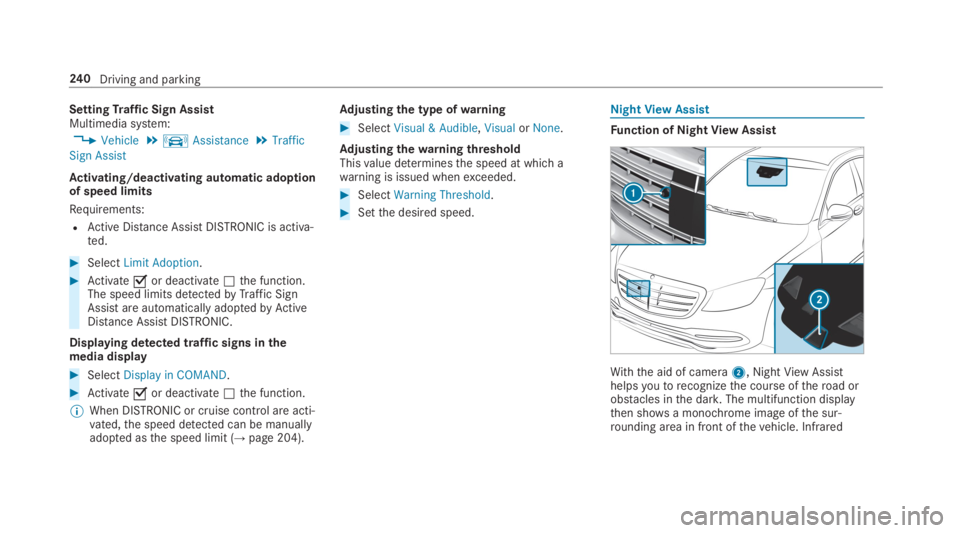
With the aid of camera2, NightViewAssisthelpsyoutorecognizethe course oftheroad orobstacles inthe dark.The multifunction displaythen showsa monochrome image ofthe sur‐rounding area in front ofthevehicle. Infrared
240Driving and parking