warning MERCEDES-BENZ S CLASS 2019 Owners Manual
[x] Cancel search | Manufacturer: MERCEDES-BENZ, Model Year: 2019, Model line: S CLASS, Model: MERCEDES-BENZ S CLASS 2019Pages: 578, PDF Size: 23.31 MB
Page 264 of 578
Head-up Display
Function ofthe Head-up Display
Mercedes‑AMGvehicles:observethe notes inthe Supplement. Otherwise,you may notrecog‐nize dangers.
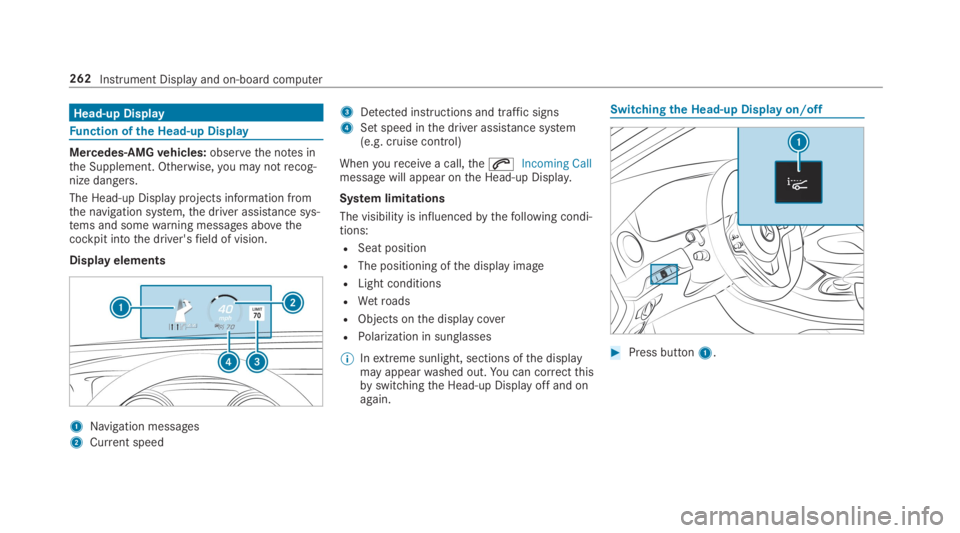
The Head-up Display projects information fromthe navigation system,the driver assistance sys‐tems and somewarning messages abovethecockpit intothe driver'sfield of vision.
Display elements
1Navigation messages
2Current speed
3Detected instructions and traffic signs
4Set speed inthe driver assistance system(e.g. cruise control)
Whenyoureceivea call,theaIncoming Callmessage will appear onthe Head-up Display.
System limitations
The visibility is influencedbythefollowing condi‐tions:
RSeat position
RThe positioning ofthe display image
RLight conditions
RWetroads
RObjects onthe display cover
RPolarization in sunglasses
%Inextreme sunlight, sections ofthe displaymay appearwashed out.You can correctthisbyswitchingthe Head-up Display off and onagain.
Switchingthe Head-up Display on/off
#Press button1.
262Instrument Display and on-board computer
Page 265 of 578
Notes on operating safety
&WARNINGRisk of distraction from infor‐mation systems and communicationsequipment
Ifyou operate information and communica‐tion equipment integrated inthevehiclewhen driving,you will be distracted fromthetraffic situation. This could also causeyoutolose control ofthevehicle.
#Only operatethis equipment whenthetraffic situation permits.
#Ifyou cannot be sure ofthis,stopthevehicle whilst paying attentiontoroadand traffic conditions and operatetheequipment withthevehiclestationary.
&WARNINGRisk of distraction from oper‐ating mobile communication equipmentwhilethevehicle is in motion
Ifyou operate mobile communication equip‐ment when driving,you will be distracted
fromthe traffic situation. This could alsocauseyoutolose control ofthevehicle.
#Only operatethis equipment whenthevehicle isstationary.
Foryourown safety, alwaysobservethefollow‐ing points when operating mobile communica‐tions equipment and especiallyyourvoice con‐trol system:
RObservethe legalrequirementsforthe coun‐try in whichyou are driving.
RWhile driving, only operate mobile communi‐cations equipment andyourvoice controlsystem whenthe traffic conditions permit it.You mayotherwise be distracted fromthetraffic conditions and cause an accident,injuringyourself andothers.
RIfyou usethevoice control system in anemergencyyourvoice canchange andyourtelephone call, e.g. an emergency call, canthereby be unnecessarily delayed.
RFamiliarizeyourself withthevoice controlsystem functions beforestartingthe journey.
Operation
Overview of operation oftheVoice ControlSystem onthe multifunctionsteering wheel
TheVoice Control System is operational approx‐imatelythirty seconds afterthe ignition isswitched on.
Voice Control System263
Page 280 of 578
Overview and operation
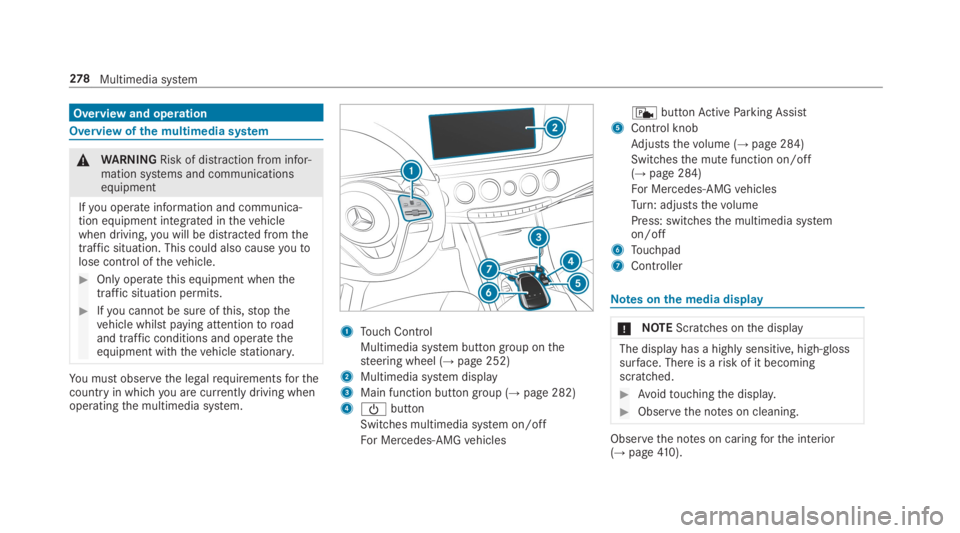
Overview ofthe multimedia system
&WARNINGRisk of distraction from infor‐mation systems and communicationsequipment
Ifyou operate information and communica‐tion equipment integrated inthevehiclewhen driving,you will be distracted fromthetraffic situation. This could also causeyoutolose control ofthevehicle.
#Only operatethis equipment whenthetraffic situation permits.
#Ifyou cannot be sure ofthis,stopthevehicle whilst paying attentiontoroadand traffic conditions and operatetheequipment withthevehiclestationary.
You must observethe legalrequirementsforthecountry in whichyou are currently driving whenoperatingthe multimedia system.
1Touch Control
Multimedia system button group onthesteering wheel (→page 252)
2Multimedia system display
3Main function button group (→page 282)
4
Page 287 of 578
Onthe multimedia system
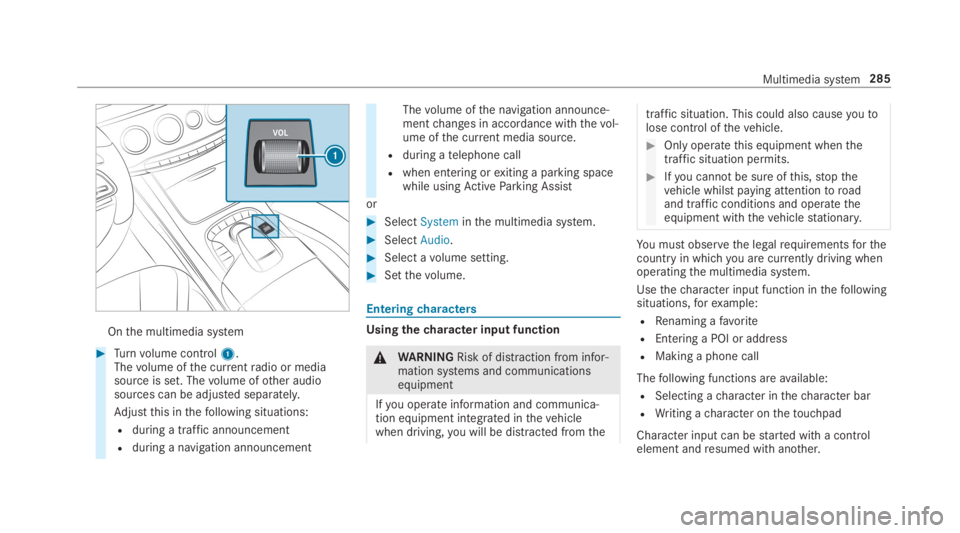
#Turnvolume control1.Thevolume ofthe currentradio or mediasource is set. Thevolume ofother audiosources can be adjusted separately.
Adjustthis inthefollowing situations:
Rduring a traffic announcement
Rduring a navigation announcement
Thevolume ofthe navigation announce‐mentchanges in accordance withthevol‐ume ofthe current media source.
Rduring atelephone call
Rwhen entering orexiting a parking spacewhile usingActiveParking Assist
or
#SelectSysteminthe multimedia system.
#SelectAudio.
#Select avolume setting.
#Setthevolume.
Enteringcharacters
Usingthecharacter input function
&WARNINGRisk of distraction from infor‐mation systems and communicationsequipment
Ifyou operate information and communica‐tion equipment integrated inthevehiclewhen driving,you will be distracted fromthe
traffic situation. This could also causeyoutolose control ofthevehicle.
#Only operatethis equipment whenthetraffic situation permits.
#Ifyou cannot be sure ofthis,stopthevehicle whilst paying attentiontoroadand traffic conditions and operatetheequipment withthevehiclestationary.
You must observethe legalrequirementsforthecountry in whichyou are currently driving whenoperatingthe multimedia system.
Usethecharacter input function inthefollowingsituations,forexample:
RRenaming afavorite
REntering a POI or address
RMaking a phone call
Thefollowing functions areavailable:
RSelecting acharacter inthecharacter bar
RWriting acharacter onthetouchpad
Character input can bestarted with a controlelement andresumed with another.
Multimedia system285
Page 300 of 578
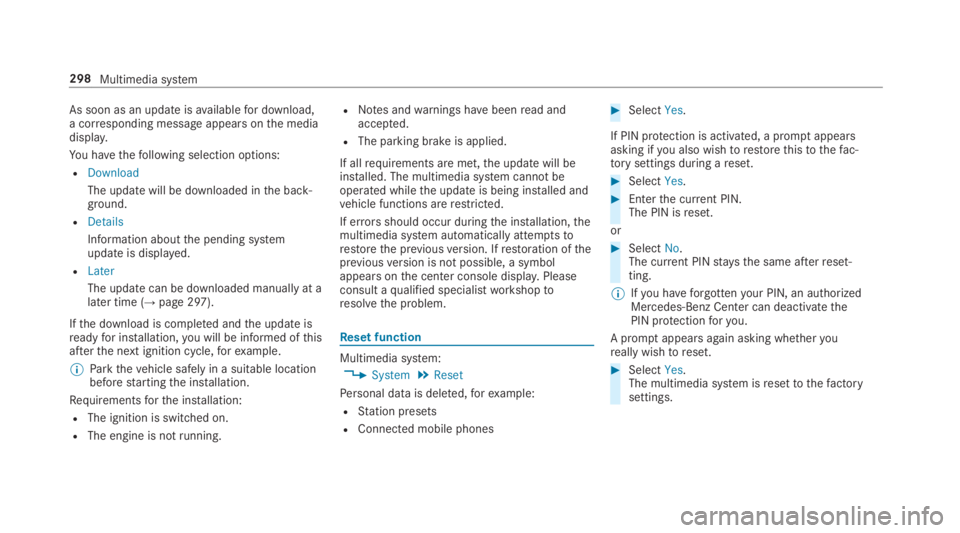
As soon as an updateisavailablefor download,a corresponding message appearsonthe mediadisplay.
You havethefollowing selection options:
RDownload
The update will be downloaded inthe back‐ground.
RDetails
Information aboutthe pending systemupdate is displayed.
RLater
The update can be downloaded manually at alater time (→page 297).
Ifthe download is completed andthe update isreadyfor installation,you will be informed ofthisafterthe next ignition cycle,forexample.
%Parkthevehicle safely in a suitable locationbeforestartingthe installation.
Requirementsforthe installation:
RThe ignition is switched on.
RThe engine is notrunning.
RNotes andwarnings havebeenread andaccepted.
RThe parking brake is applied.
If allrequirements are met,the update will beinstalled. The multimedia system cannotbeoperated whilethe update is being installed andvehicle functions arerestricted.
If errorsshould occur duringthe installation,themultimedia system automatically attemptstorestorethe previousversion. Ifrestoration ofthepreviousversion is not possible, a symbolappears onthe center console display.Pleaseconsult aqualified specialistworkshoptoresolvethe problem.
Reset function
Multimedia system:
,System.Reset
Personal data is deleted,forexample:
RStation presets
RConnected mobile phones
#SelectYes.
If PIN protection is activated, a promptappearsasking ifyou also wishtorestorethistothefac‐torysettings during areset.
#SelectYes.
#Enterthe current PIN.The PIN isreset.
or
#SelectNo.The current PINstaysthe same afterreset‐ting.
%Ifyou haveforgottenyour PIN, an authorizedMercedes-Benz Center can deactivatethePIN protectionforyou.
A promptappears again asking whetheryoureally wishtoreset.
#SelectYes.The multimedia system isresettothefactorysettings.
298Multimedia system
Page 304 of 578
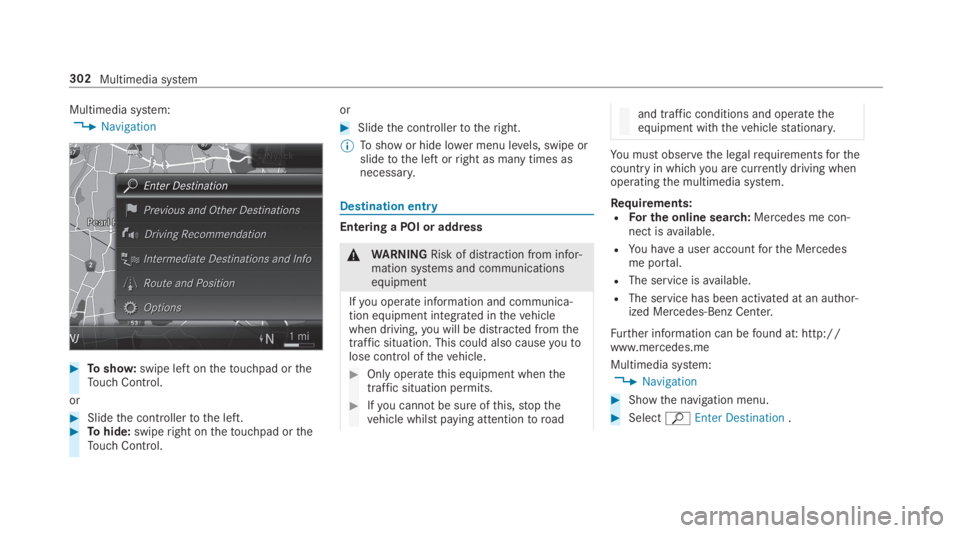
Multimedia system:
,Navigation
#Toshow:swipe left onthetouchpad ortheTouch Control.
or
#Slidethe controllertothe left.#Tohide:swiperight onthetouchpad ortheTouch Control.
or
#Slidethe controllertotheright.
%Toshow or hide lower menu levels, swipe orslidetothe left orright as many times asnecessary.
Destination entry
Entering a POI or address
&WARNINGRisk of distraction from infor‐mation systems and communicationsequipment
Ifyou operate information and communica‐tion equipment integrated inthevehiclewhen driving,you will be distracted fromthetraffic situation. This could also causeyoutolose control ofthevehicle.
#Only operatethis equipment whenthetraffic situation permits.
#Ifyou cannot be sure ofthis,stopthevehicle whilst paying attentiontoroad
and traffic conditions and operatetheequipment withthevehiclestationary.
You must observethe legalrequirementsforthecountry in whichyou are currently driving whenoperatingthe multimedia system.
Requirements:RFor the online search:Mercedes me con‐nect isavailable.
RYou havea user accountforthe Mercedesme portal.
RThe service isavailable.
RThe service has been activated at an author‐ized Mercedes-Benz Center.
Further information can befound at: http://www.mercedes.me
Multimedia system:
,Navigation
#Showthe navigation menu.
#SelectªEnter Destination.
302Multimedia system
Page 312 of 578
Automatic Traffic Jam Avoidancecan beswitched onsor offSfortheseroute types.IfAutomatic Traffic Jam Avoidanceis switchedon,Ask in the Event of Traffic Jam Avoidancecanbe selected.
TheAutomatic Traffic Jam AvoidanceandAsk inthe Event of Traffic Jam Avoidancesettings arenotavailable ineverycountry.
The settings enablethefollowing:
RAutomatic Traffic Jam Avoidance
Theroute is calculated withthe currently setroute type.
Trafficreports via LiveTraffic Information aretaken into account.
LiveTraffic Information is notavailable in allcountries.
RAsk in the Event of Traffic Jam Avoidance
A promptappears when a newroute is detec‐ted with a shorter journey time based on traf‐ficreports.You can continuetousethe cur‐rentroute or usethe dynamicroute instead.
Selectingroute optionsMultimedia system:
,Navigation.ÀRoute and Posi-
tion.Avoid Options
Avoiding areas
#SelectAreas(→page 323).
Avoiding highways,ferries, motorail trains,tunnels, unpavedroads
#Selectsor deselectSavoid option.
Usingtollroads
#SelectUse Toll Roads.
#SelectCashorElectronic BillingorOff.Theroutetakes into accountroadsthatrequirethe payment of a usagefee (toll).
IfOffis selected,tollroads are nottaken intoaccount.
The selectedroute options cannot always beimplemented. Therefore, aroute may include aferry,for instance,eventhoughtheavoidFerriesoption is enabled. A message appears andyouwill hear a corresponding message.
Using carpool lanes
#SelectNumber of Occupants in the Vehicle.
#Select number.When using carpool lanes, observethe appli‐cable legalrequirements aswell as any con‐ditions pertainingtowhen and where suchlanes may be used. Carpool lanes may onlybe used if certain conditions are met.
Theseroute options are notavailable ineverycountry.
Selecting notificationsMultimedia system:
,Naviga-
tion.ZOptions.Announcements
#Switch an announcement onsor offS.
You canchoose fromthefollowing announce‐ments:
RAnnounce Traffic Warnings
This function is notavailable in all countries.
RAnnounce Street Names
310Multimedia system
Page 314 of 578
#SelectYes.The automaticgasstation searchbegins. Theavailablegasstations alongtheroute or inthe vicinity are displayed.
#Selectthegasstation.#Whenthere is noroute,thegasstation is setasthe destination.
or
#Whenthere is aroute,thegasstation is setasthe next intermediate destination.
Startingthe automatic servicestationsearch
Requirements:RATTENTION ASSIST andtheSuggest RestAreafunction are activated (→page 238).
Driving situationTheATTENTION ASSIST Do you want to searchfor a rest area?message is shown.
#SelectYes.The servicestation search starts. Theavaila‐ble servicestations alongtheroute or inthe
vicinity ofthevehicle's current position aredisplayed.
#Selectthe servicestation.The servicestation address is displayed.#Ifroute guidance is not active, selectStartRoute Guidance.The selected servicestation is set as a desti‐nation.Route guidance begins.
or
#Ifroute guidance is active, selectStart NewRoute GuidanceorSet as Next Way Point.Start New Route Guidance:the selectedservicestation is set as a new destination.The previous destination and all intermediatedestinations are deleted.Route guidancetothe servicestation begins.
Set as Next Way Point:the selected servicestation is set asthe next intermediate desti‐nation.Route guidance begins.
Route guidance
Notes onroute guidance
&WARNINGRisk of distraction from oper‐ating integrated communication equip‐ment whilethevehicle is in motion
Ifyou operate communication equipmentintegrated inthevehicle when driving,youwill be distracted fromthe traffic situation.This could also causeyoutolose control ofthevehicle.
#Only operatethis equipment whenthetraffic situation permits.
#Ifyou cannot be sure ofthis,stopthevehicle whilst paying attentiontoroadand traffic conditions and operatetheequipment withthevehiclestationary.
You must observethe legalrequirementsforthecountry in whichyou are currently driving whenoperatingthe multimedia system.Route guidance begins once aroute has beencalculated.
312Multimedia system
Page 321 of 578
Multimedia system:
,Navigation.ZOptions
The subscriptionexpiration date is automaticallydisplayed:
Rone month beforetheexpiration date.
Roneweek beforetheexpiration date.
Rontheexpiration date.
#Todisplaymanually:selectLive Traffic Sub-scription Info.
Depending onthestatus, one ofthefollowingmessages appears:
Rthe period ofvalidityforthe subscriptionis displayed.
Rthe subscription hasexpired.
%The subscription can beextended:
Rat an authorized Mercedes-Benz Center
Rvia an MB Info calltothe Mercedes-BenzCustomer Assistance Center
Displayingthe traffic map
Requirements:RFor LiveTraffic Information:thevehicle isequipped with a communication modulefea‐turing an activated, integrated SIM card.
RWhenthevehicle isstarted,the communica‐tion module automatically establishes anInternet connection.Traffic information ismadeavailable shortly afterwards.
Multimedia system:
,Navigation.ZOptions.Map
Menu
#Alternatively: ifthe map is displayed in fullscreen mode, presstheTouch Control,thecontroller orthetouchpad.The map menu appears.
#Activateºs.
The traffic map shows thefollowing information,forexample:
Rtraffic incidents,forexample:
-roadworks
-road blocks
-warning messages
The symbolsfor traffic incidents are dis‐played in color (ontheroute) orgray(offtheroute).
Rtrafficflowinformation:
-traffic jam (red line)
-slow-moving traffic (orange line)
-heavy traffic (yellow line)
-free-flowing traffic (green line)
Rdisplayfor traffic delays ontheroute lastingat least one minute
Rwarning message symbols:
-Ôsymbol
-additionalroad safety notes whenapproaching a traffic incident, e.g.theend of a traffic jam
Ifthevehicle approaches a danger areaontheroute, awarning message is dis‐played onthe map. Awarning messagemay also be issued (→page 320).
Multimedia system319
Page 322 of 578
Displaying traffic incidentsMultimedia system:
,Navigation.ZOptions.Map
Content
#ActivatesTraffic Incidents.Roadworks,road blocks, local areareports(e.g.fog) andwarning messages are dis‐played.
Activating freeflow and traffic display
#ActivatesFree Flowing TrafficandTrafficDelays.
%The traffic delayis displayedforthe currentroute.Traffic delays lasting one minute orlonger aretaken into consideration.
Displaying details
#Displays the traffic map (→page319).
#Movesthe map (→page 322).#When a trafficreport symbol is underthecrosshair, press onthe central control ele‐ment.The trafficreport details are displayed.
or
#Press onthe central control element.
#SelectInformation on Traffic Reports.The map shows the trafficreport symbols inthe vicinity.
Trafficreport information is displayed inthestatus line:
RTrafficreport symbol
RReasonforthe trafficreport, e.g. trafficcongestion
RWarning message (highlighted inred)#Toselect a trafficreport symbol:selectNextorPrevious.
#Press onthe central control element.The trafficreport details are displayed.
Issuing hazardwarningsMultimedia system:
,Naviga-
tion.ZOptions.Announcements
#ActivatesAnnounce Traffic Warnings.Warning messages are issued andtailbackswhich pose arisk are announced.
Map and compass
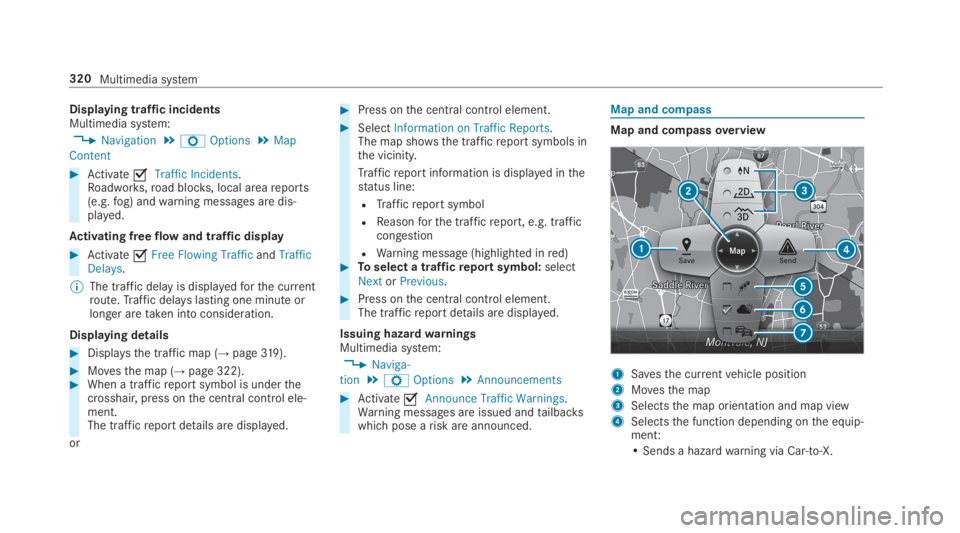
Map and compassoverview
1Savesthe currentvehicle position
2Movesthe map
3Selectsthe map orientation and map view
4Selectsthe function depending onthe equip‐ment:
• Sends a hazardwarning via Car-to-X.
320Multimedia system