warning MERCEDES-BENZ S CLASS 2019 Owners Manual
[x] Cancel search | Manufacturer: MERCEDES-BENZ, Model Year: 2019, Model line: S CLASS, Model: MERCEDES-BENZ S CLASS 2019Pages: 578, PDF Size: 23.31 MB
Page 328 of 578
%The automatically selected map scale can bechanged manuallyfor a short time. The set‐ting isreset automatically after afew sec‐onds.
Displayingthe satellite mapMultimedia system:
,Navigation.ZOptions.Map
Content
#SwitchSatellite Maponsor offS.
or
#If satellite map display6isavailable inthemap menu, switch it onsor offS(→page 320).Switched ons: satellite maps are displayedin map scales of 2 mi (2 km) or less.
Switched offS: satellite maps are not dis‐played in map scales from 2 mi (2 km)to10mi (10 km).
%Satellite mapsforthese map scales are notavailable in all countries.
Displayingweather information
Requirements:RMercedes me connect isavailable.
RYou havea user accountforthe Mercedesme portal.
RThe service isavailable.
RThe service has been activated at an author‐ized Mercedes-Benz Center.
Further information can befound at: http://www.mercedes.me
Multimedia system:
,Navigation.ZOptions.Map
Content
#ActivateWeather Informations.
or
#Ifweather information display6isavailableinthe map menu, activates(→page 320)it.Currentweather information is displayed onthe navigation map, e.g.temperature orcloud cover.
%Weather information is notavailable in allcountries.
Calling upthe Digital Operator's Manual(navigation)
Calling up information on navigationMultimedia system:
,Navigation.ZOptions.Naviga-
tion Info
#Selectthetopic.
Telephone
Telephony
Notes ontelephony
&WARNINGRisk of distraction from oper‐ating integrated communication equip‐ment whilethevehicle is in motion
Ifyou operate communication equipmentintegrated inthevehicle when driving,youwill be distracted fromthe traffic situation.
326Multimedia system
Page 329 of 578
This could also causeyoutolose control ofthevehicle.
#Only operatethis equipment whenthetraffic situation permits.
#Ifyou cannot be sure ofthis,stopthevehicle whilst paying attentiontoroadand traffic conditions and operatetheequipment withthevehiclestationary.
&WARNINGRisk of distraction from oper‐ating mobile communication equipmentwhilethevehicle is in motion
Ifyou operate mobile communication equip‐ment when driving,you will be distractedfromthe traffic situation. This could alsocauseyoutolose control ofthevehicle.
#Only operatethis equipment whenthevehicle isstationary.
You must observethe legalrequirementsforthecountry in whichyou are currently driving whenoperating mobile communication equipment inthevehicle.Further information can be obtained from anauthorized Mercedes-Benz Center or at: http://www.mercedes-benz.com/connect.
Multimedia system327
Page 343 of 578
Ending Apple CarPlay™Multimedia system:
,Connect.Apple CarPlay
#SelectDisconnect.The connection is ended.
The mobile phone continuestobe suppliedwith electricity.
or
#Disconnectthe connecting cable betweenthe mobile phone and multimedia system.Mercedes-Benzrecommends disconnectingthe connecting cable only whenthevehicle isstationary.
AndroidAuto
AndroidAutooverview
&WARNINGRisk of distraction from infor‐mation systems and communicationsequipment
Ifyou operate information and communica‐tion equipment integrated inthevehicle
when driving,you will be distracted fromthetraffic situation. This could also causeyoutolose control ofthevehicle.
#Only operatethis equipment whenthetraffic situation permits.
#Ifyou cannot be sure ofthis,stopthevehicle whilst paying attentiontoroadand traffic conditions and operatetheequipment withthevehiclestationary.
You must observethe legalrequirementsforthecountry in whichyou are currently driving whenoperatingthe multimedia system.Mobile phone functions can be used withAndroidAutousingthe Android operating sys‐tem onthe multimedia system. It is operatedusingthe central control element orthevoicecontrol.You can activatethevoice-operated con‐trol systembypressing and holdingthe
Page 350 of 578
Ending an unintentional emergency call
#Selectvonthe multifunctionsteeringwheel. Depress buttonfor several seconds.
Data transfer ofthe Mercedes-Benz emer‐gency call system
Intheevent of an automatic or manual emer‐gency callthefollowing data is transmitted,forexample:
RVehicle's GPS position data
RGPS position data ontheroute (afew300feet(hundred meters) beforethe inci‐dent)
RDirection of travel
RVehicle identification number
RVehicle drive type
RNumber of people determinedtobe inthevehicle
RWhether Mercedes me connect isavailableor not
RWhetherthe emergency callwas initiatedmanually or automatically
RTime ofthe accident
RLanguage setting onthe multimedia system
Data transmitted isvehicle information.For anyquestions aboutthe collection, use and sharingofthe eCall system data, please contact MBU‐SA's Customer Assistance Center at 800-FOR-MERC.
For Canada, please contact MBC's CustomerAssistance Center at 1-800-387-000.
Customerrequestsfor covered informationshould be submitted viathe samechannels.
For accident clarification purposes,thefollowingmeasures can betaken uptoan hour aftertheemergency call has been initiated:
RThe currentvehicle position can be called up
RAvoice connectiontothevehicle occupantscan be established
Online and Internet functions
Internet connection
Information on connectingtothe Internet
&WARNINGRisk of distraction from infor‐mation systems and communicationsequipment
Ifyou operate information and communica‐tion equipment integrated inthevehiclewhen driving,you will be distracted fromthetraffic situation. This could also causeyoutolose control ofthevehicle.
#Only operatethis equipment whenthetraffic situation permits.
#Ifyou cannot be sure ofthis,stopthevehicle whilst paying attentiontoroadand traffic conditions and operatetheequipment withthevehiclestationary.
You must observethe legalrequirementsforthecountry in whichyou are currently driving whenoperatingthe multimedia system.
348Multimedia system
Page 351 of 578
&WARNINGRisk of distraction from oper‐ating mobile communication equipmentwhilethevehicle is in motion
Ifyou operate mobile communication equip‐ment when driving,you will be distractedfromthe traffic situation. This could alsocauseyoutolose control ofthevehicle.
#Only operatethis equipment whenthevehicle isstationary.
You must observethe legalrequirementsforthecountry in whichyou are currently driving whenoperating mobile communication equipment inthevehicle.The Internet functions can only be usedtoa limi‐ted degree whilst driving.
Function ofthe communication moduleOnvehicles with a built-in communication mod‐ule,the Internet connection is established via anintegrated SIM card.
Touse Internetaccess viathe communicationmodulethefollowing conditions must be met:
RThevehicle is equipped with a permanentlyinstalled communication module.
RMercedes me connect is active andreadyforoperation.
RMercedes me connect is activatedfor Inter‐net access.
RCountry dependent: datavolume viaMercedes me connect isavailable.
Ifthe datavolume limit isreached,theavailabil‐ity of Mercedes me connect services is limited.The datavolume must be purchased viaMercedes me connect.
%Contact an authorized Mercedes-Benz Cen‐tertofind out whether it is possibletopur‐chase datavolume inyour country.
Establishing an Internet connectionMultimedia system:
,Connect
#Forexample, selectzBrowser.
%The multimedia system usually establishesthe Internet connection automatically.Ifthemultimedia system is not connectedtotheInternet,the Internet connection is estab‐lished when an Internet application is used.
%Theavailability ofweb browsers is country-dependent.
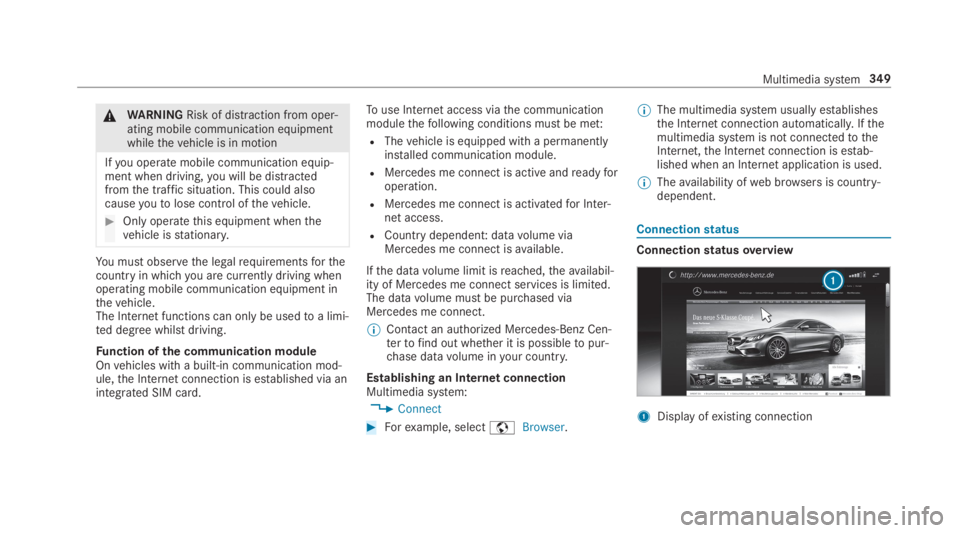
Connectionstatus
Connectionstatusoverview
1Display ofexisting connection
Multimedia system349
Page 356 of 578
Setting Internetradio optionsMultimedia system:
,Radio.ÞRadio Source.TuneIn
Radio.ZOptions
Thefollowing options areavailable:
RSelect Stream: selectthestreamquality.
RLogin to TuneIn Account: log intoyourTuneIn user account.
RLog Out of Account: log out ofyourTuneInuser account.
#Select an option.
Media
Audio mode
Information onthe audio mode
&WARNINGRisk of distraction when han‐dling datastorage media
Ifyou handle a datastorage medium whiledriving,your attention is diverted fromthe
traffic conditions. This could also causeyoutolose control ofthevehicle.
#Only handle a datastorage mediumwhenthevehicle isstationary.
Permissiblefile systems:
RFAT32
RexFAT
RNTFS
Permissible datastorage medium:
RSD card
RUSBstorage device
RiPod®/iPhone®
RMTP devices
RBluetooth®audio equipment
%Observethefollowing notes:
RThe multimedia system supports atotalof upto50,000files.
RDatastorage media upto2 TB are sup‐ported (32‑bit address space).
Supportedformats:
RMP3
RWMA
RAAC
RWAV
RFLAC
RALAC
%Observethefollowing notes:
RDuetothe largevariety ofavailablemusicfilesregarding encoders, samplingrates and datarates, playback cannotalways be guaranteed.
RDuetothe widerange of USB devicesavailable onthe market, playback cannotbe guaranteedfor all USB devices.
RCopy-protected musicfiles or DRMencryptedfiles cannot be played back.
RMP3 playersmust support MediaTrans‐fer Protocol (MTP).
354Multimedia system
Page 392 of 578
ForDTSPatents, see http://patents.dts.com.Manufactured under license fromDTS LicensingLimited.DTS,DTS-HD,the Symbol, &DTS andthe Symboltogether areregistered trademarks
ofDTS, Inc.©DTS, Inc. Allrightsreserved.
"Madefor iPod", and "Madefor iPhone," meanthat an electronic accessoryhas been designedtoconnect specificallytoiPod, or iPhone,respectively,and has been certifiedbythe devel‐opertomeet Apple performancestandards.Apple is notresponsibleforthe operation ofthisdevice or its compliance with safety andregula‐torystandards. Please notethatthe use ofthisaccessory with iPod, or iPhone may affect wire‐less performance.
For the USA:iPhone®, iPod®, iPod classic®,
iPod nano®, and iPodtouch®are trademarksofApple Inc.,registered intheU.S. andother coun‐tries. Lightning™ is a trademark of Apple Inc.
For Canada:iPhone, iPod, iPod classic, iPodnano, and iPodtouch are trademarksof AppleInc.,registered intheU.S. andother countries.Lightning is a trademark of Apple Inc.
Cinavia notice:this product uses Cinaviatech‐nologytolimitthe use of unauthorized copies ofsome commercially-producedfilm and videosandtheir soundtracks. When a prohibited use ofan unauthorized copy is detected, a message willbe displayed and playback or copying will be
interrupted. More information about Cinaviatechnology is provided at Cinavia Online Con‐sumer Information Center at http://www.cinavia.com.Torequest additional informa‐tion about Cinaviabymail, send a postcard withyour mailing addressto: Cinavia Consumer Infor‐mation Center, Box 86851,San Diego,CA,92138, USA.
This product incorporates proprietarytechnologyunder license fromVerance Corporation and isprotectedbyU.S.Patent7,369,677andotherU.S. andworldwide patents issued and pendingaswell as copyright and trade secretprotectionfor certain aspects of suchtechnology. Cinavia isa trademarkofVerance Corporation. Copyright2004-2012Verance Corporation. AllrightsreservedbyVerance.Reverse Engineering or dis‐assembly is prohibited.
Inserting a disc
&WARNINGRisk of injuryfrom laserradi‐ation fromthe Blu-ray drive
The Blu-ray drive is a class 1 laser product. Ifyou openthe housing ofthe Blu-ray drive,
390Multimedia system
Page 398 of 578
Rfrequent operation in mountainousterrain oron poorroad surfaces
Rwhenthe engine is often leftidlingfor longperiods
Roperation in particularly dusty conditionsand/or if air-recirculation mode is frequentlyused
Inthese or similar operating conditions, havetheinterior airfilter, engine air cleaner, engine oiland oilfilteretc.changed more frequently. Thetires must bechecked more frequently ifthevehicle is operated under increased loads.Fur‐ther information can be obtained at aqualifiedspecialistworkshop.
Battery disconnection periods
The ASSYST PLUS service interval displaycan only calculatethe service due datewhenthe batteryis connected.
#Notedownthe service due date displayed onthe instrument display before disconnectingthe battery (→page 395).
Engine compartment
Active hood (pedestrian protection)
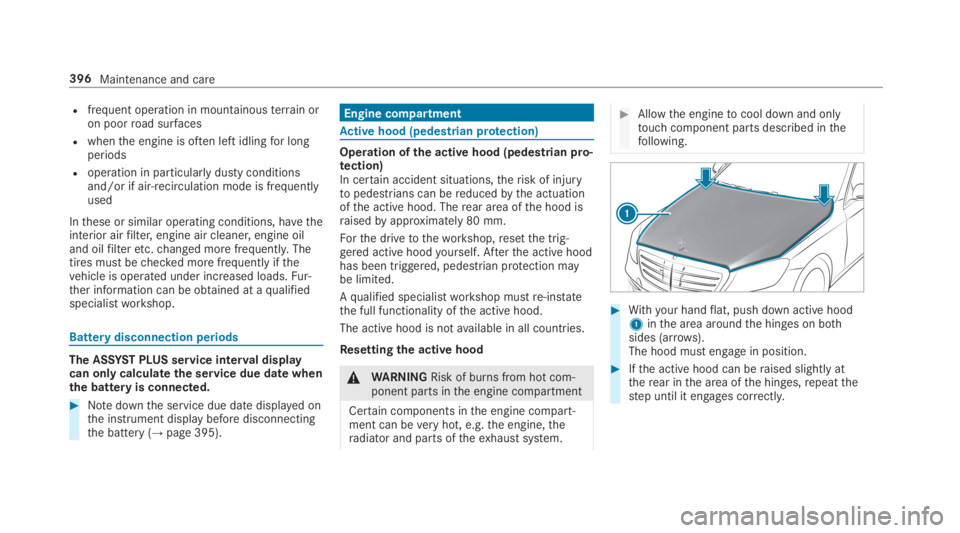
Operation ofthe active hood (pedestrian pro‐tection)In certain accident situations,therisk of injurytopedestrians can bereducedbythe actuationofthe active hood. Therear area ofthe hood israisedbyapproximately 80 mm.
Forthe drivetotheworkshop,resetthe trig‐gered active hoodyourself. Afterthe active hoodhas been triggered, pedestrian protection maybe limited.
Aqualified specialistworkshop mustre-instatethe full functionality ofthe active hood.
The active hood is notavailable in all countries.
Resettingthe active hood
&WARNINGRisk of burns from hot com‐ponent parts inthe engine compartment
Certain components inthe engine compart‐ment can beveryhot, e.g.the engine,theradiator and parts oftheexhaust system.
#Allowthe enginetocool down and onlytouch component parts described inthefollowing.
#Withyour handflat, push down active hood1inthe area aroundthe hinges on bothsides (arrows).The hood must engage in position.
#Ifthe active hood can beraised slightly attherear inthe area ofthe hinges,repeatthestep until it engages correctly.
396Maintenance and care
Page 399 of 578
Opening/closingthe hood
&WARNINGRisk of accident ifthe enginehood is unlatched while driving
An unlocked engine hood may open up whenthevehicle is in motion and blockyour view.
#Never unlatchthe engine hood whiledriving.
#Beforeevery trip, ensurethattheengine hood is latched.
&WARNINGRisk of accident and injurywhen opening and closingthe enginehood
When opening or closingthe engine hood, itmay suddenly drop intothe end position.
There is arisk of injuryfor anyone intheengine hood'srange of movement.
#Only open or closethe engine hoodwhenthere are no persons intheengine hood'srange of movement.
&WARNINGDanger of burns when open‐ingthe hood
Ifyou openthe hood whenthe engine hasoverheated or during afireinthe enginecompartment,you could come into contactwith hotgases orother escaping operatingfluids.
#Before openingthe hood, allowtheenginetocool down.
#Intheevent of afireinthe engine com‐partment,keepthe hood closed andcallthefireservice.
&WARNINGRisk of injuryduetomovingparts
Certain components inthe engine compart‐ment may continuetomoveor suddenlymoveagaineven afterthe ignition has beenswitched off, e.g.the coolerfan.
Makesure ofthefollowing before performingtasks inthe engine compartment:
#Switchthe ignition off.
#Nevertouchthe danger zone surround‐ing moving component parts, e.g.therotation area ofthefan.
#Removejewelry andwatches.
#Keep items of clothing and hairawayfrom moving parts.
&WARNINGRisk of injuryfromtouchingcomponent parts undervoltage
The ignition system andthe fuel injectionsystemworkunder highvoltage. Ifyoutouchcomponent parts which are undervoltage,you couldreceivean electric shock.
#Nevertouch component parts oftheignition system orthe fuel injection sys‐tem whenthe ignition is switched on.
&WARNINGRisk of burns from hot com‐ponent parts inthe engine compartment
Certain components inthe engine compart‐ment can beveryhot, e.g.the engine,theradiator and parts oftheexhaust system.
Maintenance and care397
Page 400 of 578
#Allowthe enginetocool down and onlytouch component parts described inthefollowing.
&WARNINGRisk of injuryfrom usingthewindshield wipers whilethe engine hoodis open
Whenthe engine hood is open andthe wind‐shield wipers are set in motion,you can betrappedbythe wiper linkage.
#Always switch offthe windshield wipersand ignition before openingthe enginehood.
Plug-inhybrid:observethe notes inthe Supple‐ment. Otherwise,you mayfailtorecognize dan‐gers.
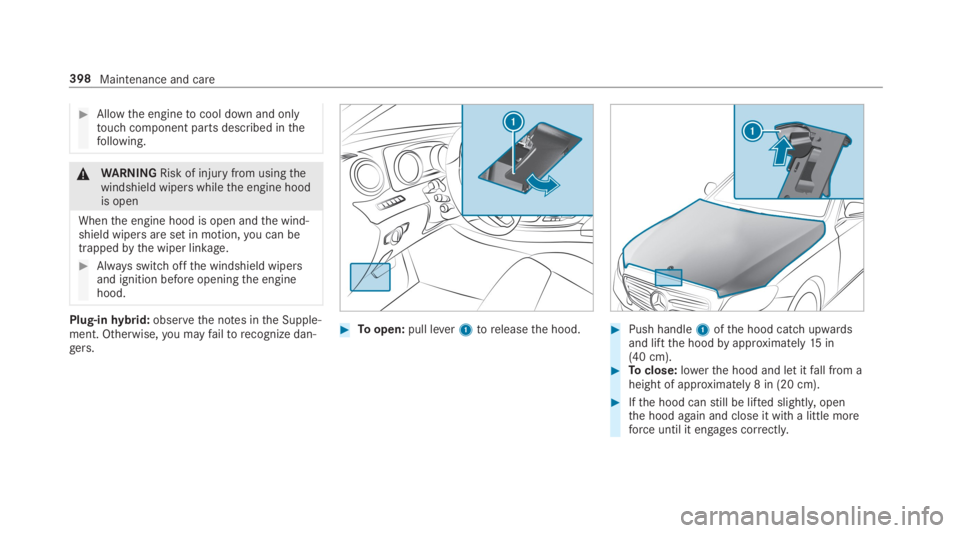
#Toopen:pull lever1toreleasethe hood.#Push handle1ofthe hood catch upwardsand liftthe hoodbyapproximately15in(40 cm).#Toclose:lowerthe hood and let itfall from aheight of approximately 8 in (20 cm).
#Ifthe hood canstill be lifted slightly,openthe hood again and close it with a little moreforce until it engages correctly.
398Maintenance and care