change time MERCEDES-BENZ S CLASS 2019 User Guide
[x] Cancel search | Manufacturer: MERCEDES-BENZ, Model Year: 2019, Model line: S CLASS, Model: MERCEDES-BENZ S CLASS 2019Pages: 578, PDF Size: 23.31 MB
Page 208 of 578
#Toincrease/reduce speed:pressrockerswitch3up/downtothe pressure point.Thestored speed is increased orreducedby1mph (1km/h).
or
#Press and holdrocker switch3up/downtothe pressure point.Thestored speed is increased orreduced inincrements of 1mph (1 km/h).
or
#Pressrocker switch3beyondthe pressurepoint.Thestored speed is increased orreducedby5mph (10 km/h).
or
#Press and holdrocker switch3beyondthepressure point.Thestored speed is increased orreduced inincrements of 5mph (10 km/h).#Toincrease orreduce the specified dis‐tance fromthevehicle in front:pressrocker switch2up or down.
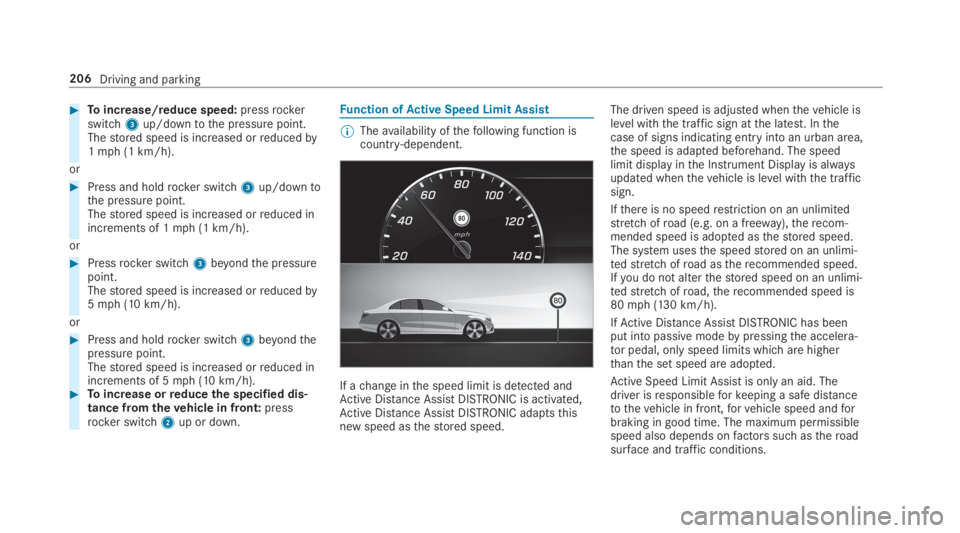
Function ofActive Speed Limit Assist
%Theavailability ofthefollowing function iscountry-dependent.
If achange inthe speed limit is detected andActive Distance AssistDISTRONIC is activated,Active Distance AssistDISTRONIC adaptsthisnew speed asthestored speed.
The driven speed is adjusted whenthevehicle islevel withthe traffic sign atthe latest. Inthecase of signs indicating entry into an urban area,the speed is adapted beforehand. The speedlimit display inthe Instrument Display is alwaysupdated whenthevehicle is level withthe trafficsign.
Ifthere is no speedrestriction on an unlimitedstretch ofroad (e.g. on a freeway),therecom‐mended speed is adopted asthestored speed.The system usesthe speedstored on an unlimi‐tedstretch ofroad astherecommended speed.Ifyou do not alterthestored speed on an unlimi‐tedstretch ofroad,therecommended speed is80mph (130 km/h).
IfActive Distance AssistDISTRONIC has beenput into passivemodebypressingthe accelera‐tor pedal, only speed limits whichare higherthanthe set speed are adopted.
Active Speed Limit Assistis only an aid. Thedriver isresponsibleforkeeping a safe distancetothevehicle in front,forvehicle speed andforbraking in good time. The maximum permissiblespeed also depends onfactors suchastheroadsurface and traffic conditions.
206Driving and parking
Page 209 of 578
System limitationsTemporary speedrestrictions (e.g.for a certaintime or duetoweather conditions) cannot beproperlydetectedbythe system. The maximumpermissible speed applyingfor avehicle with atrailer is not detectedbythe system. Inthese sit‐uationsyou must adjustyour speedyourself.
&WARNINGRisk of accident duetoActiveSpeed Limit Assistadaptingthevehicle'sspeed
The speed adoptedbyActive Speed LimitAssistmay betoo high or incorrect in someindividual cases, suchas:
RInthewet or infog
RWhentowing a trailer
#Ensurethatthe driven speed complieswith trafficregulations.
#Adjustthe driving speedtosuit currenttraffic andweather conditions.
Function ofroute-based speed adaptation
%Theavailability ofthefollowing function iscountry-dependent.
When Distance AssistDISTRONIC is active,thefunction adjuststhe speed depending ontherouteevents ahead. Depending onthe drive pro‐gram selected,thevehicle negotiatestherouteevent ahead in a fuel-saving, comfortable ordynamic manner. Whentherouteevent has beenpassed,thevehicle accelerates againtothestored speed. The set distancetothevehicle infront,vehicles detected ahead and speedrestric‐tions ahead aretaken into account.
Route-based speed adjustment canbyconfig‐ured inthe multimedia system (→page 208).
Routeevents ahead are:
RBends
RT-intersections, traffic circles andtollsta‐tions
RTurns andexits
%Whenthetollstation isreached,Active Dis‐tance AssistDISTRONIC adoptsthe speed asthestored speed.
Also,the speed isreduced ifthe turn signaltochange lanes is switched on and one ofthefol‐lowing situations is detected:
RTurning off at intersections
RDriving on slowing-down lanes
RDriving on lanes adjacenttoslowing-downlanes
The driver isresponsibleforchoosingtherightspeed and observingotherroad users. Thisapplies in particulartointersections, traffic cir‐cles and traffic lights, asroute-based speedadaptation does not brakethevehicletoastand‐still.
Whenroute guidance is active,thefirst speedadjustment is carried out automatically. Iftheturn signal indicator is switched on,the selectedroute is confirmed and further speed adjustmentis activated.
Speed adjustment is canceled inthefollowingcases:
RIfthe turn signal indicator is switched offbeforetherouteevent.
Driving and parking207
Page 210 of 578
RIfthe driver depressesthe accelerator orbrake pedal duringthe process.
System limitationsRoute-based speed adaptation does nottakeright ofwayregulations into account. The driverisresponsiblefor complying withroad trafficregulations and driving at a suitable speed.
In difficult conditions (e.g. unclearroads, narrowlanes,wetroad surfaces, snow or ice) or whendriving witha trailer,the speed adjustment madebythe system may not always be suitable. Inthese situationsthe driver must interveneaccordingly.
&WARNINGRisk of accident in spiteofroute-based speed adjustment
Route-based speed adjustment might mal‐function or betemporarily unavailable inthefollowing situations:
RIf map data is not uptodate oravailable
RIfyou do notfollowthe selectedrouteguidance
RIfthe setroute isre-planned
RInroad construction areas
RWhentowing a trailer
RIn badweather orroad conditions
RIfthe accelerator pedal is depressed
#Adjustthe speedtothe traffic situation.
Settingroute-based speed adjustment
Requirements:RActive Distance AssistDISTRONIC is activa‐ted.
Multimedia system:
,Vehicle.kAssistance.Speed
Adjustment
#Activatesor deactivateSthe function.
ActiveSteering Assist
Function ofActiveSteering AssistActiveSteering Assist is country-dependent andonlyavailableforvehicles withthe Driving Assis‐tancePackage.
ActiveSteering Assist is operational at speedsupto130mph (210km/h) and helpsyoutostayinthe center ofthe lanebymeans of moderatesteering interventions. It usesthevehicle in frontandthe lane markings as areference dependingonthe driven speed.
Whenthe system is activelysteering,theèsymbol is shown in green inthe multifunctiondisplay.
Steering andtouch detectionThe driver isrequiredtokeeptheir hands onthesteering wheel at all times andtobe abletointervene at any time. The driver mustexpect achange from activetopassive mode or viceversa at any time.
208Driving and parking
Page 211 of 578
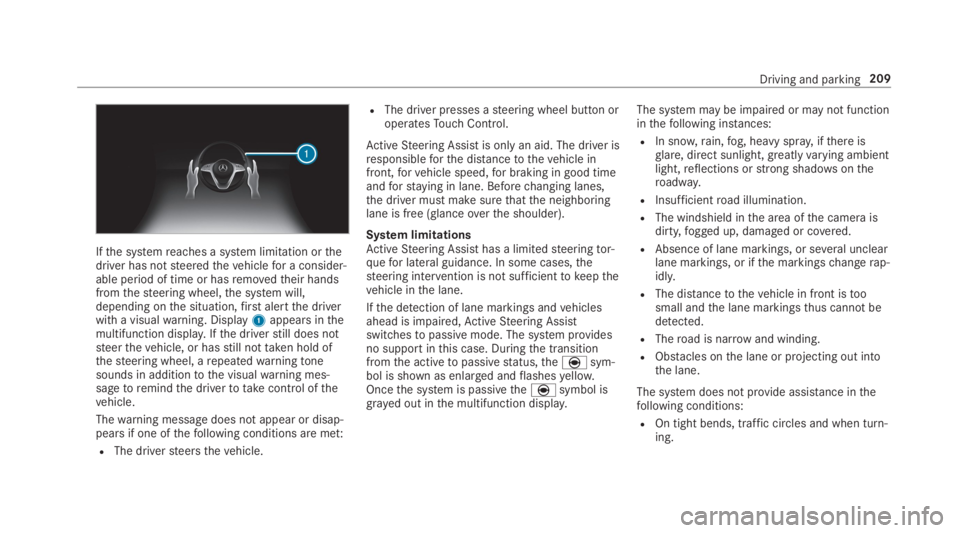
Ifthe systemreaches a system limitation orthedriver has notsteeredthevehiclefor a consider‐able period of time or hasremovedtheir handsfromthesteering wheel,the system will,depending onthe situation,first alertthe driverwith a visualwarning. Display1appears inthemultifunction display.Ifthe driverstill does notsteerthevehicle, or hasstill nottaken hold ofthesteering wheel, arepeatedwarningtonesounds in additiontothe visualwarning mes‐sagetoremindthe drivertotakecontrol ofthevehicle.
Thewarning message does not appear or disap‐pears if one ofthefollowing conditions are met:
RThe driversteersthevehicle.
RThe driver presses asteering wheel button oroperatesTouch Control.
ActiveSteering Assist is only an aid. The driver isresponsibleforthe distancetothevehicle infront,forvehicle speed,for braking in good timeandforstaying in lane. Beforechanging lanes,the driver must make surethatthe neighboringlane is free (glanceoverthe shoulder).
System limitationsActiveSteering Assist has a limitedsteeringtor‐quefor lateral guidance. In some cases,thesteering intervention is not sufficienttokeepthevehicle inthe lane.
Ifthe detection of lane markings andvehiclesahead is impaired,ActiveSteering Assistswitchestopassive mode. The system providesno support inthis case. Duringthe transitionfromthe activetopassivestatus,theèsym‐bol is shown as enlarged andflashesyellow.Oncethe system is passivetheèsymbol isgrayed out inthe multifunction display.
The system may be impaired or may not functioninthefollowing instances:
RIn snow,rain,fog, heavy spray, ifthere isglare, direct sunlight,greatlyvarying ambientlight,reflections orstrong shadowsontheroadway.
RInsufficientroad illumination.
RThe windshield inthe area ofthe camera isdirty,fogged up, damaged or covered.
RAbsence of lane markings, or several unclearlane markings, or ifthe markingschangerap‐idly.
RThe distancetothevehicle in front istoosmall andthe lane markingsthus cannot bedetected.
RTheroad is narrow and winding.
RObstacles onthe lane or projecting out intothe lane.
The system does not provide assistance inthefollowing conditions:
ROn tight bends, traffic circles and when turn‐ing.
Driving and parking209
Page 212 of 578
RWhen activelychanging lane without switch‐ing onthe turn signal.
&WARNINGRisk of accident ifActiveSteering Assist unexpectedlystops func‐tioning
Ifthe system limitations ofActiveSteeringAssist arereachedthere is no guaranteethatthe system willremain active or willkeepthevehicle in lane.
#Alwayskeepyour hands onthesteeringwheel and observethe traffic carefully.
#Alwayssteerthevehicle paying atten‐tiontotraffic conditions.
&WARNINGRisk of accident ifActiveSteering Assist unexpectedly intervenes
A malfunction inthe detection of lane mark‐ings and objects can occur.
This could cause unexpectedsteering inter‐vention.
#Steer accordingtotraffic conditions.
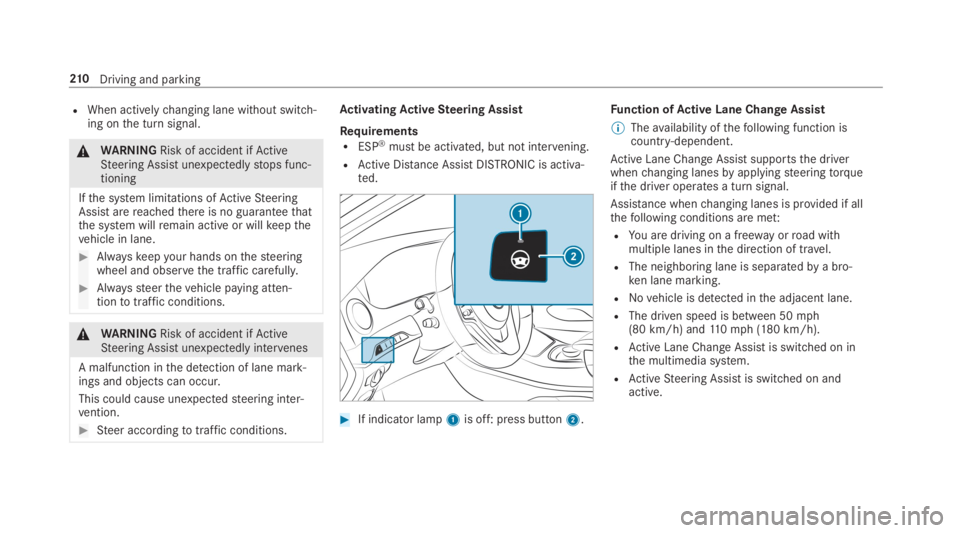
ActivatingActiveSteering Assist
RequirementsRESP®must be activated, but not intervening.
RActive Distance AssistDISTRONIC is activa‐ted.
#If indicator lamp1is off: press button2.
Function ofActive Lane Change Assist
%Theavailability ofthefollowing function iscountry-dependent.
Active Lane Change Assistsupportsthe driverwhenchanging lanesbyapplyingsteeringtorqueifthe driver operates a turn signal.
Assistance whenchanging lanes is provided if allthefollowing conditions are met:
RYou are driving on a freeway orroad withmultiple lanes inthe direction of travel.
RThe neighboring lane is separatedbya bro‐ken lane marking.
RNovehicle is detected inthe adjacent lane.
RThe driven speed is between 50mph(80 km/h) and110mph (180 km/h).
RActive Lane Change Assistis switched on inthe multimedia system.
RActiveSteering Assist is switched on andactive.
210Driving and parking
Page 214 of 578
Activating/deactivatingActive Lane ChangeAssistMultimedia system:
,Vehicle.kAssistance
#SelectLane Change Assist.
#Activatesor deactivateSthe function.
Function ofActive EmergencyStop AssistIfthe driver continually ignoresthe visual oracousticwarningtoputtheir hands onthesteer‐ing wheel,theBeginning Emergency Stopmes‐sage appears inthe multifunction display.Ifthedriverstill does notrespond,Active DistanceAssistDISTRONICreducesthe speed. Thevehi‐cle is decelerated instagestoastandstill.Atspeeds below 40mph (60 km/h)the hazardwarning lights switch on automatically.
Whenthevehicle isstationary,thefollowingactions are carried out:
RThevehicle is secured withthe electric park‐ing brake
RActive Distance AssistDISTRONIC is ended
RThevehicle is unlocked
RIf possible, an emergency call is placedtothe Mercedes-Benz emergency call center
The driver can cancelthe deceleration at anytimebyperforming one ofthefollowing actions:
RSteering
RBraking or accelerating
RPressing asteering wheel button
ROperatingTouch Control
RActivating or deactivatingActive DistanceAssistDISTRONIC
OverviewofActive Distance AssistDISTRONIC displaysinthe instrument clus‐ter
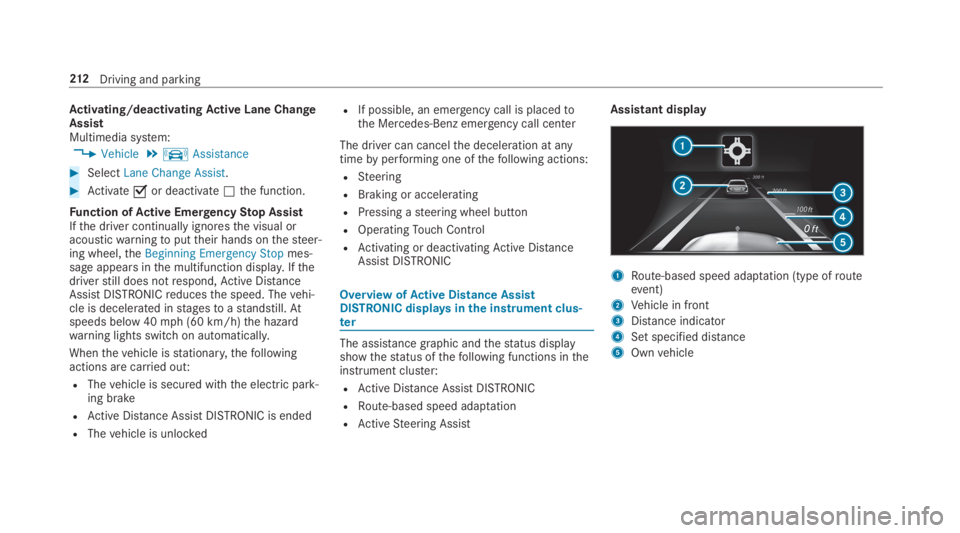
The assistance graphic andthestatus displayshowthestatus ofthefollowing functions intheinstrument cluster:
RActive Distance AssistDISTRONIC
RRoute-based speed adaptation
RActiveSteering Assist
Assistant display
1Route-based speed adaptation (type ofrouteevent)
2Vehicle in front
3Distance indicator
4Set specified distance
5Ownvehicle
212Driving and parking
Page 229 of 578
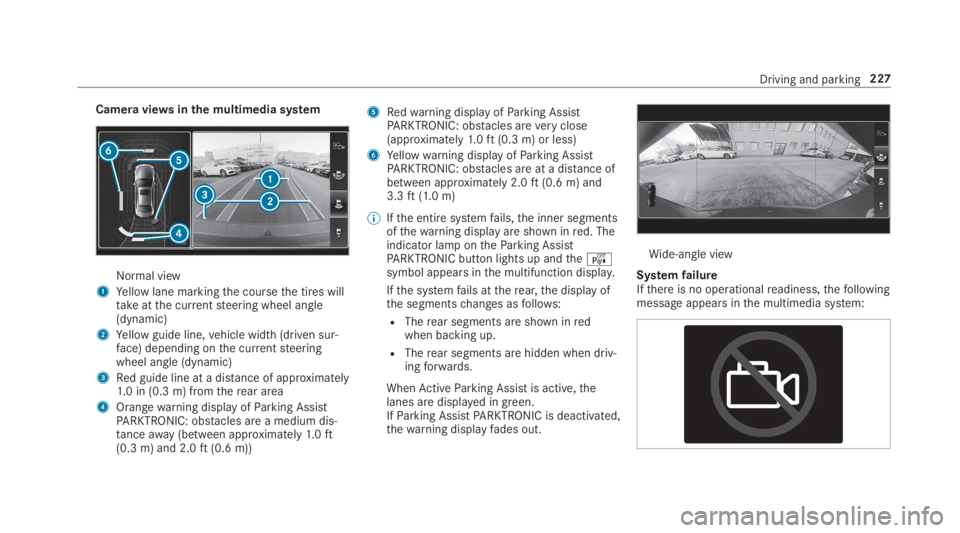
Camera viewsinthe multimedia system
Normal view
1Yellow lane markingthe coursethe tires willtakeatthe currentsteering wheel angle(dynamic)
2Yellow guide line,vehicle width (driven sur‐face) depending onthe currentsteeringwheel angle (dynamic)
3Red guide line at a distance of approximately1.0 in (0.3 m) fromtherear area
4Orangewarning display ofParking AssistPARKTRONIC: obstacles are a medium dis‐tanceaway(between approximately1.0ft(0.3 m) and 2.0ft(0.6 m))
5Redwarning display ofParking AssistPARKTRONIC: obstacles areveryclose(approximately1.0ft(0.3 m) or less)
6Yellowwarning display ofParking AssistPARKTRONIC: obstacles are at a distance ofbetween approximately 2.0ft(0.6 m) and3.3ft(1.0 m)
%Ifthe entire systemfails,the inner segmentsofthewarning display are shown inred. Theindicator lamp ontheParking AssistPARKTRONIC button lights up andtheésymbol appears inthe multifunction display.
Ifthe systemfails attherear,the display ofthe segmentschanges asfollows:
RTherear segments are shown inredwhen backing up.
RTherear segments are hidden when driv‐ingforwards.
WhenActiveParking Assist is active,thelanes are displayed in green.IfParking AssistPARKTRONIC is deactivated,thewarning displayfades out.
Wide-angle view
SystemfailureIfthere is no operationalreadiness,thefollowingmessage appears inthe multimedia system:
Driving and parking227
Page 235 of 578
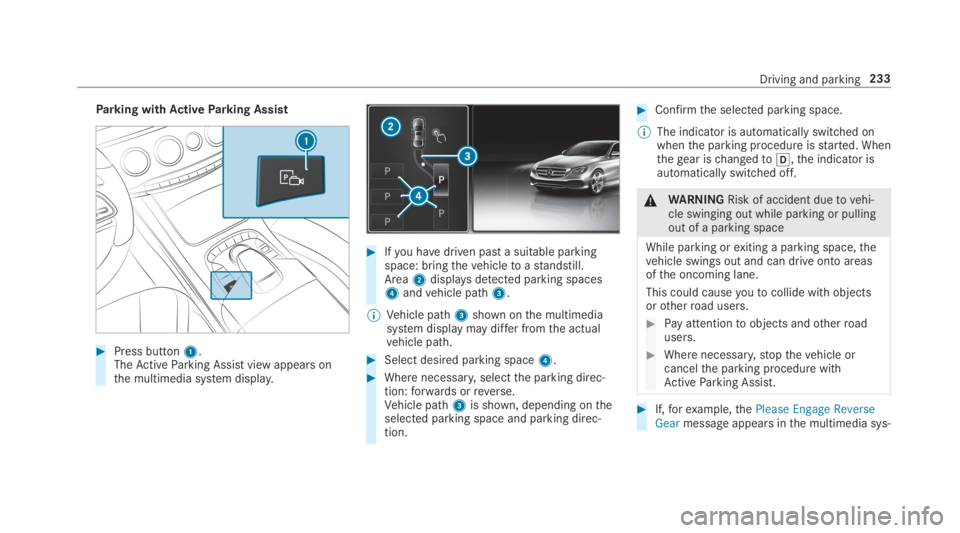
Parking withActiveParking Assist
#Press button1.TheActiveParking Assist view appears onthe multimedia system display.
#Ifyou havedriven past a suitable parkingspace: bringthevehicletoastandstill.Area2displaysdetected parking spaces4andvehicle path3.
%Vehicle path3shown onthe multimediasystem display may differ fromthe actualvehicle path.
#Select desired parking space4.
#Where necessary,selectthe parking direc‐tion:forwards orreverse.Vehicle path3is shown, depending ontheselected parking space and parking direc‐tion.
#Confirmthe selected parking space.
%The indicator is automatically switched onwhenthe parking procedure isstarted. Whenthegear ischangedto[,the indicator isautomatically switched off.
&WARNINGRisk of accident duetovehi‐cle swinging out while parking or pullingout of a parking space
While parking orexiting a parking space,thevehicle swings out and can drive onto areasofthe oncoming lane.
This could causeyoutocollide withobjectsorotherroad users.
#Pay attentiontoobjects andotherroadusers.
#Where necessary,stopthevehicle orcancelthe parking procedure withActiveParking Assist.
#If,forexample,thePlease Engage ReverseGearmessage appears inthe multimedia sys‐
Driving and parking233
Page 236 of 578
tem display: selectthe corresponding trans‐mission position.Thevehicle drives intothe selected parkingspace.
On completion ofthe parking procedure,theParking Assist Finished, Take Control of Vehicledisplay message appears.Further maneuveringmaystill be necessary.
#After completion ofthe parking procedure,safeguardthevehicle againstrollingaway.Whenrequiredbylegalrequirements or localconditions: turnthe wheelstowardsthe curb.
%You canstopthevehicle andchangethetransmission position duringthe parking pro‐cedure. The systemthen calculates a newvehicle path. The parking procedure canthen be continued. If no newvehicle path isavailable,the transmission position will bechanged again. Ifthevehicle has notyetreachedthe parking space,the parking pro‐cedure will be canceled, should agear bechanged.
Exiting a parking space withActiveParkingAssist
RequirementsYou can onlyexit a parking space withActiveParking Assist ifyou havepreviously parkedthevehicle withActiveParking Assist.
Please notethatyou areresponsibleforthevehi‐cle and surroundings duringthe entire parkingprocedure.
#Startthevehicle.
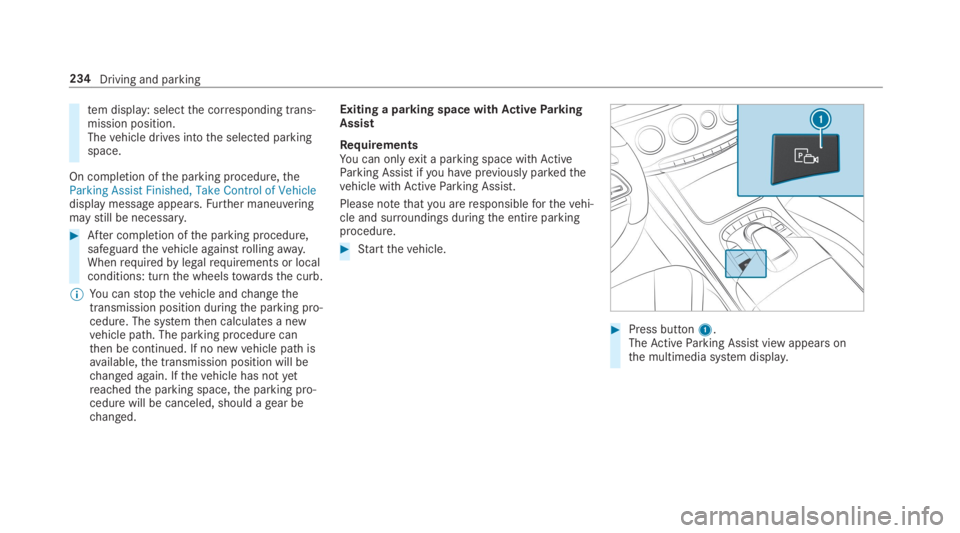
#Press button1.TheActiveParking Assist view appears onthe multimedia system display.
234Driving and parking
Page 237 of 578
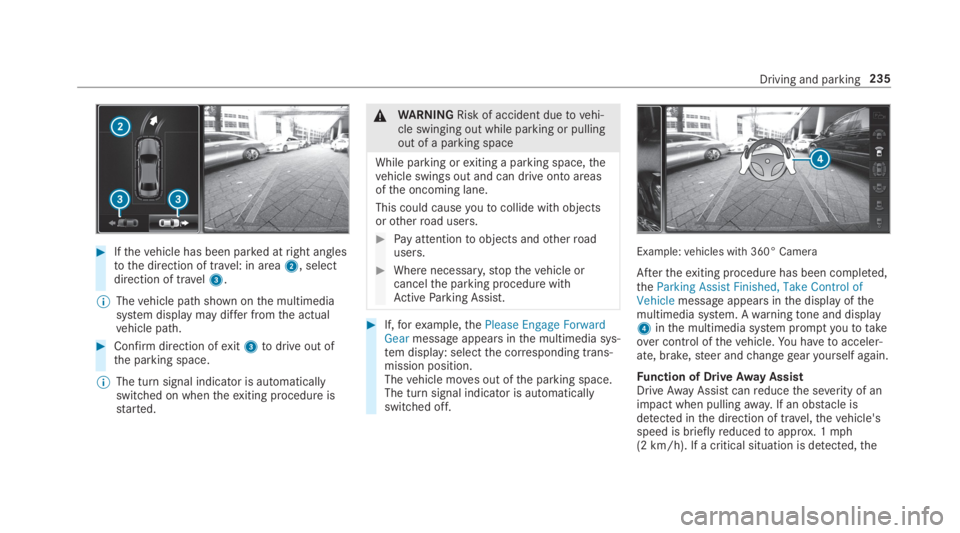
#Ifthevehicle has been parked atright anglestothe direction of travel: in area2, selectdirection of travel3.
%Thevehicle path shown onthe multimediasystem display may differ fromthe actualvehicle path.
#Confirm direction ofexit3todrive out ofthe parking space.
%The turn signal indicator is automaticallyswitched on whentheexiting procedure isstarted.
&WARNINGRisk of accident duetovehi‐cle swinging out while parking or pullingout of a parking space
While parking orexiting a parking space,thevehicle swings out and can drive onto areasofthe oncoming lane.
This could causeyoutocollide withobjectsorotherroad users.
#Pay attentiontoobjects andotherroadusers.
#Where necessary,stopthevehicle orcancelthe parking procedure withActiveParking Assist.
#If,forexample,thePlease Engage ForwardGearmessage appears inthe multimedia sys‐tem display: selectthe corresponding trans‐mission position.Thevehicle moves out ofthe parking space.The turn signal indicator is automaticallyswitched off.
Example:vehicles with 360° Camera
Aftertheexiting procedure has been completed,theParking Assist Finished, Take Control ofVehiclemessage appears inthe display ofthemultimedia system. Awarningtone and display4inthe multimedia system promptyoutotakeover control ofthevehicle.You havetoacceler‐ate, brake,steer andchangegearyourself again.
Function of DriveAway AssistDriveAwayAssistcanreducethe severity of animpact when pullingaway. If an obstacle isdetected inthe direction of travel,thevehicle'sspeed is brieflyreducedtoapprox. 1mph(2 km/h). If a critical situation is detected,the
Driving and parking235