change time MERCEDES-BENZ S CLASS 2019 Owner's Guide
[x] Cancel search | Manufacturer: MERCEDES-BENZ, Model Year: 2019, Model line: S CLASS, Model: MERCEDES-BENZ S CLASS 2019Pages: 578, PDF Size: 23.31 MB
Page 315 of 578
Theroad and trafficrules andregulations alwayshavepriorityover multimedia system drivinginstructions.
Thefollowing driving instructions can be used:
RNavigation announcements
RRoute guidance displays
RLanerecommendations
Ifyou do notfollowthe driving instructions or ifyou leavethe calculatedroute, a newroute iscalculated automatically.
Driving instructions may differ fromthe actualroad and traffic conditions if:
RTheroute is diverted
RThe direction of a one-waystreethas beenchanged
Forthisreason,you must always observeroadand trafficrules andregulations duringyourjourney aswell asthe prevailing traffic condi‐tions.
Theroute may differ fromthe idealroute duetothefollowing:
RRoadworks
RIncompletedigital map data
Notes on GPSreceptionThe correct function ofthe navigation systemdepends amongstotherthings on GPSrecep‐tion. In certain situations GPSreception can beimpaired, defective oreven not possible, e.g. intunnels or in parkinggarages.
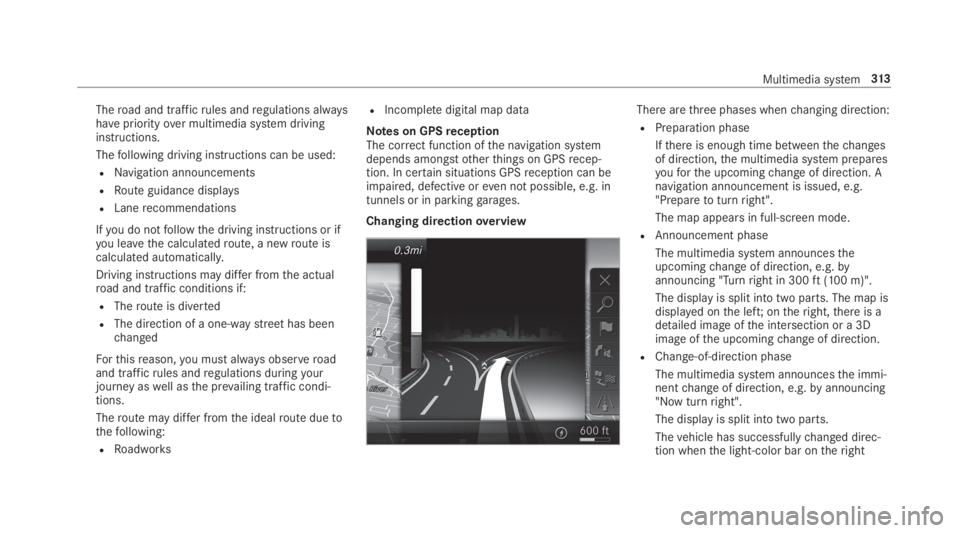
Changing directionoverview
There arethree phases whenchanging direction:
RPreparation phase
Ifthere is enough time betweenthechangesof direction,the multimedia system preparesyouforthe upcomingchange of direction. Anavigation announcement is issued, e.g."Preparetoturnright".
The map appears in full-screen mode.
RAnnouncement phase
The multimedia system announcestheupcomingchange of direction, e.g.byannouncing "Turnright in 300ft(100 m)".
The display is split into two parts. The map isdisplayed onthe left;ontheright,there is adetailed image ofthe intersection or a 3Dimage ofthe upcomingchange of direction.
RChange-of-direction phase
The multimedia system announcesthe immi‐nentchange of direction, e.g.byannouncing"Now turnright".
The display is split into two parts.
Thevehicle has successfullychanged direc‐tion whenthe light-color bar ontheright
Multimedia system313
Page 316 of 578
drops downto0feet(0 m) andthe currentvehicle position symbol hasreachedthehighlightedchange-of-direction point.
Whenthechange of direction is complete,the map appears in full-screen mode.
%Changes of direction are also shown intheInstrument Display.
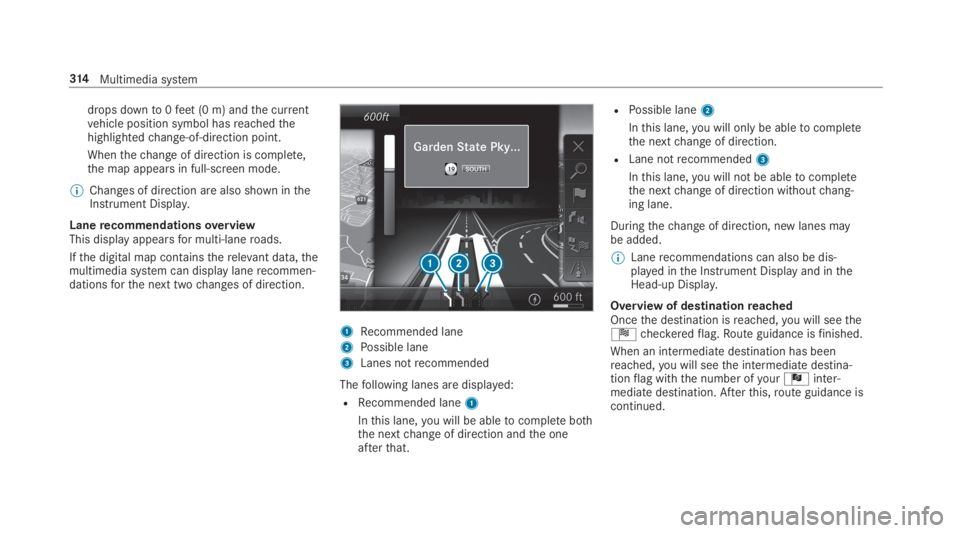
LanerecommendationsoverviewThis display appearsfor multi-laneroads.
Ifthe digital map containstherelevant data,themultimedia system can display lanerecommen‐dationsforthe next twochanges of direction.
1Recommended lane
2Possible lane
3Lanes notrecommended
Thefollowing lanes are displayed:
RRecommended lane1
Inthis lane,you will be abletocomplete boththe nextchange of direction andthe oneafterthat.
RPossible lane2
Inthis lane,you will onlybe abletocompletethe nextchange of direction.
RLane notrecommended3
Inthis lane,you will not be abletocompletethe nextchange of direction withoutchang‐ing lane.
Duringthechange of direction, new lanes maybe added.
%Lanerecommendations can also be dis‐played inthe Instrument Display and intheHead-up Display.
Overview of destinationreachedOncethe destination isreached,you will seetheÍcheckeredflag.Route guidance isfinished.
When an intermediatedestination has beenreached,you will seethe intermediate destina‐tionflag withthe number ofyourÎinter‐mediate destination. Afterthis,route guidance iscontinued.
314Multimedia system
Page 317 of 578
Switching navigation announcements on/off
Requirements:RRoute guidance is active.
#Toswitch off:pressthevolume control onthe multifunctionsteering wheel during anavigation announcement (→page 284).
or
#Pressthevolume control onthe center con‐sole during a navigation announcement(→page 284).TheVoice Guidance has been deactivated.message appears.
or
#Showthe navigation menu (→page 301).
#Select!Voice Guidance.The symbolchangesto#.#Toactivate:select#Voice Guidance.The current navigation announcement isplayed.
%Inthefollowing situations, navigationannouncements are switched on automati‐cally:
RA newroute guidance isstarted.
RTheroute isrecalculated.
%You can add and call upthis function as afavoriteunderVoice Guidance On/Off.
Switching navigation announcements on/offduring a phone call
#SelectSystem.
#SelectõAudio.
#SelectNavigation and Traffic Announce-ments.
#SwitchVoice Guidance During CallonsoroffS.
Adjusting thevolume of navigationannouncements
Requirements:RRoute guidance is active.
#Onthe multifunctionsteering wheel oronthe multimedia system:turnthevolume
control onthe multifunctionsteering wheelduring a navigation announcement.
or
#Turnthevolume control onthe center con‐sole during a navigation announcement(→page 284).
%Inthefollowing situations,thevolume israisedtothe maximumvolume or loweredtothe minimumvolume:
RA newroute guidance isstarted.
RTheroute isrecalculated.
%The minimumvolume can be individually setat an authorized Mercedes-Benz Center.
#Via system settings:selectSystem.
#SelectõAudio.
#SelectNavigation and Traffic Announce-ments.
#SelectVoice Guidance Volume.
#Setthevolume.#Toswitch audiofadeout on/offduringnavigation announcements:selectSystem.
#SelectõAudio.
Multimedia system315
Page 326 of 578
#Tochangethe size ofthe area:swipe up ordown ontheTouch Control orthetouchpad.
or
#Slidethe controller up or down.The map scale is enlarged orreduced andchangesthe size ofthe area.#Tosetthe area:presstheTouch Control,thetouchpad orthe controller.The area is entered intothe list.
Changing an areaMultimedia system:
,Navigation.ÀRoute and Posi-
tion.Avoid Options.Areas
#Highlight an area inthe list.
#Select
Page 328 of 578
%The automatically selected map scale can bechanged manuallyfor a short time. The set‐ting isreset automatically after afew sec‐onds.
Displayingthe satellite mapMultimedia system:
,Navigation.ZOptions.Map
Content
#SwitchSatellite Maponsor offS.
or
#If satellite map display6isavailable inthemap menu, switch it onsor offS(→page 320).Switched ons: satellite maps are displayedin map scales of 2 mi (2 km) or less.
Switched offS: satellite maps are not dis‐played in map scales from 2 mi (2 km)to10mi (10 km).
%Satellite mapsforthese map scales are notavailable in all countries.
Displayingweather information
Requirements:RMercedes me connect isavailable.
RYou havea user accountforthe Mercedesme portal.
RThe service isavailable.
RThe service has been activated at an author‐ized Mercedes-Benz Center.
Further information can befound at: http://www.mercedes.me
Multimedia system:
,Navigation.ZOptions.Map
Content
#ActivateWeather Informations.
or
#Ifweather information display6isavailableinthe map menu, activates(→page 320)it.Currentweather information is displayed onthe navigation map, e.g.temperature orcloud cover.
%Weather information is notavailable in allcountries.
Calling upthe Digital Operator's Manual(navigation)
Calling up information on navigationMultimedia system:
,Navigation.ZOptions.Naviga-
tion Info
#Selectthetopic.
Telephone
Telephony
Notes ontelephony
&WARNINGRisk of distraction from oper‐ating integrated communication equip‐ment whilethevehicle is in motion
Ifyou operate communication equipmentintegrated inthevehicle when driving,youwill be distracted fromthe traffic situation.
326Multimedia system
Page 334 of 578
Information onNearField Communication(NFC)NFC enables short-range wireless data transferor (re)connection of a mobile phone withthemultimedia system.
Thefollowing functions areavailable withouthaving authorized a mobile phone:
RTransferring a URLtobe viewed inthe multi‐media system (seethe manufacturer's oper‐ating instructions).
RSetting upthevehicle'sWi-Fi access dataviathe system settings (→page 291).
Further information can befound at: http://www.mercedes-benz.com/connect
Usingthe mobile phone withNearField Com‐munication (NFC)
Requirements:RNFC is activated onthe mobile phone (seethe manufacturer's operating instructions)
RThe mobile phone's screen is switched onand unlocked (seethe manufacturer's oper‐ating instructions)
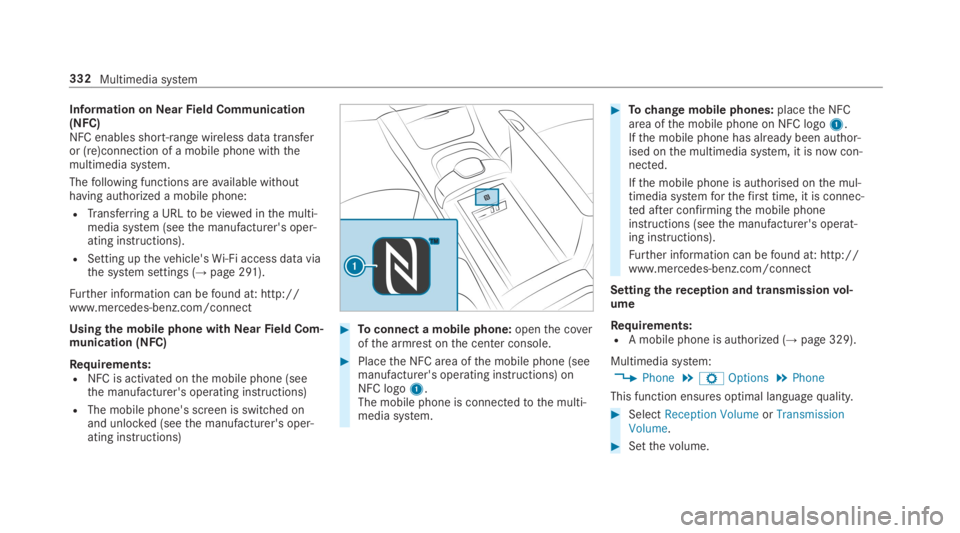
#Toconnect a mobile phone:openthe coverofthe armrest onthe center console.
#Placethe NFC area ofthe mobile phone (seemanufacturer's operating instructions) onNFC logo1.The mobile phone is connectedtothe multi‐media system.
#Tochange mobile phones:placethe NFCarea ofthe mobile phone on NFC logo1.Ifthe mobile phone has already been author‐ised onthe multimedia system, it is now con‐nected.
Ifthe mobile phone is authorised onthe mul‐timedia systemforthefirst time, it is connec‐ted after confirmingthe mobile phoneinstructions (seethe manufacturer's operat‐ing instructions).
Further information can befound at: http://www.mercedes-benz.com/connect
Settingthereception and transmissionvol‐ume
Requirements:RA mobile phone is authorized (→page 329).
Multimedia system:
,Phone.ZOptions.Phone
This function ensures optimal languagequality.
#SelectReception VolumeorTransmissionVolume.
#Setthevolume.
332Multimedia system
Page 353 of 578
Multimedia system:
,Con-
nect.zBrowser.zEnter URL
#Enter aweb address.
%The function is country-dependent.
#Tofinishthe entry and call uptheweb‐site:selectT.
Showing/hidingtheweb browser menuIfyou call up awebsitebyselecting a link,forexample,theweb browser menu is hidden.
#Toshow/hide:pressthe8button.
%Theweb browser supports video playback.
%Nowebsites or videos are displayed whilethevehicle is in motion.
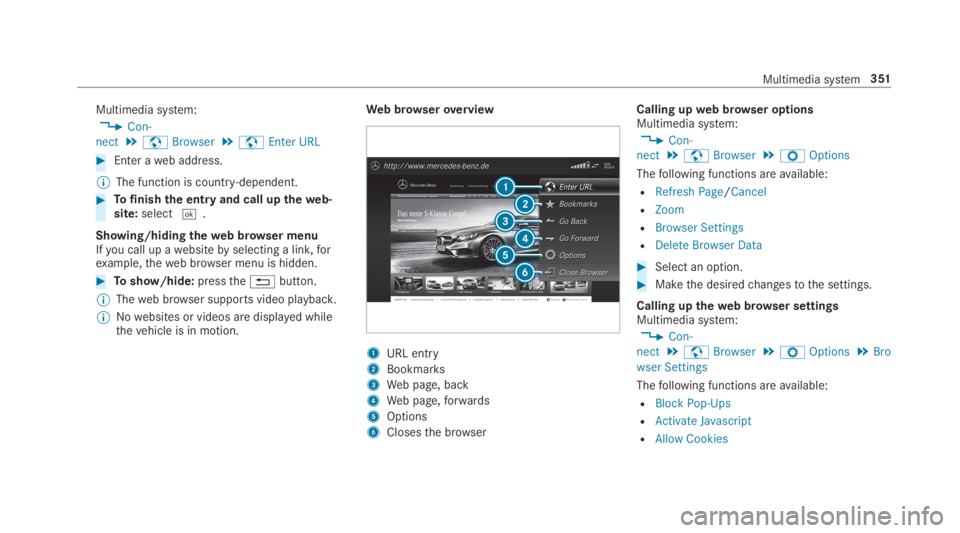
Web browseroverview
1URL entry
2Bookmarks
3Web page, back
4Web page,forwards
5Options
6Closesthe browser
Calling upweb browser optionsMultimedia system:
,Con-
nect.zBrowser.ZOptions
Thefollowing functions areavailable:
RRefresh Page/Cancel
RZoom
RBrowser Settings
RDelete Browser Data
#Select an option.
#Makethe desiredchangestothe settings.
Calling uptheweb browser settingsMultimedia system:
,Con-
nect.zBrowser.ZOptions.Bro
wser Settings
Thefollowing functions areavailable:
RBlock Pop-Ups
RActivate Javascript
RAllow Cookies
Multimedia system351
Page 388 of 578
Depending onthe setting,the program willrunfor between15and 30 minutes.
Adjusting the ambient lighting in therearpassenger compartment
Rear Seat Entertainment System:
,System.Ambient Light
#Changethe settings.
%For information about adjustingthe ambientlighting (→page150).
Activating/deactivating the panel heating
Rear Seat Entertainment System:
,System.bPanel Heating
#Activate or deactivatefunction.
Adjusting the entertainment system settings
Rear Seat Entertainment System:
,System.Entertainment System settings
Settingthe display brightness
#SelectDisplay settings.
#SelectBrightness.
#Adjustthe brightness.
Tiltingthe display
#SelectDisplay settings.
#SelectDisplay angle.
#Tiltthe displayUporDown.
Settingthe display design
#SelectDisplay settings.
#SelectDay Design,Night DesignorAuto-matic.
Adjusting the equalizer
#SelectAudio settings.
#SelectEqualizer.
#Setthe equalizer.
%For further information aboutthe equalizer(→page375).
Activating audio on cabin
#SelectAudio settings.
#SelectSwitch the speaker source on or off.Ifthe function is switched on,the currentmedia source is output viathevehicle'sspeakers.
Settingthe language
Rear Seat Entertainment System:
,System
#SelectLanguage.
#Setthe desired language.
Switching offthe display
Rear Seat Entertainment System:
,System
#SelectDisplay Off.The display is switched off.
386Multimedia system
Page 416 of 578
Tires withrun-flatcharacteristics:
#Observethe information andwarningnotes on MOExtended tires (run-flattires).
Intheevent of aflat tire,thefollowing optionsareavailable depending onyourvehicle's equip‐ment:
RVehicles with MOExtended tires:it is pos‐sibletocontinuethe journeyfor a shortperiod of time. Make sureyou observethenotes on MOExtended tires (run-flat tire)(→page414).
RVehicles with a TIREFIT kit:you canrepairthe tires sothat it is possibletocontinuethejourneyfor a short period of time.Todothis,usethe TIREFIT kit (→page415).
RVehicles with Mercedes me connect:youcan make a callforRoadside Assistance viatheoverhead control panel inthe case of abreakdown (→page 344).
RAllvehicles:changethe wheel(→page 458).
Notes on MOExtended tires (run-flat tire)
&WARNINGRisk of accident when drivingin emergency mode
When driving in emergency mode,the han‐dlingcharacteristics are impaired. e.g. whencornering, when acceleratingstronglyandwhen braking.
#Do notexceedthe permissible maxi‐mum speedfor MOExtended tires.
#Avoid any abruptsteering and drivingmaneuvers aswell as drivingoverobstacles (curbs, pot holes, off-road).This applies, in particular,toa loadedvehicle.
#Stop driving inthe emergency mode ifyou notice:
Rbanging noise
Rvehicle vibration
Rsmoke which smells likerubber
Rcontinuous ESP®intervention
Rcracksin tire sidewalls
#After driving in emergency mode havetherimscheckedbyaqualified special‐istworkshop withregardtotheir furtheruse.
#The defective tire must bereplaced ineverycase.
WithMOExtended tires (run-flat tire),you cancontinuetodriveyourvehicleeven ifthere is atotal loss of pressure in one or more tires. How‐ever,the tire affected must not show any clearlyvisible damage.
You canrecognize MOExtended tiresbytheMOExtended marking which appearsonthe sidewall ofthe tire.
Vehicles with tire pressure monitoring sys‐tem:MOExtended tires may only be used in con‐junction withan activated tire pressure monitor‐ing system.
If a pressure losswarning message appears inthe multifunction display,proceed asfollows:
RCheckthe tirefor damage.
RIf driving on, observethefollowing notes.
414Breakdown assistance
Page 461 of 578
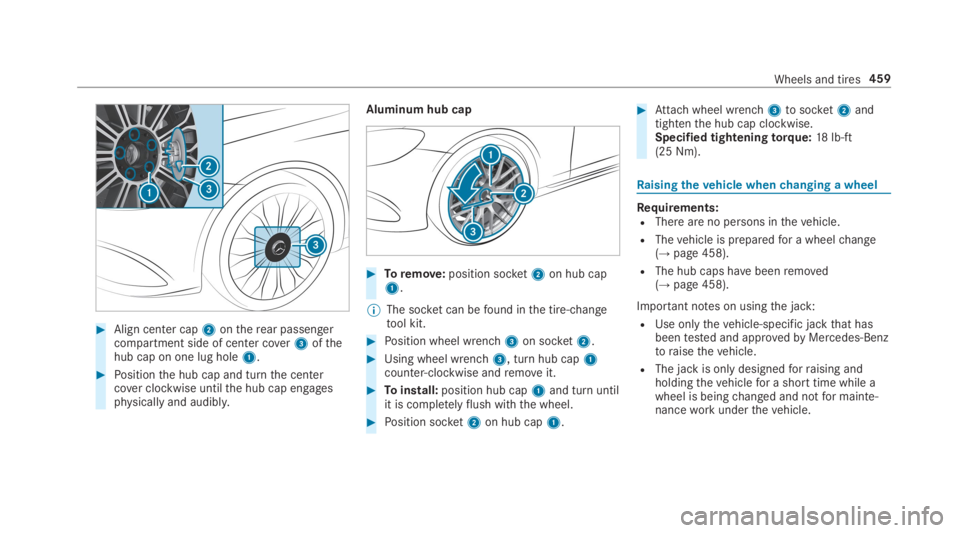
#Align center cap2ontherear passengercompartment side of center cover3ofthehub cap on one lug hole1.
#Positionthe hub cap and turnthe centercover clockwise untilthe hub cap engagesphysically and audibly.
Aluminum hub cap
#Toremove:position socket2on hub cap1.
%The socket can befound inthe tire-changetool kit.
#Position wheel wrench3on socket2.
#Using wheel wrench3, turn hub cap1counter-clockwise andremoveit.
#Toinstall:position hub cap1and turn untilit is completelyflush withthe wheel.
#Position socket2on hub cap1.
#Attachwheel wrench3tosocket2andtightenthe hub cap clockwise.Specified tighteningtorque:18lb-ft(25 Nm).
Raisingthevehicle whenchanging a wheel
Requirements:RThere are no persons inthevehicle.
RThevehicle is preparedfor a wheelchange(→page 458).
RThe hub caps havebeenremoved(→page 458).
Important notes on usingthe jack:
RUse onlythevehicle-specific jackthat hasbeentested and approvedbyMercedes-Benztoraisethevehicle.
RThe jack is only designedforraising andholdingthevehiclefor a short time while awheel is beingchanged and notfor mainte‐nanceworkunderthevehicle.
Wheels and tires459