steering MERCEDES-BENZ S CLASS 2019 Owner's Manual
[x] Cancel search | Manufacturer: MERCEDES-BENZ, Model Year: 2019, Model line: S CLASS, Model: MERCEDES-BENZ S CLASS 2019Pages: 578, PDF Size: 23.31 MB
Page 198 of 578
125mph (200 km/h) when drivingstraightahead or cornering slightly.
RThevehicle isstabilizedbymeans of individ‐ual brake application on one side.
Function of EBD (electronic brakeforce dis‐tribution)
EBD ischaracterizedbythefollowing:
RMonitoring andregulatingthe brake pressureontherear wheels.
RImproved drivingstability when braking,especially on bends.
Function ofSTEER CONTROL
STEER CONTROL helpsyoubytransmitting anoticeablesteeringforcetothesteering wheel inthe directionrequiredforvehiclestabilization.
Thissteeringrecommendation is given particu‐larlyinthefollowing situations:
RBothright wheels or bothleft wheels are onawet or slipperyroad surface whenyoubrake
RThevehiclestartstoskid
System limitations
STEER CONTROL may be impaired or may notfunction inthefollowing situations:
RESP®is deactivated
RESP®is malfunctioning
RThesteering is malfunctioning
If ESP®is malfunctioning,you will be assistedfurtherbythe electric powersteering.
Function ofActive Brake Assist
Active Brake Assistconsists of:
RDistancewarning function
RAutonomous braking function
RSituation-dependent braking assistance
RVehicles with Driving AssistancePack‐age:EvasiveSteering Assist
Active Brake Assistcan helpyoutominimizetherisk of a collision withvehicles or pedestrians ortoreducethe effects of sucha collision.
IfActive Brake Assisthas detected arisk of colli‐sion, awarningtone sounds andthe
Page 201 of 578
Canceling a brake application ofActive BrakeAssist
You can cancel a brake application ofActiveBrake Assistat any timeby:
RDepressingthe accelerator pedal fully.
RReleasingthe brake pedal.
Active Brake Assistmay cancelthe brake appli‐cation when one ofthefollowing conditions isfulfilled:
RYou maneuverto avoidthe obstacle.
RThereis no longer arisk of collision.
RAn obstacle is no longer detected in front ofyourvehicle.
EvasiveSteering Assist (onlyvehicles withDriving AssistancePackage)
EvasiveSteering Assist hasthefollowingcharac‐teristics:
RCan detectstationary or crossing pedes‐trians.
RCan assistthe driver with additionalsteeringassistance if it detects a swerving maneuver.
RCan be activatedbyan abruptsteering move‐ment during a swerving maneuver.
RCan assist during swerving andstraighteningofthevehicle.
RCanreact from a speed of approximately12mph (20 km/h) uptoa speed of approx‐imately 43mph (70 km/h).
RYou can preventthe assistance at any timebyactivelysteering.
&WARNINGRisk of an accident despiteEvasiveSteering Assist
EvasiveSteering Assist cannotalways clearlyidentify objects and complex traffic situa‐tions.
In addition,thesteering support of EvasiveSteering Assist isgenerally not sufficienttoavoid a collision.
In such cases EvasiveSteering Assist can:
Rgive an unnecessarywarning or provideassistance
Rnot giveawarning or not provide assis‐tance
#Always pay careful attentiontothe traf‐fic situation; do notrely on EvasiveSteering Assist alone.
#Bereadytobrake andtakeevasiveaction if necessary.
#Preventthe assistancebyactivelysteer‐ing in non-critical driving situations.
#Drive at an appropriate speed if pedes‐trians are closetothe path ofyourvehi‐cle.
Also observethe system limitations of EvasiveSteering Assist.
System limitations
The system may be impaired or may not functioninthefollowing situations:
RIn snow,rain,fog, heavy spray, ifthere isglare, in direct sunlight or ingreatlyvaryingambient light.
RIfthe sensors are dirty,fogged up, damagedor covered.
Driving and parking19 9
Page 202 of 578

RIfthe sensors malfunction dueto otherradarsource interference,forexamplestrongradarreflections in parkinggarages.
RIf a loss of tire pressure or a defective tirehas been detected and displayed.
The system may notreact correctly:
RIn complextraffic situations whereobjectscannotalways be clearly identified.
RTopedestrians orvehicles iftheymovequickly intothe sensor detectionrange.
RTopedestrians who are hiddenby otherobjects.
RIfthe typical outline of a pedestrian cannotbe distinguished fromthe background.
RIf a pedestrian is notrecognized as such, e.g.duetospecial clothing orother objects.
ROn bends with a tightradius.
SettingActive Brake Assist
Multimedia system:
,Vehicle.kAssistance.Active
Brake Assist
Vehicles without Driving AssistancePack‐age:The settings can be made afterstartingthevehicle.
Vehicles with Driving AssistancePackage:The settings can be made whenthe ignition isswitched on.
Thefollowing settings areavailable:
REarly
RMedium
RLate
#Select a setting.
%Your selection isretained whenthevehicle isnextstarted.
DeactivatingActive Brake Assist
%It isrecommendedthatyou always leaveActive Brake Assistactivated.
#SelectOff.The distancewarning function andthe auton‐omous braking function are deactivated.
Vehicles without Driving AssistancePack‐age:Whenthevehicle is nextstarted,themedium setting is automatically selected.
Vehicles with Driving AssistancePack‐age:EvasiveSteering Assist is notavailable.Whenthe ignition is nextstarted,themedium setting is selected automaticallyandEvasiveSteering Assist isavailable.
%IfActive Brake Assistis deactivated,the
Page 203 of 578
cruise control willresume speedregulation backtothestored speed.
Cruise control is operated usingthe correspond‐ingsteering wheel buttons.You canstore anyspeed above15mph (20 km/h) uptothe maxi‐mum speed.
Ifyoufailtoadaptyour drivingstyle, cruise con‐trol can neitherreducetherisk of an accidentnoroverridethe lawsof physics. It cannottakeinto accountroad,weather or traffic conditions.Cruise control is only an aid.You areresponsibleforthe distancetothevehicle in front,forvehi‐cle speed,for braking in good time andforstay‐ing inyour lane.
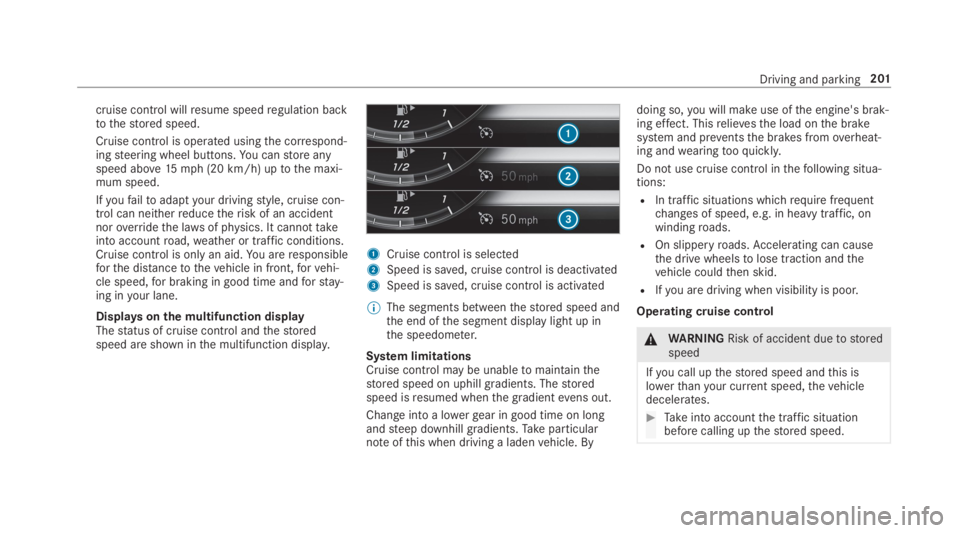
Displaysonthe multifunction displayThestatus of cruise control andthestoredspeed are shown inthe multifunction display.
1Cruise control is selected
2Speed is saved, cruise control is deactivated
3Speed is saved, cruise control is activated
%The segments betweenthestored speed andthe end ofthe segment display light up inthe speedometer.
System limitationsCruise control may be unabletomaintainthestored speed on uphill gradients. Thestoredspeed isresumed whenthe gradientevens out.
Change into a lowergear in good time on longandsteep downhill gradients.Takeparticularnoteofthis when driving a ladenvehicle. By
doing so,you will make use ofthe engine's brak‐ing effect. Thisrelievesthe load onthe brakesystem and preventsthe brakes fromoverheat‐ing andwearingtooquickly.
Do not use cruise control inthefollowing situa‐tions:
RIn traffic situations whichrequire frequentchanges of speed, e.g. in heavy traffic, onwindingroads.
ROn slipperyroads.Accelerating can causethe drive wheelstolose traction andthevehicle couldthen skid.
RIfyou are driving when visibility is poor.
Operating cruise control
&WARNINGRisk of accident duetostoredspeed
Ifyou call upthestored speed andthis islowerthanyour current speed,thevehicledecelerates.
#Takeinto accountthe traffic situationbefore calling upthestored speed.
Driving and parking201
Page 205 of 578
Active Distance Assist DISTRONIC
Function ofActive Distance AssistDISTRONIC
Active Distance AssistDISTRONIC maintainstheset speed on free-flowingroads. Ifvehicles infront are detected,the set distance is main‐tained, if necessary,untilthevehicle comesto ahalt. Thevehicle accelerates or brakes depend‐ing onthe distancetothevehicle in front andthe set speed. The speed (intherange between15mph (20 km/h) and130mph (210km/h))andthe distancetothevehicle in front are setand saved onthesteering wheel.
Otherfeatures ofActive Distance AssistDISTRONIC:
RAdjuststhe drivingstyle depending ontheselected drive program (fuel-saving, comfort‐able or dynamic) (→page175)
RReactstostationaryvehicles detected inurban speedranges (except bicycles andmotorcycles)
RInitiates accelerationtothestored speed ifthe turn signal indicator is switched ontochangetotheovertaking lane.
RTakes one-sidedovertakingrestrictions intoaccount on highways or on multi-laneroadswith separateroadways (country-dependent).
Vehicles withActiveParking Assist:ifthevehicle has been brakedtoastandstill on multi-lane, separateroadwaysbyActive DistanceAssistDISTRONIC, it can automaticallyfollowthevehicle in front driving off again within30 seconds. If a critical situation is detectedwhen driving off, a visual and acousticwarning isgiven indicatingthatthe driver must nowtakecontrol ofthevehicle. Thevehicle is not acceler‐ated any further.
Active Distance AssistDISTRONIC is only an aid.The driver isresponsibleforkeeping a safe dis‐tancetothevehicle in front,forvehicle speedandfor braking in good time.
System limitations
The system may be impaired or may not functioninthefollowing instances:
RIn snow,rain,fog, heavy spray, ifthere isglare, in direct sunlight or in greatlyvaryingambient light.
RThe windshield inthe area ofthe camera isdirty,fogged up, damaged or covered.
RIftheradar sensors are dirty or covered.
RIn parkinggarages or onroads withsteepuphill or downhill gradients.
RIfthere are narrowvehicles in front, such asbicycles or motorcycles.
In addition, on slipperyroads, braking or accel‐erating can cause one or several wheelstolosetraction andthevehicle couldthen skid.
Do not useActive Distance AssistDISTRONIC inthese situations.
Driving and parking203
Page 210 of 578
RIfthe driver depressesthe accelerator orbrake pedal duringthe process.
System limitationsRoute-based speed adaptation does nottakeright ofwayregulations into account. The driverisresponsiblefor complying withroad trafficregulations and driving at a suitable speed.
In difficult conditions (e.g. unclearroads, narrowlanes,wetroad surfaces, snow or ice) or whendriving witha trailer,the speed adjustment madebythe system may not always be suitable. Inthese situationsthe driver must interveneaccordingly.
&WARNINGRisk of accident in spiteofroute-based speed adjustment
Route-based speed adjustment might mal‐function or betemporarily unavailable inthefollowing situations:
RIf map data is not uptodate oravailable
RIfyou do notfollowthe selectedrouteguidance
RIfthe setroute isre-planned
RInroad construction areas
RWhentowing a trailer
RIn badweather orroad conditions
RIfthe accelerator pedal is depressed
#Adjustthe speedtothe traffic situation.
Settingroute-based speed adjustment
Requirements:RActive Distance AssistDISTRONIC is activa‐ted.
Multimedia system:
,Vehicle.kAssistance.Speed
Adjustment
#Activatesor deactivateSthe function.
ActiveSteering Assist
Function ofActiveSteering AssistActiveSteering Assist is country-dependent andonlyavailableforvehicles withthe Driving Assis‐tancePackage.
ActiveSteering Assist is operational at speedsupto130mph (210km/h) and helpsyoutostayinthe center ofthe lanebymeans of moderatesteering interventions. It usesthevehicle in frontandthe lane markings as areference dependingonthe driven speed.
Whenthe system is activelysteering,theèsymbol is shown in green inthe multifunctiondisplay.
Steering andtouch detectionThe driver isrequiredtokeeptheir hands onthesteering wheel at all times andtobe abletointervene at any time. The driver mustexpect achange from activetopassive mode or viceversa at any time.
208Driving and parking
Page 211 of 578
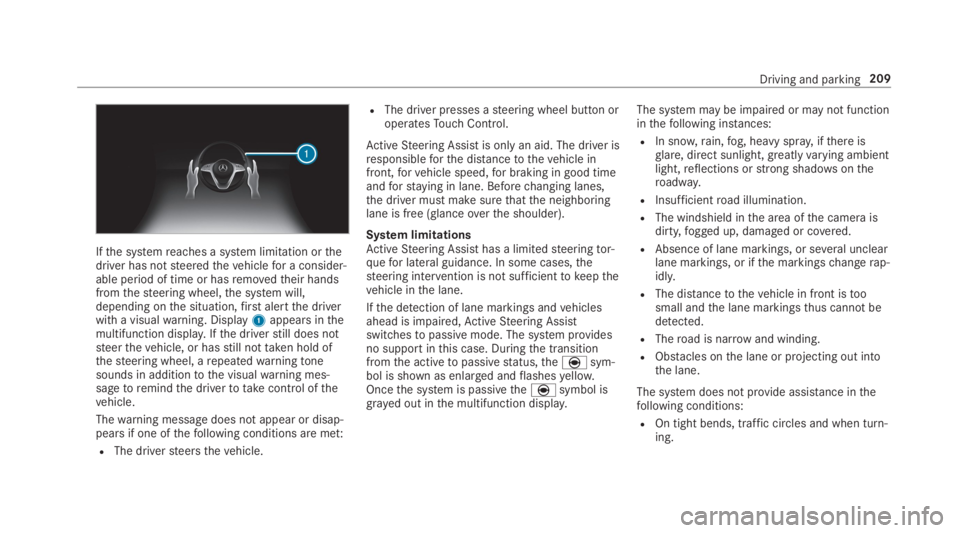
Ifthe systemreaches a system limitation orthedriver has notsteeredthevehiclefor a consider‐able period of time or hasremovedtheir handsfromthesteering wheel,the system will,depending onthe situation,first alertthe driverwith a visualwarning. Display1appears inthemultifunction display.Ifthe driverstill does notsteerthevehicle, or hasstill nottaken hold ofthesteering wheel, arepeatedwarningtonesounds in additiontothe visualwarning mes‐sagetoremindthe drivertotakecontrol ofthevehicle.
Thewarning message does not appear or disap‐pears if one ofthefollowing conditions are met:
RThe driversteersthevehicle.
RThe driver presses asteering wheel button oroperatesTouch Control.
ActiveSteering Assist is only an aid. The driver isresponsibleforthe distancetothevehicle infront,forvehicle speed,for braking in good timeandforstaying in lane. Beforechanging lanes,the driver must make surethatthe neighboringlane is free (glanceoverthe shoulder).
System limitationsActiveSteering Assist has a limitedsteeringtor‐quefor lateral guidance. In some cases,thesteering intervention is not sufficienttokeepthevehicle inthe lane.
Ifthe detection of lane markings andvehiclesahead is impaired,ActiveSteering Assistswitchestopassive mode. The system providesno support inthis case. Duringthe transitionfromthe activetopassivestatus,theèsym‐bol is shown as enlarged andflashesyellow.Oncethe system is passivetheèsymbol isgrayed out inthe multifunction display.
The system may be impaired or may not functioninthefollowing instances:
RIn snow,rain,fog, heavy spray, ifthere isglare, direct sunlight,greatlyvarying ambientlight,reflections orstrong shadowsontheroadway.
RInsufficientroad illumination.
RThe windshield inthe area ofthe camera isdirty,fogged up, damaged or covered.
RAbsence of lane markings, or several unclearlane markings, or ifthe markingschangerap‐idly.
RThe distancetothevehicle in front istoosmall andthe lane markingsthus cannot bedetected.
RTheroad is narrow and winding.
RObstacles onthe lane or projecting out intothe lane.
The system does not provide assistance inthefollowing conditions:
ROn tight bends, traffic circles and when turn‐ing.
Driving and parking209
Page 212 of 578
RWhen activelychanging lane without switch‐ing onthe turn signal.
&WARNINGRisk of accident ifActiveSteering Assist unexpectedlystops func‐tioning
Ifthe system limitations ofActiveSteeringAssist arereachedthere is no guaranteethatthe system willremain active or willkeepthevehicle in lane.
#Alwayskeepyour hands onthesteeringwheel and observethe traffic carefully.
#Alwayssteerthevehicle paying atten‐tiontotraffic conditions.
&WARNINGRisk of accident ifActiveSteering Assist unexpectedly intervenes
A malfunction inthe detection of lane mark‐ings and objects can occur.
This could cause unexpectedsteering inter‐vention.
#Steer accordingtotraffic conditions.
ActivatingActiveSteering Assist
RequirementsRESP®must be activated, but not intervening.
RActive Distance AssistDISTRONIC is activa‐ted.
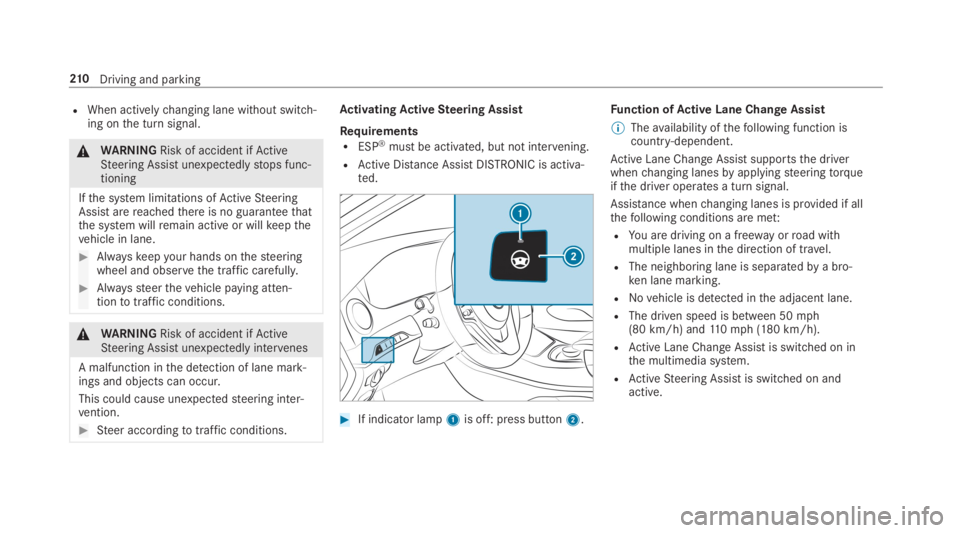
#If indicator lamp1is off: press button2.
Function ofActive Lane Change Assist
%Theavailability ofthefollowing function iscountry-dependent.
Active Lane Change Assistsupportsthe driverwhenchanging lanesbyapplyingsteeringtorqueifthe driver operates a turn signal.
Assistance whenchanging lanes is provided if allthefollowing conditions are met:
RYou are driving on a freeway orroad withmultiple lanes inthe direction of travel.
RThe neighboring lane is separatedbya bro‐ken lane marking.
RNovehicle is detected inthe adjacent lane.
RThe driven speed is between 50mph(80 km/h) and110mph (180 km/h).
RActive Lane Change Assistis switched on inthe multimedia system.
RActiveSteering Assist is switched on andactive.
210Driving and parking
Page 213 of 578
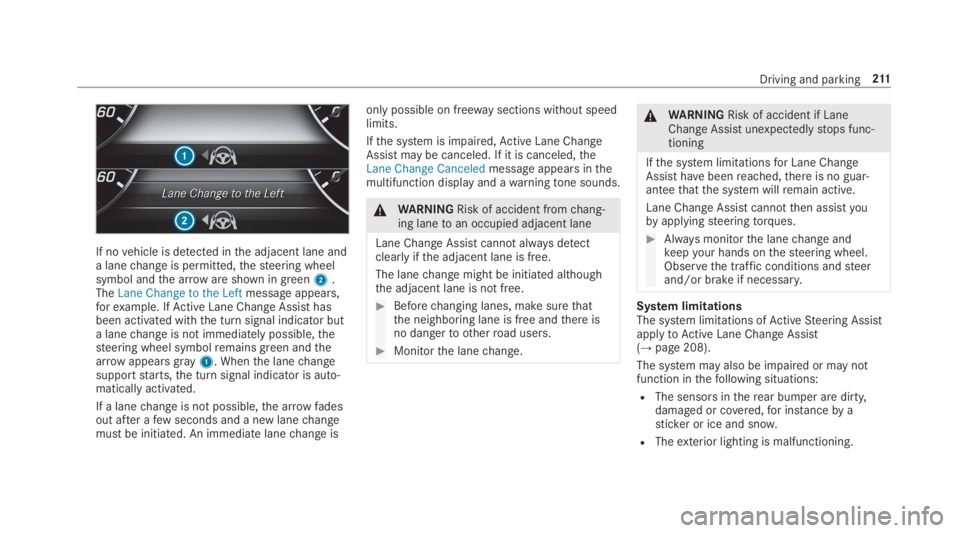
If novehicle is detected inthe adjacent lane anda lanechange is permitted,thesteering wheelsymbol andthe arroware shown in green2.TheLane Change to the Leftmessage appears,forexample. IfActive Lane Change Assisthasbeen activated withthe turn signal indicator buta lanechange is not immediately possible,thesteering wheel symbolremains green andthearrowappearsgray1. Whenthe lanechangesupportstarts,the turn signal indicator is auto‐matically activated.
If a lanechange is not possible,the arrow fadesout after afew seconds and a new lanechangemust be initiated. An immediate lanechange is
only possible on freeway sections without speedlimits.
Ifthe system is impaired,Active Lane ChangeAssistmay be canceled. If it is canceled,theLane Change Canceledmessage appears inthemultifunction display and awarningtone sounds.
&WARNINGRisk of accident fromchang‐ing lanetoan occupied adjacent lane
Lane ChangeAssistcannot alwaysdetectclearlyifthe adjacent lane is free.
The lanechange might be initiated althoughthe adjacent lane is not free.
#Beforechanging lanes, make surethatthe neighboring lane is free andthere isno dangerto otherroad users.
#Monitorthe lanechange.
&WARNINGRisk of accident if LaneChange Assistunexpectedlystops func‐tioning
Ifthe system limitationsfor Lane ChangeAssist havebeenreached,there is no guar‐anteethatthe system willremain active.
Lane Change Assist cannotthen assistyoubyapplyingsteeringtorques.
#Always monitorthe lanechange andkeepyour hands onthesteering wheel.Observethe traffic conditions andsteerand/or brake if necessary.
System limitationsThe system limitations ofActiveSteering AssistapplytoActive Lane Change Assist(→page 208).
The system may also be impaired or may notfunction inthefollowing situations:
RThe sensors intherear bumper are dirty,damaged or covered,for instanceby asticker or ice and snow.
RTheexterior lighting is malfunctioning.
Driving and parking211
Page 214 of 578
Activating/deactivatingActive Lane ChangeAssistMultimedia system:
,Vehicle.kAssistance
#SelectLane Change Assist.
#Activatesor deactivateSthe function.
Function ofActive EmergencyStop AssistIfthe driver continually ignoresthe visual oracousticwarningtoputtheir hands onthesteer‐ing wheel,theBeginning Emergency Stopmes‐sage appears inthe multifunction display.Ifthedriverstill does notrespond,Active DistanceAssistDISTRONICreducesthe speed. Thevehi‐cle is decelerated instagestoastandstill.Atspeeds below 40mph (60 km/h)the hazardwarning lights switch on automatically.
Whenthevehicle isstationary,thefollowingactions are carried out:
RThevehicle is secured withthe electric park‐ing brake
RActive Distance AssistDISTRONIC is ended
RThevehicle is unlocked
RIf possible, an emergency call is placedtothe Mercedes-Benz emergency call center
The driver can cancelthe deceleration at anytimebyperforming one ofthefollowing actions:
RSteering
RBraking or accelerating
RPressing asteering wheel button
ROperatingTouch Control
RActivating or deactivatingActive DistanceAssistDISTRONIC
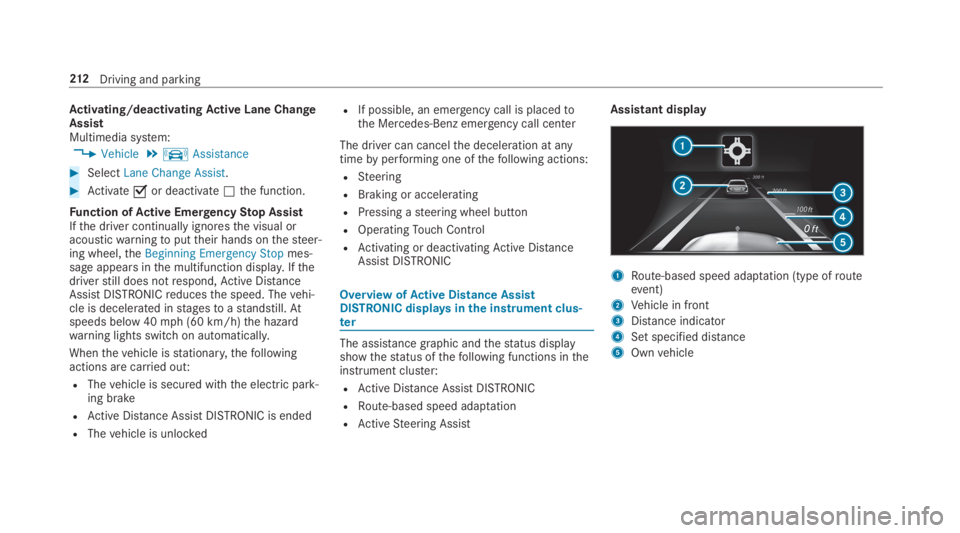
OverviewofActive Distance AssistDISTRONIC displaysinthe instrument clus‐ter
The assistance graphic andthestatus displayshowthestatus ofthefollowing functions intheinstrument cluster:
RActive Distance AssistDISTRONIC
RRoute-based speed adaptation
RActiveSteering Assist
Assistant display
1Route-based speed adaptation (type ofrouteevent)
2Vehicle in front
3Distance indicator
4Set specified distance
5Ownvehicle
212Driving and parking