lock MERCEDES-BENZ S CLASS 2019 Repair Manual
[x] Cancel search | Manufacturer: MERCEDES-BENZ, Model Year: 2019, Model line: S CLASS, Model: MERCEDES-BENZ S CLASS 2019Pages: 578, PDF Size: 23.31 MB
Page 295 of 578
#Enterthe securitykey intheexternal device.ThePlease start COMAND Touch on yourdevice and follow the instructions.messageappears.
#SelectContinue.
#Acceptthe connectionrequest fromthe newdevice.
#Enterthe PIN shown ontheexternal device.The device is authorized.
Authorizing a connected device
#SelectAuthorize a New Device.The devices already connected are displayed.
#SelectContinue Using Connected Devices.ThePlease start COMAND Touch on yourdevice and follow the instructions.messageappears.
#SelectContinue.
#The connectionrequest fromthe deviceAccept.
#Enterthe PIN shown ontheexternal device.The device is authorized.
De-authorizingthe device
#Select an authorized device fromthe list.A promptwill appear asking whetheryouwould liketode-authorizethe selecteddevice.
#SelectYes.The device is de-authorized.
Activating/deactivatingchild safety lock
Multimedia system:
,System.Parental Control
LockingtheRear Seat Entertainment System
#SelectRear LeftorRear Right.
#SelectLock.TheRear Seat Entertainment System islockedsor unlockedS.
Switching offtheRear Seat EntertainmentSystem display
#SelectRear LeftorRear Right.
#SelectDisplay On.
#Switchthe display onsor offS.
Locking anexternal device
#Select anexternal device.
#SelectLock.The device connected viatheCOMANDTouch app is lockedsor unlockedS.
System language
Notes onthe system languageThis function allowsyoutodeterminethe lan‐guageforthe menu displaysandthe navigationannouncements. The selected language affectsthecharactersavailablefor entry.The navigationannouncements are notavailable in all lan‐guages. If a language is notavailable,the naviga‐tion announcements will be in English.
Settingthe system languageMultimedia system:
,System.Language
#Setthe language.
Multimedia system293
Page 297 of 578
Activating/deactivating PIN protection
Multimedia system:
,System.PIN Protection
Settingthe PIN
#SelectSet PIN.
#Enter afour-digit PIN.
#Enterthefour-digit PIN again.If bothPINs match, PIN protection is active.
Changingthe PIN
Requirements
RA current PIN mustbe set.
#SelectChange Settings.
#Enterthe current PIN.
#SelectChange PIN.
#Set a new PIN.
Activating PIN protectionfor dataexport
#SelectChange Settings.Confirm with the PIN.
#SelectProtect Data Export.Activatesor deactivateSthe function.
Unblockingthe PIN
Requirements:
RThere is an Internet connection.
RA Mercedes me accountexists at http://www.mercedes.me.
RThePersonalizationservice is active(→page 296).
Ifthe PIN has been entered incorrectlythreetimes,the PIN will be blocked.You can have asingle-use password sentto you viatheMercedes me connect online portaltoresetthePIN protection.
#SelectUnblock PIN.
#Enterthe single-use password.PIN protection isreset, andyou can set anew PIN.
%Alternatively,you can havePIN protectionreset at an authorized Mercedes-Benz Cen‐ter.
User profile
Setting a user profileMultimedia system:
,System.gPersonalization
Displaying a user profile whenstartingIfthis function is active, a promptappears whenstartingthe system asking which user profiletouse.
#SelectDisplay Profile Selection after Start.
#Activatesor deactivateSthe function.
Selecting a user profile
#SelectGuest Profileor individual profile;.
%Some settings fromthe user profile are onlyloaded whenthevehicle isstationary orwhenthe ignition is switched on.
Automatic synchronizationEach timethe ignition is switched off or on,theindividual user profiles are synchronized onthemultimedia system and onthe server.Thisensuresthatthe latest user profiles are alwaysavailable.
Multimedia system295
Page 321 of 578
Multimedia system:
,Navigation.ZOptions
The subscriptionexpiration date is automaticallydisplayed:
Rone month beforetheexpiration date.
Roneweek beforetheexpiration date.
Rontheexpiration date.
#Todisplaymanually:selectLive Traffic Sub-scription Info.
Depending onthestatus, one ofthefollowingmessages appears:
Rthe period ofvalidityforthe subscriptionis displayed.
Rthe subscription hasexpired.
%The subscription can beextended:
Rat an authorized Mercedes-Benz Center
Rvia an MB Info calltothe Mercedes-BenzCustomer Assistance Center
Displayingthe traffic map
Requirements:RFor LiveTraffic Information:thevehicle isequipped with a communication modulefea‐turing an activated, integrated SIM card.
RWhenthevehicle isstarted,the communica‐tion module automatically establishes anInternet connection.Traffic information ismadeavailable shortly afterwards.
Multimedia system:
,Navigation.ZOptions.Map
Menu
#Alternatively: ifthe map is displayed in fullscreen mode, presstheTouch Control,thecontroller orthetouchpad.The map menu appears.
#Activateºs.
The traffic map shows thefollowing information,forexample:
Rtraffic incidents,forexample:
-roadworks
-road blocks
-warning messages
The symbolsfor traffic incidents are dis‐played in color (ontheroute) orgray(offtheroute).
Rtrafficflowinformation:
-traffic jam (red line)
-slow-moving traffic (orange line)
-heavy traffic (yellow line)
-free-flowing traffic (green line)
Rdisplayfor traffic delays ontheroute lastingat least one minute
Rwarning message symbols:
-Ôsymbol
-additionalroad safety notes whenapproaching a traffic incident, e.g.theend of a traffic jam
Ifthevehicle approaches a danger areaontheroute, awarning message is dis‐played onthe map. Awarning messagemay also be issued (→page 320).
Multimedia system319
Page 322 of 578
Displaying traffic incidentsMultimedia system:
,Navigation.ZOptions.Map
Content
#ActivatesTraffic Incidents.Roadworks,road blocks, local areareports(e.g.fog) andwarning messages are dis‐played.
Activating freeflow and traffic display
#ActivatesFree Flowing TrafficandTrafficDelays.
%The traffic delayis displayedforthe currentroute.Traffic delays lasting one minute orlonger aretaken into consideration.
Displaying details
#Displays the traffic map (→page319).
#Movesthe map (→page 322).#When a trafficreport symbol is underthecrosshair, press onthe central control ele‐ment.The trafficreport details are displayed.
or
#Press onthe central control element.
#SelectInformation on Traffic Reports.The map shows the trafficreport symbols inthe vicinity.
Trafficreport information is displayed inthestatus line:
RTrafficreport symbol
RReasonforthe trafficreport, e.g. trafficcongestion
RWarning message (highlighted inred)#Toselect a trafficreport symbol:selectNextorPrevious.
#Press onthe central control element.The trafficreport details are displayed.
Issuing hazardwarningsMultimedia system:
,Naviga-
tion.ZOptions.Announcements
#ActivatesAnnounce Traffic Warnings.Warning messages are issued andtailbackswhich pose arisk are announced.
Map and compass
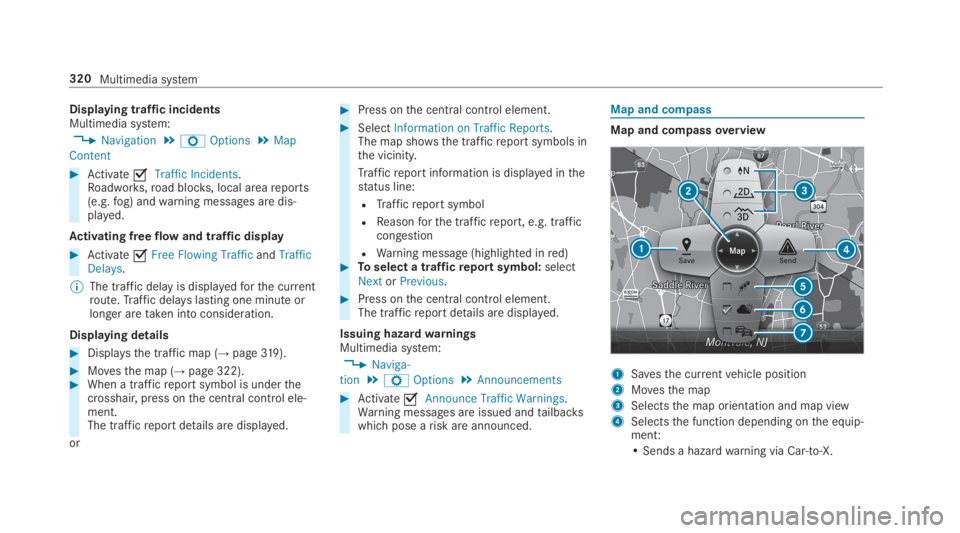
Map and compassoverview
1Savesthe currentvehicle position
2Movesthe map
3Selectsthe map orientation and map view
4Selectsthe function depending onthe equip‐ment:
• Sends a hazardwarning via Car-to-X.
320Multimedia system
Page 323 of 578
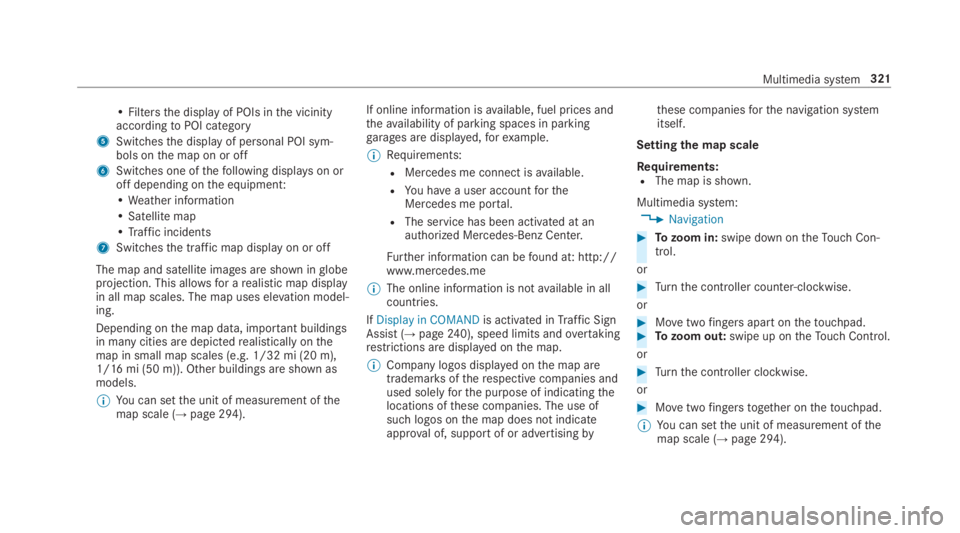
• Filtersthe display of POIs inthe vicinityaccordingtoPOI category
5Switchesthe display of personal POI sym‐bols onthe map on or off
6Switches one ofthefollowing displayson oroff depending onthe equipment:
•Weather information
• Satellite map
•Traffic incidents
7Switchesthe traffic map display on or off
The map and satellite images are shown inglobeprojection. This allowsfor arealistic map displayin all map scales. The map uses elevation model‐ing.
Depending onthe map data, important buildingsin manycities are depictedrealistically onthemap in small map scales (e.g. 1/32 mi (20 m),1/16 mi (50 m)). Other buildings are shown asmodels.
%You can setthe unit of measurement ofthemap scale (→page 294).
If online information isavailable, fuel prices andtheavailability of parking spaces in parkinggarages are displayed,forexample.
%Requirements:
RMercedes me connect isavailable.
RYou havea user accountfortheMercedes me portal.
RThe service has been activated at anauthorized Mercedes-Benz Center.
Further information can befound at: http://www.mercedes.me
%The online information is notavailable in allcountries.
IfDisplay in COMANDis activated inTraffic SignAssist (→page240), speed limits andovertakingrestrictions are displayed onthe map.
%Company logos displayed onthe map aretrademarksoftherespective companies andused solelyforthe purpose of indicatingthelocations ofthese companies. The use ofsuch logos onthe map does not indicateapproval of, supportof or advertisingby
these companiesforthe navigation systemitself.
Settingthe map scale
Requirements:RThe map is shown.
Multimedia system:
,Navigation
#Tozoom in:swipe down ontheTouch Con‐trol.
or
#Turnthe controller counter-clockwise.
or
#Movetwofingers apart onthetouchpad.#Tozoom out:swipe up ontheTouch Control.
or
#Turnthe controller clockwise.
or
#Movetwofingerstogether onthetouchpad.
%You can setthe unit of measurement ofthemap scale (→page 294).
Multimedia system321
Page 334 of 578
Information onNearField Communication(NFC)NFC enables short-range wireless data transferor (re)connection of a mobile phone withthemultimedia system.
Thefollowing functions areavailable withouthaving authorized a mobile phone:
RTransferring a URLtobe viewed inthe multi‐media system (seethe manufacturer's oper‐ating instructions).
RSetting upthevehicle'sWi-Fi access dataviathe system settings (→page 291).
Further information can befound at: http://www.mercedes-benz.com/connect
Usingthe mobile phone withNearField Com‐munication (NFC)
Requirements:RNFC is activated onthe mobile phone (seethe manufacturer's operating instructions)
RThe mobile phone's screen is switched onand unlocked (seethe manufacturer's oper‐ating instructions)
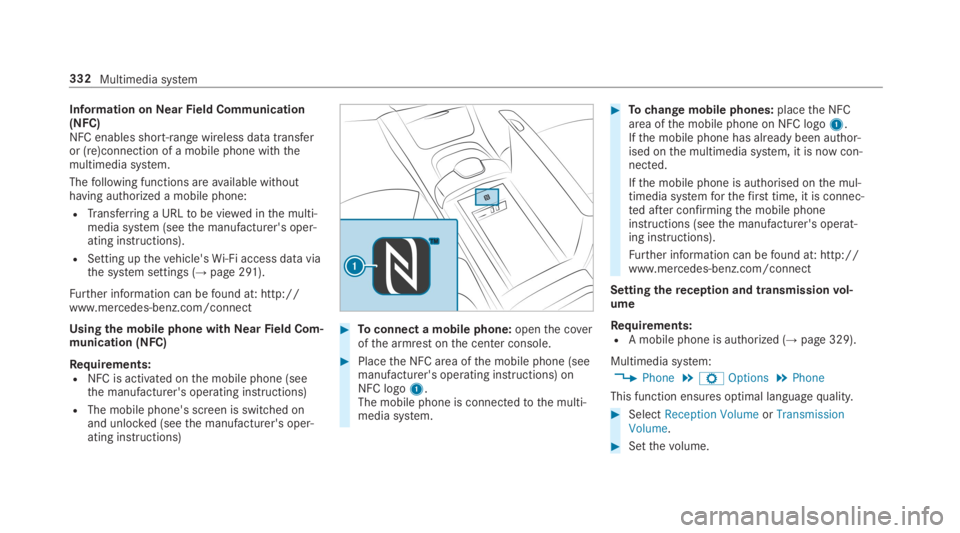
#Toconnect a mobile phone:openthe coverofthe armrest onthe center console.
#Placethe NFC area ofthe mobile phone (seemanufacturer's operating instructions) onNFC logo1.The mobile phone is connectedtothe multi‐media system.
#Tochange mobile phones:placethe NFCarea ofthe mobile phone on NFC logo1.Ifthe mobile phone has already been author‐ised onthe multimedia system, it is now con‐nected.
Ifthe mobile phone is authorised onthe mul‐timedia systemforthefirst time, it is connec‐ted after confirmingthe mobile phoneinstructions (seethe manufacturer's operat‐ing instructions).
Further information can befound at: http://www.mercedes-benz.com/connect
Settingthereception and transmissionvol‐ume
Requirements:RA mobile phone is authorized (→page 329).
Multimedia system:
,Phone.ZOptions.Phone
This function ensures optimal languagequality.
#SelectReception VolumeorTransmissionVolume.
#Setthevolume.
332Multimedia system
Page 345 of 578
Thefollowing system information is transmitted:
RSoftwarerelease ofthe multimedia system
RSystem ID (anonymized)
The transfer ofthis data is usedtooptimize com‐munication betweenthevehicle andthe mobilephone.
Todothis, andtoassign severalvehiclestothemobile phone, avehicle identifier israndomlygenerated.
This has no connectiontothevehicle identifica‐tion number (VIN) and is deleted whenthe multi‐media system isreset (→page 298).
Thefollowing drivingstatus data is transmitted:
RTransmission position engaged
RDistinction between parking,standstill,roll‐ing and driving
RDay/night mode ofthe instrument cluster
The transfer ofthis data is usedtoalter howcontent is displayedtocorrespondtothe drivingsituation.
Thefollowing position data is transmitted:
RCoordinates
RSpeed
RCompass direction
RAcceleration direction
This datais only transferred whilethe navigationsystem is active in ordertoimproveit (e.g. so itcan continue functioning when in a tunnel).
Mercedes me connect
Notes on Mercedes me connect
Mercedes me connect providesthefollowingservices:
RAccident and breakdown management (mebutton)
RConcierge Service (whenthe service is acti‐vated), appointmentrequests or similar (mebutton)
RMercedes-Benz emergency call system (auto‐matic emergency call or SOS button)
The Mercedes-Benz Customer Center andtheMercedes-Benz emergency call center areavaila‐bleforyou aroundthe clock.
The me button andthe SOS button can befoundonthevehicle'soverhead control panel(→page 344).
You can also callthe Mercedes-Benz CustomerCenter usingthe multimedia system(→page 344).
Please notethat Mercedes me connect is aMercedes-Benz service. In emergencies, alwayscallthe national emergency servicesfirst usingthestandard national emergency service phonenumbers. In emergencies,you can also usetheMercedes-Benz emergency call system(→page 346).
Observethe conditions of usefor Mercedes meconnect andother services. These can beobtained inthe Mercedes me portal: https://me.secure.mercedes-benz.com
Multimedia system343
Page 353 of 578
Multimedia system:
,Con-
nect.zBrowser.zEnter URL
#Enter aweb address.
%The function is country-dependent.
#Tofinishthe entry and call uptheweb‐site:selectT.
Showing/hidingtheweb browser menuIfyou call up awebsitebyselecting a link,forexample,theweb browser menu is hidden.
#Toshow/hide:pressthe8button.
%Theweb browser supports video playback.
%Nowebsites or videos are displayed whilethevehicle is in motion.
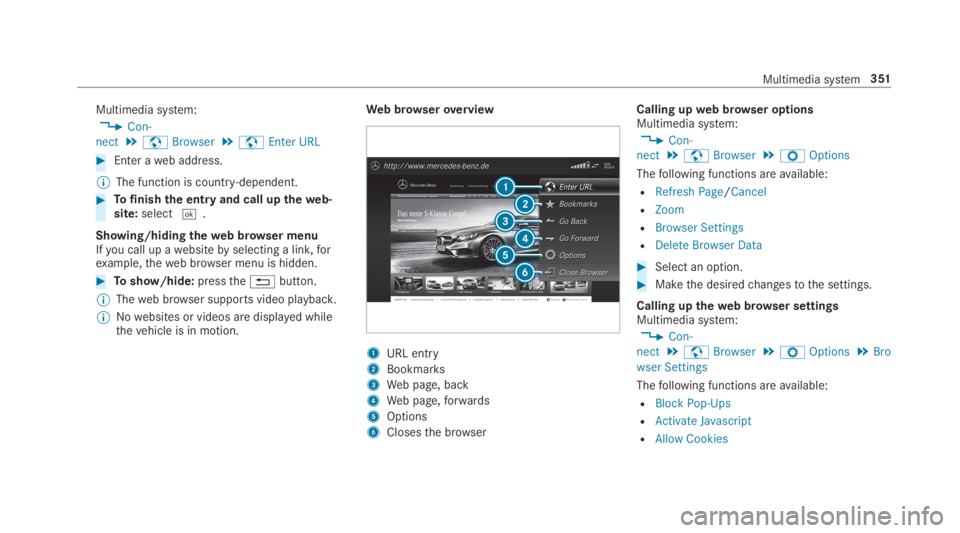
Web browseroverview
1URL entry
2Bookmarks
3Web page, back
4Web page,forwards
5Options
6Closesthe browser
Calling upweb browser optionsMultimedia system:
,Con-
nect.zBrowser.ZOptions
Thefollowing functions areavailable:
RRefresh Page/Cancel
RZoom
RBrowser Settings
RDelete Browser Data
#Select an option.
#Makethe desiredchangestothe settings.
Calling uptheweb browser settingsMultimedia system:
,Con-
nect.zBrowser.ZOptions.Bro
wser Settings
Thefollowing functions areavailable:
RBlock Pop-Ups
RActivate Javascript
RAllow Cookies
Multimedia system351
Page 372 of 578
#SelectMove Highlighted Station.
#Select a memorypreset.
Deletingstations:
#Highlight a preset entry and navigatetotheleft.
#SelectDelete Highlighted Station.
#SelectYes.
Tagging music tracks
Multimedia system:
,Radio
Ifradiostations providetherelevant information,this function allowsyoutotransfer informationonthe music track currently playingtoan
Apple®device.You canthen purchasethe audio
file fromtheiTunesStore®.
#Select♫→ Tag This Song.The track information is saved.
Activating/deactivatingradiotext
Multimedia system:
,Radio.ZOptions.Display Radio
Text Information
#Activatesor deactivateSthe function.
Satelliteradio
Information onthe satelliteradio
SIRIUS XM®satelliteradio offersmorethan175digital-qualityradiochannels providing100%commercial-free music, sports, newsand enter‐tainment,forexample. SIRIUS XM satelliteradioemploysafleet of high-performance satellitestobroadcast aroundthe clockthroughoutthe USAand Canada. The satelliteradio program isavail‐ablefor a monthlyfee. Information aboutthis
can be obtained from a Sirius XM®Service Cen‐ter and at http://www.siriusxm.com (USA) orhttp://www.siriusxm.ca (Canada).
%Sirius, XM and allrelated marksand logosare trademarksof Sirius XMRadio Inc. andits subsidiaries. Allother marks,channel
names and logos arethe property oftheirrespectiveowners. Allrightsreserved.
SatelliteradiorestrictionsSatelliteradio mode may betemporarily unavail‐able or interruptedfor avariety ofreasons.These include environmental ortopographicalconditions beyondthe control of Mercedes-BenzUSA,LLC. Thus, operation at certain locationsmay not be possible.
Registering satelliteradio
Requirements:RSatelliteradio equipment
RRegistration with a satelliteradio provider
RIfregistration is not included when purchas‐ingthe system,your credit card details willberequiredtoactivateyour account
37 0Multimedia system
Page 380 of 578
#Alwaysstowthese items or similarobjects carefully sothattheycannot beflung around,forexample in a lockablevehiclestowage compartment.
Observethe notes on loadingthevehicle.
Replacing batteries (Rear Seat Entertain‐ment System)Batteries arerequiredfortheremotecontrol andthe cordless headphones.
&DANGERSerious damagetohealthcausedbyswallowing batteries
Batteries containtoxic and corrosive sub‐stances. Swallowing batteries may causeserious damagetohealth.
There is arisk offatal injury.
#Keep batteries out ofthereach ofchil‐dren.
#If batteries are swallowed, seek medicalattention immediately.
+ENVIRONMENTALNOTEEnvironmentaldamagecausedbyimproper disposal ofbatteries
Batteries contain pollutants. It isillegaltodispose ofthem withthe householdrubbish.
#
Dispose of batteries in anenvironmentallyresponsible manner.Takedischarged batteriestoaqualifiedspecialistworkshop ortoa collectionpointfor used batteries.
Rear Seat Entertainment Systemoverview
TheRear Seat Entertainment System includes:
RTworear displays
RTworemotecontrols
RUptotwo cordless headphones
RBlu-raydrive
RPortsfor USB (two) and HDMI
%The function oftheremotecontrol andthecordless headphones can be impairedbyotherradio-based electronic devices, e.g.mobile phones.
378Multimedia system