lock MERCEDES-BENZ S CLASS 2019 Service Manual
[x] Cancel search | Manufacturer: MERCEDES-BENZ, Model Year: 2019, Model line: S CLASS, Model: MERCEDES-BENZ S CLASS 2019Pages: 578, PDF Size: 23.31 MB
Page 129 of 578
&WARNINGRisk of becoming trappedwhen pressingthe EASY-PACK trunk boxin
Whenthe EASY-PACK trunk box is pressedintotheretracted position,your hands maybecome trapped. Children, in particular, mayinjurethemselves when doing so.
#When pressingthe EASY-PACK trunkbox in, make surethatyour hands arenot withinthe sweep ofthe EASY-PACKtrunk box.
#When leavingthevehicle, alwaystakethe SmartKeywithyou and lockthevehicle.
#Never leavechildren unattended inthevehicle.
*NOTEDamagetotheextended EASY-PACK trunk box
The EASY-PACK trunk box may be damagedwhen it isextended.
#Do not place any objects on or pressdown onthe EASY-PACK trunk boxframe.
#Do not closethe trunk lid whentheEASY-PACK trunk box isextended.
*NOTEDamagetothe EASY-PACK trunkboxbyobjects
Objects which are sharp-edged, pointed,fragile,rounded or heavy and objectsthatroll can damagethe EASY-PACK trunk boxand bethrown out.
#Do not transport objects which aresharp-edged, pointed,rounded or frag‐ile and objectsthatroll inthe EASY-PACK trunk box.
#Alwaysstowand secure such objectsoutside ofthe box inthe trunk.
#Always observethe maximum permittedload ofthe EASY-PACK trunk box.
#Do not usethe EASY-PACK trunk boxwhentherear seats arefoldedfor‐wards.
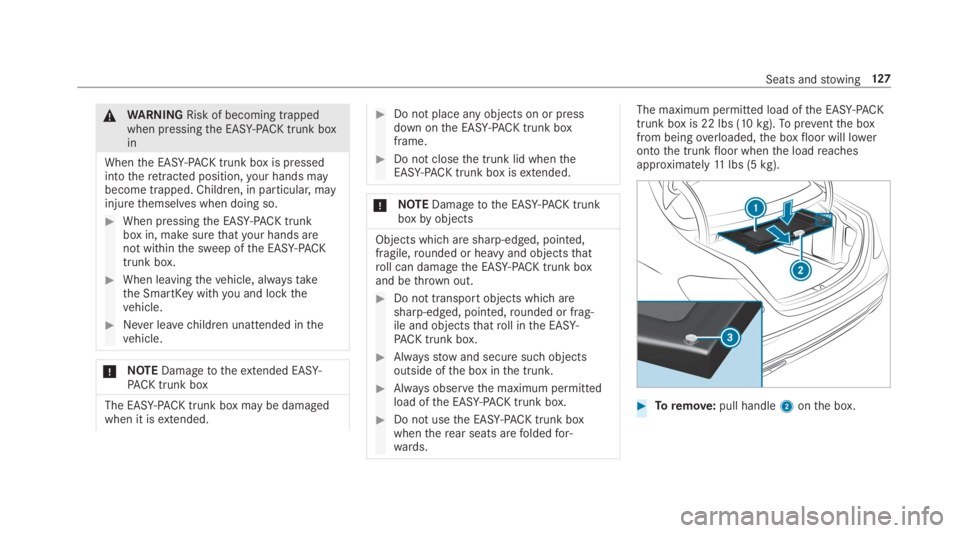
The maximum permitted load ofthe EASY-PACKtrunk box is 22 lbs (10kg).Topreventthe boxfrom beingoverloaded,the boxfloor will lowerontothe trunkfloor whenthe loadreachesapproximately11lbs (5kg).
#Toremove:pull handle2onthe box.
Seats andstowing127
Page 130 of 578
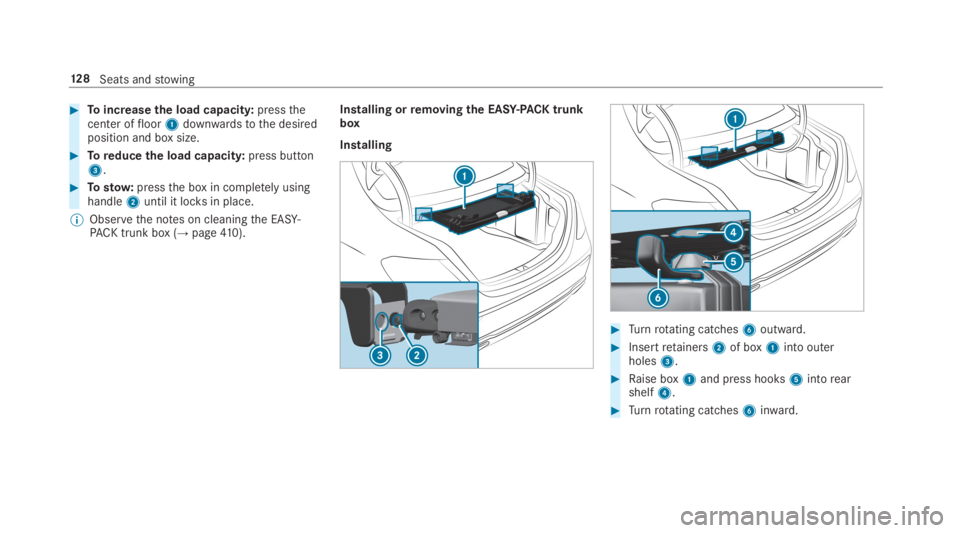
#Toincreasethe load capacity:pressthecenter offloor1downwardstothe desiredposition and box size.
#Toreduce the load capacity:press button3.
#Tostow:pressthe box in completelyusinghandle2until it locksin place.
%Observethe notes on cleaningthe EASY-PACK trunk box (→page410).
Installing orremoving the EASY-PACK trunkbox
Installing
#Turnrotating catches6outward.
#Insertretainers2of box1into outerholes3.
#Raise box1and press hooks5intorearshelf4.
#Turnrotating catches6inward.
12 8Seats andstowing
Page 136 of 578
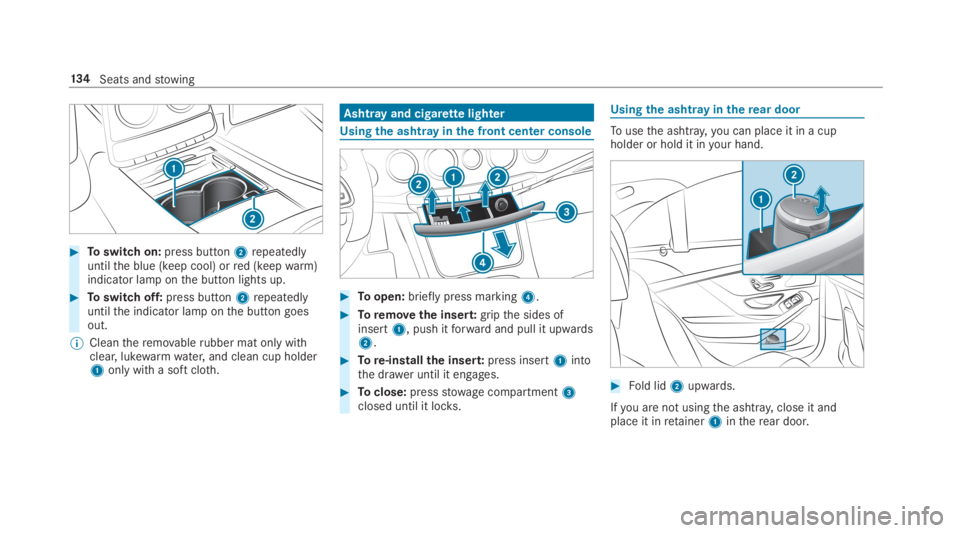
#Toswitch on:press button2repeatedlyuntilthe blue (keep cool) orred (keepwarm)indicator lamp onthe button lights up.
#Toswitch off:press button2repeatedlyuntilthe indicator lamp onthe button goesout.
%Cleantheremovablerubber mat only withclear, lukewarmwater,and clean cup holder1only witha soft cloth.
Ashtray and cigarettelighter
Usingthe ashtrayinthe front center console
#Toopen:briefly press marking4.
#Toremovethe insert:gripthe sides ofinsert1, push itforward and pull it upwards2.
#Tore-installthe insert:press insert1intothe drawer until it engages.
#Toclose:pressstowage compartment3closed until it locks.
Usingthe ashtrayintherear door
Tousethe ashtray,you can place it in a cupholder or hold it inyour hand.
#Fold lid2upwards.
Ifyou are not usingthe ashtray,close it andplace it inretainer1intherear door.
134Seats andstowing
Page 143 of 578
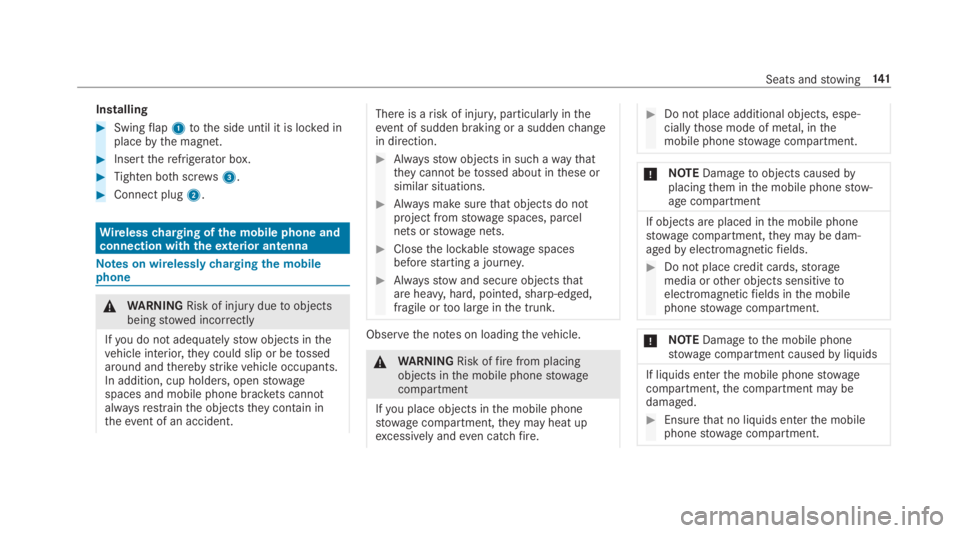
Installing
#Swingflap1tothe side until it is locked inplacebythe magnet.
#Inserttherefrigerator box.
#Tighten bothscrews3.
#Connect plug2.
Wirelesscharging ofthe mobile phone andconnection withtheexterior antenna
Notes on wirelesslychargingthe mobilephone
&WARNINGRisk of injuryduetoobjectsbeingstowed incorrectly
Ifyou do not adequatelystowobjects inthevehicle interior,theycould slip or betossedaround andtherebystrikevehicle occupants.In addition, cup holders, openstowagespaces and mobile phone brackets cannotalwaysrestrainthe objectstheycontain intheevent of an accident.
There is arisk of injury,particularly intheevent of sudden braking or a suddenchangein direction.
#Alwaysstowobjects in such awaythattheycannot betossed about inthese orsimilar situations.
#Always make surethat objects do notproject fromstowage spaces, parcelnets orstowage nets.
#Closethe lockablestowage spacesbeforestarting a journey.
#Alwaysstowand secure objectsthatare heavy, hard, pointed, sharp-edged,fragile ortoo large inthe trunk.
Observethe notes on loadingthevehicle.
&WARNINGRisk offirefrom placingobjects inthe mobile phonestowagecompartment
Ifyou place objects inthe mobile phonestowage compartment,theymay heat upexcessively andeven catchfire.
#Do not place additional objects, espe‐ciallythose mode of metal, inthemobile phonestowage compartment.
*NOTEDamagetoobjects causedbyplacingthem inthe mobile phonestow‐age compartment
If objects are placed inthe mobile phonestowage compartment,theymay be dam‐agedbyelectromagneticfields.
#Do not place credit cards,storagemedia orother objects sensitivetoelectromagneticfields inthe mobilephonestowage compartment.
*NOTEDamagetothe mobile phonestowage compartment causedbyliquids
If liquids enterthe mobile phonestowagecompartment,the compartment may bedamaged.
#Ensurethat no liquids enterthe mobilephonestowage compartment.
Seats andstowing141
Page 145 of 578
Example:vehicles with individualrear seats
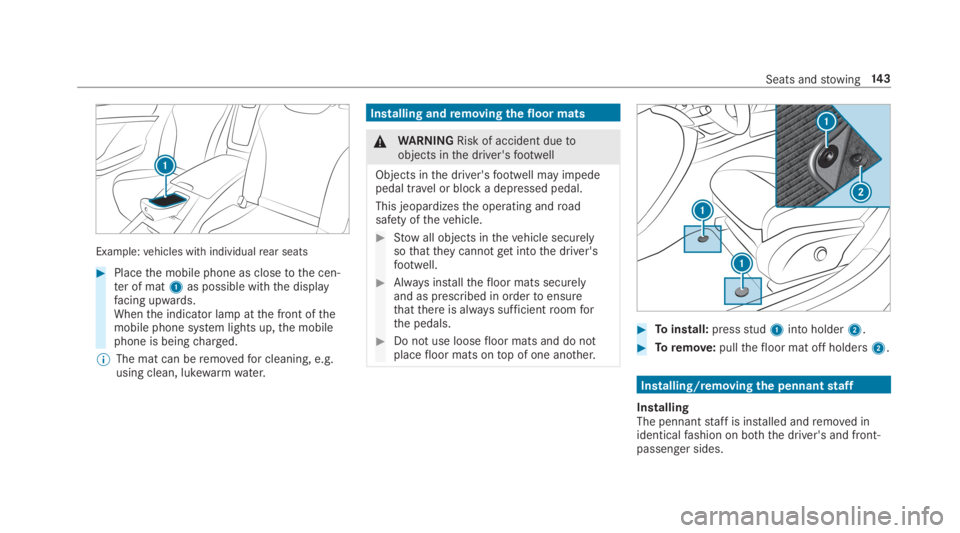
#Placethe mobile phone as closetothe cen‐ter of mat1as possible withthe displayfacing upwards.Whenthe indicator lamp atthe front ofthemobile phone system lights up,the mobilephone is beingcharged.
%The mat can beremovedfor cleaning, e.g.using clean, lukewarmwater.
Installing andremoving thefloor mats
&WARNINGRisk of accident duetoobjects inthe driver'sfootwell
Objects inthe driver'sfootwell may impedepedal travel or block a depressed pedal.
This jeopardizesthe operating androadsafety ofthevehicle.
#Stowall objects inthevehicle securelysothattheycannotgetintothe driver'sfootwell.
#Always installthefloor mats securelyand as prescribed in ordertoensurethatthere is always sufficientroomforthe pedals.
#Do not use loosefloor mats and do notplacefloor mats ontop of one another.
#Toinstall:pressstud1into holder2.
#Toremove:pullthefloor mat off holders2.
Installing/removingthe pennantstaff
InstallingThe pennantstaff is installed andremoved inidenticalfashion on both the driver's and front-passenger sides.
Seats andstowing14 3
Page 152 of 578
vehicle is unlocked. Whenyoustartthevehicle,the surround lighting is deactivated andtheautomatic driving lights are activated.
Interior lighting
Adjusting the interior lighting
Frontoverhead control panel
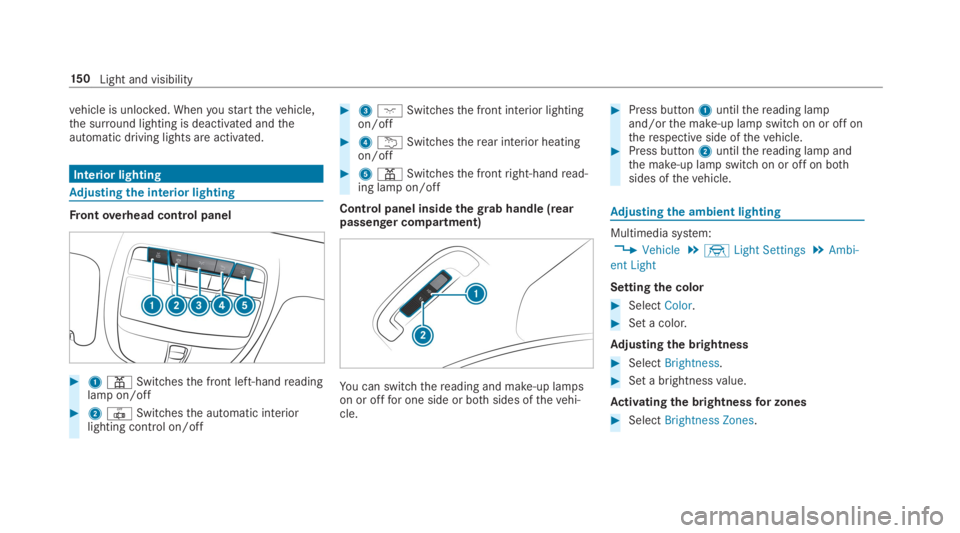
#1=Switchesthe front left-handreadinglamp on/off
#23Switchesthe automatic interiorlighting control on/off
#3JSwitchesthe front interior lightingon/off
#4BSwitchestherear interior heatingon/off
#5=Switchesthe frontright-handread‐ing lamp on/off
Control panel insidethegrab handle (rearpassenger compartment)
You can switchthereading and make-up lampson or offfor one side or bothsides ofthevehi‐cle.
#Press button1untilthereading lampand/orthe make-up lamp switch on or off ontherespective side ofthevehicle.#Press button2untilthereading lamp andthe make-up lamp switch on or off on bothsides ofthevehicle.
Adjusting the ambient lighting
Multimedia system:
,Vehicle.÷Light Settings.Ambi-
ent Light
Settingthe color
#SelectColor.
#Set a color.
Adjusting the brightness
#SelectBrightness.
#Set a brightnessvalue.
Activating the brightnessfor zones
#SelectBrightness Zones.
15 0Light and visibility
Page 153 of 578
#Activatesor deactivateSthe function.TheDisplay,FrontandRearzones can be setseparately.
%Setting brightness zones is notavailablefortheRear Seat Entertainment System.
Activating multi-color lighting
#SelectMulti-color.
#Activatesor deactivateSthe function.There areten preset color combinationsavailable.
Activating multi-color animation
#SelectMulti-color Anim..
#Activatesor deactivateSthe function.Thechosen color combinationchanges atpredefined intervals.
Activating dependency on air conditioningsettings
#SelectClimate.
#Activatesor deactivateSthe function.Ifchanges are madetothetemperature set‐ting inthevehicle,the color ofthe ambientlightingchanges briefly.
Activatingwelcome lighting
#SelectWelcome.
#Activatesor deactivateSthe function.Whenthevehicle is unlocked, a special inte‐rior lighting sequenceruns.
Setting the interior lighting switch-off delaytime
Multimedia system:
,Vehicle.÷Light Settings.Int.
Light Switch Off
#Setthe switch-off delay time.
Windshield wiper and windshieldwashersystem
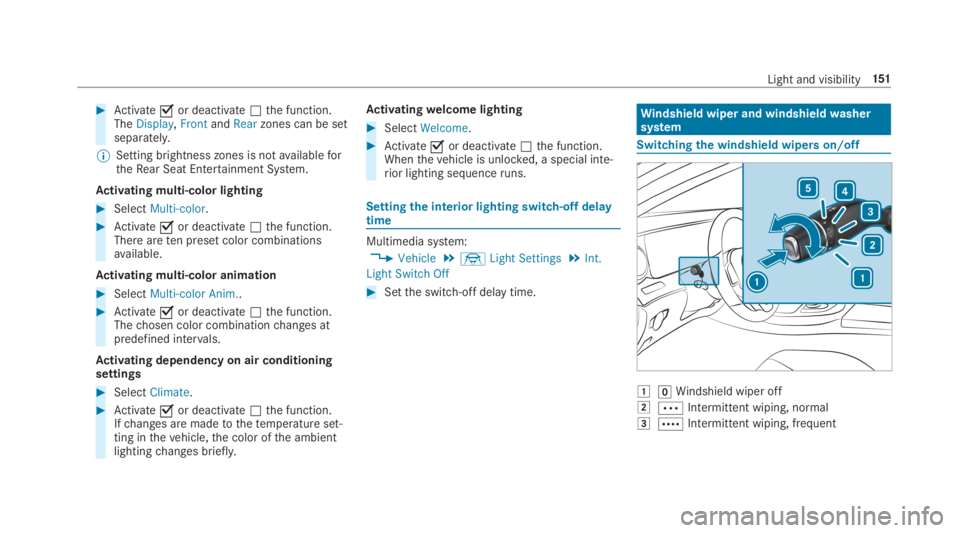
Switchingthe windshield wipers on/off
GZWindshield wiper off
HbIntermittent wiping, normal
IcIntermittent wiping, frequent
Light and visibility151
Page 155 of 578
Installingthe wiper blades
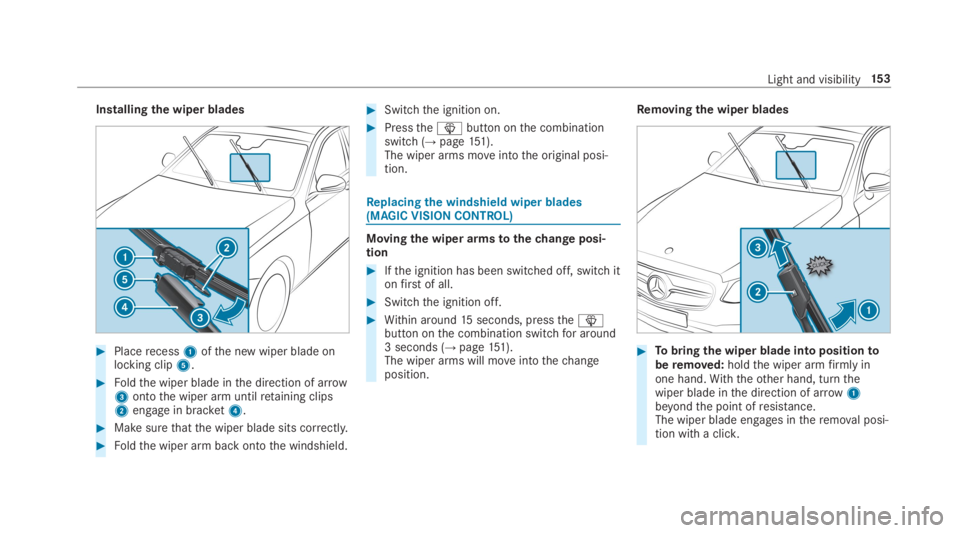
#Placerecess1ofthe new wiper blade onlocking clip5.
#Foldthe wiper blade inthe direction of arrow3ontothe wiper arm untilretaining clips2engage in bracket4.
#Makesurethatthe wiper blade sits correctly.
#Foldthe wiper arm back ontothe windshield.
#Switchthe ignition on.
#Pressthe
Page 169 of 578
Driving
Notes on Mercedes-AMGvehicles
Observethe notes onthefollowingtopics intheSupplement, asyou mayotherwisefailtorecog‐nize dangers:
RAMGPerformanceexhaust system
RAMG high-performance brake system andAMG ceramic high-performance compositebrake system
RRACESTART
RAMG adaptive sportsuspension system
Switching onthe power supplyor ignitionusingthestart/stop button
&WARNINGRisk of accident and injuryduetochildren left unattended inthevehicle
Ifchildren are left unattended inthevehicle,theycould:
Ropen doors,thereby endangeringotherpersons orroad users.
Rget out ofthevehicle and be hitbyoncoming traffic.
Roperate vehicle equipment and becometrapped,forexample.
In addition,children could also setthevehi‐cle in motion,forexample,by:
Rreleasingthe parking brake.
Rshiftingthe automatic transmission out ofpark position].
Rstartingthe engine
#Never leavechildren and animals unat‐tended inthevehicle.
#When leavingthevehicle, alwaystakethe SmartKeywithyou and lockthevehicle.
#Keepthe SmartKeyout ofthereach ofchildren.
&DANGERRisk offatal injuries duetoexhaustgases
Combustion engines emit poisonousexhaustgases such as carbon monoxide. Inhalingtheseexhaustgases is hazardoustohealthand can leadtopoisoning.
#Never leavethe enginerunning in anenclosed space without sufficientventi‐lation.
&WARNINGRisk offirecausedbyflam‐mable material ontheexhaust system
Flammable materials brought inbyeither ani‐mals or environmental influences may ignite
Driving and parking167
Page 172 of 578
RThestarter battery is sufficientlycharged.
%You can also setthetemperature withyoursmartphone. Information on Mercedes meconnect andother services: http://www.mercedes.meThis function is notavailablefor all models.
Chargingthe batterybefore commencingyour journey
%This function is notavailable in all countries.
RIfthevehicle battery is discharged,youreceivea message onyour smartphone.
RYou canthenstartthevehicle withthesmartphonetochargethe battery.
RThevehicle is automatically switched offafterten minutes.
Ensurethefollowing beforestartingthe engine:
RThe legalstipulations inthe area whereyourvehicle is parked allow enginestarting viasmartphone.
RIt is safetostart andrunthe engine whereyourvehicle is parked.
RThe fueltank is sufficientlyfilled.
Startingthevehicle
&WARNINGRisk of crushing or entrap‐ment duetounintentionalstarting oftheengine
Limbs could be crushed or trapped iftheengine isstarted unintentionally duringservice or maintenancework.
#Always securethe engine against unin‐tentionalstarting before carrying outmaintenance orrepairwork.
Requirements:RParkposition]is selected.
RThe anti-theft alarm system is not activated.
RThe panic alarm is not activated.
RThe hazardwarning lights are switched off.
RThe hood is closed.
RThe doors are closed and locked.
RThe windowsand sliding sunroof are closed.
#Startthevehicle usingthe smartphone:
RAftereveryvehiclestart,the enginerunsforten minutes.
RYou can carryout a maximum of two consec‐utivestarting attempts. Thevehicle must bestarted once withthe SmartKeybefore tryingtostartthevehicle again withthe smart‐phone.
RYou canstopthevehicle again at any time.
RFurther information can befound inthesmartphone app.
Securingthe engine againststarting beforecarrying out maintenance orrepairwork:#Switch onthe hazardwarning lights.
or
#Unlockthe doors.
or
#Open a side window orthe sliding sunroof.
Breaking-in notes
Mercedes-AMGvehicles:observethe notes inthe Supplement. Otherwise,you mayfailtorec‐ognize dangers.
17 0Driving and parking