phone MERCEDES-BENZ S-CLASS CABRIOLET 2017 Repair Manual
[x] Cancel search | Manufacturer: MERCEDES-BENZ, Model Year: 2017, Model line: S-CLASS CABRIOLET, Model: MERCEDES-BENZ S-CLASS CABRIOLET 2017Pages: 521, PDF Size: 10.48 MB
Page 320 of 521
Creating
abookmark #
Select Add new bookmark. #
EnteraU RL and aname. #
Select ¡.
Editin gabookmark #
Highlight abookmar k. #
Select ¥. #
Select Edit. #
Enter aURLand aname. #
Select ¡.
Deleting abookmark #
Highlight abookmar k. #
Select ¥. #
Select Delete. #
Select Yes.
Closin gthe br owser
Multimedia sy stem:
, Connect .
z Browser #
Select åClose browser . Interne
tradio Calling up the Interne
tradio
Re quirements:
R Ther eisana ccount on http://
www.me rcedes.me.
R The Interne tradio service is activated.
R The dat avolume is available.
Dependin gonthe countr y,dat avolume may
need tobe pur chased.
R AfastInterne tconnection ford atat ransmis‐
sion free of inter fere nce.
The service sarecountr y-dependent.
Fo rm orei nformation, consult aMercedes-
Benz Service Centre.
Multimedi asystem:
, Radio .
Þ Radio source #
Select TuneIn radio.
The Interne tradio displ ayappears. The last
st atio nsetstarts playing.
% The connectio nqualit ydepends on thel ocal
mobile phone reception. In
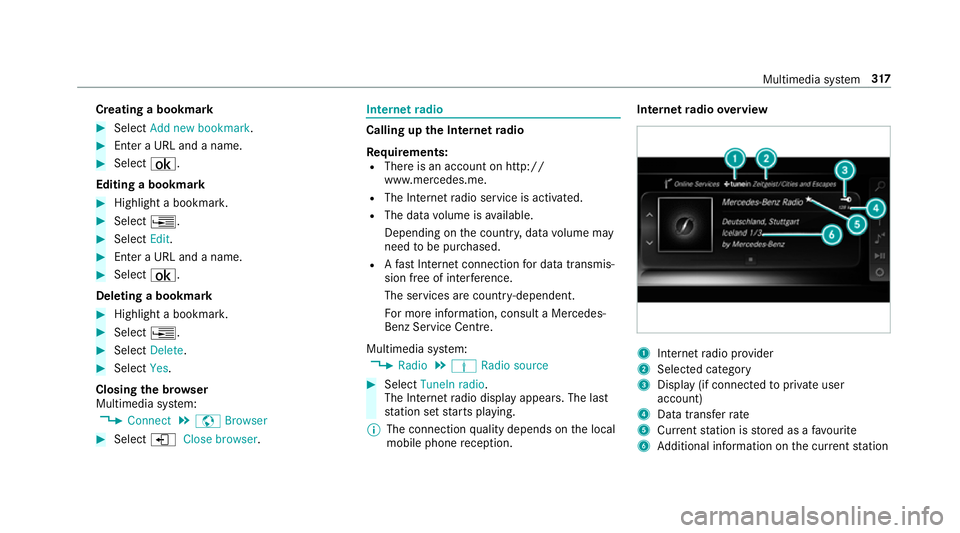
tern etradio overview 1
Inte rn et radio pr ovider
2 Selec tedc ategory
3 Displa y(if connec tedtop riva te user
account)
4 Datatransfer rate
5 Current statio niss tore dasaf avourite
6 Additional information on thec urrent station Multimedia sy
stem 317
Page 322 of 521
traf
ficc onditions .Thisc ould also cause you
to lose control of thev ehicle. #
Onlyhandle adatas tora ge medium
when thev ehicle is stationar y. Pe
rm issible file sy stems:
R FAT32
R exFAT
R NTFS
Pe rm issible dat astorage medium:
R SD card
R USB storag edevice
R iPod ®
/iPhone ®
R MTP devices
R Blue tooth ®
audio equipment
% R
The multimedia sy stem supports atotal
of up to50,000 files.
R Dat astorage media up to2TBa resup‐
por ted( 32-bit address space). Suppor
tedf ormats:
R MP3
R WMA
R AAC
R WAV
R FLAC
R ALAC
% Obser vethef ollowing no tes:
R Due tothel arge variet yofa vailable
music files rega rding encoders, sampling
ra tesa nd dat arates, playba ckcannot
alw aysbeg uaranteed.
R Due tothew ide rang eofU SB devices
av ailable on them arke t, pl aybac kcann ot
be guaranteed fora ll USB devices.
R Cop y-pr otected music files or DRM
enc rypte dfiles canno tbeplaye db ack.
R MP3 pla yers mus tsuppor tMediaTrans‐
fe rP rotocol (MTP). Manufactu
redu nder licens efromD olbyLabora‐
to ries. Dolb y,Dol byAudio and thed ouble-D sym‐
bol ar etrademar ksof Dolb yLaboratories. Multimedia sy
stem 319
Page 328 of 521
Ac
tivating/deactivatin gfull-scree nmode
Multimedia sy stem:
, Media .
à Media sources #
Select adatas torage medium.
Pla yable video files ar eplaye db ack. #
Toactivat efull-screenm ode:select #
Full screen. #
Todeactivat efull-sc reen mode: pressthe
to uchpad.
Changing video settings
Multimedia sy stem:
, Media .
Z Options .
Picture for-
mat
The following pictur eformats ar eavailable:
R Automatic
R 16:9
R 4:3
R Zoom #
Select apictur eformat. Ad
justin gthe brightness manually #
Select Brightness . #
Adjus tthe brightness. Media sear
ch St
arting them edia sear ch
Multimedia sy stem:
, Media .
ª Search
Depending on thec onnected media sources and
fi les, thef ollowing categories ar eliste d:
R Current trac klist
R Keyword search
R Playlists
R Artists
R Albums
R Tracks
R Folder
R Music genres
R Year
R Composers R
Videos
R Podcasts (Apple®
devices)
R Audiobooks (Apple®
devices) #
Select acategor y.
% The categories ar eavailable as soon as the
entir emedia conte nt hasbeenr ead in and
analysed. Media Inter
face Information abou
tthe Media Inter face
Media In terface is auniversal inter face fort he
connection of mobile audioe quipment. The mul‐
timedi asystemh as tw oUSB ports. The USB
ports ar elocated in thes towa ge compartment
unde rthe armrest.
Suppor tedd evices
The Media Inter face allo wsyoutoc onnect the
fo llowing dat astorage media:
R iPod ®
R iPhone ®
R MP3 pla yer Multimedia sy
stem 325
Page 332 of 521
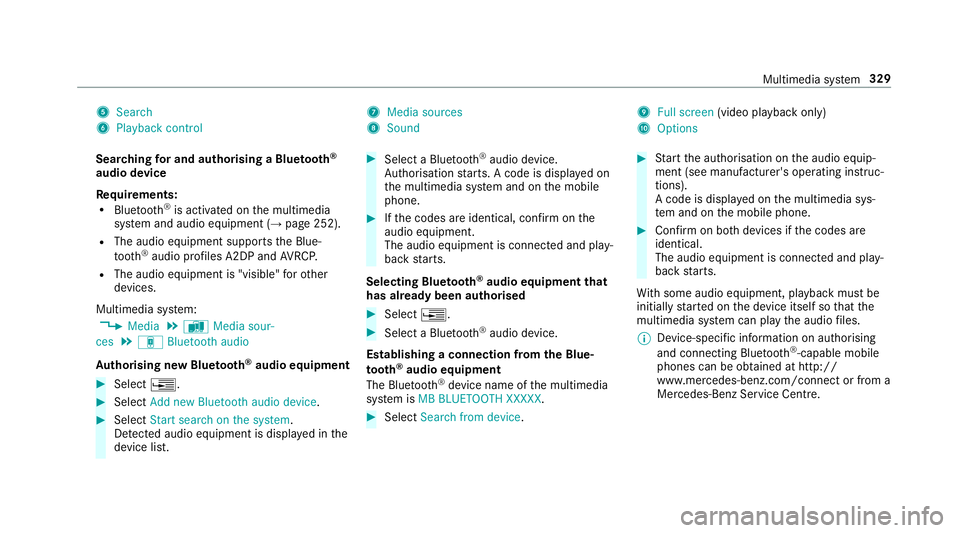
5
Search
6 Playback control 7
Media sources
8 Sound 9
Fullscreen (video pl aybac konly)
A Options
Sear ching fora nd authorisin gaBluetooth ®
audio device
Requ irements:
R Blue tooth ®
is activated on them ultimedia
sy stem and audio equipment (→ page252).
R The audio equipment supports theB lue‐
tooth ®
audio profiles A2DP and AVRC P.
R The audio equipment is "visible" foro ther
devices.
Multimedia sy stem:
, Media .
à Media sour-
ces .
á Bluetoot haudio
Au thorising ne wBluet oo th®
audio equipment #
Select ¥. #
Select Add new Bluetooth audio device. #
Select Start search on the system .
De tected audi oequipment is displ ayed in the
device list. #
Select aBluetooth ®
audio device.
Auth orisation starts .Ac odeisd isplayedon
th em ultimedia sy stem and on them obile
phone. #
Ifth ec odes ar eidentical, confi rmonthe
audio equipment.
The audio equipment is connec teda nd play‐
bac kstarts.
Selecting Blu etoo th®
audio equipment that
has already bee nauthorised #
Select ¥. #
Select aBluetooth ®
audio device.
Establishing aconnection from theB lue‐
to oth ®
audio equipment
The Blue tooth®
device name of them ultimedia
sy stem is MB BLUETOOTH XXXXX. #
Select Search from device. #
Startt he authorisation on thea udio equip‐
ment (see manufacturer's operating instruc‐
tions).
Ac ode is displa yedont he multimedia sys‐
te ma nd on them obile phone. #
Confir monb othd evices if thec odes are
identical.
The audio equipment is connected and play‐
bac kstarts.
Wi th some audioe quipment, playbac kmustbe
initially star tedont he device itself so that the
multimedia sy stem can pla ythe audio files.
% Device-specific informatio nonauthorising
and connectin gBluetooth ®
-capable mobile
phones can be ob tained at http://
www.me rcedes-benz.com/connect or from a
Mercedes-Benz Service Centre. Multimedia sy
stem 329
Page 333 of 521
Ac
tivatin gBluetooth ®
audio
Multimedi asystem:
, Media .
à Media sources #
Select áBluetoot haudio.
The multimedia sy stem activates thec onnec‐
te dB luetooth ®
audio equipment.
Selecting amusic pla yer
Multimedia sy stem:
, Media .
à Media sour-
ces .
á Bluetoot haudio #
Select aBluetooth ®
audio device.
If multiple music pla yers arep resen tont he
Blue tooth ®
audio equipment alista ppears. #
Select amusic pla yer.
Playbac kstarts.
Sear ching forat rack
Multimedia sy stem:
, Media .
à Media sour-
ces .
á Bluetoot haudio #
Select ª. #
Select acategor y.
At rack list appears. #
Select atrac k.
% The function is onl yavailable when the
mobil ephone and them usic pla yers elected
on them obile phone suppor tthis function.
Switching Blue tooth ®
audio equipment via
NFC
Requ irements:
R Obser vethen otes on using NFC
(→ pag e294).
R The Blue tooth®
audio overviewisd isplayed
( → pag e330). #
Lightl ypress theN FC area on them obile
phone (see them anufacturer's operating
instructions).
If th em obile phone has already been author‐
ised on them ultimedia sy stem as Blue tooth®
audio equipment ,itisnowconnec ted.
If th em obile phone is authorised on them ul‐
timedia sy stem as Blue tooth ®
audio equip‐ men
tfor thef irst time ,itisc onnected af ter
confirming thei nstruction sfor them obile
phone (see them anufacturer's operating
instructions).
Disconnecting Blue tooth ®
audio equipment
Multimedi asystem:
, Telephone .
á Media sources #
Select aBluetooth ®
audio device. #
Select ¥Deauthorise. #
Select Yes. Ra
dio Switchin
gontheradio Multimedia sy
stem:
, Radio #
Alternatively: press the$ button.
The radio displa yappears. Youw ill hear the
las tstatio np laye dont he las tfrequ ency
band selected. 330
Multimedia sy stem
Page 373 of 521
#
Therefore, place thef illing hose in the
plastic bag that con tained theT IREFIT
kit. +
ENVIRONMEN
TALN OTE Environmental
pollution caused byenvironmen tally ir re‐
sponsible disposal Ty
re sealant contains polluta nts.#
Have thet yres ealant bottle disposed of
professionall y,e.g. at aMercedes-Benz
Service Centre. #
Switc hoffthet yrei nflation compressor. #
Unscr ew thef illing hose from thev alveoft he
defectiv etyre. #
Storet he tyr esealant bottle, thet yrei nfla‐
tion compressor and thew arning triangle. #
Pull away immediatel y. #
Stop af terd riving fora pproxima tely ten
minutes and checkt he tyr epressur eusing
th et yrei nflation compressor.
The tyr epressur emustn ow be at least
13 0k Pa(1.3 bar/1 9psi). &
WARNING Risk of accident du etothe
specified tyr epressur enotbeing ach‐
ie ved
If th es pecified tyr epressur eisn otachie ved
af te rab rief drive, thet yreist oo badly dam‐
aged. The tyr esealant cannot repair thet yre
in this ins tance.
Dama gedt yres and atyrep ressur ethat is
to ol ow can significantl yimp air braking and
handling characteristics. #
Do no tdrive on. #
Consult aqualified specialis tworks hop. Countries
that ha veMercedes-Benz
Service24h: astickerw itht he phone number
can also be found in your vehicle, e.g. on the
B‑pilla ronthe driver's side. #
Cor rect thet yrep ressur eifitiss tillatl east
13 0k Pa(1.3 bar/1 9psi).S ee thet yrep res‐
sur etable on thef uel filler flap forv alues. #
Toincrease thet yrep ress ure: switc hon
th et yrei nflation compressor. #
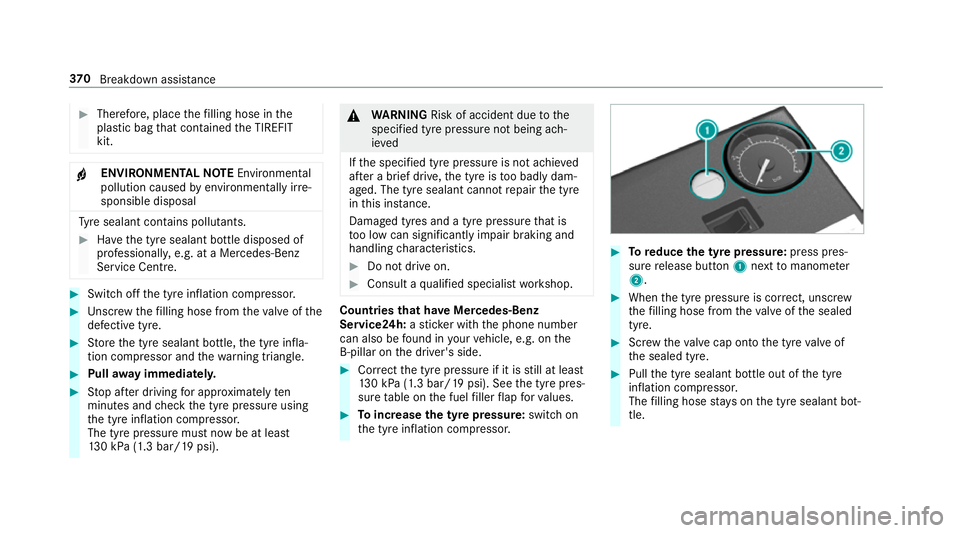
Toreduce the tyr epress ure: press pres‐
su re re lease button 1next tomanome ter
2 . #
When thet yrep ressur eisc orrect, unscr ew
th ef illing hose from thev alveoft he sealed
tyre. #
Screw thev alvec ap ont othe tyr evalveof
th es ealed tyre. #
Pull thet yres ealant bottle out of thet yre
inflation compressor.
The filling hose stay sont he tyr esealant bot‐
tle. 37 0
Breakdown assis tance
Page 410 of 521
Wa
veband Maximum transmis‐
sion output
2mw aveband
14 4-1 74MHz 50 W
Tr unked radio sys‐
te m/T etra
380 -460 MHz 10 W
70 cm waveband
400 -460 MHz 35 W
Tw o-w ayradio
(2G/3G/4G) 10 WThe
following can be used in thev ehicle without
re strictions:
R RF transmitter switham aximum transmis‐
sion output of up to100mW
R RF transmitter switht ransmitter frequencies
in the3 80 -410 MHz waveband and amaxi‐
mum transmission output of up to2W
(trunked radio sy stem/T etra)
R Mobile phones (2G/3G/4G) Ther
eareno restrictions whe npositioning the
aerial on theo utside of thev ehicle fors ome
wav ebands.
This applies tothef ollowing wavebands:
R trunked radio sy stem/T etra
R 70 cm waveband
R 2G/3G/4G Ve
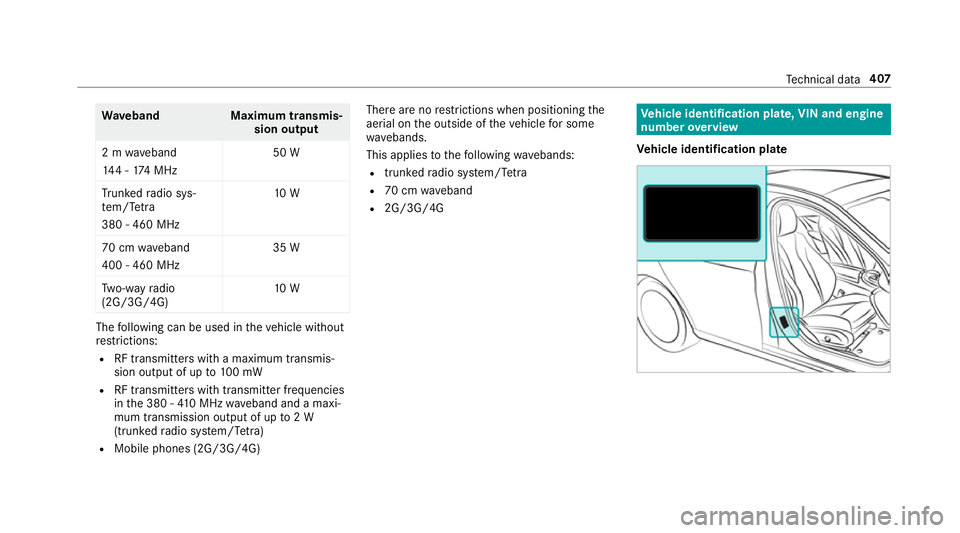
hicl eidentification plate, VIN and engine
number overview
Ve hicl eidentification plate Te
ch nica ldata 407
Page 451 of 521
Key
Displa
ymessages
Possible causes/consequences and M
MSolutions
 Replace key *T
hekeyn eeds tobe replaced. #
Consult aqualified specialis tworks hop.
Replace key See Owner's
Manual *
Ve hicles with adigital vehicl ekeyinthes ma rtphone: onlyafew or no authorisations remain fors tartin gt he
engine. #
Mak esuret hat theI nterne tconnection is no tlimited bycer tain mobile phon esettings. #
Open theM ercedes me connect weba pp http://www.mercedes.me. and call up the" Digital Car Keyint he
smartphone" service. #
Deactivat ethe service firs ta nd then activat eitagain. #
Ifth ed ispla ymessag estilla ppears, con tact theM ercedes-Benz Cus tomer Assis tance Center (C AC).
 Change key batteries *T
hekeyb atte ry is dischar ged. #
Replace theb atter y. 448
Displaymessa gesa nd warning/indicator lamps
Page 482 of 521
Fr
ont airbag ...........................................41
Hea dairba g. .......................................... 41
Ins tallation locations .............................. 41
Knee airbag ............................................ 41
Overvie w................................................ 41
Pr otection ..............................................42
Re duced pr otection ...............................43
Sid eimp acta irba g. ................................ 41
AIR CAP
Ac tivating .............................................. 86
Deactivating .......................................... 86
AIRSCARF Switching on/o ff................................. 101
AIRS CARF vents
Ad justing ............................................. 137
Alarm see Panic alarm
Alar msystem
see ATA( anti-thef talarm system)
Alternativ eroute
see Route
Ambient lighting ...................................... 124Android
Auto ............................................ 303
Connecting amobilephone ................. 303
Ending ................................................. 304
No te .................................................... 303
Overvie w............................................. 303
Sound settings .................................... 304
Tr ans ferred vehicle dat a......................3 04
Animals Pets in thev ehicle ................................. 62
Anti-loc kbraking sy stem
see AB S(Anti-loc kBrakin gS ystem)
Anti-thef talar ms ystem
see ATA( anti-thef talarm system)
Anti-thef tprotection
Ad ditional door loc k............................. .68
Immobiliser ...........................................89
Anti-thef tprotection
see ATA( anti-thef talarm system)
Anticipator yoccupant pr otection
see PRE- SAFE®
(anticipator yoccu‐
pant pr otection)
see PRE-SAFE ®
PLUS (anticipatory
occupant pr otection plus) Apple CarPlay™
....................................... 301
Connecting an iPhone ®
....................... 302
Ending .................................................3 03
No tes. ................................................. 302
Overvie w..............................................3 01
To ne settings ....................................... 302
Tr ans ferred vehicle dat a......................3 04
Ashtr ay
Fr ont centre console............................ 11 2
Assistance graphic
Menu (on-boa rdcompu ter) .................. 221
Assistanc esystems
see Drivin gsafet ys yst em
ASS YSTP LUS ........................................... 345
Batter ydisconnectio nperiods .. ...........3 46
Displ aying thes ervice due dat e........... 345
Fu nction/no tes. .................................. 345
Re gular maintenance work .................. 345
Specia lservice requ irements .............. 345
ATA (anti-thef talarm system) .................. 89
Ac tivating/deactivating interio rpro‐
te ction ................................................... 91
Deactivating thea larm. ......................... 90
Fu nctio n................................................ 89 Index
47 9
Page 486 of 521
Plastic trim .......................................... 360
Re
alwo od/trim elements ...................3 60
Re versing camera/360° Camer a....... .3 58
Ro of lining ...........................................3 60
Seat bel t.............................................. 360
Seat co ver. .......................................... 360
Sensor s............................................... 358
Sof ttop ............................................... 356
Wa shing byhand ................................. 353
Wheels/rims ....................................... 358
Wi nd de flector .....................................3 56
Wi ndo ws .............................................. 358
Wi per blades .......................................3 58
Carpe t(Ca re) .......................................... .360
Changing hub caps .................................. 397
Changing thel ights
Drivin gabroad (symm etrical dipped
beam) ................................................... 11 7
Channel tracking Setting ................................................ .333
Charging Batter y(vehicle) .................................. 373
Mobile phone (wireless) ....................... 11 4Chassis le
vel(AIR BODY CONT ROL)
Setting ................................................ .190
Chil dseat
At tach ing (no tes) ................................... 57
Fr ont passenger seat (no tes) ................. 55
Fr ont passenger seat (rear ward-
fa cing/for ward-facing) .......................... 56
Fr ont passenger seat (without airbag
shutoff) .................................................. 55
ISOFIX (fitting) ....................................... 54
ISOFIX (no tes) ....................................... 53
No tes. .................................................... 50
Re commended child restra int sy stems .. 61
Seats suitable forb elt-secu redc hild
re stra int sy stems ................................... 57
Seats suitable forI SOFIX child
re stra int sy stems ................................... 59
Children Restra int sy stems ..................................50
Chock ...................................................... .396
St orag elocation ..................................3 96
Cigar ette lighter
Fr ont centre console ............................ 11 3Cleaning
see Care
Climat econtrol
Ac tivating/deactivating theA /C
function (cont rolp anel) ........................ 131
Ac tivating/deactivating theA /C
function (multimedia sy stem) .............. 13 2
Ac tivating/deactivating thes ynchro‐
nisation function (multimedia sys‐
te m) ..................................................... 13 3
Air di stribution settings .......................1 32
Air-recirculation mode ......................... 13 3
Au tomatic control ................................ 13 2
Climat estyle function .......................... 13 2
Demi sting thew indo ws....................... 13 3
Fr ont air vents ..................................... 13 5
Glo veboxa irve nt ................................ 13 6
Inserting/removing thef lacon (fra‐
gr anc esystem) .................................... 13 4
Ionisation .............................................1 34
No te ..................................................... 131
Re ar air vents ...................................... 13 6
Re sidualh eat ....................................... 13 3
Setting thec limat estyle ...................... 13 2
Setting thef ragrance sy stem ............... 13 4 Index
483