navigation system MERCEDES-BENZ S-Class MAYBACH 2017 W222 Comand Manual
[x] Cancel search | Manufacturer: MERCEDES-BENZ, Model Year: 2017, Model line: S-Class MAYBACH, Model: MERCEDES-BENZ S-Class MAYBACH 2017 W222Pages: 230, PDF Size: 8.27 MB
Page 24 of 230
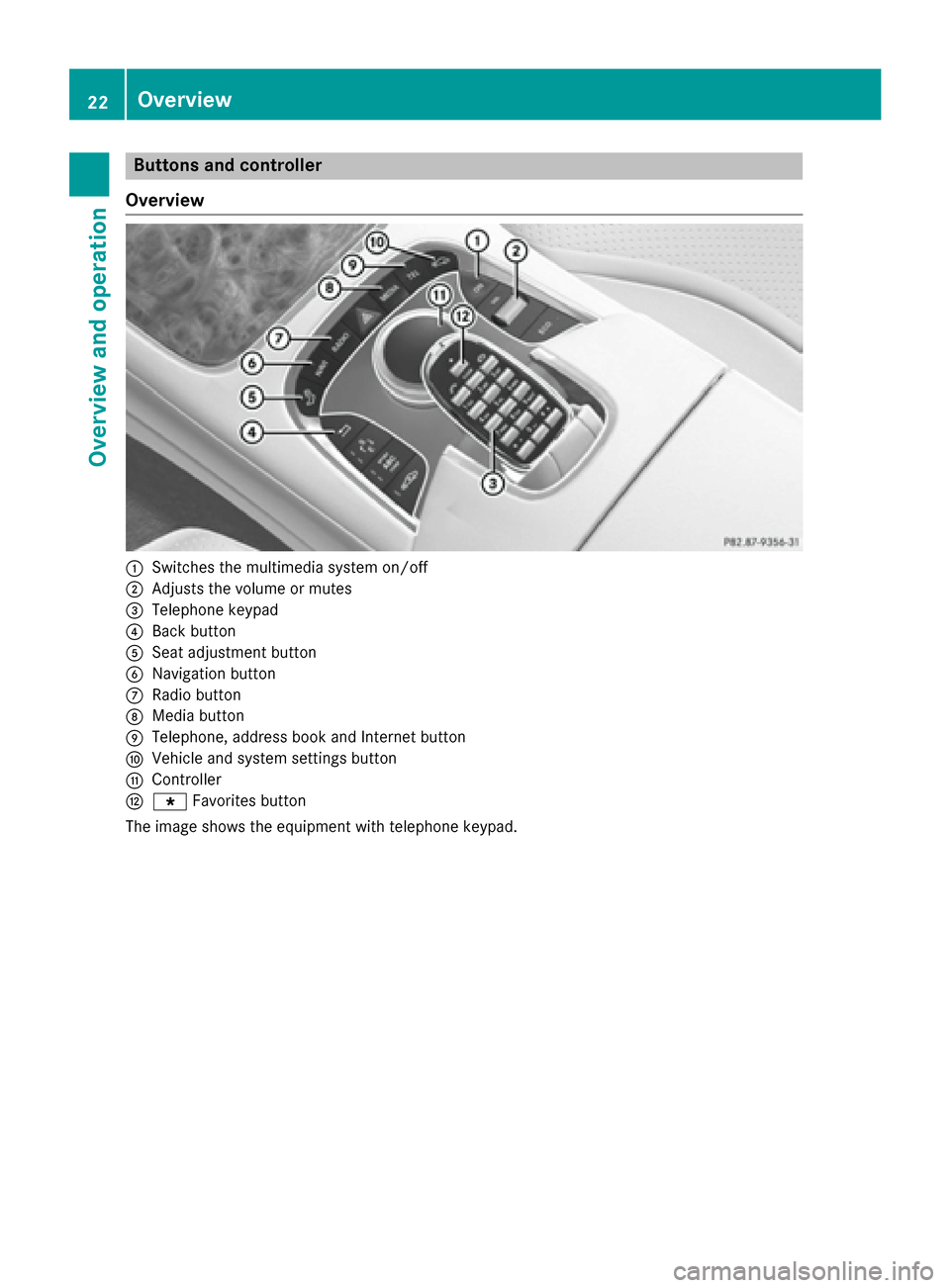
Buttons and controller
Overview
:Switches the multimedia system on/off
;Adjusts the volume or mutes
=Telephone keypad
?Back button
ASeat adjustment button
BNavigation button
CRadio button
DMedia button
ETelephone, address book and Internet button
FVehicle and system settings button
GController
Hg Favorites button
The image shows the equipment with telephone keypad.
22Overview
Overview and operation
Page 25 of 230
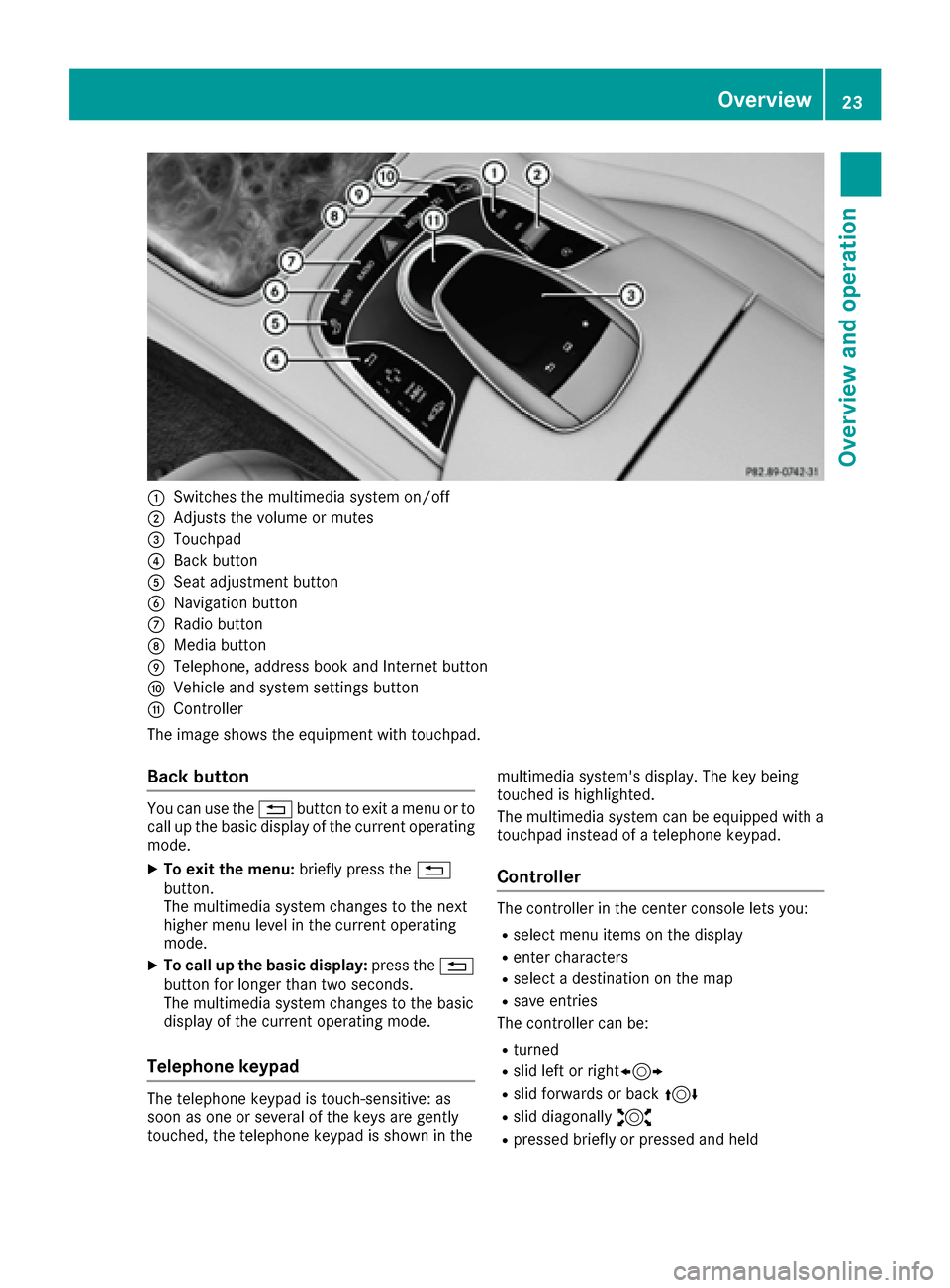
:Switches the multimedia system on/off
;Adjusts the volume or mutes
=Touchpad
?Back button
ASeat adjustment button
BNavigation button
CRadio button
DMedia button
ETelephone, address book and Internet button
FVehicle and system settings button
GController
The image shows the equipment with touchpad.
Back button
You can use the %button to exit a menu or to
call up the basic display of the current operating
mode.
XTo exit the menu: briefly press the%
button.
The multimedia system changes to the next
higher menu level in the current operating
mode.
XTo call up the basic display: press the%
button for longer than two seconds.
The multimedia system changes to the basic
display of the current operating mode.
Telephone keypad
The telephone keypad is touch-sensitive: as
soon as one or several of the keys are gently
touched, the telephone keypad is shown in the multimedia system's display. The key being
touched is highlighted.
The multimedia system can be equipped with a
touchpad instead of a telephone keypad.
Controller
The controller in the center console lets you:
Rselect menu items on the display
Renter characters
Rselect a destination on the map
Rsave entries
The controller can be:
Rturned
Rslid left or right1
Rslid forwards or back 4
Rslid diagonally2
Rpressed briefly or pressed and held
Overview23
Overview and operation
Page 26 of 230
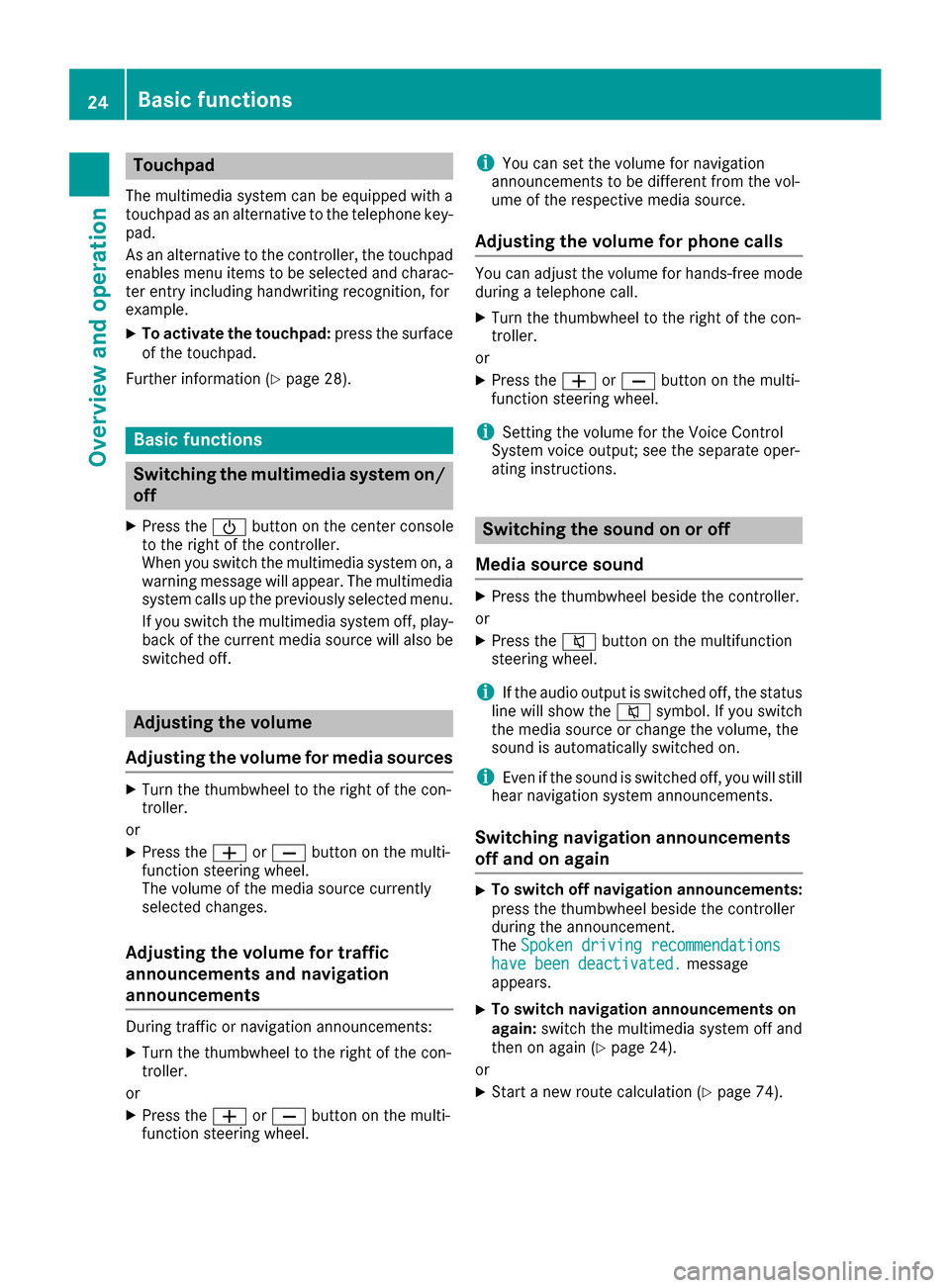
Touchpad
The multimedia system can be equipped with a
touchpad as an alternative to the telephone key-
pad.
As an alternative to the controller, the touchpad
enables menu items to be selected and charac-
ter entry including handwriting recognition, for
example.
XTo activate the touchpad:press the surface
of the touchpad.
Further information (
Ypage 28).
Basic functions
Switching the multimedia system on/
off
XPress the Übutton on the center console
to the right of the controller.
When you switch the multimedia system on, a
warning message will appear. The multimedia
system calls up the previously selected menu.
If you switch the multimedia system off, play-
back of the current media source will also be
switched off.
Adjusting the volume
Adjusting the volume for media sources
XTurn the thumbwheel to the right of the con-
troller.
or
XPress the WorX button on the multi-
function steering wheel.
The volume of the media source currently
selected changes.
Adjusting the volume for traffic
announcements and navigation
announcements
During traffic or navigation announcements:
XTurn the thumbwheel to the right of the con-
troller.
or
XPress the WorX button on the multi-
function steering wheel.
iYou can set the volume for navigation
announcements to be different from the vol-
ume of the respective media source.
Adjusting the volume for phone calls
You can adjust the volume for hands-free mode
during a telephone call.
XTurn the thumbwheel to the right of the con-
troller.
or
XPress the WorX button on the multi-
function steering wheel.
iSetting the volume for the Voice Control
System voice output; see the separate oper-
ating instructions.
Switching the sound on or off
Media source sound
XPress the thumbwheel beside the controller.
or
XPress the 8button on the multifunction
steering wheel.
iIf the audio output is switched off, the status
line will show the 8symbol. If you switch
the media source or change the volume, the
sound is automatically switched on.
iEven if the sound is switched off, you will still
hear navigation system announcements.
Switching navigation announcements
off and on again
XTo switch off navigation announcements:
press the thumbwheel beside the controller
during the announcement.
The Spoken driving recommendations
have been deactivated.message
appears.
XTo switch navigation announcements on
again: switch the multimedia system off and
then on again (
Ypage 24).
or
XStart a new route calculation (Ypage 74).
24Basic functions
Overview and operation
Page 27 of 230
or
XSelect+: while route guidance is active,
show the menu and press the controller
(
Ypage 91).
Function menu
XPress the Õbutton or the ß,$,
%, or Øbutton.
Media: the basic display for the last media
source set appears.
Navigation: the map or the last navigation
menu called up appears.
Radio: the basic menu of the last radio mode
set appears.
Telephone: the basic menu of the telephone
menu appears.
Vehicle functions: the basic display
appears.
XFor radio, media and telephone: press the
$, Õor% button repeatedly.
The menu for the available radio modes,
media sources or communication functions is displayed.
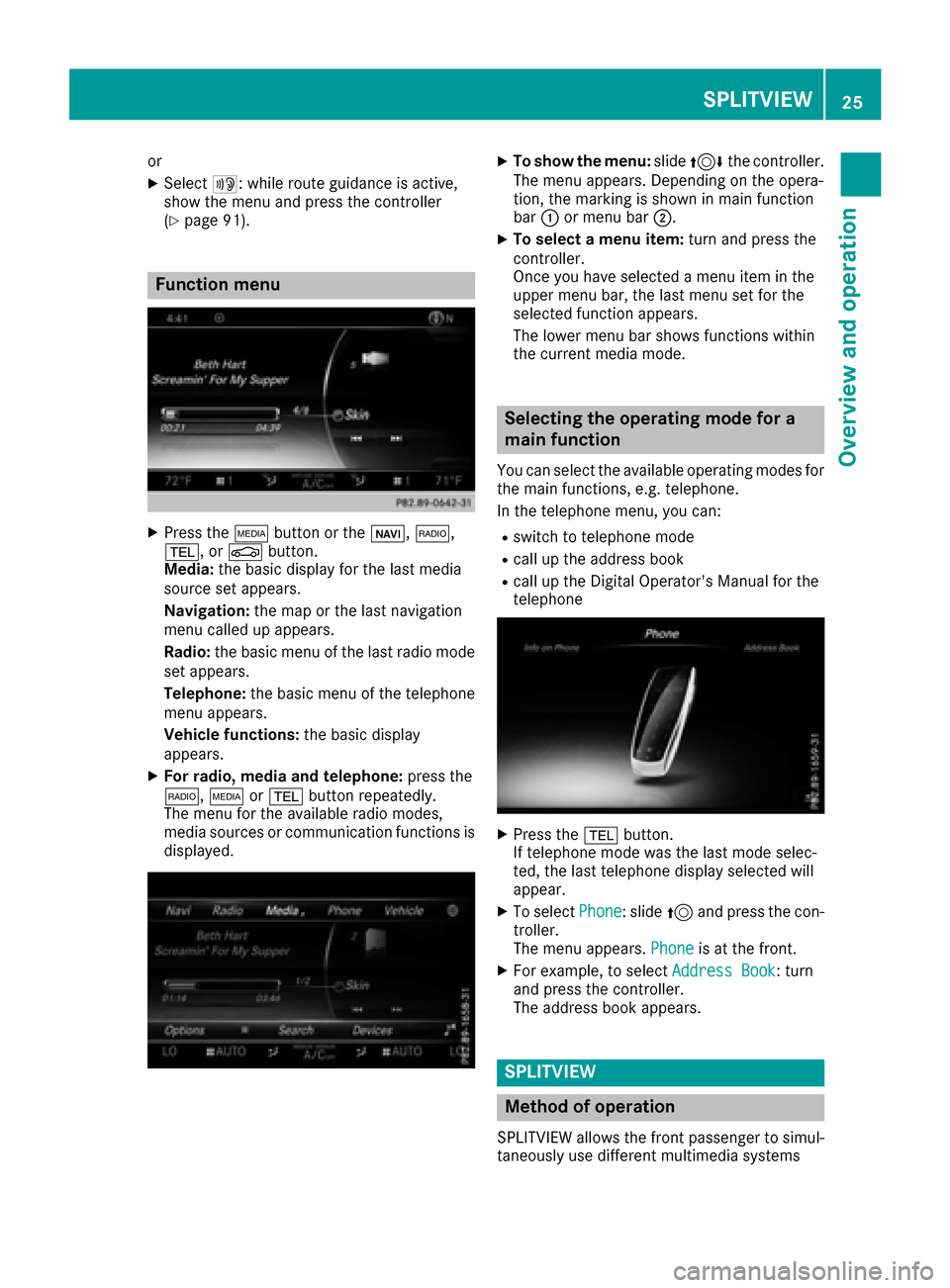
XTo show the menu: slide4 the controller.
The menu appears. Depending on the opera-
tion, the marking is shown in main function
bar :or menu bar ;.
XTo select a menu item: turn and press the
controller.
Once you have selected a menu item in the
upper menu bar, the last menu set for the
selected function appears.
The lower menu bar shows functions within
the current media mode.
Selecting the operating mode for a
main function
You can select the available operating modes for
the main functions, e.g. telephone.
In the telephone menu, you can:
Rswitch to telephone mode
Rcall up the address book
Rcall up the Digital Operator's Manual for the
telephone
XPress the %button.
If telephone mode was the last mode selec-
ted, the last telephone display selected will
appear.
XTo select Phone: slide5and press the con-
troller.
The menu appears. Phone
is at the front.
XFor example, to select Address Book: turn
and press the controller.
The address book appears.
SPLITVIEW
Method of operation
SPLITVIEW allows the front passenger to simul-
taneously use different multimedia systems
SPLITVIEW25
Overview and operation
Page 28 of 230
than the driver. Different content is seen
depending on your perspective when viewing
the display.
The navigation function, for example, can be
used from the driver's side while a video is
watched from the front-passenger side.
SPLITVIEW is operated with the COMAND
remote control from the front-passenger side.
To do so, use the special radio headphones.
Using the headphones on the correct sides
ensures an optimal sound.
You can connect your own headphones to a
special headphones jack. You can use the
COMAND remote control to operate them.
Points to remember
RYou can only adjust the volume for the head-
phones supplied, directly on the headphones.
ROnly entertainment functions, i.e. radio, TV,
video and Internet, for example, may be usedwith SPLITVIEW.
RVideos cannot be shown on the driver's side
while the vehicle is in motion.
RIf media from different sources are used,
these can be used separately from the driv-
er's and front-passenger sides.
Example:
A medium is being played on the DVD changeron the driver's side. It is not possible for the
front passenger to play any other medium
that is inserted in the DVD changer from the
front-passenger side. However, other media
can be used on the front-passenger side at
the same time, including the radio, memory
card, MEDIA REGISTER, Media Interface, USB
or AUX.
RIf you use the same medium on both the driv-
er's and front passenger sides, settings can
be made from both sides. In this case, the last
setting made takes precedence.
RRequirement for Internet use (USA): mbrace
must be activated for Internet access in the
multimedia system on the driver's side
(
Ypage 142).
RRequirement for Internet use (Canada): a
mobile phone must be connected via Blue-
tooth
®or USB to the multimedia system on
the driver's side (Ypage 142).
RThe Internet can be separately used by both
the driver and front passenger at the same
time.
RThe multifunction steering wheel can be used
to control the functions which relate to the
driver's side, but not for the front-passenger
side.
RThe driver can lock or unlock the other
screens (override feature) (Ypage 63).
Switching SPLITVIEW on/off
From the driver's side
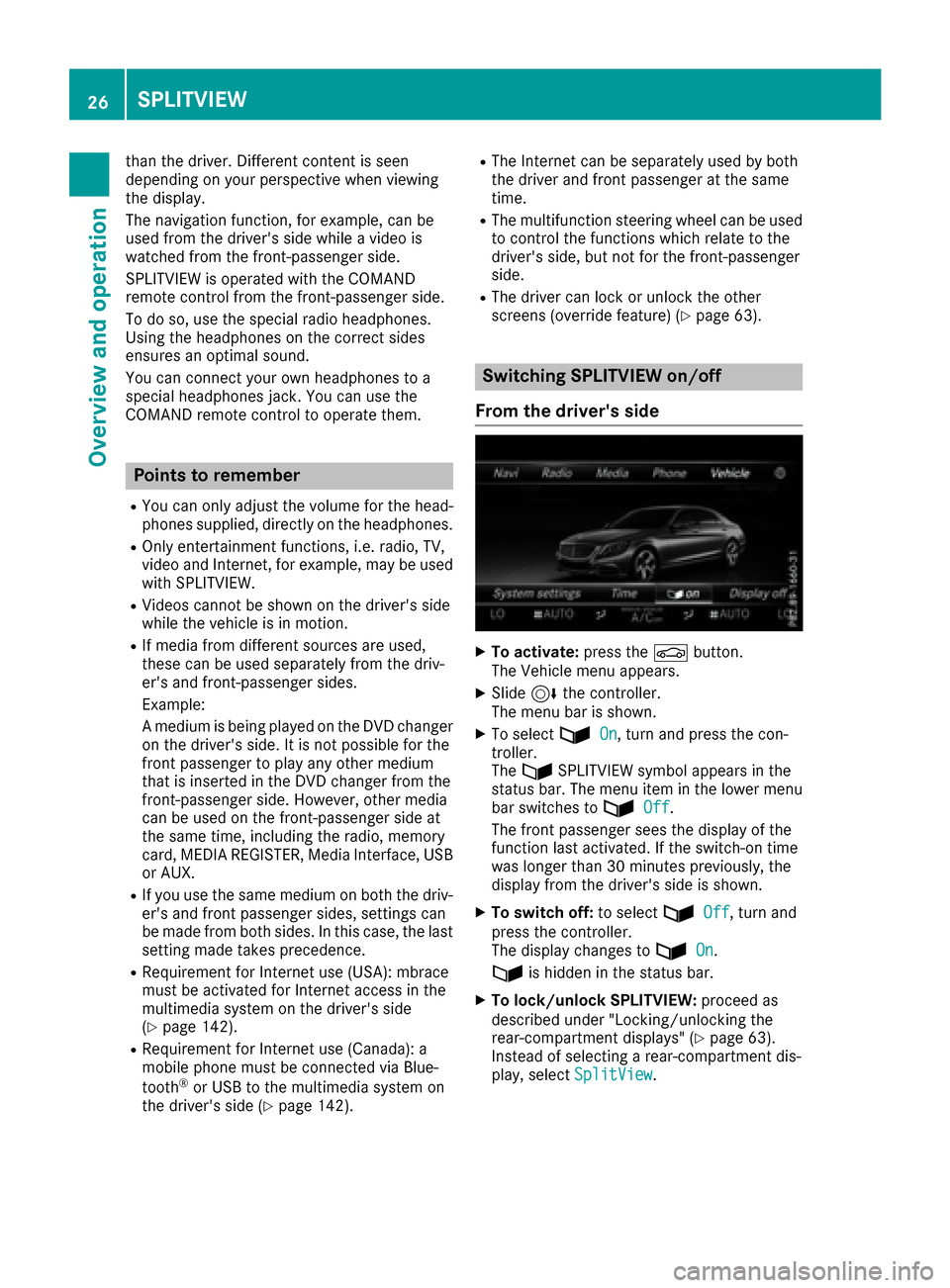
XTo activate: press theØbutton.
The Vehicle menu appears.
XSlide 6the controller.
The menu bar is shown.
XTo select ùOn, turn and press the con-
troller.
The ù SPLITVIEW symbol appears in the
status bar. The menu item in the lower menu
bar switches to ù
Off.
The front passenger sees the display of the
function last activated. If the switch-on time
was longer than 30 minutes previously, the
display from the driver's side is shown.
XTo switch off: to selectùOff, turn and
press the controller.
The display changes to ù
On.
ù is hidden in the status bar.
XTo lock/unlock SPLITVIEW: proceed as
described under "Locking/unlocking the
rear-compartment displays" (
Ypage 63).
Instead of selecting a rear-compartment dis-
play, select SplitView
.
26SPLITVIEW
Overviewand operation
Page 30 of 230
XSelect a search position, e.g.IntheVicin‐ity of the Destination.
A menu appears.
XSelect the type of search query.
An input field appears.
XEnter the destination using the COMAND
remote control and press the bbutton.
The Google™ results list appears.
XSelect the destination using the COMAND
remote control.
A menu appears.
XSelect Set as Destination.
XA prompt appears on the driver's side.
XSelectYesorNo.
If you select Yes, the navigation data is used
for route guidance.
Touchpad
Touchpad overview
!
Do not use any sharp objects on the touch-
pad. This could damage the touchpad.
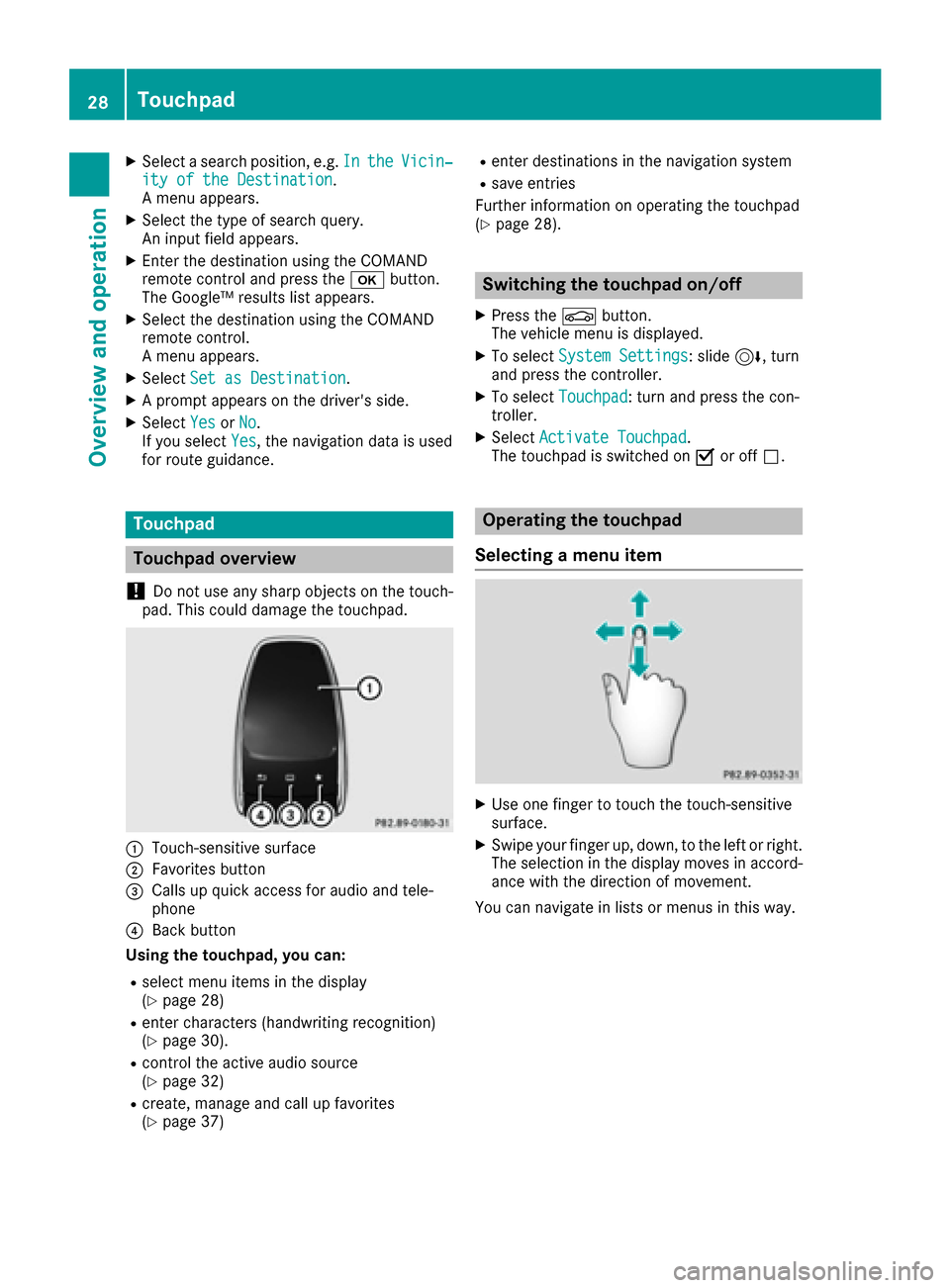
:Touch-sensitive surface
;Favorites button
=Calls up quick access for audio and tele-
phone
?Back button
Using the touchpad, you can:
Rselect menu items in the display
(Ypage 28)
Renter characters (handwriting recognition)
(Ypage 30).
Rcontrol the active audio source
(Ypage 32)
Rcreate, manage and call up favorites
(Ypage 37)
Renter destinations in the navigation system
Rsave entries
Further information on operating the touchpad
(
Ypage 28).
Switching the touchpad on/off
XPress the Øbutton.
The vehicle menu is displayed.
XTo select System Settings: slide6, turn
and press the controller.
XTo select Touchpad: turn and press the con-
troller.
XSelect Activate Touchpad.
The touchpad is switched on Oor off ª.
Operating the touchpad
Selecting a menu item
XUse one finger to touch the touch-sensitive
surface.
XSwipe your finger up, down, to the left or right.
The selection in the display moves in accord- ance with the direction of movement.
You can navigate in lists or menus in this way.
28Touchpad
Overview and operation
Page 37 of 230
XTo change the country setting for the
character bar:switch to the bottom line of
the character bar by sliding 6the control-
ler.
XTo select B: turn and press the controller.
The available languages are displayed.
XTo select the language: turn and press the
controller.
The country setting for the character bar has
been changed.
Functions in the character bar
RÄ
Switches between digits and symbols
R*
Switches to upper-case/lower-case letters
RB
Changes the country setting for the character
bar
R
Deletes a character/an entry
R45
Selects the input line
R23
Moves the cursor within the input line
R¬
Confirms an entry
R&
Cancels input
RS
Inserts a paragraph
Character entry (navigation)
Character entry options
You can enter characters using the controller, or the telephone keypad or the touchpad, depend-
ing on the vehicle equipment. With the control-
ler, you enter characters using a character bar.
By pressing the corresponding key one or more
times, you can enter the characters via the tele-
phone keypad. To enter using the touchpad,
draw the character in the entry field. The multi-
media system supports this using a handwriting
recognition function.
Entering characters using the charac-
ter bar
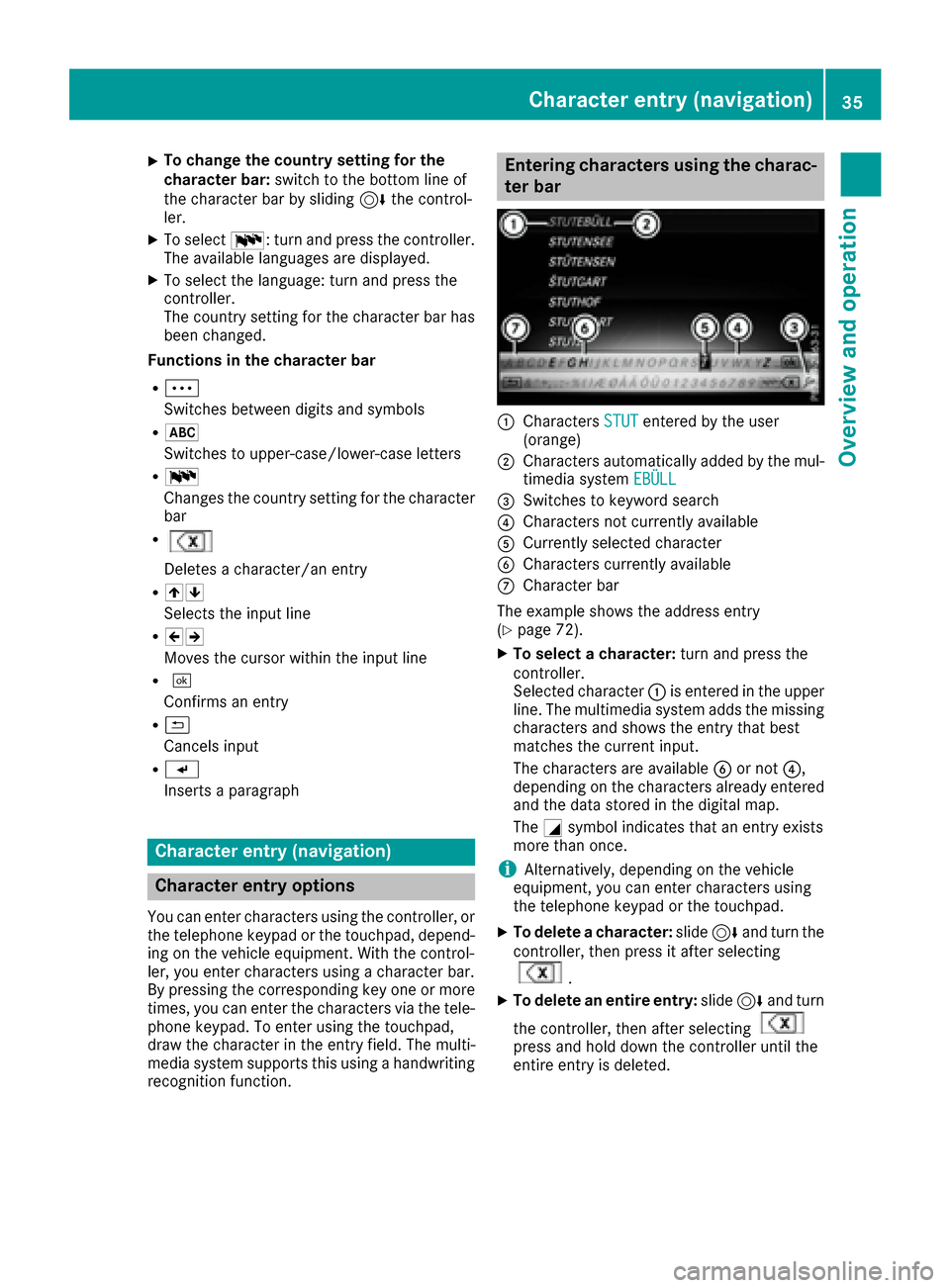
:Characters STUTentered by the user
(orange)
;Characters automatically added by the mul-
timedia system EBÜLL
=Switches to keyword search
?Characters not currently available
ACurrently selected character
BCharacters currently available
CCharacter bar
The example shows the address entry
(
Ypage 72).
XTo select a character: turn and press the
controller.
Selected character :is entered in the upper
line. The multimedia system adds the missing
characters and shows the entry that best
matches the current input.
The characters are available Bor not ?,
depending on the characters already entered and the data stored in the digital map.
The Gsymbol indicates that an entry exists
more than once.
iAlternatively, depending on the vehicle
equipment, you can enter characters using
the telephone keypad or the touchpad.
XTo delete a character: slide6and turn the
controller, then press it after selecting
.
XTo delete an entire entry: slide6and turn
the controller, then after selecting
press and hold down the controller until the
entire entry is deleted.
Character entry (navigation)35
Overview and operation
Page 42 of 230
Additional display area
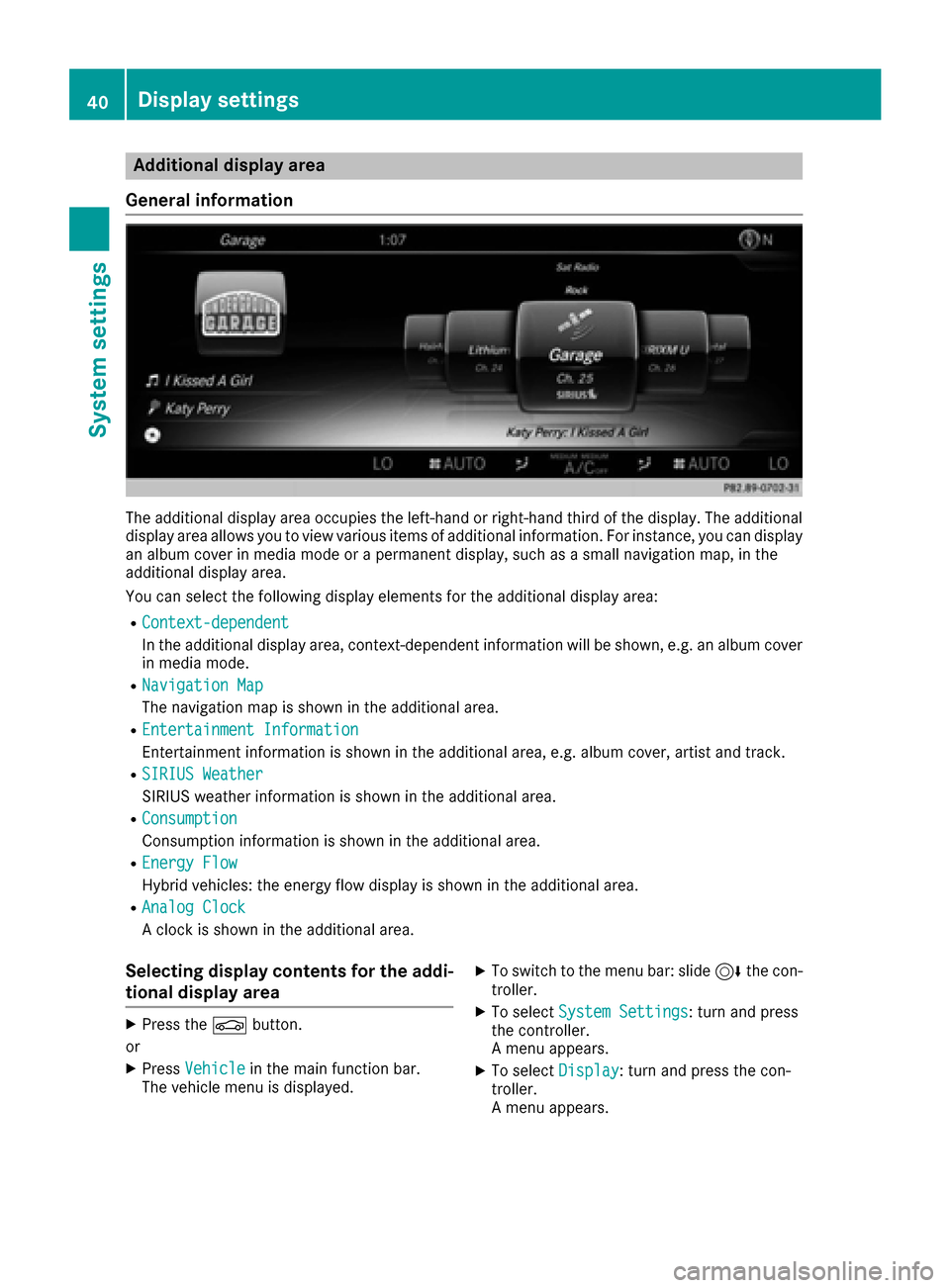
Gene ral information
The additional display area occupies the left-hand or right-hand third of the display. The additional
display area allows you to view various items of additional information. Forinstance , you can display
an album cover in media mode or a permanent display, such as a small navigation map, in the
additional display area.
You can select the following display elements for the additional display area:
RContext-dependent
In th e additional display area, context-dependent information will be shown, e.g. an album cover
in media mode.
RNavigatio nMap
The navigation map is shown in the additional area.
REntertainmen tInformation
Entertainment information is shown in the additional area, e.g. album cover, artist and track.
RSIRIUS Weathe r
SIRIUS weather information is shown in the additional area.
RConsumption
Consumption information is shown in the additional area.
REnergy Flow
Hybrid vehicles: the energy flow display is shown in the additional area.
RAnalog Clock
A clock is shown in the additional area.
Selecting display contents for the addi-
tional display area
XPress theØ button.
or
XPress Vehicl ein the main function bar.
The vehicle menu is displayed.
XTo switch to th e menu bar: slide 6thecon-
troller.
XTo select System Settings: turnand press
th econtroller.
A menu appears.
XTo select Display: turnand press th econ-
troller.
A menu appears.
40Display settings
System settings
Page 43 of 230
XSelectAdditional Display Area.
A menu appears.
XTo select the desired display element: turn
and press the controller.
The #dot indicates the current setting.
Switching the display on/off
XPress the Øbutton.
or
XPress Vehiclein the main function bar.
The vehicle menu is displayed.
XSlide 6the controller.
XTo select Display Off: turn and press the
controller.
The display goes out.
XTo switch the display on again: press the
controller.
Time settings
General information
The multimedia system can automatically set
the time and date.
The following navigation system functions
require the time, time zone and summer/stand-
ard time to be set correctly in order to work
properly:
Rroute guidance on routes with time-depend-
ent traffic guidance
Rcalculation of expected time of arrival
Switching automatic time on and off
The Automatic Time Settingsfunction is
used to activate or deactivate the automatic
setting of the time and date. This function is
activated when the vehicle leaves the factory.
XPress the Øbutton.
or
XPress Vehiclein the main function bar.
The vehicle menu is displayed.
XTo switch to the menu bar: slide 6the con-
troller.
XTo select Time: turn and press the controller.
A menu appears.
XTo switch AutomaticTimeSettingsonO
or off ª: turn and press the controller.
Setting the time zone
To set the time zone, the Automatic TimeSettingsfunction must be activated
(Ypage 41).
XPress the Øbutton.
or
XPress Vehiclein the main function bar.
The vehicle menu is displayed.
XTo switch to the menu bar: slide 6the con-
troller.
XTo select Time: turn and press the controller.
A menu appears.
XTo select Time Zone:: turn and press the
controller.
A list of countries appears. The #dot indi-
cates the current setting.
XSelect the country you are currently in by
turning and pressing the controller.
The country is accepted. A time zone list may
also be displayed, depending on the country
selected.
XTo select the desired time zone: turn and
press the controller.
The time zone is accepted.
A list of available options for setting summer
time appears (
Ypage 41).
Setting summer and standard time
Using the Daylight Saving Timefunction,
you can set the automatic changeover to sum-
mer time or switch the summer time settings on and off. The changeover to summer time advan-
ces the time by one hour.
The Daylight
SavingTimefunction or Auto‐maticoption is not available in all countries.
XPress theØbutton.
or
XPress Vehiclein the main function bar.
The vehicle menu is displayed.
Time settings41
System settings
Z
Page 48 of 230
Switching Near Field Communication
on/off
XPress theØbutton.
The Vehiclemenu appears.
XTo switch to the menu bar: slide 6the con-
troller.
XTo select System Settings: turn and press
the controller.
A menu appears.
XTo switch Near Field Communicationon
O or off ª: turn and press the controller.
Automatic volume adjustment
General information
With the AutomaticVolumeAdjustmentfunc-
tion, the volumes of different audio sources are
adjusted for each other, to compensate for rel-
ative differences in volume.
For example: changing from a relatively quiet to
a relatively loud radio station. The volume for
both stations sounds the same. Manual read-
justment of the volume is not required.
The Automatic Volume Adjustment
function
is deactivated ªwhen the vehicle leaves the
factory. Using this function, the dynamic range
of the music is slightly reduced. To make the
most of the audiophile sound quality, it is rec-
ommended to leave it off.
Switching the automatic volume
adjustment on/off
XPress the Øbutton.
or
XPress Vehiclein the main function bar.
The vehicle menu is displayed.
XTo switch to the menu bar: slide 6the con-
troller.
XTo select System Settings: turn and press
the controller.
A menu appears.
XTo select Automatic Volume Adjustment:
turn and press the controller.
Switch the Automatic Volume Adjustment
function on Oor off ª.
Setting the system language
General information
This function allows you to determine the lan-
guage for the menu displays and the navigation
messages. The selected language affects the
characters available for entry.
iThe navigation announcements are not
available in all languages. If a language is not
available, the navigation announcements will
be in English.
iWhen you set the system language, the lan-
guage of the Voice Control System will
change accordingly. If it is not supported by
the Voice Control System, English will be
selected.
Setting the system language
XPress the Øbutton.
or
XPress Vehiclein the main function bar.
The vehicle menu is displayed.
XTo switch to the menu bar: slide 6the con-
troller.
XTo select System Settings: turn and press
the controller.
A menu appears.
XTo select Language: turn and press the con-
troller.
The list of languages appears. The #dot indi-
cates the current setting.
XSelect the desired language.
The multimedia system loads the selected
language and sets it.
Assigning a favorites button
On vehicles with a touchpad, the FavoriteFunctionsfunction can be called up via the
system menu or via the favorites button on the
touchpad.
Calling up the Favorites function via the sys-
tem menu
XPress the Øbutton.
or
XPress Vehiclein the main function bar.
The vehicle menu is displayed.
46Assigning a favorites button
System settings