navigation system MERCEDES-BENZ S-Class MAYBACH 2017 W222 Comand Manual
[x] Cancel search | Manufacturer: MERCEDES-BENZ, Model Year: 2017, Model line: S-Class MAYBACH, Model: MERCEDES-BENZ S-Class MAYBACH 2017 W222Pages: 230, PDF Size: 8.27 MB
Page 91 of 230
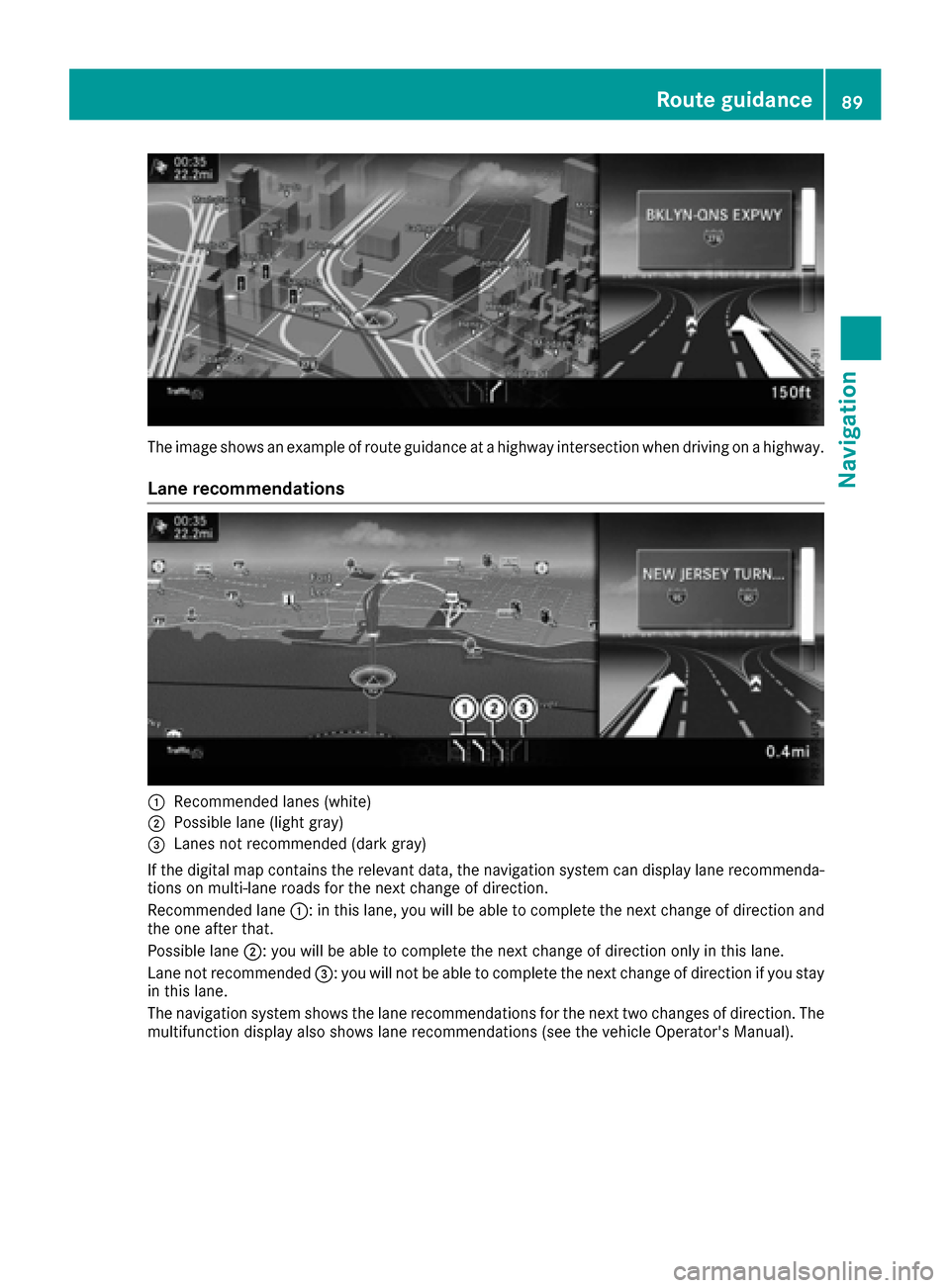
The image shows an example of route guidance at a highway intersection when driving on a highway.
Lane recommendations
:Recommended lanes (white)
;Possible lane (light gray)
=Lanes not recommended (dark gray)
If the digital map contains the relevant data, the navigation system can display lane recommenda-
tions on multi-lane roads for the next change of direction.
Recommended lane :: in this lane, you will be able to complete the next change of direction and
the one after that.
Possible lane ;: you will be able to complete the next change of direction only in this lane.
Lane not recommended =: you will not be able to complete the next change of direction if you stay
in this lane.
The navigation system shows the lane recommendations for the next two changes of direction. The multifunction display also shows lane recommendations (see the vehicle Operator's Manual).
Route guidance89
Navigation
Z
Page 94 of 230
Switching navigation announcements
on/off
XTo switch off navigation announcements:
during a navigation announcement, press thethumbwheel to the right of the controller.
or
XPress the 8button on the multifunction
steering wheel during a navigation message.
The Spoken driving recommendations
have been deactivated.message
appears.
XTo switch navigation announcements
back on: press the controller.
XSelect+: turn and press the controller.
The multimedia system automatically switches
the navigation announcements back on when:
Ra new route is calculated
Rthe vehicle is started
A navigation message is given if the route is
recalculated during dynamic route guidance due
to new traffic reports (
Ypage 96).
Canceling/continuing route guidance
Canceling route guidance
XTo show the menu: slide6the controller.
XTo select Destination: turn and press the
controller.
XSelect Cancel Active Route Guidance.
The blue route line is no longer shown on the
map.
Resuming route guidance
XTo show the menu: slide6the controller.
XTo select Destination: turn and press the
controller.
XSelect Continue Route Guidance.
A new route is calculated.
Route information
Destination information
XTo switch to navigation mode: press theØbutton.
XTo show the menu: slide6the controller.
XTo select Route: turn and press the controller.
XSelectDestination Information.
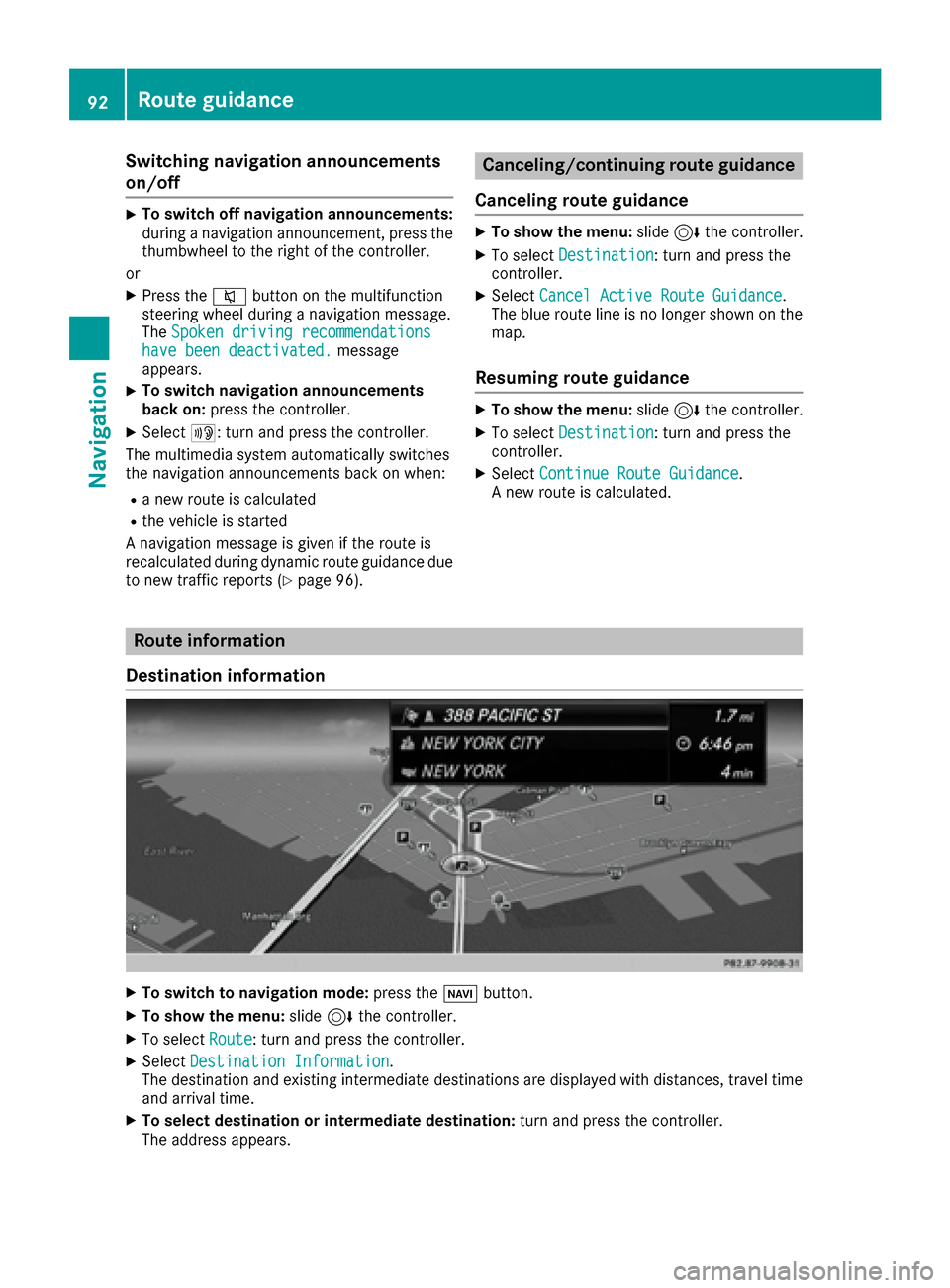
The destination and existing intermediate destinations are displayed with distances, travel time
and arrival time.
XTo select destination or intermediate destination: turn and press the controller.
The address appears.
92Route guidance
Navigation
Page 95 of 230
XSelectSave.
The destination or intermediate destination can be saved as:
Ra navigable address book contact
Ra home address
XTo call up the map, select Map.
XMove the map, change the map scale and select the destination or the intermediate destination
(Ypage 80).
XTo call the destination or intermediate destination, select Call.
If a phone is connected and a phone number is available, the multimedia system switches to the
telephone function.
Taking an alternative route
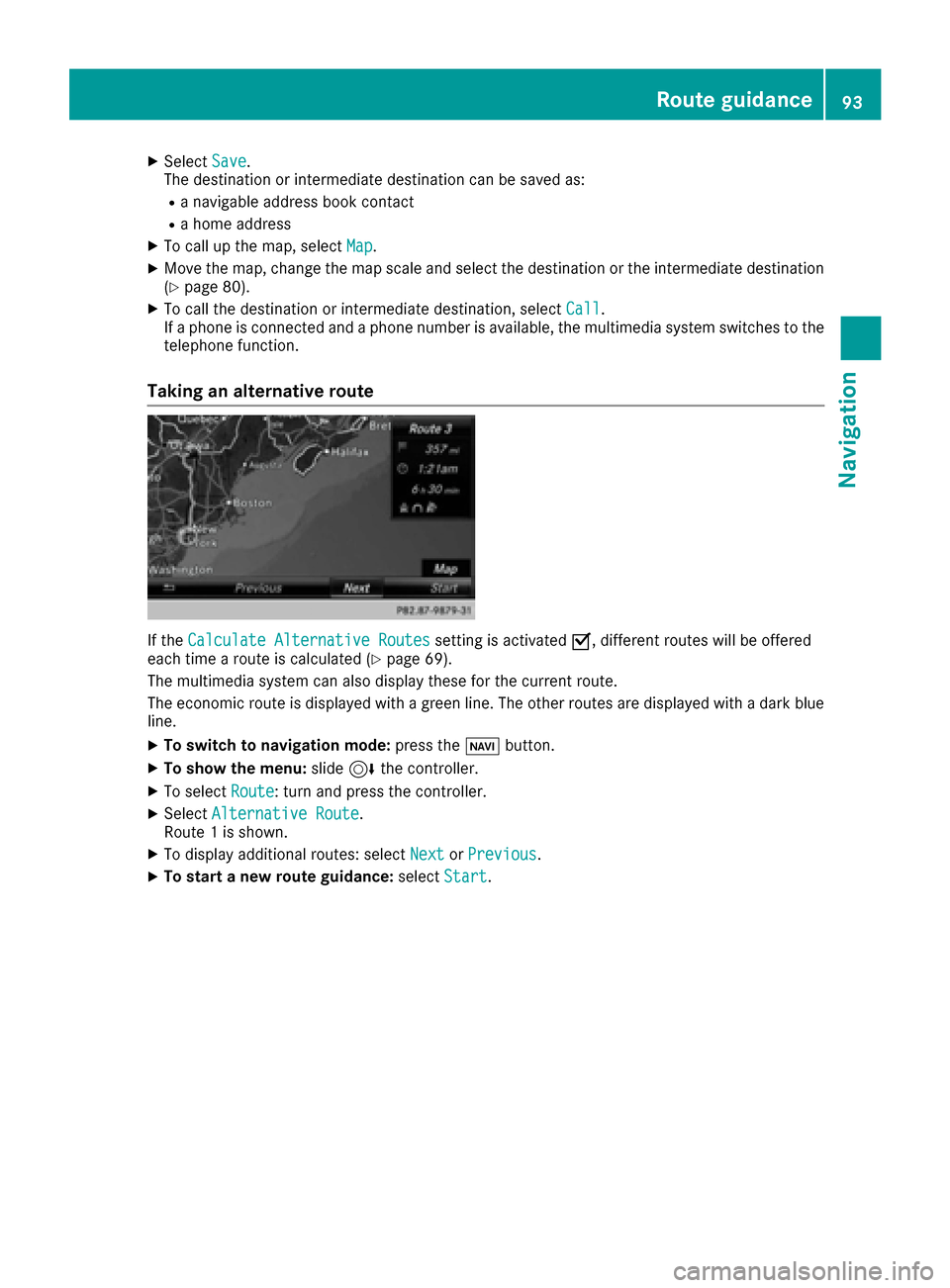
If the Calculate Alternative Routessetting is activated O, different routes will be offered
each time a route is calculated (Ypage 69).
The multimedia system can also display these for the current route.
The economic route is displayed with a green line. The other routes are displayed with a dark blue
line.
XTo switch to navigation mode: press theØbutton.
XTo show the menu: slide6the controller.
XTo select Route: turn and press the controller.
XSelectAlternative Route.
Route 1 is shown.
XTo display additional routes: select NextorPrevious.
XTo start a new route guidance: selectStart.
Route guidance93
Navigation
Z
Page 97 of 230
Traffic jam function
XTo switch to navigation mode:press the
Ø button.
XTo show the menu: slide6the controller.
XTo select Route: turn and press the controller.
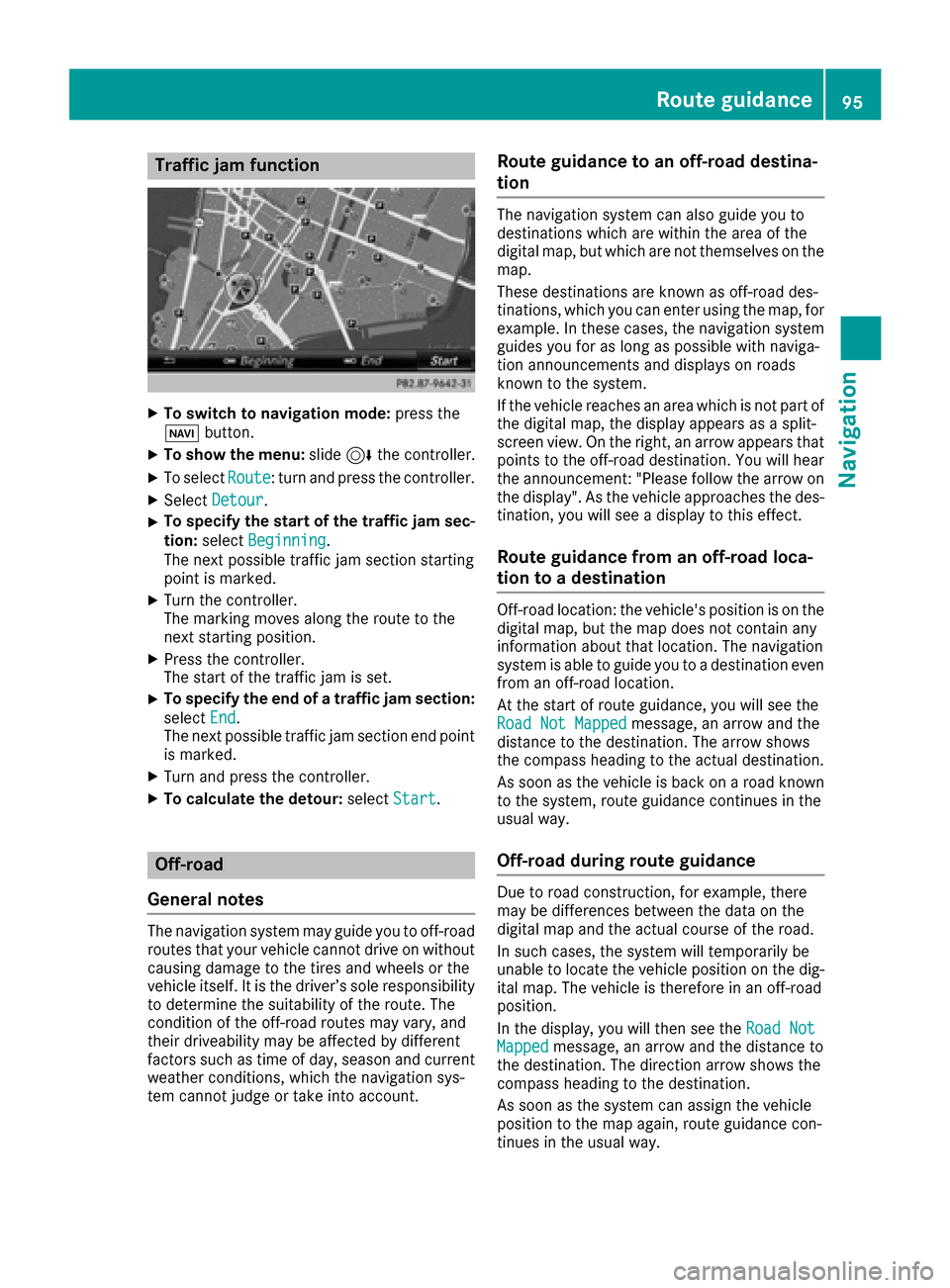
XSelectDetour.
XTo specify the start of the traffic jam sec-
tion: select Beginning
.
The next possible traffic jam section starting
point is marked.
XTurn the controller.
The marking moves along the route to the
next starting position.
XPress the controller.
The start of the traffic jam is set.
XTo specify the end of a traffic jam section:
select End
.
The next possible traffic jam section end point
is marked.
XTurn and press the controller.
XTo calculate the detour: selectStart.
Off-road
General notes
The navigation system may guide you to off-road
routes that your vehicle cannot drive on without
causing damage to the tires and wheels or the
vehicle itself. It is the driver’s sole responsibility to determine the suitability of the route. The
condition of the off-road routes may vary, and
their driveability may be affected by different
factors such as time of day, season and current
weather conditions, which the navigation sys-
tem cannot judge or take into account.
Route guidance to an off-road destina-
tion
The navigation system can also guide you to
destinations which are within the area of the
digital map, but which are not themselves on the
map.
These destinations are known as off-road des-
tinations, which you can enter using the map, for
example. In these cases, the navigation system
guides you for as long as possible with naviga-
tion announcements and displays on roads
known to the system.
If the vehicle reaches an area which is not part of the digital map, the display appears as a split-
screen view. On the right, an arrow appears that
points to the off-road destination. You will hear
the announcement: "Please follow the arrow on
the display". As the vehicle approaches the des- tination, you will see a display to this effect.
Route guidance from an off-road loca-
tion to a destination
Off-road location: the vehicle's position is on the
digital map, but the map does not contain any
information about that location. The navigation
system is able to guide you to a destination even
from an off-road location.
At the start of route guidance, you will see the
Road Not Mapped
message, an arrow and the
distance to the destination. The arrow shows
the compass heading to the actual destination.
As soon as the vehicle is back on a road known
to the system, route guidance continues in the
usual way.
Off-road during route guidance
Due to road construction, for example, there
may be differences between the data on the
digital map and the actual course of the road.
In such cases, the system will temporarily be
unable to locate the vehicle position on the dig-
ital map. The vehicle is therefore in an off-road
position.
In the display, you will then see the Road Not
Mappedmessage, an arrow and the distance to
the destination. The direction arrow shows the
compass heading to the destination.
As soon as the system can assign the vehicle
position to the map again, route guidance con-
tinues in the usual way.
Route guidance95
Navigation
Z
Page 98 of 230
Real-time traffic reports
Requirements
i
This function is currently not available for
Canada.
In order to receive real-time traffic reports via
satellite radio, you need to subscribe to SIRIUS
XM Satellite Radio Traffic Message Service. Further information on satellite radio
(
Ypage 158).
The multimedia system can receive traffic
reports via satellite radio and take account of
these for route guidance in the navigation sys-
tem. Received traffic reports are displayed on
the map either as text or as symbols.
Real-time traffic reports on the map
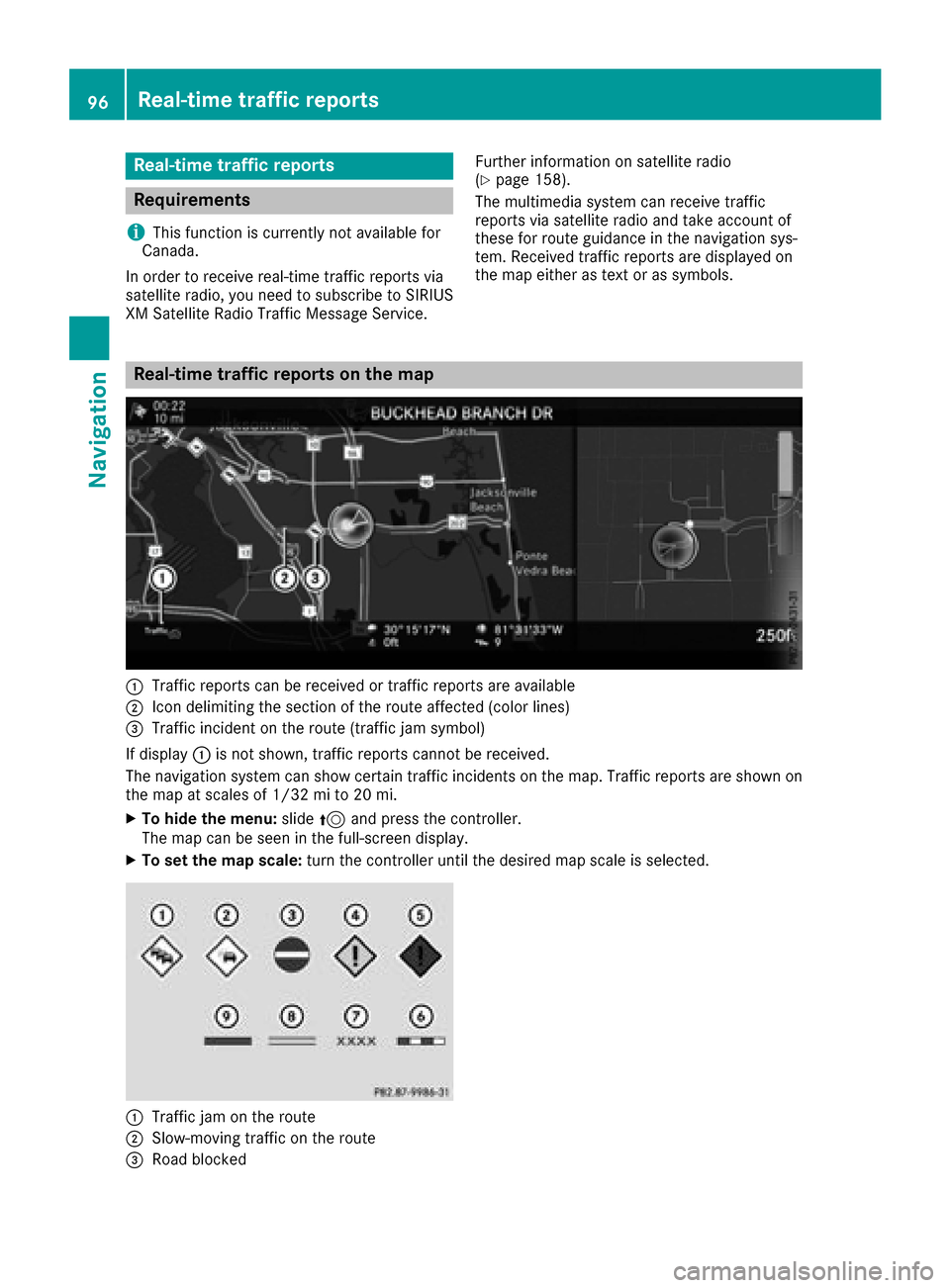
:Traffic reports can be received or traffic reports are available
;Icon delimiting the section of the route affected (color lines)
=Traffic incident on the route (traffic jam symbol)
If display :is not shown, traffic reports cannot be received.
The navigation system can show certain traffic incidents on the map. Traffic reports are shown on
the map at scales of 1/32 mi to 20 mi.
XTo hide the menu: slide5and press the controller.
The map can be seen in the full-screen display.
XTo set the map scale: turn the controller until the desired map scale is selected.
:Traffic jam on the route
;Slow-moving traffic on the route
=Road blocked
96Real-time traffic reports
Navigation
Page 100 of 230
theMessagesOnRoutemenu item is gray and
cannot be selected.
XTo switch to navigation mode: press the
Ø button.
XTo show the menu: slide6the controller.
XTo select Traffic: turn and press the con-
troller.
XTo select Messages On Route: turn and
press the controller.
The traffic report window appears. Several
traffic reports may be available for the calcu-
lated route, marked for example by 1/3.
The report shows the following information:
RState/province, road and display of the
affected direction
RSection of the road to which the traffic
report applies
RTraffic icon and traffic report
XTo display the next/previous traffic
report: turn the controller.
XTo close the display: press the%button.
Displaying all traffic reports
XTo switch to navigation mode: press the
Ø button.
XTo show the menu: slide6the controller.
XTo select Traffic: turn and press the con-
troller.
XTo select All Messages: turn and press the
controller.
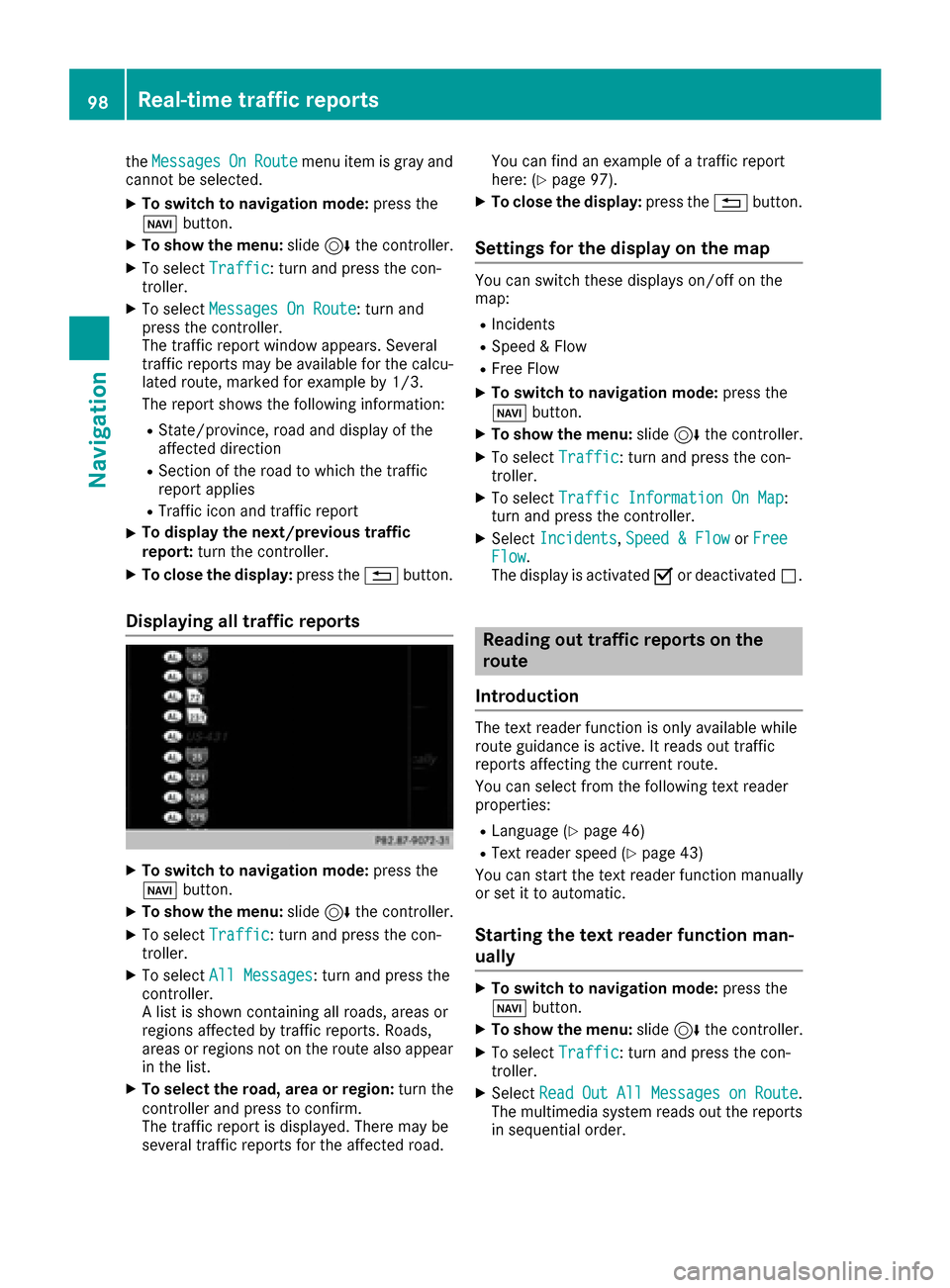
A list is shown containing all roads, areas or
regions affected by traffic reports. Roads,
areas or regions not on the route also appear
in the list.
XTo select the road, area or region: turn the
controller and press to confirm.
The traffic report is displayed. There may be
several traffic reports for the affected road. You can find an example of a traffic report
here: (
Ypage 97).
XTo close the display:
press the%button.
Settings for the display on the map
You can switch these displays on/off on the
map:
RIncidents
RSpeed & Flow
RFree Flow
XTo switch to navigation mode: press the
Ø button.
XTo show the menu: slide6the controller.
XTo select Traffic: turn and press the con-
troller.
XTo select Traffic Information On Map:
turn and press the controller.
XSelect Incidents,Speed & Flowor FreeFlow.
The display is activated Oor deactivated ª.
Reading out traffic reports on the
route
Introduction
The text reader function is only available while
route guidance is active. It reads out traffic
reports affecting the current route.
You can select from the following text reader
properties:
RLanguage (Ypage 46)
RText reader speed (Ypage 43)
You can start the text reader function manually
or set it to automatic.
Starting the text reader function man-
ually
XTo switch to navigation mode: press the
Ø button.
XTo show the menu: slide6the controller.
XTo select Traffic: turn and press the con-
troller.
XSelect ReadOutAllMessagesonRoute.
The multimedia system reads out the reports in sequential order.
98Real-time traffic reports
Navigation
Page 101 of 230
If there are no reports for the route, theReadOut All Messages on Routemenu item is
gray and cannot be selected.
XTo cancel the read-aloud function: select
Cancel Read-Aloud Function
.
The multimedia system reads the current
report aloud and then exits the read-aloud
function.
Automatic text reader function
XTo switch to navigation mode: press the
Ø button.
XTo show the menu: slide6the controller.
XTo select Traffic: turn and press the con-
troller.
XSelect Read Traffic AnnouncementsAutomatically.
Depending on the previous status, switch the
option on Oor off ª.
Recalculating the route dynamically
TheDynamicTrafficRouteroute type takes
into account all of the traffic reports it receives
for the current route when calculating the route
(
Ypage 69).
If you have selected Dynamic Traffic Route
as the route type, the multimedia system guides
you to your destination along the updated route.
Storing destinations
General notes
If a route to a destination has been calculated,
the destination is saved to the last destinations
memory. If the memory is full, the oldest desti-
nation is overwritten. When you save the current
vehicle position or a crosshair position, this
position is stored in the "Last destinations"
memory.
You can save destinations permanently in the
address book and on an SD card. For instance,
this is possible immediately after entering an
address.
Requirements: the SD card has the FAT data
system format (e.g. FAT32).
iEquipment with touchpad: alternatively, you
can carry out these steps on the touchpad
(
Ypage 28).
Storing the destination in the address
book
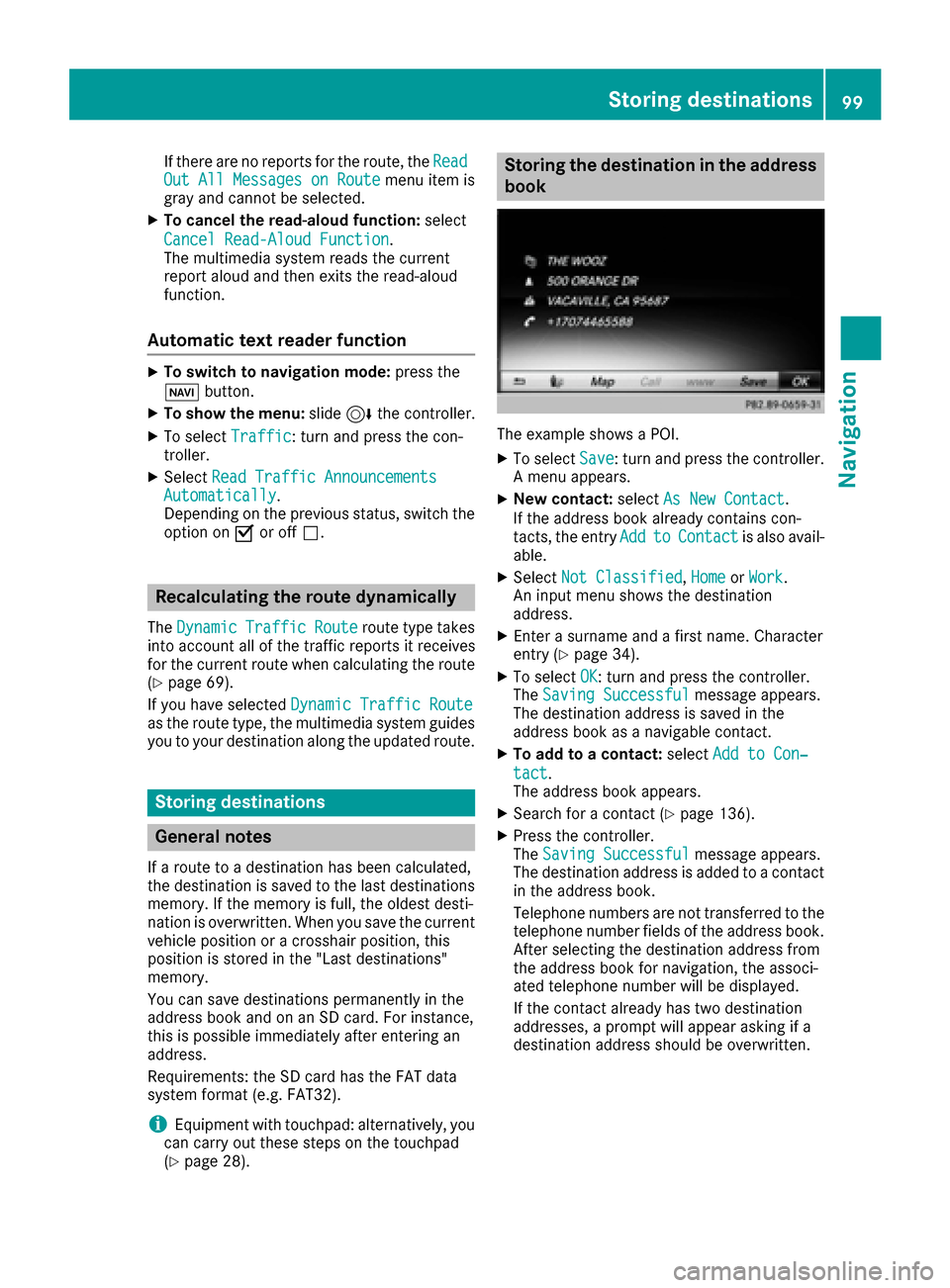
The example shows a POI.
XTo select Save: turn and press the controller.
A menu appears.
XNew contact: selectAs New Contact.
If the address book already contains con-
tacts, the entry Add
toContactis also avail-
able.
XSelect Not Classified,Homeor Work.
An input menu shows the destination
address.
XEnter a surname and a first name. Character
entry (Ypage 34).
XTo select OK: turn and press the controller.
The Saving Successfulmessage appears.
The destination address is saved in the
address book as a navigable contact.
XTo add to a contact: selectAdd to Con‐
tact.
The address book appears.
XSearch for a contact (Ypage 136).
XPress the controller.
The Saving Successfulmessage appears.
The destination address is added to a contact in the address book.
Telephone numbers are not transferred to the
telephone number fields of the address book.
After selecting the destination address from
the address book for navigation, the associ-
ated telephone number will be displayed.
If the contact already has two destination
addresses, a prompt will appear asking if a
destination address should be overwritten.
Storing destinations99
Navigation
Z
Page 103 of 230
XTo selectDeleteorDelete All: turn and
press the controller.
A prompt appears.
XSelect YesorNo.
Selecting Yesdeletes the selected destina-
tion or all destinations.
Map functions
General notes
Company logos displayed on the map are trademarks of the respective companies and used solely
for the purpose of indicating the locations of these companies. The use of such logos on the map
does not indicate approval of, support of or advertising by these companies for the navigation
system itself.
iEquipment with a touchpad: alternatively you can carry out this operation using the touchpad
(Ypage 28).
Map settings
Setting the map scale
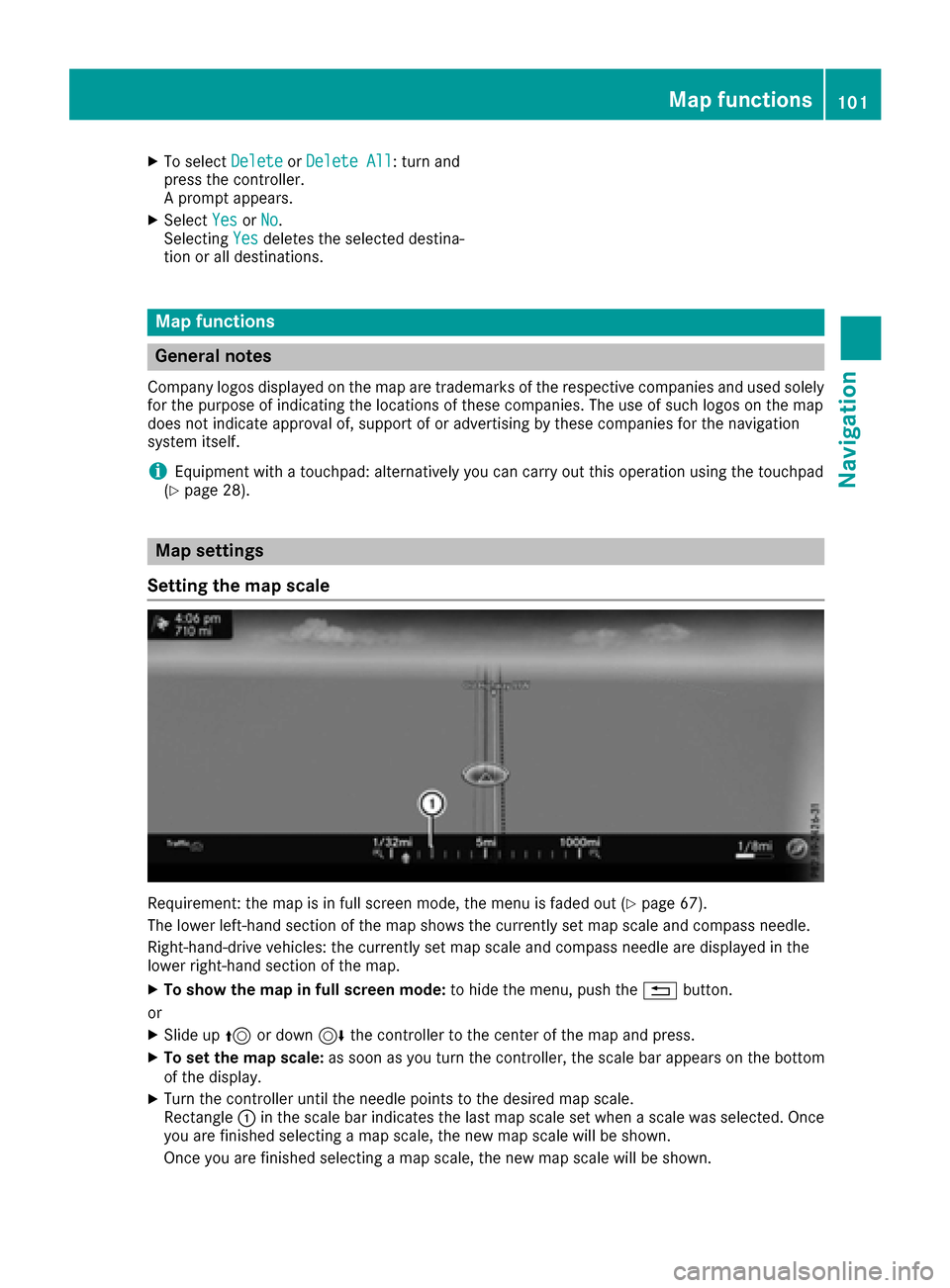
Requirement: the map is in full screen mode, the menu is faded out (Ypage 67).
The lower left-hand section of the map shows the currently set map scale and compass needle.
Right-hand-drive vehicles: the currently set map scale and compass needle are displayed in the
lower right-hand section of the map.
XTo show the map in full screen mode: to hide the menu, push the%button.
or
XSlide up 5or down 6the controller to the center of the map and press.
XTo set the map scale: as soon as you turn the controller, the scale bar appears on the bottom
of the display.
XTurn the controller until the needle points to the desired map scale.
Rectangle :in the scale bar indicates the last map scale set when a scale was selected. Once
you are finished selecting a map scale, the new map scale will be shown.
Once you are finished selecting a map scale, the new map scale will be shown.
Map functions101
Navigation
Z
Page 107 of 230
Other functions:
RMoving the map (Ypage 68)
RSetting the map scale (Ypage 101)
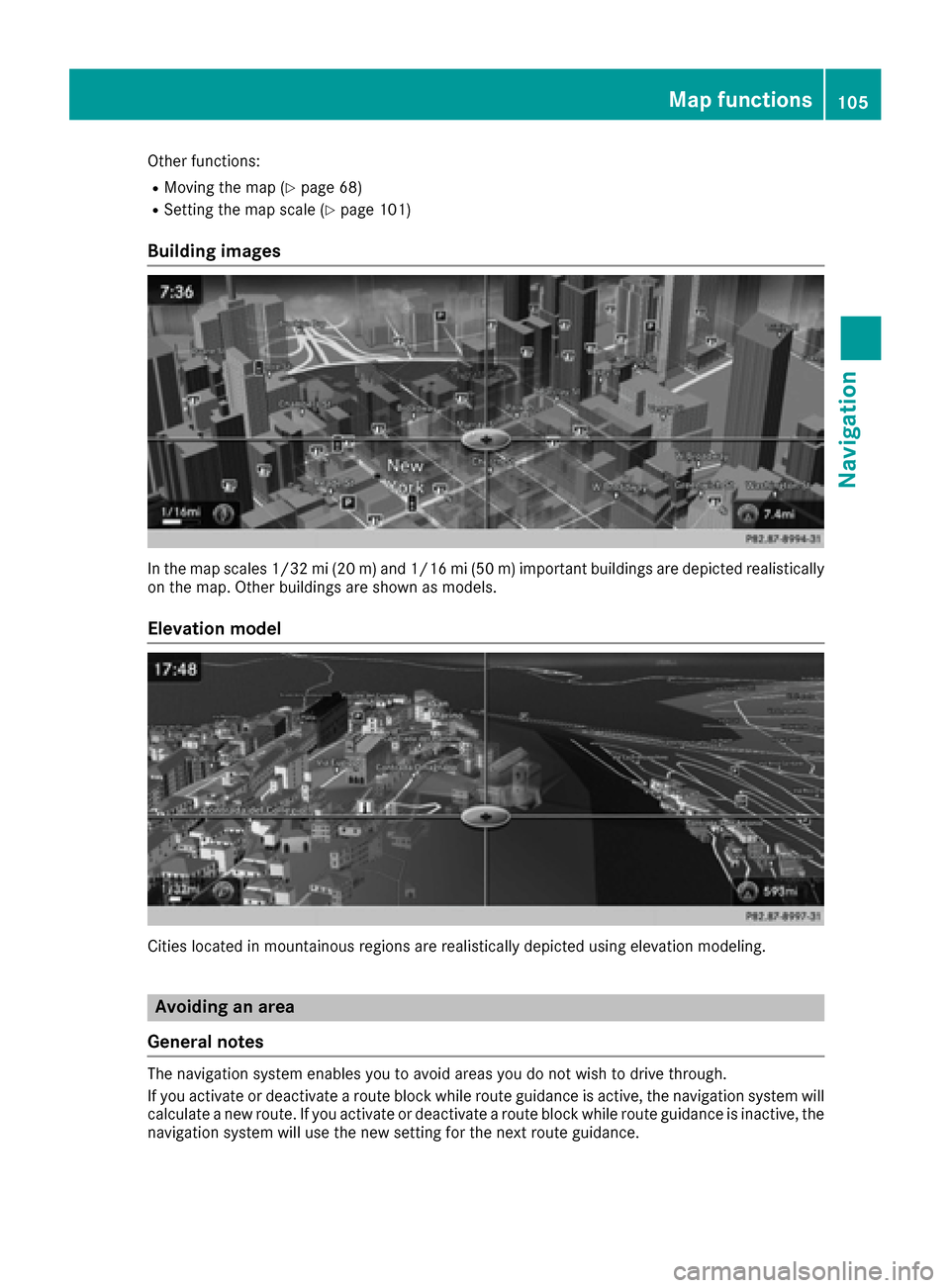
Building images
In the map scales 1/32 mi (20 m) and 1/16 mi (50 m) important buildings are depicted realistically
on the map. Other buildings are shown as models.
Elevation model
Cities located in mountainous regions are realistically depicted using elevation modeling.
Avoiding an area
General notes
The navigation system enables you to avoid areas you do not wish to drive through.
If you activate or deactivate a route block while route guidance is active, the navigation system will
calculate a new route. If you activate or deactivate a route block while route guidance is inactive, the
navigation system will use the new setting for the next route guidance.
Map functions105
Navigation
Z
Page 110 of 230
XSelectYesorNo.
After selecting Yes, the area is deleted.
XTo delete all areas: slide9 the controller when the list is displayed.
XSelect Delete All.
A prompt appears asking whether you wish to delete all areas.
XSelect YesorNo.
After selecting Yes, all areas are deleted.
SIRIUS XM service
Displaying SIRIUS XM service informa-
tion
You can display the SIRIUS XM service informa-
tion.
XTo switch to navigation mode: press the
Ø button.
XTo show the menu: slide6the controller.
XTo select Traffic: turn and press the con-
troller.
XSelect SIRIUS Service.
The window on the right half of the display
shows the telephone number of the provider
(SIRIUS XM) and the serial number of your
service module.
Registering for the SIRIUS XM traffic
report service
XCall the provider telephone number shown on
the display.
iYou can also have the satellite service acti-
vated online. To do so, visit the SIRIUS XM
Radio website at http://www.sirius.com
(USA).
Once the connection has been established:
XFollow the service employee's instructions.
The activation process may take up to ten
minutes.
If registration is not included when purchasing
the system, your credit card details will be
required to activate your account.
Updating the digital map
Introduction
The digital maps generated by the map software
become outdated in the same way as conven-
tional road maps. Optimal route guidance can
only be provided by the navigation system in
conjunction with the most up-to-date map soft-
ware.
Information about new versions of the digital
map can be obtained from an authorized
Mercedes-Benz Center. You can have the digital
map updated there using a data medium, or you
can update it yourself.
Updating at an authorized Mercedes-
Benz Center
If an update for your map software is available,
you will receive it free of charge at your
Mercedes-Benz Service Center during your vehi-
cle's annual service. You can arrange a separate
appointment for this at your Mercedes-Benz
Service Center on request.
The update can only be performed:
Rat an authorized Mercedes-Benz Center
Rfor map data for North America
The map software is not provided on DVD.
Carrying out a manual update
After the free update of the map data has
expired or when buying map data, you can
update the data yourself.
The update process may take some time (up to
45 minutes), depending on the size of the digital
map. The update will be completed more quickly
if the vehicle is stationary. If you begin the
update while the vehicle is stationary and the
starter battery has insufficient power, the mul-
timedia system may switch off automatically.
This protects the battery. In order to prevent
108Map functions
Navigation