USB MERCEDES-BENZ S-COUPE 2015 Owners Manual
[x] Cancel search | Manufacturer: MERCEDES-BENZ, Model Year: 2015, Model line: S-COUPE, Model: MERCEDES-BENZ S-COUPE 2015Pages: 286, PDF Size: 29.85 MB
Page 9 of 286
Setting the airflow ......................... 111
Setting the climate mode............... 111
Setting the temperature ................ 111
Switching air-recirculation modeon/of f............................................ 111
Switching on/of f........................... 111
Switching residual heat on/off ...... 111
Switching the rear window
defroster on/of f............................ 111
Switching the synchronization
function on and off ........................ 111
Climate control system
Automatic engine start .................. 119
Automatic engine switch-off .......... 119
Deactivating/activating ................. 119
Important safety notes .................. 119
Introduction ................................... 119
Cockpit
Overview .......................................... 32
see Instrument cluster
COLLISION PREVENTION ASSIST
PLUS
Activating/deactivating ................. 164
Operation/note s.............................. 68
COMAND
Controller ...................................... 192
Display ........................................... 192
Combination switch .......................... 103
Connecting a USB device
see also Digital Operator's Man-
ual .................................................. 188
Consumption statistics (on-board
computer) .......................................... 164
Coolant (engine)
Checking the level ......................... 214
Display message ............................ 174
Filling capacity ............................... 279
Important safety notes .................. 279
Temperature gaug e........................ 160
Warning lamp ................................. 183
Coolbox .............................................. 198
Cooling
see Climate control
Copyright ............................................. 30
Cornering light function
Display message ............................ 165
Function/note s............................. 103 Crash-responsive emergency light-
ing ....................................................... 105
Crosswind Assist (vehicles with
MAGIC BODY CONTROL) ................... 140
Crosswind Assist (vehicles with-
out MAGIC BODY CONTROL) ............... 72
Cruise control
Activation conditions ..................... 130
Cruise control lever ....................... 130
Deactivating ................................... 130
Display message ............................ 165
Driving system ............................... 129
Function/note s............................. 129
Important safety notes .................. 129
Selecting ........................................ 130
Setting a speed .............................. 130
Storing and maintaining current
speed ............................................. 130
Cup holder
Important safety notes .................. 198
Rear compartment ......................... 198
Customer Assistance Center
(CAC) ..................................................... 28
Customer Relations Department ....... 28
D
Data
see Technical data
Daytime running lamps
Display message ............................ 165
Function/note s............................. 103
Switching on/off (on-board com-
puter) ............................................. 164
Declarations of conformity ................. 27
Diagnostics connection ...................... 27
Digital Operator's Manual
Help ................................................. 21
Introduction ..................................... 21
Digital speedometer ......................... 164
DIRECT SELECT lever
Automatic transmission ................. 120
Display
see Display messages
see Warning and indicator lamps
Display (cleaning instructions) ........ 218
Display messages
ASSYST PLUS ................................ 216
Index7
Page 192 of 286
COMAND operating system
Overview
Components
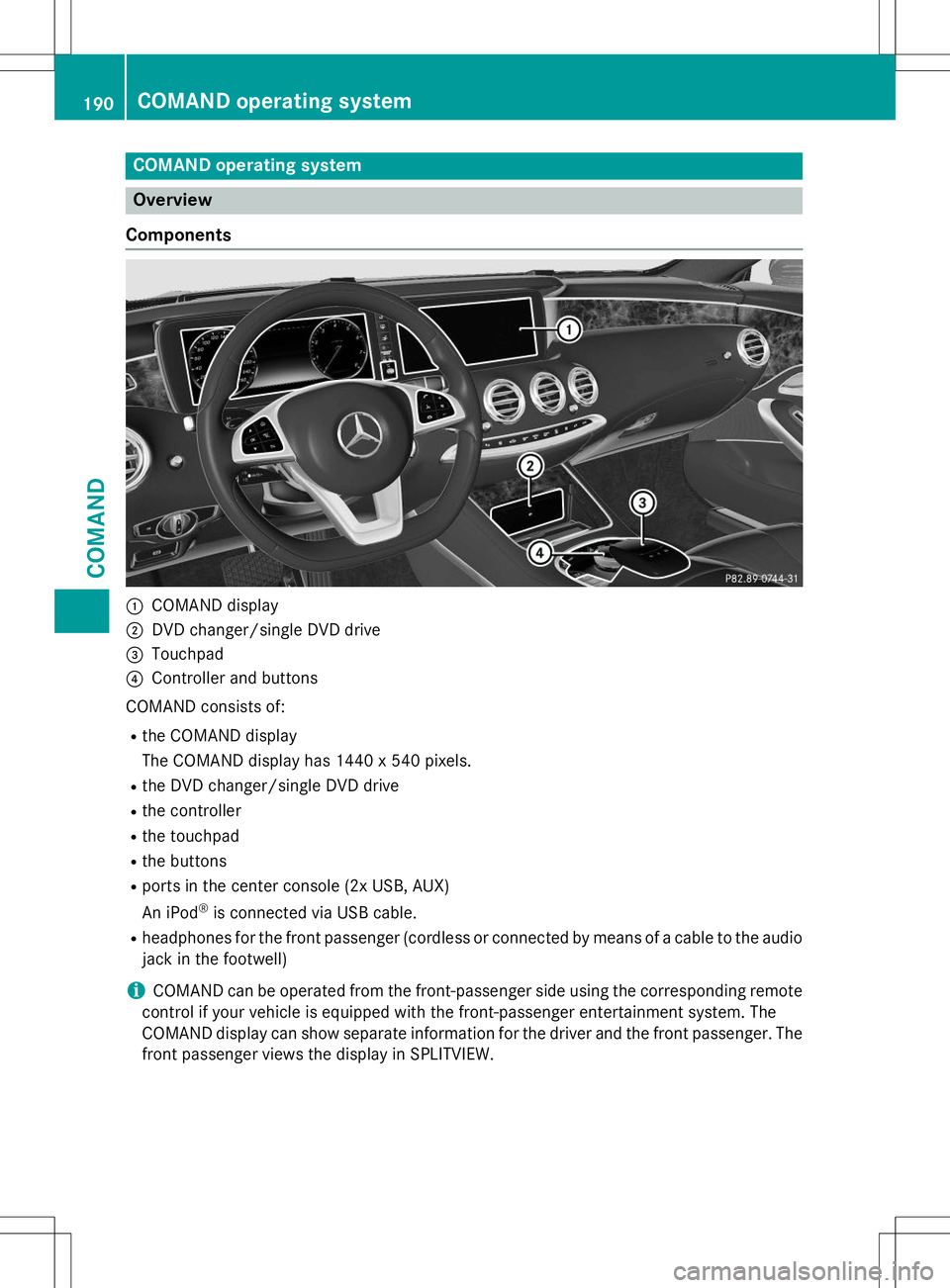
:COMAND display
;DVD changer/single DVD drive
=Touchpad
?Controller and buttons
COMAND consists of:
R the COMAND display
The COMAND display has 1440 x 540 pixels.
R the DVD changer/single DVD drive
R the controller
R the touchpad
R the buttons
R ports in the center console (2x USB, AUX)
An iPod ®
is connected via USB cable.
R headphones for the front passenger (cordless or connected by means of a cable to the audio
jack in the footwell)
iCOMAND can be operated from the front-passenger side using the corresponding remote
control if your vehicle is equipped with the front-passenger entertainment system. The
COMAND display can show separate information for the driver and the front passenger. The
front passenger views the display in SPLITVIEW.
190COMAND operating system
COMAND
Page 193 of 286
Functions
RHD FM radio/HD AM radio/satellite
radio
Internet radio (called up via communica-
tions functions)
R Media
Media support: audio CD, MP3 CD, DVD
video, 2 x USB, SD card, iPod ®
, Bluetooth ®
audio, 10 GB Media Register on the hard
drive
Music search using all media
R Sound systems
You can select from three sound systems:
Standard sound system
Burmester ®
surround sound system
Burmester high-end 3D surround sound
system for ultimate listening pleasure
R Navigation system
Destination entry using keyword search
Realistic 3D map with textured city models
Navigation functions such as Drive Infor-
mation and Google Maps™
Dynamic route guidance via SIRIUS satel-
lite radio
R Communication
Messaging functions (text messages,
email)
Address book
Internet browser
Mercedes-Benz Apps with Google™ Local
Search, Destination Download, Weather,
Facebook, Google Street View™, Internet
radio, stock prices, news and much more
WiFi interface for the connection of a
smartphone to COMAND Online and the
option of remote control for the front
passenger (SPLITVIEW)
Mercedes-Benz Mobile Website
WiFi hotspot functionality to connect a tab-
let PC or laptop in order to enable access to
the Internet using the customer's mobile
phone
R SIRIUS Weather Weather data as an information chart (cur-
rent forecast, 5-day preview, detailed infor-
mation)
Weather data on the weather map, e.g. rain
radar data, storm characteristics and the
track of tropical cyclones (hurricanes,
typhoons)
R Vehicle functions
Setting the multicontour seat with new
massage program
Climate control functions
Controlling ambient lighting: several color
and brightness level options
360° camera
Rear view camera
R Favorites functions
Fast access to favorites functions using the
favorites button on the touchpad
COMAND operating system191
COMAND
Z