ECO mode MERCEDES-BENZ SL-Class 2015 R131 Owner's Guide
[x] Cancel search | Manufacturer: MERCEDES-BENZ, Model Year: 2015, Model line: SL-Class, Model: MERCEDES-BENZ SL-Class 2015 R131Pages: 610, PDF Size: 12.21 MB
Page 288 of 610
You can use COMAND to operate the follow-
ing main functions:
R the navigation system
R the audio function
R the telephone function
R the video function
R the system settings
R the online and Internet functions
R the Digital Operator's Manual
(available depending on the vehicle model)
You can call up the main functions:
R using the corresponding buttons
R using the main function bar in the COMAND
display
R using the remote control
COMAND display General notes
! Do not use the space in front of the dis-
play for storage. Objects placed here could damage the display or impair its function.
Avoid any direct contact with the display
surface. Pressure on the display surface
may result in impairments to the display,
which could be irreversible.
Wearing polarized sunglasses may impair
your ability to read the display.
The display has an automatic temperature-
controlled switch-off feature. The brightness
is automatically reduced if the temperature is
too high. The display may temporarily switch
off completely. 286
At a glanceCOMAND
Page 290 of 610
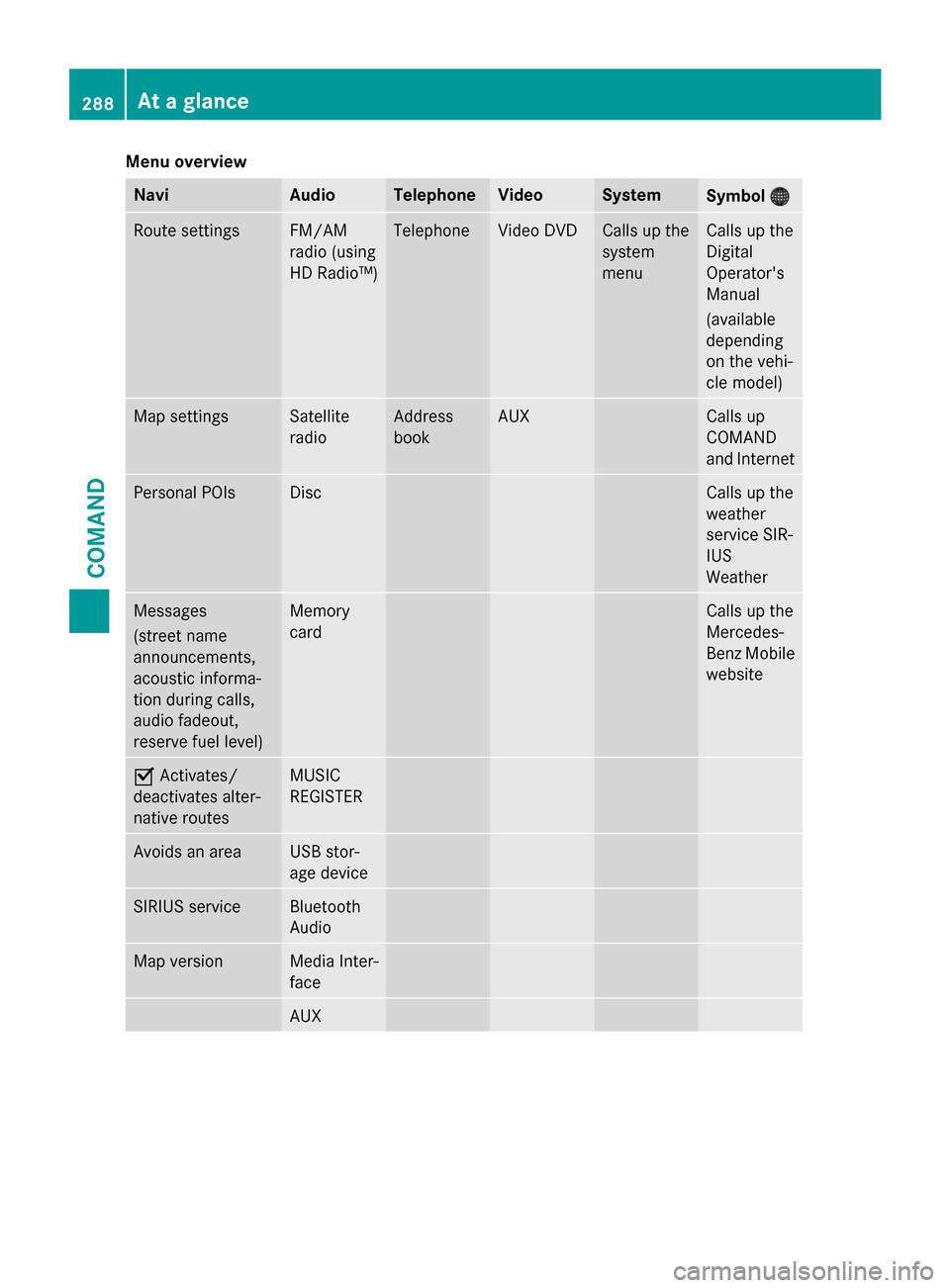
Menu overview
Navi Audio Telephone Video System
Symbol
00A7
00A7 Route settings FM/AM
radio (using
HD Radio™) Telephone Video DVD Calls up the
system
menu Calls up the
Digital
Operator's
Manual
(available
depending
on the vehi-
cle model)
Map settings Satellite
radio Address
book AUX Calls up
COMAND
and Internet
Personal POIs Disc Calls up the
weather
service SIR-
IUS
Weather
Messages
(street name
announcements,
acoustic informa-
tion during calls,
audio fadeout,
reserve fuel level) Memory
card Calls up the
Mercedes-
Benz Mobile
website 0073
Activates/
deactivates alter-
native routes MUSIC
REGISTER
Avoids an area USB stor-
age device
SIRIUS service Bluetooth
Audio
Map version Media Inter-
face
AUX288
At a glanceCOMAND
Page 296 of 610
Using COMAND
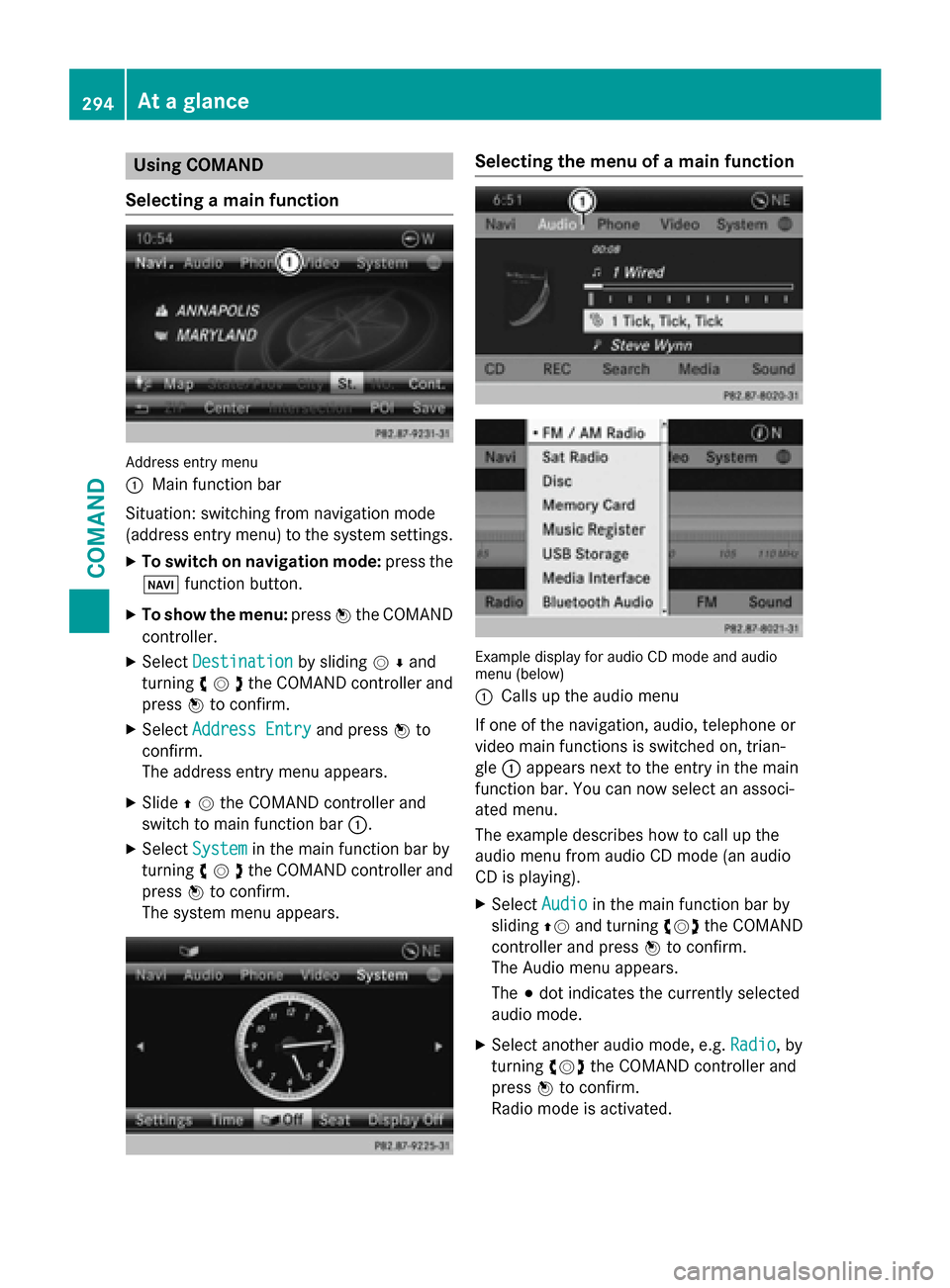
Selecting a main function Address entry menu
0043 Main function bar
Situation: switching from navigation mode
(address entry menu) to the system settings.
X To switch on navigation mode: press the
00BE function button.
X To show the menu: press0098the COMAND
controller.
X Select Destination Destination by sliding00520064and
turning 00790052007Athe COMAND controller and
press 0098to confirm.
X Select Address Entry
Address Entry and press0098to
confirm.
The address entry menu appears.
X Slide 00970052the COMAND controller and
switch to main function bar 0043.
X Select System
System in the main function bar by
turning 00790052007Athe COMAND controller and
press 0098to confirm.
The system menu appears. Selecting the menu of a main function
Example display for audio CD mode and audio
menu (below)
0043
Calls up the audio menu
If one of the navigation, audio, telephone or
video main functions is switched on, trian-
gle 0043appears next to the entry in the main
function bar. You can now select an associ-
ated menu.
The example describes how to call up the
audio menu from audio CD mode (an audio
CD is playing).
X Select Audio Audioin the main function bar by
sliding 00970052and turning 00790052007Athe COMAND
controller and press 0098to confirm.
The Audio menu appears.
The 003Bdot indicates the currently selected
audio mode.
X Select another audio mode, e.g. Radio Radio, by
turning 00790052007Athe COMAND controller and
press 0098to confirm.
Radio mode is activated. 294
At a glanceCOMAND
Page 298 of 610
Adjusting the volume for phone calls
You can adjust the volume for hands-free
mode during a telephone call.
X Turn the 0043control knob.
or X Press the 0081or0082 button on the mul-
tifunction steering wheel.
Adjusting the sound settings Calling up the sound menu
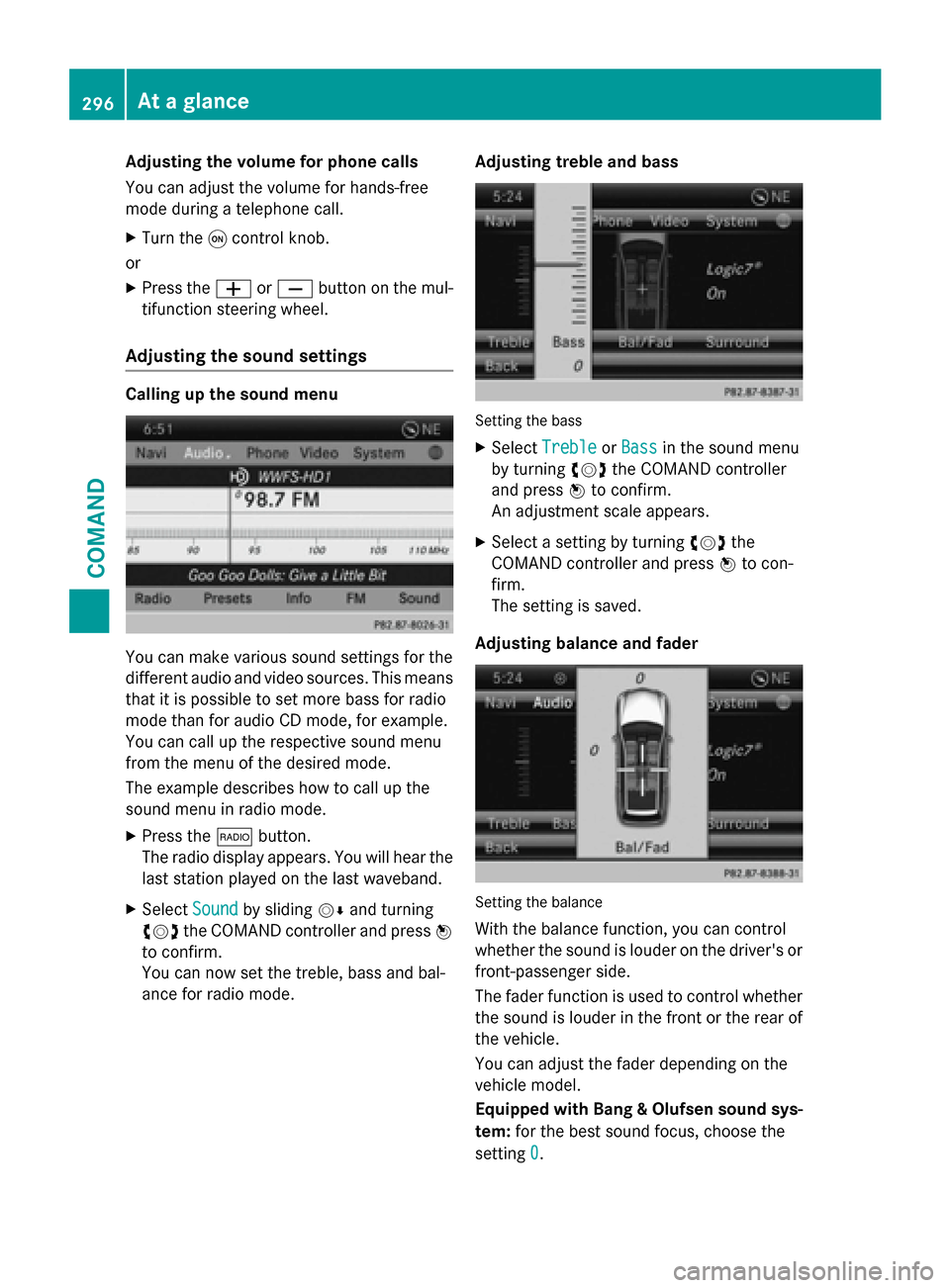
You can make various sound settings for the
different audio and video sources. This means
that it is possible to set more bass for radio
mode than for audio CD mode, for example.
You can call up the respective sound menu
from the menu of the desired mode.
The example describes how to call up the
sound menu in radio mode.
X Press the 002Abutton.
The radio display appears. You will hear the
last station played on the last waveband.
X Select Sound
Sound by sliding 00520064and turning
00790052007A the COMAND controller and press 0098
to confirm.
You can now set the treble, bass and bal-
ance for radio mode. Adjusting treble and bass Setting the bass
X Select Treble Treble orBass
Bass in the sound menu
by turning 00790052007Athe COMAND controller
and press 0098to confirm.
An adjustment scale appears.
X Select a setting by turning 00790052007Athe
COMAND controller and press 0098to con-
firm.
The setting is saved.
Adjusting balance and fader Setting the balance
With the balance function, you can control
whether the sound is louder on the driver's or front-passenger side.
The fader function is used to control whether
the sound is louder in the front or the rear of the vehicle.
You can adjust the fader depending on the
vehicle model.
Equipped with Bang & Olufsen sound sys-
tem: for the best sound focus, choose the
setting 0 0. 296
At a glanceCOMAND
Page 300 of 610
The example describes how to set the sur-
round sound for radio mode.
X To switch surround sound on/off: press
the 002A button.
The radio display appears. You will hear the
last station played on the last waveband.
X Select Sound
Soundby sliding 00520064and turning
00790052007A the COMAND controller and press 0098
to confirm.
X Select Surround
Surround and press0098to confirm.
X Select Logic7
Logic7 ®
®
On
On orLogic7
Logic7 ®
®
Off
Off by turn-
ing 00790052007A the COMAND controller and press
0098 to confirm.
Depending on your selection, surround
sound is switched on or off and the menu is
exited.
X To exit the menu without saving: press
the 003D back button or slide 009500520096the
COMAND controller.
i Please note the following: for the opti-
mum audio experience for all passengers
when Logic7 ®
is switched on, the balance
should be set to the center of the vehicle
interior.
You will achieve the best sound results by
playing video DVD media.
MP3 tracks should have a bit rate of at least
128 kbit/ s.
Surround sound playback does not func-
tion for mono signal sources, such as for
AM radio mode.
If radio reception is poor, e.g. in a tunnel,
you should switch off Logic7 ®
, since it may
otherwise switch dynamically between
stereo and mono and cause temporary
sound distortions.
On some stereo recordings, the sound
characteristics may differ from conven-
tional stereo playback.
i The
Logic7 Logic7 ®
®
On
On function creates a sur-
round sound experience for every
passenger when playing stereo recordings, for example. It enables optimum playback
of music and films on CD or video DVD with multichannel audio formats, such as MLP,
dts or Dolby Digital. This results in sound
characteristics like those intended by the
sound engineer when the original was
recorded.
i If you select
Logic7 Logic7®
®
Off
Off , the sound sys-
tem plays the tracks as stored on the
medium. Due to the design of the
passenger compartment, an optimum
audio experience cannot be guaranteed for
all passengers.
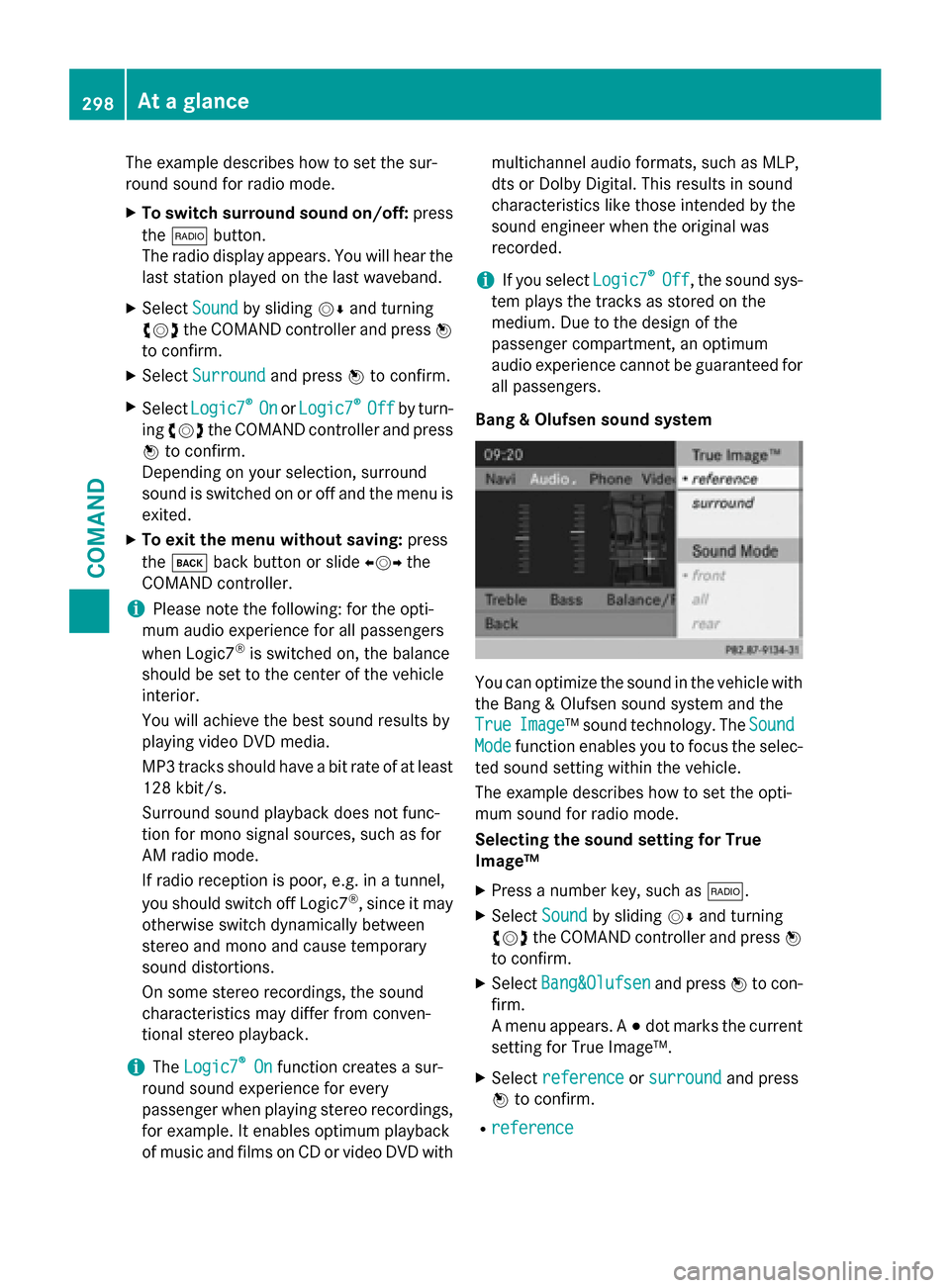
Bang & Olufsen sound system You can optimize the sound in the vehicle with
the Bang & Olufsen sound system and the
True True Image
Image™ sound technology. The Sound
Sound
Mode
Mode function enables you to focus the selec-
ted sound setting within the vehicle.
The example describes how to set the opti-
mum sound for radio mode.
Selecting the sound setting for True
Image™
X Press a number key, such as 002A.
X Select Sound Soundby sliding 00520064and turning
00790052007A the COMAND controller and press 0098
to confirm.
X Select Bang&Olufsen
Bang&Olufsen and press0098to con-
firm.
A menu appears. A 003Bdot marks the current
setting for True Image™.
X Select reference reference orsurround
surround and press
0098 to confirm.
R reference
reference 298
At a glanceCOMAND
Page 301 of 610
This setting provides a crisp, clear, luxury
high-end sound setting for a studio atmos-
phere in your vehicle.
R Surround sound
Surround sound
This setting enables a wide-ranging sound
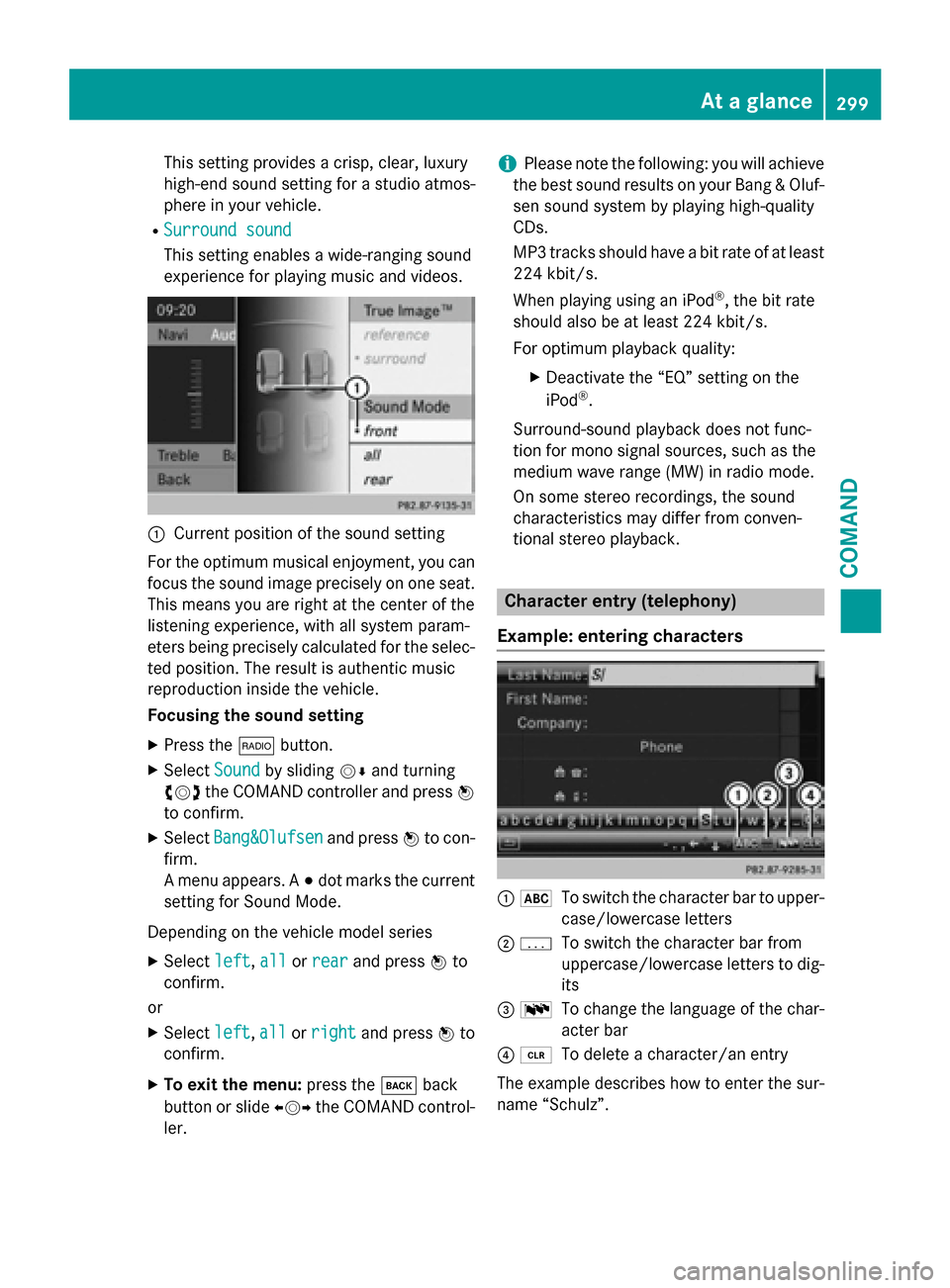
experience for playing music and videos. 0043
Current position of the sound setting
For the optimum musical enjoyment, you can
focus the sound image precisely on one seat. This means you are right at the center of the
listening experience, with all system param-
eters being precisely calculated for the selec-
ted position. The result is authentic music
reproduction inside the vehicle.
Focusing the sound setting
X Press the 002Abutton.
X Select Sound Soundby sliding 00520064and turning
00790052007A the COMAND controller and press 0098
to confirm.
X Select Bang&Olufsen
Bang&Olufsen and press0098to con-
firm.
A menu appears. A 003Bdot marks the current
setting for Sound Mode.
Depending on the vehicle model series X Select left
left, all allorrear
rear and press 0098to
confirm.
or
X Select left
left,all
allorright
right and press 0098to
confirm.
X To exit the menu: press the003Dback
button or slide 009500520096the COMAND control-
ler. i
Please note the following: you will achieve
the best sound results on your Bang & Oluf- sen sound system by playing high-quality
CDs.
MP3 tracks should have a bit rate of at least
224 kbit/s.
When playing using an iPod ®
, the bit rate
should also be at least 224 kbit/s.
For optimum playback quality:
XDeactivate the “EQ” setting on the
iPod ®
.
Surround-sound playback does not func-
tion for mono signal sources, such as the
medium wave range (MW) in radio mode.
On some stereo recordings, the sound
characteristics may differ from conven-
tional stereo playback. Character entry (telephony)
Example: entering characters 0043
0069
To switch the character bar to upper-
case/lowercase letters
0044 0042
To switch the character bar from
uppercase/lowercase letters to dig-
its
0087 0054
To change the language of the char-
acter bar
0085 0084
To delete a character/an entry
The example describes how to enter the sur-
name “Schulz”. At a glance
299COMAND Z
Page 314 of 610
ded before selling or transferring ownership
of your vehicle, for example.
Data on the internal hard drive, e.g. music
files in the MUSIC REGISTER, will be deleted. You can also delete music files from the
MUSIC REGISTER using the "Delete all music
files" function (Y page 457).
X Press the 0066function button.
X Select System
System by turning 00790052007Athe
COMAND controller and press 0098to con-
firm.
X Select Reset
Reset and press 0098to confirm.
A warning message appears asking
whether you wish to reset.
X Select Yes YesorNo
No and press 0098to confirm.
If you select Yes
Yes, a prompt will appear again
asking whether you really wish to reset to
the factory settings.
X Select Yes YesorNo
No and press 0098to confirm.
If you select Yes
Yes, a message will be shown.
COMAND is reset and restarted.
If you select No No, the process will be can-
celed. Vehicle functions
Your COMAND equipment
These operating instructions describe all the
standard and optional equipment for your
COMAND system, as available at the time of
going to print. Country-specific differences
are possible. Please note that your
COMAND system may not be equipped with
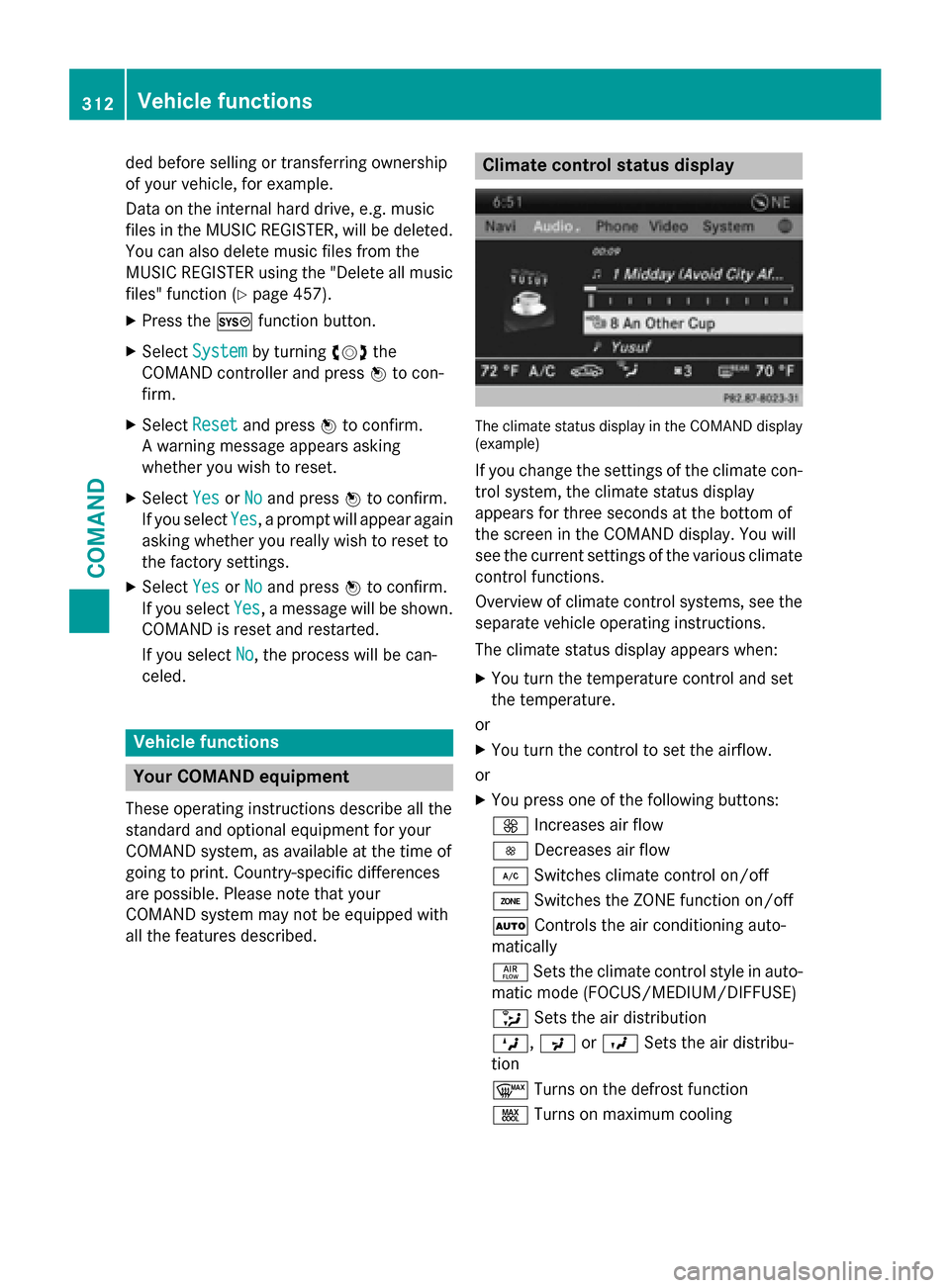
all the features described. Climate control status display
The climate status display in the COMAND display
(example)
If you change the settings of the climate con-
trol system, the climate status display
appears for three seconds at the bottom of
the screen in the COMAND display. You will
see the current settings of the various climate control functions.
Overview of climate control systems, see theseparate vehicle operating instructions.
The climate status display appears when:
X You turn the temperature control and set
the temperature.
or
X You turn the control to set the airflow.
or X You press one of the following buttons:
0097 Increases air flow
0095 Decreases air flow
005A Switches climate control on/off
00D6 Switches the ZONE function on/off
0058 Controls the air conditioning auto-
matically
00F0 Sets the climate control style in auto-
matic mode (FOCUS/MEDIUM/DIFFUSE)
008F Sets the air distribution
0099, 009Cor009B Sets the air distribu-
tion
0064 Turns on the defrost function
00C9 Turns on maximum cooling 312
Vehicle functionsCOMAND
Page 321 of 610
COMAND can give incorrect navigation com-
mands if the actual street/traffic situation
does not correspond with the digital map's
data. Digital maps do not cover all areas nor
all routes in an area. For example, a route may have been diverted or the direction of a one-
way street may have changed.
For this reason, you must always observe
road and traffic rules and regulations during
your journey. Road and traffic rules and reg-
ulations always have priority over the sys-
tem's driving recommendations.
Navigation announcements are intended to
direct you while driving without diverting your attention from the road and driving.
Please always use this feature instead of con- sulting the map display for directions. Look-
ing at the icons or map display can distract
you from traffic conditions and driving, and
increase the risk of an accident.
General notes Operational readiness of the navigation
system
The navigation system must determine the
position of the vehicle before first use or
whenever operational status is restored.
Therefore, you may have to drive for a while
before precise route guidance is possible.
GPS reception
Among other things, correct functioning of
the navigation system depends on GPS recep-
tion. In certain situations, GPS reception may
be impaired, there may be interference or
there may be no reception at all, e.g. in tun-
nels or parking garages.
i Using roof carriers may impair the correct
functioning of a roof antenna (phone, sat-
ellite radio, GPS).
Entry restriction
On vehicles for certain countries, there is a
restriction on entering data.
The restriction is active from a vehicle speed of above approximately 3 mph (5 km/h).As soon as the speed falls below approximately
2 mph (3 km/h), the restriction becomes
inactive.
When the restriction is active, certain entries cannot be made. This will be indicated by the fact that certain menu items are grayed out
and cannot be selected.
The following entries are not possible, for
example:
R entering the destination city and street
R entering a destination via the map
R entering POIs in the vicinity of a city or via a
name search
R editing entries
R using the number keypad for direct entry
Other entries are possible, such as entering
points of interest in the vicinity of the desti-
nation or current position.
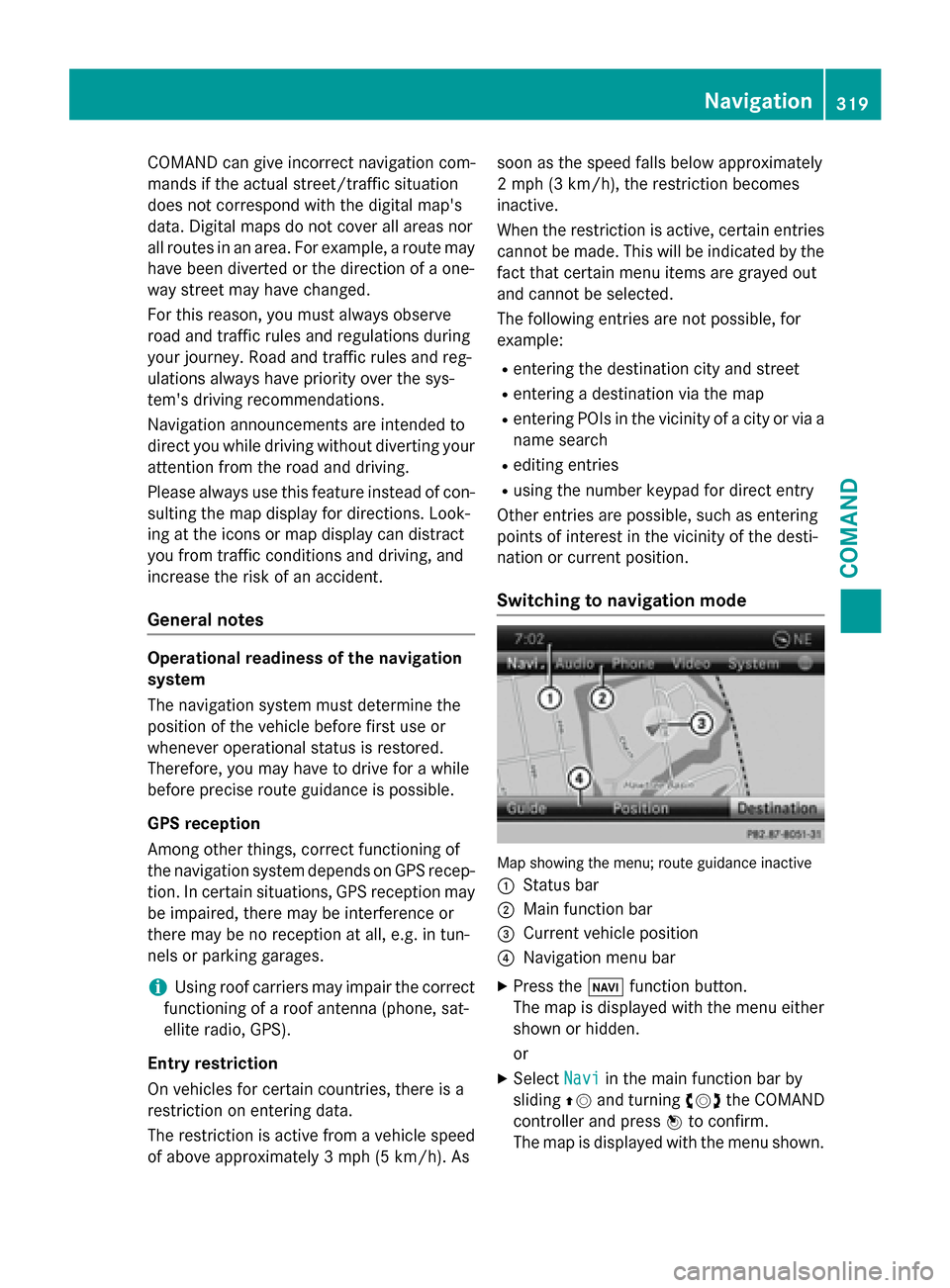
Switching to navigation mode Map showing the menu; route guidance inactive
0043 Status bar
0044 Main function bar
0087 Current vehicle position
0085 Navigation menu bar
X Press the 00BEfunction button.
The map is displayed with the menu either
shown or hidden.
or
X Select Navi Naviin the main function bar by
sliding 00970052and turning 00790052007Athe COMAND
controller and press 0098to confirm.
The map is displayed with the menu shown. Navigation
319COMAND Z
Page 343 of 610
X
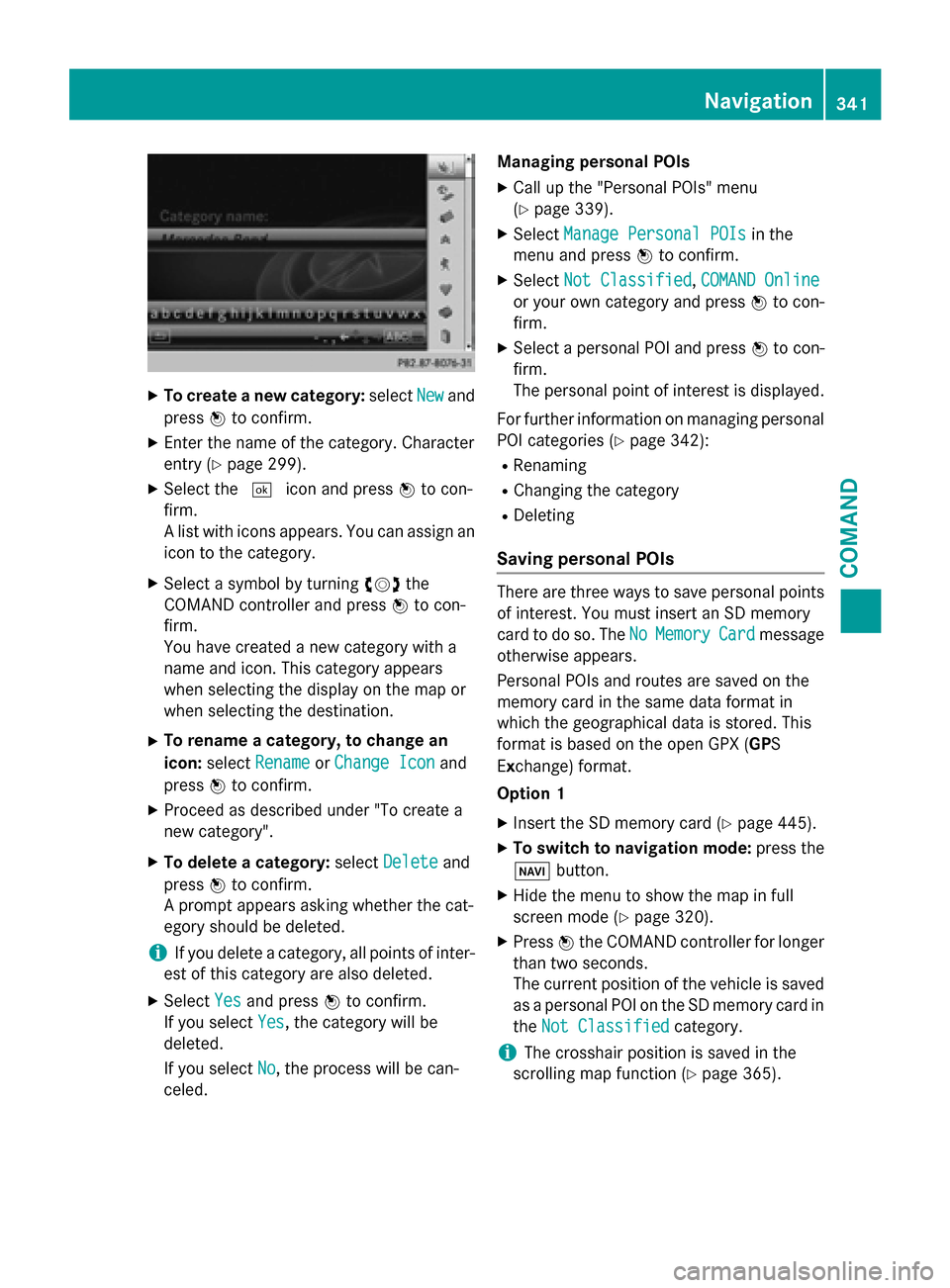
To create a new category: selectNew
New and
press 0098to confirm.
X Enter the name of the category. Character
entry (Y page 299).
X Select the 0054icon and press 0098to con-
firm.
A list with icons appears. You can assign an icon to the category.
X Select a symbol by turning 00790052007Athe
COMAND controller and press 0098to con-
firm.
You have created a new category with a
name and icon. This category appears
when selecting the display on the map or
when selecting the destination.
X To rename a category, to change an
icon: select Rename Rename orChange Icon
Change Icon and
press 0098to confirm.
X Proceed as described under "To create a
new category".
X To delete a category: selectDelete Delete and
press 0098to confirm.
A prompt appears asking whether the cat-
egory should be deleted.
i If you delete a category, all points of inter-
est of this category are also deleted.
X Select Yes
Yesand press 0098to confirm.
If you select Yes
Yes, the category will be
deleted.
If you select No
No, the process will be can-
celed. Managing personal POIs
X Call up the "Personal POIs" menu
(Y page 339).
X Select Manage Personal POIs Manage Personal POIs in the
menu and press 0098to confirm.
X Select Not Classified Not Classified, COMAND Online
COMAND Online
or your own category and press 0098to con-
firm.
X Select a personal POI and press 0098to con-
firm.
The personal point of interest is displayed.
For further information on managing personal POI categories (Y page 342):
R Renaming
R Changing the category
R Deleting
Saving personal POIs There are three ways to save personal points
of interest. You must insert an SD memory
card to do so. The No NoMemory
Memory Card
Cardmessage
otherwise appears.
Personal POIs and routes are saved on the
memory card in the same data format in
which the geographical data is stored. This
format is based on the open GPX (GPS
Ex change) format.
Option 1
X Insert the SD memory card (Y page 445).
X To switch to navigation mode: press the
00BE button.
X Hide the menu to show the map in full
screen mode (Y page 320).
X Press 0098the COMAND controller for longer
than two seconds.
The current position of the vehicle is saved
as a personal POI on the SD memory card in
the Not Classified Not Classified category.
i The crosshair position is saved in the
scrolling map function (Y page 365). Navigation
341COMAND Z
Page 349 of 610
On multi-lane roads, COMAND can display
lane recommendations for the next change of direction. The corresponding data must be
available in the digital map.
COMAND displays lane recommendation 006B
based on the next two changes of direction.
The number of lanes applies to the point at
which the next change of direction is
required.
i The multifunction display also shows lane
recommendations.
Only the recommended lanes are displayed here, see the separate vehicle Operator's
Manual.
Display and description of lane recom-
mendations Lane Day
mode Night
mode
Recommended lane
In this lane, you will
be able to complete
the next two
changes of direction
without changing
lanes. Dark
blue Light
blue
Possible lane
In this lane, you will
only be able to com-
plete the next
change of direction
without changing
lanes. Light
blue Dark
blue
Lane not recom-
mended
In this lane, you will
not be able to com-
plete the next
change of direction
without changing
lanes. Light
brown or
light gray Gray i
The colors used in the lane recommenda-
tion display vary depending on whether day
or night mode is switched on.
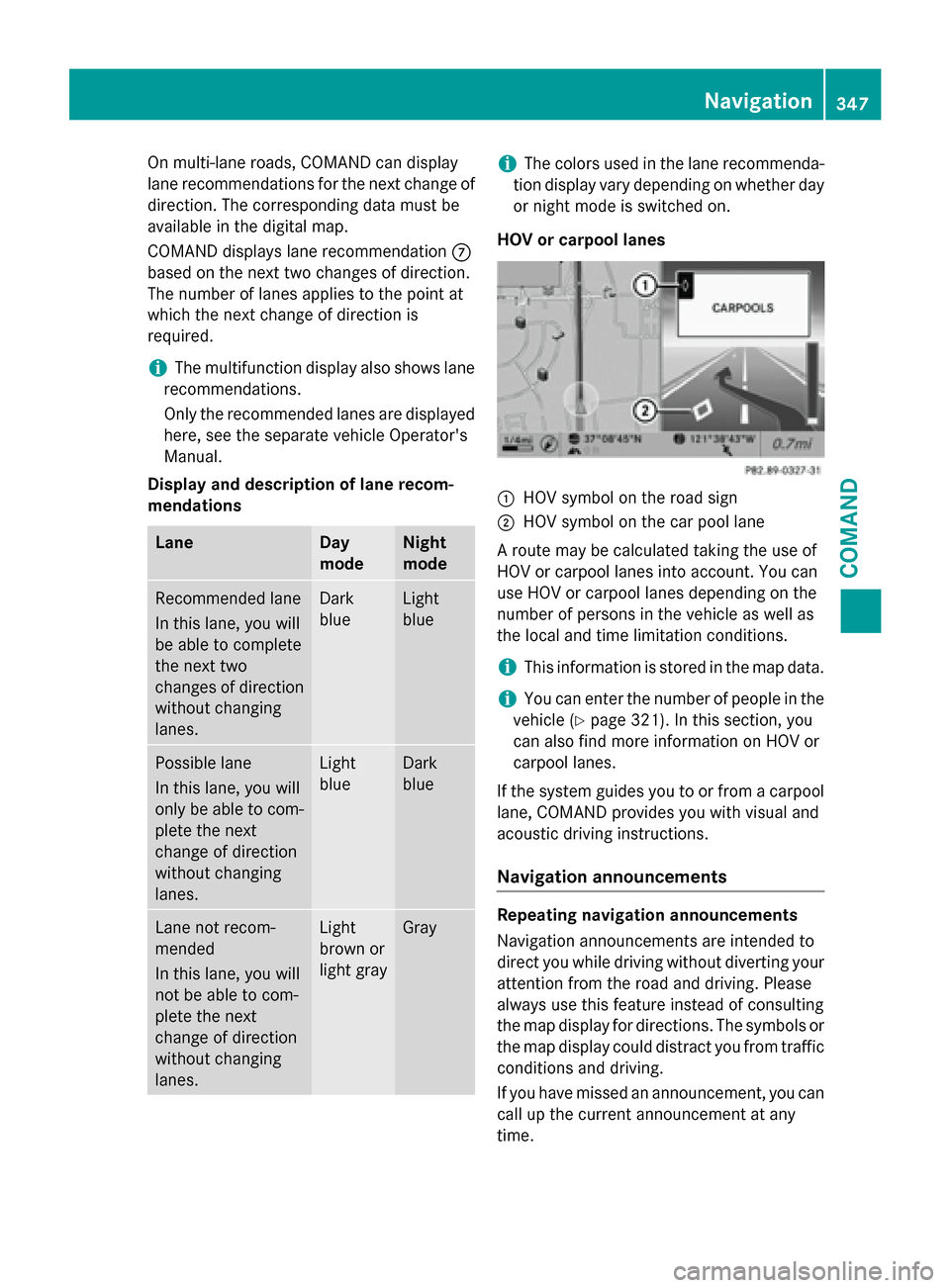
HOV or carpool lanes 0043
HOV symbol on the road sign
0044 HOV symbol on the car pool lane
A route may be calculated taking the use of
HOV or carpool lanes into account. You can
use HOV or carpool lanes depending on the
number of persons in the vehicle as well as
the local and time limitation conditions.
i This information is stored in the map data.
i You can enter the number of people in the
vehicle (Y page 321). In this section, you
can also find more information on HOV or
carpool lanes.
If the system guides you to or from a carpool
lane, COMAND provides you with visual and
acoustic driving instructions.
Navigation announcements Repeating navigation announcements
Navigation announcements are intended to
direct you while driving without diverting your
attention from the road and driving. Please
always use this feature instead of consulting
the map display for directions. The symbols or
the map display could distract you from traffic conditions and driving.
If you have missed an announcement, you can
call up the current announcement at any
time. Navigation
347COMAND Z