key MERCEDES-BENZ SL CLASS 2019 Manual PDF
[x] Cancel search | Manufacturer: MERCEDES-BENZ, Model Year: 2019, Model line: SL CLASS, Model: MERCEDES-BENZ SL CLASS 2019Pages: 330, PDF Size: 16.53 MB
Page 174 of 330
Each time you start the engine with the Smart-Key or the Start/Stop button, the comfortablesetting is activated. For further informationabout starting the engine, see (Ypage 127).
Selecting sports tuning
The firmer setting of the suspension tuning insports mode ensures even better contact withthe road. Select this mode if you favor a firmersuspension setting.
XMake sure that the engine is running or thatit has been switched off by the ECO start/stop function.
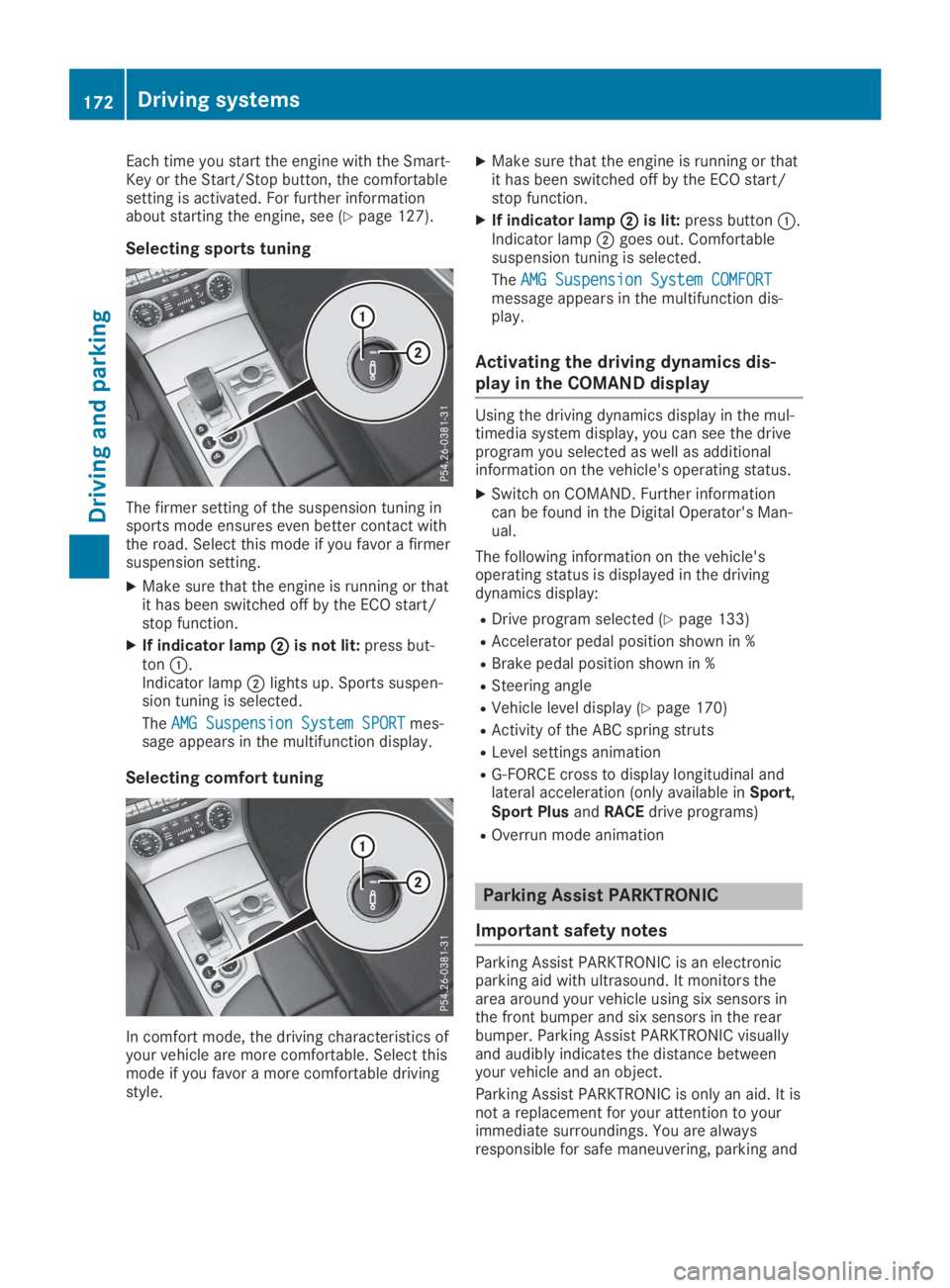
XIf indicator lampDDis not lit:press but-tonC.Indicator lampDlights up. Sports suspen-sion tuning is selected.
TheAMG Suspension System SPORTAMG Suspension System SPORTmes-sage appears in the multifunction display.
Selecting comfort tuning
In comfort mode, the driving characteristics ofyour vehicle are more comfortable. Select thismode if you favor a more comfortable drivingstyle.
XMake sure that the engine is running or thatit has been switched off by the ECO start/stop function.
XIf indicator lampDDis lit:press buttonC.Indicator lampDgoes out. Comfortablesuspension tuning is selected.
TheAMG Suspension System COMFORTAMG Suspension System COMFORTmessage appears in the multifunction dis-play.
Activating the driving dynamics dis-
play in the COMAND display
Using the driving dynamics display in the mul-timedia system display, you can see the driveprogram you selected as well as additionalinformation on the vehicle's operating status.
XSwitch on COMAND. Further informationcan be found in the Digital Operator's Man-ual.
The following information on the vehicle'soperating status is displayed in the drivingdynamics display:
RDrive program selected (Ypage 133)
RAccelerator pedal position shown in %
RBrake pedal position shown in %
RSteering angle
RVehicle level display (Ypage 170)
RActivity of the ABC spring struts
RLevel settings animation
RG-FORCE cross to display longitudinal andlateral acceleration (only available inSport,Sport PlusandRACEdrive programs)
ROverrun mode animation
Parking Assist PARKTRONIC
Important safety notes
Parking Assist PARKTRONIC is an electronicparking aid with ultrasound. It monitors thearea around your vehicle using six sensors inthe front bumper and six sensors in the rearbumper. Parking Assist PARKTRONIC visuallyand audibly indicates the distance betweenyour vehicle and an object.
Parking Assist PARKTRONIC is only an aid. It isnot a replacement for your attention to yourimmediate surroundings. You are alwaysresponsible for safe maneuvering, parking and
172Driving systems
Driving an d parking
Page 182 of 330
Under the following circumstances, the rearview camera will not function, or will functionin a limited manner:
Rif the trunk lid is open
Rin heavy rain, snow or fog
Rat night or in very dark places
Rif the camera is exposed to very bright light
Rif the area is lit by fluorescent bulbs or LEDlighting (the display may flicker)
Rif there is a sudden change in temperature,e.g. when driving into a heated garage inwinter
Rif the camera lens is dirty or obstructed.Observe the notes on cleaning(Ypage 275)
Rif the rear of your vehicle is damaged. In thiscase, have the camera position and settingchecked at a qualified specialist workshop.
The field of vision and other functions of therear view camera may be restricted due toadditional accessories on the rear of the vehi-cle (e.g. license plate holder, bicycle rack).
On vehicles with height-adjustable chassis,leaving the standard height can result in inac-curacies in the guide lines, depending on tech-nical conditions.
iThe contrast of the display may be affec-ted by the sudden presence of sunlight orother light sources, e.g. when exiting agarage. Pay particular attention in this situa-tion.
iIf usability is severely restricted, e.g. dueto pixel errors, have the display repaired orreplaced.
Activating/deactivating the rear view
camera
XTo activate:make sure that the SmartKeyis in positionHin the ignition lock.
XMake sure that theActivation by R gearActivation by R gearfunction is selected in the multimedia sys-tem; see the Digital Operator's Manual.
XEngage reverse gear.The multimedia system shows the areabehind the vehicle with guide lines.
The image from the rear view camera isavailable throughout the maneuvering proc-ess.
To deactivate:the rear view camera deacti-vates if you shift the transmission to position], or after driving forwards a short distance.
The inner segments of the warning indicatorare displayed in red if there is a complete sys-tem failure. The indicator lamp in thePARKTRONIC button lights up.
If the system fails at the rear of the vehicle:
Rthe rear segments are shown in red whenbacking up.
Rthe rear segments are hidden when drivingforwards.
Displays in the multimedia system
The rear view camera may show a distortedview of obstacles, show them incorrectly ornot at all. The rear view camera does not showobjects in the following positions:
Rvery close to the rear bumper
Runder the rear bumper
Rin close range above the handle on the trunklid
!Objects not at ground level may appear tobe further away than they actually are, e.g.:
Rthe bumper of a parked vehicle
Rthe drawbar of a trailer
Rthe ball coupling of a trailer tow hitch
Rthe rear section of an HGV
Ra slanted post
Use the guidelines only for orientation.Approach objects no further than the bot-tom-most guideline.
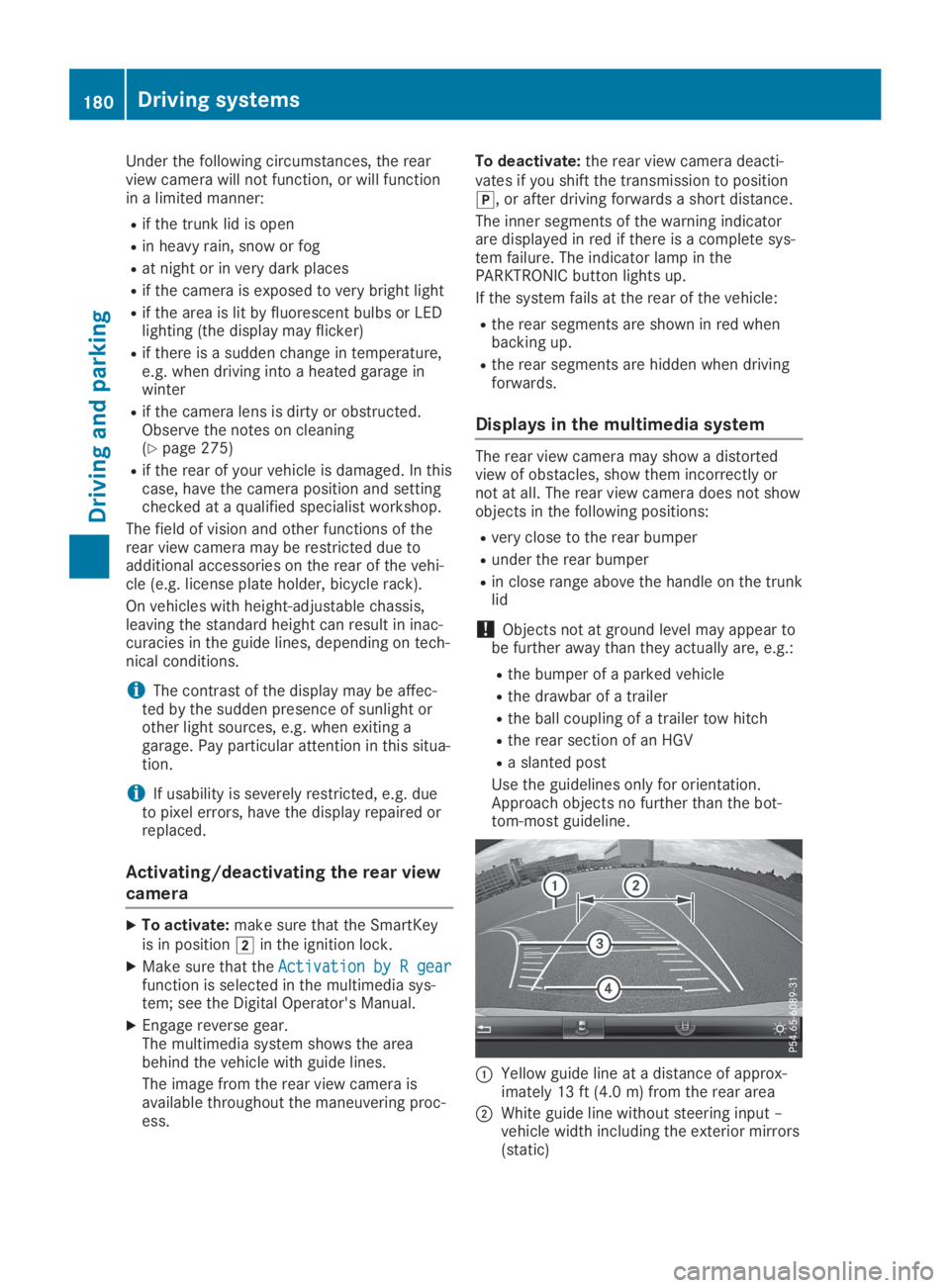
CYellow guide line at a distance of approx-imately 13 ft (4.0 m) from the rear area
DWhite guide line without steering input –vehicle width including the exterior mirrors(static)
180Driving systems
Driving and parking
Page 189 of 330

Either no braking application, or a course-cor-recting brake application adapted to the driv-ing situation occurs if:
Rthere are vehicles or obstacles, e.g. crashbarriers, located on both sides of your vehi-cle.
Ra vehicle approaches you too closely at theside.
Ryou have adopted a sporty driving style withhigh cornering speeds.
Ryou clearly brake or accelerate.
Ra driving safety system intervenes, e.g.
ESP®or PRE-SAFE®Brake.
RESP®is switched off.
Ra loss of tire pressure or a defective tire isdetected.
Switching on Active Blind Spot Assist
XMake sure that Active Blind Spot Assist isactivated (Ypage 199).
XTurn the SmartKey to positionHin the igni-tion lock.Warning lampsCin the exterior mirrorslight up red for approximately 1.5 secondsand then turn yellow.
Active Lane Keeping Assist
General notes
Active Lane Keeping Assist monitors the areain front of your vehicle by means of multifunc-tion cameraCat the top of the windshield.Various areas to the front, rear and side ofyour vehicle are also monitored with the aid ofthe radar sensor system. Active Lane KeepingAssist detects lane markings on the road andcan warn you before you leave your lane unin-tentionally. If you do not react to the warning,a lane-correcting application of the brakes canbring the vehicle back into the original lane.
This function is available in a speed rangebetween 40 mph and 120 mph (60 km/h and200 km/h).
For Active Lane Keeping Assist to assist youwhen driving, the radar sensor system must beoperational.
Important safety notes
If you fail to adapt your driving style, ActiveLane Keeping Assist can neither reduce therisk of accident nor override the laws of phys-ics. Active Lane Keeping Assist cannot takeinto account road, weather or traffic condi-tions. Active Lane Keeping Assist is only anaid. You are responsible for the distance to thevehicle in front, for vehicle speed, for brakingin good time and for staying in your lane.
Active Lane Keeping Assist cannot continu-ously keep your vehicle in its lane.
GWARNING
Active Lane Keeping Assist cannot always
clearly detect lane markings.
Driving systems187
Driving an d parking
Z
Page 203 of 330
automatic headlamp mode is activated(Ypage 109).
Rexterior lighting delayed switch-off:theexterior lighting remains lit for 60 secondsafter the engine is switched off. If you closeall the doors and the trunk lid, the exteriorlighting goes off after 15 seconds.
Depending on your vehicle's equipment, whenthe surround lighting and delayed switch-offexterior lighting are on, the following light up:
Rparking lamps
Rlow-beam headlamps
Rdaytime running lamps
Rside marker lamps
Rsurround lighting in the exterior mirrors
Activating/deactivating the interior
lighting delayed switch-off
If you activate theInterior LightingInterior LightingDelayDelayfunction, the interior lighting remainson for 20 seconds after you remove the Smart-Key from the ignition lock.
XPress theYorebutton on the steer-ing wheel to select theSett.Sett.menu.
XPress thedorcbutton to select theLightLightsubmenu.
XPressvto confirm.
XPress thedorcbutton to select theInterior Lighting DelayInterior Lighting Delayfunction.When theInterior Lighting DelayInterior Lighting Delayfunc-tion is activated, the vehicle interior is dis-played in orange in the multifunction dis-play.
XPress thevbutton to save the setting.
Vehicle
Activating/deactivating the automatic
door locking mechanism
If you activate theAutomatic Door LockAutomatic Door Lockfunction, the vehicle is centrally locked abovea speed of approximately 9 mph (15 km/h).
XPress theYorebutton on the steer-ing wheel to select theSett.Sett.menu.
XPress thedorcbutton to select theVehicleVehiclesubmenu.
XPressvto confirm.
XPress thedorcbutton to select theAutomatic Door LockAutomatic Door Lockfunction.When theAutomatic Door LockAutomatic Door Lockfunctionis activated, the multifunction display showsthe left-hand vehicle door in orange.
XPress thevbutton to save the setting.
For further information on the automatic lock-ing feature, see (Ypage 81).
Activating/deactivating the acoustic
locking verification signal
If you switch on theAcoustic LockAcoustic Lockfunction,an acoustic signal sounds when you lock thevehicle.
XPress theYorebutton on the steer-ing wheel to select theSett.Sett.menu.
XPress thedorcbutton to select theVehicleVehiclesubmenu.
XPressvto confirm.
XPress thedorcbutton to select theAcoustic LockAcoustic Lockfunction.If theAcoustic LockAcoustic Lockfunction is activated,the7symbol in the multifunction displaylights up orange.
XPress thevbutton to save the setting.
Comfort
Activating/deactivating the EASY-
ENTRY/EXIT feature
GWARNING
When the EASY-ENTRY/EXIT feature adjusts
the steering wheel, you and other vehicle
occupants – particularly children – could
become trapped. There is a risk of injury.
While the EASY-ENTRY/EXIT feature is mak-
ing adjustments, make sure that no one has
any body parts in the sweep of the steering
wheel.
If somebody becomes trapped:
Rpress one of the memory function posi-
tion buttons, or
Rmove the switch for steering wheel
adjustment in the opposite direction to
that in which the steering wheel is mov-
ing.
The adjustment process is stopped.
Menus and submenus201
On-board computer and displays
Z
Page 206 of 330
Stopping the RACE TIMER
XPress the8button on the steeringwheel.
XConfirmYesYeswithv.
The RACE TIMER interrupts timing if you stopthe vehicle and turn the SmartKey to positionGin the ignition lock. If you turn the Smart-Key to position3and then pressvto con-
firmStartStart, timing is continued.
Resetting the current lap
XStop the RACE TIMER.
XPress theYorebutton to selectReset LapReset Lap.
XPressvto reset the lap time to "0".
Deleting all laps
If you switch off the engine, the RACE TIMER isreset to "0" after 30 seconds. All laps aredeleted.
You cannot delete individual stored laps. If youhave stopped 16 laps, the current lap does nothave to be reset.
XReset the current lap.
XPressvto confirmResetReset.Reset Race-Timer?Reset Race-Timer?appears in the multi-function display.
XPress thedbutton to selectYesYesandpress thevbutton to confirm.All laps are deleted.
Overall statistics
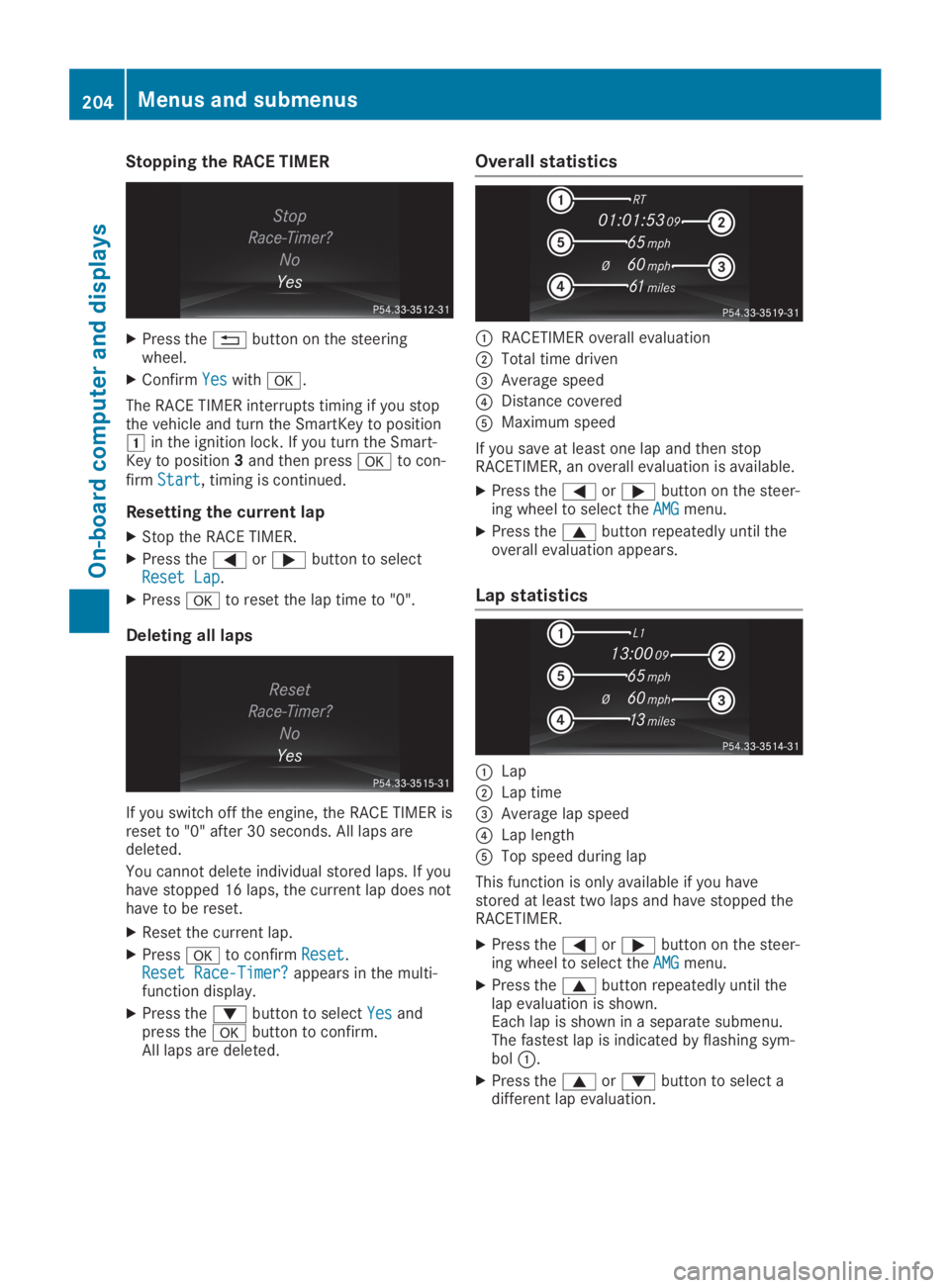
CRACETIMER overall evaluation
DTotal time driven
Page 248 of 330
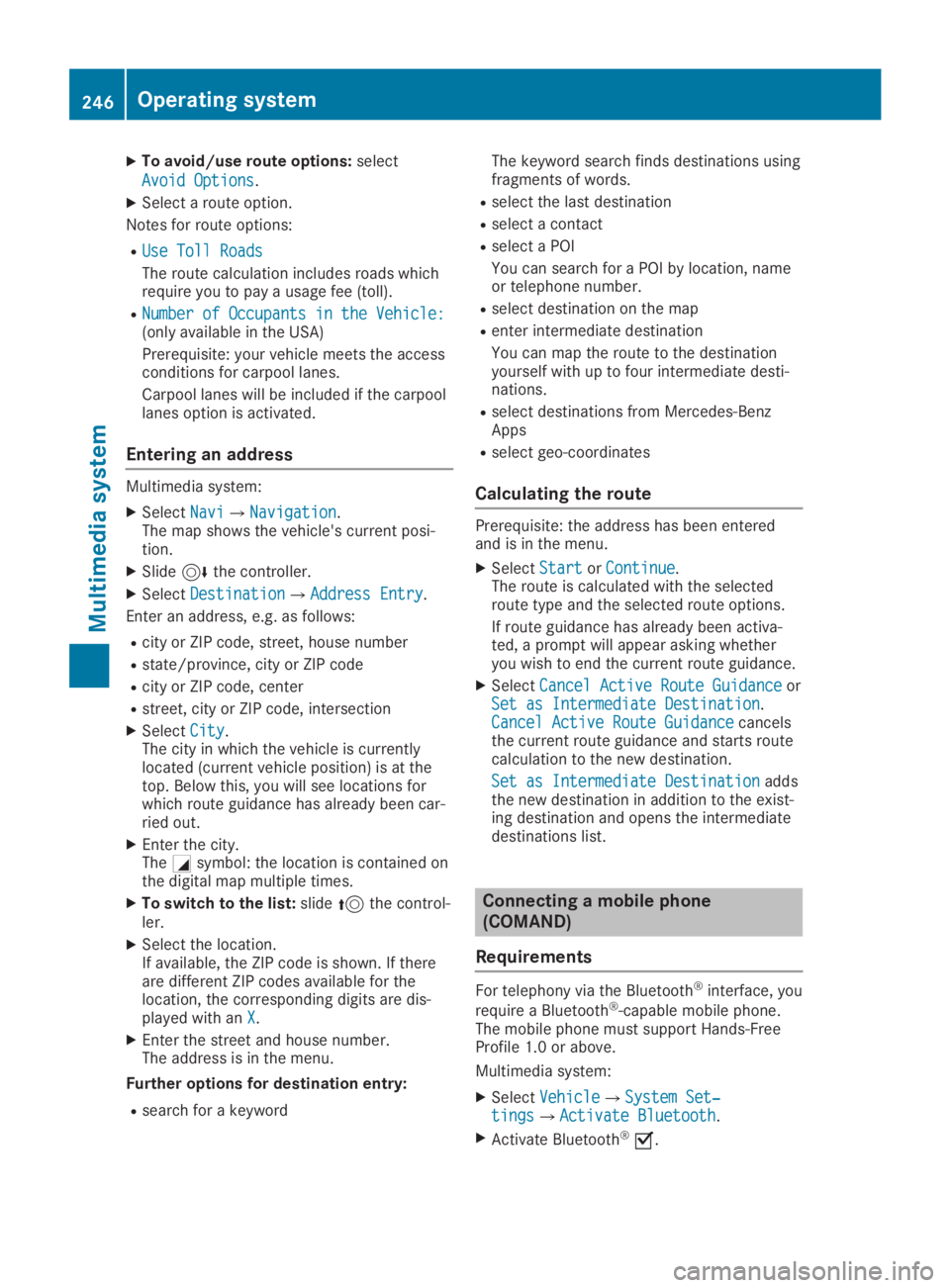
XTo avoid/use route options:select
Avoid OptionsAvoid Options.
XSelect a route option.
Notes for route options:
RUse Toll RoadsUse Toll Roads
The route calculation includes roads whichrequire you to pay a usage fee (toll).
RNumber of Occupants in the Vehicle:Number of Occupants in the Vehicle:(only available in the USA)
Prerequisite: your vehicle meets the accessconditions for carpool lanes.
Carpool lanes will be included if the carpoollanes option is activated.
Entering an address
Multimedia system:
XSelectNaviNavi{NavigationNavigation.The map shows the vehicle's current posi-tion.
XSlide6the controller.
XSelectDestinationDestination{Address EntryAddress Entry.
Enter an address, e.g. as follows:
Rcity or ZIP code, street, house number
Rstate/province, city or ZIP code
Rcity or ZIP code, center
Rstreet, city or ZIP code, intersection
XSelectCityCity.The city in which the vehicle is currentlylocated (current vehicle position) is at thetop. Below this, you will see locations forwhich route guidance has already been car-ried out.
XEnter the city.TheCsymbol: the location is contained onthe digital map multiple times.
XTo switch to the list:slide5the control-ler.
XSelect the location.If available, the ZIP code is shown. If thereare different ZIP codes available for thelocation, the corresponding digits are dis-played with anXX.
XEnter the street and house number.The address is in the menu.
Further options for destination entry:
Rsearch for a keyword
The keyword search finds destinations usingfragments of words.
Rselect the last destination
Rselect a contact
Rselect a POI
You can search for a POI by location, nameor telephone number.
Rselect destination on the map
Renter intermediate destination
You can map the route to the destinationyourself with up to four intermediate desti-nations.
Rselect destinations from Mercedes-BenzApps
Rselect geo-coordinates
Calculating the route
Prerequisite: the address has been enteredand is in the menu.
XSelectStartStartorContinueContinue.The route is calculated with the selectedroute type and the selected route options.
If route guidance has already been activa-ted, a prompt will appear asking whetheryou wish to end the current route guidance.
XSelectCancel Active Route GuidanceCancel Active Route GuidanceorSet as Intermediate DestinationSet as Intermediate Destination.Cancel Active Route GuidanceCancel Active Route Guidancecancelsthe current route guidance and starts routecalculation to the new destination.
Set as Intermediate DestinationSet as Intermediate Destinationaddsthe new destination in addition to the exist-ing destination and opens the intermediatedestinations list.
Connecting a mobile phone
(COMAND)
Requirements
For telephony via the Bluetooth®interface, you
require a Bluetooth®-capable mobile phone.The mobile phone must support Hands-FreeProfile 1.0 or above.
Multimedia system:
XSelectVehicleVehicle{System Set‐System Set‐tingstings{Activate BluetoothActivate Bluetooth.
XActivate Bluetooth®s.
246Operating system
Multimedia system
Page 249 of 330
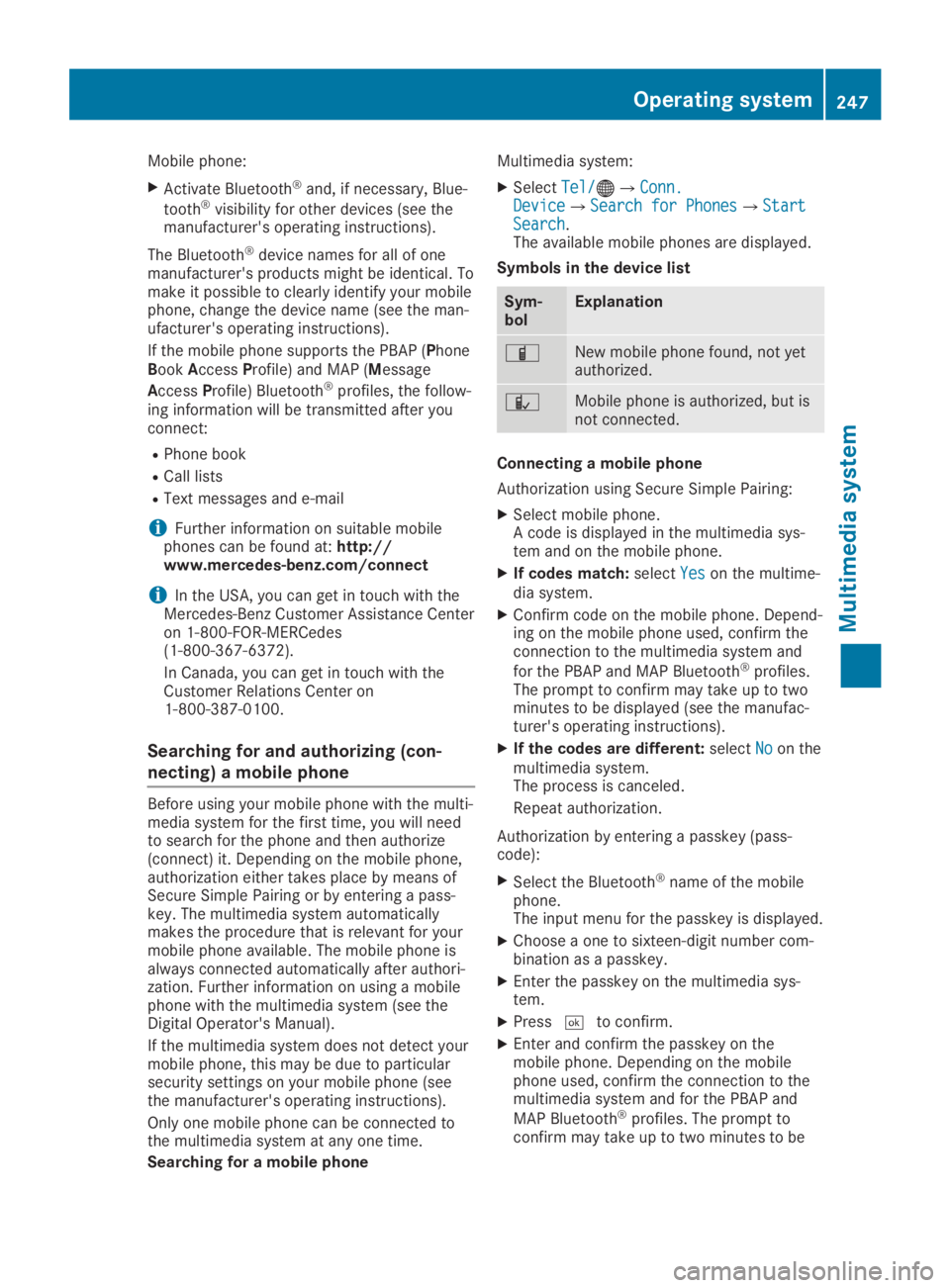
Mobile phone:
XActivate Bluetooth®and, if necessary, Blue-
tooth®visibility for other devices (see themanufacturer's operating instructions).
The Bluetooth®device names for all of onemanufacturer's products might be identical. Tomake it possible to clearly identify your mobilephone, change the device name (see the man-ufacturer's operating instructions).
If the mobile phone supports the PBAP (PhoneBookAccessProfile) and MAP (Message
AccessProfile) Bluetooth®profiles, the follow-ing information will be transmitted after youconnect:
RPhone book
RCall lists
RText messages and e-mail
iFurther information on suitable mobilephones can be found at:http://www.mercedes-benz.com/connect
iIn the USA, you can get in touch with theMercedes-Benz Customer Assistance Centeron 1-800-FOR-MERCedes(1-800-367-6372).
In Canada, you can get in touch with theCustomer Relations Center on1-800-387-0100.
Searching for and authorizing (con-
necting) a mobile phone
Before using your mobile phone with the multi-media system for the first time, you will needto search for the phone and then authorize(connect) it. Depending on the mobile phone,authorization either takes place by means ofSecure Simple Pairing or by entering a pass-key. The multimedia system automaticallymakes the procedure that is relevant for yourmobile phone available. The mobile phone isalways connected automatically after authori-zation. Further information on using a mobilephone with the multimedia system (see theDigital Operator's Manual).
If the multimedia system does not detect yourmobile phone, this may be due to particularsecurity settings on your mobile phone (seethe manufacturer's operating instructions).
Only one mobile phone can be connected tothe multimedia system at any one time.
Searching for a mobile phone
Multimedia system:
XSelectTel/Tel/
Page 251 of 330
Stowage areas
Stowage spaces
Important safety notes
GWARNING
If objects in the passenger compartment are
stowed incorrectly, they can slide or be
thrown around and hit vehicle occupants. In
addition, cup holders, open stowage spaces
and mobile phone brackets cannot always
retain all objects they contain. There is a
risk of injury, particularly in the event of sud-
den braking or a sudden change in direction.
RAlways stow objects so that they cannot
be thrown around in such situations.
RAlways make sure that objects do not pro-
trude from stowage spaces, parcel nets or
stowage nets.
RClose the lockable stowage spaces before
starting a journey.
RAlways stow and secure heavy, hard, poin-
ted, sharp-edged, fragile or bulky objects
in the trunk.
Glove compartment
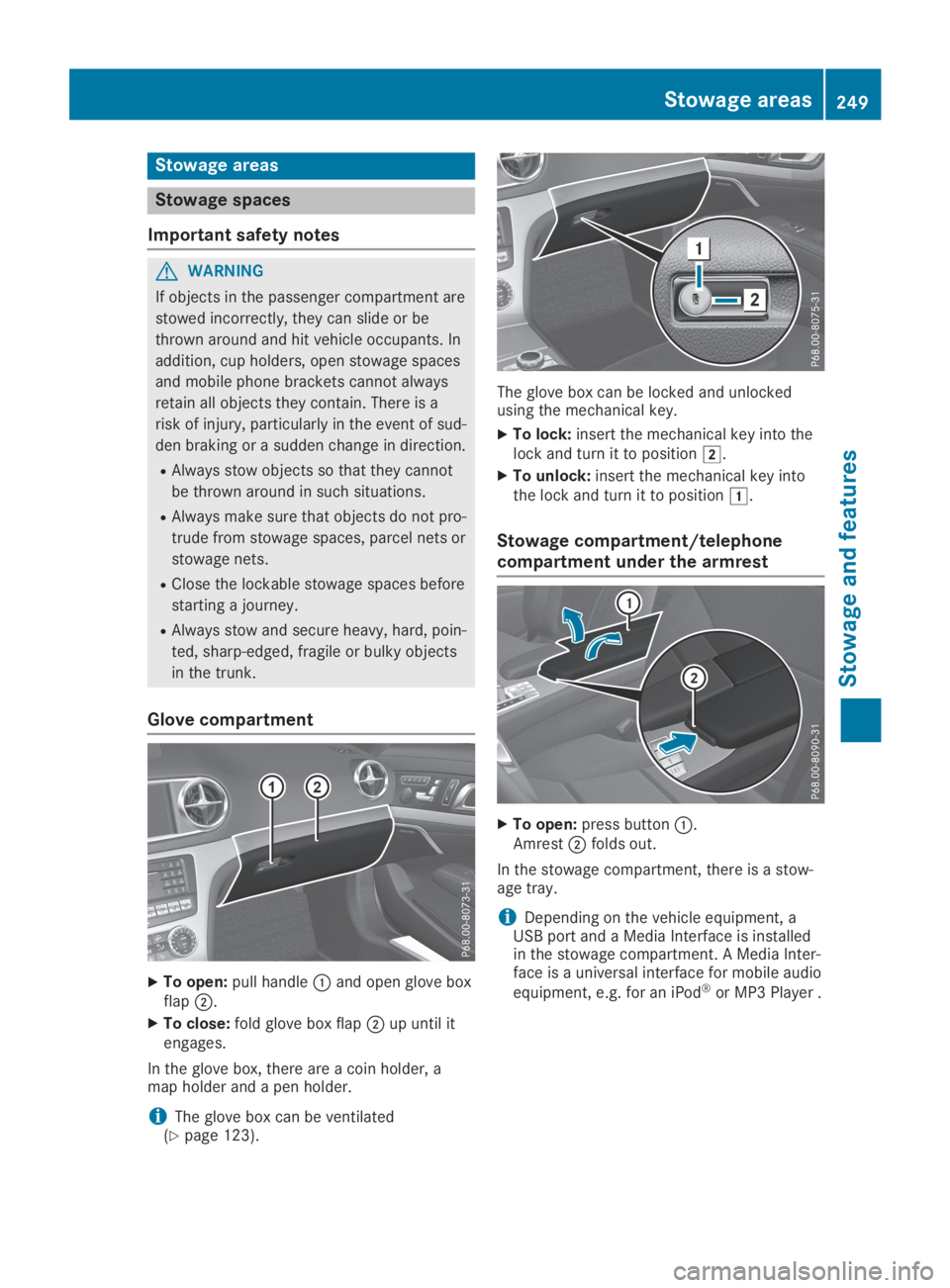
XTo open:pull handleCand open glove boxflapD.
XTo close:fold glove box flapDup until itengages.
In the glove box, there are a coin holder, amap holder and a pen holder.
iThe glove box can be ventilated(Ypage 123).
The glove box can be locked and unlockedusing the mechanical key.
XTo lock:insert the mechanical key into thelock and turn it to positionH.
XTo unlock:insert the mechanical key intothe lock and turn it to positionG.
Stowage compartment/telephone
compartment under the armrest
XTo open:press buttonC.AmrestDfolds out.
In the stowage compartment, there is a stow-age tray.
iDepending on the vehicle equipment, aUSB port and a Media Interface is installedin the stowage compartment. A Media Inter-face is a universal interface for mobile audio
equipment, e.g. for an iPod®or MP3 Player .
Stowage areas249
Stowage and features
Z
Page 261 of 330
All other calls can be ended by pressing:
Rthevbutton on the multifunction steer-ing wheel
Ror the corresponding COMAND button forending a telephone call
iWhen a call is initiated, the audio systemis muted. The mobile phone is no longerconnected to COMAND. However, if youwant to use your mobile phone, do so onlywhen the vehicle is stationary and in a safelocation.
Vehicle Health Check
With the Vehicle Health Check, the CustomerAssistance Center can provide improved sup-port for problems with your vehicle. During anexisting call, vehicle data is transferred to theCustomer Assistance Center. The customerservice representative can use the receiveddata to decide what kind of assistance isrequired. You are then, for example, guided tothe nearest Mercedes-Benz Service Center ora recovery vehicle is called.
If vehicle data needs to be transferred duringan MB Info call or a Roadside Assistance call,this is initiated by the Customer AssistanceCenter. You will see theRoadside Assis‐Roadside Assis‐tance Connectedtance Connectedmessage in the COMANDdisplay. If the Vehicle Health Check can bestarted, theRequest for vehicle diagno‐Request for vehicle diagno‐sis received. Start vehicle diagno‐sis received. Start vehicle diagno‐sis?sis?message appears in the display.
XConfirm the message withYesYes.
XWhen theVehicle Diagnosis: PleaseVehicle Diagnosis: Pleasestart ignition.start ignition.message appears, turnthe SmartKey to positionHin the ignitionlock (Ypage 126).
XWhen thePlease follow the instruc‐Please follow the instruc‐tions received by phone and movetions received by phone and moveyour vehicle to a safe positionyour vehicle to a safe positionmes-sage appears, follow the customer servicerepresentative's instructions.The message in the display disappears.
If you selectCancelCancelthe Vehicle HealthCheck is canceled completely.
The vehicle operating state check begins.You will see theVehicle diagnosisVehicle diagnosisactivated.activated.message.
When the check is completed, theSendSendvehicle diagnostics data (Voice con‐vehicle diagnostics data (Voice con‐nection may be interrupted duringnection may be interrupted during
data transfer)data transfer)message appears. The vehi-cle data can now be sent to the CustomerAssistance Center.
XPressOKOKto confirm the message.The voice connection with the CustomerAssistance Center is terminated.
You will see theVehicle Diagnosis:Vehicle Diagnosis:Transferring data...Transferring data...message.
The vehicle data is sent to the CustomerAssistance Center.
Depending on what the customer service rep-resentative agreed with you, the voice connec-tion is re-established after the transfer is com-plete. If necessary, you will be contacted at alater time by another means, e.g. by e-mail orphone.
Another function of the Vehicle Health Checkis the transfer of service data to the CustomerAssistance Center. If a service is overdue, theCOMAND display shows a message about vari-ous special offers at your workshop.
USA only: this information can also be calledup under "Owners Online" at http://www.mbusa.com.
Information on the data stored in the vehicle(Ypage 29).
Information on Roadside Assistance(Ypage 26).
Garage door opener
General notes
The HomeLink®garage door opener integratedin the rear-view mirror allows you to operateup to three different door and gate systems.
Use the integrated garage door opener only ongarage doors that:
Rhave safety stop and reverse features and
Rmeet current U.S. federal safety standards
Once programed, the integrated garage dooropener in the rear-view mirror will assume thefunction of the garage door system's remotecontrol. Please also read the operating instruc-tions for the garage door system.
When programming a garage door opener,park the vehicle outside the garage. Do notrun the engine while programming.
Certain garage door drives are incompatiblewith the integrated garage door opener. If youhave difficulty programing the integrated
Features259
Sto wage an d features
Z
Page 270 of 330
If you need to do any work inside the engine
compartment:
Rswitch off the ignition
Rnever reach into the area where there is a
risk of danger from moving components,
such as the fan rotation area
Rremove jewelry and watches
Rkeep items of clothing and hair, for exam-
ple, away from moving parts
GWARNING
The cooling system is pressurized, particu-
larly when the motor is warm. If you open
the cap, you could be scalded if hot coolant
sprays out. There is a risk of injury.
Let the engine cool down before you open
the cap. Wear protective gloves and protec-
tive eyewear when opening. Open the cap
slowly to release pressure.
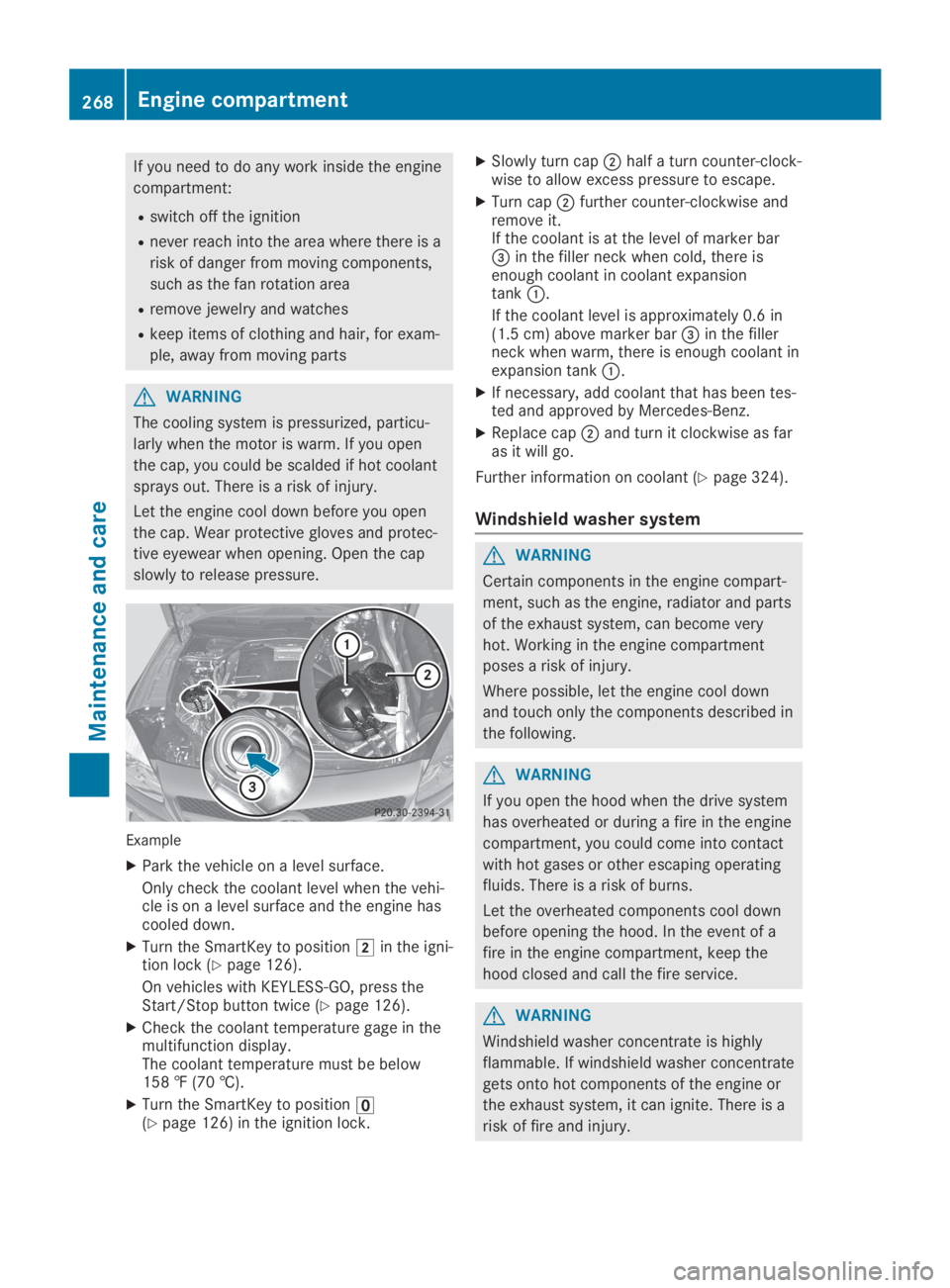
Example
XPark the vehicle on a level surface.
Only check the coolant level when the vehi-cle is on a level surface and the engine hascooled down.
XTurn the SmartKey to positionHin the igni-tion lock (Ypage 126).
On vehicles with KEYLESS-GO, press theStart/Stop button twice (Ypage 126).
XCheck the coolant temperature gage in themultifunction display.The coolant temperature must be below158 ‡ (70 †).
XTurn the SmartKey to position