audio MERCEDES-BENZ SL-CLASS ROADSTER 2013 User Guide
[x] Cancel search | Manufacturer: MERCEDES-BENZ, Model Year: 2013, Model line: SL-CLASS ROADSTER, Model: MERCEDES-BENZ SL-CLASS ROADSTER 2013Pages: 572, PDF Size: 9.23 MB
Page 28 of 572
Raising ...........................................
549
Reporting problems .........................32
Securing from rolling away ............ 549
Towing away
.................................. 518
Tow-starting ................................... 518
Transporting .................................. 520
Unlocking (in an emergency) ........... 76
Unlocking (SmartKey) ......................68
Vehicle data ................................... 565
Vehicle battery
see Battery (vehicle)
Vehicle data ....................................... 565
Vehicle dimensions ...........................565
Vehicle emergency locking ................77
Vehicle identification number see VIN
Vehicle identification plate ..............559
Vehicle level Active Body Control (AMG
vehicles) ........................................ 181
Active Body Control (except AMG
vehicles) ........................................ 179
Display message ............................ 241
Vehicle maintenance
see ASSYST PLUS
Vehicle tool kit .................................. 508
Video Operating the DVD ......................... 212
Overview ........................................ 452
see Video DVD
Video AUX
Setting the picture ......................... 453
Video DVD
Automatic picture shutoff ..............452
DVD menu ..................................... 457
Fast forward/rewind ...................... 455
Function restrictions ...................... 454
Interactive content ........................458
Notes on discs ............................... 453
Operation ....................................... 453
Pause function ............................... 456
Playing conditions .......................... 453
Safety notes .................................. 453
Selecting ........................................ 456
Selecting a film/title ...................... 456
Selecting a scene/chapter ............ 456
Setting the audio format ................ 458
Setting the language ...................... 458Setting the picture .........................
453
Showing/hiding the control menu . 454
Showing/hiding the menu
.............455
Stop function ................................. 455
Subtitles ........................................ 458
Switching to ................................... 454
VIN ...................................................... 559
Voice Control System Settings ......................................... 291
Volume, adjusting
COMAND ....................................... 277
Navigation messages ..................... 277 W
Warning and indicator lamps ABS
................................................ 257
Brakes ........................................... 257
Check Engine ................................. 263
Coolant .......................................... 263
Distance warning ........................... 265
DISTRONIC PLUS ........................... 265
ESP ®
.............................................. 259
ESP ®
OFF ....................................... 260
Fuel tank ........................................ 263
Overview ........................................ 255
PASSENGER AIR BAG OFF
indicator lamp .................................. 43
Reserve fuel ................................... 263
Seat belt ........................................ 256
SPORT handling mode ................... 260
SRS ................................................ 262
Tire pressure monitor .................... 266
Warranty ............................................ 558
Washer fluid Display message ............................ 253
Waypoints
Accepting waypoints for the route . 310
Editing ........................................... 310
Entering ......................................... 308
Weather Band
Searching for a channel ................. 415
Switching on .................................. 414
Weather display (COMAND)
Calling up the weather map ...........395
Information chart ........................... 393
Selecting locations in the
information chart ........................... 39426
Index
Page 209 of 572
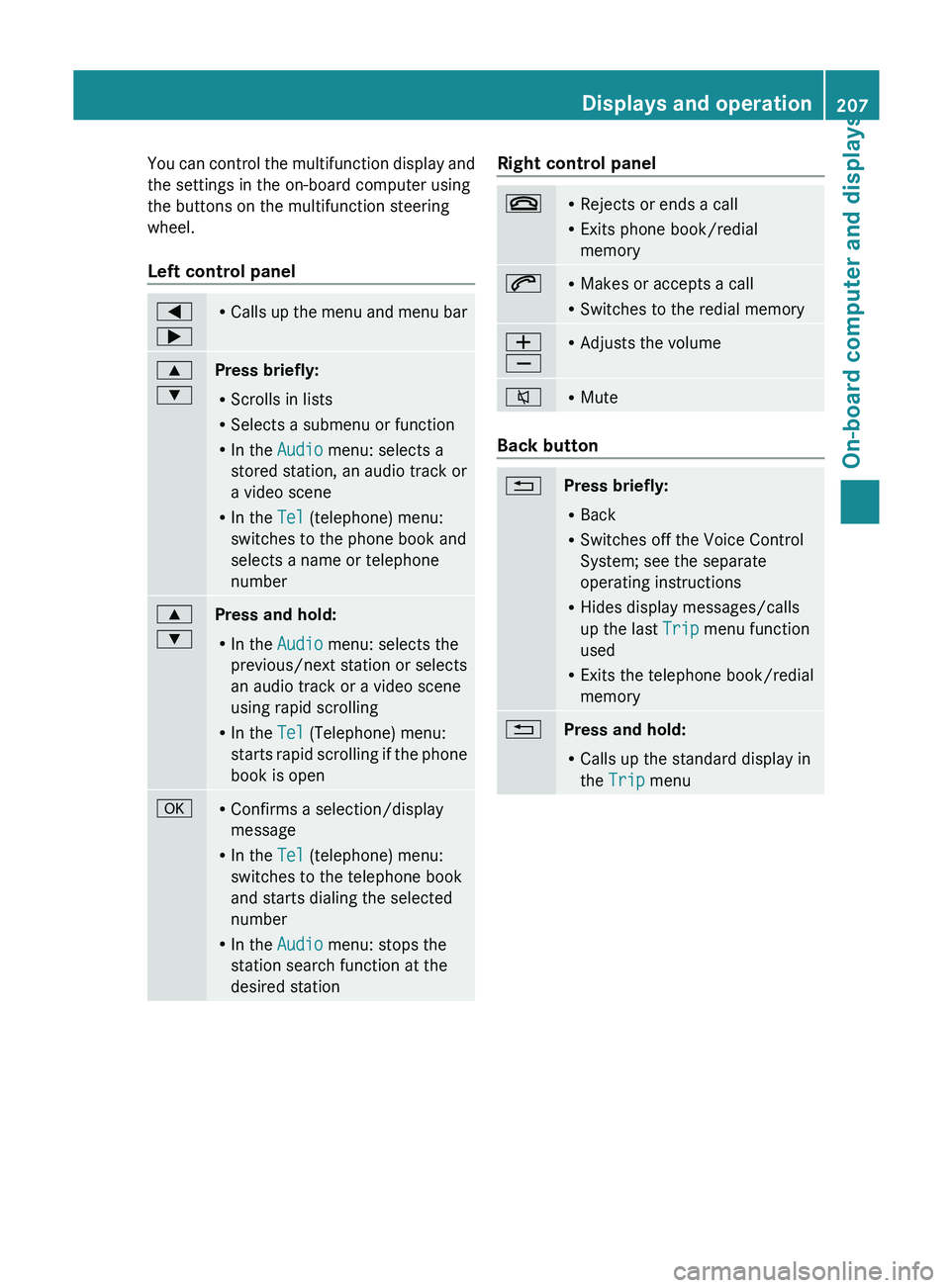
You can control the multifunction display and
the settings in the on-board computer using
the buttons on the multifunction steering
wheel.
Left control panel
=
; R
Calls up
the menu and menu bar 9
:
Press briefly:
R
Scrolls in lists
R Selects a submenu or function
R In the Audio menu: selects a
stored station, an audio track or
a video scene
R In the Tel (telephone) menu:
switches to the phone book and
selects a name or telephone
number 9
:
Press and hold:
R
In the Audio menu: selects the
previous/next station or selects
an audio track or a video scene
using rapid scrolling
R In the Tel (Telephone) menu:
starts rapid
scrolling if the phone
book is open a R
Confirms a selection/display
message
R In the Tel (telephone) menu:
switches to the telephone book
and starts dialing the selected
number
R In the Audio menu: stops the
station search function at the
desired station Right control panel
~ R
Rejects or ends a call
R Exits phone book/redial
memory 6 R
Makes or accepts a call
R Switches to the redial memory W
X R
Adjusts the volume 8 R
Mute Back button
%
Press briefly:
R
Back
R Switches off the Voice Control
System; see the separate
operating instructions
R Hides display messages/calls
up the last Trip menu function
used
R Exits the telephone book/redial
memory %
Press and hold:
R
Calls up the standard display in
the Trip menu Displays and operation
207
On-board computer and displays Z
Page 210 of 572
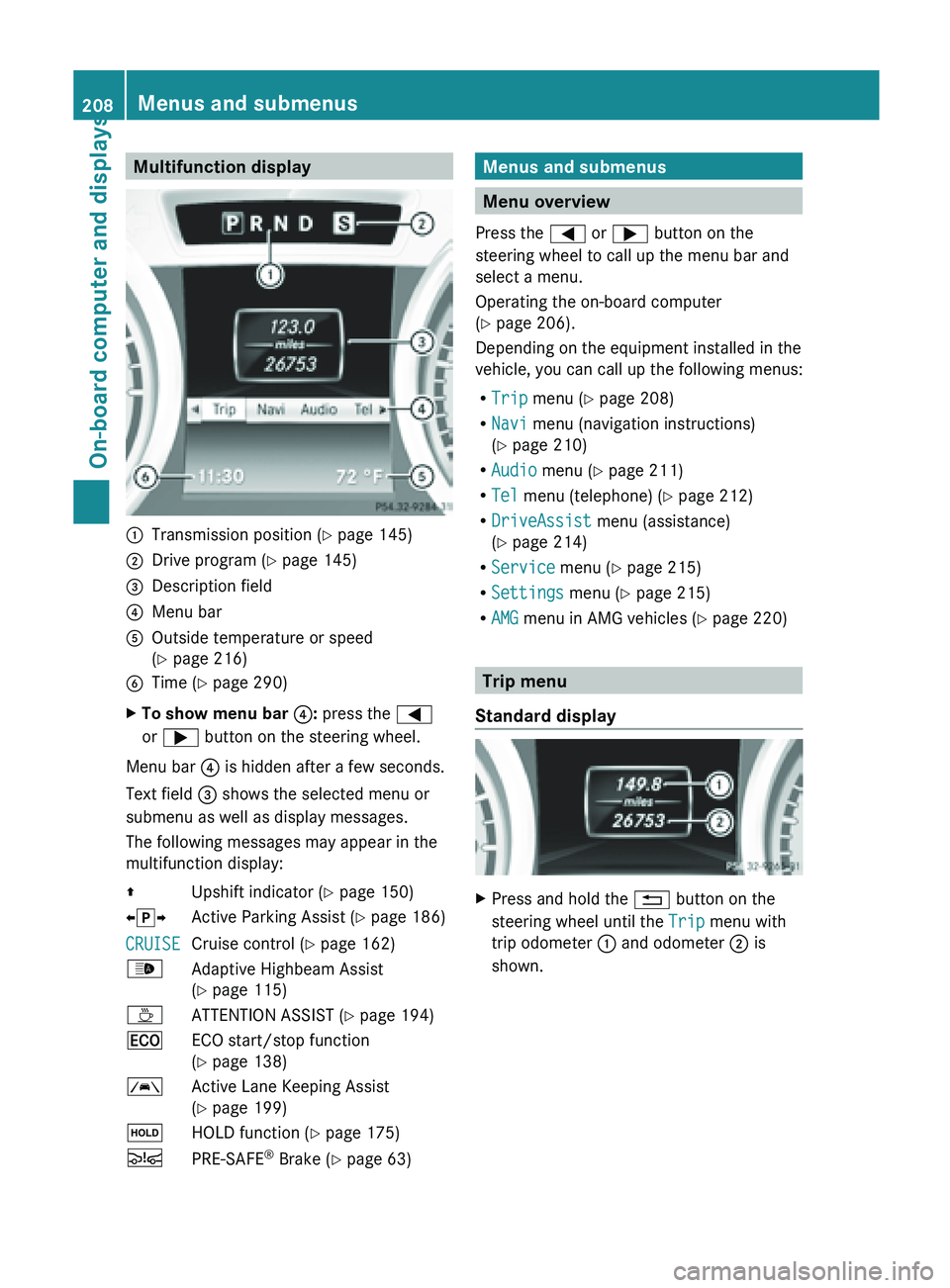
Multifunction display
:
Transmission position ( Y page 145)
; Drive program (Y page 145)
= Description field
? Menu bar
A Outside temperature or speed
(Y page 216)
B Time ( Y page 290)
X To show menu bar ?: press the =
or ; button on the steering wheel.
Menu bar ? is hidden after a few seconds.
Text field = shows the selected menu or
submenu as well as display messages.
The following messages may appear in the
multifunction display:
Z Upshift indicator (Y page 150)
XjY Active Parking Assist (Y page 186)
CRUISE Cruise control (
Y page 162)
_ Adaptive Highbeam Assist
(Y page 115)
À ATTENTION ASSIST (Y page 194)
¤ ECO start/stop function
(Y page 138)
à Active Lane Keeping Assist
(Y page 199)
ë HOLD function ( Y page 175)
Ä PRE-SAFE ®
Brake (Y page 63) Menus and submenus
Menu overview
Press the = or ; button on the
steering wheel to call up the menu bar and
select a menu.
Operating the on-board computer
(Y page 206).
Depending on the equipment installed in the
vehicle, you can call up the following menus:
R Trip menu (Y page 208)
R Navi menu (navigation instructions)
(Y page 210)
R Audio menu (Y page 211)
R Tel menu (telephone) ( Y page 212)
R DriveAssist menu (assistance)
(Y page 214)
R Service menu (Y page 215)
R Settings menu (Y page 215)
R AMG menu in AMG vehicles ( Y page 220) Trip menu
Standard display X
Press and hold the % button on the
steering wheel until the Trip menu with
trip odometer : and odometer ; is
shown. 208
Menus and submenus
On-board computer and displays
Page 213 of 572
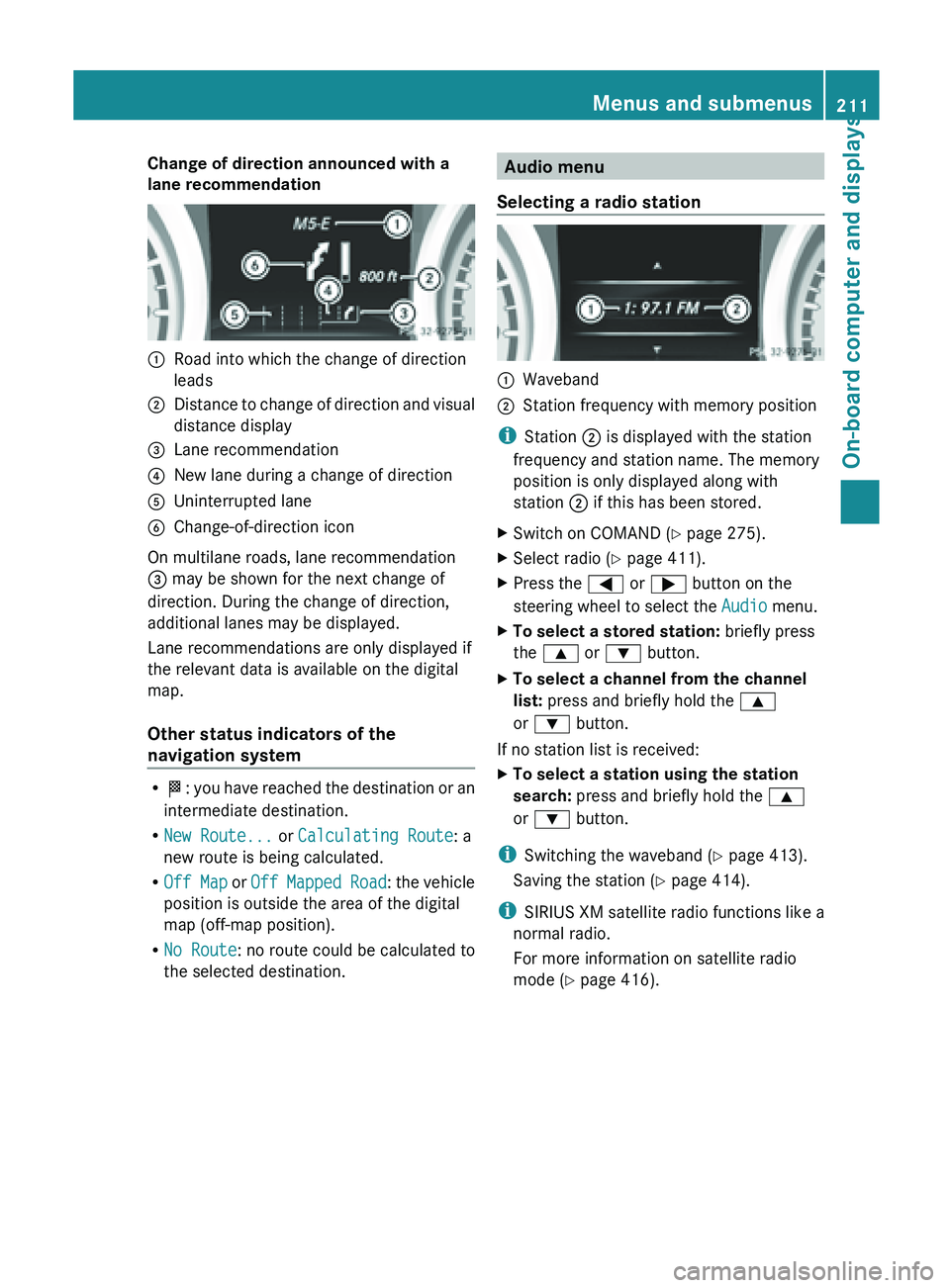
Change of direction announced with a
lane recommendation
:
Road into which the change of direction
leads
; Distance to change of direction and visual
distance display
= Lane recommendation
? New lane during a change of direction
A Uninterrupted lane
B Change-of-direction icon
On multilane roads, lane recommendation
= may be shown for the next change of
direction. During the change of direction,
additional lanes may be displayed.
Lane recommendations are only displayed if
the relevant data is available on the digital
map.
Other status indicators of the
navigation system R
O: you
have reached the destination or an
intermediate destination.
R New Route... or Calculating Route: a
new route is being calculated.
R Off Map or Off Mapped Road : the vehicle
position is outside the area of the digital
map (off-map position).
R No Route : no route could be calculated to
the selected destination. Audio menu
Selecting a radio station :
Waveband
; Station frequency with memory position
i Station ; is displayed with the station
frequency and station name. The memory
position is only displayed along with
station ; if this has been stored.
X Switch on COMAND (Y page 275).
X Select radio ( Y page 411).
X Press the = or ; button on the
steering wheel to select the Audio menu.
X To select a stored station: briefly press
the 9 or : button.
X To select a channel from the channel
list: press and briefly hold the 9
or : button.
If no station list is received:
X To select a station using the station
search: press and briefly hold the 9
or : button.
i Switching the waveband ( Y page 413).
Saving the station ( Y page 414).
i SIRIUS XM satellite radio functions like a
normal radio.
For more information on satellite radio
mode ( Y page 416). Menus and submenus
211
On-board computer and displays Z
Page 214 of 572
Operating audio player or data carrier
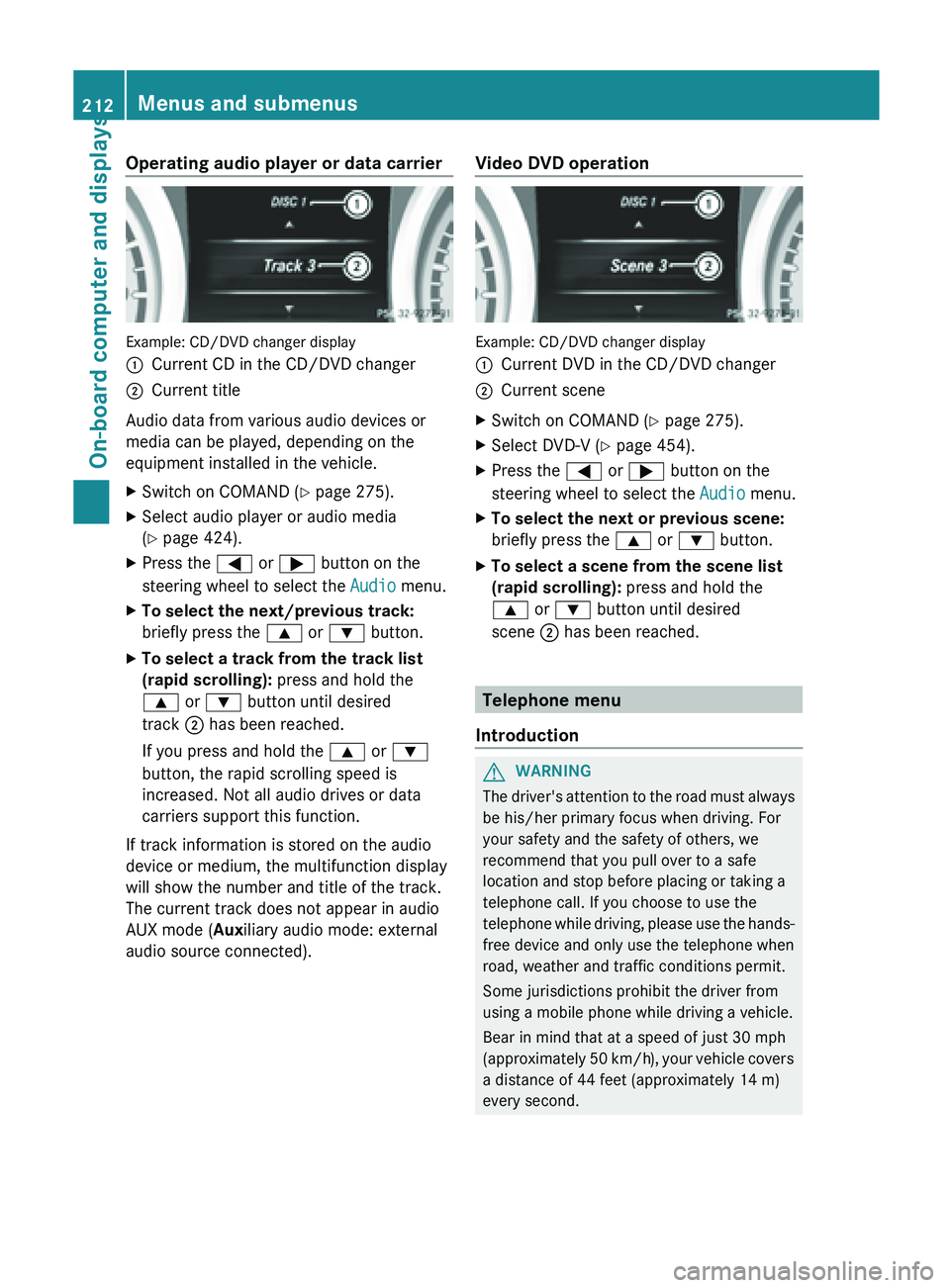
Example: CD/DVD changer display
:
Current CD in the CD/DVD changer
; Current title
Audio data from various audio devices or
media can be played, depending on the
equipment installed in the vehicle.
X Switch on COMAND (Y page 275).
X Select audio player or audio media
(Y page 424).
X Press the = or ; button on the
steering wheel to select the Audio menu.
X To select the next/previous track:
briefly press the 9 or : button.
X To select a track from the track list
(rapid scrolling): press and hold the
9 or : button until desired
track ; has been reached.
If you press and hold the 9 or :
button, the rapid scrolling speed is
increased. Not all audio drives or data
carriers support this function.
If track information is stored on the audio
device or medium, the multifunction display
will show the number and title of the track.
The current track does not appear in audio
AUX mode (Auxiliary audio mode: external
audio source connected). Video DVD operation Example: CD/DVD changer display
:
Current DVD in the CD/DVD changer
; Current scene
X Switch on COMAND (Y page 275).
X Select DVD-V ( Y page 454).
X Press the = or ; button on the
steering wheel to select the Audio menu.
X To select the next or previous scene:
briefly press the 9 or : button.
X To select a scene from the scene list
(rapid scrolling): press and hold the
9 or : button until desired
scene ; has been reached. Telephone menu
Introduction G
WARNING
The driver's attention to the road must always
be his/her primary focus when driving. For
your safety and the safety of others, we
recommend that you pull over to a safe
location and stop before placing or taking a
telephone call. If you choose to use the
telephone while
driving, please use the hands-
free device and only use the telephone when
road, weather and traffic conditions permit.
Some jurisdictions prohibit the driver from
using a mobile phone while driving a vehicle.
Bear in mind that at a speed of just 30 mph
(approximately 50 km/h), your vehicle covers
a distance of 44 feet (approximately 14 m)
every second. 212
Menus and submenus
On-board computer and displays
Page 269 of 572
Useful information ............................
268
Operating safety ............................... 268
At a glance ......................................... 271
System settings ................................ 289
Navigation ......................................... 295
Telephone .......................................... 357
Online and Internet functions ..........385
Audio .................................................. 411
Video .................................................. 452
SIRIUS Weather ................................ 461 267COMAND
Page 270 of 572
Useful information
i These operating instructions describe all
the standard and optional equipment of
your COMAND system, as available at the
time of going to print. Country-specific
differences are possible. Please note that
your COMAND system may not be
equipped with all the features described.
This also applies to safety-related systems
and functions.
i Read the information on qualified
specialist workshops: ( Y page 31).
Operating safety
Important safety notes
G
WARNING
Making alterations to electronic components
can cause malfunctions.
Radio, satellite
radio, amplifier, DVD changer,
navigation module, phone and voice control
are networked. If one component is not
functional or if it has been incorrectly
removed/replaced, this could impair the
operation of other components.
This could seriously jeopardize the
operational safety of your vehicle.
We recommend that you always have
maintenance work on electronic components
carried out at an authorized Mercedes-Benz
Center. G
WARNING
In
order to avoid distraction which could lead
to an accident, the driver should only enter
system settings
with the vehicle at a standstill
and operate the system only when road,
weather and traffic conditions permit.
Bear in mind that at a speed of only 30 mph
(approximately 50 km/h), the vehicle covers
a distance of 44 feet (approximately 14 m) per
second. COMAND delivers information to simplify
your choice of route and guide you
comfortably and safely to your destination.
For safety reasons, we recommend that you
bring your vehicle to a standstill, paying
attention to road and traffic conditions,
before making or accepting a telephone call
or viewing navigation maps, instructions or
downloaded information on the COMAND
screen.
G
WARNING
While the navigation system provides
directional assistance,
the driver must remain
focused on safe driving behavior, especially
attention to traffic and street signs, and
should utilize the system's audio cues while
driving.
The navigation system does not supply any
information on stop signs, yield signs, traffic
regulations or traffic safety rules. Their
observance always remains in the driver's
personal responsibility. DVD maps do not
cover all areas nor all routes within an area. G
WARNING
This equipment complies with FCC radiation
exposure limits set forth for uncontrolled
equipment and meets the FCC radio
frequency (RF) Exposure Guidelines in
Supplement C to OET65.
This equipment has very low levels of RF
energy that is deemed to comply without
maximum permissive exposure evaluation
(MPE). But it is desirable that it should be
installed and operated with at least 8
inches
(20 cm)
and more between the radiator and a
person's body (excluding extremities: hands,
wrists, feet and legs.) 268
Operating safety
COMAND
Page 273 of 572
authorized Mercedes-Benz Center if you have
any
questions
about equipment or operation.Function restrictions
For safety
reasons, some COMAND functions
are restricted or unavailable while the vehicle
is in motion. You will notice this, for example,
because either you will not be able to select
certain menu items or COMAND will display
a message to this effect. At a glance
COMAND operating system
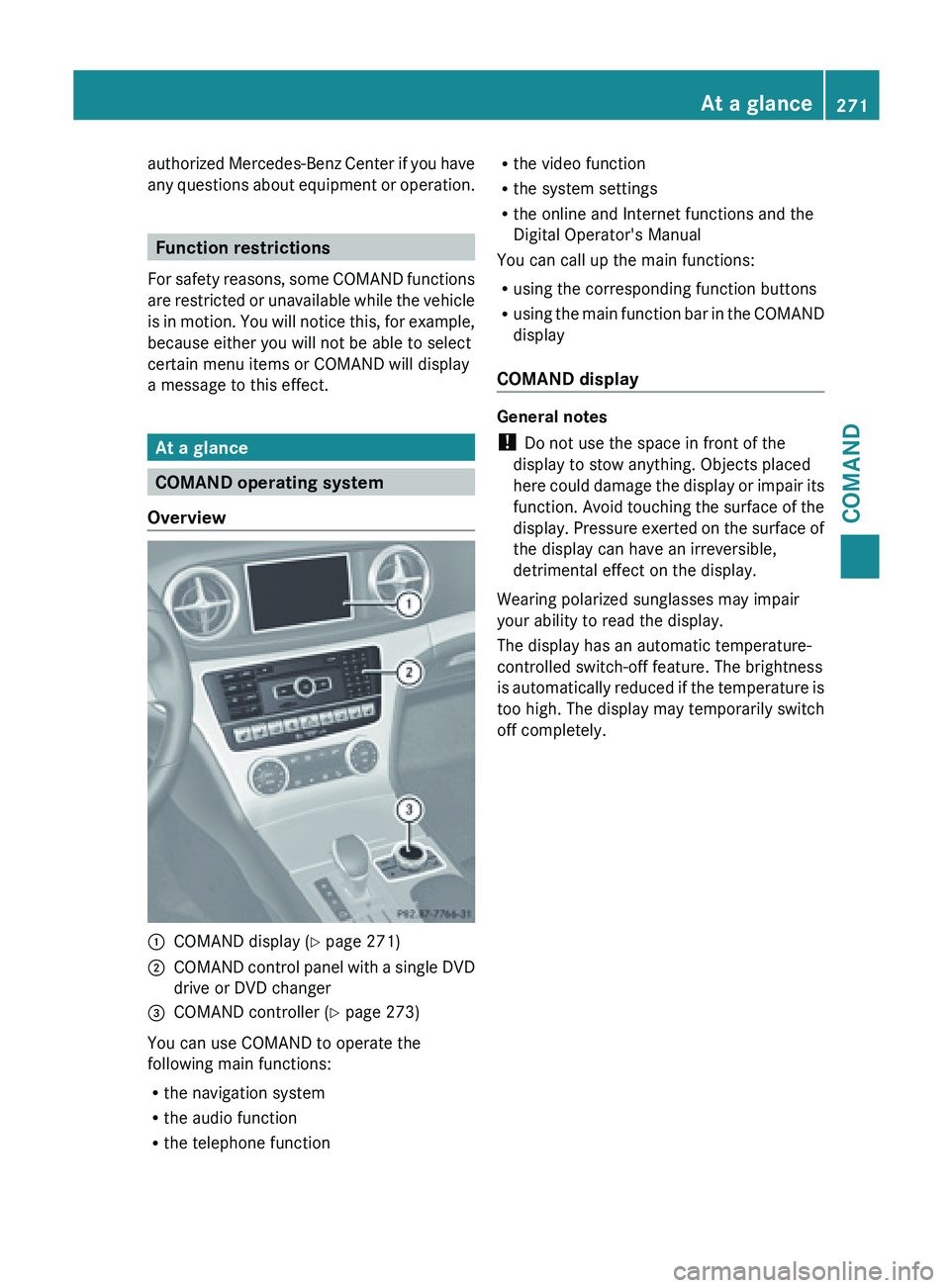
Overview :
COMAND display ( Y page 271)
; COMAND control panel with a single DVD
drive or DVD changer
= COMAND controller (Y page 273)
You can use COMAND to operate the
following main functions:
R the navigation system
R the audio function
R the telephone function R
the video function
R the system settings
R the online and Internet functions and the
Digital Operator's Manual
You can call up the main functions:
R using the corresponding function buttons
R using the
main function bar in the COMAND
display
COMAND display General notes
!
Do not use the space in front of the
display to stow anything. Objects placed
here could
damage the display or impair its
function. Avoid touching the surface of the
display. Pressure exerted on the surface of
the display can have an irreversible,
detrimental effect on the display.
Wearing polarized sunglasses may impair
your ability to read the display.
The display has an automatic temperature-
controlled switch-off feature. The brightness
is automatically reduced if the temperature is
too high. The display may temporarily switch
off completely. At a glance
271
COMAND Z
Page 274 of 572
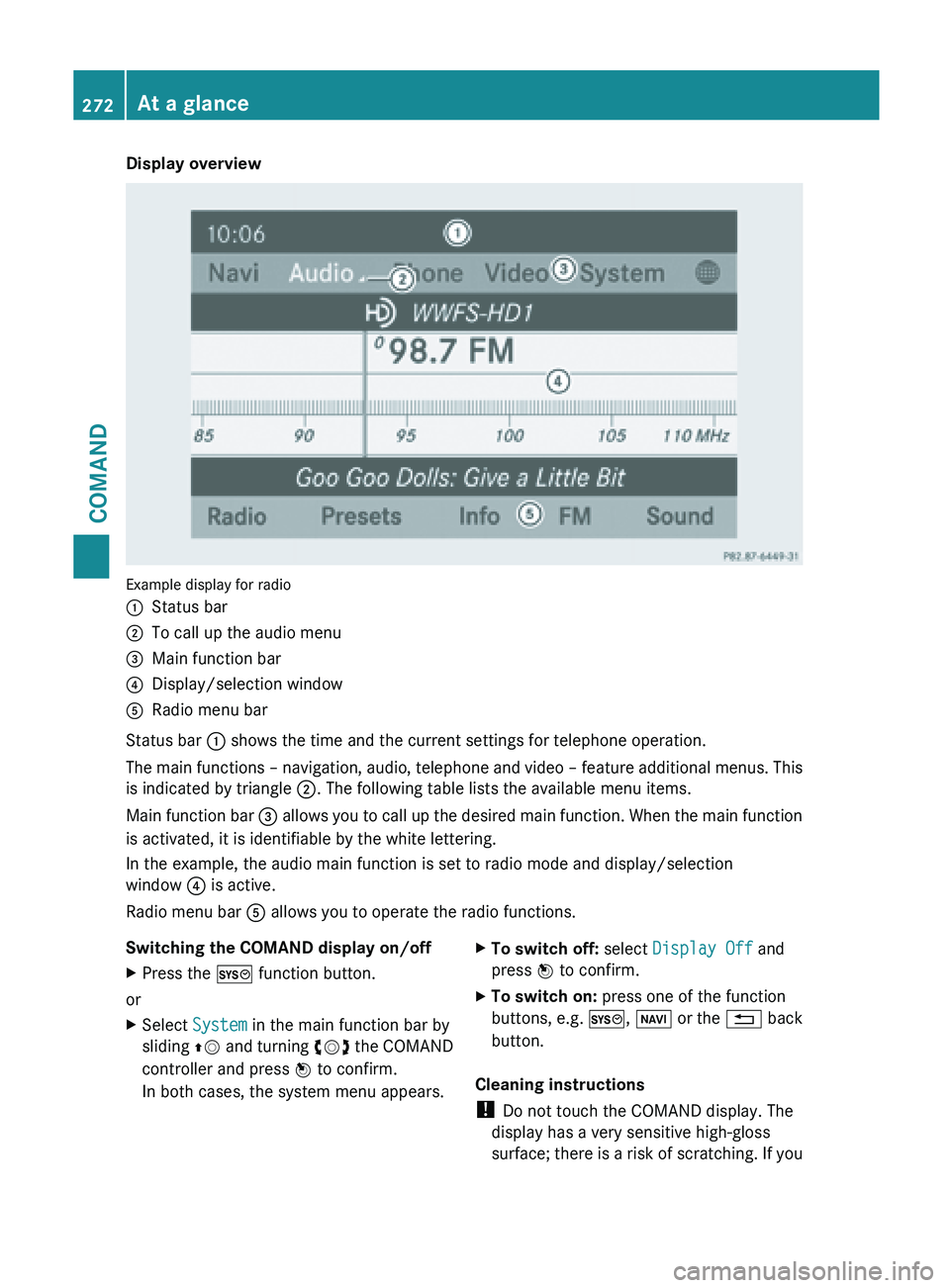
Display overview
Example display for radio
:
Status bar
; To call up the audio menu
= Main function bar
? Display/selection window
A Radio menu bar
Status bar : shows the time and the current settings for telephone operation.
The main
functions – navigation, audio, telephone and video – feature additional menus. This
is indicated by triangle ;. The following table lists the available menu items.
Main function bar = allows you to call up the desired main function. When the main function
is activated, it is identifiable by the white lettering.
In the example, the audio main function is set to radio mode and display/selection
window ? is active.
Radio menu bar A allows you to operate the radio functions.
Switching the COMAND display on/off
X Press the W function button.
or
X Select System in the main function bar by
sliding ZV and
turning cVd the COMAND
controller and press W to confirm.
In both cases, the system menu appears. X
To switch off: select Display Off and
press W to confirm.
X To switch on: press one of the function
buttons, e.g. W, Ø or
the % back
button.
Cleaning instructions
! Do not touch the COMAND display. The
display has a very sensitive high-gloss
surface; there
is a risk of scratching. If you272
At a glance
COMAND
Page 277 of 572
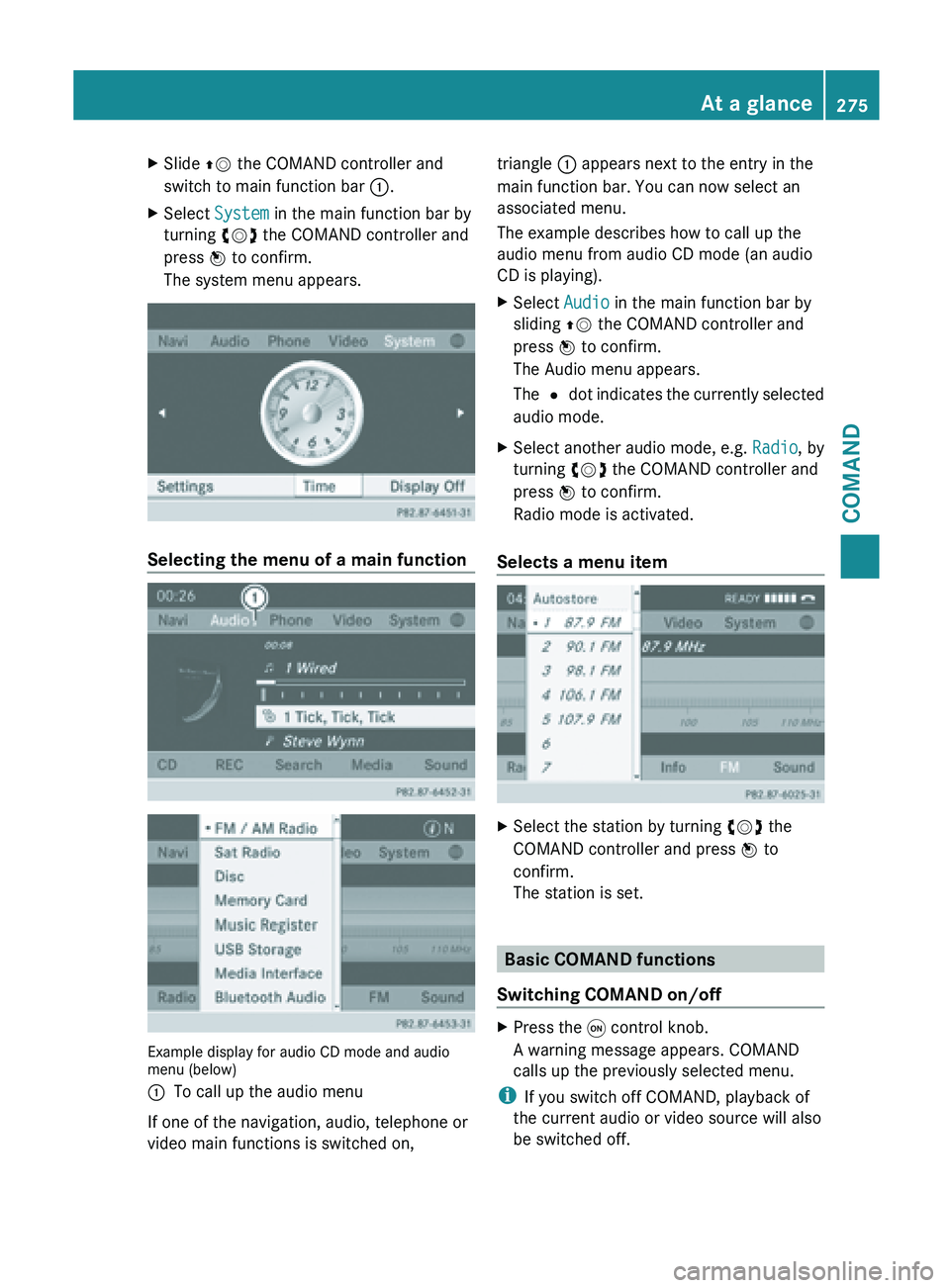
X
Slide ZV the COMAND controller and
switch to main function bar :.
X Select System in the main function bar by
turning cVd the COMAND controller and
press W to confirm.
The system menu appears. Selecting the menu of a main function
Example display for audio CD mode and audio
menu (below)
:
To call up the audio menu
If one of the navigation, audio, telephone or
video main functions is switched on, triangle : appears next to the entry in the
main function bar. You can now select an
associated menu.
The example describes how to call up the
audio menu from audio CD mode (an audio
CD is playing).
X
Select Audio in the main function bar by
sliding ZV the COMAND controller and
press W to confirm.
The Audio menu appears.
The # dot
indicates the currently selected
audio mode.
X Select another audio mode, e.g. Radio, by
turning cVd the COMAND controller and
press W to confirm.
Radio mode is activated.
Selects a menu item X
Select the station by turning cVd the
COMAND controller and press W to
confirm.
The station is set. Basic COMAND functions
Switching COMAND on/off X
Press the q control knob.
A warning message appears. COMAND
calls up the previously selected menu.
i If you switch off COMAND, playback of
the current audio or video source will also
be switched off. At a glance
275
COMAND Z