navigation system MERCEDES-BENZ SL-CLASS ROADSTER 2013 User Guide
[x] Cancel search | Manufacturer: MERCEDES-BENZ, Model Year: 2013, Model line: SL-CLASS ROADSTER, Model: MERCEDES-BENZ SL-CLASS ROADSTER 2013Pages: 572, PDF Size: 9.23 MB
Page 172 of 572
R
you have switched on the corresponding
turn signal.
R DISTRONIC PLUS
does not detect a danger
of collision.
If these conditions are fulfilled, your vehicle
is accelerated. Acceleration will be
interrupted if changing lanes takes too long
or if the distance between your vehicle and
the vehicle in front becomes too small.
Vehicles with COMAND
i The following function is not operational
in all countries.
DISTRONIC PLUS uses additional information
from your navigation system so that it can
react appropriately to certain traffic
situations. This is the case if, while following
a vehicle, DISTRONIC PLUS is active and you:
R approach or drive through a traffic circle
R approach a T intersection
R turn off at a freeway exit
Even if the vehicle in front leaves the
detection range, DISTRONIC PLUS
temporarily maintains the current driving
speed and does not accelerate. This is based
on the current map data in the navigation
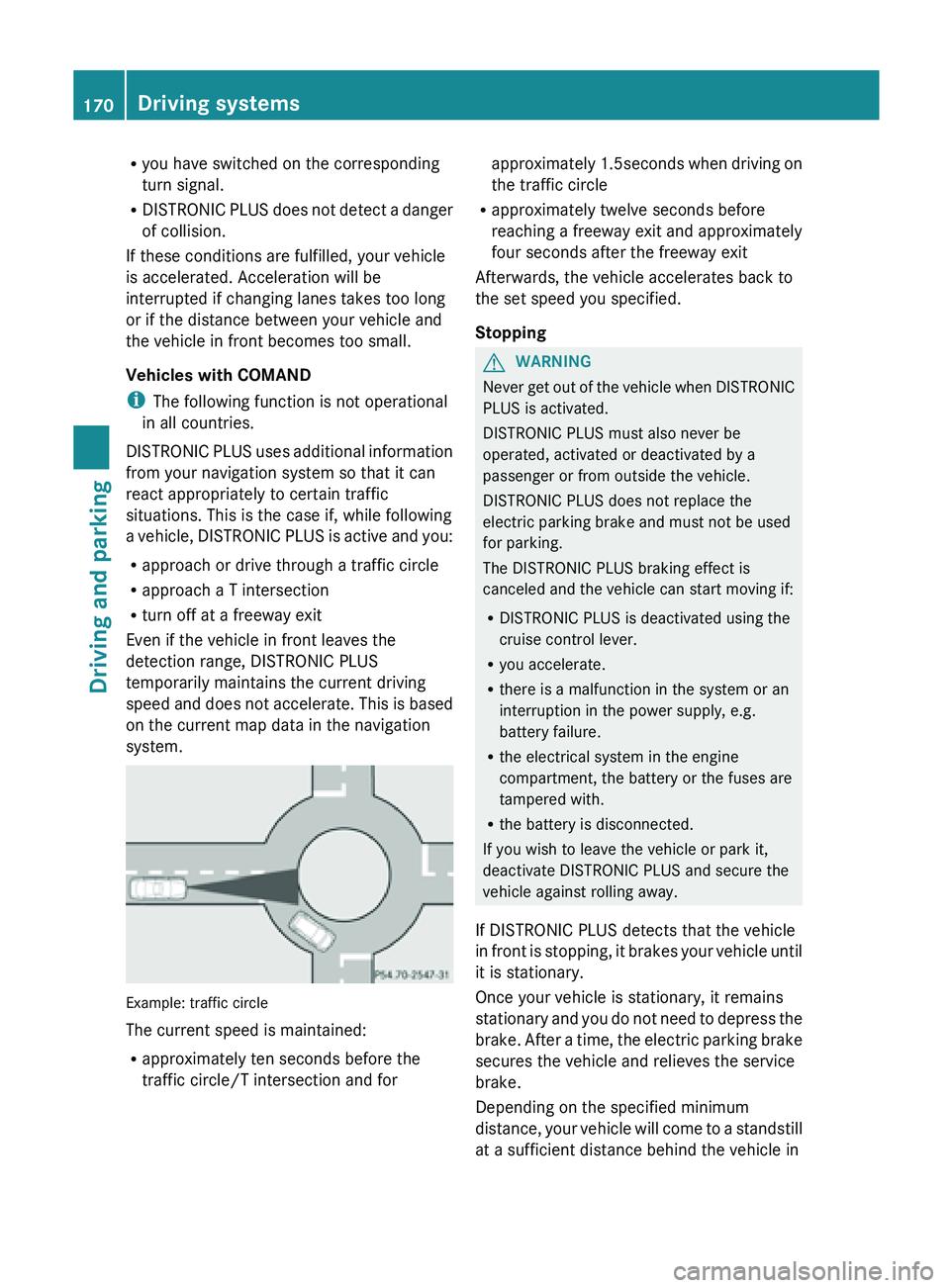
system. Example: traffic circle
The current speed is maintained:
R
approximately ten seconds before the
traffic circle/T intersection and for approximately 1.5seconds
when driving on
the traffic circle
R approximately twelve seconds before
reaching a freeway exit and approximately
four seconds after the freeway exit
Afterwards, the vehicle accelerates back to
the set speed you specified.
Stopping G
WARNING
Never get out of the vehicle when DISTRONIC
PLUS is activated.
DISTRONIC PLUS must also never be
operated, activated or deactivated by a
passenger or from outside the vehicle.
DISTRONIC PLUS does not replace the
electric parking brake and must not be used
for parking.
The DISTRONIC PLUS braking effect is
canceled and the vehicle can start moving if:
R DISTRONIC PLUS is deactivated using the
cruise control lever.
R you accelerate.
R there is a malfunction in the system or an
interruption in the power supply, e.g.
battery failure.
R the electrical system in the engine
compartment, the battery or the fuses are
tampered with.
R the battery is disconnected.
If you wish to leave the vehicle or park it,
deactivate DISTRONIC PLUS and secure the
vehicle against rolling away.
If DISTRONIC PLUS detects that the vehicle
in front
is stopping, it brakes your vehicle until
it is stationary.
Once your vehicle is stationary, it remains
stationary and you do not need to depress the
brake. After a time, the electric parking brake
secures the vehicle and relieves the service
brake.
Depending on the specified minimum
distance, your vehicle will come to a standstill
at a sufficient distance behind the vehicle in 170
Driving systems
Driving and parking
Page 212 of 572
Resetting values
Example: resetting the trip computer "From start"
X
Press the = or ; button on the
steering wheel to select the Trip menu.
X Press the 9 or : button to select the
function that you wish to reset.
X Press a.
X Press the : button to select Yes and
press the a button to confirm.
You can reset the values of the following
functions:
R trip odometer
R trip computer "From start"
R trip computer "From reset" Navigation system menu
Displaying navigation instructions In the
Navi menu, the multifunction display
shows navigation instructions. Further
information (Y page 295).
X Switch on COMAND (Y page 275).
X Press the = or ; button on the
steering wheel to select the Navi menu.
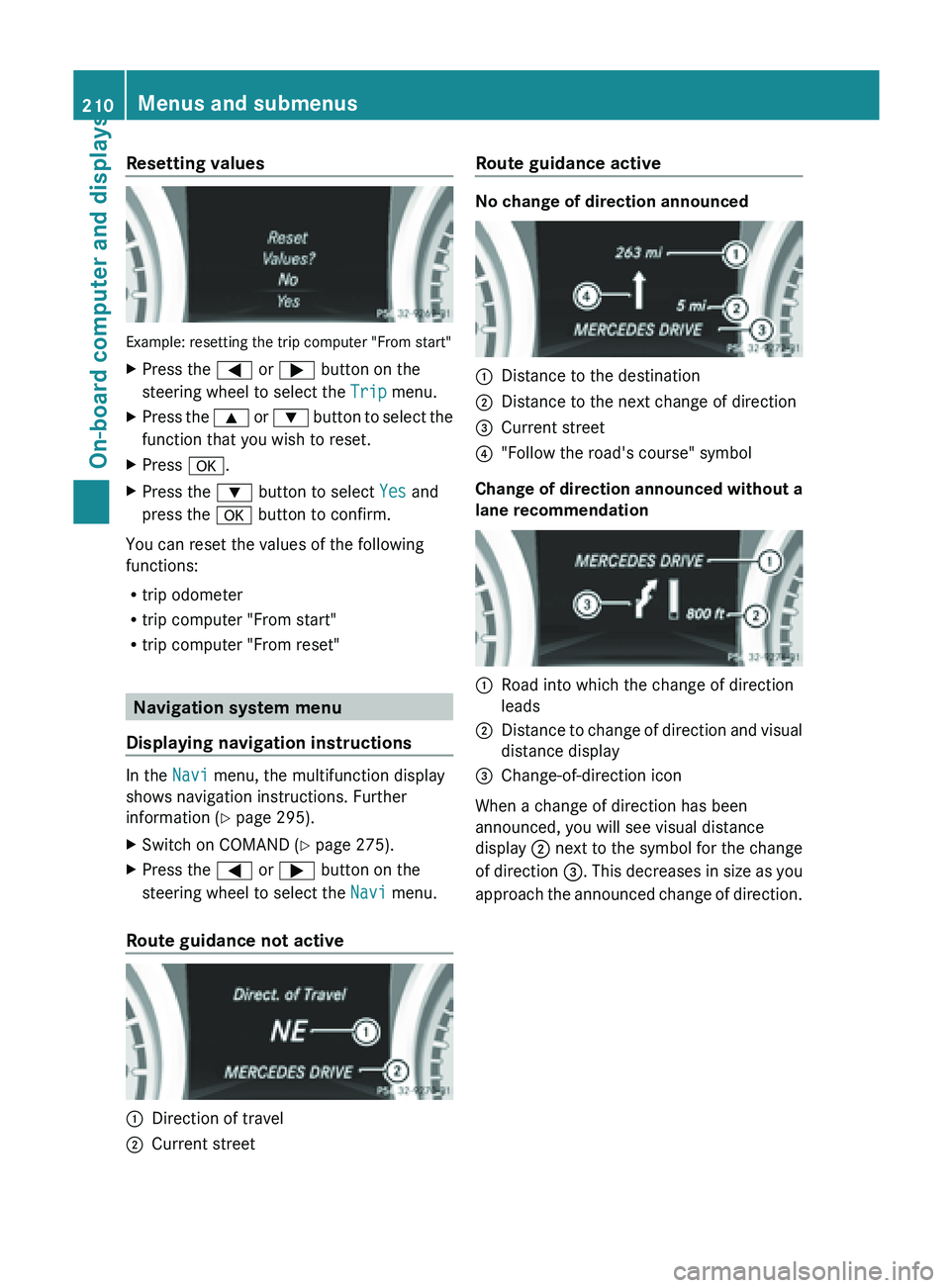
Route guidance not active :
Direction of travel
; Current street Route guidance active No change of direction announced
:
Distance to the destination
; Distance to the next change of direction
= Current street
? "Follow the road's course" symbol
Change of direction announced without a
lane recommendation :
Road into which the change of direction
leads
; Distance to change of direction and visual
distance display
= Change-of-direction icon
When a change of direction has been
announced, you will see visual distance
display ; next
to the symbol for the change
of direction =. This decreases in size as you
approach the announced change of direction. 210
Menus and submenus
On-board computer and displays
Page 213 of 572
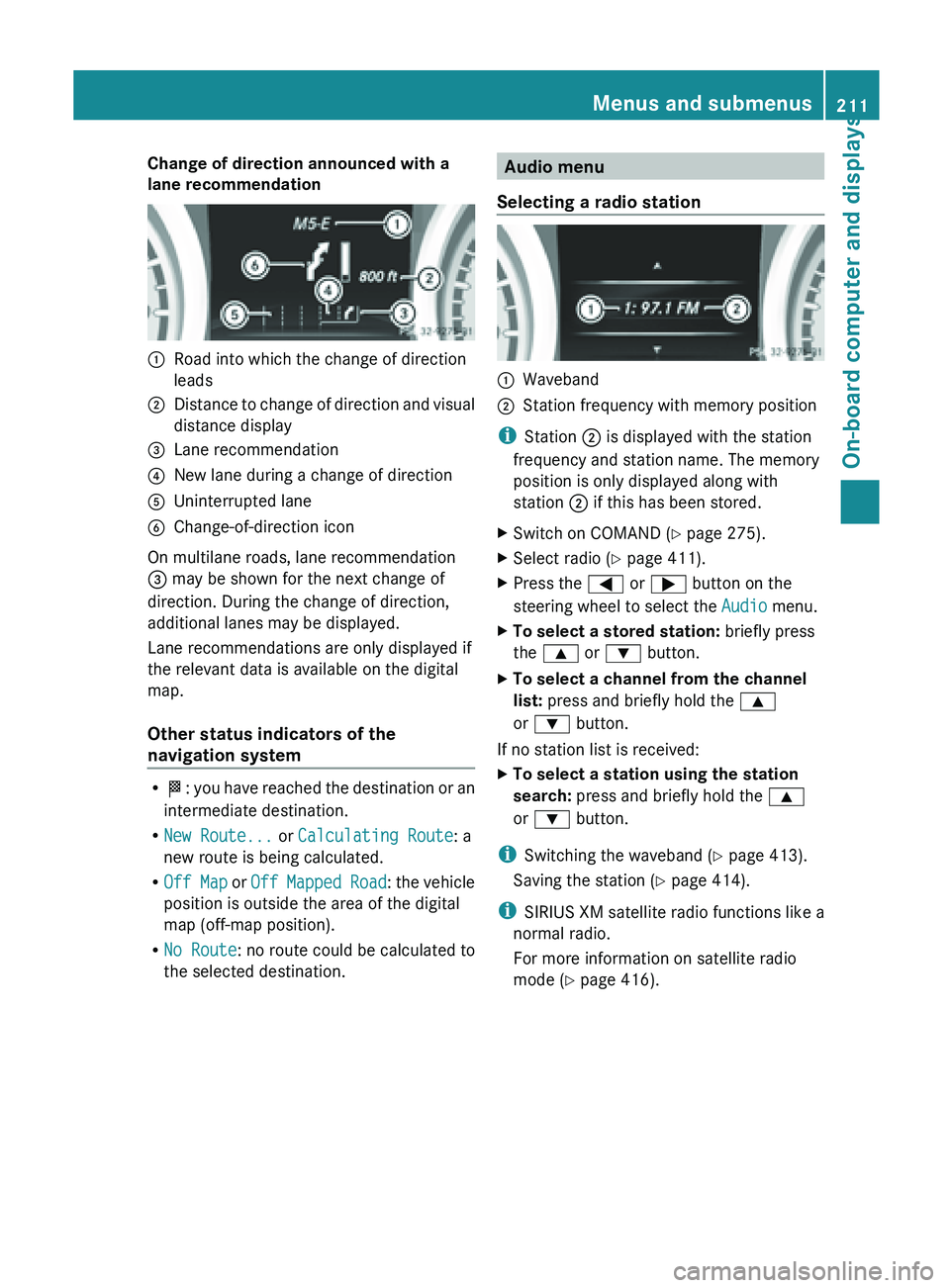
Change of direction announced with a
lane recommendation
:
Road into which the change of direction
leads
; Distance to change of direction and visual
distance display
= Lane recommendation
? New lane during a change of direction
A Uninterrupted lane
B Change-of-direction icon
On multilane roads, lane recommendation
= may be shown for the next change of
direction. During the change of direction,
additional lanes may be displayed.
Lane recommendations are only displayed if
the relevant data is available on the digital
map.
Other status indicators of the
navigation system R
O: you
have reached the destination or an
intermediate destination.
R New Route... or Calculating Route: a
new route is being calculated.
R Off Map or Off Mapped Road : the vehicle
position is outside the area of the digital
map (off-map position).
R No Route : no route could be calculated to
the selected destination. Audio menu
Selecting a radio station :
Waveband
; Station frequency with memory position
i Station ; is displayed with the station
frequency and station name. The memory
position is only displayed along with
station ; if this has been stored.
X Switch on COMAND (Y page 275).
X Select radio ( Y page 411).
X Press the = or ; button on the
steering wheel to select the Audio menu.
X To select a stored station: briefly press
the 9 or : button.
X To select a channel from the channel
list: press and briefly hold the 9
or : button.
If no station list is received:
X To select a station using the station
search: press and briefly hold the 9
or : button.
i Switching the waveband ( Y page 413).
Saving the station ( Y page 414).
i SIRIUS XM satellite radio functions like a
normal radio.
For more information on satellite radio
mode ( Y page 416). Menus and submenus
211
On-board computer and displays Z
Page 259 of 572
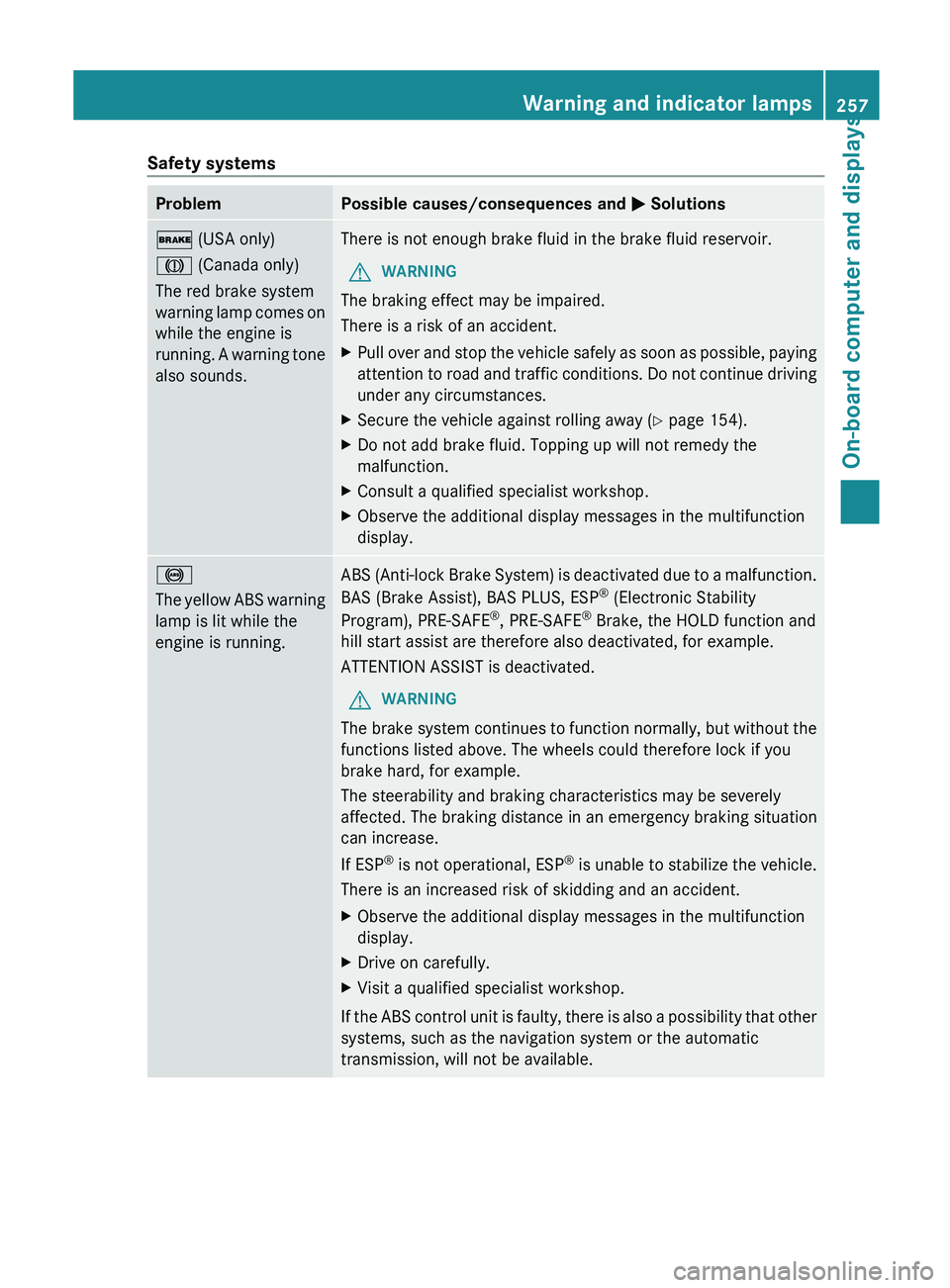
Safety systems
Problem Possible causes/consequences and
M Solutions$ (USA only)
J (Canada only)
The red brake system
warning
lamp
comes on
while the engine is
running. A warning tone
also sounds. There is not enough brake fluid in the brake fluid reservoir.
G WARNING
The braking effect may be impaired.
There is a risk of an accident.
X Pull over and stop the vehicle safely as soon as possible, paying
attention to
road and traffic conditions. Do not continue driving
under any circumstances.
X Secure the vehicle against rolling away ( Y page 154).
X Do not add brake fluid. Topping up will not remedy the
malfunction.
X Consult a qualified specialist workshop.
X Observe the additional display messages in the multifunction
display. !
The
yellow
ABS warning
lamp is lit while the
engine is running. ABS (Anti-lock Brake System) is deactivated due to a malfunction.
BAS (Brake Assist), BAS PLUS, ESP
®
(Electronic Stability
Program), PRE-SAFE ®
, PRE-SAFE ®
Brake, the HOLD function and
hill start assist are therefore also deactivated, for example.
ATTENTION ASSIST is deactivated.
G WARNING
The brake system continues to function normally, but without the
functions listed above. The wheels could therefore lock if you
brake hard, for example.
The steerability and braking characteristics may be severely
affected. The braking distance in an emergency braking situation
can increase.
If ESP ®
is
not operational, ESP ®
is unable to stabilize the vehicle.
There is an increased risk of skidding and an accident.
X Observe the additional display messages in the multifunction
display.
X Drive on carefully.
X Visit a qualified specialist workshop.
If the ABS control unit is faulty, there is also a possibility that other
systems, such as the navigation system or the automatic
transmission, will not be available. Warning and indicator lamps
257
On-board computer and displays Z
Page 269 of 572
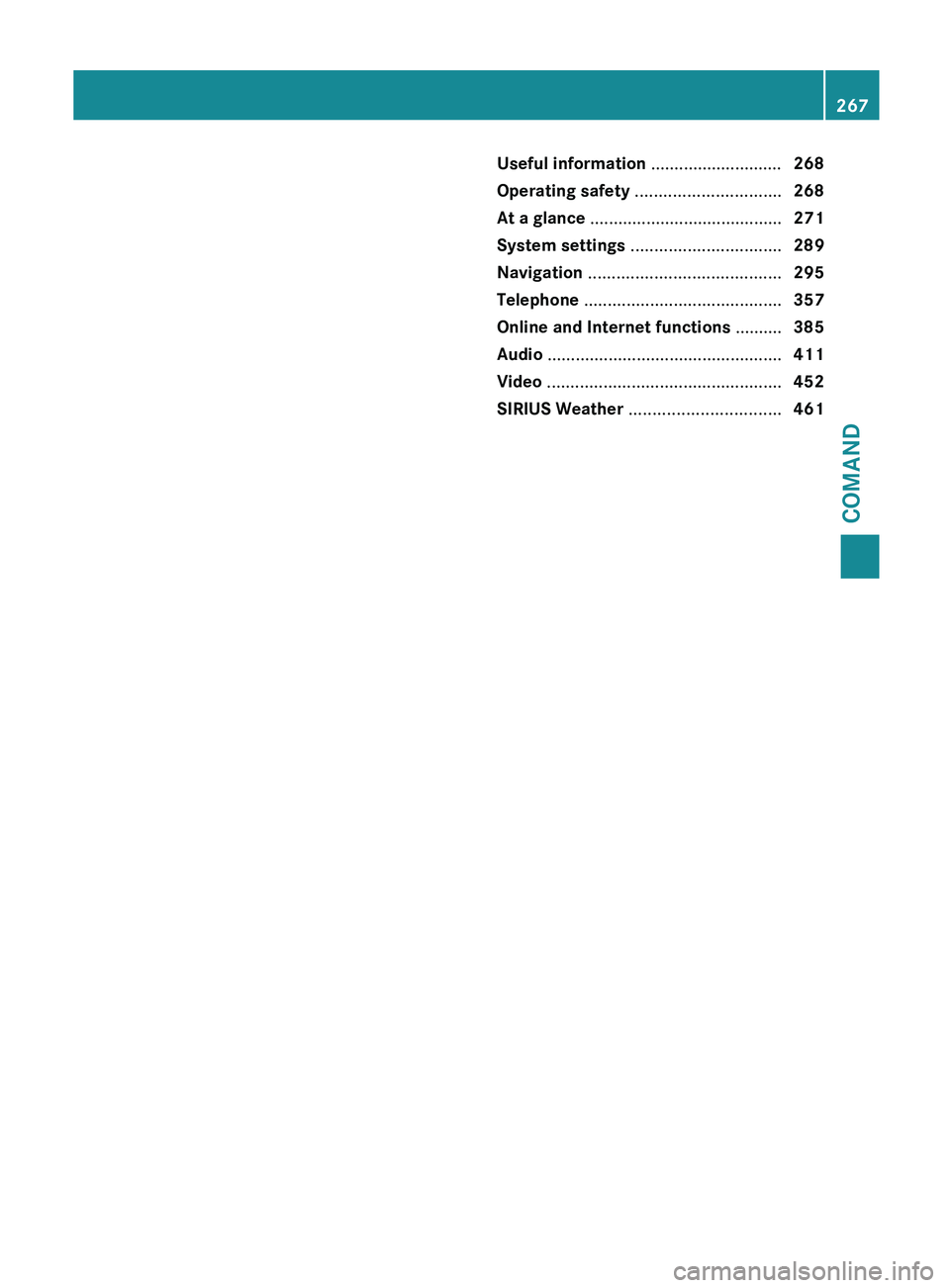
Useful information ............................
268
Operating safety ............................... 268
At a glance ......................................... 271
System settings ................................ 289
Navigation ......................................... 295
Telephone .......................................... 357
Online and Internet functions ..........385
Audio .................................................. 411
Video .................................................. 452
SIRIUS Weather ................................ 461 267COMAND
Page 270 of 572
Useful information
i These operating instructions describe all
the standard and optional equipment of
your COMAND system, as available at the
time of going to print. Country-specific
differences are possible. Please note that
your COMAND system may not be
equipped with all the features described.
This also applies to safety-related systems
and functions.
i Read the information on qualified
specialist workshops: ( Y page 31).
Operating safety
Important safety notes
G
WARNING
Making alterations to electronic components
can cause malfunctions.
Radio, satellite
radio, amplifier, DVD changer,
navigation module, phone and voice control
are networked. If one component is not
functional or if it has been incorrectly
removed/replaced, this could impair the
operation of other components.
This could seriously jeopardize the
operational safety of your vehicle.
We recommend that you always have
maintenance work on electronic components
carried out at an authorized Mercedes-Benz
Center. G
WARNING
In
order to avoid distraction which could lead
to an accident, the driver should only enter
system settings
with the vehicle at a standstill
and operate the system only when road,
weather and traffic conditions permit.
Bear in mind that at a speed of only 30 mph
(approximately 50 km/h), the vehicle covers
a distance of 44 feet (approximately 14 m) per
second. COMAND delivers information to simplify
your choice of route and guide you
comfortably and safely to your destination.
For safety reasons, we recommend that you
bring your vehicle to a standstill, paying
attention to road and traffic conditions,
before making or accepting a telephone call
or viewing navigation maps, instructions or
downloaded information on the COMAND
screen.
G
WARNING
While the navigation system provides
directional assistance,
the driver must remain
focused on safe driving behavior, especially
attention to traffic and street signs, and
should utilize the system's audio cues while
driving.
The navigation system does not supply any
information on stop signs, yield signs, traffic
regulations or traffic safety rules. Their
observance always remains in the driver's
personal responsibility. DVD maps do not
cover all areas nor all routes within an area. G
WARNING
This equipment complies with FCC radiation
exposure limits set forth for uncontrolled
equipment and meets the FCC radio
frequency (RF) Exposure Guidelines in
Supplement C to OET65.
This equipment has very low levels of RF
energy that is deemed to comply without
maximum permissive exposure evaluation
(MPE). But it is desirable that it should be
installed and operated with at least 8
inches
(20 cm)
and more between the radiator and a
person's body (excluding extremities: hands,
wrists, feet and legs.) 268
Operating safety
COMAND
Page 273 of 572
authorized Mercedes-Benz Center if you have
any
questions
about equipment or operation.Function restrictions
For safety
reasons, some COMAND functions
are restricted or unavailable while the vehicle
is in motion. You will notice this, for example,
because either you will not be able to select
certain menu items or COMAND will display
a message to this effect. At a glance
COMAND operating system
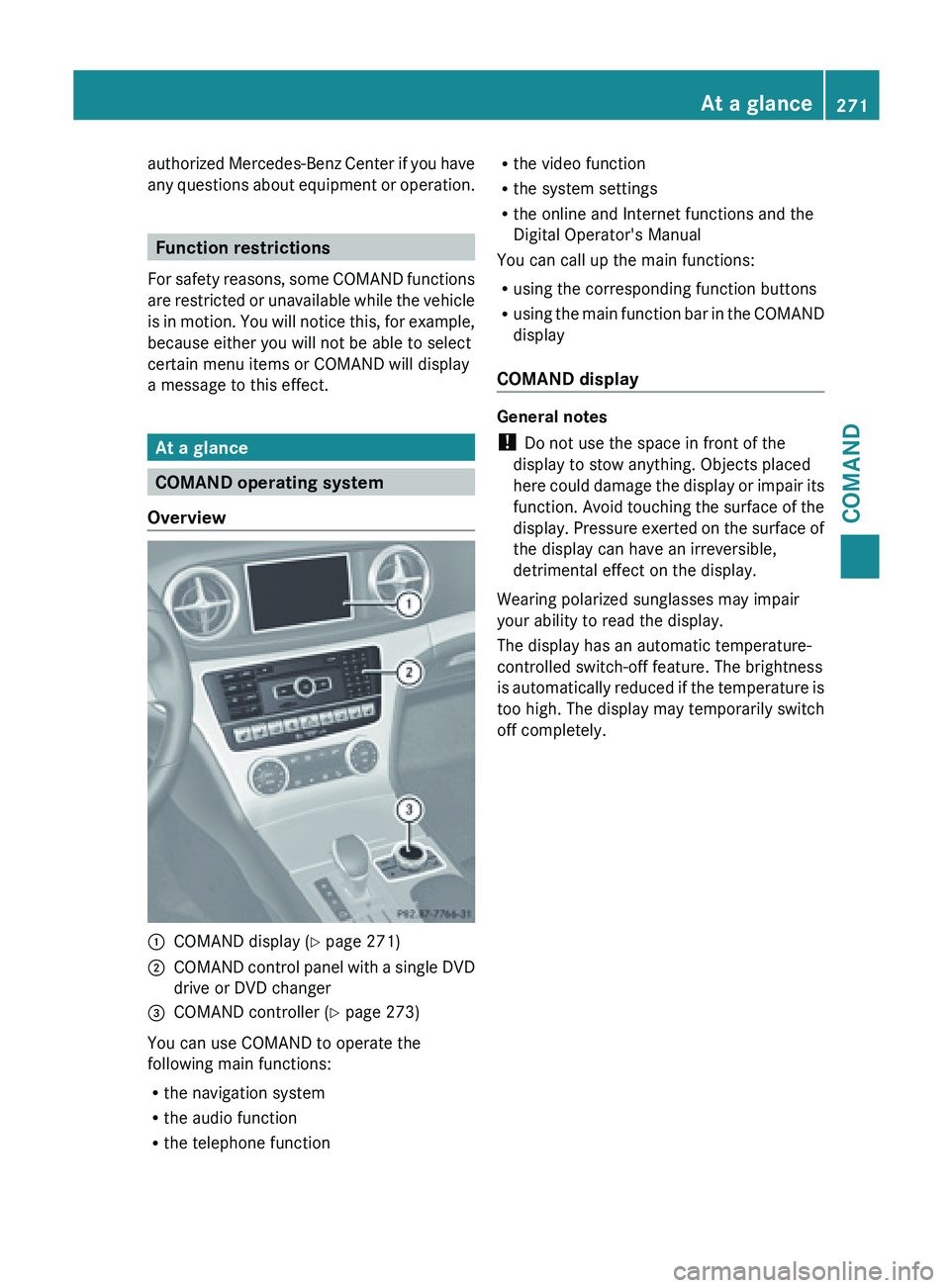
Overview :
COMAND display ( Y page 271)
; COMAND control panel with a single DVD
drive or DVD changer
= COMAND controller (Y page 273)
You can use COMAND to operate the
following main functions:
R the navigation system
R the audio function
R the telephone function R
the video function
R the system settings
R the online and Internet functions and the
Digital Operator's Manual
You can call up the main functions:
R using the corresponding function buttons
R using the
main function bar in the COMAND
display
COMAND display General notes
!
Do not use the space in front of the
display to stow anything. Objects placed
here could
damage the display or impair its
function. Avoid touching the surface of the
display. Pressure exerted on the surface of
the display can have an irreversible,
detrimental effect on the display.
Wearing polarized sunglasses may impair
your ability to read the display.
The display has an automatic temperature-
controlled switch-off feature. The brightness
is automatically reduced if the temperature is
too high. The display may temporarily switch
off completely. At a glance
271
COMAND Z
Page 274 of 572
Display overview
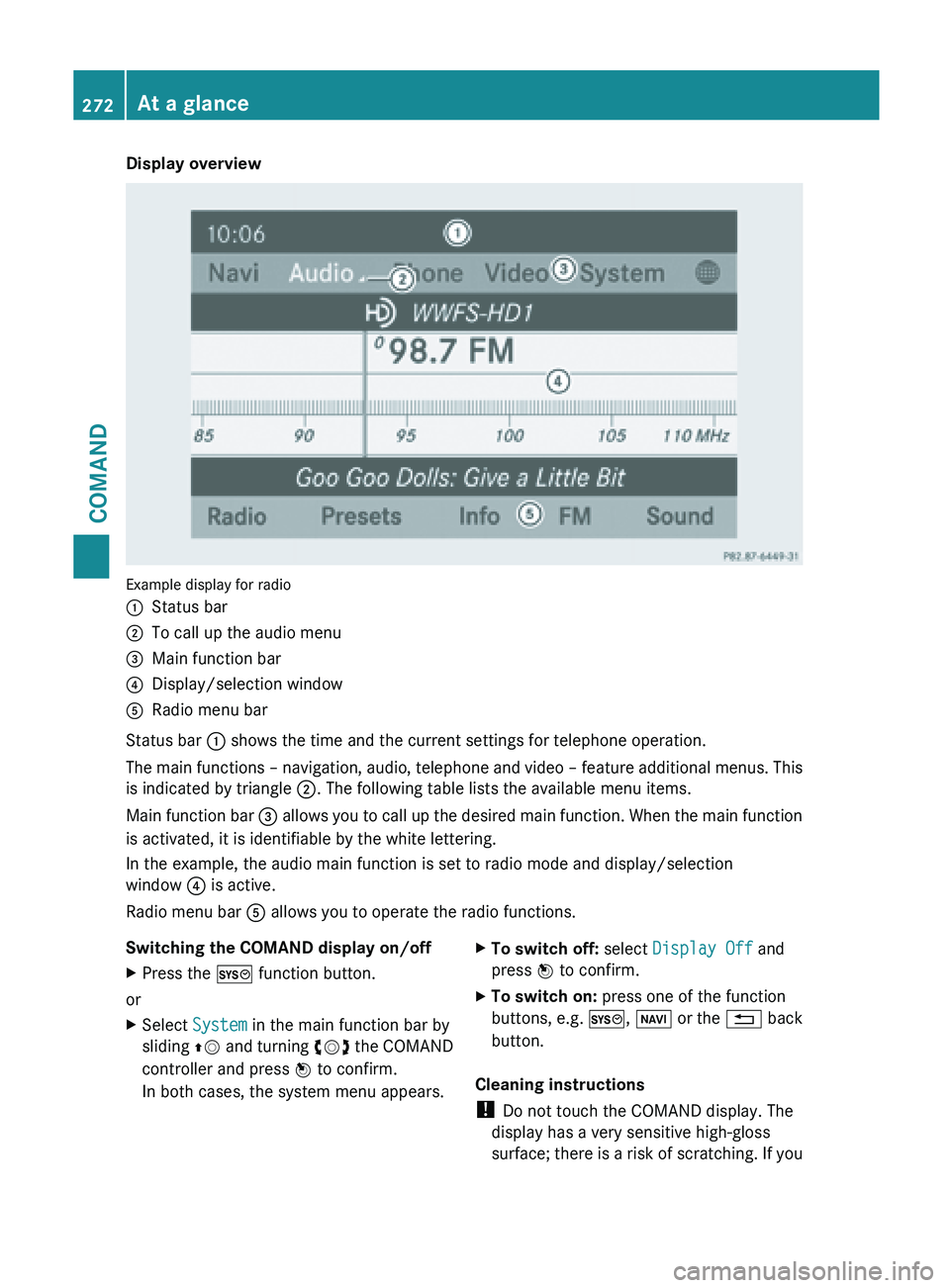
Example display for radio
:
Status bar
; To call up the audio menu
= Main function bar
? Display/selection window
A Radio menu bar
Status bar : shows the time and the current settings for telephone operation.
The main
functions – navigation, audio, telephone and video – feature additional menus. This
is indicated by triangle ;. The following table lists the available menu items.
Main function bar = allows you to call up the desired main function. When the main function
is activated, it is identifiable by the white lettering.
In the example, the audio main function is set to radio mode and display/selection
window ? is active.
Radio menu bar A allows you to operate the radio functions.
Switching the COMAND display on/off
X Press the W function button.
or
X Select System in the main function bar by
sliding ZV and
turning cVd the COMAND
controller and press W to confirm.
In both cases, the system menu appears. X
To switch off: select Display Off and
press W to confirm.
X To switch on: press one of the function
buttons, e.g. W, Ø or
the % back
button.
Cleaning instructions
! Do not touch the COMAND display. The
display has a very sensitive high-gloss
surface; there
is a risk of scratching. If you272
At a glance
COMAND
Page 276 of 572
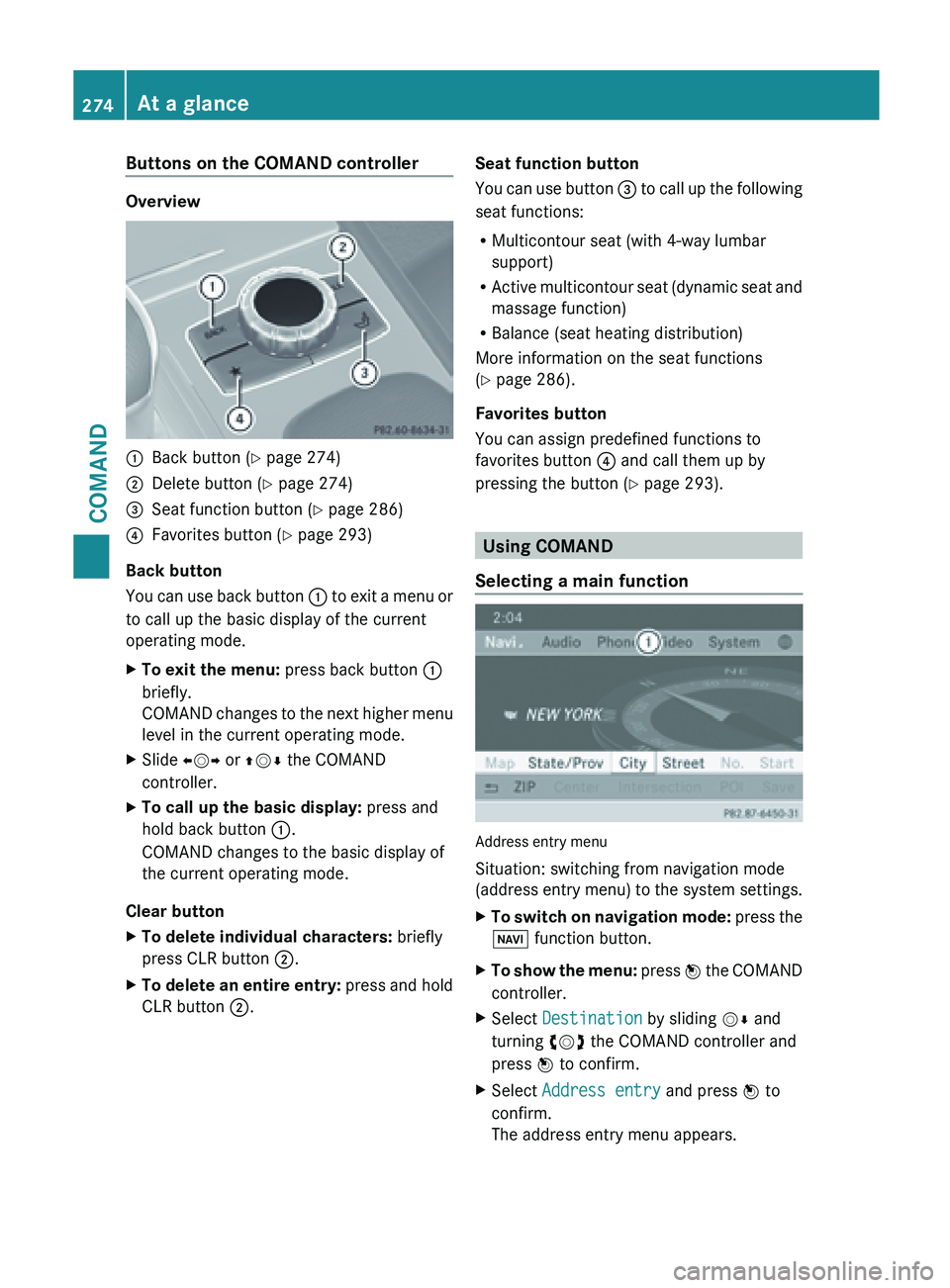
Buttons on the COMAND controller
Overview
:
Back button (Y page 274)
; Delete button ( Y page 274)
= Seat function button ( Y page 286)
? Favorites button ( Y page 293)
Back button
You can
use back button : to exit a menu or
to call up the basic display of the current
operating mode.
X To exit the menu: press back button :
briefly.
COMAND changes
to the next higher menu
level in the current operating mode.
X Slide XVY or ZVÆ the COMAND
controller.
X To call up the basic display: press and
hold back button :.
COMAND changes to the basic display of
the current operating mode.
Clear button
X To delete individual characters: briefly
press CLR button ;.
X To delete an entire entry: press
and hold
CLR button ;. Seat function button
You
can
use button = to call up the following
seat functions:
R Multicontour seat (with 4-way lumbar
support)
R Active multicontour seat (dynamic seat and
massage function)
R Balance (seat heating distribution)
More information on the seat functions
(Y page 286).
Favorites button
You can assign predefined functions to
favorites button ? and call them up by
pressing the button ( Y page 293). Using COMAND
Selecting a main function Address entry menu
Situation: switching from navigation mode
(address
entry
menu) to the system settings.
X To switch on navigation mode: press
the
Ø function button.
X To show the menu:
press W
the COMAND
controller.
X Select Destination by sliding VÆ and
turning cVd the COMAND controller and
press W to confirm.
X Select Address entry and press W to
confirm.
The address entry menu appears. 274
At a glance
COMAND
Page 277 of 572
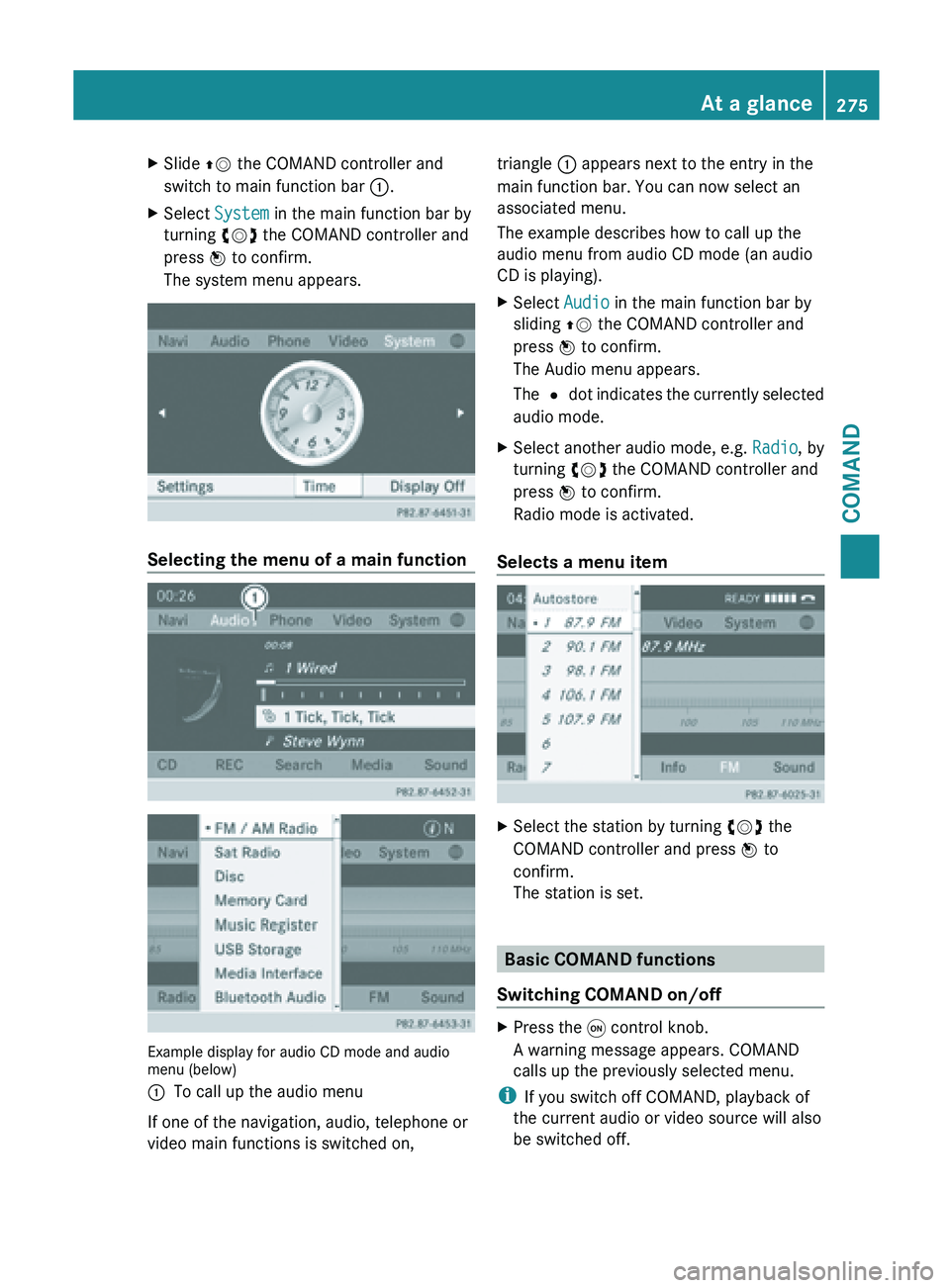
X
Slide ZV the COMAND controller and
switch to main function bar :.
X Select System in the main function bar by
turning cVd the COMAND controller and
press W to confirm.
The system menu appears. Selecting the menu of a main function
Example display for audio CD mode and audio
menu (below)
:
To call up the audio menu
If one of the navigation, audio, telephone or
video main functions is switched on, triangle : appears next to the entry in the
main function bar. You can now select an
associated menu.
The example describes how to call up the
audio menu from audio CD mode (an audio
CD is playing).
X
Select Audio in the main function bar by
sliding ZV the COMAND controller and
press W to confirm.
The Audio menu appears.
The # dot
indicates the currently selected
audio mode.
X Select another audio mode, e.g. Radio, by
turning cVd the COMAND controller and
press W to confirm.
Radio mode is activated.
Selects a menu item X
Select the station by turning cVd the
COMAND controller and press W to
confirm.
The station is set. Basic COMAND functions
Switching COMAND on/off X
Press the q control knob.
A warning message appears. COMAND
calls up the previously selected menu.
i If you switch off COMAND, playback of
the current audio or video source will also
be switched off. At a glance
275
COMAND Z