sensor MERCEDES-BENZ SL ROADSTER 2008 User Guide
[x] Cancel search | Manufacturer: MERCEDES-BENZ, Model Year: 2008, Model line: SL ROADSTER, Model: MERCEDES-BENZ SL ROADSTER 2008Pages: 317, PDF Size: 5.35 MB
Page 65 of 317
Anti-thef
tsyste ms 62
X
Remove the key fro mthe ignition lock.
X Pres sbutton 2.
Indicato rlamp 1flashe sbriefly.
X Lock the vehicl eusing the key .Onvehicles
with KEYLESS GO*, the locking button on
the door handle/boo tlid cana lsobeu sed.
Th einterior motio nsensorremain sdeact i-
vated until the vehicl eisunlock ed and
locked again. Safety
*optional
230_AKB; 5; 4, en-GB
bjanott, Version: 2.9.6 2008-04-08T15:09:54+02:00-Seite 62 Dateiname: 6515_3089_02_buchblock.pdf; preflight
Page 68 of 317
Opening and closing
65
approximately six seconds until the battery
chec
klamp flashes twice.
The key now function sasfollows:
X To unlock the driver's door: press the
k buttononce.
X To unlock centrally: press thekbut-
ton twice.
X To lock centrally: press thejbutton.
Restoring the factor ysettings X
Press the kandj buttons simulta-
neously for approximately six seconds until
the batter ychec klamp flashes twice. KEYLESS GO key*
The optional equipment supplied with your
vehicle includes two KEYLESSGOk eys. You
can start ,lock or unlock the vehicle using the
KEYLESSGOk ey. To do this, you need only
carry the KEYLESSGOk ey on your person.
When you touch the surface of the sensor son
the vehicle's door handles, KEYLESSGO
establishes aradio connection between the
vehicle and the key. The distanc ebetween
the KEYLESSGOk ey and the vehicle's door handle from which you wish to lock or unlock
the vehicle, must not be greater than
1m.
When you pull the door handle, the following
unlock centrally if the factory settings have
not been changed:
R the doors
R the boot lid
R the fuel filler flap
R the glove compartment
R the stowage compartment under the arm-
rest
R the stowage compartment sinthe rear
If you pull on the handle of the boot lid, only
the boot of your vehicle is unlocked.
When starting the engin eand whilst driving
KEYLESSGOa lso checks by establishing brief
periods of radio contact whether avalid KEY-
LES SGOk ey is in the vehicle. G
Risk of accident
If children are left unsupervised in the vehi-
cle, they could open adoor from the inside,
even if it has been locked. Or they could
start the vehicle if avalid KEYLESSGOk ey
is in the vehicle and they press the KEY-
LES SGOb uttonont he gear selector lever.
They could endanger themselves and oth- ers. Never leave children unsupervised in
the vehicle. Switc
hoff the engin eand take
the KEYLESSGOk ey with you, even if you
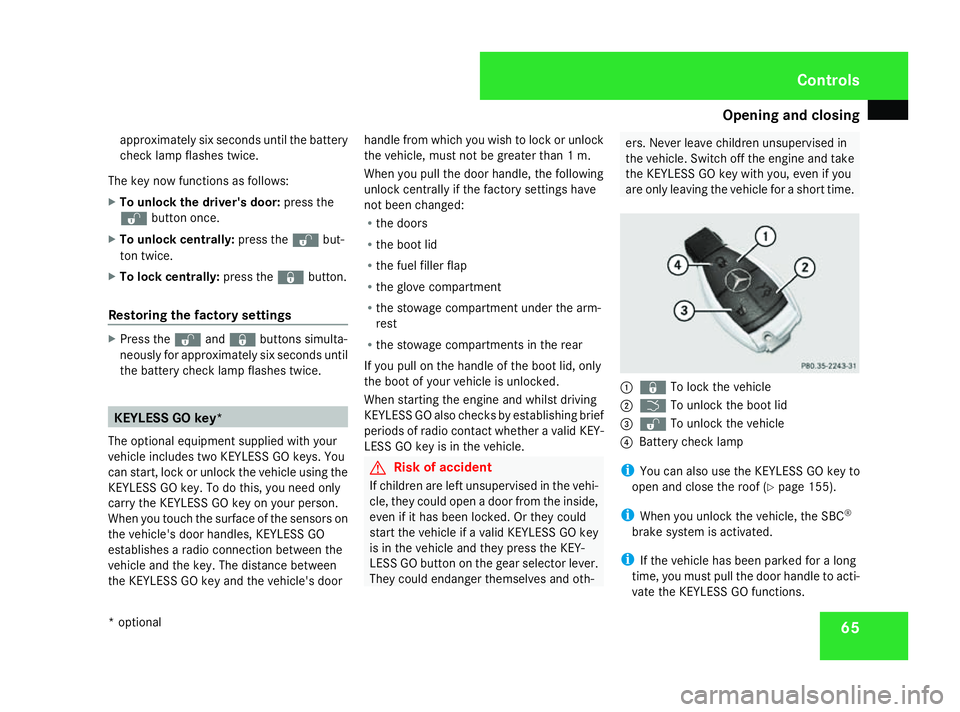
are only leaving the vehicle for ashort time. 1
j To lock the vehicle
2 i To unlock the boot lid
3 k To unlock the vehicle
4 Battery chec klamp
i You can also use the KEYLESSGOk ey to
open and close the roof (Y page 155).
i When you unlock the vehicle, the SBC ®
brake system is activated.
i If the vehicle has been parked for along
time, you must pull the door handle to acti-
vate the KEYLESSGOf unctions. Controls
*o ptional
230_AKB
;5;4,en-GB
bjanott, Version:2.9.6
2008-04-08T15:09:54+02:0
0-Seite 65 ZDateiname: 6515_3089_02_buchblock.pdf; preflight
Page 96 of 317
Side windows
93
may be activated inadvertently. This could
then damage the windscreen wiper blades
or scratcht
he windscreen.
For this reason, you should always switch
off the windscreen wipers in dry weather.
X Make sure that the key is in position 1or
2 in the ignition lock.
The various wiper settings can be selected
as follows: Single wipe
X Briefly press the combination switch to the
pressure point in the direction of arrow
2. Wiping with washer fluid
X Press the combination switch beyond the
pressure point in the direction of arrow
2. Intermittent wipe/rain sensor
X Turn the combination switch in the direc-
tion of arrow 1to position I.
The rain sensor is activated. The appropri-
ate wiping frequency is automatically
adjusted according to the intensity of the
rain. Continuous wipe
X Depending on the intensity of the rain, turn
the combination switch in the direction of
arrow 1to position IIor III. Switching off the windscreen wipers
X Turn the combination switch to position 0. Side windows
Opening/closing the side windows
G
Risk of injury
Make sure that nobody can become trap-
ped between the side window and the door
frame as aside window is opened. Do not
touch or lean against the side window dur-
ing the opening procedure. You could
become trapped between the side window
and the door frame as the window moves
down. If there is arisk of becoming trapped,
release the switch immediately or pull the
switch up to close the side window again. G
Risk of injury
Make sure that nobody can become trap-
ped as you close aside window. If there is
ar isk of becoming trapped, release the
switch immediately or push the switch
again to reopen the side window. G
Risk of injury
Children may injure themselves if they open
or close the side windows.
Never leave children unsupervised in the
vehicle. Always take the KEYLESS GO
key* with you when leaving the vehicle, Controls
*o ptional
230_AKB; 5; 4, en-GB
bjanott
,V ersion: 2.9.6
2008-04-08T15:09:54+02:00
-Seite 93 ZDateiname: 6515_3089_02_buchblock.pdf; preflight
Page 120 of 317
On-boar
dcomputer 117
X
Press the æorç buttontos elect a
submenu.
The selected submenu is highlighted.
X Press the jbuttontos electafunction
within the submenu.
X Press the æorç buttontoc hange
the setting.
The changed setting is stored.
X Press the èorÿ buttontos elect a
differen tdisplay.
The following tables show the settings you
can make in the individual submenus. You will
find additional information on the pages
shown. Instrument cluster submenu
R
unit of measuremen tfor distance
(Y page 117)
R distanc eunits for digital speedometer
(Y page 118)
R language (Y page 118)
R status line display (Y page 118) Lighting submenu
R
constan theadlamp mode (Y page 118)
R locator lightin g(Ypage 119)
R exterior lightin gdelayed switch-off
(Y page 119)
R interior lightin gdelayed switch-off
(Y page 120)
R Intelligent Light System *(Ypage 120) Vehicle submenu
R
permanen tSpeedtronic (Y page 136)
R automatic locking feature (Y page 120)
R interior motion sensor *(Ypage 121) Convenience submenu
R
easy-entry/exit feature (Y page 121)
R fold the exterior mirror sinwhen locking
the vehicle* (Y page 121) Selecting the unit of measurement for
distance
This function is not available on vehicles with
speedometers in mph.
The selected unit of measuremen
tfor dis-
tanc eapplies to:
R the analogue speedometer
R the total distanc erecorder and the trip
meter
R the trip computer
R cruise control
R Speedtronic
R Distronic*
X Press èor· to select the Set-
tings menu.
X Press the jbuttontos elect submenus.
X Press the æorç buttontoselect the
Inst. cluster submenu.
X Press the jbuttontos electSpeedom-
eter. Controls
*o ptional
230_AKB
;5;4,en-GB
bjanott, Version:2.9.6
2008-04-08T15:09:54+02:0
0-Seite 117 ZDateiname: 6515_3089_02_buchblock.pdf; preflight
Page 124 of 317
On-boar
dcomputer 121
Priming/deactivating the interior
motion sensor* Vehicles for the Netherlands: this function is
not available. The interior motion sensor is
alway
sprimed, even when the roof is open.
This function allows you to prime the interior
motion sensor ,even when the roof is open.
However, false alarms can be caused by fall-
ing leaves or insects, for example.
X Press èor· to select the Set-
tings... menu.
X Press the jbuttontos elect submenus.
X Press the æorç buttontoselect the
Vehicle submenu.
X Press the jbuttontos electInterior
motion sensor with roof open.
X Press the æorç buttontop rime or
deactivate the Interiormotion sensor
with roof open.
X Press the j,èorÿ buttonto
select adifferen tdisplay. Activating or deactivating the easy-
entry/exit feature i
For more information on the easy-entry/
exit feature, see (Y page 79). G
Risk of injury
The steering wheel moves when the easy-
entry/exit feature is active. There is arisk
of occupants becomin gtrapped. Before
activating the easy-entry/exit feature,
make sure that nobody can become trap-
ped.
Do not leave children unsupervised in the
vehicle, even if they are secured in achild
restraint system. The children could open
the driver's door and thereby unintention-
ally activate the easy-entry/exit feature
and become trapped.
X Press èor· to select the Set-
tings menu.
X Press the jbuttontos elect submenus.
X Press the æorç buttontoselect the
Convenience submenu.
X Press the jbuttontos elect the EASY-
ENTRY system. X
Press the æorç buttontoa ctivate
or deactivate the EASY-ENTRY system.
X Press the j,èorÿ buttonto
select adifferen tdisplay.
Activating/deactivating the Fold in mir-
rorsw hen locking* function The
Fold in mirrors when locking func-
tion allows you to determine whether the
exterior mirror sshould fold in when you lock
the vehicle. When you switch on the ignition,
the exterior mirror sfold out again.
If you have switched the function on and you
fold in the exterior mirror susing the button
on the centre console (Y page 80), they will
not fold out automatically. The exterior mir-
rors can then only be folded out using the
butto nont he centre console.
X Press èor· to select the Set-
tings menu.
X Press the jbuttontos elect submenus.
X Press æorç to select the Conve-
nience submenu.
X Press jto select Fold in mirrors
when locking . Controls
*o ptional
230_AKB
;5;4,en-GB
bjanott, Version:2.9.6
2008-04-08T15:09:54+02:0
0-Seite 121 ZDateiname: 6515_3089_02_buchblock.pdf; preflight
Page 131 of 317
Driving sys
tems 128 Distroni
cdoesn ot react to:
R pedestrians
R stationar yobstacle sont he road, e.g .sta-
tionar yorparked vehicles
R oncoming and crossing traffic
Distroni cmaynot detect narrow vehicles
driving in front, e.g .motorcycles, or vehi-
cle sd riving on adifferen tline. Therefore,
always pa yattentio ntotrafficconditions
eve nw henD istroni cisa ctivated. Other-
wise ,you mayfailtor ecognis edangers in
time, could caus eanaccident and injure
yourself and others.
If as lowe r-moving vehicl eisdetecte dinf ront,
Distroni ccauses your vehicl etobrake and
maintain aprese tdistance to the vehicl ein
front. G
Ris
kofa ccident
Distroni ccannot take account of roa dand
traffi cconditions .Deactivate ,ordonot
activate ,Distroni cifitd oesn ot detect the
vehicl einfront, or if it no longe rdetects it.
This is especiall ythe case:
R befor ecorners
R on filte rlan es R
when changing to alan ew ithf asterm ov-
ing traffic
R in complex driving situations or where
the lanes ar ediverted ,e.g.atr oadworks
on am otorway.
Otherwise, Distroni cmaintains the current
spee dora ccelerates up to the se tspeed.
Distroni ccannot take account of weather
conditions .Deactivate ,ordonot activate,
Distronic:
R if the roads ar eslippery, snow-covered or
icy .The wheels could lose their grip
under braking or acceleration. Th evehi-
cle could start to skid.
R if the sensors ar edirty or there is poor
visibility, e.g .due to snow, rain or fog.
Distanc econtrol ma ybeimpaired.
Alway spayattentio ntotrafficconditions
eve nw henD istroni cisa ctivated. Other-
wise ,you mayfailtor ecognis edangers in
time, could caus eanaccident and injure
yourself and others.
If there is no vehicl einfront, Distroni coper-
ate sint he same wa yascruisecontrol .Dis-
troni cfun ctions in the 30 km/h to
180 km/h range. G
Ris
kofa ccident
Distroni cbrakes your vehicl eatamaximum
of 2m /s2
,d epen ding on its speed. This
corresponds to approximately 20% of your
vehicle' smaximum braking power. You
must also appl ythe brakes yourself if this
braking powe risnot sufficient.
If Distroni cdetects ariskofc ollision with a
vehicl einfront, an intermittent warning
tone sounds. Additionally, the EDTR
warning lamp in the speedomete rlight sup
red .Brake to avoi dacollision.
Cruis econtro llever With the cruis
econtrol lever yo ucan operate
Distroni cand variable Speedtronic.
Th eL IM indicator lamp on the cruis econtrol
lever indicates which syste myouhave selec-
ted:
R LIM indicator lamp off:
Distroni ciss elect ed
R LIM indicator lamp lit:
variable Speedtroni ciss elect ed Controls
230_AKB; 5; 4, en-GB
bjanott,
Version: 2.9.6 2008-04-08T15:09:54+02:00-Seite 128 Dateiname: 6515_3089_02_buchblock.pdf; preflight
Page 145 of 317
Driving sys
tems 142 Parktronic*
G
Ris
kofa ccident
Parktronic is onl yanaidand ma ynot detect
al lo bs tacles. It is not asubst itute for atten-
tiv ed riving.
Yo ua realways responsibl efor safety and
must continue to pa yattentio ntoyour
immediate surrounding swhenp arking and
manoeuvring. Yo ucould otherwis eendan-
ge ry oursel fand others. G
Ris
kofi njury
Make sure tha tnopersons or animals are
in the manoeuvring range .Otherwise, they
could be injured.
Parktronic is an electroni cparking aid. It indi-
cates visually and audibl ythe distance
between your vehicl eand an object.
Parktronic is automaticall yactivate dwhen
yo us witch on the ignition and release the
parking brake.
Parktronic is deactivate datspeedsabove
18 km/h .Itisreactivate datlower speeds.
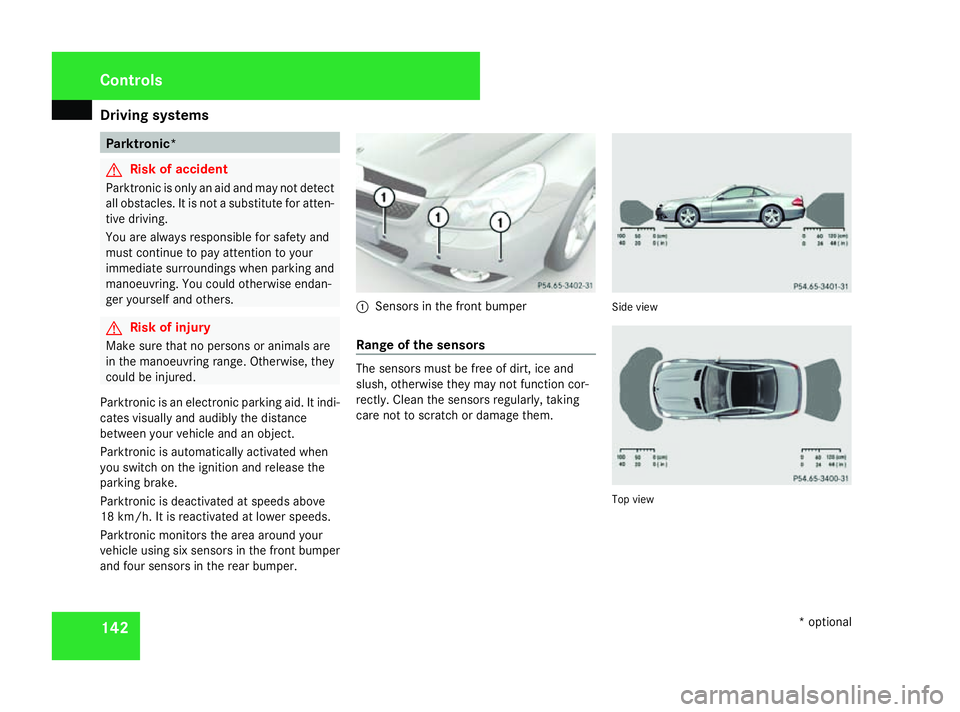
Parktronic monitors the area around your
vehicl eusing si xsensors in the front bumper
and fou rsensors in the rea rbum per. 1
Sensors in the front bumper
Range of the sensors Th
es ensors must be fre eofdirt, ic eand
sl ush, otherwise the ymaynot function cor-
rectl y. Clean the sensors regularl y,taking
care not to scratch or damage them. Side view
To
pv iew Con
trols
*optional
230_AKB; 5; 4, en-GB
bjanott, Version: 2.9.6 2008-04-08T15:09:54+02:00-Seite 142 Dateiname: 6515_3089_02_buchblock.pdf; preflight
Page 146 of 317
Driving sys
tems 143
Front sensors Centre Approximatel
y100 cm Corners Approximatel
y60cm Rea
rsenso rs Centre Approximatel
y120 cm Corners Approximatel
y80cm !
Payp articula rattentio ntoobjects above
or belo wthe sensors when parking, such
as flower pots or trailer towbars. Parktronic
does not detect such objects when the yare
in the immediate vicinity of the vehicle. You
could damage the vehicl eorthe objects.
Ultrasonic sources such as an automatic
ca rw ash, alorry's compressed-air brakes
or ap neumati cdrill could caus eParktronic
to malfunction.
Minimum distance Centre Approximatel
y20cm Corners Approximatel
y15cm If there is an obstacle withi
nthisr ange,all
warning displays ligh tupa nd atone sounds.
If the distance fall sbelow the minimum clear-
ance, it ma ynolongerbes hown.
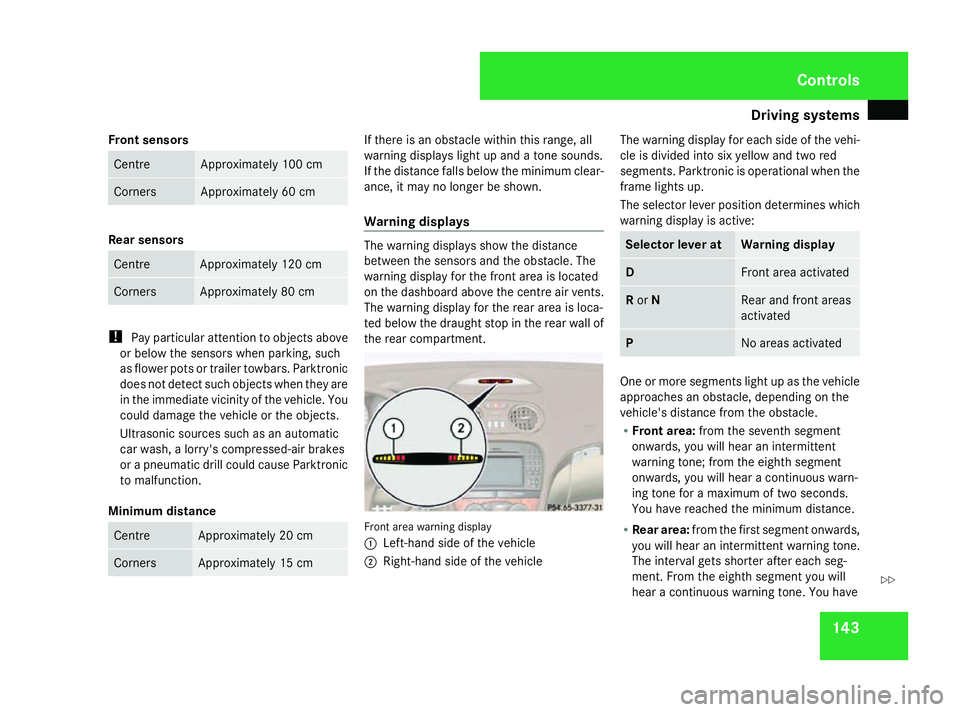
Warnin gdisplays Th
ew arning displays sho wthe distance
between the sensors and the obstacle .The
warning displa yfor the front area is located
on the dashboard above the centr eairvents.
Th ew arning displa yfor the rea rareaisl oca-
ted belo wthe draught sto pinthe rea rwallof
the rea rcompartment. Front area warning display
1
Left-hand side of the vehicle
2 Right-hand side of the vehicle Th
ew arning displa yfor each side of the vehi-
cle is divide dinto si xyello wand two red
segments. Parktronic is operational when the
frame lights up.
Th es elect or lever positio ndetermine swhich
warning displa yisactive: Selecto
rlever at Warnin
gdisplay D Front area activated
R
or N Rear and front areas
activated
P No area
sactivated One or mor
esegments ligh tupast he vehicle
approache sanobstacle ,depen ding on the
vehicle' sdistance fro mthe obstacle.
R Front area: fromt he seventh segment
onwards ,you will hear an intermittent
warning tone ;fro mt he eighth segment
onwards ,you will hear acontinuous warn-
ing tone for amaximum of two seconds.
Yo uh aver eache dthe minimum distance.
R Rea rarea: fromt he first segment onwards,
yo uw illh earani ntermittent warning tone.
Th einterva lgetss horter after each seg-
ment. Fro mthe eighth segment yo uwill
hear acontinuous warning tone .You have Controls
230_AKB; 5; 4, en-GB
bjanott,
Version: 2.9.6 2008-04-08T15:09:54+02:00-Seite 143 ZDateiname: 6515_3089_02_buchblock.pdf; preflight
Page 198 of 317
Care
195H
Environmental note
Dispose of empty packaging ,cleaning
cloth sand polishin gwads in an environ-
mentally responsible manner.
! Do no taffix:
R stickers
R films
R magnetic plates or similar items
to painte dsurfaces, otherwise you could
damag ethe paintwork. Vehicle care
! Do no tpark th evehicl efor alon gp eriod
of time directly after cleaning ,especially if
th ew heels have jus tbeen cleane dwitha
whee lcleaner. Whee lcleaners could cause
rapi dcorro sionoft hebrak ediscsa nd
brak epads/linings. Afte rcleaning ,park
th ev ehicl ewhen it is at normal operating
temperature. Automati
ccar wash G
Ris
kofa ccident
The vehicl eisbraked when SBC ®
Hold is
activated. Therefore, deactivat eSBC®
Hold
before th evehicl eisw ashedinana uto-
matic car wash.
You can wash th evehicl einana utomatic car
wash from th everys tart.
! It is preferable to use car washe swhich
do no tuse high-pressur ecleaners. In car
washe sthatu se high water pressures,
there is adanger that water may leak into
th ev ehicle.
! Do no tuse atouch-free automatic car
wash that uses chemical agents to wash
th ev ehicle.
If th evehicl eisv eryd irty, prewash it before
cleaning it in an automatic car wash.
! Mak esuret hatthe automatic car wash is
suitable for th esizeoft hevehicle. Fold in
th ee xter iorm irror sbefore th evehicl eis
washed. Ther eisotherwise ariskofd am-
age to th eexter iorm irrors.
! Mak esuret ha tthe side windows are com-
pletely closed, that th eventilation/heater blowe
risfully turne doff and that th ewind-
scree nwiper switch is set to 0.Otherwise,
th er ain sensor may be activated, inadver-
tently triggerin gwiper operation .This could
caus edamag etothevehicle.
Afte rusin gana utomatic car wash, wipe off
wax from th ewindscree nand th ewiper
blades .This will preven tsmears and reduce
wipin gnoises caused by residue on th ewind-
screen.
High-pressur ecleaners G
Ris
kofa ccident
Do no tuse high-pressure cleaners wit hcir-
cular-jet nozzles (dir tgrinders )toc lean
your vehicl eor-especially -the tyres. You
could otherwise damag ethe tyres and
caus eana ccident.
! Observ ethe instruction sissue dbyt he
equipmen tmanufacturer concerning the
distanc etobem aintainedbetween the
nozzle of th ehigh-pressure cleane rand the
vehicl e(at least 30 cm).
Mov ethe high-pressure cleane rnozzle
aroun dwhen cleaning your vehicle.
Do no taim directly at any of th efollowing: Operation
230_AKB; 5; 4, en-GB
bjanott
,V ersion: 2.9.6
2008-04-08T15:09:54+02:00
-Seite 195 ZDateiname: 6515_3089_02_buchblock.pdf; preflight
Page 201 of 317
Care
198
!
Do no tclean exhaust tai lpipes wit halka-
line-based cleaning agents suc haswheel
cleaner.
Use th echrome-cleaning agen trecommen-
ded by Mercedes-Benz for cleaning .Inf or-
mation about chrome-cleaning agents can
be obtained from any Mercedes-Benz
Service Centre.
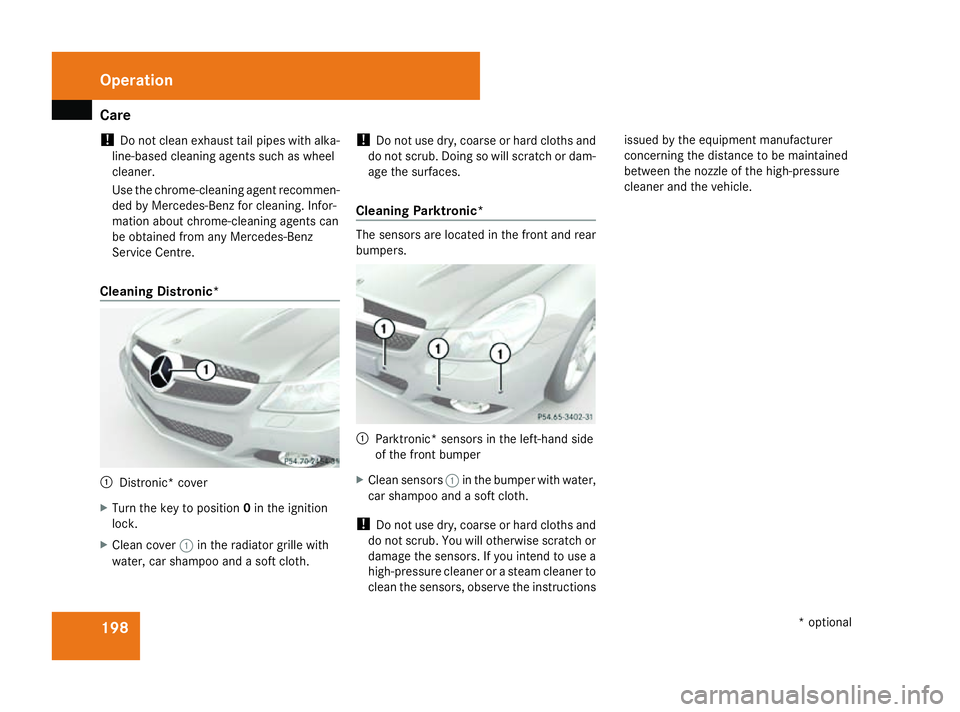
Cleaning Distronic* 1
Distronic* cover
X Turn th ekeyto position 0in th eignition
lock.
X Clean cover 1in th eradiato rgrille with
water, car shampoo and asoftc loth. !
Do no tuse dry, coars eorhard cloth sand
do no tscrub. Doing so will scratch or dam-
age th esurfaces.
Cleaning Parktronic* The sensor
sare locate dinthefron tand rear
bumpers. 1
Parktronic* sensor sintheleft-han dside
of th efront bumper
X Clean sensors 1in th ebumper wit hwater,
car shampoo and asoftc loth.
! Do no tuse dry, coars eorhard cloth sand
do no tscrub. You will otherwise scratch or
damag ethe sensors. If you inten dtouse a
high-pressur ecleane roras team cleane rto
clean th esensors, observ ethe instructions issue
dbyt heequipmen tmanufacturer
concerning th edistanc etobem aintained
between th enozzle of thehigh-pressure
cleane rand th evehicle. Operation
*optional
230_AKB; 5; 4, en-GB
bjanott
,V ersion: 2.9.6
2008-04-08T15:09:54+02:00
-Seite 198 Dateiname: 6515_3089_02_buchblock.pdf; preflight