USB MERCEDES-BENZ SL ROADSTER 2012 User Guide
[x] Cancel search | Manufacturer: MERCEDES-BENZ, Model Year: 2012, Model line: SL ROADSTER, Model: MERCEDES-BENZ SL ROADSTER 2012Pages: 637, PDF Size: 20.68 MB
Page 318 of 637
X
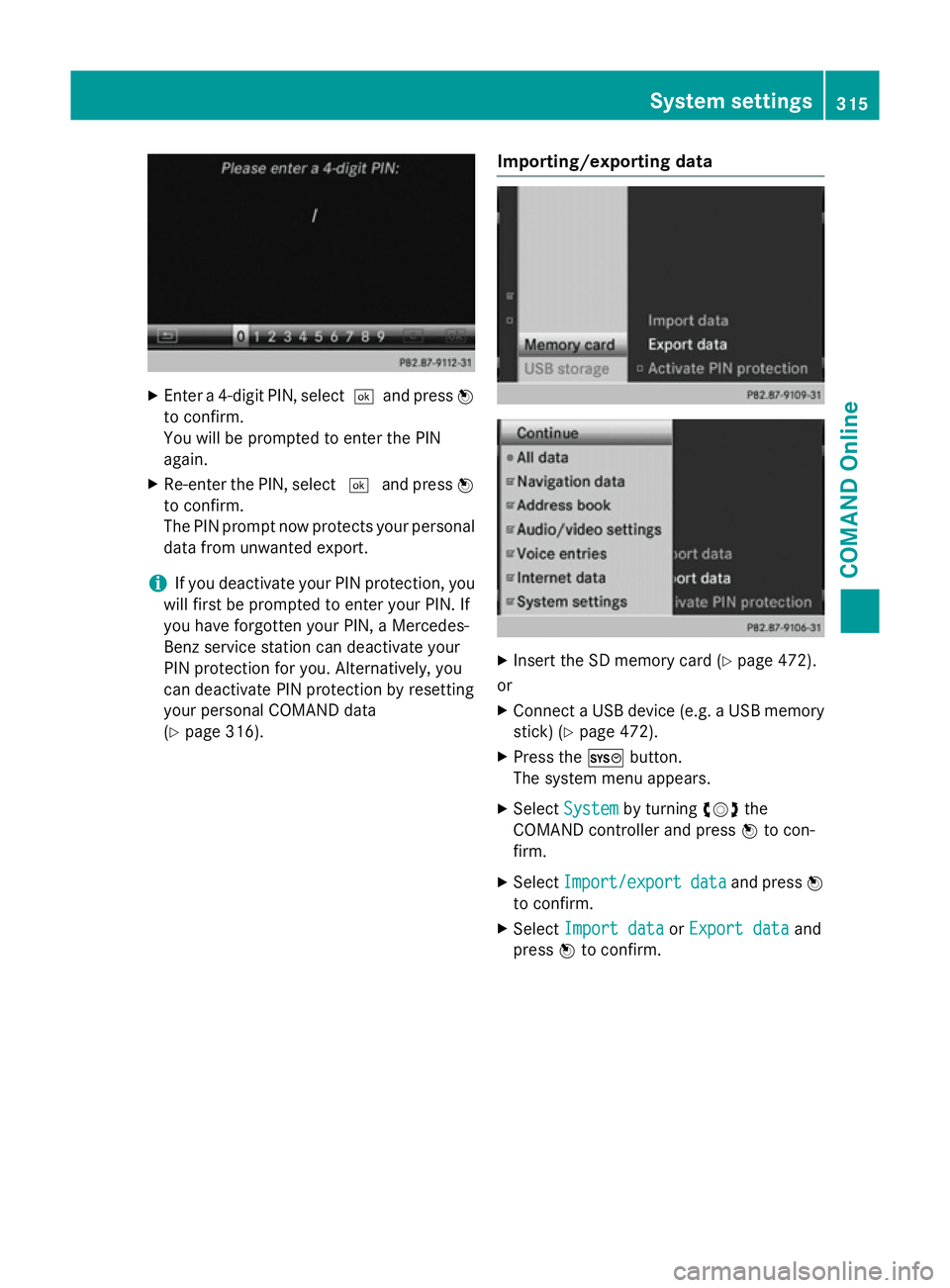
Enter a 4-digit PIN, select ¬and pressW
to confirm.
You will be prompted to enter the PIN
again.
X Re-enter the PIN, select ¬and press W
to confirm.
The PIN prompt now protects your personal data from unwanted export.
i If you deactivate your PIN protection, you
will first be prompted to enter your PIN. If
you have forgotten your PIN, a Mercedes-
Benz service station can deactivate your
PIN protection for you. Alternatively, you
can deactivate PIN protection by resetting
your personal COMAND data
(Y page 316). Importing/exporting data X
Insert the SD memory card (Y page 472).
or
X Connect a USB device (e.g. a USB memory
stick) (Y page 472).
X Press the Wbutton.
The system menu appears.
X Select System System by turning cVdthe
COMAND controller and press Wto con-
firm.
X Select Import/export
Import/export data
dataand press W
to confirm.
X Select Import data
Import data orExport data
Export data and
press Wto confirm. System settings
315COMAND Online Z
Page 319 of 637
If PIN protection is activated, a PIN prompt
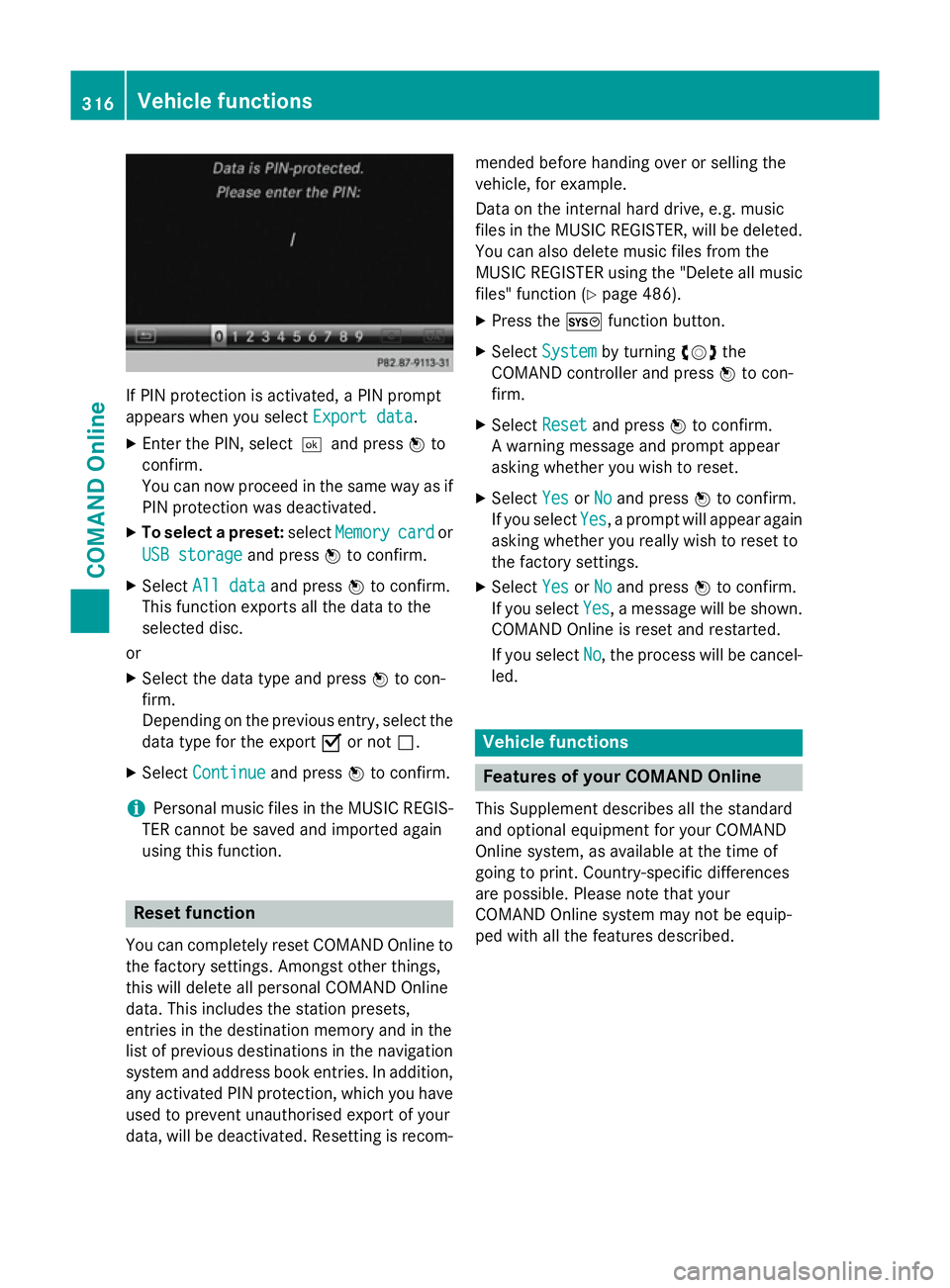
appears when you select Export data
Export data.
X Enter the PIN, select ¬and pressWto
confirm.
You can now proceed in the same way as if
PIN protection was deactivated.
X To select a preset: selectMemory
Memory card cardor
USB storage
USB storage and pressWto confirm.
X Select All data
All data and pressWto confirm.
This function exports all the data to the
selected disc.
or
X Select the data type and press Wto con-
firm.
Depending on the previous entry, select the
data type for the export Oor not ª.
X Select Continue
Continue and pressWto confirm.
i Personal music files in the MUSIC REGIS-
TER cannot be saved and imported again
using this function. Reset function
You can completely reset COMAND Online to
the factory settings. Amongst other things,
this will delete all personal COMAND Online
data. This includes the station presets,
entries in the destination memory and in the
list of previous destinations in the navigation system and address book entries. In addition, any activated PIN protection, which you have
used to prevent unauthorised export of your
data, will be deactivated. Resetting is recom- mended before handing over or selling the
vehicle, for example.
Data on the internal hard drive, e.g. music
files in the MUSIC REGISTER, will be deleted.
You can also delete music files from the
MUSIC REGISTER using the "Delete all music
files" function (Y page 486).
X Press the Wfunction button.
X Select System
System by turning cVdthe
COMAND controller and press Wto con-
firm.
X Select Reset Resetand press Wto confirm.
A warning message and prompt appear
asking whether you wish to reset.
X Select Yes
Yes orNo No and press Wto confirm.
If you select Yes
Yes, a prompt will appear again
asking whether you really wish to reset to
the factory settings.
X Select Yes
Yes orNo No and press Wto confirm.
If you select Yes
Yes, a message will be shown.
COMAND Online is reset and restarted.
If you select No
No, the process will be cancel-
led. Vehicle functions
Features of your COMAND Online
This Supplement describes all the standard
and optional equipment for your COMAND
Online system, as available at the time of
going to print. Country-specific differences
are possible. Please note that your
COMAND Online system may not be equip-
ped with all the features described. 316
Vehicle functionsCOMAND Online
Page 405 of 637
i
You can also call up the telephone book
with the multifunction steering wheel, see
the separate vehicle Owner's Manual.
Closing the phone book X Select the &symbol in the main function
bar by sliding VÆand turning cVdthe
COMAND controller and press Wto con-
firm.
or
X Press the %button.
Using the multifunction steering wheel
X Use the =or; button to select the
Tel
Tel menu.
X Use 9, :or9 to call up the phone
book.
Symbol overview Sym-
bol Explanation
Æ
Address book entry that has been
entered or changed via COMAND
Online
Imported contact that has been
saved in the phone or address book
\
Address book entry with voice tag
These entries have also been
assigned a voice tag. Voice tags are
available in vehicles with LINGUA-
TRONIC (see the separate operat-
ing instructions). Sym-
bol Explanation
Ã
Contact imported from a mobile
phone that supports PBAP
¯
Entry which has been imported
from the SD memory card or USB
device
®
Entry imported via the Bluetooth
®
interface Searching for a phone book entry
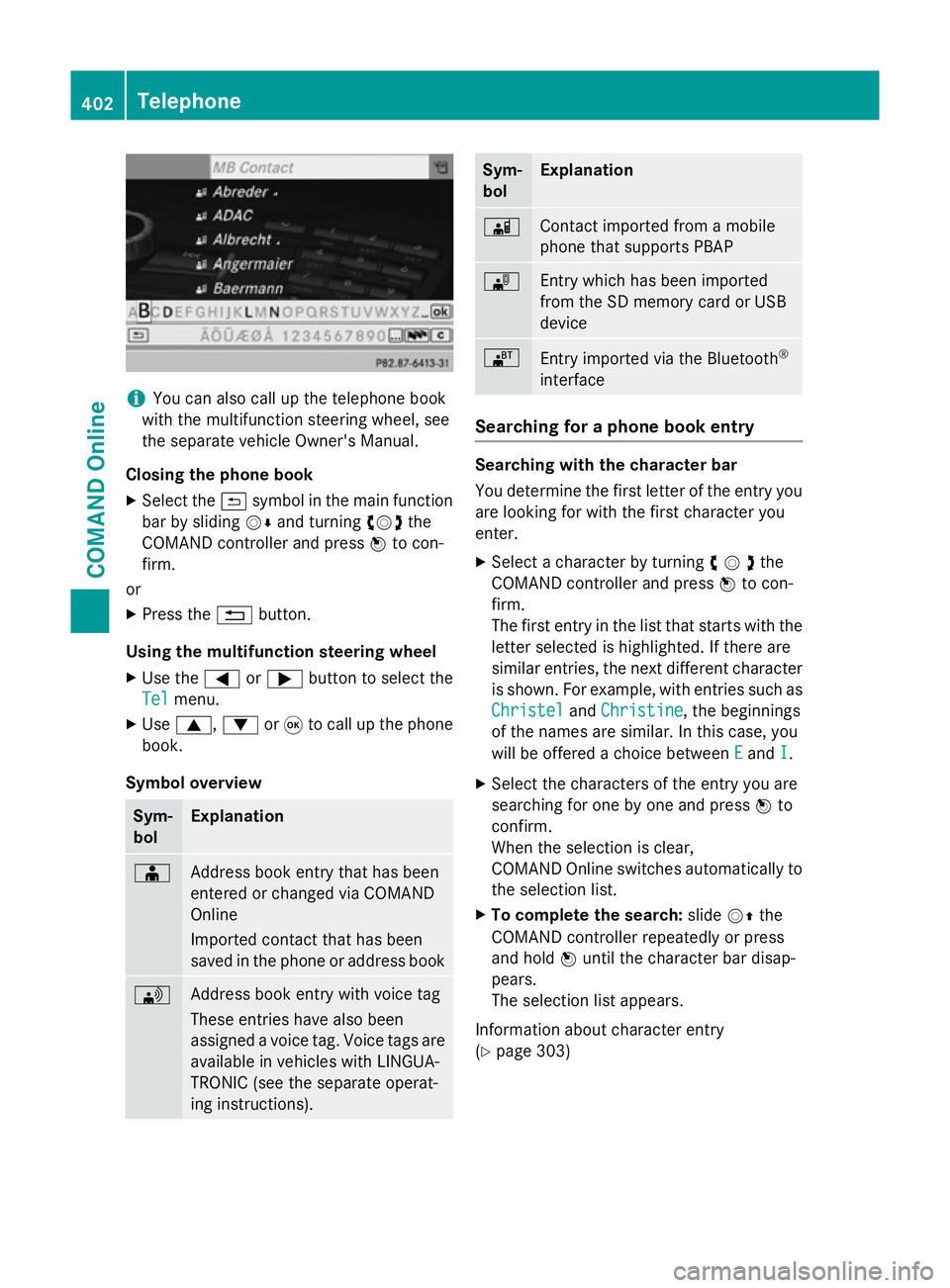
Searching with the character bar
You determine the first letter of the entry you
are looking for with the first character you
enter.
X Select a character by turning cVdthe
COMAND controller and press Wto con-
firm.
The first entry in the list that starts with the letter selected is highlighted. If there are
similar entries, the next different character
is shown. For example, with entries such as
Christel
Christel andChristine Christine , the beginnings
of the names are similar. In this case, you
will be offered a choice between E Eand I
I.
X Select the characters of the entry you are
searching for one by one and press Wto
confirm.
When the selection is clear,
COMAND Online switches automatically to
the selection list.
X To complete the search: slideVZthe
COMAND controller repeatedly or press
and hold Wuntil the character bar disap-
pears.
The selection list appears.
Information about character entry
(Y page 303) 402
TelephoneCOMAND Online
Page 414 of 637
Using phone numbers in the text
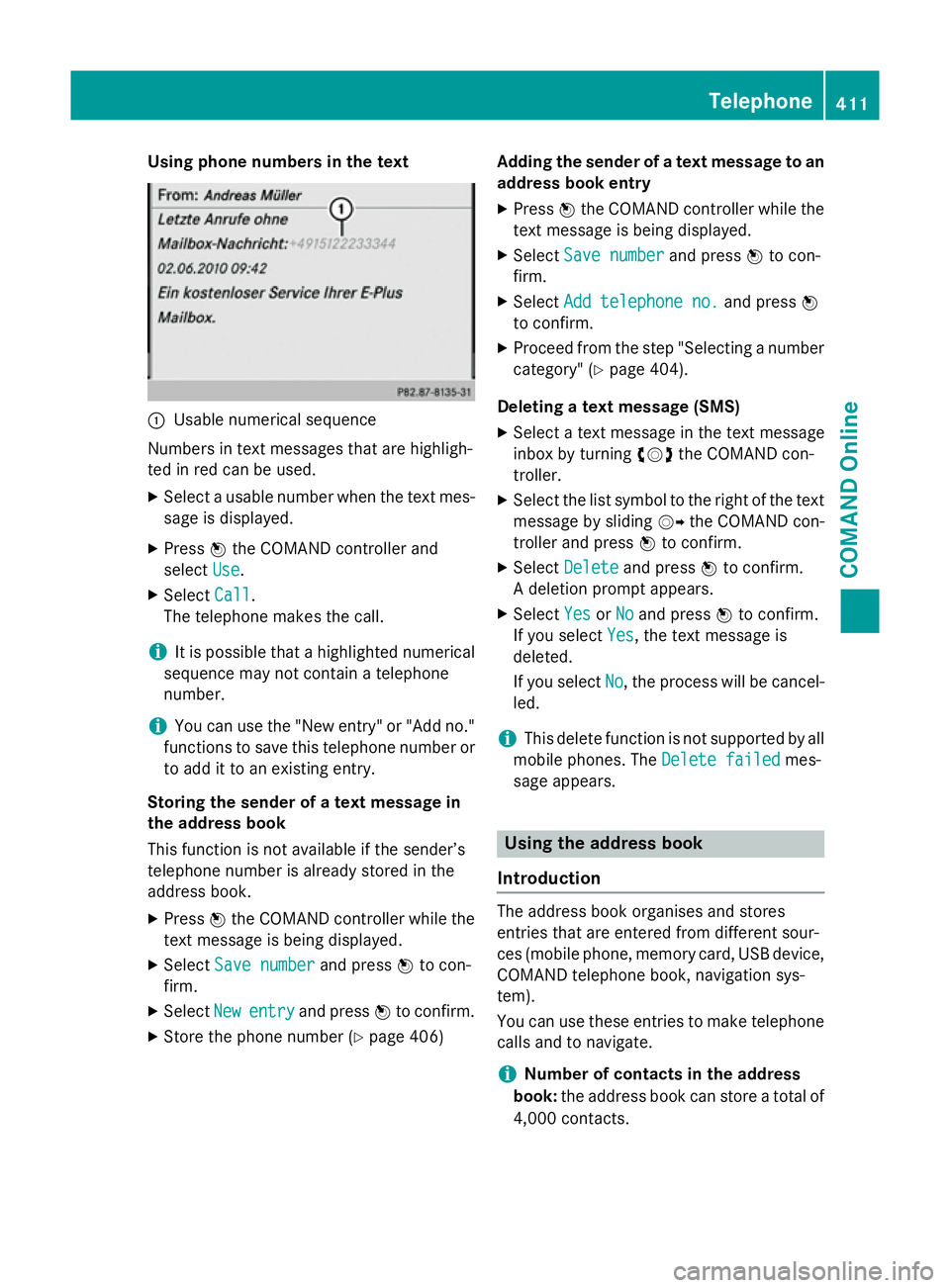
:
Usable numerical sequence
Numbers in text messages that are highligh-
ted in red can be used.
X Select a usable number when the text mes-
sage is displayed.
X Press Wthe COMAND controller and
select Use
Use.
X Select Call
Call.
The telephone makes the call.
i It is possible that a highlighted numerical
sequence may not contain a telephone
number.
i You can use the "New entry" or "Add no."
functions to save this telephone number or to add it to an existing entry.
Storing the sender of a text message in
the address book
This function is not available if the sender’s
telephone number is already stored in the
address book.
X Press Wthe COMAND controller while the
text message is being displayed.
X Select Save number
Save number and pressWto con-
firm.
X Select New
New entry entry and press Wto confirm.
X Store the phone number (Y page 406)Adding the sender of a text message to an
address book entry
X Press Wthe COMAND controller while the
text message is being displayed.
X Select Save number
Save number and pressWto con-
firm.
X Select Add telephone no.
Add telephone no. and pressW
to confirm.
X Proceed from the step "Selecting a number
category" (Y page 404).
Deleting a text message (SMS)
X Select a text message in the text message
inbox by turning cVdthe COMAND con-
troller.
X Select the list symbol to the right of the text
message by sliding VYthe COMAND con-
troller and press Wto confirm.
X Select Delete Delete and press Wto confirm.
A deletion prompt appears.
X Select Yes YesorNo
No and press Wto confirm.
If you select Yes
Yes, the text message is
deleted.
If you select No No, the process will be cancel-
led.
i This delete function is not supported by all
mobile phones. The Delete failed
Delete failedmes-
sage appears. Using the address book
Introduction The address book organises and stores
entries that are entered from different sour-
ces (mobile phone, memory card, USB device,
COMAND telephone book, navigation sys-
tem).
You can use these entries to make telephone
calls and to navigate.
i Number of contacts in the address
book: the address book can store a total of
4,000 contacts. Telephone
411COMAND Online Z
Page 419 of 637
X
Enter the destination address
(Y page 326)
X Start route guidance.
The navigable address is added to the
address book entry automatically.
i This will provide you with an address book
entry that is suitable for navigation. Once
you have altered the address data in the
address entry menu, the altered address in
the navigation system will be used the next
time the system is started instead of the
postal address. Therefore always ensure
that the destination address is indeed the
required destination when navigation
starts from the address book.
Voice tags Introduction
You can enter voice tags via LINGUATRONIC
(see the separate operating instructions).
Once you have assigned a voice tag to an
address book entry, you can vocally call up
this entry and dial a phone number, for exam-
ple. You can add one voice tag per address
book entry.
Adding or changing a voice tag
X Search for an address book entry with or
without a voice tag (¦) (Y page 413).
X Select the list symbol to the right of the
entry by sliding VYthe COMAND control-
ler and press Wto confirm.
X Select Voice
Voice tag tagand press Wto confirm.
X Select Add
Add orChange
Change and press Wto con-
firm.
Subsequent operation is voice-controlled.
LINGUATRONIC guides you through the
dialogues.
Deleting a voice tag
X Search for an address book entry with a
voice tag (Y page 413).
X Select the list symbol to the right of the
entry by sliding VYthe COMAND control-
ler and press Wto confirm. X
Select Voice
Voice tag tagand press Wto confirm.
X Select Delete
Delete and press Wto confirm.
A deletion prompt appears.
X Select Yes
Yes orNo
No and press the 9button to
confirm.
If you select Yes Yes, COMAND Online deletes
the voice tag.
If you select No No, the process will be cancel-
led.
Listening to a voice tag X Search for an address book entry with a
voice tag (Y page 413).
X Select the list symbol to the right of the
entry by sliding VYthe COMAND control-
ler and press Wto confirm.
X Select Voice Voice tag tagand press Wto confirm.
X Select Listen
Listen and press Wto confirm.
You hear the voice tag.
Importing phone book entries This function allows you to store phone book
entries from the mobile phone in the address
book.
Possible sources are:
R the mobile phone
R the memory card
R the USB device
R the Bluetooth ®
interface
Imported phone book entries are indicated in
the phone book by different symbols
(Y page 402).
X Search for an entry in the phone book on
the mobile phone d(Ypage 402).
X Select the list symbol to the right of the
entry by sliding VYthe COMAND control-
ler and press Wto confirm.
X Select Save entry
Save entry and pressWto con-
firm.
The Data saved Data saved message appears. The
phone book entry is now saved as an
address book entry. 416
TelephoneCOMAND Online
Page 420 of 637
The
dsymbol is replaced by the ¥sym-
bol.
Importing contacts Information and requirements
You can import contacts (vCards) from the
memory card and from a USB device into the
address book, or receive vCards via Blue-
tooth ®
.
i Up to 2,500 entries can be imported into
the address book. A message notifies you
when the maximum number is reached.
You then have to delete existing entries in
order to import new entries (Y page 413).
Depending on the source of the contact data, different requirements apply: Source Conditions
Memory card The SD memory card is
inserted (Y
page 472). It
contains importable con-
tact details. USB device The USB device is inserted
into the USB port
(Y
page 472). It contains
importable contact details. Requirements for receiving vCards via
Bluetooth
®
You can receive vCards from devices (e.g.
from a PC) that support the sending of vCards
via Bluetooth ®
.
It is not necessary to authorise the device in
COMAND to do so.
Please bear the following in mind:
R Bluetooth ®
must be activated in COMAND
and on the Bluetooth ®
device; see the oper-
ating instructions for the device.
R the Bluetooth ®
device must be able to send
vCards via Bluetooth ®
(see the operating
instructions for the device).
R the Bluetooth ®
device in the vehicle must
be switched on. Importing from the memory card or USB
device
Entries imported from the memory card or
from a USB device have the
¯symbol.
The following conditions must be fulfilled in
order to import vCards:
R vCards (vcf files) may be located in the main
directory or in folders. COMAND Online
allows you to select the relevant folders
directly.
R vCards must have the ".vcf" file extension.
i One vcf file may contain several vCards.
COMAND Online supports vCards in ver-
sions 2.1 and 3.0.
X Select Address book
Address book in the address book
or, if the telephone basic menu is shown,
select Telephone Telephone by slidingVÆand turn-
ing cVd the COMAND controller and press
W to confirm.
X Select Import contacts
Import contacts and pressWto
confirm.
A menu appears.
X Select From the memory card From the memory card orFrom
From
USB device
USB device in the menu by turning cVd
the COMAND controller and press Wto
confirm.
X Select Add
AddorOverwrite
Overwrite and pressWto
confirm.
Add Add imports the entries from the memory
card or USB device into the address book.
Overwrite Overwrite imports the entries from the
memory card or USB device and overwrites all entries in the address book with the
¯ symbol. The previous entries are then
no longer available.
After the contact data has been imported
successfully, you will see a message to this
effect. The address book or the respective
telephone basic menu is displayed.
i You can select
Overwrite
Overwrite if the address
book already contains corresponding
entries. A message notifies you if the
address book is full. Telephone
417COMAND Online Z
Page 423 of 637
The following functions are available in
COMAND Online when the module is used:
R hands-free mode
R data modem mode (Y page 423)
R sending and receiving text messages
(Y page 425)
R access to the phone book of the mobile
phone (if supported by the mobile phone)
(Y page 424)
R loading a mobile phone via the mini USB
connection (Y page 426)
When the module is installed, the vehicle's
exterior aerial is used for reception. This
ensures optimal language quality and Internet connectivity.
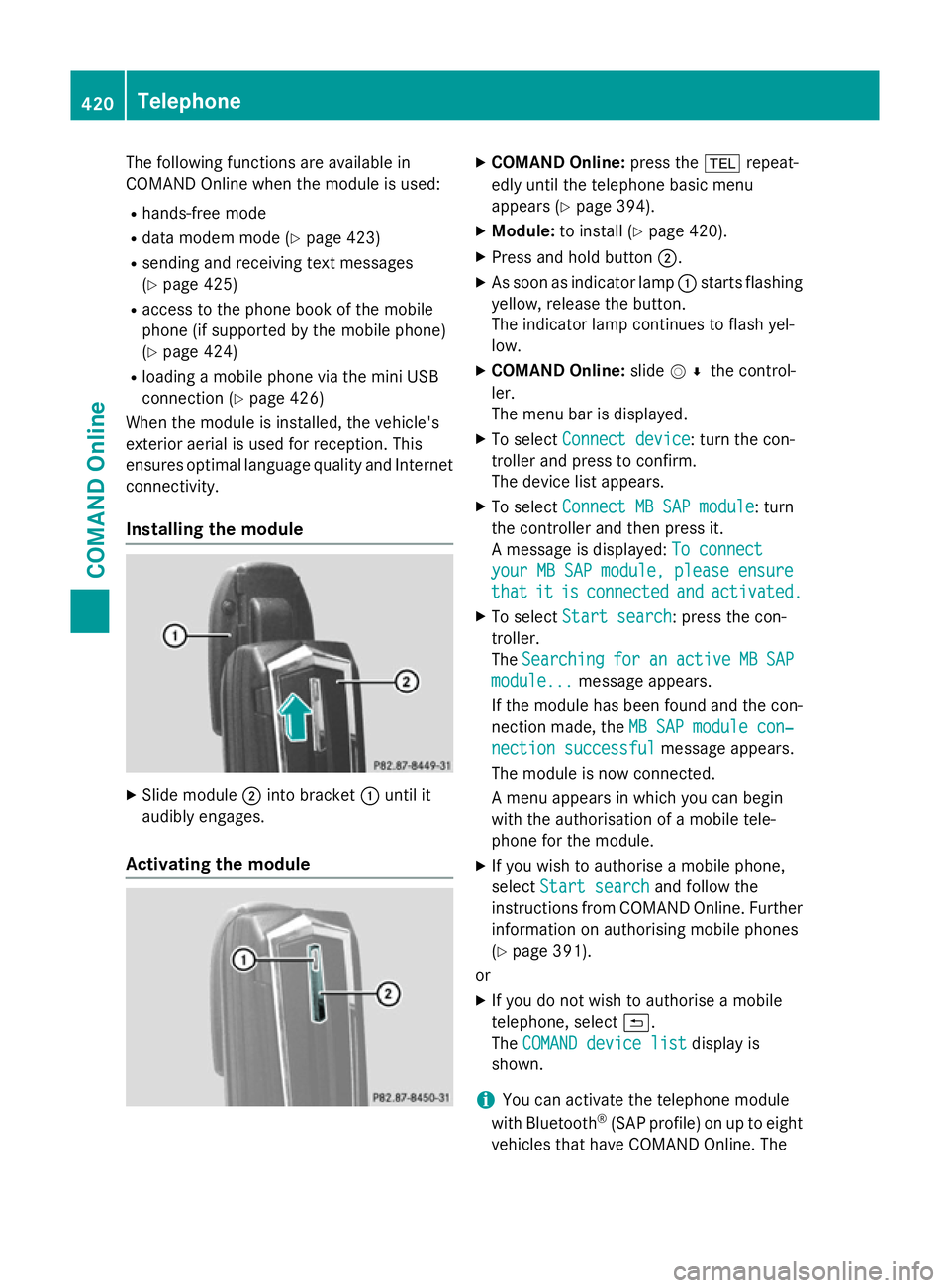
Installing the module X
Slide module ;into bracket :until it
audibly engages.
Activating the module X
COMAND Online: press the%repeat-
edly until the telephone basic menu
appears (Y page 394).
X Module: to install (Y page 420).
X Press and hold button ;.
X As soon as indicator lamp :starts flashing
yellow, release the button.
The indicator lamp continues to flash yel-
low.
X COMAND Online: slideV¬ the control-
ler.
The menu bar is displayed.
X To select Connect device
Connect device: turn the con-
troller and press to confirm.
The device list appears.
X To select Connect MB SAP module Connect MB SAP module: turn
the controller and then press it.
A message is displayed: To connect To connect
your MB SAP module, please ensure
your MB SAP module, please ensure
that that it
itis
isconnected
connected and
andactivated.
activated.
X To select Start search
Start search: press the con-
troller.
The Searching Searching for
foran
anactive
active MB
MBSAP
SAP
module...
module... message appears.
If the module has been found and the con-
nection made, the MB SAP module con‐
MB SAP module con‐
nection successful
nection successful message appears.
The module is now connected.
A menu appears in which you can begin
with the authorisation of a mobile tele-
phone for the module.
X If you wish to authorise a mobile phone,
select Start search Start search and follow the
instructions from COMAND Online. Further
information on authorising mobile phones
(Y page 391).
or
X If you do not wish to authorise a mobile
telephone, select &.
The COMAND device list COMAND device list display is
shown.
i You can activate the telephone module
with Bluetooth ®
(SAP profile) on up to eight
vehicles that have COMAND Online. The 420
TelephoneCOMAND Online
Page 429 of 637
Deleting call lists
X Enter the number "0002" in the telephone
basic menu.
X Press the 6button.
The call lists stored in the module are reset and will no longer appear starting with the
next phone book transfer.
The call lists of the connected mobile phone
are not deleted. Deleting the call lists of the
mobile phone (see the operating instructions
for the mobile phone).
Deleting call lists from COMAND Online
(Y page 407).
i In SIM card mode, the
Delete call Delete call
lists
lists menu item is available in COMAND
Online.
Terminating the connection between
the mobile phone and the module Automatic disconnection
Once outside the receiving range, the Blue-
tooth ®
connection between the mobile phone
and the module is automatically terminated.
Manual disconnection
X Terminate the Bluetooth ®
connection on
the mobile phone (see the operating
instructions for the mobile phone).
Re-establishing a connection
X You can re-establish the Bluetooth ®
con-
nection after disconnecting manually
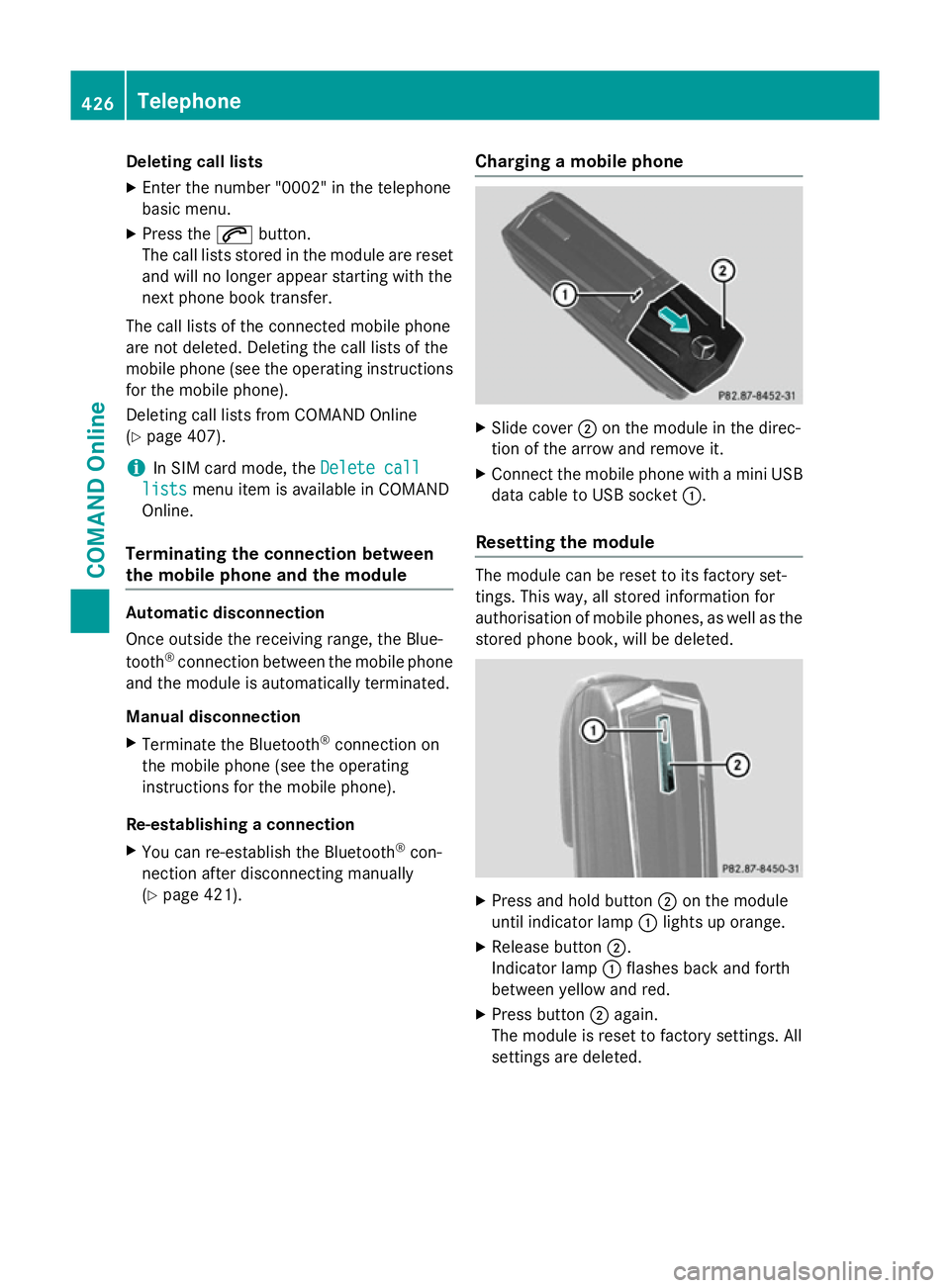
(Y page 421). Charging a mobile phone X
Slide cover ;on the module in the direc-
tion of the arrow and remove it.
X Connect the mobile phone with a mini USB
data cable to USB socket :.
Resetting the module The module can be reset to its factory set-
tings. This way, all stored information for
authorisation of mobile phones, as well as the stored phone book, will be deleted. X
Press and hold button ;on the module
until indicator lamp :lights up orange.
X Release button ;.
Indicator lamp :flashes back and forth
between yellow and red.
X Press button ;again.
The module is reset to factory settings. All
settings are deleted. 426
TelephoneCOMAND Online
Page 475 of 637
i
Not all memory cards available on the
market are designed for the temperatures
which may be reached in the vehicle.
If the SD memory card is no longer in use,
you should remove it from
COMAND Online. High temperatures can
damage the card.
Due to the wide range of SD memory cards
available on the market, playback cannot
be guaranteed for all brands of SD memory card.
The readable storage capacity depends on
the memory card used. You can obtain fur-
ther information at any Mercedes-Benz
Service Centre.
Inserting an SD memory card X Insert the memory card into the slot on the
control panel until it engages in place. The
side with the contacts must face down-
wards and point towards the slot.
If no MP3 tracks can be found, you will see
a message to this effect.
The first 100 MP3 tracks are loaded. The
first MP3 track is then played. An hourglass symbol indicates that further tracks are
being loaded in the background.
Ejecting an SD memory card
X Press the memory card.
The memory card is ejected.
X Remove the memory card from the slot.
Connecting a USB device The USB port is located in the stowage com-
partment in the centre console.
Electrical consumption at this connection
must not exceed a continuous current of
500 mA. If the electrical consumption is
higher, use a separate source to provide
power for the USB device (e.g.
12 V power supply).
X Connect the USB device (e.g. USB stick) to
the USB port.
If no MP3 tracks can be found, you will seea message to this effect. The first 100 MP3 tracks are loaded. The
first MP3 track is then played. An hourglass
symbol indicates that further tracks are
being loaded in the background.
i Due to the wide range of USB devices
available on the market, playback cannot
be guaranteed for all brands of USB device.
Information about suitable USB devices
can be obtained from a Mercedes-Benz
Service Centre.
MP3 players must support Media Transfer
Protocol (MTP). The MTP mode must be
active.
Switching to audio CD/audio DVD or
MP3 mode Inserting or connecting a data medium
X Insert CDs/DVDs (Y page 469)
or
X Inserting an SD memory card
(Y page 472)
or
X Connect a USB device (Y page 472).
COMAND loads the medium inserted and
starts to play it.
Switching on using the button X Press the hfunction button one or more
times.
By pressing the function button repeatedly,
you can change the operating mode in the
following order: R audio CD/DVD/video DVD/MP3 CD/MP3
DVD in the DVD changer or single DVD
drive (disc mode)
R memory card mode
R MUSIC REGISTER
R USB memory
R Media Interface or audio AUX mode
R operation with Bluetooth ®
audio
X Select an audio medium from the media list
(Y page 474). 472
AudioCOMAND Online
Page 476 of 637
Switching on with the audio menu
X Select Audio
Audioin the main function bar by
sliding ZVand turning cVdthe COMAND
controller and press Wto confirm.
The last active audio source is now activa-
ted.
You can activate a different audio source
using the audio menu.
X Select Audio Audioby sliding ZVand turning
cVdthe COMAND controller and press W
to confirm.
The audio menu appears.
X Select Disc
Disc, Memory Memory card
card,Music
Music Regis‐
Regis‐
ter
ter ,USB storage
USB storage orMedia Interface
Media Interface
and press Wto confirm.
This switches to the desired audio source.
X Select an audio medium from the media list
(Y page 474).
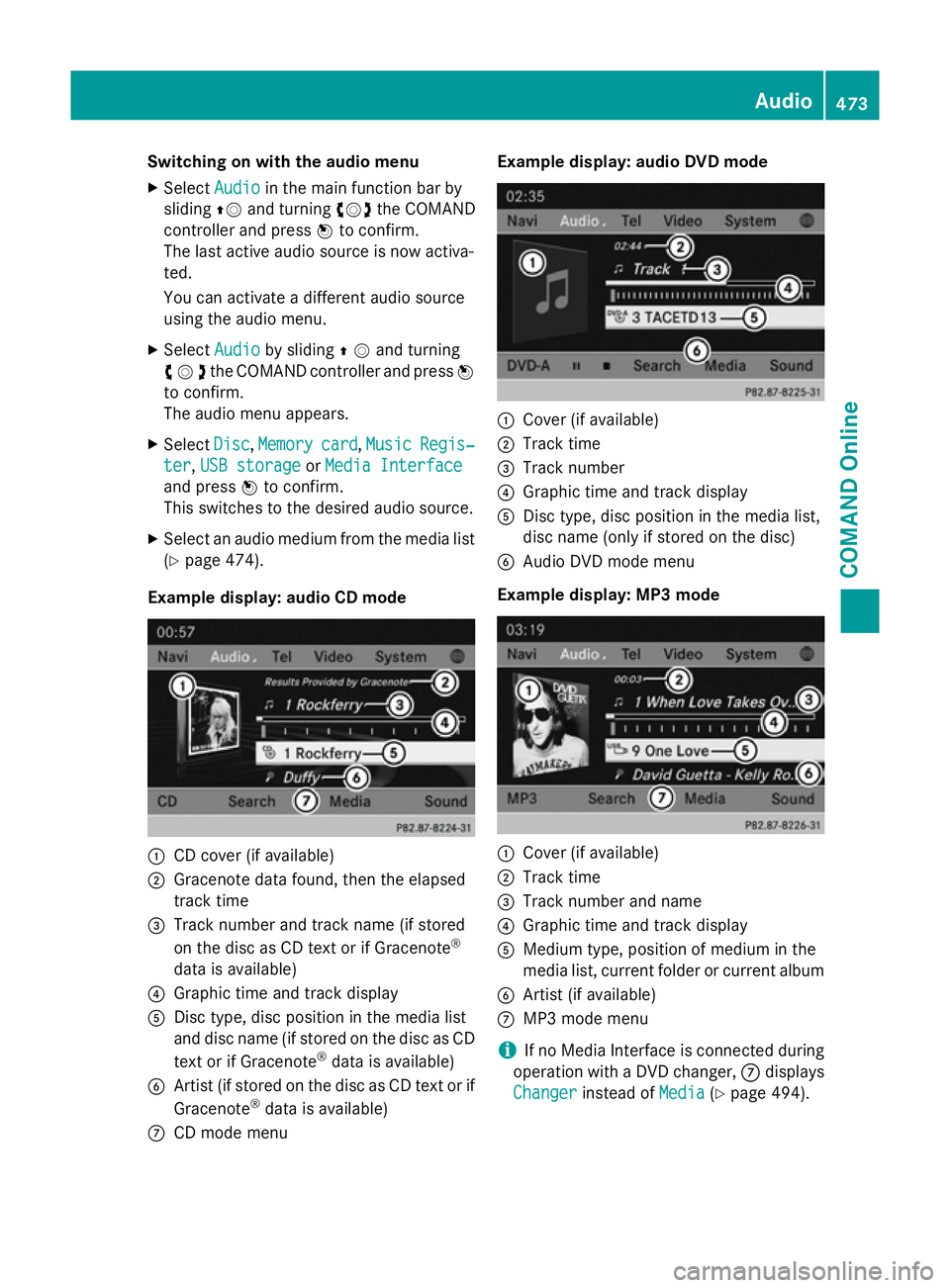
Example display: audio CD mode :
CD cover (if available)
; Gracenote data found, then the elapsed
track time
= Track number and track name (if stored
on the disc as CD text or if Gracenote ®
data is available)
? Graphic time and track display
A Disc type, disc position in the media list
and disc name (if stored on the disc as CD
text or if Gracenote ®
data is available)
B Artist (if stored on the disc as CD text or if
Gracenote ®
data is available)
C CD mode menu Example display: audio DVD mode
:
Cover (if available)
; Track time
= Track number
? Graphic time and track display
A Disc type, disc position in the media list,
disc name (only if stored on the disc)
B Audio DVD mode menu
Example display: MP3 mode :
Cover (if available)
; Track time
= Track number and name
? Graphic time and track display
A Medium type, position of medium in the
media list, current folder or current album
B Artist (if available)
C MP3 mode menu
i If no Media Interface is connected during
operation with a DVD changer, Cdisplays
Changer Changer instead of Media
Media(Ypage 494). Audio
473COMAND Online Z