bluetooth MERCEDES-BENZ SL ROADSTER 2012 User Guide
[x] Cancel search | Manufacturer: MERCEDES-BENZ, Model Year: 2012, Model line: SL ROADSTER, Model: MERCEDES-BENZ SL ROADSTER 2012Pages: 637, PDF Size: 20.68 MB
Page 303 of 637
X
Press the $button.
The radio display appears. You will hear the
last station played on the last waveband
selected.
X Select Sound
Sound by sliding VÆand turning
cVd the COMAND controller and press W
to confirm.
You can now set the treble, bass and bal-
ance for radio mode.
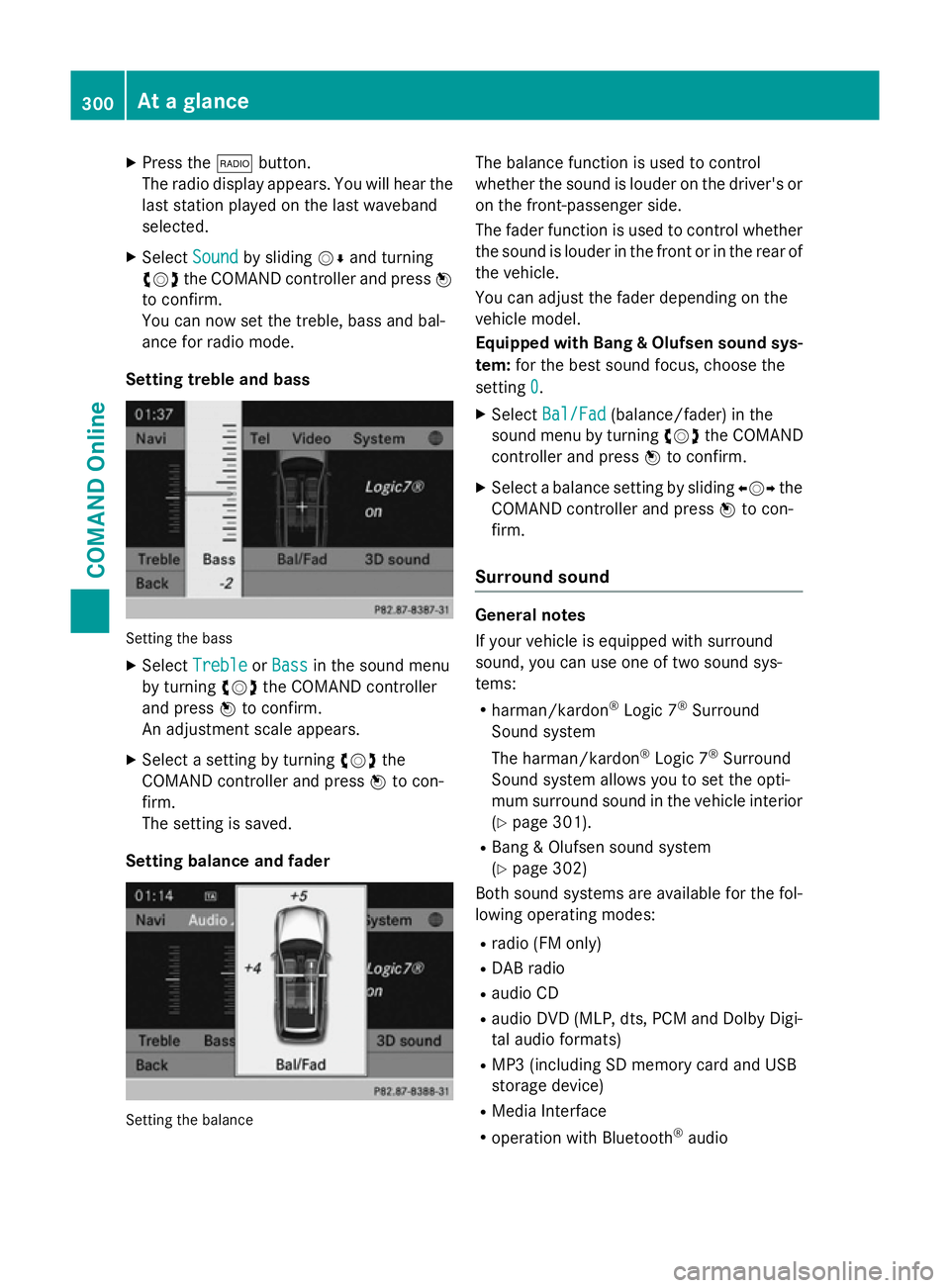
Setting treble and bass Setting the bass
X Select Treble Treble orBass
Bass in the sound menu
by turning cVdthe COMAND controller
and press Wto confirm.
An adjustment scale appears.
X Select a setting by turning cVdthe
COMAND controller and press Wto con-
firm.
The setting is saved.
Setting balance and fader Setting the balance The balance function is used to control
whether the sound is louder on the driver's or
on the front-passenger side.
The fader function is used to control whether
the sound is louder in the front or in the rear of the vehicle.
You can adjust the fader depending on the
vehicle model.
Equipped with Bang & Olufsen sound sys-
tem: for the best sound focus, choose the
setting 0 0.
X Select Bal/Fad
Bal/Fad (balance/fader) in the
sound menu by turning cVdthe COMAND
controller and press Wto confirm.
X Select a balance setting by sliding XVYthe
COMAND controller and press Wto con-
firm.
Surround sound General notes
If your vehicle is equipped with surround
sound, you can use one of two sound sys-
tems:
R harman/kardon ®
Logic 7 ®
Surround
Sound system
The harman/kardon ®
Logic 7 ®
Surround
Sound system allows you to set the opti-
mum surround sound in the vehicle interior
(Y page 301).
R Bang & Olufsen sound system
(Y page 302)
Both sound systems are available for the fol-
lowing operating modes:
R radio (FM only)
R DAB radio
R audio CD
R audio DVD (MLP, dts, PCM and Dolby Digi-
tal audio formats)
R MP3 (including SD memory card and USB
storage device)
R Media Interface
R operation with Bluetooth ®
audio 300
At a glanceCOMAND Online
Page 316 of 637
improve voice recognition. See the separate
operating instructions. Bluetooth
®
settings
General information about Bluetooth ®Bluetooth
®
technology is a standard for
short-range wireless data transmissions up to
approximately 10 metres. Bluetooth ®
allows,
for example, the exchange of vCards. Bluetooth
®
is a registered trademark of Blue-
tooth Special Interest Group (SIG) Inc.
Activating/deactivating Bluetooth ®X
Press the Wbutton.
The system menu appears.
X Select System
System by turning cVdthe
COMAND controller and press Wto con-
firm.
X Select Activate
Activate Bluetooth
Bluetooth and pressW
to confirm.
This switches Bluetooth ®
on O or off ª. Setting the system language
This function allows you to determine the lan-
guage for the menu displays and the naviga-
tion announcements. The selected language
affects the characters available for entry.
The navigation announcements are not avail-
able in all languages. If a language is not avail- able, the navigation announcements will be in English.
If you change the system language, the lan-
guage for LINGUATRONIC will also be
changed. If the selected language is not sup- ported by LINGUATRONIC, English will be
selected.
X Press the Wbutton.
X Select System System by turning cVdthe
COMAND controller and press Wto con-
firm.
X Select Language
Language and pressWto confirm.
The list of languages appears. The #dot
indicates the current setting.
X Select the language by turning cVdthe
COMAND controller and press Wto con-
firm.
COMAND loads the selected language and
sets it.
i If you are using Arabic map data, the text
information can also be shown in Arabic on
the navigation map. To do this, select Eng‐ Eng‐
lish
lish (Arabic
(Arabic map)
map)as the language from
the list of languages. Navigation announce-
ments are then made in Arabic. Assigning a favourites button
X To assign a favourites button: press the
W button.
X Select System
System by turning cVdthe
COMAND controller and press Wto con-
firm.
X Select Assign as favourite
Assign as favourite and press
W to confirm.
The list of predefined functions appears.
The dot #indicates the currently selected
function.
X Select the function by turning cVdthe
COMAND controller and press Wto con-
firm.
The favourites button is assigned the selec-
ted function.
X Example: to call up a favourite: press the
g favourites button.
This calls up the predefined function. System settings
313COMAND Online Z
Page 391 of 637
Therefore, only use mobile communication
equipment if it is connected to the exterior
aerial of the vehicle.
Introduction COMAND Online allows you to use two dif-
ferent modes of telephony:
R telephony via the Bluetooth ®
interface
(standard equipment):
R permanently installed/SAP telephony (only
in conjunction with a data-enabledMB
SAP module)
In telephony via Bluetooth ®
interface
mode, the mobile phone is connected directly
to COMAND Online via Bluetooth ®
.
Enhancing this operating mode with the
optional mobile phone bracket allows you to:
R connect the mobile phone to the exterior
aerial on the vehicle
R charge the mobile phone
In the permanently installed/SAP teleph-
ony mode, the optional data-enabledMB
SAP module is inserted into the fitting in the
armrest designed for housing the mobile
phone bracket.
When connecting Bluetooth ®
-capable mobile
phones with PBAP (Phone BookAccess
Profile), the contacts are automatically down-
loaded to COMAND Online.
If your mobile phone supports the MAP Blue-
tooth ®
profile (M essageAccess Profile),
COMAND Online can receive and display text messages.
Further information on the following topics
can be obtained from your Mercedes-Benz
Service Centre or on the Internet at http://
www.mercedes-benz.com/connect :
R suitable mobile phones
R available mobile phone brackets
R connecting Bluetooth ®
-capable mobile
phones to COMAND Online
R overview of the functions for the operating
modes Call disconnected while the vehicle is in
motion A call may be disconnected if:
R there is insufficient GSM network coverage
in certain areas
R you move from one GSM or UMTS trans-
mitter/receiver area (GSM/UMTS cell) into
another and no channels are free
R you use a SIM card that is not compatible
with the network available
R you are using a mobile phone with "Twin-
card" and the mobile phone with the sec-
ond SIM card is logged into the network at
the same time
Operating options You can operate the telephone:
R using the COMAND controller:
turn cVd
slide XVY orZVÆ
press W
R by using the 6or~ button and the
telephone keypad on COMAND Online
R by using the 6or~ button on the
multifunction steering wheel
R by using LINGUATRONIC (see the separate
LINGUATRONIC operating instructions)
Unless stated otherwise, the descriptions and
illustrations in this section refer to
COMAND Online.
Function restrictions You will not be able to use the telephone, will
no longer be able to use the telephone, or you
may have to wait before using it in the follow- ing situations:
R if the mobile phone is switched off
R if the Bluetooth ®
function is switched off in
COMAND Online 388
TelephoneCOMAND Online
Page 392 of 637
R
if the Bluetooth ®
function is switched off on
the mobile phone while you are using Blue-
tooth ®
interface telephony
R if the mobile phone is not logged into a
mobile phone network
i The telephone automatically tries to log
on to a network. If no network is available,
you may not be able to make a 999or112
emergency call. If you attempt to make an
outgoing call, the No
No service service message will
appear for a short while.
If you switch COMAND Online off during a call in hands-free mode, the call will be termina-
ted. You can prevent this as follows:
X Switch the mobile phone to private mode
before switching off COMAND Online (see
the mobile phone operating instructions).
999 or 112 emergency call The following conditions must be fulfilled in
order to make a 999or112 emergency call:
R the mobile phone must be switched on
R a network must be available
R a valid and operational SIM card must be
inserted in the mobile phone
R the PIN must have been entered
If you are unable to make an emergency call,
you must arrange rescue measures yourself.
i The
999 or112 emergency call number is
a public service. Any misuse is punishable
by law. Telephony via the Bluetooth
®
inter-
face
Conditions For telephony via COMAND Online's Blue-
tooth
®
interface, a Bluetooth ®
-capable
mobile phone is required. On COMAND Online
X Activate the Bluetooth ®
function in
COMAND Online (Y page 313).
On the mobile phone X Switch on the mobile phone and enter the
PIN when prompted to do so (see the
mobile phone operating instructions).
X Activate Bluetooth ®
functions and, if nec-
essary, Bluetooth ®
visibility on the mobile
phone (see the mobile phone operating
instructions).
The battery of the mobile phone should
always be kept sufficiently charged in order to prevent malfunctions.
In preparation for telephoning via the Blue-
tooth ®
interface, you should check the fol-
lowing items on your mobile phone (see the
mobile phone operating instructions):
R Hands-Free Profile
The mobile phone must support Hands-
Free Profile 1.0 or above.
R Bluetooth ®
visibility
On certain mobile phones, the device itself must be made "visible" to other devices, as
well as activating the Bluetooth ®
function
(see the mobile phone operating instruc-
tions).
This visibility is for restricted periods of
time on some mobile phones.
R Bluetooth ®
device name
Every Bluetooth ®
device has a Bluetooth ®
device name. This device name is freely
definable, but can be identical for all devi-
ces from the same manufacturer. It is
therefore recommended that you change
this name so that you can easily recognise
your mobile phone (see the mobile phone
operating instructions).
i Not all mobile phones available on the
market are equally suitable. Further infor-
mation on suitable mobile phones and
mobile phone brackets can be obtained at
your Mercedes-Benz Service Centre or on Telephone
389COMAND Online Z
Page 393 of 637
the Internet at
http://www.mercedes-
benz.com/connect .
i Some displays (e.g. the signal strength)
depend on the supported version of the
Hands-Free Profile.
Connecting a mobile phone General notes
Before using your mobile phone with
COMAND Online for the first time, you will
need to:
R search for it (Y page 390) and then
R authorise (register) it (Y page 391).
Device-specific information on authorising
and connecting Bluetooth ®
-capable mobile
phones can be found on the Internet at
http://www.mercedes-benz.com/
connect.
When you authorise a new mobile phone, it is connected automatically.
You can authorise up to 15 mobile phones.
If the mobile phone supports PBAP (Phone
Book Access Profile) and MAP (Message
Access Profile), the following contacts and
messages are downloaded into COMAND
Online when connecting:
R the phone book
R the call lists
R text messages (SMS)
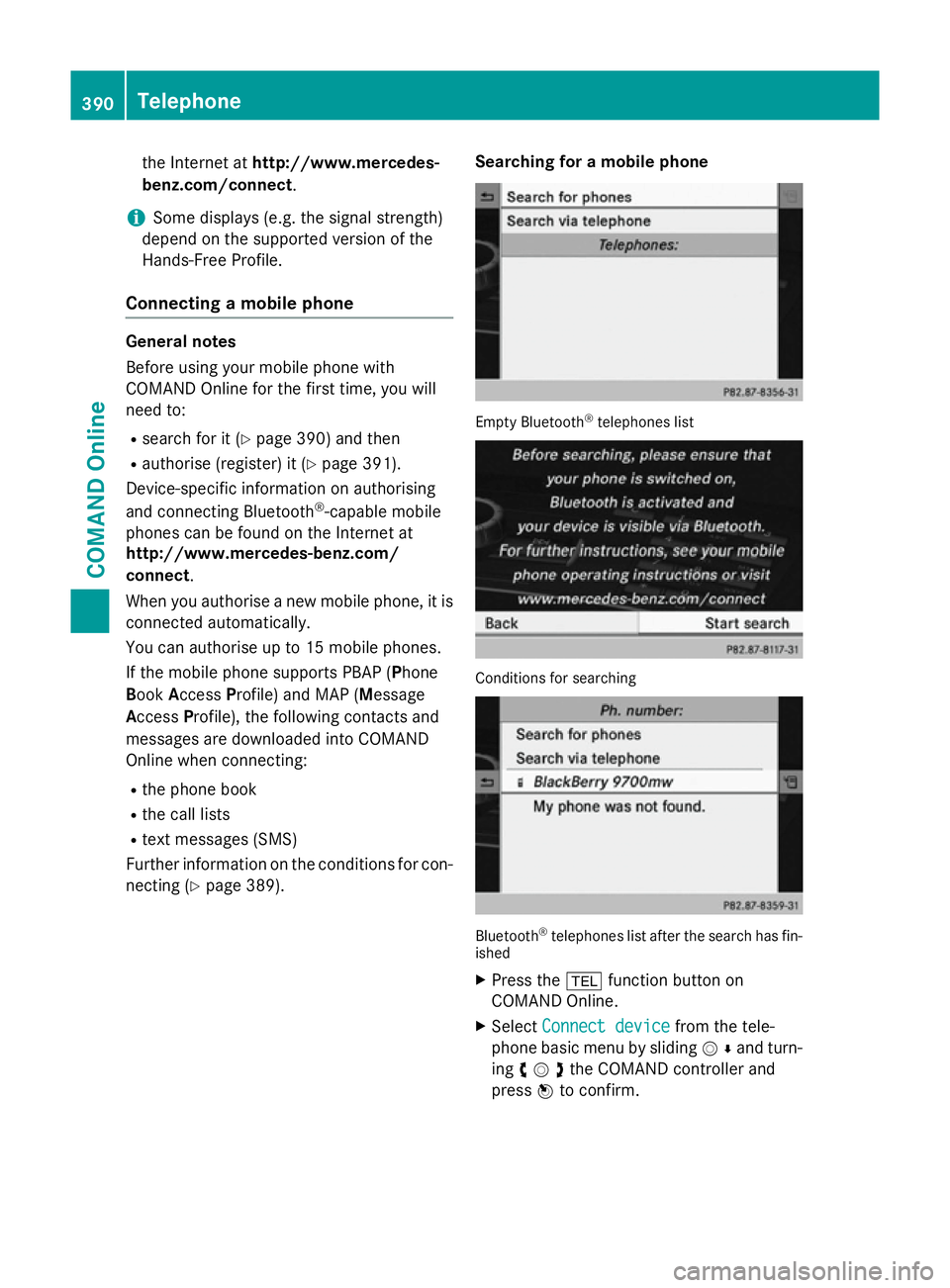
Further information on the conditions for con- necting (Y page 389). Searching for a mobile phone Empty Bluetooth
®
telephones list Conditions for searching
Bluetooth
®
telephones list after the search has fin-
ished
X Press the %function button on
COMAND Online.
X Select Connect device Connect device from the tele-
phone basic menu by sliding VÆand turn-
ing cVdthe COMAND controller and
press Wto confirm. 390
TelephoneCOMAND Online
Page 394 of 637
X
Select Search for phones
Search for phones and press the
W button to confirm.
A message appears.
X Select Start search
Start search and press theW
button to confirm.
The Searching for Bluetooth
Searching for Bluetooth
phones...
phones... message appears. COMAND
Online looks for Bluetooth ®
telephones
within range and adds them to the Blue-
tooth ®
telephones list.
If a new phone is found, it appears in the list
with the Ïsymbol.
The duration of the search depends on the number of Bluetooth ®
telephones within
range and their characteristics.
Symbols in the Bluetooth ®
phone list Sym-
bol Explanation
Ï
New mobile phone in range, but
not yet authorised
Y
Authorised mobile phone
#
Currently connected mobile
phone Ñ
Mobile phone in range and
authorised Ñ
(grey)
Mobile phone not in range, but
already authorised
The Bluetooth
®
phone list shows all mobile
phones within range and all previously
authorised mobile phones, whether or not
they are in range.
i Mobile phones that are connected to the
optional data-enabled MB SAP module are
shown in a separate phone list. You can call
this up using the MB SAP module
MB SAP module entry
(Y page 421).
i If the Bluetooth ®
telephones list is already
full, you will be requested to de-authorise a mobile phone (Y page 393). If COMAND
Online does not find your mobile phone, external authorisation may be necessary
(Y page 392).
i When you call up the phone list again, de-
authorised devices will be removed from
the list. In this case, start a new search to
update the Bluetooth ®
telephone list.
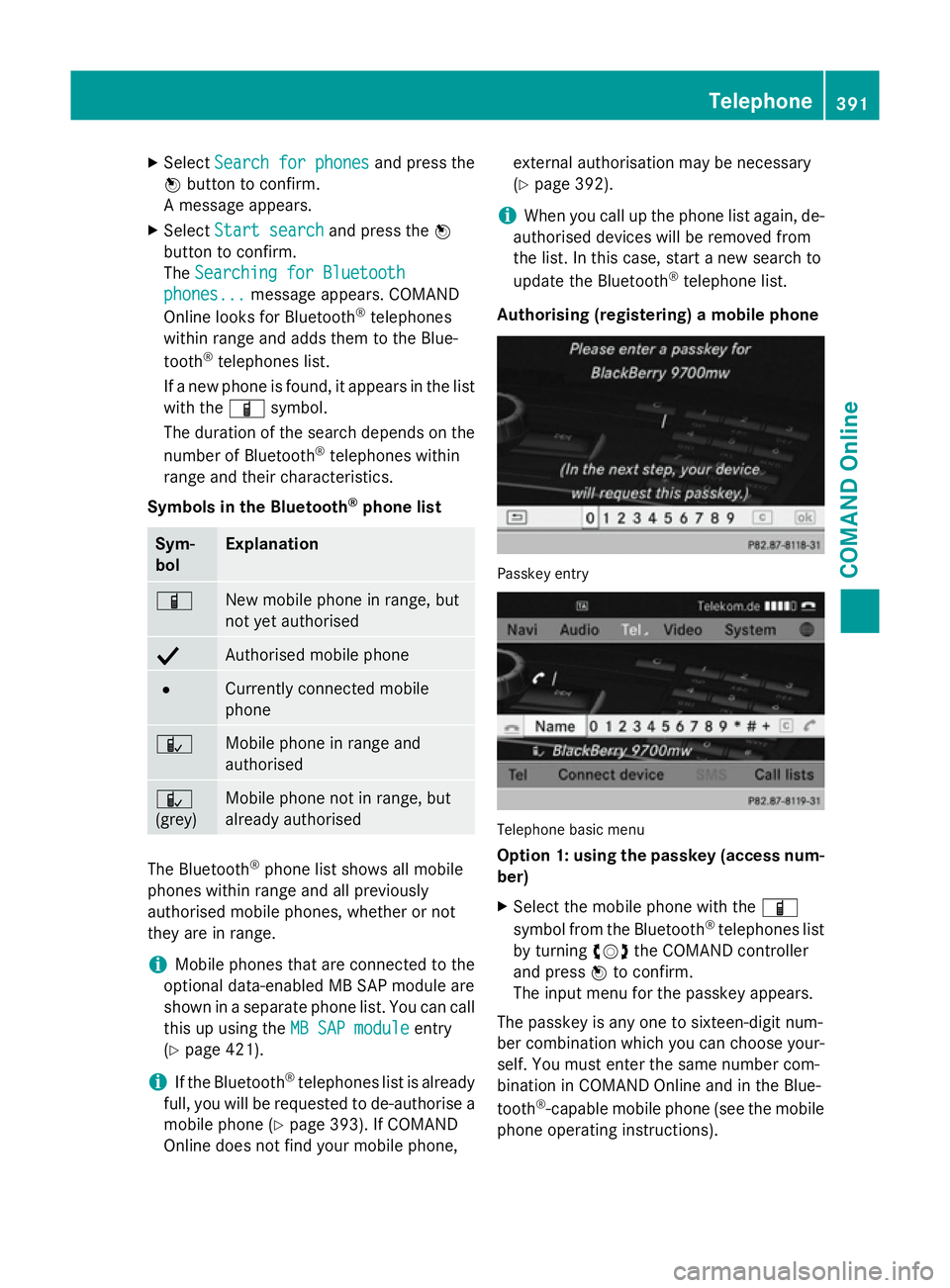
Authorising (registering) a mobile phone Passkey entry
Telephone basic menu
Option 1: using the passkey (access num-
ber)
X Select the mobile phone with the Ï
symbol from the Bluetooth ®
telephones list
by turning cVdthe COMAND controller
and press Wto confirm.
The input menu for the passkey appears.
The passkey is any one to sixteen-digit num-
ber combination which you can choose your-
self. You must enter the same number com-
bination in COMAND Online and in the Blue-
tooth ®
-capable mobile phone (see the mobile
phone operating instructions). Telephone
391COMAND Online Z
Page 395 of 637
i
Some mobile phones require a passkey
with four or more digits.
i If you want to re-authorise a mobile phone
following de-authorisation, you can select a different passkey.
i Mercedes-Benz recommends de-authori-
sation in COMAND Online and on the
mobile phone (Y page 393). Subsequent
authorisation may otherwise fail.
X To enter a passkey in COMAND Online:
press the number keys in turn.
or
X Select the digits in the digit bar one by one
by turning cVdthe COMAND controller
and pressing Wto confirm.
¬is highlighted after the first number
has been entered.
X In both cases, select ¬and press Wto
confirm.
X To enter the passkey on the mobile
phone: if the Bluetooth ®
connection is suc-
cessful, you will be requested to enter the
passkey (access code, passkey; see the
mobile phone operating instructions).
X Enter the same passkey in the mobile
phone as the one already entered in
COMAND Online.
The Connecting Bluetooth pro‐
Connecting Bluetooth pro‐
files... files... message appears.
The Authorisation successful
Authorisation successful mes-
sage appears once authorisation is com-
pleted.
The mobile phone is authorised and connec-
ted to COMAND Online. You can now make
phone calls using the COMAND Online hands- free system.
i After entering the passkey, you may also
need to enter a confirmation in your mobile
phone in order to make calls. Please check your mobile phone display. On some mobile
phones, this confirmation can be saved. In
this case, you do not need to enter it again. If the COMAND Online display shows the
Authorisation failed
Authorisation failed message, you
may have exceeded the prescribed time
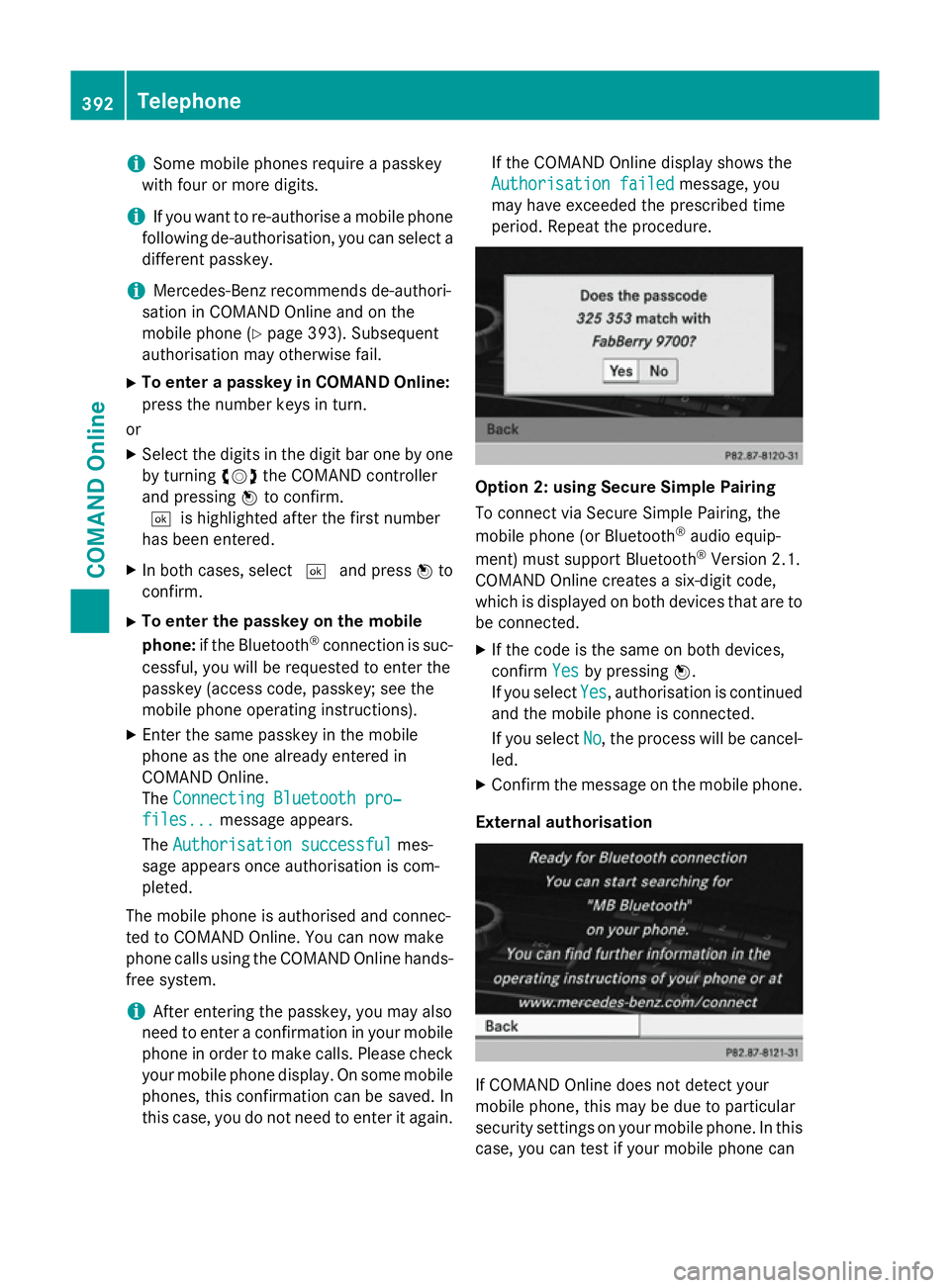
period. Repeat the procedure. Option 2: using Secure Simple Pairing
To connect via Secure Simple Pairing, the
mobile phone (or Bluetooth
®
audio equip-
ment) must support Bluetooth ®
Version 2.1.
COMAND Online creates a six-digit code,
which is displayed on both devices that are to
be connected.
X If the code is the same on both devices,
confirm Yes Yesby pressing W.
If you select Yes Yes, authorisation is continued
and the mobile phone is connected.
If you select No
No, the process will be cancel-
led.
X Confirm the message on the mobile phone.
External authorisation If COMAND Online does not detect your
mobile phone, this may be due to particular
security settings on your mobile phone. In this
case, you can test if your mobile phone can 392
TelephoneCOMAND Online
Page 396 of 637
find COMAND Online. The Bluetooth
®
device
name of COMAND Online is " MB
MBBluetooth
Bluetooth".
Please note the following: some mobile
phones require that you establish the con-
nection to COMAND Online again once you
have entered the passkey (see the mobile
phone operating instructions). The mobile
phone cannot otherwise be authorised.
X Press the %function button on
COMAND Online.
X Select Connect device Connect device from the tele-
phone basic menu by sliding VÆand turn-
ing cVdthe COMAND controller and
press Wto confirm.
The Bluetooth ®
phone list appears.
X Select Search via telephone
Search via telephone and press
W to confirm.
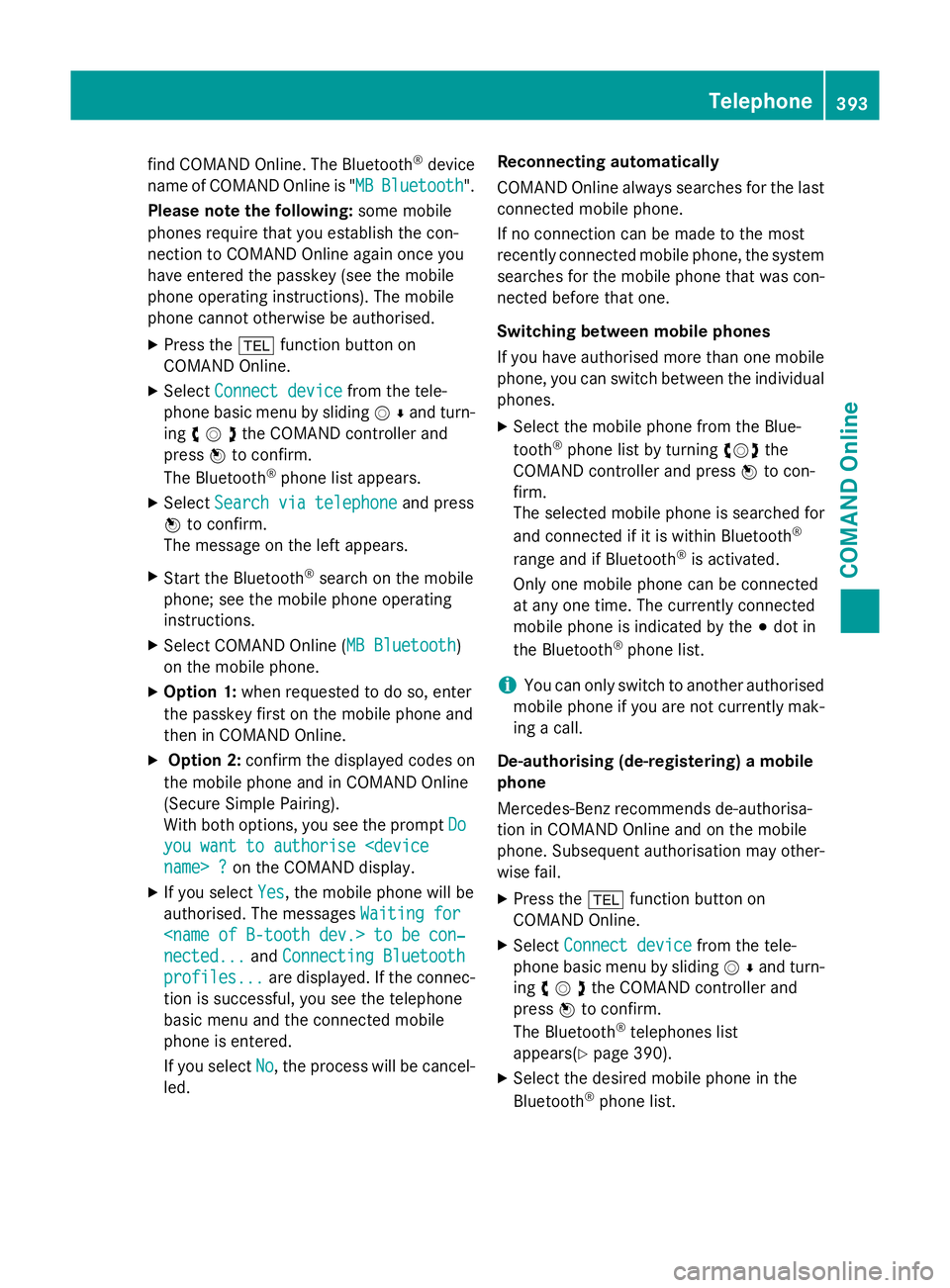
The message on the left appears.
X Start the Bluetooth ®
search on the mobile
phone; see the mobile phone operating
instructions.
X Select COMAND Online ( MB Bluetooth
MB Bluetooth )
on the mobile phone.
X Option 1: when requested to do so, enter
the passkey first on the mobile phone and
then in COMAND Online.
X Option 2: confirm the displayed codes on
the mobile phone and in COMAND Online
(Secure Simple Pairing).
With both options, you see the prompt Do
Do
you want to authorise
X If you select Yes
Yes , the mobile phone will be
authorised. The messages Waiting for
Waiting for
nected...
nected... andConnecting Bluetooth Connecting Bluetooth
profiles...
profiles... are displayed. If the connec-
tion is successful, you see the telephone
basic menu and the connected mobile
phone is entered.
If you select No
No, the process will be cancel-
led. Reconnecting automatically
COMAND Online always searches for the last
connected mobile phone.
If no connection can be made to the most
recently connected mobile phone, the systemsearches for the mobile phone that was con-
nected before that one.
Switching between mobile phones
If you have authorised more than one mobile
phone, you can switch between the individual
phones.
X Select the mobile phone from the Blue-
tooth ®
phone list by turning cVdthe
COMAND controller and press Wto con-
firm.
The selected mobile phone is searched for
and connected if it is within Bluetooth ®
range and if Bluetooth ®
is activated.
Only one mobile phone can be connected
at any one time. The currently connected
mobile phone is indicated by the #dot in
the Bluetooth ®
phone list.
i You can only switch to another authorised
mobile phone if you are not currently mak-
ing a call.
De-authorising (de-registering) a mobile
phone
Mercedes-Benz recommends de-authorisa-
tion in COMAND Online and on the mobile
phone. Subsequent authorisation may other-
wise fail.
X Press the %function button on
COMAND Online.
X Select Connect device
Connect device from the tele-
phone basic menu by sliding VÆand turn-
ing cVdthe COMAND controller and
press Wto confirm.
The Bluetooth ®
telephones list
appear s(Y page 390).
X Select the desired mobile phone in the
Bluetooth ®
phone list. Telephone
393COMAND Online Z
Page 397 of 637
X
Select the list symbol to the right of the
entry by sliding VYthe COMAND control-
ler and press Wto confirm.
X Select De-authorise
De-authorise and pressWto con-
firm.
A prompt appears, asking whether you
really wish to de-authorise this device.
X Select Yes YesorNo
No.
If you select Yes
Yes, the device will be deleted
from the Bluetooth ®
telephones list.
If you select No
No, the process will be cancel-
led.
i Before re-authorising the mobile phone,
you should also delete the device name MB
MB
Bluetooth
Bluetooth from your mobile phone's Blue-
tooth ®
list.
Displaying connection details X
Press the %function button on
COMAND Online.
X Select Connect device
Connect device from the tele-
phone basic menu by sliding VÆand turn-
ing cVdthe COMAND controller and
press Wto confirm.
The Bluetooth ®
phone list appears.
X Select the desired mobile phone in the
Bluetooth ®
phone list.
X Select the list symbol to the right of the
entry by sliding VYthe COMAND control-
ler and press Wto confirm.
X Select Details
Details and press Wto confirm.
The following information concerning the
selected mobile phone is shown:
R Bluetooth ®
name
R Bluetooth ®
address
R availability status (shown after a new
search)
R authorisation status
X To close the detailed view: turncVd or
slide XVY the COMAND controller. Telephone basic menu (Bluetooth
®
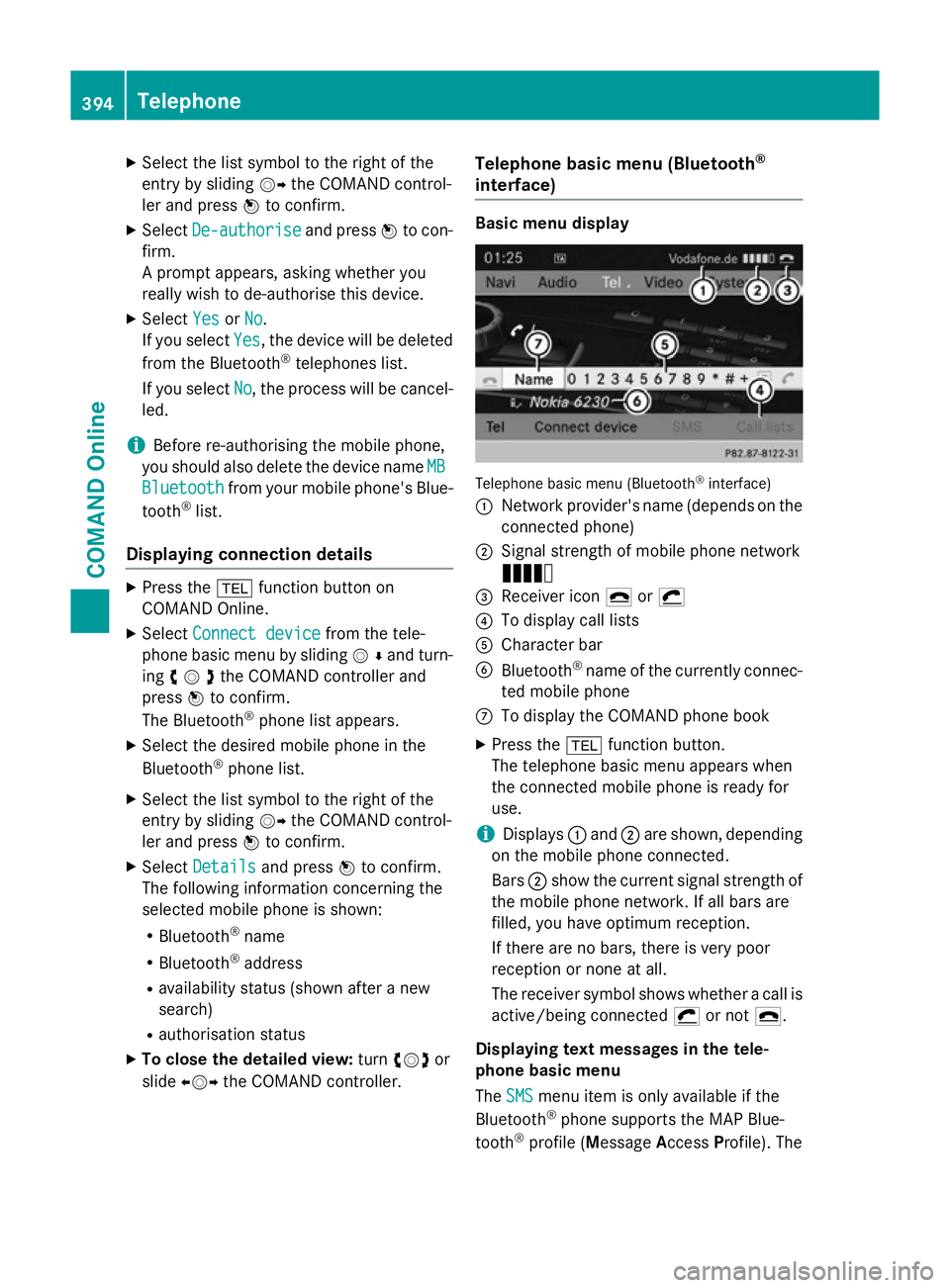
interface) Basic menu display
Telephone basic menu (Bluetooth
®
interface)
: Network provider's name (depends on the
connected phone)
; Signal strength of mobile phone network
Ä
= Receiver icon ¢or¡
? To display call lists
A Character bar
B Bluetooth ®
name of the currently connec-
ted mobile phone
C To display the COMAND phone book
X Press the %function button.
The telephone basic menu appears when
the connected mobile phone is ready for
use.
i Displays
:and ;are shown, depending
on the mobile phone connected.
Bars ;show the current signal strength of
the mobile phone network. If all bars are
filled, you have optimum reception.
If there are no bars, there is very poor
reception or none at all.
The receiver symbol shows whether a call is active/being connected ¡or not ¢.
Displaying text messages in the tele-
phone basic menu
The SMS SMS menu item is only available if the
Bluetooth ®
phone supports the MAP Blue-
tooth ®
profile (Message AccessProfile). The 394
TelephoneCOMAND Online
Page 398 of 637
downloading of text messages from the Blue-
tooth ®
phone must have been completed.
The menu item is otherwise greyed out. Fur-
ther information on text messages
(Y page 409).
If you have an unread text message, the 1
mail symbol is displayed. The symbol disap-
pears once you have read the text message.
The ú mail symbol is displayed as soon as
the text message memory is full. The symbol
disappears once you delete at least one text
message. Switching on and changing telephony
operating modes
Overview If your vehicle is equipped with convenience
telephony, COMAND Online starts the teleph- ony mode depending on whether a telephone
module with Bluetooth ®
(SAP profile) is inser-
ted in the fitting or not.
If neither a telephone module with Bluetooth ®
(SAP profile) nor a mobile phone bracket is
inserted, COMAND Online immediately starts
the telephony via the Bluetooth ®
interface.
Activating with inserted telephone
module with Bluetooth ®
(SAP profile) If a telephone module with Bluetooth
®
(SAP
profile) is inserted, COMAND Online starts
the SAP telephony.
i If no telephone module with Bluetooth ®
(SAP profile) is inserted, COMAND Online
checks whether a mobile phone bracket is
inserted and, if so, which type.
i You must set up your »telephone module
with Bluetooth ®
(SAP profile)« before first
use so it is recognised by COMAND Online
(Y page 420).
If no mobile phone is connected to the tele-
phone module with Bluetooth ®
(SAP profile),
the Ready for Bluetooth telephony...
Ready for Bluetooth telephony... message appears. Approximately two
minutes after switching on COMAND Online,
a prompt will appear asking whether you wish
to switch to Bluetooth ®
telephony.
If you confirm by selecting Yes
Yes, the Ready Ready
for Bluetooth telephony...
for Bluetooth telephony... message
will appear. COMAND Online will search for
the two mobile phones last connected via the
Bluetooth ®
interface. If one of the two mobile
phones is found, the telephone basic menu
for Bluetooth ®
telephony appears
(Y page 394). If neither of the mobile phones
is found, the Ready for Bluetooth tel‐ Ready for Bluetooth tel‐
ephony... ephony... message remains in the display.
You can now connect your mobile phone
(Y page 390).
If you choose No No, theReady for SAP con‐
Ready for SAP con‐
nectivity...
nectivity... message reappears.
Activating without a telephone module
with Bluetooth ®
(SAP profile) Bluetooth
®
telephony is started
COMAND Online starts telephony via the
Bluetooth ®
interface and searches for the last
two mobile phones to have been connected
via the Bluetooth ®
interface. If one of the two
mobile phones is found, the telephone basic
menu for Bluetooth ®
telephony appears
(Y page 394). If neither of the mobile phones
is found, the Ready for Bluetooth tel‐ Ready for Bluetooth tel‐
ephony...
ephony... message remains in the display.
You now have to connect your mobile phone
(Y page 390).
i If you do not connect another mobile
phone via the phone list, the Bluetooth ®
connection with the mobile phone remains
active until the next time COMAND Online
is switched off. While the Bluetooth ®
con-
nection is active, only the Bluetooth ®
inter-
face functions are available to you.
Switching between modes of telephony If your vehicle is equipped with an optional
data-enabled telephone module with Blue- Telephone
395COMAND Online Z