clock MERCEDES-BENZ SL ROADSTER 2012 User Guide
[x] Cancel search | Manufacturer: MERCEDES-BENZ, Model Year: 2012, Model line: SL ROADSTER, Model: MERCEDES-BENZ SL ROADSTER 2012Pages: 637, PDF Size: 20.68 MB
Page 231 of 637
Useful information
i This Owner's Manual describes all mod-
els, series and optional equipment for your
vehicle that were available at the time of
going to press. National variations are pos- sible. Note that your vehicle may not be
equipped with all of the functions descri-
bed. This is also the case for systems and
functions relevant to safety.
i Read the information on qualified special-
ist workshops: (Y page 34). Important safety notes
G
WARNING
Operating the integrated information systems and communications equipment in the vehicle
while driving will distract you from traffic con-
ditions. You could then lose control of the
vehicle. There is a risk of an accident.
Only operate these devices if road traffic con-
ditions permit. If you are unsure about the
surrounding conditions, pull over to a safe
location and make entries only while the vehi-
cle is stationary. G
WARNING
If the instrument cluster has failed or mal-
functioned, you may not recognise function
restrictions relevant to safety. The operating
safety of your vehicle may be impaired. There is a risk of an accident.
Drive on carefully. Have the vehicle checked
at a qualified specialist workshop immedi-
ately.
You must observe the legal requirements for
the country in which you are currently driving when operating the on-board computer.
The on-board computer only shows messages
or warnings from certain systems in the mul- tifunction display. You should therefore make
sure your vehicle is operating safely at all times. Otherwise, a vehicle that is not oper-
ating safely may cause an accident.
For an overview, see the instrument panel
illustration (Y
page 40). Displays and operation
Instrument cluster lighting
The lighting in the instrument cluster, in the
displays and the controls in the vehicle inte-
rior can be adjusted using the brightness con- trol knob.
The brightness control knob is on the bottom
left of the instrument cluster (Y page 40).
X Turn the brightness control knob anti-
clockwise or clockwise.
If the light switch is set to Ã,Tor
L, the brightness is dependant upon
the brightness of the ambient light.
i The light sensor in the instrument cluster
automatically controls the brightness of
the multifunction display.
In daylight, the displays in the instrument
cluster are not lit. Coolant temperature gauge
G
WARNING
If you open the bonnet while the engine is
overheating or while there is a fire in the
engine compartment, you could come into
contact with hot gases or other leaking ser-
vice products. There is a danger of injury.
Allow an overheating engine to cool down
before opening the bonnet. If there is a fire in the engine compartment, leave the bonnet
closed and notify the fire brigade.
The coolant temperature gauge is in the
instrument cluster on the right-hand side
(Y page 40).
Under normal operating conditions and with
the specified coolant level, the coolant tem-
perature may rise to 120 †. 228
Displays and operationOn-board computer and displays
Page 299 of 637
COMAND controller
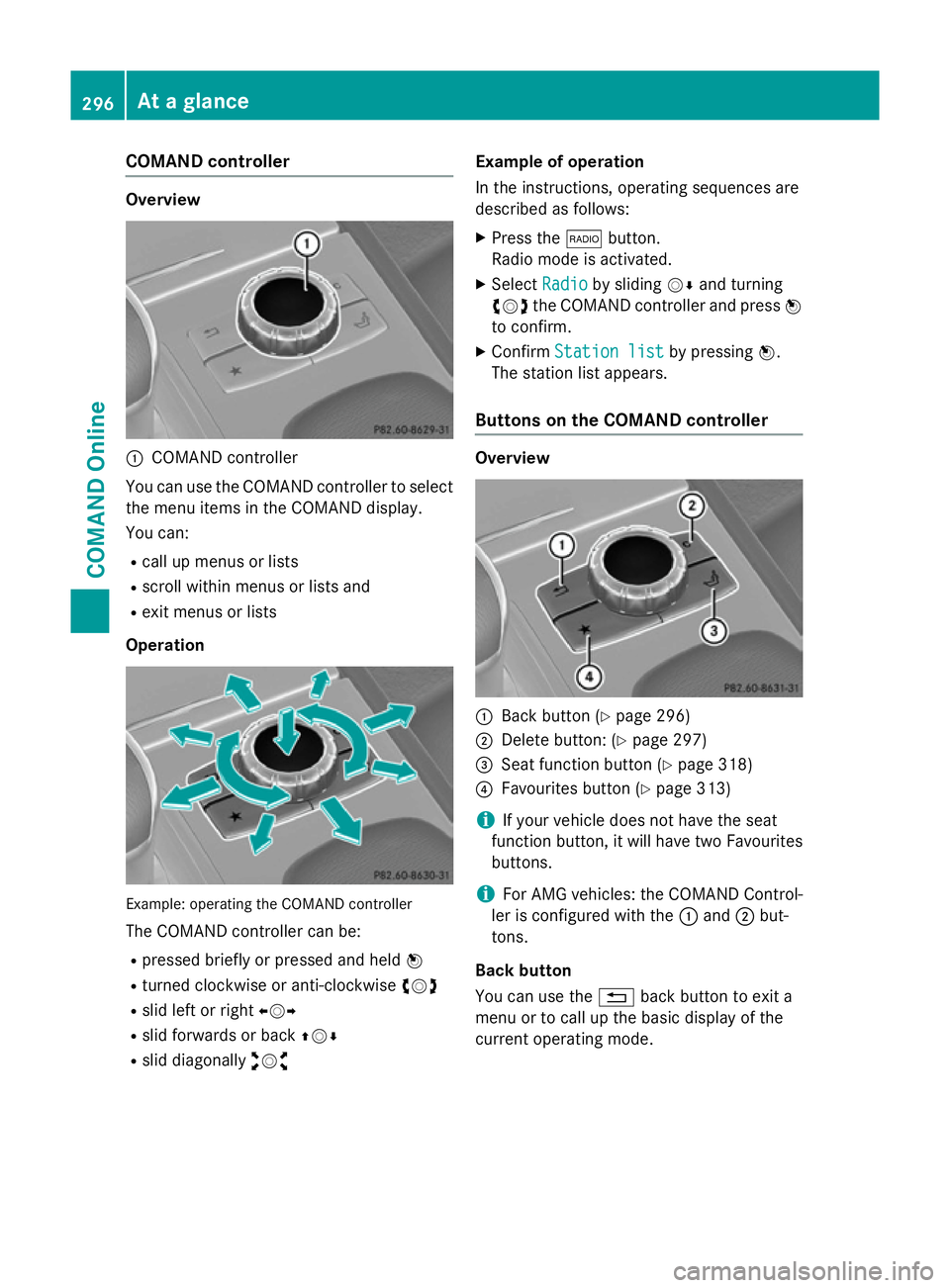
Overview
:
COMAND controller
You can use the COMAND controller to select the menu items in the COMAND display.
You can:
R call up menus or lists
R scroll within menus or lists and
R exit menus or lists
Operation Example: operating the COMAND controller
The COMAND controller can be:
R pressed briefly or pressed and held W
R turned clockwise or anti-clockwise cVd
R slid left or right XVY
R slid forwards or back ZVÆ
R slid diagonally aVb Example of operation
In the instructions, operating sequences are
described as follows:
X Press the $button.
Radio mode is activated.
X Select Radio Radioby sliding VÆand turning
cVd the COMAND controller and press W
to confirm.
X Confirm Station list Station list by pressingW.
The station list appears.
Buttons on the COMAND controller Overview
:
Back button (Y page 296)
; Delete button: (Y page 297)
= Seat function button (Y page 318)
? Favourites button (Y page 313)
i If your vehicle does not have the seat
function button, it will have two Favourites buttons.
i For AMG vehicles: the COMAND Control-
ler is configured with the :and ;but-
tons.
Back button
You can use the %back button to exit a
menu or to call up the basic display of the
current operating mode. 296
At a glanceCOMAND Online
Page 317 of 637
You can select the following predefined func-
tions in a menu:
R SplitView on/off
SplitView on/off: you can switch the
screen view for the front passenger on or
off.
R Display off/on
Display off/on: you can switch the dis-
play off or on.
R Full screen: 'Clock' Full screen: 'Clock': you can call up
the full screen with the clock.
R ® Menu
Menu : you can call up the COMAND
Online and Internet functions.
R 360°
360° camera
camera: you can call up the picture of
the 360° camera.
R Full screen: 'Map'
Full screen: 'Map' : you can call up the
full screen with the map.
R Spoken driving tip
Spoken driving tip : you can call up the
current driving recommendation.
R Display
Display traffic
trafficmessages
messages: you can call
up traffic reports.
R Navigate to 'Home address'
Navigate to 'Home address' : you can
start route guidance to your home address
if you have already entered and saved the
address (Y page 330).
R Detour menu
Detour menu : you can call up the Detour
menu and then block a section of the route
and recalculate the route (Y page 357).
R Compass
Compass screen
screen: you can call up the com-
pass. Importing/exporting data
General notes !
When data is being copied to the USB
stick or the memory card, the stick or the
card must not be removed under any cir-
cumstances. Doing so runs the risk of data loss. Using this function, you can:
R transfer your personal COMAND data from
one system/vehicle to another
R make a backup copy of your personal data
(export data) and load it again (import
data).
R protect your data from unwanted export by
activating a pin prompt (presetting: deacti-
vated ª).
You can either use an SD memory card or a
USB storage device (e.g. a USB stick) as tem- porary storage.
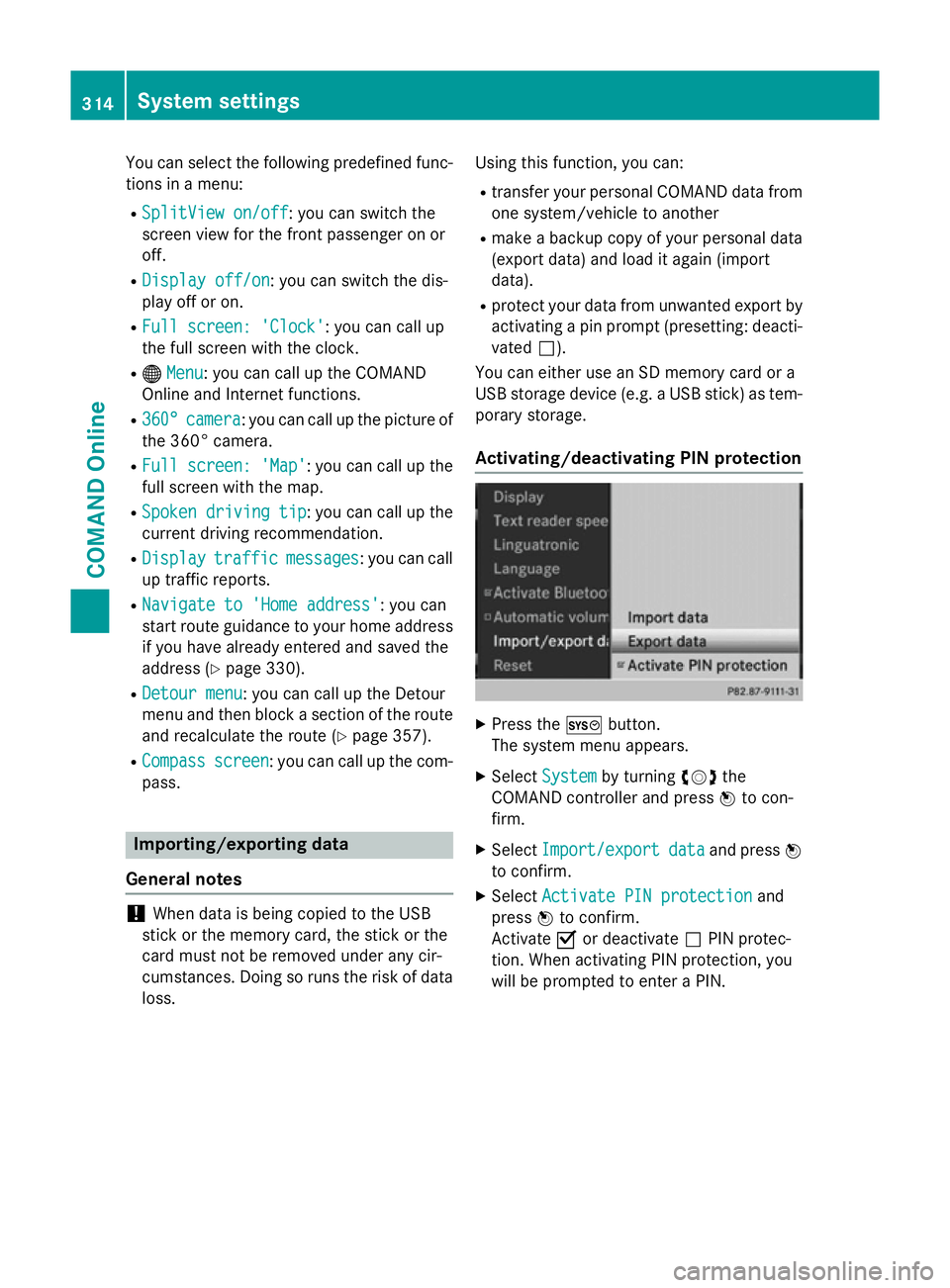
Activating/deactivating PIN protection X
Press the Wbutton.
The system menu appears.
X Select System
System by turning cVdthe
COMAND controller and press Wto con-
firm.
X Select Import/export Import/export data
dataand press W
to confirm.
X Select Activate PIN protection
Activate PIN protection and
press Wto confirm.
Activate Oor deactivate ªPIN protec-
tion. When activating PIN protection, you
will be prompted to enter a PIN. 314
System settingsCOMAND Online
Page 321 of 637
X
To call up the full-screen display: press
the W button.
X In the system menu, slide ZVthe
COMAND controller up until the Full Full
screen screen option is selected.
X Press Wthe COMAND controller.
The system display is shown as full screen
(without system menu).
X Slide XVY the COMAND controller repeat-
edly until the fuel consumption indicator
appears.
The COMAND display shows the fuel con-
sumption for the last 15 minutes of the
journey.
X To exit the full-screen display: pressW
the COMAND controller.
The system menu appears.
Every bar of the graph displays the average
value for one minute.
The fuel consumption display may differ from
the display in the FROM START FROM STARTtrip computer
in the Trip
Trip menu; see the vehicle Owner's
Manual. Driving conditions menu (Active Body
Control)
General notes On vehicles with Active Body Control (ABC),
you can display some driving systems and
additional information in the COMAND dis-
play.
Calling up drive status regulator (ABC) X
Press W.
X In the system menu, slide ZVthe
COMAND controller up until the display/
selection window is selected.
X Slide XVY the COMAND controller repeat-
edly until the drive status regulator (ABC)
appears.
The corresponding displays appear in the
COMAND display. Details on the displays:
R for vehicles except AMG vehicles; see the
separate vehicle Owner's Manual
R for AMG vehicles; see the separate vehicle
Owner's Manual
Exiting the display X
Slide XVY the COMAND controller until
the desired display (clock or fuel consump-
tion) is shown. Seat functions
Overview Using the
Tbutton next to the COMAND
controller or the Seat menu item in the sys-
tem menu, you can call up different setting
functions: The following settings depend on
the type of seat and the vehicle model series:
R seat cushion length
R backrest side bolsters
R lumbar
R balance
R cushion side bolsters
R driving dynamics
R massage
i You also can save and recall the current
settings of a seat function using the mem-
ory button and the corresponding memory
position switch; see the separate vehicle
Owner's Manual.
The massage function cannot be started or
stopped using the memory button. 318
Vehicle functionsCOMAND Online
Page 337 of 637
Moving the map and selecting the desti-
nation
X Call up the destination entry via the map
(Y page 333).
X To scroll the map: slideXVY, ZVÆor
aVb the COMAND controller.
X To set the map scale: as soon as you turn
cVd the COMAND controller, the scale bar
appears.
X Turn cVd until the desired scale is set.
Turning clockwise zooms out from the map; turning anti-clockwise zooms in.
X To select a destination: pressWthe
COMAND controller.
If the crosshair lies outside the digital map,
COMAND Online uses the nearest digitised
road for route calculation. The The
The cross‐ cross‐
hair is outside the digitalised
hair is outside the digitalised
area area of
ofthe
the map
mapmessage is shown. If the
crosshair is located over a body of water,
you will see the message: The destina‐ The destina‐
tion is located in a body of
tion is located in a body of
water. Please select another des‐ water. Please select another des‐
tination.
tination.
X Select OK
OKand press Wto confirm.
If the destination is within the limits of the
digital map, COMAND Online attempts to
assign the destination to the map.
If the destination can be assigned, you will see the address entry menu with the
address of the destination. If not, you will
see the Destination from map
Destination from map entry.
X To start route calculation: selectStart
Start
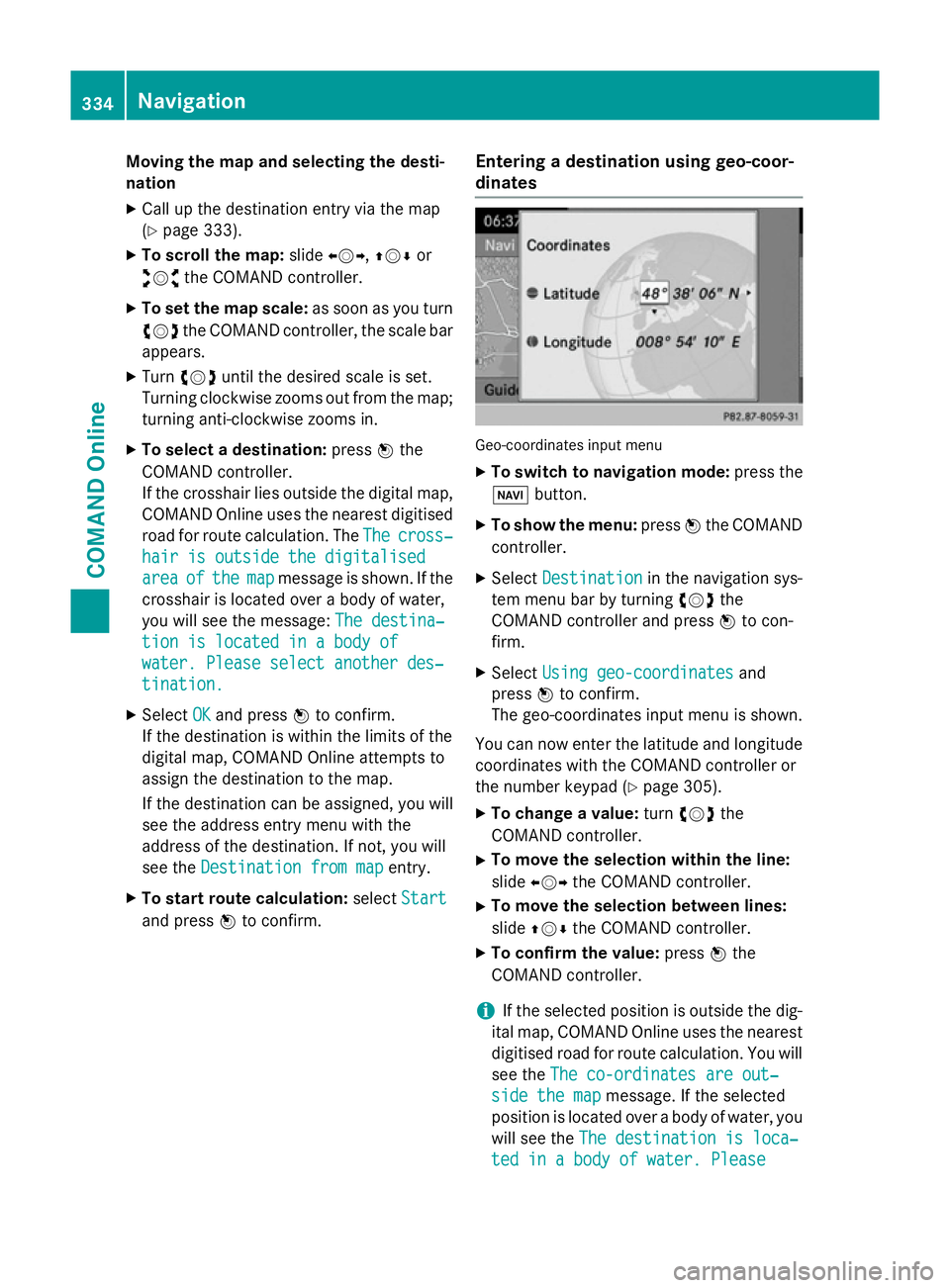
and press Wto confirm. Entering a destination using geo-coor-
dinates Geo-coordinates input menu
X To switch to navigation mode: press the
Ø button.
X To show the menu: pressWthe COMAND
controller.
X Select Destination Destination in the navigation sys-
tem menu bar by turning cVdthe
COMAND controller and press Wto con-
firm.
X Select Using geo-coordinates
Using geo-coordinates and
press Wto confirm.
The geo-coordinates input menu is shown.
You can now enter the latitude and longitude coordinates with the COMAND controller or
the number keypad (Y page 305).
X To change a value: turncVd the
COMAND controller.
X To move the selection within the line:
slide XVY the COMAND controller.
X To move the selection between lines:
slide ZVÆ the COMAND controller.
X To confirm the value: pressWthe
COMAND controller.
i If the selected position is outside the dig-
ital map, COMAND Online uses the nearest
digitised road for route calculation. You will
see the The co-ordinates are out‐ The co-ordinates are out‐
side the map
side the map message. If the selected
position is located over a body of water, you
will see the The destination is loca‐
The destination is loca‐
ted in a body of water. Please
ted in a body of water. Please 334
NavigationCOMAND Online
Page 368 of 637
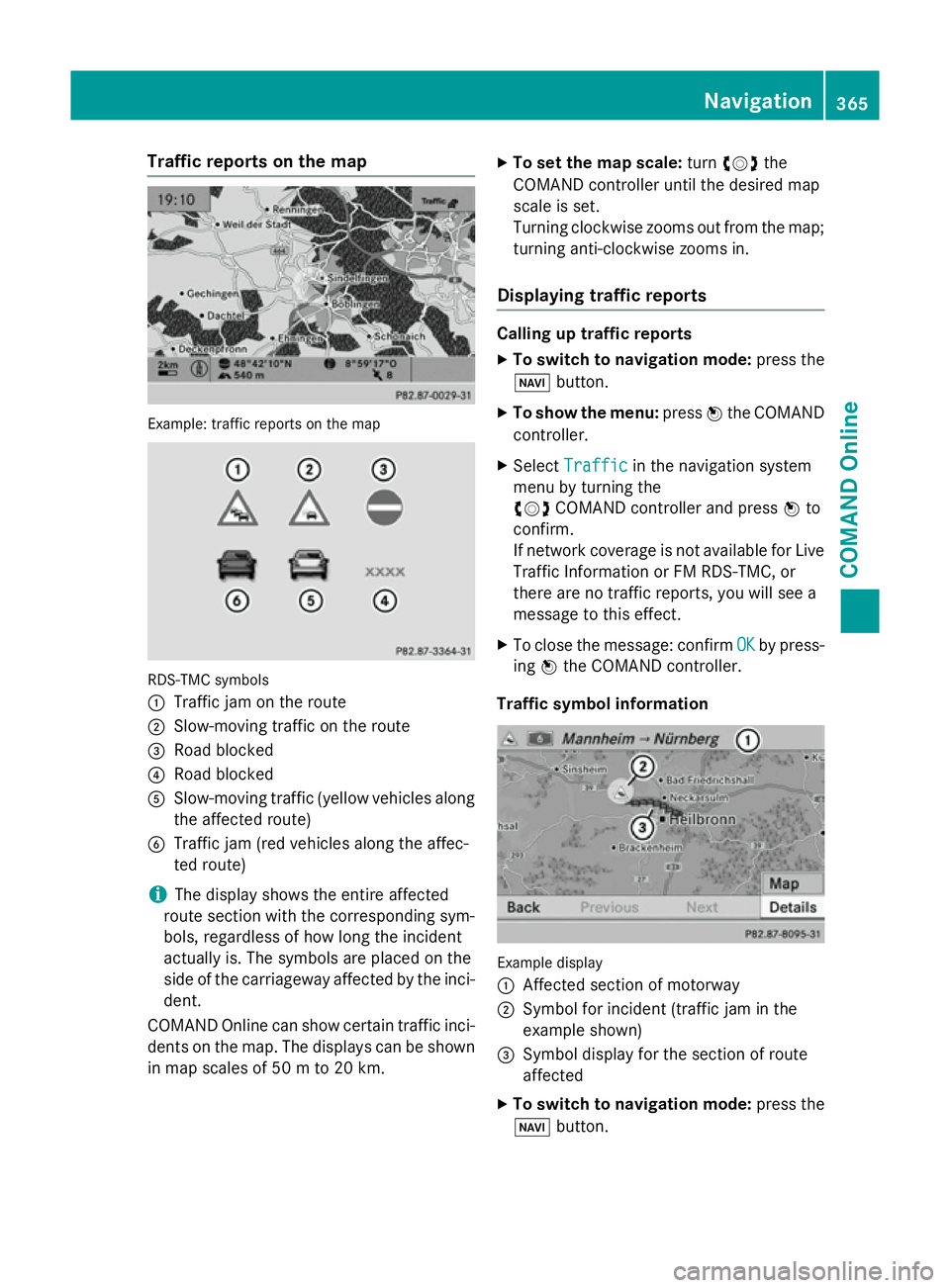
Traffic reports on the map
Example: traffic reports on the map
RDS-TMC symbols
:
Traffic jam on the route
; Slow-moving traffic on the route
= Road blocked
? Road blocked
A Slow-moving traffic (yellow vehicles along
the affected route)
B Traffic jam (red vehicles along the affec-
ted route)
i The display shows the entire affected
route section with the corresponding sym-
bols, regardless of how long the incident
actually is. The symbols are placed on the
side of the carriageway affected by the inci-
dent.
COMAND Online can show certain traffic inci-
dents on the map. The displays can be shown in map scales of 50 m to 20 km. X
To set the map scale: turncVd the
COMAND controller until the desired map
scale is set.
Turning clockwise zooms out from the map;
turning anti-clockwise zooms in.
Displaying traffic reports Calling up traffic reports
X To switch to navigation mode: press the
Ø button.
X To show the menu: pressWthe COMAND
controller.
X Select Traffic Traffic in the navigation system
menu by turning the
cVd COMAND controller and press Wto
confirm.
If network coverage is not available for Live
Traffic Information or FM RDS-TMC, or
there are no traffic reports, you will see a
message to this effect.
X To close the message: confirm OK OKby press-
ing Wthe COMAND controller.
Traffic symbol information Example display
:
Affected section of motorway
; Symbol for incident (traffic jam in the
example shown)
= Symbol display for the section of route
affected
X To switch to navigation mode: press the
Ø button. Navigation
365COMAND Online Z
Page 382 of 637
X
Select Speed
Speed Limit
Limit Assist
Assist and press W
to confirm.
Depending on the previous status, switch
the option on Oor off ª. Additional settings
Avoiding an area General notes
COMAND Online enables you to avoid areas
you do not wish to drive through.
If you activate or deactivate a route block
while route guidance is active,
COMAND Online will calculate a new route. If
you activate or deactivate a route block while route guidance is inactive, COMAND Online
will use the new setting for the next route
guidance.
i Motorways within blocked areas are
always included in the route calculation.
Defining an area for the first time
X To switch to navigation mode: press the
Ø button.
X To show the menu: pressWthe COMAND
controller.
X Select Navi
Navi in the main function bar by
sliding ZVand turning cVdthe COMAND
controller and press Wto confirm.
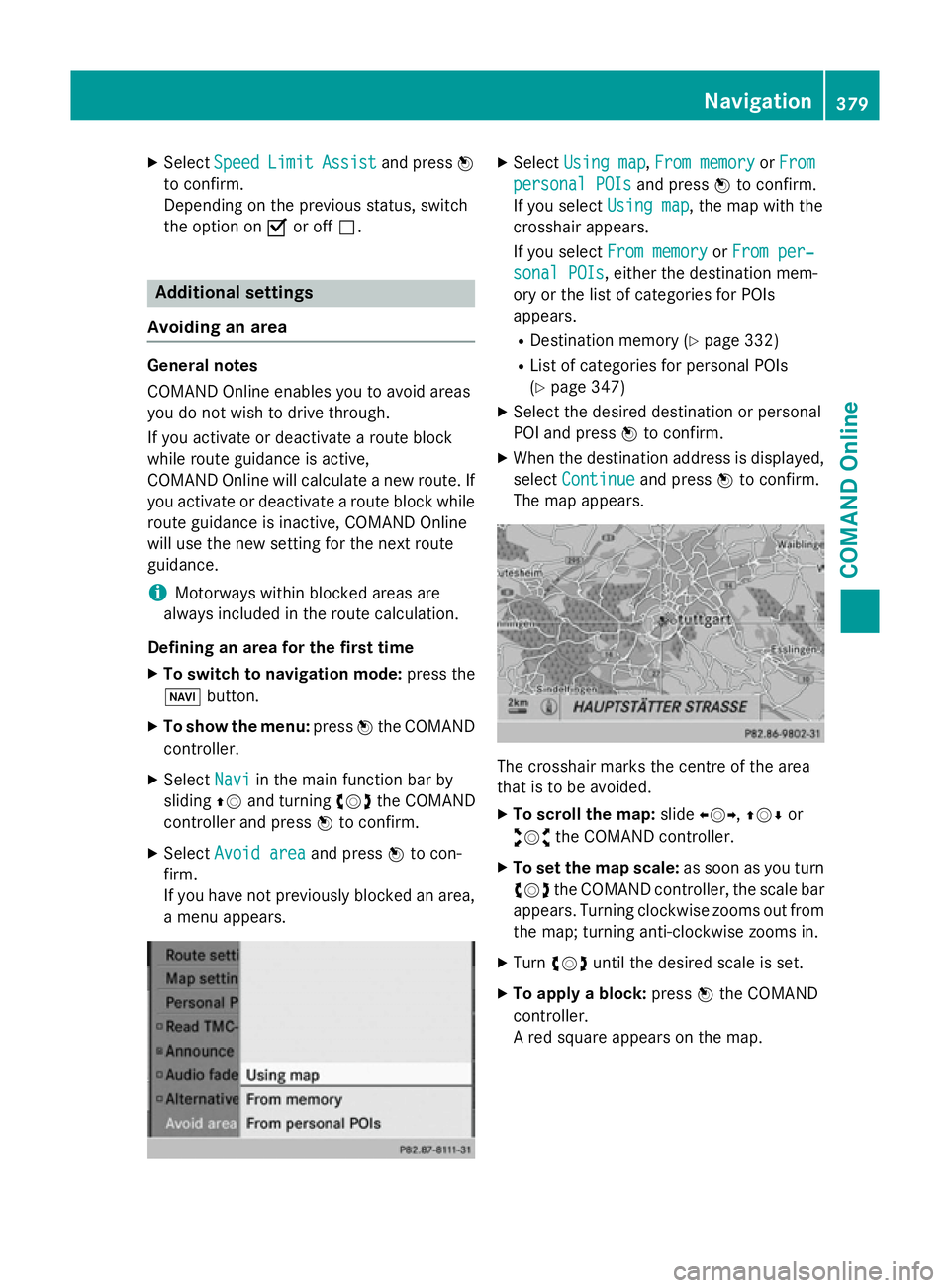
X Select Avoid area
Avoid area and pressWto con-
firm.
If you have not previously blocked an area, a menu appears. X
Select Using map Using map ,From memory
From memory orFrom
From
personal POIs
personal POIs and pressWto confirm.
If you select Using map
Using map, the map with the
crosshair appears.
If you select From memory From memory orFrom per‐
From per‐
sonal POIs
sonal POIs, either the destination mem-
ory or the list of categories for POIs
appears.
R Destination memory (Y page 332)
R List of categories for personal POIs
(Y page 347)
X Select the desired destination or personal
POI and press Wto confirm.
X When the destination address is displayed,
select Continue
Continue and pressWto confirm.
The map appears. The crosshair marks the centre of the area
that is to be avoided.
X To scroll the map: slideXVY,ZVÆ or
aVb the COMAND controller.
X To set the map scale: as soon as you turn
cVd the COMAND controller, the scale bar
appears. Turning clockwise zooms out from the map; turning anti-clockwise zooms in.
X Turn cVd until the desired scale is set.
X To apply a block: pressWthe COMAND
controller.
A red square appears on the map. Navigation
379COMAND Online Z
Page 430 of 637
Deactivating the module
Deactivation makes sense if you do not intend
to use the telephone module with Bluetooth ®
(SAP profile) again with COMAND Online.
X COMAND Online: press the%repeat-
edly until the telephone basic menu
appears (Y page 394).
X To switch to the menu bar: slide V¬the
controller.
X To select Connect device
Connect device : turn the con-
troller and press to confirm.
The device list appears.
X Select Disconnect MB SAP module Disconnect MB SAP module .
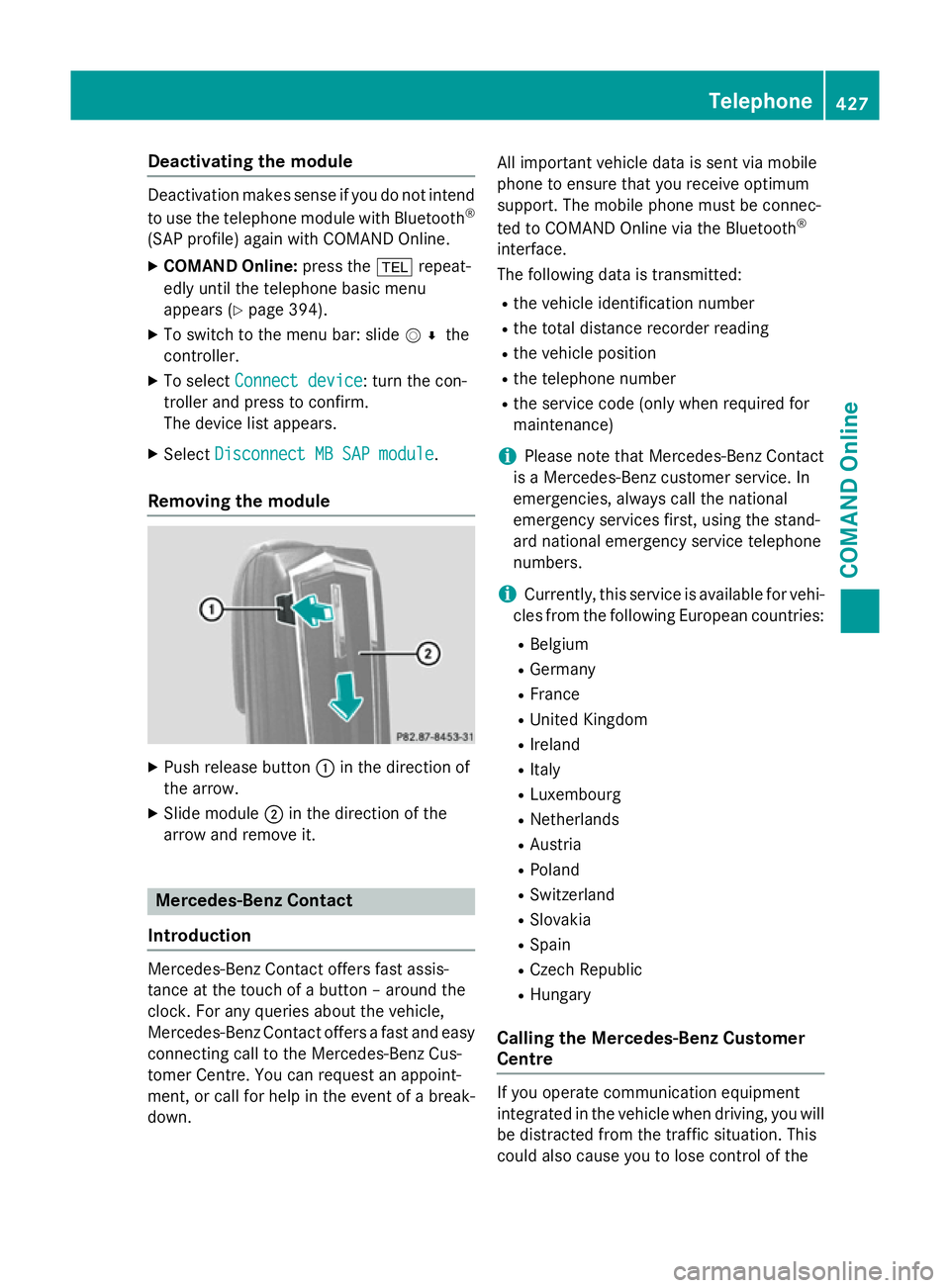
Removing the module X
Push release button :in the direction of
the arrow.
X Slide module ;in the direction of the
arrow and remove it. Mercedes-Benz Contact
Introduction Mercedes-Benz Contact offers fast assis-
tance at the touch of a button – around the
clock. For any queries about the vehicle,
Mercedes-Benz Contact offers a fast and easy
connecting call to the Mercedes-Benz Cus-
tomer Centre. You can request an appoint-
ment, or call for help in the event of a break-
down. All important vehicle data is sent via mobile
phone to ensure that you receive optimum
support. The mobile phone must be connec-
ted to COMAND Online via the Bluetooth
®
interface.
The following data is transmitted:
R the vehicle identification number
R the total distance recorder reading
R the vehicle position
R the telephone number
R the service code (only when required for
maintenance)
i Please note that Mercedes-Benz Contact
is a Mercedes-Benz customer service. In
emergencies, always call the national
emergency services first, using the stand-
ard national emergency service telephone
numbers.
i Currently, this service is available for vehi-
cles from the following European countries:
R Belgium
R Germany
R France
R United Kingdom
R Ireland
R Italy
R Luxembourg
R Netherlands
R Austria
R Poland
R Switzerland
R Slovakia
R Spain
R Czech Republic
R Hungary
Calling the Mercedes-Benz Customer
Centre If you operate communication equipment
integrated in the vehicle when driving, you will
be distracted from the traffic situation. This
could also cause you to lose control of the Telephone
427COMAND Online Z
Page 521 of 637
R
in the Audio menu (Y page 462)
R in the media list (Y page 474)
X Select Search
Search in the basic display by slid-
ing VÆ and turning cVdthe COMAND
controller and press Wto confirm.
The category list appears (Y page 481).
Displaying pictures X
Select Photos
Photos from the category list
(Y page 481) by turning cVdthe COMAND
controller and press Wto confirm.
A folder directory appears.
X Select a folder with photos and press Wto
confirm.
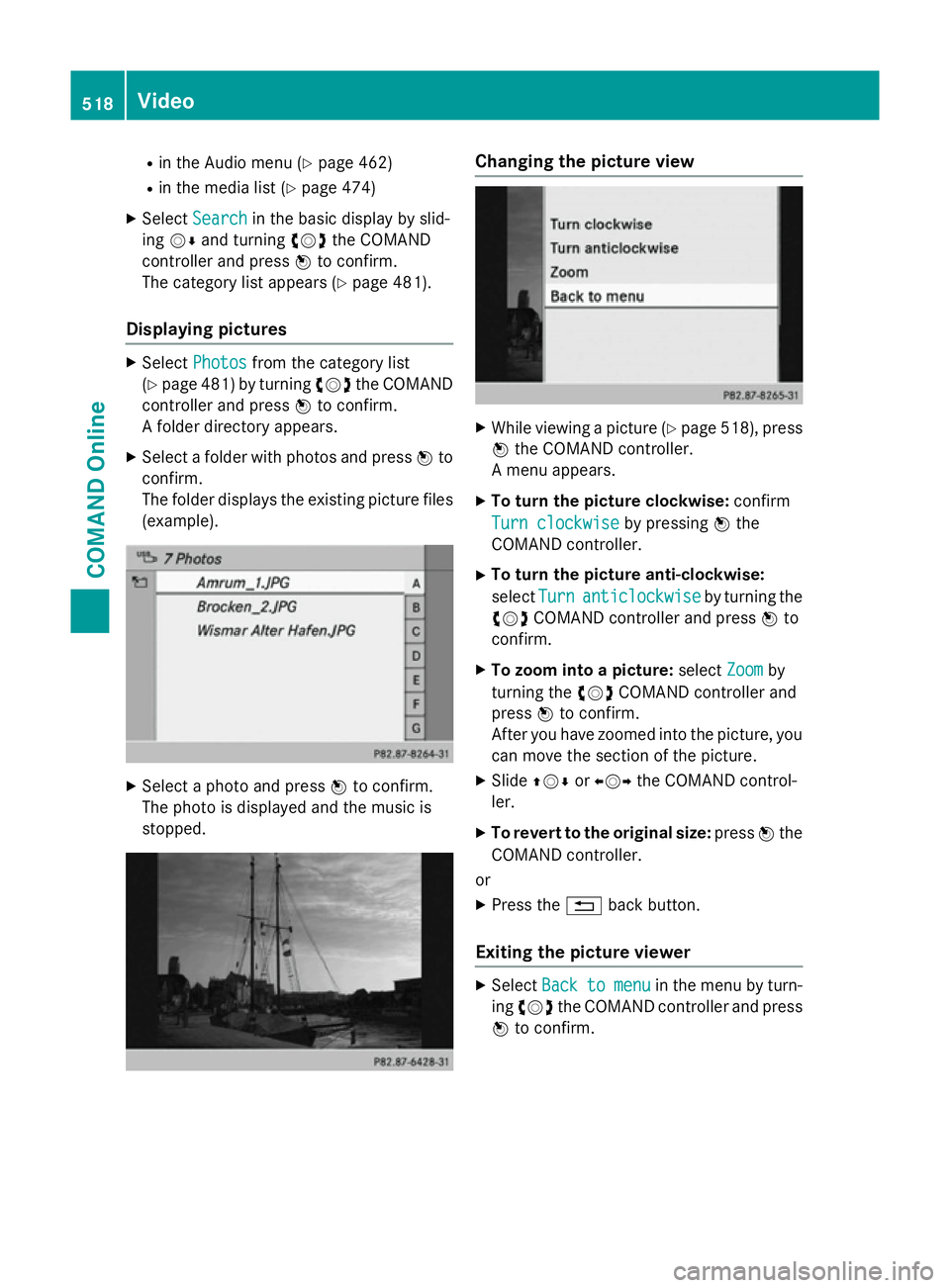
The folder displays the existing picture files
(example). X
Select a photo and press Wto confirm.
The photo is displayed and the music is
stopped. Changing the picture view
X
While viewing a picture (Y page 518), press
W the COMAND controller.
A menu appears.
X To turn the picture clockwise: confirm
Turn clockwise
Turn clockwise by pressingWthe
COMAND controller.
X To turn the picture anti-clockwise:
select Turn Turnanticlockwise
anticlockwise by turning the
cVd COMAND controller and press Wto
confirm.
X To zoom into a picture: selectZoom
Zoomby
turning the cVdCOMAND controller and
press Wto confirm.
After you have zoomed into the picture, you
can move the section of the picture.
X Slide ZVÆ orXVY the COMAND control-
ler.
X To revert to the original size: pressWthe
COMAND controller.
or
X Press the %back button.
Exiting the picture viewer X
Select Back
Backto
tomenu
menu in the menu by turn-
ing cVd the COMAND controller and press
W to confirm. 518
VideoCOMAND Online
Page 568 of 637
H
Environmental note
When topping up the oil, take care not to spill any. If oil enters the soil or waterways, it is
harmful to the environment.
! Only use engine oils and oil filters that
have been approved for vehicles with a ser-
vice system. You can obtain a list of the
engine oils and oil filters tested and
approved in accordance with the
Mercedes-Benz Specifications for Service
Products at any Mercedes-Benz Service
Centre.
Damage to the engine or exhaust system is caused by the following:
R using engine oils and oil filters that have
not been specifically approved for the
service system
R changing the engine oil and oil filter after
missing the change interval required by
the service system
R using engine oil additives
! Do not add too much oil. If the oil level is
above the "max" mark on the dipstick, too
much oil has been added. This can lead to
damage to the engine or the catalytic con-
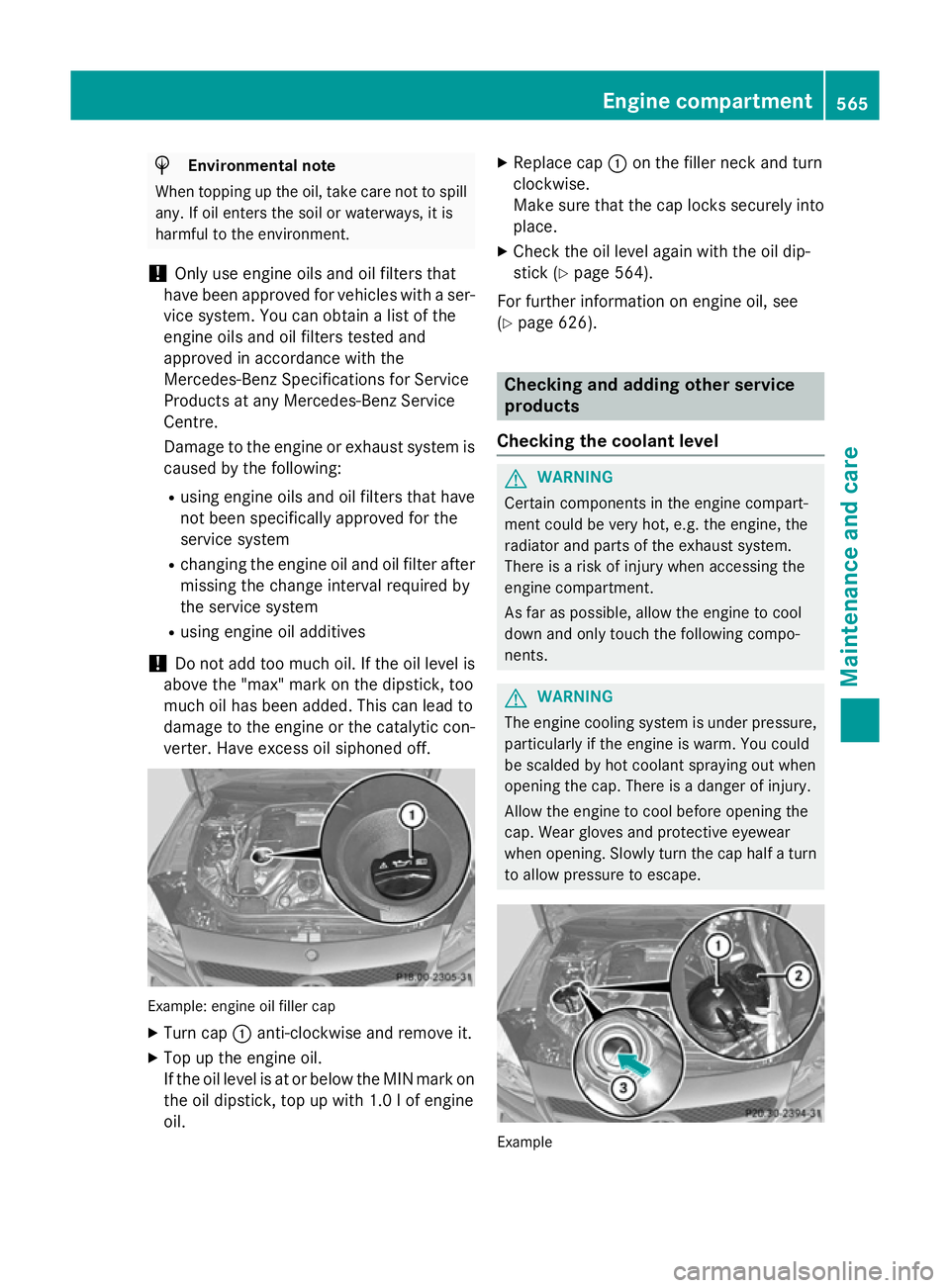
verter. Have excess oil siphoned off. Example: engine oil filler cap
X Turn cap :anti-clockwise and remove it.
X Top up the engine oil.
If the oil level is at or below the MIN mark on
the oil dipstick, top up with 1.0 l of engine
oil. X
Replace cap :on the filler neck and turn
clockwise.
Make sure that the cap locks securely into place.
X Check the oil level again with the oil dip-
stick (Y page 564).
For further information on engine oil, see
(Y page 626). Checking and adding other service
products
Checking the coolant level G
WARNING
Certain components in the engine compart-
ment could be very hot, e.g. the engine, the
radiator and parts of the exhaust system.
There is a risk of injury when accessing the
engine compartment.
As far as possible, allow the engine to cool
down and only touch the following compo-
nents. G
WARNING
The engine cooling system is under pressure, particularly if the engine is warm. You could
be scalded by hot coolant spraying out when
opening the cap. There is a danger of injury.
Allow the engine to cool before opening the
cap. Wear gloves and protective eyewear
when opening. Slowly turn the cap half a turn
to allow pressure to escape. Example Engine compartment
565Maintenance and care Z