lock MERCEDES-BENZ SLC 2019 User Guide
[x] Cancel search | Manufacturer: MERCEDES-BENZ, Model Year: 2019, Model line: SLC, Model: MERCEDES-BENZ SLC 2019Pages: 306, PDF Size: 15 MB
Page 22 of 306
Trunk partition
Display message ............................ 205
General notes .................................. 80
Opening/closing .............................. 81
Turn signals
Display message ............................ 193
Switching on/off .............................. 99
Two-way radio
Frequencies ................................... 296
Installation ..................................... 296
Transmission output (maximum) .... 296
Type identification plate
see Vehicle identification plate
U
Unlocking
Emergency unlocking ....................... 73
From inside the vehicle (central
unlocking button) ............................. 72
Upshift indicator
(on-board computer, Mercedes-
AMG SLC 43) ................................. 179
USB devices
Connecting to the Media Inter-
face ...............................................224
V
Vehicle
Correct use ...................................... 27
Data acquisition ............................... 28
Display message ............................ 203
Electronics ..................................... 296
Equipment ....................................... 24
Individual settings .......................... 176
Limited Warranty .............................28
Loading .......................................... 279
Locking (in an emergency) ............... 73
Locking (SmartKey) .......................... 66
Lowering ........................................ 292
Maintenance .................................... 25
Parking for a long period ................ 137
Pulling away................................... 120
Raising ........................................... 290
REACH Regulation ........................... 27
Reporting problems ......................... 28
Securing from rolling away ............ 289
Tow-starting ................................... 263
Towing away .................................. 263
Transporting .................................. 265
Unlocking (in an emergency) ........... 73
Unlocking (SmartKey)...................... 66
Vehicle data ................................... 303
Vehicle battery
see Battery (vehicle)
Vehicle data....................................... 303
Vehicle dimensions........................... 303
Vehicle emergency locking................ 73
Vehicle identification number
see VIN
Vehicle identification plate.............. 297
Vehicle tool kit.................................. 252
Video
Operating the DVD ......................... 173
see also Digital Operator's Man-
ual .................................................. 217
VIN
Seat ............................................... 298
Type plate ...................................... 297
W
Warning and indicator lamps
ABS ................................................ 210
Active Brake Assist ........................ 215
Brake Assist ................................... 215
Brakes ........................................... 210
Check Engine ................................. 213
Coolant .......................................... 213
Distance warning ........................... 215
ESP®.............................................. 211
ESP®OFF ....................................... 212
Fuel tank ........................................ 213
General notes ................................ 208
Parking brake ................................ 212
PASSENGER AIR BAG ...................... 39
Reserve fuel................................... 213
Restraint system ............................ 212
Seat belt ........................................ 208
SPORT handling mode................... 212
Tire pressure monitor .................... 216
Warranty.............................................. 24
Washer fluid
Display message ............................ 206
20Index
Page 29 of 306
ing interference that may cause undesiredoperation of the device."
Diagnostics connection
The diagnostics connection is used for con-necting diagnostic equipment at a qualifiedspecialist workshop.
GWARNING
If you connect equipment to a diagnostics
connection in the vehicle, it may affect the
operation of vehicle systems. As a result,
the operating safety of the vehicle could be
affected. There is a risk of an accident.
Only connect equipment to a diagnostics
connection in the vehicle, which is approved
for your vehicle by Mercedes-Benz.
GWARNING
Objects in the driver's footwell may restrict
the clearance around the pedals or block a
depressed pedal. This jeopardizes the oper-
ating and road safety of the vehicle. There is
a risk of an accident.
Stow all objects securely in the vehicle so
that they do not get into the driver's foot-
well. When using floormats or carpets, make
sure that they are properly secured so that
they do not slip or obstruct the pedals. Do
not place several floormats or carpets on
top of one another.
!If the engine is switched off and equip-ment on the diagnostics connection is used,the starter battery may discharge.
Connecting equipment to the diagnostics con-nection can lead to emissions monitoringinformation being reset, for example. This maylead to the vehicle failing to meet the require-ments of the next emissions test during themain inspection.
Qualified specialist workshop
An authorized Mercedes-Benz Center is aqualified specialist workshop. It has the neces-sary specialist knowledge, tools and qualifica-tions to correctly carry out the work required
on your vehicle. This is especially the case forwork relevant to safety.
Observe the notes in the Maintenance Book-let.
Always have the following work carried out atan authorized Mercedes-Benz Center:
Rwork relevant to safety
Rservice and maintenance work
Rrepair work
Ralterations, installation work and modifica-tions
Rwork on electronic components
Correct use
If you remove any warning stickers, you or oth-ers could fail to recognize certain dangers.Leave warning stickers in position.
Observe the following information when driv-ing your vehicle:
Rthe safety notes in this manual
Rtechnical data for the vehicle
Rtraffic rules and regulations
Rlaws and safety standards pertaining tomotor vehicles
Information about the REACH regula-
tion
The REACH regulation (Regulation (EC) no.1907/2006, Article 33) lays down an informa-tion obligation for substances of very high con-cern (SVHC).
Daimler AG acts in good faith to avoid usingthese SVHCs and to allow the customer tohandle these substances safely. In accordancewith supplier information and internal productinformation from Daimler AG, SVHCs thataccount for more than 0.1 percent by weightof individual products in this vehicle areknown.
More detailed information can be found at thefollowing addresses:
Rhttp://www.daimler.com/reach(Germanversion)
Rhttp://www.daimler.com/reach/en(English version)
Operating safety27
Introduction
Z
Page 39 of 306
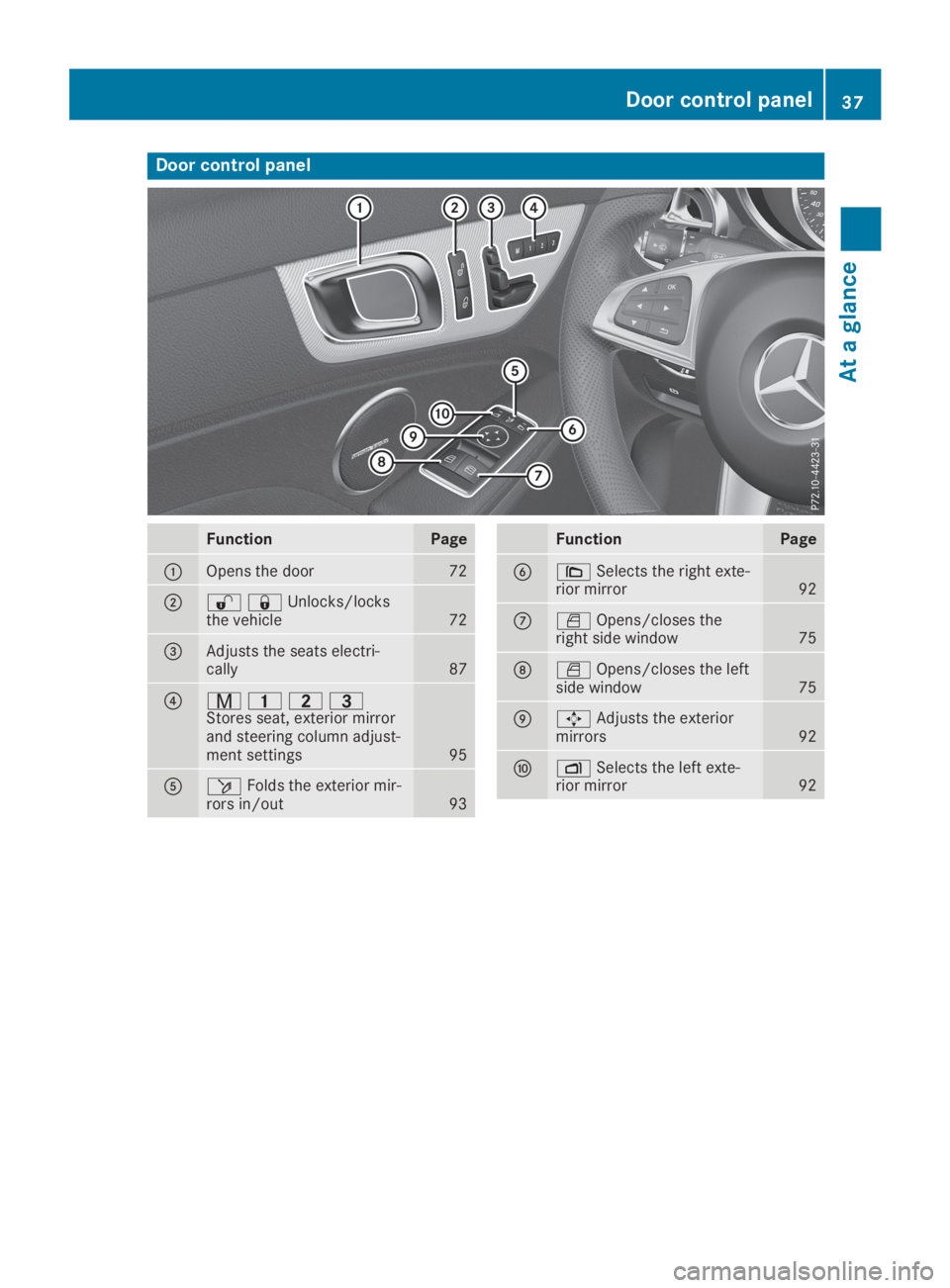
Door control panel
FunctionPage
COpens the door72
D67Unlocks/locksthe vehicle72
Page 40 of 306
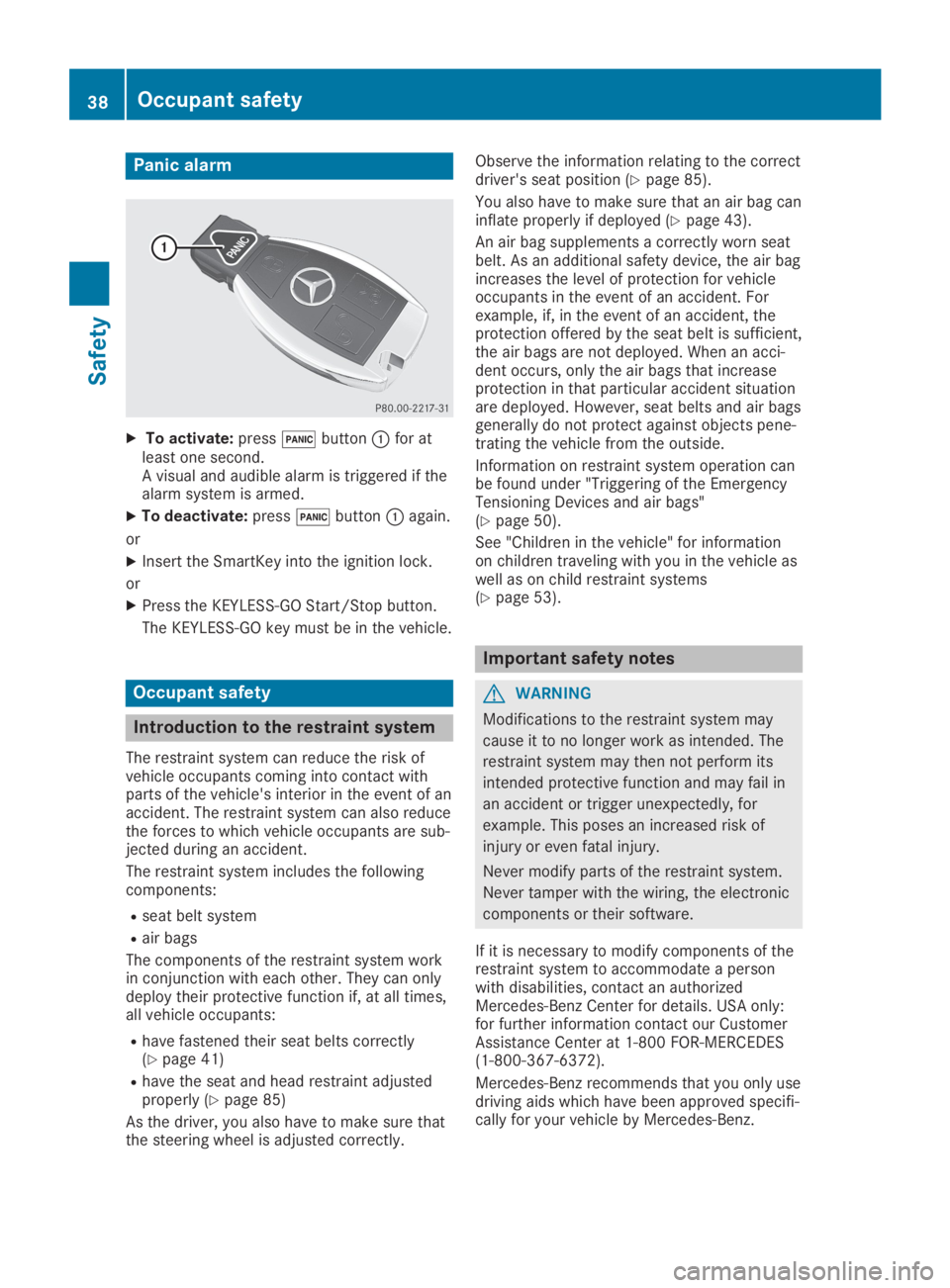
Panic alarm
XTo activate:press3buttonCfor atleast one second.A visual and audible alarm is triggered if thealarm system is armed.
XTo deactivate:press3buttonCagain.
or
XInsert the SmartKey into the ignition lock.
or
XPress the KEYLESS-GO Start/Stop button.
The KEYLESS-GO key must be in the vehicle.
Occupant safety
Introduction to the restraint system
The restraint system can reduce the risk ofvehicle occupants coming into contact withparts of the vehicle's interior in the event of anaccident. The restraint system can also reducethe forces to which vehicle occupants are sub-jected during an accident.
The restraint system includes the followingcomponents:
Rseat belt system
Rair bags
The components of the restraint system workin conjunction with each other. They can onlydeploy their protective function if, at all times,all vehicle occupants:
Rhave fastened their seat belts correctly(Ypage 41)
Rhave the seat and head restraint adjustedproperly (Ypage 85)
As the driver, you also have to make sure thatthe steering wheel is adjusted correctly.
Observe the information relating to the correctdriver's seat position (Ypage 85).
You also have to make sure that an air bag caninflate properly if deployed (Ypage 43).
An air bag supplements a correctly worn seatbelt. As an additional safety device, the air bagincreases the level of protection for vehicleoccupants in the event of an accident. Forexample, if, in the event of an accident, theprotection offered by the seat belt is sufficient,the air bags are not deployed. When an acci-dent occurs, only the air bags that increaseprotection in that particular accident situationare deployed. However, seat belts and air bagsgenerally do not protect against objects pene-trating the vehicle from the outside.
Information on restraint system operation canbe found under "Triggering of the EmergencyTensioning Devices and air bags"(Ypage 50).
See "Children in the vehicle" for informationon children traveling with you in the vehicle aswell as on child restraint systems(Ypage 53).
Important safety notes
GWARNING
Modifications to the restraint system may
cause it to no longer work as intended. The
restraint system may then not perform its
intended protective function and may fail in
an accident or trigger unexpectedly, for
example. This poses an increased risk of
injury or even fatal injury.
Never modify parts of the restraint system.
Never tamper with the wiring, the electronic
components or their software.
If it is necessary to modify components of therestraint system to accommodate a personwith disabilities, contact an authorizedMercedes-Benz Center for details. USA only:for further information contact our CustomerAssistance Center at 1-800 FOR-MERCEDES(1‑800‑367‑6372).
Mercedes-Benz recommends that you only usedriving aids which have been approved specifi-cally for your vehicle by Mercedes-Benz.
38Occupant safety
Safety
Page 42 of 306
the vehicle occupant in the best position inrelation to the air bag.
The seat belt system comprises:
RSeat belts
REmergency Tensioning Devices and seat beltforce limiters
If the seat belt is pulled quickly or sharply bythe seat belt guide, the inertia reel locks. Thebelt strap cannot be extracted any further.
The Emergency Tensioning Device tightens theseat belt in an accident, pulling the belt closeagainst the body. However it does not pull thevehicle occupant back in the direction of thebackrest.
The Emergency Tensioning Device does notcorrect an incorrect seat position or the rout-ing of an incorrectly fastened seat belt.
When triggered, a seat belt force limiter helpsto reduce the force exerted by the seat belt onthe vehicle occupant.
The seat belt force limiters are synchronizedwith the front air bags which absorb part ofthe deceleration force. This can reduce theforce exerted on the vehicle occupants duringan accident.
!If the front-passenger seat is not occupied,do not engage the seat belt tongue in thebuckle on the front-passenger seat. Other-wise, in the event of an accident the Emer-gency Tensioning Device and the sideimpact air bag, in addition to other systems,may be triggered and have to be replaced.
Important safety notes
The use of seat belts and child restraint sys-tems is required by law in:
Rall 50 states
Rthe U.S. territories
Rthe District of Columbia
Rall Canadian provinces
Even where this is not required by law, all vehi-cle occupants should correctly fasten theirseat belts before starting the journey.
GWARNING
If the seat belt is not worn correctly, it can-
not perform its intended protective function.
An incorrectly fastened seat belt can also
cause injuries, for example, in the event of
an accident or when braking or changing
direction abruptly. This poses an increased
risk of injury or even fatal injury.
Always ensure that all vehicle occupants
have their seat belts fastened correctly and
are sitting properly.
The components of the restraint system workin conjunction with each other. They can onlydeploy their protective function if, at all times,all vehicle occupants:
Rhave fastened their seat belts correctly(Ypage 41)
Rhave the seat and head restraint adjustedproperly (Ypage 85)
GWARNING
The seat belt does not offer the intended
level of protection if you have not moved the
backrest to an almost vertical position.
When braking or in the event of an accident,
you could slide underneath the seat belt and
sustain abdomen or neck injuries, for exam-
ple. This poses an increased risk of injury or
even fatal injury.
Adjust the seat properly before beginning
your journey. Always ensure that the back-
rest is in an almost vertical position and that
the shoulder section of your seat belt is
routed across the center of your shoulder.
GWARNING
Persons less than 5 ft (1.50m)tall cannot
wear the seat belt correctly without an addi-
tional and suitable restraint system. If the
seat belt is not worn correctly, it cannot per-
form its intended protective function. An
incorrectly fastened seat belt can also cause
injuries, for example, in the event of an acci-
dent or when braking or changing direction
abruptly. This poses an increased risk of
injury or even fatal injury.
For this reason, always secure persons
under 5 ft (1.50m)tall in suitable additional
restraint systems.
40Occupant safety
Safety
Page 48 of 306
Occupant Classification System
(OCS)
Introduction
The Occupant Classification System (OCS) cat-egorizes the person in the front-passengerseat. Depending on that result, the front-passenger front air bag and front-passengerknee bag are either enabled or deactivated.
The system does not deactivate:
Rthe side impact air bag
Rthe headbag
Rthe Emergency Tensioning Devices
Requirements
To be classified correctly, the front passengermust sit:
Rwith the seat belt fastened correctly
Rin an almost upright position with their backagainst the seat backrest
Rwith their feet resting on the floor, if possi-ble
If the front passenger does not observe theseconditions, OCS may produce a false classifi-cation, e.g. because the front passenger:
Rtransfers their weight by supporting them-selves on a vehicle armrest
Rsits in such a way that their weight is raisedfrom the seat cushion
If you install a child restraint system on thefront-passenger seat, be sure to observe thecorrect positioning of the child restraint sys-tem. Never place objects under or behind thechild restraint system, e.g. a cushion. Theentire base of the child restraint system mustalways rest on the seat cushion of the front-passenger seat. The backrest of the forward-facing child restraint system must lie as flat aspossible against the backrest of the front-passenger seat.
The child restraint system must not touch theroof or be subjected to a load by the headrestraint. Adjust the angle of the seat backrestand the head restraint position accordingly.
Only then can OCS be guaranteed to functioncorrectly. Always observe the child restraintsystem manufacturer's installation and operat-ing instructions.
Occupant Classification System opera-
tion (OCS)
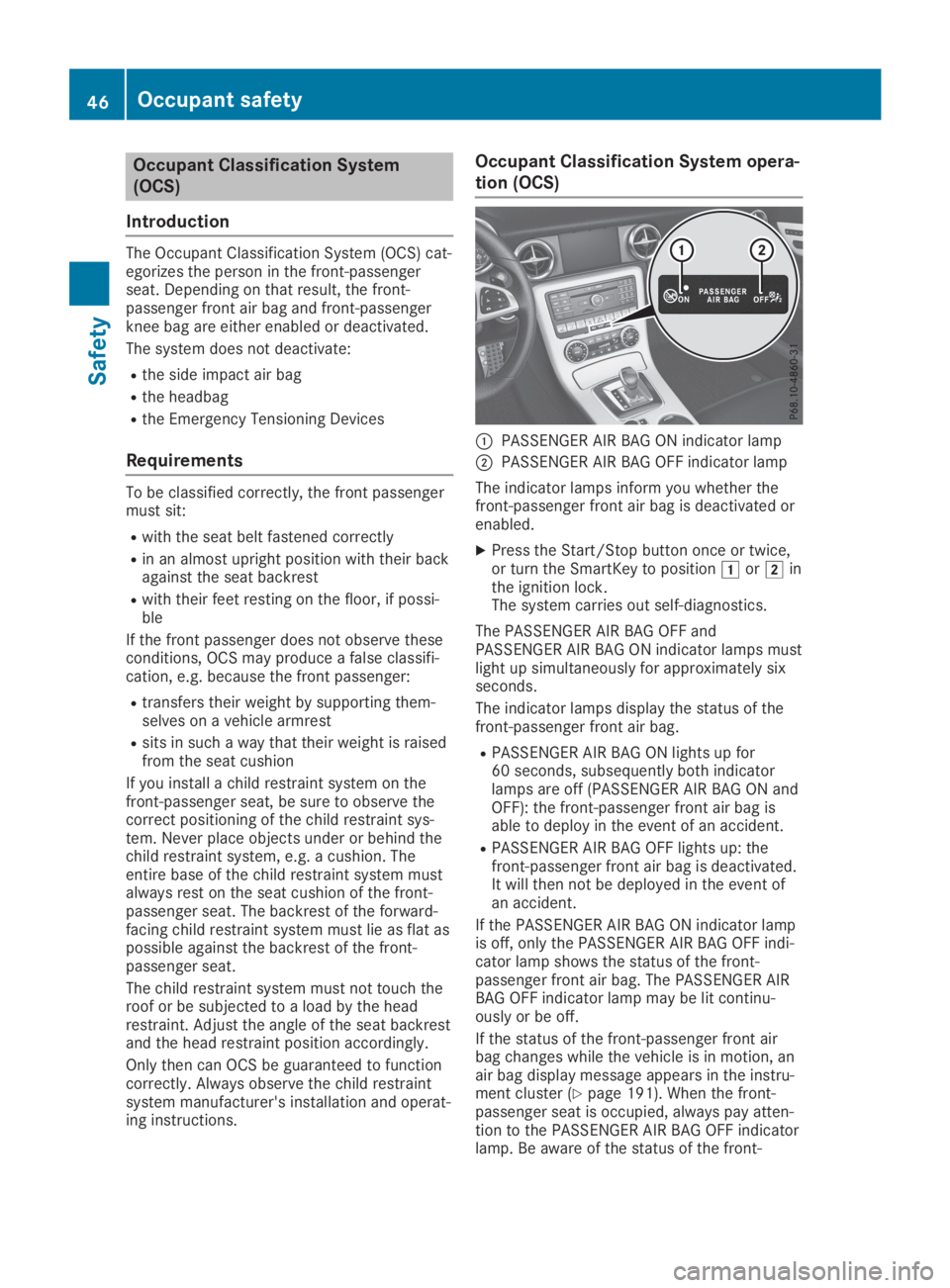
CPASSENGER AIR BAG ON indicator lamp
DPASSENGER AIR BAG OFF indicator lamp
The indicator lamps inform you whether thefront-passenger front air bag is deactivated orenabled.
XPress the Start/Stop button once or twice,or turn the SmartKey to positionGorHinthe ignition lock.The system carries out self-diagnostics.
The PASSENGER AIR BAG OFF andPASSENGER AIR BAG ON indicator lamps mustlight up simultaneously for approximately sixseconds.
The indicator lamps display the status of thefront-passenger front air bag.
RPASSENGER AIR BAG ON lights up for60 seconds, subsequently both indicatorlamps are off (PASSENGER AIR BAG ON andOFF): the front-passenger front air bag isable to deploy in the event of an accident.
RPASSENGER AIR BAG OFF lights up: thefront-passenger front air bag is deactivated.It will then not be deployed in the event ofan accident.
If the PASSENGER AIR BAG ON indicator lampis off, only the PASSENGER AIR BAG OFF indi-cator lamp shows the status of the front-passenger front air bag. The PASSENGER AIRBAG OFF indicator lamp may be lit continu-ously or be off.
If the status of the front-passenger front airbag changes while the vehicle is in motion, anair bag display message appears in the instru-ment cluster (Ypage 191). When the front-passenger seat is occupied, always pay atten-tion to the PASSENGER AIR BAG OFF indicatorlamp. Be aware of the status of the front-
46Occupant safety
Safety
Page 56 of 306
GWARNING
If you leave children unsupervised in the
vehicle, they could set it in motion by, for
example:
Rrelease the parking brake.
Rshift the automatic transmission out of
the parking positionP.
Rstart the engine.
In addition, they may operate vehicle equip-
ment and become trapped. There is a risk of
an accident and injury.
When leaving the vehicle, always take the
SmartKey with you and lock the vehicle.
Never leave children unsupervised in the
vehicle.
GWARNING
If persons, particularly children are subjec-
ted to prolonged exposure to extreme heat
or cold, there is a risk of injury, possibly
even fatal. Never leave children unattended
in the vehicle.
GWARNING
If the child restraint system is subjected to
direct sunlight, parts may get very hot. Chil-
dren may burn themselves on these parts,
particularly on the metal parts of the child
restraint system. There is a risk of injury.
If you leave the vehicle, taking the child with
you, always ensure that the child restraint
system is not exposed to direct sunlight.
Protect it with a blanket, for example. If the
child restraint system has been exposed to
direct sunlight, let it cool down before secur-
ing the child in it. Never leave children unat-
tended in the vehicle.
Always ensure that all vehicle occupants havetheir seat belts fastened correctly and are sit-ting properly. Particular attention must be paidto children.
Observe the safety notes on the seat belt(Ypage 40) and the notes on correct use ofseat belts (Ypage 41).
A booster seat may be necessary to achieveproper seat belt positioning for children over
40 lbs (18 kg) until they reach a height wherea three-point seat belt can be properly fas-tened without a booster seat.
Special seatbelt retractor
GWARNING
If the seat belt is released while driving, the
child restraint system will no longer be
secured properly. The special seat belt
retractor is disabled and the inertia real
draws in a portion of the seat belt. The seat
belt cannot be immediately refastened.
There is an increased risk of injury, possibly
even fatal.
Stop the vehicle immediately, paying atten-
tion to road and traffic conditions. Reacti-
vate the special seat belt retractor and
secure the child restraint system properly.
The seat belt on the front-passenger's side isequipped with a special seat belt retractor.When activated, the special seat belt retractorensures that the seat belt cannot slacken oncethe child seat is secured.
Installing a child restraint system:
XMake sure you observe the child restraintsystem manufacturer's installation instruc-tions.
XPull the seat belt smoothly out of the beltloop.
XEngage seat belt tongue in belt buckle.
Activating the special seat belt retractor:
XPull the seat belt out fully and let the inertiareel retract it again.While the seat belt is retracting, you shouldhear a ratcheting sound. The special seatbelt retractor is enabled.
XPush the child restraint system down so thatthe seat belt is tight and does not loosen.
54Children in the vehicle
Safety
Page 58 of 306
tem. This confirmation can also be found inthe installation instructions that are includedwith the child restraint system.
Observe the warning labels in the vehicle inte-rior and on the child restraint system.
Child restraint system on the front-
passenger seat
General notes
If you install a child restraint system on thefront-passenger seat, always observe theinstructions and safety notes on the "Occu-pant Classification System (OCS)" (Ypage 46).
You can thus avoid the risks that could ariseas a result of:
Ran incorrectly categorized person in thefront-passenger seat
Rdeactivating the front passenger front airbag unintentionally
Rthe unsuitable positioning of the childrestraint system, e.g. too close to the dash-board
Rearward-facing child restraint system
If circumstances require you to secure a childin a rearward-facing child restraint system onthe front-passenger seat, always make surethat the front passenger front air bag is deacti-vated. Only if the PASSENGER AIR BAG OFFindicator lamp is lit continuously (Ypage 39),is the front passenger front air bag deactiva-ted.
Always observe the child restraint systemmanufacturer's installation and operatinginstructions.
Forward-facing child restraint system
If you secure a child in a forward-facing childrestraint system on the front-passenger seat,always move the front-passenger seat as farback as possible. The entire base of the childrestraint system must always rest on the seatcushion of the front-passenger seat. The back-rest of the child restraint system must lie asflat as possible against the backrest of thefront-passenger seat. The child restraint sys-tem must not touch the roof or be subjectedto a load by the head restraint. Adjust theangle of the seat backrest and the head
restraint position accordingly. Always makesure that the shoulder belt strap is correctlyrouted from the front-passenger seat beltguide to the shoulder belt guide on the childrestraint system. The shoulder belt strap mustbe routed forward and down from the front-passenger seat belt guide.
Always observe the child restraint systemmanufacturer's installation and operatinginstructions.
Pets in the vehicle
GWARNING
If you leave animals unsupervised or unse-
cured in the vehicle, they may press buttons
or switches, for instance.
In this way, animals may:
Ractivate vehicle equipment and become
trapped, for example
Rswitch systems on or off and thereby
endanger other road users
Furthermore, unsecured animals may be
flung around inside the vehicle in the event
of an accident or abrupt steering or braking
maneuver, and thereby injure vehicle occu-
pants. There is a risk of accident and injury.
Never leave animals unattended in the vehi-
cle.
Always secure animals properly when driv-
ing, for instance with a suitable pet carrier.
Driving safety systems
Overview of driving safety systems
In this section, you will find information aboutthe following driving safety systems:
RABS (Anti-lockBrakingSystem)(Ypage 57)
RBAS (BrakeAssistSystem) (Ypage 57)
RActive Brake Assist (Ypage 58)
RAdaptive brake lights (Ypage 60)
RESP®(ElectronicStabilityProgram)(Ypage 60)
56Driving safety systems
Safety
Page 59 of 306
REBD (ElectronicBrake forceDistribution)(Ypage 63)
RADAPTIVE BRAKE (Ypage 64)
Important safety notes
If you fail to adapt your driving style or if youare inattentive, the driving safety systems canneither reduce the risk of an accident noroverride the laws of physics. Driving safetysystems are merely aids designed to assistdriving.
You are responsible for maintaining the dis-tance to the vehicle in front, for vehicle speed,for braking in good time, and for staying inlane. Always adapt your driving style to suitthe prevailing road and weather conditions andmaintain a safe distance from the vehicle infront. Drive carefully.
The driving safety systems described onlywork as effectively as possible when there isadequate contact between the tires and theroad surface. Pay particular attention to theinformation regarding tires, recommendedminimum tire tread depths etc. in the "Wheelsand tires" section (Ypage 267).
In wintry driving conditions, always use wintertires (M+S tires) and if necessary, snowchains. Only in this way will the driving safetysystems described in this section work aseffectively as possible.
ABS (Anti-lock Braking System)
General information
ABS regulates brake pressure in such a waythat the wheels do not lock when you brake.This allows you to continue steering the vehi-cle when braking.
The%ABS warning lamp in the instrumentcluster lights up when the ignition is switchedon. It goes out when the engine is running.
ABS works from a speed of about 5 mph(8 km/h), regardless of road-surface condi-tions. ABS works on slippery surfaces, evenwhen you only brake gently.
Important safety notes
iObserve the "Important safety notes" sec-tion (Ypage 57).
GWARNING
If ABS is malfunctioning, the wheels could
lock when braking. The steerability and
braking characteristics would be severely
affected. There is an increased danger of
skidding and accidents.
Drive on carefully. Have ABS checked imme-
diately at a qualified specialist workshop.
When ABS is malfunctioning, other systems,including driving safety systems, will alsobecome inoperative. Observe the informationon the ABS warning lamp (Ypage 210) anddisplay messages which may be shown in theinstrument cluster (Ypage 183).
Brakes
XIf ABS intervenes:continue to depress thebrake pedal vigorously until the braking sit-uation is over.
XTo make a full brake application:depressthe brake pedal with full force.
If ABS intervenes when braking, you will feel apulsing in the brake pedal.
The pulsating brake pedal can be an indicationof hazardous road conditions, and functions asa reminder to take extra care while driving.
BAS (Brake Assist System)
General information
BAS operates in emergency braking situations.If you depress the brake pedal quickly, BASautomatically boosts the braking force, thusshortening the stopping distance.
Important safety notes
iObserve the "Important safety notes" sec-tion (Ypage 57).
Driving safety systems57
Safety
Z
Page 60 of 306
GWARNING
If BAS is malfunctioning, the braking dis-
tance in an emergency braking situation is
increased. There is a risk of an accident.
In an emergency braking situation, depress
the brake pedal with full force. ABS prevents
the wheels from locking.
Braking
XKeep the brake pedal firmly depressed untilthe emergency braking situation is over.ABS prevents the wheels from locking.
The brakes will function as usual once yourelease the brake pedal. BAS is deactivated.
Active Brake Assist
General information
iObserve the "Important safety notes" sec-tion (Ypage 57).
Active Brake Assist consists of a distancewarning function with an autonomous brakingfunction and Adaptive Brake Assist.
Active Brake Assist can help you to minimizethe risk of a collision with the vehicle in frontor reduce the effects of such a collision.
If Active Brake Assist detects that there is arisk of collision, you will be warned visuallyand acoustically. If you do not react to the vis-ual collision warning or the warning tone,autonomous braking can be initiated in criticalsituations. If you apply the brake yourself in acritical situation, Adaptive Brake Assist of theActive Brake Assist system supports you.
Important safety notes
In particular, the detection of obstacles can beimpaired if:
Rthere is dirt on the sensors or anything elsecovering the sensors
Rthere is snow or heavy rain
Rthere is interference by other radar sources
Rthere are strong radar reflections, for exam-ple in parking garages
Ra narrow vehicle is traveling in front, e.g. amotorbike
Ra vehicle is traveling in front on a differentline
Ryou are driving a new vehicle or servicing onthe Active Brake Assist system has justbeen carried out
Observe the important safety notes in the"Breaking-in notes" section (Ypage 117).
Following damage to the front end of the vehi-cle, have the configuration and operation ofthe radar sensor checked at a qualified spe-cialist workshop. This also applies to collisionsat slow speeds where there is no visible dam-age to the front of the vehicle.
Activating/deactivating
Active Brake Assist is automatically activeafter switching on the ignition.
You can activate or deactivate Active BrakeAssist using the on-board computer(Ypage 175). When deactivated, the distancewarning function and the autonomous brakingfunction are also deactivated.
If Active Brake Assist is deactivated, the