warning MERCEDES-BENZ SLC 2020 Workshop Manual
[x] Cancel search | Manufacturer: MERCEDES-BENZ, Model Year: 2020, Model line: SLC, Model: MERCEDES-BENZ SLC 2020Pages: 310, PDF Size: 16.05 MB
Page 150 of 310
Selec
tingthedrive progra m
Act ive Distanc eAssist DISTRONIC supportsa
sporty driving stylewhen youhave selected
the Sor S+ drive program (Ypage 124).
Acc eleration behindthevehicle infront orto
the setspeed isthen noticeably more
dynamic. Ifyou have selected theCor Edriv-
ing program, thevehicle accelerates more
gently. Incity traffic andstop-st arttraffic,
drive program Cis recommen ded.
Changing lanes
If you want tochange tothe overtakin glane
on multi-lane roads,Active Distanc eAssist
DISTRONIC supportsyouif:
R you aredriving fasterthan45mph
(70 km/h)
R Act ive Distanc eAssist DISTRONIC ismain-
taining thedistance toav ehicle infront
R you switch onthe appropriate turnsignal
R Act ive Distanc eAssist DISTRONIC doesnot
current lydetect adanger ofcollision
If these condition sarefulfilled, yourvehicle is
accelerated. Acceleration willbeinterrupt edif
changing lanestakes toolong orifthe dis-
tance between yourvehicle andthevehicle in
front becomes toosmall.
i When
youchange lanes,Active Distanc e
Assist DISTRONIC monitorsthe left lane on
left-hand- drivevehicles orthe right laneon
right-han d-drivevehicles.
Stopping G
WARNING
If you leave thedriver's seatwhen thevehi-
cle isonly being braked byAct ive Distanc e
Assist DISTRONIC, itcould rollaway :
R ifthere isam alfunction inthe system or
in the voltage supply
R ifAct ive Distanc eAssist DISTRONIC is
deactivated usingthecruise controllever,
for example byavehicle occupant orfrom
outside thevehicle
R ifthe electrical systeminthe engine com-
partment ,the battery orthe fuses are
tampered with R
ifthe battery isdisconnec ted
R ifthe vehicle isaccelerated, e.g.byavehi-
cle occupant
There isar isk ofan accident.
Always deactivate Active Distanc eAssist
DISTRONIC andsecure thevehicle against
rolling awaybefore youleave it.
Further information ondeactivating Active Dis-
tance Assist DISTRONIC (Ypage 150).
If Act ive Distanc eAssist DISTRONIC detects
that thevehicle infront isstopping, itbrakes
your vehicle untilitis stationary.
Once yourvehicle isstationary, itremains sta-
tionary andyoudonot need todepress the
brake.
i Aft
eratime, theelectric parking brake
secures thevehicle andrelieves theservice
brake.
i Depending
onthe specified minimum dis-
tance, yourvehicle willcome toas tandst ill
at as ufficient distance behindthevehicle in
front .The specified minimum distanceisset
using thecont rolonthe cruise controllever.
When Active Distanc eAssist DISTRONIC is
activated, thetransm issionisshifted automati-
cally toposition 005Dif:
R the driver's seatbeltisnot fastened andthe
driver's doorisopen
R the engine isswitched off,unless itis auto-
matically switchedoffbythe ECO start/
stop funct ion.
The electric parking brakeisapplie dautomati-
cally ifAct ive Distanc eAssist DISTRONIC is
active whenthevehicle isstationary and:
R as ystem malfunction occurs
R the power supply isnot sufficient
If am alfunction occurs,thetransm issionmay
also shift toposition 005Dautomatically.
Setting aspeed Keep
inmind thatitmay take abrief moment
until thevehicle hasaccelerated orbraked to
the speed set.
X To
adj ust the setspeed in1m phincre-
ments (1km/h increments): brieflypress
the cruise controllever up0043 tothe pres- 148
Driving
systemsDriving andparking
Page 152 of 310
Disp
laywhen ActiveDist anceAssis t
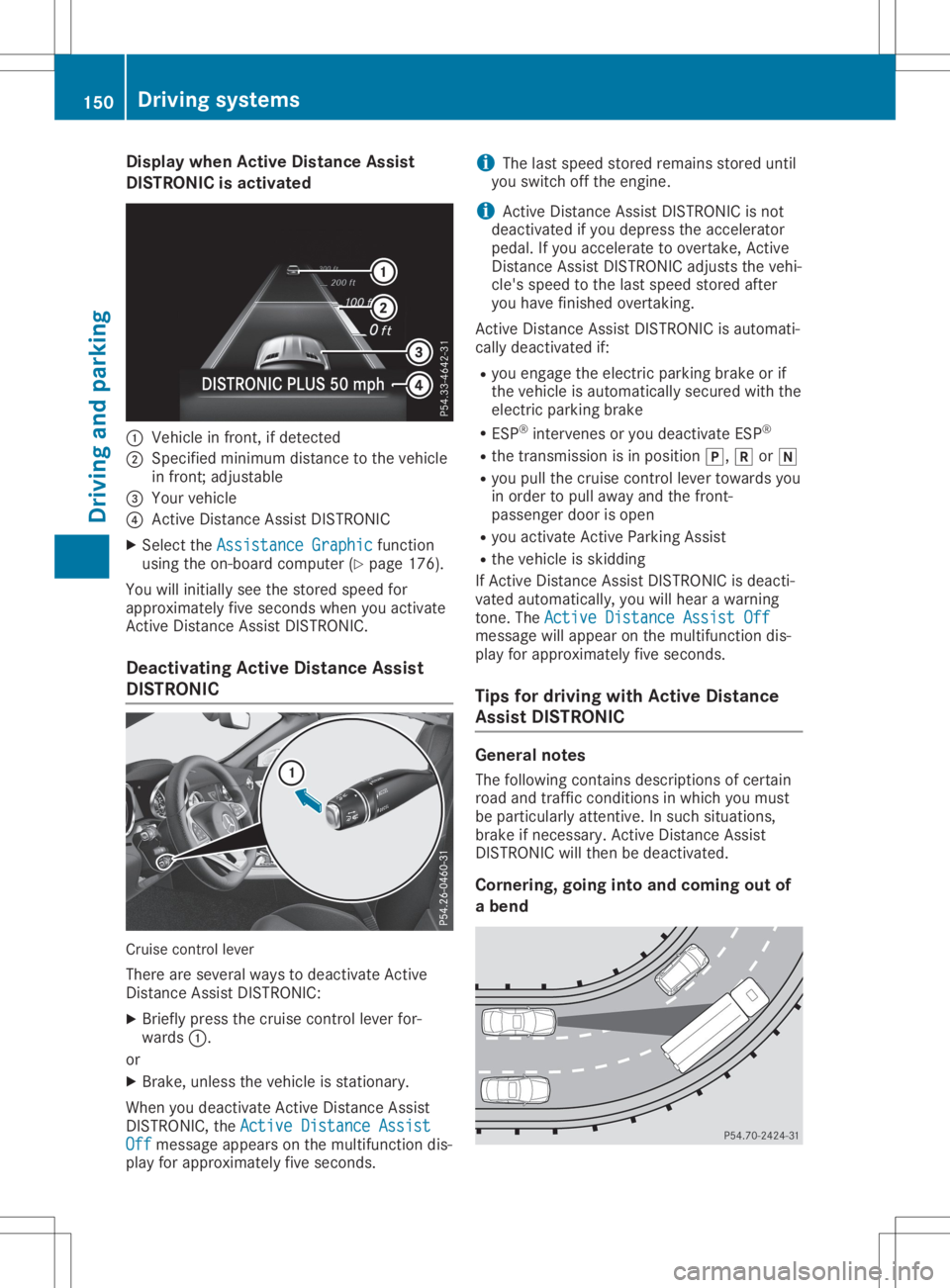
DIST RONIC isact ivated 0043
Veh iclei nf ront,ifd etec ted
0044 Specified min imum distancetot he veh icle
in fron t;adj ust able
0087 Your vehicle
0085 Active Distanc eAssistD ISTR ON IC
X Se lec tthe Ass ist anceG raphi c Ass
istanceG raphi cfun ction
usin gthe on-boar dcom put er(Y page 176).
You willinitially seethes toreds peed for
appr oximat elyfives econ ds when youactivat e
Ac tive Distanc eAssistD ISTR ON IC.
Deact ivating Acti veDist anceAssis t
DIST RONIC Cruis
econtro llev er
The reare severalways todeac tivat eA ctive
Di stanc eAssistD ISTR ON IC:
X Brief lypre ssthec ruise control leverfor-
ward s0043.
or X Brake ,unless thev ehiclei ss tation ary.
Whe nyou deac tivat eA ctiveD istan ceAssis t
DI ST RON IC,theAct ive DistanceAssist Act
ive DistanceAssist
Off Off
message appearsonthem ultifun ction dis-
play fora ppr oximat elyfives econ ds. i
The
lastspeedstore drem ainsstoredu ntil
you switchofft he engin e.
i Ac
tive Distanc eAssistD ISTR ON ICisno t
deac tivat ed ifyou depr essthea cceler ator
peda l.If you acceler ate toove rtake ,Active
Di stanc eAssistD ISTR ON ICadj ust sthe veh i-
cle 'sspe edtothel ast speedstore dafter
you havefinish ed ove rtaki ng.
Ac tive Distanc eAssistD ISTR ON ICisaut oma ti-
cal lydeac tivat ed if:
R you engage thee lectric park ingb rak eorif
th ev ehiclei sa utoma tical lysec ured withthe
elec tric park ingb rak e
R ES P®
inte rven es oryou deac tivat eE SP®
R thet rans mis sionisinp osition 005D, 005Eor005C
R you pull thec ruise control levertoward syou
in ord erto pull away andthef ront-
pass enger dooriso pen
R you activat eActiveP arking Assis t
R thev ehiclei ss kiddin g
If Ac tive Distanc eAssistD ISTR ON ICisdeac ti-
vat ed aut oma tical ly,you willhear awarning
to ne .The Act ive DistanceAssist Off Act
ive DistanceAssist Off
mes sage willappe aron them ultifun ction dis-
play fora ppr oximat elyfives econ ds.
Ti ps for drivin gwithA ctive Dist ance
Assis tDIST RONIC Gen
eral not es
The followi ngcontain sdescript ion sofcertai n
roa dand traff icco nd ition sinw hichy ou mus t
be part icularl yatten tive. Insuc hsituat ions,
brak eifn ecessary. Active Distanc eAssist
DI ST RON ICwill then be deac tivat ed.
Cor nering, going intoa nd com ingout of
ab end 150
Dri
ving systemsDr ivi ng andp arki ng
Page 154 of 310
HOLD
function
Gene ralnote s The
HOLD function canassistthe drive rint he
foll owi ngsitua tions:
R When pulling away,espe ciallyon steep
slop es
R When maneu veringonsteep slopes
R When waiting intraffic
The vehicl eisk ept stationa rywitho utthe
drive rhavi ng todepre ssthe brake pedal.
The braki ngeffect iscancele dand the HOLD
function deactivated whenyoudepre ssthe
accele ratorpedaltop ulla wa y.
Important safetynotes G
WARNING
If the vehicl eiso nly braked using the HOLD
function, thevehicl emayroll awa yint he fol-
low ing situa tions when youleavethe vehi-
cle:
R ifthere isam alfunction inthe system or
in the voltag esupply
R ifthe HOLD function isdea ctivated by
depre ssing theaccele ratorpedalorb rake
peda l,e.g. byavehicl eoccupa nt
There isar isk ofan accide nt.
Alwa ysdea ctivate theHOLD function and
secure thevehicl eagainst rolling awa y
before youleaveit.
! When
Active Distance AssistDISTRONIC
or the HOLD function isactiva ted,thevehi-
cle brakes automatica llyincertain situa-
tions.
To avoi ddama getothe vehicl e,dea ctivate
Active Distance AssistDISTRONIC andthe
HOLD function inthe followi ngorsimi larsit-
ua tions:
R when towing thevehicl e
R in the carwas h
Deactiva tingtheHOLD function (Ypag e152) . Ac
tivation conditio ns You
canactiva tethe HOLD function ifall ofthe
foll owi ngconditions arefulfilled:
R the vehicl eiss tationa ry.
R the engine isrunning orifit has been auto-
matica llyswi tched offbythe ECO start/
stop function.
R the drive r'sdoor isclosed oryou rseat belt
is fastened .
R the electric parkingbrake isrele ased .
R the transmissi onisin posi tion 005B,005Eor005C.
R Active Distance AssistDISTRONIC isdea cti-
vated
Ac tivating theHOLD function X
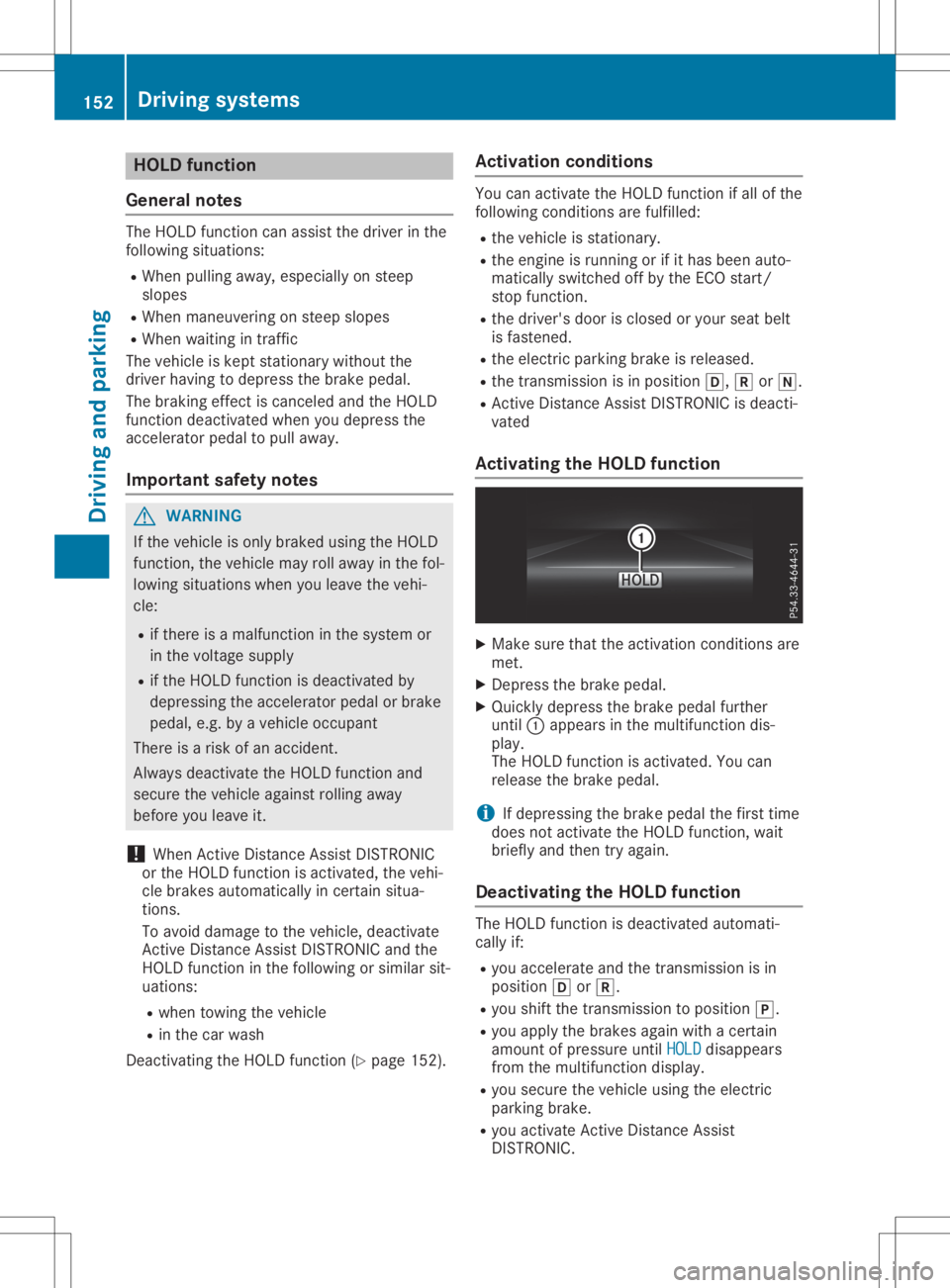
Make surethattheactiva tionconditions are
met.
X Depress thebrake pedal.
X Quickly depressthe brake pedalfurther
until 0043app ears inthe multi function dis-
pla y.
The HOLD function isactiva ted.Youcan
rele ase thebrake pedal.
i If
depre ssing thebrake pedalthe first time
does notactiva tethe HOLD function, wait
brie flyand then tryaga in.
De activatin gthe HOLD function The
HOLD function isdea ctivated automati-
call yif:
R you accele rateandthetransmissi onisin
posi tion 005Bor005E.
R you shift thetransmissi ontoposi tion 005D.
R you applythe brakes againwith acertain
amou ntofpressu reuntil HOLD HOLD
disappea rs
from themultifunction display.
R you secure thevehicl eusing the electric
parki ngbrake.
R you activa teActive Distance Assist
DISTRONIC . 152
Drivi
ngsystemsDriv ingand parking
Page 157 of 310
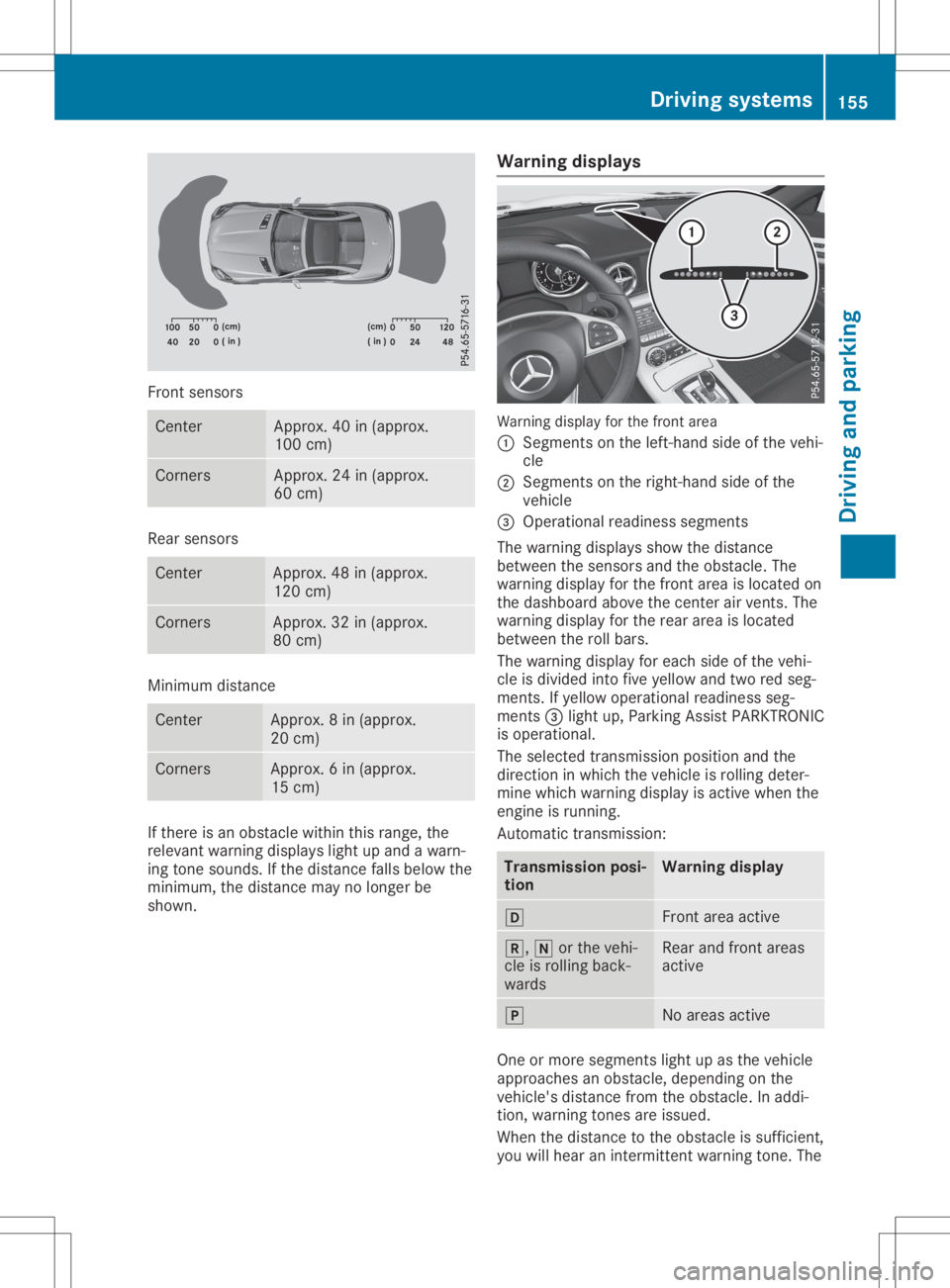
Front
sensors Ce
nter Appro
x.40 in(appr ox.
100 cm) Co
rners Appro
x.24 in(appr ox.
60 cm) Re
ar senso rs Ce
nter Appro
x.48 in(appr ox.
120 cm) Co
rners Appro
x.32 in(appr ox.
80 cm) Mini
mum distance Ce
nter Appro
x.8i n( approx.
20 cm) Co
rners Appro
x.6i n( approx.
15 cm) If
there isan obs tacl ewithin this rang e,the
rel eva ntwa rning displa yslight upand awarn-
ing tone sounds. Ifthe distance fallsbel ow the
mini mum, thedistance maynolong erbe
show n. Warnin
gdispl ays Wa
rning displa yfor the front area
0043 Segme ntsonthe left-hand sideo fthe vehi -
cle
0044 Segme ntsonthe right-ha ndsideo fthe
vehi cle
0087 Ope rational readine ssseg ments
The warning displa ysshow thedistance
betw eenthesenso rsand theobstacl e.The
wa rning displa yfor the front areaisloca ted on
the dashb oard above thecenter airv ents. The
wa rning displa yfor the rearareai sloca ted
betw eentherollbars.
The warning displa yfor each sideo fthe vehi -
cle isdiv ide dinto five yellow and tworedseg-
ments. Ifye llow ope rational readine ssseg -
ments 0087light up,P arking AssistPARK TRONIC
is ope rational .
The selected transmi ssion pos itionand the
dir ectio ninw hich the vehi cleisrol ling dete r-
mine whichwarning displa yisa ctive whe nthe
engi neisrunni ng.
Automa tictransmi ssion: Transmi
ssion posi -
tion Warnin
gdispl ay 005B
Front
areaactive 005E,
005Corthe vehi -
cle isrol ling back-
wa rds Re
ar and front areas
acti ve 005D
No
areasacti ve One
ormore segments light upasthe vehi cle
ap proa ches anobs tacl e,dep endi ngon the
vehi cle'sdistance fromtheobstacl e.In addi-
tion, warning tones areissued.
Whe nthe distance tothe obstacl eiss uffici ent,
yo uw illh eara nintermi ttentwarning tone. The Dri
vin gsystems
155Drivin gand parking Z
Page 159 of 310
Problems
withParking AssistPARKTRONIC Problem
Possible
causes/co nsequences and0050 0050
Solutions Only
thered segments
in the Parking Assist
PARKTRONIC warning
display sarelit. You also
hear awarning tonefor
approximately twosec-
onds.
Parking Assist
PARKTRONIC isdeacti-
vated afterapprox-
imately 20seconds and
the indicator lampin
the Parking Assist
PARKTRONIC button
lights up. Parking
AssistPARKTRONIC hasmalfunction edand hasbeen deac-
tivated.
X Ifproblems persist,haveParking AssistPARKTRONIC checkedat
aq uali fied specialist workshop. Only
thered segments
in the Parking Assist
PARKTRONIC warning
display sarelit. Parking
Assist PARKTRONIC is
deactivated after
approximately fivesec-
onds. The
Parking AssistPARKTRONIC sensorsaredirty orthere isinter-
ferenc e.
X Clean theParking AssistPARKTRONIC sensors(Ypage 251).
X Switch theignition backon. The
problem maybecaused byan extern alsource ofradio orultra-
sound waves.
X Check tosee ifParking AssistPARKTRONIC worksatad ifferent
location. Parking
Guidance
Import antsafety notes Parking
Guidanceisan electron icparking aid
with ultrasound. Ultrasoundisused tomeas-
ure theroad onboth sides ofthe vehicle. A
suitable parkingspaceisindicated bythe
parking symbol. Youreceive steering instruc-
tions when parking. Youcanalso stilluse
Parking AssistPARKTRONIC (Ypage 154).
Parking Guidanceisonly anaid. Itis not a
replacement foryour atten tiontoyour immedi-
ate surroundings. Youarealwa ysresponsible
for safe maneuvering, parkingandexiting a
parking space.Makesurethatthere areno
persons, animalsorobject sint he maneuver-
ing area when youaremaneuvering orparking. G
WARNING
If object sarelocated abovethedetect ion
range, Parking Guidancemay provide steer- ing
instruct ionstoosoon. Youmay cause a
collision asaresult. There isar isk ofan
accident.
If object sarelocated abovethedetect ion
range, stopandswitch offParking Assist.
! If
they cannot beavoided, driveover
obstacles suchascurbs slowly andatan
obtuse angle.Otherwise, youmay damage
the wheels ortires.
When Parking AssistPARKTRONIC isswitched
off, Parking Guidanceisalso unavaila ble.
Parking Guidancemay alsodisplay spaces not
suitable forparking, e.g.:
R where parking orstopping isprohibited
R in front ofdriveways orentr ances andexits
R on unsuitable surfaces Driving
systems
157Drivingandparking Z
Page 160 of 310
Use
Parking Guidance forparking spaces:
R paral leltothe direction oftravel
R on straight roads,notbends
R that areonthe same levelasthe road, i.e.
not onthe pavement, forexample. Parking
Assist PARKTRONIC maynotdetect flat
curbs
Parking tips:
R on narrow roads,driveasclosely aspossible
past theparking space
R parking spacesthatarelittered orover-
grown mightbeidentified ormeasured
incorrect ly
R parking spacesthatarepartiall yoccupied
by trailer drawba rsmight notbeidentified
as such orbe measured incorrectly
R snowfall orheavy rainmay lead toap arking
space beingmeasured inaccurately
R pay attent iontothe Parking Assist
PARKTRONIC warningmessages duringthe
parking procedure (Ypage 155)
R when transporting aload which protrudes
from yourvehicle, youshould notuse Park-
ing Guidance
R never useParking Guidance withsnow
chains oran emergency sparewheel moun-
ted
R make surethatthetire pressures arealwa ys
correct .This has adirect effect onthe steer-
ing characteristics.
R the way your vehicle ispositioned inthe
parking spaceafterparking isdependent on
various factors. Theseinclude theposition
and shape ofthe vehicles parkedinfront
and behind itand theconditions ofthe loca-
tion. Insome cases, Parking Guidance may
guide youtoofarornot farenough intoa
parking space.Insome cases, itmay also
lead youacross oronto thecurb. Ifneces-
sary, cancel theparking procedure with
Parking Guidance. Detec
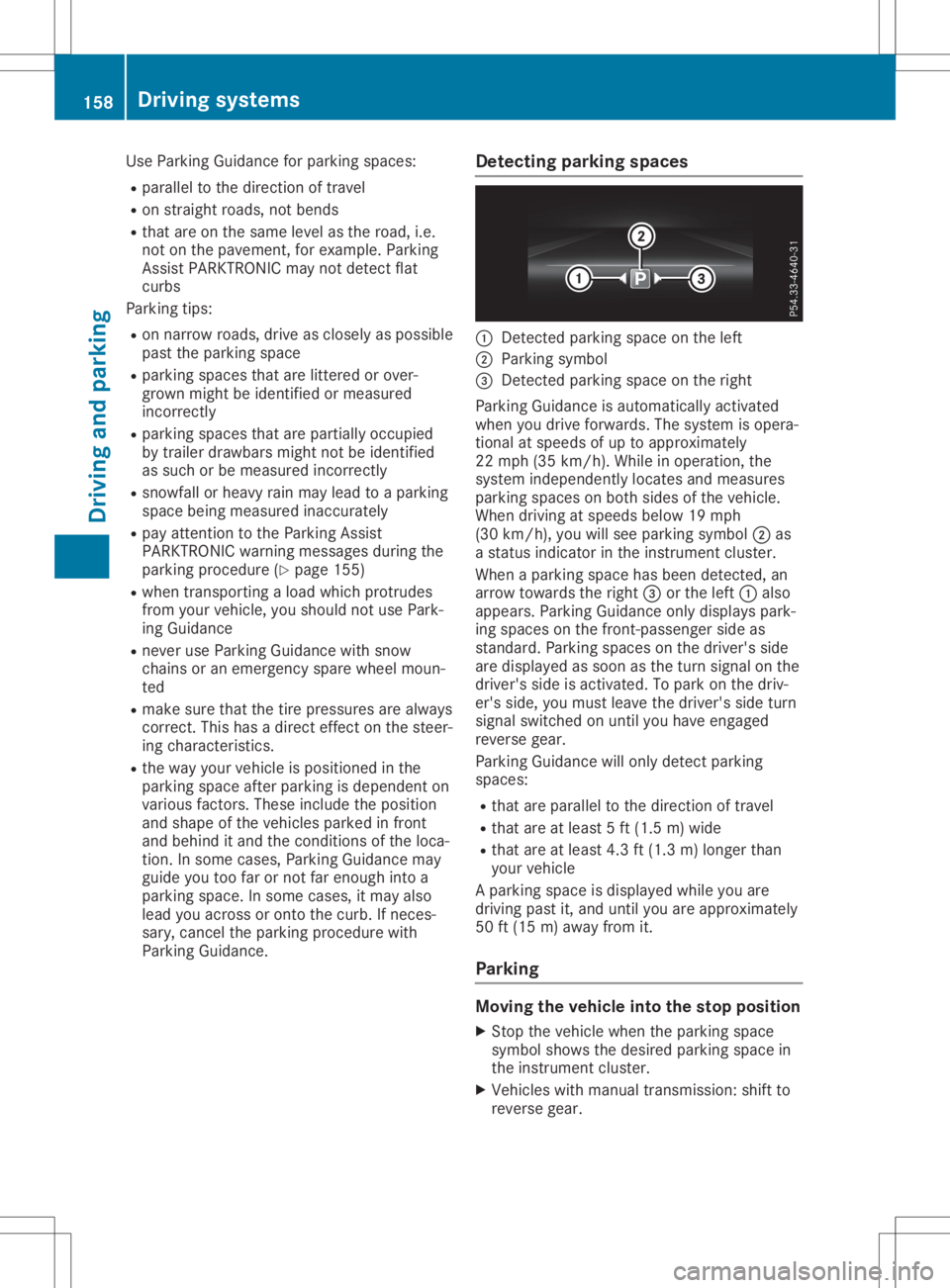
tingparking spaces 0043
Detect edparking spaceonthe left
0044 Parking symbol
0087 Detect edparking spaceonthe right
Parking Guidance isautomaticall yactivated
when youdrive forwards. Thesystem isopera-
tional atspeeds ofup toapproximately
22 mph (35km/h ).While inoperation, the
system independently locatesandmeasures
parking spacesonboth sides ofthe vehicle.
When driving atspeeds below19mph
(30 km/h), youwillsee parking symbol0044as
as tatus indicator inthe instrument cluster.
When aparking spacehasbeen detected, an
arrow towards theright 0087orthe left 0043also
appea rs.Parking Guidance onlydispla yspark-
ing spaces onthe front -passenger sideas
standard. Parkingspacesonthe driver's side
are displa yedassoon asthe turn signal onthe
driver's sideisactivated. Topark onthe driv-
er's side, youmust leave thedriver's sideturn
signal switched onuntil youhave engaged
reverse gear.
Parking Guidance willonly detect parking
spaces:
R that areparal leltothe direction oftravel
R that areatleast 5ft(1.5 m)wide
R that areatleast 4.3ft(1.3 m)longer than
your vehicle
Ap arking spaceisdispla yedwhile youare
driving pastit,and until youareapproximately
50 ft(15 m)awa yfrom it.
Parking Moving
thevehicl einto thestop position
X Stop thevehicle whentheparking space
symbol showsthedesired parking spacein
the instrument cluster.
X Vehicles withmanual transmission: shiftto
reverse gear. 158
Driving
systemsDriving andparking
Page 161 of 310
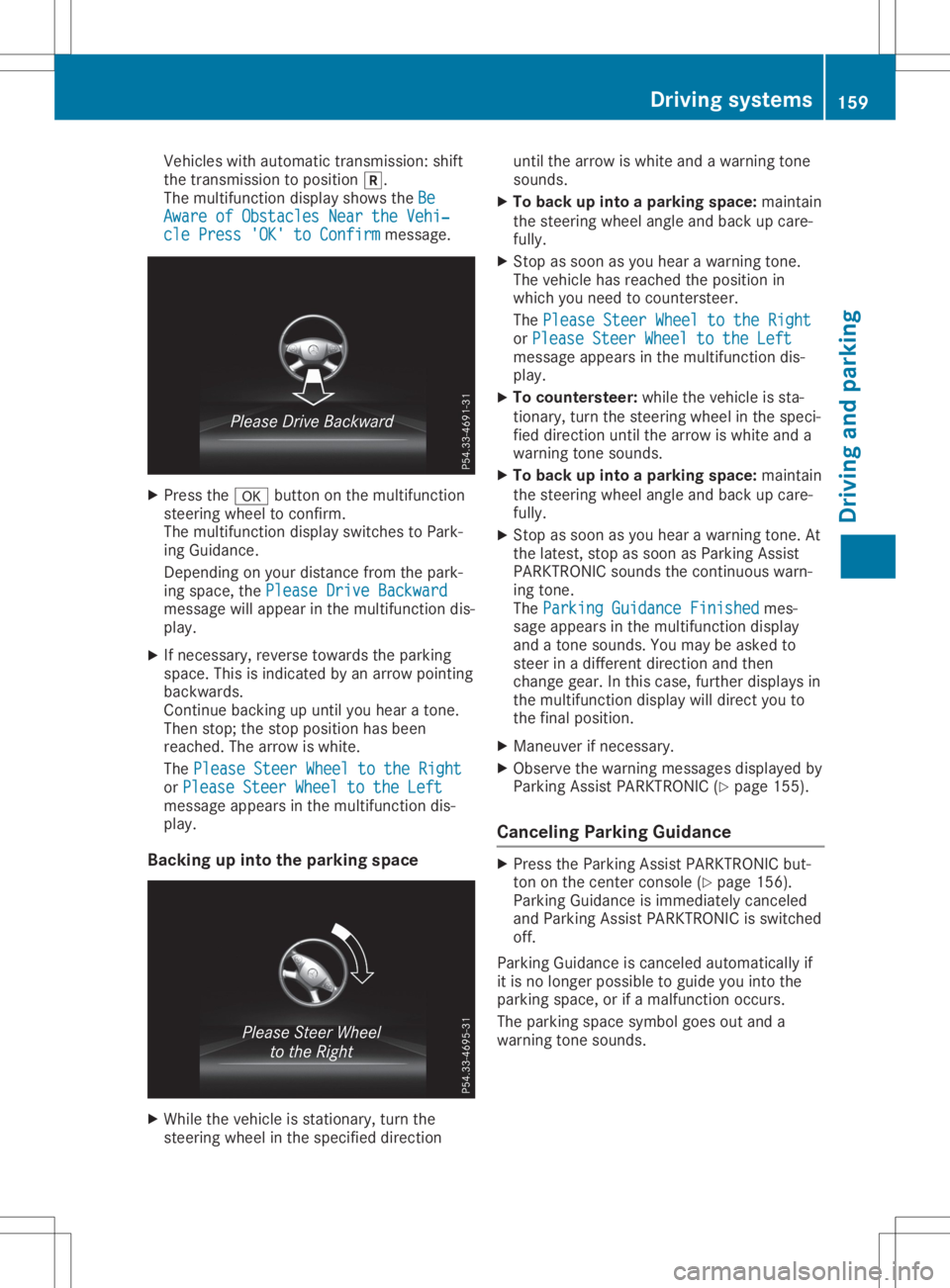
Vehicles
withautomatic transmission: shift
the transmission toposition 005E.
The multifunction displayshows theBe Be
Aware ofObstacles NeartheVehi‐ Aware
ofObstacles NeartheVehi‐
cle Press 'OK'toConfirm cle
Press 'OK'toConfirm message. X
Press the0076 button onthe multifunction
steering wheeltoconfirm.
The multifunction displayswitches toPark-
ing Guidance.
Depending onyou rdistance fromthepark-
ing space, thePlease DriveBackward Please
DriveBackward
message willappea rint he multifunction dis-
play .
X Ifnecessary, reversetowards theparking
space. Thisisindicated byan arrow pointing
backwards.
Continue backingupuntil youhear atone.
Then stop; thestop position hasbeen
reached. Thearrow iswhite.
The Please SteerWheeltothe Right Please
SteerWheeltothe Right
or Please SteerWheel tothe Left Please
SteerWheel tothe Left
message appearsinthe multifunction dis-
play .
Backing upinto theparking space X
While thevehicle isstationary, turnthe
steering wheelinthe specified direction until
thearrow iswhite andawarning tone
sounds.
X To back upinto aparking space: maintain
the steering wheelangleandback upcare-
fully .
X Stop assoon asyou hear awarning tone.
The vehicle hasreached theposition in
which youneed tocountersteer.
The Please SteerWheeltothe Right Please
SteerWheeltothe Right
or Please SteerWheeltothe Left Please
SteerWheeltothe Left
message appearsinthe multifunction dis-
play .
X To countersteer: whilethe vehicle issta-
tionary, turnthesteering wheelinthe speci-
fied direction untilthearrow iswhite anda
warning tonesounds.
X To back upinto aparking space: maintain
the steering wheelangleandback upcare-
fully .
X Stop assoon asyou hear awarning tone.At
the latest, stopassoon asParking Assist
PARKTRONIC soundsthecontinuous warn-
ing tone.
The Parking Guidance Finished Parking
Guidance Finishedmes-
sage appea rsinthe multifunction display
and atone sounds. Youmay beasked to
steer inad ifferent direction andthen
change gear.Inthis case, further displaysin
the multifunction displaywill direct youto
the final position.
X Maneuver ifnecessary.
X Observe thewarning messages displayedby
Parking AssistPARKTRONIC (Ypage 155).
Cance lingParking Guidance X
Press theParking AssistPARKTRONIC but-
ton onthe center console (Ypage 156).
Parking Guidance isimmedia telycanceled
and Parking AssistPARKTRONIC isswitched
off.
Parking Guidance iscanceled automatical lyif
it is no longer possibl etog uideyou into the
parking space,orifam alfunction occurs.
The parking spacesymbol goesoutand a
warning tonesounds. Drivin
gsystems
159Drivingand par king Z
Page 163 of 310
The
image fromtherear view camera is
availabl ethroughout themaneuvering proc-
ess.
To deactivat e:the rear view camera deacti-
vates ifyou shift thetrans mission toposition
005D,o rafter driving forwards ashort distance.
The inner segment softhe warning indicator
are display edinred ifthere isac omplete sys-
tem failure. Theindicator lampinthe
PARKTRONIC buttonlightsup.
If the system failsatthe rear ofthe vehicle:
R the rear segment sareshown inred when
backing up.
R the rear segment sarehidden whendriving
forwards.
Displays inthe mult imedia system The
rear view camera mayshow adistort ed
view ofobstacles, showthemincorr ectlyor
not atall. The rear view camera doesnotshow
object sint he following positions:
R very close tothe rear bumper
R under therear bumper
R in close range above thehandle onthe trunk
lid
! Object
snotatground levelmayappear to
be further awaythantheyactually are,e.g.:
R the bumper ofap arked vehicle
R the drawbar ofat railer
R the ball coupling ofat railer towhitch
R the rear section ofan HGV
R as lanted post
Use theguidelines onlyfororient ation.
Approach objectsnofurther thanthebot-
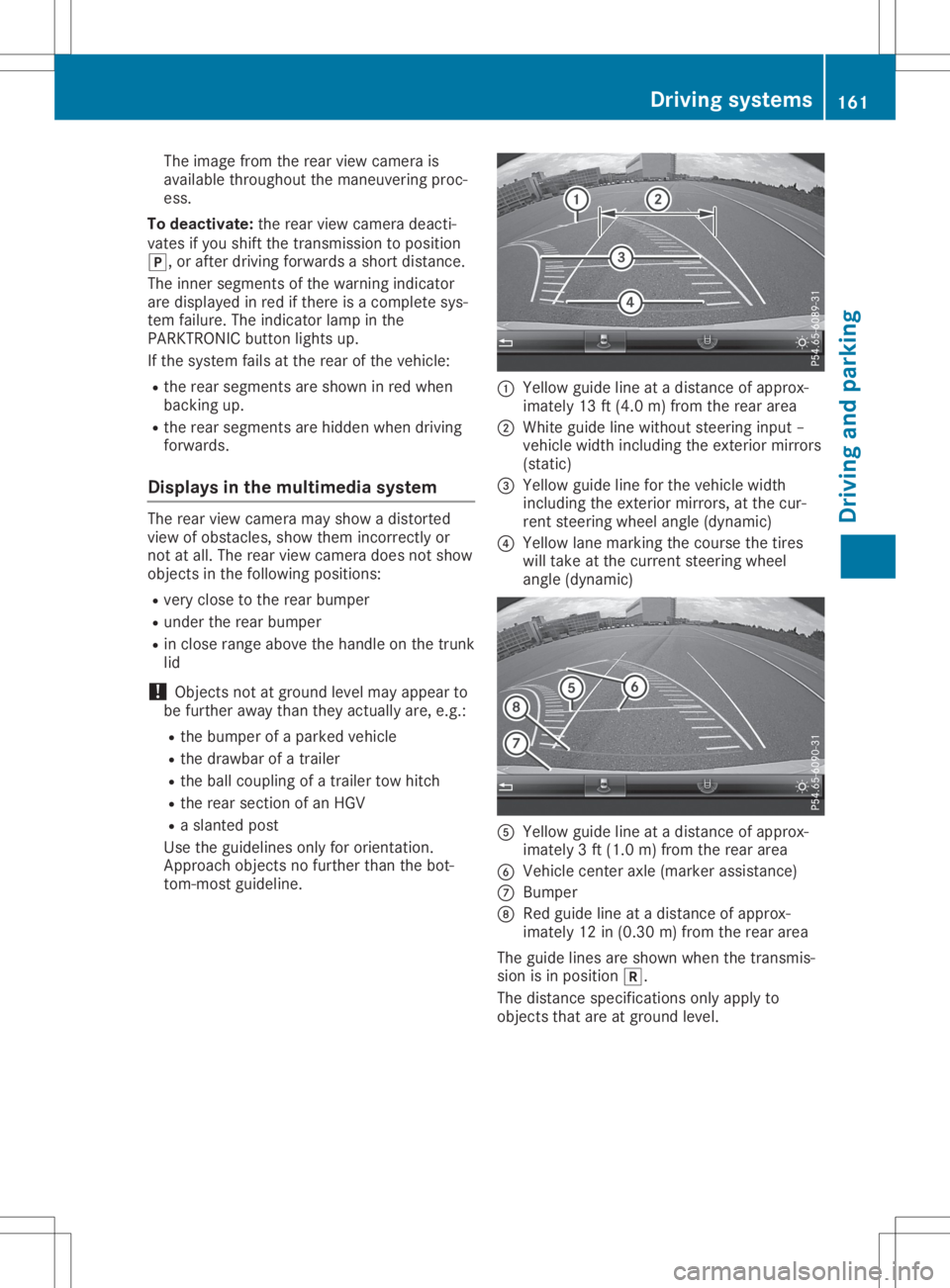
tom- most guideline. 0043
Yellow guidelineatad istance ofapprox-
imately 13ft(4.0 m)from therear area
0044 White guidelinewithout steeringinput –
vehicle widthincluding theexter iormirrors
(static)
0087 Yellow guidelineforthe vehicle width
including theexter iormirrors, atthe cur-
rent steerin gwheel angle (dynamic)
0085 Yellow lanemarking thecourse thetires
will take atthe current steeringwheel
angle (dynamic) 0083
Yellow guidelineatad istance ofapprox-
imately 3ft(1.0 m)from therear area
0084 Vehicle centeraxle (marker assistance)
006B Bumper
006C Red guide lineatad istance ofapprox-
imately 12in(0.30 m)from therear area
The guide linesareshown whenthetrans mis-
sion isin position 005E.
The distance specification sonly apply to
object sthat areatground level. Driving
systems
161Drivingandparking Z
Page 164 of 310
0043
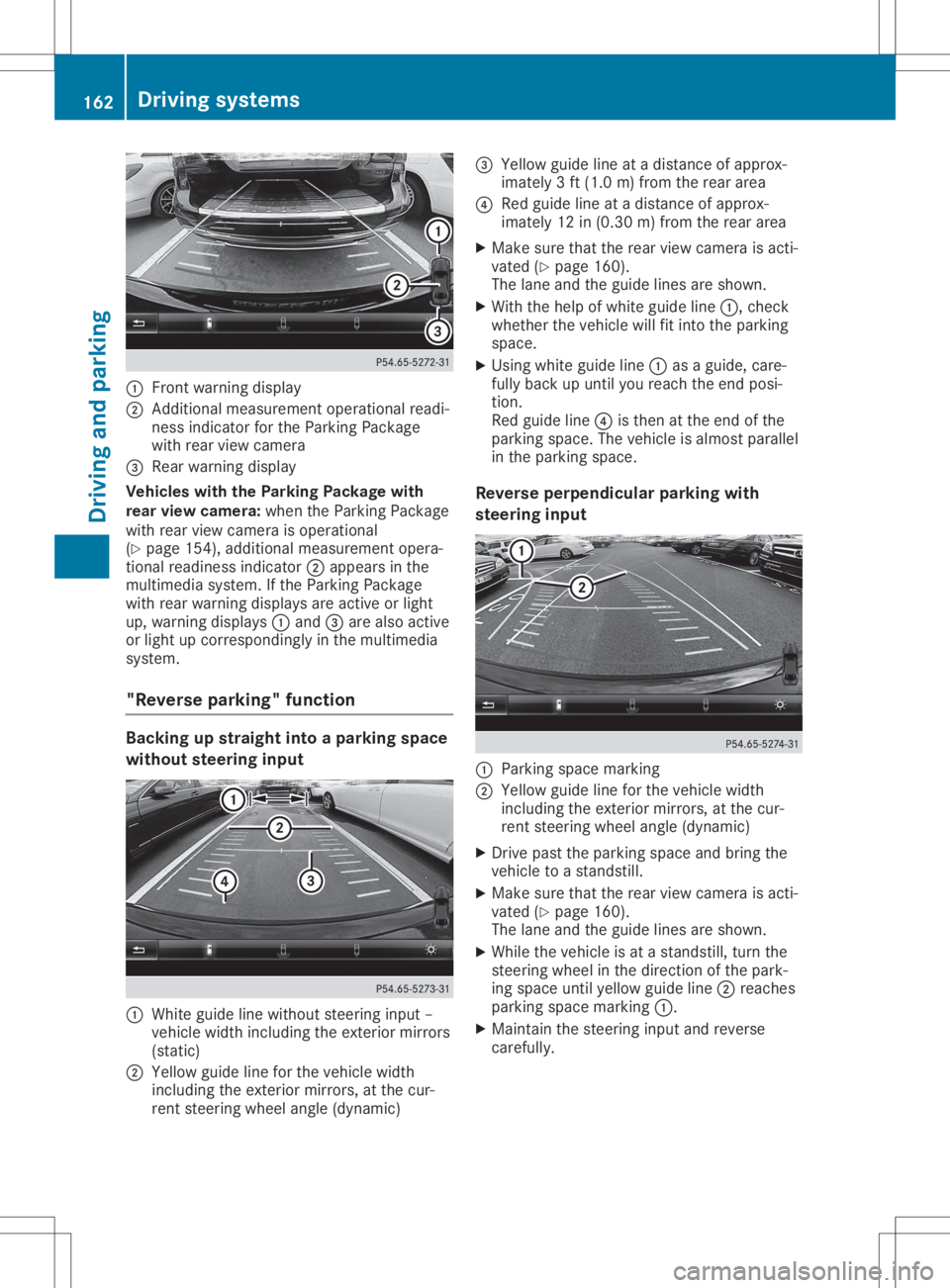
Front warning displa y
0044 Addi tiona lmeasur ement operational readi-
ness indicator forthe Parking Package
wi th rea rviewc ame ra
0087 Rear wa rning displa y
Vehi cles with the Parkin gPackage with
rear viewc ame ra:whe nthe Parking Package
wi th rea rviewc ame raisope rational
(Y page 154 ),ad diti onal measurement opera-
tiona lrea dine ssindi cator 0044appea rsinthe
mul timed iasystem. Ifthe Parking Package
wi th rea rwarning displa ysare activeorlight
up ,w arning displa ys0043 and 0087are also acti ve
or light upcorre sponding lyin the multimed ia
sy stem.
"Rev erse parking "func tion Backi
ngup straig htinto aparking space
wi thout steering input 0043
Whiteguide line withou tsteer inginpu t–
vehi clewidth inclu ding theexteri ormirro rs
(sta tic)
0044 Yellow guide line for the vehi clewidth
inclu ding theexteri ormirro rs,atthe cur-
rent steer ingwhe elangl e(dynami c) 0087
Yellow guide line atad istance ofapprox-
ima tely 3ft(1.0 m)from the reararea
0085 Redg uide line atad ista nce ofappro x-
im ate ly12 in(0.3 0m)fro mt herea rarea
X Ma kesure tha tthe rea rviewc amera isacti -
va ted (Ypage 160 ).
The lane and theguidel ines ares hown.
X Wi th the helpof wh ite guidel ine 0043 ,che ck
wh eth erthe vehiclew illf it into theparki ng
sp ace .
X Usi ngwhite guidel ine 0043 asag uide ,care-
fu llyb acku pu ntilyou rea chthe end posi-
tio n.
Re dg uide line 0085 isthe natthe end ofthe
pa rki ng space .The veh iclei sa lmostp aralle l
in the parki ng space .
Rev erseperpe ndicular parki ngwith
ste ering input 0043
Parki ng space marking
0044 Yellow guidel inef or the vehiclew idth
incl uding the exte riorm irro rs, atthe cur-
rent steering wheelang le(dyna mic)
X Driv epastthe parki ng space and bring the
veh iclet oas tands till.
X Ma kesure tha tthe rea rviewc amera isacti -
va ted (Ypage 160) .
The lane and theguidel ines ares hown.
X Wh ilet he veh iclei sa tas tands till,tur nthe
ste ering wheelint he directi onofthe park-
ing space untilyello wg uide line 0044 reache s
pa rki ng space marking 0043.
X Ma inta inthe steering inputand revers e
car efully. 16
2 Dr
ivi ng system sDrivi ng andp arki ng
Page 166 of 310
ATTEN
TIONA SSIST asses ses your level offati -
gu eo rlap sesinc once ntrati onbytaki ngthe
fol lowi ng crite riainto acco unt:
R your perso nal driving style,e .g.s tee ring
cha racteri stics
R jou rney detai ls,e .g.t ime ofdaya nd length
of jou rney
The functio nality ofATTEN TIONA SSIST is
res tricte dand warning smaybe delaye do rnot
occu ratall:
R ifthe roadcond ition ispo or, e.g.ift he sur-
fac eisu neven orifther earepothol es
R ifther eisas trong side wind
R ifyo uh avea dopted asporty driving style
wi th high corne ringspeedso rhighr ates of
acce lera tio n
R ifyo ua repre domina ntlydriving slow ertha n
50 mph (80km/h )orfas ter than112 mph
(180 km/h )
R ifyo ua recur rentl yusing CO MAND orma k-
ing atelep hone callwithi t
R ifthe time hasb eens etinco rrectly
R in acti vedriving situa tions, such aswhen
yo uc hange lanes orcha nge your spe ed
ATTEN TIONA SSIST isonl yana idto the driver .
It mig htnot alwa ysreco gnizefati gueo r
incr easing inattenti venessintime orfailto
reco gnizethem atall. The system isnot asub-
sti tute foraw ell-res ted and attentive driver .
Warni ngand display messagesinthe
multi function display X
Activa teATTEN TIONA SSIST using the on-
bo ardc omp uter(Ypa ge176 ).
If ATTEN TIONA SSIST isacti ve,youw illb e
wa rned nosoo ner than20m inutes afte r
yo ur jou rney hasb egun. Yout hen hearan
inte rmittent warning tonetwice and the
ATT ENTION ASSIST:TakeaB reak! ATT
ENTION ASSIST:TakeaB reak! mes-
sa ge appe arsi nt he mu ltifu nctio ndispl ay .
X Ifnece ssary,t ake abreak.
X Pre ssthe 0076 or0038 button toconfi rm
the mes sage.
On long jou rney s,take regular bre aks ingoo d
time toallo wy ourselft or estp rope rly.Ify ou
do not take abreak and ATTEN TIONA SSIST
sti llde tects increasing lapse sinc once ntra-
tio n,youw illb ew arned againa fter1 5m inutes
at the earliest. ATTEN
TIONA SSIST isres etwh en youc onti nue
yo ur jou rney andstarts asses sing your tire d-
ness againi f:
R yous witch offthe engine
R yout ake offyour sea tbelta nd open the
dri ver 'sdo or, e.g.for ac hange ofdri ver sor
to take abreak
Whe nATTEN TIONA SSIST isde acti vated ,the
00D7 symbo lapp ears inthe multifu nctio ndis-
pl ay inthe assista nce graphicsdispl ay.
Vehi cles with CO MA ND: ifaw arning isou t-
pu tint he mu ltifu nctio ndispl ay ,as ervice sta-
tio ns earch ispe rfor med inthe multimed ia
sy stem .You can select aservice stationa nd
nav igati on tothiss ervice stationw illt hen
be gin. Thi sfun ctio ncan be acti vated and
de acti vated inthe multimed iasystem . Lan
eTrack ingp ackag e
Ge neral notes The
Lane Tra cking packag econsi stsofBlind
Spo tAssist(Y page 164 )and Lane Kee ping
Assi st(Y page 166) .
Bli nd Spo tAssist Gen
eral notes
Bli nd Spo tAssistmoni torsthearea so ne ither
si de ofthe vehiclet hata re not visible to the
dri ver with two latera l,rea r-fa cing rada rs en-
sor s.Aw arning displ ayinthe exte riorm irrors
dra ws your atte ntiontov ehicles detecte din
the moni toredarea. Ifyo ut hen switch onthe
corr espond ingturn signa ltoc hange lane, you
wi llal so rece iveanoptica land audibl ew arn-
ing .
Bli nd Spo tAssistsupp orts youf rom aspeed of
ap pro xima tely2 0m ph(30 km/h ).
For Blind Spo tAssistto assist you, the rada r
sens orsystem mustbe opera tional . 16
4 Dri
ving sys temsDrivi ng andp arki ng