phone MERCEDES-BENZ SLC ROADSTER 2018 Owner's Manual
[x] Cancel search | Manufacturer: MERCEDES-BENZ, Model Year: 2018, Model line: SLC ROADSTER, Model: MERCEDES-BENZ SLC ROADSTER 2018Pages: 298, PDF Size: 5.26 MB
Page 3 of 298
Welcome to the world of Mercedes-Benz
We urge you to read this Operator's Manual
carefully and familiarize yourself with the vehi-
cle before driving. For yourown safety and a
longer vehiclel ife,follow the instructions and
warning notices in this manual. Ignoring them
coul dresult in damage to the vehicleorp ersonal
injury to you or others.
Vehicle damage caused by failure to follow
instructions is not covered by the Mercedes-
Benz Limited Warranty.
The equipment or product designation of your
vehiclem ay vary depending on:
RModel
ROrder
RCountry specification
RAvailability
Mercedes-Benz therefore reservest he right to
introduce changes in the following areas:
RDesign
REquipment
RTechnicalf eatures
The equipment in you rvehiclem ay therefore
differf rom that shownint he descriptions and
illustrations.
The following are integralc omponents of the
vehicle:
RDigita lOperator's Manual
RPrinted Operator's Manual
RMaintenance Booklet
REquipment-dependent supplements
Keep these documents in the vehicleata ll
times. If you sell the vehicle, alway spassa ll
documents on to the new owner.
Your Operator's Manual:
Digital form inside the vehicle
The Digita lOperator's Manual provides
comprehensive and specifically adapted
information on you rvehicle's equipment
and multimedias ystem. It contains infor-
mative animations, individua llanguage
settings and an intuitive search function.
Booklet inside the vehicle
In addition to this manua land the afore-
mentioned digital media, you als ohave the
option to obtai nacomprehensive printed
versionoft he Supplement for you rmulti-
medias ystem from you rauthorized
Mercedes-Benz Center.
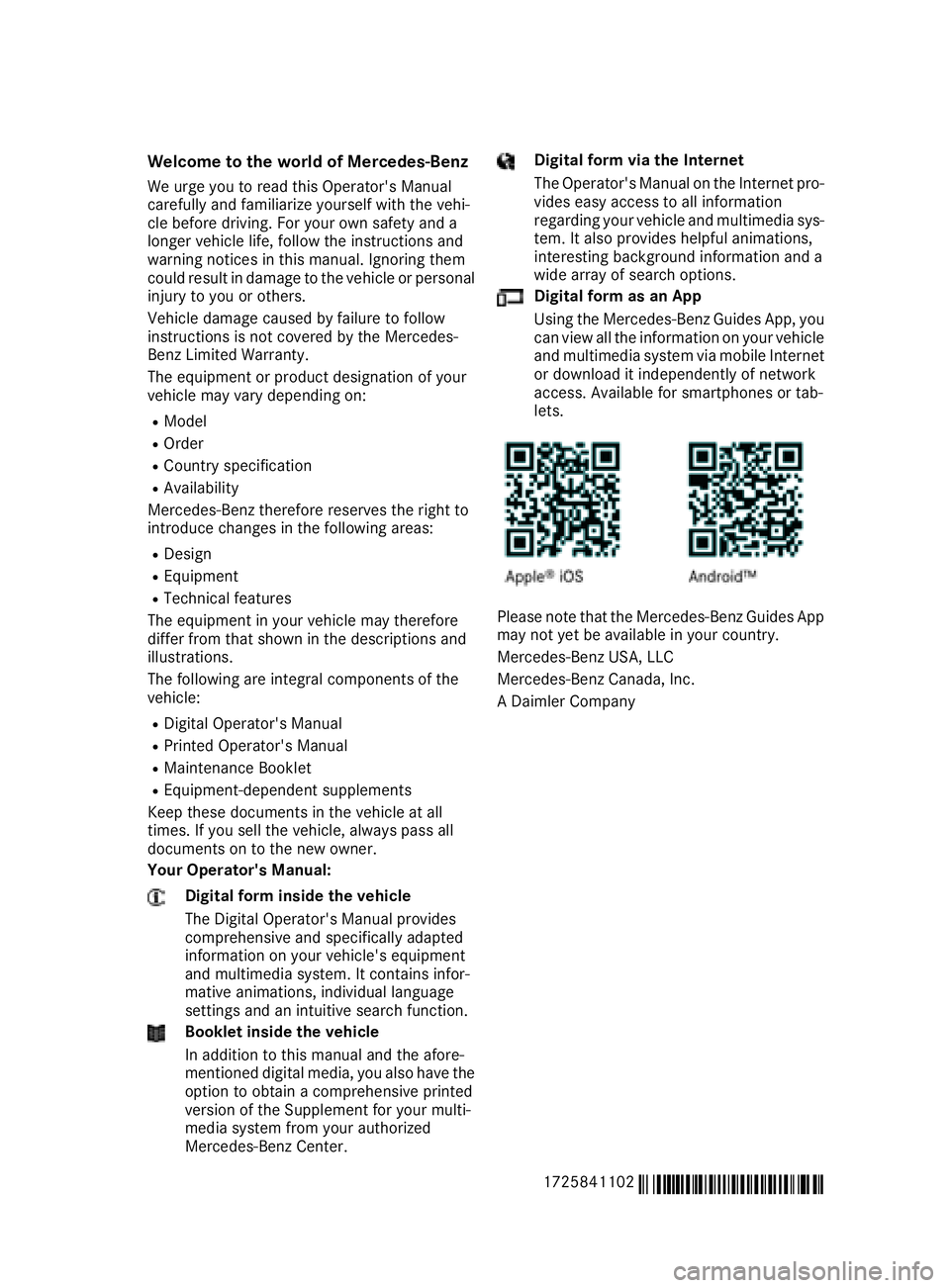
Digital form via the Internet
The Operator's Manual on the Internet pro-
videse asy access to all information
regarding you rvehiclea nd multimedias ys-
tem. It als oprovides helpful animations,
interesting background information and a
wid earrayofs earch options.
Digital form as an App
Using the Mercedes-Benz GuidesA pp, you
can view all the information on you rvehicle
and multimedias ystem via mobile Internet
or download it independently of network
access. Availabl efor smartphones or tab-
lets.
Please note that the Mercedes-Benz GuidesA pp
may not yet be available in you rcountry.
Mercedes-Benz USA, LLC
Mercedes-Benz Canada,I nc.
AD aimler Company
1725841102
É1725841102~ËÍ
Page 7 of 298
Assistance menu(on-boar dcom-
puter) .................................................. 170
ASSYSTP LUS
Dis playin gaservic emessage ........ 237
Hiding aservic emessage .............. 237
Resetting th eservic einterval dis-
play ................................................ 237
Se rvice message ............................ 237
Spe cial servic erequirements ........ .238
ATA (Anti-Theft Alarm system)
Activating/deactivating ................... 64
Function ...........................................6 4
Switching off the alarm .................... 64
ATTENTIO NASSIS T
Activating/deactivating ................. 171
Displa ymessage ............................ 193
Function/note s............................. 158
Audi omenu( on-board computer) .... 168
Audi osystem
see Digital Operator's Manual
Authorized Mercedes-Benz Center
see Qualifie dspecialist workshop
Authorized workshop
see Qualifie dspecialist workshop
AUTO lights
Displa ymessage ............................ 189
see Lights
Automatic car was h(care) ............... 238
Automatic engine start (ECO start/
stopf unction) .................................... 119
Automatic engine switch-off (ECO
start/stopf unction).......................... 119
Automatic headlamp mode ................ 95
Automatic transmission
Accelerator peda lposition ............. 125
Changing gea r............................... 125
Displa ymessage ............................ 198
Drive program. ............................... 125
Drive programd isplay .................... 122
Driving tip s.................................... 125
DYNAMIC SELECT button .............. 121
Emergency running mode. ............. 129
Eng
aging drive position .................. 124
Engaging neutral ............................ 123
Engaging park position automati-
cally ............................................... 123
Engaging reverse gea r................... 123 Engaging the park position ............ 123
Gearshift recommendation ............ 128
Kickdown.
...................................... 125
Manua lshifting .............................. 126
Oil temperature (on-board com-
puter, Mercedes-AMGS LC 43) ...... 175
Overview ........................................ 122
Problem (malfunction) ................... 129
Pulling away ................................... 118
Selector lever ................................ 122
Starting the engine ........................ 117
Steering wheelp addleshifters ...... 126
Transmission position display ........ 122
Transmission positions .................. 124
Automatic transmissio nemer-
gencym ode....................................... 129
B
Back button ....................................... 212
BAS (Brake Assist System) ................. 57
Battery (SmartKey)
Checking .......................................... 68
Important safety notes .................... 67
Replacing ......................................... 68
Battery (vehicle)
Charging ........................................ 253
Displa ymessage ............................ 191
Important safety notes .................. 251
Jump starting ................................. 253
Overview ........................................ 251
Belt
see Seatb elts
Bel twarning ......................................... 42
Blind SpotA ssist
Activating/deactivating ................. 171
Displa ymessage ............................ 194
Notes/function .............................. 159
Bluetooth
®
Searching for amobilephone ........ 215
Searching for amobilephone
(device manager )........................... 216
see also Digital Operator's Man-
ua l.................................................. 211
Telephony ...................................... 215
Brake Assist System
see BAS (Brake Assist System)
Index5
Page 12 of 298
Deactivating/activating (except
SLC 43 AMG)................................... 61
Deactivating/activating
(Mercedes-AMG SLC 43) ................. 62
Display message ............................ 179
Function/note s................................ 60
Generaln otes .................................. 60
Important safety information ........... 60
Warning lamp ................................. 205
ETS/4ETS (ElectronicT raction Sys-
tem) ...................................................... 60
Exhaustc heck................................... 134
Exhaustp ipe (cleaning instruc-
tions) .................................................. 243
Exterior lighting
Setting options ................................ 95
see Lights
Exterior mirrors
Adjusting ......................................... 91
Dipping (automatic) ......................... 92
Folding in when locking (on-board
computer) ...................................... 174
Folding in/out (automatically )......... 91
Folding in/out (electrically) ............. 91
Outofp osition (troubleshooting )..... 92
Storing settings (memory func-
tion) ................................................. 93
Storing the parking position ............. 92
Eyeglassesc ompartment ................. 220
F
Favorites
Overview ........................................ 213
Filler cap
see Refueling
Fillin gcapacitie s(Technical data) ... 290
First-aidk it......................................... 244
Flat tire
MOExtended tire s.......................... 247
Preparing the vehicl e..................... 246
TIREFIT kit ...................................... 247
see Emergency spare wheel
Floormats ........................................... 232
Frequencies
Mobil ephone ................................. 288
Two-way radio ................................ 288 Fuel
Additives ........................................ 292
Consumption statistics .................. 166
Displaying the current consump-
tion ................................................ 166
Displaying the rang e...................... 166
Driving tip s.................................... 134
Fue lgauge ....................................... 32
Grade (gasoline )............................ 291
Important safety notes .................. 291
Problem (malfunction) ................... 131
Refueling ........................................ 129
Tank content/reserve fue l............. 291
Fue lfille rflap
Opening ......................................... 130
Fue llevel
Calling up the rang e(on-board
computer) ...................................... 166
Fue ltank
Capacity ........................................ 291
Problem (malfunction) ................... 131
Fus eallocatio nchart (vehicl etool
kit) ...................................................... 245
Fuses
Allocation chart ............................. 258
Before changing ............................. 258
Fusebox in the engine compart-
ment .............................................. 259
Fus ebox in the trunk ..................... 259
Important safety notes .................. 258G
Garaged ooro pener
Clearing the memory ..................... 231
Generaln otes ................................ 228
Important safety notes .................. 228
Opening/closing the garag edoor..2 30
Problems whe nprogramming ........2 30
Programming (button in the rear-
view mirror) ................................... 229
Synchronizing the rolling code ....... 229
Gear indicator (on-board com-
puter, Mercedes-AMG SLC 43) ......... 175
Genuine parts ...................................... 23
Glove box ...........................................2 19
10Index
Page 15 of 298
Messagessee Display messages
Mirrors
see Exterior mirrors
see Rear-view mirror
Mobile phone
Connecting (Bluetooth
®inter-
face) ..............................................2 15
Connecting (device manager) ........2 16
Frequencies ................................... 288
Installatio n..................................... 288
Menu (on-board computer) ............ 169
Transmissiono utput (maximum ).... 288
Modifying the programming
(SmartKey) ...........................................6 6
MOExtended tires .............................. 247
Mountingw heels
Lowering the vehicle. ..................... 284
Mounting anew wheel. .................. 283
Preparing the vehicle. ....................281
Raising the vehicle ......................... 281
Removing awheel .......................... 283
Securing the vehicle against roll-
ing away ........................................ 281
MP3
Operation ....................................... 169
see also Digita lOperator's Man-
ua l..................................................2 11
Multifunctio ndisplay
Function/notes .............................1 65
Permanent display. ........................ 172
Multifunctio nsteering wheel
Operating the on-board computer .. 164 Overview .......................................... 33
Multimedia system
Switching on and off ......................2 12
Music files
see also Digita lOperator's Man-
ua l.................................................. 211
N
Navigation
Entering adestination .................... 213
Menu (on-board computer) ............ 167
see also Digital Operator's Man-
ua l.................................................. 211 Navigation menu
Important safety notes .................. 167
NECK-PRO hea drestraints
Important safety notes .................... 52
Operation ......................................... 52
Resetting triggered .......................... 53
Note sonb reaking-i nanewvehi-
cle ....................................................... 115
O
Occupant Classification System
(OCS)
Conditions ....................................... 46
Faults ............................................... 49
Operation ......................................... 46
System self-test ............................... 48
Occupant safety
Air bags ........................................... 43
Automati cmeasures afte ranacci-
dent ................................................. 53
Bel twarning ..................................... 42
Childre ninthe vehicl e..................... 53
Important safety notes .................... 38
Introduction to the restraint sys-
tem .................................................. 38
Occupant Classification System
(OCS) ............................................... 45
PASSENGER AIR BAG indicator
lamps ............................................... 39
Pets in the vehicl e........................... 56
PRE-SAFE
®(anticipatory occu-
pant protection) ............................... 53
Restraint system warning lamp ........ 38
Seatb elt. ......................................... 39
OCS
Conditions ....................................... 46
Faults ............................................... 49
Operation ......................................... 46
System self-test ............................... 48
Odometer ........................................... 166
Oil
see Engine oil
On-board computer
AMG menu ..................................... 175
Assistance menu ........................... 170
Audio menu ................................... 168
Convenience submenu .................. 174
Index13
Page 16 of 298
Display messages.......................... 177
Displaying aservice message ........ 237
Factory settings submenu ............. 175
Important safety notes .................. 163
Instrument cluster submenu .......... 172
Lighting submenu .......................... 172
Menu overview .............................. 166
Message memory .......................... 178
Navigation menu ............................ 167
Operation ....................................... 164
RACETIMER ................................... 175
Service menu ................................. 171
Setting smenu ............................... 172
Standard display ............................ 166
Telephone menu ............................ 169
Tripm enu ...................................... 166
Vehicl esubmenu ........................... 173
Video DVD operation ..................... 169
Operatin gsafety
Declaration of conformity ................ 26
Important safety notes .................... 26
Operatin gsystem
see On-board computer
Operation
Digital Operator's Manua l................ 22
Operator's Manual
Vehicl eequipment ........................... 24
Outside temperature display ........... 163
Overhead controlp anel...................... 36
P
Paddles hifters
see Steering wheelp addleshifters
Paint code number ............................ 289
Paintwork (cleaning instructions) ... 240
Panic alarm .......................................... 38
Parking
Important safety notes .................. 131
Parking brake ................................ 132
Position of exterio rmirror, front-
passenger sid e................................. 92
Rear vie wcamera .......................... 154
see PARKTRONIC
Parking aid
Parking Guidance ........................... 152
see Exterior mirrors
see PARKTRONIC Parking Assist PARKTRONIC
Deactivating/activating ................. 151
Important safety notes .................. 149
Problems (malfunctions )................ 152
Sensorr ange................................. 150
Warning display ............................. 151
Parking brake
Applying automaticall y................... 133
Applying or releasing manually ...... 132
Displa ymessage ............................ 181
Electric parking brake .................... 132
Emergency braking ........................ 133
Generaln otes ................................ 132
Releasing automaticall y................. 133
Warning lamp ................................. 206
Parking Guidance
Displa ymessage ............................ 194
Important safety notes .................. 152
Parking lamps
Switching on/off. ............................. 96
PARKTRONIC
Driving system ............................... 149
Function/note s............................. 149
PASSENGER AI RBAG
Displa ymessage ............................ 187
Indicato rlam ps ................................ 39
Problems (malfunction) .................. 187
Pets in the vehicle ............................... 56
Phone book
see also Digital Operator's Man-
ual.................................................. 211
Pivotin gdraft stop
see AIRGUIDE
Powe rwashers .................................. 239
Powe rwindows
see Sid ewindows
PRE-SAFE
®(anticipatory occupant
protection)
Displa ymessage ............................ 184
Operation ......................................... 53
Protectio nagainst theft
ATA (Anti-Theft Alarm system). ........ 64
Immo bil
izer ...................................... 63
Protectio nofthe environment
Generaln otes .................................. 23
Pulling away
Automati ctransmission ................. 118
14Index
Page 20 of 298
System .......................................... 224
VehicleHealth Check .................... 227
Telephone
Accepting acall( multifunction
steering wheel ).............................. 170
Authorizing amobilephone (con-
necting )......................................... 215
Authorizing amobil ephone via the
device manager (connecting )......... 216
Connecting amobilephone
(device manager )........................... 216
Connecting amobilephone (gen-
erali nformation) ............................ 215
Displa ymessage ............................ 200
Menu (on-board computer) ............ 169
Numbe rfrom the phone boo k........ 170
Redialing ........................................ 170
Rejecting/ending acall. ................ 170
see also Digital Operator's Man-
ua l.................................................. 211
Temperature
Coolant .......................................... 164
Coolant (on-board computer,
Mercedes-AMGS LC 43) ................ 175
Engine oil( on-board computer,
Mercedes-AMGS LC 43) ................ 175
Outsid etemperature ...................... 163
Setting (climate control )................ 109
Transmission oil( on-board com-
puter, Mercedes-AMGS LC 43) ...... 175
Timing (RACETIMER) ......................... 175
Tire pressure
Calling up (on-board computer) ..... 267
Checking manually ........................ 266
Displa ymessage ............................ 196
Maximu m....................................... 266
Not reached (TIREFIT) .................... 249
Notes. ............................................ 265
Reached (TIREFIT) .......................... 249
Recommended ............................... 263
Tire pressure loss warnin gsystem
Generaln otes ................................ 266
Important safety notes .................. 267
Restarting ...................................... 267
Tire pressure monitor
Checking the tire pressure elec-
tronically ........................................ 269
Function/note s............................. 267 Generaln
otes ................................ 267
Important safety notes .................. 268
Radi otypea pproval for the tire
pressure monitor ........................... 270
Restarting ...................................... 270
Warning lamp ................................. 210
W
arning message .......................... 269
Tire-changet oolkit........................... 246
TIREFI Tkit.......................................... 247
Important safety notes .................. 247
Storage location ............................ 246
Tire pressure not reached .............. 249
Tire pressure reached .................... 249
Tires
Aspect rati o(definition) ................. 279
Average weight of the vehicle
occupants (definition) .................... 278
Bar (definition) ............................... 278
Changing awheel .......................... 280
Characteristics .............................. 278
Checking ........................................ 260
Curb weight (definition) ................. 279
Definition of terms ......................... 278
Directio nofrotation ...................... 280
Displa ymessage ............................ 196
Distribution of the vehicl eoccu-
pants (definition) ............................ 280
DOT (Department of Transporta-
tion) (definition) ............................. 278
DOT, Tire Identification Number
(TIN) ............................................... 277
GAW R(GrossA xle Weight Rating)
(definition) ..................................... 278
GV W( GrossV ehicleWeight) (def-
inition) ........................................... 279
GVWR (GrossV ehicleWeight Rat-
ing )(de finition) .............................. 279
Important safety notes .................. 260
Increased vehicl eweigh tdue to
optionale quipment (definition) ...... 278
Information on driving .................... 260
Kilopascal( kPa)(de finition) ........... 279
Labeling (overview) ........................ 275
Loadb earing index (definition) ...... 280
Loadi ndex ..................................... 277
Loadi ndex (definition) ................... 279
M+S tire s....................................... 262
18Index
Page 35 of 298
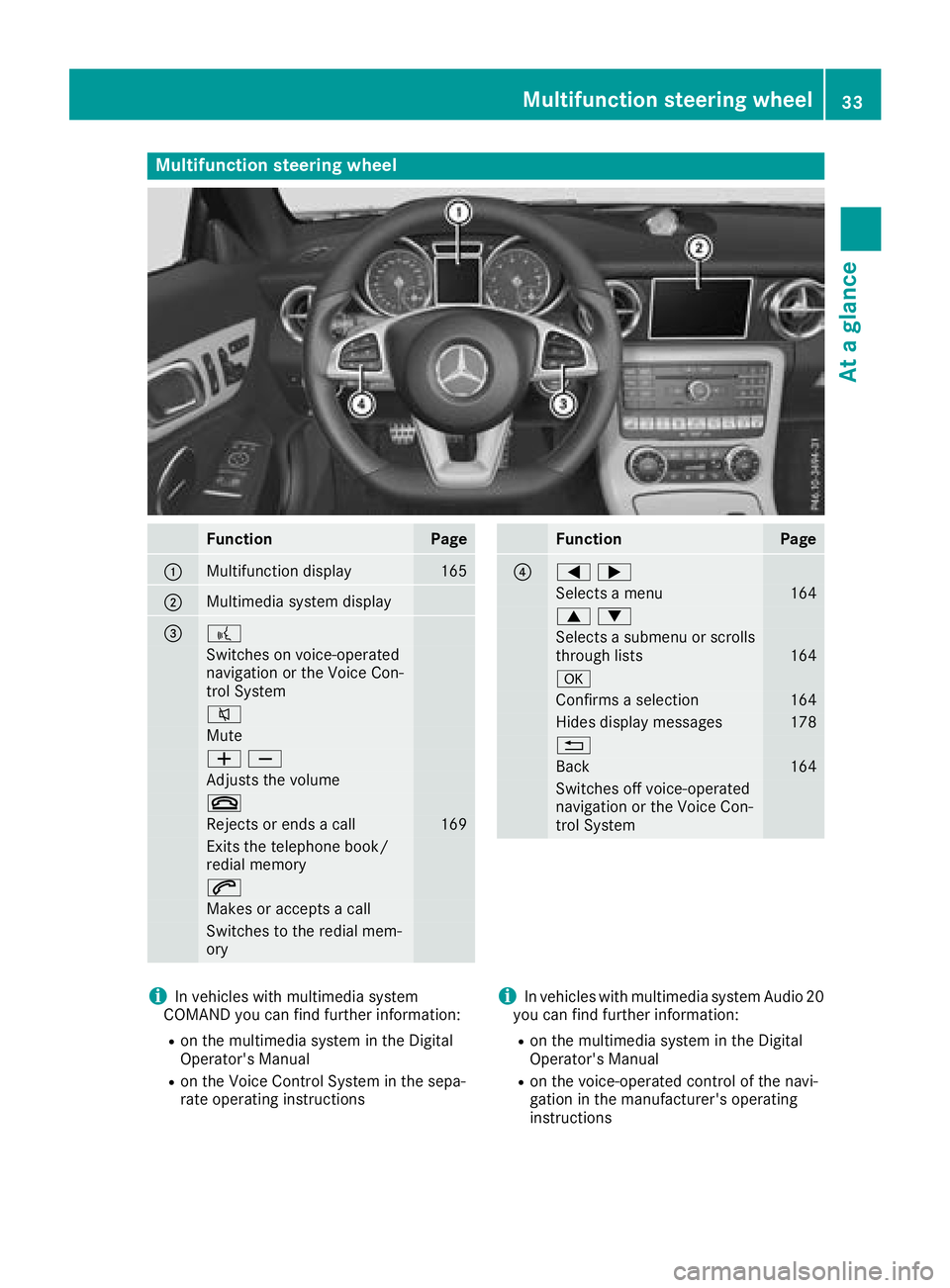
Multifunction steering wheel
FunctionPage
:Multifunction display165
;Multimediasystem display
=?
Switches on voice-operated
navigation or the Voice Con-
trol System
8
Mute
WX
Adjusts the volume
~
Rejects or end sacall169
Exits the telephone book/
redia lmemory
6
Makes or accepts acall
Switchestot he redialmem-
ory
FunctionPage
?=;
Selects amenu164
9:
Selects asubmenu or scrolls
through lists164
a
Confirm saselection164
Hides display messages178
%
Back164
Switches off voice-operated
navigation or the Voice Con-
trol System
iIn vehicles with multimedi asystem
COMAND yo ucan find further information:
Ron the multimedi asystem in the Digital
Operator's Manual
Ron the Voice Control System in the sepa-
rate operating instructions
iIn vehicles with multimedi asystem Audio 20
yo uc an find further information:
Ron the multimedi asystem in the Digital
Operator's Manual
Ron the voice-operated control of the navi-
gation in the manufacturer'so perating
instructions
Multifunctions teering wheel33
Atag lance
Page 66 of 298
engine can be started by anyone withavalid
SmartKey that is left inside the vehicle.
iThe immobilizer is alwaysd eactivated when
you start the engine.
In the event that the engine cannot be started
(yet the vehicle's batter yischarged), the sys-
tem is not operational. Contac tanauthorized
Mercedes-Benz Center or call
1-800-FOR-MERCedes (in the USA)o r
1-800-387-0100 (in Canada).
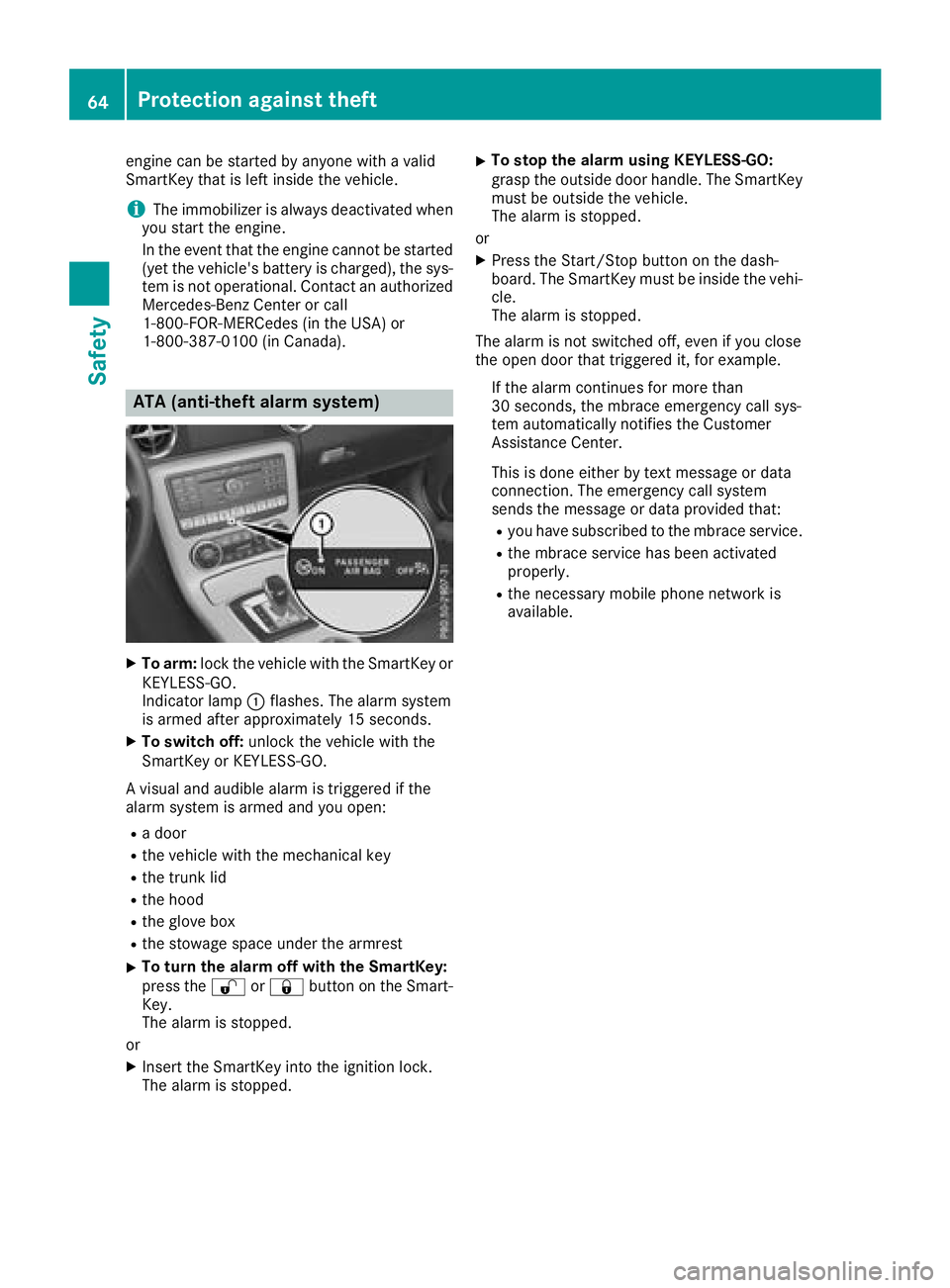
ATA (anti-theft alarms ystem)
XTo arm:lock the vehicle with the SmartKey or
KEYLESS-GO.
Indicator lamp :flashes. The alarm system
is armed after approximately 15 seconds.
XTo switch off: unlock the vehicle with the
SmartKey or KEYLESS-GO.
Av isual and audible alarm is triggered if the
alarm system is armed and you open:
Rad oor
Rthe vehicle with the mechanical key
Rthe trun klid
Rthe hood
Rthe glove box
Rthe stowage space under the armrest
XTo tur nthe alarmo ff with the SmartKey:
press the %or& button on the Smart-
Key.
The alarm is stopped.
or
XInsertt he SmartKey into the ignition lock.
The alarm is stopped.
XTo stop the alarmu sing KEYLESS-GO:
grasp the outside door handle. The SmartKey
must be outside the vehicle.
The alarm is stopped.
or
XPress the Start/Stop button on the dash-
board. The SmartKey must be inside the vehi-
cle.
The alarm is stopped.
The alarm is not switched off, even if you close
the open door that triggered it, for example.
If the alarm continues for more than
30 seconds, the mbrace emergency call sys-
tem automatically notifies the Customer
Assistance Center.
This is done either by tex tmessage or data
connection. The emergency call system
sends the message or data provided that:
Ryou have subscribed to the mbrace service.
Rthe mbrace serviceh as been activated
properly.
Rthe necessary mobile phone network is
available.
64Protection against theft
Safety
Page 67 of 298
SmartKey
Important safety notes
GWARNING
If children are left unsupervised in the vehicle,
they could:
Roperate the vehicle's equipment.
Additionally, children could set the vehicle in
motion if, for example, they:
Rrelease the parking brake
Rshift the automatic transmission out of park
position P
Rstart the engine
There is arisk of an accident and injury.
Never leave children or animals unattended in
the vehicle.
When leaving the vehicle, always take the
SmartKey with you and lock the vehicle. This
also appliestom obile phones if the "Digital
Car Key in smartphone" function is activated
via the Mercedes me connect web app.
GWARNING
If you attach heavy or large object stothe
SmartKey, the SmartKey could be uninten-
tionally turned in the ignition lock. This could
cause the engine to be switched off. There is a risk of an accident.
Do not attach any heavy or large object stothe
SmartKey. Remove any bulky key rings before
insertingt he SmartKey into the ignition lock.
!Keep the SmartKey away from stron gmag-
netic fields. Otherwise, the remote control
function could be affected.
Strong magnetic fields can occur in the vicin-
ity of powerful electrical installations.
Do not keep the SmartKey:
Rwith electronic devices, e.g. amobile phone
or another SmartKey
Rwith metallic objects, e.g. coins or metal foil
Rinside metallic objects, e.g. ametal case
This can affect the functionality of the Smart- Key.
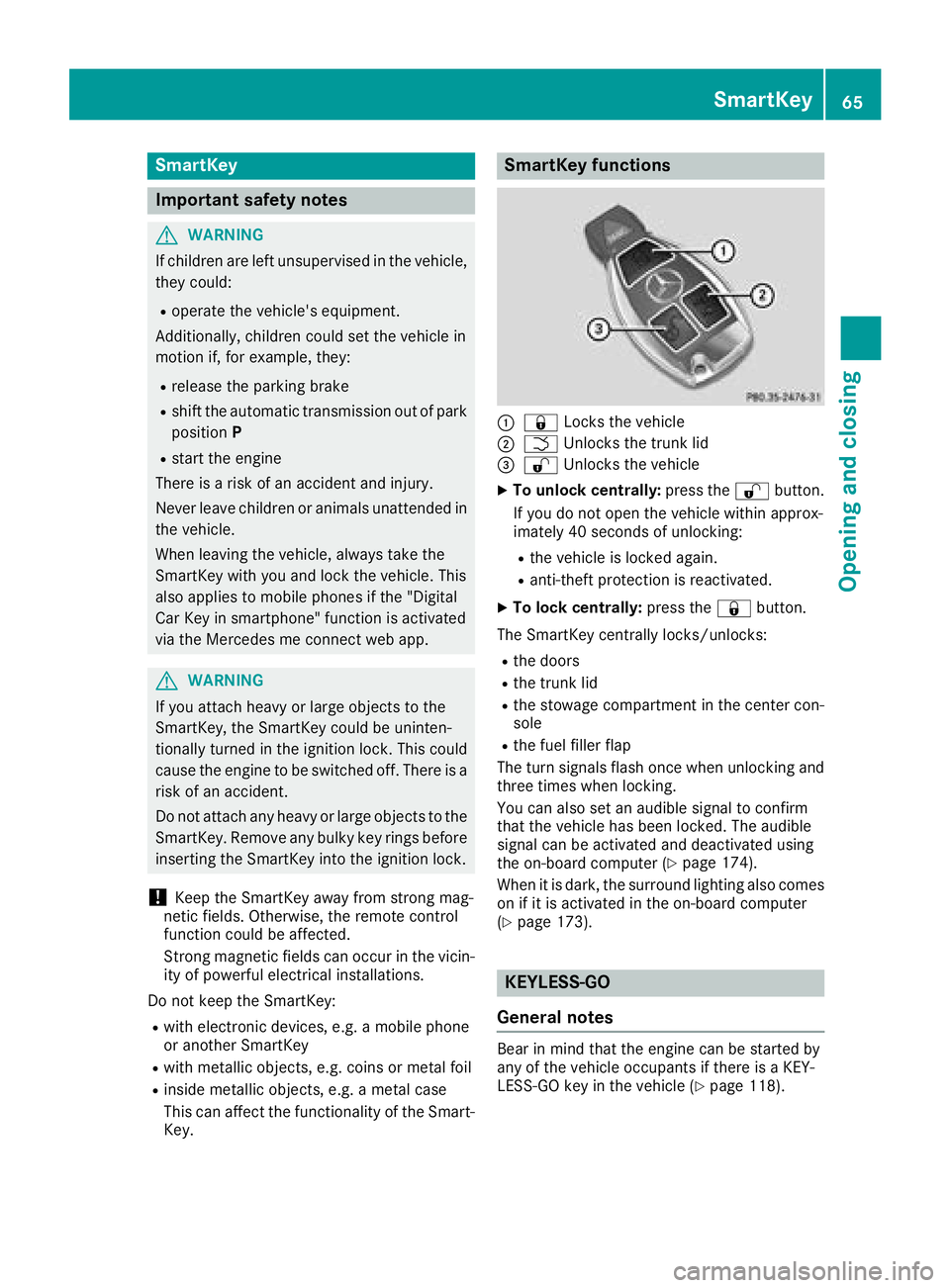
SmartKey functions
:& Locks the vehicle
;FUnlockst he trunk lid
=%Unlockst he vehicle
XTo unlock centrally: press the%button.
If you do not open the vehicle within approx-
imately 40 seconds of unlocking:
Rthe vehicle is locked again.
Ranti-theft protection is reactivated.
XTo lock centrally: press the&button.
The SmartKey centrally locks/unlocks:
Rthe doors
Rthe trunk lid
Rthe stowage compartmentint he center con-
sole
Rthe fuel filler flap
The turn signals flash once when unlocking and
three times when locking.
You can also set an audible signal to confirm
that the vehicle has been locked. The audible
signal can be activated and deactivated using
the on-board computer (
Ypage 174).
When it is dark, the surround lighting also comes
on if it is activated in the on-board computer
(
Ypage 173).
KEYLESS-GO
General notes
Bear in mind that the engine can be started by
any of the vehicle occupants if there is aKEY-
LESS-GO key in the vehicle (
Ypage 118).
SmartKey65
Opening and closing
Z
Page 73 of 298
When leaving the vehicle, alwaystake the
SmartKey with you and lock the vehicle. This
also applies to mobile phones if the "Digital
Car Key in smartphone" function is activated
via the Mercedes me connect web app.
Unlocking and opening doors from
the inside
!
The side windows will not open/close if the
batter yisdischarged or if the side windows
have iced up. It will then not be possible to
close the door. Do not attempt to forcet he
door closed. You could otherwise damage the door or the side window.
You can open adoor from inside the vehicle
even if it has been locked.
If the vehicle has previously been locked from
the outside, opening adoor from the inside will
trigger the anti-theft alarm system. Switc hoff
the alarm (
Ypage 64).
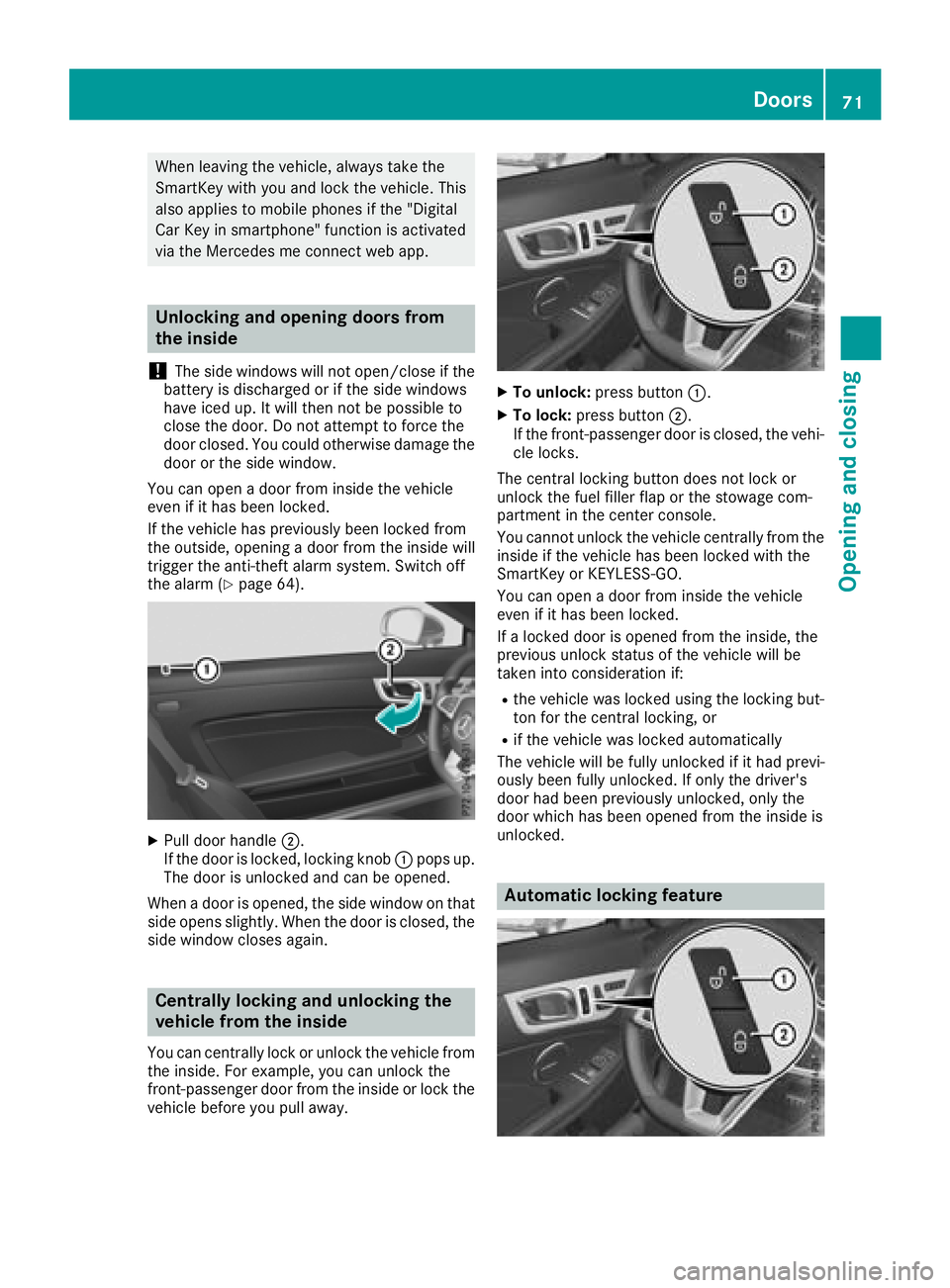
XPull door handle ;.
If the door is locked, lockingk nob: pops up.
The door is unlocked and can be opened.
When adoor is opened, the side window on that
side opens slightly. When the door is closed, the
side window closes again.
Centrally locking and unlocking the
vehicle from the inside
You can centrally lock or unlock the vehicle from
the inside. For example, you can unlock the
front-passenger door from the inside or lock the
vehicle before you pull away.
XTo unlock: press button :.
XTo lock:press button ;.
If the front-passenger door is closed, the vehi-
cle locks.
The central lockingb utton does not lock or
unlock the fuel filler flap or the stowage com-
partmen tinthe center console.
You cannot unlock the vehicle centrally from the
inside if the vehicle has been locked with the
SmartKey or KEYLESS-GO.
You can open adoor from inside the vehicle
even if it has been locked.
If al ocked door is opened from the inside, the
previous unlock status of the vehicle will be
taken into consideration if:
Rthe vehicle was locked using the lockingb ut-
ton for the central locking, or
Rif the vehicle was locked automatically
The vehicle will be fully unlocked if it had previ-
ously been fully unlocked. If only the driver's
door had been previously unlocked, only the
door which has been opened from the inside is
unlocked.
Automatic locking feature
Doors71
Opening and closing
Z