phone MERCEDES-BENZ SLC ROADSTER 2018 User Guide
[x] Cancel search | Manufacturer: MERCEDES-BENZ, Model Year: 2018, Model line: SLC ROADSTER, Model: MERCEDES-BENZ SLC ROADSTER 2018Pages: 298, PDF Size: 5.26 MB
Page 90 of 298
This could result in burns in the immediate
vicinityofthe air vents. There is arisk of injury.
Reduce the heater output before it becomes
too hot.
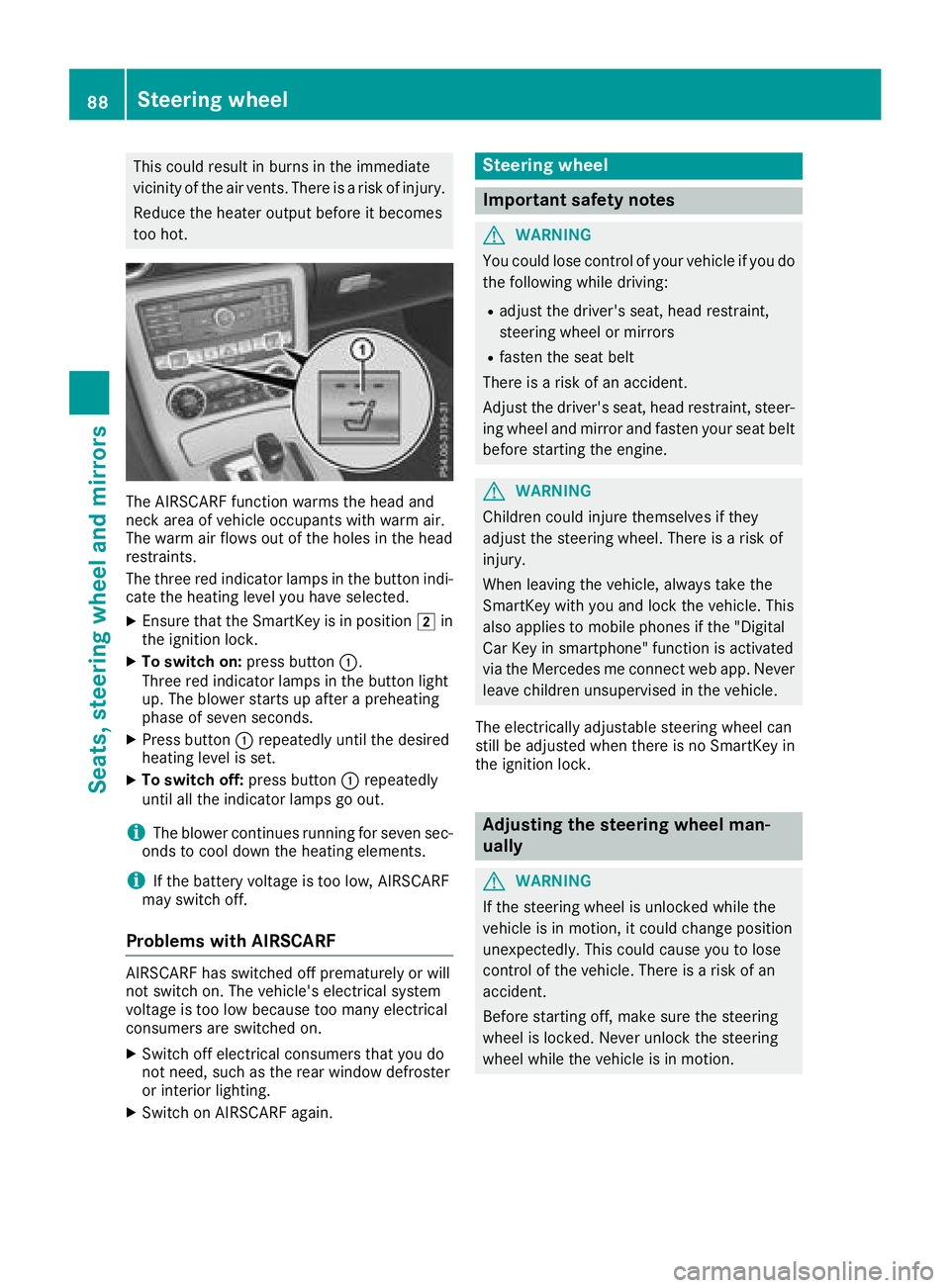
The AIRSCARF function warms the head and
neck area of vehicle occupantsw ith warm air.
The warm air flows out of the holes in the head
restraints.
The three red indicator lamps in the button indi-
cate the heating level you have selected.
XEnsure that the SmartKey is in position 2in
the ignition lock.
XTo switch on: press button:.
Three red indicator lamps in the button light
up. The blower start supafterapreheating
phase of seven seconds.
XPress button :repeatedly until the desired
heating level is set.
XTo switch off: press button:repeatedly
until all the indicator lamps go out.
iThe blower continues runnin gfor seven sec-
onds to cool down the heating elements.
iIf the battery voltage is too low, AIRSCARF
may switch off.
Problems with AIRSCARF
AIRSCARF has switched off prematurely or will
not switch on. The vehicle's electrical system
voltage is too low because too many electrical
consumersa re switched on.
XSwitch off electrical consumer sthat you do
not need, such as the rear window defroster
or interior lighting.
XSwitch on AIRSCARF again.
Steering wheel
Important safety notes
GWARNING
You could lose control of your vehicle if you do the following while driving:
Radjust the driver's seat, head restraint,
steerin gwheel or mirrors
Rfasten the seat belt
There is arisk of an accident.
Adjust the driver's seat, head restraint, steer-
ing wheel and mirror and fasten your seat belt before starting the engine.
GWARNING
Children could injure themselves if they
adjust the steerin gwheel. There is arisk of
injury.
When leaving the vehicle, alwayst ake the
SmartKey with you and lock the vehicle. This
also applies to mobile phones if the "Digital
Car Key in smartphone" function is activated
via the Mercedes me connect web app. Never leave children unsupervised in the vehicle.
The electrically adjustable steerin gwheel can
still be adjusted when there is no SmartKey in
the ignition lock.
Adjusting the steering wheel man-
ually
GWARNING
If the steerin gwheel is unlocked while the
vehicle is in motion,itc ould change position
unexpectedly. This could cause you to lose
control of the vehicle. There is arisk of an
accident.
Before starting off, make sure the steering
wheel is locked. Never unlock the steering
wheel while the vehicle is in motion.
88Steering wheel
Seats, steering wheel and mirrors
Page 95 of 298
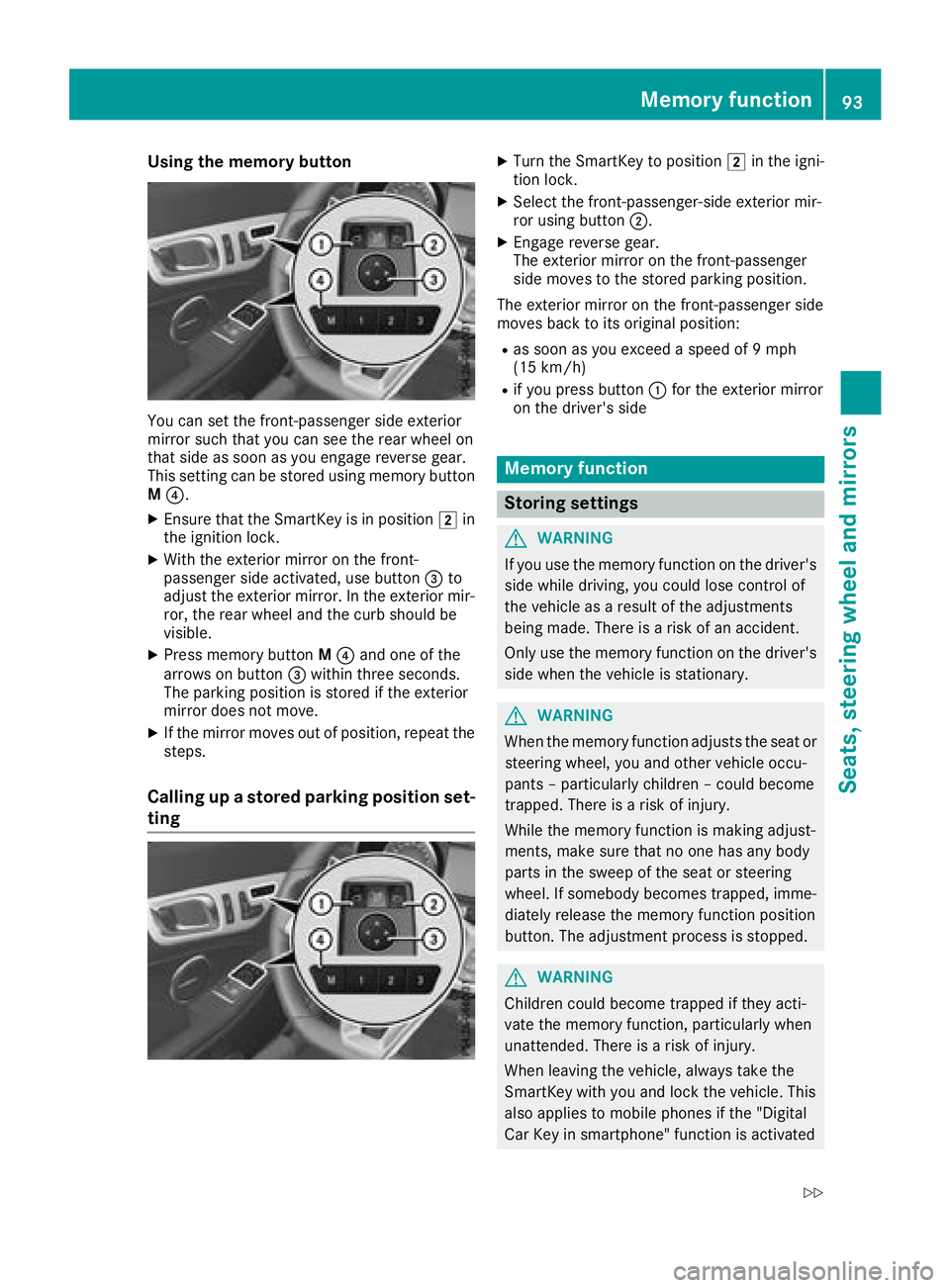
Using the memory button
You can set the front-passenger side exterior
mirror such that you can see the rear wheel on
that side as soon as you engage reverse gear.
This setting can be stored using memorybutton
M ?.
XEnsure that the SmartKey is in position 2in
the ignition lock.
XWith the exterior mirror on the front-
passenger side activated, use button =to
adjust the exterior mirror.Int he exterior mir-
ror, the rear wheel and the curb should be
visible.
XPress memoryb uttonM? and one of the
arrows on button =within three seconds.
The parkin gposition is stored if the exterior
mirror does not move.
XIf the mirror moves out of position ,repeat the
steps.
Calling up astored parking position set-
ting
XTurn the SmartKey to position 2in the igni-
tion lock.
XSelec tthe front-passenger-side exterior mir-
ror using button ;.
XEngage reverse gear.
The exterior mirror on the front-passenger
side moves to the stored parkin gposition.
The exterior mirror on the front-passenger side
moves back to its original position:
Ras soon as you exceed aspeed of 9mph
(15 km/h)
Rif you press button :for the exterior mirror
on the driver'ss ide
Memoryfunction
Storing settings
GWARNING
If you use the memoryf unction on the driver's
side while driving, you could lose contro lof
the vehicle as aresult of the adjustments
being made. There is arisk of an accident.
Only use the memoryf unction on the driver's
side when the vehicle is stationary.
GWARNING
When the memoryf unction adjuststhe seat or
steering wheel, you and other vehicle occu-
pant s–p articularly children –could become
trapped. There is arisk of injury.
While the memoryf unction is makingadjust-
ments, make sure that no one has any body
parts in the sweep of the seat or steering
wheel. If somebody becomes trapped, imme-
diately release the memoryf unction position
button. The adjustment proces sisstopped.
GWARNING
Children could become trapped if they acti-
vate the memoryf unction,particularly when
unattended. There is arisk of injury.
When leaving the vehicle, always tak ethe
SmartKey with you and lock the vehicle. This
also applies to mobile phones if the "Digital
Car Key in smartphone" function is activated
Memor yfunction93
Seats, steering wheel and mirrors
Z
Page 118 of 298
Where possible, avoid spinningthe drive
wheels when pulling away on slippery roads.
You could otherwise damage the drive train.
Key positions
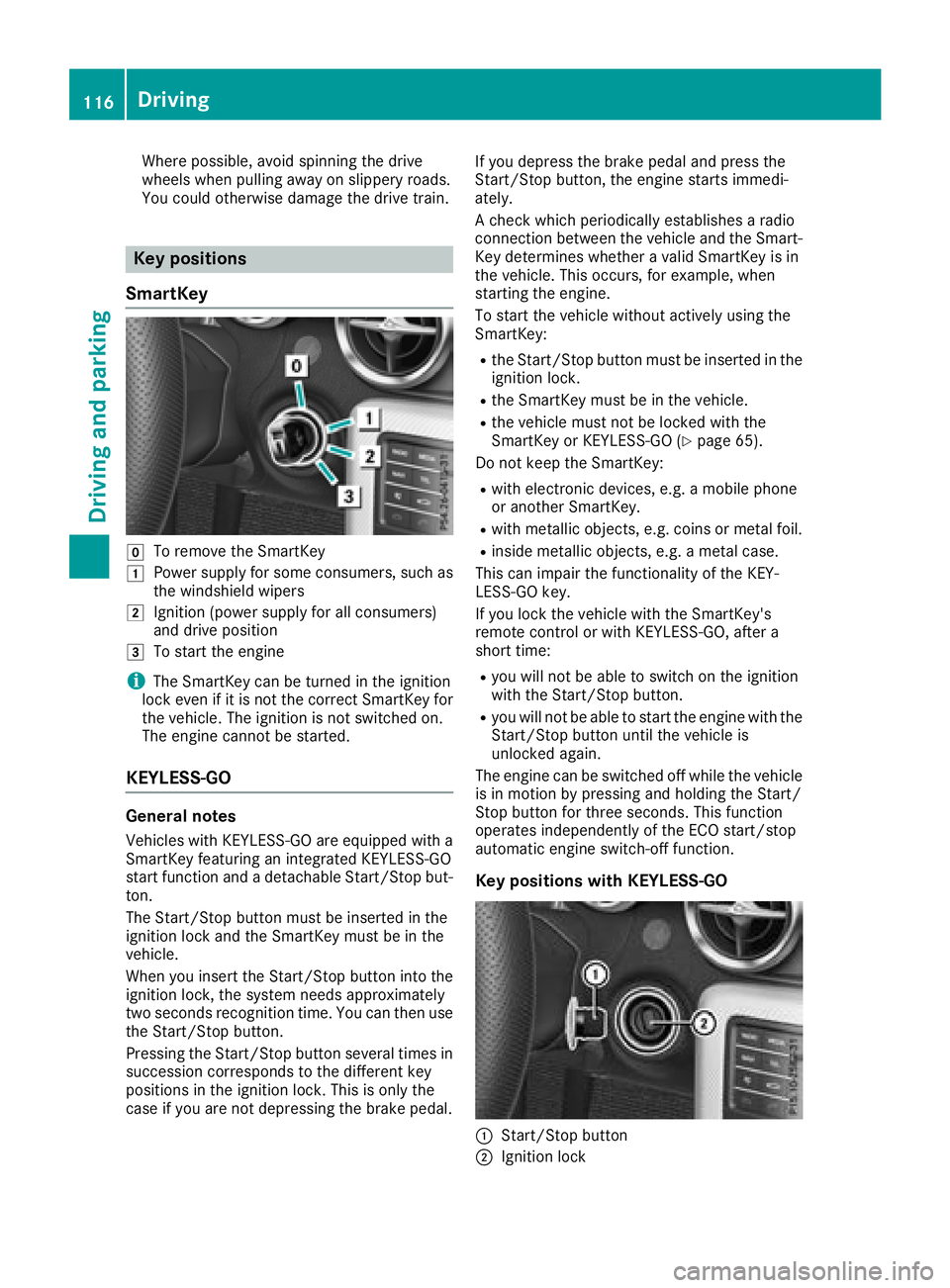
SmartKey
gTo remove the SmartKey
1Power supply for some consumers, such as
the windshield wipers
2Ignition (power supply for all consumers)
and drive position
3To start the engine
iThe SmartKey can be turned in the ignition
lock even if it is not the correct SmartKey for
the vehicle. The ignition is not switched on.
The engine cannot be started.
KEYLESS-GO
General notes
Vehicles with KEYLESS-GO are equipped with a
SmartKey featuring an integrated KEYLESS-GO
start function and adetachable Start/Stop but-
ton.
The Start/Stop button must be inserted in the
ignition lock and the SmartKey must be in the
vehicle.
When you insert the Start/Stop button into the
ignition lock, the system needs approximately
two seconds recognition time. You can then use
the Start/Stop button.
Pressing the Start/Stop button several times in
succession corresponds to the differentk ey
positions in the ignition lock. This is only the
case if you are not depressing the brake pedal. If you depress the brake pedal and press the
Start/Stop button
,the engine start simmedi-
ately.
Ac heck which periodically establishes aradio
connection between the vehicle and the Smart-
Key determines whether avalid SmartKey is in
the vehicle. This occurs,f or example, when
starting the engine.
To start the vehicle without actively using the
SmartKey:
Rthe Start/Stop button must be inserted in the
ignition lock.
Rthe SmartKey must be in the vehicle.
Rthe vehicle must not be locked with the
SmartKey or KEYLESS-GO (Ypage 65).
Do not keep the SmartKey:
Rwith electronic devices, e.g. amobile phone
or another SmartKey.
Rwith metallic objects, e.g. coins or metal foil.
Rinside metallic objects, e.g. ametal case.
This can impair the functionality of the KEY-
LESS-GO key.
If you lock the vehicle with the SmartKey's
remotec ontrol or with KEYLESS-GO, after a
short time:
Ryou will not be able to switch on the ignition
with the Start/Stop button.
Ryou will not be able to start the engine with the
Start/Stop button until the vehicle is
unlocked again.
The engine can be switched off while the vehicle
is in motion by pressing and holding the Start/
Stop button for three seconds. This function
operates independently of the ECO start/stop
automatic engine switch-off function.
Key positions with KEYLESS-GO
:Start/Stop button
;Ignition lock
116Driving
Driving and parking
Page 119 of 298
As soonasthe ignition is switched on, al lthe
indicator lamps in the instrument cluster light
up .Further informatio nonsituations where an
indicator lamp either fails to go outa fterstarting
the engine or lights up whil edriving
(
Ypage 204).
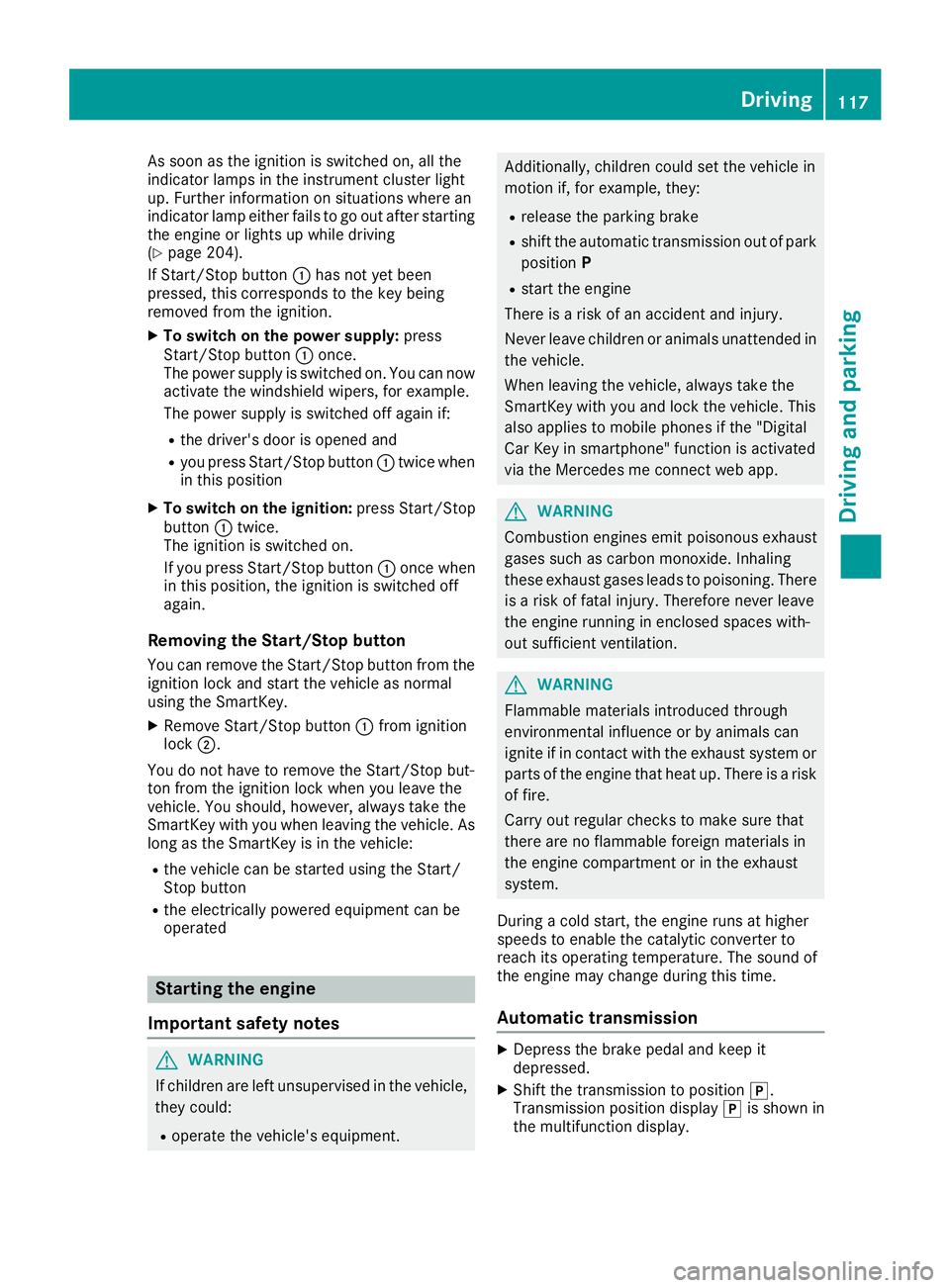
If Start/Stop button :hasn ot yetbeen
pressed, thisc orrespondstot he key being
removedf rom the ignition.
XTo switchonthe power supply: press
Start/Stop button :once.
The powe rsuppl yiss witched on. Yo ucan now
activate the windshield wipers, for example.
The powe rsuppl yiss witched off agai nif:
Rthe driver's door is opene dand
Ryoup ress Start/Stop button :twice when
in thisp osition
XTo switc honthe ignition: press Start/Stop
button :twice.
The ignition is switched on.
If yo upress Start/Stop button :once when
in thisp osition, the ignition is switched off
again.
Removing the Start/Stopb utton
Youc an remove the Start/Stop button from the
ignition lock and start the vehicl easnormal
using the SmartKey.
XRemove Start/Stop button :from ignition
lock ;.
Yo udon ot have to remove the Start/Stop but-
ton from the ignition lock when yo uleave the
vehicle. Yo ushould, however, always take the
SmartKeyw ithy ou when leaving the vehicle. As
long as the Sma rtKey
isint
he vehicle:
Rthe vehiclecan be started using the Start/
Stop button
Rthe electrically powered equipment can be
operated
Starting the engine
Important safety notes
GWARNING
If children ar eleftu nsupervised in the vehicle,
they could:
Roperate the vehicle's equipment.
Additionally, children could set the vehicl ein
motion if, for example, they:
Rrelease the parking brake
Rshift the automatic transmission outofp ark
position P
Rstart the engine
There is ariskofana ccident and injury.
Never leav echildren or animals unattended in
the vehicle.
Whe nleavi ng the vehicle, always take the
SmartKeyw ithy ou and lock the vehicle. This
also applie stomobilephones if the "Digital
Ca rK ey in smartphone"f unctio nisa ctivated
via the Mercedes me connect we bapp.
GWARNING
Combustion engine semitp oiso nousexhaust
gases such as carbo nmonoxide. Inhaling
thes eexhaus tgases lead stopoisoning. There
is ar iskoff atalinjury.T herefore neve rleave
the engine running in enclose dspaces with-
outs ufficient ventilation.
GWARNING
Flammabl ematerial sintroduced through
environmentali nfluence or by animals can
ignite if in contact with the exhaus tsystem or
parts of the engine thath eatu p.There is arisk
of fire.
Carry outr egular checks to make sure that
ther eareno flammabl eforeig nmaterial sin
the engine compartment or in the exhaust
system.
During acolds tart, the engine runs at higher
speed stoenablethe catalytic converter to
reach its operating temperature .The sound of
the engine mayc hange during thist ime.
Automatictransmission
XDepres sthe brake peda land kee pit
depressed.
XShift the transmission to position j.
Transmission positio ndisplay jis shown in
the multifunctio ndisplay.
Driving117
Driving an dparking
Z
Page 125 of 298
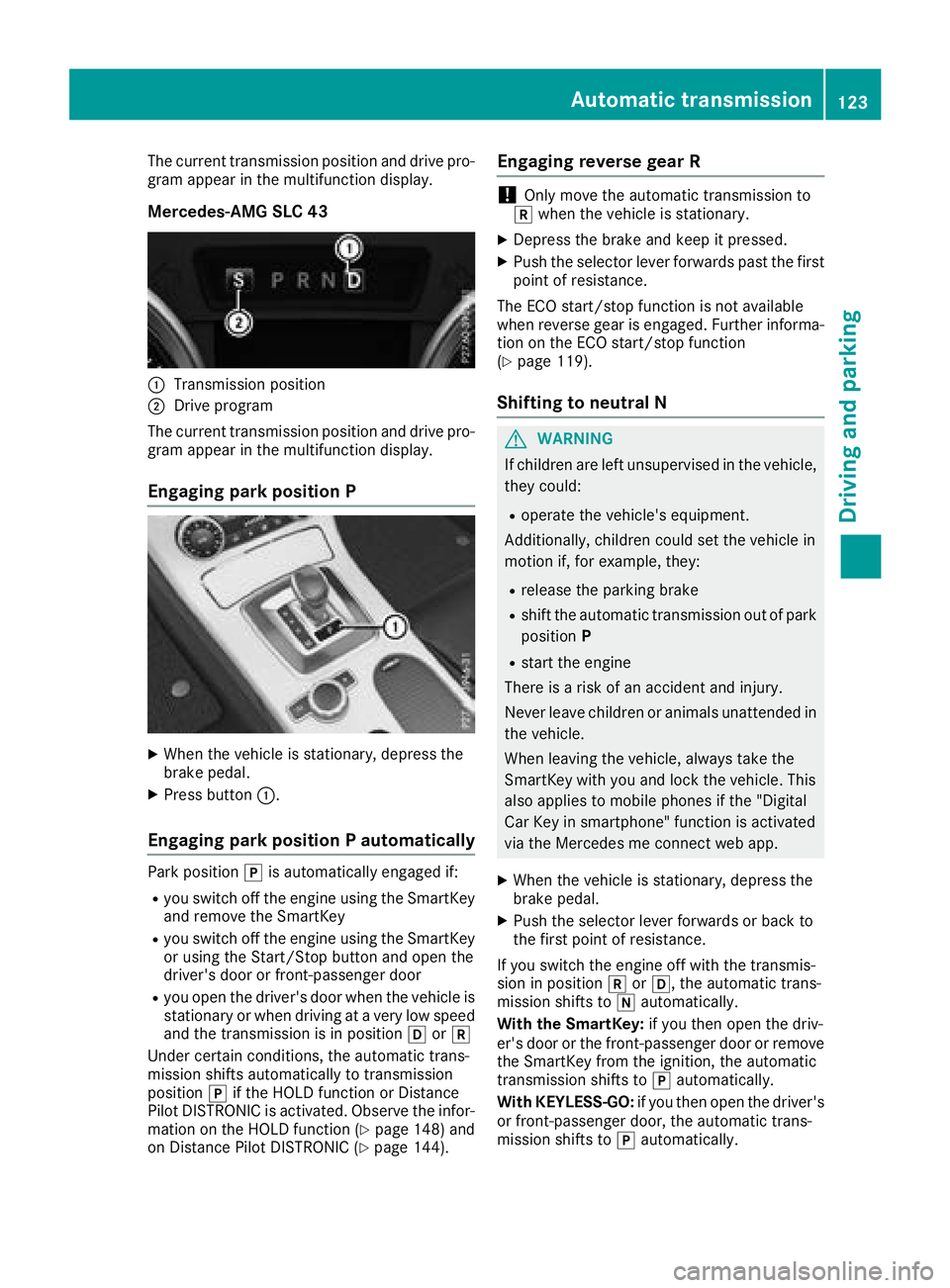
The current transmission position and drive pro-
gram appear in the multifunction display.
Mercedes-AMG SLC 43
:Transmission position
;Drive program
The current transmission position and drive pro-
gram appear in the multifunction display.
Engaging parkp osition P
XWhen the vehicle is stationary, depress the
brake pedal.
XPress button:.
Engaging parkp ositionPautomatically
Park position jis automatically engaged if:
Ryou switch off the engine using the SmartKey
and remove the SmartKey
Ryou switch off the engine using the SmartKey
or using the Start/Stop button and open the
driver's door or front-passenger door
Ryou open the driver's door when the vehicle is
stationary or when driving at avery low speed
and the transmission is in position hork
Under certain conditions, the automatic trans-
mission shifts automatically to transmission
position jif the HOLD function or Distance
Pilot DISTRONIC is activated. Observe the infor-
mation on the HOLD function (
Ypage 148) and
on Distance Pilot DISTRONIC (Ypage 144).
Engaging reverse gear R
!Only move the automatic transmission to
k when the vehicle is stationary.
XDepress the brake and keep it pressed.
XPush the selector lever forwards past the first
point of resistance.
The ECO start/sto pfunction is not available
when reverse gear is engaged. Further informa-
tion on the ECO start/sto pfunction
(
Ypage 119).
Shifting to neutral N
GWARNING
If children are left unsupervised in the vehicle,
they could:
Roperate the vehicle's equipment.
Additionally, children could set the vehicle in
motion if, for example, they:
Rrelease the parking brake
Rshift the automatic transmission out of park
position P
Rstart the engine
There is arisk of an accident and injury.
Never leave children or animals unattended in
the vehicle.
When leaving the vehicle, alwayst ake the
SmartKey with you and lock the vehicle. This
also applies to mobile phones if the "Digital
Car Key in smartphone" function is activated
via the Mercedes me connect web app.
XWhen the vehicle is stationary, depress the
brake pedal.
XPush the selector lever forwards or back to
the first point of resistance.
If you switch the engine off with the transmis-
sion in position korh,t he automatic trans-
mission shifts to iautomatically.
With the SmartKey: if you then open the driv-
er's door or the front-passenger door or remove
the SmartKey from the ignition, the automatic
transmission shifts to jautomatically.
With KEYLESS-GO: if you then open the driver's
or front-passenger door, the automatic trans-
mission shifts to jautomatically.
Automatic transmission123
Driving and parking
Z
Page 136 of 298
Drivingtips
General notes
Important safet ynotes
GWARNING
If you switch of fthe ignition whil edriving,
safety-relevant function sare only available
wit hlimitations, or no tatall. Thi scould affect,
fo re xample, th epowe rsteerin gand th ebrake
boostin geffect. You will require considerably
more effort to steer and brake .There is arisk
of an accident.
Do no tswitch of fthe ignition whil edriving.
GWARNING
If you operat emobile communication equip -
men twhen driving, you may be distracted
from th etraffic situation .You could also los e
contro lofthevehicle. There is ariskofa n
accident.
Only operat ethise quipmen twhen th evehicle
is stationary.
Observ ethe lega lrequirements fo rthe country
in whic hyou are driving. Some jurisdiction spro-
hibi tthe driver from usin gamobile phone whil e
drivin gavehicle.
If you mak eacallw hiled riving, always use
hands-free mode. Only operat ethe telephon e
when th etraffic situation permits. If you are
unsure ,pull over to asafel ocation and stop
befor eoperatin gthe telephone.
Bear in min dthatatas peed of only 30 mph
(approximately 50 km/h), th evehicle cover sa
distanc eof44f t(approximately 14 m)per sec-
ond.
Drive sensibly –save fuel
Observe the following tips to save fuel:
RThe tires should always be inflated to the rec-
ommended tire pressure.
RRemove unnecessary loads.
RWarm up the engin eatlow engin espeeds.
RAvoid frequenta cceleration or braking.
RObserve the servicei ntervals in the Mainte-
nanc eBooklet or in the servicei nterval dis-play. Have all the maintenanc
ework carried in
accordance with Daimler AG regulations.
Fuel consumption also increases when driving in cold weather, in stop-start traffic and in hilly ter-
rain.
Drinking and driving
GWARNING
Drinkin gand driving and/or takin gdrugs and
driving are very dangerous combinations.
Even asmall amount of alcohol or drugs can
affect your reflexes, perceptions and judg-
ment.
The possibility of aserious or even fatal acci-
dent is greatly increased when you drink or
take drugs and drive.
Do not drink or take drugs and drive or allow
anyone to drive who has been drinking or tak-
ing drugs.
Emission control
GWARNING
Combustion engines emit poisonous exhaust
gases such as carbon monoxide. Inhaling
these exhaust gases leads to poisoning. There
is ar isk of fatal injury. Thereforen ever leave
the engin erunning in enclosed spaces with-
out sufficientv entilation.
Certain engin esystems are designed to keep
the level of poisonous component sinexhaust
fumes within legal limits.
These systems only work at peak efficiency if
they are serviced exactly in accordance with the
manufacturer's specifications .Always have
work on the engin ecarried out at aqualified
specialist workshop. Mercedes-Benz recom-
mends that you use an authorized Mercedes-
BenzC enter for this purpose. In particular, work
relevant to safety or on safety-related systems
must be carried out at aqualified specialist
workshop.
The engin esettings must not be changed under
any circumstances. Furthermore, all specific
servicew ork must be carried out at regular
intervals and in accordance with the Mercedes-
Benzs ervicer equirements. Details can be found
in the Maintenance Booklet.
134Driving tips
Driving and parking
Page 160 of 298
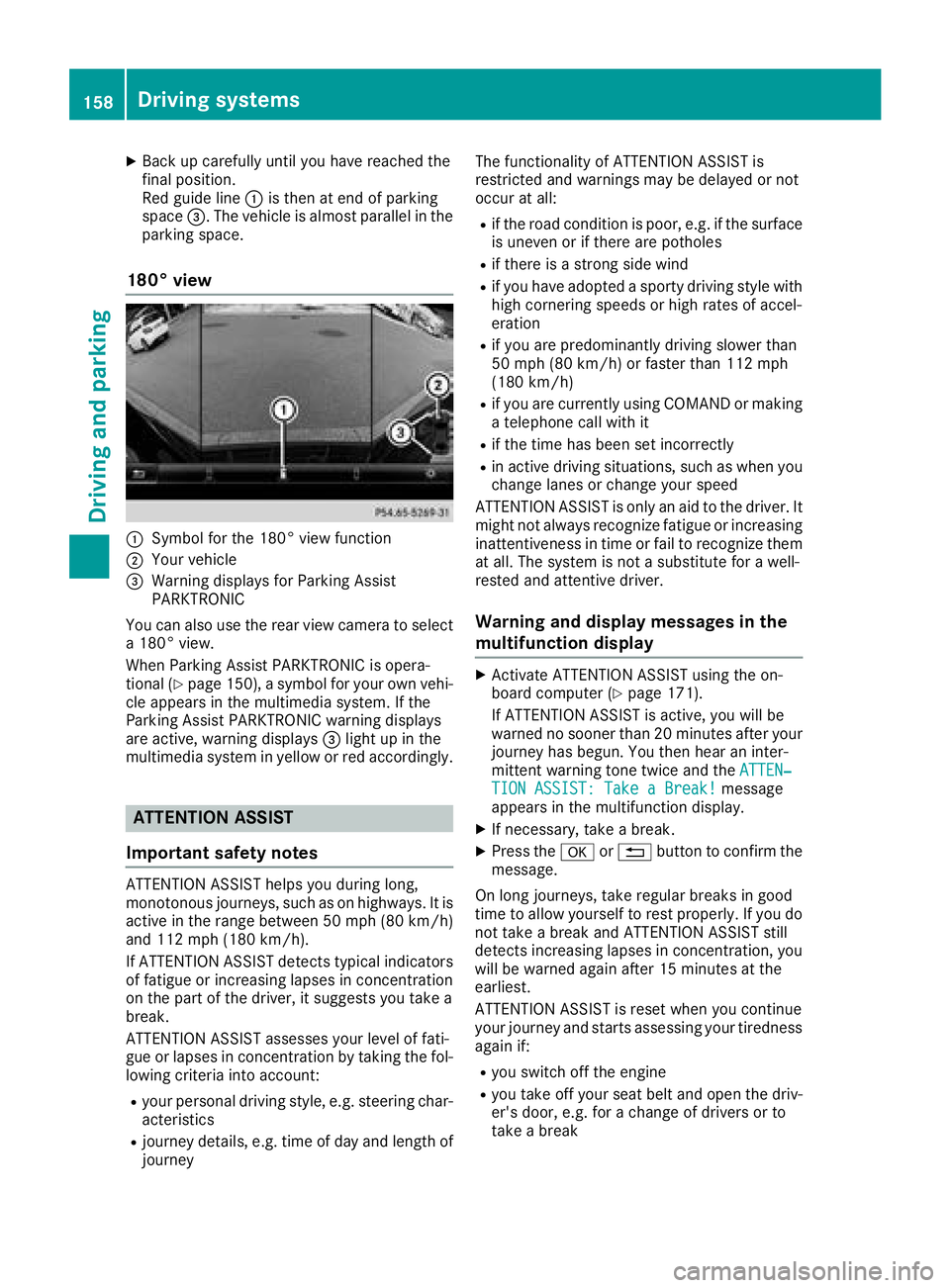
XBack up carefully untilyouhav ereached the
fina lposition.
Re dg uide line:is then at end of parking
space =.The vehicle is almost parallel in the
parking space.
180°v iew
:Symbol for the 180° vie wfunction
;You rvehicle
=Warning display sfor Parking Assist
PARKTRONIC
You can also use the rearv iewc amera to select
a1 80° view.
WhenP arking Assist PARKTRONIC is opera-
tiona l(
Ypage 150), asym bol for your own vehi-
cle appears in the multimedia system. If the
Parking Assist PARKTRONIC warning displays
are active, warning displays =light up in the
multimedia system in yellow or red accordingly.
ATTENTION ASSIST
Important safety notes
ATTENTION ASSIST helps yo uduring long,
monotonous journeys, such as on highways .Itis
active in the rang ebetween 50 mph (80 km/h)
and 112 mph (180 km/h).
If ATTENTION ASSIST detects typica lindicators
of fatigueori ncreasing lapsesinc oncentration
on the part of the driver, it suggests yo utake a
break.
ATTENTION ASSIST assesses your level of fati-
gueorl apsesinc oncentration by taking the fol-
lowing criteria into account:
Ryour personald riving style, e.g. steering char-
acteristics
Rjourney details, e.g. time of daya nd length of
journey The functionality of ATTENTION ASSIST is
restricted and warnings may be delayed or not
occurata
ll:
Rif the roadc ondition is poor, e.g. if the surface
is uneven or if there are potholes
Rif there is astrong sid ewind
Rif yo uhavea doptedas porty driving styl ewith
hig hc ornering speeds or hig hrate sofa ccel-
eration
Rif yo uare predominantly driving slowe rthan
50 mph (80 km/h )orfaster than 112 mph
(180 km/h)
Rif yo uare currently using COMAND or making
at elephone cal lwithi t
Rif the time has bee nset incorrectly
Rin active driving situations, such as whe nyou
chang elan es or chang eyours peed
ATTENTION ASSIST is only an ai dtothe driver. It
might not always recognize fatigueori ncreasing
inattentiveness in time or fai ltorecognize them
at all. The system is not asubstitute for awell-
resteda nd attentive driver.
Warningand display messagesint he
multifunctiond isplay
XActivate ATTENTION ASSIST using the on-
board computer (Ypage 171).
If ATTENTION ASSIST is active, yo uwillb e
warned no sooner than 20 minutes afte ryou r
journey has begun. You then hearani nter-
mittent warning tone twice and the ATTEN‐
TION ASSIST: TakeaBreak!message
appears in the multifunction display.
XIf necessary, take abreak.
XPresst hea or% button to confir mthe
message.
On long journeys, take regula rbreaks in good
time to allow yourself to rest properly. If yo udo
not take abreak and ATTENTION ASSIST still
detects increasing lapsesinc oncentration, you
will be warned agai nafter1 5m inutes at the
earliest.
ATTENTION ASSIST is resetw heny ou continue
your journey and starts assessing your tiredness
agai nif:
Ryous witch off the engine
Ryout ake off your seatb elta nd opent he driv-
er's door, e.g. for achang eofd rivers or to
take abreak
158Drivin gsystems
Drivin gand parking
Page 166 of 298
Coolanttemperatur egauge
GWARNING
Opening th ehood when th eengineiso ver-
heated or when there is afireint heengine
compartmen tcoul de xpose you to hot gases
or other servic eproducts. Thereisar isko f
injury.
Let an overheate denginec ooldown before
opening th ehood.Ift here is afireint he
enginec ompartment, keep th ehood closed
and contac tthe fired epartment.
!Ad isplay message is shown if th ecoolant
temperatur eistoohigh.
If th ecoolant temperatur eisover2 48 ‡
(12 0† ), do no tcontinue driving .The engine
will otherwise be damaged.
The coolant temperatur egage is in th einstru-
men tcluste ront heright-hands ide (
Ypage 32).
The Hmarkin ginthecoolant temperatur egauge
corresponds to acoolant temperatur eof
approximately 24 8‡(120† ).
Under normal operatin gconditionsa nd at the
correc tcoolant level, th ecoolant temperature
gauge may ris etotheHmarking.
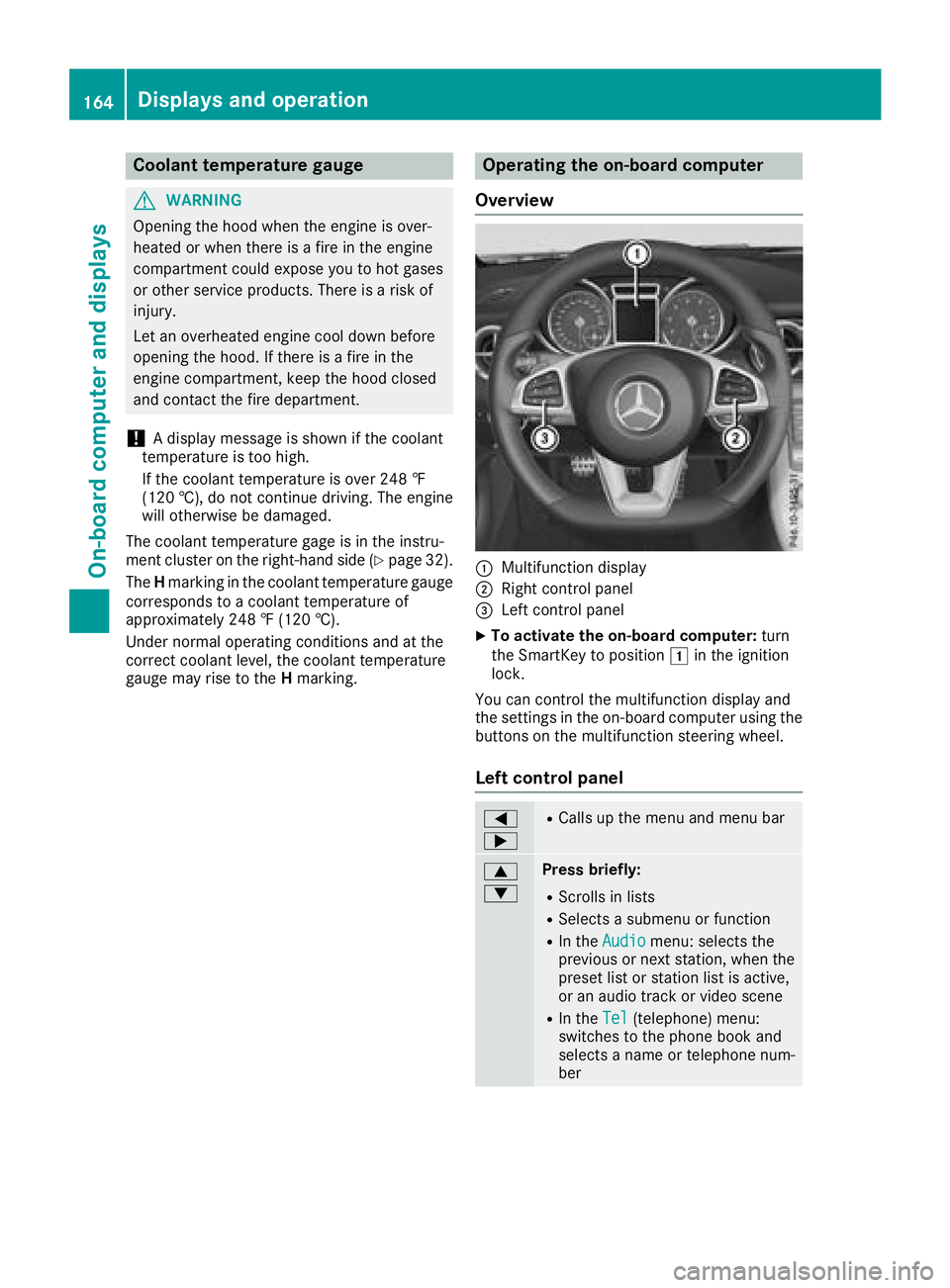
Operatin gthe on-boar dcomputer
Overview
:Multifunction display
;Right control panel
=Leftc ontrol panel
XTo activate th eon-boar dcomputer: turn
th eS martKey to position 1in th eignition
lock.
You can control th emultifunction display and
th es ettings in th eon-board computer usingt he
buttons on th emultifunction steering wheel.
Left control panel
=
;RCalls up th emenua nd men ubar
9
:Press briefly:
RScroll sinlists
RSelect sasubmenuorf unction
RIn theAudiomenu: select sthe
previous or next station, when the
preset list or statio nlist is active,
or an audio track or vide oscene
RIn the Tel(telephone )menu:
switches to th ephoneb ook and
selects anam eort elephone num-
ber
164Displays and operation
On-boardc omputer and displays
Page 167 of 298
9
:Press and hold:
RIn theAudiomenu: selects apre-
set list or astation list in the
desired frequency range, selects
an audio track or video scene using
rapid scrolling
RIn the Tel(Telephone) menu:
starts rapid scrolling if the phone
book is open
aRConfirms the selection or display
message
RIn the Tel(Telephone) menu:
switches to the telephone book
and starts dialing the selected
number
%Press briefly:
RBack
RSwitches off voice-operated con-
trol for navigation or the Voice
Control System
RHides display messages or calls up
the last Tripmenu function used
RExitsthe telephone book/redial
memory
%Press and hold:
RCallsupt he standard display in the
Tripmenu
Right control panel
~RRejects or ends acall
RExitst he telephone book/redial
memory
6RMakes or accepts acall
RSwitches to the redial memory
W
XRAdjusts the volume
8RMute
?RSwitches on voice-operated con-
trol for navigation or the Voice
Control System
You can find further information on voice-oper-
ated control for navigation in the manufactur-
er's operating instructions in vehicles with an
Audio 20 multimedia system. Vehicles with the COMAND multimedia system:
you can find further information on the Voice
Control System in the separate operating
instructions.
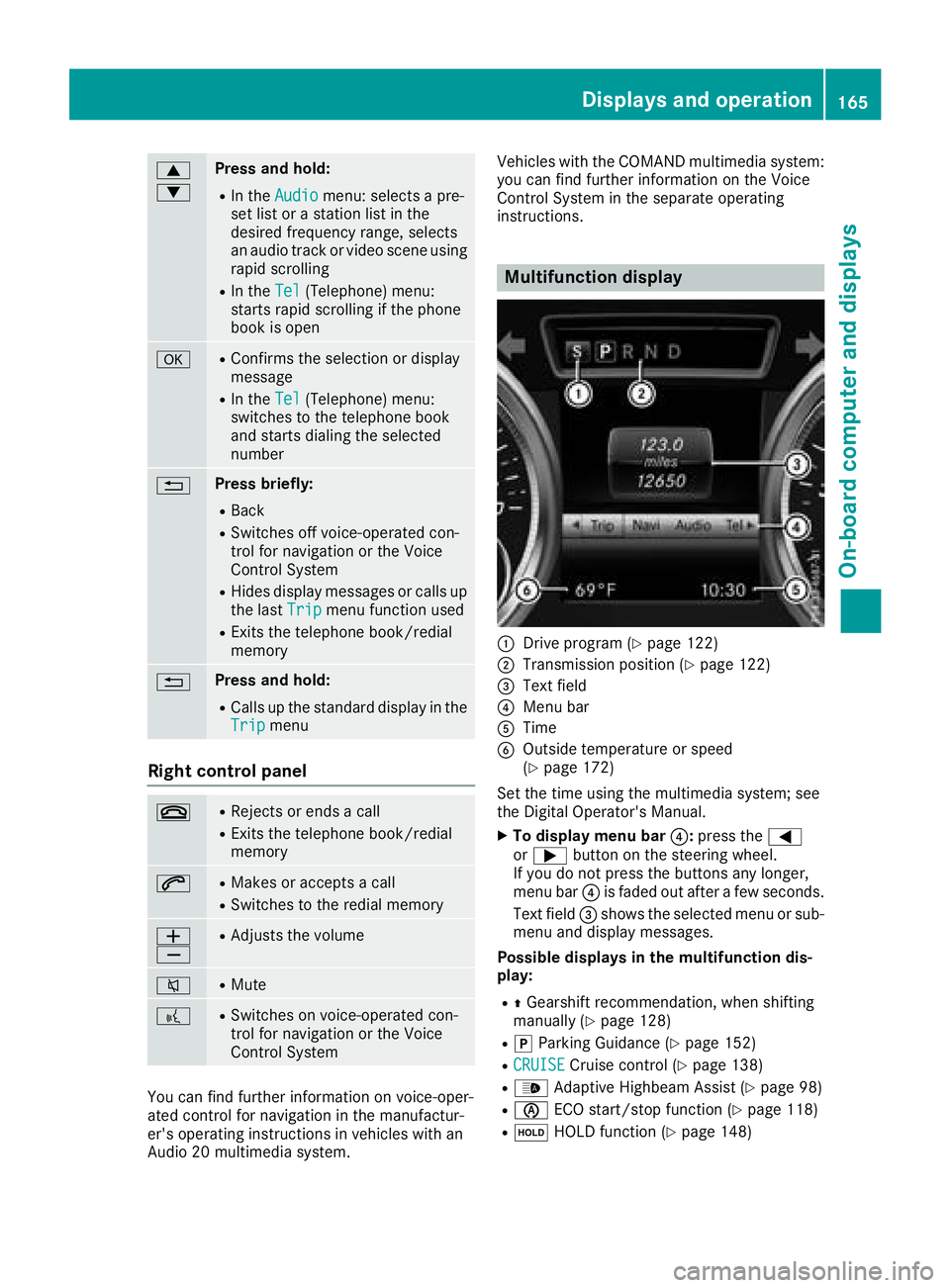
Multifunction display
:Drive program (Ypage 122)
;Transmission position (Ypage 122)
=Text field
?Menu bar
ATime
BOutside temperature or speed
(Ypage 172)
Set the time using the multimedia system; see
the Digital Operator's Manual.
XTo display menu bar ?:press the =
or ; button on the steering wheel.
If you do not press the buttons any longer,
menu bar ?is faded out after afew seconds.
Text field =shows the selected menu or sub-
menu and display messages.
Possible displays in the multifunction dis-
play:
RZ Gearshift recommendation, when shifting
manually (Ypage 128)
Rj Parking Guidance (Ypage 152)
RCRUISECruise control (Ypage 138)
R_ Adaptive Highbeam Assist (Ypage 98)
RèECO start/stop function (Ypage 118)
RëHOLD function (Ypage 148)
Displays and operation165
On-board computer and displays
Z
Page 168 of 298
Menus and submenus
Menu overview
Using the=or; button on the steering
wheel, open the menu bar.
Operating the on-board compute r(
Ypage164).
Depending on the vehiclee quipment, you can
select the following menu:
RTripmenu (Ypage1 66)
RNavimenu (navigatio ninstructions)
(Ypage1 67)
RAudiomenu (Ypage168)
RTelmenu (telephone) (Ypage169)
RDriveAssistmenu (assistance)
(Ypage1 70)
RServ.menu (Ypage171)
RSett.menu (settings) (Ypage172)
RAMGmenu (Mercedes-AMG SLC 43)
(Ypage1 75)
Trip menu
Standard display
XPress and hold the %button on the steer-
ing wheelu ntil theTripmenu with trip odom-
eter :and odometer ;appears.
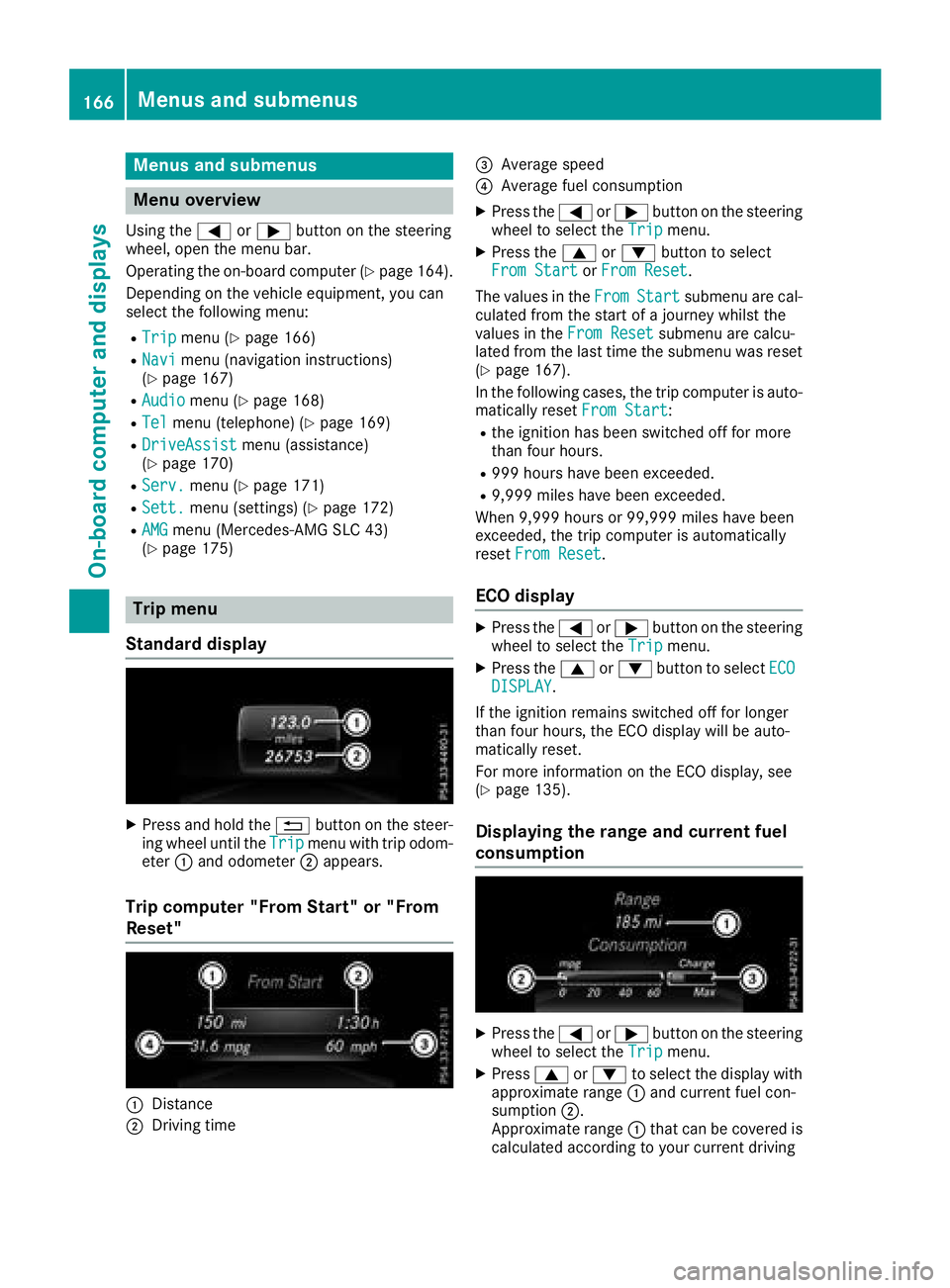
Trip computer "From Start" or "From
Reset"
:Distance
;Driving time
=Average speed
?Average fuel consumption
XPress the =or; button on the steering
wheeltos elect theTripmenu.
XPress the 9or: button to select
From Startor From Reset.
The values in the From
Startsubmenu are cal-
culated from the start of ajourney whilst the
values in the From Reset
submenu are calcu-
lated from the las ttime the submenu was reset
(
Ypage1 67).
In the following cases ,the trip compute risauto-
matically reset From Start
:
Rthe ignitionhas been switched off for more
than four hours.
R999 hour shave bee nexceeded.
R9,999 milesh ave been exceeded.
When 9,999 hours or 99,999 milesh ave been
exceeded, the trip computer is automatically
reset From Reset
.
ECOd isplay
XPress the =or; button on the steering
wheeltos elect theTripmenu.
XPress the 9or: button to select ECODISPLAY.
If the ignitio nremains switched off for longer
than four hours,t he ECO display willbea uto-
matically reset.
For more information on the ECO display ,see
(
Ypag e135).
Displayingt he range and current fuel
consumption
XPress the =or; button on the steering
wheeltos elect theTripmenu.
XPress9or: to select the display with
approximate range :and current fuel con-
sumption ;.
Approximate range :that can be covered is
calculated according to you rcurrent driving
166Menus and submenus
On-board computer and displays