ABS MERCEDES-BENZ SPRINTER 2006 Service Manual
[x] Cancel search | Manufacturer: MERCEDES-BENZ, Model Year: 2006, Model line: SPRINTER, Model: MERCEDES-BENZ SPRINTER 2006Pages: 2305, PDF Size: 48.12 MB
Page 1724 of 2305
OPERATION
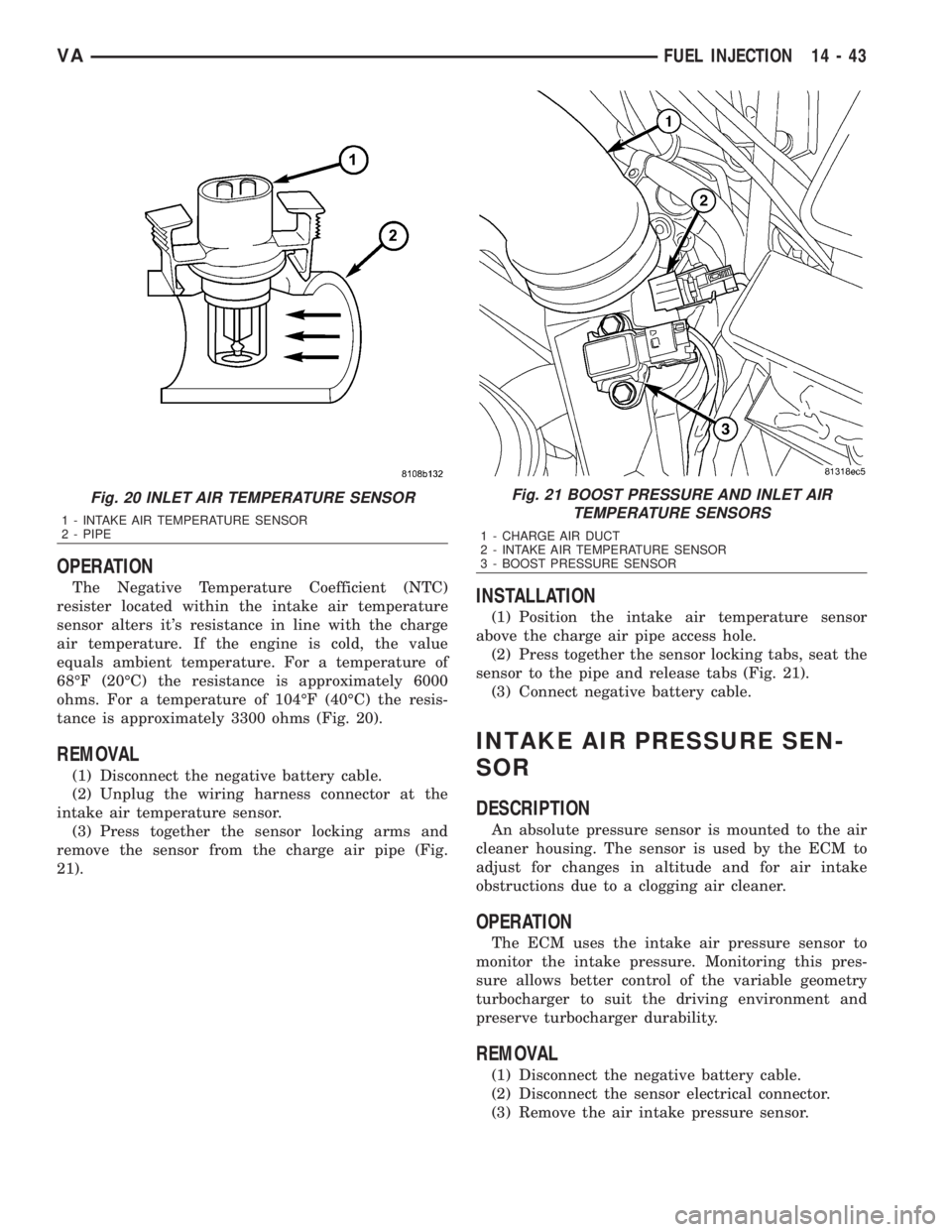
The Negative Temperature Coefficient (NTC)
resister located within the intake air temperature
sensor alters it's resistance in line with the charge
air temperature. If the engine is cold, the value
equals ambient temperature. For a temperature of
68ÉF (20ÉC) the resistance is approximately 6000
ohms. For a temperature of 104ÉF (40ÉC) the resis-
tance is approximately 3300 ohms (Fig. 20).
REMOVAL
(1) Disconnect the negative battery cable.
(2) Unplug the wiring harness connector at the
intake air temperature sensor.
(3) Press together the sensor locking arms and
remove the sensor from the charge air pipe (Fig.
21).
INSTALLATION
(1) Position the intake air temperature sensor
above the charge air pipe access hole.
(2) Press together the sensor locking tabs, seat the
sensor to the pipe and release tabs (Fig. 21).
(3) Connect negative battery cable.
INTAKE AIR PRESSURE SEN-
SOR
DESCRIPTION
An absolute pressure sensor is mounted to the air
cleaner housing. The sensor is used by the ECM to
adjust for changes in altitude and for air intake
obstructions due to a clogging air cleaner.
OPERATION
The ECM uses the intake air pressure sensor to
monitor the intake pressure. Monitoring this pres-
sure allows better control of the variable geometry
turbocharger to suit the driving environment and
preserve turbocharger durability.
REMOVAL
(1) Disconnect the negative battery cable.
(2) Disconnect the sensor electrical connector.
(3) Remove the air intake pressure sensor.
Fig. 20 INLET AIR TEMPERATURE SENSOR
1 - INTAKE AIR TEMPERATURE SENSOR
2 - PIPE
Fig. 21 BOOST PRESSURE AND INLET AIR
TEMPERATURE SENSORS
1 - CHARGE AIR DUCT
2 - INTAKE AIR TEMPERATURE SENSOR
3 - BOOST PRESSURE SENSOR
VAFUEL INJECTION 14 - 43
Page 1946 of 2305
(2) Apply 50 mm (2 in.) masking tape in 150 mm
(6 in.) lengths along weatherstrips, weld seams or
moldings. After each length is applied, drive the vehi-
cle. If noise goes away after a piece of tape is applied,
remove tape, locate, and repair defect.
POSSIBLE CAUSE OF WIND NOISE
²Moldings standing away from body surface can
catch wind and whistle.
²Gaps in sealed areas behind overhanging body
flanges can cause wind-rushing sounds.
²Misaligned movable components.
²Missing or improperly installed plugs in pillars.
²Weld burn through holes.
STANDARD PROCEDURE
STANDARD PROCEDURE - PLASTIC BODY
PANEL REPAIR
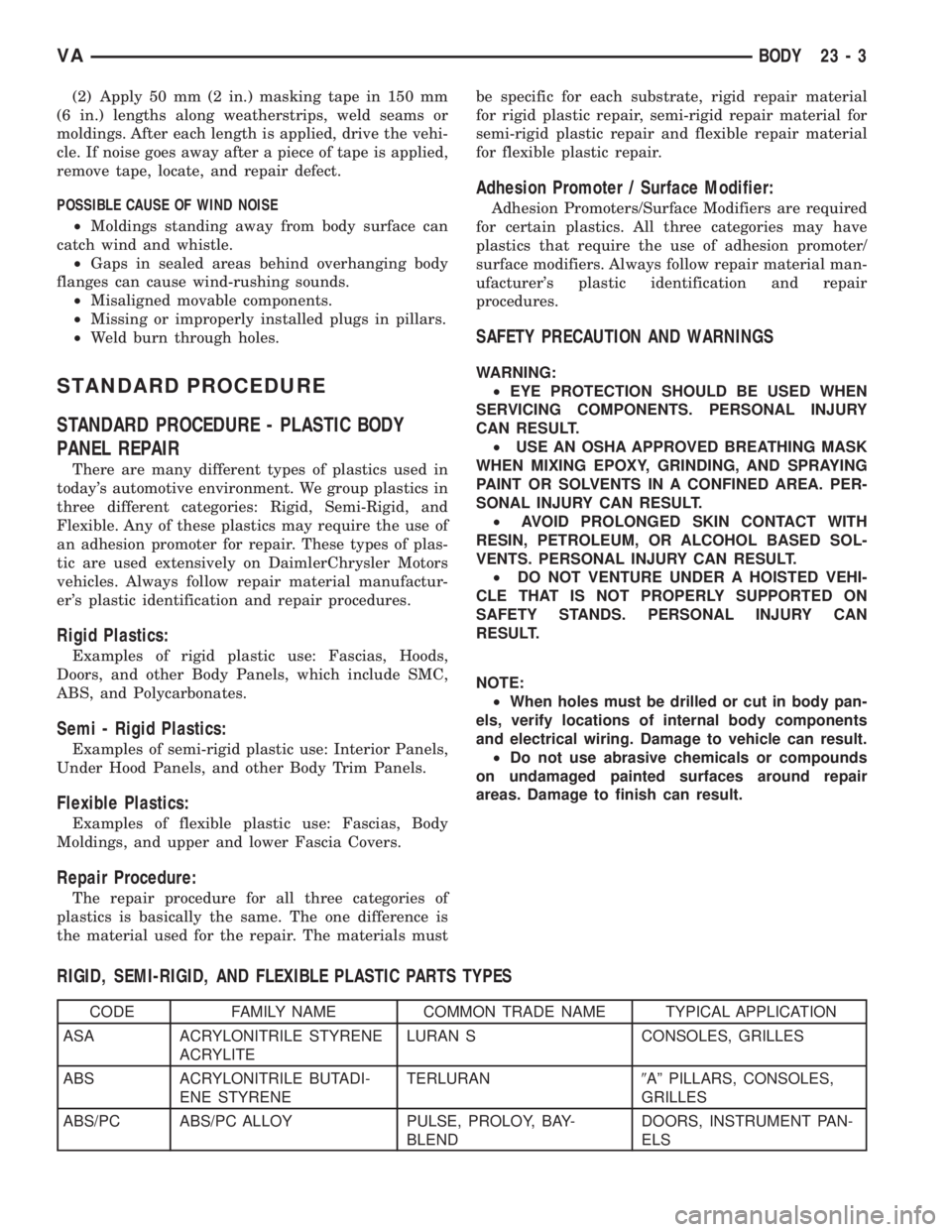
There are many different types of plastics used in
today's automotive environment. We group plastics in
three different categories: Rigid, Semi-Rigid, and
Flexible. Any of these plastics may require the use of
an adhesion promoter for repair. These types of plas-
tic are used extensively on DaimlerChrysler Motors
vehicles. Always follow repair material manufactur-
er's plastic identification and repair procedures.
Rigid Plastics:
Examples of rigid plastic use: Fascias, Hoods,
Doors, and other Body Panels, which include SMC,
ABS, and Polycarbonates.
Semi - Rigid Plastics:
Examples of semi-rigid plastic use: Interior Panels,
Under Hood Panels, and other Body Trim Panels.
Flexible Plastics:
Examples of flexible plastic use: Fascias, Body
Moldings, and upper and lower Fascia Covers.
Repair Procedure:
The repair procedure for all three categories of
plastics is basically the same. The one difference is
the material used for the repair. The materials mustbe specific for each substrate, rigid repair material
for rigid plastic repair, semi-rigid repair material for
semi-rigid plastic repair and flexible repair material
for flexible plastic repair.
Adhesion Promoter / Surface Modifier:
Adhesion Promoters/Surface Modifiers are required
for certain plastics. All three categories may have
plastics that require the use of adhesion promoter/
surface modifiers. Always follow repair material man-
ufacturer's plastic identification and repair
procedures.
SAFETY PRECAUTION AND WARNINGS
WARNING:
²EYE PROTECTION SHOULD BE USED WHEN
SERVICING COMPONENTS. PERSONAL INJURY
CAN RESULT.
²USE AN OSHA APPROVED BREATHING MASK
WHEN MIXING EPOXY, GRINDING, AND SPRAYING
PAINT OR SOLVENTS IN A CONFINED AREA. PER-
SONAL INJURY CAN RESULT.
²AVOID PROLONGED SKIN CONTACT WITH
RESIN, PETROLEUM, OR ALCOHOL BASED SOL-
VENTS. PERSONAL INJURY CAN RESULT.
²DO NOT VENTURE UNDER A HOISTED VEHI-
CLE THAT IS NOT PROPERLY SUPPORTED ON
SAFETY STANDS. PERSONAL INJURY CAN
RESULT.
NOTE:
²When holes must be drilled or cut in body pan-
els, verify locations of internal body components
and electrical wiring. Damage to vehicle can result.
²Do not use abrasive chemicals or compounds
on undamaged painted surfaces around repair
areas. Damage to finish can result.
RIGID, SEMI-RIGID, AND FLEXIBLE PLASTIC PARTS TYPES
CODE FAMILY NAME COMMON TRADE NAME TYPICAL APPLICATION
ASA ACRYLONITRILE STYRENE
ACRYLITELURAN S CONSOLES, GRILLES
ABS ACRYLONITRILE BUTADI-
ENE STYRENETERLURAN9Aº PILLARS, CONSOLES,
GRILLES
ABS/PC ABS/PC ALLOY PULSE, PROLOY, BAY-
BLENDDOORS, INSTRUMENT PAN-
ELS
VABODY 23 - 3
Page 1947 of 2305
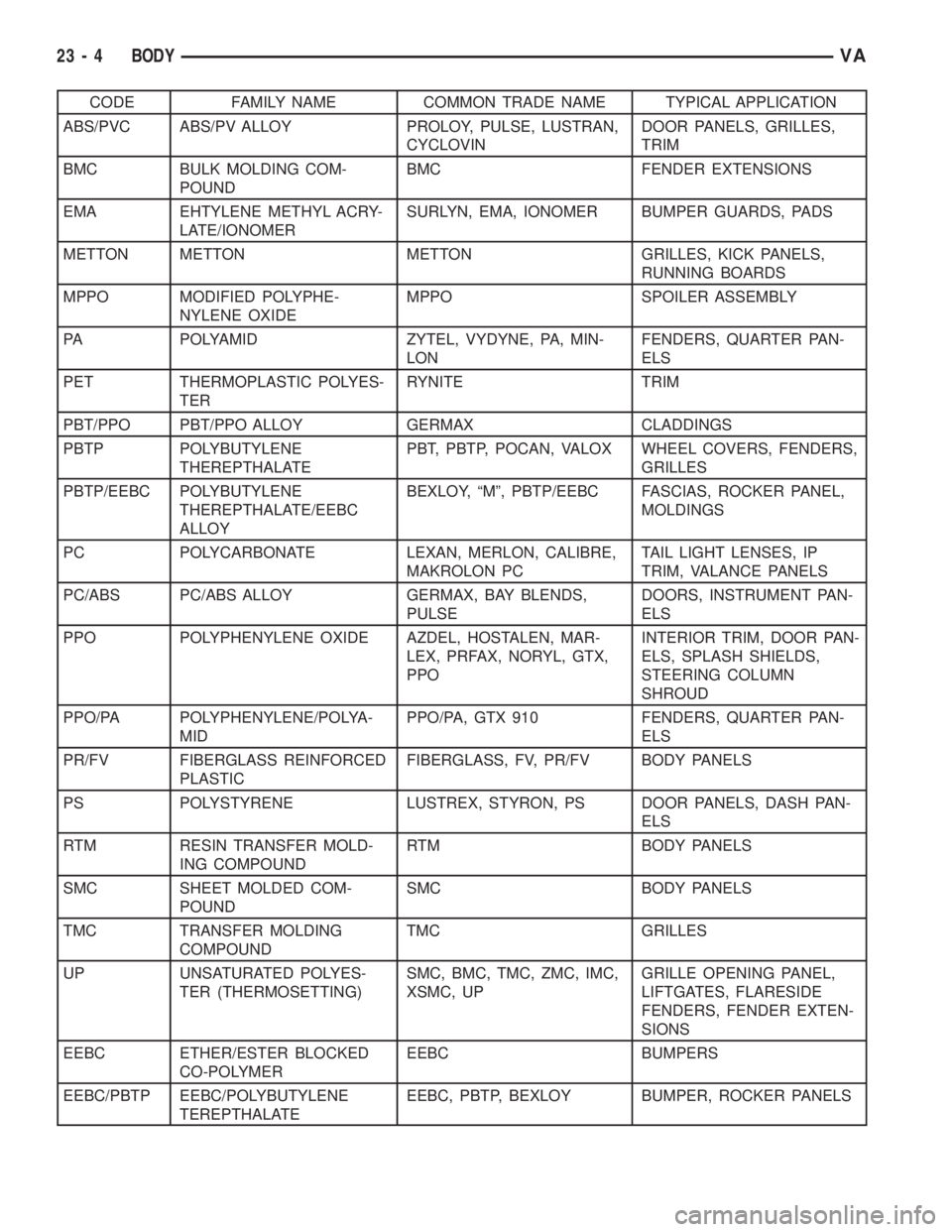
CODE FAMILY NAME COMMON TRADE NAME TYPICAL APPLICATION
ABS/PVC ABS/PV ALLOY PROLOY, PULSE, LUSTRAN,
CYCLOVINDOOR PANELS, GRILLES,
TRIM
BMC BULK MOLDING COM-
POUNDBMC FENDER EXTENSIONS
EMA EHTYLENE METHYL ACRY-
LATE/IONOMERSURLYN, EMA, IONOMER BUMPER GUARDS, PADS
METTON METTON METTON GRILLES, KICK PANELS,
RUNNING BOARDS
MPPO MODIFIED POLYPHE-
NYLENE OXIDEMPPO SPOILER ASSEMBLY
PA POLYAMID ZYTEL, VYDYNE, PA, MIN-
LONFENDERS, QUARTER PAN-
ELS
PET THERMOPLASTIC POLYES-
TERRYNITE TRIM
PBT/PPO PBT/PPO ALLOY GERMAX CLADDINGS
PBTP POLYBUTYLENE
THEREPTHALATEPBT, PBTP, POCAN, VALOX WHEEL COVERS, FENDERS,
GRILLES
PBTP/EEBC POLYBUTYLENE
THEREPTHALATE/EEBC
ALLOYBEXLOY, ªMº, PBTP/EEBC FASCIAS, ROCKER PANEL,
MOLDINGS
PC POLYCARBONATE LEXAN, MERLON, CALIBRE,
MAKROLON PCTAIL LIGHT LENSES, IP
TRIM, VALANCE PANELS
PC/ABS PC/ABS ALLOY GERMAX, BAY BLENDS,
PULSEDOORS, INSTRUMENT PAN-
ELS
PPO POLYPHENYLENE OXIDE AZDEL, HOSTALEN, MAR-
LEX, PRFAX, NORYL, GTX,
PPOINTERIOR TRIM, DOOR PAN-
ELS, SPLASH SHIELDS,
STEERING COLUMN
SHROUD
PPO/PA POLYPHENYLENE/POLYA-
MIDPPO/PA, GTX 910 FENDERS, QUARTER PAN-
ELS
PR/FV FIBERGLASS REINFORCED
PLASTICFIBERGLASS, FV, PR/FV BODY PANELS
PS POLYSTYRENE LUSTREX, STYRON, PS DOOR PANELS, DASH PAN-
ELS
RTM RESIN TRANSFER MOLD-
ING COMPOUNDRTM BODY PANELS
SMC SHEET MOLDED COM-
POUNDSMC BODY PANELS
TMC TRANSFER MOLDING
COMPOUNDTMC GRILLES
UP UNSATURATED POLYES-
TER (THERMOSETTING)SMC, BMC, TMC, ZMC, IMC,
XSMC, UPGRILLE OPENING PANEL,
LIFTGATES, FLARESIDE
FENDERS, FENDER EXTEN-
SIONS
EEBC ETHER/ESTER BLOCKED
CO-POLYMEREEBC BUMPERS
EEBC/PBTP EEBC/POLYBUTYLENE
TEREPTHALATEEEBC, PBTP, BEXLOY BUMPER, ROCKER PANELS
23 - 4 BODYVA
Page 2023 of 2305

(4) Disconnect the electrical connectors, if
equipped.
INSTALLATION
(1) Position seat in vehicle and connect the electri-
cal connectors, if equipped.
(2) Install the mounting bolts and tighten to 25
N´m (18 ft. lbs.).
(3) Install the seat belt anchor and bolt.
(4) Tighten anchor bolt to 35 N´m (26 ft. lbs.).
(5) Connect battery negative cable.
SEAT BACK - FRONT
REMOVAL
(1) Disconnect and isolate battery negative cable.
(2) Remove seat cushion. (Refer to 23 - BODY/
SEATS/SEAT CUSHION - FRONT - REMOVAL)
(3) Verify that seat back is in full upright position.
(4) Disconnect lumbar support hose, if equipped.
(Fig. 3)
(5) Remove seat back bolts and remove seat
back.
INSTALLATION
(1) Remove stop screw.
(2) Install seat back locking spline side first.
NOTE: For better centering of seat back in the
mounting bore during installation, operate the seat
back release lever once.
(3) Install the spline side seat back bolt.
(4) Install remaining seat back side.
NOTE: It may be necessary to press the guide tabs
apart slightly.
(5) Install the remaining seat back bolt.
(6) Tighten the seat back bolts to 20 N´m (15 ft.
lbs.).
(7) Place seat back in the foremost position until
the hold down spring latches audibly.
(8) Install stop bolt and tighten to 20 N´m (15 ft.
lbs.).
(9) Connect the lumbar support hose, if equipped.
(10) Check seat back operation.
(11) Install the seat cushion. (Refer to 23 - BODY/
SEATS/SEAT CUSHION - FRONT - INSTALLA-
TION)
SEAT CUSHION - FRONT
REMOVAL
(1) Disconnect and isolate battery negative cable.
(2) Move seat to the foremost position.
(3) On standard cushion equipped vehicles, remove
the front two screws. (Fig. 4)
Fig. 2 FRONT SEAT
1 - SEAT BELT ANCHOR BOLT
2 - BOLTS (6)
Fig. 3 FRONT SEAT BACK
1 - SEAT BACK
2 - STOP BOLT
3 - LUMBAR SUPPORT HOSE
4 - GUIDE TAB
5 - RELEASE LEVER
6 - SEAT BACK BOLTS (2)
23 - 80 SEATSVA
Page 2040 of 2305
When the outside air contains smoke, odors, high
humidity, or if rapid cooling is desired, interior air
can by recirculated by selecting the Recirculation
Mode with the mode control knob. The mode control
knob operates the recirculation door through use of a
vacuum actuator. When the Recirculation Mode is
selected, the recirculation door is closed to prevent
outside air from entering the passenger compart-
ment.
To maintain minimum evaporator temperature and
prevent evaporator freezing, an evaporator tempera-
ture sensor is used.
The A/C system is designed for the use of non-CFC,
R-134a refrigerant only and uses an expansion valve
to meter refrigerant flow to the evaporator.
DIAGNOSIS AND TESTING
A / C PERFORMANCE
The A/C system is designed to provide the passen-
ger compartment with low temperature and low
humidity air. The A/C evaporator, located in the
HVAC housing is cooled to temperatures near the
freezing point. As warm damp air passes over the
fins of the A/C evaporator, the air transfers its heat
to the refrigerant in the evaporator coils and the
moisture in the air condenses on the evaporator fins.
During periods of high heat and humidity, an A/C
system will be more effective in the Recirculation
mode (max-A/C). With the system in the Recircula-
tion mode, only air from the passenger compartment
passes through the A/C evaporator. As the passenger
compartment air dehumidifies, the A/C system per-
formance levels rise.
Humidity has an important bearing on the temper-
ature of the air delivered to the interior of the vehi-
cle. It is important to understand the effect that
humidity has on the performance of the A/C system.
When humidity is high, the A/C evaporator has to
perform a double duty. It must lower the air temper-
ature, and it must lower the temperature of the
moisture in the air that condenses on the evaporator
fins. Condensing the moisture in the air transfers
heat energy into the evaporator fins and coils. This
reduces the amount of heat the A/C evaporator can
absorb from the air. High humidity greatly reduces
the ability of the A/C evaporator to lower the temper-
ature of the air.
However, evaporator capacity used to reduce the
amount of moisture in the air is not wasted. Wring-
ing some of the moisture out of the air entering the
vehicle adds to the comfort of the passengers.
Although, an owner may expect too much from their
A/C system on humid days. A performance test is the
best way to determine whether the system is per-
forming up to design standards. This test also pro-
vides valuable clues as to the possible cause oftrouble with the A/C system. The ambient air tem-
perature in the location where the vehicle will be
tested must be a minimum of 21É C (70É F) for this
test.
A / C PERFORMANCE TEST
WARNING: Refer to the applicable warnings and
cautions for this system before performing the fol-
lowing operation (Refer to 24 - HEATING & AIR
CONDITIONING/PLUMBING - WARNINGS) and (Refer
to 24 - HEATING & AIR CONDITIONING/PLUMBING -
CAUTIONS). Failure to follow the warnings and cau-
tions could result in possible personal injury or
death.
NOTE: Very specific instructions and conditions
pertain to this procedure which are significantly dif-
ferent than procedures used in other vehicle appli-
cations. Follow each step in the order they are
presented. Do not skip steps or change conditions
from those stated or results will be adversely
affected and invalid.
NOTE: When connecting the service equipment
coupling to the line fitting, verify that the valve of
the coupling is fully closed. This will reduce the
amount of effort required to make the connection.
(1) Check for diagnostic trouble codes using a
DRBIIItscan tool. If no DTCs are found in the
engine control module (ECM), go to Step 2. If any
DTCs are found, repair as required, then proceed to
Step 2.
(2) Place the vehicle in the shade and operate the
heating-A/C system under the following conditions.
²Engine at idle at operating temperature
²All doors or windows open
²Transaxle in Neutral
²All A/C duct louvers open
²A/C-heater controls set to fresh air (NOT Recir-
culate), full cool, panel mode, high blower and with
A/C compressor engaged.
NOTE: The A/C compressor clutch is de-energized
under any of the following conditions:
²Restricted compressor (thermal fuse in the pul-
ley)
²Low pressure in the system
²Low evaporator temperature
²Hard acceleration (WOT)
²High coolant temperatures
(3) Insert a thermometer in the driver side center
panel air outlet and operate the A/C system until the
thermometer temperature stabilizes.
VAHEATING & AIR CONDITIONING 24 - 3
Page 2054 of 2305
AMBIENT TEMPERATURE SEN-
SOR
DESCRIPTION
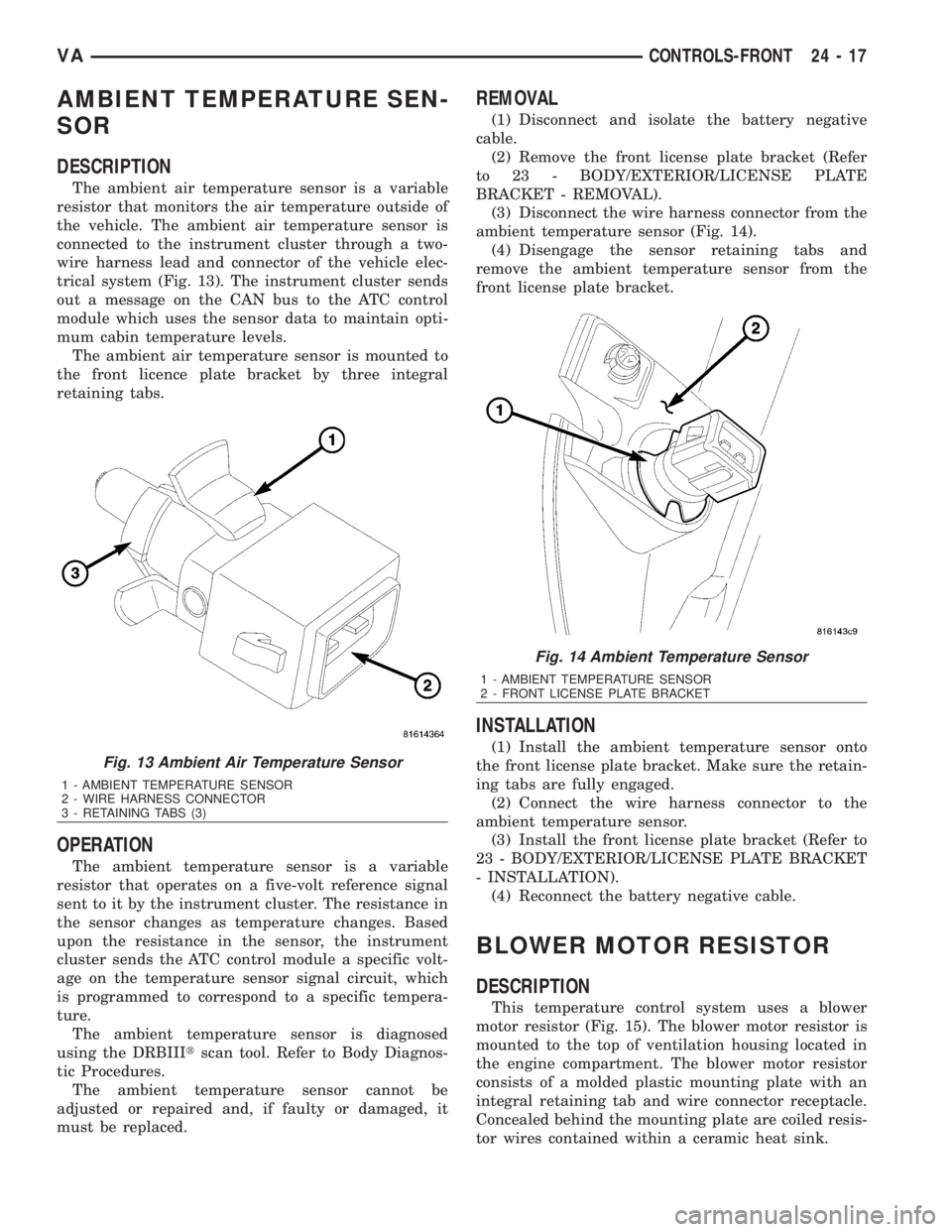
The ambient air temperature sensor is a variable
resistor that monitors the air temperature outside of
the vehicle. The ambient air temperature sensor is
connected to the instrument cluster through a two-
wire harness lead and connector of the vehicle elec-
trical system (Fig. 13). The instrument cluster sends
out a message on the CAN bus to the ATC control
module which uses the sensor data to maintain opti-
mum cabin temperature levels.
The ambient air temperature sensor is mounted to
the front licence plate bracket by three integral
retaining tabs.
OPERATION
The ambient temperature sensor is a variable
resistor that operates on a five-volt reference signal
sent to it by the instrument cluster. The resistance in
the sensor changes as temperature changes. Based
upon the resistance in the sensor, the instrument
cluster sends the ATC control module a specific volt-
age on the temperature sensor signal circuit, which
is programmed to correspond to a specific tempera-
ture.
The ambient temperature sensor is diagnosed
using the DRBIIItscan tool. Refer to Body Diagnos-
tic Procedures.
The ambient temperature sensor cannot be
adjusted or repaired and, if faulty or damaged, it
must be replaced.
REMOVAL
(1) Disconnect and isolate the battery negative
cable.
(2) Remove the front license plate bracket (Refer
to 23 - BODY/EXTERIOR/LICENSE PLATE
BRACKET - REMOVAL).
(3) Disconnect the wire harness connector from the
ambient temperature sensor (Fig. 14).
(4) Disengage the sensor retaining tabs and
remove the ambient temperature sensor from the
front license plate bracket.
INSTALLATION
(1) Install the ambient temperature sensor onto
the front license plate bracket. Make sure the retain-
ing tabs are fully engaged.
(2) Connect the wire harness connector to the
ambient temperature sensor.
(3) Install the front license plate bracket (Refer to
23 - BODY/EXTERIOR/LICENSE PLATE BRACKET
- INSTALLATION).
(4) Reconnect the battery negative cable.
BLOWER MOTOR RESISTOR
DESCRIPTION
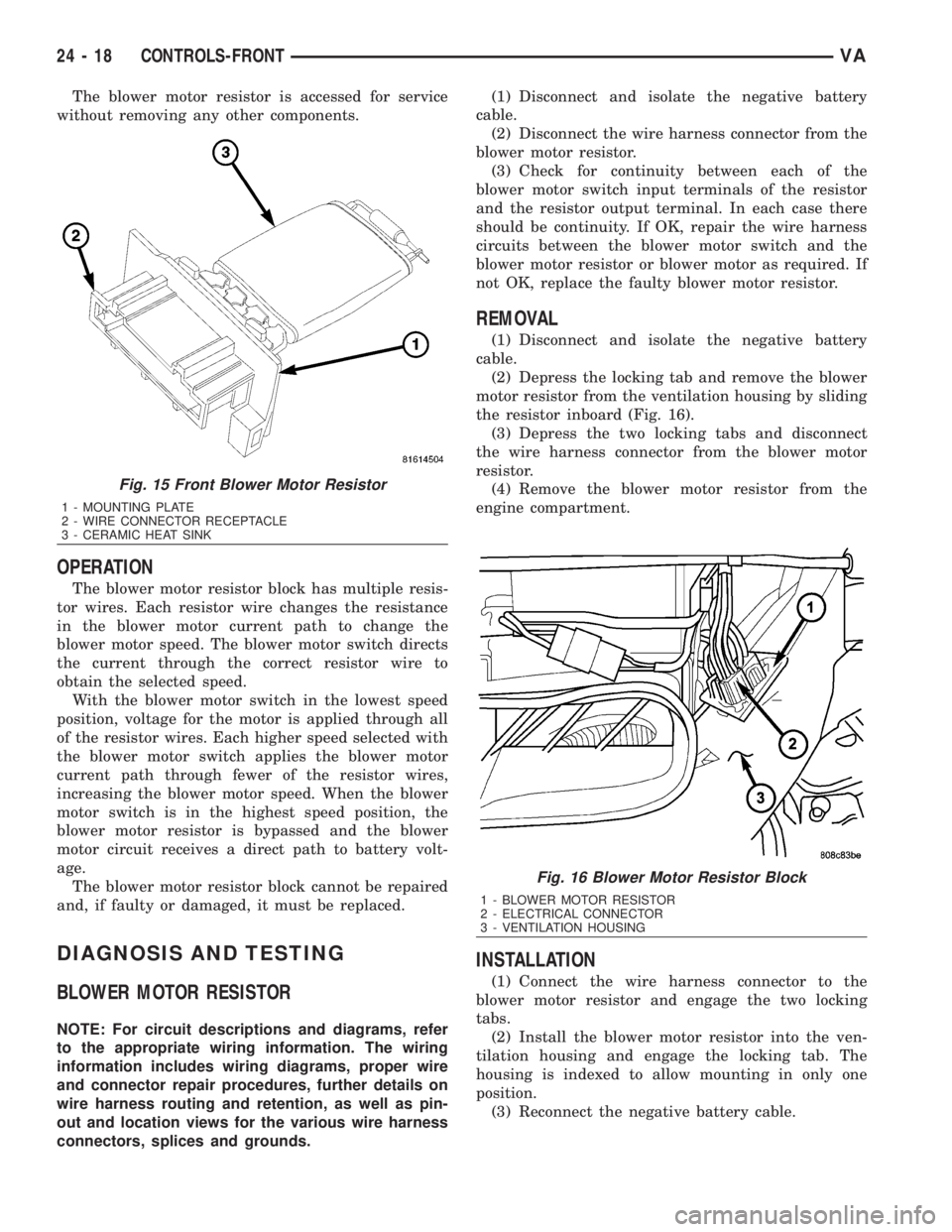
This temperature control system uses a blower
motor resistor (Fig. 15). The blower motor resistor is
mounted to the top of ventilation housing located in
the engine compartment. The blower motor resistor
consists of a molded plastic mounting plate with an
integral retaining tab and wire connector receptacle.
Concealed behind the mounting plate are coiled resis-
tor wires contained within a ceramic heat sink.
Fig. 13 Ambient Air Temperature Sensor
1 - AMBIENT TEMPERATURE SENSOR
2 - WIRE HARNESS CONNECTOR
3 - RETAINING TABS (3)
Fig. 14 Ambient Temperature Sensor
1 - AMBIENT TEMPERATURE SENSOR
2 - FRONT LICENSE PLATE BRACKET
VACONTROLS-FRONT 24 - 17
Page 2055 of 2305
The blower motor resistor is accessed for service
without removing any other components.
OPERATION
The blower motor resistor block has multiple resis-
tor wires. Each resistor wire changes the resistance
in the blower motor current path to change the
blower motor speed. The blower motor switch directs
the current through the correct resistor wire to
obtain the selected speed.
With the blower motor switch in the lowest speed
position, voltage for the motor is applied through all
of the resistor wires. Each higher speed selected with
the blower motor switch applies the blower motor
current path through fewer of the resistor wires,
increasing the blower motor speed. When the blower
motor switch is in the highest speed position, the
blower motor resistor is bypassed and the blower
motor circuit receives a direct path to battery volt-
age.
The blower motor resistor block cannot be repaired
and, if faulty or damaged, it must be replaced.
DIAGNOSIS AND TESTING
BLOWER MOTOR RESISTOR
NOTE: For circuit descriptions and diagrams, refer
to the appropriate wiring information. The wiring
information includes wiring diagrams, proper wire
and connector repair procedures, further details on
wire harness routing and retention, as well as pin-
out and location views for the various wire harness
connectors, splices and grounds.(1) Disconnect and isolate the negative battery
cable.
(2) Disconnect the wire harness connector from the
blower motor resistor.
(3) Check for continuity between each of the
blower motor switch input terminals of the resistor
and the resistor output terminal. In each case there
should be continuity. If OK, repair the wire harness
circuits between the blower motor switch and the
blower motor resistor or blower motor as required. If
not OK, replace the faulty blower motor resistor.
REMOVAL
(1) Disconnect and isolate the negative battery
cable.
(2) Depress the locking tab and remove the blower
motor resistor from the ventilation housing by sliding
the resistor inboard (Fig. 16).
(3) Depress the two locking tabs and disconnect
the wire harness connector from the blower motor
resistor.
(4) Remove the blower motor resistor from the
engine compartment.
INSTALLATION
(1) Connect the wire harness connector to the
blower motor resistor and engage the two locking
tabs.
(2) Install the blower motor resistor into the ven-
tilation housing and engage the locking tab. The
housing is indexed to allow mounting in only one
position.
(3) Reconnect the negative battery cable.
Fig. 15 Front Blower Motor Resistor
1 - MOUNTING PLATE
2 - WIRE CONNECTOR RECEPTACLE
3 - CERAMIC HEAT SINK
Fig. 16 Blower Motor Resistor Block
1 - BLOWER MOTOR RESISTOR
2 - ELECTRICAL CONNECTOR
3 - VENTILATION HOUSING
24 - 18 CONTROLS-FRONTVA
Page 2065 of 2305
INSTALLATION
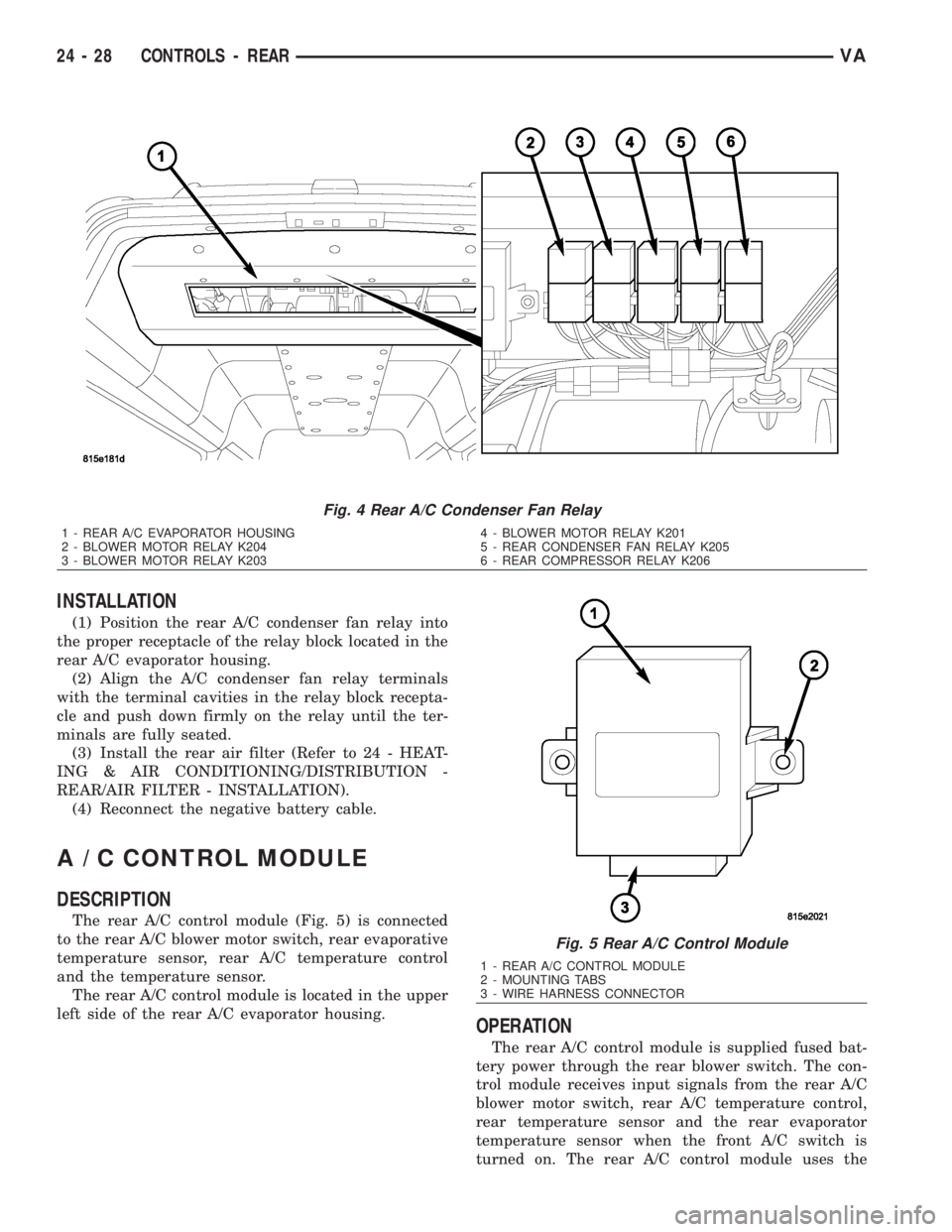
(1) Position the rear A/C condenser fan relay into
the proper receptacle of the relay block located in the
rear A/C evaporator housing.
(2) Align the A/C condenser fan relay terminals
with the terminal cavities in the relay block recepta-
cle and push down firmly on the relay until the ter-
minals are fully seated.
(3) Install the rear air filter (Refer to 24 - HEAT-
ING & AIR CONDITIONING/DISTRIBUTION -
REAR/AIR FILTER - INSTALLATION).
(4) Reconnect the negative battery cable.
A / C CONTROL MODULE
DESCRIPTION
The rear A/C control module (Fig. 5) is connected
to the rear A/C blower motor switch, rear evaporative
temperature sensor, rear A/C temperature control
and the temperature sensor.
The rear A/C control module is located in the upper
left side of the rear A/C evaporator housing.
OPERATION
The rear A/C control module is supplied fused bat-
tery power through the rear blower switch. The con-
trol module receives input signals from the rear A/C
blower motor switch, rear A/C temperature control,
rear temperature sensor and the rear evaporator
temperature sensor when the front A/C switch is
turned on. The rear A/C control module uses the
Fig. 4 Rear A/C Condenser Fan Relay
1 - REAR A/C EVAPORATOR HOUSING
2 - BLOWER MOTOR RELAY K204
3 - BLOWER MOTOR RELAY K2034 - BLOWER MOTOR RELAY K201
5 - REAR CONDENSER FAN RELAY K205
6 - REAR COMPRESSOR RELAY K206
Fig. 5 Rear A/C Control Module
1 - REAR A/C CONTROL MODULE
2 - MOUNTING TABS
3 - WIRE HARNESS CONNECTOR
24 - 28 CONTROLS - REARVA
Page 2073 of 2305
motor, while relay 2 when activated, sends power
directly to the blower motor.
The rear blower motor switch cannot be repaired
and, if faulty or damaged, it must be replaced.
DIAGNOSIS AND TESTING
REAR BLOWER MOTOR SWITCH
Before testing the rear blower motor switch, verify
that the front A/C system is functional by performing
the ATC Fuction Test using the DRBIIItscan tool.
Use a volt/ohmmeter to test the rear blower motor
switch. For circuit descriptions and diagrams, refer
to the appropriate wiring information. The wiring
information includes wiring diagrams, proper wire
and connector repair procedures, details of wire har-
ness routing and retention, connector pin-out infor-
mation and location views for the various wire
harness connectors, splices and grounds.
WARNING: To avoid personal injury or death, on
vehicles equipped with airbags, disable the supple-
mental restraint system before attempting any
steering wheel, steering column, airbag, seat belt
tensioner, impact sensor, or instrument panel com-
ponent diagnosis or service. Disconnect and isolate
the battery negative (ground) cable, then wait two
minutes for the system capacitor to discharge
before performing further diagnosis or service. This
is the only sure way to disable the supplemental
restraint system. Failure to take the proper precau-
tions could result in accidental airbag deployment.
(1) Disconnect and isolate the battery negative
cable.
(2) Unplug the wire harness connector from the
rear blower motor switch.
(3) Check for continuity between terminal 10 and
terminals 1, 7 and 4 of the blower motor switch. In
all instances, there should be continuity.
NOTE: To check the switch's internal circuits, con-
nect the negative lead of the ohmmeter to terminal
10 and the positive ohmmeter lead to terminals 1, 7
and 4. To check the switch's integral light emitting
diodes, reverse the ohmmeter leads.
(4) Check for continuity between the rear blower
motor switch terminals 3 and 7 as you move the
blower motor switch to each of the two speed posi-
tions, and the Off position. There should be continu-
ity in only one blower motor switch speed position.
(5) Check for continuity between the rear blower
motor switch terminals 4 and 8 as you move the
blower motor switch to each of the two speed posi-
tions, and the Off position. There should be continu-ity in only the other blower motor switch speed
position.
(6) If OK, test and repair the rear blower motor
switch wire harness circuits. If not OK, replace the
faulty rear blower motor switch.
REMOVAL
WARNING: To avoid personal injury or death, on
vehicles equipped with airbags, disable the supple-
mental restraint system before attempting any
steering wheel, steering column, airbag, seat belt
tensioner, impact sensor, or instrument panel com-
ponent diagnosis or service. Disconnect and isolate
the battery negative (ground) cable, then wait two
minutes for the system capacitor to discharge
before performing further diagnosis or service. This
is the only sure way to disable the supplemental
restraint system. Failure to take the proper precau-
tions could result in accidental airbag deployment.
NOTE: The rear A/C blower motor switch is used on
vehicles with the optional rear A/C system.
(1) Disconnect and isolate the negative battery
cable.
(2) Remove the accessory switch panel from the
instrument panel (Refer to 23 - BODY/INSTRU-
MENT PANEL/ACCESSORY SWITCH BEZEL -
REMOVAL).
(3) Disconnect the wire harness connector from the
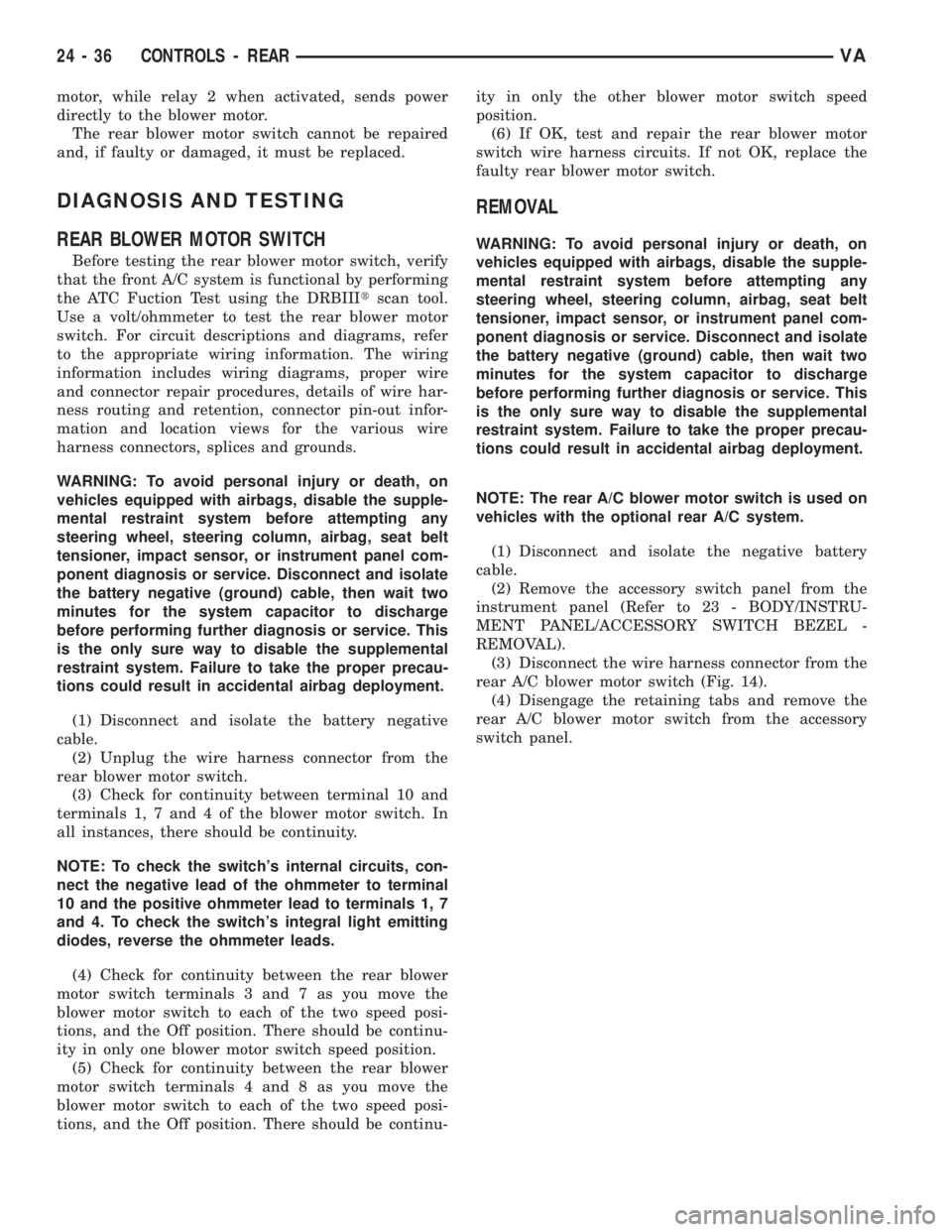
rear A/C blower motor switch (Fig. 14).
(4) Disengage the retaining tabs and remove the
rear A/C blower motor switch from the accessory
switch panel.
24 - 36 CONTROLS - REARVA
Page 2074 of 2305
INSTALLATION
(1) Install the rear A/C blower motor switch into
the accessory switch panel. Make sure the retaining
tabs are fully engaged.
(2) Connect the wire harness connector to the rear
A/C blower motor switch.
(3) Install the accessory switch panel (Refer to 23 -
BODY/INSTRUMENT PANEL/ACCESSORY
SWITCH BEZEL - INSTALLATION).
(4) Reconnect the negative battery cable.
EVAPORATOR TEMPERATURE
SENSOR
DESCRIPTION
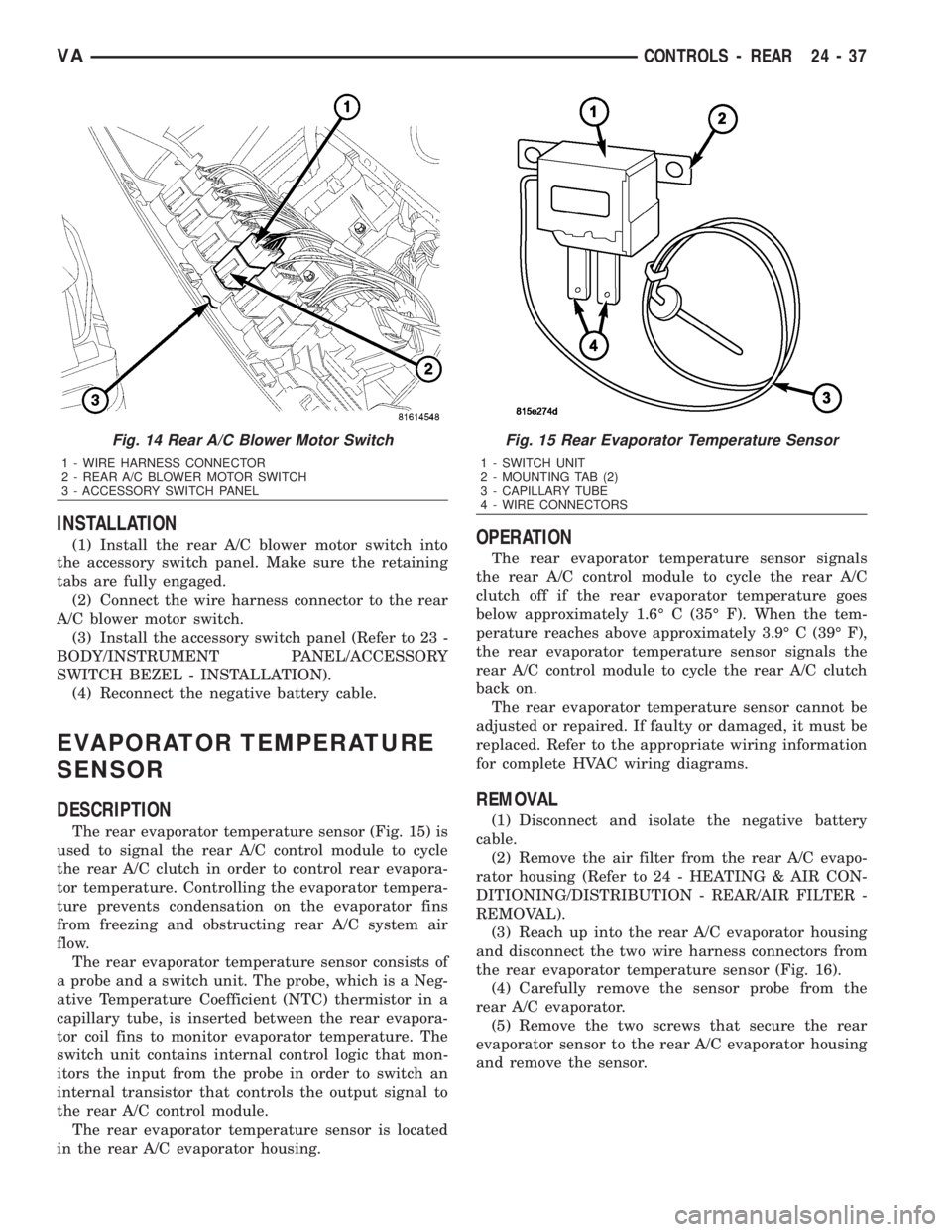
The rear evaporator temperature sensor (Fig. 15) is
used to signal the rear A/C control module to cycle
the rear A/C clutch in order to control rear evapora-
tor temperature. Controlling the evaporator tempera-
ture prevents condensation on the evaporator fins
from freezing and obstructing rear A/C system air
flow.
The rear evaporator temperature sensor consists of
a probe and a switch unit. The probe, which is a Neg-
ative Temperature Coefficient (NTC) thermistor in a
capillary tube, is inserted between the rear evapora-
tor coil fins to monitor evaporator temperature. The
switch unit contains internal control logic that mon-
itors the input from the probe in order to switch an
internal transistor that controls the output signal to
the rear A/C control module.
The rear evaporator temperature sensor is located
in the rear A/C evaporator housing.
OPERATION
The rear evaporator temperature sensor signals
the rear A/C control module to cycle the rear A/C
clutch off if the rear evaporator temperature goes
below approximately 1.6É C (35É F). When the tem-
perature reaches above approximately 3.9É C (39É F),
the rear evaporator temperature sensor signals the
rear A/C control module to cycle the rear A/C clutch
back on.
The rear evaporator temperature sensor cannot be
adjusted or repaired. If faulty or damaged, it must be
replaced. Refer to the appropriate wiring information
for complete HVAC wiring diagrams.
REMOVAL
(1) Disconnect and isolate the negative battery
cable.
(2) Remove the air filter from the rear A/C evapo-
rator housing (Refer to 24 - HEATING & AIR CON-
DITIONING/DISTRIBUTION - REAR/AIR FILTER -
REMOVAL).
(3) Reach up into the rear A/C evaporator housing
and disconnect the two wire harness connectors from
the rear evaporator temperature sensor (Fig. 16).
(4) Carefully remove the sensor probe from the
rear A/C evaporator.
(5) Remove the two screws that secure the rear
evaporator sensor to the rear A/C evaporator housing
and remove the sensor.
Fig. 14 Rear A/C Blower Motor Switch
1 - WIRE HARNESS CONNECTOR
2 - REAR A/C BLOWER MOTOR SWITCH
3 - ACCESSORY SWITCH PANEL
Fig. 15 Rear Evaporator Temperature Sensor
1 - SWITCH UNIT
2 - MOUNTING TAB (2)
3 - CAPILLARY TUBE
4 - WIRE CONNECTORS
VACONTROLS - REAR 24 - 37