warning MERCEDES-BENZ SPRINTER 2011 MY11 Operator’s Manual
[x] Cancel search | Manufacturer: MERCEDES-BENZ, Model Year: 2011, Model line: SPRINTER, Model: MERCEDES-BENZ SPRINTER 2011Pages: 292, PDF Size: 6.75 MB
Page 70 of 292
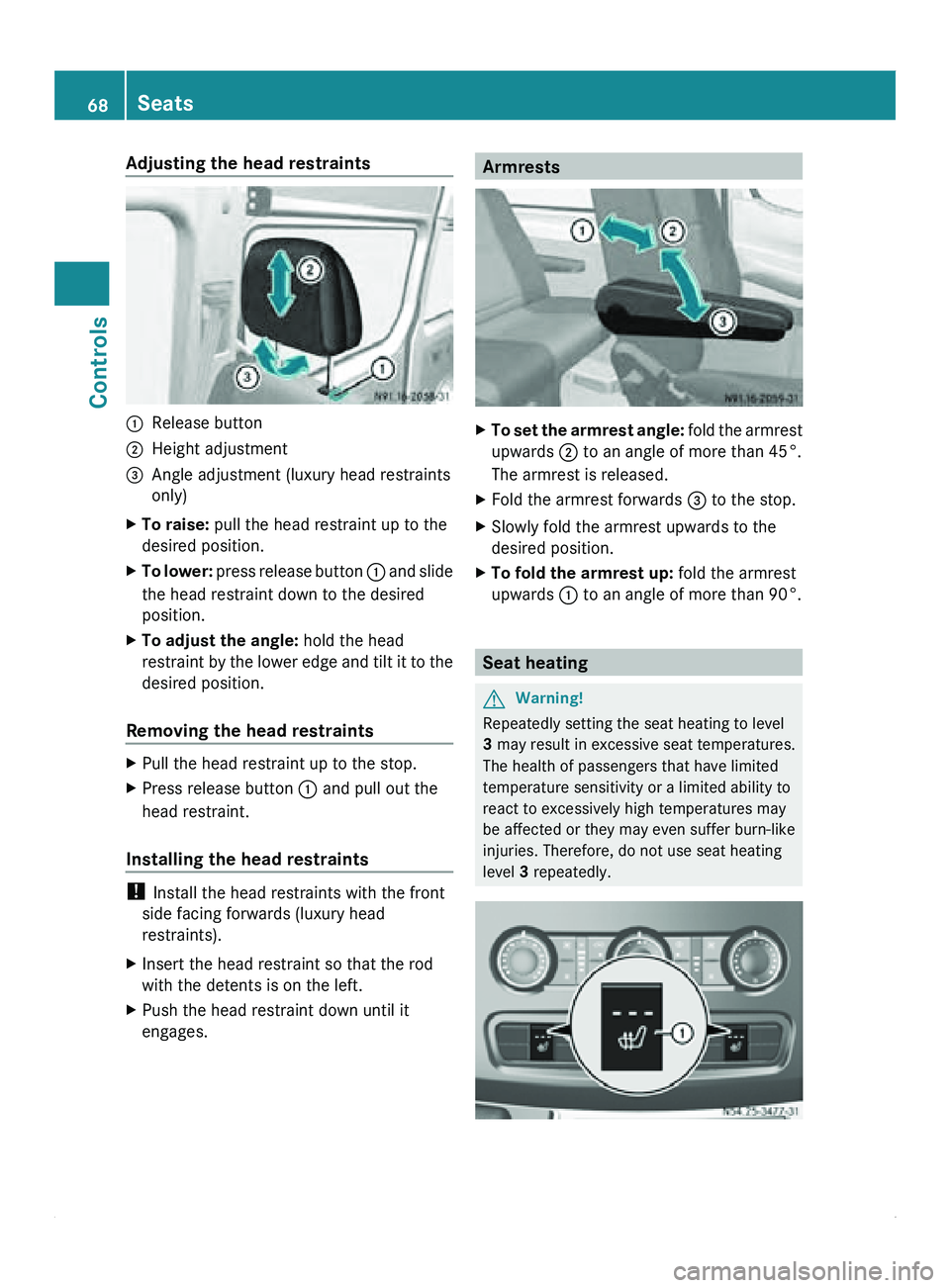
Adjusting the head restraints
0046
Release button
0047 Height adjustment
008A Angle adjustment (luxury head restraints
only)
X To raise: pull the head restraint up to the
desired position.
X To lower: press release button
0046 and slide
the head restraint down to the desired
position.
X To adjust the angle: hold the head
restraint by the
lower edge and tilt it to the
desired position.
Removing the head restraints X
Pull the head restraint up to the stop.
X Press release button 0046 and pull out the
head restraint.
Installing the head restraints !
Install the head restraints with the front
side facing forwards (luxury head
restraints).
X Insert the head restraint so that the rod
with the detents is on the left.
X Push the head restraint down until it
engages. Armrests
X
To set the armrest angle: fold the
armrest
upwards 0047 to an angle of more than 45°.
The armrest is released.
X Fold the armrest forwards 008A to the stop.
X Slowly fold the armrest upwards to the
desired position.
X To fold the armrest up: fold the armrest
upwards 0046 to an angle of more than 90°. Seat heating
G
Warning!
Repeatedly setting the seat heating to level
3 may result in excessive seat temperatures.
The health of passengers that have limited
temperature sensitivity or a limited ability to
react to excessively high temperatures may
be affected or they may even suffer burn-like
injuries. Therefore, do not use seat heating
level 3 repeatedly.68
Seats
Controls
Page 71 of 292
The three red indicator lamps in button 0046
show the activated heating level
1 to 3.
The system automatically switches down
from level 3
to level 2 after approximately five
minutes.
The system automatically switches down
from level 2 to level 1 after approximately ten
minutes.
! When you leave your seat, do not place
anything on the seat and switch off the seat
heating. Do not switch the seat heating on
when the seat is not occupied, e.g. when
driving without a co-driver. The seat
heating may otherwise overheat, causing
damage to the seat.
At level 1, the seat heating remains in
continuous operation.
X To switch on: make sure
that the key is in
position 1 in the ignition lock.
X Press button 0046 repeatedly until the
desired heating level is set.
X To switch off: press button 0046 repeatedly
until all indicator lamps go out. Steering wheel
G
Warning
Only adjust the steering wheel when the
vehicle is stationary. Only drive with the
steering wheel locked in position.
An incorrectly secured steering wheel could
make it more difficult to steer the vehicle
safely since the steering wheel could move
unexpectedly when turned. This could result
in you losing control of the vehicle and
causing an accident, thereby endangering
yourself and others. G
Warning
Never leave children unsupervised in the
vehicle. They could
become trapped if they try
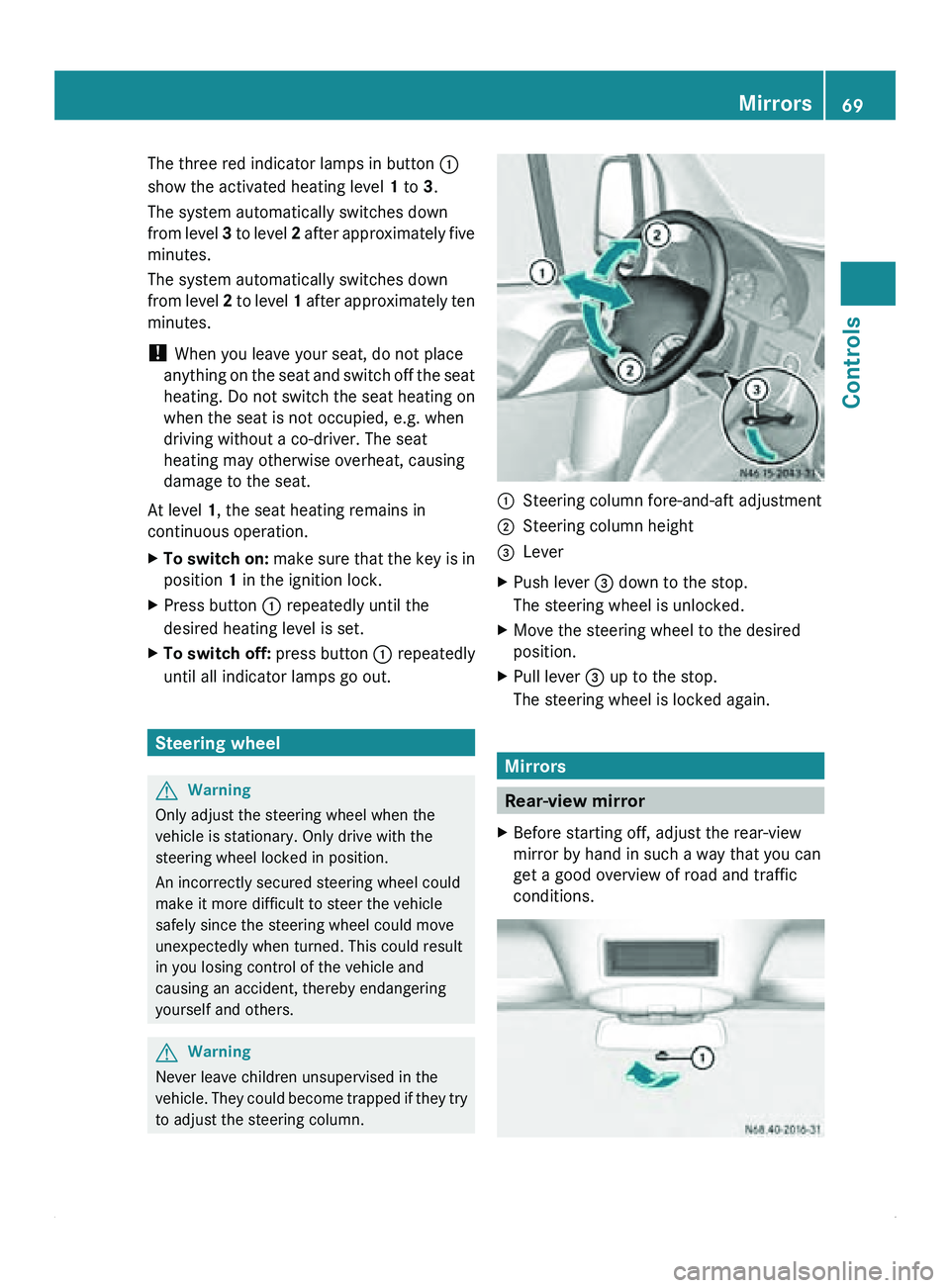
to adjust the steering column. 0046
Steering column fore-and-aft adjustment
0047 Steering column height
008A Lever
X Push lever 008A down to the stop.
The steering wheel is unlocked.
X Move the steering wheel to the desired
position.
X Pull lever 008A up to the stop.
The steering wheel is locked again. Mirrors
Rear-view mirror
X Before starting off, adjust the rear-view
mirror by hand in such a way that you can
get a good overview of road and traffic
conditions. Mirrors
69
Controls Z
Page 72 of 292
X
Anti-glare mode: push anti-glare lever 0046
in the direction of the arrow. Exterior mirrors
Important safety notes G
Warning
The additional mirrors in the exterior mirrors
reduce the size
of the image. The objects are
actually closer than they appear. You could
cause an accident if you only observe the
traffic through the additional mirrors.
Therefore, pay particular attention to traffic
behind you when maneuvering or passing
using the main mirror in the exterior mirrors
also and, if necessary, the rear-view mirror.
Adjusting manually X
Before starting off, manually adjust the
exterior mirrors in
such a way that you can
get a good overview of road and traffic
conditions.
Adjusting electrically i
The exterior mirrors are automatically
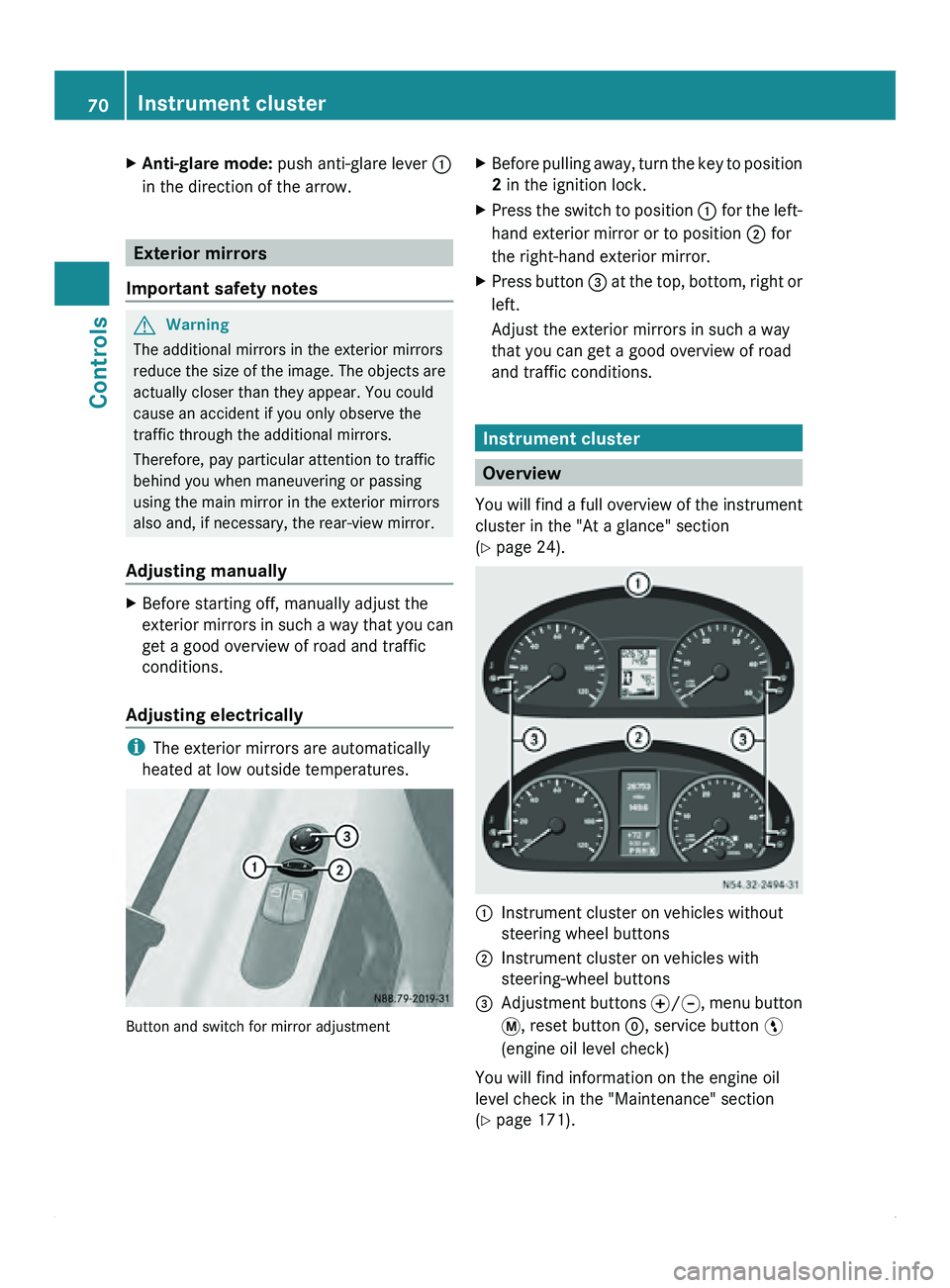
heated at low outside temperatures. Button and switch for mirror adjustment X
Before pulling away, turn the key to position
2 in the ignition lock.
X Press the switch to position 0046 for the
left-
hand exterior mirror or to position 0047 for
the right-hand exterior mirror.
X Press button 008A at
the
top, bottom, right or
left.
Adjust the exterior mirrors in such a way
that you can get a good overview of road
and traffic conditions. Instrument cluster
Overview
You will find
a full overview of the instrument
cluster in the "At a glance" section
(Y page 24). 0046
Instrument cluster on vehicles without
steering wheel buttons
0047 Instrument cluster on vehicles with
steering-wheel buttons
008A Adjustment buttons 0069/006A, menu button
007B
, reset button 0048, service button 00A4
(engine oil level check)
You will find information on the engine oil
level check in the "Maintenance" section
(Y page 171). 70
Instrument cluster
Controls
Page 73 of 292
The display in the instrument cluster is
activated when you:
R
open the driver's door
R turn the key
to position 2 in the ignition lock
R press the 0048 reset button
R switch on the lights
The display switches off automatically after
approximately 30 seconds if:
R the vehicle lighting is not switched on.
R the key is in position 0 in the ignition lock.G
Warning
No messages can be displayed if the
instrument cluster and/or the display fails.
You will then not be able to see information
about the vehicle status, such as speed and
outside temperature, warning/indicator
lamps and display messages or the failure of
systems. Handling characteristics may be
affected. Adapt your speed and driving style
accordingly.
Immediately consult a qualified specialist
workshop. The qualified specialist workshop
must have the necessary specialist
knowledge and tools to carry out the work
required. We recommend an authorized
Sprinter Dealer for
this purpose. In particular,
all work relevant to safety or on safety-related
systems must be carried out at a qualified
specialist workshop. G
Warning
Only use the adjustment buttons on the
instrument cluster when
the traffic conditions
permit. You would otherwise be too distracted
and could cause an accident.
Do not reach through the steering wheel to
operate the adjustment buttons. The
movement of the steering wheel would be
significantly impeded. Your attention would
also be diverted from road and traffic
conditions. This could cause you to lose
control of the vehicle, and lead to an accident. Do not rest your head or chest on the steering
wheel or dashboard when operating the
adjustment buttons.
You will find page references for further
information in the index under "Air bag".
Speedometer
i In some countries, a warning sounds
when the vehicle reaches the maximum
speed limit, e.g. at 75 mph (120 km/h).
The speed can also be shown in the display.
You can find information on the digital
speedometer for vehicles without steering
wheel buttons under ( Y page 73) and for
vehicles with steering wheel buttons under
(Y page 77). Tachometer
The red band
in the tachometer indicates the
engine's overrevving range.
To protect the engine, the fuel supply is
interrupted when the red band is reached.
! Do not drive in the overrevving range, as
this could damage the engine.
0040Environmental information
Avoid driving at high engine revs. This driving
style causes an unnecessary increase in
vehicle fuel consumption and, therefore,
damage to the
environment due to increased
emission of pollution. Instrument cluster
71
Controls Z
Page 74 of 292
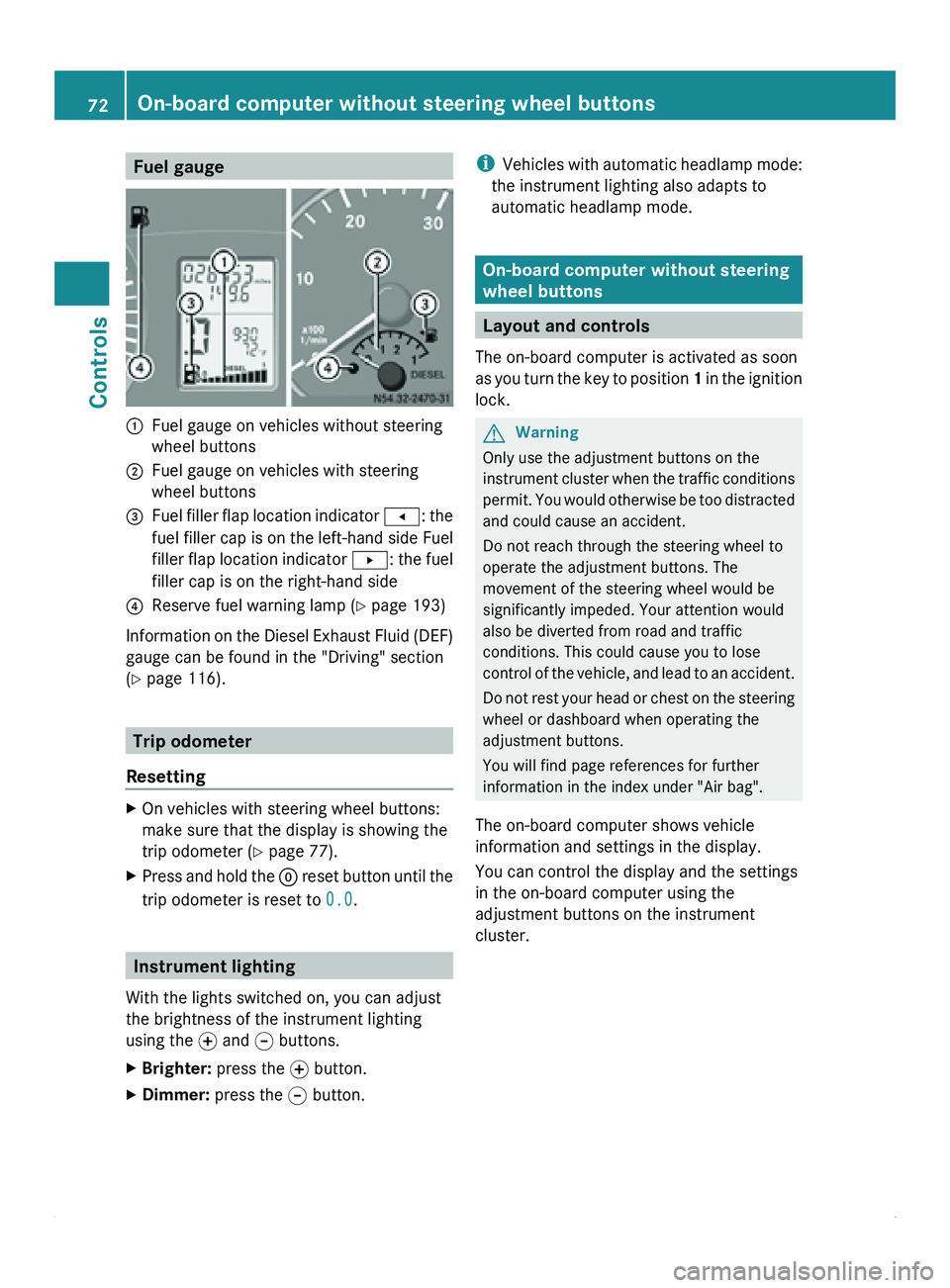
Fuel gauge
0046
Fuel gauge on vehicles without steering
wheel buttons
0047 Fuel gauge on vehicles with steering
wheel buttons
008A Fuel filler flap location indicator
0081: the
fuel filler
cap is on the left-hand side Fuel
filler flap location indicator 0082: the fuel
filler cap is on the right-hand side
0088 Reserve fuel warning lamp ( Y page 193)
Information on the Diesel Exhaust Fluid (DEF)
gauge can be found in the "Driving" section
(Y page 116). Trip odometer
Resetting X
On vehicles with steering wheel buttons:
make sure that the display is showing the
trip odometer (Y
page 77).
X Press and hold the 0048 reset button
until the
trip odometer is reset to 0.0.Instrument lighting
With the lights switched on, you can adjust
the brightness of the instrument lighting
using the 0069
and 006A buttons.
X Brighter: press the 0069 button.
X Dimmer: press the 006A button. i
Vehicles with automatic
headlamp mode:
the instrument lighting also adapts to
automatic headlamp mode. On-board computer without steering
wheel buttons
Layout and controls
The on-board computer is activated as soon
as you turn
the key to position 1 in the ignition
lock. G
Warning
Only use the adjustment buttons on the
instrument cluster when
the traffic conditions
permit. You would otherwise be too distracted
and could cause an accident.
Do not reach through the steering wheel to
operate the adjustment buttons. The
movement of the steering wheel would be
significantly impeded. Your attention would
also be diverted from road and traffic
conditions. This could cause you to lose
control of the vehicle, and lead to an accident.
Do not rest your head or chest on the steering
wheel or dashboard when operating the
adjustment buttons.
You will find page references for further
information in the index under "Air bag".
The on-board computer shows vehicle
information and settings in the display.
You can control the display and the settings
in the on-board computer using the
adjustment buttons on the instrument
cluster. 72
On-board computer without steering wheel buttons
Controls
Page 75 of 292
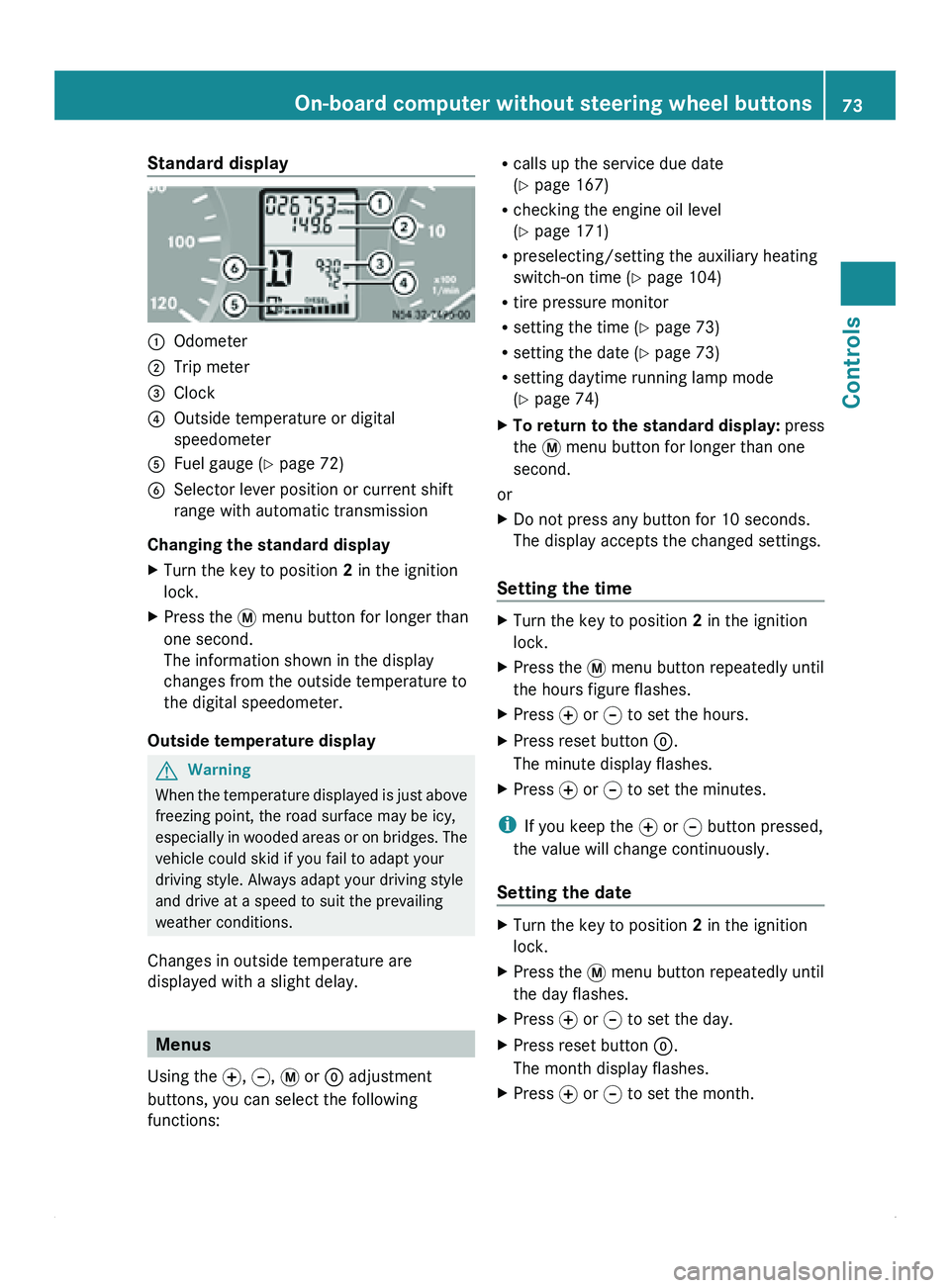
Standard display
0046
Odometer
0047 Trip meter
008A Clock
0088 Outside temperature or digital
speedometer
0086 Fuel gauge ( Y page 72)
0087 Selector lever position or current shift
range with automatic transmission
Changing the standard display
X Turn the key to position 2 in the ignition
lock.
X Press the 007B menu button for longer than
one second.
The information shown in the display
changes from the outside temperature to
the digital speedometer.
Outside temperature display G
Warning
When the temperature displayed is just above
freezing point, the road surface may be icy,
especially in wooded
areas or on bridges. The
vehicle could skid if you fail to adapt your
driving style. Always adapt your driving style
and drive at a speed to suit the prevailing
weather conditions.
Changes in outside temperature are
displayed with a slight delay. Menus
Using the 0069, 006A, 007B or 0048 adjustment
buttons, you can select the following
functions: R
calls up the service due date
(Y page 167)
R checking the engine oil level
(Y page 171)
R preselecting/setting the auxiliary heating
switch-on time ( Y page 104)
R tire pressure monitor
R setting the time (Y
page 73)
R setting the date ( Y page 73)
R setting daytime running lamp mode
(Y page 74)
X To return to the standard display: press
the 007B menu button for longer than one
second.
or
X Do not press any button for 10 seconds.
The display accepts the changed settings.
Setting the time X
Turn the key to position 2 in the ignition
lock.
X Press the 007B menu button repeatedly until
the hours figure flashes.
X Press 0069 or 006A to set the hours.
X Press reset button 0048.
The minute display flashes.
X Press 0069 or 006A to set the minutes.
i If you keep the 0069 or 006A button pressed,
the value will change continuously.
Setting the date X
Turn the key to position 2 in the ignition
lock.
X Press the 007B menu button repeatedly until
the day flashes.
X Press 0069 or 006A to set the day.
X Press reset button 0048.
The month display flashes.
X Press 0069 or 006A to set the month. On-board computer without steering wheel buttons
73
Controls Z
Page 76 of 292
X
Press reset button 0048.
The year display flashes.
X Press 0069 or 006A to set the year.
i If you keep the 0069 or 006A button pressed,
the value will change continuously.
Setting daytime running lamp mode If you have switched daytime running lamp
mode on and the light switch is in the 0027
position, the following light up automatically
when the engine is running: the parking
lamps, the low-beam headlamps, the tail
lamps and the license plate lamps.
For safety reasons, it is only possible to
change this setting when the vehicle is
stationary. The factory setting is ON in
countries in which daytime running lamp
mode is mandatory.
X
Turn the key to position 2 in the ignition
lock.
X Press the 007B menu button repeatedly until
the 0064 indicator lamp in the instrument
cluster flashes and the message ON or
OFF appears in the display.
X Press 0069 or 006A to activate or deactivate
daytime running lamp mode.
i USA only:
If you turn the light switch to 006C or
0064, the corresponding light is switched
on. Daytime running lamp mode remains
activated if the light switch is turned to
005A.
Canada only:
If you turn
the light switch to 0064, the low-
beam headlamps are switched on. Daytime
running lamp mode remains activated if the
light switch is turned to 006C or 005A. On-board computer with steering
wheel buttons
Layout and controls
The on-board computer is activated as soon
as you turn
the key to position 1 in the ignition
lock. G
Warning
Only use the on-board computer when road
and traffic conditions permit. You would
otherwise be distracted and unable to
concentrate properly on driving, and could
cause an accident.
The on-board computer shows vehicle
information and settings in the display.
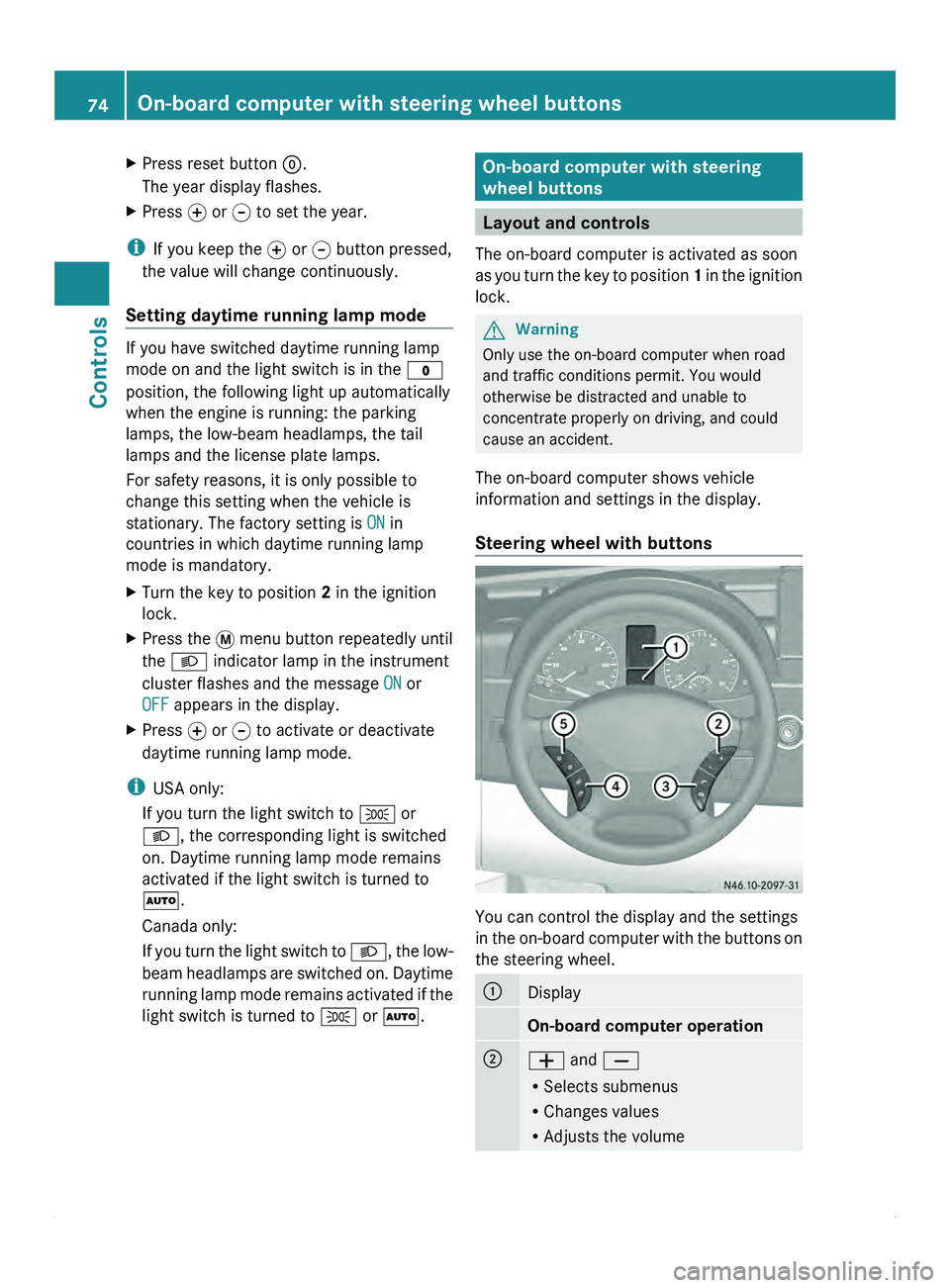
Steering wheel with buttons You can control the display and the settings
in the
on-board
computer with the buttons on
the steering wheel. 0046
Display
On-board computer operation
0047
005A and 005B
R
Selects submenus
R Changes values
R Adjusts the volume74
On-board computer with steering wheel buttons
Controls
Page 80 of 292
X
Press 0029 or 002D to select the desired
station.
i It is only possible to store new stations
using the audio system. See the separate
operating instructions.
You can also operate the radio in the same
way as usual.
Operating the CD player Using the steering wheel buttons
X
Switch on the radio (see the separate
operating instructions) and select the CD
player.
X Press the 0059 or 0058 button repeatedly
until the
settings for the current CD appear
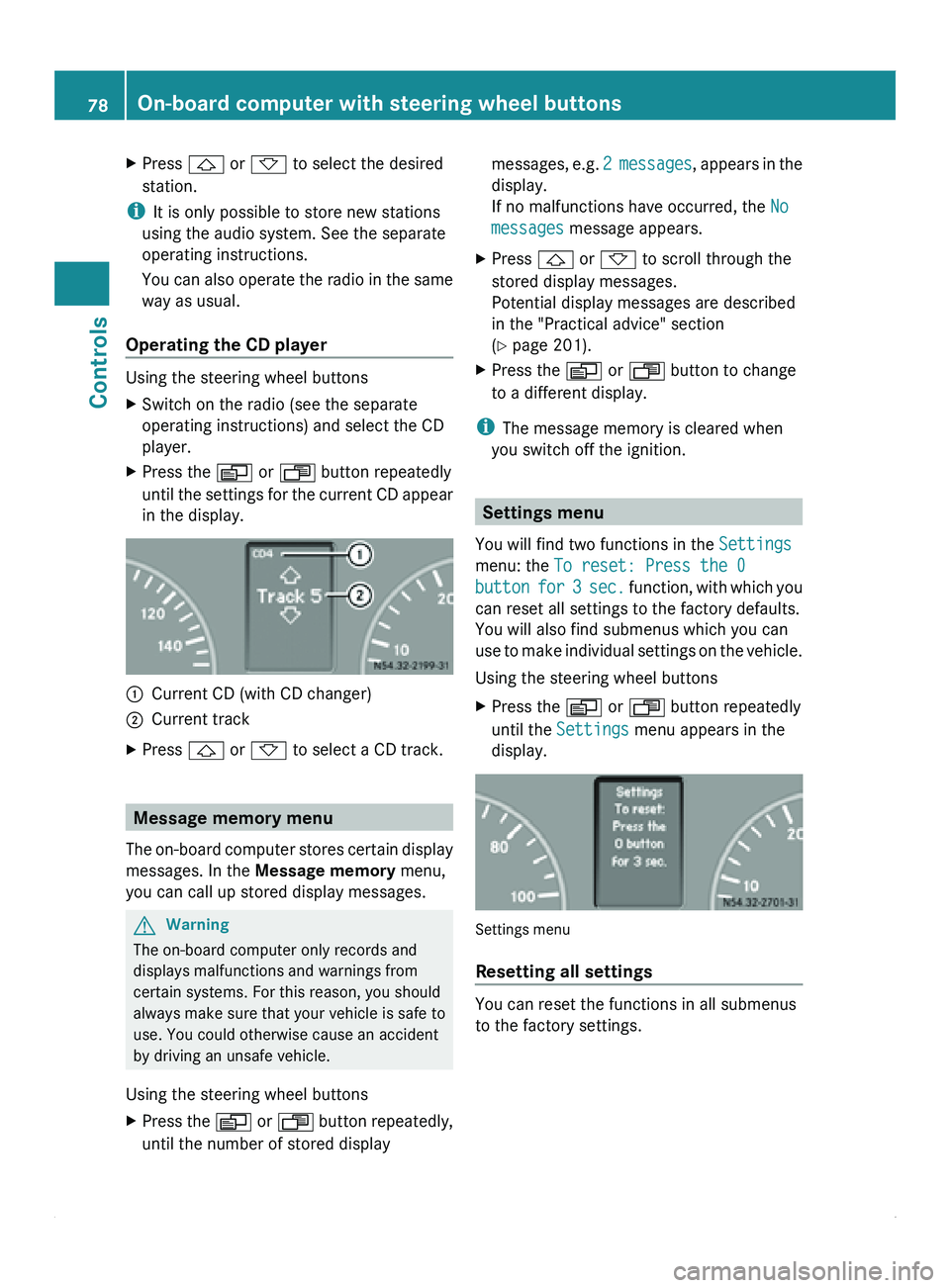
in the display. 0046
Current CD (with CD changer)
0047 Current track
X Press 0029 or 002D to select a CD track. Message memory menu
The on-board computer stores certain display
messages. In the Message memory menu,
you can call up stored display messages. G
Warning
The on-board computer only records and
displays malfunctions and warnings from
certain systems. For this reason, you should
always make sure that your vehicle is safe to
use. You could otherwise cause an accident
by driving an unsafe vehicle.
Using the steering wheel buttons
X Press the 0059
or 0058 button repeatedly,
until the number of stored display messages,
e.g. 2
messages, appears in the
display.
If no malfunctions have occurred, the No
messages message appears.
X Press 0029
or 002D to scroll through the
stored display messages.
Potential display messages are described
in the "Practical advice" section
(Y page 201).
X Press the 0059 or 0058 button to change
to a different display.
i The message memory is cleared when
you switch off the ignition. Settings menu
You will find two functions in the Settings
menu: the To reset: Press the 0
button for 3 sec. function, with which you
can reset all settings to the factory defaults.
You will also find submenus which you can
use to make individual settings on the vehicle.
Using the steering wheel buttons
X Press the 0059 or 0058 button repeatedly
until the Settings
menu appears in the
display. Settings menu
Resetting all settings
You can reset the functions in all submenus
to the factory settings.78
On-board computer with steering wheel buttons
Controls
Page 88 of 292
Calling up the range
Using the steering wheel buttons
X
Press the 0059 or 0058 button repeatedly
until the display shows the After start
message.
X Press the 0029 or 002D button repeatedly
until the Range message appears.
The approximate distance which can be
covered with the tank's current contents
and your current style of driving is shown.
i If the fuel tank is almost empty, the
00B7 Please refuel message is shown
instead of the range.
Resetting the consumption statistics Using the steering wheel buttons
X
Press the 0059 or 0058 button repeatedly
until the display shows the After start
message.
X Press 0029 or 002D to select the function
you would like to reset.
X Press and hold the 0048 reset
button until the
values are reset to "0".
i The consumption statistics After
start are automatically reset after 999
hours or 9,999 miles (kilometers).
The consumption statistics After Reset
are automatically reset after 9,999 hours
or 99,999 miles (kilometers). Telephone menu
You can operate the mobile phone using the
functions in the TEL menu, provided it is
connected to the
Sprinter hands-free system.G
Warning
A driver's attention to the road must always
be his/her primary focus when driving. For
your safety and the safety of others, we
recommend that you pull over to a safe
location and stop before placing or taking a
telephone call. If you choose to use the telephone while driving, please use the hands-
free device and only use the telephone when
weather, road and traffic conditions permit.
Some jurisdictions prohibit the driver from
using a mobile phone while driving a vehicle.
Bear in mind that at a speed of just 30 mph
(approximately 50 km/h
), your vehicle is
covering
a distance of 44 feet (approximately
14 m) every second.
Switching the mobile phone on Using the steering wheel buttons
X
Switch on the mobile phone and the audio
system; see the separate operating
instructions.
X Press the 0059 or 0058 button repeatedly
until the TEL menu appears in the display.
The information in the display depends on
the status of the mobile phone:
R
Mobile phone off:
the display shows the
TEL off (Audio 20) message.
R PIN not entered: the display shows the
TEL PIN (Audio 20) message.
X Enter the PIN code using the mobile phone
or audio system.
The mobile phone searches for a network.
The display
remains
blank during this time.
You will see the operational readiness
display as soon as the mobile phone has
found a network.
Once the operational readiness symbol is
shown, you can operate the mobile phone
using the steering wheel buttons.
i If the operational readiness symbol goes
out, your vehicle is outside the
transmission/reception range.
Accepting a call You can accept a call at any time, provided
the mobile phone is ready to receive calls.
You will see the following message in the
display:86
On-board computer with steering wheel buttons
Controls
Page 89 of 292
X
Press 006A.
The display shows the call duration.
Rejecting or ending a call X
Press 007F.
The caller then hears the engaged tone.
The display shows the operational
readiness symbol again.
Dialing a number from the phone book You may select and dial a number from the
phone book
at
any time, provided the mobile
phone is ready to receive calls.
i It is only possible to create new phone
number entries in the phone book using the
mobile phone itself. See the separate
operating instructions.
X Press the 0059 or 0058 button repeatedly
until the TEL menu appears in the display.
The operational readiness
display is shown.
X Press 0029 or 002D
to switch to the phone
book.
The on-board computer reads the phone
book stored on the SIM card or in the
mobile phone. This may take more than a
minute. The display shows the
Processing (Audio 20) message.
Reading is complete when the message
disappears.
X Press 0029 or 002D to select the desired
name.
The display shows the stored names in
alphabetical order.
i The display scrolls through the names
rapidly if
you
press 0029 or 002D for longer
than one second. Releasing the button
stops the rapid scroll.
If you do not wish to make a call, press the
007F button.
X Press 006A.
The on-board computer dials the
corresponding phone number. The display
shows the dialing (Audio 20) message. The on-board computer stores the phone
numbers in the redial memory.
When a connection is made, the display
shows the name of the other person and
the call duration.
Redialing The on-board computer stores the last phone
numbers dialed. This means that you do not
have to search through the entire phone
book.
X
Press the 0059 or 0058 button repeatedly
until the TEL menu appears in the display.
The operational readiness
display is shown.
X Press 006A.
The display
shows
the most recently dialed
numbers or names in the redial memory.
X Press the 0029 or 002D button repeatedly
until the number or name you are looking
for is displayed.
X Press 006A.
The on-board computer dials the
corresponding phone number.
If a connection is made, the display shows
the call duration and name of the person
you are calling,
if stored in the phone book,
or the number you are dialing continues to
be displayed. Power supply
Battery isolating switch
You can use the battery isolating switch to
disconnect the power supply to all your
vehicle's consumers. This will prevent
uncontrolled battery discharge
caused by off-
load current consumption. G
Warning
If the vehicle is equipped with an additional
battery in the engine compartment, it is
necessary to disconnect
both batteries when
working on the vehicle electrical circuit. Only Power supply
87
Controls
Z